1
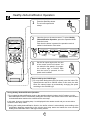
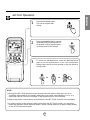
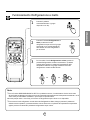
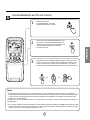
How to use the Operation Mode Selection button
ENGLISH
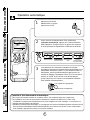
Cooling Operation
1
Press the Start/Stop button.
The unit will respond with
a beep.
2
Open the door on the remote control. To select Cooling
Operation, press the Operation Mode Selection button.
Each time the button is pressed, the operation mode is
shifted in the direction of the arrow.
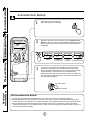
Cooling
3
Auto
Healthy
Dehumidification
Heating
(Heat pump model only)
Close the door on the remote control. Set the temperature
lower than the room temperature. The temperature can be
set within a range of 18°C~30°C in 1°C increments.
To raise the temperature
To lower the temperature
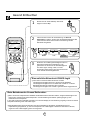
4
Set the fan speed again with the door
of the remote control still closed. You
can select the fan speed in four stepslow, medium, high, or CHAOS. Each
time the button is pressed, the fan
speed mode is shifted.
Natural wind by the CHAOS logic
❏ For more fresh feeling than other fan speed, press the Indoor Fan Speed Selector and set to
CHAOS mode. In this mode, the wind blows like natural breeze by automatically changing fan
speed according to the CHAOS logic.
7