1
UK
USAGE INSTRUCTIONS
UK
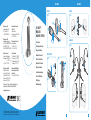
DIAGRAM KEY
DESK CHARGER
UK
HEADSET
• Charge the headset battery as described in this User Guide.
Do not charge with any other AC power adapter or charger.
• Do not incinerate, disassemble, bend, crush or short-circuit the battery.
1
Microphone
8
AC Power Adapter
2
Speaker
9
AC Power Adapter Port
3
Talk Button
10 Headset Docking Cradle
4
Volume/Mute Control
11 Charge Contacts
5
On-line Indicator
12 Charge Indicator
6
Charge Contacts
13 Power Indicator
• If liquid from the battery comes in contact with the eyes, skin or any other part of the
body, immediately flush with fresh water and seek medical advice.
7
Battery Door
14 Stand
• For battery replacement please refer to the diagrams in Fig.5 on page 4.
15 Stand Pegs
Plantronics B.V. hereby declares that this C65 DECT Wireless Headset System is
in compliance with the essential requirements and other relevant provisions of
Directive 1999/5/EC.
F
A copy of the Declaration of Conformity to the essential requirements
of 1999/5/EC maybe found at www.plantronics.com/documentation.
The C65 complies with the EU recommendations on human exposure
to electromagnetic fields.
I
General:
E
Please read the following instructions before use:
• Exercise care when handling the battery, AC power adapter, the base and the
headset. Do not short the metal contacts (on the plastic casing) with electrically
conducting materials such as rings, bracelets, keys etc.
DK
IMPORTANT SAFETY INFORMATION
D
16 Desk Charger Module
• Dispose of spent battery promptly and safely in accordance with local regulations.
Keep battery away from children.
• Operating temperature +4˚C to +49˚C.
1. GETTING STARTED
• The product is suitable for indoor use only.
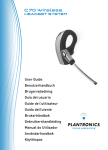
To use your Plantronics C65 DECT Headset System, please follow these simple steps:
• To reduce the risk of electric shock, explosion or fire:
1. Install your C65 desk-charger.
N
• Storage temperature +4˚C to +49˚C.
2. Charge your headset battery.
• Ensure that the voltage rating (e.g. 230V 50Hz) corresponds to the local mains
supply you intend to use.
3. Register your headset to your DECT telephone.
• Use only the correct battery type – part number – 64327-01.
NL
• Use only the AC power adapter supplied.
4. Choose you headset wearing style.
P
• Do not disassemble the product.
• Keep all products, cords and cables away from operating machinery.
• Please observe these precautions to ensure continued safety. Misuse or mistreatment
may result in fire, explosion or the release of corrosive chemicals.
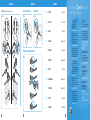
To install the desk-charger simply connect to the AC Power Adapter as shown in Fig. 2
on page 1. Then attach the stand by inserting the Stand Pegs into the locating holes
on the underside of the Desk Charger Module.
SF
• Avoid contact with liquids.
Battery Safety:
INSTALLING THE DESK CHARGER
This will create the finished desk charger assembly (refer to Fig.3, page 1).
S
• Battery storage temperature +4˚C to +49˚C.
• Battery operating temperature +4˚C to +49˚C.
7
8