1
How to Use
ENG
Voice Dialing
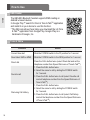
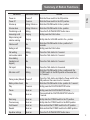
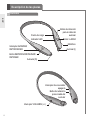
- Briefly press the CALL button to activate Voice Command. For best results,
record the voice dialing tag through your headset.
NOTE: If your handset does not support voice dialing, this action may activate
Last Number Redial.
Last Number Redial
- Press and hold the CALL button for 1 second to activate Last Number Redial.
The headset will beep and then call the last number dialed.
Ending a Call
- Briefly press the CALL button.
Call Waiting
- Answer a second call without hanging up the first call by pressing the CALL button
for 1 second. Press the CALL button for 1 second to return to the original call.
- Briefly press the CALL button to terminate both calls at once.
Rejecting a Call
- Activate call reject by pressing the CALL button for 2 seconds when the handset
rings.
* These functions may only be used if your handset supports them. For further
information about using these features, please consult your handset’s user
manual.
Mic Mute
- Slide the VOLUME switch to the + position and the FF/REW switch to the REW
position at the same time for 1 second to mute/unmute the Mic during conversation.
* Precaution : For your safety, do not operate microphone mute during driving.
Volume Control
- Slide the VOLUME switch to the + or - position to adjust the speaker volume.
- There are 16 levels of speaker volume in Hands-Free mode.
- There are 16 levels of speaker volume in Audio Streaming mode.
- To prevent hearing loss, which is caused by listening to music for long periods
of time, the HBS-900 will emit a long beep tone or two beeps when you use the
upper 6 volume levels.
8