1
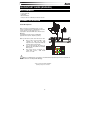
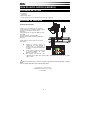
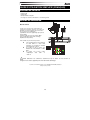
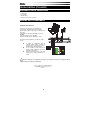
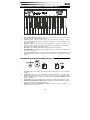
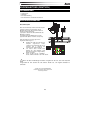
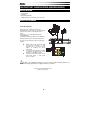
QUICKSTART GUIDE (ENGLISH) BOX CONTENTS y y y y Live 25 keyboard USB cable Quickstart Guide Safety Instructions & Warranty Information booklet CONNECTION DIAGRAM Power-On Sequence When connecting your LIVE keyboard to a sound system, set all the volumes to minimum then follow the correct sequence to turn all the devices on: (1) Computer or/and other MIDI device which receives MIDI data (2) LIVE keyboard, which sends out MIDI data (3) Audio devices (mixer, amplifier, speakers) When you turn off the system, follow the reverse order. After you have connected LIVE to your computer via USB, turn the LIVE keyboard on; the computer will find it and install the drivers automatically. You can plug and play this product on Windows XP / Vista, Windows 7 and Mac OSX systems. This product will be recognized as a ”USB Audio Device”, ”USB Sound Device” or ”LIVE”. Before you make these connections, ensure that the keyboard is powered off and turn off all other devices to avoid possible damage. * Items not mentioned in BOX CONTENTS (including cables) are not included 3