1
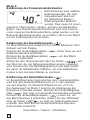
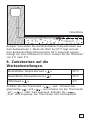
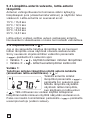
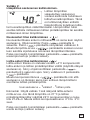
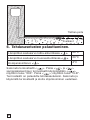
TA
Basic Thermostat
Thermostat operation and user manual
English:
Thermostat ...................................................... 4
Operation and user manual
Deutsch:
Fußbodenheizung ....................................... 16
Installation und Betrieb
Français:
Chauffage par le sol .................................. 28
Guide d’installation et d’utilisation
Nederlands: Vloerverwarming ........................................ 41
Installatie en bediening
Norsk
Gulvvarme ........................................................ 53
Installasjon og anvendelse
Svenska:
Golvvärme ........................................................ 65
Installation och användning
Dansk:
Gulvvarme ........................................................ 77
Installation og betjening
Suomi:
Intellis –termostaatti ................................ 89
lattialämmitykselle
Asennus- ja käyttöohje
Polski:
Instrukcja termostat ........................................ 101
montażu i obsługi
Русский
Системы подогрева полов ..................... 113
Инструкция по монтажу и эксплуатации
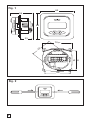
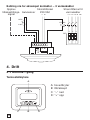
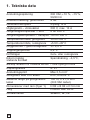
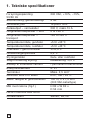
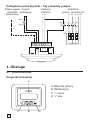
Fig. 1
82
54
82
33
56
70,60
∅ 60
62
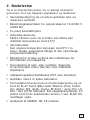
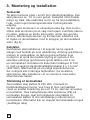
Fig. 2
3
English
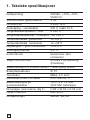
1. Technical specification
2. Description
............................................................
5
.....................................................................................
6
......................................................
7
........................................................................................
9
3. Mounting and installation
4. Operation
4.1 Getting started
..................................................................
9
4.2 Optional function .............................................................. 11
11
4.2.1
Heat Booster
4.2.2
External set back
4.2.3
Lock ............................................................................. 12
..........................................................
.................................................
12
5. Trouble shooting........................................................................... 12
5.1 Error Codes ......................................................................... 12
5.2 Floor sensor resistances ............................................. 12
.........................................
13
...........................................................................
15
5.3 Calibration of temperature
6. Factory settings
4
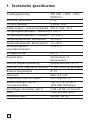
1. Technical specifications
Supply voltage
230VAC, +10%,–15%,
50/60 Hz
Power consumption, average
4 VA
Main power switch
2-pole 16A
Relay output - heating cable
230V, max. 13A
Ambient temperature – operation 0 +50°C
Ambient temperature – transport –20 +50°C
Temperature range, floor sensor
+5 +35°C
Temperature range, room sensor +5 +45°C
Accuracy – floor/room sensor
+/– 0,5°C
Switching hysteresis
0,5°C
Control modes
Floor sensor or room
sensor
Optional external control
Set back function –3.5°C
Back-up for set values
In non-volatile memory
Protection class
IP 21
Terminals
Max. 2,5 mm2
Floor sensor
with 3 m cable
NTC, 10K / 25°C.
Maximum lenght of floor
sensor cable
100 m, 2 x 1,5 mm2
(230VAC cable type)
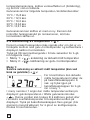
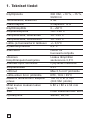
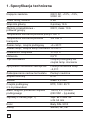
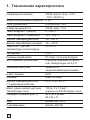
Dimension with frame (Fig.1)
H 82 x W 82
x D 54 mm
Colour
Approvals
Polar white RAL 9010
Semko, NF, CE
5
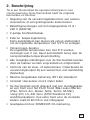
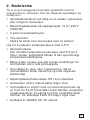
2. Description
TA is a basic thermostat specially designed for underfloor
heating. It provides the following features and functions:
• Heating cable control by means of an external floor
sensor or integrated room sensor.
• Load capacity of the output relay, 13A/230V (3000W)
• 2-pole main power switch
• External set back
Extra terminal which can be used as an external
closing contact to reduce the set temperature by 3,5°C
• Heat Booster
The set temperature can be increased by 5°C for
2 hours. Reverts automatically to the original
temperature setting
• Possible to lock and unlock all possible settings for
the thermostat at the touch of the buttons
• Monitoring of the floor or room sensor. Cut off the
heating output during sensor fault and with indication
(fail-safe)
• Enclosure protection class IP21 as standard
• Floor sensor with 3 meters of cable included
• The thermostat is supplied with an assembly frame
and a front for the ELJO Trend / B&J Jussi / Merten
(Plan, Smart, Arc, Atelier, M1, Antik, Termo, M-Star) /
Jung (CD, LS, AS) / Gira (ST55 Standard, E2) wall box
system. An extra front for the square sized frames
such as ELKO RS is also included
• Approved by SEMKO,NF, CE-marked
6
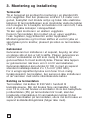
3. Mounting and installation
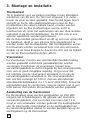
Thermostat
TA is intended for flush mounting in a standard 65 mm
wallbox. It should be positioned approximately 1,5 metres
above the floor, protected from direct sunlight and
draughts. All electrical conduits passing into the thermostat
box that contain cables must be sealed to protect the
thermostat against warm air, e.g. with a piece of insulation
in the conduit outlet.
TA can also be mounted in an external wall box. If the
thermostat will be mounted on a rough wall surface, e.g.
bricks, put a string of silicon glue under the top frame.
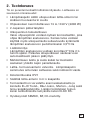
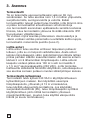
Assembly frame and front can be exchanged by pushing
with a screw driver on two knobs, placed on the sides of the
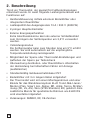
thermostat. (Fig. 2)
Floor sensor
The floor sensor should be installed in a separate flexible
conduit/hose for easy replacement. For best control
performance, position the floor sensor between two heating
cables as close as possible to the top floor surface. Do not
position the floor sensor tip closer than 3 cm to the heating
cable.
The floor sensor cable can be extended to 100 m with a
separate standard installation cable 2 x 1.5 mm2 (230VAC).
In order to avoid signal disturbance resulting in a possible
malfunctioning of the thermostat, the sensor should not be
installed in a conduit together with other power carrying
cables.
Connection of the thermostat
The thermostat must be connected to 230VAC according to
the circuit diagrams. When connecting multiple heaters to
the thermostat where the combined total load is above 13A,
you are required to use a contactor or switchgear.
If the protective earth terminal, (PE) on the thermostat is
used, the incoming power cable to the heating cable shall be
connected to the common earth terminal on the thermostat,
otherwise a separate terminal connection block (not
included) must be used.
7
Product specific information for use with
floorheating systems
• Use with T2Quicknet:
Quicknet product line is approved with the thermostat
working in floor sensor mode. Be aware that the
floor sensor must be installed and activated for an
installation with Quicknet.
• Use with T2Red (T2Reflecta) self-regulating
systems.
Self-regulating heating cables have an inrush current
at start up. In order to guarantee the life time of the
thermostat, the maximum load of the self-regulating
application in nominal conditions is limited to 10A.
A 13A self-regulating load will reduce the life time of
the relay contacts.
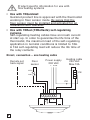
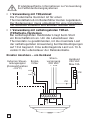
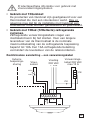
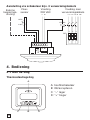
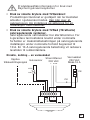
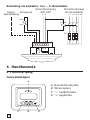
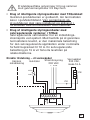
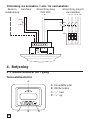
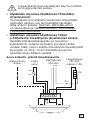
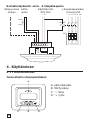
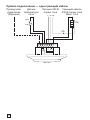
Direct, connection – one heating cable
Remote set
back signal
Power supply
230 VAC
Floor
sensor
Heating cable
230 VAC
Max.13A
L N PE
L
NTC
PE
10K
N
PE
SENSOR
FP
8
L N
N
L
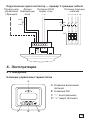
Connection via contactor e.g.– 3 heating cables
Remote set Floor
back signal sensor
Power supply
230 VAC
Power supply to
heating cables
L N
L1 L2 L3 N PE
NTC
10K
K1 A2
1
3
5
A1
2
4
6
L
L
L
PE
N N N
SENSOR
FP
L N
N
L
4. Operation
4.1 Getting started
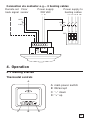
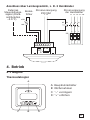
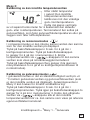
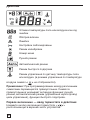
Thermostat controls
A
A: main power switch
B: OK/accept
C: “–“ down
D: “+” up
C
B
D
9
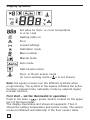
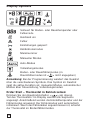
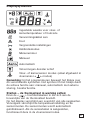
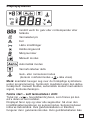
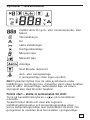
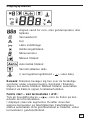
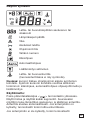
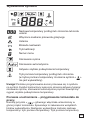
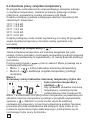
Display symbols
Set value for floor- or room temperature
or error code
Heating cable on
Error
Locked settings
Calibration mode
Menu number
Manual mode
Auto mode
Heat booster active
Floor- or Room sensor mode
(in room sensing mode < > is not shown)
Note: the square moves over the different symbols when
programming. The symbol in the square indicates the active
function: manual mode, automatic mode by external signal,
booster function.
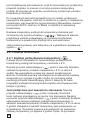
First start – set the thermostat in operation :
Push in the main <
> power switch, located on the upper
part of the thermostat.
The display illuminates and shows all segments. Then it
shows the setting temperature and sensor mode. The sensor
mode is initialised automatically. If the floor sensor cable
10
is connected, it operates in floor sensor mode. If the floor
sensor cable is not connected, it operates in room sensor
mode.
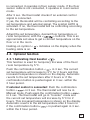
After 5 sec. the thermostat checks if an external control
signal is connected.
If yes, the thermostat will be controlling according to the
set temperature and external signal. The symbol AUTO is
activated. If no, the thermostat will be controlling according
to the set temperature.
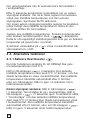
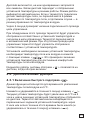
Adjust the set temperature, desired floor temperature or
> buttons. This is an
room temperature, with the <
approximate set value to get a comfort temperature on the
floor or in the room.
Heating-on symbol <
heating cable is on.
> indicates on the display when the
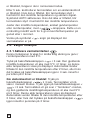
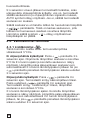
4.2. Optional function
4.2.1 Activating Heat booster < >
This function is used for temporary increase of the floor/
room temperature by 5°C.
Push the confirmation button < > in 3 sec. The current
set temperature will increase by 5°C for 2 hours and this
increased temperature is shown on the display. Automatic
reverts to the set temperature after 2 hours or if the
confirmation button is pushed again in 3 sec. within the
2 hour period.
If external control is connected: Push the confirmation
button <
> in 3 sec. The thermostat will now be in
Manual mode. Push again the confirmation button <
>
in 3 sec. The thermostat will go in “booster” mode and
the current set temperature will increase by 5°C for 2
hours. This increased temperature is shown on the display.
Automatic reverts to the set temperature after 2 hours or
if the confirmation button<
> is pushed again in 3 sec.
within the 2 hour period.
11
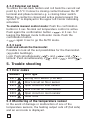
4.2.2 External set back
To utilise the set-back funtion and roll back the current set
point by 3.5°C: Connect a closing contact between the FP
terminal and phase terminal e.g. a closing timer switch.
When the contact is closed and active signal present, the
symbol "P" is displayed in the upper left corner indicating
activation.
To enable manual control mode: Push the confirmation
button in 3 sec. Normal set temperature control is active.
> in 3 sec. for
Push again the confirmation button <
leaving the Manual mode to Booster mode. Push the
confirmation button
<
> again 3 sec to go the AUTO mode.
4.2.3 Lock
Lock and unlock the thermostat
Possible to lock all the set possibilities for the thermostat.
(eg public buildings)
Lock: Push simultaneously <
> and <
> and <
>
Unlock: Push simultaneously <
> and <
> and <
>
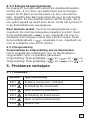
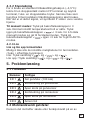
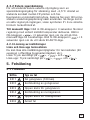
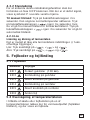
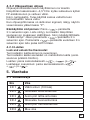
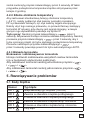
5. Trouble shooting
5.1 Error codes
Number
Error type
ER 1
Wrong floor sensor (100 kΩ)
ER 2
Short circuit on floor sensor
ER 3
Open circuit on floor sensor
ER 4
Short circuit on room sensor
ER 5
Open circuit on room sensor
ER 6
Other error
5.2 Monitoring of the temperature sensor
In the event of damage or malfunction of one of the
temperature sensors, the heating output cuts off (fail safe)
and an errorcode is displayed.
12
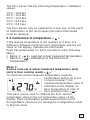
The floor sensor has the following temperature / resistance
values:
15°C / 15,8 kΩ
20°C / 12,5 kΩ
25°C / 10,0 kΩ
30°C / 8,04 kΩ
35°C / 6,51 kΩ
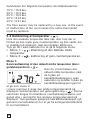
The floor sensor may be replaced by a new one. In the event
of malfunction of the room sensor the entire thermostat
must be replaced.
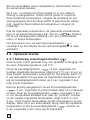
5.3 Calibration of temperature <
>
If the desired temperature is not reached or if there is a
difference between real floor/room temperature and the set
value on the display, calibrate the thermostat.
Push OK continuously for full 6 seconds to enter following
Menu:
• Menu 1: < > read-out actual measured temperature
• Menu 2: < > calibration of the floor/room
temperature
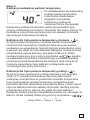
Menu 1:
Service read-out of actual measured temperature (only
valid in floor sensing mode) < >:
To check the actual measured temperature, push the
confirmation button for 6 sec.
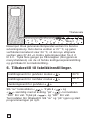
In menu number 1 the
measured temperature value is
indicated on the display: infloor temperature in case of
floor sensing mode < >.
This value can be used to calibrate the floor surface
temperature value to the set temperature value on the
display. Push confirmation button several times (scroll
through Menu structure) for leaving the Configuration mode
to Normal mode
13
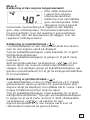
Menu 2:
Calibration of the temperature set value
After stable temperature in
floor: The set temperature
value can be calibrated
against the real floor / room
temperature. This needs to
be done using a separate
thermometer for determining the actual floor or room
temperature. The thermometer should be put on the floor
surface, sensing the floor surface temperature, or on the
wall sensing the air temperature.
Calibration of room sensor mode < >:
In room sensor mode the internal sensor value is the same
as for the set value on the display.
Push the confirmation button <
> in 6 sec. to enter the
Configuration mode.
Push the confirmation button <
> to enter menu
number 2.
Change the temperature value via <
> buttons to the
same value shown on the reference wall thermometer.
Push confirmation button several times (scroll through
Menu structure) for leaving the Configuration mode to
Normal mode
Calibration of floor sensor mode < >:
In floor sensor mode there is a default offset value of +4°C
between the infloor sensor value and the floorsurface value
(which is the set value on the display). The read-out value in
Menu 1 can be used for set value calibration.
Push the confirmation button <
> in 6 sec. to enter the
Configuration mode.
Push again the confirmation button <
> to enter menu
number 2.
Change the offset value via <
> buttons so that the
set temperature value will be approx. the same value shown
on the reference floor surface thermometer.
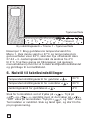
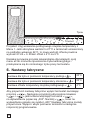
14
Tsurface
Tmenu1
New offset = Tmenu 1 - Tsurface
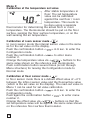
Example: Use the floor sensor temperature value from menu
1. If this value is 27°C and the floor surface thermometer
shows 24°C, the new offset value will be 27-24 = 3.
Change the offset from 4°C to 3°C.
Push confirmation button several times (scroll through
Menu structure) for leaving the Calibration mode to Normal
mode
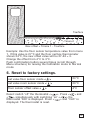
6. Reset to factory settings.
set value floor sensor mode <
>
23°C
set value room sensor mode <
>
20°C
floor sensor offset value <
>
4°C
>. Press <
> and
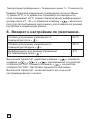
Reset: switch "off" the thermostat <
<
> simultanously with switching "on" <
> the
thermostat "000" is displayed. Press <
> and “CLR” is
displayed. The thermostat is reset.
15
Deutsch
1. Technische Daten
2. Beschreibung
.......................................................................
17
................................................................................
18
.......................................................
19
........................................................................................
21
3. Montage und Installation
4. Betrieb
4.1 Beginn
....................................................................................
21
4.2 Optionale Funktion ........................................................... 23
4.2.1
Volleistungsmodus ............................................. 23
4.2.2
Steuerleitung
4.2.3
Sperre
5. Fehlersuche
..........................................................
24
........................................................................
24
....................................................................................
5.1 Fehlercodes
.........................................................................
24
24
5.2 Wiederstand Fussbodenfühler ................................. 25
.........................................................
25
...................................................................
27
5.3 Kalibrationsmodus
6. Werkseinstellungen
16
1. Technische Daten
Betriebsspannung
230 VAC, +10% bis –15%
50/60 Hz
Stromverbrauch, durchschnittlich 4 VA
Hauptnetzschalter
2-polig, 16A
Relaisausgang – Heizband
230 V, max. 13A
Umgebungstemperatur – Betrieb 0 bis +50°C
Umgebungstemperatur – Transport –20 bis +50°C
Temperaturbereich, Bodenfühler
+5 bis +35°C
Temperature range, room sensor +5 bis +45°C
Genauigkeit – Boden-/Raumfühler +/– 0,5°C
Schalthysterese
0,5°C
Steuermodi
Bodenfühler oder
Raumfühler
Optionale externe Steuerung
Rücksetzfunktion –3.5°C
Sicherung der Sollwerte
Im nichtflüchtigen Speicher
Schutzklasse
IP 21
Anschlussklemmen
Max. 2,5 mm2
Bodenfühler mit 3 m langem Kabel NTC, 10K / 25°C.
Max. Länge des Bodenfühlerkabels 100 m, 2 x 1,5 mm2
(Kabeltyp 230 VAC)
Abmessungen mit Rahmen
(Abb. 1)
H 82 x B 82 x T 54 mm
Farbe
Zulassungen
Polar white RAL 9010
Semko, NF, CE
17
2. Beschreibung
TA ist ein Thermostat, der speziell für Fußbodenheizungen
entwickelt wurde. Er weist folgende Leistungsmerkmale und
Funktionen auf:
• Heizbandsteuerung mittels externem Bodenfühler oder
integriertem Raumfühler
• Lastkapazität des Ausgangsrelais 13 A / 230 V (3000 W)
• 2-poliger Hauptnetzschalter
• Externe Energiesparfunktion
Extra Anschlussklemme kann als externer Schließkontakt
zum Verringern der Solltemperatur um 3,5°C verwendet
werden.
• Volleistungsmodus
Die Solltemperatur kann zwei Stunden lang um 5°C erhöht
werden. Sie wird automatisch auf die ursprüngliche
Temperatureinstellung zurückgesetzt.
• Möglichkeit der Sperre aller Thermostat-Einstellungen und
Aufheben der Sperre per Tastendruck
• Überwachung des Boden- oder Raumfühlers. Abschalten
der Heizleistung bei fehlerhaftem Fühler mit Anzeige
(ausfallsicher)
• Standardmäßig Gehäuseschutzklasse IP21
• Bodenfühler mit 3 m langem Kabel mitgeliefert
• Der Thermostat wird mit einem Montagerahmen und einer
Blende für das Wanddosensystem ELJO Trend /B&J Jussi /
Merten (Plan, Smart, Arc, Atelier, M1, Antik, Termo, M-Star)
/Jung (CD, LS, AS) /Gira (ST55 Standard, E2) geliefert. Eine
zusätzliche Blende für quadratische Rahmen wie ELKO RS
wird ebenfalls mitgeliefert.
• Zulassungen: SEMKO, NF, CE-Zeichen
18
3. Montage und Installation
Thermostat
TA ist für den festen Einbau in eine 65 mm StandardLeerdose vorgesehen. Der Einbauort sollte ca. 1,5 m über
dem Boden gewählt werden, an einer Stelle, die gegen direkte
Sonneneinstrahlung und Zugluft geschützt ist. Alle Leerrohre
am Thermostatgehäuse, in denen externe Kabel verlegt sind,
müssen abgedichtet werden, um den Thermostat vor warmer
Luft zu schützen zB Eingänge absperren mit ein Isolationsteil.
TA kann auch in einer Aufputzwanddose montiert werden.
Wenn der Thermostat an einer raue Wandoberfläche (.z.Bsp.
Ziegel) montiert wird, ist ein Streifen Silikonkleber unter dem
Oberrahmen anzubringen. Der Montagerahmen und die Blende
lassen sich austauschen, indem mit einem Schraubendreher
auf zwei Knöpfe seitlich am Thermostat gedrückt wird (Abb. 2).
Bodenfühler
Der Bodenfühler sollte in einem eigenen flexiblen Rohr
eingebaut werden, damit er problemlos getauscht werden
kann. Er ist zwischen zwei Heizbändern möglichst dicht
unterhalb der Fußbodenoberfläche zu montieren, damit
optimale Steuerleistung erzielt wird. Die Spitze des
Bodenfühlers muss mindestens 3 cm vom Heizband
entfernt sein. Das Bodenfühlerkabel lässt sich mit Hilfe
eines zusätzlichen standardmäßigen Installationskabels (2 x
1,5 mm2; 230 VAC) auf 100 m verlängern. Um Signalstörungen
und daraus resultierende Funktionsstörungen des Thermostats
zu vermeiden, sollte der Fühler nicht zusammen mit anderen
stromführenden Kabeln in einem Rohr verlegt werden.
Anschluss des Thermostats
Der Thermostat muss wie in den Schaltplänen dargestellt an
eine Spannungsquelle von 230 VAC angeschlossen werden.
Wenn mehrere Heizbänder verwendet werden, mit insgesamt
mehr als 13 A, muss ein Leistungsschütz verwendet werden.
Wenn der Schutzleiteranschluss (PE) am Thermostat
verwendet wird, muss das Netzkabel für das Heizband an
eine gemeinsame PE-Anschlussklemme am Thermostat
angeschlossen werden. Andernfalls ist eine separate
Anschlussleiste (nicht mitgeliefert) zu verwenden.
19
Produktspezifische Informationen zur Verwendung
bei Fußbodenheizungssystemen
• • Verwendung mit T2Quicknet:
Die Produktreihe Quicknet ist für einen
Thermostatbetrieb im Bodenfühlermodus zugelassen.
Der Bodensensor muss unbedingt für eine Installation
mit Quicknet installiert und aktiviert worden sein.
• • Verwendung mit selbstregelnden T2Red(T2Reflecta-)Systemen
Bei selbstregelnden Heizbändern liegt beim Start
ein Einschaltstrom an. Um die Lebensdauer des
Thermostats zu gewährleisten, ist die maximale Last
der selbstregelnden Anwendung bei Nennbedingungen
auf 10 A begrenzt. Eine selbstregelnde Last von 13 A
verkürzt die Lebensdauer der Relaiskontakte.
Direkter Anschluss – ein Heizband
Externes Steuerleitungssignal
(Rücksetzfunktion
–3.5°C)
Stromversorgung
230 VAC
Bodenfühler
Heizband
230 VAC
Max.13A
L N PE
L
NTC
PE
10K
N
PE
SENSOR
FP
20
L N
N
L
Anschluss über Leistungsschütz, z. B. 3 Heizbänder
Externes
Stromversorgung
Steuerleitungs- Boden230 VAC
fühler
L N
signal (Rücksetzfunktion
NTC
–3.5°C)
10K
Stromversorgung
der Heizbänder
L1 L2 L3 N PE
K1 A2
1
3
5
A1
2
4
6
L
L
L
PE
N N N
SENSOR
FP
L N
N
L
4. Betrieb
4.1 Beginn
Thermostatregler
A
A: Hauptnetzschalter
B: OK/Annehmen
C: “–“ verringern
D: “+” erhöhen
C
B
D
21
Display-Symbole
Sollwert für Boden- oder Raumtemperatur oder
Fehlercode
Heizband ein
Fehler
Einstellungen gesperrt
Kalibrationsmodus
Menünummer
Manueller Modus
Auto-Modus
Volleistungsmodus
Boden- oder Raumfühlermodus (in
Raumfühlermodus ist < > nicht angegeben)
Anmerkung: Bei der Programmierung wandert das Quadrat
über die verschiedenen Symbole. Das Symbol im Quadrat
zeigt die aktive Funktion an: manueller Modus, automatischer
Modus über Steuerleitung, Volleistungsmodus.
Erster Start – Thermostat in Betrieb setzen:
Drücken Sie den Hauptnetzschalter <
> am oberen
Teil des Thermostats. Im Display werden alle Segmente
angezeigt. Anschließend werden die Einstelltemperatur und der
Fühlermodus angezeigt. Der Fühlermodus wird automatisch
initialisiert. Wenn das Fühlerkabel angeschlossen ist, arbeitet
der Thermostat im Bodenfühlermodus.
22
Wenn das Fühlerkabel nicht angeschlossen ist, arbeitet der
Thermostat im Raumfühlermodus.
Nach 5 Sek. prüft der Thermostat, ob eine Externe
Steuerleitung (Rücksetzkunktion –3.5°C) angeschlossen ist.
Falls ja, führt der Thermostat die Steuerung entsprechend
der Solltemperatur und des Steuerleitungssignals durch. Das
Symbol AUTO ist aktiviert. Falls nicht, führt der Thermostat die
Steuerung entsprechend der Solltemperatur durch.
Stellen Sie die Solltemperatur und die gewünschte Boden> ein. Es
oder Raumtemperatur mit den Tasten <
handelt sich hierbei um einen ungefähren Sollwert, mit dem
eine angenehme Boden- oder Raumtemperatur erreicht wird.
Symbol „Heizung ein“ < > wird bei angeschlossenem
Heizband auf dem Display angezeigt.
4.2. Optionale Funktion
4.2.1 Volleistungsmodus <
>
Diese Funktion wird für eine vorübergehende Erhöhung der
Boden-/Raumtemperatur um 5°C verwendet.
Drücken Sie die Bestätigungstaste < > 3 Sek. lang. Die
derzeitige Solltemperatur wird 2 Stunden lang um 5°C erhöht.
Der höhere Temperaturwert wird auf dem Display angezeigt.
Mit „Automatisch“ wird die Solltemperatur nach 2 Stunden
wieder zurückgesetzt. Dies kann man auch erreichen, wenn
man die Bestätigungstaste vor Ablauf der 2 Stunden 3 Sek.
lang drückt.
Steuerleitung angeschlossen: Drücken Sie die Bestätigungs> 3 Sek. lang. Der Thermostat wird jetzt in den
taste <
manuellen Modus gesetzt. Drücken Sie die Bestätigungstaste
> erneut 3 Sek. lang. Der Thermostat wird in den Vol<
leistungsmodus gesetzt, und die derzeitige Solltemperatur wird
2 Stunden lang um 5°C erhöht. Der höhere Temperatur-wert
wird auf dem Display angezeigt. Mit „Automatisch“ wird die
Solltemperatur nach 2 Stunden wieder zurückgesetzt. Dies
kann auch erreicht werden, wenn man die Bestätigungstaste
> vor Ablauf der 2 Stunden 3 Sek. lang drückt.
<
23
4.2.2 Steuerleitung (Rücksetzfunktion)
Zur Verwendung des Steuerleitungseingangs als standardmäßige Absenkungsfunktion von −3,5°C, schließen Sie
zwischen der Anschlussklemme FP und dem Phaseleiter
einen Schließkontakt an. zB ein Schliesskontakt einer Zeitschaltuhr. Verwenden Sie den gleichen Phaseleiter wie für
die Leistung des Thermostates. Wenn an der Anschlussklemme der Steuerleitung ein aktives Signal anliegt, wird in
der oberen linken Ecke das Symbol P angezeigt.
Manueller Modus: Drücken Sie die Bestätigungstaste 3 Sek.
lang. Die normale Solltemperatursteuerung ist aktiv. Drücken
Sie die Bestätigungstaste <
> erneut 3 Sek. lang,
um vom manuellen Modus in den Volleistungsmodus zu
wechseln. Drücken Sie die Bestätigungstaste <
> erneut
3 Sek. lang, um in den AUTO-Modus zu wechseln.
4.2.3 Sperre
Sperren der Thermostateinstellungen und Aufheben der Sperre
Alle Einstellmöglichkeiten des Thermostats lassen sich
sperren (z. B. in öffentlichen Gebäuden).
Sperren: Drücken Sie gleichzeitig < > und <
> und < >
Aufheben der Sperre: Drücken Sie gleichzeitig <
> und
<
> und <
>
5. Fehlersuche
5.1 Fehlercodes
Nummer
Fehlertyp
24
ER 1
Falscher Bodenfühler (100 kΩ)
ER 2
Kurzschluss im Bodenfühler
ER 3
Stromkreisunterbrechung im Bodenfühler
ER 4
Kurzschluss im Raumfühler
ER 5
Stromkreisunterbrechung im Raumfühler
ER 6
Anderer Fehler
5.2 Überwachung des Temperaturfühlers
Bei einer Beschädigung oder Fehlfunktion eines der
Temperaturfühler wird der Heizausgang unterbrochen
(ausfallsicher) und ein Fehlercode angezeigt.
Der Bodenfühler weist folgende Temperatur-/Widerstandswerte
auf:
15°C / 15,8 kΩ
20°C / 12,5 kΩ
25°C / 10,0 kΩ
30°C / 8,04 kΩ
35°C / 6,51 kΩ
Der Bodenfühler kann durch einen neuen ersetzt werden. Bei
einer Funktionsstörung des Raumfühlers muss der komplette
Thermostat ersetzt werden.
5.3 Kalibrationsmodus <
>
Wenn die gewünschte Temperatur nicht erreicht wird oder
eine Differenz zwischen realer Boden-/Raumtemperatur und
angezeigtem Wert im Display gibt, so ist eine Kalibrierung des
Thermostaten vorzunehmen. Halten Sie OK ganze 6 Sek. lang
gedrückt, um folgendes Menü aufzurufen:
> Auslesen der gemessenen Ist-Temperatur
• Menü 1: <
> Kalibrierung der Boden-/Raumtemperatur.
• Menü 2: <
Menü 1:
Auslesen der gemessenen Ist-Temperatur (Nur möglich in
Bodenfühlermodus < >:
Zum Prüfen der gemessenen
Ist-Temperatur drücken Sie die
Bestätigungstaste 6 Sek. Lang.
Im Menü Nummer 1 wird der
gemessene Temperaturwert auf
dem Display angezeigt:
Innenbodentemperatur im Bodenfühlermodus < >, Mit Hilfe
dieses Wertes lässt sich der Bodenoberflächen auf den
Solltemperaturwert auf dem Display kalibrieren. Drücken Sie
den Bestätigungsknopf mehrmals (indem Sie durch die
Menüstruktur blättern), um vom Kalibrationsmodus in den
normalen Modus zu wechseln.
25
Menü 2:
Kalibrierung des Temperatureinstellwertes
Nach Erreichen einer stabilen
Bodentemperatur: Der Solltemperaturwert kann auf
die tatsächliche Boden-/
Raumtemperatur kalibriert
werden. Dies muss mit einem
separaten Thermometer erfolgen, mit dem die tatsächliche
Boden- oder Raumtemperatur bestimmt wird. Das Thermometer muss auf die Bodenoberfläche gelegt werden, um die
Bodenoberflächentemperatur zu ermitteln, oder an die Wand,
um die Lufttemperatur zu ermitteln.
Kalibrierung des Raumfühlermodus < >:
Im Raumfühlermodus entspricht der interne Fühlerwert dem
Sollwert auf dem Display.
> 6 Sek. lang, um den
Drücken Sie die Bestätigungstast <
Kalibrationsmodus aufzurufen.
Drücken Sie die Bestätigungstaste <
>, um das Menü
Nummer 2 aufzurufen.
> auf
Stellen Sie den Temperaturwert über die Tasten <
den Wert ein, der am Referenzwandthermometer angezeigt
wird. Drücken Sie den Bestätigungsknopf mehrmals (indem
Sie durch die Menüstruktur blättern), um vom Kalibrationsmodus in den normalen Modus zu wechseln.
Kalibrierung des Bodenfühlermodus < >:
Im Bodenfühlermodus liegt zwischen dem Innenbodenfühlerwert und dem Bodenoberflächenwert (d. h. dem Sollwert
auf dem Display) ein Standard-Offsetwert von +4°C vor.
Der Auslesewert im Menü 1 kann für die Kalibrierung des
Sollwertes verwendet werden. Drücken Sie die Bestätigungstaste <
> Sek. lang, um den Kalibrationsmodus aufzurufen.
Drücken Sie die Bestätigungstaste <
> erneut ein, um
das Menü Nummer 2 aufzurufen. Ändern Sie den Offsetwert
>, so dass der Solltemperaturwert
über die Tasten <
ungefähr dem Wert auf dem Bodenoberflächen-Referenzthermometer entspricht.
Neue Offset = Tmenu1 –Toberfläche
26
Toberfläche
Tmenu1
Beispiel: Verwenden Sie den Bodenfühler-Temperaturwert aus
dem Auslesemenü 1. Wenn der Wert bei 27°C liegt und auf
dem Bodenoberflächenthermometer 24°C angezeigt werden,
beträgt der neue Offsetwert 27-24=3. Ändern Sie die Offsetwert
von 4°C nach 3°C.
6. Zurücksetzen auf die
Werkseinstellungen.
Bodenfühler-Temperaturwert <
>
23°C
Raumfühler-Temperaturwert <
>
20°C
Offsetwert <
>
4°C
Schalten Sie den Thermostat <
> „aus“. Drücken Sie
> und <
> und schalten Sie den Thermostat
gleichzeitig<
>: „000“ wird angezeigt. Drücken Sie <
>.
„ein“ <
„CLR“ wird angezeigt. Der Thermostat wird zurückgesetzt.
27
Français
1. Caractéristiques techniques
2. Description
.................................................
29
.....................................................................................
30
.....................................................
31
........................................................................................
33
3. Montage et raccordement
4. Utilisation
................................................................
33
..................................................................................
35
4.1 Mise en service
4.2 Options
..............................................................
35
....................................................................
36
4.2.1
Mode forcé
4.2.2
Fil pilote
4.2.3
Verrouillage ............................................................. 36
5. Guide de dépannage................................................................... 37
5.1 Codes d’erreur
..................................................................
5.2 Résistance sonde de sol
.............................................
5.3 Calibrage de la température
......................................
6. Réinitialisation des paramètres d’usine
28
........................
37
37
37
40
1. Spécifications techniques
Tension d’alimentation
230 VAC, +10%, –15%,
50/60 Hz
Consommation électrique
moyenne
4 VA
Interrupteur principal
Bipolaire 16 A
Sortie de relais – câble chauffant 230 V, max. 13 A
Température de fonctionnement
0 +50°C
Température de stockage
–20 +50°C
Plage de températures, sonde
de sol
+5 +35°C
Plage de températures, sonde
d’ambiance
+5 +45°C
Précision sonde d’ambiance/de sol +/– 0,5°C
Hystérésis
0,5°C
Type de régulation
Sonde de sol ou sonde
d’ambiance
Contrôle extérieur – en option
Fil pilote à 6 ordres
Sauvegarde des valeurs
paramétrées
Mémoire non volatile
Classe de protection
IP 21
Section des fils électriques
Max. 2,5 mm2
Sonde de sol avec câble de 3 m
NTC, 10K /25°C.
Longueur max. du câble de la
sonde de sol
100 m, 2 x 1,5 mm2
(câble type 230 VAC)
Dimensions avec boîtier (fig. 1)
H 82 x L 82 x D 54 mm
Couleur
Blanc polaire RAL 9010
Agréments
Semko, NF, CE
29
2. Description
TA est un thermostat spécialement conçu pour le chauffage
par le sol. Il présente les caractéristiques et fonctions
suivantes:
• Régulation du câble chauffant par sonde de sol
externe ou sonde d’ambiance.
• Courant et tension maximum sur les contacts du relais
13 A / 230 V (3000 W).
• Interrupteur principal bipolaire.
• Fil pilote 6 ordres
Par un système de régulation, principe fil pilote,
il offre la possibilité de gérer jusqu’à 6 ordres de
fonctionnement.
• Mode forcé
La température de consigne peut être augmentée de
5°C pendant 2 heures. Le système revient ensuite
automatiquement à la température réglée initialement.
• Le clavier du thermostat peut être verrouillé pour
éviter toute modification intempestive.
• Détection des défauts sur sonde de sol et d’ambiance.
Mise hors tension du câble chauffant en cas de panne
de la sonde.
• Classe de protection standard IP21.
• Sonde livrée avec 3 mètres de câble.
• Thermostat fourni avec boîtier et face avant pour
système mural ELJO Trend /B&J Jussi /Merten (Plan,
Smart, Arc, Atelier, M1, Antik, Thermo, M-Star) /Jung
(CD, LS, AS)/Gira (ST55 Standard, E2). Une façade
supplémentaire est également fournie pour les cadres
carrés tels que ELKO RS.
• Agréments SEMKO, NF, Marquage CE.
30
3. Montage et raccordement
Thermostat
Le TA est conçu pour être encastré dans un boîtier standard
de 65 mm. Le thermostat doit être installé à environ 1,5
mètre d’hauteur, à l’abri des rayons du soleil et des courants
d’air. Toutes les gaines électriques connectées au boîtier du
thermostat et contenant des câbles externes doivent être
isolées pour protéger le thermostat de l’air chaud. Pour une
installation sur des murs granités, par exemples briques,
mettre de la colle silicone au-dessous du boîtier.
Le TA peut également être monté en saillie.
Pour changer le boîtier et la face avant, enfoncer à l’aide
d’un tournevis les deux clips situés de part et d’autre du
thermostat (fig. 2).
Sonde de sol
Installer la sonde de sol dans un tuyau flexible séparé
pour faciliter son remplacement. Pour une meilleure
régulation, la sonde doit être installée entre deux câbles
chauffants, le plus près possible de la surface du sol. Ne
pas installer l’extremité de la sonde de sol à moins de 3 cm
du câble chauffant. Le câble de la sonde de sol peut être
rallongé de 100 m au moyen d’une rallonge standard de
2 x 1,5 mm2 (230 VAC). Pour éviter toute perturbation du
signal de mesure pouvant entraîner un disfonctionnement
du thermostat, ne pas installer la sonde dans un tuyau
contenant d’autres câbles sous tension.
Raccordement du thermostat
Le thermostat doit être connecté à du courant 230 VAC,
conformément au schéma de câblage. Prévoir un contacteur
lorsque plusieurs câbles chauffants sont installés, pour un
total dépassant 13 A. La mise à la terre de l’alimentation et
celle du câble chauffant sont reliées au même bornier.
31
Informations spécifiques pour l’utilisation du
thermostat avec les systèmes de chauffage par le
sol
• Utilisation avec T2Quicknet :
la ligne de produits Quicknet est agréée pour un
thermostat utilisé avec sonde de sol. Attention : pour
les installations Quicknet, une sonde de sol doit
impérativement être installée et activée.
• Utilisation avec les systèmes autorégulants T2Red
(T2Reflecta).
Les câbles autorégulants ont un courant d’appel
de démarrage. Pour garantir la durée de vie du
thermostat, la charge maximale des applications
autorégulantes, dans les conditions nominales, est
limitée à 10 A. Une charge autorégulante de 13 A
réduit la durée de vie des contacts des relais.
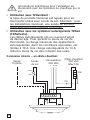
Connexion directe – un câble chauffant
Signal
fil pilote
Alimentation
230 VAC
Sonde
de sol
Câble chauffant
230 VAC
Max.13A
L N PE
L
NTC
PE
10K
N
PE
SENSOR
FP
32
L N
N
L
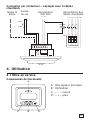
Connexion par contacteur – exemple avec 3 câbles
chauffants
Sonde
de sol
Signal fil
pilote
Alimentation
230 VAC
Alimentation des
câbles chauffants
L N
L1 L2 L3 N PE
NTC
10K
K1 A2
1
3
5
A1
2
4
6
L
L
L
PE
N N N
SENSOR
FP
L N
N
L
4. Utilisation
4.1 Mise en service
Commandes du thermostat
A
A : interrupteur principal
B : OK/Valider
C : « – » moins
D : « + » plus
C
B
D
33
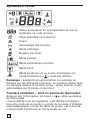
Symboles à l’écran
Valeur paramétrée de la température de sol ou
ambiante, ou code d’erreur
Câble chauffant sous tension
Erreur
Verrouillage des touches
Mode calibrage
Numéro du menu
Mode manuel
Mode automatique fil pilote
Mode forcé
Mode sonde de sol ou sonde d’ambiance (en
mode d’ambiance < > n’est pas affiché)
Remarque : pendant la programmation, le rectangle se
déplace sur les différents symboles. Le symbole visible dans
le rectangle indique la fonction active : mode manuel, mode
automatique par fil pilote, mode forcé.
Première utilisation – mise en service du thermostat :
Appuyer sur l’interrupteur principal <
> situé au-dessus
du thermostat.
L’écran affiche tous les segments, puis affiche la température et le mode de la sonde. Le mode de la sonde s’initialise
automatiquement. Lorsqu’un câble de sonde est connecté,
le thermostat fonctionne en mode sonde de sol.
34
Lorsqu’aucun câble de sonde n’est connecté, le thermostat
fonctionne en mode sonde d’ambiance.
Au bout de 5 secondes, le thermostat vérifie si un fil pilote
est connecté.
Si c’est le cas, le thermostat fonctionnera selon la
température paramétrée et le signal du fil pilote. Le symbole
AUTO est affiché. Dans le cas contraire, le thermostat
fonctionnera uniquement selon la température paramétrée.
Régler la température ambiante ou de sol souhaitée à
>. Cette valeur de consigne
l’aide des boutons <
approximative permet d’obtenir une température confortable.
Le symbole < > s’affiche à l’écran pour indiquer que le
câble chauffant fonctionne.
4.2. Options
4.2.1 Activation du mode forcé < >
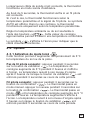
Cette fonction permet d’augmenter temporairement de 5°C
la température du sol ou de la pièce.
Pas de fil pilote connecté : appuyer pendant 3 secondes
sur le bouton de validation < >. La température de
consigne augmente de 5°C pendant 2 heures et s’affiche
à l’écran. La température revient à son niveau d’origine
après 2 heures ou lorsque le bouton de validation < > est
enfoncé pendant 3 secondes au cours de cette période.
Fil pilote connecté : appuyer pendant 3 secondes sur le
bouton de confirmation <
>. Le thermostat passe en
mode manuel. appuyer à nouveau pendant 3 secondes sur
le bouton de confirmation <
>. Le thermostat passe en
mode < > et la température de consigne augmente de 5 °C
pendant 2 heures. La température augmentée s’affiche à
l’écran. La température revient à son niveau d’origine après
2 heures ou lorsque le bouton de validation <
> est
enfoncé pendant 3 secondes au cours de cette période.
35
4.2.2 Fil pilote
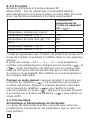
Brancher le fil pilote à la borne marquée FP.
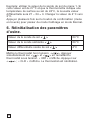
Mode AUTO : lors du démarrage, le thermostat détecte
automatiquement le fil pilote et passe en mode Auto. En mode
Auto, les fonctions standards à 6 ordres comprennent :
Visualisation
momentanée de
l’ordre en appuyant
>
sur <
Température normale de confort
-
Température réduite, –3,5°C
-3.5
Température de mise hors gel, 7°C
HG
Arrêt
Arr
Température réduite, –1,0°C
-1
Température réduite, –2,0°C
-2
Lorsqu’un signal autre que ‘Confort’ est présent au niveau de la
borne du fil pilote, le symbole P s’affiche dans le coin supérieur
gauche.
A partir des modes « 3,5 », « -1 », « -2 », il est possible de
> et
modifier momentanément la consigne par les touches <
>. Cette modification est effective pour une durée maxi<
male de 12 heures. Elle est annulée dès qu’un ordre différent
de celui en cours apparaît. Elle n’affecte en rien la température
de consigne déjà réglée.
Passage en mode manuel : appuyer pendant 3 secondes sur
>. La température de consigne
le bouton de validation <
normale est activée. Appuyer à nouveau pendant 3 secondes
> pour quitter le mode
sur le bouton de validation <
manuel et passer en mode < >. Appuyer à nouveau pendant
> pour passer en
3 secondes sur le bouton de validation <
mode AUTO.
4.2.3 Verrouillage
Verrouillage et déverrouillage du thermostat
Le clavier du thermostat peut être verrouillé pour éviter les
modifications intempestives des paramètres (par ex. dans les
lieux publics).
36
Verrouillage : appuyer simultanément sur <
>, <
> et
>
<
>, <
>
Déverrouillage : appuyer simultanément sur <
et <
>
5. Guide de dépannage
5.1 Codes d’erreur
Numéro
Type d’erreur
ER 1
Mauvaise valeur de sonde de sol (100 kΩ)
ER 2
Court-circuit de la sonde de sol
ER 3
Circuit ouvert de sonde de sol
ER 4
Court-circuit de la sonde d’ambiance
ER 5
Circuit ouvert de sonde d’ambiance
ER 6
Autres erreurs
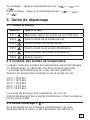
5.2 Contrôle des sondes de température
Lorsque l’une des sondes de température est endommagée
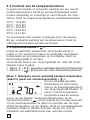
ou défectueuse, le câble est mis hors tension (fail-safe
– sécurité redondante) et un code d’erreur s’affiche.
Valeurs de température/résistance de la sonde de sol :
15°C / 15,8 kΩ
20°C / 12,5 kΩ
25°C / 10,0 kΩ
30°C / 8,04 kΩ
35°C / 6,51 kΩ
La sonde de sol peut être remplacée. En cas de
disfonctionnement de la sonde d’ambiance, il faut remplacer
tout le thermostat.
5.3 Mode calibrage <
>
Si la température de consigne est différente de celle
mesurée dans la pièce, il est nécessaire de calibrer le
37
thermostat.
Appuyer en continu sur OK pendant 6 secondes pour
accéder aux menus suivants :
• Menu 1: < > lecture de la température effective
• Menu 2: < > calibrage de la température de sol/
ambiante.
Menu 1 :
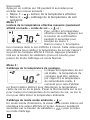
Lecture de la température effective mesurée (seulement
affiché en mode « sonde de sol » < >) :
Pour vérifier la température
effective mesurée, appuyer sur
le bouton de confirmation
pendant 6 secondes pour
accéder au menu 1.
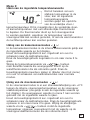
Dans le menu 1, la température mesurée dans le sol s’affiche à l’écran. Cette valeur peut
être utilisée pour calibrer la température du sol par rapport
au point de consigne affiché à l’écran. Appuyer plusieurs
fois sur le bouton de validation (menu en boucle) pour
passer du mode Calibrage en mode Normal.
Menu 2 :
Calibrage de la température de consigne.
Lorsque la température du sol
est stable : la température de
consigne peut être calibrée
par rapport à la température
de sol/ambiante réelle. Il
convient pour cela d’utiliser
un thermomètre distinct pour déterminer la température
réelle du sol ou de la pièce. Poser le thermomètre sur le sol
pour mesurer la température de la surface du sol, ou sur le
mur pour déterminer la température ambiante.
Calibrage du mode sonde ambiante < >:
En mode sonde d’ambiance, la valeur de la sonde interne est
identique à la valeur affichée à l’écran. Appuyer pendant 6
secondes sur le bouton de validation <
> pour accéder
au mode Calibrage.
38
Appuyer de nouveau sur le bouton de validation pour
accéder au menu 2.
Modifier la température à l’aide des boutons <
> pour
qu’elle corresponde à la valeur de référence affichée par le
thermomètre mural. Appuyer plusieurs fois sur le bouton de
validation (menu en boucle) pour passer du mode Calibrage
en mode Normal.
Calibrage du mode sonde de sol < >:
En mode sonde de sol, il y a une différence par défaut de
+4°C entre la valeur de la sonde dans le sol et la valeur de
la surface du sol (qui correspond à la valeur paramétrée à
l’écran). La valeur affichée dans le menu 1 peut être utilisée
pour calibrer le point de consigne.
Appuyer pendant 6 secondes sur le bouton de validation <
> pour accéder au mode Calibrage. Appuyer de nouveau
sur le bouton de confirmation pour accéder au menu 2.
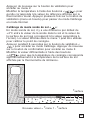
Modifier la valeur différentielle à l’aide des boutons
<
> pour que la température de consigne corresponde
approximativement à la température de la surface du sol
affichée par le thermomètre de référence.
Tsurface
Tmenu1
Nouveau valeur = Tmenu 1 - Tsurface
39
Exemple: utiliser la valeur de la sonde de sol du menu 1. Si
cette valeur est de 27°C et que le thermomètre indique une
température de surface au sol de 24°C, la nouvelle valeur
différentielle sera 27 – 24 = 3. Changer la valeur de 4°C vers
3°C.
Appuyer plusieurs fois sur le bouton de confirmation (menu
en boucle) pour passer du mode Calibrage en mode Normal.
6. Réinitialisation des paramètres
d’usine.
Valeur de la sonde de sol <
23°C
>
Valeur de la sonde ambiante <
20°C
>
Valeur différentielle sonde de sol <
>
4°C
>. Appuyer
Mettre le thermostat hors tension <
simultanément sur <
> et <
> en remettant le
thermostat sous tension. « 000 » s’affiche. Appuyer sur
<
> ; « CLR » s’affiche. Le thermostat est réinitialisé.
40
Nederlands
1. Technische specificaties
.........................................................
42
2. Beschrijving ..................................................................................... 43
3. Montage en installatie .............................................................. 44
4. Bediening
........................................................................................
4.1 Aan de slag
.........................................................................
46
46
4.2 Optionele functie .............................................................. 48
4.2.1
Volvermogen-booster
4.2.2
Externe besparingssturing
4.2.3
Vergrendeling
48
.............................
49
........................................................
49
...............................................................
49
............................................................................
49
5. Problemen verhelpen
5.1 Foutcodes
.......................................
....................
50
...............................................................
50
5.2 Kontrole van de temperatuursensor
5.3 Kalibratiemodus
6. Fabrieksinstellingen ................................................................... 52
41
1. Technische specificaties
Voedingsspanning
230 VAC, +10%, –15%,
50/60 Hz
Verbruik, gemiddeld
4 VA
Hoofdschakelaar
2-polig 16 A
Relais output – verwarmingskabel 230 V, max. 13 A
Omgevingstemperatuur – bediening 0 +50°C
Omgevingstemperatuur – transport -20 +50°C
Temperatuurbereik, vloersensor
+5 +35°C
Temperatuurbereik, kamersensor +5 +45°C
Nauwkeurigheid –
vloer/kamersensor
+/–0.5°C
Schakelprecisie
0,5°C
Regelmodus
Vloersensor of
kamersensor
Externe besparingssturing
temperatuurval –3.5°C
Back-up voor ingestelde waarden In niet-vluchtig geheugen
Beschermingsklasse
IP 21
Klemmen
Max. 2,5 mm2
Vloersensor met 3 m kabel
NTC,10K /25°C.
Maximumlengte van de
vloersensorkabel
100 m, 2 x 1,5 mm2
(230 VAC kabeltype)
Afmetingen met kader (afb.1)
H 82 x B 82 x D 54 mm
Kleur
Polar wit RAL 9010
Goedkeuringen
Semko, NF, CE
42
2. Beschrijving
TA is een thermostaat die speciaal ontworpen is voor
vloerverwarming. Deze thermostaat heeft de volgende
kenmerken en functies:
• Regeling van de verwarmingskabel door een externe
vloersensor of een geïntegreerde kamersensor.
• Belastingsvermogen van het uitgangsrelais,13 A /
230 V (3000 W)
• 2-polige hoofdschakelaar
• Externe besparingssturing
Extra aansluitklem kan dienen als extern sluitcontact
om de ingestelde temperatuur met 3,5°C te verlagen.
• Volvermogen-booster
De ingestelde temperatuur kan met 5°C worden
verhoogd voor 2 uur. Keert automatisch terug naar de
oorspronkelijke temperatuurinstelling.
• Alle mogelijke instellingen voor de thermostaat kunnen
door de toetsen worden vergrendeld en ontgrendeld.
• Controle van de vloer- of kamersensor. Onderbreekt de
verwarmingsoutput bij een sensorfout, met aanduiding
(faalveilig)
• Beschermingsklasse behuizing IP21 als standaard
• Inclusief vloersensor met 3 meter kabel
• De thermostaat wordt geleverd met een montagekader
en een front voor het ELJO Trend /B&J Jussi /Merten
(Plan, Smart, Arc, Atelier, Antik, Termo, M-Star)
/Jung (CD, LS, AS) /Gira (ST55 Standard, E2)
wanddoossysteem. Een extra front voor de vierkante
kaders zoals ELKO RS is ook inbegrepen
• Goedgekeurd door SEMKO,NF, CE-markering.
43
3. Montage en installatie
Thermostaat
TA is bestemd voor verzonken montage in een standaardwanddoos van 65 mm. De TA moet ongeveer 1,5 meter
boven de vloer worden geplaatst, beschermd tegen direct
zonlicht en tocht. Alle elektriciteitsbuizen naar de thermostaatdoos die externe kabels bevat, moeten worden
afgedicht om de thermostaat tegen warme lucht te
beschermen vb. door het aanbrengen van een stuk isolatiemateriaal in de electriciteitsbuizen. De TA kan ook in een
externe wanddoos worden gemonteerd.
Als de thermostaat gemonteerd wordt op een ruw oppervlak
vb. baksteen, dient er een silicone strip aangebracht te
worden onder het montagekader. Het montagekader en het
front kunnen worden verwisseld door met een schroevendraaier op de twee knopjes te duwen die zich aan de zijkanten van de thermostaat bevinden (afb.2)
Vloersensor
De vloersensor moet in een afzonderlijke flexibele leiding
worden geplaatst zodat deze gemakkelijk kan worden
vervangen. Positioneer de vloersensor tussen twee
verwarmingskabels zo dicht mogelijk bij het vloeroppervlak,
voor een zo goed mogelijke regeling. Zorg ervoor dat
het uiteinde van de vloersensor minstens 3 cm van de
verwarmingskabel verwijderd is. De vloersensorkabel
kan worden verlengd tot 100 m met een afzonderlijke
standaardinstallatiekabel 2 x 1,5 mm2 (230 VAC). Teneinde
signaalstoringen te voorkomen, mag de sensor niet in een
buis samen met andere stroomkabels worden geplaatst.
Aansluiting van de thermostaat
De thermostaat moet worden aangesloten op 230 VAC
volgens het schakeldiagram. Bij gebruik van meerdere
verwarmingskabels, met een totaal van meer dan 13 A,
moet er een schakelaar worden gebruikt. De aardingskabel
van de inkomende stroomkabel en de aardingskabel van
de verwarmingskabel dienen te worden aangesloten op de
aardingsklem op de thermostaat.
44
Productspecifieke informatie voor gebruik met
vloerverwarmingssystemen
• Gebruik met T2Quicknet:
De producten van Quicknet zijn goedgekeurd voor een
thermostaat die met een vloersensor werkt. Hou er
rekening mee dat bij de installatie met Quicknet een
vloersensor moet worden geïnstalleerd en geactiveerd.
• Gebruik met T2Red (T2Reflecta) zelfregelende
systemen.
Zelfregelende verwarmingskabels vragen een
inschakelstroom bij het starten. Voor een langere
levensduur van de thermostaat is de nominale
maximumbelasting van de zelfregelende toepassing
beperkt tot 10A. Een 13A zelfregelende belasting
vermindert de levensduur van de relaiscontacten.
Rechtstreekse aansluiting – een verwarmingskabel
Voeding
230 VAC
Vloersensor
L N PE
Verwarmingskabel 230 VAC
max.13 A
L
NTC
PE
10K
N
PE
FP
SENSOR
Externe
besparingssturing
L N
N
L
45
Aansluiting via schakelaar bijv. 3 verwarmingskabels
Vloersensor
Externe
besparingssturing
Voeding
230 VAC
Voeding naar
verwarmingskabels
L N
L1 L2 L3 N PE
NTC
10K
K1 A2
1
3
5
A1
2
4
6
L
L
L
PE
N N N
SENSOR
FP
L N
N
L
4. Bediening
4.1 Aan de slag
Thermostaatregeling
A
A: hoofdschakelaar
B: OK/accepteren
C: “–“ lager
D: “+” hoger
C
46
B
D
Displaysymbolen
Ingestelde waarde voor vloer- of
kamertemperatuur of foutcode
Verwarmingskabel aan
Fout
Vergrendelde instellingen
Kalibratiemodus
Menunummer
Manueel
Automatisch
Volvermogen-booster actief
Vloer- of kamersensor modus (enkel afgebeeld in
vloersensor < > modus)
Opmerking: bij het programmeren beweegt het blokje over
de verschillende symbolen. Het symbool in het blokje duidt
de actieve functie aan: manueel, automatisch met externe
sturing, boosterfunctie.
Starten – de thermostaat in werking zetten:
Druk de <
> hoofdschakelaar in die zich aan de
bovenzijde van de thermostaat bevindt.
Op het display verschijnt een overzicht van alle segmenten.
Vervolgens verschijnt de temperatuurinstelling en de
sensormodus. De sensormodus wordt automatisch
geïnitialiseerd. Als de sensorkabel is aangesloten,
functioneert deze in de vloersensormodus.
47
Als de sensorkabel niet is aangesloten, functioneert deze in
de kamersensormodus.
Na 5 sec. controleert de thermostaat of er een externe
sturing is aangesloten. Indien dit het geval is, regelt de
thermostaat de temperatuur volgens de instelling en het
sturingssignaal. Het symbool AUTO is geactiveerd. Indien
niet, regelt de thermostaat de temperatuur volgens de
instelling.
Pas de ingestelde temperatuur, de gewenste vloertemperatuur of de kamertemperatuur aan met de <
> toetsen.
Dit is een benaderende instelling voor een comfortabele
vloer- of kamertemperatuur.
Het pictogram voor verwarming ingeschakeld < >
verschijnt op het display als de verwarmingskabel is ingeschakeld.
4.2. Optionele functie
4.2.1 Activering volvermogen-booster <
>
Deze functie wordt gebruikt voor een tijdelijke verhoging van
de vloer-/kamertemperatuur met 5°C.
Houd de bevestigingstoets <
> 3 sec. ingedrukt. De
huidige ingestelde temperatuur stijgt met 5°C voor 2 uur en
deze hogere temperatuur verschijnt op het display. Keert na
2 uur automatisch terug naar de ingestelde temperatuur of
als de bevestigingstoets binnen de 2 uur nogmaals 3 sec.
lang wordt ingedrukt.
Externe sturing aangesloten: Houd de bevestigingstoets
<
> 3 sec. ingedrukt. De thermostaat staat nu in manuele
modus. Druk de bevestigingstoets <
> nogmaals 3 sec.
in. De thermostaat schakelt over naar de “booster”-modus
en de huidige ingestelde temperatuur stijgt met 5°C voor
2 uur. Deze hogere temperatuur wordt weergegeven op het
display. Keert na 2 uur automatisch terug naar de ingestelde
temperatuur of als de bevestigingstoets <
> binnen de
2 uur nogmaals 3 sec. lang wordt ingedrukt.
48
4.2.2 Externe besparingssturing
De ingang FP kan gebruikt worden als standaardterugstelfunctie van –3,5°C door een sluitcontact aan te brengen
tussen de FP-klem en de fase klem vb. bmv een externe
klok. Dezelfde fase klem gebruiken als voor de inkomende
stroomkabel. De thermostaat werkt in AUTO modus. Als er
een actief signaal op de FP klem komt, wordt het symbool P
in de hoek linksboven weergegeven.
Naar manuele modus: houd de bevestigingstoets 3 sec.
ingedrukt. De normale temperatuurregeling is actief. Houd
> 3 sec. ingedrukt om over te
de bevestigingstoets <
schakelen van manuele modus naar boostermodus. Houd
de bevestigingstoets <
> nogmaals 3 sec. ingedrukt om
over te schakelen naar AUTO-modus.
4.2.3 Vergrendeling
Vergrendeling en ontgrendeling van de thermostaat
Het is mogelijk alle instellingen voor de thermostaat te
vergrendelen. (bijv. in openbare gebouwen)
Vergrendeling: Druk gelijktijdig <
> en <
> en <
Ontgrendeling: Druk gelijktijdig <
> en <
> en <
> in
> in
5. Problemen verhelpen
5.1 Foutcodes
Nummer
Type foutmelding
ER 1
Foutieve vloersensor (100 kΩ)
ER 2
Kortsluiting bij vloersensor
ER 3
Open circuit bij vloersensor
ER 4
Kortsluiting bij kamersensor
ER 5
Open circuit bij kamersensor
ER 6
Andere fout
49
5.2 Controle van de temperatuursensor
In geval van schade of verkeerde werking van een van de
temperatuursensors wordt de verwarmingsoutput onderbroken (faalveilig) en verschijnt er een foutcode. De vloersensor heeft de volgende temperatuur-/weerstandwaarden:
15°C / 15,8 kΩ
20°C / 12,5 kΩ
25°C / 10,0 kΩ
30°C / 8,04 kΩ
35°C / 6,51 kΩ
De vloersensor kan worden vervangen door een nieuwe.
Bij een verkeerde werking van de kamersensor moet de
volledige thermostaat worden vervangen.
5.3 Kalibratiemodus < >
Indien de gewenste temperatuur niet bereikt wordt of
indien er een verschil is tussen de werkelijke vloer/kamertemperatuur en de temperatuur op het display, dient de
thermostaat geijkt te worden.
Houd de OK-toets 6 sec. lang ingedrukt om naar het onderstaande menu te gaan:
• Menu 1: < > weergave werkelijk gemeten temperatuur
• Menu 2: < > ijking van de vloer-/kamertemperatuur.
Menu 1: Weergave van de werkelijk gemeten temperatuur
(enkel in geval van vloersensormodus) < >:
Om de werkelijk gemeten
temperatuur te controleren,
moet u de bevestigingstoets 6
sec. lang ingedrukt houden. In
menu 1 wordt de gemeten
temperatuurwaarde weergegeven op het display: vloersensortemperatuur bij de
vloersensormodus < >. Deze waarde kan worden gebruikt
om de vloertemperatuur te ijken ten opzichte van de ingestelde temperatuur op het display. Druk de bevestigingstoets
meerdere malen in (blader door het menu) om over te
schakelen van kalibratiemodus naar normale modus.
50
Menu 2:
IJken van de ingestelde temperatuurwaarde
Na het bereiken van een
stabiele temperatuur in de
vloer, kan de ingestelde
temperatuurwaarde
worden geijkt ten opzichte
van de werkelijke vloer-/
kamertemperatuur. Dit is mogelijk door de werkelijke vloerof kamertemperatuur met een afzonderlijke thermometer
te bepalen. De thermometer dient op het vloeroppervlak
te worden geplaatst, waardoor de temperatuur van het
vloeroppervlak kan worden gemeten, of aan de wand waardoor
de luchttemperatuur kan worden gemeten.
IJking van de kamersensormodus < >:
In de kamersensormodus is de interne sensorwaarde gelijk aan
de ingestelde waarde op het display.
Houd de bevestigingstoets 6 sec. ingedrukt om over te
schakelen naar de kalibratiemodus.
Druk de bevestigingstoets nogmaals in om naar menu 2 te
gaan.
> toetsen
Wijzig de temperatuurwaarde via <
naar dezelfde waarde die weergegeven wordt op de
wandthermometer die als referentie geldt. Druk de
bevestigingstoets meerdere malen in (blader door het menu)
om over te schakelen van kalibratiemodus naar normale
modus.
Ijking van de vloersensormodus < >:
In de vloersensormodus is er een standaardafwijking van +4°C
tussen de interne vloersensortemperatuur en de vloeropper
vlaktetemperatuur (die gelijk is aan de ingestelde waarde op
het display). De weergegeven waarde in menu 1 kan worden
gebruikt om de ingestelde waarde te ijken.
Houd de bevestigingstoets 6 sec. ingedrukt om over te
schakelen naar de kalibratiemodus. Druk de bevestigingstoets
opnieuw in om naar menu 2 te gaan. Wijzig de afwijkings> toetsen zodat de ingestelde
waarde via de <
temperatuur ongeveer overeenkomt met de waarde op de
vloeroppervlakthermometer die als referentie dient.
51
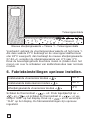
Tvloeroppervlakte
Tmenu1
Nieuwe afwijkingswaarde = Tmenu 1 - Tvloeroppervlakte
Voorbeeld: gebruik de vloertemperatuurwaarde uit het menu 1.
Als deze waarde 27°C bedraagt en de vloeroppervlakthermom
eter 24°C weergeeft, dan bedraagt de nieuwe afwijkingswaarde
27-24 =3. verander de afwijkingswaarde van 4°C naar 3°C.
Druk de bevestigingstoets meerdere malen in (blader door het
menu) om over te schakelen van kalibratiemodus naar normale
modus.
6. Fabrieksinstellingen opnieuw instellen.
Instelwaarde vloersensormodus <
Instelwaarde kamersensormodus <
23°C
>
20°C
>
Afwijkingswaarde vloersensormodus <
>
4°C
Schakel de thermostaat <
>. uit. Druk tegelijkertijd op <
> en <
> en schakel de thermostaat in <
>: er ver> en er verschijnt
schijnt “000” op het display. Druk op <
“CLR” op het display. De fabrieksinstellingen zijn opnieuw
ingesteld.
52
Norsk
1. Teknisk spesifikasjon ................................................................ 54
2. Beskrivelse
.....................................................................................
......................................................
56
........................................................................................
58
3. Montering og installering
4. Drift
55
4.1 Komme i gang ................................................................... 58
4.2 Valgfri funksjon .................................................................. 60
4.2.1
Varmeforsterker
4.2.2
Ekstern tilbakestilling
4.2.3
Lås
60
........................................
61
...............................................................................
61
...........................................................................
61
...............................................................................
61
5. Problemløsning
5.1 Feilkoder
...................................................
5.2 Motstandsverdi gulvføler ............................................ 61
.........................................
62
....................................................................
64
5.3 Kalibrering av temperatur
6. Fabrikkinnstillinger
53
1. Tekniske spesifikasjoner
Nettspenning
230VAC, +10%,–15%,
50/60 Hz
Strømforbruk, gjennomsnitt
4 VA
Hovedbryter
2-pols 16 A
Reléutgang - varmekabel
230 V, maks.13 A
Omgivelsestemperatur – drift
0 +50°C
Omgivelsestemperatur – transport –20 +50°C
Temperaturskala, gulvsensor
+5 +35°C
Temperaturskala, romsensor
+5 +45°C
Nøyaktighet – gulv-/romsensor
+/–0,5°C
Koblingshysterese
0,5 °C
Kontrollmodi
Gulvsensor eller
romsensor
Valgfri ytre kontroll
6-nivåers styreledning
(Frankrike)
Sikkerhetskopi for innstilte verdier I ikke-flyktig minne
Beskyttelsesklasse
IP 21
Terminaler
Maks. 2,5 mm2
Gulvsensor med 3 m kabel
NTC,10K /25°C.
Maksimallengde på
gulvsensorkabel
10 m, 2 x 1,5 mm2
(230 VAC kabeltype)
Dimensjon med ramme (fig.1)
H 82 x W 82 x D 54 mm
Farge Polarhvit
Godkjenninger
RAL 9010
Semko, NF, CE
54
2. Beskrivelse
TA er en grunnleggende termostat spesialutformet for
oppvarming av undergulv. Den har følgende egenskaper og
funksjoner:
• Varmekabelkontroll ved hjelp av en ekstern gulvsensor
eller integrert romsensor.
• Belastningskapasitet på utgangsreleet, 13 A / 230 V
(3000 W)
• 2-polet hovedstrømbryter
• Ytre økonomi
Ekstra terminal som kan brukes som en ekstern
Lås for å redusere settemperaturen med 3,5°C.
• Varmeforsterker
Den innstilte temperaturen kan økes med 5°C på 2
timer. Vender automatisk tilbake til den opprinnelige
temperaturinnstillingene.
• Mulig å låse og låse opp alle mulige innstillinger for
termostaten ved å røre på knappene
• Overvåking av gulv- eller romsensoren. Slå av
varmeeffekten under sensorfeil og med angivelse
(feilsikring)
• Kapslingsbeskyttelse klasse IP21 som standard
• Gulvsensor med 3 meters kabel følger med
• Termostaten er utstyrt med en monteringsramme og
en front for ELJO Trend /B&J Jussi /Merten /Jung/Gira
veggbokssystem. En ekstra front for kvadratformede
rammer, for eksempel ELKO RS følger også med
• Godkjent av SEMKO, NF, CE-merket.
55
3. Montering og installering
Termostat
TA er beregnet på problemfri montering i en standard 65
mm veggboks. Den bør plasseres omtrent 1,5 meter over
gulvet, beskyttet mot direkte sollys og trekk. Alle elektriske
kabelrør til termostatboksen som inneholder eksterne kabler
må forsegles for å beskytte termostaten mot varm luft, f.eks.
med et stykke isolasjon i slangeuttaket.
TA kan også monteres i en ekstern veggboks.
Dersom Termostaten blir montert på en ujevn veggflate,
f.eks. teglstein, legg Silikonlim under topplokket.
Monteringsramme og front kan skiftes ut ved å trykke en
skrutrekker på to knotter, plassert på siden av termostaten.
(Fig.2)
Gulvsensor
Gulvsensoren bør installeres i et separat, bøyelig rør eller
en slange slik at den er lett å skifte. Plasser gulvsensoren
mellom varmekabler så tett som mulig til toppen på
gulvoverflaten for best kontrollytelse. Plasser ikke tuppen
av gulvsensoren nærmere enn 3 cm til varmekabelen.
Gulvsensorkabelen kan utvides til 100 m med en separat
standard installasjonkabel 2 x 1,5 mm2 (230 VAC).
For å unngå signalforstyrrelse som fører til en mulig
funksjonssvikt i termostaten, bør sensoren ikke installeres i
et rør sammen med andre strømbærende kabler.
Kobling av termostaten
Termostaten må kobles til 230 VAC i henhold til
kretsskjemaene. Når det brukes flere varmekabler, totalt
over 13 A, må det brukes en kontaktor. Hvis den beskyttede
jordkontakten (PE) på termostaten blir brukt, skal den
inngående strømkabelen til varmekabelen kobles til den
felles jordkontakten på termostaten, ellers må det brukes en
separat kontaktkoblingsblokk (følger ikke med).
56
Produktspesifikk informasjon for bruk med
Raychem gulvvarmesystemer
• Bruk av smarte brytere med T2Quicknet:
Produktlinjen Quicknet er godkjent når termostaten
arbeider i gulvsensormodus. Vær klar over at
gulvsensoren må installeres og aktiveres for en
installasjon med Quicknet.
• Bruk av smarte brytere med T2Red (T2reflecta)
selvregulerende systemer.
Selvregulerende varmekabler har startstrømmer. For
å garantere termostatens levetid under nominelle
forholder er maksimalbelastningen på selvregulerende
installasjon under nominelle forhold begrenset til
10 A. En 13 A selvregulerende belastning vil redusere
levetiden til relékontaktene.
Direkte, kobling – en varmekabel
Opphev
Gulvsensor
tilbakestillingssignal
Strømtilførsel
230 VAC
Varmekabel
230 VAC
Maks.16 A
L N PE
L
NTC
PE
10K
N
PE
SENSOR
FP
L N
N
L
57
Kobling via for eksempel kontaktor – 3 varmekabler
Strømtilførsel
Opphev
230 VAC
tilbakestillings- Gulvsensor
signal
L N
Strømtilførsel til
varmekabler
L1 L2 L3 N PE
NTC
10K
K1 A2
1
3
5
A1
2
4
6
L
L
L
PE
N N N
SENSOR
FP
L N
N
L
4. Drift
4.1 Komme i gang
Termostatbrytere
A
A: hovedbryter
B: OK/aksept
C: “–“ ned
D: “+” opp
C
58
B
D
Displaysymboler
Innstilt verdi for gulv eller romtemperatur eller
feilkode
Varmekabel på
Feil
Låste innstillinger
Kalibreringsverdi
Menynummer
Manuell modus
Automatisk modus
Varmeforsterker aktiv
Gulv- eller romsensormodus
(dersom romfølermodus < > ikke vises)
Merk: kvadratet beveger seg over de forskjellige symbolene
under programmering. Symbolet i kvadratet angir den aktive
funksjonen: manuell modus, automatisk modus med ekstern
signal, forsterkerfunksjon.
Første start – sett termostaten i drift:
Trykk inn <
> hovedstrømbryteren, som finnes på den
øvre delen av termostaten.
Displayet fører opp og viser alle segmenter. Så viser den
innstillingstemperaturen og sensormodus. Sensormodusen
initieres automatisk. Hvis gulvfølerkabelen er tilkoblet,
fungerer den i gulvsensormodus. Hvis gulvfølerkabelen ikke
59
er tilkoblet, fungerer den i romsensormodus.
Etter 5 sek. kontrollerer termostaten om en eksternkontroll
er tilkoblet. Hvis det er tilfellet, blir termostaten styrt i
henhold til den innstilte temperaturen og ekstern signal.
Symbolet AUTO aktiviseres. Hvis det ikke er tilfellet, blir
termostaten styrt i henhold til den innstilte temperaturen.
Juster den innstilte temperaturen, ønsket gulvtemperatur
>-knappene. Dette er en
eller romtemperatur, med <
omtrentlig innstilt verdi for å gi en komforttemperatur på
gulvet eller i rommet.
Varme på-symbolet <
varmekabelen er på.
> angir på displayet når
4.2. Valgfri funksjon
4.2.1 Aktivere varmeforsterker <
>
Denne funksjonen brukes for midlertidig økning av gulv-/
romtemperaturen med 5°C.
Trykk på bekreftelsesknappen < > i 3 sek. Den gjeldende
innstilte temperaturen vil øke med 5°C i 2 timer, og denne
økte temperaturen vises på displayet. Automatisk vender
tilbake til den innstilte temperaturen etter 2 timer, eller hvis
det trykkes på bekreftelsesknappen igjen i 3 sek. innenfor
perioden på 2 timer.
Om eksternkontroll er tilkoblet: Trykk på
bekreftelsesknappen <
> ii 3 sek. Termostaten vil nå
være i manuell modus. Trykk igjen på bekreftelsesknappen <
> i 3 sek. Termostaten vil gå over i “forsterker”-modus,
og den gjeldende innstillingstemperaturen vil øke med 5°C
på 2 timer. Denne økte temperaturen vises på displayet.
Automatisk vender tilbake til den innstilte temperaturen etter
2 timer, eller hvis det trykkes på bekreftelsesknappen <
>
igjen innenfor perioden på 2 timer.
60
4.2.2 Styreledning
For å bruke en standard tilbakestillingsfuksjon (–3,5°C):
koble til en stoppkontakt mellom FP terminal og nøytral
terminal, f.eks. en stoppeklokke bryter. Samme fase som
benyttes til termostatens tilkoblingsspenning skal brukes.
Når det er et aktivt signal, vil symbolet P vises i øvre venstre
hjørne.
Til manuell modus: Trykk på bekreftelsesknappen i 3
sek. Normal innstilt temperaturkontroll er aktiv. Trykk
> i 3 sek. for å forlate
igjen på bekreftelsesknappen <
manuell modus og gå til forsterkermodus. Trykk på
bekreftelsesknappen <
> igjen i 3 sek for å gå til AUTOmodus.
4.2.3 Lås
Lås og lås opp termostaten
Mulig å låse alle de innstilte mulighetene for termostaten.
(f.eks. i offentlige bygninger)
Lås: Trykk samtidig <
> og <
> og <
>
Lås opp: Trykk samtidig <
> og <
> og <
>
5. Problemløsning
5.1 Feilkoder
Nummer
Feiltype
ER 1
Feil gulvføler (100 kΩ)
ER 2
Kortslutning på gulvsensor
ER 3
Åpen krets på gulvsensor
ER 4
Kortslutning på romsensor
ER 5
Åpen krets på romsensor
ER 6
Annen feil
5.2 Motstandsverdi gulvføler
Dersom det inntreffer skade eller funksjonsvikt på en av
61
temperatursensorene, kobles varmeeffekten ut (feilsikring),
og det blir vist en feilkode.
Gulvsensoren har følgende temperatur-/motstandsverdier:
15°C / 15,8 kΩ
20°C / 12,5 kΩ
25°C / 10,0 kΩ
30°C / 8,04 kΩ
35°C / 6,51 kΩ
Gulvsensoren kan skiftes ut med en ny. Dersom det
inntreffer funksjonssvikt på romsensoren, må hele
termostaten skiftes ut.
5.3 Kalibrering av temperatur <
>
Dersom ønsket temperature ikke oppnås eller om det er en
forskjelle mellom reell gulv-/romtemperatur og settverdiene i
displayet, kalibrer termostaten.
Trykk på OK sammenhengende i 6 hele sekunder for å gå
inn følgende meny:
• Meny 1: < > avlesning av aktuell målt temperatur
• Meny 2: < > kalibrering av gulv-/romtemperatur
Meny 1:
Service avlesning av aktuell målt temperatur (kun ved
bruk av gulvføler) < >:
For å kontrollere den aktuelle
målte temperaturen trykker du
på bekreftelsesknappen i 6
sek. og trykk igjen på
bekreftelsesknappen for å gå
inn i meny 1.
I meny nummer 1 angis den målte temperaturverdien på
displayet: gulvtemperaturen i tilfelle gulvsensormodus
< >, Denne verdien kan brukes til å kalibrere gulvet eller
rommets overflatetemperatur til temperaturverdien på
displayet. Trykk på bekreftelsesknappen flere ganger (bla
gjennom menystrukturen) for å gå ut av konfigurasjonsmodus til normalmodus.
62
Meny 2:
Kalibrering av den innstilte temperaturverdien
Etter stabil temperatur
i gulvet: Den innstilte
temperaturverdien kan
kalibreres mot den virkelige
gulv-/romtemperaturen.
Dette må gjøres ved hjelp
av et separat termometer for å bestemme den aktuelle
gulv- eller romtemperaturen. Termometeret bør settes på
gulvoverflaten, som føler gulvoverflatetemperaturen eller på
veggen som føler lufttemperaturen.
Kalibrering av romsensormodus < >:
I romsensormodus er den interne sensorverdien den samme
som for den innstilte verdien på displayet.
Trykk på bekreftelsesknappen i 6 sek. for å gå inn i
konfigurasjonsmodus. Trykk på bekreftelsesknappen
to ganger for å gå inn i menynummer 3. Endre
temperaturverdien via <
>-knappene til den samme
verdien som vises på referanseveggtermometeret.
Trykk på bekreftelsesknappen flere ganger (bla gjennom
menystrukturen for å gå ut av konfigurasjonsmodusen til
normalmodus).
Kalibrering av gulvsensormodus < >:
I gulvsensormodus er det en standard utlignet verdi på +4
°C mellom gulvsensorverdien og gulvoverflateverdien (som
er den innstilte verdien på displayet). Avlesningsverdien i
Meny 2 kan brukes for innstilt verdikalibrering.
Trykk på bekreftelsesknappen i 6 sek. for å gå inn i
konfigurasjonsmodus. Trykk igjen på bekreftelsesknappen to
ganger for å gå inn i menynummer 3. Endre den utlignede
verdien via <
>-knappene slik at den innstilte
temperaturverdien blir ca. den samme som vises på referans
egulvoverflatetermometeret.
Innstillingsverdi = TMeny 1 - TGulvareale
63
TGulvareale
TMeny1
Eksempel: Bruk gulvsensortemperaturverdien fra Service
avlesningsmeny. Hvis denne verdien er 27 °C, og gulvo
verflatetermometeret viser 24 °C, vil den nye utlignede
verdien være 27-24 =3. Endre justeringsverdien fra 4 .C
til 3.C. Trykk flere ganger pa OK-knappen (bla igjennom
menystrukturen) om du vil forlate konfigurasjonsinnstilling
og ga tilbake til normalinnstilling.
6. Tilbakestill til fabrikkinnstillinger.
Instillingsverdi for gulvføler modus <
>
23°C
Instillingsverdi for romføler modus <
>
20°C
Justeringsverdi for gulvføler <
>
4°C
>. Trykk å <
> og
Slå “av” termostaten <
<
> samtidig med at kobling “på" <
> termostaten
“000” blir vist. Trykk på <
>, og “AFF” blir vist.
Termostaten blir tilbakestilt. Slå “av” og “på” igjen og start
programmeringen på nytt.
64
Svenska
1. Tekniska data ................................................................................. 66
2. Beskrivning
....................................................................................
3. Montering och installation
4. Handhavande
....................................................
................................................................................
4.1 Komma igång
....................................................................
67
68
70
70
4.2 Alternativa funktioner ..................................................... 72
4.2.1
Heat Booster
4.2.2
Extern sparsänkning
4.2.3
Låsning av inställningsmöjligheter
5. Felsökning
..........................................................
..........................................
72
73
...........
73
......................................................................................
73
5.1 Felkoder
................................................................................
74
..............................
74
...................................................................
76
5.3 Kalibrering av temperaturvärde
6. Fabriksinställningar
73
........................
5.2 Övervakning av temperaturgivare,
golvgivarens resistansvärde
65
1. Tekniska data
Anslutningsspänning
230 VAC,+10 %, –15 %,
50/60 Hz
Effektförbrukning, genomsnitt
4 VA
Huvudströmbrytare
2-polig 13 A
Utgångsrelä – värmekabel
230 V, max. 13 A
Omgivningstemperatur – drift
0 till +50°C
Omgivningstemperatur – transport -20 till +50°C
Temperaturområde, golvgivare
+5 till +35°C
Temperaturområde, rumsgivare
+5 till +45°C
Noggrannhet – golv/rumsgivare
+/- 0,5°C
Kopplingshysteres
0,5°C
Driftslägen
Golv- eller rumsgivare
Extern ingång
slutande kontakt
Sparsänkning, –3,5°C,
Backup funktion för inställda värden I icke-flyktigt minne
Kapslingsklass
IP 21
Anslutningsplint
Max 2,5 mm2
Golvgivare med 3 m kabel
NTC,10 K/25°C
Maximal längd på golvgivarens
kabel
100 m, 2 x 1,5 mm2
(230 VAC kabel)
Dimensioner med ram (figur 1)
H 82 x B 82 x D 54 mm
Färg
Polarvit RAL 9010
Godkännande
SEMKO, NF, CE
66
2. Beskrivning
TA är en termostat särskilt konstruerad för golvvärme. Den
har följande funktioner:
• Reglering av värmekabel via extern golvgivare eller
integrerad rumsgivare
• Belastningsförmåga för utgångsrelä,13 A/230 V
(3000 W)
• 2-polig huvudströmbrytare
• Extern ekonomistyrning
En slutande kontakt kopplad till plint, kan användas
som extern sparsänkningsfunktion för att sänka den
inställda temperaturen med 3,5°C
• Heat Booster
Den inställda temperaturen kan ökas med 5°C i 2
timmar. Återgår automatiskt till den ursprungliga
temperaturinställningen efter 2 timmar
• Möjlighet att låsa och låsa upp alla
inställningsmöjligheter för termostaten via knapparna
på fronten
• Övervakning av golv- eller rumsgivaren. Avstängning
av utgångsreläet vid fel på golv/rumsgivaren, med
felindikering (fail safe funktion)
• Kapslingsskydd klass IP21 som standard
• Golvgivaren med 3 meter anslutningskabel medföljer
• Termostaten levereras med en monteringsram och
front för väggdossystemen ELJO Trend /B&J Jussi
/Merten /Jung/Gira. Extra front för fyrkantiga ramar, till
exempel ELKO RS, medföljer
• Godkänd av SEMKO, NF- och CE-märkt.
67
3. Montering och installation
Termostathuset
TA är avsedd för infälld montering i en 65 mm
standardväggdosa. Den bör placeras cirka 1,5 meter över
golvet, skyddad från direkt solljus och drag. Alla kabelrör till
termostatboxen måste förseglas för att skydda termostaten
mot varm luft.Exempelvis med en bit isolering i röret.
Om termostaten monteras på en ojämn väggyta, i ett
badrum och kapslingsklass IP21 krävs, kan en sträng av
silikontätning användas under ramen på termostatens
ovansida.
TA kan även monteras i en extern förhöjningsram på vägg.
Monteringsramen och fronten kan bytas ut genom att du
trycker med en skruvmejsel på två interna plastknappar på
termostatens sidor (figur 2).
Golvgivaren
Golvgivaren bör installeras i ett separat flexibelt skyddsrör
eller en slang så att den enkelt kan bytas ut. Placera
golvgivaren mellan två värmekablar så nära golvytan
som möjligt, så får du bästa möjliga reglering. Placera
inte golvgivarens ände inom 3 cm från värmekabeln.
Golvgivarens anslutningskabel kan förlängas till 100 m
med en separat standardinstallationskabel 2 x 1,5 mm2 (för
230 VAC). För att undvika signalstörningar som negativt kan
påverka termostaten, bör golvgivaren inte installeras i ett rör
tillsammans med andra strömledande kraftkablar.
Anslutning av termostaten
Termostaten skall anslutas till 230 VAC enligt kretsschemat.
När du använder flera värmekablar med total last över
13 A, måste en kontaktor användas. Om skyddsjordsplinten
(PE) på termostaten används skall den inkommande
skyddsjorden, och skyddsjorden på värmekabeln, anslutas
till denna gemensamma jordanslutning. Alternativt kan de
anslutas till en separat anslutningsplint placerad i botten av
apparatdosan. (Plint medföljer ej).
68
Produktspecifik information för användning med
ihop med T2/Raychems golvvärmesystem
• Användning av termostaten med värmemattan
T2QuickNet:
T2QuickNet-systemet är godkänt för användning med
termostaten i golvgivarläge. Tänk på att golvgivaren måste
vara installerad och aktiverad för en godkänd T2QuickNetinstallation.
• Användning av termostaten med självreglerande
T2Röd värmekabel (+ T2Reflecta)
Självreglerande värmekablar har en startström vid
inkoppling. För att termostaten ska få lång livstid är den
maximala belastningen för den självreglerande värmekabeln
under nominella förhållanden begränsad till 10 A. En
självreglerande värmekabel med belastning på 13 A minskar
reläkontakternas livslängd.Vid stora laster över 10 A
används en kontaktor.
Direktanslutning – en värmekabel
Strömförsörjning
230 VAC
Golvgivare
Värmekabel
230 VAC
Max.13A
L N PE
L
NTC
PE
10K
N
PE
FP
SENSOR
Extern
sparsänkning
L N
N
L
69
Anslutning via kontaktor, t.ex. – 3 värmekablar
Strömförsörjning
230 VAC
Extern
Golvgivare
sparsänkning
Strömförsörjning
till värmekablar
L N
L1 L2 L3 N PE
NTC
10K
K1 A2
1
3
5
A1
2
4
6
L
L
L
PE
N N N
SENSOR
FP
L N
N
L
4. Handhavande
4.1 Komma igång
Termostatknappar
A
A: Huvudströmbrytare
B: OK/acceptera
C: “–“ nedåt/minska
D: “+” uppåt/öka
C
70
B
D
Symboler i teckenfönstret
Inställt värde för golv- eller rumstemperatur, eller
felkod
Värmekabel på
Fel
Låsta inställningar
Konfigurationsläge
Menynummer
Manuellt läge
Autoläge
Heat Booster aktiverad
Golv- eller rumsgivarläge
(i rumsgivarläge visas ingen symbol)
Obs! Fyrkanten flyttas över de olika symbolerna under
inställningen. Symbolen inne i fyrkanten visar vilken funktion
som är aktiv: manuellt läge, automatiskt läge via extern
styrsignal eller Heat Booster funktion.
Första start – ställa in termostaten för drift:
Tryck på huvudströmbrytaren <
> på termostatens
ovansida.
Teckenfönstret tänds och visar alla segment.
Inställningstemperatur och temperaturgivarläge visas.
Val av temperaturgivarläge sker automatiskt vid start. Om
golvgivaren är ansluten körs termostaten i golvgivarläge.
71
Om golvgivarkabeln inte är ansluten körs termostaten i
rumsgivarläge
Efter 5 sekunder kontrollerar termostaten om en extern
styrsignal anslutits. Om så är fallet reglerar termostaten
enligt den inställda temperaturen och den externa
styrsignalen. Symbolen AUTO aktiveras.
Om ingen extern styrsignal anslutits reglerar termostaten
enbart enligt den inställda temperaturen. Detta är den
normala driften för termostaten.
Justera den inställda temperaturen, önskad golvtemperatur
eller önskad rumstemperatur med <
>-knapparna.
Detta är ett ungefärligt inställningsvärde som ger en bekväm
temperatur på golvet eller i rummet.
Symbolen värmekabel på <
värmekabeln är i drift.
> visas i teckenfönstret när
4.2. Alternativa funktioner
4.2.1 Aktivera Heat Booster <
>
Den här funktionen används för att tillfälligt öka golv/rumstemperaturen med 5°C.
Håll in OK-knappen < > i 3 sekunder. Den aktuella
inställda temperaturen ökar med 5°C i 2 timmar, och den
ökade temperaturen visas i teckenfönstret. Den inställda
temperaturen återställs automatiskt efter 2 timmar,
eller om OK-knappen hålls in igen i 3 sekunder inom
tvåtimmarsperioden.
Extern styrsignal ansluten: Håll in OK-knappen <
>
i 3 sekunder. Termostaten är nu i manuellt läge. Håll in
OK-knappen <
> i 3 sekunder igen. Termostaten sätts
i ”boosterläge” och den aktuella inställda temperaturen
ökar med 5°C i 2 timmar. Den ökade temperaturen visas
i teckenfönstret. Den inställda temperaturen återställs
automatiskt efter 2 timmar, eller om OK-knappen <
>
hålls in igen i 3 sekunder inom tvåtimmarsperioden.
72
4.2.2 Extern sparsänkning
För att använda denna externa styringång som en
sparsänkningsingång för sänkning med –3,5°C: Anslut en
slutande kontakt mellan FP-plinten och fas.
Exempelvis en klockströmbrytare. Samma fas som till termostatens anslutningsspänning skall användas. Så länge det är
en aktiv signal på ingången, visas symbolen P i övre vänstra
hörnet i teckenfönstret.
Till manuellt läge: Håll in OK-knappen i 3 sekunder. Normal
reglering med enbart inställd temperatur aktiveras. Håll in
> i 3 sekunder igen om du vill gå från
OK-knappen <
manuellt läge till boosterläge. Håll in OK-knappen <
>i3
sekunder igen om du vill växla till AUTO-läge.
4.2.3 Låsning av inställningar
Låsa och låsa upp termostaten
Du kan låsa alla inställningsmöjligheter för termostaten (till
exempel i offentliga byggnader/daghem etc).
Låsa: Tryck samtidigt på <
>, <
> och <
>
Låsa upp: Tryck samtidigt på <
>, <
> och <
>
5. Felsökning
5.1 Felkoder
Siffra
Typ av fel
ER 1
Fel golvgivare (100 kΩ)
ER 2
Kortslutning av golvgivaren
ER 3
Öppen krets för golvgivaren
ER 4
Kortslutning av rumsgivaren
ER 5
Öppen krets för rumsgivaren
ER 6
Annat fel
73
5.2 Övervakning av temperaturgivaren,
golvgivarens temperaturvärden
Om någon av temperaturgivarna skadas eller slutar att
fungera, stängs uppvärmningen av (fail safe funktion) och
en felkod visas.
Golvgivaren har följande temperatur/motståndsvärden:
15°C / 15,8 kΩ
20°C / 12,5 kΩ
25°C / 10,0 kΩ
30°C / 8,04 kΩ
35°C / 6,51 kΩ
Golvgivaren kan bytas ut mot en ny. Om rumsgivaren slutar
att fungera måste hela termostaten bytas ut.
5.3 Kalibrering av det inställda temperaturvärdet < >
Om den önskade temperaturen är ej uppnådd eller om
det är en skillnad mellan golv-/rumstemperaturen och
inställningsvärdet i teckenfönstret, kan en kalibrering göras
Håll in OK-knappen i 6 sekunder, för att komma till följande
meny:
• Meny 1: < > visning av verklig uppmätt temperatur
vid golvgivare
• Meny 2: < > kalibrering av golv-/rumstemperatur.
Meny 1:
Visning av verklig uppmätt temperatur vid temperaturgivaren (endast vid golvgivarläge) < >:
Kontrollera den verkliga
uppmätta temperaturen
genom att hålla in OK-knappen
i 6 sekunder. I meny 1 visas
den uppmätta temperaturen i
teckenfönstret: interna golvtemperaturen vid golvgivarläge < >. Det här värdet kan
användas vid kalibrering av temperaturen vid golvytan mot
det inställda värdet i teckenfönstret. Tryck flera gånger på
OK-knappen (bläddra igenom menystrukturen) om du vill
lämna konfigurationsläget och återgå till normalläge.
74
Meny 2:
Kalibrering av det inställda temperaturvärdet
När golvtemperaturen
är stabil: det inställda
temperaturvärdet kan
kalibreras mot den verkliga
golv- eller rumstemperaturen.
Detta görs med hjälp av en
separat termometer som används för att avläsa den verkliga
golv- eller rumstemperaturen. Termometern placeras på
golvytan så att den kan känna av golvtemperaturen, eller på
väggen så att den kan känna av lufttemperaturen.
Kalibrering av rumsgivare < >:
I rumsgivarläge är det interna temperaturgivarvärdet lika
värdet som inställningsvärdet i teckenfönstret.
Håll in OK-knappen i 6 sekunder för att komma till
konfigurationsläget.
Tryck igen på OK-knappen för att komma till meny 2.
Ändra temperaturvärdet med hjälp av <
>-knapparna
till det värde som visas på referenstermometern på väggen.
Tryck flera gånger på OK-knappen (bläddra igenom
menystrukturen) om du vill lämna konfigurationsläget och
återgå till normalläge.
Kalibrering av golvgivare < >:
I golvgivarläge finns det ett offsetvärde, justeringsvärde, på
+4°C mellan golvgivarens temperaturvärde och golvytans
temperaturvärde (vilket är ungefär det inställda värdet i
teckenfönstret).
Håll in OK-knappen i 6 sekunder för att komma till
konfigurationsläget. Tryck igen på OK-knappen för att
komma till meny 2. Ändra justeringsvärdet med <
>
-knapparna så att det inställda temperaturvärdet ungefär
motsvarar det värde som visas på referenstermometern på
golvytan.
75
Tgolvyta
Tmeny1
Nytt offsetvärde/inställningsvärde = Tmeny1 - Tgolvyta
Exempel : Använd golvgivarens temperaturvärde från meny
1. Om värdet är 27°C och termometern vid golvytan visar
24°C, är det nya justeringsvärdet 27 - 24 = 3.
Ändra då justeringsvärdet från 4°C till 3°C.
Tryck flera gånger på OK-knappen (bläddra igenom
menystrukturen) om du vill lämna konfigurationsläget och
återgå till normalläge.
6. Återställa till fabriksinställningarna.
Temperaturinställningsvärde vid golvgivarläge <
>
> 20°C
Temperaturinställningsvärde vid rumsgivarläge <
Offsetvärde / justeringsvärde för golvgivaren <
23°C
>
4°C
>. Tryck på <
>
Återställning: Stäng av termostaten <
och <
> samtidigt som du sätter på <
> termostaten.
Siffrorna “000” visas. Tryck på <
> så visas “CLR”.
Termostaten återställs och startas om.
76
Dansk
1. Tekniske specifikationer .......................................................... 78
2. Beskrivelse
.....................................................................................
79
3. Montering og installation ....................................................... 80
4. Betjening
........................................................................................
4.1 Sådan kommer du i gang
...........................................
82
82
4.2 Valgfri funktion................................................................... 84
4.2.1
Varmebooster
4.2.2
Ekstern natsänkning
4.2.3
Lås
5. Fejlfinding
........................................................
85
...............................................................................
85
......................................................................................
5.1 Fejlkoder
84
..........................................
...............................................................................
5.2 Modstande, gulvföler
....................................................
85
...........................................
86
....................................................................
88
5.3 Kalibrering af temperatur
6. Fabriksindstillinger
85
85
77
1. Tekniske specifikationer
Forsyningsspænding
50/60 Hz
230 VAC, +10%, –15%,
Strømforbrug, gennemsnitligt
4 VA
Hovedafbryder
To-polet 16 A
Relæoutput – varmekabel
230 V, maks.13 A
Omgivende temperatur – drift
0 til +50°C
Omgivende temperatur –
transport
–20 til +50°C
Temperaturområde, gulvføler
+5 til +35°C
Temperaturområde, rumføler
+5 til +45°C
Præcision – gulv-/rumføler
+/–0,5°C
Omskiftningshysterese
0,5°C
Styringsmåder
Gulv- eller rumføler
Valgfri udvendig styring
Natsänkning -3,5°C
Backup af indstillede værdier
I permanent hukommelse
Beskyttelsesklasse
IP 21
Terminaler
Maks. 2,5 mm2
Gulvføler med 3 m kabel
NTC, 10K / 25°C.
Maks. længde af gulvfølerkabel
100 m, 2 x 1,5 mm2
(230 VAC-kabeltype)
Mål med ramme (fig.1)
H 82 x W 82 x
D 54 mm
Farve Polarhvid RAL 9010
Godkendelser
78
Semko, NF, CE
2. Beskrivelse
TA er en standardtermostat, der er særligt udviklet til
gulvvarme. Den har følgende egenskaber og funktioner:
• Varmekabelstyring via en extern gulvføler eller en
integreret rumføler.
• Belastningskapaciteten for outputrelæet er 13 A/230 V
(3000 W).
• To-polet hovedafbryder.
• Udvendig økonomi.
Ekstra klemme som via et tidsur kan sänke den
indstillet temperaturen med 3,5°C
• Varmebooster.
Den angivne temperatur kan øges med 5°C i to
timer. Vender automatisk tilbage til den oprindelige
temperaturindstilling.
• Mulighed for at låse og åbne alle indstillinger for
termostaten via knapperne.
• Overvågning af gulv- eller rumføler. Spærring
af varmeoutput under følerfejl, med indikation
(fejlsikker).
• Indkapslingssikkerhedsklasse IP21 som standard.
• Gulvføler med 3 m kabel inkluderet.
• Termostaten leveres med en monteringsramme og en
front til ELJO Trend /B&J Jussi /Merten (Plan, Smart,
Arc, Atelier, M1, Antik, Termo, M-Star) / Jung (CD, LS,
AS) / Gira (ST55 Standard, E2)-vægkassesystemet. En
ekstra front til de kvadratiske rammer, f.eks. ELKO RS,
medfølger også.
• Godkendt af SEMKO, NF, CE-mærket.
79
3. Montering og installation
Termostat
TA skal monteres plant i en 65 mm standardvægdåse. Den
skal placeres ca. 1,5 m over gulvet, beskyttet mod direkte
sollys og træk. Alle elektriske rør til og fra termostatdåsen,
f.eks. med noget isoleringsmateriale i ledningsrørets
udgang.
TA kan også monteres i et udvendigt underlag. Hvis termostaten skal monteres på en væg med ujævn overflade såsom
mursten, påføres en stribe siliconelim under den øverste
ramme. Monteringsrammen og fronten kan udskiftes ved
at trykke en skruetrækker mod to knapper på termostatens
sider (fig.2).
Gulvføler.
Gulvføleren skal installeres i et separat rør/en separat
slange med henblik på nem udskiftning. Anbring gulvføleren
mellem to varmekabler så tæt på gulvoverfladen som
muligt for at opnå den bedste styring af systemet. Du
skal ikke anbringe gulvfølerens spids tættere end 3 cm
på varmekablet. Gulvfølerens kabel kan forlænges til 100
m med et separat standardinstallationskabel 2 x 1,5 mm2
(230 VAC). Med henblik på at undgå signalinterferens,
der muligvis kan forårsage fejlfunktion i termostaten,
skal føleren ikke installeres i et rør sammen med andre
strømførende kabler.
Tilslutning af termostaten
Termostaten skal sluttes til 230 VAC i henhold til
kredsløbsdiagrammerne. Ved brug af flere varmekabler
(med en samlet belastning på over 13 A), skal der anvendes
en kontaktor. Hvis beskyttelsesjordterminalerne (PE) på
terminalen bruges, skal det indgående strømkabel til
varmekablet sluttes til den almindelige jordterminal på
termostaten. Alternativt kan en separat terminalrække bruges
(medfølger ikke).
80
Produktspecifikke oplysninger til brug sammen
med gulvvarmesystemer fra Raychem
• Brug af intelligente styringsenheder med T2Quicknet:
Quicknet-produktserien er godkendt, når termostaten
kører i gulvfølertilstand. Vær opmærksom på,
at gulvføleren skal være installeret og aktiveret i
forbindelse med en installation med Quicknet.
• Brug af intelligente styringsenheder med
selvregulerende systemer i T2Rød.
Selvregulerende varmekabler har en indkoblingsstrømspids ved opstart. Med henblik på at garantere
termostatens levetid, er den maksimale belastning
for den selvregulerende applikation under nominelle
forhold begrænset til 10 A. En selvregulerende
belastning på 13 A vil forkorte levetiden på
relækontakterne.
Direkte tilslutning – ét varmekabel
Strømforsyning
230 VAC
Gulvføler
Varmekabel
230 VAC,
maks.16 A
L N PE
L
NTC
PE
10K
N
PE
FP
SENSOR
Ekstern
natsänkning
L N
N
L
81
Tilslutning via kontaktor, f.eks. tre varmekabler
Gulvføler
Ekstern
natsänkning
Strømforsyning
230 VAC
Strømforsyning til
varmekabler
L N
L1 L2 L3 N PE
NTC
10K
K1 A2
1
3
5
A1
2
4
6
L
L
L
PE
N N N
SENSOR
FP
L N
N
L
4. Betjening
4.1 Sådan kommer du i gang
Termostatkontroller
A
A: hovedafbryder
B: OK/Accepter
C: “–“ ned
D: “+” op
C
82
B
D
Displaysymboler
Angivet værdi for rum- eller gulvtemperatur, eller
fejlkode
Varmekabel til
Fejl
Låste indstillinger
Kalibreringstilstand
Menunummer
Manuel tilstand
Automatisk tilstand
Varmeforstærker aktiv
(i rumregistreringstilstand <
> vises ikke)
Bemærk: Firkanten bevæger sig hen over de forskellige
symboler under programmering. Symbolet i firkanten
angiver den aktive funktion: Manuel tilstand, automatisk
tilstand via Ekstern signal, forstærkerfunktion.
Første start – sæt termostaten i drift :
Tryk på hovedafbryderen <
>, som du finder på den
øverste del af termostaten.
I displayet vises alle segmenter. Derefter vises den
angivne temperatur og følertilstanden. Følertilstanden
startes automatisk. Hvis gulvfölerkablet er tilsluttet, virker
termostaten i gulvfølertilstand.
83
Hvis gulvfölerkablet ikke er tilsluttet, virker termostaten i
rumfølertilstanden.
Efter fem sekunder kontrollerer termostaten, om en Ekstern
styrning er tilsluttet.
Hvis det er tilfældet, udfører termostaten kontrollen i
henhold til den angivne temperatur og Ekstern signal.
Symbolet AUTO vises. Hvis dette ikke er tilfældet, udfører
termostaten kontrollen i henhold til den angivne temperatur.
Du skal regulere den angivne temperatur og den ønskede
>.
gulv- eller rumtemperatur med knapperne <
Dette er et omtrentligt værdisæt til at opnå en komfortabel
temperatur ved gulvet eller i rummet.
Symbolet < > (varme slået til) angiver via displayet, når
varmekablet er tilsluttet.
4.2. Valgfri funktion
4.2.1 Aktivering af varmeforstærker < >
Denne funktion bruges til midlertidig forøgelse af gulv-/
rumtemperaturen med 5°C.
Tryk på bekræftelsesknappen < > i tre sekunder. Den
aktuelt angivne temperatur øges med 5°C i to timer, og
denne forøgede temperatur vises på displayet. Vender
automatisk tilbage til den angivne temperatur efter to timer
eller, hvis der trykkes på bekræftelsesknappen igen i tre
sekunder, inden for perioden på to timer.
Hvis ekstern styrning er tilsluttet: Tryk på
bekræftelsesknappen <
> i tre sekunder. Termostaten er
nu i manuel tilstand. Tryk igen på bekræftelsesknappen
<
> i tre sekunder. Termostaten går i “forstærkertilstand”,
og den aktuelt angivne temperatur øges med 5°C i to
timer. Denne øgede temperatur vises på displayet. Vender
automatisk tilbage til den angivne temperatur efter to timer
eller, hvis der trykkes på bekræftelsesknappen igen i tre
sekunder, inden for perioden på to timer.
84
4.2.2 Styreledning
For at anvende denne natsänkningsfunktion skal der
forbindes en fase til FP klemmen. Når der er et aktivt signal,
vises symbolet P i øverste venstre hjørne.
Til manuel tilstand: Tryk på bekræftelsesknappen i tre
sekunder. Den angivne normaltemperatur aktiveres. Tryk
> igen i tre sekunder, hvis
på bekræftelsesknappen <
du vil gå fra manuel tilstand til forstærkertilstand. Tryk på
bekræftelsesknappen <
> igen i tre sekunder for at gå til
automatisk tilstand.
4.2.3 Lås
Låsning og åbning af termostaten
Det er muligt at låse alle termostatens indstillinger. (i f.eks.
offentlige bygninger)
Lås: Tryk samtidigt på <
>, <
> og <
>
Åbn: Tryk samtidigt på <
>, <
> og <
>
5. Fejlkoder og fejlfinding
5.1 Fejlkoder
Nummer
Fejltype
ER 1
Forkert gulvføler (100 kΩ)
ER 2
Kortslutning på gulvføler
ER 3
Åbent kredsløb på gulvføler
ER 4
Kortslutning på rumføler
ER 5
Åbent kredsløb på rumføler
ER 6
Anden fejl
5.2 Overvågning af temperaturføleren
I tilfælde af skade eller fejlfunktion på en af
temperaturføleren lukkes der for varmeoutputtet (fejlsikker
tilstand), og der vises en fejlkode.
85
Gulvføleren har følgende temperatur-/modstandsværdier:
15°C / 15,8 kΩ
20°C / 12,5 kΩ
25°C / 10,0 kΩ
30°C / 8,04 kΩ
35°C / 6,51 kΩ
The floor sensor may be replaced by a new one. In the event
of malfunction of the room sensor the entire thermostat
must be replaced.
5.3 Kalibrering af temperatur < >
Hvis den ønskede temperatur ikke nås, eller hvis der er
forskel på den reelle gulv-/rumtemperatur og den værdi, der
er indstillet på displayet, skal termostaten kalibreres.
Tryk på OK i seks sekunder for at gå til følgende menu:
• Menu 1: < > aflæsning af den faktiske målte
temperatur
• Menu 2: <
> kalibrering af gulv-/rumtemperaturen.
Menu 1:
Serviceaflæsning af den aktuelt målte temperatur (kun i
gulvfølerposition) < >:
Hvis du vil kontrollere den
aktuelt målte temperatur, skal
du trykke på
bekræftelsesknappen i seks
sekunder og derefter trykke på
bekræftelsesknappen igen for
at gå ind i menu 2.
I menu nummer 2 vises den målte temperaturværdi på
displayet: Gulvtemperatur ved gulvregistrering < >, Denne
værdi kan bruges til at kalibrere overfladetemperaturen ved
gulvet eller i rummet til den angivne temperaturværdi på
displayet. Tryk gentagne gange på bekræftelsesknappen (gå
gennem menustrukturen) for at gå fra konfigurationstilstand
til normal tilstand.
86
Menu 2:
Kalibrering af den angivne temperaturværdi
Efter stabil temperatur
i gulvet: Den angivne
temperaturværdi kan
kalibreres mod den faktiske
gulv-/rumtemperatur. Dette
skal gøres med et separat
termometer med henblik på at registrere den faktiske
gulv- eller rumtemperatur. Termometeret skal placeres
på gulvoverfladen, hvor det registrerer gulvoverfladens
temperatur, eller det skal placeres på væggen, hvor det
registrerer lufttemperaturen.
Kalibrering af rumfølertilstand < >:
I rumfølertilstanden er den interne følerværdi den samme
som for den angivne værdi på displayet.
Tryk på bekræftelsesknappen i seks sekunder for at gå til
konfigurationstilstanden.
Tryk på bekræftelsesknappen to gange for at gå til menu
nummer 2.
Skift temperaturværdien via knapperne <
> til den
samme værdi, der vises på referencetermometeret på
væggen. Tryk gentagne gange på bekræftelsesknappen (gå
gennem menustrukturen) for at gå fra konfigurationstilstand
til normal tilstand.
Kalibrering af gulvfølertilstand < >:
I gulvfølertilstanden er der en offsetværdi på +4°C mellem
gulvsensorens værdi og værdien for gulvoverfladen (den
angivne værdi på displayet). Den aflæste værdi i menu 1 kan
bruges til kalibrering af den angivne værdi.
Tryk på bekræftelsesknappen i seks sekunder for at gå til
konfigurationstilstanden. Tryk igen på bekræftelsesknappen
to gange for at gå til menu nummer 2. Skift offsetværdien
via knapperne <
>, så værdien for den
angivne temperatur er ca. den samme værdi som på
referencetermometeret på gulvoverfladen.
87
Tgulvoverflade
Tmenu1
Ny indstillingsværdi = Tmenu 1 - Tgulvoverflade
Eksempel 1: Brug gulvfølerens temperaturværdi fra
Menu 1. Hvis denne værdi er 27°C og termometeret på
gulvoverfladen viser 24°C, skal den nye offsetværdi være
27-24 = 3. Justeringsværdien skal da ændres fra 4°C
til 3°C. Tryk flere gange på OK-knappen (gå igennem
menustrukturen) hvis du vil forlade konfigurationstilstandet
og gå tilbage til normaltilstand.
6. Nulstil til fabriksindstillinger
Temperaturindstillingsværdi for gulvføler <
Temperaturindstillingsværdi for rumsføler <
Justeringsværdi for gulvføleren <
>
>
>
23°C
20°C
4°C
>. Tryk på
Sluk for termostaten ved at trykke på <
<
> og <
> <> samtidig med, at du trykker på <
>
“000” vises på termostaten. Tryk på <
>, og “AFF” vises.
Termostaten er nulstillet. Sluk og tænd igen, og start forfra
på programmering.
88
Suomi
1. Tekniset tiedot
2. Tuotekuvaus
..............................................................................
90
...................................................................................
91
3. Asennus- ja kytkentäohje ....................................................... 92
4. Käyttäminen .................................................................................... 94
4.1 Perustoiminnot
.................................................................
94
4.2 Vaihtoehtoiset toiminnot ............................................. 96
4.2.1
Lisälämmitys
4.2.2
Ulkopuolinen ohjaus
4.2.3
Lukitus
5. Vian haku
..........................................................
97
.......................................................................
97
......................................................................................
5.1 Virhekoodit
..........................................................................
5.3 Ohjelmointitila
97
97
.......................................
98
...................................................................
98
5.2 Lämpötila-anturin valvonta
6. Tehdasasetukset
96
..........................................
..........................................................................100
89
1. Tekniset tiedot
Käyttöjännite
230 VAC, +10 %, –15 %,
50/60 Hz
Tehonkulutus, keskiarvo
4 VA
Päävirtakytkin
2-napainen 13 A
Käyttölämpötila
0...+50°C
Kuljetuslämpötila
-20...+50°C
Lämpötila-alue, lattia-anturi
+5...+35°C
Lämpötila-alue, huoneanturi
+5...+45°C
Lattia- ja huoneanturin tarkkuus
+/- 0,5°C
Kytkentähystereesi
0,5°C
Säätötavat
Lattia- tai
huoneanturiohjattu
Ulkoinen
lämpötilanpudotusohjelma
Laskee lämpötilan
asetusarvoa 3,5°C
Asetusarvojen varmistus
Pysyvässä muistissa
Suojausluokka
IP21
Liittimet
Max 2,5 mm2 johtimille
Lattia-anturi 3m:n johtimilla
NTC, 10 K / 25°C
Maksimi lattia-anturin kaapelin
pituus
100 m, 2 x1,5 mm2
(230 VAC johdin)
Mitat kaulus mukaan lukien
(kuva 1)
k 82 x l 82 x s 54 mm
Väri
Polar valkoinen RAL 9010
Hyväksynnät
Semko, NF, CE
90
2. Tuotekuvaus
TA on perustermostaatti lattialämmitykselle. Laitteessa on
seuraavat ominaisuudet:
• Lämpökaapelin säätö ulkopuolisen lattia-anturin tai
sisäisen huoneanturin avulla
• Ohjausreleen kuormitettavuus 13 A / 230 V (3000 W)
• 2-napainen päävirtakytkin
• Ulkopuolinen taloudellisuus
Vakio ohjausjohdin voidaan kytkeä termostaattiin, joka
ohjaa lämpötilan asetusarvoa. Samaa tuloa voidaan
käyttää myös ulkopuolisella sulkeutuvalla kytkimellä
lämpötilan asetusarvon pudottamiseksi 3,5°C:lla
• Lisälämmitys
Lämpötilan asetusarvoa voidaan korottaa 5°C:lla 2:n
tunnin ajaksi. Palautuu alkuperäiseen asetusarvoon
automaattisesti jakson päätyttyä.
• Mahdollisuus lukita ja avata kaikki termostaatin
asetukset yhdellä napin painalluksella.
• Lattia- tai huoneanturin valvonta. Lämpökaapelin
sammutus anturivian sattuessa sekä indikointi viasta.
• Kotelointiluokka IP21
• Sisältää lattia-anturin 3 m:n kaapelilla
• Termostaatti on varustettu asennuskauluksella ja
kannella ELJO Trend-, B&J Jussi-, Merten-, Jung sekä
Gira-rasiajärjestelmille. Lisäksi toimitetaan toinen
kansi nelikulmaisille kehyksille kuten ELKO RS.
• Hyväksynnät SEMKO, NF, CE-merkitty.
91
3. Asennus
Termostaatti
TA on tarkoitettu upposennettavaksi vakioon 65 mm
seinärasiaan. Se tulee asentaa noin 1,5 m lattian yläpuolelle,
suojattuna lialta, auringonvalolta ja vedolta. Kaikki
termostaattiin tulevat putket tulee tiivistää, jotta lämmin ilma
ei pääse termostaattiin aiheuttamaan virhetoimintoja
Jos termostaatti asennetaan epätasaiselle seinälle kosteissa
tiloissa, tulee termostaatin yläreuna tiivistää silikonilla IP21
tiiveysluokan ylläpitämiseen.
TA voidaan myös asentaa pintarasiaan. Asennuskehys ja
-kansi voidaan vaihtaa painamalla ruuvitaltalla kahta nuppia,
termostaatin molemmilla puolilla (kuva 2).
Lattia-anturi
Lattia-anturi tulee asentaa erilliseen taipuisaan putkeen/
letkuun, jotta se on helposti vaihdettavissa. Aseta anturi
kahden lämpökaapelin väliin mahdollisimman lähelle lattian
pintaa parhaan säädön saavuttamiseksi. Älä asenna anturin
kärkeä 3 cm:ä lähemmäksi lämpökaapelia. Lattia-anturin
kaapelia voidaan jatkaa aina 100 m:n asti normaalilla 2
x 1,5 mm2 asennuskaapelilla (230 VAC). Jotta toimintaa
haittaavilta sähköisiltä häiriöiltä vältyttäisiin, anturikaapelia ei
saa asentaa samaan putkeen muiden sähköjohtojen kanssa.
Termostaatin kytkeminen
Termostaatti tulee kytkeä 230 VAC:n käyttöjännitteeseen
kytkentäohjeen mukaan. Kun käytetään useampia
lämpökaapeleita, yhteensä yli 13 A virrankulutus,
tulee käyttää ulkopuolista kontaktoria. Jos käytetään
suojamaadoitusliitintä (PE), tulee lämpökaapelin syöttävä
käyttöjännitteen johto liittää termostaatin yhteiseen
maadoitusliittimeen, muuten tulee käyttää ulkopuolista
liitintä (ei kuulu toimitukseen).
92
Tuotekohtaista tietoa käytettäessä Raychem-lattialä
mmitysjärjestelmän kanssa.
• Älykkäiden ohjausten käyttäminen T2QuickNetjärjestelmissä:
Termostaatti on hyväksytty toimimaan T2QuickNet
tuotteiden kanssa, kun termostaattia käytetään
lattia-anturin kanssa. Huomioi, että lattia-anturi
on asennettava ja otettava käyttöön, kun tehdään
T2QuickNet-asennusta.
• Älykkäiden ohjausten käyttäminen T2Red
(+T2Reflecta) itsesäätyvien järjestelmien kanssa.
Itsesäätyvillä lämpökaapeleilla on suurempi
kytkentävirta. Jotta termostaatin normaali elinikä
voidaan taata, suurin sallittu nimellisvirta itsesäätyvälle
kuormalle on 10 A. 13 A:n itsesäätyvä kuorma
lyhentää releen kärkien elinikää.
Suora kytkentä, yhdellä lämpökaapelilla
Käyttöjännite
230 VAC
Lattiaanturi
Lämpökaapeli
230 VAC
maksimi 13A
L N PE
L
NTC
PE
10K
N
PE
FP
SENSOR
Ulkopuolinen
ohjaus
L N
N
L
93
Kontaktorikytkentä, esim. -3 lämpökaapelia
Ulkopuolinen Lattiaanturi
ohjaus
Käyttöjännite
230 VAC
Lämpökaapeleiden
virransyöttö
L N
L1 L2 L3 N PE
NTC
10K
K1 A2
1
3
5
A1
2
4
6
L
L
L
PE
N N N
SENSOR
FP
L N
N
L
4. Käyttäminen
4.1 Perustoiminnot
Termostaatin ohjauspainikkeet
A
A: päävirtakytkin
B: OK/hyväksy
C: “–“/alas
D: “+”/ylös
C
94
B
D
Näytön symbolit
Lattia- tai huonelämpötilan asetusarvo tai
vikakoodi
Lämpökaapeli päällä
Vika
Asetukset lukittu
Ohjelmointi tila
Valikon numero
Käsiohjaus
Automaattiohjaus
Lisälämmitys aktiivinen
Lattia- tai huoneanturitila
(huoneanturitilassa ei näy symbolia)
Huomaa: kursori liikkuu ohjelmoinnin aikana symbolien
kohdalle. Symboli kursorin kohdalla osoittaa aktiivisen
toiminnon: käsiohjaus, automaattiohjaus ohjausjohtimella ja
lisälämmitys.
Käyttöönotto:
Paina päävirtakatkaisijaa <
> termostaatin yläosassa.
Näyttö listaa ja näyttää kaikki segmentit. Seuraavaksi
näyttöön tulee lämpötilan asetusarvo ja säätimen anturitila.
Anturitila alustuu automaattisesti. Jos anturijohdin on
kytketty, termostaatti toimii lattia-anturitilassa.
Jos anturijohdin ei ole kytketty, toimii termostaatti
95
huoneanturitilassa.
5:n sekunnin viiveen jälkeen termostaatti tarkistaa, onko
ulkopuolista ohjausjohdinta kytketty. Jos on, termostaatti
säätää asetusarvon ja ohjausjohtimen signaalin mukaan,
AUTO symboli näkyy näytössä. Jos ei, säätää termostaatti
asetusarvon mukaan.
Säädä asetusarvo eli haluttu lattian tai huoneilman lämpötila
<
> painikkeilla. Tämä on karkea asetusarvo, jolla
lattiaan tai huoneeseen saadaan soveltuva lämpötila.
Lämmitys päällä symboli < > näkyy näytössä kun
lämpökaapeli on päällä.
4.2. Vaihtoehtoiset toiminnot
4.2.1 Lisälämmitys < >
Tämä toiminto nostaa lattia- tai huonelämpötilaa
väliaikaisesti 5°C:lla.
Ei ohjausjohdinta kytkettynä: Paina < >-painiketta 3:n
sekunnin ajan. Ohjelmoitu lämpötilan asetusarvo korottuu
5°C:lla 2:n tunnin ajaksi ja korotettu asetusarvo näkyy
näytössä. Lämpötila palaa alkuperäiseen asetusarvoon
automaattisesti 2:n tunnin lämmitysjakson jälkeen tai jos
< >-painiketta painetaan lämmitysjakson aikana uudellen
3:n sekunnin ajan.
Ohjausjohdin kytkettynä: Paina <
>-painiketta 3:n
sekunnin ajan. Termostaatti siirtyy käsinohjattuun tilaan.
Paina uudelleen <
>-painiketta 3:n sekunnin ajan.
Termostaatti siirtyy ”lisälämmitys”-tilaan, lämpötilan
asetusarvo korotetaan 5°C:lla
2:n tunnin lämmitysjakson ajaksi. Korotettu lämpötilan
asetusarvo näkyy näytössä. Lämpötila palaa alkuperäiseen
asetusarvoon automaattisesti 2:n tunnin lämmitysjakson
jälkeen, tai jos<
>-painiketta painetaan lämmitysjakson
aikana uudellen 3:n sekunnin ajan.
96
4.2.2 Ulkopuolinen ohjaus
Ohjausjohdinsisäänmenon käyttäminen normaaliin
lämpötilan laskemiseksi –3,5°C:lla: kytke sulkeutuva kytkin
FP-sisäänmenon ja vaiheen väliin.
Esim. kelloajastin. Tulee käyttää samaa vaihetta kuin
termostaattiin tuleva vaihe.
Kun ohjausjohtimessa on aktiivinen signaali, näkyy näytön
vasemmassa yläkulmassa ”P”.
>-painiketta
Käsikäyttöön siirtyminen: Paina <
3:n sekunnin ajan. Laite siirtyy normaaliin lämpötilan
asetusarvon mukaiseen säätötilaan. Siirry käsikäyttötilasta
”lisälämmitys”-tilaan painamalla <
>-painiketta 3:n
sekunnin ajan. Painamalla <
>-painiketta uudelleen 3:n
sekunnin ajan laite palaa AUTO-tilaan.
4.2.3 Lukitus
Lock and unlock the thermostat
Termostaatin lukitseminen ja avaaminen.
Termostaatin kaikki asetukset on mahdollista lukita (esim.
asennus julkisiin tiloihin).
Lukitus: paina samanaikaisesti <
>, <
> ja <
>
Lukituksen avaaminen: paina samanaikaisesti <
>,
<
> ja <
>
5. Vianhaku
5.1 Vikakoodeja
Nro
Vika
ER 1
Väärä anturi (100 kΩ)
ER 2
Oikosulku lattia-anturissa
ER 3
Avoin piiri lattia-anturissa
ER 4
Oikosulku huoneanturissa
ER 5
Avoin piiri huoneanturissa
ER 6
Muu vika
97
5.2 Lämpötila-anturin valvonta, lattia-anturin
lämpötila
Anturien vahingoittuessa tai toimiessa väärin kytkeytyy
lämpökaapeli pois (vikaantumisturvallinen) ja näyttöön tulee
vikakoodi. Lattia-anturilla on seuraavat arvot:
15°C / 15,8 kΩ
20°C / 12,5 kΩ
25°C / 10,0 kΩ
30°C / 8,04 kΩ
35°C / 6,51 kΩ
Lattia-anturi voidaan vaihtaa uuteen vastaavaan anturiin.
Huoneanturin vikaantuessa on koko termostaatti vaihdettava.
5.3 Ohjelmointitila <
>
Jos ei ole saavutettu haluttua lämpötilaa tai jos huoneen/
lattian lämpötila eroaa näytössä olevasta asetusarvosta
Siirry seuraaviin ohjelmointitilan valikoihin painamalla
>-painiketta 6:n sekunnin ajan:
<
• Valikko 1: < > näyttää todellisen mitatun lämpötilan
• Valikko 2: < > lattia/huonelämpötilan kalibrointi
Valikko 1:
Todellisen mitatun lämpötilan näyttö anturin kohdalla
(ainoastaan lattia-anturitilassa). < >:
Tarkista anturilla mitatut
lämpötilat painamalla <
>painiketta 6:n sekunnin ajan.
Mitattu lämpötila näytetään
näytössä: lattian lämpötila,
kun käytössä on lattia-anturi
< >, Tätä mittausarvoa voidaan käyttää lattiapinnan
lämpötilan kalibroimiseen näytöllä näkyvään asetusarvoon.
Palaa normaaliin toimintatilaan painamalla <
>-painiketta
useampia kertoja (valikon selaus).
98
Valikko 2:
Lämpötilan asetusarvon kalibroiminen.
Lattian lämpötilan
vakauduttua: asetusarvo
voidaan kalibroida todelliseen
lattia/huonelämpötilaan. Tämä
on tehtävä käyttäen erillistä
lämpömittaria todellisen lattiatai huonelämpötilan määrittämiseksi. Lämpömittari tulisi
asettaa lattialle mittaamaan lattian pintalämpötilaa tai seinälle
mittaamaan ilman lämpötilaa.
Huoneanturi tilan kalibroiminen < >:
Huoneanturitilassa anturin mittausarvo on sama kuin näytön
>-painiketta 6
asetusarvo. Ohjelmointitila: Paina <
sekuntia. Paina <
>-painiketta siirtyäksesi valikkoon 2.
Muuta lämpötila-arvoa <
> painikkeilla samaan arvoon
kuin seinälle sijoitetussa referenssi lämpötilamittarissa.
Palaa normaaliin toimintatilaan painamalla <
>-painiketta
useampia kertoja (valikon selaus).
Lattia-anturi tilan kalibroiminen < >:
Lattia-anturi tilassa on oletusarvoisesti +4°C kompensointi
lattia-anturin ja lattian pintalämpötilan välillä (näytöllä näkyvä
asetusarvo). Siirry ohjelmointitilaan painamalla <
>painiketta 6:n sekunnin ajan. Siirry valikkoon 2 painamalla
<
>-painiketta
Muuta kompensointiarvoa <
> painikkeilla niin että
asetusarvo on likimain sama kun erillisen lämpömittarin
osoittama lattian pintalämpötila.
Uusi asetusarvo = Tvalikko1 - Tlattian pinta
Esimerkki : Käytä valikko 1:ssä näkyvää lattia-anturin
mitta-arvoa. Jos tämä lämpötila on 27°C ja lattian
pintalämpötilamittari näyttää 24°C kompensointiarvo tulee
olla 27-24=3. Muuta silloin kompensaatioarvo 4°C:ta 3°C:
seen
Palaa normaaliin toimintatilaan painamalla <
useita kertoja (valikon selaus).
>-painiketta
99
Tlattian pinta
Tvalikko1
6. Tehdasasetusten palauttaminen.
Lämpötilan asetusarvo lattia-anturitilassa <
>
23°C
Lämpötilan asetusarvo huoneanturitilassa <
>
20°C
Kompensointiarvo <
>
4°C
>. Paina <
> ja <
>
Sammuta termostaatti <
samanaikaisesti kun termostaatti käynnistetään <
>,
näyttöön tulee ”000”. Paina <
>, näyttöön tulee ”CLR”.
Termostaatti on palautettu tehdasasetuksiin. Sammuta ja
käynnistä termostaatti ja aloita ohjelmoiminen uudelleen.
100
Polski
1. Specyfikacja techniczna ................................................................. 102
2. Opis ............................................................................................................ 103
3. Montaż i podłączenie ....................................................................... 104
4. Obsługa .................................................................................................... 106
4.1 Uruchomienie ............................................................................. 106
4.2 Funkcje termostatu .................................................................. 108
4.2.1 Szybkie podwyższenie temperatury
4.2.2 Zdalne obniżenie temperatury
............. 108
......................... 109
4.2.3 Blokada termostatu ................................................. 109
5. Rozwiązywanie problemów
.......................................................... 109
5.1 Kody błędów ............................................................................... 109
5.2 Kontrola pracy czujnika temperatury ............................. 110
5.3 Kalibracja temperatury .......................................................... 110
6. Nastawy fabryczne
........................................................................... 112
101
1. Specyfikacja techniczna
Napięcie zasilania
230 V AC, +10%, –15%,
50/60 Hz
Pobór mocy, średnio
4 VA
Włącznik główny
2-polowy 16 A
Wyjście przekaźnikowe –
przewód grzejny
230 V, maks. 13 A
Temperatura otoczenia podczas pracy 0 +50°C
Temperatura otoczenia podczas
transportu
-20 +50°C
Zakres temp., czujnik podłogowy
+5 +35°C
Zakres temp., czujnik temp. otoczenia +5 +45°C
Dokładność czujników
+/- 0,5°C
Histereza
0,5°C
Tryb sterowania
Czujnik podłogowy lub
czujnik temp. otoczenia
Opcjonalne sterowanie zewnętrzne
Funkcja obniżenia temp.
–3,5°C
Zabezpieczenie nastaw termostatu
Pamięć nieulotna
Stopień ochrony
IP 21
Zaciski
Maks. 2,5 mm2
Czujnik podłogowy
z 3 m przewodem
NTC, 10K / 25°C
Maks. długość przewodu czujnika
podłogowego
100 m, 2 x 1,5 mm2
(230 VAC – typ kabla)
Wymiary z ramką (Rys. 1)
Wys. 82 x Szer. 82
x Gł. 54 mm
Kolor
Biały RAL 9010
Atesty
Semko, NF, CE
102
2. Opis
Termostat TA jest podstawowym termostatem przeznaczonym
do systemów ogrzewania podłogowego. Termostat ten posiada
następujące cechy i funkcje:
• Sterowanie pracą przewodów grzejnych przy pomocy
zewnętrznego czujnika temperatury podłogi lub
zintegrowanego czujnika temperatury otoczenia.
• Obciążalność przekaźnika wyjściowego, 13 A / 230 V
(3000 W)
• 2-polowy wyłącznik główny
• Zdalne sterowanie termostatem
Dodatkowy zacisk może zostać użyty jako zewnętrzny styk
zwierny umożliwiający obniżenie temperatury o 3,5°C.
• Szybkie podwyższenie temperatury
Nastawiona temperatura może zostać podwyższona o 5°C
na okres 2 godzin. Po tym czasie sterownik powraca do
nastawy nominalnej.
• Możliwość zablokowania i odblokowania wszystkich
możliwych nastaw dla termostatu dokonywanych poprzez
przyciski na jego obudowie.
• Monitorowanie stanu czujników temperatury podłogi oraz
otoczenia. Odcięcie zasilania przewodów grzejnych w
przypadku awarii czujnika oraz sygnalizacja uszkodzenia.
• Standardowy stopień ochrony obudowy IP21.
• Czujnik podłogowy z 3 m przewodem przyłączeniowym
• Termostat jest dostarczany z ramką montażową i frontem
dla systemów puszek łączników typu ELJO Trend / B&J
Jussi / Merten (Plan, Smart, Arc, Atelier, M1, Antik, Termo,
M-Star) / Jung (CD, LS, AS) / Gira (ST55 Standard, E2).
W skład zestawu wchodzi również dodatkowy front o
wymiarach kwadratu taki jak ELKO RS.
• Atesty: SEMKO, NF, znak CE
103
3. Montaż i podłączenie
Termostat
Termostat TA przeznaczony jest do montażu podtynkowego
w standardowej puszce 65 mm. Termostat powinien być
umiejscowiony około 1,5 m na podłogą, w miejscu osłoniętym
od bezpośredniego promieniowania słonecznego i przeciągów.
Wszystkie rurki ochronne doprowadzające przewody do termostatu
muszą być uszczelnione tak, aby ciepłe powietrze nie oddziaływało
na termostat, np. przy pomocy masy uszczelniającej umieszczonej
w wylocie rurki ochronnej.
Termostat TA można także montować w puszce natynkowej. Jeśli
termostat będzie zamontowany na chropowatej powierzchni ściany,
np. cegłach, to na krawędzi ramki termostatu należy położyć
warstwę silikonu.
Ramka montażowa i front termostatu mogą być wymienione przy
użyciu śrubokręta, przy pomocy, którego trzeba zwolnić zatrzaski
znajdujące się na bokach termostatu.
Czujnik podłogowy
Czujnik podłogowy należy umieścić w oddzielnej rurce ochronnej
ułatwiającej wymianę czujnika. Czujnik umieścić pomiędzy dwoma
przewodami grzejnymi możliwie najbliżej powierzchni podłogi,
co pozwoli na dokładny pomiar temperatury. Odległość między
czujnikiem a przewodem grzejnym nie może być mniejsza niż
3 cm. Przewód czujnika można wydłużyć do 100 m przy użyciu
typowego przewodu instalacyjnego 2 x 1,5 mm2 (230 VAC).
Przewód czujnika nie może być prowadzony w rurce ochronnej
wraz z innymi przewodami, gdyż mogą one wprowadzać
zakłócenia skutkujące nieprawidłowym działaniem termostatu.
Podłączenie termostatu
Termostat zasilany jest z sieci o napięciu 230 V AC zgodnie
ze schematem połączeń. Jeśli termostat steruje pracą wielu
przewodów grzejnych, dla których prąd płynący w obwodzie
przekracza 13 A, to konieczne jest zastosowanie stycznika.
Jeżeli zacisk przewodu ochronnego termostatu jest już
wykorzystany, to przewód zasilający przewody grzejne musi zostać
podłączony do wspólnego zacisku ochronnego w termostacie, w
przeciwnym przypadku musi zostać zamontowany oddzielny zacisk
ochronny (nie wchodzi w skład zestawu).
104
Szczegółowe informacje o produkcie do stosowania
z systemami ogrzewania podłogowego Raychem.
• Zastosowanie inteligentnego sterowania dla mat
T2Quicknet: Linia produktów Quicknet jest dopuszczona
do pracy z termostatem w trybie pomiaru temperatury
podłogi. Pamiętaj, że w przypadku stosowania termostatu z
matami Quicknet czujnik podłogowy musi być zamontowany
oraz aktywowany.
• Zastosowanie inteligentnego sterowania z
samoregulującym systemem T2Red (T2Reflecta)
Samoregulujące przewody grzejne mają wysokie
prądy rozruchowe. Aby zagwarantować bezawaryjną
pracę termostatu, maksymalne obciążenie dla aplikacji
samoregulujących w nominalnych warunkach jest
ograniczone do 10 A. Obciążenie 13 A dla przewodów
samoregulujących ograniczy czas użytkowania styków
przekaźnika.
Podłączenie bezpośrednie – jeden przewód grzejny
Zasilanie
230 VAC
Czujnik
podłogowy
L N PE
Przew. grzejny
230 VAC
Maks.16A
L
NTC
PE
10K
N
FP
SENSOR
Zdalny sygnał
obniżenia
temperatury
PE
L N
N
L
105
Podłączenie przez stycznik – trzy przewody grzejne
Zasilanie
230 VAC
Zdalny sygnał Czujnik
obniżenia podłogowy
temperatury
Zasilanie
przew. grzenjnych
L N
L1 L2 L3 N PE
NTC
10K
K1 A2
1
3
5
A1
2
4
6
L
L
L
PE
N N N
SENSOR
FP
PE
L N
N
L
4. Obsługa
4.1 Uruchomienie
Przyciski termostatu
A
A: Włącznik główny
B: OK/Akceptuj
C: “-“ minus
D: “+” plus
C
106
B
D
Wyświetlane symbole
Nastawa temperatury podłogi lub otoczenia lub kodu
usterki
Włączone zasilanie przewodu grzejnego
Usterka
Blokada nastawień
Tryb kalibracji
Numer menu
Sterowanie ręczne
Sterowanie automatyczne
Aktywne szybkie podwyższenie temperatury
Tryb pomiaru temperatury podłogi lub otoczenia
(w trybie pomiaru temperatury otoczenia symbol <
nie jest wyświetlany)
>
Uwaga: Podczas programowania kursor przesuwa się z symbolu
na symbol. Symbol zaznaczony kursorem oznacza aktywną funkcję:
sterowanie ręczne, sterowanie automatyczne poprzez zewnętrzny
sygnał, szybkie podwyższenie temperatury.
Pierwsze uruchomienie – przygotowanie termostatu do
pracy:
Naciśnij przycisk <
> głównego włącznika umieszczony w
górnej części termostatu. Spowoduje to zaświecenie wszystkich
bloków wyświetlacza. Następnie wyświetlona zostanie nastawa
temperatury i tryb pomiaru temperatury. Tryb pomiaru temperatury
107
jest inicjalizowany automatycznie. Jeśli do termostatu jest podłączony
przewód czujnika, to pracuje on w trybie pomiaru temperatury
podłogi. W przeciwnym wypadku uruchomiony zostaje tryb pomiaru
temperatury otoczenia.
Po 5 sekundach termostat sprawdza czy nie zostało podłączone
zewnętrzne sterowanie. Jeśli tak, to działa on w oparciu o nastawioną
temperaturę oraz zewnętrzny sygnał sterujący. Wyświetlany również
jest symbol AUTO. Jeśli nie, to działa on zgodnie z nastawioną
temperaturą.
Nastawa temperatury podłogi lub temperatury otoczenia jest
>. Nastawa ta stanowi
zmieniana przy pomocy klawiszy <
przybliżoną wartość pozwalającą na uzyskanie komfortowej
temperatury na powierzchni podłogi lub w pomieszczeniu.
Jeśli przewód grzewczy jest załączony na wyświetlaczu pojawia się
symbol < >.
4.2. Funkcje termostatu
4.2.1 Szybkie podwyższenie temperatury <
>
Funkcja ta jest stosowana do tymczasowego podwyższenia
temperatury podłogi lub temperatury otoczenia o 5°C.
Naciśnij przycisk zatwierdzający < > przez 3 sekundy. Aktualna
nastawa temperatury zostanie zwiększona o 5°C na okres 2
godzin. Na wyświetlaczu pojawi się również zwiększona jej
wartość. Termostat powraca automatycznie do pierwotnej nastawy
temperatury po upływie 2 godzin chyba, że ponownie został
naciśnięty przycisk zatwierdzający przez 3 sekundy. W takim
przypadku podwyższona temperatura będzie utrzymywana przez
kolejne 2 godziny.
Jeśli podłączone jest zewnętrzne sterowanie: Naciśnij
przycisk zatwierdzający < > przez 3 sekundy. Termostat
teraz zostanie przestawiony na ręczny tryb sterowania. Naciśnij
ponownie przycisk zatwierdzający < > przez 3 sekundy. Zostanie
aktywowana funkcja szybkiego podwyższenia temperatury a
aktualna nastawa temperatury zostanie zwiększona o 5°C na okres
2 godzin. Zwiększona wartość temperatury jest pokazywana na
wyświetlaczu. Termostat powraca automatycznie do pierwotnej
nastawy temperatury po upływie 2 godzin chyba, że ponownie
108
został naciśnięty przycisk zatwierdzający przez 3 sekundy. W takim
przypadku podwyższona temperatura będzie utrzymywana przez
kolejne 2 godziny.
4.2.2 Zdalne obniżenie temperatury
Aby zastosować standardową funkcję obniżenia temperatury
(–3,5°C), należy podłączyć styk zwierny pomiędzy zaciskiem
FP a przewodem fazowym, np. styk zwierny zegara sterującego.
Należy użyć tego samego przewodu, co przewód fazowy zasilający
termostat. W sytuacji, gdy obecny jest sygnał sterujący, w lewym
górnym rogu wyświetlacza pokazuje się symbol P.
> przez 3
Tryb ręczny: Naciśnij przycisk zatwierdzający <
sekundy. Aktywowana zostaje normalna nastawa temperatury. Naciśnij
> przez 3 sekundy, aby z
ponownie przycisk zatwierdzający <
trybu ręcznego przejść do trybu szybkiego podwyższenia temperatury.
>
Ponowne naciśnięcie przycisku zatwierdzającego <
przez 3 sekundy powoduje powrót do trybu automatycznego AUTO.
4.2.3 Blokada termostatu
Blokowanie i odblokowywanie termostatu
Istnieje możliwość zablokowania wszystkich nastaw termostatu
(np. w budynkach użyteczności publicznej).
Aby zablokować termostat naciśnij jednocześnie przyciski <
>
i<
>i<
>
Aby odblokować termostat naciśnij jednocześnie przyciski <
>
i<
>i<
>
5. Rozwiązywanie problemów
5.1 Kody błędów
Numer
ER 1
Typ błędu
Nieprawidłowy typ czujnika (100 kΩ)
ER 2
Zwarcie w obwodzie czujnika podłogowego
ER 3
Przerwa w obwodzie czujnika podłogowego
ER 4
Zwarcie w obwodzie czujnika temp. otoczenia
ER 5
Przerwa w obwodzie czujnika temp. otoczenia
ER 6
Inny błąd
109
5.2 Kontrola pracy czujnika temperatury
W przypadku uszkodzenia lub nieprawidłowego działania jednego
z czujników temperatury, zasilanie przewodu grzejnego zostaje
odłączone i wyświetlony zostaje stosowany kod błędu.
Czujnik podłogowy posiada następujące wartości rezystancji dla
określonych temperatur:
15°C / 15,8 kΩ
20°C / 12,5 kΩ
25°C / 10,0 kΩ
30°C / 8,04 kΩ
35°C / 6,51 kΩ
Czujnik podłogowy może zostać wymieniony na nowy. W przypadku
awarii czujnika temperatury otoczenia należy wymienić cały
termostat.
5.3 Kalibracja temperatury <
>
Jeżeli pożądana temperatura nie zostanie osiągnięta lub, jeśli
istnieje różnica pomiędzy rzeczywistą temperaturą podłogi/otoczenia
i wartością nastawioną na wyświetlaczu, to należy dokonać kalibracji
termostatu.
> przez 6 sekund. Menu pojawiają się w
Przytrzymaj przycisk <
następującej kolejności:
• Menu 1: <
• Menu 2: <
otoczenia
> odczyt aktualnie mierzonej temperatury
> kalibracja czujnika temperatury podłogi/
Menu 1:
Serwisowy odczyt aktualnie mierzonej temperatury (tylko dla
trybu pomiaru temperatury
podłogi) < >:
Aby sprawdzić aktualnie mierzoną
temperaturę, naciśnij przycisk
potwierdzenia przez 6 sekund. W
Menu 1 w zależności od trybu pomiaru temperatury wyświetlana jest
aktualnie mierzona temperatura podłogi w przypadku wyświetlania
symbolu < >. Wartość ta może zostać użyta do kalibracji
nastawionej temperatury z mierzoną temperaturą podłogi. Naciskaj
ponownie przycisk zatwierdzenia dla kolejnych opcji menu aż do
momentu opuszczenia trybu kalibracyjnego i przełączania się do
normalnego trybu pracy termostatu.
110
Menu 2:
Kalibracja nastawionej wartości temperatury
Po ustabilizowaniu się temperatury
podłogi nastawa temperatury
może zostać skalibrowana
względem rzeczywistej
temperatury podłogi lub
otoczenia. Pomiar rzeczywistej
temperatury podłogi lub otoczenia należy przeprowadzić przy
pomocy oddzielnego termometru. Termometr taki należy położyć na
podłodze w celu pomiaru jej temperatury lub zawiesić na ścianie,
aby zmierzyć temperaturę otoczenia.
Kalibracja dla trybu pomiaru temperatury otoczenia < >:
W trybie pomiaru temperatury otoczenia wartość temperatury
mierzona przez wewnętrzny czujnik jest taka sama jak wartość
nastawiona na wyświetlaczu. Naciśnij przycisk potwierdzenia przez
6 sekund, aby wejść do trybu kalibracji. Następnie naciśnij przycisk
potwierdzenia jeszcze dwa razy, aby wejść do Menu 2. Zmień
> zgodnie
nastawę temperatury przy pomocy przycisków <
ze wskazaniem termometru umieszczonego na ścianie. Naciskaj
ponownie przycisk zatwierdzenia dla kolejnych opcji menu aż do
momentu opuszczenia trybu kalibracji i przełączania się do
normalnego trybu pracy termostatu.
Kalibracja dla trybu pomiaru temperatury podłogi < >:
W trybie pomiaru temperatury podłogi stosowany jest domyślny
offset +4°C pomiędzy temperaturą mierzoną przez czujnik
podłogowy a temperaturą na powierzchni posadzki (temperatura
ta jest jednocześnie nastawą temperatury wyświetlaną przez
termostat). Wartość temperatury odczytana w Menu 1 może zostać
użyta do kalibracji wartości nastawy termostatu. Naciśnij przycisk
potwierdzenia przez 6 sekund, aby wejść do trybu kalibracji.
Następnie naciśnij przycisk potwierdzenia jeszcze raz, aby wejść do
Menu 2. Zmień nastawę offsetu przy pomocy przycisków <
>
Nowy offset = Tmenu 1 - Tpow.
111
Tpow.
Tmenu1
Przykład: Użyj wskazania podłogowego czujnika temperatury z
Menu 1. Jeśli odczytana wartość to 27°C a termometr umieszczony
na podłodze wskazuje 24°C, to nowa wartość offsetu powinna
wynosić 27-24 = 3. Zmień offset z 4°C na 3°C.
Naciskaj ponownie przycisk zatwierdzenia dla kolejnych opcji
menu aż do momentu opuszczenia trybu kalibracyjnego i
przełączania się do normalnego trybu pracy termostatu.
6. Nastawy fabryczne
nastawa dla trybu z pomiarem temperatury podłogi <
nastawa dla trybu z pomiarem temperatury otoczenia <
nastawa offsetu temperatury czujnika podłogowego <
23°C
>
>
>
20°C
4°C
Aby przywrócić nastawy fabryczne wyłącz termostat naciskając
przycisk <
>. Następnie przyciśnij jednocześnie klawisze
<
>i<
> jednoczenie włączając termostat <
>,
na wyświetlaczu pojawi się „000”. Naciśnij <
>, teraz na
wyświetlaczu pokaże się symbol „AFF” Nastawy fabryczne zostały
przywrócone. Wyłącz i włącz ponownie termostat a następnie
rozpocznij programowanie.
112
Русский
1. Технические характеристики
2. Описание
................................................114
......................................................................................115
3. Монтаж и установка
..................................................................116
4. Эксплуатация .................................................................................119
4.1 Введение
..............................................................................119
4.2 Дополнительные функции .............................................121
4.2.1
Быстрый подогрев
4.2.2
Внешнее управление .........................................122
снижением температуры
4.2.3
Блокировка
5. Разрешение проблем
5.1 Коды ошибок
...............................................121
.............................................................122
................................................................123
......................................................................123
5.2 Контроль работы датчиков температуры
...........123
5.3 Калибровка температуры ............................................123
6. Возврат к настройкам по умолчанию
...............................126
113
1. Tехнические характеристики
Напряжение питания
230 В перем. тока, +10%,
–15%, 50/60 Гц
Энергопотребление (среднее) 4 VA
Реле управления
2-полюсное, 16 A
Коммутируемый ток
230 В, макс. 13 A
Темп. воздуха — работа
0...+50°C
Темп. воздуха — транспорт
–20...+50°C
Датчик температуры пола
+5...+35°C
Датчик температуры воздуха
+5...+45°C
Точность — датчик
температуры пола/воздуха
+/– 0,5°C
Гистерезис
0,5°C
Режимы управления
По темп. пола или воздуха
Доп. внешнее управление
Функция снижения уставочной температуры на 3,5°C
Хранение настроек
Хранятся в
энергонезависимой памяти
Класс защиты
IP 21
Клеммы
Макс. 2,5 мм2
Датчик температуры пола
c 3-метровым кабелем
NTC, 10K / 25°C
Макс. длина кабеля датчика
температуры пола
100 м, 2 x 1,5 мм2
(кабель на 230 В перем. тока)
Размеры с рамкой (рис.1)
82 x 82 x 54 мм
(В х Ш х Г)
Цвет
Белый RAL 9010
Сертификация
Semko, NF, CE
114
2. Описание
TA — базовый термостат, специально разработанный для
систем подогрева полов. Ниже перечислены его основные
особенности и функции.
• Управление греющим кабелем, основываясь на
показаниях внешнего датчика температуры пола или
интегрированного датчика температуры воздуха
• 2-полюсное реле управления
• Коммутируемый ток реле управления 13 A/230 В (3 000 Вт)
• Внешняя экономия
Дополнительная клемма, которая может быть
использована в качестве внешнего замыкающего
контакта для снижения уставочной температуры
на 3,5°C
• Быстрый разогрев
Уставочная температура может быть увеличена на 5°C
на 2 часа. По истечении этого времени происходит
автоматический возврат к заданной температуре
• Возможность блокировки всех возможных настроек
термостата одним нажатием
• Выключение обогрева при отказе датчика с индикацией
сбоя (безопасный режим)
• Класс зашиты корпуса IP21 как стандарт
• Датчик температуры пола с 3<метровым кабелем
включен в комплект
• Термостат поставляется в комплекте с монтажными
рамками и панелями для стенных коробов ELJO Trend /
B&J Jussi / Merten (Plan, Smart, Arc, Atelier, M1, Antik,
Termo, M<Star) / Jung (CD, LS, AS) / Gira (ST55 Standard,
E2) а также панелью для квадратных рамок, таких как
ELKO RS
• Сертифицирован SEMKO, NF, CE
115
3. Монтаж и установка
Термостат
TA предназначен для встраивания в стандартный внутренний
65 мм стенной короб. Он должен быть помещен на высоте
примерно 1,5 м над полом и защищен от прямого солнечного
света и сквозняков. Все электрические подводки к
термостату, содержащие внешние кабели, должны быть
изолированы, чтобы защитить термостат от теплого
воздуха, например с помощью куска теплоизоляции в устье
кабелепровода.
TA также может быть смонтирован во внешний стенной короб.
При монтаже термостата на шершавую стену, например
кирпичную, необходимо проложить слой силиконового клея
под верхней рамкой.
Монтажные рамки и панели можно менять, нажав с помощью
отвертки на две кнопки, расположенные по бокам термостата
(рис. 2).
Датчик температуры пола
Датчик температуры пола должен быть смонтирован в
отдельной гибкой трубке, чтобы обеспечить его замену. Для
оптимального управления температурой датчик температуры
пола необходимо поместить между двумя греющими кабелями
как можно ближе к поверхности пола. Не размещайте датчик
температуры пола ближе чем в 3 см от греющего кабеля.
Кабель датчика температуры пола может быть удлинен до
100 м с помощью отдельного стандартного кабеля 2 x 1,5 мм2
(230 В перем. тока).
Во избежание искажения сигнала, что может привести к
неправильной работе термостата, кабель датчика не следует
прокладывать в одной трубке с другими электрическими
кабелями.
Подключение термостата
Термостат должен быть подключен к источнику питания 230
В перем. тока в соответствии с приведенными ниже схемами
116
подключения. При использовании нескольких греющих
кабелей, требующих силы тока выше 13 A, необходимо
использовать контактор.
При использовании защитной клеммы заземления
(PE) силовой кабель, питающий греющий кабель, будет
подсоединен к общей клемме заземления термостата. В
противном случае необходимо использовать отдельный
клеммный блок (не входит в комплект).
Важная информация для использования
термостата с системами подогрева полов Raychem
• Использование термостата с продуктами
T2Quicknet:
Серия продуктов Quicknet сертифицирована для
использования с термостатом в режиме управления
по температуре пола. Помните, что при использовании
термостата с продуктами Quicknet обязательна
установка и использование датчика температуры пола.
• Использование термостата с саморегулируемыми
системами T2Red (T2reflecta).
Саморегулируемые греющие кабели имеют высокий
пусковой ток при включении. Для того, чтобы
гарантировать срок службы термостата, макс. нагрузка
для саморегулируемых систем в нормальных условиях
ограничена 10 A. Нагрузка из саморегулируемых
греющих кабелей на 13 A снизит срок эксплуатации
контактов реле.
117
Прямое подключение — один греющий кабель
Провод цепи
Датчик
управления температуры
(Франция)
пола
Питание 230 В
перем. тока
L N PE
Греющий кабель
230 В перем. тока
Mакс. 16 A
L
NTC
PE
10K
N
PE
SENSOR
FP
118
L N
N
L
Подключение через контактор — пример: 3 греющих кабеля
Провод цепи
Датчик
Питание 230 В
управления температуры перем. тока
(Франция)
пола
L N
Питание греющих
кабелей
L1 L2 L3 N PE
NTC
10K
K1 A2
1
3
5
A1
2
4
6
L
L
L
PE
N N N
SENSOR
FP
L N
N
L
4. Эксплуатация
4.1 Введение
Клавиши управления термостатом
A
A: Клавиша включения
питания
B: Клавиша ОК
C: “–“ вниз (меньше)
D: “+” вверх (больше)
C
B
D
119
Дисплей
Уставка температуры пола или воздуха или код
ошибки
Обогрев влючен
Ошибка
Настройки заблокированы
Режим калибровки
Номер меню
Ручной режим
Автоматический режим
Режим быстрого подогрева
Режим управления по датчику температуры пола
или воздуха (в режиме управления по температуре
воздуха символ <
> не отображается)
Примечание: При программировании между различными
символами перемещается прямоугольник. Символ в
прямоугольнике указывает активную функцию: ручной
режим, автоматический режим (управление через провод
цепи управления), функция быстрого подогрева.
Первое включение — ввод термостата в действие:
Нажмите кнопку включения термостата <
>
расположенную в верхней части устройства.
120
Дисплей включается, на нем одновременно загораются
все символы. Затем дисплей переходит к отображению
уставочной температуры и режима работы. Режим работы
выбирается автоматически. Если к термостату подключен
датчик температуры пола, он переключается в режим
управления по температуре пола, в противном случае — в
режим управления по температуре воздуха.
Через 5 секунд проверяет наличие подключенного провода
цепи управления.
При обнаружении этого провода термостат будет управлять
обогревом в соответствии с уставочной температурой и
сигналом в цепи управления. Термостат переключается
в автоматический режим. При отсутствии провода цепи
управления термостат будет управлять обогревом в
соответствии с уставочной температурой.
Установите необходимое значение уставочной температуры,
необходимую температуру пола или воздуха в комнате
с помощью клавиш <
> Это примерное значение
уставочной температуры для достижения комфортной
темпаратуры пола или воздуха.
Индикатор работы системы обогрева <
дисплее, когда обогрев включен.
> появляется на
4.2. Дополнительные функции
4.2.1 Включение быстрого подогрева <
>
Данная функция используется для временного увеличения
температуры пола/воздуха на 5°C.
Нажмите и удерживайте в течение 3 секунд клавишу < >.
Текущая уставка температуры будет увеличена на 5°C на 2
часа и новое значение уставочной температуры отобразится
на дисплее. Термостат автоматически возвращается к
первоначально заданной уставочной температуре через
2 часа или если в течение этого времени была нажата (и
удерживалась в течение 3 секунд) клавиша < >).
121
Провод цепи управления подключен. Нажмите и
удерживайте в течение 3 секунд клавишу <
>. Термостат
перейдет в ручной режим. Снова нажмите и удерживайте
в течение 3 секунд клавишу <
>. Термостат перейдет в
режим быстрого подогрева, текущая уставка температуры
будет увеличена на 5°C на 2 часа и новое значение
уставочной температуры отобразится на дисплее. Термостат
автоматически возвращается к первоначально заданной
уставочной температуре через 2 часа или если в течение
этого времени была нажата (и удерживалась в течение 3
секунд) клавиша <
>).
4.2.2 Провод цепи управления
Для использования провода цепи управления в качестве
стандартной функции снижения температуры на –3,5°C
установите перемычку между клеммой FP и нейтралью,
например клеммой реле таймера. Перемычка
устанавливается для той же клеммы, что используется
для питания термостата. При наличии активного сигнала,
в левом верхнем углу дисплея отображается символ P.
Ручной режим. Для перехода в ручной режим нажмите и
удерживайте в течение 3 секунд клавишу <
>. Термостат
перешел в режим управления по заданной уставочной
температуре. Для возврата в режим быстрого подогрева
снова нажмите и удерживайте в течение 3 секунд клавишу
<
>. Для перехода назад в автоматический режим вновь
нажмите и удерживайте в течение 3 секунд клавишу <
>.
4.2.3 Блокировка настроек
Термостат оснащен функцией блокировки всех настроек (эта
функция может быть полезна, например, для общественных
зданий).
Блокировка. Нажмите одновременно <
>, <
>и
<
>
Снятие блокировки. Нажмите одновременно <
>, <
>
и<
>
122
5. Разрешение проблем
5.1 Коды ошибок
Номер
Тип неисправности
ER 1
Неправильный датчик пола (100 kΩ)
ER 2
Короткое замыкание в цепи датчика
температуры пола
ER 3
Обрыв в цепи датчика температуры пола
ER 4
Короткое замыкание в цепи датчика
температуры в комнате
ER 5
Обрыв в цепи датчика температуры в комнате
ER 6
Другая ошибка
5.2 Контроль работы датчиков температуры
В случае повреждения или сбоев в работе одного из датчиков
температуры, обогрев выключается (безопасный режим) и
на дисплее отображается код ошибки. Датчик температуры
пола имеет следующие соотношения температуры и
сопротивления:
15°C / 15,8 kΩ
20°C / 12,5 kΩ
25°C / 10,0 kΩ
30°C / 8,04 kΩ
35°C / 6,51 kΩ
Датчик температуры пола может быть заменен на новый.
При сбоях работы датчика температуры воздуха необходимо
менять весь термостат.
5.3 Калибровка температуры <
>
Если заданная температура не достигается или есть
разница между реальной температурой пола/в комнате и
уставкой, отображаемой на дисплее, необходимо
выполнить калибровку термостата.
123
Для перехода к следующим пунктам меню нажмите и
удерживайте в течение 6 секунд клавишу <
>.
• Меню 1: < > считывание измеренной температуры
• Меню 2: < > калибровка температуры пола/воздуха
Меню 1:
Отображение реальной измеренной температуры (только
для режима измерения температуры пола) < >:
Для отображения реальной
измеренной температуры
нажмите и удерживайте в
течение 6 секунд клавишу <
> и затем снова нажмите
клавишу <
> для входа в
Меню 1. При входе в Меню 1 на дисплее отображается
значение измеренной температуры: температура пола для
режима управления по температуре пола < >, или
температура воздуха для режима управления по температуре
воздуха < >. Это значение может быть использовано для
калибровки уставочной температуры. Нажмите клавишу
<
> несколько раз (для пролистывания через меню) для
возврата из режима настройки в нормальный режим.
Меню 2:
Калибровка уставочной температуры
После стабилизации
температуры пола. Значение
уставочной температуры
может быть откалибровано
по отношению к реальной
температуре пола/воздуха.
Для этого необходим отдельный термометр для определения
реальной температуры пола/воздуха. Термометр должен быть
помещен на поверхность пола (для определения температуры
пола) или на стену (для определения температуры воздуха).
Режим калибровки датчика температуры воздуха < >:
В режиме управления по температуре воздуха показания
внутреннего датчика температуры воздуха совпадают со
124
значением уставочной температуры, отображаемой на
дисплее.
Нажмите и удерживайте в течение 6 секунд клавишу <
>
для входа в режим настройки. Снова нажмите клавишу
<
> дважды для входа в Меню 2. Установите значение
температуры с помощью клавиш <
> таким образом,
чтобы она соответствовала значению, показываемому
настенным термометром. Нажмите клавишу <
> несколько
раз (для пролистывания через меню) для возврата из режима
настройки в нормальный режим.
Режим калибровки датчика температуры пола < >:
В режиме управления по температуре пола по умолчанию
задан дифференциал в +4°C между температурой,
измеренной датчиком внутри пола и температурой
поверхности пола (которая задается в качестве уставочной
и отображается на дисплее). Для калибровки уставочной
температуры может быть использовано значение реальной
измеренной температуры из Меню 1.
Нажмите и удерживайте в течение 6 секунд клавишу <
>
для входа в режим настройки. Снова нажмите клавишу
<
> дважды для входа в Меню 2. Измените температурный
дифференциал с помощью клавиш <
> таким образом,
чтобы уставочная температура примерно соответствовала
значению, показываемому термометром на поверхности пола.
Tповерхности
Tизмеренная
(меню 1)
125
Температурный дифференцал = Tизмеренная (меню 1) – Tповерхности
Пример.Реальная измеренная температура пола (из Меню
1) равна 27°C, в то время как термометр на поверхности
пола показывает 24°C, новый температурный дифференциал
должен быть 27 – 24 = 3. Нажмите клавишу <
> несколько
раз (для пролистывания через меню) для возврата из режима
настройки в нормальный режим.
6. Возврат к настройкам по умолчанию.
Уставка для режима управления по
температуре пола < >
23°C
Уставка для режима управления по
температуре воздуха < >
20°C
Дифференциал для режима управления
по температуре пола < >
4°C
Выключите термостат нажатием клавиши <
>. Нажмите
клавиши <
>, <
>и<
> одновременно. На дисплее
отобразится “000”. Нажмите клавишу <
> на дисплее
отобразится “AFF”. Настройки термостата сброшены.
Выключите термостат, снова включите его и начните
программирование с начала.
126
Çeská Republika
Raychem HTS s.r.o.
Novodvorská 82
14200 Praha 4
Phone 241 009 215
Fax 241 009 219
Danmark
Tyco Thermal Controls Nordic AB
Stationsvägen 4
S-430 63 Hindås
Tel. 70 11 04 00
Fax 70 11 04 01
Deutschland
Tyco Thermal Controls GmbH
Englerstraße 11
69126 Heidelberg
Tel. 0800 1818205
Fax 0800 1818204
Tyco Thermal Controls GmbH
Kölner Straße 46
57555 Mudersbach
Tel. 0271 35600-0
Fax 0271 35600-28
France
Tyco Thermal Controls SA
B.P. 90738
95004 Cergy-Pontoise Cedex
Tél. 0800 906045
Fax 0800 906003
Italia
Tyco Electronics Raychem SPA
Centro Direzionale Milanofiori
Palazzo E5
20090 Assago, Milano
Tel. (02) 57 57 61
Fax (02) 57 57 6201
Österreich
Tyco Thermal Controls N.V. Lubbeek
Office Wien
Brown-Boveri Strasse 6/14
2351 Wiener Neudorf
Tel. (0 22 36) 86 00 77
Fax (0 22 36) 86 00 77-5
Polska
Raychem Polska Sp. z o.o.
Tyco Thermal Controls
ul. Farbiarska 69 C
02-862 Warszawa
Tel. +48 22 331 29 50
Fax +48 22 331 29 51
Schweiz / Suisse
Tyco Thermal Controls N.V.
Office Baar
Haldenstrasse 5
Postfach 2724
6342 Baar
Tel. (041) 766 30 80
Fax (041) 766 30 81
Suomi
Tyco Thermal Controls Nordic AB
Stationsvägen 4
S-430 63 Hindås
Puh. 0800 11 67 99
Telekopio 0800 11 86 74
Sverige
Tyco Thermal Controls Nordic AB
Stationsvägen 4
S-430 63 Hindås
Tel. 0301-228 00
Fax 0301-212 10
United Kingdom
Tyco Thermal Controls (UK) Ltd
3 Rutherford Road,
Stephenson Industrial Estate
Washington, Tyne & Wear
NE37 3HX, United Kingdom
Phone 0800 969013
Fax: 0800 968624
Nederland
Tyco Thermal Controls b.v.
Van Heuven Goedhartlaan 121
1181 KK Amstelveen
Tel. 0800 0224978
Fax 0800 0224993
Россия и другие страны СНГ
Tyco Electronics Raychem GmbH
125315, г. Москва
Ленинградский проспект,
д. 72, офис 807
Тел: +7 (095) 721-18-88
Факс: +7 (095) 721-18-91
Norge
Tyco Thermal Controls Norway AS
Malerhaugveien 25
Postboks 6076 - Etterstad
0602 Oslo
Tel. +47 66 81 79 90
Fax +47 66 80 83 92
www.tycothermal.com
Raychem is a trademark of
Tyco Thermal Controls.
© Tyco Thermal Controls INST-264 PCN 1244–002938 Rev.0 06/05 Printed in Belgium on recycled paper
België / Belgique
Tyco Thermal Controls
Staatsbaan 4A
3210 Lubbeek
Tel. (016) 21 35 02
Fax (016) 21 36 04