1
Setup
Note: Lutron recommends mounting the Receiver in a
discreet location where the control may be accessed for
programming purposes.
It is recommended that the Visor Control Receiver be
programmed into the HomeWorks® system before
proceeding.
1. Connect contact closure output wiring (if applica-
1. Plan which buttons on the Visor Control Receiver
ble). Connect the wiring to the contact closure output terminal blocks using Class 2 cable. See Relay
Contact Ratings (page 3).
Caution - Do not connect high voltage wiring
to the contact closure output terminal blocks.
See Relay Contact Ratings (page 3).
2. Plug power cord into Receiver.
3. Plug adapter into wall outlet.
button on the Visor Control Receiver until the
green LEARN LED turns ON (approximately
3 seconds).
3. Select Receiver button. Press and release
Plug in power
cord and
adapter
Français
Português
are to learn Visor Control Transmitter buttons.
2. Enter LEARN Mode. Press and hold the LEARN
Español
English
Installation
Recevier button that is to learn a Transmitter
button; its LED will turn ON.
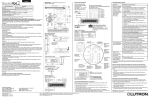
Wall Mounting
Visor Control Receivers may be wall mounted using
the supplied wall bracket.
LED turns ON.
1. Attach wall bracket to wall using the supplied
screws and wall anchors.
UP
• If the large white button is selected, all LEDs in the center column
will turn ON.
• If the large gray button is selected, all LEDs in the right most
column will turn ON.
4. Select Transmitter button that is to be learned by
2. Place adapter cord into notches at top and bottom
of wall bracket. Place contact closure wiring (if
applicable) into cutout at top of wall bracket. Align
Receiver and snap onto wall bracket.
Contact Closure
Wiring
the Receiver. Press and hold the Visor Control
Transmitter button until the orange LED next to the
selected Receiver button flashes (approximately 3
seconds). The LEARN LED will flash whenever the
Receiver “hears” the Transmitter.
Power Cord
UP
The orange LED will turn OFF after the
Visor Control button is released. The
green LEARN LED will stay ON.
2