1
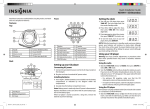
Clock Display
Setting Up the Clock Radio
Setting Clock Time and Calendar
TIME/ALARM Display
Alarm 2 Armed
Alarm 1 Armed
iPod Indicator
1. Press and hold the CLOCK Button located on the back of the unit until 12H or 24H appeared.
Select your desired clock display either 12 hour or 24 hour by pressing SKIP FORWARD or
BACKWARD Button repeatedly. Then press the CLOCK Button again to confirm 12H or 24H
mode setting.
2. The clock display at the centre will flash. Press the SKIP FORWARD or BACKWARD Button to
set the current time, then press the CLOCK Button again to confirm clock setting. (Note: if the
system is set to 12-hour mode, if it’s afternoon, the PM indicator will be lighted on.)
3. The year display at the lower right will flash. Press the CLOCK Button to accept the current
setting, or press the SKIP FORWARD or BACKWARD Button until current year is display. Press
the CLOCK Button to confirm year setting.
4. The date display at the lower right will flash. Press the CLOCK Button to accept the current
setting or press the SKIP FORWARD or BACKWARD Button until current date is displayed.
Press the CLOCK Button to confirm date setting.
Setting Alarm Time
Wake To Indicator:
iPod, Radio, Buzzer,
SHUFFLE Indicator
AM Indicator
PRESET Indicator
FM Indicator
ST/KHz/MHz
SLEEP Indicator
Indicator
PM Indicator
Radio Frequency/Date/
Volume Level/AUX Display
1. The unit can set two Alarm Time.
2. Press and hold the ALARM 1 Button or ALARM 2 Button until the display flashes. Press the
SKIP FORWARD or BACKWARD Button until the desired alarm time is displayed. Remember
to set the correct AM or PM (an icon to the right of the time display is the PM indicator).
3. Press the WAKE Button to select the iPod, radio or alarm buzzer hi or low to wake to.
A corresponding Wake Icon will light up for the selected Wake sound.
To select Buzzer Hi or Low
4. Press and hold ALARM 1 or ALARM 2 Button until clock display flashing, press ALARM 1 or
ALARM 2 Button again. Then select AL-L or AL-H by press SKIP
or
repeatedly.
Press the ALARM 1 Button or ALARM 2 Button again to exit the setting mode. The alarm time
and wake to mode are set.
Note: Once you set the alarm time, the alarm will be automatically armed. The Alarm Icon and Wake
Icon will appear to indicate the alarm is armed.
Note: Make sure to adjust volume level for comfortable wake up volume.
7
8