1
SOUS W IND OW S
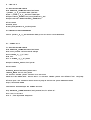
Re copie r l
a cl
ass jdbc m ysq le n %JONAS_ ROOT%\ l
ib\ e xt\
copy cp %AUD OO_ H OME%/INSTALL/w ar/m ysq l
-conne ctor-java-3.1.4-be ta-bin.jar C:\ JOnAS4.1\ l
ib\ e xt\
Positionne r l
a variabl
e d'e nvironne m e nt
se t CLASSPATH =%CLASSPATH %;%JONAS_ ROOT%\ l
ib\ e xt\ m ysq l
-conne ctor-java-3.1.4-be tabin.jar
# D e m arrage autom atiq ue de m ysq l
e ch o "cd /usr/l
ocal
/m ysq l
" > /e tc/rc.d/init.d/m ysq l
d
e ch o "bin/m ysq l
d_ safe --use r=m ysq l& " > > /e tc/rc.d/init.d/m ysq l
d
ch m od + x /e tc/rc.d/init.d/m ysq l
d
cd /e tc/rc.d/rc5.d
l
n -s ../init.d/m ysq l
d S9 9 m ysq l
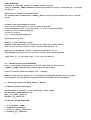
Vérification de m ysq l
$m ysq l-u root -pm anage r m ysq l
Re ading tabl
e inform ation for com pl
e tion of tabl
e and col
um n nam e s
You can turn off th is fe ature to ge t a q uick e r startup w ith -A
W el
com e to th e MySQL m onitor. Com m ands e nd w ith ;or \ g.
Your MySQL conne ction id is 4 to se rve r ve rsion: 5.0 .2-al
ph a-standard
Type 'h e l
p;' or '\ h ' for h e l
p. Type '\ c' to cl
e ar th e buffe r.
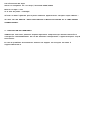
4.2 - INSTALLATION SOUS W IND OW S
Lance r l
'e xécutabl
e d'instal
l
ation de m ysq lse tup.e xe q ui se trouve e n:
%AUD OO_ H OME%\ INSTALL\ bin\ w in\ m ysq l
-5.0 .2-al
ph a-w in\
Fournir l
e m ot de passe du com pte root = m anage r
Modifie r l
e PATH pour pointe r sur "C:\ Program Fil
e s\ MySQL\ MySQL Se rve r 5.0 \ bin\ "
Par l
e pane au de configuration/Systèm e /Avancé/Variabl
e s d'e nvironne m e nt/
V - INITIALISATION D E LA BASE AUD OO / MYSQL
5.1 INSTALLATION SOUS LINUX
$m ysq l
adm in -h l
ocal
h ost -u root -pm anage r cre ate audoo
$cd $AUD OO_ H OME/INSTALL/sq l
$init_ al
l
_ tabl
e s_ m ysq l
.sh
$update _ al
l
_ tabl
e s.sq l
5.2 INSTALLATION W IND OW S
c:\ > cd %AUD OO_ H OME%
c:\ > INSTALL\ sq l
\ m ysq l
>
c:\ > init_ al
l
_ tabl
e s_ m ysq l
.bat
c:\ > update _ al
l
_ tabl
e s.bat