1
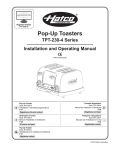
SLOT TOASTERS
TPU-230-4 and TPU-230-6 Series
Installation and Operating Manual
I&W #07.05.202.00
1
2
3
0
1
4
2
3
0
5
4
CO
5
CO
NT
NT
RO
DA
RK
L
PO
RO
DA
L
WE
R
RK
PO
WE
R
CO
HA
TC
CO
MM
ER
TO CI
AS AL
TER
O
2
4
HA
TC
O
TOMMERCI
AS AL
TER
RP
.
MI
LW
AU
KE
E,
2
CO
RP
.
CO
MI
LW
4
AU
KE
E,
WI
6
U.S
.A.
W
SL
OT
S
Schlitztoaster
Serie TPU-230-4 und TPU-230-6
Installations- und Bedienungshandbuch
P 11
Grille-pain à fentes
Série TPU-230-4 et TPU-230-6
Manuel d'installation et d'utilisation
P 29
Toasters met sleuven
Serie TPU-230-4 en TPU-230-6
Handleiding voor Installatie en Bediening
P 47
SL
OT
S
Tostadoras con ranuras
Serie TPU-230-4 y TPU-230-6
Manual de Instalación y Operación
P 20
Tostapane verticali
Serie TPU-230-4 e TPU-230-6
Manuale per l'installazione e l'uso
P 38
© 2010 Hatco Corporation
CONTENTS
Operation......................................................................7
General ......................................................................7
Maintenance .................................................................8
General ......................................................................8
Cleaning .....................................................................8
Replacing a Heating Element ....................................8
Troubleshooting Guide ...............................................9
Hatco Limited Warranty ............................................10
Service Information ...................................................10
Important Owner Information .....................................2
Introduction..................................................................2
Important Safety Information .....................................3
Model Description .......................................................4
Specifications ..............................................................5
Plug Configurations....................................................5
Electrical Rating Chart ...............................................5
Dimensions ................................................................5
Installation....................................................................6
General ......................................................................6
IMPORTANT OWNER INFORMATION
Business
Hours:
Record the model number, serial number (located on the
bottom of the unit), voltage, and purchase date of the unit
in the spaces below. Please have this information available when calling Hatco for service assistance.
Model No. ____________________________________
Serial No. ____________________________________
8:00 AM to 5:00 PM
Central Standard Time (C.S.T.)
(Summer Hours: June to September –
8:00 AM to 5:00 PM C.S.T.
Monday through Thursday
8:00 AM to 2:30 PM C.S.T. Friday)
Telephone: (414) 671-6350
Voltage ______________________________________
E-mail:
Date of Purchase ______________________________
Fax:
[email protected]
(414) 671-3976 (Parts and Service)
Additional information can be found by visiting our web
site at www.hatcocorp.com.
INTRODUCTION
The Hatco Slot Toaster is perfect for self-serve
buffet areas, restaurants, diners, and cafes. The unit
evenly toasts a variety of bread products
including bagels and waffles.
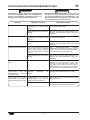
WARNING
WARNING indicates a hazardous situation which, if
not avoided, could result in death or serious injury.
The Slot Toaster features a durable stainless steel
housing, four or six self-centering extra-wide slots, a
timed toasting control, a removable crumb tray for easy
cleaning, and a 1829 mm (6') power cord with plug.
CAUTION
CAUTION indicates a hazardous situation which, if not
avoided, could result in minor or moderate injury.
The Hatco Slot Toaster is a product of extensive
research and field testing. The materials used were
selected
for
maximum
durability,
attractive
appearance, and optimum performance. Every unit is
inspected
and
tested
thoroughly
prior
to
shipment.
NOTICE
NOTICE is used to address practices not related to
personal injury.
This manual provides the installation, safety, and
operating instructions for the Hatco Slot Toaster. Hatco
recommends all installation, operating, and safety
instructions appearing in this manual be read prior to
installation or operation of your Hatco Slot Toaster.
Safety information that appears in this manual is identified
by the following signal word panels:
2
Form No. TPUCEM-0310
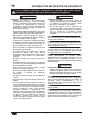
IMPORTANT SAFETY INFORMATION
Read the following important safety information before using this equipment to avoid serious injury or
death and to avoid damage to equipment or property.
WARNING
WARNING
ELECTRIC SHOCK HAZARD:
• Plug unit into a properly grounded electrical
receptacle of the correct voltage, size, and plug
configuration. If plug and receptacle do not
match, contact a qualified electrician to determine
and install the proper voltage and size electrical
receptacle.
FIRE HAZARD:
• Locate unit a minimum of 25 mm (1″) from
combustible walls and materials. If safe distances
are not maintained, combustion or discoloration
could occur.
• This unit must be serviced and PAT tested by
trained and qualified personnel only. Service by
unqualified personnel may lead to electric shock
or burn.
EXPLOSION HAZARD: Do not store or use gasoline
or other flammable vapors or liquids in the vicinity of
this or any other appliance.
• Unit is not weatherproof. Locate unit indoors
where ambient air temperature is a minimum of
21°C (70°F).
This unit is not intended for use by children or
persons with reduced physical, sensory, or mental
capabilities. Ensure proper supervision of children
and keep them away from the unit.
• Do not place anything on top of toaster. Do not
place toaster near or underneath curtains or other
combustible materials. Items near or on top of
toaster could catch fire causing injury and/or
damage to the toaster.
• Unplug power cord and allow unit to cool before
performing maintenance, cleaning, or attempting
to clear a jam.
In case of fire, disconnect toaster from power source
immediately. This allows unit to cool, making it easier
and safer to put out the fire.
• DO NOT submerge or saturate with water. Unit is
not waterproof. Do not operate if unit has been
submerged or saturated with water.
• Do not pull unit by power cord.
Make sure all operators have been instructed on the
safe and proper use of the unit.
• Discontinue use if power cord is frayed or worn.
• Do not attempt to repair or replace a damaged
power cord. The cord must be replaced by Hatco,
an Authorized Hatco Service Agent, or a person
with similar qualifications.
This unit has no “user-serviceable” parts. If service is
required on this unit, contact an Authorized Hatco
Service Agent or contact the Hatco Service
Department at 414-671-6350; fax 414-671-3976.
• Do not steam clean or use excessive water on
unit.
• This unit is not “jet-proof” construction. Do not
use jet-clean spray to clean this unit.
CAUTION
BURN HAZARD:
• Some exterior surfaces on unit will get hot. Use
caution when touching these areas.
• NEVER insert a knife, fork, or similar object into
the toasting chamber.
• Do not remove crumb tray for cleaning until
toaster is cool.
• Do not pick up the toaster by inserting fingers into
the toaster slots and grasping the heating
elements.
Locate unit at proper counter height in an area that is
convenient for use. The location should be level to
prevent unit or its contents from falling accidentally
and strong enough to support the weight of the unit
and contents.
• Do not clean unit when it is energized or hot.
• Do not allow liquids to spill into the unit.
• Use only Genuine Hatco Replacement Parts when
service is required. Failure to use Genuine Hatco
Replacement Parts will void all warranties and
may subject operators of the equipment to
hazardous electrical voltage, resulting in
electrical shock or burn. Genuine Hatco
Replacement Parts are specified to operate safely
in the environments in which they are used. Some
aftermarket or generic replacement parts do not
have the characteristics that will allow them to
operate safely in Hatco equipment.
Always operate toaster with crumb tray installed.
The toasting of coated or buttered products such as
garlic bread, cheese sandwiches, and sweet rolls is
NOT recommended. Residue will reduce toaster
performance and could ignite inside the toaster.
Using the toaster with the food products listed above
will void unit warranty.
NOTICE
Do not lay unit on the side with the control panel.
Damage to unit could occur.
Use non-abrasive cleaners only. Abrasive cleaners
could scratch finish of unit, marring its appearance
and making it susceptible to soil accumulation.
This unit is intended for
only — NOT for household use.
3
commercial
use
Form No. TPUCEM-0310
MODEL DESCRIPTION
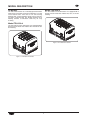
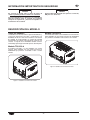
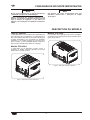
Model TPU-230-6
All Models
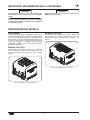
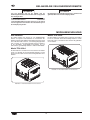
The TPU-230-6 is a six slot toaster. It is equipped with a
SLOTS selector knob that enables two, four, or six slot
toasting.
The Hatco Slot Toaster is a manually-operated toaster
and is perfect for buffet areas and restaurants. The TPU
series toasters have either four or six self-centering
toasting slots, a timed toasting control, and a 1829 mm
(6′) power cord with plug. The durable stainless steel
housing contains a removable crumb tray for easy
cleaning.
Model TPU-230-4
The TPU-230-4 is a four slot toaster. It is equipped with a
SLOTS selector knob that enables either two slot or four
slot toasting.
1
2
3
0
4
5
CO
NT
RO
DA
RK
L
PO
WE
R
CO
HA
TC
O
TOMMERCI
AS AL
TER
2
CO
RP
.
MI
LW
4
AU
KE
E,
WI
6
U.S
.A.
SL
1
OT
S
Figure 2. TPU-230-6 Slot Toaster
2
3
0
4
5
CO
NT
RO
DA
L
RK
PO
WE
R
CO
HA
TC
TOMMERCI
AS AL
TER
O
2
4
CO
RP
.
MI
LW
AU
KE
E,
W
SL
OT
S
Figure 1. TPU-230-4 Slot Toaster
4
Form No. TPUCEM-0310
SPECIFICATIONS
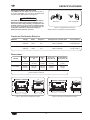
Plug Configurations
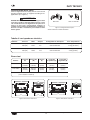
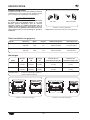
Units are supplied from the factory with an electrical cord
and plug installed. Plugs are supplied according to the
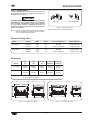
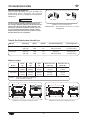
applications. (See Figure 3.)
WARNING
ELECTRIC SHOCK HAZARD: Plug unit into a properly
grounded electrical receptacle of the correct voltage,
size, and plug configuration. If plug and receptacle
do not match, contact a qualified electrician to
determine and install the proper voltage and size
electrical receptacle.
BS-1363
Figure 3. Plug Configurations
NOTE: Receptacle not supplied by Hatco.
NOTE: The specification label is located on the bottom of
the unit. See label for serial number and verification of unit electrical information.
Electrical Rating Chart
Model
Voltage
Watts
Amps
Plug Configuration
Shipping Weight
230 (CE)
1976
8.6
CEE 7/7 Schuko
7.4 kg (16.5 lbs.)
12.3
CEE 7/7 Schuko
TPU-230-4
230 (CE)
TPU-230-6
230 (CE)
1976
Width
(A)
Model
TPU-230-4
320 mm
(12-5/8″)
TPU-230-6
424 mm
(16-3/4″)
Slot Openings =
Depth
(B)
262 mm
(10-3/8″)
2
Footprint
Width (D)
Footprint
Depth (E)
245 mm
(9-3/4″)
389 mm
(15-3/8″)
195 mm
(7-3/4″)
284 mm
(11-1/4″)
25 mm W x 120 mm D x 120 mm H
(1″ W x 4-3/4″ D x 4-3/4″ H)
C
2
4
2
9.6 kg (21 lbs.)
B
2
3
1
4
4
6
COMMERCIAL
5
0
COMMERCIAL
5
TOASTER
TOASTER
LIGHT
DARK
COLOR CONTROL
LIGHT
9.6 kg (21 lbs.)
A
4
0
7.4 kg (16.5 lbs.)
195 mm
(7-3/4″)
B
3
1
BS-1363
Height
(C)
246 mm
(9-3/4″)
262 mm
(10-3/8″)
BS-1363
12.3
2840
A
C
8.6
2840
230 (CE)
Dimensions
CEE 7/7 Schuko
POWER
HATCO CORP. MILWAUKEE WI U.S.A.
SLOTS
DARK
COLOR CONTROL
POWER
HATCO CORP. MILWAUKEE, WI U.S.A.
SLOTS
D
E
D
E
Figure 4. TPU-230-4 Dimensions
Figure 5. TPU-230-6 Dimensions
5
Form No. TPUCEM-0310
INSTALLATION
General
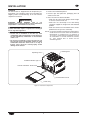
1. Remove the unit from the carton.
2. Remove the information packet.
The Slot Toaster is shipped with all components preassembled. Care should be taken when unpacking the
shipping carton to avoid damage to the unit and the
components enclosed.
3. Remove tape and protective packaging from all
surfaces of the unit.
4. Place the unit in the desired location.
• Make sure the unit is at the proper counter height
in an area convenient for use.
WARNING
ELECTRIC SHOCK HAZARD: Unit is not
weatherproof. Locate unit indoors where ambient air
temperature is a minimum of 21°C (70°F).
• Make sure the countertop is level and strong
enough to support the weight of the unit and food
product.
EXPLOSION HAZARD: Do not store or use gasoline
or other flammable vapors or liquids in the vicinity of
this or any other appliance.
• Make sure all the feet on the bottom of the unit are
positioned securely on the countertop.
FIRE HAZARD:
• Locate unit a minimum of 25 mm (1″) from
combustible walls and materials. If safe distances
are not maintained, combustion or discoloration
could occur.
NOTE: For proper operation and maximum performance,
locate the unit in an area where the ambient air
temperature is constant and is a minimum of
21°C (70°F). Areas that are susceptible to active
air movements or currents should be avoided,
i.e., near exhaust fans or hoods and air
conditioning ducts.
• Do not place anything on top of toaster. Do not
place toaster near or underneath curtains or other
combustible materials. Items near or on top of
toaster could catch fire causing injury and/or
damage to the toaster.
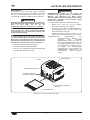
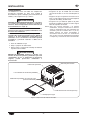
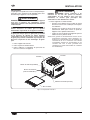
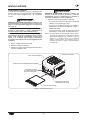
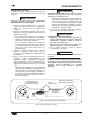
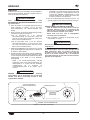
Toasting Slot
Operating Lever
POWER Indicator Light
1
2
3
0
4
COLOR CONTROL Timer Knob
5
CO
NT
RO
DA
L
RK
PO
WE
R
CO
HA
TC
TOMMERCI
AS AL
TER
O
2
4
CO
RP
.
MI
LW
AU
KE
E,
W
SL
OT
S
SLOTS Selector Knob
Crumb Tray
Figure 6. TPU-230-4 Components
6
Form No. TPUCEM-0310
OPERATION
General
5. Push down on the operating lever to lift the toasted
product out of the toaster.
The Slot Toaster is designed for ease of operation.
Perform the following procedure to operate the toaster.
WARNING
ELECTRIC SHOCK HAZARD:
• Unplug power cord and allow unit to cool before
performing maintenance, cleaning, or attempting
to clear a jam.
WARNING
Read all safety messages in the IMPORTANT SAFETY
INFORMATION section before operating this
equipment.
• NEVER insert a knife, fork, or similar object into
the toasting chamber.
1. Plug the unit into a properly grounded electrical
outlet of the correct voltage, size, and plug
configuration. See the SPECIFICATIONS section for
details.
6. For periodic cleaning, remove and empty the crumb
tray.
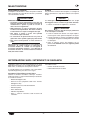
2. Set the SLOTS selector knob to the desired number
of energized toasting slots.
CAUTION
Always operate toaster with crumb tray installed.
a. For the TPU-230-4, set the SLOTS selector knob
to either two or four slots. When selecting two
slots, the two slots on the left will be energized.
The toasting of coated or buttered products such as
garlic bread, cheese sandwiches, and sweet rolls is
NOT recommended. Residue will reduce toaster
performance and could ignite inside the toaster.
Using the toaster with the food products listed above
will void the unit warranty.
b. For the TPU-230-6, set the SLOTS selector knob
to two, four, or six slots. When selecting two or
four slots, the two or four slots on the left will be
energized.
3. Place bread product in toasting slots and push up on
the operating lever to lower product into the toaster.
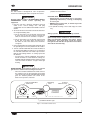
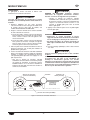
4. Turn the COLOR CONTROL timer knob clockwise to
the desired toast darkness setting. The “0” setting on
the COLOR CONTROL timer knob represents the
lightest toast setting and the “5” setting represents
the darkest.
• As soon as the COLOR CONTROL timer knob is
turned clockwise to a toast darkness setting, the
POWER indicator light illuminates and the heating
elements inside the toaster energize and begin
heating.
CAUTION
BURN HAZARD: Some exterior surfaces on unit will
get hot. Use caution when touching these areas.
• When the COLOR CONTROL timer knob reaches
the end of its cycle, the timer bell rings, the heating
elements shut off, and the POWER indicator light
goes off. Toasted product can remain in the
toaster to keep warm, if desired.
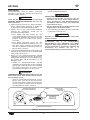
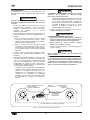
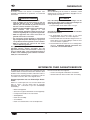
COLOR CONTROL
Timer Knob
2
Operating
Lever
SLOTS
Selector Knob
2
3
1
4
4
COMMERCIAL
5
0
LIGHT
COLOR CONTROL
TOASTER
DARK
POWER
HATCO CORP. MILWAUKEE, WI U.S.A.
SLOTS
POWER Indicator Light
Figure 7. TPU-230-4 Control Panel
7
Form No. TPUCEM-0310
MAINTENANCE
General
Replacing a Heating Element
The Slot Toaster is designed for maximum durability and
performance with minimum maintenance.
Use the following instructions to replace a heating
element in a TPU Slot Toaster. One of the following kits
will need to be ordered, depending on the element that
needs to be replaced.
Part Number
R02.09.278.00
R02.09.279.00
WARNING
ELECTRIC SHOCK HAZARD:
• Unplug power cord and allow unit to cool before
performing maintenance, cleaning, or attempting
to clear a jam.
• DO NOT submerge or saturate with water. Unit is
not waterproof. Do not operate if unit has been
submerged or saturated with water.
Item
Heating Element, Outer, 340 Watts
Heating Element, Inner, 432 Watts
WARNING
ELECTRIC SHOCK HAZARD: This unit must be
serviced and PAT tested by trained and qualified
personnel only. Service by unqualified personnel may
lead to electric shock or burn.
• Do not steam clean or use excessive water on
unit.
1. Operate the toaster to identify the position of the
defective heating element.
2. Unplug the toaster
from the power
supply and allow the
toaster to cool.
• This unit is not “jet-proof” construction. Do not
use jet-clean spray to clean this unit.
• Do not clean unit when it is energized or hot.
This unit has no “user-serviceable” parts. If service is
required on this unit, contact an Authorized Hatco
Service Agent or contact the Hatco Service
Department at 414-671-6350; fax 414-671-3976.
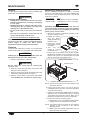
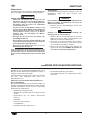
3. Remove the crumb
tray from the front of
the toaster.
Cleaning
4. Turn
over
the
toaster to access
the bottom cover.
To preserve the finish of the toaster, it is recommended
that the metal surfaces be wiped daily with a damp cloth.
SLOT
S
Crumb Tray
5. Remove the five (5) bottom cover screws. Carefully
lift and rotate the bottom cover so that it is clear of the
bottom of the toaster. The attached power cord will
limit the movement of the bottom cover.
NOTICE
Submerging or saturating the unit with water will
damage the unit and void the unit warranty.
1. Remove and empty the crumb tray.
Bottom Cover Screw
CAUTION
Do not remove the crumb tray for cleaning until
toaster is cool.
Bottom Cover
2. Wash the crumb tray with warm water and a mild
detergent. Rinse with water.
TS
3. Allow the crumb tray to air dry or hand dry with a soft
cloth before placing back into the toaster.
SLO
4. Wipe the exterior surface of the toaster with a damp
cloth. NOTICE: Use non-abrasive cleaners only.
Figure 8. Replacing the Bottom Cover
NOTE: The feet on the bottom cover of the toaster do not
need to be removed.
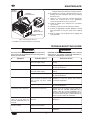
6. Loosen, but do not remove, the two (2) element
retaining bracket screws. The screws are located on
each end of the bracket.
7. Using a 7mm socket and a phillips head screw driver,
disconnect the electrical wires from the electrical
connections on the defective element. Make sure to
identify the locations of the wires for reassembly.
8. Remove the defective heating element:
a. Pull back on the element retaining bracket until the
heating element is released from the bracket.
NOTE: The retaining bracket screw holes are slotted to
allowing for the movement of the element
retaining bracket.
8
b. With the element released, gently pull the element
up and out of the element slot.
Form No. TPUCEM-0310
MAINTENANCE
NOTE: The two outside heating elements have different
wattage ratings than the interior heating elements.
Heating
Element
10. Re-position the element retaining bracket over the
heating elements and tighten the two (2) retaining
bracket screws.
Retaining
Bracket Screw
11. Using the screws and nuts removed previously,
connect the electrical wires to the appropriate
electrical connections on the new element.
12. Install the bottom cover using the five (5) bottom
cover screws.
13. Install the crumb tray into the front of the toaster.
14. Perform the appropriate Portable Appliance Testing
(PAT) procedure to verify the safety of the repaired
unit.
TS
SLO
Retaining
Bracket Screw
15. Plug the toaster into the proper power supply and
verify operation.
Element Retaining
Bracket
Figure 9. Replacing the Element
9. Install the new element into the element slot.
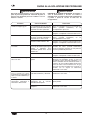
TROUBLESHOOTING GUIDE
WARNING
WARNING
This unit must be serviced by qualified personnel
only. Service by unqualified personnel may lead to
electric shock or burn.
Symptom
Probable Cause
Toast too light.
ELECTRIC SHOCK HAZARD: Unplug power cord and
allow unit to cool before performing maintenance,
cleaning, or attempting to clear a jam.
COLOR CONTROL timer knob
turned to a light setting.
Supply voltage to unit is low.
Toast too dark.
COLOR CONTROL timer knob
turned to a dark setting.
Supply voltage to unit is high.
Unit takes too long to toast.
The first few batches can take
longer because the toaster needs
time to heat up when initially
turned on.
Supply voltage to unit is low.
Unit toasts on one side only.
Heating element defective.
Heating element does not
come on at all when the
COLOR CONTROL timer is
running.
The COLOR CONTROL timer is
defective.
Toaster trips the
breaker or GFCI.
circuit
Circuit breaker is not sized
properly for the toaster.
Wiring fault inside toaster.
9
Corrective Action
Turn COLOR CONTROL timer knob to a darker
setting.
Verify the supply voltage to the toaster matches
the unit specifications.
Turn COLOR CONTROL timer knob to a lighter
setting.
Verify the supply voltage to the toaster matches
the unit specifications.
Turn the COLOR CONTROL timer knob
clockwise to cycle the toaster once before
inserting bread product.
Verify the supply voltage to the toaster matches
the unit specifications.
Visually check the heating element inside the
toaster with the COLOR CONTROL timer
running. With the COLOR CONTROL timer
running, the heating element should glow red. If
the element does not glow, Contact Authorized
Service Agent or Hatco for assistance.
Contact Authorized Service Agent or Hatco for
assistance.
Check circuit breaker for proper sizing.
Contact Authorized Service Agent or Hatco for
assistance.
Form No. TPUCEM-0310
HATCO LIMITED WARRANTY
1. PRODUCT WARRANTY
Hatco warrants the products that it manufactures (the
“Products”) to be free from defects in materials and
workmanship, under normal use and service, for a period
of one (1) year from the date of purchase when installed
and maintained in accordance with Hatco’s written
instructions or 18 months from the date of shipment from
Hatco. Buyer must establish the Product’s purchase date
by returning Hatco’s Warranty Registration Card or by
other means satisfactory to Hatco in its sole discretion.
THE FOREGOING WARRANTIES ARE EXCLUSIVE
AND IN LIEU OF ANY OTHER WARRANTY,
EXPRESSED OR IMPLIED, INCLUDING BUT NOT
LIMITED TO ANY IMPLIED WARRANTY OF
MERCHANTABILITY OR FITNESS FOR A PARTICULAR
PURPOSE OR PATENT OR OTHER INTELLECTUAL
PROPERTY RIGHT INFRINGEMENT. Without limiting
the generality of the foregoing, SUCH WARRANTIES DO
NOT COVER: Coated incandescent light bulbs,
fluorescent lights, decorative heat lamp bulbs, coated
halogen light bulbs, halogen heat lamp bulbs, heated
glass shelves, glass components, and fuses; Product
failure in booster tank, fin tube heat exchanger, or other
water heating equipment caused by liming, sediment
buildup, chemical attack, or freezing; or Product misuse,
tampering or misapplication, improper installation, or
application of improper voltage.
Hatco warrants the following Product components to be
free from defects in materials and workmanship from the
date of purchase (subject to the foregoing conditions) for
the period(s) of time and on the conditions listed below:
a) One (1) Year Parts and Labor PLUS One
(1) Additional Year Parts-Only Warranty:
Conveyor Toaster Elements (metal sheathed)
Drawer Warmer Elements (metal sheathed)
Drawer Warmer Drawer Rollers and Slides
Food Warmer Elements (metal sheathed)
Display Warmer Elements
(metal sheathed air heating)
Holding Cabinet Elements
(metal sheathed air heating)
Built-In Heated Well Elements —
HWB and HWBI Series (metal sheathed)
2. LIMITATION OF REMEDIES AND DAMAGES
Hatco’s liability and Buyer’s exclusive remedy hereunder
will be limited solely, at Hatco’s option, to repair or
replacement using new or refurbished parts or Product
by Hatco or a Hatco-authorized service agency (other
than where Buyer is located outside of the United States,
Canada, United Kingdom, or Australia, in which case
Hatco’s liability and Buyer’s exclusive remedy hereunder
will be limited solely to replacement of part under
warranty) with respect to any claim made within the
applicable warranty period referred to above. Hatco
reserves the right to accept or reject any such claim in
whole or in part. In the context of this Limited Warranty,
“refurbished” means a part or Product that has been
returned to its original specifications by Hatco or a Hatcoauthorized service agency. Hatco will not accept the
return of any Product without prior written approval from
Hatco, and all such approved returns shall be made at
Buyer’s sole expense. HATCO WILL NOT BE LIABLE,
UNDER
ANY
CIRCUMSTANCES,
FOR
CONSEQUENTIAL OR INCIDENTAL DAMAGES,
INCLUDING BUT NOT LIMITED TO LABOR COSTS OR
LOST PROFITS RESULTING FROM THE USE OF OR
INABILITY TO USE THE PRODUCTS OR FROM THE
PRODUCTS BEING INCORPORATED IN OR
BECOMING A COMPONENT OF ANY OTHER
PRODUCT OR GOODS.
b) One (1) Year Parts and Labor PLUS Four
(4) Years Parts-Only Warranty on
pro-rated terms that Hatco will explain
at Buyer’s request:
3CS and FR Tanks
c) One (1) Year Parts and Labor PLUS Nine
(9) Years Parts-Only Warranty on:
Electric Booster Heater Tanks
Gas Booster Heater Tanks
d) Ninety (90) Day Parts-Only Warranty:
Replacement Parts
SERVICE INFORMATION
Warranty Issues — United Kingdom
Non-Warranty Issues
If you experience an issue with a TPU toaster during the
warranty period, contact the Marren Group at:
NOTE: The last four digits in a ten digit numerical serial
number are the manufacturing date code.
The warranty on Hatco TPU Series Slot Toasters is for
one year from date of purchase or eighteen months from
date of shipping from Hatco, whichever occurs first.
If you experience a non-warranty issue that requires
assistance, please contact the Marren Group.
Telephone: +44(0)1933 666233
Example: Serial number 9625060833 has a date
code of “0833” which indicates the following:
When contacting the Marren Group for warranty
assistance, please supply the following information:
0833
• Model of unit
Week Thirty-Three
Year 2008
• Serial number (located on the bottom of the unit)
• Specific problem with the unit
• Date of purchase
• Name of business
• Shipping address
• Contact name and telephone number
10
Form No. TPUCEM-0310
INHALT
Betrieb ........................................................................16
Allgemeines .............................................................16
Wartung ......................................................................17
Allgemeines .............................................................17
Reinigung .................................................................17
Hinweise zur Garantieleistung .................................17
Richtlinien zur Störungsbeseitigung .......................18
Eingeschränkte Garantie durch Hatco ....................19
Wichtige Informationen für den Benutzer ...............11
Einleitung ...................................................................11
Wichtige Sicherheitshinweise ..................................12
Modellbeschreibung..................................................13
Technische Daten ......................................................14
Steckerkonfigurationen ............................................14
Tabelle der elektrischen Anschlüsse ........................14
Abmessungen ..........................................................14
Aufstellen des Geräts................................................15
Allgemeines .............................................................15
WICHTIGE INFORMATIONEN FÜR DEN BENUTZER
Geschäftszeiten:
8.00 Uhr bis 17.00 Uhr
Central Standard Time (CST)
Schreiben Sie die Modellbezeichnung, die Seriennummer
(unter dem Gerät), die Spannung und das Kaufdatum in
die folgenden Zeilen. Haben Sie bitte dies Information zur
Hand, wenn Sie Hatco wegen einer ServiceUnterstützung anrufen.
Modellbezeichnung ____________________________
Seriennummer ________________________________
Telefon:
Spannung ____________________________________
Kaufdatum
Fax:
__________________________________
(im Sommer: Juni bis September –
8.00 Uhr bis 17.00 Uhr (CST)
Montag bis Donnerstag
8.00 Uhr bis 14.30 Uhr (CST) Freitag)
(414) 671-6350
(414) 671-3976 (Ersatzteile und Service)
Weitere Informationen finden Sie auf unserer Website
unter www.hatcocorp.com.
EINLEITUNG
Der Hatco Schlitztoaster ist ideal geeignet für
Selbstbedienungsbuffets sowie Restaurants, ImbissStuben und Cafes. Mit dem Gerät werden vielfältige
Brotprodukte, einschließlich Bagels und Waffeln,
gleichmäßig getoastet.
WARNUNG
WARNUNG bedeutet, dass eine Gefahr schwerer oder
tödlicher Verletzungen besteht, wenn die Situation
nicht vermieden wird.
Der Schlitztoaster weist ein robustes Edelstahlgehäuse,
vier oder sechs selbstzentrierende, extra breite Schlitze,
individuelle
Regelung
der
Toastdauer,
eine
herausnehmbare, leicht zu reinigende Krümelschublade
und ein 1829 mm langes Netzkabel mit Stecker auf.
VORSICHT
VORSICHT bedeutet, dass eine Gefahr leichter oder
mittelschwerer Verletzungen besteht, wenn die
Situation nicht vermieden wird.
Der Hatco Schlitztoaster ist das Ergebnis umfassender
Entwicklungsarbeiten und praktischer Erprobung. Die
verwendeten Materialen wurden ausgewählt, um lange
Lebensdauer, gute Optik und optimale Leistung zu
erzielen. Jedes Gerät wurde vor der Auslieferung
ausführlich überprüft und getestet.
HINWEIS
HINWEIS bedeutet, dass eine Gefahr von Geräte- oder
Sachschäden besteht.
Dieses Handbuch enthält Anleitungen für das Aufstellen
und die Bedienung des Schlitztoasters sowie wichtige
Sicherheitshinweise. Wir empfehlen, alle in diesem
Handbuch enthaltenen Aufstell-, Sicherheits- und
Bedienungsanweisungen für diesen Hatco Schlitztoaster
vor dem Aufstellen und der Inbetriebnahme zu lesen.
Sicherheitshinweise sind in diesem Handbuch durch ein
Warnsymbol mit den folgenden Signalwörtern
gekennzeichnet:
11
Form-Nr. TPUCEM-0310
WICHTIGE SICHERHEITSHINWEISE
Vor der Anwendung dieser Ausrüstung lesen Sie die folgenden wichtigen Sicherheitsinformationen, um
ernste Verletzung oder Tod zu vermeiden und Schaden der Ausrüstung oder des Eigentums zu
vermeiden.
WARNUNG
WARNUNG
GEFAHR VON ELEKTROSCHOCKS:
• Das Gerät muss an eine ordnungsgemäß
geerdete Steckdose mit der richtigen Spannung,
Größe und Steckerkonfiguration angeschlossen
werden. Wenn Stecker und Steckdose nicht
übereinstimmen, wenden Sie sich an einen
qualifizierten Elektriker, um die richtige
Netzspannung und Steckerart zu ermitteln und die
korrekte Steckdose zu installieren.
• Verwenden Sie bei der Reparatur von Hatco
Geräten ausschließlich Hatco Ersatzteile. Wenn
Sie keine Original-Hatco-Ersatzteile verwenden,
setzen
Sie
die
Bediener
der
Geräte
möglicherweise
gefährlichen
elektrischen
Spannungen aus, welche zu Stromschlag oder
Verbrennungen führen können. Original-HatcoErsatzteile sind für den sicheren Betrieb unter den
gegebenen Einsatzbedingungen ausgelegt.
Manche Ersatzteile anderer Hersteller oder
Nachbauteile verfügen nicht über die geforderten
Eigenschaften und funktionieren nicht sicher in
Hatco Geräten.
• Ziehen Sie den Stecker des Toasters aus der
Steckdose und lassen Sie das Gerät abkühlen,
bevor Sie Wartungs- oder Reinigungsarbeiten
durchführen oder versuchen, eine verklemmte
Toastscheibe zu lösen.
BRANDGEFAHR:
• Stellen Sie das Gerät mit mindestens 25 mm
Abstand zu entflammbaren Wänden oder
Materialen auf. Wenn dieser Sicherheitsabstand
nicht eingehalten wird, können Verfärbungen
entstehen und brennbare Stoffe können sich
entzünden.
• Tauchen Sie das Gerät NICHT in Wasser und
reinigen Sie das Gerät NICHT mit übermäßig viel
Wasser. Das Gerät ist nicht wasserdicht. Es darf
nicht betrieben werden, wenn es in Wasser
getaucht oder mit übermäßig viel Wasser
gereinigt wurde.
• Stellen Sie keine Gegenstände auf den Toaster.
Stellen Sie den Toaster nicht in der Nähe von bzw.
unter Gardinen oder anderen brennbaren Stoffen
auf. In der Nähe des oder auf dem Toaster
befindliche Gegenstände können sich entzünden
und Verletzungen und/oder Sachschäden
verursachen.
• Das Gerät ist nicht witterungsfest. Stellen Sie das
Gerät in einem Raum an einer Stelle auf, an der
die Umgebungstemperatur mindestens 21 °C
beträgt.
• Ziehen Sie das Gerät nicht am Kabel.
• Betreiben Sie das Gerät nicht, wenn das
Netzkabel durchgescheuert oder abgenutzt ist.
EXPLOSIONSGEFAHR: Lagern oder verwenden Sie
weder Benzin noch andere entflammbare Dämpfe
oder Flüssigkeiten in der Nähe dieses Geräts oder
anderer Haushaltsgeräte.
• Versuchen Sie nicht, ein beschädigtes Netzkabel
zu reparieren oder zu ersetzen. Das Kabel muss
durch Hatco, einen autorisierten Servicebetrieb
oder einen qualifizierten Techniker ersetzt
werden.
Im Falle eines Brandes muss der Toaster sofort von
der Stromquelle getrennt werden. Das Gerät kühlt
sich dann ab, und das Feuer kann leichter und auf
sicherere Weise gelöscht werden.
• Reinigen Sie das Gerät nicht mit Dampf oder
übermäßig viel Wasser.
• Dieses Gerät ist nicht für direktes Absprühen mit
einem Wasserstrahl geeignet. Es darf nicht mit
einem Sprühstrahl gereinigt werden.
Reparaturen am Toaster dürfen nur von qualifiziertem
Personal durchgeführt werden. Von unqualifiziertem
Personal durchgeführte Reparaturen können zu
Elektroschocks oder Verbrennungen führen. Dieses
Gerät erhält keine vom Benutzer zu wartenden Teile.
• Stecken Sie kein(e) Messer, Gabel oder ähnlichen
Gegenstände in die Toasterschlitze.
Falls eine Reparatur dieses Geräts erforderlich sein
sollte, wenden Sie sich an Ihren autorisierten Hatco
Servicebetrieb oder an die Hatco Serviceabteilung
unter +1-414-671-6350 (Telefon) oder +1-414-671-3976
(Fax).
• Heben Sie das Gerät nicht an, indem Sie die
Finger in die Toasterschlitze stecken und das
Gerät an den Heizelementen greifen.
• Reinigen Sie das Gerät nicht, wenn es sich in
Betrieb befindet oder heiß ist.
• Achten Sie darauf, dass keine Flüssigkeiten in
das Gerät geschüttet werden.
12
Form-Nr. TPUCEM-0310
WICHTIGE SICHERHEITSHINWEISE
HINWEIS
VORSICHT
VERBRENNUNGSGEFAHR:
• Einige Außenflächen des Geräts werden heiß.
Beim Berühren dieser Flächen Vorsicht walten
lassen.
Legen Sie das Gerät nicht auf die Seite mit dem
Bedienfeld, um Beschädigungen zu verhindern.
Verwenden
Sie
nur
nichtscheuernde
Reinigungsmittel. Scheuernde Reinigungsmittel
können die Oberfläche des Geräts verkratzen und es
damit unansehnlich und anfällig für das Festsetzen
von Verunreinigungen machen.
• Die Krümelschublade darf nur dann entfernt
werden, wenn der Toaster abgekühlt ist.
Stellen Sie das Gerät unter Einhaltung der richtigen
Thekenhöhe an einer geeigneten Stelle auf. Der
Aufstellungsort sollte eben sein, um versehentliches
Umkippen des Geräts bzw. Herausfallen des Inhalts
zu verhindern, und standfest genug, um das Gewicht
von Gerät und Speisen zu tragen.
Der Toaster ist nur für den gewerblichen Gebrauch
und NICHT für den Gebrauch im Haushalt
vorgesehen.
Betreiben Sie den Toaster nur mit eingesetzter
Krümelschublade.
Das Rösten von beschichteten oder gebutterten
Erzeugnissen
wie
z.
B.
Knoblauchbrot,
Käsesandwiches oder Süßgebäck wird NICHT
empfohlen. Rückstände mindern die Leistung des
Toasters und können sich im Toaster entzünden. Die
Verwendung des Toasters mit den o. a.
Lebensmittelprodukten macht die Garantie nichtig.
MODELLBESCHREIBUNG
Alle Modelle
Modell TPU-230-6
Der Hatco Schlitztoaster ist ein manuell betriebener
Toaster, der ideal für Buffets und Restaurants geeignet
ist. Die Toaster der Baureihe TPU weisen vier oder sechs
selbstzentrierende Schlitze, individuelle Regelung der
Toastdauer und ein 1829 mm langes Kabel mit Stecker
auf. Das Gehäuse aus Edelstahl enthält eine
herausnehmbare Krümelschublade, die eine mühelose
Reinigung ermöglicht.
Das Modell TPU-230-6 ist ein Toaster mit sechs
Schlitzen. Es verfügt über einen mit SLOTS
gekennzeichneten Wahlknopf, der das Rösten mit zwei,
vier oder sechs Schlitzen ermöglicht.
Modell TPU-230-4
Das Modell TPU-230-4 ist ein Toaster mit vier Schlitzen.
Es verfügt über einen mit SLOTS gekennzeichneten
Wahlknopf, der das Rösten mit zwei oder vier Schlitzen
ermöglicht.
1
2
3
0
4
5
CO
NT
RO
DA
RK
L
PO
WE
R
CO
HA
TC
O
TOMMERCI
AS AL
TER
2
CO
RP
.
MI
LW
4
AU
KE
E,
WI
6
U.S
.A.
SL
1
OT
S
Abbildung 2. Schlitztoaster, Modell TPU-230-6
2
3
0
4
5
CO
NT
RO
DA
L
RK
PO
WE
R
CO
HA
TC
TOMMERCI
AS AL
TER
O
2
4
CO
RP
.
MI
LW
AU
KE
E,
W
SL
OT
S
Abbildung 1. Schlitztoaster, Modell TPU-230-4
13
Form-Nr. TPUCEM-0310
TECHNISCHE DATEN
Steckerkonfigurationen
Geräte werden werkseitig mit einem Netzkabel mit
angebrachtem Stecker ausgerüstet. Die gelieferten
Stecker entsprechen der jeweiligen Anwendung (Siehe
Abbildung 3).
WARNUNG
BS-1363
GEFAHR VON ELEKTROSCHOCKS:Das Gerät muss
an eine ordnungsgemäß geerdete Steckdose mit
der richtigen Spannung, Größe und Steckerkonfiguration angeschlossen werden. Wenn Stecker und
Steckdose nicht übereinstimmen, wenden Sie sich
an einen qualifizierten Elektriker, um die richtige
Netzspannung und Steckerart zu ermitteln und die
korrekte Steckdose zu installieren.
Tabelle Der Elektrischen Anschlüsse
Modell
TPU-230-4
Steckerkonfiguration
Versandgewicht
230 (CE)
1976
8.6
CEE 7/7 Schuko
7.4 kg (16.5 lbs.)
12.3
CEE 7/7 Schuko
9.6 kg (21 lbs.)
1976
Breite
(A)
320 mm
(12-5/8″)
424 mm
(16-3/4″)
Tiefe
(B)
262 mm
(10-3/8″)
2
BS-1363
Tiefe zwischen
Füßen (E)
245 mm
(9-3/4″)
389 mm
(15-3/8″)
195 mm
(7-3/4″)
284 mm
(11-1/4″)
195 mm
(7-3/4″)
A
C
2
4
4
2
B
2
3
1
4
4
6
COMMERCIAL
5
0
COMMERCIAL
5
TOASTER
TOASTER
LIGHT
DARK
COLOR CONTROL
LIGHT
9.6 kg (21 lbs.)
Breite zwischen
Füßen (D)
B
3
1
0
7.4 kg (16.5 lbs.)
Höhe
(C)
246 mm
(9-3/4″)
262 mm
(10-3/8″)
BS-1363
12.3
2840
Schlitze = 25 mm W x 120 mm D x 120 mm H
(1″ W x 4-3/4″ D x 4-3/4″ H)
A
8.6
2840
230 (CE)
Abmessungen
C
Die Steckdose wird nicht von Hatco
bereitgestellt.
Ampere
230 (CE)
TPU-230-6
ANMERKUNG:
Watts
TPU-230-6
TPU-230-4
Abbildung 3. Steckerkonfigurationen
Spannung
230 (CE)
Modell
CEE 7/7 Schuko
POWER
HATCO CORP. MILWAUKEE WI U.S.A.
SLOTS
DARK
COLOR CONTROL
POWER
HATCO CORP. MILWAUKEE, WI U.S.A.
D
SLOTS
D
E
E
Abbildung 5. Abmessungen, Modell TPU-230-6
Abbildung 4. Abmessungen, Modell TPU-230-4
14
Form-Nr. TPUCEM-0310
AUFSTELLEN DES GERÄTS
Allgemeines
Der Toaster ist bei Anlieferung bereits vollständig
zusammengebaut. Gehen Sie beim Auspacken vorsichtig
vor, um eine Beschädigung des Geräts und der im
Lieferumfang enthaltenen Komponenten zu vermeiden
WARNUNG
BRANDGEFAHR: Stellen Sie das Gerät mit
mindestens 25 mm Abstand zu entflammbaren
Wänden oder Materialen auf. Wenn dieser
Sicherheitsabstand nicht eingehalten wird, können
Verfärbungen entstehen und brennbare Stoffe
können sich entzünden.
WARNUNG
GEFAHR VON ELEKTROSCHOCKS: Das Gerät ist
nicht witterungsfest. Stellen Sie das Gerät in einem
Raum an einer Stelle auf, an der die
Umgebungstemperatur mindestens 21 °C beträgt.
4. Stellen Sie das Gerät am gewünschten Ort auf.
• Wählen Sie einen Ort mit der
Thekenhöhe und bequemem Zugang.
richtigen
• Stellen Sie sicher, dass der Aufstellungsort eben
und standfest genug ist, um das Gewicht von
Gerät und Speisen zu tragen.
EXPLOSIONSGEFAHR: Lagern oder verwenden Sie
weder Benzin noch andere entflammbare Dämpfe
oder Flüssigkeiten in der Nähe dieses Geräts oder
anderer Haushaltsgeräte.
• Achten Sie darauf, dass alle Füße an der
Unterseite des Geräts fest auf der Theke stehen.
BRANDGEFAHR: Stellen Sie keine Gegenstände auf
den Toaster. Stellen Sie den Toaster nicht in der Nähe
von bzw. unter Gardinen oder anderen brennbaren
Stoffen auf. In der Nähe des oder auf dem Toaster
befindliche Gegenstände können sich entzünden und
Verletzungen und/oder Sachschäden verursachen.
ANMERKUNG: Zur
Gewährleistung
des
ordnungsgemäßen
Betriebs
und
Erzielung
einer
optimalen
Betriebsleistung sollte das Gerät an
einer Stelle aufgestellt werden, an der
die Umgebungstemperatur konstant ist
und mindestens 21 °C beträgt. Bereiche,
die Zugluft oder Luftströmungen
ausgesetzt sind, z. B. in der Nähe von
Abluftgebläsen, Abzughauben und
Klimaschächten, sollten vermieden
werden.
1. Nehmen Sie das Gerät aus dem Karton.
2. Entnehmen Sie das Informationspaket.
3. Entfernen Sie Klebeband und Schutzverpackung
von allen Oberflächen des Geräts.
Toasterschlitze
Hebel
Netzleuchte (POWER)
1
2
3
0
4
Röstgrad-Timerknopf
(COLOR CONTROL)
5
CO
NT
RO
DA
L
RK
PO
WE
R
CO
HA
TC
TOMMERCI
AS AL
TER
O
2
4
CO
RP
.
MI
LW
AU
KE
E,
W
SL
OT
S
Toasterschlitz-Wahlknopf
(SLOTS)
Krümelschublade
Abbildung 6. Komponenten, Modell TPU-230-4
15
Form-Nr. TPUCEM-0310
BETRIEB
Allgemeines
5. Drücken Sie den Hebel nach unten, um das
getoastete Produkt auszuwerfen.
Der Schlitztoaster wurde für einfache Bedienung
konstruiert. Verwenden Sie das folgende Verfahren für
die Bedienung des Toasters.
WARNUNG
GEFAHR VON ELEKTROSCHOCKS:
• Ziehen Sie den Stecker des Toasters aus der
Steckdose und lassen Sie das Gerät abkühlen,
bevor Sie Wartungs- oder Reinigungsarbeiten
durchführen oder versuchen, eine verklemmte
Toastscheibe zu lösen.
WARNUNG
Lesen Sie alle Sicherheitshinweise im Abschnitt
WICHTIGE SICHERHEITSHINWEISE, bevor Sie das
Gerät verwenden.
1. Schließen Sie das Gerät an eine Schuko-Steckdose
mir der entsprechenden Spannung an. Details sind
im Abschnitt TECHNISCHE DATEN zu finden.
• Stecken Sie kein(e) Messer, Gabel oder ähnlichen
Gegenstände in die Toasterschlitze.
6. Zur regelmäßigen Reinigung die Krümelschublade
herausnehmen und entleeren.
2. Wählen Sie mit dem Toasterschlitz-Wahlknopf
(SLOTS) die gewünschte Anzahl der zu
verwendenden Toasterschlitze.
a. Beim Modell TPU-230-4 können Sie den
Toasterschlitz-Wahlknopf (SLOTS) auf zwei oder
vier Schlitze einstellen. Bei Auswahl von zwei
Schlitzen werden die beiden linken Schlitze
verwendet.
VORSICHT
Betreiben Sie den Toaster nur mit eingesetzter
Krümelschublade.
Das Rösten von beschichteten oder gebutterten
Erzeugnissen
wie
z.
B.
Knoblauchbrot,
Käsesandwiches oder Süßgebäck wird NICHT
empfohlen. Rückstände mindern die Leistung des
Toasters und können sich im Toaster entzünden. Die
Verwendung des Toasters mit den o. a.
Lebensmittelprodukten macht die Garantie nichtig.
b. Beim Modell TPU-230-6 können Sie den
Toasterschlitz-Wahlknopf (SLOTS) auf zwei, vier
oder sechs Schlitze einstellen. Bei Auswahl von
zwei oder vier Schlitzen werden die zwei oder vier
linken Schlitze verwendet.
3. Legen Sie das Brotprodukt in die Toasterschlitze und
schieben Sie den Hebel nach oben, um das Produkt
in den Toaster abzusenken.
4. Drehen Sie den Röstgrad-Timerknopf (COLOR
CONTROL) im Uhrzeigersinn auf den gewünschten
Röstgrad. Die Einstellung “0“ am Timerknopf erzeugt
den hellsten Toast und die Einstellung “5“ den
dunkelsten Toast.
• Sobald der Röstgrad-Timerknopf (COLOR
CONTROL) im Uhrzeigersinn auf einen Röstgrad
gedreht wird, leuchtet die Netzleuchte (POWER)
auf und die Heizelemente im Toaster werden
eingeschaltet und beginnen mit dem Heizen.
VORSICHT
VERBRENNUNGSGEFAHR: Einige Außenflächen des
Geräts werden heiß. Beim Berühren dieser Flächen
Vorsicht walten lassen.
• Wenn der Timerknopf das Zyklusende erreicht,
gibt der Timer einen Ton ab, die Heizelemente
werden ausgeschaltet und die Netzleuchte geht
aus. Das getoastete Produkt kann auf Wunsch
zum Warmhalten im Toaster verbleiben.
Röstgrad-Timerknopf
(COLOR CONTROL)
2
Hebel
ToasterschlitzWahlknopf
(SLOTS)
3
1
2
4
4
COMMERCIAL
5
0
LIGHT
COLOR CONTROL
TOASTER
DARK
POWER
HATCO CORP. MILWAUKEE, WI U.S.A.
SLOTS
Netzleuchte (POWER)
Abbildung 7. Bedienpult, Modell TPU-230-4
16
Form-Nr. TPUCEM-0310
Allgemeines
WARTUNG
Reinigung
Der Schlitztoaster ist bei minimalem Wartungsbedarf für
lange Lebensdauer und maximale Leistung konstruiert.
Zur Pflege des Toastergehäuses empfiehlt es sich, die
Metallflächen täglich mit einem feuchten Tuch
abzuwischen.
WARNUNG
GEFAHR VON ELEKTROSCHOCKS:
• Ziehen Sie den Stecker des Toasters aus der
Steckdose und lassen Sie das Gerät abkühlen,
bevor Sie Wartungs- oder Reinigungsarbeiten
durchführen oder versuchen, eine verklemmte
Toastscheibe zu lösen.
HINWEIS
Das Versenken oder die Sättigung der Maßeinheit mit
Wasser schädigen die Maßeinheit und heben die
Maßeinheitsgarantie auf.
1. Nehmen Sie die Krümelschublade heraus und
entleeren Sie sie.
• Tauchen Sie das Gerät NICHT in Wasser und
reinigen Sie das Gerät NICHT mit übermäßig viel
Wasser. Das Gerät ist nicht wasserdicht. Es darf
nicht betrieben werden, wenn es in Wasser
getaucht oder mit übermäßig viel Wasser
gereinigt wurde.
VORSICHT
Entfernen Sie nicht den Krümelschublade für
Reinigung, bis der Toaster kühl ist.
2. Waschen Sie die Krümelschublade mit warmem
Wasser und einem milden Reinigungsmittel und
spülen Sie sie mit klarem Wasser ab.
• Reinigen Sie das Gerät nicht mit Dampf oder
übermäßig viel Wasser.
• Dieses Gerät ist nicht für direktes Absprühen mit
einem Wasserstrahl geeignet. Es darf nicht mit
einem Sprühstrahl gereinigt werden.
3. Lassen Sie sie an der Luft trocknen oder trocknen
Sie sie mit einem trockenen, weichen Tuch, bevor
Sie sie wieder in den Toaster einsetzen.
• Reinigen Sie das Gerät nicht, wenn es sich in
Betrieb befindet oder heiß ist.
4. Wischen Sie die Außenflächen des Toasters mit
einem feuchten Tuch ab. HINWEIS: Verwenden Sie
nur nichtscheuernde Reinigungsmittel.
Falls eine Reparatur dieses Geräts erforderlich sein
sollte, wenden Sie sich an Ihren autorisierten Hatco
Servicebetrieb oder an die Hatco Serviceabteilung
unter +1-414-671-6350 (Telefon) oder +1-414-671-3976
(Fax).
HINWEISE ZUR GARANTIELEISTUNG
Der Hatco-Händler Dealer wird:
Für den Toaster der Serie TPU von Hatco gilt eine
Garantie von einem Jahr ab dem Kaufdatum bzw. von 18
Monaten ab dem Datum des Versands durch Hatco, je
nachdem, welcher Fall zuerst eintritt.
• Nach Bedarf Ersatzteil(e) bereitstellen
• Den Garantieanspruch zur Bearbeitung an Hatco
weiterleiten
Falls während der Garantiezeit ein Mangel am Toaster
der Serie TPU festgestellt wird, gehen Sie
folgendermaßen vor:
Setzen Sie sich mit Ihrem Hatco-Händler vor
Ort in Verbindung
Bei der Kontaktaufnahme mit einem Hatco-Händler zur
Anforderung von Kundendienstleistungen halten Sie bitte
folgende Informationen bereit, um eine umgehende
Bearbeitung zu gewährleisten:
• Modellbezeichnung des Geräts
• Seriennummer (befindet sich an der Unterseite des
Geräts)
• Beschreibung
Problems
• Kaufdatum
des
am
Toaster
auftretenden
• Name Ihres Unternehmens
• Versandadresse
• Kontaktperson und Telefonnummer
17
Form-Nr. TPUCEM-0310
RICHTLINIEN ZUR STÖRUNGSBESEITIGUNG
WARNUNG
WARNUNG
Reparaturen am Toaster dürfen nur von qualifiziertem
Personal durchgeführt werden. Von unqualifiziertem
Personal durchgeführte Reparaturen können zu
Elektroschocks oder Verbrennungen führen.
Problem
Toast zu hell.
Mögliche Ursache
GEFAHR VON ELEKTROSCHOCK: Ziehen Sie den
Stecker des Toasters aus der Steckdose und lassen
Sie das Gerät abkühlen, bevor Sie Wartungs- oder
Reinigungsarbeiten durchführen oder versuchen,
eine verklemmte Toastscheibe zu lösen.
Röstgrad-Timerknopf auf eine
Einstellung für hellen Toast
gestellt.
Speisespannung zum Gerät ist zu
niedrig.
Toast zu dunkel.
Sicherstellen, dass die Speisespannung des
Toasters den technischen Daten des Gerät
entspricht.
Den Röstgrad-Timerknopf auf eine Einstellung
für helleren Toast stellen.
Die ersten Toastvorgänge können
etwas mehr Zeit in Anspruch
nehmen, da der Toaster sich nach
dem ersten Einschalten erwärmen
muss.
Den
Röstgrad-Timerknopf
(COLOR
CONTROL) im Uhrzeigersinn drehen, um den
Toaster einmal zu erwärmen und abzukühlen,
bevor das Brotprodukt eingelegt wird.
Speisespannung zum Gerät ist zu
niedrig.
Gerät toastet nur auf einer
Seite.
Heizelement defekt.
Heizelemente werden nicht
eingeschaltet, wenn der
Röstgrad-Timer
(COLOR
CONTROL) läuft.
Der
(COLOR
defekt.
Wenden Sie sich an Ihren
Hatco Händler vor Ort oder an
den Kundendienst von Hatco.
Den Röstgrad-Timerknopf auf eine Einstellung
für dunkleren Toast stellen.
Röstgrad-Timerknopf auf eine
Einstellung für dunklen Toast
gestellt.
Speisespannung zum Gerät ist zu
hoch.
Toastvorgang dauert zu lang.
Abhilfemassnahme
Röstgrad-Timerknopf
CONTROL)
ist
Leistungsschalter ist nicht den
Anforderungen des Toasters
entsprechend dimensioniert.
Verdrahtungsfehler im Toaster.
18
Sicherstellen, dass die Speisespannung des
Toasters den technischen Daten des Gerät
entspricht.
Sicherstellen, dass die Speisespannung des
Toasters den technischen Daten des Gerät
entspricht.
Das Heizelement im Toaster visuell prüfen,
während der Röstgrad-Timer läuft. Das
Heizelement sollte rot glühen, während der
Timer läuft. Wenn das Heizelement nicht rot
glüht, wenden Sie sich an Ihren Hatco Händler
vor Ort oder an den Kundendienst von Hatco.
Wenden Sie sich an Ihren Hatco Händler vor
Ort oder an den Kundendienst von Hatco.
Prüfen Sie, ob der Leistungsschalter richtig
dimensioniert ist.
Wenden Sie sich an Ihren Hatco Händler vor
Ort oder an den Kundendienst von Hatco.
Form-Nr. TPUCEM-0310
EINGESCHRÄNKTE GARANTIE DURCH HATCO
1. PRODUKTGARANTIE
Hatco gewährleistet, dass die von ihr hergestellten Produkte (die "Produkte") bei normalem Gebrauch und Einsatz für einen Zeitraum von einem (1) Jahr ab dem
Kaufdatum keinerlei Materialfehler aufweisen werden, vorausgesetzt, dass sie gemäß der schriftlichen Anleitung
von Hatco installiert und gewartet wurden, bzw. für einen
Zeitraum von 18 Monaten ab dem Datum der Lieferung
durch Hatco. Der Käufer muss das Kaufdatum des Produkts durch Einsendung der Hatco-Garantiekarte oder
auf eine andere Weise nachweisen, die von Hatco in
deren alleinigem Ermessen als ausreichend erachtet
wird.
Hatco garantiert, dass die folgende Produktteile ab dem
Kaufdatum (gemäß den obigen Bedingungen) für folgenden Zeitabschnitte und unter folgenden Bedingungen frei
von Materialfehlern sind:
a)
b)
c)
DIE OBIGEN GARANTIEBEDINGUNGEN GELTEN
ALLEIN UND AUSSCHLIESSLICHE ANSTELLE ALLER
ANDEREN GARANTIEBEDINGUNGEN, AUSDRÜCKLICH ODER IMPLIZIT, INKLUSIVE, ABER NICHT DARAUF EINGESCHRÄNKT, JEDER IMPLIZIERTEN
GARANTIE AUF VERWERTBARKEIT ODER EIGNUNG
FÜR EINEN BESTIMMTEN ZWECK ODER PATENT
ODER VERLETZUNG EINES ANDEREN RECHTS AUF
GEISTIGES EIGENTUM. Ohne die Allgemeingültigkeit
der obigen Bedingungen einzuschränken, GELTEN
SOLCHE GARANTIEN NICHT FÜR: Beschichtete Glühlampen, Leuchtstoffröhren, Wärmelampen, Teile aus Glas
oder Produktfehler im Booster-Tank bzw. LamellenWärmetauscher, welche durch Kalk- und andere
Ablagerungen, chemische Korrosion oder Frieren des
Tanks verursacht wurden, missbräuchliche Verwendung
oder Veränderung des Produkts, falsche Installation oder
Anwendung falscher Spannung.
Ein (1) Jahr Teile- PLUS ein (1) zusätzliches
Jahr Nur-Teile-Garantie:
Metall-ummantelte Toaster-Elemente
Metall-ummantelte Wärme-Elemente der Lade
Ladenrollen und -bahnen der Wärme-Lade
Metall-ummantelte Wärme-Elemente für
Nahrungsmittel
Metall-ummantelte Luft-Wärme-Elemente für
Schaukästen
Metall-ummantelte Luft-Wärme-Elemente für Aufbewahrungskästen
Eingebaute, metallummantelte Heizschachtelemente
2. EINSCHRÄNKUNG DER ERSATZLEISTUNGUND
DES SCHADENERSATZES
Hatcos Haftungsverpflichtung und der alleinige Rechtsbehelf des Käufers gemäß dieser Garantie im Hinblick
auf jeden während der anwendbaren und oben erwähnten Garantiezeit geltend gemachten Anspruch sind ausschließlich, im Ermessen von Hatco, auf Reparatur oder
Ersatz durch einen von Hatco autorisierten Servicebetrieb
beschränkt (außer wenn der Käufer außerhalb der Vereinigten Staaten, Kanadas, Großbritanniens oder Australiens wohnhaft ist; in diesem Fall sind Hatcos
Haftungsverpflichtung und der alleinige Rechtsbehelf des
Käufers gemäß dieser Garantie ausschließlich auf den
Ersatz des von der Garantie gedeckten Teiles
beschränkt).. Hatco nimmt ohne vorherige schriftliche
Zustimmung keine Rücksendung irgendeines Produkts
an. Die Kosten jeder bewilligten Rücksendungen hat
ausschließlich der Käufer zu tragen. UNTER KEINEN
UMSTÄNDEN IST HATCO FÜR FOLGE- ODER WEITERE SCHÄDEN, INKLUSIVE, ABER NICHT DARAUF
BESCHRÄNKT, KOSTEN DER ARBEITSZEIT ODER
ENTGANGENER GEWINNE, WELCHE AUS DER VERWENDUNG ODER NICHT MÖGLICHEN VERWENDUNG DER PRODUKTE ODER DEM EINBAU ODER
DEM EINSATZ ALS TEIL EINES ANDEREN PRODUKTS
ODER WARE ENTSTEHEN, HAFTBAR.
Ein (1) Jahr Teile- PLUS vier (4) zusätzliche
Jahre Nur-Teile-Garantie zu anteilsmäßigen Bedingungen, welche Hatco gerne auf Käuferanfrage mitteilt:
3CS- und FR-Tanks
Ein (1) Jahr Garantie auf Teile und Verarbeitung
PLUS neun (9) Jahre Garantie nur auf Teile für:
Elektrische Booster-Heiztanks
Booster-Gasheiztanks
19
Form-Nr. TPUCEM-0310
CONTENIDO
Operación ...................................................................25
Generalidades..........................................................25
Mantenimiento ...........................................................26
Generalidades..........................................................26
Limpieza...................................................................26
Información del Servicio de Garantía ......................26
Guía de Resolución de Problemas ..........................27
Garantía limitada de Hatco .......................................28
Información Importante para el Propietario ............20
Introducción ...............................................................20
Información Importante de Seguridad.....................21
Descripción del Modelo ............................................22
Especificaciones .......................................................23
Configuraciones del Enchufe ...................................23
Cuadro de Clasificación Eléctrica ..........................23
Dimensiones ............................................................23
Instalación ..................................................................24
Generalidades..........................................................24
INFORMACIÓN IMPORTANTE PARA EL PROPIETARIO
Horario de atención:
8:00 a.m. a 5:00 p.m.
Horario de la zona central
Anote el número de modelo, número de serie (ubicado
en la parte inferior de la unidad), voltaje y fecha de
compra de su unidad en los espacios a continuación. Por
favor, tenga esta información disponible cuando llame a
Hatco para recibir asistencia técnica.
Modelo No. __________________________________
Serie No. ____________________________________
Teléfono:
Voltaje ______________________________________
Fax:
Fecha de compra ______________________________
(Horario de verano: junio a septiembre
8:00 a.m. a 5:00 p.m. horario de la
zona central, lunes a jueves
8:00 a.m. a 2:30 p.m. horario de la
zona central, viernes)
(414) 671-6350
(414) 671-3976 (Piezas y servicio)
Puede encontrar información adicional si visita nuestro
sitio Web en www.hatcocorp.com.
INTRODUCCIÓN
La tostadora con ranuras Hatco es ideal para áreas buffet
de autoservicio, restaurantes, comedores y cafés. La
unidad tuesta en forma pareja una amplia variedad de
panes incluidos bagels y waffles. La tostadora con
ranuras cuenta con una caja de acero inoxidable durable,
cuatro o seis ranuras extra anchas de autocentrado, un
control de tostado temporizado, una bandeja para migas
removible para una fácil limpieza y un cable de
alimentación de 1829 mm con enchufe.
ADVERTENCIA
ADVERTENCIA indica una situación peligrosa que, en
caso de no evitarse, puede resultar en lesiones
graves e incluso la muerte.
ATENCIÓN
ATENCIÓN indica una situación peligrosa que, en
caso de no evitarse, puede resultar en lesiones
menores o moderadas.
La tostadora con ranuras Hatco es producto de extensas
investigaciones y pruebas de funcionamiento. Los
materiales utilizados se seleccionaron por su máxima
durabilidad, apariencia atractiva y rendimiento óptimo.
Cada unidad se inspecciona y prueba minuciosamente
antes de salir al mercado.
AVISO
AVISO se usa para abordar prácticas que no están
relacionadas con lesiones personales.
Este manual contiene las instrucciones de instalación,
seguridad y operación de la tostadora comercial Hatco.
Recomendamos que se lean todas las instrucciones de
instalación, funcionamiento y seguridad que aparecen en
este manual antes de instalar o hacer funcionar su
tostadora con ranuras Hatco.
La información de seguridad que aparece en este manual
se identifica a través de los siguientes paneles con
señales y palabras:
20
Nº de formulario. TPUCEM-0310
INFORMACIÓN IMPORTANTE DE SEGURIDAD
Lea la siguiente importante información de seguridad para evitar lesiones
personales o la muerte, y para evitar daños al equipo o la propiedad.
ADVERTENCIA
ADVERTENCIA
PELIGRO DE DESCARGA ELÉCTRICA:
• Enchufe la unidad a un tomacorriente
adecuadamente conectado a tierra del voltaje,
tamaño y configuración del enchufe correctos. Si
el enchufe y el tomacorriente no coinciden,
comuníquese con un electricista calificado para
determinar e instalar el voltaje y el tamaño de
tomacorriente correctos.
RIESGO DE INCENDIO:
• Coloque la unidad a un mínimo de 25 mm de
paredes y materiales que sean combustibles. Si no
se mantienen las distancias seguras, podría
provocarse combustión o decoloración.
• NO sumerja ni sature la unidad con agua. La
unidad no es impermeable. No opere la unidad si
ésta se sumergió o saturó con agua.
RIESGO DE EXPLOSIÓN: No almacene ni use
gasolina u otros vapores o líquidos inflamables cerca
de este u otros artefactos.
• No coloque objetos sobre la tostadora. No
coloque la tostadora cerca o debajo de cortinas o
de otros materiales combustibles. Los elementos
cerca o encima de la tostadora podrían
incendiarse y provocar lesiones o daños en la
tostadora.
• Desenchufe el cable de alimentación y deje que la
unidad se enfríe antes de realizar mantenimiento,
limpieza o tratar de eliminar una obstrucción.
• La unidad no es a prueba de intemperie. Coloque
la unidad en interiores donde la temperatura del
aire ambiente sea de un mínimo de 21° C (70° F).
En caso de incendio, desconecte la tostadora de su
fuente de energía en forma inmediata. Ello permite
que la unidad se enfríe, lo que facilita y hace más
segura la extinción del fuego.
• No tire la unidad por el cable de alimentación.
• No use la unidad si el cable de alimentación está
deshilachado o desgastado.
Sólo personal calificado debe realizar mantenimiento
en esta unidad. El mantenimiento por parte de
personal que no esté calificado puede causar
descargas eléctricas o quemaduras.
• No intente reparar ni reemplazar un cable de
alimentación
dañado.
El
cable
deberá
reemplazarlo Hatco, un agente de servicio Hatco
autorizado o una persona con calificaciones
similares.
Esta unidad no tiene piezas a las que el usuario pueda
realizar mantenimiento. Si necesita realizar
mantenimiento en esta unidad, comuníquese con un
agente de servicio autorizado de Hatco o con el
Departamento de Servicio de Hatco al 414-671-6350;
fax 414-671-3976.
• No limpie con vapor ni use agua en exceso en la
unidad.
• Esta unidad no tiene una construcción “a prueba
de chorros”. No use un pulverizador de limpieza a
chorro para limpiar la unidad.
ATENCIÓN
• Nunca inserte un cuchillo, tenedor u objeto
similar en la cámara de tostado.
PELIGRO DE QUEMADURAS:
• Algunas superficies exteriores de la unidad se
calientan. Tenga precaución al tocar estas áreas.
• No tome la tostadora introduciendo los dedos en
las ranuras ni tomando los elementos
calefactores.
• No retire la bandeja para migas a fin de realizar
limpieza hasta que la tostadora esté fría.
• No limpie la unidad cuando esté energizada o
caliente.
Coloque la unidad a la altura correcta del mesón en
un área que sea cómoda para su uso. La ubicación
debe estar nivelada para evitar que la unidad o su
contenido caigan accidentalmente y ser lo
suficientemente firme para soportar el peso de la
unidad y el contenido.
• No permita que se derramen líquidos dentro de la
unidad.
• Use sólo repuestos Hatco originales cuando se
necesite realizar mantenimiento. En caso de que
no se usen repuestos Hatco originales se puede
someter a los operadores del equipo a voltajes
eléctricos peligrosos, dando como resultado
descargas eléctricas o quemaduras. Los
repuestos Hatco originales están especificados
para operar en forma segura en los entornos en
los que se usan. Los repuestos de mercado
secundario o genéricos no cuentan con las
características que les permiten operar en forma
segura en los equipos Hatco.
Opere siempre la tostadora con la bandeja para
migas instalada.
NO se recomienda el tostado de productos cubiertos
o con mantequilla, como pan de ajo, sándwiches de
queso y panecillos dulces. Los residuos reducirán el
rendimiento de la tostadora y podrían encender su
interior. El uso de la tostadora con los alimentos que
aparecen anteriormente anularán la garantía.
21
Nº de formulario. TPUCEM-0310
INFORMACIÓN IMPORTANTE DE SEGURIDAD
AVISO
AVISO
No coloque la unidad sobre el lado del panel de
control o podrían producirse daños en la unidad.
Esta unidad está diseñada sólo para uso comercial,
NO para uso doméstico.
Use sólo limpiadores no abrasivos. Los limpiadores
abrasivos podrían rayar el acabado de la unidad,
estropear su apariencia y hacerla susceptible a la
acumulación de suciedad.
DESCRIPCIÓN DEL MODELO
Todos los Modelos
Modelo TPU-230-6
La tostadora con ranuras Hatco se opera manualmente y
es perfecta para áreas de buffet y restaurantes. Las
tostadoras de la serie TPU tienen cuatro o seis ranuras
de tostado de autocentrado, un control de tostado
temporizado y un cable de alimentación de 1829 mm con
enchufe. La caja de acero inoxidable durable contiene
una bandeja para migas removible para su fácil limpieza.
El modelo TPU-230-6 es una tostadora con seis ranuras.
Está equipado con una perilla selectora de RANURAS
que permiten el tostado en dos cuatro o seis ranuras.
Modelo TPU-230-4
El modelo TPU-230-4 es una tostadora con cuatro
ranuras. Está equipado con una perilla selectora de
RANURAS que permiten el tostado en dos o cuatro
ranuras.
1
2
3
0
4
5
CO
NT
RO
DA
RK
L
PO
WE
R
CO
HA
TC
O
TOMMERCI
AS AL
TER
2
CO
RP
.
MI
LW
4
AU
KE
E,
WI
6
U.S
.A.
SL
OT
S
Figura 2. Tostadora con ranuras TPU-230-6
1
2
3
0
4
5
CO
NT
RO
DA
L
RK
PO
WE
R
CO
HA
TC
TOMMERCI
AS AL
TER
O
2
4
CO
RP
.
MI
LW
AU
KE
E,
W
SL
OT
S
Figura 1. Tostadora con ranuras TPU-230-4
22
Nº de formulario. TPUCEM-0310
ESPECIFICACIONES
Configuraciones del Enchufe
Las unidades salen de fábrica con un cable eléctrico y
un enchufe instalados. Los enchufes se suministran de
acuerdo con las aplicaciones (vea Figura 3.)
ADVERTENCIA
PELIGRO DE DESCARGA ELÉCTRICA: Enchufe la
unidad a un tomacorriente adecuadamente conectado a tierra del voltaje, tamaño y configuración del
enchufe correctos. Si el enchufe y el tomacorriente
no coinciden, comuníquese con un electricista calificado para determinar e instalar el voltaje y el
tamaño de tomacorriente correctos.
BS-1363
Figura 3. Configuraciones del Enchufe
NOTA: Hatco no proporciona el tomacorriente.
Cuadro de Clasificación Eléctrica
Modelo
TPU-230-4
Voltaje
Vatios
Amperios
Configuraciones del Enchufe
230 (CE)
1976
8.6
CEE 7/7 Schuko
230 (CE)
2840
12.3
CEE 7/7 Schuko
230 (CE)
TPU-230-6
230 (CE)
Dimensiones
Modelo
TPU-230-4
2
2840
12.3
424 mm
(16-3/4″)
262 mm
(10-3/8″)
A
262 mm
(10-3/8″)
9.6 kg (21 lbs.)
9.6 kg (21 lbs.)
Profundidad
de las patas (E)
245 mm
(9-3/4″)
389 mm
(15-3/8″)
195 mm
(7-3/4″)
284 mm
(11-1/4″)
25 mm W x 120 mm D x 120 mm H
(1″ W x 4-3/4″ D x 4-3/4″ H)
195 mm
(7-3/4″)
A
C
2
4
2
B
2
3
1
4
4
6
COMMERCIAL
5
0
COMMERCIAL
5
TOASTER
TOASTER
LIGHT
DARK
COLOR CONTROL
LIGHT
BS-1363
7.4 kg (16.5 lbs.)
Ancho de
las patas (D)
4
0
7.4 kg (16.5 lbs.)
Altura
(C)
246 mm
(9-3/4″)
Peso de Envío
BS-1363
B
3
1
8.6
Profundidad
(B)
Abertura de la ranuras =
C
1976
Ancho
(A)
320 mm
(12-5/8″)
TPU-230-6
CEE 7/7 Schuko
POWER
HATCO CORP. MILWAUKEE WI U.S.A.
SLOTS
DARK
COLOR CONTROL
POWER
HATCO CORP. MILWAUKEE, WI U.S.A.
D
SLOTS
D
E
Figura 4. Dimensiones del ModeloTPU-230-4
E
Figura 5. Dimensiones del Modelo TPU-230-6
23
Nº de formulario. TPUCEM-0310
INSTALACIÓN
Generalidades
4. Coloque la unidad en la ubicación que desea.
• Asegúrese de que la unidad está a la altura
correcta del mesón en un área cómoda para su
uso.
La tostadora se envía con todos los componentes
previamente montados. Se debe tener cuidado al
desembalar la caja de embarque para evitar daños a la
unidad y a los componentes que contiene.
• Asegúrese de que la superficie del mesón esté a
nivel y sea lo suficientemente firme para soportar
el peso de la unidad y los alimentos.
ADVERTENCIA
• Asegúrese de que todas las patas de la parte
inferior de la unidad se ubiquen en forma segura
sobre la superficie del mesón.
PELIGRO DE DESCARGA ELÉCTRICA: La unidad no
es a prueba de intemperie. Coloque la unidad en
interiores donde la temperatura del aire ambiente sea
de un mínimo de 21° C (70° F).
NOTA: Para una correcta operación y un máximo
rendimiento, coloque la unidad en un área en
donde la temperatura del aire ambiental sea
constante y sea de un mínimo de 21 °C (70 °F).
Deben evitarse las áreas susceptibles a
movimientos activos de aire o a corrientes de
aire; es decir, cerca de ventiladores de descarga
o campanas y conductos de aire acondicionado.
RIESGO DE EXPLOSIÓN: No almacene ni use
gasolina u otros vapores o líquidos inflamables cerca
de este u otros artefactos.
RIESGO DE INCENDIO: No coloque objetos sobre la
tostadora. No coloque la tostadora cerca o debajo de
cortinas o de otros materiales combustibles. Los
elementos cerca o encima de la tostadora podrían
incendiarse y provocar lesiones o daños en la
tostadora.
1. Retire la unidad de la caja.
2. Saque el paquete de información.
3. Quite la cinta y el material de embalaje de todas las
superficies de la unidad.
ADVERTENCIA
RIESGO DE INCENDIO: Coloque la unidad a un
mínimo de 25 mm de paredes y materiales que sean
combustibles. Si no se mantienen las distancias
seguras, podría provocarse combustión o
decoloración.
Ranuras para tostado
Palanca de operación
Luz indicadora de encendido (POWER)
1
2
3
0
4
Perilla del temporizador de control de color
(COLOR CONTROL)
5
CO
NT
RO
DA
L
RK
PO
WE
R
CO
HA
TC
TOMMERCI
AS AL
TER
O
2
4
CO
RP
.
MI
LW
AU
KE
E,
W
SL
OT
S
Perilla selectora de ranuras (SLOTS)
Bandeja para migas
Figura 6. Componentes del modelo TPU-230-4
24
Nº de formulario. TPUCEM-0310
OPERACIÓN
Generalidades
La tostadora con ranuras está diseñada para una
operación fácil. Realice el siguiente procedimiento para
operarla.
ATENCIÓN
PELIGRO DE QUEMADURAS: Algunas superficies
exteriores de la unidad se calientan. Tenga
precaución al tocar estas áreas.
• Cuando la perilla del temporizador de control de
color (COLOR CONTROL) llega al fin de su ciclo,
suena el timbre del temporizador, se apagan los
elementos de calefacción y la luz indicadora de
encendido (POWER). Si se desea, se puede
mantener el producto tostado dentro de la
tostadora para mantenerlo tibio.
ADVERTENCIA
Lea todos los mensajes de seguridad de la sección
Información de seguridad importante antes de operar
el equipo.
1. Enchufe la unidad en un tomacorriente eléctrico
adecuadamente conectado a tierra, del voltaje,
tamaño y configuración del enchufe correctos.
Consulte
los
detalles
en
la
sección
ESPECIFICACIONES.
5. Empuje la palanca de operación para sacar el
producto tostado de la tostadora.
2. Ponga la perilla selectora de ranuras (SLOTS) en el
número deseado de ranuras energizadas para el
tostado.
ADVERTENCIA
PELIGRO DE DESCARGA ELÉCTRICA:
• Desenchufe el cable de alimentación y deje que la
unidad se enfríe antes de realizar mantenimiento,
limpieza o tratar de eliminar una obstrucción.
a. Para el modelo TPU-230-4, ponga la perilla
selectora de ranuras (SLOTS) en dos o cuatro
ranuras. Al seleccionar dos ranuras, se energizarán
las dos ranuras del lado izquierdo.
• Nunca inserte un cuchillo, tenedor u objeto
similar en la cámara de tostado.
b. Para el modelo TPU-230-6, ponga la perilla
selectora de ranuras (SLOTS) en dos, cuatro o
seis ranuras. Al seleccionar dos o cuatro ranuras,
se energizarán las dos o cuatro ranuras del lado
izquierdo.
6. Para la limpieza periódica, retire la bandeja para
migas y vacíela.
3. Coloque el pan en las ranuras de tostado y empuje
la palanca de operación para introducirlo en la
tostadora.
ATENCIÓN
Opere siempre la tostadora con la bandeja para
migas instalada.
NO se recomienda el tostado de productos cubiertos
o con mantequilla, como pan de ajo, sándwiches de
queso y panecillos dulces. Los residuos reducirán el
rendimiento de la tostadora y podrían encender su
interior. El uso de la tostadora con los alimentos que
aparecen anteriormente anularán la garantía.
4. Gire la perilla del temporizador de control de color
(COLOR CONTROL) en sentido de las agujas del
reloj en la configuración de intensidad de tostado
que desea. La configuración “0” de la perilla del
temporizador de control de color representa la
configuración de tostado más leve y la configuración
“5” representa el tostado máximo.
• Tan pronto como la perilla del temporizador de
control de color (COLOR CONTROL) se gira en
sentido de las agujas del reloj hacia una
configuración de intensidad del tostado, se
enciende la luz indicadora de encendido
(POWER) y los elementos de calefacción dentro
de la tostadora se energizan y comienzan a
calentar.
2
3
1
Perilla del temporizador de
control de color
(COLOR CONTROL)
Palanca
Perilla selectora
de ranuras
de operación
(SLOTS)
2
4
4
COMMERCIAL
5
0
LIGHT
COLOR CONTROL
TOASTER
DARK
POWER
HATCO CORP. MILWAUKEE, WI U.S.A.
SLOTS
Luz indicadora de encendido (POWER)
Figura 7. Panel de control del modelo TPU-230-4
25
Nº de formulario. TPUCEM-0310
MANTENIMIENTO
Generalidades
Limpieza
La tostadora con ranuras Hatco está diseñada para
proporcionar máximo rendimiento y durabilidad, con
mantenimiento mínimo.
Para conservar el acabado de la tostadora, se
recomienda limpiar diariamente sus superficies con un
paño húmedo.
AVISO
ADVERTENCIA
PELIGRO DE DESCARGA ELÉCTRICA:
• Desenchufe el cable de alimentación y deje que
la unidad se enfríe antes de realizar
mantenimiento, limpieza o tratar de eliminar una
obstrucción.
Sumergir o la saturación de la unidad con agua
dañará la unidad y anulará la garantía de la unidad.
1. Retire la bandeja para migas y vacíela.
• NO sumerja ni sature la unidad con agua. La
unidad no es impermeable. No opere la unidad si
ésta se sumergió o saturó con agua.
No quite la bandeja de la miga para la limpieza hasta
que la tostadora es fría.
• Esta unidad no tiene una construcción “a prueba
de chorros”. No use un pulverizador de limpieza
a chorro para limpiar la unidad.
3. Permita que la bandeja para migas se seque al aire
o séquela a mano con un paño suave antes de
volver a colocarla en la tostadora.
ATENCIÓN
• No limpie con vapor ni use agua en exceso en la
unidad.
2. Lave la bandeja para migas con agua tibia y un
detergente suave, y enjuague con agua.
• No limpie la unidad cuando esté energizada o
caliente.
4. Limpie la superficie exterior de la tostadora con un
paño húmedo. AVISO: Use sólo limpiadores no
abrasivosy.
Esta unidad no tiene piezas a las que el usuario pueda
realizar mantenimiento. Si necesita realizar
mantenimiento en esta unidad, comuníquese con un
agente de servicio autorizado de Hatco o con el
Departamento de Servicio de Hatco al 414-671-6350;
fax 414-671-3976.
INFORMACIÓN DEL SERVICIO DE GARANTÍA
El distribuidor de Hatco hará lo siguiente:
La garantía en las tostadoras Hatco serie TPT-230-4 es
de un año a partir de la fecha de compra o dieciocho
meses a partir de la fecha del envío por Hatco, lo que
ocurra primero.
• Proporcionará piezas de repuesto, según sea
requerido
• Presentará un reclamo bajo la garantía a Hatco para
su procesamiento
Si experimenta un problema con una tostadora serie TPU
durante el período de garantía, haga lo siguiente:
Póngase en Contacto con un Distribuidor Local de
Hatco
Al comunicarse con un distribuidor de Hatco para recibir
asistencia con el servicio, proporcione al distribuidor la
siguiente información para asegurar un pronto
procesamiento:
• Modelo de la Unidad
• Número de Serie (situado en la parte inferior de la
unidad)
• Problema Específico con la Tostadora
• Fecha de Compra
• Nombre de su Negocio
• Dirección de Envío
• Nombre de Contacto y Número de Teléfono
26
Nº de formulario. TPUCEM-0310
GUÍA DE RESOLUCIÓN DE PROBLEMAS
ADVERTENCIA
ADVERTENCIA
Sólo personal calificado debe realizar mantenimiento
a la unidad. El mantenimiento realizado por personal
no calificado puede causar descargas eléctricas o
quemaduras.
Síntoma
La tostada es demasiado
clara.
Causa Probable
PELIGRO DE DESCARGA ELÉCTRICA: Desenchufe
el cable de alimentación y deje que la unidad se enfríe antes de realizar mantenimiento, limpieza o
tratar de eliminar una obstrucción.
La perilla del temporizador de
control de color (COLOR
CONTROL) se giró a una
configuración leve.
El voltaje de suministro a la
unidad es bajo.
La tostada es demasiado
oscura.
Los primeros lotes pueden
demorar más tiempo porque la
tostadora necesita tiempo para
calentarse cuando se enciende
inicialmente.
Gire la perilla del temporizador de control de
color (COLOR CONTROL) en sentido de las
agujas del reloj para hacer funcionar la
tostadora una vez antes de insertar el pan.
La unidad tuesta únicamente
de un lado.
Elemento calefactor defectuoso.
El elemento de calefacción no
se enciende cuando el
temporizador de CONTROL
DE
COLOR
está
en
funcionamiento.
El temporizador del control de
color (COLOR CONTROL) está
defectuoso.
el
Verifique que el voltaje de suministro a la
tostadora coincida con las especificaciones de
la unidad.
Gire la perilla del temporizador de control de
color (COLOR CONTROL) a una configuración
menos tostado.
El voltaje de suministro a la
unidad es bajo.
La tostadora dispara
disyuntor o el GFCI.
Gire la perilla del temporizador de control de
color (COLOR CONTROL) a una configuración
más tostada.
La perilla del temporizador de
control
de
color
(COLOR
CONTROL) se giró a una
configuración más tostada.
El voltaje de suministro a la
unidad es alto.
La unidad demora demasiado
tiempo para tostar.
Acción Correctiva
El disyuntor no tiene el tamaño
apropiado para la tostadora.
Defecto de cableado en el interior
de la tostadora.
27
Verifique que el voltaje de suministro a la
tostadora coincida con las especificaciones de
la unidad.
Verifique que el voltaje de suministro a la
tostadora coincida con las especificaciones de
la unidad.
Revise visualmente el elemento de calefacción
dentro de la tostadora con el temporizador de
control de color (COLOR CONTROL) en
funcionamiento. Con el temporizador del
control de color en funcionamiento, el elemento
de calefacción debe estar en rojo brillante. Si el
elemento no brilla, comuníquese con el agente
de servicio autorizado o con Hatco para
obtener ayuda.
Comuníquese con el agente de servicio
autorizado o con Hatco para obtener ayuda.
Revise el disyuntor para verificar que sea del
tamaño correcto.
Comuníquese con el agente de servicio
autorizado o con Hatco para obtener ayuda.
Nº de formulario. TPUCEM-0310
GARANTÍA LIMITADA DE HATCO
1. GARANTÍA DEL PRODUCTO
Hatco garantiza que los productos que fabrica estarán libres de defectos en los materiales, bajo condiciones normales de uso y servicio, durante un período de un (1) año
a partir de la fecha de compra cuando se instalan y
reciben mantenimiento de acuerdo con las instrucciones
por escrito de Hatco, o por 18 meses a partir de su envío
por Hatco. El comprador debe comprobar la fecha de la
compra del producto devolviendo la tarjeta de registro de
la garantía de Hatco, o por otros medios que sean satisfactorios de acuerdo con el criterio de Hatco.
Hatco garantiza que los siguientes componentes del producto están libres de defectos en materiales a partir de la
fecha de compra (sujetos a las condiciones precedentes)
durante los períodos de tiempo y las condiciones que figuran a continuación:
a)
Garantía de un (1) año para piezas y mano de
obra, MAS un (1) año adicional solamente para
piezas:
Resistencias de la tostadora (forrados de metal)
Resistencias de los Cajones Térmicos (forrados de
metal)
Cajones Térmicos, rodillos del cajón y piezas
deslizantes
Resistencias de calentadores de alimentos (forrados
de metal)
Resistencias del vitrinas expositoras
(humidificadoras con forro de metal)
Resistencias de vitrinas mantenedoras
(calor por aire con forro de metal)
Elementos de horno de calefacción incorporados (recubiertos de metal)
2. LIMITACIÓN DE REMEDIOS Y DAÑOS
De acuerdo con este documento, la responsabilidad de
Hatco y el recurso exclusivo del comprador se limitará
únicamente, a opción de Hatco, a la reparación o reemplazo por una agencia de servicio autorizada por Hatco
(excepto cuando el comprador resida fuera de Estados
Unidos, Canadá, el Reino Unido o Australia, en cuyo
caso de acuerdo con este documento la responsabilidad
de Hatco y el recurso exclusivo del comprador se limitará únicamente al reemplazo de la pieza bajo garantía)
respecto a cualquier reclamación que se haga dentro del
período de garantía aplicable mencionado arriba. Hatco
se reserva el derecho de aceptar o rechazar cualquier
reclamación en parte o en su totalidad. Hatco no aceptará la devolución de ningún producto sin la previa
aprobación de Hatco por escrito, y en todas las devoluciones aprobadas el comprador correrá con los gastos.
HATCO NO SERÁ RESPONSABLE, BAJO NINGUNA
CIRCUNSTANCIA, DE DAÑOS INDIRECTOS O INCIDENTALES, INCLUYENDO PERO SIN LIMITARSE A
COSTOS DE MANO DE OBRA O PÉRDIDA DE INGRESOS QUE RESULTEN DEL USO O DE LA INCAPACIDAD DE USAR EL PRODUCTO O DE QUE EL
PRODUCTO SE INCORPORE A OTRO PRODUCTO O
MERCANCÍA O SEA UN COMPONENTE DE DICHO
PRODUCTO.
b) Un (1) año en piezas y mano de obra MÁS cuatro (4) años adicionales de garantía de piezas
solamente en términos prorrateado que Hatco
explicará a petición
del comprador:
Depósitos 3DS y FR
c)
LAS GARANTÍAS ANTERIORES SON EXCLUSIVAS Y
SUSTITUYEN A CUALQUIER OTRA GARANTÍA, EXPRESA O IMPLÍCITA, INCLUYENDO PERO SIN LIMITARSE A CUALQUIER GARANTÍA IMPLÍCITA DE
COMERCIABILIDAD O ADECUACIÓN PARA UN FIN
PARTICULAR O PATENTE U OTRA INFRACCIÓN DEL
DERECHO DE PROPIEDAD INTELECTUAL. Sin limitar
la generalidad de lo anterior, TALES GARANTÍAS NO
CUBREN: Bombillas incandescentes revestidas, lámparas fluorescentes, bombillas de lámparas calentadoras, componentes de vidrio o fallo del producto en el
tanque reforzador e intercambiador de calor del tubo de
la aleta causado por cal, acumulación de sedimentos,
ataque de sustancias químicas o congelación en los depósitos, uso inadecuado del producto, alteraciones o aplicación errónea, instalación inadecuada o aplicación del
voltaje incorrecto .
Garantía de un (1) año en piezas y mano de
obra MÁS nueve (9) anos solo en piezas de:
Calentadores de agua eléctricos de refuerzo
Calentadores de agua a gas de refuerzo
28
Nº de formulario. TPUCEM-0310
SOMMAIRE
Mode d'emploi............................................................34
Généralités...............................................................34
Maintenance ...............................................................35
Généralités...............................................................35
Nettoyage.................................................................35
Garantie ......................................................................35
Guide de Dépannage .................................................36
Garantie Limitée Hatco .............................................37
Informations Importantes pour le Propriétaire............29
Introduction................................................................29
Consignes de Sécurité Importantes ........................30
Description du Modèle ..............................................31
Caractéristiques Techniques....................................32
Configuration des Fiches .........................................32
Tableau des Caractéristiques électriques ................32
Dimensions ..............................................................32
Installation..................................................................33
Généralités...............................................................33
INFORMATIONS IMPORTANTES POUR LE PROPRIÉTAIRE
Noter le numéro de modèle, le numéro de série (indiqués
sur le dessous de l’appareil), le voltage et la date d’achat
de votre appareil ci-dessous. Veuillez avoir cette
information à portée de la main si vous appelez Hatco
pour assistance.
Horaires ouvrables ;
8h00 à 17h00
Heure du Centre des États-Unis (CST)
Numéro de série ______________________________
Téléphone : (+1 414) 671-6350
Date d’achat __________________________________
Des renseignements supplémentaires sont disponibles
sur
notre
site
Web
à
www.hatcocorp.com.
(Horaires d’été : juin à septembre –
8h00 à 17h00 CST du lundi au jeudi
8h00 à 14h30 CST le vendredi)
Modèle No. __________________________________
Télécopieur :
Voltage ______________________________________
(+1 414) 671-3976 (Pièces et
Service après-vente)
INTRODUCTION
Les consignes de sécurité qui apparaissent dans ce
manuel sont identifiées par les mots indicateurs suivants
:
Le grille-pain à fentes Hatco est parfait pour les zones de
buffet à self-service, les restaurants, les bistrots et les
cafés. L’appareil grille uniformément une variété de pains
et de viennoiseries, notamment bagels et gaufres.
Le grille-pain à fentes comporte un boîtier en acier
inoxydable durable, quatre ou six fentes extra-larges à
centrage automatique, une commande de chauffage
temporisée, un bac à miettes amovible pour faciliter le
nettoyage et un cordon électrique de 1829 mm avec
fiche.
AVERTISSEMENT
AVERTISSEMENT indique une situation dangereuse
qui, si elle n’est pas évitée, peut provoquer la mort ou
des blessures graves.
Le grille-pain à fentes Hatco est le fruit de recherches et
d'essais poussés sur le terrain. Les matériaux utilisés ont
été sélectionnés pour une durabilité maximale, un aspect
esthétique et une performance optimale. Chaque appareil
est soigneusement inspecté et testé avant expédition.
ATTENTION
ATTENTION indique une situation dangereuse qui, si
elle n’est pas évitée, peut provoquer des blessures
légères ou moyennes.
Ce manuel fournit les instructions d'installation, les
consignes de sécurité et le mode d'emploi du grille-pain
à fentes Hatco. Il est recommandé de lire toutes les
instructions d'installation, de sécurité et de
fonctionnement contenues dans ce manuel avant
d'installer et d'utiliser le grille-pain à fentes Hatco.
AVIS
AVIS est utilisé pour des questions sans rapport avec
des blessures corporelles.
29
Formulaire n° TPUCEM-0310
CONSIGNES DE SÉCURITÉ IMPORTANTES
AVERTISSEMENT
AVERTISSEMENT
DANGER DE DÉCHARGE ÉLECTRIQUE :
• Brancher l’appareil sur une prise de courant avec
terre de tension, de format et de configuration des
broches corrects. Si la fiche et la prise ne se
correspondent pas, s’adresser à un électricien
qualifié pour déterminer et installer une prise de
courant de format et de tension corrects.
DANGER D’INCENDIE :
• Placer l’appareil à un minimum de 25 mm des
parois et matières combustibles. Si une distance
sûre n’est pas maintenue, la chaleur peut
provoquer une combustion ou une altération de
couleur.
• Ne rien placer sur le dessus du grille-pain. Ne pas
placer le grille-pain à proximité ou en dessous de
rideaux ou autres matières combustibles. Des
articles proches ou sur le dessus du grille-pain
peuvent s’enflammer et provoquer des blessures
corporelles et des dommages du grille-pain.
• Débrancher le cordon électrique et laisser
l’appareil refroidir avant d’effectuer son entretien
ou son nettoyage ou d’essayer de le décoincer.
• NE PAS immerger l’appareil ni le saturer d’eau.
L’appareil n’est pas étanche à l’eau. Ne pas le
faire fonctionner s’il a été immergé ou saturé
d’eau.
DANGER D’EXPLOSION : Ne pas entreposer ni
utiliser d’essence ou autres gaz ou liquides
inflammables à proximité de cet appareil ou d’autres.
• L’appareil n’est pas à l’épreuve des intempéries.
Placer l’appareil à l’intérieur à une température
ambiante de 21°C minimum.
En cas d’incendie, débrancher immédiatement le
grille-pain de sa source d’électricité. Ceci permet à
l’appareil de refroidir et le feu peut être éteint de
façon plus facile et plus sûre.
• Ne pas tirer l’appareil par son cordon électrique.
• Ne pas utiliser l’appareil si le cordon est
endommagé ou usé.
La réparation de cet appareil doit être confiée
exclusivement à du personnel qualifié. Les
réparations par des personnes non qualifiées
peuvent provoquer des décharges électriques et des
brûlures.
• Ne pas tenter de réparer ni de changer un cordon
électrique endommagé. Ce cordon doit être
changé par Hatco, par un réparateur Hatco agréé
ou par une personnes de qualifications
comparables.
Cet appareil ne contient aucune pièce réparable par
l’utilisateur. Si cet appareil doit être réparé, contacter
un réparateur Hatco agréé ou le Service après-vente
Hatco au +1 414-671-6350 ; télécopieur +1 414-6713976.
• Ne pas nettoyer à la vapeur ni utiliser trop d’eau
sur l’appareil.
• Cet appareil n’est pas étanche aux jets. Ne pas
utiliser de jet sous pression pour nettoyer
l’appareil.
• Ne jamais introduire de couteau, fourchette ou
autre objet semblable dans les fentes du grillepain.
ATTENTION
DANGER DE BRÛLURE :
• Certaines surfaces extérieures de l’appareil
deviennent chaudes. Toucher ces zones de
l’appareil avec précaution.
• Ne pas soulever le grille-pain en plaçant les doigts
dans les fentes et en saisissant les éléments
chauffants.
• Ne pas enlever le bac à miettes pour le nettoyer
tant que le grille-pain n’est pas froid.
• Ne pas nettoyer l’appareil lorsqu’il est sous
tension ou chaud.
Placer l’appareil sur un plan de travail de hauteur
correcte à un endroit qui convient pour son
utilisation. Le support doit être de niveau pour éviter
toute chute accidentelle du grille-pain ou de son
contenu et suffisamment solide pour résister au
poids de l’appareil et de son contenu.
• Ne pas renverser de liquide dans l’appareil.
• Pour les réparations, utiliser exclusivement des
pièces de rechange Hatco d’origine. L’utilisation
de pièces autres que des pièces Hatco d’origine
peut exposer l’utilisateur de l’appareil à des
tensions électriques dangereuses et à un risque
de décharge électrique ou de brûlure. Les pièces
de rechange Hatco d’origine sont conçues pour
fonctionner
sans
danger
dans
les
environnements dans lesquels elles sont
utilisées. Certaines pièces de rechange
génériques ou de second marché ne présentent
pas les caractéristiques leur permettant de
fonctionner sans danger dans la matériel Hatco.
Toujours utiliser le grille-pain avec le bac à miettes
en place.
Il n’est PAS conseillé de griller des produits glacés
ou beurrés tels que pain à l’ail, sandwichs au
fromage et viennoiseries glacées. Les résidus
réduisent les performances du grille-pain et peuvent
s’enflammer à l’intérieur de l’appareil. L’utilisation du
grille-pain avec les produits alimentaires indiqués cidessus a pour effet d’annuler la garantie.
30
Formulaire n° TPUCEM-0310
CONSIGNES DE SÉCURITÉ IMPORTANTES
AVIS
AVIS
Ne pas poser l’appareil sur le côté du panneau de
commande sous peine de l’endommager.
Cet appareil est conçu exclusivement pour une
utilisation commerciale — PAS pour un emploi
domestique.
Utiliser uniquement des produits nettoyants non
abrasifs. Les produits nettoyants abrasifs peuvent
rayer la finition de l’appareil, ce qui altère son
apparence et le rend plus susceptible d’accumuler la
saleté.
DESCRIPTION DU MODÈLE
Tous les modèles
Modèle TPU-230-6
Le grille-pain Hatco est un modèle manuel idéal pour les
zones de buffet et les restaurants. Les grille-pain de la
série TPU comportent quatre ou six fentes extra-larges à
centrage automatique, une commande de chauffage
temporisée et un cordon électrique de 1829 mm avec
fiche. Le boîtier en acier inoxydable durable contient un
bac à miettes amovible pour faciliter le nettoyage.
Le TPU-230-6 est un grille-pain à six fentes. Il comporte
un bouton sélecteur (SLOTS) qui permet d’activer deux,
quatre ou six fentes.
Modèle TPU-230-4
Le TPU-230-4 est un grille-pain à quatre fentes. Il
comporte un bouton sélecteur (SLOTS) qui permet
d’activer deux ou quatre fentes.
1
2
3
0
4
5
CO
NT
RO
DA
RK
L
PO
WE
R
CO
HA
TC
O
TOMMERCI
AS AL
TER
2
CO
RP
.
MI
LW
4
AU
KE
E,
WI
6
U.S
.A.
SL
1
OT
S
Figure 2. Grille-pain à fentes TPU-230-6
2
3
0
4
5
CO
NT
RO
DA
L
RK
PO
WE
R
CO
HA
TC
TOMMERCI
AS AL
TER
O
2
4
CO
RP
.
MI
LW
AU
KE
E,
W
SL
OT
S
Figure 1. Grille-pain à fentes TPU-230-4
31
Formulaire n° TPUCEM-0310
CARACTÉRISTIQUES TECHNIQUES
Configuration des fiches
Les appareils sont livrés avec un cordon électrique avec
fiche. Différentes fiches sont fournies selon les
applications (Figure 3).
AVERTISSEMENT
DANGER DE DÉCHARGE ÉLECTRIQUE: Brancher
l’appareil sur une prise de courant avec terre de
tension, de format et de configuration des broches
corrects. Si la fiche et la prise ne se correspondent
pas, s’adresser à un électricien qualifié pour
déterminer et installer une prise de courant de format
et de tension corrects.
BS-1363
CEE 7/7 Schuko
Figure 3. Configuration des fiches
NOTA: Prise non fournie par Hatco.
Tableau des valeurs nominales électriques
Modèle
TPU-230-4
Tension
Puissance
Intensité
Configuration de Fiches
Poids d’embarquement
230 (CE)
1976
8.6
CEE 7/7 Schuko
7.4 kg (16.5 lbs.)
230 (CE)
2840
12.3
CEE 7/7 Schuko
9.6 kg (21 lbs.)
Largeur
(A)
Profonduer
(B)
Hauteur
(C)
Empattement
Largeur (D)
Empattement
Profondeur (E)
424 mm
(16-3/4″)
262 mm
(10-3/8″)
245 mm
(9-3/4″)
389 mm
(15-3/8″)
195 mm
(7-3/4″)
230 (CE)
TPU-230-6
230 (CE)
Dimensions
Modèle
TPU-230-4
320 mm
(12-5/8″)
TPU-230-6
1976
8.6
2840
12.3
262 mm
(10-3/8″)
C
2
284 mm
(11-1/4″)
B
C
4
4
195 mm
(7-3/4″)
2
B
2
3
1
4
4
6
COMMERCIAL
5
0
COMMERCIAL
5
TOASTER
TOASTER
LIGHT
DARK
COLOR CONTROL
LIGHT
9.6 kg (21 lbs.)
A
2
3
1
0
7.4 kg (16.5 lbs.)
BS-1363
246 mm
(9-3/4″)
Fentes = 25 mm W x 120 mm D x 120 mm H
(1″ W x 4-3/4″ D x 4-3/4″ H)
A
BS-1363
POWER
HATCO CORP. MILWAUKEE WI U.S.A.
SLOTS
DARK
COLOR CONTROL
POWER
HATCO CORP. MILWAUKEE, WI U.S.A.
SLOTS
D
E
D
E
Figure 4. Dimensions TPU-230-4
Figure 5. Dimensions TPU-230-6
32
Formulaire n° TPUCEM-0310
INSTALLATION
Généralités
Le grille-pain est expédié avec tous ses composants préassemblés. Faire attention lors du déballage pour éviter
d'endommager l'appareil et ses composants.
AVERTISSEMENT
DANGER D’INCENDIE: Placer l’appareil à un
minimum de 25 mm des parois et matières
combustibles. Si une distance sûre n’est pas
maintenue, la chaleur peut provoquer une
combustion ou une altération de couleur.
AVERTISSEMENT
DANGER DE DÉCHARGE ÉLECTRIQUE: L’appareil
n’est pas à l’épreuve des intempéries. Placer
l’appareil à l’intérieur à une température ambiante de
21°C minimum.
4. Placer l’appareil à l’endroit souhaité.
• S’assurer que l’appareil est sur un plan de travail
de hauteur correcte à un endroit qui convient pour
son utilisation.
DANGER D’EXPLOSION: Ne pas entreposer ni
utiliser d’essence ou autres gaz ou liquides
inflammables à proximité de cet appareil ou d’autres.
• S’assurer que le plan de travail est de niveau et
suffisamment solide pour résister au poids de
l’appareil et des produits alimentaires.
DANGER D’INCENDIE: Ne rien placer sur le dessus
du grille-pain. Ne pas placer le grille-pain à proximité
ou en dessous de rideaux ou autres matières
combustibles. Des articles proches ou sur le dessus
du grille-pain peuvent s’enflammer et provoquer des
blessures corporelles et des dommages du grillepain.
• Vérifier que tous les pieds sous l’appareil reposent
solidement sur le plan de travail.
NOTA: Pour garantir un fonctionnement correct et une
performance maximale, placer l'appareil à un
endroit où la température de l'air ambiant est
constante et de 21 °C minimum. Les endroits
susceptibles d'activer les mouvements ou les
courants d'air sont à éviter (proximité des
ventilateurs ou hottes d'évacuation et conduites
de climatisation).
1. Retirer l'appareil de sa boîte.
2. Retirer la pochette d'informations.
3. Retirer l'adhésif et l'emballage de protection de
toutes les surfaces de l'appareil.
Fentes
Manette
Témoin de marche (POWER)
1
2
3
0
4
Bouton de minuterie
(COLOR CONTROL)
5
CO
NT
RO
DA
L
RK
PO
WE
R
CO
HA
TC
TOMMERCI
AS AL
TER
O
2
4
CO
RP
.
MI
LW
AU
KE
E,
W
SL
OT
S
Sélecteur de fentes (SLOTS)
Bac à miettes
Figure 6. Composants TPU-230-4
33
Formulaire n° TPUCEM-0310
MODE D'EMPLOI
Généralités
Le grille-pain à fentes est facile à utiliser. Son
fonctionnement est décrit ci-dessous.
ATTENTION
DANGER DE BRÛLURE: Certaines surfaces
extérieures de l’appareil deviennent chaudes.
Toucher ces zones de l’appareil avec précaution.
• Lorsque le bouton de minuterie COLOR
CONTROL arrive à la fin de son cycle, la sonnette
de minuterie retentit, les éléments chauffants sont
coupés et le témoin de marche s’éteint. Le cas
échéant, le produit grillé peut rester au chaud
dans le grille-pain.
AVERTISSEMENT
Lire tous les messages de sécurité de la section
Consignes de sécurité importantes avant d’utiliser ce
matériel.
1. Brancher l'appareil sur une prise électrique
correctement mise à la terre du type, de la taille et de
la tension corrects. Pour plus de détails, voir
CARACTÉRISTIQUES TECHNIQUES.
5. Appuyer sur la manette pour relever le produit grillé
hors du grille-pain.
2. Régler le sélecteur SLOTS sur le nombre souhaité
de fentes devant être activées.
a. Sur le TPU-230-4, régler le sélecteur SLOTS sur
deux ou quatre fentes. Lorsqu’il est réglé sur deux
fentes, seules les deux fentes de gauche sont
mises sous tension.
AVERTISSEMENT
DANGER DE DÉCHARGE ÉLECTRIQUE:
• Débrancher le cordon électrique et laisser
l’appareil refroidir avant d’effectuer son entretien
ou son nettoyage ou d’essayer de le décoincer.
b. Sur le TPU-230-6, régler le sélecteur SLOTS sur
deux, quatre ou six fentes. Lorsqu’il est réglé sur
deux ou quatre fentes, seules les deux ou quatre
fentes de gauche sont mises sous tension.
• Ne jamais introduire de couteau, fourchette ou
autre objet semblable dans les fentes du grillepain.
6. Pour un nettoyage périodique, retirer le bac à miettes
et le vider.
3. Placer le pain ou les viennoiseries dans les fentes et
pousser la manette vers le haut pour abaisser le
produit dans le grille-pain.
4. Tourner le bouton de minuterie COLOR CONTROL
dans le sens horaire jusqu’au réglage de coloration
souhaité. Le réglage « 0 » du bouton de minuterie
correspond au pain le plus clair et le réglage « 5 » au
pain le plus foncé.
ATTENTION
Toujours utiliser le grille-pain avec le bac à miettes
en place.
Il n’est PAS conseillé de griller des produits glacés
ou beurrés tels que pain à l’ail, sandwichs au
fromage et viennoiseries glacées. Les résidus
réduisent les performances du grille-pain et peuvent
s’enflammer à l’intérieur de l’appareil. L’utilisation du
grille-pain avec les produits alimentaires indiqués cidessus a pour effet d’annuler la garantie.
• Dès que le bouton de minuterie COLOR
CONTROL est tourné dans le sens horaire jusqu’à
un réglage de coloration, le témoin de marche
POWER s’allume et les éléments chauffants à
l’intérieur du grille-pain sont mis sous tension et
commencent à chauffer.
Bouton de minuterie
(COLOR CONTROL)
2
Manette
Sélecteur de
fentes (SLOTS)
2
3
1
4
4
COMMERCIAL
5
0
LIGHT
COLOR CONTROL
TOASTER
DARK
POWER
HATCO CORP. MILWAUKEE, WI U.S.A.
SLOTS
Témoin de marche (POWER)
Figure 7. Panneau de commande TPU-230-4
34
Formulaire n° TPUCEM-0310
Généralités
Nettoyage
Le grille-pain à fentes Hatco a été conçu pour une
durabilité maximum et une performance optimum, avec
un minimum d'entretien.
MAINTENANCE
Pour préserver la finition du grille-pain, il est recommandé
de passer quotidiennement un chiffon humide sur ses
surfaces métalliques.
AVIS
AVERTISSEMENT
DANGER DE DÉCHARGE ÉLECTRIQUE:
• Débrancher le cordon électrique et laisser
l’appareil refroidir avant d’effectuer son entretien
ou son nettoyage ou d’essayer de le décoincer
La submersion ou la saturation de l’appareil avec de
l'eau endommagera l’appareil et videra la garantie
d'unité.
1. Retirer le bac à miettes et le vider.
• NE PAS immerger l’appareil ni le saturer d’eau.
L’appareil n’est pas étanche à l’eau. Ne pas le
faire fonctionner s’il a été immergé ou saturé
d’eau.
ATTENTION
N'enlevez pas le bac à miettes pour le nettoyage
jusqu'à ce que le grille-pain soit froid.
• Ne pas nettoyer à la vapeur ni utiliser trop d’eau
sur l’appareil.
2. Laver le bac à miettes à l'eau chaude avec un
détergent doux, puis rincer à l'eau.
• Cet appareil n’est pas étanche aux jets. Ne pas
utiliser de jet sous pression pour nettoyer
l’appareil.
3. Allow crumb tray to air dry or hand dry with a soft
cloth before placing back into the toaster.
• Ne pas nettoyer l’appareil lorsqu’il est sous
tension ou chaud.
4. Essuyer la surface extérieure du grille-pain avec un
chiffon humide. AVIS: Utiliser uniquement des
produits nettoyants non abrasifs.
Cet appareil ne contient aucune pièce réparable par
l’utilisateur. Si cet appareil doit être réparé, contacter
un réparateur Hatco agréé ou le Service après-vente
Hatco au +1 414-671-6350 ; télécopieur +1 414-6713976.
Ensuite, le Revendeur Hatco:
La garantie des grille-pain série TPU de Hatco est d'un an
à partir de la date d'achat ou de 18 mois à partir de la
date d'expédition de Hatco, selon la première échéance.
GARANTIE
• Fournira les pièces détachées requises
• Enverra la réclamation sous garantie à Hatco pour
traitement
En cas de problème avec un grille-pain série TPU durant
la période de garantie, procéder comme suit:
Contacter un Revendeur Hatco
Se tenir prêt à lui fournir les informations suivantes pour
garantir un traitement rapide:
• Modèle
• Numéro de Série (sous l'appareil)
• Problème Spécifique
• Date d'achat
• Nom de l'entreprise
• Adresse d'expédition
• Nom de la Personne à Contacter et Téléphone
35
Formulaire n° TPUCEM-0310
GUIDE DE DÉPANNAGE
AVERTISSEMENT
AVERTISSEMENT
La réparation de cet appareil doit être confiée
exclusivement à du personnel qualifié. Les
réparations par des personnes non qualifiées
peuvent provoquer des décharges électriques et des
brûlures.
Symptôme
Pain pas assez grillé.
DANGER DE DÉCHARGE ÉLECTRIQUE: Débrancher
le cordon électrique et laisser l’appareil refroidir
avant d’effectuer son entretien ou son nettoyage ou
d’essayer de le décoincer.
Cause Probable
Bouton de minuterie (COLOR
CONTROL) réglé sur une
coloration claire.
La tension d'alimentation est trop
basse.
Pain trop grillé.
Vérifier la tension d'alimentation pour s'assurer
qu'elle correspond aux caractéristiques
techniques de l'appareil.
Régler le bouton de minuterie (COLOR
CONTROL) sur une coloration plus claire.
Les premiers lots mettent plus
longtemps à griller, car le grillepain doit monter à température.
Tourner le bouton de minuterie (COLOR
CONTROL) dans le sens horaire pour faire
fonctionner le grille-pain avant d’y placer du
pain.
La tension d'alimentation est trop
basse.
L'appareil ne grille que d'un
côté.
Élément chauffant défectueux.
L’élément
chauffant
ne
s’allume pas du tout lorsque la
minuterie
(COLOR
CONTROL) est en marche.
La minuterie est défectueuse.
Le grille-pain fait sauter le
coupe-circuit ou le disjoncteur
de fuite de terre.
Régler le bouton de minuterie (COLOR
CONTROL) sur une coloration plus foncée.
Bouton de minuterie (COLOR
CONTROL) réglé sur une
coloration foncée.
La tension d'alimentation est trop
haute.
L'appareil met trop longtemps
à griller.
Solution
Le coupe-circuit n'est pas de
calibre correct pour le grille-pain.
Erreur de câblage à l'intérieur du
grille-pain.
36
Vérifier la tension d'alimentation pour s'assurer
qu'elle correspond aux caractéristiques
techniques de l'appareil.
Vérifier la tension d'alimentation pour s'assurer
qu'elle correspond aux caractéristiques
techniques de l'appareil.
Contrôler visuellement les éléments chauffants
à l’intérieur du grille-pain pendant la marche de
la minuterie. Lorsque la minuterie est en
marche, les éléments chauffants doivent rougir.
S’ils ne rougissent pas, contacter un réparateur
agréé ou Hatco pour assistance.
Contacter un réparateur agréé ou Hatco pour
assistance.
Vérifier si le coupe-circuit est de calibre correct.
Contacter un réparateur agréé ou Hatco pour
assistance.
Formulaire n° TPUCEM-0310
GARANTIE LIMITÉE HATCO
1. GARANTIE DU PRODUIT
Hatco garantit que les produits qu'il fabrique (les " produits ") seront dépourvus de vices de matériel, dans des
conditions normales d'utilisation et de maintenance, pendant une période d'un (1) an à partir de la date d'achat à
condition qu'ils soient installés et entretenus conformément aux instructions écrites de Hatco ou de 18 mois à
partir de la date d'expédition de l'usine Hatco. L'acheteur
doit prouver la date d'achat du produit en renvoyant la
carte d'enregistrement de garantie ou par tout autre
moyen jugé acceptable par Hatco, à sa seule discrétion.
LES GARANTIES PRÉ-CITÉES SONT EXCLUSIVES ET
EN LIEU DE TOUTES AUTRES GARANTIES, EXPRIMÉES OU IMPLICITES, INCLUANT MAIS NON LIMITÉ À TOUTE GARANTIE COMMERCIALE OU DE
COMPATIBILITÉ POUR UN PROPOS PARTICULIER
OU TOUTE VIOLATION DE BREVET OU AUTRE DROIT
DE PROPRIÉTÉ INTELLECTUELLE. Sans limitation
quand aux garanties pré-citées, DE TELLES
GARANTIES NE COUVRENT PAS: Les ampoules à incandescence, les ampoules à fluorescence, les ampoules des lampes de réchauffage, les composants en
verre ou des produits défectueux dans le réservoir d’amplification et l’échangeur de chaleur entraîné par des
dépôts calcaires, des amas de sédiments, une détérioration entraînée par des produits chimiques ou un gel du
réservoir, un usage impropre du produit, une modification
ou mauvaise application ou installation impropre application de voltage impropre.
Hatco garantit que les composants du produit suivant ne
présentent aucuns défauts dans les matériaux employés
pour leur construction, à partir de la date d’achat (sujet
aux conditions en vigueur), pour la (les) période(s) de
temps listées ci-dessous:
a) Un (1) an pour les pièce PLUS un (1) an supplémentaire pour les pièces uniquement:
Éléments du grille-pain (pièces métalliques)
Éléments de tiroir chauffant (pièces métalliques)
Tiroir chauffant Rouleaux chauffants et
Glissières
Éléments de réchauffeur d’aliments
(pièces métalliques)
Vitrine chauffante (éléments métalliques, chauffage par
air)
Éléments d’armoire de stockage (éléments métalliques,
chauffage par air)
Éléments de puits chauffant intégrés (pièces métalliques)
2. LIMITATION DES REMÈDES ET DOMMAGES
La responsabilité de Hatco et le recours exclusif de l'acheteur se limitent uniquement, au choix de Hatco, à une
réparation ou un remplacement par un centre de réparation agréé par Hatco (exception : acheteur se trouvant
hors des États-Unis, du Canada, du Royaume-Uni ou de
l'Australie, auquel cas la responsabilité de Hatco et le recours exclusif de l'acheteur en ceci se limiteront uniquement au remplacement de la pièce sous garantie) pour
toute demande effectuée dans le cadre de la période de
garantie en vigueur indiquée plus haut. Hatco se réserve
le droit d’accepter ou de rejeter toute demande en partie
ou en intégralité. Hatco n’acceptera pas le renvoi de tel
produit que ce soit sans une autorisation écrite préalable
de Hatco, et les coûts d’expédition des renvois approuvés
sont à la charge exclusive de l’acheteur. HATCO NE
PEUT ÊTRE TENU RESPONSABLE, SOUS AUCUNE
CIRCONSTANCE, POUR DES DOMMAGES CONSÉCUTIFS OU INCIDENTS, INCLUANT MAIS NON LIMITÉS AU COÛT DE LA MAIN D’ŒUVRE OU A LA PERTE
DE PROFIT RÉSULTANT DE L’UTILISATION OU DE
L’IMPOSSIBILITÉ D’UTILISER LES PRODUITS OU DU
FAIT QUE LE PRODUIT SOIT INCORPORÉ OU DEVIENNE UN COMPOSANT D’UN AUTRE PRODUIT OU
MARCHANDISE.
b) Un (1) an pour les pièces PLUS quatre (4) ans
supplémentaires de garantie pour les pièces
uniquement sur les équipements professionnels
soumis aux conditions
spéciales que Hatco expliquera à la demande de
l’acheteur:
Réservoirs 3CS et FR
c) Garantie un (1) an (pièces et main-d'oeuvre)
PLUS garantie neuf (9) ans (pièces
seulement) sur:
Chauffe-eau d'appoint électriques
Chauffe-eau d'appoint au gaz
37
Formulaire n° TPUCEM-0310
INDICE
Funzionamento ..........................................................43
Informazioni Generali ...............................................43
Manutenzione.............................................................44
Informazioni Generali ...............................................44
Pulizia ......................................................................44
Informazioni Sugli Interventi in Garanzia ................44
Guida alla Soluzione dei Problemi ...........................45
Garanzia Limitata Hatco............................................46
Informazioni Importanti per il Proprietario..............38
Introduzione ...............................................................38
Importanti Informazioni Sulla Sicurezza .................39
Descrizione dei Modelli .............................................40
Dati Tecnici.................................................................41
Configurazioni delle Spine .......................................41
Tabella dei Valori Elettrici Nominali ..........................41
Dimensioni ...............................................................41
Installazione ...............................................................42
Informazioni Generali ...............................................42
INFORMAZIONI IMPORTANTI PER IL PROPRIETARIO
Orario d’ufficio:
dalle 8 alle 17
Fuso orario centrale degli USA
Indicare il numero del modello, il numero di serie (situate
sulla parte inferiore dell’unità), la tensione di
alimentazione e la data di acquisto della propria unità
negli spazi di seguito. Queste informazioni dovranno
essere fornite nel momento in cui verrà richiesta
l’assistenza Hatco.
N. del modello ________________________________
N. di serie ____________________________________
Telefono:
Tensione di alimentazione ______________________
Fax:
Data di acquisto ______________________________
(Orario estivo: da giugno a settembre–
dalle 8 alle 17 fuso orario centrale
degli USA da lunedì a giovedì
dalle 8 alle 14.30 fuso orario centrale
degli USA il venerdì)
(414) 671-6350
(414) 671-3976 (Parts and Service)
Si possono ottenere informazioni supplementari visitando il nostro sito Web all’indirizzo
www.hatcocorp.com.
INTRODUZIONE
Il tostapane verticale Hatco è ideale per aree di selfservice di buffet e per ristoranti, trattorie e bar. L’unità
tosta in modo uniforme una varietà di prodotti di panificio,
compreso panini a ciambella e cialde.
AVVERTENZA
AVVERTENZA indica una situazione pericolosa che se
non viene evitata può causare lesioni gravi o letali.
Il tostapane verticale possiede una sede duratura in
acciaio inossidabile dotata di quattro o cinque fessure
autocentranti extra larghe, un controllo di tostatura con
timer, un vassoio per le briciole rimovibile per facilitare la
pulitura e un cavo di alimentazione con spina della
lunghezza di 1829 mm (6 piedi).
ATTENZIONE
ATTENZIONE indica una situazione pericolosa che se
non viene evitata può causare lesioni lievi o moderate.
Il tostapane verticale Hatco è il risultato di vaste ricerche
e collaudi sul campo. I materiali impiegati sono stati
selezionati per ottimizzarne la durevolezza, l'estetica e le
prestazioni. Ogni unità viene ispezionata e collaudata
prima della spedizione.
AVVISO
AVVISO serve a indicare situazioni che non
riguardano lesioni della persona.
Il presente manuale contiene le istruzioni su installazione,
sicurezza e uso del tostapane verticale Hatco. Si
consiglia di leggere tutte le istruzioni su installazione, uso
e sicurezza contenute in questo manuale prima di
procedere all'installazione o all'uso del tostapane
verticale Hatco.
Le informazioni di sicurezza del presente manuale sono
segnalate con le seguenti scritte:
38
N. di pubblicazione TPUCEM-0310
IMPORTANTI INFORMAZIONI SULLA SICUREZZA
Leggere le seguenti importanti informazioni sulla sicurezza, al
infortuni gravi o anche fatali, ed evitare danni alle apparecchiature o alle cose.
AVVERTENZA
evitare
PERICOLO DI INCENDIO:
• Sistemare l’unità a un minimo di 25 mm (1 pollice)
da pareti o materiali infiammabili. Se non si
mantengono le distanze di sicurezza, l’unità può
scolorirsi o bruciare.
• Non porre nessun oggetto sul tostapane. Non
porre il tostapane vicino o sotto a tende o altri
materiali infiammabili. Articoli posti sopra o in
vicinanza del tostapane potrebbero incendiarsi
causando lesioni e/o danneggiamento del
tostapane.
• Scollegare il cavo di alimentazione e lasciare che
l’unità si raffreddi prima di eseguire interventi di
manutenzione e pulizia o prima di cercare di
sbloccare un inceppamento.
PERICOLO DI ESPLOSIONE: Non riporre e non usare
benzina o altri liquidi o vapori infiammabili in vicinanza
di questo o di altri elettrodomestici.
• NON immergere in acqua o inzuppare d’acqua.
L’unità non è impermeabile. Non usare l’unità se è
stata immersa in acqua o inzuppata d’acqua.
In caso di incendio, scollegare immediatamente il
tostapane dalla fonte di alimentazione. In questo
modo l’unità potrà raffreddarsi e si potrà spegnere
l’incendio in modo più facile e sicuro.
• L’unità non è a prova di intemperie. Sistemare
l’unità al chiuso in un posto in cui la temperatura
ambiente sia un minimo di 21 °C (70 °F).
• Smettere di usare l’unità se il cavo
alimentazione si consuma o si logora.
di
AVVERTENZA
PERICOLO DI SCOSSA ELETTRICA:
• Collegare l’unità a una presa elettrica
opportunamente messa a terra e di corretta
tensione e configurazione di spina. Se la spina e
la presa non corrispondono, mettersi in contatto
con un elettricista qualificato per stabilire la
tensione corretta e installare la presa elettrica
della misura giusta.
• Non tirare l’unità dal cavo di alimentazione.
fine
Interventi sull’unità devono essere eseguiti solo da
parte di personale qualificato. Interventi da parte di
persone non qualificate possono risultare in scossa
elettrica o ustione.
di
• Non cercare di riparare o sostituire un cavo di
alimentazione
danneggiato.
Il
cavo
di
alimentazione deve essere sostituito da parte di
Hatco, un rappresentante di servizio autorizzato
Hatco o una persona con simili qualifiche
professionali.
Questa unità non contiene parti su cui “l’utente” può
intervenire. Se l’unità richiede un intervento di
assistenza mettersi in contatto con un Agente di
assistenza autorizzato di Hatco o con il Reparto di
assistenza di Hatco al numero telefonico 414-6716350; fax 414-671-3976.
• Non pulire a vapore o usare una quantità
eccessiva d’acqua sull’unità.
• La costruzione di questa unità non è a prova di
getto. Non usare spruzzi a getto per pulire l’unità.
ATTENZIONE
PERICOLO DI USTIONE:
• Alcune superfici esterne dell’unità diventano
molto calde. Fare attenzione quando si toccano
queste aree.
• Non inserire mai un coltello, una forchetta o altro
oggetto simile nello scomparto di tostatura.
• Non sollevare il tostapane inserendo le dita nelle
fessure e afferrando gli elementi di riscaldamento.
• Non estrarre il vassoio delle briciole per pulirlo
finché il tostapane non si è raffreddato.
• Non pulire l’unità quando è sotto tensione o calda.
• Non lasciare che nessun liquido entri nell’unità.
Sistemare l’unità su di un banco di altezza adatta in
un’area che sia pratica per l’uso. La posizione
dovrebbe essere in piano, per evitare che l’unità e il
suo contenuto possano rovesciarsi, e forte a
sufficienza da supportare il peso dell’unità stessa e
del suo contenuto.
• Nell’eseguire interventi sull’unità usare solo pezzi
di ricambio originali di Hatco. Il mancato uso di
pezzi di ricambio originali di Hatco può esporre
l’operatore a pericolose tensioni elettriche capaci
di produrre scosse o ustioni. I pezzi di ricambio
originali di Hatco sono necessari per un
funzionamento sicuro negli ambienti d’uso
previsti. Alcuni pezzi di ricambio generici o di altri
produttori
non
possiedono
le
stesse
caratteristiche
e
non
consentono
il
funzionamento degli apparecchi Hatco in
condizioni di sicurezza.
Usare sempre l’unità con il vassoio delle briciole in
posizione.
NON si sconsiglia di tostare prodotti ricoperti o
imburrati, come ad esempio pane all’aglio, sandwich
di formaggio e tortine. Il residuo ridurrà le prestazioni
del tostapane e potrebbe fare scoppiare un incendio
all’interno. L’uso del tostapane con i prodotti
alimentari elencati sopra annulla la garanzia
dell’unità.
39
N. di pubblicazione TPUCEM-0310
IMPORTANTI INFORMAZIONI SULLA SICUREZZA
AVVISO
AVVISO
Non appoggiare l’unità sul lato con il pannello dei
controlli perché così facendo si potrà danneggiare
l’unità.
Questa unità è prevista solo per uso commerciale,
NON per uso domestico.
Usare solo agenti di pulizia non abrasivi. I detergenti
abrasivi possono graffiare la finitura dell’unità,
sciupandone l’aspetto e rendendo l’unità soggetta ad
accumulo di sporcizia.
DESCRIZIONE DEI MODELLI
Tutti i modelli
Modello TPU-230-6
Il tostapane verticale Hatco è un tostapane a operazione
manuale ideale per buffet e ristoranti. I tostapane della
serie TPU sono dotati di quattro o sei fessure di tostatura
autocentranti, di un timer di controllo della tostatura e di
un cavo di alimentazione con spina della lunghezza di
1829 mm (6 pollici). La duratura sede di acciaio
inossidabile è dotata di vassoio delle briciole rimovibile
per facilitare la pulizia.
Il TPU-230-6 è un tostapane a sei fessure. È dotato di
una manopola di selezione SLOTS (fessure) che
consente di scegliere tra tostatura in due, quattro o sei
fessure.
Modello TPU-230-4
Il TPU-230-4 è un tostapane a quattro fessure. È dotato
di una manopola di selezione SLOTS (fessure) che
consente di scegliere tra tostatura in due o quattro
fessure.
1
2
3
0
4
5
CO
NT
RO
DA
RK
L
PO
WE
R
CO
HA
TC
O
TOMMERCI
AS AL
TER
2
CO
RP
.
MI
LW
4
AU
KE
E,
WI
6
U.S
.A.
SL
OT
S
Figura 2. Tostapane verticale TPU-230-6
1
2
3
0
4
5
CO
NT
RO
DA
L
RK
PO
WE
R
CO
HA
TC
TOMMERCI
AS AL
TER
O
2
4
CO
RP
.
MI
LW
AU
KE
E,
W
SL
OT
S
Figura 1. Tostapane verticale TPU-230-4
40
N. di pubblicazione TPUCEM-0310
DATI TECNICI
Configurazioni delle spine
Units are supplied from the factory with an electrical cord
and plug installed. Plugs are supplied according to the
applications. (See Figure 3.)
AVVERTENZA
PERICOLO DI SCOSSA ELETTRICA: Collegare l’unità
a una presa elettrica opportunamente messa a terra
e di corretta tensione e configurazione di spina. Se la
spina e la presa non corrispondono, mettersi in
contatto con un elettricista qualificato per stabilire la
tensione corretta e installare la presa elettrica della
misura giusta.
Tabella di corrispondenza electtrica
Modello
Tensione
TPU-230-4
230 (CE)
230 (CE)
TPU-230-6
230 (CE)
Dimensioni
Modello
TPU-230-4
TPU-230-6
2
NOTA: Presa non fornita da Hatco.
Configurazione della Spina
Peso di Spedizione
1976
8.6
CEE 7/7 Schuko
7.4 kg (16.5 lbs.)
12.3
CEE 7/7 Schuko
1976
8.6
2840
2840
Larghezza
(A)
Profondità
(B)
424 mm
(16-3/4″)
262 mm
(10-3/8″)
BS-1363
12.3
262 mm
(10-3/8″)
A
BS-1363
Profondità
d’igombro (E)
245 mm
(9-3/4″)
389 mm
(15-3/8″)
195 mm
(7-3/4″)
284 mm
(11-1/4″)
C
2
4
2
B
2
3
1
4
4
6
COMMERCIAL
5
0
COMMERCIAL
5
TOASTER
TOASTER
LIGHT
DARK
COLOR CONTROL
LIGHT
195 mm
(7-3/4″)
A
4
0
9.6 kg (21 lbs.)
Larghezza
d’igombro (D)
246 mm
(9-3/4″)
7.4 kg (16.5 lbs.)
9.6 kg (21 lbs.)
Altezza
(C)
B
3
1
Figura 3. Configurazioni delle spine
Ampere
Fessure = 25 mm W x 120 mm D x 120 mm H
(1″ W x 4-3/4″ D x 4-3/4″ H)
C
CEE 7/7 Schuko
Watt
230 (CE)
320 mm
(12-5/8″)
BS-1363
POWER
HATCO CORP. MILWAUKEE WI U.S.A.
SLOTS
DARK
COLOR CONTROL
POWER
HATCO CORP. MILWAUKEE, WI U.S.A.
SLOTS
D
E
D
E
Figura 4. Dimensioni TPU-230-4
Figura 5. Dimensioni TPU-230-6
41
N. di pubblicazione TPUCEM-0310
INSTALLAZIONE
Informazioni generali
Il tostapane viene spedito con tutti i componenti già
montati. Procedere con cautela durante il disimballaggio,
per prevenire danni all'apparecchio e ai componenti
acclusi.
AVVERTENZA
PERICOLO DI INCENDIO: Sistemare l’unità a un
minimo di 25 mm (1 pollice) da pareti o materiali
infiammabili. Se non si mantengono le distanze di
sicurezza, l’unità può scolorirsi o bruciare.
4. Sistemare l’unità nella posizione desiderata.
AVVERTENZA
• Accertarsi che l’unità sia su di un banco di altezza
adatta in un’area pratica per l’uso.
PERICOLO DI SCOSSA ELETTRICA: L’unità non è a
prova di intemperie. Sistemare l’unità al chiuso in un
posto in cui la temperatura ambiente sia un minimo di
21 °C (70 °F)
• Accertasi che il ripiano del banco sia in piano e
sufficientemente robusto da supportare l’unità e i
prodotti alimentari.
PERICOLO DI ESPLOSIONE: Non riporre e non usare
benzina o altri liquidi o vapori infiammabili in
vicinanza di questo o di altri elettrodomestici.
• Accertarsi che tutti i piedi sul fondo dell’unità si
posizionino in modo sicuro sul ripiano del banco.
PERICOLO DI INCENDIO: Non porre nessun oggetto
sul tostapane. Non porre il tostapane vicino o sotto a
tende o altri materiali infiammabili. Articoli posti
sopra o in vicinanza del tostapane potrebbero
incendiarsi causando lesioni e/o danneggiamento del
tostapane.
NOTA: Per assicurarne il funzionamento sicuro e idoneo,
collocare il tostapane in un locale chiuso, dove la
temperatura ambiente sia costante e pari ad
almeno 21 °C. Evitare le aree in cui ci possono
essere correnti d'aria, ad esempio vicino a
ventilatori di scarico o cappe e condotti dell'aria
condizionata.
1. Estrarre l'apparecchio dalla scatola.
2. Rimuovere la documentazione.
3. Rimuovere il nastro e la pellicola protettiva da tutte le
superfici dell'apparecchio.
Fessure di tostatura
Leva di funzionamento
Spia luminosa di alimentazione (POWER)
1
2
3
0
4
Manopola del timer
di controllo del colore
(COLOR CONTROL)
5
CO
NT
RO
DA
L
RK
PO
WE
R
CO
HA
TC
TOMMERCI
AS AL
TER
O
2
4
CO
RP
.
MI
LW
AU
KE
E,
W
SL
OT
S
Manopola di selezione
delle fessure (SLOTS)
Vassoio delle briciole
Figura 6. Componenti TPU-230-4
42
N. di pubblicazione TPUCEM-0310
FUNZIONAMENTO
Informazioni generali
Il tostapane verticale è stato progettato per essere di
facile uso. Per usare il tostapane procedere nel modo
seguente.
ATTENZIONE
PERICOLO DI USTIONE: Alcune superfici esterne
dell’unità diventano molto calde. Fare attenzione
quando si toccano queste aree.
• Quando la manopola del timer di controllo del
colore (COLOR CONTROL) raggiunge la fine del
suo ciclo, il timer emette un segnale acustico, gli
elementi di riscaldamento si spengono e la spia
luminosa di alimentazione (POWER) si spegne.
Se desiderato, si può lasciare il prodotto tosato nel
tostapane per mantenerlo caldo.
AVVERTENZA
Prima di usare l’unità, leggere tutti i messaggi di
sicurezza contenuti nella sezione IMPORTANTI
INFORMAZIONI SULLA SICUREZZA.
1. Inserire la spina dell'apparecchio in una presa
elettrica di tensione, dimensioni e configurazione
adatte. Per i dettagli vedere la sezione DATI
TECNICI
5. Per estrarre il prodotto tostato dal tostapane,
spingere in giù la leva di funzionamento.
2. Impostare la manopola di selezione delle fessure
(SLOTS) sul numero desiderato delle fessure di
tostatura da accendere.
AVVERTENZA
PERICOLO DI SCOSSA ELETTRICA:
• Scollegare il cavo di alimentazione e lasciare che
l’unità si raffreddi prima di eseguire interventi di
manutenzione e pulizia o prima di cercare di
sbloccare un inceppamento.
a. Per il TPU-230-4, impostare la manopola di
selezione delle fessure (SLOTS) su due o quattro.
Quando si selezionano due fessure, quelle messe
sotto tensione sono le due di sinistra.
b. Per il TPU-230-6, impostare la manopola di
selezione delle fessure (SLOTS) su due, quattro o
sei. Quando si selezionano due o quattro fessure,
quelle messe sotto tensione sono le due o le
quattro di sinistra.
• Non inserire mai un coltello, una forchetta o altro
oggetto simile nello scomparto di tostatura.
6. Per la pulizia periodica, estrarre il cassetto
raccoglibriciole e svuotarlo.
3. Sistemare il prodotto di panificio nelle fessure di
tostatura e spingere verso l’alto la leva di
funzionamento per abbassare il prodotto all’interno
del tostapane.
ATTENZIONE
Usare sempre l’unità con il vassoio delle briciole in
posizione.
4. Girare in senso orario la manopola del timer che
controlla il colore (COLOR CONTROL) per
impostarla sul valore corrispondente al grado di
scurezza desiderato. Il valore di impostazione “0”
della manopola del timer di controllo del colore
rappresenta la tostatura più chiara e il “5” quella più
scura.
NON si sconsiglia di tostare prodotti ricoperti o
imburrati, come ad esempio pane all’aglio, sandwich
di formaggio e tortine. Il residuo ridurrà le prestazioni
del tostapane e potrebbe fare scoppiare un incendio
all’interno. L’uso del tostapane con i prodotti
alimentari elencati sopra annulla la garanzia
dell’unità.
• Non appena la manopola del timer di controllo del
colore (COLOR CONTROL) viene girata in senso
orario per impostare uno dei valori di tostatura, la
spia luminosa di alimentazione (POWER) si
accende e gli elementi di riscaldamento all’interno
del tostapane vengono messi sotto tensione e
iniziano a riscaldarsi.
Manopola del timer
di controllo del colore
(COLOR CONTROL)
2
Leva di
funzionamento
Manopola di selezione
delle fessure (SLOTS)
2
3
1
4
4
COMMERCIAL
5
0
LIGHT
COLOR CONTROL
TOASTER
DARK
POWER
HATCO CORP. MILWAUKEE, WI U.S.A.
SLOTS
Spia luminosa di alimentazione (POWER)
Figura 7. Quadro di controllo TPU-230-4
43
N. di pubblicazione TPUCEM-0310
MANUTENZIONE
Informazioni generali
Pulizia
Il tostapane verticale Hatco è stato concepito in modo da
offrire il massimo in termini di durevolezza e prestazioni
con manutenzione minima.
Per preservare la finitura del tostapane, si consiglia di
pulirne giornalmente le superfici metalliche con un panno
umido.
AVVISO
AVVERTENZA
PERICOLO DI SCOSSA ELETTRICA:
• Scollegare il cavo di alimentazione e lasciare che
l’unità si raffreddi prima di eseguire interventi di
manutenzione e pulizia o prima di cercare di
sbloccare un inceppamento.
La immergere o inzuppare dell'unità con acqua
danneggierà l'unità e svuoterà la garanzia dell'unità.
1. Estrarre il cassetto raccoglibriciole e svuotarlo.
• NON immergere in acqua o inzuppare d’acqua.
L’unità non è impermeabile. Non usare l’unità se
è stata immersa in acqua o inzuppata d’acqua.
ATTENZIONE
Non rimuova il vassoio della briciola per pulizia fino
a che il tostapane sia freddo.
• Non pulire a vapore o usare una quantità
eccessiva d’acqua sull’unità.
2. Lavare il vassoio delle briciole con acqua tiepida e
un detergente neutro, quindi sciacquarlo con acqua.
• La costruzione di questa unità non è a prova di
getto. Non usare spruzzi a getto per pulire l’unità.
3. Lasciare asciugare il cassetto raccoglibriciole all'aria
o asciugarlo con panno morbido prima di reinserirlo
nel tostapane.
• Non pulire l’unità quando è sotto tensione o
calda.
4. Pulire le superfici esterne del tostapane con un
panno umido. AVISSO: Usare solo agenti di pulizia
non abrasivi.
Questa unità non contiene parti su cui “l’utente” può
intervenire. Se l’unità richiede un intervento di
assistenza mettersi in contatto con un Agente di
assistenza autorizzato di Hatco o con il Reparto di
assistenza di Hatco al numero telefonico 414-6716350; fax 414-671-3976.
INFORMAZIONI SUGLI INTERVENTI IN GARANZIA
Il rivenditore Hatco:
I tostapane Hatco serie TPU sono garantiti per un anno
dalla data di acquisto o 18 mesi dalla data di spedizione
dalla Hatco, secondo quale sia la prima scadenza
• Fornirà i Ricambi Necessari
• Inoltrerà alla Hatco il Reclamo
In caso di problemi con un tostapane serie TPU durante
il periodo di garanzia, procedere come segue:
Contattare il Rivenditore Locale Hatco
Quando si contatta il rivenditore Hatco per richiedere
assistenza, fornire le seguenti informazioni per assicurare
la celerità del servizio:
• Modello dell'apparecchio
• Numero di Serie (Riportato sulla Parte Inferiore
dell'apparecchio)
• Una Descrizione Accurata del Problema
• Data di Acquisto
• Nome dell'azienda
• Indirizzo di spedizione
• Nome e Numero Telefonico della Persona da
Contattare
44
N. di pubblicazione TPUCEM-0310
GUIDA ALLA SOLUZIONE DEI PROBLEMI
AVVERTENZA
AVVERTENZA
Interventi sull’unità devono essere eseguiti solo da
parte di personale qualificato. Interventi da parte di
persone non qualificate possono risultare in scossa
elettrica o ustione.
Sintomo
Tostatura troppo leggera.
PERICOLO DI SCOSSA ELETTRICA: Scollegare il
cavo di alimentazione e lasciare che l’unità si
raffreddi prima di eseguire interventi di manutenzione
e pulizia o prima di cercare di sbloccare un
inceppamento.
Causa Probabile
La manopola del timer di controllo
del colore (COLOR CONTROL) è
impostata sul valore più basso.
Tensione di alimentazione bassa.
Tostatura eccessiva.
La manopola del timer di controllo
del colore (COLOR CONTROL) è
impostata su un valore scuro.
Tensione di alimentazione alta.
La tostatura richiede un tempo
eccessivo.
Le prime fette possono richiedere
un tempo di tostatura più lungo in
quanto
il
tostapane
deve
riscaldarsi quando viene acceso
inizialmente.
Tensione di alimentazione bassa.
La tostatura viene eseguita
solo su un lato.
Un elemento
guasto.
L’elemento di riscaldamento
non si accende per niente
quando il timer di controllo del
colore (COLOR CONTROL) è
in azione.
Il timer di controllo del colore
(COLOR CONTROL) è difettoso.
Il tostapane fa scattare
l'interruttore automatico o
l'interruttore differenziale.
riscaldante
è
La portata dell'interruttore è
inadeguata per la corrente
assorbita dal tostapane.
Circuito guasto all'interno del
tostapane.
45
Intervento
Girare la manopola del timer di controllo del
colore
(COLOR
CONTROL)
su
di
un’impostazione più scura.
Verificare che la tensione di alimentazione del
tostapane corrisponda ai valori dei dati tecnici.
Girare la manopola del timer di controllo del
colore
(COLOR
CONTROL)
su
di
un’impostazione meno scura.
Verificare che la tensione di alimentazione del
tostapane corrisponda ai valori dei dati tecnici.
Girare in senso orario la manopola del timer di
controllo del colore (COLOR CONTROL)
perché il tostapane completi un ciclo prima di
inserirvi il prodotto di panetteria.
Verificare che la tensione di alimentazione del
tostapane corrisponda ai valori dei dati tecnici.
Controllare a vista gli elementi di riscaldamento
all’interno del tostapane mentre il timer di
controllo del colore (COLOR CONTROL) è in
azione. Quando il timer di controllo del colore è
in azione, gli elementi di riscaldamento devono
essere di colore rosso incandescente. Se gli
elementi non sono incandescenti, mettersi in
contatto con un Agente di assistenza
autorizzato o con Hatco.
Mettersi in contatto con un Agente di assistenza
autorizzato o con Hatco.
Verificare che l'interruttore automatico sia della
giusta portata.
Mettersi in contatto con un Agente di assistenza
autorizzato o con Hatco.
N. di pubblicazione TPUCEM-0310
GARANZIA LIMITATA HATCO
1. GARANZIA SUL PRODOTTO
La Hatco garantisce che i prodotti di sua fabbricazione
(i "Prodotti"), in normali condizioni di uso e manutenzione, sono esenti da difetti di materiale per un (1) anno
dalla data di acquisto, se installati e mantenuti in osservanza delle istruzioni scritte della Hatco, oppure per 18
mesi dalla data di spedizione dalla Hatco. L'acquirente
deve stabilire la data di acquisto del prodotto mediante
invio della sched a di registrazione della garanzia Hatco
oppure in altro modo ritenuto soddisfacente ad esclusiva discrezione della Hatco.
LE GARANZIE DI CUI SOPRA SONO ESCLUSIVE E
SOSTITUISCONO QUALSIASI ALTRA GARANZIA,
ESPRESSA O IMPLICITA, COMPRESA TRA L'ALTRO,
LA
GARANZIA
DI
COMMERCIABILITÀ
O
ADEGUATEZZA PER UNO SCOPO PARTICOLARE O
DI PROTEZIONE DALLA VIOLAZIONE DEI DIRITTI DI
BREVETTO O DI ALTRO GENERE DI PROPRIETÀ INTELLETTUALE. Senza limitare il concetto generico di
quanto sopra, DETTE GARANZIE NON COPRONO:
lampadine di illuminazione ad incandescenza antiriflettenti, lampade fluorescenti, lampadine del riscaldatore a
lampada, gli elementi in vetro o eventuali anomalie del
Prodotto riscontrate nel serbatoio del riscaldatore o nello
scambiatore di calore del tubo ad alette causate da calcare, sedimenti, prodotti chimici o congelamento nei serbatoi, dall’impiego inadeguato del Prodotto, dalla
manipolazione o applicazione non corretta, dall’installazione impropria o dall’applicazione della tensione non
corretta o dalla ritaratura.
La Hatco garantisce che i seguenti componenti del
Prodotto non presenteranno difetti materiali dalla data
dell’acquisto (in conformità alle condizioni di cui sopra)
per la(e) durata(e) e le condizioni di seguito elencate:
a)
Garanzia di un (1) anno sui componenti PIÙ un
(1) anno supplementare soltanto sui componenti:
Componenti del tostapane (rivestiti in metallo)
Componenti scorrevoli del riscaldatore (rivestiti in
metallo)
Riscaldatore , rulli del riscaldatore e scivoli del
Riscaldatore
Componenti del riscaldatore (rivestiti in metallo)
Componenti del visualizzatore del riscaldatore (riscaldamento ad aria rivestito in metallo )
Componenti di sostegno dell’armatura (impianto di
riscaldamento
ad aria rivestito in metallo )
Elementi del pozzo riscaldato incorporato (con protezione di metallo)
2. LIMITI DEGLI OBBLIGHI DI RIPARAZIONE
E DI RISARCIMENTO DANNI
In risposta a qualsiasi richiesta di servizio in garanzia,
avanzata durante il periodo di validità della stessa, indicato sopra, l'esclusiva responsabilità della Hatco e l'unico
rimedio a disposizione dell'acquirente ai sensi di questa
garanzia si limitano, a discrezione della Hatco, alla sostituzione o alla riparazione da parte di un ente di assistenza autorizzato dalla Hatco (sempre che l'acquirente
non si trovi negli Stati Uniti, in Canada, nel Regno Unito
o in Australia, nei quali casi l'esclusiva responsabilità della
Hatco e l'unico rimedio a disposizione dell'acquirente ai
sensi di questa garanzia saranno la sola sostituzione del
componente in garanzia). La Hatco si riserva il diritto di
accettare o respingere parzialmente o completamente il
reclamo. La Hatco non accetterà la restituzione dei propri Prodotti senza previa approvazione scritta da parte
della stessa e le spese di spedizione saranno esclusivamente a carico dell’Acquirente. LA HATCO DECLINA
QUALSIASI RESPONSABILITÀ PER EVENTUALI
DANNI INDIRETTI O ACCIDENTALI, COMPRESI TRA
L'ALTRO I COSTI DI MANODOPERA O IL MANCATO
GUADAGNO CAUSATI DALL’UTILIZZO O DALL’IMPOSSIBILITÀ DI UTILIZZARE I PRODOTTI O DOVUTI
AL MONTAGGIO DEI PROPRI PRODOTTI IN ALTRI
IMPIANTI O APPARECCHI.
b) Garanzia di un (1) anno sui componenti PIÙ
quattro (4) anni supplementari solo sui componenti secondo le condizioni prestabilite che la
Hatco spiegherà su richiesta dell’Acquirente:
Serbatoi 3CS e FR
c)
Garanzia di un (1) anno su ricambi e manodopera PIÙ nove (9) sui soli ricambi per:
Serbatoi di acqua calda ausiliari elettrici
Serbatoi di acqua calda ausiliari a gas
46
N. di pubblicazione TPUCEM-0310
INHOUD
Werking.......................................................................52
Algemeen .................................................................52
Onderhoud .................................................................53
Algemeen .................................................................53
Reinigen ...................................................................53
Informatie over Garantieservice...............................53
Oplossen van Problemen .........................................54
Beperkte garantie van Hatco ....................................55
Belangrijke Informatie Voor De Eigenaar ................47
Inleiding ......................................................................47
Belangrijke Veiligheidsinformatie ............................48
Modelbeschrijving .....................................................49
Specificaties...............................................................50
Stekkerconfiguraties ................................................50
Tabel met elektrische gegevens...............................50
Afmetingen ...............................................................50
Installatie ....................................................................51
Algemeen .................................................................51
BELANGRIJKE INFORMATIE VOOR DE EIGENAAR
Kantooruren:
8:00 uur tot 17:00 uur
Central Standard Time (CET – 7 uur)
Noteer het modelnummer, serienummer (bevindt zich op
de onderkant van het apparaat), de spanning en de
aankoopdatum van uw apparaat in de ruimte onderaan.
Zorg ervoor dat u deze informatie ter beschikking hebt
als u Hatco voor service belt.
Modelnr. ____________________________________
Serienr.______________________________________
Telefoon:
Spanning ____________________________________
Fax:
Aankoopdatum ________________________________
(Zomeruren: juni tot september –
8:00 uur tot 17:00 uur CST
maandag tot donderdag
8:00 uur tot 14:30 uur CST op vrijdag)
+1-414-671-6350
+1-414-671-3976
(Onderdelen en service)
Bijkomende informatie vindt u op onze website:
www.hatcocorp.com.
INLEIDING
De veiligheidsinformatie in deze handleiding wordt
voorafgegaan door een tekstkader met een van de
volgende termen:
De Hatco toaster met sleuven is perfect voor
zelfbedieningsbuffetten, restaurants, snackbars en cafés.
Dit apparaat kan diverse broodproducten, waaronder
bagels en wafels, gelijkmatig roosteren.
De toaster heeft een duurzame roestvrijstalen behuizing,
vier of zes zelfcentrerende extra brede sleuven, een
toastregeling op basis van een timer, een uitneembare,
gemakkelijk schoon te maken kruimellade en een 1829
mm lang snoer met stekker.
WAARSCHUWING
WAARSCHUWING wijst op een gevaarlijke situatie
die, als ze niet wordt vermeden, tot ernstige of
dodelijke letsels kan leiden.
De Hatco toaster met sleuven is het resultaat van
uitvoerig onderzoek en praktijktesten. De gebruikte
materialen zijn gekozen voor maximale duurzaamheid,
aantrekkelijk uiterlijk en optimale prestaties. Ieder
apparaat wordt voor verzending grondig geïnspecteerd
en getest.
VOORZICHTIG
VOORZICHTIG wijst op een gevaarlijke situatie die, als
ze niet wordt vermeden, tot lichte of vrij ernstige
letsels kan leiden.
Deze handleiding bevat de installatie-, veiligheids- en
bedieningsinstructies voor de Hatco toaster met sleuven.
Wij raden u aan alle installatie-, bedienings- en
veiligheidsinstructies in deze handleiding te lezen voordat
u uw Hatco toaster met sleuven installeert of ermee
begint te werken.
ATTENTIE
ATTENTIE wordt gebruikt om uw aandacht te vestigen
op praktijken die niet tot lichamelijke letsels leiden.
47
Formulier nr. TPUCEM-0310
BELANGRIJKE VEILIGHEIDSINFORMATIE
Lees de volgende belangrijke veiligheidsinformatie om mogelijk dodelijk letsel te
voorkomen en om schade aan het apparaat of materiaal te voorkomen.
WAARSCHUWING
WAARSCHUWING
GEVAAR VOOR ELEKTRISCHE SCHOKKEN:
• Steek de stekker van het apparaat alleen in een
naar behoren geaard stopcontact met de correcte
spanning, grootte en stekkerconfiguratie. Als de
stekker en het stopcontact niet passen, neemt u
contact op met een gekwalificeerd elektricien om
een stopcontact met de correcte spanning en
grootte te installeren.
BRANDGEVAAR:
• Plaats het apparaat op ten minste 25 mm afstand
van brandbare wanden en materialen. Als de
veiligheidsafstand niet wordt gerespecteerd kan
ontbranding of verkleuring optreden.
• Leg niets op de toaster. Plaats de toaster niet in
de buurt van of onder gordijnen of andere
brandbare materialen. Voorwerpen in de buurt van
of op de toaster kunnen in brand schieten en
letsels en/of schade aan de toaster veroorzaken.
• Trek de stekker uit het stopcontact en laat het
apparaat afkoelen voor u er onderhoud aan
uitvoert, het schoonmaakt of probeert om brood
dat vast is komen te zitten los te maken.
ONTPLOFFINGSGEVAAR: Benzine of andere
ontvlambare dampen of vloeistoffen mogen niet in de
buurt van dit of een ander apparaat worden
opgeslagen of gebruikt.
• Dompel het apparaat NIET onder en maak het ook
NIET
kletsnat.
Het
apparaat
is
niet
waterbestendig. Gebruik het apparaat niet als het
onder werd gedompeld of erg nat werd gemaakt.
In geval van brand trekt u onmiddellijk de stekker van
de toaster uit het stopcontact. Dan kan het apparaat
afkoelen waardoor de brand gemakkelijker en veiliger
kan worden gedoofd.
• Het apparaat is niet weerbestendig. Gebruik het
apparaat alleen binnenshuis op een plaats waar
de omgevingstemperatuur minimaal 21°C
bedraagt.
Onderhoud aan en herstellingen van dit apparaat
mogen alleen worden uitgevoerd door bevoegd
personeel. Als onbevoegd personeel het onderhoud
of de herstelling uitvoert kan dat tot elektrische
schokken of brandwonden leiden.
• Trek niet aan het elektrische snoer van het
apparaat.
• Gebruik het apparaat niet langer wanneer het
elektrische snoer gerafeld of versleten is.
Dit apparaat bevat geen onderdelen die door de
gebruiker kunnen worden vervangen. Als het
apparaat moet worden hersteld neemt u contact op
met een erkend Hatco servicevertegenwoordiger of
de Hatco serviceafdeling op het nummer +1-414-6716350; fax +1-414-671-3976.
• Probeer een beschadigd elektrisch snoer niet te
herstellen of vervangen. Het snoer moet door
Hatco,
een
erkende
Hatco
servicevertegenwoordiger of een persoon met
vergelijkbare kwalificaties worden vervangen.
• Maak het apparaat niet schoon met stoom en
gebruik ook niet al te veel water.
• De constructie van dit apparaat is niet bestand
tegen hogedrukspuiten. Gebruik geen sprays met
een spuitstraal om dit apparaat schoon te maken.
VOORZICHTIG
GEVAAR VOOR BRANDWONDEN:
• Sommige oppervlakken aan de buitenkant van het
apparaat worden heet. Wees voorzichtig wanneer
u deze oppervlakken aanraakt.
• Steek nooit een mes, vork of vergelijkbaar
voorwerp in de roosterkamer.
• Verwijder voor het schoonmaken de kruimellade
niet uit het apparaat voordat de toaster is
afgekoeld.
• Til de toaster niet op door uw vingers in de
sleuven van de toaster te steken en de
verwarmingselementen vast te nemen.
Plaats het apparaat op een hoogte en een plaats waar
er gemakkelijk mee kan worden gewerkt. Het
oppervlak moet waterpas zijn om te voorkomen dat
het apparaat of de inhoud ervan per ongeluk zou
vallen en moet sterk genoeg zijn om het gewicht van
het toestel en de inhoud te kunnen dragen.
• Maak het apparaat niet schoon als het onder
stroom staat of nog warm is.
• Laat geen vloeistoffen in het apparaat lopen.
• Gebruik
alleen
authentieke
Hatco
vervangingsonderdelen als het apparaat moet
worden hersteld. Als geen authentieke Hatco
vervangingsonderdelen worden gebruikt kunnen
de gebruikers van het apparaat aan gevaarlijke
elektrische spanning worden blootgesteld met
elektrische schokken of brandwonden tot gevolg.
Authentieke Hatco vervangingsonderdelen zijn
specifiek ontworpen om veilig te werken in de
omgevingen waarin ze worden gebruikt. Sommige
niet-authentieke
of
generieke
vervangingsonderdelen hebben niet de vereiste
eigenschappen om veilig te kunnen werken in
apparaten van Hatco.
Gebruik de toaster nooit zonder dat de kruimellade is
aangebracht.
Het roosteren van producten met beleg of boter zoals
knoflookbroodjes, tosti's en zoete broodjes wordt
NIET aanbevolen. Door de residuen worden de
prestaties van de toaster minder en kan mogelijk
brand in de toaster ontstaan. Als u de hierboven
genoemde producten in de toaster roostert vervalt de
garantie op het apparaat.
48
Formulier nr. TPUCEM-0310
BELANGRIJKE VEILIGHEIDSINFORMATIE
ATTENTIE
ATTENTIE
Leg het apparaat niet op de zijkant met de
bedieningselementen want anders kan het apparaat
beschadigd raken.
Dit apparaat is uitsluitend bedoeld voor commercieel
gebruik, NIET voor huishoudelijk gebruik.
Gebruik
uitsluitend
niet-schurende
schoonmaakmiddelen.
Schurende
schoonmaakmiddelen kunnen krassen op de finish
van het apparaat veroorzaken die ontsierend zijn en
tot vuilophoping leiden.
MODELBESCHRIJVING
Alle modellen
Model TPU-230-6
De Hatco toaster met sleuven is een handbediende
toaster en is perfect voor buffetten en restaurants. De
toasters van de TPU-modelreeks hebben ofwel vier ofwel
zes zelfcentrerende sleuven, een toastregeling op basis
van een timer en een 1829 mm lang snoer met stekker.
In de duurzame roestvrijstalen behuizing zit een
uitneembare, gemakkelijk schoon te maken kruimellade.
De TPU-230-6 is een toaster met zes sleuven. De toaster
heeft een "SLOTS" sleuvenkeuzeknop waarmee u kan
kiezen of u twee, vier dan wel zes sleuven wil gebruiken
om te toasten.
Model TPU-230-4
De TPU-230-4 is een toaster met vier sleuven. De toaster
heeft een “SLOTS” sleuvenkeuzeknop waarmee u kan
kiezen of u twee dan wel vier sleuven wil gebruiken om te
toasten.
1
2
3
0
4
5
CO
NT
RO
DA
RK
L
PO
WE
R
CO
HA
TC
O
TOMMERCI
AS AL
TER
2
CO
RP
.
MI
LW
4
AU
KE
E,
WI
6
U.S
.A.
SL
1
OT
S
Illustratie 2. TPU-230-6 toaster met vier sleuven
2
3
0
4
5
CO
NT
RO
DA
L
RK
PO
WE
R
CO
HA
TC
TOMMERCI
AS AL
TER
O
2
4
CO
RP
.
MI
LW
AU
KE
E,
W
SL
OT
S
Illustratie 1. TPU-230-4 toaster met vier sleuven
49
Formulier nr. TPUCEM-0310
SPECIFICATIES
Stekkerconfiguraties
De apparaten worden met een op de fabriek geïnstalleerd
elektriciteitssnoer met stekker geleverd. Stekkers worden
geleverd volgens de toepassingen (zie Illustratie 3).
WAARSCHUWING
GEVAAR VOOR ELEKTRISCHE SCHOKKEN: Steek
de stekker van het apparaat alleen in een naar
behoren geaard stopcontact met de correcte
spanning, grootte en stekkerconfiguratie. Als de
stekker en het stopcontact niet passen, neemt u
contact op met een gekwalificeerd elektricien om een
stopcontact met de correcte spanning en grootte te
installeren.
Tabel met elektrische gegevens
Model
TPU-230-4
Stekkerconfiguratie
Verzendgewicht
230 (CE)
1976
8.6
CEE 7/7 Schuko
7.4 kg (16.5 lbs.)
12.3
CEE 7/7 Schuko
9.6 kg (21 lbs.)
Breedte
(A)
TPU-230-4
320 mm
(12-5/8″)
TPU-230-6
Sleufopeningen =
424 mm
(16-3/4″)
1976
2
12.3
2840
Diepte
(B)
262 mm
(10-3/8″)
BS-1363
Diepte tussen
buitenkant pootjes (E)
245 mm
(9-3/4″)
389 mm
(15-3/8″)
195 mm
(7-3/4″)
284 mm
(11-1/4″)
25 mm W x 120 mm D x 120 mm H
(1″ W x 4-3/4″ D x 4-3/4″ H)
195 mm
(7-3/4″)
A
C
2
4
2
B
2
3
1
4
4
6
COMMERCIAL
5
0
COMMERCIAL
5
TOASTER
TOASTER
LIGHT
DARK
COLOR CONTROL
LIGHT
9.6 kg (21 lbs.)
Breedte tussen
buitenkant pootjes (D)
4
0
7.4 kg (16.5 lbs.)
Hoogte
(C)
246 mm
(9-3/4″)
262 mm
(10-3/8″)
BS-1363
B
3
1
8.6
2840
A
C
OPMERKING: Stopcontact niet door Hatco geleverd.
Ampère
230 (CE)
Model
Illustratie 3. Stekkerconfiguraties
Watts
230 (CE)
Afmetingen
CEE 7/7 Schuko
Spanning
230 (CE)
TPU-230-6
BS-1363
POWER
HATCO CORP. MILWAUKEE WI U.S.A.
SLOTS
DARK
COLOR CONTROL
POWER
HATCO CORP. MILWAUKEE, WI U.S.A.
SLOTS
D
E
D
E
Illustratie 4. TPU-230-4 Afmetingen
Illustratie 5. TPU-230-6 Afmetingen
50
Formulier nr. TPUCEM-0310
INSTALLATIE
Algemeen
4. Plaats het apparaat op de gewenste plaats.
• Zorg ervoor dat het apparaat op een hoogte en
een plaats staat waar er gemakkelijk mee kan
worden gewerkt.
De toaster wordt geleverd met alle onderdelen
voorgemonteerd. Bij het uitpakken van de verzenddoos
dient men voorzichtig te zijn om beschadiging van het
apparaat en de onderdelen te voorkomen.
• Zorg ervoor dat het oppervlak waar het apparaat
op rust waterpas staat en sterk genoeg is om het
gewicht van het apparaat en de voedingswaren te
kunnen dragen.
WAARSCHUWING
GEVAAR VOOR ELEKTRISCHE SCHOKKEN: Het
apparaat is niet weerbestendig. Gebruik het apparaat
alleen binnenshuis op een plaats waar de
omgevingstemperatuur minimaal 21°C bedraagt.
• Zorg ervoor dat alle pootjes op de onderkant van
het apparaat stevig op het dragende oppervlak
rusten.
ONTPLOFFINGSGEVAAR: Benzine of andere
ontvlambare dampen of vloeistoffen mogen niet in de
buurt van dit of een ander apparaat worden
opgeslagen of gebruikt.
OPMERKING: Voor juiste werking en optimale
prestaties moet het apparaat op een
plaats staan waar de temperatuur
van de omgevingslucht constant en
minimaal 21 °C is. Plaatsen waar
zich actieve luchtverplaatsing of stroming kan voordoen, moeten
worden vermeden, d.w.z. in de buurt
van afzuigventilatoren of -kappen en
airconditioningleidingen.
BRANDGEVAAR: Leg niets op de toaster. Plaats de
toaster niet in de buurt van of onder gordijnen of
andere brandbare materialen. Voorwerpen in de buurt
van of op de toaster kunnen in brand schieten en
letsels en/of schade aan de toaster veroorzaken.
1. Haal het apparaat uit de doos.
2. Haal het informatiepakket eruit.
3. Haal de tape en beschermende verpakking van alle
oppervlakken van het apparaat.
WAARSCHUWING
BRANDGEVAAR: Plaats het apparaat op ten minste
25 mm afstand van brandbare wanden en materialen.
Als de veiligheidsafstand niet wordt gerespecteerd
kan ontbranding of verkleuring optreden.
Roostersleuven
Bedieningshendel
“POWER” stroomverklikkerlichtje
1
2
3
0
4
“COLOR CONTROL”
kleurkeuzetimerknop
5
CO
NT
RO
DA
L
RK
PO
WE
R
CO
HA
TC
TOMMERCI
AS AL
TER
O
2
4
CO
RP
.
MI
LW
AU
KE
E,
W
SL
OT
S
“SLOTS” sleuvenkeuzeknop
Kruimellade
Illustratie 6. TPU-230-4 Onderdelen
51
Formulier nr. TPUCEM-0310
WERKING
Algemeen
• Wanneer de kleurkeuzetimerknop “COLOR
CONTROL” het einde van zijn cyclus bereikt, gaat
de timerbel, gaan de verwarmingselementen uit
en dooft het “POWER” verklikkerlichtje. U mag
getoaste producten in de toaster laten zitten om
ze warm te houden, als u dat wenst.
De toaster met sleuven is ontworpen om gemakkelijk te
kunnen worden bediend. Ga op de volgende manier te
werk om de toaster te bedienen.
5. Duw de bedieningshendel naar beneden om het
getoaste product uit de toaster omhoog te brengen.
WAARSCHUWING
Lees
alle
veiligheidsvoorschriften
onder
BELANGRIJKE VEILIGHEIDSINFORMATIE voor u dit
apparaat bedient.
WAARSCHUWING
1. Steek de stekker in een geaard stopcontact van de
juiste spanning en grootte, en met de juiste
stekkerconfiguratie. Zie SPECIFICATIES voor
details.
GEVAAR VOOR ELEKTRISCHE SCHOKKEN:
• Trek de stekker uit het stopcontact en laat het
apparaat afkoelen voor u er onderhoud aan
uitvoert, het schoonmaakt of probeert om brood
dat vast is komen te zitten los te maken.
2. Zet de “SLOTS” sleuvenkeuzeknop op het gewenste
aantal sleuven dat moet roosteren.
• Steek nooit een mes, vork of vergelijkbaar
voorwerp in de roosterkamer.
a. Bij de TPU-230-4 zet u de “SLOTS”
sleuvenkeuzeknop op hetzij twee hetzij vier
sleuven. Als u twee sleuven kiest, kan u in de twee
linkse sleuven brood roosteren.
6. Voor periodieke reiniging de kruimellade uit de
toaster halen en legen.
b. Bij de TPU-230-6 kiest u met de “SLOTS”
sleuvenkeuzeknop twee, vier of zes sleuven. Als u
twee of vier sleuven kiest, kan u in de twee of vier
linkse sleuven brood roosteren.
VOORZICHTIG
Gebruik de toaster nooit zonder dat de kruimellade is
aangebracht.
3. Plaats het broodproduct in de roostersleuven en duw
op de bedieningshendel omhoog om het product in
de toaster te laten zakken.
Het roosteren van producten met beleg of boter zoals
knoflookbroodjes, tosti's en zoete broodjes wordt
NIET aanbevolen. Door de residuen worden de
prestaties van de toaster minder en kan mogelijk
brand in de toaster ontstaan. Als u de hierboven
genoemde producten in de toaster roostert vervalt de
garantie op het apparaat.
4. Draai de kleurkeuzetimerknop “COLOR CONTROL”
naar rechts tot de gewenste roostergraad. De stand
“0” van de kleurkeuzetimerknop staat voor de lichtste
roostergraad en de stand “5” is de donkerste
roostergraad.
• Zodra u de kleurkeuzetimerknop “COLOR
CONTROL” naar rechts hebt gedraaid om een
roostergraad in te stellen licht het “POWER”
verklikkerlichtje
op
en
beginnen
de
verwarmingselementen in de toaster op te
warmen.
VOORZICHTIG
GEVAAR VOOR BRANDWONDEN: Sommige
oppervlakken aan de buitenkant van het apparaat
worden heet. Wees voorzichtig wanneer u deze
oppervlakken aanraakt.
“SLOTS” sleuvenkeuzeknop
“COLOR CONTROL”
kleurkeuzetimerknop
2
Bedieningshendel
2
3
1
4
4
COMMERCIAL
5
0
LIGHT
COLOR CONTROL
TOASTER
DARK
POWER
HATCO CORP. MILWAUKEE, WI U.S.A.
SLOTS
“POWER” stroomverklikkerlichtje
Illustratie 7. TPU-230-4 Controlebord
52
Formulier nr. TPUCEM-0310
Algemeen
Reinigen
De Hatco toaster met sleuven is ontworpen voor
maximale duurzaamheid en prestaties, met minimaal
onderhoud.
ONDERHOUD
Om de afwerking van de toaster te behouden, wordt
aanbevolen de metalen oppervlakken dagelijks met een
vochtige doek af te nemen.
ATTENTIE
WAARSCHUWING
GEVAAR VOOR ELEKTRISCHE SCHOKKEN:
• Trek de stekker uit het stopcontact en laat het
apparaat afkoelen voor u er onderhoud aan
uitvoert, het schoonmaakt of probeert om brood
dat vast is komen te zitten los te maken.
Het onderdompelen van of het verzadigen van de
apparaat met water zal de eenheid beschadigen en
zal de apparaatsgarantie vernietigen.
1. De kruimellade uit de toaster halen en legen.
• Dompel het apparaat NIET onder en maak het ook
NIET
kletsnat.
Het
apparaat
is
niet
waterbestendig. Gebruik het apparaat niet als het
onder werd gedompeld of erg nat werd gemaakt.
Verwijder niet het kruimellade voor het schoonmaken
tot de toaster koud is.
• De constructie van dit apparaat is niet bestand
tegen hogedrukspuiten. Gebruik geen sprays met
een spuitstraal om dit apparaat schoon te maken.
3. De kruimellade aan de lucht laten drogen of met een
zachte doek met de hand afdrogen alvorens hem
weer in de toaster te plaatsen.
VOORZICHTIG
• Maak het apparaat niet schoon met stoom en
gebruik ook niet al te veel water.
2. De kruimellade met warm water en een zacht
reinigingsmiddel wassen, met water afspoelen.
• Maak het apparaat niet schoon als het onder
stroom staat of nog warm is.
4. De buitenkant van de toaster met een vochtige doek
afnemen. ATTENTIE: Gebruik uitsluitend nietschurende schoonmaakmiddelen.
Dit apparaat bevat geen onderdelen die door de
gebruiker kunnen worden vervangen. Als het
apparaat moet worden hersteld neemt u contact op
met een erkend Hatco servicevertegenwoordiger of
de Hatco serviceafdeling op het nummer +1-414-6716350; fax +1-414-671-3976.
INFORMATIE OVER GARANTIESERVICE
De Hatco-dealer doet het Volgende:
De garantie op Hatco toasters serie TPU geldt één jaar
vanaf de datum van aanschaf of achttien maanden vanaf
de datum van verzending van Hatco, indien dit eerder is.
• Vereiste Vervangende Onderdelen Verschaffen
• Garantieclaim aan Hatco zenden voor Verwerking
Als u tijdens de garantieperiode een probleem hebt met
een toaster serie TPU, kunt u het volgende doen:
Contact opnemen met een Plaatselijke Hatcodealer
Wanneer u contact opneemt met een Hatco-dealer voor
hulp en service, geef de dealer dan de volgende
informatie om verzekerd te zijn van onmiddellijke
behandeling:
• Model van Apparaat
• Serienummer (Op de Onderkant van het Apparaat)
• Het Specifieke Probleem met de Toaster
• Aankoopdatum
• Naam van uw Bedrijf
• Verzendadres
• Naam en Telefoonnummer van Contactpersoon
53
Formulier nr. TPUCEM-0310
OPLOSSEN VAN PROBLEMEN
WAARSCHUWING
WAARSCHUWING
Onderhoud aan en herstellingen van dit apparaat
mogen alleen worden uitgevoerd door bevoegd
personeel. Als onbevoegd personeel het onderhoud
of de herstelling uitvoert kan dat tot elektrische
schokken of brandwonden leiden.
Symptoom
Mogelijke Oorzaak
Toast te licht.
GEVAAR VOOR ELEKTRISCHE SCHOKKEN: Trek de
stekker uit het stopcontact en laat het apparaat
afkoelen voor u er onderhoud aan uitvoert, het
schoonmaakt of probeert om brood dat vast is komen
te zitten los te maken.
De
“COLOR
CONTROL”
kleurkeuzetimerknop is op een
lichte stand gezet.
Toevoerspanning aan apparaat is
te laag.
Toast te donker.
De eerste paar ladingen kunnen
langer duren omdat het tijd kost
om de toaster op te warmen
wanneer hij eerst wordt aangezet.
Draai
de
“COLOR
CONTROL”
kleurkeuzetimerknop naar rechts om de toaster
eenmaal een cyclus te laten uitvoeren voor u
het broodproduct in de toaster steekt.
De toast wordt maar aan één
kant geroosterd.
Verwarmingselement defect.
De verwarmingselementen
warmen helemaal niet op
wanneer
de
“COLOR
CONTROL” kleurkeuzetimer
loopt.
De “COLOR CONTROL” timer is
defect.
de
of
Controleren of de voedingsspanning van de
toaster overeenkomt met de specificaties van
het apparaat.
Zet
de
“COLOR
CONTROL”
kleurkeuzetimerknop op een lichtere stand.
Toevoerspanning aan apparaat is
te laag.
De toaster activeert
stroomonderbreker
aardlekschakelaar.
Zet
de
“COLOR
CONTROL”
kleurkeuzetimerknop op een donkerdere stand.
De
“COLOR
CONTROL”
kleurkeuzetimerknop is op een
donkere stand gezet.
Toevoerspanning aan apparaat is
te hoog.
Het roosteren duurt te lang.
Corrigerende Maatregel
Stroomonderbreker heeft niet de
juiste capaciteit voor de toaster.
Bedradingsfout in de toaster.
54
Controleren of de voedingsspanning van de
toaster overeenkomt met de specificaties van
het apparaat.
Controleren of de voedingsspanning van de
toaster overeenkomt met de specificaties van
het apparaat.
Controleer de verwarmingselementen in de
toaster visueel terwijl de “COLOR CONTROL”
kleurkeuzetimerknop loopt. Wanneer de
“COLOR CONTROL” kleurkeuzetimerknop
loopt zou het verwarmingselement rood moeten
gloeien. Als het element niet gloeit, neemt u
contact
op
met
een
erkend
servicevertegenwoordiger of met Hatco voor
assistentie.
Neem contact op met een erkend
servicevertegenwoordiger of met Hatco voor
assistentie.
Controleren of de stroomonderbreker de juiste
capaciteit heeft.
Neem contact op met een erkend
servicevertegenwoordiger of met Hatco voor
assistentie.
Formulier nr. TPUCEM-0310
BEPERKTE GARANTIE VAN HATCO
1. PRODUCTGARANTIE
Hatco garandeert dat de producten die zij vervaardigt (de
"Producten") vrij zijn van materiaalfouten bij normaal gebruik en onderhoud, gedurende de periode van één (1)
jaar vanaf de aankoopdatum als ze geïnstalleerd en onderhouden worden in overeenstemming met de
schriftelijke instructies van Hatco of gedurende 18 maanden na datum van verzending door Hatco. De Koper moet
de aankoopdatum van het product registreren door de
Garantieregistratiekaart te retourneren aan Hatco, of
deze datum op een andere wijze aan Hatco mededelen,
naar goeddunken van Hatco.
DE VOORAFGAANDE GARANTIES ZIJN EXCLUSIEF
EN VERVANGEN ALLE ANDERE GARANTIES, OFWEL
UITDRUKKELIJK OF GEÏMPLICEERD, MET INBEGRIP
VAN, MAAR NIET BEPERKT TOT, ENIGE GEÏMPLICEERDE GARANTIE VAN VERKOOPBAARHEID,
OF GESCHIKTHEID VOOR EEN BEPAALD DOEL, OF
OCTROOI, OF ANDERE INBREUK OP INTELLECTUELE EIGENDOMSRECHTEN. Zonder de algemeenheid van het voorafgaande te beperken DEKKEN
ZULKE GARANTIES NIET HET VOLGENDE: Gecoate
gloeilampen, fluorescentielampen, gloeilampen voor lampverwarmers, glazen onderdelen of het falen van het
Product in de omlooptank en in de lamellenbuis van de
warmtewisselaar veroorzaakt door kalkafzetting, sedimentafzettingen, chemische invreting of bevriezen in de
tanks, misbruik van het Product, knoeien of verkeerde
toepassing, onjuiste installatie, toepassen van de verkeerde spanning.
Hatco garandeert dat de volgende productonderdelen vrij
zijn van defecten in materialen vanaf de aankoopdatum
(onderhevig aan de voorafgaande voorwaarden) voor de
periode(n) in overeenstemming met de voorwaarden die
hieronder worden gespecificeerd:
a) Eén (1) jaar op onderdelen PLUS een
bijkomende garantie van één (1) jaar uitsluitend
op onderdelen:
Toasterelementen (metalen bekleding) Schuifverwarmingselementen (metalen bekleding)
Schuifverwarmer schuifrollers en glijdingen
Voedselverwarmingselementen (metalen bekleding)
Uitstalverwarmingselementen
(luchtverwarming met metalen bekleding)
Elementen van het wachtcabinet
(luchtverwarming met metalen bekleding)
Ingebouwde elementen van warmhoudketel (met
metalen bekleding)
2. BEPERKING VAN REMEDIES EN SCHADE
De aansprakelijkheid van Hatco en het uitsluitend verhaal
van de Koper ingevolge hiervan zijn beperkt, naar uitsluitende keuze van Hatco, tot reparatie of vervanging door
een door Hatco bevoegd servicebedrijf (behalve wanneer
de Koper zich buiten de Verenigde Staten, Canada, het
Verenigd Koninkrijk of Australië bevindt, in welk geval de
aansprakelijkheid van Hatco en het uitsluitend verhaal
van de Koper ingevolge hiervan uitsluitend beperkt zijn
tot vervanging van een deel onder garantie) met betrekking tot iedere claim die binnen de hierboven genoemde toepasselijke garantieperiode is ingediend.
Hatco behoudt zich het recht voor om vorderingen in hun
geheel of gedeeltelijk te aanvaarden of af te wijzen. Hatco
aanvaardt geen geretourneerde Producten zonder
voorafgaandelijk verkregen schriftelijke toestemming van
Hatco, en alle onkosten voor goedgekeurde geretourneerde producten zijn ten laste van de Koper.
ONDER GEEN ENKELE OMSTANDIGHEDEN ZAL
HATCO AANSPRAKELIJK GESTELD WORDEN VOOR
GEVOLGSCHADE OF BIJKOMENDE SCHADE, MET
INBEGRIP VAN, MAAR NIET BEPERKT TOT, ARBEIDSONKOSTEN OF WINSTDERVING RESULTERENDE
VAN HET GEBRUIK VAN OF HET ONVERMOGEN DE
PRODUCTEN TE GEBRUIKEN, OF VAN DE PRODUCTEN DIE GEÏNCORPOREERD WORDEN IN OF
EEN ONDERDEEL WORDEN VAN ENIG ANDER
PRODUCT OF ENIGE ANDERE GOEDEREN.
b) Eén (1) jaar op onderdelen PLUS een garantie
van vier (4) bijkomende jaren uitsluitend op onderdelen op basis van pro rato voorwaarden die
Hatco zal uitleggen op verzoek van de Koper:
3CS- en FR-tanks
c) Eén (1) jaar garantie op onderdelen en arbeid
PLUS negen (9) jaar garantie op alleen onderdelen voor:
Extra elektrische boilers
Extra gasboilers
55
Formulier nr. TPUCEM-0310
HATCO CORPORATION
P.O. Box 340500
Milwaukee, WI 53234-0500 U.S.A.
Telephone (414) 671-6350
International Fax (414) 671-3976
[email protected]
www.hatcocorp.com
March 2010
Part No. 07.04.433.00 Form No. TPUCEM-0310