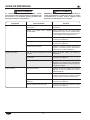
1
INSTALLATION
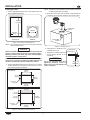
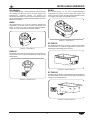
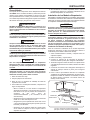
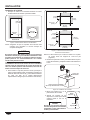
Installing the Remote Mounted Control Box (RMB)
c. Align the holes on the
RHW
mounting flanges with the Control
Box
screw holes in the installation
surface, and secure the control Housing
box housing to the surface
using four M4 screws (not
supplied).
1. Install the control box in the control box cutout:
For RCTHW-1B Models
a. Position the control box so it will fit through the cutout
and pass it through the cutout to the front of the
installation surface.
b. Align the mounting holes on the control box with the
holes in the installation surface, and secure it to the
surface using two M4 screws (not supplied).
d. Install the front cover on the
control box using the four front
cover screws.
For RHW-1B Models
a. Remove the four screws that secure the front cover to
the control box. Remove the front cover and pass it
through the cutout to the front of the installation surface.
Mounting
Flange
Front
Cover
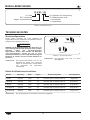
2. Plug the power cord into a properly grounded electrical
outlet of the correct voltage, size, and plug configuration.
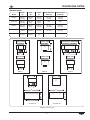
See the SPECIFICATIONS section for details.
b. Pass one of the mounting flanges on the control box
housing through the cutout. Squeeze the other
mounting flange to fit it through the cutout.
OPERATION
General
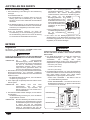
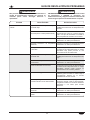
4. Press the TEMP button to scroll through and select the
desired temperature setting. The indicator above each
temperature setting will glow when that setting is selected.
There are three temperature settings:
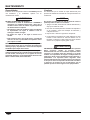
Use the following procedure to operate the HEATMAX Heated
Wells.
• 90–100°C (194–212°F)
WARNING
• 70–90°C (158–194°F)
Read all safety messages in the IMPORTANT SAFETy
INFORMATION section before operating this equipment.
• 50–70°C (122–158°F)
5. Press the MODE button to scroll through and select the
desired heating mode. The indicator above each mode will
glow when that mode is selected. There are two heating
modes:
NOTE: For proper heat transfer, operate the RHW series,
(Round Heated Wells), with the special pan supplied.
This pan has a curved bottom to match the shape of
the heating element.
• FULL POWER Mode — Unit operates at 100% power.
1. Plug the unit into a properly grounded electrical outlet of
the correct voltage, size, and plug configuration. See the
SPECIFICATIONS section for details.
• LOW POWER Mode — Unit operates at 50% power for
food warming and to avoid burning.
• The POWER indicator will glow red when the unit has
power.
2. Place a pan/pot filled with food product or water into the
unit.
NOTE: Do not operate the unit without a food pan or with an
empty/dry pan. The unit will overheat and go into
FaulT mode.
POWER
Indicator
3. Press the ON/OFF button to turn on the unit.
• The POWER indicator will glow green when the unit is
on and heating.
FAULT
Indicator
NOTE: The FaulT indicator will illuminate and the unit will
beep when the unit is overheated or if the temperature
sensor short circuits. When this happens, power is cut
off automatically until the temperature returns to normal
range or the temperature sensor functions normally.
ON/OFF
Button
CAUTION
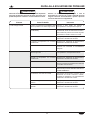
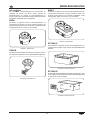
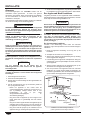
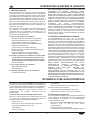
Figure 13. RHW Control Panel
BURN HAzARD: Some exterior surfaces on unit will get
hot. Use caution when touching these areas.
Form No. RHWCEM-0910
TEMP
Button
9
MODE
Button