1
ENGLISH
LCD HDTV
Owner’s Manual
Table of Contents . . . . 4
Model No.:
No. de Modelo:
No de modèle :
DP19648
ESPAÑOL
TV de LCD HDTV
Manual de Instrucciones
Contenido . . . . . . . . . 19
FRANÇAIS
TVHD ACL
Manuel d’instructions
Table des matières . . 33
Welcome to the World of Sanyo
Need assistance?
Visit our Web site at
www.sanyoctv.com
Thank you for purchasing this Sanyo LCD High-Definition
Digital Television. You made an excellent choice for
Performance, Reliability, Features, Value, and Styling.
or call toll free
1-800-877-5032
We can Help!
© 2008 Sanyo Manufacturing Corporation
Part No. / No. de Parte / No de piece : 1JC6P1P0301A –
CAUTION
THIS SYMBOL INDICATES THAT DANGEROUS VOLTAGE CONSTITUTING A
RISK OF ELECTRIC SHOCK IS PRESENT WITHIN THIS UNIT.
RISK OF ELECTRIC SHOCK DO NOT OPEN
CAUTION: TO REDUCE THE RISK OF ELECTRIC SHOCK, DO NOT REMOVE COVER (OR
BACK). NO USER-SERVICEABLE PARTS INSIDE. REFER SERVICING TO QUALIFIED SERVICE PERSONNEL.
THIS SYMBOL INDICATES THAT THERE ARE IMPORTANT OPERATING AND
MAINTENANCE INSTRUCTIONS IN THE LITERATURE ACCOMPANYING THIS
UNIT.
WARNING: TO REDUCE THE RISK OF FIRE OR ELECTRIC SHOCK, DO NOT EXPOSE THIS APPLIANCE TO
RAIN OR MOISTURE.
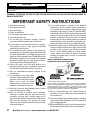
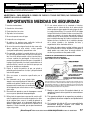
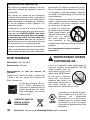
IMPORTANT SAFETY INSTRUCTIONS
1.
2.
3.
4.
5.
6.
7.
8.
9.
10.
11.
12.
13.
14.
2
Read these instructions.
Keep these instructions.
Heed all warnings.
Follow all instructions.
Do not use this apparatus near water.
Clean only with dry cloth.
Do not block any ventilation openings. Install in
accordance with the manufacturer’s instructions.
Do not install near any heat sources such as radiators,
heat registers, stoves, or other apparatus (including
amplifiers) that produce heat.
Do not defeat the safety purpose of the polarized or
grounding-type plug. A polarized plug has two blades with
one wider than the other. A grounding-type plug has two
blades and a third grounding prong. The wide blade or the
third prong are provided for your safety. If the provided
plug does not fit fully into your outlet, consult an electrician for replacement of the obsolete outlet.
Protect the power cord from being walked on or
pinched particularly at plugs, convenience receptacles,
and the point where they exit from the apparatus.
Only use attachments/accessories specified by the
manufacturer.
Use only with the cart, stand, tripod,
bracket, or table specified by the manufacturer, or sold with the apparatus.
When a cart is used, use caution
when moving the cart/apparatus combination to avoid injury from tip-over.
Unplug this apparatus during lightning storms or when
unused for long periods of time.
Refer all servicing to qualified service personnel.
Servicing is required when the apparatus has been
damaged in any way, such as power-supply cord or
plug is damaged, liquid has been spilled or objects have
fallen into the apparatus, the apparatus has been
exposed to rain or moisture, does not operate normally,
or has been dropped.
15. If an outside antenna is connected to the television
equipment, be sure the antenna system is grounded so
as to provide some protection against voltage surges
and built up static charges. In the U.S. Selection 810-21
of the National Electrical Code provides information with
respect to proper grounding of the mast and supporting
structure, grounding of the lead-in wire to an antenna
discharge unit, size of grounding conductors, location of
antenna discharge unit, connection to grounding electrodes, and requirements for the grounding electrodes.
16. An outside antenna system should not be located in the
vicinity of overhead power lines or other electrical light
or power circuits, or where it can fall into such power
lines or circuits. When installing an outside antenna
system, extreme care should be taken to keep from
touching such power lines or circuits as contact with
them might be fatal.
EXAMPLE OF ANTENNA GROUNDING ACCORDING
TO NATIONAL ELECTRICAL CODE,ANSI/NFPA 70
“Note to CATV system installer:
This reminder is provided to call the CATV system installer’s
attention to Article 820-40 of the NEC that provides guidelines for
proper grounding and, in particular, specifies that the cable
ground shall be connected to the grounding system of the building, as close to the point of cable entry as practical.”
17. Wall or Ceiling Mounting—The product should be
mounted to a wall or ceiling only as recommended by
the manufacturer.
18. "Apparatus shall not be exposed to dripping or splashing
and no objects filled with liquids, such as vases, shall be
placed on the apparatus."
19. When the MAINS plug is used as the disconnect device,
the disconnect device shall remain readily operable.
Need help? Visit our Web site at www.sanyoctv.com or Call 1-800-877-5032
FCC INFORMATION
This equipment has been tested and found to comply with the limits for a Class B digital device, pursuant to Part 15
of the FCC Rules. These limits are designed to provide reasonable protection against harmful interference in a residential installation. This equipment generates, uses and can radiate radio frequency energy and, if not installed and
used in accordance with the instructions, may cause harmful interference to radio communications. However, there
is no guarantee that interference will not occur in a particular installation. If this equipment does cause harmful
interference to radio or television reception, which can be determined by turning the equipment off and on, the user
is encouraged to try to correct the interference by one or more of the following measures:
– Reorient or relocate the receiving antenna.
– Increase the separation between the equipment and receiver.
– Connect the equipment into an outlet on a circuit different from that to which the receiver is connected.
– Consult the dealer or an experienced radio/TV technician for help.
CAUTION: FCC Regulations state that improper modifications or unauthorized changes to this unit may void the
user’s authority to operate the unit.
TRADEMARKS
PROTECTING THE LCD SCREEN
Manufactured under license from Dolby
Laboratories. “Dolby” is a trademark of Dolby
Laboratories.
The screen can be damaged if it is not maintained
properly. Do not use hard objects such as hard
cloth or paper. Do not use excessive pressure
when cleaning the screen; excessive pressure can cause permanent discoloration or dark spots.
NEVER spray liquids on the
screen.
“As an Energy Star® Partner, Sanyo
Manufacturing Corporation has determined that this product meets the
Energy Star® guidelines for energy
efficiency.”
This symbol on the nameplate
means the product is Listed by
Underwriters’ Laboratories Inc. It is
designed and manufactured to
meet rigid U.L. safety standards
against risk of fire, casualty and
electrical hazards.
HANDLING PRECAUTIONS
•
Handle by the cabinet only. Never touch the
screen when handling.
•
Excessive pressure on the screen can cause
permanent discoloration or dark spots.
•
Handling damage is not covered under warranty.
SPECIFICATIONS
Power Requirement:
Source: AC 120V, 60Hz
AC Power Consumption (average): 50 watts
Hello! I’m your new Sanyo Wide-screen LCD HDTV.
Don’t plug me in just yet! Please read this manual carefully so you can learn about my many features, such as,
my integrated HD Tuner, V-Guide control, Digital
Channels, my PC Input and many more...
CONTAINS MERCURY LAMPS,
DISPOSE OF PROPERLY
Need help? Visit our Web site at www.sanyoctv.com or Call 1-800-877-5032
3
CONTENTS
IMPORTANT SAFETY INSTRUCTIONS . . . . . . . . . . . . . . . 2
FCC INFORMATION . . . . . . . . . . . . . . . . . . . . . . . . . . . . . . . .3
TRADEMARKS . . . . . . . . . . . . . . . . . . . . . . . . . . . . . . . . . . . .3
PROTECTING THE LCD SCREEN . . . . . . . . . . . . . . . . . . . . . .3
PRECAUTIONS—
Handling . . . . . . . . . . . . . . . . . . . . . . . . . . . . . . . . . . . . . . .3
Disposal . . . . . . . . . . . . . . . . . . . . . . . . . . . . . . . . . . . . . . . .3
SPECIFICATIONS . . . . . . . . . . . . . . . . . . . . . . . . . . . . . . . . . .3
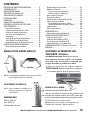
CONTENTS . . . . . . . . . . . . . . . . . . . . . . . . . . . . . . . . . . . . . . .4
VIEWING ANGLES (BRIGHTNESS) . . . . . . . . . . . . . . . . . . .4
DETACHING THE TV TILT STAND . . . . . . . . . . . . . . . . . . . .4
GETTING STARTED—
Remote Control Battery Installation . . . . . . . . . . . . . . . .5
Antenna Connections for off-air or cable . . . . . . . . . . .5
Controls and Jacks . . . . . . . . . . . . . . . . . . . . . . . . . . . . . .5
Connections . . . . . . . . . . . . . . . . . . . . . . . . . . . . . . . . . . . .6
Analog Signal / Stereo Audio Out . . . . . . . . . . . . . . . . . 6
Digital Signal / Digital Audio Out . . . . . . . . . . . . . . . . . .6
Power Connection / Initial Channel Search . . . . . . . . .7
PC CONNECTIONS . . . . . . . . . . . . . . . . . . . . . . . . . . . . . . . . .8
PC Menu Navigation Map . . . . . . . . . . . . . . . . . . . . . . . .8
PC MONITOR OPERATION . . . . . . . . . . . . . . . . . . . . . . . . . .8
PC Preparation . . . . . . . . . . . . . . . . . . . . . . . . . . . . . . . . . .8
PC Monitor Setup . . . . . . . . . . . . . . . . . . . . . . . . . . . . . . .8
PC Menu Operating Tips . . . . . . . . . . . . . . . . . . . . . . . . .8
Manual Adjustments . . . . . . . . . . . . . . . . . . . . . . . . . . . . .8
REMOTE CONTROL OPERATION . . . . . . . . . . . . . . . . . . . . .9
ON-SCREEN MENU OPERATION—
Menu Navigation Map . . . . . . . . . . . . . . . . . . . . . . . . . .10
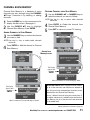
Manual Channel Search . . . . . . . . . . . . . . . . . . . . . . . .10
Channel Scan Memory . . . . . . . . . . . . . . . . . . . . . . . . . .11
Adding Channels to Scan Memory . . . . . . . . . . . . .11
Deleting Channels from Scan Memory . . . . . . . . . .11
V-Guide (Parental Control)
V-Guide Operation . . . . . . . . . . . . . . . . . . . . . . . . . . .12
V-Guide Operation (Advanced) . . . . . . . . . . . . . . . .13
Picture / Sound Adjustment
Adjusting the Picture / Sound Manually . . . . . . . . .14
Advanced Picture / Sound Adjustments . . . . . . . . .14
Digital Captioning . . . . . . . . . . . . . . . . . . . . . . . . . . . . . .14
Energy (Power) Saver . . . . . . . . . . . . . . . . . . . . . . . . . . .14
HELPFUL HINTS (PROBLEMS/SOLUTIONS) . . . . . . . . . .15
WARRANTY . . . . . . . . . . . . . . . . . . . . . . . . . . . . . . . . . . . . . .16
VIEWING ANGLES (BRIGHTNESS)
DETACHING THE HDTV TILT STAND
Tools Needed: Phillips screwdriver
Important Note: Place HDTV face down on a
padded or cushioned surface to protect the
screen and finish.
Vertical
Horizontal
1
Remove the two (2) screws from the metal
bracket. CAUTION: Hold the stand firmly as
you remove the last screw.
NOTE: The picture may appear too dark when
viewed outside normal viewing angles.
ADJUSTING THE ANGLE
NOTE: Use the Tilt feature to
adjust the vertical angle
for optimum viewing.
DIMENSIONS
Width: 18.9 in.
Height: 15.1 in.
Depth: 7.2 in.
4
WALL MOUNTING: VESA standard interface
(100 x 100)
Use the four (4) screws that are threaded into the
wall mounting inserts on the back of your HDTV
to secure it to a wall mounting kit.
NOTE: Wall Mounting kit is not supplied.
LCD Mounting screws measurements:
M4 Diameter, Length—10mm (maximum)
Need help? Visit our Web site at www.sanyoctv.com or Call 1-800-877-5032
GETTING STARTED—
BATTERY INSTALLATION
CONTROLS AND JACKS
Install batteries in the remote control
(2 ”AA”, not included).
RIGHT-SIDE
PANEL
PRECAUTIONS
To ensure safe operation, please
observe the following precautions:
Power
key
Replace both batteries at the same
time. Do not use a new battery with a
used battery.
There’s a risk of explosion if a battery is
replaced by an incorrect type.
Volume
– + keys
Do not expose the Remote Control Unit to
moisture or heat.
Match the “+” and “–” signs on the
batteries with marks inside the
remote control.
Channel
keys
ANTENNA CONNECTION FOR
OFF-AIR SIGNALS OR CABLE
ANTENNA
ANALOG / DIGITAL
ANTENNA IN
OR
LEFT-SIDE PANEL
CABLE
THE TUNER IN THIS HDTV CAN RECEIVE :
a. Digital and Analog off-air signals from an
antenna.
OR
b. Analog or ClearQAM cable channels from a
direct Cable TV connection.
NOTES: You must use the on-screen MENU to Search
for ClearQAM Cable channels. (See page 10.)
For the best picture, connect your Cable box
or Satellite receiver to the Video1, 2, or 3
Input jacks.
S-Video Input (VIDEO1)
Digital Audio Output (Coaxial)
AV Input (VIDEO1 - Composite)
Component Video Input (VIDEO2 or VIDEO3)
Stereo Audio Out (L/R) Jacks
PC Input and Stereo Audio (Mini)
• MONITOR RGB (D-SUB)
• AUDIO R/L (Stereo Mini Jack)
Analog / Digital Antenna Input
This HDTV can receive ANY unscrambled RF
signal being broadcast.
Need help? Visit our Web site at www.sanyoctv.com or Call 1-800-877-5032
5
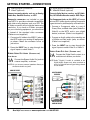
GETTING STARTED—CONNECTIONS
1
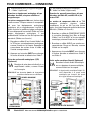
Analog Signal Connections—
Video1 (optional)
2
Digital Signal Connections—
Video2 & Video3 (optional)
Connect an analog device, such as, an Analog
Cable Box, Satellite Receiver, or VCR
Connect digital devices, such as, an HD Cable
Box, HD Satellite Receiver and/or DVD Player
Composite connectors are included on your
new HDTV to provide continued compatibility
with older analog devices, such as a VCR. The
S-Video connector will provide the best analog
resolution. If you have an S-Video connector
on your old analog equipment, you should use
it instead of the standard video connector.
(Cables are not supplied.)
The Component jacks on this HDTV will accept
various HDTV video signals, making Component
a great choice for picture quality and resolution.
1. Connect an AV cable to the VIDEO 1 jacks on
the HDTV and to your analog AV equipment,
as shown. Match the connector colors to
jack colors.
2. Connect an Audio cable to the matching set
of White and Red audio jacks, as shown.
(Cable is not supplied.)
2. Press the INPUT key to step through the
signal inputs to select Video 1.
1. Connect a Component cable to a set of
Green, Blue, and Red video jacks (Video2 or
Video3) on the HDTV and to your digital
device, as shown. (Cable is not supplied.)
3. Press the INPUT key to step through the
signal inputs to select Video 2 or Video 3.
DIGITAL AUDIO OUT JACK (OPTIONAL STEP)
STEREO AUDIO OUT JACKS (OPTIONAL STEP)
FIXED ANALOG
1A
Connect the Stereo Audio Out jacks to
a stereo amplifier, as shown.
NOTE:Do not connect external speakers directly to
the Stereo Audio out jacks.
2A
Connect the Digital Audio output to a
multichannel receiver, as shown.
NOTE:Dolby® Digital 5.1 audio is available at the
Digital Audio Output only when received as
part of a Digital Antenna signal being viewed
on the screen.
ANALOG DEVICE
MULTICHANNEL
RECEIVER
STEREO AMP
DVD PLAYER OR
SIMILAR DEVICE
6
Need help? Visit our Web site at www.sanyoctv.com or Call 1-800-877-5032
GETTING STARTED—POWER CONNECTION / CHANNEL SEARCH
POWER CONNECTION
3
4
Plug in AC power cord
(120V AC, 60 Hz).
Press the POWER key.
(Follow the on-screen
instructions.)
To 120V AC outlet
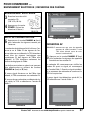
INITIAL CHANNEL SEARCH
5
Press the CHANNEL (Up) key to search
for signals connected to the Antenna
terminal (Initial Display).
Channel Search will check for Antenna and
Cable signals. If Antenna signals are detected,
the HDTV searches for both analog and digital
off-air channels. If Cable signals are detected,
the HDTV will search for analog Cable channels.
Channels are stored in Channel Memory and
can be scanned using the CHANNEL (Up)
and (Down) keys.
If no Antenna signals are detected, the HDTV
will begin an AV search.
If neither of these searches detected a valid
signal, the HDTV will tune to input Video1.
INITIAL DISPLAY
CHANNEL SEARCH DISPLAY
AV SEARCH
NOTE:Be sure all the external video devices you connected to the HDTV are powered ON before
you begin an AV Search.
6
Press the CHANNEL (Down) key to
search for signals from devices you connected to the AV input jacks (Initial Display).
AV Search will begin checking the AV inputs for
valid signals, beginning with input Video1.
When a valid signal is detected, the search
process ends and the HDTV tunes to that input
source.
If a valid signal is not detected on any of the AV
inputs, the HDTV will tune to input Video1.
AV SIGNAL SEARCH DISPLAY
Need help? Visit our Web site at www.sanyoctv.com or Call 1-800-877-5032
7
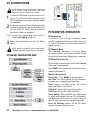
PC CONNECTIONS
NOTE: Before connecting any cables, disconnect
the AC Power Cords of both the HDTV and
Personal Computer from the AC outlets.
1
Connect an RGB cable from the monitor output on your PC to the RGB connector on the
HDTV and tighten the screws. (Monitor Cable
not supplied.)
2
Insert one end of a Stereo Mini-Audio cable
into the PC Audio Out jack and the other end
into the HDTV PC Audio Input jack. (Stereo
Mini-Audio Cable not supplied.)
HINT: Volume can be adjusted both from the PC and
the HDTV VOLUME and keys.
3
Select Auto Adjustment from the PC Setup
Menu.
NOTE: Power on the HDTV and any other peripheral equipment before powering on the computer.
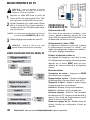
PC MENU NAVIGATION MAP
PC MONITOR OPERATION
PC PREPARATION
To avoid an “Out of Range” condition, preset
your PC’s output resolution to an XGA value, such
as, 1024 x 768, before you disconnect it from your
regular monitor.
PC MONITOR SETUP
The Frequency, Resolution, Dot Clock, Phase,
Horizontal Position, and Vertical Position are set
automatically when Auto Adjustment is selected.
PC MENU OPERATING TIPS
Picture and Sound settings in the PC Menu do not
affect other input settings.
Press RESET twice to reset ALL settings to factory
defaults. (See page 9.)
MANUAL ADJUSTMENTS
Color Temp.—Press ENTER to choose setting.
Dot Clock—Dot Clock adjusts the Dot frequency
to match your computer’s dot frequency.
Phase—Adjust the Phase when the picture
appears to flicker or is blurred.
H–Position—Moves the image horizontally.
V–Position—Moves the image vertically.
Power Saving—When the HDTV no longer detects
H- and V-sync signals from the PC, it switches to
standby mode. It will return to normal operation
when H- and V-sync signals are again detected.
Reset PC Settings—Resets all the PC Menu
options to Factory default values.
8
Need help? Visit our Web site at www.sanyoctv.com or Call 1-800-877-5032
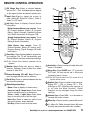
Shape Key—Press to choose between
PIX
options Pix1 ~ Pix4. Available options depend
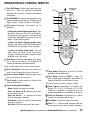
REMOTE CONTROL OPERATION
Point
towards TV
on the signal and the broadcast’s aspect ratio.
Key—Press to select the source to
Input
view: Analog RF, Digital RF, Video 1, Video 2,
Video 3, or PC Input.
Key—Press to display Channel Banner
Info
information.
11
Digital Antenna Banner may contain: Tuner
ID, Channel Number, Station ID, Program
Rating, Signal Strength, Detailed Program
Info, Audio Information, & Program Title.
Analog Antenna Banner may contain: Tuner
ID, Channel Number, Station ID, Program
Rating, & Audio Information.
12
13
Cable Banner may contain: Tuner ID,
Channel Number, Station ID (analog only),
Program Rating, Signal Strength, & Audio
Information.
14
Key—Press this key twice to restore fac Reset
tory settings. The TV will automatically start
Channel Search and clear customized settings.
NOTE:The Channel Scan Memory database will be
replaced.
Keys—Press two keys to select a
Number
channel. Example: Press 0 then 6 to select
channel 6. (See #14.)
Scanning (CH ) Keys—Press to
Channel
scan through the channels in memory.
Key—Press to switch between the last
Recall
two channels selected.
Menu Navigational Keys:
Menu—Press to display on-screen menu.
Cursor (up) (down) keys—Press these
keys to move the cursor up and down.
Cursor < (left) > (right) keys—Press these
keys to move the cursor left and right.
Enter Key—Press to select an option from
the menu system, when required.
Exit Key—Press to exit from the menu.
Key—Press to select the desired audio
Audio
mode, if available.
Sleep Key—Press SLEEP then “0” to set the
Off
Timer. Off time can be set in 30-minute
increments up to 3 hours.
NOTE:The Off Timer cancels if the TV is turned off or if
a power failure occurs.
11 Caption Key—Press to select mode options:
Digital CC1 ~ CC6, or Analog CC1 ~ CC4,
QuikCap, or OFF. (QuikCap turns captions on
or off with the Mute function.) Digital
Captions can be changed using the menu
settings.
12 Volume Keys—Press VOL – + to decrease or
increase the audio volume.
13 Mute Key—Press to mute or restore the sound.
14 1– – Key—For Cable channels above 99, press
this key, then press the other two numbers.
Need help? Visit our Web site at www.sanyoctv.com or Call 1-800-877-5032
9
ON-SCREEN MENU OPERATION
MENU NAVIGATION MAP
MANUAL CHANNEL SEARCH
MAIN MENU
MANUAL CHANNEL SEARCH HAS THREE CATEGORIES
SUB-MENU OPTIONS
• Cable
• Air(Antenna)
• Digital Add-On
Cable Search looks for analog cable channels and
unscrambled (ClearQAM) digital cable channels.
This search will take several minutes. After the
search is complete, the HDTV will tune to the lowest ClearQAM channel, if available. Otherwise, the
HDTV will tune to the lowest analog cable channel.
Air(Antenna) Search will search for analog and
digital channels that are broadcast over-the-air.
After the search is complete, the HDTV will tune to
the lowest Digital channel or the lowest analog
channel. If no digital or analog channels are
found, the HDTV will tune to Video 1.
Digital Add-On Search will add new digital channels that are found to the Channel Scan Database.
1
2
3
Press the MENU key on the remote control to
display the Main menu. (See page 9.)
Use the CURSOR keys to highlight
Manual Channel Search. Press ENTER.
Use the CURSOR keys to select Cable,
Air (Antenna), or Digital Add-On.
After the search is complete, the HDTV will exit the
menu system and return to normal TV viewing.
NOTE:“Not available” will appear on the screen
when an option is unavailable.
TUNING MODE
Analog RF
Digital RF
Video 1
Video 2/3
UNAVAILABLE MENU OPTION(S)
Digital Caption
None (all Menu options available)
Manual Channel Search, Channel Scan
Memory, Digital Caption
Manual Channel Search, Channel Scan
Memory, Digital Caption, V-Guide
IMPORTANT FACT: This HDTV maintains only one database of digital channels. Therefore, when you search for
cable channels, the database of antenna digital channels
will be deleted. You will only be able to receive those
ClearQAM channels your cable company provides.
10
NOTE: For information on local digital channels,
visit www.antennaweb.org.
Need help? Visit our Web site at www.sanyoctv.com or Call 1-800-877-5032
CHANNEL SCAN MEMORY
Channel Scan Memory is a database of active
channels you scan through using the CHANNEL
keys. Customize it by deleting or adding
channels.
1
2
Press the MENU key on the remote control to
display the Main menu. (See page 9.)
Use the CURSOR keys to highlight
Channel Scan Memory. Press ENTER.
ADDING CHANNELS
3
TO
SCAN MEMORY
DELETING CHANNELS
3
FROM
SCAN MEMORY
Use the CHANNEL or NUMBER keys to
select the channel you want to Delete.
NOTE: Use the 1– – key to select cable channels
above 99.
4
5
Press ENTER to Delete the channel from
Channel Scan Memory.
Press EXIT to return to normal TV viewing.
Use the NUMBER keys to select the channel
you want to Add.
NOTE: Use the 1– – key to select cable channels
above 99.
4
Press ENTER to Add the channel to Channel
Scan Memory.
Channel Scan
Memory Screens
This Display
appears after
you press
ENTER.
After 3 seconds the TV screen will display “Add?”
IMPORTANT FACTS: When a digital channel is deleted, all of that channel’s sub-channels are deleted as
well. Only previously deleted digital channels can be
added back to the Channel Scan Memory.
This Display
appears after
you press
ENTER.
After 3 seconds the TV screen will display “Delete?”
Tune to “deleted” channels using the number keys. If
one digital sub-channel is added back to the Channel
Scan Memory list, all of that channel’s sub-channels
will be added back.
(Menu operations continued on page 12.)
Need help? Visit our Web site at www.sanyoctv.com or Call 1-800-877-5032
11
ON-SCREEN MENU OPERATION
(CONTINUED)
V-GUIDE (PARENTAL CONTROL)
NOTE: THIS FEATURE IS DESIGNED TO COMPLY
WITH THE UNITED STATES OF AMERICA’S FCC
V-CHIP REGULATIONS. THEREFORE, IT MAY
NOT FUNCTION WITH BROADCASTS THAT
ORIGINATE IN OTHER COUNTRIES.
4
This Sanyo television is equipped with an electronic V-Chip to interpret MPAA (Motion Picture
Association of America) and TV Parental
Guidelines rating codes. When these codes are
detected, the HDTV will automatically display or
block the program, depending upon choices you
make when setting up the V-Guide system.
Use this feature to block automatically programs
with content you deem as inappropriate for your
children to view.
MORE
NOTE:Content ratings are under the letters FV, D, L,
S, and V.
5
Press the ENTER key to Block or Unblock
selected rating. A lock symbol will appear
beside the selected rating option indicating
that it is blocked.
OPERATING TIPS
V-Guide settings are effective for Analog channels, Digital channels, and Video1 signals.
You can block portions of a TV rating by
INFORMATION
Additional information about MPAA and V-Chip
rating can be found at: www.mpaa.org and
www.v-chip.org, respectively.
V-GUIDE OPERATION
1
2
3
Use the CURSOR and < > keys to select
MOVIE, TV, or Content Ratings. (A green
square will appear beside the selected item.)
choosing one or more of the Content ratings
(D, L, S, and V). By blocking just the L and S
content ratings of TV-14, for example, TV-14
rated programs with a D and/or V content rating could still be viewed.
Use the CURSOR keys to highlight
V-Guide in the Main menu. Press ENTER.
Use the CURSOR keys to highlight On,
in the V-Guide menu. Press ENTER.
Use the CURSOR keys to highlight
Adjust. Press ENTER.
STANDARD V-GUIDE RATINGS—AT-A-GLANCE
MPAA (Movie) RATING TV RATING CONTENT RATING
BLOCKED RATINGS
(Lock symbol)
12
Need help? Visit our Web site at www.sanyoctv.com or Call 1-800-877-5032
REGIONAL V-GUIDE OPERATION (ADVANCED)
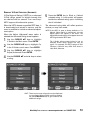
V-Chip Regional Ratings 5 (RRT5) is an advanced
V-Chip ratings system for digital channels that
are received with an antenna. Your new Sanyo
HDTV supports this alternative system.
5
When the HDTV detects compatible RRT5 data, it
is downloaded and stored in memory and the
menu is modified to include an advanced adjustment option.
The advanced rating table will reflect previous
choices you may have made.
When the Adjust (Advanced) setup option is
selected the Advanced Rating screen appears.
Use the CURSOR keys to highlight
V-Guide in the Main menu. Press ENTER.
1
2
3
4
NOTE:If the HDTV is reset to factory defaults or if a
Manual Cable Search is performed, only the
Adjust option will appear in the menu. The
Adjust (Advanced) option will reappear when the
HDTV again detects RRT5 data.
Use the CURSOR keys to highlight On,
in the V-Guide control menu. Press ENTER.
Use the CURSOR keys to highlight
Adjust (Advanced). Press ENTER.
Use the CURSOR and <
a rating.
Press the ENTER key to Block or Unblock
selected rating. A Lock symbol will appear
beside the selected rating option indicating
that it is blocked.
The V-Guide ratings screen below is just an
example. Actual rating options will vary by
region. For example, the RRT5 ratings for San
Francisco, California may differ from those in
Little Rock, Arkansas.
> keys to select
HINT: There may be more ratings than can be displayed
on one screen. When vertical scroll bars appear,
use the CURSOR keys to gain access to the
additional ratings.
Need help? Visit our Web site at www.sanyoctv.com or Call 1-800-877-5032
13
ON-SCREEN MENU OPERATION
(CONTINUED)
PICTURE / SOUND ADJUSTMENT
ENERGY (POWER) SAVER
Choose Auto to accept predetermined values for
each parameter or choose Manual to adjust
Picture / Sound values to your preferences.
This power saving feature reduces the backlight
brightness level. The options are:
•
Use the CURSOR keys to highlight
Picture / Sound. Press ENTER.
OFF—the feature is off and the power consumption is normal.
•
Use the CURSOR keys to highlight
Manual. Press ENTER.
LOW—power saving level is low and the backlight brightness level is lower than normal.
•
HIGH—power saving level is high and the backlight brightness is set to the lowest level.
ADJUSTING
1
2
3
4
THE
PICTURE / SOUND MANUALLY
Use the CURSOR keys to highlight Color,
Tint, Contrast, Brightness, Sharpness, or Tone.
Use the CURSOR <
> keys to adjust the levels.
ADVANCED PICTURE / SOUND
1
2
Use the CURSOR keys to highlight
Energy Saver. Press ENTER.
Use the CURSOR keys to select Off, Low,
or High.
ADJUSTMENTS
5
To change the Digital Noise Reduction,
Dynamic Contrast, or Loud Sound Suppressor
settings, press the right CURSOR (>) key,
select On or Off and press ENTER.
6
Press EXIT to return to normal TV viewing.
NOTE: The Energy Saver settings level varies with the
Picture/Sound mode.
DIGITAL CAPTIONING
Captioning is textual information that may be
transmitted with the picture and sound. Digital
Captions can be changed using the menu settings.
1
2
14
Use the CURSOR keys to highlight
Digital Caption. Press ENTER.
Use the CURSOR keys to select an option
and the CURSOR < > to adjust the value.
Need help? Visit our Web site at www.sanyoctv.com or Call 1-800-877-5032
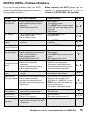
HELPFUL HINTS—Problems/Solutions
If you are having problems with your HDTV,
check this trouble shooting chart to find one or
more possible solutions.
Problem:
Check these Conditions:
No picture, sound
(Digital Picture)
Check antenna/external connections
May be station trouble, NO signal
broadcast.
MUTE function may be ON.
Before returning your HDTV, please visit our
website at www.sanyoctv.com or call us
toll free at 1.800.877.5032. We can Help!
Try these Solutions:
No Captioning
Cannot customize
Caption
Check if station is broadcasting a
Closed-Caption signal.
Select another channel.
Digital Caption signal is not being
broadcast.
“No Signal”
message appears on
screen
Pixilation of Digital
image
Cannot select or
scan some channels
Adjust antenna.
Try a different channel.
Press RESET twice to restart channel
search. (All customized settings will be
cancelled.)
Adjust Volume.
9, 14
Press CAPTION to select Analog
captioning.
9, 14
Press PIX SHAPE to change setting.
Check if program is in color.
Check antenna/external connections.
Color or Tint misadjusted.
May be station trouble.
Maybe MUTE function is ON.
Try a different channel.
Adjust antenna.
Press RESET twice to restart channel
search.
Adjust Volume and/or Image.
9
Check Audio / Video connections.
Check external equipment
connections.
Check external equipment setting.
Check antenna connection.
Press INPUT.
Switch on external equipment.
Turn antenna, install signal booster.
Set external equipment output connections to match input connections.
5~9
Press INFO and check signal
strength.
Channel may be removed from memory.
Check antenna connections.
No digital signal being broadcast.
V-Guide is set to block programming.
Weak Signal.
Select Channel Scan Memory to add
channels or start channel search.
Set V-Guide to “ALLOW ALL” or press
RESET twice to clear all settings and
restart channel search.
Turn antenna, install signal booster.
Cable Channel Indicator C should
appear next to channel number.
Search for Cable channels using Manual
Channel Search.
Remote Control
will not operate TV
Check batteries.
Check if TV is plugged in.
Replace batteries.
Aim remote control at front of TV.
Cabinet makes popping sound.
9
Turn antenna, install signal booster.
Install outdoor Digital antenna.
No Cable channels
above number 13
5~9
Press CAPTION to select
captioning mode.
Cannot display picture on a full screen
Poor Picture/Sound
(watching Analog)
Page No.
5, 9
5,
9 ~ 11
10
5, 7, 9
This is a normal condition during
warm-up and cool down of the plastic
cabinet parts.
Need help? Visit our Web site at www.sanyoctv.com or Call 1-800-877-5032
15
ONE-YEAR LIMITED PARTS AND LABOR WARRANTY
THIS LIMITED PARTS AND LABOR WARRANTY IS VALID ONLY ON SANYO TELEVISIONS PURCHASED AND USED IN
THE UNITED STATES OF AMERICA, CANADA, AND PUERTO RICO, EXCLUDING ALL OTHER U.S. TERRITORIES AND
PROTECTORATES. THIS LIMITED WARRANTY APPLIES ONLY TO THE ORIGINAL RETAIL PURCHASER, AND DOES NOT
APPLY TO PRODUCTS USED FOR INDUSTRIAL OR COMMERCIAL PURPOSES.
WARRANTY APPLICATION
FOR ONE YEAR from the date of original retail purchase Sanyo Manufacturing Corporation (SMC) warrants this TV to
be free from manufacturing defects in materials and workmanship under normal use and conditions for parts and labor.
For the FIRST 90 DAYS from the date of original retail purchase, Sanyo Manufacturing Corporation will replace any
defective TV via exchange at the retailer. To ensure proper warranty application, keep the original-dated-sales receipt
for evidence of purchase. Return the defective TV to the retailer along with the receipt and the included accessories,
such as the remote control. The defective TV will be exchanged for the same model, or a replacement model of equal
value, if necessary. Replacement model will be contingent on availability and at the sole discretion of Sanyo
Manufacturing Corporation.
THE FOREGOING WARRANTY IS EXCLUSIVE AND IN LIEU OF ALL OTHER WARRANTIES OF MERCHANTABILITY OR
FITNESS FOR A PARTICULAR PURPOSE.
OBLIGATIONS
For one year from the date of purchase, Sanyo Manufacturing Corporation warrants this product to be free from
defects in material and workmanship under normal use and conditions. During the first 90 days under this warranty
for any manufacturing defect or malfunction Sanyo Manufacturing Corporation will provide a new TV via exchange at
the retailer.
HOW TO MAKE A CLAIM UNDER THIS WARRANTY
Please call 1-800-877-5032. Please be prepared to give us the television’s model number and serial number when you
call. The model number and serial number are printed on a label attached to the back of the unit.
For customer assistance, call toll free 1-800-877-5032.
Weekdays 7:30 AM – 7:00 PM Central Time
Saturday
7:30 AM – 4:00 PM Central Time
This warranty expresses specific contractual rights; retail purchasers may have additional statutory rights which vary
from state to state.
(EFFECTIVE: March 1, 2007)
For your protection in the event of theft or loss of this product, please fill in the information requested
below and KEEP IN A SAFE PLACE FOR YOUR OWN PERSONAL RECORDS.
Model No.______________________________
Date of Purchase _________________________
Serial No.______________________________
Purchase Price ___________________________
(Located on back of unit)
Where Purchased_________________________
Sanyo Manufacturing Corp.
3333 Sanyo Road, Forrest City, AR 72335
16
Need help? Visit our Web site at www.sanyoctv.com or Call 1-800-877-5032
PRECAUCIÓN
RIESGO DE TOQUE ELECTRICO NO ABRIR!
ESTE SÍMBOLO INDICA QUÉ VOLTAJES PELIGROSOS QUE CONSTITUYEN UN RIESGO DE TOQUE ELÉCTRICO ESTÁN PRESENTES DENTRO
DE ESTA UNIDAD.
PRECAUCIÓN : PARA REDUCIR EL RIESGO DE TOQUE ELECTRICO, NO QUITE LA CUBIERTA (O
LA TAPA TRASERA). NO HAY PARTES ADENTRO QUE LAS PUEDA REPARAR EL USUARIO.
REFIERASE A PERSONAL CALIFICADO PARA REPARAR EL APARATO.
ESTE SÍMBOLO INDICA QUE HAY INSTRUCCIONES IMPORTANTES DE
OPERACIÓN Y MANTENIMIENTO EN LA LITERATURA QUE SE ANEXA A
ESTA UNIDAD.
ADVERTENCIA : PARA REDUCIR EL RIESGO DE FUEGO O TOQUE ELÉCTRICO, NO EXPONGA ESTE
APARATO A LLUVIA O HUMEDAD.
IMPORTANTES MEDIDAS DE SEGURIDAD
1. Lea estas instrucciones.
2. Guarde estas instrucciones.
3. Preste atención a los avisos.
4. Siga todas las instrucciones.
5. No use este aparato cerca del agua.
6. Limpie sólo con un trapo seco.
7. No obstruya las aperturas para ventilación. Instale de
acuerdo a las instrucciones del fabricante.
8. No se instale cerca de ninguna fuente de calor como radiaadores, registros de calor, estufas, u otros aparatos
(incluyendo amplificadores) que produzcan calor.
9. Por seguridad, no elimine la conexión de tierra de la clavija. Una clavija polarizada tiene una hoja más ancha que la
otra. Una clavija de tipo conexión a tierra, tiene dos hojas y
un tercer conector mas prolongado. La hoja ancha o el
conector prolongado están provistas para su seguridad. Si
la plaga o clavija proveída no asienta correctamente en el
contacto eléctrico, consulte a un electricista para que esa
toma de ac obsoleta sea remplazada.
15. Si una antena externa se ha conectado al televisor,
asegurese que el sistema de tierra de la antena este de
forma que provea alguna protección contra fugas de voltaje o cargas electrostáticas. En la sección 810-21 del código
nacional eléctrico de lo Estados Unidos se menciona información con respecto a la manera adecuada de instalar el
sistema de tierra al mástil principal, aterrizaje del cableado
para la unidad de descarga de la antena, tamaño de los conductores de tierra, localización de la unidad de descarga
de la antena, conexión a los electrodos de tierra, y
requerimientos de los electrodos de tierra.
16. Un sistema de antena externo no debe instalarse cerca de
líneas de electricidad o circuitos de potencia o alumbrado, o
donde puedan caer sobre líneas de energía eléctrica o
circuitos cuyo contacto con ellos puede ser fatal.
EJEMPLO DE ATERRIZAMIENTO DE ANTENA DE ACUERDO
AL CODIGO ELÉCTRICO NACIONAL
(National Electrical Code, ANSI/NFPA 70)
10. Proteja el cordón de potencia de que sea pisado o
perforado, particularmente en las hojas y del punto donde
este sale del aparato.
11. Sólo use anexos o accesorios especificados por el
fabricante.
12. Use únicamente con el carro, estante, tripie,
soporte o mesa especificada por el fabricante, o
vendida con el aparato. Cuando se use un carro,
tenga precaución cuando mueva la combinación
de carro/aparato para evitar lesiones en caso de
que se caiga.
13. Desconecte este aparato en caso de relampagueo o cuando
no se use por un periodo de tiempo prolongado.
14. Refiera todas las reparaciones a personal de servicio calificado. Se requiere de servicio cuando el aparato se ha dañado de cualquier forma, como si el cordón de potencia se
dañara de alguna forma, se ha derramado líquido sobre el
aparato o algún objeto le ha caído encima, el aparato se ha
expuesto a la lluvia o humedad, que no opere normalmente
o que se haya caído.
“Nota al instalador del sistema de cable CATV :
Este recordatorio es dado para llamar la atención del instalador del sistema de cale CATV al Artículo 820-40 del NEC que provee guias para el
aterrizamiento adecuado y, en particular, específica que la tierra del cable
deberá de estar conectada al sistema de tierra del edificio, tan cercano al
punto de entrada del cable como sea práctico.”
17. Montaje en pared o techo—Este producto deberá de ser
montado en la pared o techo siguiendo las recomendaciones
del fabricante.
18. "Este aparato no deberá de ser expuesto a ser mojado, y
no se deberán de colocar recipientes con líquido encima
de él."
19. Si el conector del cable de AC se usa como artículo de
desconexión principal, entonces este deberá de
permanecer accesible todo el tiempo.
¿Necesita ayuda? Visite nuestro sitio en internet www.sanyoctv.com o Llame al 1-800-877-5032
17
INFORMACIÓN FCC
Este equipo ha sido probado y se encontró en acuerdo a los límites para un aparato digital Clase B, en acorde a la
Parte 15 de las Reglas FCC. Estos límites están diseñados para proveer una protección razonable contra interferencia nociva en una instalación residencial. Este equipo genera, usa y puede irradiar energía de radio frecuencia y si no
es instalado o usado de acuerdo a las instrucciones, puede llegar a causar interferencia nociva a radio comunicaciones. Sin embargo, no es completamente seguro que no ocurrirá interferencia alguna en una instalación en particular. Si este equipo llega a causar interferencia nociva a la recepción de radio o televisión, la cual puede ser determinada por medio de apagar y encender el equipo, se recomienda al usuario intentar corregir la interferencia mediante una o varias de las siguientes medidas:
- Reorientar o mover la antena de recepción.
- Aumentar la separación entre el equipo y el receptor.
- Conectar el equipo a un enchufe en un circuito diferente al cual esté conectado el receptor.
- Consultar al vendedor o a un técnico de radio y televisión con experiencia para más ayuda.
PRECAUCIÓN: Regulaciones de la FCC advierten que modificaciones inadecuadas o cambios no autorizados a esta
unidad pueden anular la autorización del usuario para operar la unidad.
MARCAS REGISTRADAS
PROTEGER LA PANTALLA LCD
Manufacturado
bajo
licencia
de
Dolby
Laboratories. “Dolby ” el símbolo son marcas registradas de Laboratorios Dolby.
La pantalla podría dañarse si no se le dá un mantenimiento adecuado. NO use objetos duros como
trapos gruesos o papel. NO utilize presión excesiva cuando se
limpie la pantalla de LCD; ésto
podría causar decoloración permanente o puntos negros en la
misma.
“Como un Asociado de ENERGY STAR®,
Sanyo Manufacturing Corporation, ha
determinado que este producto
cumple con los lineamientos en eficiencia energética de ENERGY STAR®”.
NUNCA aplique líquidos en aerosol a la pantalla.
Este símbolo impreso, significa que
el producto está listado por
Underwriters Laboartories Inc. El diseño y manufactura de este producto,
reúne los rígidos estándares de U.L.,
contra riesgos de incendio, accidentes o descargas eléctricas.
PRECAUCIONES DE
MANEJO
• Manéjese sólo por el gabinete. Nunca toque la
pantalla cuando está siendo manejado.
• Presión excesiva en la pantalla puede causar
decoloración permanente o puntos negros.
• Daño por manejo no está cubierto por la
garantía.
ESPECIFICACIONES
Hola!
Soy tu nuevo televisor Sanyo de pantalla
ancha LCD HDTV. No me conectes todavía! Por favor lee
con cuidado este manual para saber de mis funciones
tales como: sintonizador HD integrado, Control Paternal,
Canales Digitales, mi entrada para PC y mucho más…
18
Requerimientos de Potencia:
Fuente: AC 120V, 60Hz
Consumo de Potencia: 50 watts
CONTIENE LÁMPARAS DE
MERCURIO, DESECHAR
DE MANERA APROPIADA
¿Necesita ayuda? Visite nuestro sitio en internet www.sanyoctv.com o Llame al 1-800-877-5032
CONTENIDO
IMPORTANTES MEDIDAS DE SEGURIDAD . . . . . . . . . .17
INFORMACIÓN FCC . . . . . . . . . . . . . . . . . . . . . . . . . . . . . . .18
MARCAS REGISTRADAS . . . . . . . . . . . . . . . . . . . . . . . . . .18
PROTEGER LA PANTALLA LCD . . . . . . . . . . . . . . . . . . . . .18
PRECAUCIONES DE MANEJO . . . . . . . . . . . . . . . . . . . . . .18
ESPECIFICACIONES . . . . . . . . . . . . . . . . . . . . . . . . . . . . . . .18
CONTENIDO . . . . . . . . . . . . . . . . . . . . . . . . . . . . . . . . . . . . .19
ÁNGULOS DE VISIÓN (BRILLO) . . . . . . . . . . . . . . . . . . . . .19
QUITANDO EL PEDESTAL DEL TELEVISOR . . . . . . . . . . .19
PARA COMENZAR— . . . . . . . . . . . . . . . . . . . . . . . . . . . . . .20
Instalación de baterías . . . . . . . . . . . . . . . . . . . . . . . . .20
Conexión de Antena Aerea o Cable . . . . . . . . . . . . . .20
Paneles de Control y Conectores . . . . . . . . . . . . . . . .20
Operación del Control Remoto . . . . . . . . . . . . . . . . . . .21
Conexiones . . . . . . . . . . . . . . . . . . . . . . . . . . . . . . . . . . .22
Señal Análoga / Salida Audio Estéreo . . . . . . . . . . . .22
Señal Digital / Salida Audio Digital . . . . . . . . . . . . . . .22
Conexión Eléctrica / Búsqueda de Canales . . . . . . .23
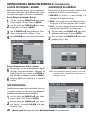
OPERACIÓN DEL MENÚ EN PANTALLA . . . . . . . . . . . . .24
Mapa de Navegación del Menú . . . . . . . . . . . . . . . . .24
Búsqueda Manual de Canales . . . . . . . . . . . . . . . . . . .24
Memoria de Canales . . . . . . . . . . . . . . . . . . . . . . . . . . . .25
Agregar Canales a la Memoria . . . . . . . . . . . . . . . .25
Quitar Canales de la Memoria . . . . . . . . . . . . . . . . .25
Guía-V (Control Paternal) . . . . . . . . . . . . . . . . . . . . . . . .26
Operación de Guía-V . . . . . . . . . . . . . . . . . . . . . . . . . . .26
Operación Guía-V Regional (Avanzado) . . . . . . . . . . .27
Ajuste de Imagen / Sonido . . . . . . . . . . . . . . . . . . . . . . .28
Ajuste Manual de Imagen y Sonido . . . . . . . . . . . .28
Ajustes Avanzados de Imagen y Sonido . . . . . . . .28
Caption Digital . . . . . . . . . . . . . . . . . . . . . . . . . . . . . . . . .28
Ahorrador de Energía . . . . . . . . . . . . . . . . . . . . . . . . . . .28
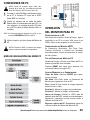
CONEXIONES DE PC . . . . . . . . . . . . . . . . . . . . . . . . . . . . . .29
Mapa de Navegación del Menú PC . . . . . . . . . . . . . . .29
OPERACIÓN DEL MONITOR PARA PC . . . . . . . . . . . . . . .29
Configuración de la PC . . . . . . . . . . . . . . . . . . . . . . . . . .29
Configuración del Monitor HDTV . . . . . . . . . . . . . . . . .29
Tips de operación del Menú de PC . . . . . . . . . . . . . . .29
Ajustes Manuales a la Configuración . . . . . . . . . . . . .29
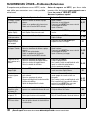
SUGERENCIAS ÚTILES - Problemas / Soluciones . . . . .30
GARANTÍA . . . . . . . . . . . . . . . . . . . . . . . . . . . . . . . . . . . . . . .31
ÁNGULOS DE VISIÓN (BRILLO)
QUITANDO EL PEDESTAL DEL
TELEVISOR (OPCIONAL)
Herramienta necesaria: Desarmador de cruz.
Nota importante: Coloque la HDTV con la pantalla
hacia abajo sobre una superficie acolchonada para
proteger la pantalla y el acabado de la HDTV.
Vertical
Horizontal
los 2 tornillos del soporte metálico.
1 Quite
PRECAUCIÓN: Sujete firmemente el soporte
al momento que se quita el último tornillo.
NOTA: La imagen puede parecer obscura si se ve fuera
de los ángulos de visión normales.
AJUSTANDO EL ÁNGULO
NOTA: Use el pedestal inclinable de la
televisión para tener un ángulo de
visión óptimo.
DIMENSIONES
Ancho: 48,0 cm.
Alto: 38,3 cm.
Profundidad: 18,4 cm.
MONTAJE EN LA PARED:
Interfase estándar VESA 100 x 100
Use los 4 tornillos colocados en los orificios para
montaje de la parte trasera de la HDTV para asegurarla al estuche especial de montaje en pared.
NOTA: Este estuche no está incluido.
Medidas de los tornillos para el montaje del LCD.
Diámetro M4, Longitud – 10mm (máximo).
¿Necesita ayuda? Visite nuestro sitio en internet www.sanyoctv.com o Llame al 1-800-877-5032
19
PARA COMENZAR—
PANELES DE CONTROL
Y CONECTORES
INSTALACIÓN DE BATERÍAS
Instale baterías en el control remoto
(2 ”AA”, no incluidas).
PRECAUCIONES
PANEL
DERECHO
Para asegurarse de una buena
operación, por favor observe las
siguientes precauciones:
Tecla de
“power”
Reemplace ambas baterías al mismo
tiempo. No utilice una batería nueva
con una usada.
Teclas de
Volumen
+y-
Existe riesgo de explosión si las baterías
son remplazadas con unas de tipo
incorrecto.
Asegurese de que las marcas “+” y “-” de
las baterías correspondan con las de el
control remoto.
Teclas de
Canal
CONEXIÓN DE ANTENA AEREA O
CABLE
ENTRADA DE ANTENA
ANÁLOGA/DIGITAL
ANTENA
O
CABLE
ESTA HDTV PUEDE SINTONIZAR :
a. Señales Digitales y Análogas de una antena
aerea.
O
b. Canales de TV por Cable análogos o sin
codificar.
NOTAS: Se debe usar el MENU en pantalla para
Buscar canales de TV por Cable sin codificar.
Para obtener la mejor imagen, conecte su
Decodificador o Receptor Satelital a las
entradas de Video1, 2 ó 3.
Esta HDTV puede recibir CUALQUIER señal
RF que sea transmitida.
20
PANEL IZQUIERDO
Entrada S-Video (VIDEO1)
Salida de Audio Digital (Coaxial)
Entrada AV (Audio/Video Compuesto)
Entrada de Video Componente (VIDEO2 or
VIDEO3)
Salida de Audio Estéreo Análogo L/R
Entrada para PC y Estéreo Audio Mini
• MONITOR RGB (D-SUB)
• AUDIO R/L (Conector Estéreo Mini)
Entrada de Antena Análoga / Digital
¿Necesita ayuda? Visite nuestro sitio en internet www.sanyoctv.com o Llame al 1-800-877-5032
PIX Shape—Utilize para elegir opciones
Tecla
entre Pix1 – Pix4. Las opciones disponibles
dependen de la señal y la relación de aspecto
transmitida.
de INPUT—Presione para seleccionar la
Tecla
fuente de video que desea ver: RF Análogo, RF
Digital, Video 1, Video 2, Video 3 o PC Input.
Info—Despliega
Tecla
recuadro.
OPERACIÓN DEL CONTROL REMOTO
Apunte hacia
la HDTV
información en un
La Barra de Antena Digital puede tener: Tipo
de señal, Núm. de Canal, ID de Estación,
Clasificación de Programa, Fuerza de Señal,
Información Detallada del Programa, Info. de
Audio y Título del programa.
La Barra de Antena Análoga puede tener:
Tipo de señal, Núm. de Canal, ID de Estación,
Clasificación de Programa e Info. de Audio.
La Barra de Cable puede tener: Tipo de
señal, Núm. de Canal, ID de Canal (sólo
análogo), Clasificación del Programa, Fuerza
de Señal e Info. de Audio.
11
12
13
14
Reset—Presionar dos veces para regreTecla
sar a valores de fábrica. La Búsqueda de
Canales comenzará automáticamente.
NOTA: La lista anterior de canales será reemplazada.
Numéricas—Presione dos teclas por
Teclas
canal. Ejem: Presione 0 y 6 para el canal 6.
de Canal CH
—Presione para naveTeclas
gar los canales en la memoria.
Recall—Cambia entre los últimos dos
Tecla
canales accesados.
Teclas de Navegación del Menú:
Menu—Muestra el menú en pantalla.
Teclas de Cursor —Mueven el cursor
hacia arriba o abajo.
Teclas de Cursor < > —Mueven el cursor
hacia la izquierda o derecha.
Tecla Enter—Activa la opción seleccionada,
cuando se requiera.
Tecla Exit—Presionar para salir del menú.
Audio—Selecciona el modo de audio
Tecla
deseado, de ser disponible.
Sleep—Presione SLEEP y luego “0”
Tecla
para incrementar el apagado automático en
intervalos de 30 minutos hasta 3 horas.
NOTA: Este modo se cancela al apagar la HDTV.
11 Tecla Caption—Despliega los modos de:
Digital CC1 a CC6, o Análogo CC1 a CC4,
QuikCap o Apagado. La apariencia de los
subtítulos puede ser modificada en el menú.
12 Teclas de Volumen—Incrementa (+) o disminuye (–) la intensidad del sonido.
13 Tecla Mute—Cancela o restaura el audio.
14 Tecla “1– –” —Para canales mayores al 99, presione seguido de los dos números restantes.
¿Necesita ayuda? Visite nuestro sitio en internet www.sanyoctv.com o Llame al 1-800-877-5032
21
PARA COMENZAR—CONEXIONES
1
Conexiones para Señal Análoga—
Video1 (opcional)
2
Conexiones de Señal Digital—
Video1 y Video3 (opcional)
Conecte un dispositivo análogo tal como un
Decodificador de Cable, Receptor Satelital o
Videocasetera.
Conecte dispositivos digitales tales como
Decodificadores de Cable, Satelite HD y/o
Reproductor DVD.
Entradas RCA (compuestas) están incluidas en
su nueva HDTV para proveer compatibilidad
con dispositivos análogos anteriores, tales
como una Videocasetera. El conector S-Video
proveerá la mejor imagen análoga. Si se cuenta
con un dispositivo con salida S-Video, se
recomienda su uso sobre el conector estándar.
Las entradas de Componente de esta HDTV
aceptan varias señales digitales, haciendolas
una muy buena opción para una buena calidad
y resolución de imagen.
1. Conecte un cable AV a la entrada VIDEO 1 de
la HDTV y a su equipo análogo, como se
muestra. Concuerde el color del cable con la
entrada respectiva. (cable no incluido)
2. Presione la tecla INPUT para cambiar de
señal y seleccionar Video 1.
SALIDA DE AUDIO ESTÉREO ANÁLOGO L/R
(PASO OPCIONAL) ANÁLOGO FIJO
1A
De la salida Audio Out conecte el
amplificador de estéreo, como se
muestra.
NOTA:No conecte bocinas externas directamente a
la HDTV.
DISPOSITIVO ANÁLOGO
1. Conecte un cable de COMPONENTE a un
grupo de entradas Verde, Azul y Roja
(Video2 o 3) de la HDTV y a su dispositivo
digital, como se muestra (cable no incluido).
2. Conecte un cable de AUDIO al grupo correspondiente de entradas Roja y Blanca, como
se muestra (cable no incluido).
3. Presione la tecla INPUT para cambiar de
señal y seleccionar Video 2 ó 3.
SALIDA DE AUDIO DIGITAL
(PASO OPCIONAL) COAXIAL
2A
Conecte la Salida de Audio Digital a
un receptor mulitcanal, como se
muestra.
NOTA:Audio Dolby® Digital 5.1 está disponible de la
salida de audio digital sólo cuando se recibe
como parte de la señal de antena digital.
RECEPTOR MULTICANAL
AMP.
ESTÉREO
REPRODUCTOR DVD O SIMILAR
22
¿Necesita ayuda? Visite nuestro sitio en internet www.sanyoctv.com o Llame al 1-800-877-5032
PARA COMENZAR—
CONEXIÓN ELÉCTRICA / BÚSQUEDA DE CANALES
CONEXIÓN ELÉCTRICA
3
Conecte el cordón de
potencia de AC (120V
AC, 60 Hz).
4
Presione la tecla de
POWER (siga las instrucciones en pantalla).
A la toma de 120VAC
BÚSQUEDA DE CANALES INICIAL
5
Presione la tecla CHANNEL para buscar
señales conectadas a la entrada de Antena.
La Búsqueda de Canales buscará señales de
Antena y Cable. Si señales de Antena Aerea son
detectadas, la HDTV buscará señales tanto
análogas como digitales. Si se detectan señales
de Cable, la HDTV buscará sólo canales análogos
de Cable.
Los canales se almacenan en la Memoria y
pueden ser seleccionados usando las teclas de
CH y .
PANTALLA DE BÚSQUEDA DE CANALES
BÚSQUEDA AV
NOTA:Asegúrese que todos los dispositivos externos
de video que conecte a su HDTV estén prendidos antes de comenzar la búsqueda AV.
6
Presione la tecla CH para buscar señales
de dispositivos conectados a entradas AV.
Si no detecta señales de Antena Aerea o Cable,
la HDTV comenzará una búsqueda de AV.
La búsqueda AV comenzará por revisar las
entradas AV con señal válida, comenzando por
la entrada Video1. Cuando se detecta una señal
válida, el proceso de búsqueda termina y la
HDTV la sintoniza.
Si ninguna de estas búsquedas detecta una
señal válida, la HDTV sintonizará la entrada de
Video1.
Si no se detecta una señal válida en ninguna
entrada AV, la HDTV sintonizará la entrada
Video1.
PANTALLA INICIAL
PANTALLA DE BÚSQUEDA AV
¿Necesita ayuda? Visite nuestro sitio en internet www.sanyoctv.com o Llame al 1-800-877-5032
23
OPERACIÓN DEL MENÚ EN PANTALLA
MAPA DE NAVEGACIÓN DEL MENÚ
MENÚ PRINCIPAL
OPC. SUB-MENÚ
BÚSQUEDA MANUAL DE CANALES
BÚSQUEDA MANUAL DE CANALES TIENE 3 CATEGORÍAS
• Cable
• Aire (Antena)
• Adición Digital
Búsqueda en Cable agrega canales análogos y
digitales sin codificar. Esta búsqueda puede
tomar varios minutos. Cuando termine, la HDTV
sintonizará el canal digital sin codificar más bajo
de estar disponible. De no ser así, la HDTV sintonizará el canal análogo más bajo.
Búsqueda en Aire (Antena) agrega canales digitales y análogos transmitidos por Aire. Al terminar, la HDTV sintonizará el canal Digital o
Análogo más bajo. De no haber señal, la HDTV
sintonizará Video 1.
Búsqueda de Adición Digital agrega cualquier
canal digital nuevo a la base de datos.
1
2
3
Presione la tecla MENU para exhibir el menú
principal.
Use las teclas CURSOR para resaltar
Búsqueda Manual. Presione ENTER.
Use las teclas de CURSOR para seleccionar Cable, Aire (Antena) o Adición Digital.
Al terminar la búsqueda, la HDTV saldrá del Menú
y regresará a la pantalla normal.
NOTA:“No disponible” aparecerá en la pantalla cuando una opción no se pueda utilizar.
TIPO DE SEÑAL
RF Análogo
RF Digital
Video 1
Video 2/3
OPCIONES DE MENÚ NO DISPONIBLES
Caption DTV (subtítulos)
Ninguna (todas las opciones son disponibles)
Búsqueda Manual de Canales, Memoria de
Canales, Caption DTV
Búsqueda Manual de Canales, Memoria de
Canales, Caption DTV, Guía-V
INFO. IMPORTANTE: Esta HDTV mantiene una sola base de
datos para canales digitales. Por lo tanto cuando busque
canales digitales de Cable, la base de datos de canales digitales será borrada. Usted sólo podrá recibir aquellos
canales ClearQAM provistos por su compañía de cable.
24
NOTA:
Para información sobre canales digitales
locales, visite www.antennaweb.org.
¿Necesita ayuda? Visite nuestro sitio en internet www.sanyoctv.com o Llame al 1-800-877-5032
MEMORIA DE CANALES
Memoria de Canales es una base de datos de
canales almacenados que se pueden accesar con
las teclas de CH . Modifíquela agregando o
quitando canales.
1
2
3
DE LA
MEMORIA
Use la tecla CHANNEL o las teclas
numéricas para seleccionar el canal que
desea quitar.
Presione la tecla MENU para exhibir el menú
principal.
NOTA: Use la tecla 1– – para seleccionar canales de
cable mayores al 99.
Use las teclas de CURSOR para resaltar
Memoria de Canales. Presione ENTER.
4
5
AGREGAR CANALES
3
QUITAR CANALES
A LA
MEMORIA
Presione ENTER para Quitar el canal de
la Memoria.
Presione EXIT para regresar a la pantalla
normal.
Use la teclas NUMÉRICAS para seleccionar
el canal que desea agregar.
NOTA: Use la tecla 1– – para seleccionar canales de
cable mayores al 99.
4
Presione ENTER para Agregar el canal a
la Memoria.
Pantallas de
Memoria de
Canales
Esta pantalla
aparece
después de
presionar
ENTER.
Luego de 3 segundos, en la pantalla
aparecerá el mensaje "Agregar?"
INFORMACIÓN IMPORTANTE: Cuando un
Esta pantalla
aparece
después de
presionar
ENTER.
canal digital es eliminado, todos sus sub-canales
también son eliminados. Sólo aquellos canales
digitales previamente eliminados pueden ser
agregados nuevamente a la base de datos.
Luego de 3 segundos, en la pantalla
aparecerá el mensaje "Saltar?"
Sintonize canales “saltados” usando las teclas
numéricas. Si un sub-canal digital se agrega de
nuevo a la base de datos, entonces todos los subcanales de ese canal serán agregados de nuevo.
(Operaciones del Menú continuan en la página 26).
¿Necesita ayuda? Visite nuestro sitio en internet www.sanyoctv.com o Llame al 1-800-877-5032
25
OPERACIÓN DEL MENÚ EN PANTALLA
GUÍA-V (CONTROL PATERNAL)
NOTA: ESTA FUNCIÓN ESTÁ DISEÑADA PARA
CUMPLIR CON REGULACIONES DE LA FCC
PARA V-CHIP EN LOS ESTADOS UNIDOS DE
AMÉRICA, ESTA FUNCIÓN PUDIERA NO ACTIVARSE CON SEÑALES QUE ORIGINEN DE
OTROS PAISES.
Esta televisión Sanyo está equipada con un circuito electrónico V-CHIP para interpretar los códigos de clasificación de la MPAA y ordenamientos
de Control Paternal en TV Digital. Cuando estos
códigos son detectados la HDTV desplegará o
bloqueará la señal dependiendo de las opciones
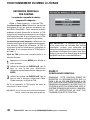
hechas en el sistema Guía-V.
Utilize esta función para bloquear programas con
contenido que considere inapropiado para sus
hijos.
MÁS INFORMACIÓN
Puede consultar información adicional sobre la
clasificación V-Chip y MPAA en las páginas:
www.v-chip.org y www.mpaa.org.
OPERACIÓN
DE
GUÍA-V
1
Utilize las teclas de CURSOR para
resaltar Guía-V en el Menú principal.
Presione ENTER.
2
Utilize las teclas de CURSOR para
resaltar Prendido en el Menú de Guía-V.
Presione ENTER.
3
4
(CONTINUACIÓN)
Utilize las teclas de CURSOR para seleccionar Ajustar. Presione ENTER.
Utilize las teclas de CURSOR y < > para
seleccionar CINE, TV, o Clase de Contenido
(un cuadro verde aparecerá a un lado de la
selección).
NOTA:La clasificación de contenido está bajo: FV, D, L,
S y V.
5
Presione la tecla ENTER para Bloquear o
Permitir clasificaciones seleccionadas. Un
símbolo de candado aparecerá a un lado de
la opción de clasificación seleccionada indicando que está bloqueada.
TIPS DE OPERACIÓN:
Los valores de la Guía-V son efectivos para
canales Análogos, canales Digitales y señales de
Video1.
Usted puede bloquear porciones de la clasificación escogiendo una o más de las clasificaciones de contenido (D, L, S, y V). Bloqueando
sólo las clasificaciones de contenido L y S de
TV-14, por ejemplo, programas con clasificación
TV-14 con una clasificación de contenido D y/o
V todavía podrían verse.
EJEMPLO DE CLASIFICACIÓN DE GUÍA-V
CLASIFICACIÓN DE
PELÍCULA
CLASIFICACIÓN
DE TV
CLASIFICACIÓN
DE
CONTENIDO
CLASIFICACIONES BLOQUEADAS
26
¿Necesita ayuda? Visite nuestro sitio en internet www.sanyoctv.com o Llame al 1-800-877-5032
OPERACIÓN GUÍA-V REGIONAL (AVANZADO)
5
La Clasificación V-Chip Regional 5 (RRT5) es un
sistema de clasificación avanzada V-Chip para
canales digitales recibidos por medio de antena.
Su nueva HDTV Sanyo es compatible con este
sistema alterno.
Cuando la HDTV detecta información RRT5 compatible, es descargada y almacenada en la
memoria y el menú es modificado para incluir la
opción de Ajuste Avanzado.
Cuando se selecciona la opción de Ajuste
(Avanzado), se despliega la pantalla de Clasificación Avanzada.
1
Utilize las teclas de CURSOR para
resaltar Guía-V en el Menú principal.
Presione ENTER.
2
Utilize las teclas de CURSOR para
resaltatar Prendido en el menú de Guía-V.
Presione ENTER.
3
Utilize las teclas de CURSOR para
resaltar Ajuste (Avanzado). Presione ENTER.
4
Utilize las teclas de CURSOR y <
seleccionar una clasificación.
Presione ENTER para Bloquear o Permitir la
clasificación seleccionada. Un candado
aparecerá a un lado de la clasificación indicando que está bloqueada.
La tabla de clasificación avanzada reflejará
opciones previamente seleccionadas.
NOTA: Si la HDTV se restaura a los valores originales
de fábrica o si se realiza una Búsqueda de Cable
Manual, sólo aparecerá en el Menú la opción de
Ajustar. La opción de Ajustar (Avanzado) reaparecerá cuando la HDTV detecte una vez más
información RRT5.
La pantalla de Guía-V que se muestra abajo sólo
es un ejemplo. Las opciones desplegadas dependerán de la región. Por ejemplo, las clasificaciones RRT5 en San Francisco, California pueden
variar a las de Little Rock, Arkansas.
> para
TIP :
Puede haber más clasificaciones de las que se
despliegan en pantalla. Cuando aparezca una
barra de desplazamiento vertical, use las teclas
de CURSOR para poder accesar las clasificaciones adicionales.
¿Necesita ayuda? Visite nuestro sitio en internet www.sanyoctv.com o Llame al 1-800-877-5032
27
OPERACIÓN DEL MENÚ EN PANTALLA
(CONTINUACIÓN)
AJUSTE DE IMAGEN / SONIDO
AHORRADOR DE ENERGÍA
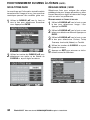
Seleccione Auto para asignar valores predeterminados para cada opción o elija Manual para ajustar
los valores de Imagen y Sonido a su preferencia.
Esta función de ahorro de energía reduce el nivel
de brillo de la HDTV. Las opciones son:
•
APAGADO—la función no está activada y el
consumo de energía es normal.
Use las teclas de CURSOR para seleccionar Imagen / Sonido. Presione ENTER.
•
BAJO—el nivel de ahorro de energía es bajo y
el brillo de la HDTV es más bajo de lo normal.
Use las teclas de CURSOR para seleccionar Manual. Presione ENTER.
•
ALTO—el nivel de ahorro de energía es alto y el
nivel de brillo de la HDTV es el más bajo.
Use el CURSOR para seleccionar Color,
Tinte, Contraste, Brillo, Nitidez, o Tono.
1
2
AJUSTE MANUAL
1
2
3
4
DE IMAGEN Y
Use el CURSOR <
AJUSTES AVANZADOS
>
SONIDO
para ajustar los niveles.
DE IMAGEN Y
Use las teclas de CURSOR para elejir
Ahorrador de Energía. Presione ENTER.
Use las teclas de CURSOR para elejir
Apagado, Bajo o Alto.
SONIDO
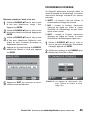
5
Para cambiar los valores de Reducción Digital
de Ruido, Contraste Dinámico o Supresor de
Ruido Excesivo, use la tecla de CURSOR >,
elija Prendido o Apagado y presione ENTER.
6
Presione EXIT para regresar a la pantalla
normal.
NOTA: Los niveles de ajustes del modo de Ahorro de
Energía varian dependiendo del modo de
Imagen y Sonido.
CAPTION DIGITAL
Subtítulos que pueden ser transmitidos junto con
la imagen y sonido, los valores de las preferencias
pueden ser modificados dentro del Menú.
1
2
28
Use las teclas de CURSOR para seleccionar Caption DTV. Presione ENTER.
Use las teclas de CURSOR para elegir
una opción y las teclas CURSOR < > para
ajustar el valor.
¿Necesita ayuda? Visite nuestro sitio en internet www.sanyoctv.com o Llame al 1-800-877-5032
CONEXIONES DE PC
NOTA: Antes de conectar algún cable, desenchufe de la toma AC los cables de corriente
tanto del Televisor HDTV como el de la PC.
1
Conecte un cable RGB de la salida de monitor
de la PC al conector PC Input de la HDTV
(cable RGB no incluido).
2
Inserte un extremo de un cable de Audio
Estéreo Mini a la salida de audio de la PC y el
otro extremo a la entrada de audio PC Input
en la HDTV (cable de Audio Estéreo Mini no
incluido).
HINT: El volumen puede ser ajustado con la PC y/o con
las teclas VOLUME y de la HDTV.
3
Utilize la opción de Auto Ajuste del Menú de
PC.
NOTA: Encender la HDTV y cualquier otro equipo
externo antes de encender la computadora.
MAPA DE NAVEGACIÓN DEL MENÚ PC
OPERACIÓN
DEL MONITOR PARA PC
CONFIGURACIÓN
DE LA
PC
Para evitar una condición “Fuera de Rango”, baje la
resolución en su PC a un valor XGA, como lo es
1024 x 768 px, antes de quitar su monitor actual.
CONFIGURACIÓN
MONITOR HDTV
DEL
La Frecuencia, Resolución, Dot Clock, Fase,
Posición Horizontal y Vértical son ajustadas
automáticamente cuando se selecciona la opción
de Auto Ajuste.
TIPS
DE
OPERACIÓN
DEL
MENU
DE
PC
Ajustes de Imagen y Sonido en el Menú de PC no
afectan ajustes de otras entradas.
Presione RESET dos veces para restaurar los
valores de fábrica (ver página 21).
AJUSTES MANUALES
A LA
CONFIGURACIÓN
Temp. de Color—Presione ENTER para seleccionar el ajuste.
Dot Clock—Dot Clock ajusta la Frecuencia de
Barrido para igualarla a la de su PC.
Fase—Ajuste la Fase cuando la imagen aparenta
estar borrosa o vibrar.
Posición-H—Mueve la imagen horizontalmente.
Posición-V—Mueve la imagen verticalmente.
Ahorro de Energía—Cuando la HDTV deje de
detectar señal de la PC, cambia a modo de espera.
Regresará a operación normal cuando vuelva a
detectar señal de la PC.
Regresar a ajustes de PC—Reestablece todos los
valores iniciales de fábrica del Menú de PC.
¿Necesita ayuda? Visite nuestro sitio en internet www.sanyoctv.com o Llame al 1-800-877-5032
29
SUGERENCIAS ÚTILES—Problemas/Soluciones
Si experimenta problemas con su HDTV, revise
esta tabla para encontrar una o más posibles
soluciones.
Problema
Confirme las Siguientes Condiciones
No Imagen / Sonido
(Imagen Digital)
Antes de regresar su HDTV, por favor visite
nuestro sitio de internet www.sanyoctv.com o
llame sin costo al 1.800.877.5032.
Nosotros le podemos ayudar!
Revise la conexión de Antena o Equipo
externo.
Podría ser un problema de la transmisora.
Podría estar la función MUTE activada.
Intente estas Soluciones
Página
Ajuste la Antena.
Seleccione un canal diferente.
20, 21
Presione la tecla RESET dos veces o reinicie
una búsqueda de canales.
Ajuste el Volumen.
No Subtítulos
(Caption Digital)
Revise si la estación está transmitiendo
señal Caption. Seleccione otro canal.
Presione la tecla CAPTION para activar la
función.
Subtítulos no se
pueden personalizar.
Carencia de señal Caption Digital.
Presione la tecla CAPTION para seleccionar
21, 28
Caption Análogo.
Presione la tecla de PIX SHAPE para
expandir o acercar la imagen.
No se muestra la
imagen en la pantalla completa.
Recepción pobre
de Imagen / Sonido.
Revise si el programa es a color.
Revise las conexiones de Antena o equipo
externo.
Color o Tinte mal ajustados.
Podría ser problema de la estación.
Podría estar la función MUTE activada.
Revise las conexiones de Audio/Video.
Revise las conexiones del equipo externo.
Revise los ajustes del equipo externo
Revise la conexión de la Antena
Distorción de la
Imagen Digital.
Presione INFO y revise el nivel de la señal.
No selecciona o
no busca algunos
canales.
El mensaje de “No
señal” aparece en la
pantalla.
No canales de Cable
disponibles arriba
del número 13.
El Control Remoto
no opera la TV.
El gabinete de la
HDTV hace ruidos.
30
El canal pudo haber sido removido
de la memoria.
Revise las conexiones de antena.
Ninguna señal digital está siendo transmitida.
Señales están débiles.
Opción de bloqueo Guía-V activada.
El indicador de canal de cable C debe de
aparecer a un costado del número del canal.
Revise si las baterías están insertadas.
Revise que el televisor esté conectado.
21, 28
21
Seleccione un canal diferente.
Ajuste la antena.
Presione la tecla RESET dos veces o reinicie 20~22
una búsqueda de canales.
28
Ajuste el Volumen y/o Imagen.
Presione la tecla INPUT.
Prenda el equipo externo.
Gire la antena. Instale un amplificador de señal.
20~22
Iguale las salidas del equipo externo
con las conexiones de entrada.
Gire la antena, Instale un amplificador de señal.
Instale una antena Digital Externa.
21
Seleccione Memoria de Canales y manualmente agregue los canales o inicie una
búsqueda.
20, 21
Gire la antena, Instale un amplificador de señal.
25, 26
Elija la opción Guía-V para permitir todos o
presione la tecla RESET dos veces para
reiniciar una búsqueda de canales.
Busque canales de Cable utilizando la
Búsqueda Manual de Canales.
24
Reemplazar las baterías.
Dirija el Control Remoto al frente del televisor. 20, 21
Esta es una condición normal de los gabinetes de plástico durante el calentamiento o
el enfriamiento.
¿Necesita ayuda? Visite nuestro sitio en internet www.sanyoctv.com o Llame al 1-800-877-5032
GARANTÍA LIMITADA DE UN AÑO EN PARTES Y MANO DE OBRA
ESTA GARANTÍA LIMITADA DE PARTES Y MANO DE OBRA ES VALIDA SÓLO EN TELEVISORES SANYO COMPRADOS
Y USADOS EN LOS ESTADOS UNIDOS DE AMÉRICA, CANADA Y PUERTO RICO, EXCLUYENDO CUALQUIER OTRO
TERRITORIO Y PROTECTORADO DE E.E.U.U. ESTA GARANTÍA LIMITADA APLICA SÓLO A COMPRADORES
MINORISTAS Y NO APLICA A PRODUCTOS UTILIZADOS CON FINES COMERCIALES O INDUSTRIALES.
APLICACIÓN DE LA GARANTÍA
POR UN AÑO, desde la fecha de la compra original, Sanyo Manufacturing Corporation (SMC) garantiza esta televisión
de estar libre de defectos de manufactura en materiales y mano de obra bajo uso y condiciones normales para partes
y trabajo.
Por los PRIMEROS 90 DÍAS, desde la fecha de la compra original, Sanyo Manufacturing Corporation remplazará
cualquier televisión defectuosa vía el vendedor original. Para asegurar la apropiada aplicación de la garantía,
conserve el recibo original de compra fechado como evidencia de compra. Regrese la TV defectuosa al vendedor
junto con su recibo de compra además de todos los accesorios incluidos, como el control remoto. La TV defectuosa
será cambiada por una del mismo modelo, o un modelo equivalente o de igual valor, si es necesario. El reemplazo
del TV será en contingencia y disponibilidad y a la exclusiva discreción de Sanyo Manufacturing Corporation.
ESTA GARANTÍA ES EXCLUYENTE DE Y EN LUGAR DE TODAS LAS OTRAS GARANTÍAS DE COMERCIALIZACIÓN O USO
PARA UN PROPÓSITO ESPECÍFICO.
OBLIGACIONES
Por un año, desde la fecha de la compra original, Sanyo Manufacturing Corporation (SMC) garantiza esta televisión
de estar libre de defectos de manufactura en materiales y mano de obra bajo condiciones normales de uso. Durante
los primeros 90 días bajo esta garantía para cualquier defecto de manufactura o mal funcionamiento Sanyo
Manufacturing Corporation proveerá una nueva TV vía intercambio con el vendedor.
COMO HACER UN RECLAMO BAJO ESTA GARANTÍA.
Por favor llame al 1-800-877-5032. Por favor esté preparado para darnos el número de modelo de la televisión cuando llame. El número de modelo y el número de serie están impresos en la etiqueta agregada en la parte trasera de la
unidad.
Para asistencia al consumidor, llame sin costo al 1-800-877-5032
Lunes a Viernes: 7:30 AM – 7:00 PM Hora Central
Sábado: 7:30 AM – 4:00 PM Hora Central
Esta garantía expresa derechos contractuales específicos; minoristas podrán tener derechos estatutarios
adicionales que pueden variar de estado a estado.
(EFECTIVO: Marzo 1, 2007)
Para su protección en caso de robo o pérdida de esté producto, por favor llene la siguiente información requerida y GUARDELA en un lugar seguro para su registro personal:
No. de Modelo__________________________
Fecha de compra __________________________
No. de Serie ___________________________
Precio de compra __________________________
(Localizada en la parte posterior)
Lugar de compra __________________________
Sanyo Manufacturing Corp.
3333 Sanyo Road, Forrest City, AR 72335
¿Necesita ayuda? Visite nuestro sitio en internet www.sanyoctv.com o Llame al 1-800-877-5032
31
MESURES DE SÉCURITÉ
Afin d’éviter les risques d’incendie ou de choc
électrique, n’exposez pas l’appareil à la pluie ni
à l’humidité.
Afin d’éviter les risques de choc électrique,
n’enlevez pas le panneau arrière. L’appareil est
entièrement transistorisé et ne contient aucune
pièce remplaçable ou réparable par l’utilisateur.
En cas de problème, confiez l’appareil à un
réparateur qualifié.
Le téléviseur est muni d’un cordon d’alimentation CA à fiche polarisée dont une lame est plus
large que l’autre. MISE EN GARDE : pour éviter
le risque de choc électrique, faites correspondre
la lame large de la fiche à la fente large de la
prise, puis enfichez à fond. Ceci est une mesure
de sécurité conçue pour ne brancher la fiche que
d’une seule façon sur une prise électrique.
Lorsque vous utilisez le téléviseur avec des jeux
vidéo, ne saturez pas la luminosité ni le contraste.
Avec le temps, ceci pourrait causer l’impression
FICHE TECHNIQUE
Alimentation : 120 V CA, 60 Hz
Consommation : 50 watts
Renseignements au sujet des marques de
commerce :
Fabriqué sous licence de Dolby Laboratories.
« Dolby » est une marque de commerce de
Dolby Laboratories.
En tant que partenaire d’ENERGY
MD
STAR , Sanyo Manufacturing
Corporation a déterminé que ce
produit répond, pour son rendement énergétique, aux normes
MD
d’ENERGY STAR .
CONTIENT DES LAMPES AU
MERCURE, À JETER DE
FAÇON APPROPRIÉE
32
Besoin d’aide?
permanente de l’image du champ de jeu sur
l’écran. Ne placez pas cet appareil sur un chariot, un support ou une table instable. Il risquerait
de tomber, de s’endommager et d’entraîner de
graves blessures.
Utilisez uniquement un chariot, une table ou un
support recommandé par le fabricant ou vendu
avec l’appareil. Lors de son installation, suivez
les instructions du fabricant
et utilisez les accessoires
d’installation recommandés.
Prenez garde lorsque vous
déplacez le téléviseur s’il se
trouve sur un chariot.
Des arrêts brutaux, une
force excessive et des
surfaces inégales peuvent renverser le chariot et
l’appareil.
Lisez attentivement le présent manuel et
conservez-le.
PROTECTION DE L’ÉCRAN
D’AFFICHAGE ACL
L'écran est susceptible d'être endommagé s'il
n'est pas entretenu convenablement. NE PAS
utiliser d'objets durs tels
qu'un chiffon rugueux ou du
papier rigide. NE PAS appuyer trop fort en nettoyant
l'écran ACL; une pression
excessive peut causer une
décoloration permanente ou
des taches d'ombre. Ne
jamais pulvériser de liquides sur l'écran.
Ce symbole sur la plaque d’identification indique que le produit est
approuvé
par
Underwriters
Laboratories Inc. Il a été conçu et
fabriqué selon les normes strictes
de sécurité UL contre les risques
d’incendie, de blessures et de chocs
électriques.
Visitez notre site web à www.sanyoctv.com ou appelez le 1-800-877-5032
TABLE DES MATIÈRES
MESURES DE SÉCURITÉ . . . . . . . . . . . . . . . . . . . . . . . . . . .32
FICHE TECHNIQUE . . . . . . . . . . . . . . . . . . . . . . . . . . . . . . . .32
PROTECTION DE L’ÉCRAN D’AFFICHAGE ACL . . . . . . . .32
TABLE DES MATIÈRES . . . . . . . . . . . . . . . . . . . . . . . . . . . .33
INFORMATION FCC . . . . . . . . . . . . . . . . . . . . . . . . . . . . . . .33
ANGLES DE VISIONNEMENT (LUMINOSITÉ) . . . . . . . . .34
PRÉCAUTIONS LORS DE LA MANIPULATION . . . . . . . .34
Utilisation du socle inclinable . . . . . . . . . . . . . . . . . . . .34
Adjusting the angle . . . . . . . . . . . . . . . . . . . . . . . . . . . . .34
POUR COMMENCER —
Branchement d’antenne aérienne ou câble . . . . . . . .35
Installation des piles . . . . . . . . . . . . . . . . . . . . . . . . . . . .35
Commandes et fiches . . . . . . . . . . . . . . . . . . . . . . . . . . .35
Connexions . . . . . . . . . . . . . . . . . . . . . . . . . . . . . . . . . . . .36
Signal analogique / audio analoquiques . . . . . . . . . . .36
Signal numérique / audio numérique . . . . . . . . . . . . . .36
BRANCHEMENT ÉLEC. / RECH. DES CHAÎNES . . . . . . . .37
Branchement électrique . . . . . . . . . . . . . . . . . . . . . . . .37
Rech. de chaînes initiale . . . . . . . . . . . . . . . . . . . . . . . .37
Recherche AV . . . . . . . . . . . . . . . . . . . . . . . . . . . . . . . . .37
BRANCHEMENTS DE PC . . . . . . . . . . . . . . . . . . . . . . . . . .38
Carte de navigation du menu PC . . . . . . . . . . . . . . . . .38
OPÉRATION DE L’ÉCRAN POUR PC . . . . . . . . . . . . . . . . .38
Configuration du PC . . . . . . . . . . . . . . . . . . . . . . . . . . . .38
Configuration de l’écran (TVN) . . . . . . . . . . . . . . . . . . .38
Conseils d’opération du menu PC . . . . . . . . . . . . . . . . .38
Réglages manuels . . . . . . . . . . . . . . . . . . . . . . . . . . . . . .38
UTILISATION DE LA TÉLÉCOMMANDE . . . . . . . . . . . . . .39
FONCTIONNEMENT DU MENU À L'ÉCRAN
Diagramme de navigation du menu . . . . . . . . . . . . . . .41
Recherche manuele de chaînes . . . . . . . . . . . . . . . . . .42
Memoire des chaînes
Pour ajouter un canal . . . . . . . . . . . . . . . . . . . . . . . .43
Pour supprimer les chaînes . . . . . . . . . . . . . . . . . . .43
Sous-titres num. . . . . . . . . . . . . . . . . . . . . . . . . . . . . . . . .44
Réglage image / son . . . . . . . . . . . . . . . . . . . . . . . . . . . .44
Réglages avancés de l’image et du son . . . . . . . . . . .45
Économiseur d’énergie . . . . . . . . . . . . . . . . . . . . . . . . . .45
DÉPANNAGE (problèmes / solutions) . . . . . . . . . . . . . . .46
GARANTIE . . . . . . . . . . . . . . . . . . . . . . . . . . . . . . . . . . . . . . .48
INFORMATION FCC
Cet équipement a été testé et déclaré conforme aux limites fixées pour un appareil de Classe B, selon la Partie 15 du
règlement FCC. Ces limites sont destinées à assurer une protection raisonnable contre des interférences nocives
dans une installation résidentielle. Cet équipement génère, utilise et peut irradier une énergie de fréquence radio et
s’il n’est pas installé ou utilisé conformément aux instructions, il peut provoquer des interférences nuisibles aux communications radio. Cependant, il est impossible de garantir qu’aucune interférence ne soit créée suivant le type d’installation. Si cet équipement vient à générer une interférence nuisible à la réception de la radio ou de la télévision,
qui peut être mise en évidence en allumant et en éteignant l’appareil, on recommandera à l’utilisateur d’essayer de
corriger cette interférence au moyen d’une ou plusieurs méthodes :
- en réorientant ou en déplaçant l’antenne réceptrice.
- en augmentant la distance entre l’équipement et le récepteur.
- en connectant l’équipement à une prise d’un circuit électrique différent de celui sur lequel est connecté le récepteur.
- en demandant l’aide d’un vendeur ou d’un technicien de radio et télévision expérimenté.
PRÉCAUTION : Le règlement FCC avertit que des modifications inadéquates ou non autorisées sur cette unité peuvent annuler l’autorisation de l’utilisateur pour opérer l’unité.
Besoin d’aide?
Visitez notre site web à www.sanyoctv.com ou appelez le 1-800-877-5032
33
PRÉCAUTIONS LORS DE
LA MANIPULATION
Bonjour !
Je suis ton nouveau téléviseur Sanyo
écran large ACL TVN. Ne me branche pas tout de suite!
Lis s’il te plaît avec attention ce manuel et découvre mes
nombreuses fonctions comme celles de mon syntoniseur HD intégré, Contrôle Parental, Chaînes
numériques, entrée pour PC et beaucoup d’autres…
ANGLES DE VISIONNEMENT
(LUMINOSITÉ)
•
Manipulez en tenant par le boîtier uniquement. Ne touchez jamais l'écran lors de la
manipulation.
•
Une pression excessive sur l'écran peut
causer une décoloration permanente ou la
formation de taches foncées.
•
Les dommages attribuables à la manipulation ne sont pas couverts par la garantie.
UTILISATION DU SOCLE
INCLINABLE
Pour changer l’angle de visualisation de votre
téléviseur ACL, tenez le haut de l’appareil d’une
main et retenez fermement le socle, puis faites
basculer l’écran en avant ou en arrière.
ATTENTION : ne mettez pas la main sous l’écran
quand vous faites basculer le téléviseur.
ENLÈVEMENT DU SOCLE INCLINABLE
Vertical
Horizontal
Outils requis : tournevis à vis cruciforme
Remarque importante : placez le téléviseur face
en bas sur une surface matelassée pour protéger
l’écran et le fini de l’appareil.
REMARQUE : l’image peut apparaître trop foncée
lorsqu’on la regarde hors des angles de visionnement
normaux.
les deux (2) vis du support métallique.
1 Enlevez
ATTENTION : retenez fermement le socle
quand vous enlevez la dernière vis.
AJUSTER L’ANGLE
REMARQUE : veuillez utiliser la
fonction d’inclinaison
pour ajuster l’angle
vertical
pour
un
visionnement optimal.
MONTAGE MURAL
Norme d'interface VESA 100 x 100.
Dimensions
Dim. horizontale (largeur) : 479.9 mm
Dim. verticale (hauteur) : 383.0 mm
Profondeur : 184.0 mm
Utilisez les 4 vis placées dans les fentes situées à
l’arrière du TVN pour l’assujettir au moyen de la
trousse d’installation murale.
REMARQUE : la trousse de montage n’est pas comprise.
Dimensions des vis de montage du ACL :
Diamètre M4, longueur — de 10 mm (maximum).
34
Besoin d’aide?
Visitez notre site web à www.sanyoctv.com ou appelez le 1-800-877-5032
POUR COMMENCER —
COMMANDES ET FICHES
INSTALLATION DES PILES
Placez les piles dans la télécommande (2 AA,
non comprises).
PANNEAU LATÉRAL
DROIT
Touches de
mise en
marche et
d’arrêt
(power)
PRÉCAUTIONS
Pour assurer un fonctionnement sécuritaire, veuillez observer les mesures de
précaution suivantes :
Remplacez les deux piles en même
temps. N'utilisez pas une pile neuve
avec une pile usagée.
Il y a risque d’explosion si une pile est
remplacée par un modèle incorrect.
N'exposez pas la télécommande
à l'humidité ou à la chaleur.
Touches de
volume
(VOL – +)
Touches
de canal
(CH )
Les signes “+” et “–” des piles doivent
correspondre à ceux de l’intérieur de la
télécommande.
BRANCHEMENT D’ANTENNE
AÉRIENNE OU CÂBLE
ANTENNE RF
Entrée d'antenne
analogique /
numérique
OU
PANNEAU LATÉRAL
GAUCHE
CÂBLE
LE SYNTONISEUR DE CETTE TVN PEUT RECEVOIR :
a. des signaux numériques et analogiques
d’une antenne aérienne.
OU
b. des chaînes de TV par câble analogiques ou
non brouillées.
REMARQUE : vous devez utiliser le MENU sur écran
pour chercher les chaînes de TV par câble
non brouillées.
Afin d’obtenir la meilleure image possible,
branchez votre décodeur ou récepteur
satellite sur les entrées Vidéo 1, 2 ou 3.
Entrée S-vidéo (VIDEO1)
Sortie audio numérique (Coaxial)
Prises audio/vidéo (VIDEO1)
Entrée composant vidéo (VIDEO2 ou VIDEO3)
Prises de sortie audio analogiques (G/D)
Entrée pour PC et stéréo audio mini
• MONITEUR RGB (D-SUB)
• AUDIO R/L (prise stéréo mini)
Entrée pour antenne analogique ou pour
antenne numérique
Cette TVN peut recevoir TOUT signal RF
non brouillé diffusé.
Besoin d’aide?
Visitez notre site web à www.sanyoctv.com ou appelez le 1-800-877-5032
35
POUR COMMENCER — CONNEXIONS
1
Branchements pour un signal analogique
– Vidéo 1 (optionnel)
2
Branchements de signal numérique –
Vidéo 2 et Vidéo 3 (optionnels)
Branchez un équipement analogique tel que
décodeur de câble, récepteur satellite ou
magnétoscope.
Branchez les appareils numériques tels que
décodeurs de câble HD, satellite HD et/ou
lecteur DVD.
Les prises composant vidéo sont inclues dans
votre nouveau TVN pour assurer la compatibilité avec les équipements analogiques
antérieurs, tel un magnétoscope. La prise SVidéo fournira la meilleure image analogique.
Si vous disposez d’une sortie S-Vidéo sur votre
ancien équipement analogique, il est
préférable de l’utiliser au lieu de la prise vidéo
standard. (Câbles non fournis.)
Les entrées de composant vidéo de ce TVN
acceptent
plusieurs
signaux
vidéos
numériques, ce qui en fait une très bonne
option pour des images de qualité et de bonne
définition. (Câbles non fournis.)
1. Branchez un câble AV sur l’entrée Vidéo 1 de
la TVN et sur votre équipement analogique,
comme illustré sur le croquis. Respectez la
concordance de couleur entre le câble et
l’entrée correspondante.
1. Branchez un câble de COMPOSANT VIDÉO
à une série d’entrées Vert, Bleu et Rouge
(Vidéo 2 ou 3) du HDTV et à votre appareil
numérique, comme illustré sur le croquis.
2. Branchez un câble AUDIO aux entrées correspondantes Rouge et Blanche, comme
illustré sur le croquis.
2. Appuyez sur la touche INPUT pour changer
la source d’entrée et sélectionner Vidéo 1.
3. Appuyez sur la touche INPUT pour changer
la source d’entrée et sélectionner Vidéo 2
out Video 3.
Prises de sortie audio analogiques (G/D)
(Optionnel)
Sortie audio numérique Coaxial (Optionnel)
1A
Branchez la prise de sortie Audio à un
amplificateur stéréo, comme illustré
sur le croquis.
REMARQUE : ne branchez jamais de haut-paleurs
extérieurs directement au téléviseur.
APPAREIL ANALOGIQUE
2A
Branchez la sortie Audio Numérique
sur un récepteur à canaux multiples,
comme illustré sur le croquis.
REMARQUE : le signal audio numérique Dolby® 5.1
n'est disponible à la sortie audio
numérique que lorsqu'il fait partie
d'un signal d'antenne numérique.
RÉCEPTEUR À
CANAUX
MULTIPLES
AMPLIFICATEUR
STÉRÉOPHONIQUE
36
Besoin d’aide?
LECTEUR DE DVD OU AUTRE DISPOSITIF
Visitez notre site web à www.sanyoctv.com ou appelez le 1-800-877-5032
POUR COMMENCER —
BRANCHEMENT ÉLECTRIQUE / RECHERCHE DES CHAÎNES
BRANCHEMENT ÉLECTRIQUE
3
Branchez le cordon d'alimentation CA
(120 V CA, 60 Hz).
Appuyez sur la touche
(Suivez les
directives à l'écran.)
4 POWER.
Vers la prise
120 V CA
RECH. DE CHAÎNES INITIALE
5
Appuyez sur la touche CHANNEL (haut)
pour rechercher les signaux transmis par
l’antenne.
La recherche de chaînes se fait à la fois sur l’antenne et sur le Câble. Si des signaux de l’antenne aérienne sont détectés, le TVN cherchera
aussi bien les signaux analogiques que
numériques. Si des signaux du Câble sont
détectés, le TVN cherchera seulement les
chaînes analogiques du Câble.
Les chaînes sont mises en mémoire et peuvent
être sélectionnées en utilisant les touches
CHANNEL (haut) et (bas).
Si aucun signal d’antenne ou de Câble n’est
détecté, le TVN commencera une recherche AV.
Si aucune de ces recherches ne détecte de signal valide, le TVN va sélectionner l’entrée de
Vidéo 1.
ÉCRAN INITIAL
Besoin d’aide?
ÉCRAN DE RECHERCHE DE CHAÎNES
RECHERCHE AV
REMARQUE : assurez-vous que tous les appareils
externes de vidéo branchés à votre
TVN soient allumés avant de commencer la recherche AV.
6
Appuyez sur la touche CHANNEL (bas)
pour rechercher les signaux des appareils
branchés sur les entrées AV.
La recherche AV commencera par vérifier les
entrées AV ayant un signal, en commençant
par l’entrée Vidéo 1. Quand un signal est détecté, le processus de recherche se termine et le
TVN va le syntoniser.
Si aucun signal n’est détecté en entrée AV, le
TVN sélectionnera l’entrée Vidéo 1.
ÉCRAN DE RECHERCHE AV
Visitez notre site web à www.sanyoctv.com ou appelez le 1-800-877-5032
37
BRANCHEMENTS DE PC
REMARQUE : avant de brancher le moindre
câble, débranchez les prises de courant du
Téléviseur TVN et de l’ordinateur.
1
Branchez un câble RGB entre la sortie de
l’écran du PC et la prise d’entrée PC du TVN,
puis serrez les vis (câble RGB non fournis).
2
Insérez l’extrémité d’un câble Audio Stéréo
Mini à la sortie du PC et l’autre extrémité à
l’entrée audio PC du TVN (câble audio stéréo
mini non fournis).
CONSEIL : Le volume peut se régler depuis le PC et/ou
avec les touches VOLUME et du TVN.
3
Utilisez Réglage automatique du menu PC.
OPÉRATION DE
L’ÉCRAN POUR PC
CONFIGURATION
CONFIGURATION
REMARQUE : allumez le TVN et tout autre
appareil externe avant d’allumer l’ordinateur.
CARTE DE NAVIGATION DU MENU PC
DU
PC
Pour éviter de se retrouver en condition « hors
norme », baissez la définition de votre PC à une
valeur XGA, par exemple 1024 x 768 pixels, avant
de débrancher votre écran normal.
DE L’ÉCRAN
(TVN)
La fréquence, la définition, le dot clock, la phase,
le positionnement horizontal et vertical sont
réglés automatiquement lorsque vous sélectionnez l’option Réglage automatique.
CONSEILS D’OPÉRATION
DU MENU PC
Les réglages de l’image et su son dans le menu
PC n’affectent pas les réglages des autres entrées.
Appuyez sur le bouton RESET deux fois pour
restaurer les valeurs initiales de la configuration
d’usine.
RÉGLAGES
MANUELS
Température de couleur – Appuyez sur ENTER
pour sélectionner le réglage.
Réglage horloge à points – Ajustez la fréquence
de balayage pour la synchroniser à celle du PC.
Réglage de la Phase – Réglez la phase lorsque
l’image devient floue ou tremblante.
Position H – Déplace l’image horizontalement
Position V – Déplace l’image verticalement
Economie d’énergie – Quand le TVN ne détecte
plus de signal du PC, il passe en mode de veille. Il
revient à son mode de fonctionnement normal
dès qu’il reçoit un signal du PC.
Retour aux réglages du PC – Rétablit toutes les
valeurs initiales de configuration d’usine du
menu PC.
38
Besoin d’aide?
Visitez notre site web à www.sanyoctv.com ou appelez le 1-800-877-5032
de forme de l’image — Appuyez pour
Touche
choisir les options de Pix1 à Pix4. Les options
disponibles dépendent du signal reçu et du
format de retransmission de l’image.
Touche d’entrée — Appuyez pour sélectionner
la source de vidéo désirée : RF analogique, RF
numérique, Vidéo 1, Vidéo 2, Vidéo 3 ou
entrée PC.
info — Appuyez pour afficher l’é-cran
Touche
d’information.
Le bannière de l’antenne numérique peut
contenir : les coordonnées du syntoniseur, le
numéro de chaîne, les coordonnées de la
station, la classification du programme, l’intensité du signal reçu, des informations
détaillées sur l’émission, sur l’audio et le titre
de l’émission.
Le bannière de l’antenne analogique peut
contenir : les coordonnées du syntoniseur, le
numéro de chaîne, les coordonnées de la
station, la classification du programme et
des informations audio.
Le bannière du Câble peut contenir : les
coordonnées du syntoniseur, le numéro de
chaîne, les coordonnées de la station (seulement analogiques), la classification du programme, l’intensité du signal reçu, et des
informations audio.
reset — Appuyez deux fois pour
Touche
revenir à la configuration initiale d’usine. La
recherche des chaînes commencera automatiquement.
REMARQUE : la liste antérieure des chaînes sera remplacée.
numériques — Appuyez deux touchTouches
es pour chaque chaîne. Exemple : Appuyez
sur 0 et 6 pour sélectionner la chaîne 6. (Voir
nº 14 ci-dessous.)
de canal (CH haut bas) —
Touches
Appuyez pour faire défiler les chaînes en
mémoire.
ORIENTEZ VERS
LA TVN
UTILISATION DE LA TÉLÉCOMMANDE
11
12
13
14
de rappel (Recall) — Appuyez pour
Touche
revenir à la chaîne précédente et permuter
entre les deux dernières chaînes sélectionnées.
Touche de navigation du Menu :
Menu — Appuyez pour afficher le menu à
l’écran.
Touches du curseur — Appuyez pour déplacer
le curseur de haut en bas.
Touches du curseur — Appuyez pour déplacer
le curseur de gauche à droite.
Touche Enter (entrée) — Appuyez pour activer
l’option sélectionnée lorsque c’est nécessaire.
Touche Exit (sortie) — Appuyez pour sortir du
menu.
(Suite à la page 40)
Besoin d’aide?
Visitez notre site web à www.sanyoctv.com ou appelez le 1-800-877-5032
39
UTILISATION DE LA TÉLÉCOMMANDE (suite)
de sommeil — Appuyez SLEEP puis «
Touche
0 » pour régler le mode d’extinction automatique par intervalles de 30 minutes jusqu’à 3
heures.
REMARQUE : la minuterie est annulée lorsque le
téléviseur est éteint.
11 Touche Caption (Sous-titre) — Appuyez pour
ORIENTEZ VERS
LA TVN
Touche audio — Appuyez pour sélectionner le
mode audio désiré, lorsque c’est disponible.
11
sélectionner les options : Numériques CC1 à
CC6, analogiques CC1 à CC4, QuickCap ou
éteint. (QuickCap affiche ou enlève les soustitres avec l’option Silence.) L’aspect des soustitres peut être modifié par le menu de configuration.
12
13
12 Touches de volume — Appuyez sur les touch-
es VOL + – pour régler le volume.
13 Touche Mute (silence) — Appuyez pour couper
ou remettre le son.
14 Touche “1– –” — Pour les chaînes supérieures
à 99, appuyez cette touche puis sur les deux
chiffres suivants du numéro désiré.
40
Besoin d’aide?
Visitez notre site web à www.sanyoctv.com ou appelez le 1-800-877-5032
14
FONCTIONNEMENT DU MENU À L'ÉCRAN
DIAGRAMME DE NAVIGATION DU MENU
MENU PRINCIPAL
OPTION SOUS-MENU
REMARQUE : la mention « non disponible » apparaîtra à l’écran quand
une option n’est pas disponible.
MODE SYNTONISEUR
Analogique RF
Numérique RF
Vidéo 1
Vidéo 2 / 3
Besoin d’aide?
OPTIONS TV INDISPONIBLES
Sous-Titres Num.
Aucun (Toutes les options du Menu sont disponibles)
Recherche manuelle de chaînes, Mémoire des chaînes,
Sous-Titres Num.
Recherche manuelle de chaînes, Mémoire des chaînes,
Sous-Titres Num., Guide V
Visitez notre site web à www.sanyoctv.com ou appelez le 1-800-877-5032
41
FONCTIONNEMENT DU MENU À L'ÉCRAN
RECHERCHE MANUELLE
DES CHAÎNES
La recherche manuelle de chaînes
comprend 3 catégories :
• Câble • Ondes (antenne) • Ajout de TVN
La recherche par le câble s’effectue sur les chaînes
analogiques et sur les chaînes numériques non
brouillées (ClearQAM). Cette recherche prendra
quelques minutes. Quand elle se termine, le TVN
va syntoniser la chaîne numérique non brouillée la
plus basse disponible. Si ce n’est pas le cas, le TVN
syntonisera la chaîne analogique la plus basse.
La recherche par onde (antenne) s’effectue sur les
chaînes numériques et analogiques transmises par
voie aérienne. Quand elle se termine, le TVN va
syntoniser la chaîne numérique ou analogique la
plus basse. Si ce n’est pas le cas, le TVN syntonisera Vidéo 1.
Ajout de TVN ajoute toute nouvelle chaîne à la
base de données.
1
2
3
Appuyez sur la touche MENU pour afficher le
menu principal.
Utilisez les touches de CURSOR vers le
haut ou vers le bas pour sélectionner
Recherche manuelle des chaînes. Appuyez sur
ENTER.
Utilisez les touches de CURSOR vers le
haut ou vers le bas pour sélectionner Câble,
Ondes (antenne), or Ajout de TVN.
En fin de recherche, le TVN sortira du menu et
retournera à l’écran normal.
REMARQUE : pour s’informer sur les chaînes numériques
locales, visitez le site www.antennaweb.org.
42
FAITS IMPORTANT : ce téléviseur ne conserve
qu’une seule base de données des chaînes
numériques. Lorsque vous recherchez des
chaînes numériques de câble, la base de données
des chaînes numériques par antenne sera donc
effacée. Vous ne pourrez recevoir que les chaînes
ClearQAM fournis par votre câblodiffuseur.
Besoin d’aide?
GUIDE V
(SURVEILLANCE PARENTALE)
REMARQUE : CETTE FONCTION PERMET DE
RESPECTER LA RÉGLEMENTATION SUR LA
PUCE V DE LA FCC DES ÉTATS-UNIS. IL SE
PEUT QU’ELLE NE FONCTIONNE PAS AVEC LES
ÉMISSIONS ORIGINAIRES D’AUTRES PAYS. CE
TÉLÉVISEUR N’EST PAS COMPATIBLE AVEC LE
SYSTÈME D’EMISSION DE GUIDE V CANADIEN,
DONC, LES INSTRUCTIONS NE SONT PAS
FOURNIES POUR CETTE FONCTION.
Visitez notre site web à www.sanyoctv.com ou appelez le 1-800-877-5032
MEMOIRE DES CHAÎNES
POUR
La Mémoire des Chaînes est une base de données
des chaînes actives qui peuvent être sélectionnées
en utilisant les touches CH . Vous pouvez la
modifier en ajoutant ou en suppriment des
chaînes.
Appuyez sur la touche MENU pour afficher le
menu principal.
1
2
Utilisez le CURSEUR vers le haut ou vers
le bas pour sélectionner Mémoire des chaînes.
Appuyez sur ENTER.
SUPPRIMER LES CHAÎNES DE LA MÉMOIRE
DES CHAÎNES
3
Utilisez les touches numériques pour choisir
le canal désiré supprimer.
REMARQUE : utilisez la touche 1- - pour sélectionner
des chaînes du câble supérieures à 99.
4
5
Appuyez sur ENTER pour Supprimer le canal
de Mémoire des chaînes.
Appuyez sur EXIT pour retourner au visionnement normal du téléviseur.
POUR AJOUTER UN CANAL À LA MÉMOIRE DES CHAÎNES
3
Utilisez la touche CHANNEL ou les touches
numériques pour sélectionner la chaîne que
vous désirez ajouter.
REMARQUE : utilisez la touche 1- - pour sélectionner
des chaînes du câble supérieures à 99.
4
Appuyez sur ENTER pour Ajouter le canal à
ÉCRAN DE MODIFIMémoire des chaînes.
CATION DES
CHAÎNES EN
MÉMOIRE
Cet affichage
disparaît
lorsque vous
appuyez sur la
touche ENTER.
Au bout de trois secondes, l’écran de
télévision affichera « Ajouter? »
FAITS IMPORTANT : lorsqu'un canal numérique est supprimé, tous les sous-chaînes de ce
canal sont également supprimés. Seuls les
chaînes numériques déjà supprimés peuvent
être rajoutés dans la base de données.
Cet affichage
disparaît
lorsque vous
appuyez sur la
touche ENTER.
Au bout de trois secondes, l’écran de
télévision affichera « Supprimer? »
Besoin d’aide?
Syntonisez les chaînes « effacées » en utilisant
les touches numériques. Si un sous-canal
numérique est rajouté à la base de données,
tous les sous-chaînes de ce canal seront également rajoutés.
Visitez notre site web à www.sanyoctv.com ou appelez le 1-800-877-5032
43
FONCTIONNEMENT DU MENU À L'ÉCRAN
(SUITE)
SOUS-TITRES NUM.
RÉGLAGE IMAGE / SON
Le sous-titrage est l'information textuelle cachée
transmise avec l'image et le son. Les sous-titres
numériques peuvent être modifiés grâce aux.
Sélectionnez Auto pour assigner des valeurs
prédéterminées pour chaque paramètre ou sélectionnez Manuel pour régler les valeurs de l’image
et du son selon vos préférences.
1
2
44
Utilisez le CURSEUR vers le haut ou
vers le bas pour sélectionner Sous-titres
num. Appuyez sur ENTER.
Utilisez les touches du CURSEUR pour
sélectionner une option et les flèches du
CURSEUR < > pour régler les valeurs.
Besoin d’aide?
RÉGLAGE MANUEL DE L’IMAGE ET DU SON
1
Utilisez le CURSEUR vers le haut ou vers
le bas pour sélectionner Image / Son.
Appuyez sur ENTER.
2
Utilisez le CURSEUR vers le haut ou vers
le bas pour sélectionner Manuel. Appuyez sur
ENTER.
3
Utilisez le CURSEUR vers le haut ou vers
le bas pour sélectionner Couleur, Teinte,
Contraste, Luminosité, Netteté, ou Tonalité.
4
5
Utilisez les touches de CURSEUR < > pour
ajuster les niveaux.
Appuyez sur EXIT pour retourner au visionnement normal du téléviseur.
Visitez notre site web à www.sanyoctv.com ou appelez le 1-800-877-5032
ÉCONOMISEUR D’ÉNERGIE
RÉGLAGES
AVANCÉS DE L’IMAGE ET DU SON
Ce dispositif d'économie d'énergie réduit le
niveau d'intensité du rétroéclairage. La fonction
d'économie d'énergie comprend les options
suivantes :
•
ARRÊT – la fonction n'est pas activée, la
consommation d'énergie est normale.
•
BAS – lorsque la fonction d'économie
d'énergie est réglée sur faible, le niveau
d'intensité du rétroéclairage est plus faible
que le niveau normal.
HAUT – lorsque la fonction d'économie
d'énergie est réglée sur élevée, le niveau
d'intensité du rétroéclairage est réglé à son.
1
Utilisez le CURSEUR vers le haut ou vers
le bas pour sélectionner Image / Son.
Appuyez sur ENTER.
2
Utilisez le CURSEUR vers le haut ou vers
le bas pour sélectionner Manuel. Appuyez sur
ENTER.
•
3
Utilisez le CURSEUR vers le haut ou vers
le bas pour sélectionner Réduction numérique du bruit, Contraste dynamique ou
Suppresseur de sons forts.
1
4
Appuyez sur la touche droite > du CURSEUR,
sélectionnez Marche ou Arrêt puis appuyez
sur ENTER.
Utilisez le CURSEUR vers le haut ou
vers le bas pour sélectionner Economiseur
d’energie. Appuyez sur ENTER.
2
Utilisez les touches < > du CURSEUR pour
sélectionner Arrêt, Bas ou Haut.
5
Appuyez sur EXIT pour retourner au visionnement normal du téléviseur.
Besoin d’aide?
REMARQUE : Les réglages de l'économiseur d'énergie varieront en fonction du mode
Image / Son.
Visitez notre site web à www.sanyoctv.com ou appelez le 1-800-877-5032
45
DÉPANNAGE — problèmes/solutions
Si vous avez des problèmes avec votre téléviseur,
révisez ce tableau pour trouver une ou plusieurs
solutions possibles.
Avant de nous retourner votre téléviseur haute
définition, veuillez visiter notre site Web
www.sanyoctv.com ou appelez-nous sans frais
au 1-800-877-5032. Nous pouvons vous aider!
Problème
Vérifiez ces situations
Essayez ces solutions
Pas d’image ou de
son (image
numérique).
Vérifiez le branchement de l’antenne/de
l’équipement extérieur.
Il se peut que la station ait un problème et
qu’elle ne diffuse AUCUN signal.
La fonction Mute peut avoir été activée.
Vérifiez si la station diffuse un signal de
sous-titrage.
Choisissez un autre canal.
Aucun signal de sous-titrage numérique
n’est diffusé.
Appuyez sur la touche CAPTION pour choisir
le sous-titrage analogique.
Utilisez la touche PIX SHAPE pour agrandir
l'image ou faire un zoom.
39
Faites pivoter l'antenne, installez un
préamplificateur d'antenne.
Installez une antenne numérique extérieure.
35
39
Pas de sous-titrage.
Je ne peux pas
personnaliser les
sous-titres.
L'image plein écran
ne peut être affichée.
Pixillation de l'image
numérique.
Appuyez sur la touche INFO et vérifiez la
puissance du signal.
Image/son
médiocre (image
analogique).
Le message
« Pas de signal »
apparaît à l'écran.
46
Vérifiez si l’émission est diffusée en
couleurs.
Vérifiez le branchement de l’antenne/de
l’équipement extérieur.
La couleur/la teinte peut être mal réglée.
Il se peut que la station ait un problème.
La fonction Mute peut avoir été activée.
Vérifiez les branchements audio/vidéo.
Vérifiez le branchement de l’équipement
extérieur.
Vérifiez les réglages de l’équipement
extérieur.
Vérifiez le branchement de l’antenne.
Besoin d’aide?
Ajustez l’antenne.
Essayez un autre canal.
Appuyez sur la touche RESET deux fois ou
recommencez la recherche des chaînes.
Ajustez le volume.
Appuyez sur la touche CAPTION pour choisir
le sous-titrage.
Essayez un autre canal.
Ajustez l’antenne.
Appuyez sur la touche RESET deux fois ou
recommencez la recherche des chaînes.
Ajustez le volume et / ou image.
Appuyez sur la touche INPUT.
Mettez l’équipement extérieur en marche.
Faites pivoter l’antenne, installez un
préamplificateur d’antenne.
Réglez les connexions de sortie de
l’équipement extérieur afin qu’elles
correspondent aux connexions d’entrée.
Visitez notre site web à www.sanyoctv.com ou appelez le 1-800-877-5032
Page
35
39
39
39
44
35
39
44
35
39
36
Problème
Vérifiez ces situations
Essayez ces solutions
Je ne peux ni choisir
ni balayer certains
chaînes.
Le canal peut avoir été effacé de la mémoire.
Vérifiez le branchement de l’antenne.
Aucun signal numérique n’est diffusé.
Signal faible.
L’indicateur des chaînes du câble C devrait
apparaître à côté du numéro du canal.
Vérifiez les piles.
Vérifiez si le téléviseur est branché.
Pas des chaînes de
câble supérieurs
à 13.
Je ne peux pas utiliser ma TVN.
Le coffret émet un
claquement.
Choisissez Mémoire des Chaînes et ajoutez
les chaînes manuellement, ou effectuez une
recherche des chaînes.
Faites pivoter l’antenne, installez un
préamplificateur d’antenne.
Cherchez les chaînes du Câble en utilisant la
Recherche Manuelle des Chaînes.
Remplacez les piles.
Orientez la télécommande vers l’avant
de la TVN.
Page
35
43
42
35
39
Cet état de choses est normal pendant le
chauffage et le refroidis-sement des pièces
en plastique du coffret.
Besoin d’aide?
Visitez notre site web à www.sanyoctv.com ou appelez le 1-800-877-5032
47
GARANTIE LIMITÉE D'UN AN POUR PIÈCE ET MAIN-D' ŒUVRE
CETTE GARANTIE LIMITÉE POUR PIÈCE ET MAIN-D'UVRE N'EST VALABLE QUE SUR LES TÉLÉVISEURS SANYO ACHETÉS ET
UTILISÉS AUX ÉTATS-UNIS D'AMÉRIQUE, AU CANADA, ET À PORTO RICO, À L'EXCLUSION DE TOUT AUTRE TERRITOIRE ET
PROTECTORAT DES ÉTATS-UNIS D'AMÉRIQUE.
CETTE GARANTIE LIMITÉE NE S'APPLIQUE QU'AU PREMIER ACHETEUR; ELLE NE S'APPLIQUE PAS AUX PRODUITS
UTILISÉS À DES FINS INDUSTRIELLES OU COMMERCIALES.
APPLICATION DE LA GARANTIE
PENDANT UN AN à compter de la date d'achat chez le revendeur d'origine, Sanyo Manufacturing Corporation (SMC)
garantit que ce téléviseur est exempt de tout défaut de pièce et main-d'œuvre dans des conditions d'utilisation normale, tant
pour les pièces que pour la main-d'œuvre.
Pendant les 90 PREMIERS JOURS à compter de la date d'achat chez le revendeur d'origine, Sanyo Manufacturing
Corporation remplacera tout téléviseur présentant des défauts par un échange chez le détaillant. Pour assurer une application correcte de la garantie, veuillez conserver l'original du reçu de vente faisant apparaître la date, comme preuve
d'achat. Retournez le téléviseur défectueux au détaillant accompagné du reçu et de tous les accessoires inclus, tels que
la télécommande. Le téléviseur défectueux sera échangé contre un appareil du même modèle ou d'un modèle de remplacement d'une valeur égale, s'il y a lieu. Le modèle de remplacement dépendra de la disponibilité, à la seule discrétion de
Sanyo Manufacturing Corporation.
LA GARANTIE EXPOSÉE AUX PRÉSENTES EST EXCLUSIVE EST REMPLACE TOUTE AUTRE GARANTIE DE QUALITÉ
MARCHANDE OU ADAPTÉE À UN BUT PARTICULIER.
OBLIGATIONS
Pendant un an à compter de la date d'achat, Sanyo Manufacturing Corporation (SMC) garantit que ce téléviseur est exempt
de tout défaut de pièce et main-d'œuvre dans des conditions d'utilisation normale. Au titre de cette garantie et au cours des
90 premiers jours, Sanyo Manufacturing Corporation fournira un nouveau téléviseur par un échange chez le détaillant pour
tout défaut ou dysfonctionnement.
COMMENT BÉNÉFICIER DE CETTE GARANTIE
Veuillez appeler le 1-800-877-5032. Munissez-vous du numéro de modèle du téléviseur et de son numéro de série lorsque
vous nous appelez. Les numéros de modèle et de série sont imprimés sur une étiquette figurant au dos de l'appareil.
Pour obtenir de l'aide, veuillez joindre notre service à la clientèle au numéro gratuit 1-800-877-5032.
En semaine : de 7 h 30 à 19 h 00, heure normale du Centre
Le samedi : de 7 h 30 à 16 h 00, heure normale du Centre
Cette garantie expose des droits contractuels spécifiques; les acheteurs au détail peuvent bénéficier de droits statutaires
qui varient d'un État ou d'une province à l'autre.
(Date d'entrée en vigueur : le 1er mars 2007)
À titre de protection en cas de vol ou de perte de ce produit, veuillez indiquer ci-dessous les renseignements demandés et GARDER CETTE FEUILLE EN LIEU SÛR, AVEC VOS PAPIERS PERSONNELS.
No de modèle ________________________________
Date d’achat _______________________
No de série _________________________________
(Indiqué à l’arrière de l’appareil)
Prix d’achat _______________________
Lieu d’achat _______________________
Sanyo Manufacturing Corp.
3333 Sanyo Road, Forrest City, AR 72335
US1-F
19–N4TP/R/S
GXCC
[This manual printed with Soy Ink.]