1
1. Technical data
Housing: Plastic
Protection type: IP 20 (EN 60529)
Ambient temperature: 0 … 70 °C
Dimensions: 95 × 70 × 25 mm
Mounting: Wall mounting is possible (optional)
Display: 7-segment LED display
Power supply:
Mains power supply:
100 … 240 V~ / 50-60 Hz
en
Mains adapter: power supply:
12 VDC, 0.5 A
5.5 x 2.5 mm
PWM frequency: 512 Hz
PWM voltage: 11,8 V
Interface: RESOL VBus®
2. Mounting
ATTENTION! ESD damage!
Electrostatic discharge can lead to damage
to electronic components!
ÎÎ Take care to discharge properly
before touching the inside of the
device. To do so, touch a grounded
surface such as a radiator or tap!
12
The unit must only be located in dry interior locations. It is
not suitable for installation in hazardous locations.
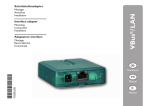
The interface adapter is light and small enough to not
require any form of mounting. It can be placed directly on
the desk or on a system component (pay attention to the
allowed ambient temperature!).
Four self-adhesive, skid-proof rubber pads are included with
the adapter. If necessary, these can be affixed to the corresponding molds on the base part of the housing to ensure
a secure placement of the device without wall mounting.
If desired, the interface adapter can be mounted to a wall:
ÎÎ Mark the desired hanging position on the wall.
ÎÎ Drill and prepare the hole with a wall plug and screw.
ÎÎ Hang the device onto the screw.
ÎÎ Mark the position for the mounting screw
(centres 70 mm).
ÎÎ Drill and prepare a hole with a wall plug.
ÎÎ Hang the device and fasten it by means of the second
screw.
For wall mounting, opening the housing is not required.
Opening the housing is only required for access to the
terminals.
ÎÎ To open the housing, unscrew the cover screw and
pull off the upper part of the housing.
ÎÎ To close the housing again, relocate the upper part of
the housing and refasten the cover screw.