1
Quick Start Guide
TO DOWNLOAD FULL INSTRUCTION MANUAL AND INSTALL MIBODY 360 TRACKING SOFTWARE
PLEASE VISIT: www.mibody360.com
TO START USING YOUR HOMEDICS MIBODY360 PEDOMETER STRAIGHT AWAY SIMPLY FOLLOW
THE QUICK START INSTRUCTIONS BELOW:
IMPORTANT:
2
CONNECT TO PC BEFORE USE.
1
DO NOT IMMERSE THE PEDOMETER IN WATER.
3
GB
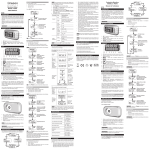
Control Buttons
1. SET: Enter Setting Mode; confirm and move to next setting option.
2. DISP: Display distance walked / run.
3. MEM: Enter Memory Mode.
Getting Started
Activate pedometer (first-time use only)
Press and hold any key until the screen is activated.
Carrying the pedometer
The 360PE can be carried around the neck or in pockets and handbags by using the strap.
Setting Mode
In the Setting Mode, you can set the time and stride length.
1. Press SET to enter the Setting Mode.
2. Wait for the setting option to flash, then press DISP or MEM to set values. You can press and hold
these buttons to rapidly set the values.
3. Press SET to move to next value.
The setting sequence is:
Date (year, month, day), Time (hour, minutes) and Stride length (metres)
Note: after 30 seconds the display will revert to normal.
2