1
Connections to other equipment
The exact arrangement you use to interconnect various video and audio components to the TV/DVD is dependent on the model and features of each component. Check the Owner's Manual provided with each component
for the location of video and audio inputs and outputs.
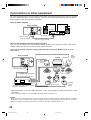
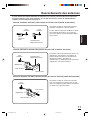
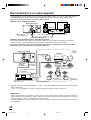
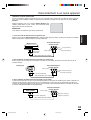
Using an Audio Amplifier
Rear of TV/DVD
VIDEO
L
Amplifier
UHF/
VHF
AUDIO
R
Audio (L) Output
To Audio (R) Input
To Audio (L) Input
Audio (R) Output
AUDIO cord (not supplied)
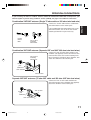
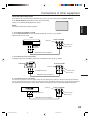
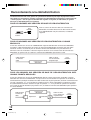
Using an AV Amplifier with built-in digital surround
If you are using an Amplifier with a built-in digital surround as follows, you can enjoy the various audio systems
including Dolby Digital Surround audio that sounds just like the movie.
Connect an AV amplifier with built-in Dolby Digital decoder, DTS decoder, MPEG decoder or etc as
shown below.
Front
Speaker
(Right)
Rear of TV/DVD
Subwoofer
TV/DVD
VIDEO
L
UHF/
VHF
AUDIO
Front
Speaker
(Left)
R
Coaxial Digital Audio Output
Center Speaker
Coaxial digital cable (not supplied)
To Coaxial Digital Audio Input
AV Amplifier with built-in digital surround
decoder as listed above
Surround
Speaker (Left)
Surround
Speaker
(Right)
* Manufactured under license from Dolby Laboratories. “Dolby” and the double-D symbol are trademarks of Dolby
Laboratories.
* “DTS” and “DTS Digital Out” are trademarks of Digital Theater Systems, Inc.
NOTES:
• When you make the connection above, on the AV Amplifier, do not set DOLBY DIGITAL to DOLBY DIGITAL, or MPEG to
MPEG “ON”. If you do, a loud noise will emit from the speakers possibly causing damage to your hearing or to the speakers.
• Some DTS decoders which do not support DVD-DTS interface may not work properly with the unit.
42
5P10421A E P36-43
42
22/7/04, 13:51