1
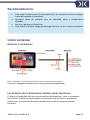
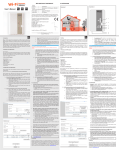
Recommendations To avoid touch screen interference do not use the device whilst charging via the mains charger. Please keep the device away from moisture, dust and high temperatures. Do not drop or strike the device. To reduce the risks of Electric Shock do not open the outer casing. Getting Started Buttons and Connections Charging the Battery You can only charge your tablet using the included mains charger. We recommend charging for a eight hours before first use. Unlocking and Powering On and Off To Power On press and hold the power button until the screen lights up. To power off hold down the power button until a menu appears asking what you would like to do. To wake the tablet from sleep or put it back to sleep click the power button once. Tablet User Guide v1.0 Page 3