1
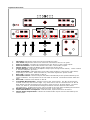
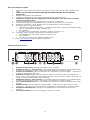
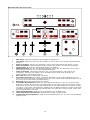
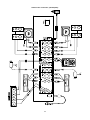
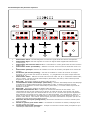
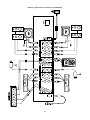
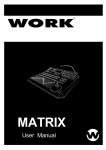
Top Panel Overview
1.
2.
3.
4.
5.
6.
7.
8.
9.
10.
11.
12.
13.
14.
Mic Fader: Adjusts the audio level of the microphone input.
Line Fader: Adjusts the audio level of devices connected to the Line In jacks.
Audio 1/2 Fader: Controls the overall level for the Source 1 and 2 audio inputs.
Audio Crossfader: Fades audio between the Audio 1 and Audio 2 inputs.
Master Fader: Controls the Master audio output level of the mixer.
Cueing Section: Controls the headphone output (see Cueing Section below). There is also a
¼ stereo headphone jack here.
Video Crossfader: Fades between the A and B video busses or controls the video effect,
depending on the mode. With Auto Fade on, this slider adjusts the speed of fade.
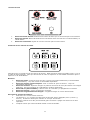
Bus A FX: Controls video effects on Bus A.
Auto Fade Control: Performs wipes and fades automatically at the speed selected by the
Video Crossfader. The top button turns Auto Fade on and off. The bottom button starts the
fade.
Bus B FX: Controls video effects on Bus B.
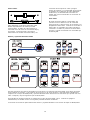
Crossfader Bus Selection: Assigns inputs to the video busses. The Bus A controls are
located on the left, Bus B on the right. Any video source can be routed to Bus A or Bus B.
Both busses can also be assigned to the same video source for layered effects. To select
Video-3 or Video-4, Press both the Background button and the desired video button
simultaneously. A background color can be routed to any Bus using the Background button.
Background Select: Selects the background color for the effects.
Video Fade Modes and Options: Controls fades, wipes and Picture-In-Picture.
Master Audio Output Meter: Shows the master audio output level as controlled by the
Master Fader.
4