1
4. Mounting
•
•
•
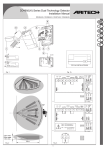
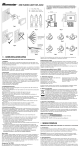
Open the cover by gently inserting a small screwdriver in the slot between the two halves of
the unit.
Mount the base of the unit at the selected location. Use the two mounting holes to fasten the
unit to the ceiling.
Use the wire knockout at the back of the base to run the wire.
5. Wiring
Connect the wires to the terminal block in the following order :
1) Connect the TAMPER terminals to a normally closed (N.C.)
24h-protection zone of the alarm control panel. The tamper
contact will open when the cover is removed.
2) Connect the ALARM terminals to a normally closed (N.C.)
anti-intrusion zone of the alarm control panel. The relay
contact will open when motion is detected or in the event of
power loss.
3) Connect the 12VDC (+) and (-) terminals to a power source of
8 to 16VDC. Observe the polarity. The buyer is advised to
use a back-up battery.
alarm
12V
tamper
6. Pulse Counter Selector
The user can choose between single-pulse or double-pulse
detection.
v Put the pulse jumper in position "1" for single-pulse detection.
v Put the pulse jumper in position "2" for double-pulse detection.
Double-pulse detection further improves the system’s immunity
against false alarm.
pulses
NOTE : The unit is supplied with the pulse jumper in position "2".
7. Detection LED
1) Use a power source of 12VDC and allow 3 to 5 minutes for the unit to warm up and stabilise
before testing.
2) Walk across the protected area at 1 step per second and observe the LED. If the detector is
in single-pulse mode, the LED will light up whenever you enter or exit one of the protection
beams. If the detector is in double-pulse mode, you may have to take two steps in order to
trigger the detector and activate the LED.
8. LED on/off
After testing the device, the LED can be disabled in order to
prevent unauthorised persons from tracing the coverage pattern.
Put the LED jumper in the "OFF" position to disable the LED.
HAA50
2
VELLEMAN