1
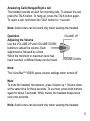
Answering Calls/Hangup/Rejct a call
The headset sounds an alert for incoming calls. To answer the call,
press the TALK button. To hang up, press the TALK button again.
To reject a call, hold down the TALK button for 1 second.
Note: Audio tones can be heard only when wearing the headset.
Operation
Adjusting the Volume
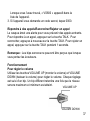
Use the VOLUME UP and VOLUME DOWN
buttons to adjust the volume. Each
adjustment is followed by a tone.
When the minimum or maximum level has
been reached, a different beep can be heard.
VOLUME UP
VOLUME DOWN
Note:
The VoiceStar™ VS600 saves volume settings when turned off.
Mute
To mute the headset microphone, press Volume up + Volume down
at the same time for three seconds. To un-mute, press both buttons
again for about 3 seconds. While muted, the headset beeps twice
every two seconds.
Note: Audio tones can be heard only when wearing the headset.