1
BASIC OPERATION
Before operating your transceiver, you should make the following preparations. You should install
the battery pack on to the main unit and fully charge your 7.2V Ni-MH battery pack or charge it
separately before its being attached onto the radio, then you can use it after making sure to attach
the antenna on your radio.
Turning On/Off Your Transceiver
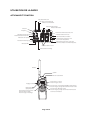
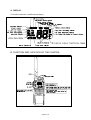
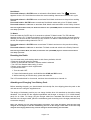
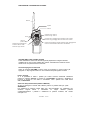
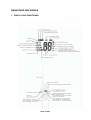
Rotate VOLUME knob to turn the transceiver on or off with an indicating voice of click. And adjust
the volume to a comfortable level.
Adjusting Squelch
Rotate SQ knob to adjust squelch threshold level.
Squelch is used to eliminate static and background noise and allows for silent operation of the
POCKET 4300 until a transmission is received. If the squelch is too high, only the strongest
transmissions can be heard, and when too low, intermittent static and noise are heard.
Selecting High/Low Power or Lock keypad
Press and release this key to toggle the transmit power between high and low. When the unit is
operating at low power, “Lo” appears on LCD and “Hi” appears on LCD when operating at high
power.
You also can lock your radio keypad to avoid accidental pressing of keys by activating the key lock.
Pressing and holding H/L/LOCK button until key lock icon will appear on LCD if it is enabled. The
function is effective to all other knobs/keys except PTT and H/L/LOCK buttons.
Selecting a Channel
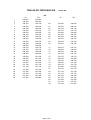
Press the ▲/▼ (UP/DOWN) button to scroll through the available channels.
Note: Not all channel numbers are available in INT bands.
Transmitting and Receiving
Press and hold the Push-To-Talk (PTT) key to transmit on the selected channel, then release to
receive. The TX indicator appears while transmitting.
Page 3 of 8