1
Operation of wireless remote control
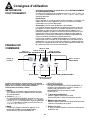
REMOTE CONTROL
FUNCTIONS
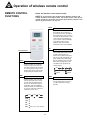
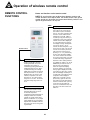
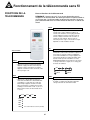
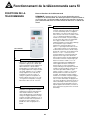
Names and functions on the remote control.
NOTE: Be sure that there are no obstructions between receiver and
remote controller; Don't drop or throw the remote control, Don't get the
remote control wet, do not put the remote control directly under the sunlight or any place where it is very hot.
TIMER
TIMER Button
•
Remote Control
+
+ Button
•
-
Press for temperature increase.
Pressing this button can set the
temperature when unit is on.
Continuously pressing this button or
holding this button for more than 2
seconds will change the settings
rapidly. Once the button is released
and not pressed the °C (°F) will be
displayed. Once the unit is in auto
mode the temperature can not be
altered or set. The celsius setting
range from 16°C-30°C . The fahrenheit scale setting range from 61°F 86°F.
- Button
•
By pressing this button the temperature can be decreased. Pressing
this button allows the user to set
the desired temperature.
Continuously pressing this button or
holding the button for 2 seconds,
settings can quickly change. Once
button is released the °C (°F) signal
will be displayed. The temperqature
adjustment is unavailable under the
auto mode, but can be set by pressing this button.
10
By pressing this button while the
unit is off you can set the time for
auto switch on (when unit should
turn on). The range of setting is 0.524 hours. Letters “T-ON” and “H”
will flash for 5 seconds. Within 5
seconds you may press this key to
complete the set up. If the setting is
valid the set time will be displayed
for 2 seconds before the temperature display message. During flashing you may press “+” key to
increase the value and press “-” key
to decrease the value. The time will
increase or decrease by 0.5 hours
with each press of these keys. If
pressing “+” or “-” key continuously
the time value will change rapidly.
The remote controller can increase
the set time by 0.5 hours every 0.25
seconds. After being energized the
default is no timer setting and there
is no display of “T-ON” or “H”. Press
ON/OFF key to switch the unit on
and cancel the auto switch-on.
When the temperature display
becomes constant, you may press
this key again to display the remaining set time.The time value, "T-ON"
and "H" will display constantly for 2
seconds. After 2 seconds the preset
temperature will be displayed.
Within these 2 seconds, you may
press this key again to cancel the
auto switch-on. By pressing this key
under the switch-on state, you may
set the time for auto switch-off.
(when the unit should turn off). This
procedure is the same as for auto
switch-on.