1
C60T266A4
12/1/06
16:51
Página 21
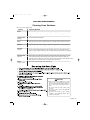
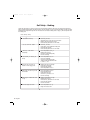
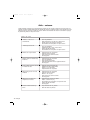
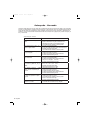
Self Help - Operation
Before calling for service, check the following:
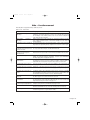
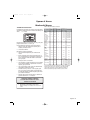
Table 9: Self Help - Operation
Oven Problem
Problem Solving Steps
Other F__ Error appears in the
display window.
Turn power off and turn it back on again after a few seconds. If condition
persists, note the code number and call an authorized servicer.
F03 or F04 Error appear in the
display window.
The oven display stays OFF
A problem with the lock occured. Turn power off and turn it back on again
after a few seconds. The oven should run a latch auto-test. If conditi on
persists, note the code number and call an authorized technician.
Turn off power at the main power supply (fuse or breaker box). Turn breaker
back on. If condition persists, call an authorized service center.
Cooling fan continues to run
after oven is turned off
This is normal . The fan turns off automatically when the electronic
components have cooled sufficiently.
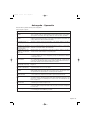
Oven is not heating
Make sure the oven temperature has been selected. Check the circuit breaker
or fuse box to your house. Make sure there is proper electrical power to the
oven.
Oven door is locked and will not
release, even after cooling
Oven is not cooking evenly
Oven temperature is too hot or
too cold
Oven light is not working
properly
Oven light stays on
Cannot remove lens cover on
light
Oven will not self-clean properly
Clock and timer are not working
properly
Excessive moisture
Porcelain chips
Turn the oven off at the circuit breaker and wait a few seconds. Turn breaker
back on. The oven should reset itself and will be operable.
Check oven calibration. Adjust calibration if necessary (see Oven Offset,
Page 17). Refer to cooking charts for recommended rack position.
Always reduce recipe temperature by 25°F when baking with convention bake
mode.
The oven thermostat needs adjustment. See Calibrating Oven Temperature,
Page 17.
Replace or reinsert the light bulb if loose or defective. See Page 15. Touching
the bulb with fingers may cause the bulb to burn out.
Oven light comes on automatically when oven begins heating. Press LIGHT to
turn oven light off. If oven is off, check for obstruction in oven door or check to
see if hinge is bent.
There may be soil build-up around the lens cover. Wipe lens cover area with
a clean dry towel prior to attempting to remove the lens cover.
Allow the oven to cool before running self-clean. Always wipe out loose soil or
heavy spills before running self-clean. If oven is badly soiled, set oven for a
four-hour Self-Clean. See Self-Cleaning, Page 13.
Make sure there is proper electrical power to the oven. See the Clock and
Timer sections on Pages 2 and 8.
When using bake mode, preheat the oven first. Convection bake will eliminate
any moisture in oven (this is one of the advantages of convection).
When oven racks are removed and replaced, always tilt racks upward and do
not force them to avoid chipping the porcelain.
English • 19