1
TEMPERATURE SET BACK TIMER
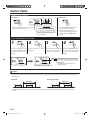
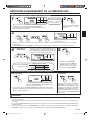
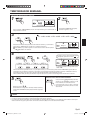
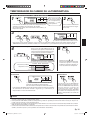
Temperature SET BACK timer setting
1
SET BACK
SU MO TU WE TH FR SA
If there is no existing
SET BACK temperature setting, “- -” will
be displayed for the
temperature.
3 6 9 12 15 18 21
Press theTIMER SET button
for 2 seconds or more.
Press the SET BACK button to change to the SET BACK confirmation display.
The SET BACK operating time and the set temperature will
be displayed.
3
Day setting
1
2
Operating time setting
2
3
4
ex. When setting all days together
Follow the same procedures to set the operating time as those for the weekly timer. The TIMER DELETE button is
also used as described in the procedures for the weekly timer.
4
Temperature setting
Press the SET TEMP. buttons to set the
temperature. (The temperature setting
range is the same as the range for the
operation mode.)
5
SU MO TU WE TH FR SA
3 6 9 12 15 18 21
ex. Operating time 15:00–22:00
ON
SET BACK temperature
Normal temperature
84˚F OFF
76˚F
76˚F
3
4
Repeat steps and .
Press the TIMER SET button for
2 seconds or more to complete
the temperature SET BACK
timer settings.
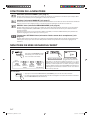
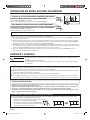
Temperature SET BACK timer operation
To cancel
To start
SET BACK
SU MO TU WE TH FR SA
1
ex. Display during SET BACK timer operation
(The operating time will not be displayed.)
Press the SET BACK button. The SET BACK confirmation display appears
for 5 seconds, and then the timer starts automatically.
2
Press the SET BACK button, and then
press the TIMER DELETE button while
the SET BACK confirmation display is
displayed. Even if the SET BACK button is pressed again, the SET BACK
timer will be cancelled.
NOTES
•
•
•
•
The SET BACK timer only changes the set temperature, it cannot be used to start or stop air conditioner operation.
The SET BACK timer can be set to operate up to 2 times per day but only 1 temperature setting can be used.
The SET BACK timer can be used together with the ON, OFF, and weekly timer functions.
The SET BACK operating time is displayed only in the SET BACK confirmation display. (Refer to step 1 for the SET
BACK confirmation display.)
En-10
9374343072-04_OM.indb Sec1:10
9/2/2010 2:59:02 PM