1
1. If you using a controller with 5 pins DMX output, you need to use a 5 to 3 pin
cause damage or interference to DMX interface circuit.
C. Some units don’t respond to the easy controller
adapter-cable.
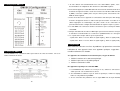
2. At last unit, the DMX cable has to be terminated with a terminator. Solder a 120 ohm
1/4W resistor between pin 2(DMX-) and pin 3(DMX+) into a 3-pin XLR-plug and plug it in
1. You may have a break in the DMX cabling. Check the LED for the response of the
master/ slave mode signal.
2. Wrong DMX address in the unit. Set the proper address.
the DMX-output of the last unit.
3. Connect the unit together in a `daisy chain` by XLR plug from the output of the unit to
D. No response to the sound
the input of the next unit. The cable can not branched or split to a `Y` cable. DMX 512 is
1. Make sure the unit does not receive DMX signal.
a very high-speed signal. Inadequate or damaged cables, soldered joints or corroded
2. Check microphone to see if it is good by tapping the microphone
connectors can easily distort the signal and shut down the system.
E. One of the channels is not working well
4. The DMX output and input connectors are pass-through to maintain the DMX circuit,
1. The stepper motor might be damaged or the cable connected to the PCB is broken.
2. The motor’s drive IC on the PCB might be out of condition
when power is disconnected to the unit.
5. Each lighting unit needs to have an address set to receive the data sent by the controller.
The address number is between 0-511 (usually 0 & 1 are equal to 1).
6. Fixture Cleaning
6. The end of the DMX 512 system should be terminated to reduce signal errors.
The cleaning of internal and external optical lenses and/or mirrors must be carried out
7. 3 pin XLR connectors are more popular than 5 pin XLR.
periodically to optimize light output. Cleaning frequency depends on the environment in
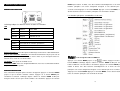
3 pin XLR: Pin 1: GND, Pin 2: Negative signal (-), Pin 3: Positive signal (+)
which the fixture operates: damp, smoky or particularly dirty surrounding can cause greater
5 pin XLR: Pin 1: GND, Pin 2: Negative signal (-), Pin 3: Positive signal (+)
accumulation of dirt on the unit’s optics.
Clean with soft cloth using normal glass cleaning fluid.
5. Troubleshooting
Following are a few common problems that may occur during operation. Here are
some suggestions for easy troubleshooting:
Always dry the parts carefully.
Clean the external optics at least every 20 days. Clean the internal optics at least every
30/60 days.
A. The unit does not work, no light and the fan does not work
1. Check the connection of power and main fuse.
2. Measure the mains voltage on the main connector.
3. Check the power on LED.
B. Not responding to DMX controller
1. DMX LED should be on. If not, check DMX connectors, cables to see if link properly.
2. If the DMX LED is on and no response to the channel, check the address settings and
DMX polarity.
3. If you have intermittent DMX signal problems, check the pins on connectors or on PCB
of the unit or the previous one.
4. Try to use another DMX controller.
5. Check if the DMX cables run near or run alongside to high voltage cables that may
22-
23-