1
getting started
PlaYstation®3 sYsteM
Starting a game: Before use, carefully read the instructions supplied with the PS3™ computer entertainment
system. the documentation contains information on setting up and using your system as well as important
safety information.
Check that the mAIN POwER switch (located on the system rear) is turned on. Insert the Army of TWO™: The 40th Day
disc with the label facing up into the disc slot. Select the icon for the software title under [Game] in the PS3™ system’s
home menu, and then press the S button. Refer to this manual for information on using the software.
Quitting a game: During gameplay, press and hold down the PS button on the wireless controller for at least
2 seconds. then select “Quit Game” from the screen that is displayed.
hint: to remove a disc, touch the eject button after quitting the game.
saved data for Ps3™ forMat software
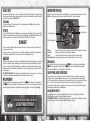
oPtions
Cheats
Video
Control
Unlock
Extra Weapons
Storage
Enter codes to unlock in-game cheats.
Adjust your picture.
Change your control preferences.
Add guns purchased in Army of TWO to your arsenal for Army of TWO: The 40th Day.
Select a memory storage device to save your game to.
PlaYing the gaMe
make your way through a hellish urban war zone, with only your partner’s loyalty to count on. Clear out enemies
in your way, upgrade your gear, find hidden spoils of war, and get out of Shanghai alive… if you can.
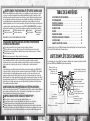
gaMe screen
Saved data for PS3™ format software is saved on the system’s hard disk.
the data is displayed under “Saved Game Utility” in the Game menu.
shanghai surPrise
For tyson Rios and Elliot Salem, war is strictly business. they’d served as Army Rangers in mogadishu before
going into the private sector, earning top dollar as the top operators for paramilitary corporation SSC… an
arrangement that came to a sudden and bloody end. Now Rios and Salem work for the only people they still
trust: each other. And business is better than ever.
their latest job is easy money — hook up with a fellow merc in Shanghai, plant some electronics, and get paid.
But neither the horrors of Somalia nor the betrayals of the SSC have prepared them for what’s coming. A new
kind of war is about to engulf China’s greatest city, and to survive it, Rios and Salem must decide if there’s a
line even they won’t cross.
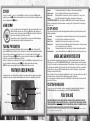
setting uP the gaMe
Before getting into the action, set up a profile to save all of your memorable achievements.
linKing Your online id to an ea account
you need to link your Online ID to an EA Account to access the online features of Army of TWO: The 40th Day. If
you have already linked your Online ID to an EA Account, you can play online instantly. If you have not linked
your Online ID, you’ll be prompted in the game to sign in with an existing EA Account or to create a new EA
Account. Once the account is linked to your Online ID, you can then play online. Linking to an EA Account is
easy… all it takes is an e-mail address and a password.
your e-mail address and password are also your login to ARmyOFtwO.COm. Join the online community now!
saving and loading gaMes
Army of TWO: The 40th Day automatically saves your progress at certain checkpoints. Select one of three save
slots when you launch a new game; continue your campaign by selecting the appropriate save slot.
2
Aggrometer
Partner cam
Reticle
Partner health
Partner command
(single player only)
Ammo
Partner location
Solo
Split-Screen Co-Op
Online Private Co-Op
Online Public Co-Op
take an A.I. partner along to back you up.
team up locally with a friend you can rely on.
Play online with a buddy you invite in.
Find a stranger online to watch your back.
MoralitY and co-oP choices
Every choice has repercussions in a war zone, both immediate and long-term. throughout the campaign, you
must react to situations that don’t always have clear-cut answers, or where instant rewards come with a high
price tag. Either player can make the decision, but whoever chooses first chooses for the team.
Every interaction affects how people — including your partner — react to you. Review the consequences of your
actions by selecting CO-OP ChOICES off the Extras menu.
PaY attention, soldier! Civilians trapped in the city are rapidly becoming hostages or victims. you can
change that, if you decide to get involved. Once any enemies are captured or killed, press the S button near a
living civilian to set them free. then select ID CARDS from your Pause menu to see how your generosity pans out.
3