1
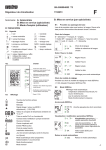
3. Mount thermostat onto the valve by turning it clockwise. Turn the complete thermostat by hand until the collar nut
touches the contact surface of the valve.
Keep turning the handwheel against the
increased resistance until the raised
marking in the connection area of the
handwheel is in line with the groove of
the collar nut (illustr. 8).
6. Finally, set thermostat to the required
room temperature with the help of
the setting key and push in the cover
disc.
Illustr. 6
�
Illustr. 3
4. Introduce a 2.5 mm spanner through the
lateral bore in the connection area of the
handwheel into the safety screw. Hand
tighten the thermostat firmly with the
spanner remaining inside the bore.
NOTE!
Now the handwheel can be turned without changing the set temperature.
6 Temperature setting
1. Using a suitable tool (e.g. small screwdriver), pull out front cover disc (illustr. 1)
through the opening at the handwheel.
2. Using the setting key (item no. 101 14 97),
turn the setting screw until the corresponding setting figure or a minor graduation is visible in the viewer (illustr. 2)
Setting ranges from the frost protection
symbol “❄” to setting figure “5”.
The markings between figure “2” and “4”
represent a change of room temperature of
2°C.
Illustr. 4
about 28°C
5. Now tighten the safety screw by turning
the 2.5 mm spanner clockwise.
about 24°C
about 20°C
about 16°C
about 12°C
Illustr. 5
Illustr. 7
about 7°C
3. Finally, push in the cover disc (illustr. 6).
3