1
Informationen
Connections and operating elements
Important information
Connections and operating elements
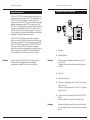
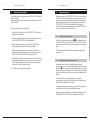
The LINK 2800 DECT/GAP is used as a universal base station for
operating handsets conforming to the DECT/GAP standard, and for the
LINK BOX GAP 300/5000. A total of 8 handsets can be registered. The
LINK 2800 DECT/GAP can be used on two analogue telephone lines with
DTMF dialling. In combination with a registered LINK BOX GAP
300/5000, cordless connection of analogue terminals to the telephone
network is possible within the radio range. This “cordless extension cable”
removes the need for time-consuming cabling work for your analogue
telephones, fax machines, answerphones, door intercoms and modem.
5
220/230V
50 Hz
The LINK 2800 DECT/GAP L.Range also has an SMA aerial connection
for an external aerial, in addition to the integrated aerials. This is used to
connect a DECT aerial which can extend the range of the LINK 2800
DECT/GAP L.Range. When using the LINK 2800 DECT/GAP with a LINK
BOX GAP 5000, and depending on the aerials used and the
environmental conditions, it is possible to bridge up to 9 km, the LINK
BOX GAP 300 can be used at a distance of up to 50 m within buildings
and 300 m in the open air.
NOTE
When shipped, the LINK 2800 DECT/GAP is set up for operation on two
analogue telephone lines conforming to the TBR 21 standard with DTMF
dialling and a long flash time.
3
6
4
2
3
2m
1
1
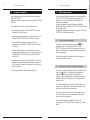
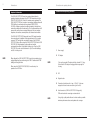
Power supply
2
AC adapter
Only use the supplied AC adapter with the coloured RJ-11 plug.
Ensure that the AC adapter is unplugged before opening the
housing.
NOTE
When using the LINK BOX GAP 300/5000, it must be set up for
operation on an ISDN line.
NOTE
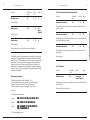
3
LED
4
Register button
5
Connection for telephone line 1 resp. 2. The RJ-11 jacks are
assigned to the two centre connections (pins 3 and 4).
6
Aerial connection (LINK 2800 DECT/GAP L.Range only)
SMA aerial socket for connecting an external aerial.
Using a high-quality aerial cable and as short a cable as possible
minimises performance losses and optimises the coverage.
Operating Instructions
2