1
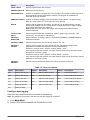
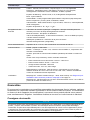
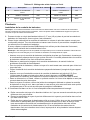
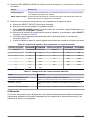
Option
Description
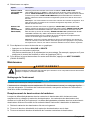
LEVEL UNITS
Sets the measurement units for level.
PRIMARY DEVICE
Selects the primary device.
PROGRAM LOCK
Enables or disables the program lock. The program lock prevents unauthorized use of
the keyboard and access via RS232 or modem. The program lock password is
9500 and cannot be changed.
SAMPLER PACING Enables or disables sampling. Sets the sample interval. Options: 100 gallons (gal),
liters (ltr), cubic meters (m3), acre-feet (af) or cubic feet (cf)
SITE ID
Sets the site ID (maximum of 8 digits). The site ID is on all data printouts. Use this
feature when multiple sites are monitored with a single flow meter or if data readings
from multiple flow meters are collected.
Note: A text site ID can be set with InSight data management software and an
RS232 connection.
TOTAL FLOW
UNITS
Sets the measurement units for total flow. Options: gallons (gal), liters (ltr), cubic
meters (m3), acre-feet (af) or cubic feet (cf)
VELOCITY
DIRECTION
Sets the direction of velocity. Options: UPSTREAM (NORMAL), DOWNSTREAM or
ALWAYS POSITIVE
VELOCITY UNITS
Sets the measurement units for velocity. Options: ft/s, m/s
VELOCITY
CUTOFF
Sets the velocity cutoff. Use when the site has low velocities and frequent low
particulate concentrations that prevent velocity measurements.
Example 1: Velocity cutoff = 0.20 ft/s, Velocity default = 0 ft/s
If the velocity is less than 0.20 ft/s, the meter saves a value of 0 ft/s until the velocity
increases to more than 0.20 ft/s.
Example 2: Velocity cutoff = 0.20 ft/s, Velocity default = 0.20 ft/s
If the velocity is less than 0.20 ft/s, the meter saves a value of 0.20 ft/s until the velocity
increases to more than 0.20 ft/s.
VELOCITY
DEFAULT
Sets the velocity value that is used when velocity cannot be measured.
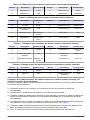
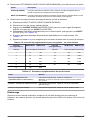
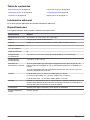
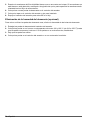
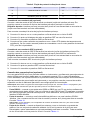
Table 15 Flow unit options
Option
Description
Option
Description
Option
Description
gps
Gallons per second
mgd
Million gallons per day
cfd
Cubic feet per day
gpm
Gallons per minute
afd
Acre-feet per day
cms
Cubic meters per second
gph
Gallons per hour
cfs
Cubic feet per second
cmm
Cubic meters per minute
lps
Liters per second
cfm
Cubic feet per minute
cmh
Cubic meters per hour
lpm
Liters per minute
cfh
Cubic feet per hour
cmd
Cubic meters per day
lph
Liters per hour
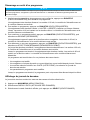
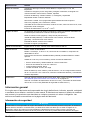
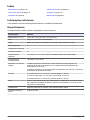
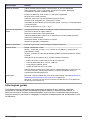
Configure data logging
Select the input channels that are recorded to the data log.
Note: No readings are recorded to the data log until data logging is configured.
1. Push MAIN MENU.
2. Select OPTIONS>ADVANCED OPTIONS>DATA LOG.
English 21