1
TECHNICAL INFORMATION
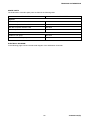
Parameters Values
In the following table are indicated the different
possible values for each sublimation parameter.
For these parameters the possible settings and the
messages displayed are the same shown for the
MANUAL and AUTOMATIC operating mode,
excepted for the script A/R in place of MAN at the
end of the second row.
PARAMETER
DEFAULT VALUE
ADJUSTABLE RANGE
Current
30 A
30 A to 50 A at step of 0.5 A
Time
1 minute
1 minute to 7 minutes at step of
30 seconds
Period
3 minutes
3 minutes to 32 hours with
following intermediate values:
− 10 minutes
− 30 minutes
− 1 hour
− 2 hours
− 4 hours
− 8 hours
Pressure threshold
1x10⁻⁷ mbar
1x10⁻¹⁰ mbar to 1x10⁻⁴ mbar at
step of 1x10-X mbar
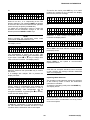
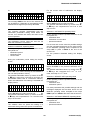
Pressing the W or V keys the display shows:
Sublimation
To start the sublimation proceed as follows:
− On the rear panel, turn the power switch on (I
position).
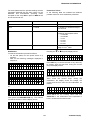
− Wait for the following messages displayed in
sequence:
S U B L I M A T I O N
v S T A R T
?
Y E S
M A N
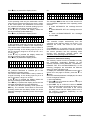
Press SET key to confirm the start or any other key
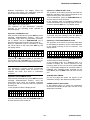
to escape. After the start time, during the current
ramp the display shows:
A U T O T E S T
V = X X . X V
A U T O T E S T
C U R R .
I = X X . X A
R A M P
M A N
O K
M i n i
T i
- b a
l
Where XX.X are the currently value used.
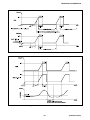
Then, finish the current ramp, during the
sublimation, the display shows the voltage, the
current and the time used for the sublimation, as
follows:
v
l
M A N
Or:
T S P
V = X X . X V
F i
l a m e n t
X
v
I = X X . X A
T = X X : X X : X X
M A N
M A N
Where XX.X are the currently value used and
XX:XX:XX is the sublimation time expressed in
hours, minutes and seconds format.
Then press the SUBLIMATION key. The relevant
Led will be turned on and the display shows:
S U B L I M A T I O N
v S T A R T
?
N O
M A N
23
87-900-077-01(D)