1
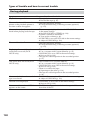
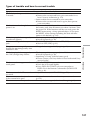
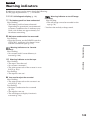
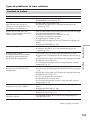
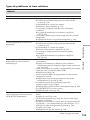
Types of trouble and how to correct trouble
Troubleshooting
Dépannage
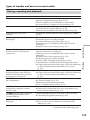
Symptom
Cause and/or Corrective Actions
The picture does not appear in the
• The LCD panel is open.
viewfinder.
c Close the LCD panel.
A vertical band appears when you • The contrast between the subject and background is too
shoot a subject such as lights or a
high. This is not a malfunction.
candle flame against a dark
background.
A vertical band appears when you • This is not a malfunction.
shoot a very bright subject.
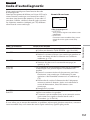
An unknown picture appears on
• If 10 minutes elapse after you set the POWER switch to
the screen.
CAMERA or DEMO MODE is set to ON in the menu
settings without a cassette inserted, your camcorder
automatically starts the demonstration.
c Insert a cassette or press the LCD screen. The
demonstration stops. You can also set DEMO MODE to
OFF in the menu settings (p. 131).
The picture is recorded in incorrect • NIGHTSHOT is slid to ON.
or unnatural colours.
c Slide it to OFF (p. 42).
Picture appears too bright, and the • NIGHTSHOT is slid to ON in a bright place.
subject does not appear on the
c Slide it to OFF (p. 42).
screen.
• The back light function is active.
c Deactivate it (p. 41).
The click of the shutter does not
• BEEP is set to OFF in the menu settings.
sound.
c Set it to MELODY or NORMAL (p. 132).
Black bands appear when you
c Set STEADYSHOT to OFF in the menu settings (p. 127).
record a TV screen or computer
screen.
Flickering or changes in colour
• PORTRAIT or SPORTS of PROGRAM AE is on when
occurs.
recording in light from a discharge tube such as a
fluorescent lamp, sodium lamp or mercury lamp.
c Set PROGRAM AE to AUTO in the menu settings (p.
69).
(continued on the following page)
143