1
e
Pleaesad!
R
L
S
13
O SUPER
ARI
S
Game Rules
•M
11
ER
Getting Started
R SLUG
G
7
PE
SU
In-Game Controls
SU
P
IO
4
S • MARIO
G G ER S •
MA
SLU
R
Controls
ER
ER
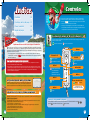
Contents
GG
U
Controls
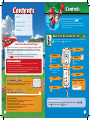
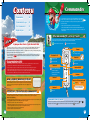
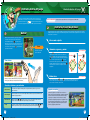
This game supports three control styles. You can switch
between them midgame. Please see
p.3 for
information on switching control types.
• For multiplayer games, you will need one Wii Remote or
one Wii Remote and Nunchuk per player—depending on the control type you’re using.
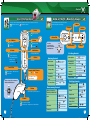
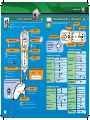
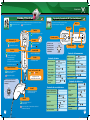
Holding the Wii Remote Upright
For this control type, most of the in-game actions require you to swing the Wii Remote.
Offensive controls
Defensive controls
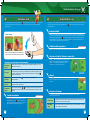
About the Three Control Types
You can choose between three control types when playing Mario Super Sluggers: holding
the Wii Remote upright, holding it sideways, or using the Nunchuk. You must hold the
Wii Remote upright or use the Nunchuk to control nongame activities, such as scrolling
through menus.
• This manual uses the upright and Nunchuk control types for its explanations.
p.6 for information on holding the Wii Remote sideways.
See
Switching Control Types
• To switch between upright or Nunchuk control, simply connect or disconnect a Nunchuk controller to the Wii Remote.
• To switch to sideways control, select Change Controls from the Pause menu, then
click on the Control Type panel until you see a sideways Wii Remote icon. If you’re
using Nunchuk control, disconnect the Nunchuk first.
SYSTEM MENU UPDATE
Please note that when first loading the Game Disc into the Wii console, the
Wii will check if you have the latest system menu, and if necessary a Wii
system update screen will appear. Press OK to proceed.
Pointer
Aim error item
A + B Buttons
Use error item
Star Pitch
Attack
A Button
HOME Button
Throw a changeup
Jump when fielding
Special move
Display HOME Menu
+ Button
Call time
1 Button
Bunt
Swinging the Wii Remote
2 Button
CAUTION: WRIST STRAP USE
B Button
Star Swing
Hit
Throw
See pages 7-10 for
more details.
Bunt
Please use the wrist strap to help prevent injury to other people or damage to surrounding objects
or the Wii Remote in case you accidentally let go of the Wii Remote during game play.
Also remember the following:
• Make sure all players put on the wrist strap properly when it is their turn.
• Do not let go of the Wii Remote during game play.
• Dry your hands if they become moist.
• Allow adequate room around you during game play and make sure that all areas
you might move into are clear of other people and objects.
• Stay at least three feet from the television.
• Use the Wii Remote Jacket
3
Wii Manual MSS_noa.indd 3-4
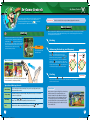
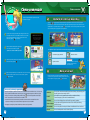
Menu Screen Controls
On menu screens, make selections by pointing with the Wii Remote or using
Press
to confirm selections and
to cancel.
or
.
4
7/15/08 10:51:47 AM


![reply_card [Converted]](http://vs1.manualzilla.com/store/data/006431610_1-a96cdf9e94afe173ba2eb2b834531732-150x150.png)