1
How to Use
さくいん
Basic Operations
英数字 ■2画面………………………………………………………………………………… 24
■3次元Y/C ……………………………………………………………………… 33
■525i(480i)
、525p(480p)、
1125i(1080i)
、750p(720p) ……………………… 24
……………………………………………………………………
■DPMS機能
34
■NR……………………………………………………………………………………… 33
■P in P ……………………………………………………………………………… 25
■P out P …………………………………………………………………………… 25
■PC ……………………………………………………………………………………… 19
■RGB ……………………………………………………………… 14、17、34
■S2映像入力端子 ………………………………………………… 14、17
BFor more detailed instructions on the operation, points of caution, maintenance, what to do in case of
malfunction, please contact the place of purchase.
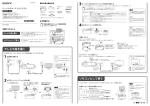
■If the remote control is not usable, operate
the television with the controls on the Display
電源
入力切換
赤 - 電源
緑 受像
メニュー
音量
+
決定
あ 行 ■First, push the Power to turn on.
Remote control
sensor
Input signal Sound Volume
selector
controllers
Operate your Remote control
pointed to the Remote control
sensor.
(Within about 7meters in front of
the Display.)
電源
入力切換
Turn ON/OFF
画面表示
サラウンド
消音
音量
Control the Sound Volume
標準
戻る
決定
画質調整
2画面
左右入換
画面位置
サイズ
PC
音声調整
初期設定
右画面操作
画面モード
オフタイマー
プラズマディスプレイ
40
Input signal
selector
ページ
■映像メニュー ………………………………………………………………… 30
■オフタイマー ………………………………………………………………… 21
■音声の調整 ……………………………………………………………………… 29
■音声メニュー ………………………………………………………………… 29
■音量 …………………………………………………………………………………… 20
か 行 Power
ページ
ページ
30
■画質の調整
■面画位置/サイズ ………………………………………………………… 28
■画面表示 ………………………………………………………………………… 20
■画面モード ……………………………………………………………………… 22
■壁掛け ……………………………………………………………………………… 10
■カラーシステム …………………………………………………………… 33
■拡大画面 ………………………………………………………………………… 23
■コンポーネント
(色差)
ビデオ入力(RGB)端子… 14、17
■コンポーネント入力切換 …………………………………………… 34
………………………………………………………………………
さ 行 た 行 ページ
■テクニカル ……………………………………………………………………… 31
■デジタルシネマリアリティ ……………………………………… 33
■電源 ………………………………………………………………………… 17、18
■電源ランプ ……………………………………………………………………… 17
■電源コード ……………………………………………………………………… 13
な 行 ページ
■入力切換 ………………………………………………………………………… 19
■入力表示書換設定 ………………………………………………………… 34
■ノーマル ………………………………………………………………………… 23
は 行 ページ
■パソコン ……………………………………………………… 15、17、19
■ハンドル ………………………………………………………………… 11、17
■ビデオ入力端子 …………………………………………………… 14、17
■表示言語切換 ………………………………………………………………… 34
■フル …………………………………………………………………………………… 23
■付属品 ………………………………………………………………………… 裏表紙
ま 行 ページ
■右画面操作 ……………………………………………………………………… 25
■メニュー ………………………………………………………………………… 26
ら 行 ページ
■リモコン ………………………………………………………………… 12、16
■リモコン受光部 …………………………………………………………… 17
■ローボード ……………………………………………………………………… 10
ページ
■左右入換 ………………………………………………………………………… 25
■サラウンド ……………………………………………………………………… 21
■サイドパネル設定 ………………………………………………………… 35
■ジャスト ………………………………………………………………………… 23
■消音 …………………………………………………………………………………… 21
■消費電力低減設定 ………………………………………………………… 34
■初期設定 ………………………………………………………………………… 32
■信号モード ……………………………………………………………………… 32
■スクリーンセーバー …………………………………………………… 35
■据置きスタンド …………………………………………………………… 10
■スピーカー …………………………………………………………… 12、17
■ズーム ……………………………………………………………………………… 23
■セルフワイド ………………………………………………………………… 23
■セルフワイド設定 ………………………………………………………… 33
■待機電力低減設定 ………………………………………………………… 34
必
要
な
と
き
41