1
Opening a received e-mail
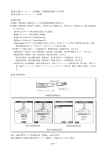
When you receive an e-mail, "E-mail △ " ( △ : number of received mails) is displayed in the
idle display. Received e-mails are saved in the Inbox.
When you receive an e-mail
⇒ A message appears in the idle display, then
appears in the idle display.
Press p (confm).
⇒ The Inbox display appears.
Icon
: Indicates the folder containing new mail.
2
Turn j to select the folder
containing new mail, and press
p (select).
⇒ The display for the selected folder appears.
E−mail 1
Inbox Unread
M folder 1
Folder1
Folder2
Folder3
Folder4
Folder5
Folder6
Folder7
How to use mail
1
also
Mainfidr New 1/020
001 △△△@□□□.ne.
002 Jane Moore
003 Kate Dicken
004 Jane Moore
005 John Smith
006 Kate Dicken
007 John Smith
008 John Smith
Icons
: Indicates "read mail" that has already been read.
: Indicates "unread mail" that has not yet been read.
: Indicates that a photo is attached to the mail.
Normally, e-mail is saved in the M folder.
41
01JP07BAS-E.p65
41
04.2.12, 4:42 PM