1
Receiving a call
When you have an incoming call, the incoming ring sounds and the incoming indicator
flashes.
When you set the manner mode, settings for the manner mode take effect (see page 25).
Press T or p (call) to
answer the call.
Duration
10
When you have finished the call, press t.
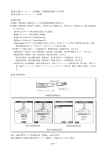
Display when you have received a call
When a phone number is displayed:
The other party has set to notify Caller ID. If the other party's name
is already saved in the phone book, that person's name is also
displayed.
When "User unset" is displayed:
The other party has set not to notify Caller ID.
When "Payphone" is displayed:
You have received a call from a payphone.
When "Not support" is displayed:
You have received a call from a party that is not able to notify you
of their phone number.
How to use the phone
1
Susan Jones
XXXX
Incoming call
User unset
Display if you could not answer a call
If you could not answer a call, you are notified that you had a call on the
display. If you press p (confm), you can confirm the phone number
of the other party that called you and redial that party (see page 20).
Missed call 1
19
01JP05BAS-E.p65
19
04.2.12, 4:08 PM