1
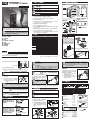
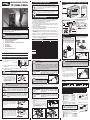
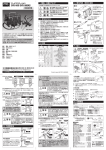
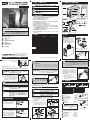
DESOLDERING STATION TP-200AS/280AS 4. PACKAGE CONTENTS / NAMES OF PARTS 1. SAFETY MARK DEFINITIONS In this manual, the following safety marks are used. WARNING Failure to obey a safety warning could result in serious injury or death to yourself or to others, or in physical damage. ■Control Box Heat Lamp Power Switch TA TION CAUTION Failure to obey a safety warning could result in injury to yourself or to others, or in physical damage. Power Supply Connector Fuse : 250V 3A (Standard model) 250V 3.15A (CE model) (TP-100CP1.3 in TP-280AS) (TP-100CP1.3 in TP-280AS) TP-280AS Vacuum Chamber Plug 5. SETTING CAUTION To prevent any damage that may occur during transport, screws have been affixed in 4 places. Ensure that all screws are removed before use. To reship, re-affix the screws in their original positions. Felt B Steel Felt A the soldering 5-1. Assemble iron Woo stand. Do not attach the holding flange to the front opening. CAUTION 5-2. Place the cleaning pin into its holder provided at the rear right side of the control box. 10 4 5 6 AT HE 0℃ 45 DIA PHR SEN AGM MIN SOR BUI TYP PO IMU LT- E VAC HAU WER M HEA IN CER UUM PTS T TEM CH XIM AM PUM ALT UM PER IC HEA P ER HEA ATU T TEM RE TER PER ATU 25 RE 0℃ MA TPNG STATION -2 00 DES OLD ERI TP NG STATIO -2 N 00 OLD ERI DES KEEP THIS MANUAL FOR FUTURE REFERENCE TP-200AS 3 www.goot.co.jp E-mail: [email protected] TP-280AS ■Cleaning Pin TP-100CP0.7 Air Connector Cover ZUN G TAIYO ELECTRIC IND.CO.,LTD. TP-200AS 110V, 120-130V, 220-240V AC 50/60Hz 130W(110V, 120-130V), 170-200W(220-240V) 250-450˚C (482-842˚F) Ceramic heater with internal sensor Sensor feedback (ON-OFF control) Over 100MΩ Diaphragm system -0.08MPa (-600mmHg) 95(W)x256(L)x205(H)mm 220x155mm Approx.2.6kg (w/o cord, hose) 250g (w/o cord) Approx.2.9kg Less than 2mV Less than 2Ω 1.2m 3-prong cord 1.5m Trigger Steel Wool Felt B HEI MODEL Voltage Power Consumption Temperature Setting Range Heater Temperature Control System Insulation Resistance Vacuum Pump System Ultimate Pressure Control Box Dimensions Desoldering Gun Control Box Weight Desoldering Gun Total Leak Voltage Ground/Earth Resistance Connecting cord length Power cord length ■Filter Set TP-100F Felt A Nozzle UM 3. SPECIFICATIONS SAFETY MARK DEFINITIONS FOR SAFE OPERATION SPECIFICATIONS PACKAGE CONTENTS / NAME OF PARTS SETTING OPERATION MAINTENANCE REPLACEMENT PARTS ■Soldering Iron Stand ■Operation Manual Slider Cartridge CU 1. 2. 3. 4. 5. 6. 7. 8. ■Desoldering Gun VA NOTE This is a common operation manual for TP-200AS & TP-280AS. Each model number is mentioned in the text. Be sure to read properly for your model. 1. Do not use in dangerous environments. Never use it in damp, humid or wet locations (including outside), or near flammable substances. 2. Keep children and bystanders away from the unit. 3. Turn off the power when not in use. 4. Your desoldering station is an electrical tool used to remove solder in order to free components from printed circuit boards. Do not use this for any other purpose. 5. Wear proper apparel and safety glasses. 6. Connect to a correct AC power supply. Do not use with any power voltage other than the indicated voltage. 7. If the desoldering unit cord or the power cord, is damaged, stop using immediately and turn off the power. Return to the distributor for replacement. 8. Be sure to use the ST-76 soldering iron stand included with this desoldering station. Other soldering iron stands may melt the parts of this unit. 9. Make sure that the machine must be grounded at all times to prevent electrical shocks and static electricity. IRON Thank you for buying the Desoldering Station. Read this Owner’s Operation Manual before using your desoldering station. 250V 3A A note or word of advice. 2. FOR SAFE OPERATION OPERATION MANUAL Fuse Holder Vacuum Connector NOTE TP-200AS BACK Temperature Setting Knob DIA SENPHRAG MIN SOR M TYP IMU BUILT E VAC M HEA -IN MA CER UUM T TEM XIM AM PUM UM PER IC HEA P HEA T TEM ATURE TER PER ATU 25 RE 0℃ Printed in Japan, SEPTEMBER 2014 A4530MH01 PO WER HA UP TSC HA LTE R 45 0℃ HEA 0 HE IZU 12 T TE NG 4 3 MP. 5 6 7 8 VACUUM NOTE 5-4. Put the desoldering gun into the soldering iron stand. 5-5. Check that the power switch on the control box is OFF ( side) and then plug in the control box. Do not pull the trigger for more than 2 Ensure that the unit is properly grounded CAUTION seconds. Wait at least 10 seconds between WARNING to avoid electrical shock. The desoldering trigger pulls. Failure to do so could result in the heater or motor overheating. gun is conductive. 5-6. Set the desired temperature by the temperature setting knob. 5-7. Turn the power switch ON (to I side). The [HEAT] lamp will light up and the heater will start heating up. When the [HEAT] lamp flashes the desoldering station is ready to use. (approx. 2-3 mins) NOTE 350˚C After desoldering operation, remove any solder scraps on the nozzle by the wetted heatresistant sponge on the soldering iron stand. HEAT 250˚C 450˚C The indicated temperature is approximate. Some smoke will be produced during initial operation, but it will soon stop. No smoke produced after the initial operation. Never touch the nozzle or other metal or plastic part. These areas get very hot. Possibly resulting in serious personal injury or damage. Be sure that the WARNING nozzle has sufficiently cooled down when storing. To prevent fire or personal injury, turn off and unplug the desoldering station if there is a burning smell, overheating, or if the plastic parts deform. WARNING Do not use it again and contact your nearest distributor. 6. OPERATION Trigger Pull trigger when solder melts. Trigger 1. Place against the leads, and pull trigger slightly. 2. When solder has melted, pull trigger fully. Use only genuine goot replacement parts CAUTION for maintenance. The use of any other parts may be hazardous and cause damage to the unit. 1. Pull back the slider and take out the cartridge. 2. Remove the solder scraps from the cartridge. Trigger 3. Connect the arrow side of the cartridge 1. Place against the leads, the slightly. front ring gasket. Return the slider and pulltotrigger to the 2. When solder hasfront. melted, Make sure that the rear plug pull trigger fully. goes into the cartridge. Arrow Mark Slider 1. Turn the nozzle counterclockwise using a wrench (11mm) and remove it. 2. Replace with a new nozzle. Be careful not to overtighten it. 20 12 77.5 20 14 77.5 Overall View (Standard Type) TP-100N-08 TP-100N-10 (TP-200AS Standard) TP-100N-15 TP-100N-25 Gauge φ0.8mm φ1.0mm φ1.5mm φ2.5mm Overall View (Slim Type) Part NO. Gauge φ0.8mm φ1.0mm TP-100N-S8 TP-100N-S1 TP-100N-S5 φ1.5mm (TP-280AS Standard) ■ REPLACEMENT PARTS Heater ............................ TP-100H Heater Pipe* .................. TP-100HP Filter Set (3pcs) ............. TP-100F Filter A, B (each 3pcs) .. TP-100FT Felt B (10pcs) ................ TP-100RFT Cartridge Set................. TP-100K Steel Wool Only ............ TP-100UL Filter Set TP-100F Felt B Steel Wool Felt A (3pcs) *Standard model only Cartridge Set TP-100K Cartridge WARNING Felt A Front Ring Gasket When the clogged collected solder in the nozzle cannot be removed by the cleaning pin or cleaning drill, the nozzle needs to be replaced. Desoldering Gun Exclusive for TP-200AS... TP-20GAS Exclusive for TP-280AS... TP-28GAS Screwdriver Cartridge Slider Rear Plug REPLACEMENT OF NOZZLE Part NO. Turn off the power switch (to side), unplug the power cord before maintenance. And be sure that the nozzle is cooled down. Collected Solder Scrap NOTE UM ■ NOZZLE 7. MAINTENANCE WARNING 9 Do not use this desoldering gun without both felt A and felt B. The pump could be damaged. TP-280AS: The powerful suction makes many more filter clogs than TP-200AS. Requires frequent replacing of the filter to maintain desoldering power. CU 8. REPLACEMENT PARTS When operation is completed, push in and pull out the cleaning pin 3 or 4 times. Then pull the trigger once. This will extend the nozzle life. (Lastly, do not fail to put the pretinning on the nozzle tip.) Cartridge TP-280AS Place the nozzle over the leads of the component to be removed. Wait until the solder melts, then Trigger pull the trigger slightly. The pump starts operating, and Pull trigger when solder melts. the vacuum is created in the vacuum chamber. Next, pull the trigger more. The open-valve will open, and the solder is pumped. NOTE Clean the nozzle with the cleaning pin frequently during desoldering work. A cleaning drill is an optional part for some nozzle sizes. CLEANING AND REPLACEMENT OF CARTRIDGE, FILTER TP-200AS Place the nozzle over the leads of the component to be removed. Wait until the solder melts, then pull the trigger for desoldering. TP-200AS After releasing the trigger, the pump will operate for approx. 0.5 seconds more, to pump the collected solder in the nozzle. TP-280AS When the vacuum chamber is completely filled, the pump cannot take effect even if the trigger is pulled. In that case, pull the trigger in completely. The openvalve will open, and restore negative pressure in the chamber. Then the pump will operate again. 10 VA φ6.4 IRON N φ8.0 5-3. Connect the desoldering gun to the control box. ex.) TP-200AS IRO Steel Wool Rear Plug Tweezers Felt B Use this desoldering gun exclusively to prevent the injury or damage. Steel Wool Felt A Felt B (1pcs) Cleaning Pin φ0.7mm (for φ0.8 & 1.0mm nozzle) .TP-100CP-0.7 φ1.3mm (for φ1.5 & 2.5mm nozzle) .. TP-100CP-1.3 Cleaning Pin Vice (Option) Pin vice body (The drill bit is not included.) ...... TP-100PV Drill Bit φ 0.7mm ............................. TP-100DB-07 Drill Bit φ 0.9mm ............................. TP-100DB-09 Drill Bit φ 1.4mm ............................. TP-100DB-14 Drill Bit φ 2.4mm ............................. TP-100DB-24 Cleaning Pin