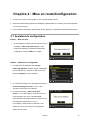
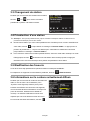
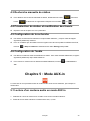
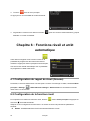
1
DR333 DAB/DAB+ und UKW DIGITAL RADIO mit Touchscreen und Farbdisplay BEDIENUNGSANLEITUNG Deutsch / English / Français / Italiano Sicherheitshinweise 9. Die Sicherheitsmerkmale des gepolten oder geerdeten Steckers dürfen nicht umgangen werden. Ein polarisierter Stecker besitzt zwei Stromkontakte, einen breiten und einen schmaleren. Ein geerdeter Stecker hat zwei Kontakte und einen dritten Erdungsanschluss. Der breite Kontakt oder der dritte Erdungsanschluss ist für Ihre Sicherheit vorgesehen. Falls der mitgelieferte Stecker nicht in Ihre Steckdose passt, wenden Sie sich an einen qualifizierten Elektriker, um die veraltete Steckdose auszutauschen. 10. Achten Sie insbesondere im Bereich von Steckern, Steckdosen und am Geräteausgang darauf, das nicht auf das Netzkabel getreten oder das Kabel eingeklemmt werden kann. Sollte das Netzkabel beschädigt sein, muss es von einem qualifizierten Fachmann repariert werden. Verwenden Sie nur die vom Hersteller angegebenen Halterungen/Zubehörteile. Verwenden Sie nur die Gerätewagen, Standvorrichtungen, Stative, Halter oder Tische, die vom Hersteller benannt oder im Lieferumfang des Geräts enthalten sind. Wenn ein Gerätewagen verwendet wird, seien Sie beim Bewegen dieses Wagen-/Geräteaufbaus vorsichtig, um Verletzungen durch Umkippen zu vermeiden. VORSICHT GEFAHR VON STROMSCHLAG NICHT ÖFFNEN VORSICHT: UM DAS RISIKO EINES STROMSCHLAGS TO ZU VERRINGERN: ENTFERNEN SIE KEINE SCHRAUBEN, ABDECKUNGEN ODER DAS GEHÄUSE. ES GIBT KEINE VOM BENUTZER WARTUNGSBEDÜRFTIGEN INNENTEILE. LASSEN SIE KUNDENDIENST NUR VON QUALIFIZIERTEM BEDIENUNGSPERSONAL DURCHFÜHREN Das Blitzsymbol mit Pfeilkopf in einem gleichseitigen Dreieck ist ein Warnhinweis, der den Besitzer vor der Anwesenheit un-isolierter "gefährlicher Spannung" im Geräteinnern warnen soll, die hoch genug sein kann, um für Personen eine Gefahr von Stromschlag darzustellen. Das Ausrufezeichen innerhalb eines gleichseitigen 11. Dreiecks soll den Benutzer auf das Vorhandensein wichtiger Anweisungen für Wartung (Kundendienst) in Bedienung der dem und 12. Gerät beigelegten Dokumentation hinweisen. WARNUNG: UM DIE GEFAHR VON FEUER UND STROMSCHLAG ZU VERRINGERN, DARF DIESES GERÄT WEDER REGEN NOCH FEUCHTIGKEIT AUSGESETZT WERDEN. WICHTIGE SICHERHEITSHINWEISE Um die Gefahr von Stromschlag, Feuer usw. zu verringern: 1. 2. 3. 4. 5. 6. 7. 8. 2 Lesen Sie diese Anweisungen. Heben Sie diese Anweisungen auf. Beachten Sie alle Warnungen. Befolgen Sie alle Anweisungen. Verwenden Sie dieses Gerät nicht in der Nähe von Wasser. Reinigen Sie das Gerät nur mit einem trockenen Tuch. Zur Entfernung hartnäckiger Flecken verwenden Sie bitte ein weiches Tuch, das mit einer schwachen Lösung eines milden Reinigungsmittels und Wasser angefeuchtet ist. Danach trocknen Sie das Gerät sofort mit einem sauberen Tuch. Verwenden Sie keine Scheuerlappen, Alkohol oder andere chemische Lösungsmittel, da diese die Oberfläche des Gerätes beschädigen oder die Paneel Beschriftung ablösen können. Blockieren Sie keine Lüftungsöffnungen. Die Belüftung darf durch Abdecken der Belüftungsöffnungen wie z. B. mit Zeitungen, Tischdecken, Vorhängen usw. nicht behindert werden. Stellen Sie das Gerät nicht in der Nähe von Wärmequellen wie z. B. Heizkörpern, Heizregister, Öfen oder anderen Geräten (einschließlich Verstärkern), die Wärme abgeben, auf. WARNUNG BEI VERWENDUNG EINES TRAGBAREN WAGENS 13. 14. 15. 16. 17. Ziehen Sie bei Gewittern oder bei längerer Nichtbenutzung den Stecker aus der Steckdose. Überlassen Sie alle Kundendienstarbeiten qualifiziertem Fachpersonal. Kundendienst ist erforderlich, wenn das Gerät auf irgendwelche Weise beschädigt wurde, z.B. wenn das Netzkabel oder der Netzstecker beschädigt wurden, wenn Flüssigkeiten in das Gerät verschüttet wurden oder Fremdkörper hineinfielen, wenn das Gerät Regen oder Feuchtigkeit ausgesetzt war, nicht normal funktioniert, oder wenn es heruntergefallen ist. Das Gerät sollte keinem Spritzwasser ausgesetzt werden, und mit Flüssigkeiten gefüllte Gegenstände, wie z. B. Vasen, sollten nicht auf dem Gerät abgesetzt werden. Der Netzstecker oder ein Gerätestecker wird als Abschaltvorrichtung verwendet; diese Vorrichtung sollte immer betriebsbereit sein. Lesen Sie bitte Bewertungslabels von Sender und Empfänger für Energieversorgung und andere Sicherheitshinweise. Deutsch Sicherheitshinweise 1 Verpackungsinhalt 4 Geräteübersicht .......................................................................................................4 Fernbedienungsübersicht ........................................................................................5 1.1 Bildschirmseiten ................................................................................................6 1.2 Die Funktion/Verwendung der On Screen Schaltflächen ..................................7 1.3 Symbolzusammenfassung ................................................................................8 Kapitel 2: Erste Schritte/Installation 9 2.1 Setup-Wizard .....................................................................................................9 Kapitel 3: DAB/DAB+ Modus 10 3.1 Zugriff auf den DAB/DAB+ Modus ................................................................. 10 3.2 Sendersuche .................................................................................................. 10 3.3 Wechseln zu einem anderen Sender .............................................................. 11 3.4 Senderspeicher ............................................................................................... 11 3.5 Favoriten bearbeiten ....................................................................................... 11 3.6 Information zur aktuellen Programmwiedergabe ............................................ 11 3.7 Kompression des Dynamikbereiches (DRC)................................................... 11 Kapitel 4: UKW-Modus 12 4.1 Zugriff auf UKW-Modus .................................................................................. 12 4.2 AutoScan (Automatische Sendersuche) ........................................................ 12 4.3 Manuelles Abstimmen .................................................................................... 12 4.4 Senderspeicher und Bearbeiten von Favoriten .............................................. 12 4.5 Einstellung zur Sendersuche.......................................................................... 12 4.6 Audio-Einstellungen ........................................................................................ 13 Kapitel 5: AUX IN Modus 13 5.1 Audiowiedergabe: ........................................................................................... 13 Kapitel 6: Alarme 14 6.1 Einstellen des Schlummer-Alarms ................................................................. 14 6.2 Alarmeinstellungen ......................................................................................... 14 Kapitel 7: Einstellungen 15 7.1 Übersicht ........................................................................................................ 15 7.2 Zeiteinstellungen ............................................................................................ 15 7.3 Sprache .......................................................................................................... 15 7.4 Hintergrundbeleuchtung ................................................................................. 15 7.5 Equalizer-Einstellungen.................................................................................. 16 7.7 Schlaftimer...................................................................................................... 16 7.8 Software Version ............................................................................................ 16 7.9 Werkeinstellung .............................................................................................. 17 Kapitel 8: Technische Daten Deutsch 17 3 Verpackungsinhalt Was Sie in Ihrem Paket finden können: Digital Radio DR333 Fernbedienung AC-DC Ladenetzteil Bedienungsanleitung Geräteübersicht Bildschirm Senderspeicher 1 - 10 Infrarot-Empfangs - LAUTSTÄRKE + STANDBY/AN punkt Antenne DC: 9V USB Update AUX IN R AUDIO L BUCHSE 4 Deutsch Fernbedienungsübersicht Standby/An Wählen VOL VOL Menü Info Sendersuche DAB UKW Aux Senderspeicher 1 - 10 Schlummer-/Schlafalarm Steuerung Alle-Modus Drücken, um Radio ein-/auszuschalten. WÄHLEN Drücken Sie oder um nach rechts oder links zu blättern. Drücken Sie oder um nach oben oder nach unten zu blättern. Drücken Sie SELECT, um zu bestätigen. MENÜ Drücken, um das Hauptmenü und andere Optionen aufzurufen. DAB Drücken Sie diese Taste, um den „DAB“-Modus aufzurufen. UKW Drücken, um den „UKW“-Modus aufzurufen. Aux Drücken, um den „AUX IN“-Modus aufzurufen. SCAN INFO Im DAB-Modus, UKW-Modus: Drücken, um den Suchlauf nach aktiven Stationen aufzurufen. Im DAB-Modus, UKW-Modus: Drücken, um durch Senderinformation zu blättern. Drücken, um Alarmeinstellung aufzurufen. Drücken, um Schlaftimer-Einstellung aufzurufen. SNOOZE/SLEEP Wenn der Alarm ertönt, drücken Sie diese Taste, um den Alarm zu verschieben. Im DAB-Modus, UKW-Modus: Drücken und halten, um aktuellen Sender 1 - 10 zu speichern. Drücken, um entsprechenden gespeicherten Sender wieder auf zu rufen. Drücken, um Lautstärke einzustellen. Deutsch 5 Kapitel 1: Einführung 1.1 Bildschirmseiten • Die Seite zeigt verschiedene Menüs, Dialoge und Anzeigen, so wie unten beschrieben. Prinzipiell gibt es sechs Typen von Anzeigeseiten: Menü Dialog Splash Screen Fehler/Information Aktuelle Wiedergabe Standby (Uhr) Sollte der Text zu lange sein, um auf die Seite zu passen, dann wird er zuerst abgeschnitten dargestellt; dann, nach ein paar Sekunden, scrollt der Inhalt langsam weiter, so dass Sie alles lesen können. • Die Menüseite ist die Hauptseite, um durch die Radio-Hauptfunktionen und Einstellungen zu navigieren. Es gibt 5 Touch-Symbole auf der Seite, um auf die folgenden Seiten zu navigieren: • DAB Radio UKW Radio AUX IN Alarme Einstellungen Die Standby-Seite zeigt die Zeit, Datum, Schlummerzeit-Countdown und alle aktiven Alarmzeiten an. 6 Deutsch 1.2 Die Funktion/Verwendung der On Screen Schaltflächen Schaltflächen Funktion/Verwendung Zurück zum Hauptmenü Schließen Zurück zur vorherigen Seite Lautstärke Im Wiedergabemodus kann diese Schaltfläche dazu verwendet werden, zur letzten Titelliste oder Senderliste zurückzukehren Radio-Modus: Tippen Sie hier, um „Meine Favoriten“ aufzurufen Tippen Sie diese Schaltfläche an, wenn Sie den Sender zu Ihren Favoriten hinzufügen möchten Antippen, um zusätzliche Informationen anzuzeigen, während ein Programm wiedergegeben wird DAB-Modus: Antippen um zum vorherigen Sender der Senderliste zu springen UKW-Modus: Antippen zur Sendersuche DAB-Modus: Antippen um zum nächsten Sender der Senderliste zu springen UKW-Modus: Antippen zur Sendersuche Deutsch 7 1.3 Symbolzusammenfassung Wenn Sie die Symbole auf der Menüseite antippen, dann wird das Radio in den entsprechenden Modus wechseln und den zuletzt gehörten Sender wiedergeben. Dialogseiten werden gezeigt, so dass der Anwender Einstellungen ändern kann. Ihr Inhalt variiert von einfachen Ja/Nein Optionen bis zu komplizierteren Dialoganzeigen. Jeder Modus hat ein eigenes Menü mit Optionen, die für diesen Modus spezifisch sind. Zum Beispiel tippen Sie auf um das DAB-Modus-Menü aufzurufen, das fünf Optionen hat: Scannen, Favoriten bearbeiten, DRC, Manuell einstellen und Unzulässige Sender entfernen. Das System- Einstellungs- Menü erlaubt Zugriff auf die Systemeinstellungen und auf Information wie z. B. Zeitangabe, Alarme, Equalizer und diverse Einstellungen, sowie auf den Setup-Wizard. Menüs die mehr Optionen aufweisen als auf eine Seite passen, haben eine Bildlaufleiste. Mit dieser Leiste kann dann durch das Menü gescrollt werden. Einige Menüs, zum Beispiel das Einstellungsmenü, haben mehrere Untermenüs. 8 Deutsch Kapitel 2: Erste Schritte/Installation 1. Stellen Sie Ihr Radio in ein geeignetes Regal oder auf einen stabilen und flachen Tisch. 2. Verbinden Sie das Netzteil mit Ihrem Radio und dem Stromversorgungsanschluss. 3. Um einen besseren Rundfunkempfang zu erhalten (DAB, DAB+ und UKW), ziehen Sie die Teleskopantenne heraus. 2.1 Setup-Wizard Schritt 1 - Einschalten 1. Bei Erstgebrauch erscheint die Frage ‚Start setup wizard now?‘ Fortfahren durch Antippen der YES Schaltfläche. Schritt 2 – Setup-Wizard 1. Wählen Sie zuerst Ihre gewünschte Sprache aus: Englisch, Dansk, Nederlands, Suomi, Deutsch usw. Tippen Sie auf die bevorzugte Option; hier wählen wir English als Beispiel. 2. Jetzt werden Sie gebeten, das Zeitformat einzustellen: 24 Std. oder 12 Std. - Format, tippen Sie auf Ihr bevorzugtes Format. 3. Sie werden jetzt gebeten, eine Zeit-Synchronisierungsquelle zu wählen: Keine/DAB/UKW. Falls Sie ‚Keine‘ wählen, bedeutet das, dass Sie die Zeit manuell einstellen müssen. Ihr Radio zeigt Ihnen jetzt an: ‚Setup-Wizard beendet‘. Deutsch 9 Kapitel 3: DAB/DAB+ Modus 3.1 Zugriff auf den DAB/DAB+ Modus Der DAB-Modus empfängt DAB/DAB+ Digitalradio und zeigt Information über den Sender, Radio-Stream und Titelwiedergabe an. Antippen, um den DAB/DAB+ Modus aufzurufen. Oder Sie drücken DAB per Fernbedienung, um den DAB/DAB+ Modus aufzurufen. Mit dieser Einstellung wird der zuletzt gehörte Sender automatisch angewählt. 3.2 Sendersuche Wenn Sie den DAB Radiomodus das erste Mal wählen, führt Ihr Radio automatisch eine Sendersuche durch, um zu sehen, welche Sender verfügbar sind. Nach dem ersten Suchlauf sollten Sie gelegentlich erneut einen Suchlauf starten. Verfügbare Sender ändern sich gelegentlich. Wenn der Empfang bei der ursprünglichen Sendersuche nicht gut war (zum Beispiel, wenn die Antenne nicht ausgefahren war); dies kann sich in einer leeren oder unvollständigen Liste an verfügbaren Sendern äußern. Sollten Sie schlechten Empfang von einigen Sendern haben, möchten Sie eventuell nur Sender mit guter Signalstärke in die Liste aufnehmen. Um eine Sendersuche manuell zu starten, tippen Sie auf > Scannen (oder Sie drücken direkt auf SCAN per Fernbedienung). Wenn die Sendersuche abgeschlossen ist, zeigt das Radio eine Liste von verfügbaren Sendern an. Um nur nach Sendern mit guter Signalstärke zu suchen, tippen Sie auf Um existierende inaktive Sender zu entfernen, tippen Sie auf 10 Deutsch > Manuell einstellen. > Unzulässige Sender entfernen. 3.3 Wechseln zu einem anderen Sender Während einer Programmwiedergabe können Sie einfach den Sender wechseln, indem Sie auf oder tippen, um zum vorherigen oder nächsten Sender zu springen. 3.4 Senderspeicher Hinweis: Im DAB und UKW-Modus können beide bis zu 10 Sender gespeichert werden. Dies Vorgehensweise ist für beide Modi identisch. Um einen Sender zu speichern, während Ihr Zielprogramm bereits spielt, tippen Sie auf die Anzeige zeigt „Favorit hinzugefügt“ oder drücken und halten Sie eine der Speichertasten 1 – 10 bis „Favorit hinzugefügt“ angezeigt wird. Um einen Speicher anzuwählen, wechseln Sie zuerst in einen entsprechenden Modus, tippen dann auf und wählen dann einen der aufgelisteten voreingestellten Sender oder drücken kurz eine der Speichertasten. 3.5 Favoriten bearbeiten Versichern Sie sich, dass Sie bereits einige Senderspeicher auf Ihrem Radio belegt haben. Sollten Sie einen Favoriten verschieben oder entfernen wollen, kann das geschehen, indem Sie > Favoriten bearbeiten antippen. 3.6 Information zur aktuellen Programmwiedergabe Während der Stream spielt, zeigt der Bildschirm Namen und DLS- (Dynamic Label Segment) Informationen, die vom Sender ausgestrahlt werden mit Echtzeitinformationen wie z. B. Programmname, Track und Titel, an.Um mehr Informationen anzusehen, tippen Sie bitte auf . 3.7 Kompression des Dynamikbereiches (DRC) Falls Sie Musik mit einem hohen Dynamikbereich in einem lauten Umfeld hören dann kann es sein, dass Sie den Audio-Dynamikbereich komprimieren möchten. Dies macht leise Töne lauter und laute Töne leiser. Um die DRC zu ändern, tippen Sie auf > DRC > Aus, Niedrig oder Hoch. Deutsch 11 Kapitel 4: UKW-Modus 4.1 Zugriff auf UKW-Modus Der UKW-Radio-Modus empfängt analoge Radiosignale im UKW-Frequenzbereich und zeigt RDS (Radio Data System) – Informationen über diesen Sender (falls verfügbar) an. Um den UKW-Modus aufzurufen, tippen Sie auf im Hauptmenü. Oder drücken Sie FM auf der Fernbedienung. 4.2 AutoScan (Automatische Sendersuche) , um die AutoScan -Funktion zu aktivieren; Um einen Sender zu finden, tippen Sie auf Sie können dann im UKW-Frequenzbereich auf- und abwärts nach Sendern suchen, indem Sie oder antippen. Oder Sie drücken SCAN auf der Fernbedienung, um die automatische Sendersuche zu starten. Die Frequenzanzeige läuft auf und ab während Ihr Radio den Frequenzbereich durchsucht und sie bleibt stehen, wenn das Radio einen UKW-Radiosender findet. 4.3 Manuelles Abstimmen Man kann auch manuell abstimmen, indem man das erneutes Antippen auf und Antippen von Symbol deaktiviert durch oder , um die Frequenz manuell in 0.5MHz Schritten zu ändern. 4.4 Senderspeicher und Bearbeiten von Favoriten Bitte schauen Sie in die vorherigen Kapitel 3.4 und 3.5. 4.5 Einstellung zur Sendersuche Standardmäßig halten UKW-Scans bei jedem verfügbaren Sender. Dies kann durch schlechtes Signal-Rausch-Verhältnis zu Rauschen bei schwachen Sendern führen. 12 Deutsch Um die Sendersucheinstellungen zu ändern, um nur bei Sendern mit guter Signalstärke zu halten, tippen Sie auf > Bei Sendern anhalten und ändern Sie von Alle auf nur Starke. 4.6 Audio-Einstellungen Standardmäßig werden alle Stereosender in Stereo wiedergegeben. Bei schwachen Sendern kann dies zu einem schwachen Signal-Rausch-Verhältnis (Rauschen) führen. Um schwache Sender in Mono abspielen zu lassen, tippen Sie auf > Mono erzwingen > Ja. Kapitel 5: AUX IN Modus Der AUX In Modus spielt Audiosignale von einer externen Quelle wie z. B. einem MP3-Player ab. 5.1 Audiowiedergabe: 1. Reduzieren Sie die Lautstärke beim Radio und, falls einstellbar, beim Audio-Quellengerät. 2. Verbinden Sie die externe Audioquelle mit der AUX Input 3,5 mm Stereobuchse. 3. Tippen Sie auf im Seitenmenü. Oder drücken Sie AUX per Fernbedienung, um AUX aufzurufen. 4. Stellen Sie die Lautstärke Ihres Radios je nach Bedarf ein, indem Sie auf tippen (und, falls nötig, erhöhen Sie auch die Lautstärke des Audio-Quellengerätes). Deutsch 13 Kapitel 6: Alarme Es gibt zwei vielseitig einstellbare Alarme mit Schlummerfunktion. Außerdem gibt es einen Schlaftimer mit dem das Radio nach einer gewählten Zeitspanne automatisch ausgeschaltet wird. 6.1 Einstellen des Schlummer-Alarms Die Standard-Schlummerdauerzeit ist 1 Minute. Um die Zeit zu ändern, wählen Sie Hauptmenü > Settings > Sonstige Einstellungen > Schlummer > und wählen dann eine Zeit zwischen 1 – 30 Minuten. 6.2 Alarmeinstellungen im Hauptmenü oder Sie drücken Um einen Alarm einzustellen oder zu ändern, tippen Sie auf einfach auf auf der Fernbedienung. Wählen Sie die Alarmnummer (1 oder 2) und konfigurieren Sie dann die folgenden Parameter: Aktivieren: Aus/Täglich/Einmal/Wochenende/Wochentags Uhrzeit: 00:00, nach der Einstellung der richtigen Alarmtonzeit tippen Sie auf , um einen Menüschritt zurück zu machen. Modus: DAB, UKW und Summer. Meine Favoriten: Zuletzt gehörter oder voreingestellter Sender 1 - 10 Hinweis: diese Option hängt von Ihrer Modus Wahl ab: DAB, UKW oder Summer Lautstärke: 1 - 16 Der Alarm ertönt, wenn die gewählte Einstellzeit erreicht ist. Während der Alarm ertönt, wird auf dem Bildschirm ein Symbol in der oberen linken Ecke gezeigt. a. Um die Schlummerfunktion zu aktivieren, tippen Sie auf (oder drücken Sie SNOOZE/SLEEP auf der Fernbedienung). Das Radio kehrt für die eingestellte Dauer auf Standby zurück, wobei das Symbol ‚Alarm deaktiviert‘ blinkt und die Countdown-Schlummerzeit angezeigt wird. b. Um den Alarm auszuschalten, tippen Sie auf c. Um den Alarm permanent auszuschalten wählen Sie im Hauptmenü > Settings Alarmeinstellungen > Aktivieren: Aus. 14 und das Alarmsymbol bleibt aktiviert. Deutsch > Kapitel 7: Einstellungen 7.1 Übersicht Das Antippen von im Hauptmenü bringt Sie zu den Radio-Haupteinstellungen – ein zentraler und bequemer Weg alle Radioeinstellungen zu konfigurieren. Die Einstellungen sind in folgende Kategorien unterteilt: Uhrzeiteinstellungen Alarmeinstellungen Equalizer-Einstellungen Sonstige Einstellungen Einrichtungsassistent 7.2 Zeiteinstellungen Unter den Zeiteinstellungen stehen folgende Einstellmöglichkeiten zur Verfügung: Zeitquelle. Z.B. Keine, DAB oder UKW Manuelles Setup Uhrzeitformat 7.3 Sprache Die Standardsprache ist Englisch. Für Änderungen wählen Sie Hauptmenü > Settings Sonstige Einstellungen > Sprache >, dann wählen Sie Ihre Sprache. 7.4 Hintergrundbeleuchtung Unter Hauptmenü > Settings > Sonstige Einstellungen finden Sie 2 Menüs mit der Sie die Hintergrundbeleuchtung beeinflussen können. Unter Hintergrundbeleuchtung Aus können Sie die Zeit auswählen nach der das Display automatisch abgedunkelt wird, sofern das Radio nicht bedient wird. Als Standard ist hier Nie gewählt. Im Menü Hintergrundbeleuchtung können unterschiedliche Beleuchtungsstufen für den Standbybzw. für den eingeschalteten Modus gewählt werden. Deutsch 15 7.5 Equalizer-Einstellungen Es stehen mehrere voreingestellte EQ-Modi zur Verfügung. Sie können den EQ auch individuell einstellen, hierzu wählen Sie Hauptmenü > Settings > Equalizer-Einstellungen > Benutzerdefinierter EQ. Dort können Sie die Bässe und Höhen nach Ihren Wünschen einstellen. 7.7 Schlaftimer Hinweis: Sie möchten, dass sich Ihr Radio nach einer vordefinierten Zeitdauer abschaltet; Sie können dies mit Hilfe der Sleeptimer-Funktion des Radios erreichen. 1. Die Standard-Schlafzeit ist OFF. Zum Ändern wählen Sie: Menü > Settings > Sonstige Einstellungen > Schlaf >, dann stellen Sie den Schlaftimer auf Ihre gewünschte Zeitspanne ein. Oder Sie drücken wiederholt die Taste SNOOZE/SLEEP auf der Fernbedienung, um Ihre bevorzugte Zeit einzustellen. 2. Nach Beendigung der Einstellungen wird das Schlafsymbol auf der oberen rechten Seite des Radiobildschirms gezeigt. 3. Das Radio versetzt sich nun automatisch selbst in den Standby-Modus, nachdem die Zeit abgelaufen ist. 4. Falls Sie danach das Radioprogramm doch weiter hören möchten, drücken Sie die STANDBY/AN Schaltfläche. 7.8 Software Version Hinweis: Der Kundendienst kann Sie nach der Softwareversion Ihres Produktes fragen. Um die Softwareversion anzusehen, tippen Sie auf Settings 16 Deutsch > Sonstige Einstellungen > Version der Software. 7.9 Werkeinstellung Eine Werkeinstellung setzt alle Anwendereinstellungen auf die Standardwerte zurück. Um eine Werkrückeinstellung durchzuführen, tippen Sie auf Settings > Sonstige Einstellungen > Werkseinstellung > Sind Sie sicher? Ja/Nein > Ja. Kapitel 8: Technische Daten Technische Daten ...................... DAB/DAB+/UKW Radio Ausgangsleistung ..................... 5W RMS Anzeige ....................................... TFT Stromversorgung ...................... AC/DC Adapter: Input: 100-240Vac, 50/60Hz DC Output: 9V/1000mA (Bitte nur mitgelieferten Adapter verwenden) Gewährleistungs- und Recyclinginformationen Wir sind verpflichtet, jedem Gerät Informationen über die Entsorgung, über die gesetzlichen Gewährleistungsbestimmungen und die EG Konformitätserklärungen mit Hinweisen über das Benutzen der Geräte in den verschiedenen Ländern beizufügen. Sie finden daher diese Informationen im folgenden Text. Gesetzliche Gewährleistung von 2 Jahren nach Kaufdatum Der Verkäufer dieses Geräts gewährt Ihnen eine gesetzliche Gewährleistung von zwei Jahren nach Kaufdatum des Geräts. Diese Gewährleistung umfasst alle Fehler, die durch defekte Bauteile oder fehlerhafte Funktionen innerhalb der Gewährleistungsfrist auftreten sollten, nicht jedoch Fehler, die auf normaler Abnutzung beruhen, wie z.B. verbrauchte Akkus, Kratzer im Display, Gehäusedefekte, abgebrochene Antennen, sowie Defekte durch äußere Einwirkung, wie Korrosion, Überspannung durch unsachgemäße externe Spannungsversorgung oder Verwendung ungeeigneten Zubehörs. Ebenso sind Fehler von der Gewährleistung ausgeschlossen, die auf nicht bestimmungsgemäßen Umgang mit dem Gerät beruhen. Deutsch 17 Bitte wenden Sie sich bei Gewährleistungsansprüchen zunächst unmittelbar an den Händler, bei dem Sie das Gerät erworben haben, oder auch gleich an unseren Servicepartner. Der Händler wird Ihr Gerät entweder reparieren oder austauschen, oder er wird Ihnen eine für das Gerät spezialisierte Serviceadresse nennen. Falls Sie Ihr Gerät einschicken, vergessen Sie Ihre Kaufquittung als Nachweis über das Kaufdatum nicht und beschreiben Sie bitte den aufgetretenen Fehler möglichst genau. Elektroschrottgesetz und Recycling Europäische Gesetze verbieten das Entsorgen von defekten oder nicht mehr brauchbaren Geräten über den Hausmüll. Sollten Sie eines Tages Ihr Gerät entsorgen wollen, dann geben Sie es bitte nur bei den überall eingerichteten kommunalen Sammelstellen zum Recycling ab. Dieses Sammelsystem wird von der Industrie finanziert und sichert auch die umweltgerechte Entsorgung und das Recycling wertvoller Rohstoffe. Serviceanschrift und technische Hotline PST professional support technologies GmbH Breitscheider Weg 117a 40885 Ratingen Die Servicehotline ist unter 02102-1459546 bzw. per e-mail unter [email protected] erreichbar. Bevor Sie bei einem Problem ein vermeintlich defektes Gerät zurückschicken, können Sie Zeit und Versandkosten sparen, indem Sie zunächst ein paar einfache Tests (siehe Kapitel Störungserkennung) durchführen, oder lassen Sie sich per Hotline helfen © 2013 Alan Electronics GmbH 18 Deutsch DR333 DAB/DAB+ and FM DIGITAL RADIO with Touchscreen and colour display INSTRUCTION MANUAL English Safety Information 9. The lightning flash with arrowhead symbol within an equilateral triangle is intended to alert the user to the presence of uninsulated "dangerous voltage" within the product's enclosure that may be of sufficient magnitude to constitute a risk of electric shock to persons. The exclamation point within an equilateral triangle is intended to alert the user to the presence of important operating and maintenance (servicing) instructions in the literature accompanying the appliance. WARNING: TO REDUCE THE RISK OF FIRE OR ELECTRIC SHOCK, DO NOT EXPOSE THIS APPLIANCE TO RAIN OR MOISTURE. IMPORTANT SAFETY INSTRUCTIONS To reduce the risk of electrical shock, fire, etc.: 1. Read these instructions. 2. Keep these Instructions. 3. Heed all Warnings. 4. Follow all instructions. 5. Do not use this apparatus near water. 6. Clean only with dry cloth. For stubborn stains, use a soft cloth dampened with a weak solution of mild detergent and water. Dry the apparatus immediately afterwards with a clean cloth. Do not use abrasive clothes, thinners, alcohol, or other chemical solvents, because they may damage the finish or remove the panel lettering. 7. Do not block any ventilation openings. The ventilation shall not be impeded by covering the ventilation openings with items, such as newspapers, table clothes, curtains, etc. 8. Do not install near any heat source such as radiators, heat registers, stoves, or other apparatus (including amplifiers) that produce heat. 20 English Do not defeat the safety purpose of the polarized or grounding - type plug. a polarized plug has two blades with one wider than the other. A grounding type plug has two blades and a third grounding prong. The wide blade or the third prong are provided for your safety. If the provided plug does not fit into your outlet, consult an electrician for replacement of the obsolete outlet. 10. Protect the power cord from being walked on or pinched particularly at plugs, convenience receptacles, and the point where they exit from the apparatus. If the power cord is damaged, it must be repaired by a qualified repairer. 11. Only use attachments/accessories specified by the manufacturer. 12. Use only with the cart, stand, tripod, bracket or table specified by the manufacturer, or sold with the apparatus. When a cart is used, use caution when moving the cart/apparatus combination to avoid injury from tip-over. 13. Unplug this apparatus during lightning storms or when unused for long periods of time. 14. Refer all servicing to qualified service personnel. Servicing is required when the apparatus has been damaged in any way, such as power-supply cord or plug is damaged, liquid has been spilled or objects have fallen into the apparatus, the apparatus has been exposed to rain or moisture, does not operate normally, or has been dropped. 15. The apparatus shall not be exposed to dripping or splashing and no objects filled with liquids, such as vases, shall be placed on the apparatus. 16. The mains plug or an appliance coupler is used as the disconnect device, the disconnect device shall remain readily operable. 17. Please read Rating Labels at the back of the Sender and Receiver for power input and other safety information. Safety Information 19 Package Content 22 Unit Overview ....................................................................................................... 22 Remote Control Overview .................................................................................... 23 1.1 Screens .......................................................................................................... 24 1.2 The Function/Usage of UI Screen Buttons form ............................................ 25 1.3 Character Summary ....................................................................................... 26 Chapter2: Getting Started/Setup 27 2.1 Setup Wizard .................................................................................................. 27 Chapter3: DAB/DAB+ Mode 28 3.1 Access to DAB/DAB+ Mode ........................................................................... 28 3.2 Scanning for Stations ..................................................................................... 28 3.3 Switch to another Station ............................................................................... 29 3.4 Station Presets ............................................................................................... 29 3.5 Edit Favourites................................................................................................ 29 3.6 Now Playing Information ................................................................................ 29 3.7 Dynamic Range Compression (DRC) ............................................................ 29 Chapter4: FM Mode 30 4.1 Access to FM Mode ........................................................................................ 30 4.2 Autoscan ......................................................................................................... 30 4.3 Manually Tune ................................................................................................ 30 4.4 Station Presets and Edit favourites ................................................................ 30 4.5 Scan Settings ................................................................................................. 31 4.6 Audio Settings ................................................................................................ 31 Chapter5: AUX in Mode 31 5.1 To play Audio with AUX in Mode .................................................................... 31 Chapter6: Alarms 32 6.1 Setting Alarm Snooze ..................................................................................... 32 6.2 Setting Alarms ................................................................................................ 32 Chapter7: Settings 33 7.1 How to Enter Settings ..................................................................................... 33 7.2 Time Settings.................................................................................................. 33 7.3 Language........................................................................................................ 33 7.4 Display Backlight ............................................................................................ 33 7.5 Equaliser Settings .......................................................................................... 34 7.6 Standby Backlight Off ..................................................................................... 34 7.7 Sleep .............................................................................................................. 34 7.8 Software Version ............................................................................................ 35 7.9 Factory Reset ................................................................................................. 35 Chapter8: Specification 35 Warranty and Recycling Information 36 English 21 Package Content What you can find inside of your package: Digital Radio DR333 Remote control AC-DC Power Adapter Instruction Manual Unit Overview 22 English Remote Control Overview Control All mode Press to turn on/off radio. Press SELECT or to scroll right and left. Press or to scroll up and down. Press SELECT to confirm. MENU DAB Press to enter main menu and other options. Press to enter “DAB” mode. FM Press to enter “FM” mode. Aux Press to enter “Aux in” mode. SCAN In DAB, FM mode: Press to autoscan for active stations. INFO In DAB, FM mode: Press to browse station info. Press to enter alarm setting. SNOOZE/SLEEP 1 - 10 Press to enter Sleep setting. When alarm sounds, press to postpone alarm. In DAB, FM mode: Press and hold to store current playing station. Press to recall relevant preset station. Press to adjust volume level. English 23 Chapter 1: Introduction 1.1 Screens • The screen shows various menus, dialogues and displays, as described below. There are basically six types of screen: Menu Dialogue Splash (mode) Error/Information Now playing Standby (clock) When the text is too long to fit on the screen, it is first shown truncated, then, after a few seconds, slowly scrolls so that you can read it all. • The menu screen is the main screen to navigate around the main radio functions and settings. There are 5 touch icons on the screen to navigate to: • DAB Radio FM Radio AUX IN Alarms Settings The standby screen shows the time, date, snooze time countdown and any active alarm times. 24 English 1.2 The Function/Usage of UI Screen Buttons form UI Screen Buttons Function/Usage Back to menu screen Close Return to previous screen Volume In play mode, this button may be used to return to the last track list or station list Radio modes: touch to view “My Favourites” Touch to ‘add to Favourite’ Touch to show a separate information while a program is playing Touch to previous station, or FM mode: Touch to scan Touch to next station, or FM mode: Touch to scan English 25 1.3 Character Summary As you touch the icons on the menu screen, it will try to enter the selected mode and start playing the last station or track that was playing in that mode. Dialogue screens are shown to allow the user to change settings. They vary in complexity from simple Yes/No options up to more complex man-machine dialogue screens. Each mode has a Mode menu, with options specific to that mode. For example, touch to enter the DAB mode menu, which has five options: Scan, Edit favourites, DRC, manual tune and Prune invalid stations. The system Settings menu allows access to system settings and information such as time, alarms, equalizer and miscellaneous settings and Setup Wizard. Menus with more options than will fit on one screen have a scroll bar. The scroll bar on the right of the screen shows if there are further options over those visible. Some menus, for example the Settings menu, have several submenus. 26 English Chapter 2: Getting Started/Setup 1. Place your radio on a suitable shelf or a stable and flat table. 2. Connect the power adaptor between your radio and the mains supply. 3. To better receive broadcast radio (DAB, DAB+ and FM) extend the telescopic antenna. 2.1 Setup Wizard Step 1 - Power up 1. For initial use, it will ask you ‘Start setup wizard now?’ Continue by touching the YES button. Step 2 – Setup wizard 1. The menu will ask you to select Language format: English, Dansk, Nederlands, Suomi, German etc. Touch your preferred option, here, let’s select English for example. 2. Now it asks you to set Time format: 24h or 12h, touch your preferred format. 3. It asks you to Select Time Sync Source: None /DAB/FM. Selecting ‘none’ means that you need to manually set the time. Now, your radio will indicate you ‘Setup wizard completed’. English 27 Chapter 3: DAB/DAB+ Mode 3.1 Access to DAB/DAB+ Mode DAB mode receives DAB/DAB+ digital radio and displays information about the station, stream and track playing. Touch to enter DAB/DAB+ mode. Or press DAB via remote control to enter DAB/DAB+ mode. In use, the last listened station is automatically selected. 3.2 Scanning for Stations The first time you select DAB radio mode, your radio will automatically perform a full scan to see what stations are available. You may also need to start a scan to update the list of stations for one of the following reasons: Available stations change from time to time. If reception was not good for the original scan (for example the antenna was not up), this may result in an empty or incomplete list of available stations. If you have poor reception of some stations, you may wish to list only stations with good signal strength. To start a scan manually touch > Scan (or directly press SCAN via remote control). Once the scan is complete, the radio shows a list of available stations. To scan stations with a good signal strength only, touch To remove existing inactive stations, touch 28 > Manual tune. > Prune invalid stations. English 3.3 Switch to another Station While a program is playing you can simply change the station by touching or to select the previous or next station. 3.4 Station Presets Note: Both DAB and FM Mode can preset up to 10 stations and their setting methods are alike. To store a preset, while your target program is playing, touch until the display shows “Favourite added” or press and hold one of preset buttons 1-10 until “Favourite added” is displayed. To select a preset, shift to corresponding mode at first and then touch and then select one of the listed preset stations or shortly press one of the preset buttons. 3.5 Edit Favourites Be sure you have been setting several preset stations on your radio for DAB/DAB+ mode. If you would like to move or delete a favourite, it can be reached by touching > Edit favourites. 3.6 Now Playing Information While the stream is playing, the screen shows its name and DLS (Dynamic Label Segment) information’s broadcasted by the station giving real-time information’s such as program name, track title and contact details. Stereo broadcasts are indicated with an icon at the top of the screen. To view further information touch . 3.7 Dynamic Range Compression (DRC) If you are listening to music with a high dynamic range in a noisy environment you may wish to compress the audio dynamic range. This makes quiet sounds louder and loud sounds quieter. To change DRC, touch > DRC > OFF, Low or High. English 29 Chapter 4: FM Mode 4.1 Access to FM Mode FM radio mode receives analogue radio from the FM band and displays RDS (Radio Data System) information about the station (if available). To enter FM mode, touch on the screen menu. Or press FM via remote control. 4.2 Autoscan to activate the Autoscan function and then you can To find a station, touch scan up or down the FM band by touching or . Or press SCAN on remote control to Autoscan active stations. The frequency display starts to run up or down as your radio scans the FM band and stops when it finds an FM radio station. 4.3 Manually Tune It can also be tuned manually by deselecting the again and then touch or icon by touching to manually change the frequency. 4.4 Station Presets and Edit favourites 30 Please refer to previous chapter 3.4 and 3.5 English 4.5 Scan Settings By default, FM scans stop at any available station. This may result in a poor signal-to-noise ratio (hiss) from weak stations. To change the scan settings to stop only at stations with good signal strength, touch > Stop on stations and change from All to Strong. 4.6 Audio Settings By default all stereo stations are reproduced in stereo. For weak stations this may result in a poor signal-to-noise ratio (hiss). > Force mono > Yes. To play weak stations in mono, touch Chapter 5: AUX in Mode Aux In mode plays audio from an external source such as for example an MP3 player. 5.1 To play Audio with AUX in Mode 1. Turn the volume low on both radio and if adjustable the audio source device. 2. Connect the external audio source to the Aux input 3.5 mm stereo socket. 3. Touch on the screen menu. Or press Aux via remote control to enter. 4. Adjust the volume of your radio by touching (and if necessary the audio source device) as required. English 31 Chapter 6: Alarms There are two versatile wake-up alarms with snooze facility and a sleep function to turn the system off after a set period. 6.1 Setting Alarm Snooze The default snooze duration time is 1minutes. To change select Screen Menu > Settings > Miscellaneous settings > Alarm snooze > then select from 1-30minutes. 6.2 Setting Alarms To set or change an alarm, touch from the Screen Menu or simply press on remote control. Select the alarm number (1 or 2) and then configure the following parameters: Enable: OFF/Daily/Once/Weekend/Weekday Time: 00:00, after getting the alarm sound time right, touch Mode: DAB, FM, and Buzzer. My Favourite: Last listened and preset station 1-10 to move back. Note that this option is subject to you have chose DAB, FM or alarm as sound source. Volume: 1 – 16 The alarm will sound when the selected set time is reached. While the alarm sounds the screen will show an icon at the top left of the screen. a. To activate the snooze function, touch (or press SNOOZE/SLEEP on the remote control). The radio returns to standby for the set period with the silenced alarm icon flashing and countdown snooze time displayed. b. To temporarily cancel it, touch c. and the alarm icon will be still on. To disable this alarm setting, select screen Menu > Settings Enable: Off. 32 English > purpose alarm > Chapter 7: Settings 7.1 How to Enter Settings Touching on the screen menu will take you to the main radio settings providing a centralized and convenient way to configure all the radio settings. The settings are arranged into the following categories: Time settings Alarms settings Equaliser settings Miscellaneous settings Setup Wizard 7.2 Time Settings A range of time settings are available which include the possibility to set: Time source. E.g. None, DAB or FM Manual time set-up Time format 7.3 Language The default language is English. To change, select Screen Menu > Settings > Miscellaneous settings > Language > then select your language. 7.4 Display Backlight The default idle timeout is 5minutes. To change, select Screen Menu > Settings > Miscellaneous settings > Display Backlight > Power on/Standby > then select your preferred level. English 33 7.5 Equaliser Settings Several preset EQ modes are available including a user-defined setting under ‘Custom’ option. To adjust the EQ select Screen Menu > Settings > Equaliser Settings. You can then choose from a variety of preset modes or create your own with custom bass, treble and loudness settings. 7.6 Standby Backlight Off The default Standby Backlight Off is 1minutes. To change, select Screen Menu > Settings > Miscellaneous settings > Standby Backlight Off > then select among “never-30minutes”. 7.7 Sleep Note: You may want your radio to turn off after a pre-defined period of time, you can accomplish this by using the sleep timer of the radio. 1. The default Sleep time is OFF. To change select: Menu > Settings > Miscellaneous settings > Sleep > then set the sleep timer to your desired time span. Or press SNOOZE/SLEEP on remote control repeatedly to select your preferred option. 2. After the setting is done the sleep icon is shown on the top right side of the radio screen. 3. The Radio will now automatically put itself into standby mode after time has elapsed. 4. To continue enjoying your radio program press the STANDBY/ON button. 34 English 7.8 Software Version Note: The customer service may ask you for the software version of your product. To view the software version touch Settings > Miscellaneous Settings > Software version. 7.9 Factory Reset A factory reset resets all user settings to default values. To perform a factory reset touch the Settings menu icon > Miscellaneous Settings > Factory reset > Are you sure? Yes/No > Yes. Chapter 8: Specification Specification....………………….. DAB/DAB+/FM Radio Output Power…………………..... 5W RMS Display………………………… TFT Power Requirements…………… AC/DC Adapter: Input: 100-240Vac, 50/60Hz DC Output: 9V/1000mA (please use the provided adapter only) English 35 Warranty and Recycling Information We are legally obliged to include disposal and warranty information as well as EU declaration of conformity with the use instructions in different countries for every unit. Please find this information on the following pages. 2-Year Warranty From Date Of Purchase The manufacturer/retailer guarantees this product for two years from date of purchase. This warranty includes all malfunctions caused by defective components or incorrect functions within the warranty period excluding wear and tear, such as exhausted batteries, scratches on the display, defective casing, broken antenna and defects due to external effects such as corrosion, over voltage through improper external power supply or the use of unsuitable accessories. Defects due to unintended use are also excluded from the warranty. Please contact your local dealer for warranty claims. The dealer will repair or exchange the product or forward it to an authorized service center. You can also contact our service partner directly. Please include your proof of purchase with the product and describe the malfunction as clearly as possible. WEEE and Recycling The European laws do not allow any more the disposal of old or defective electric or electronic devices with the household waste. Return your product to a municipal collection point for recycling to dispose of it. This system is financed by the industry and ensures environmentally responsible disposal and the recycling of valuable raw materials. Service Address And Technical Hotline (for units sold in Germany) PST professional support technologies GmbH Breitscheider Weg 117a D - 40885 Ratingen Contact our service hotline by phone +49-(0)2102-1459546 or e-mail at [email protected]. Before returning the product, check the chapter “Troubleshooting” for some easy steps and tests or contact our hotline. © 2013 Alan Electronics GmbH 36 English DR333 RADIO NUMÉRIQUE DAB/DAB+ et FM, avec écran tactile et couleur GUIDE D'INSTRUCTIONS Français Informations de sécurité 9. ATTENTION RISQUE DE CHOC ÉLECTRIQUE NE PAS OUVRIR ATTENTION : POUR RÉDUIRE LE RISQUE DE CHOC ÉLECTRIQUE : NE RETIREZ NI LES VIS, NI LES CACHES NI LE COFFRET. VOTRE APPAREIL NE CONTIENT AUCUNE PIÈCE RÉPARABLE. POUR TOUT PROBLÈME, APPORTEZ VOTRE APPAREIL À UN CENTRE DE SERVICE COMPÉTENT. L’éclair avec un symbole de flèche à l'intérieur d'un triangle équilatéral alerte l'utilisateur de la présence d'une « tension dangereuse » non isolée à l'intérieur du produit, d'une amplitude peut-être suffisante pour présenter un risque de choc électrique pour des personnes. Le point d'exclamation à l'intérieur d'un triangle équilatéral dans la documentation des instructions importantes repère concernant le fonctionnement et la maintenance (réparation) du produit. AVERTISSEMENT : POUR RÉDUIRE LES RISQUES D'INCENDIE OU DE CHOC ÉLECTRIQUE, N'EXPOSEZ PAS CET APPAREIL À LA PLUIE ET À L'HUMIDITÉ. Pour votre sécurité, l'appareil est équipé d'une prise reliée à la terre ou polarisée. Ne modifiez pas cette prise. Une prise polarisée se caractérise par une broche plus large que l'autre. Une prise de terre est une prise à trois broches : deux pour le courant et une pour la mise à la terre. La broche plus large ou la broche de liaison à la terre est destinée à votre sécurité. Si la prise du cordon d'alimentation fourni ne s'adapte pas à votre prise secteur, demandez à un technicien compétent de la changer. 10. Déployez le cordon d'alimentation de manière à ce que personne ne puisse marcher dessus et que rien ne puisse l'écraser, notamment au niveau des prises, des prolongateurs et du point de sortie de l'appareil. S'il doit être remplacé, confiez cette opération uniquement à un technicien qualifié. 11. Utilisez uniquement les équipements/accessoires recommandés par le fabricant. 12. Utilisez votre appareil uniquement avec les chariots, pupitres, trépieds, supports et tables recommandés par le fabricant ou vendus avec l'appareil. Si vous installez votre appareil sur un chariot et que vous voulez le déplacer, opérez avec prudence pour ne pas vous blesser si l'appareil en vient à tomber. INSTRUCTIONS DE SÉCURITÉ IMPORTANTES Pour réduire les risques de choc électrique, d'incendie, etc. : AVERTISSEMENT CHARIOT 13. 1. 2. 3. 4. 5. 6. 7. 8. 38 Lisez ces instructions. Conservez ces instructions. Respectez tous les avertissements. Conformez-vous à toutes les instructions. N’utilisez pas cet appareil près d’une source d'eau. Essuyez votre appareil uniquement avec un chiffon sec. Pour les taches résistantes, frottez avec un chiffon, doux, légèrement trempé dans une solution faible de détergent doux et d'eau. Essuyez immédiatement l'appareil avec un chiffon propre et sec. N'utilisez pas de matériau abrasif, de diluant, d'alcool et autre dissolvant chimique pour ne pas endommager le revêtement du coffret ni effacer les lettres inscrites sur le coffret. N'obstruez pas les ouvertures d'aération. N'obstruez pas les ouvertures d'aération, que ce soit avec un journal, une nappe, un rideau, etc. Éloignez l'appareil de toute source de chaleur telle qu’un radiateur, une ouverture d'air chaud et un four, et de tout appareil dégageant de la chaleur (par exemple un amplificateur). Débranchez l'appareil de la prise secteur lorsque le temps est à l'orage et lorsque vous n'envisagez pas de l'utiliser avant longtemps. 14. Confiez toutes vos réparations uniquement à un technicien qualifié. Apportez votre appareil à un technicien qualifié s'il présente des signes de dommage, par exemple si le cordon d'alimentation ou sa prise est endommagé, si un liquide s'est renversé sur l'appareil, si un objet est tombé à l'intérieur de l'appareil, si l'appareil a été exposé à la pluie ou à l'humidité, si l'appareil ne fonctionne pas normalement et si l'appareil est tombé. 15. Ne placez pas votre appareil dans un endroit l'exposant à un contact avec un liquide (par égouttement, éclaboussure, etc.) et ne posez dessus aucun objet contenant un liquide, tel un vase. 16. Si votre seule option pour éliminer toute tension à l'intérieur de l'appareil est de débrancher celui-ci du secteur ou d'un coupleur, prévoyez une prise secteur CA ou un coupleur facilement accessible à tout moment. 17. Lisez l'étiquette de spécifications fixée à l'arrière de l'émetteur et du récepteur ; elle précise la tension d'alimentation requise et certaines conditions de sécurité à respecter. Français Informations de sécurité 37 Contenu de la boîte 40 Présentation de l'appareil ..................................................................................... 40 Présentation de la télécommande ........................................................................ 41 1.1 Écrans ............................................................................................................ 42 1.2 Description des boutons de l'interface utilisateur ........................................... 43 1.3 Utilisation des menus ..................................................................................... 44 Chapitre 2 : Mise en route/Configuration 45 2.1 Assistant de configuration .............................................................................. 45 Chapitre 3 : Mode radio numérique (DAB/DAB+) 46 3.1 Activation du mode radio numérique (DAB/DAB+) ........................................ 46 3.2 Recherche de stations .................................................................................... 46 3.3 Changement de station .................................................................................. 47 3.4 Présélection d'une station .............................................................................. 47 3.5 Modification des favouris ................................................................................ 47 3.6 Informations sur le contenu actuellement diffusé ........................................... 47 3.7 Compression dynamique (DRC-Dynamic Range Compression) ................... 48 Chapitre 4 : Mode FM 48 4.1 Activation du mode FM ................................................................................... 48 4.2 Recherche automatique de stations FM ........................................................ 48 4.3 Recherche manuelle de station ...................................................................... 49 4.4 Présélection de station et modification des favoris ........................................ 49 4.5 Configuration de la recherche ........................................................................ 49 4.6 Configuration de l'audio .................................................................................. 49 Chapitre 5 : Mode AUX-in 49 5.1 Lecture d'un contenu audio en mode AUX in ................................................. 49 Chapitre 6 : Fonctions réveil et arrêt automatique 50 6.1 Configuration du rappel de réveil (Snooze) .................................................... 50 6.2 Configuration de la fonction réveil .................................................................. 50 Chapitre 7 : Configuration (menu Settings) 51 7.1 Activation du mode Settings (Paramètres) ..................................................... 51 7.2 Horloge ........................................................................................................... 52 7.3 Langue............................................................................................................ 52 7.4 Eclairage de l'écran ........................................................................................ 52 7.5 Égaliseur......................................................................................................... 52 7.6 Durée du rétroéclairage.................................................................................. 53 7.7 Arrêt automatique ........................................................................................... 53 7.8 Version du logiciel .......................................................................................... 53 7.9 Réinitialisation ................................................................................................ 53 Chapitre 8 : Spécifications 54 Information importante 55 Français 39 Contenu de la boîte La boîte qui vous a été remise contient les éléments suivants : Radio numérique DR333 Télécommande Adaptateur d'alimentation CA-CC Guide d'instructions Présentation de l'appareil Écran d'affichage Stations présélectionnées 1 à 10 Détecteur des signaux de la - VOLUME + VEILLE/MARCHE télécommande Antenne Alimentation CC : 9 V Entrée AUX D PORT DE MISE À JOUR AUDIO G CONNECTEURS 40 Français Présentation de la télécommande VEILLE/MARCHE SÉLECTION VOL VOL MENU INFO RECHERCHE DAB FM Aux Touches de présélection 1-10 RAPPEL DE RÉVEIL/ARRÊT AUTO Touche Depuis tous les modes Appuyez pour allumer/éteindre la radio. Appuyez sur SELECT ou pour déplacer l'affichage vers la droite ou vers la ou pour déplacer l'affichage vers le haut ou vers le bas. gauche. Appuyez sur Appuyez sur SELECT pour confirmer. MENU DAB Appuyez pour accéder au menu principal et à d'autres options. Appuyez pour activer le mode numérique « DAB ». FM Appuyez pour activer le mode « FM ». Aux Appuyez pour activer le mode numérique « AUX IN ». SCAN INFO En mode DAB et FM : Appuyez sur cette touche pour démarrer la recherche automatique de stations. En mode DAB et FM : Appuyez sur cette touche pour naviguer dans les informations disponibles pour la station. Appuyez sur cette touche pour accéder aux paramètres de la fonction réveil. Appuyez sur cette touche pour accéder aux paramètres de la fonction arrêt SNOOZE/SLEEP automatique. Lorsque la source audio de réveil retentit, appuyez sur cette touche pour l'arrêter momentanément. En mode DAB et FM : Appuyez sur l'une de ces touches et maintenez-la 1 - 10 enfoncée pour présélectionner la station actuellement diffusée. Appuyez sur l'une de ces touches pour écouter la station de radio présélectionnée qui lui est affectée. Appuyez pour ajuster le niveau sonore. Français 41 Chapitre 1 : Introduction 1.1 Écrans • Plusieurs pages-écran ont été définies, chacune avec ses menus, ses messages et ses éléments graphiques. Ces écrans, au nombre de six, sont les suivants : Menu Dialogue Splash (mode) Erreur/Information Now playing (Lecture en cours) Veille (horloge) Lorsqu'un texte est trop long pour apparaître en totalité sur l'écran, une première partie est affichée, puis, après quelques, le texte est décalé lentement pour que vous puissiez lire le reste. • La page-écran menu vous permet d'accéder aux principales fonctions et aux paramètres de configuration de la radio. Elle contient les 5 icônes tactiles suivantes : • DAB Radio (Radio numérique) FM Radio (Radio FM) AUX (Entrée AUX) Alarms (Réveil) Settings (Paramètres) La page-écran de veille affiche l'heure et la date actuelles, le compte à rebours du délai de la fonction rappel de réveil et les heures de réveil actives. 42 Français 1.2 Description des boutons de l'interface utilisateur Bouton Fonction/Utilisation d'interface Retour au menu principal Fermer Retour à la page-écran précédente Volume En mode lecture, retour à la dernière liste des titres ou des stations En mode radio : touchez pour afficher la liste « My Favourites » Touchez pour « add to Favourite » Touchez pour afficher des informations pendant la diffusion d'une émission Touchez pour diffuser la station précédente, ou Mode FM : Touchez pour démarrer la recherche de stations Touchez pour diffuser la station suivante, ou Mode FM : Touchezpour démarrer une recherche de stations Français 43 1.3 Utilisation des menus Chaque pression sur l'une des icônes du menu principal active le mode correspondant et diffuse la dernière station ou le dernier titre que vous écoutiez depuis ce mode. Les pages-écran de dialogue vous permettent de modifier certains paramètres. Certaines sont très simples et se limitent à un Oui/Non ; d'autres sont plus complexes. Pour chaque mode, vous avez accès à un menu contextuel d'options spécifiques à ce mode. Par exemple, touchez pour accéder au menu contextuel du mode radio numérique (DAB). Il contient cinq options : Scan (Rechercher), Edit favourites (Modifier les favoris), DRC (Compression dynamique), manual tune (Recherche manuelle) et Prune invalid stations (Effacer les stations non valides). Le menu système Settings vous permet d'accéder aux paramètres et informations système, via les options time (Horloge), alarms (Réveil), equalizer (Égaliseur), miscellaneous (Divers) et Setup Wizard (Assistant de configuration). Lorsqu'un menu contient plus d'options que la page-écran ne peut en afficher en une fois, une barre de défilement apparaît sur la droite. Utilisez cette barre pour afficher les autres options du menu. Certains menus, par exemple Settings, vous donnent accès à des sous-menus. 44 Français Chapitre 2 : Mise en route/Configuration 1. Placez votre radio sur une étagère ou sur une table stable et plate. 2. Branchez l'extrémité appropriée de l'adaptateur d'alimentation sur la radio, puis l'autre extrémité sur une prise secteur. 3. Pour améliorer la réception (DAB, DAB+ et FM), déployez complètement l'antenne télescopique. 2.1 Assistant de configuration Étape 1 – Mise en route 1. Si sous utilisez votre radio pour la première fois, le message « Start setup wizard now? » vous propose de démarrer maintenant l'assistant de configuration Touchez YES pour accepter. Étape 2 – Assistant de configuration 1. La page-écran de sélection de la Langue d'affichage apparaît : English, Dansk, Nederlands, Suomi, Deutsch etc. Touchez la langue que vous désirez, English dans notre exemple. 2. Un nouveau message vous demande de préciser le format d'affichage de l'heure : 24h ou 12h. Touchez le format que vous désirez. 3. Un dernier message « Select Time Sync Source: » vous demande de choisir la source de synchronisation de l'heure : None/DAB/FM (Aucune/Radio numérique/FM). Pour régler l'heure manuellement, sélectionnez « none ». Le message « Setup wizard completed » vous indique que vous avez terminé la configuration initiale de votre radio. Français 45 Chapitre 3 : Mode radio numérique (DAB/DAB+) 3.1 Activation du mode radio numérique (DAB/DAB+) Le mode numérique DAB/DAB+ vous permet d'écouter les stations de radio numériques et d'afficher diverses informations sur la station, la diffusion en flux et la lecture en cours. Touchez pour activer le mode radio numérique DAB/DAB+. Ou appuyez sur la touche DAB de la télécommande. La dernière station que vous écoutiez dans ce mode est automatiquement diffusée. 3.2 Recherche de stations Lorsque vous activez le mode radio numérique pour la première fois, la radio procède à une recherche automatique de toutes les stations qui sont accessibles. La mise à jour manuelle de la liste de ces stations peut être nécessaire : pour rendre compte des stations qui ne sont plus accessibles et de celles qui sont redevenues accessibles, lorsque cette liste est vide ou incomplète parce qu'elle a été obtenue dans des conditions de mauvaise réception (par exemple si vous aviez oublié de déployer l'antenne), pour retirer de la liste les stations dont les signaux sont trop faibles pour assurer une bonne écoute. Pour démarrer manuellement une recherche de stations, touchez > Scan (ou appuyez directement sur la touche SCAN de la télécommande). Une fois que la recherche est terminée, la liste des stations détectées apparaît sur l'écran. Pour limiter la liste aux seules stations dont les signaux sont suffisamment forts, touchez > Manual tune. Pour effacer de la liste les stations qui ont cessé de diffuser, touchez 46 Français > Prune invalid stations. 3.3 Changement de station Pendant que vous écoutez une émission d'une station, touchez ou pour revenir à la station précédente ou passer à la station suivante. 3.4 Présélection d'une station Remarque : Vous pouvez présélectionner jusqu'à 10 stations numériques DAB et 10 stations FM. La procédure est identique pour les deux modes. Recherchez la station que vous voulez présélectionner. Pendant que son contenu est diffusé sur votre radio, touchez jusqu'à afficher le message « Favourite added » ou appuyez sur la position de présélection 1 - 10 que vous désirez pour cette station et maintenez-la enfoncée jusqu'à afficher le message « Favourite added ». Pour écouter le contenu d'une station présélectionnée, activez le mode radio numérique ou radio FM approprié, touchez et sélectionnez cette station dans la liste proposée ou appuyez directement sur la touche numérique de la position de présélection de la station. 3.5 Modification des favouris Vous devez avoir déjà présélectionné plusieurs stations numériques DAB/DAB+. Pour déplacer ou supprimer l'une des stations préférées, touchez > Edit favourites. 3.6 Informations sur le contenu actuellement diffusé Pendant que vous écoutez le contenu d'une station de radio, le nom de celle-ci et le radiotexte ( DLS -Dynamic Label Segment) transmis par le poste émetteur sont affichés sur l'écran de votre appareil, vous fournissant diverses informations en temps réel (nom de l'émission, libellé du titre et détails du contact). Les émissions diffusées en stéréo sont repérées par une icône affichée en haut de l'écran. Pour accéder à d'autres informations, touchez . Français 47 3.7 Compression dynamique (DRC-Dynamic Range Compression) Lorsque vous écoutez une musique dont la dynamique est très étendue dans un environnement bruyant, vous pouvez essayer d'améliorer l'écoute en appliquant une compression audio dynamique. La compression atténue les sons forts et amplifie les sons faibles. Pour modifier l'état de la fonction DRC, touchez > DRC > OFF, Low ou High. Chapitre 4 : Mode FM 4.1 Activation du mode FM En mode FM, la radio diffuse les signaux analogiques de la bande FM et affiche des informations sur la station fournies par un système RDS (lorsque de telles informations sont disponibles). Pour activer le mode FM, touchez dans le menu principal. Ou appuyez sur la touche FM de la télécommande. 4.2 Recherche automatique de stations FM Pour démarrer une recherche automatique de station, touchez défilement des fréquences de la bande FM en touchant et spécifiez le sens de ou . Vous pouvez également appuyer sur la touche SCAN de la télécommande pour démarrer la recherche automatique de station. La fréquence varie sur l'écran (dans le sens croissant ou décroissant selon le sens de la recherche que vous avez choisi) en même temps que la radio parcourt la bande FM et s'arrête lorsqu'une station est détectée. 48 Français 4.3 Recherche manuelle de station Pour démarrer une recherche manuelle de station, désélectionnez l'icône l'icône , retouchez et diminuez ou augmentez la fréquence en touchant ou . 4.4 Présélection de station et modification des favoris Reportez-vous au chapitre 3.4 et 3.5 précédent. 4.5 Configuration de la recherche Par défaut, la recherche FM s'arrête sur chaque station détectée, y compris celles de rapport signal/bruit (sifflement) médiocre. Pour ne considérer que les stations dont les signaux sont de bonne qualité et suffisamment forts, touchez > Stop on stations et sélectionnez la valeur Strong plutôt que All. 4.6 Configuration de l'audio Par défaut, les stations stéréo sont diffusées en stéréo. Pour celles émettant faiblement, le rapport signal/bruit (sifflement) risque d'être médiocre. Pour écouter en mode mono les stations émettant faiblement, touchez > Force mono > Yes. Chapitre 5 : Mode AUX-in Le mode Aux In vous permet d'écouter le contenu audio d'une source extérieure, par exemple un lecteur MP3. 5.1 Lecture d'un contenu audio en mode AUX in 1. Réduisez le volume au minimum sur la radio et sur la source audio extérieure. 2. Reliez la source audio extérieure à l'entrée stéréo Aux, 3,5 mm. Français 49 3. Touchez dans le menu principal. Ou appuyez sur la touche Aux de la télécommande. 4. Augmentez le volume sur la radio en touchant (et/ou sur la source audio extérieure), jusqu'à atteindre un niveau confortable. Chapitre 6 : Fonctions réveil et arrêt automatique Votre radio est équipée d'une fonction réveil avec la possibilité de programmer deux heures de réveil et d'utiliser le rappel pour dormir quelques minutes de plus, et d'une fonction d'arrêt automatique avec la possibilité de programmer le délai avant l'arrêt. 6.1 Configuration du rappel de réveil (Snooze) Par défaut, le réveil se déclenche à nouveau après 1 minute. Pour allonger ce délai, choisissez Menu principal > Settings > Miscellaneous settings > Alarm snooze > et choisissez une autre valeur entre 1 et 30 minutes. 6.2 Configuration de la fonction réveil Pour spécifier ou modifier une heure de réveil, touchez la touche dans le menu principal ou appuyez sur de la télécommande. Indiquez si vous configurez l'heure de réveil 1 ou l'heure de réveil 2 et précisez les paramètres suivants : 50 Enable : Arrêt/Quotidien/Une fois/Fin de semaine/Semaine ouvrée Français Time : 00:00, spécifiez la durée pendant laquelle la radio diffusera le contenu de la source audio de réveil puis touchez pour revenir. Mode : DAB, FM ou Buzzer (Sonnerie). My Favourite : Dernière station écoutée et station présélectionnée 1-10 Notez que cette option dépend de la source audio DAB, FM ou alarm (sonnerie) que vous avez choisie pour vous réveiller. Volume : 1 - 16 La radio diffuse la source audio de réveil à l'heure que vous avez spécifiée et affiche une icône en haut et à gauche de l'écran. a. Pour activer la fonction rappel de réveil, touchez (ou appuyez sur la touche SNOOZE/SLEEP de la télécommande). La radio se place alors en mode veille et commence le compte à rebours avant de déclencher à nouveau la source audio de réveil. Pendant ce temps, l'icône de réveil clignote sur l'écran. b. Pour arrêter temporairement cette fonction, touchez . L'icône de réveil reste allumée sur l'écran. c. Pour désactiver complètement cette fonction, sélectionnez Menu principal > Settings > purpose alarm > Enable: Off. Chapitre 7 : Configuration (menu Settings) 7.1 Activation du mode Settings (Paramètres) Pour simplifier la configuration de votre radio, nous avons rassemblé tous ses paramères dans une liste unique, à laquelle vous accédez en touchant dans le menu principal. Cinq catégories vous ont alors proposées : Time settings Alarms settings Equaliser settings Miscellaneous settings Setup Wizard Français 51 7.2 Horloge Cette catégorie vous amène aux paramètres suivants : Time source. Par exemple None, DAB ou FM Manual time set-up Time format 7.3 Langue Par défaut, les menus et les options sont affichés en anglais. Pour modifier ce paramètre, choisissez Menu principal > Settings > Miscellaneous settings > Language > et indiquez la nouvelle langue à appliquer. 7.4 Eclairage de l'écran Par défaut, l'écran reste allumé pendant 5minutes. Pour modifier ce paramètre, sélectionnez Menu principal > Settings > Miscellaneous settings > Display Backlight > Power on/Standby > et indiquez la nouvelle valeur que vous désirez. 7.5 Égaliseur Vous choisissez votre égaliseur parmi ceux qui sont proposés ou vous configurez votre propre égaliseur (option « Custom »). Pour modifier ce paramètre, sélectionnez Menu principal > Settings > Equaliser Settings. Choisissez un égaliseur parmi ceux qui vous sont proposés ou créez votre propre égaliseur en précisant un niveau de graves, un niveau d'aigus et une intensité sonore. 52 Français 7.6 Durée du rétroéclairage Par défaut, l'écran s'éteint après 1 minute. Pour modifier ce paramètre, sélectionnez Menu principal > Settings > Miscellaneous settings > Standby Backlight Off > et choisissez une valeur entre « never et 30 minutes ». 7.7 Arrêt automatique Remarque : Vous pouvez programmer votre radio pour qu'elle s'éteigne après un certain délai, ce qui est utile pour s'endormir en musique. 1. Par défaut, la fonction arrêt automatique est désactivée (OFF). Pour modifier cet état, sélectionnez : Menu principal > Settings > Miscellaneous settings > Sleep >et choisissez le délai avant l'arrêt. Ou appuyez sur la touche SNOOZE/SLEEP de la télécommande jusqu'à sélectionner le délai avant arrêt que vous désirez. 2. Lorsque la fonction arrêt automatique est active, une icône s'allume en haut et à droite de l'écran de la radio. 3. La radio démarre le compte à rebours et se place en mode veille une fois que le délai que vous avez fixé est écoulé. 4. Pour annuler l'arrêt automatique et continuer d'écouter le programme de la station, appuyez sur VEILLE/MARCHE. 7.8 Version du logiciel Remarque : le service d'assistance peut vous demander la version du logiciel installé sur votre appareil. Pour afficher la version du logiciel installé, touchez Settings > Miscellaneous Settings > Software version. 7.9 Réinitialisation La réinitialisation efface tous les réglages effectués par l'utilisateur et rétablit ceux qui ont été effectués en usine. Pour réinitialiser votre radio, touchez Settings > Miscellaneous Settings > Factory reset > Are you sure? Yes/No > Yes. Français 53 Chapitre 8 : Spécifications Spécifications ............................ Radio numérique DAB/DAB + et FM Puissance en sortie ................... 5 W RMS Écran ........................................... TFT Alimentation électrique ............. Adaptateur CA/CC : Entrée : 100-240 V, courant alternatif, 50/60Hz Sortie courant continu : 9 V/1000 mA (utilisez uniquement l'adaptateur que nous avons joint à votre appareil) 54 Français Information importante Nous sommes légalement tenus d'inclure les dispositions et les informations de garantie et la déclaration de conformité de l'UE avec le mode d'emploi de chaque unité, et ce dans la langue de chaque pays. Veuillez trouvez ces informations dans les pages suivantes. Deux ans de garantie à compter de la date d’achat Le Fabricant/revendeur garantit ce produit pour deux ans à compter de la date d’achat. Cette garantie couvre tout dysfonctionnement dû à une défaillance des composants ou à des fonctions incorrectes pendant la période de la garantie à l'exception des pièces d’usure, telles que batteries, égratignures de l'écran, défectuosité du boîtier, rupture de l'antenne et les défaillances dues à des raisons extérieures telles que corrosion, surtension à cause d'une source d'alimentation externe inappropriée ou l'utilisation d'accessoires inadéquats. La garantie ne couvre pas les défaillances dues à un usage non prévu.Contactez votre revendeur local pour réclamation sous garantie. Le revendeur réparera/remplacera ou envoie le produit à un centre de service agréé. Vous pouvez également contacter directement notre station de réparation agrée. Incluez la preuve d'achat avec le produit et décrivez l'anomalie de la façon la plus précise. Déchets d'Equipements Electriques et Electroniques (DEEE) et recyclage La loi Européennes ne permet pas la mise au rebus des équipements électriques et électroniques usagés avec les ordures ménagères. Ramenez votre produit à un centre de collecte municipal pour être recyclé. Ce système de collecte est financé par les industriels pour garantir l’élimination respectueuse de l’environnement et le recyclage de matières premières précieuses. Adresse du service d'assistance téléphonique (en Allemagne) PST professional support technologies GmbH Breitscheider Weg 117a 40885 Ratingen Contactez notre service d'assistance téléphonique par téléphone au +49 (0)2102-1459546 ou par courriel au [email protected]. Avant de retourner le produit consultez le chapitre “Dépannage” pour vous aidera à effectuer certains tests faciles, sinon contactez notre service d'assistance téléphonique. Français 55 © 2013 Alan Electronics GmbH 56 Français DR333 RADIO DIGITALE DAB/DAB+ e FM DIGITAL RADIO con Touchscreen e display a colori MANUALE DI ISTRUZIONI Italiano Informazioni sulla sicurezza 9. Non rendere inattiva la funzionalità di sicurezza del tipo di spina polarizzata o con la messa a terra. Una spina polarizzata è dotata di due lame, una più larga dell’altra. Mentre una spina con la messa a terra presenta due poli più un terzo per la messa a terra. Il polo più largo o il terzo polo sono forniti come misura di sicurezza. Se la spina provvista non entra nella presa, consultare un elettricista per la sostituzione della presa obsoleta. ATTENZIONE RISCHIO DI SCOSSA ELETTRICA NON APRIRE La spia lampeggiante con il simbolo della saetta, all’interno di un triangolo equilatero, avverte l’utente della presenza di "dispersione di corrente" all’interno dello chassis del prodotto che può essere di potenza sufficiente a provocare una scossa elettrica. Il punto esclamativo all’interno di un triangolo equilatero avverte l'utente della presenza di importanti istruzioni relative all'uso e alla manutenzione (assistenza) nel manuale allegato all'apparecchio. ATTENZIONE: PER RIDURRE IL RISCHIO DI INCENDIO O DI SCOSSA ELETTRICA, NON ESPORRE QUESTO DISPOSITIVO A PIOGGIA O UMIDITÀ. IMPORTANTI ISTRUZIONI DI SICUREZZA Per ridurre il rischio di incendio, scossa elettrica ecc.: 1. Leggere le seguenti istruzioni. 2. Conservare le seguenti istruzioni. 3. Prestare attenzione a tutti gli avvertimenti. 4. Attenersi alle istruzioni. 5. Non utilizzare l'apparato vicino all'acqua. 6. Pulire solo con panni asciutti. In caso di macchie ostinate, usare un panno pulito umido e una soluzione di detergente neutro e acqua. Asciugare immediatamente il dispositivo con un panno pulito. Non utilizzare panni abrasivi, diluenti, alcol o altri solventi chimici, in quanto possono danneggiare le finiture o rimuovere le scritte sul pannello. 7. Non ostruire le aperture di ventilazione. La ventilazione non deve essere impedita coprendo le aperture di ventilazione con oggetti, quali giornali, tovaglie, tende ecc. 8. Non installare l'apparecchio vicino a fonti di calore quali caloriferi, bocchette di aria calda, stufe o altre apparecchiature (compresi amplificatori) che emettono calore. 58 Italiano 10. Evitare di camminare sul cavo di alimentazione o di pizzicarlo, in particolare presso le spine, le prese di alimentazione e il punto da cui fuoriescono dall'apparecchio. Se il cavo di alimentazione è danneggiato, deve essere riparato da un tecnico qualificato. 11. Utilizzare solo accessori specificati dal produttore. 12. Utilizzare solo con carrelli, supporti, treppiedi, staffe o piani specificati dal produttore o venduti insieme all'apparato. Se si utilizza un carrello, prestare attenzione durante lo spostamento dell'apparato su di esso, evitando infortuni dovuti al ribaltamento. AVVISO CARRELLO AVVISO CARRELLOPORTATILE PORTATILE 13. Scollegare l’apparecchio durante i temporali o quando non usato per lungo tempo. 14. Segnalare tutti gli interventi di manutenzione al personale di assistenza qualificato. La manutenzione è richiesta quando l'apparecchio è stato in qualche modo danneggiato, ad es. nel caso in cui il cavo di alimentazione o la presa siano danneggiati, sia stato rovesciato del liquido o degli oggetti siano caduti al suo interno, l'apparecchio sia stato esposto a pioggia o umidità, non funziona correttamente oppure è caduto. 15. L'apparecchio non deve essere esposto a schizzi o gocce d'acqua e non appoggiare oggetti pieni di liquidi, come vasi, su di esso. 16. La spina di alimentazione o un connettore è usato come dispositivo di scollegamento, questo dispositivo entrerà subito in uso. 17. Leggere le targhette identificative sul retro del trasmettitore e del ricevitore per l'ingresso di alimentazione e altre informazioni di sicurezza. Informazioni sulla sicurezza 57 Contenuto della confezione 60 Panoramica unità .................................................................................................... 60 Panoramica del telecomando ................................................................................. 61 1.1 Schermate ........................................................................................................ 62 1.2 Funzione/Uso dei pulsanti interfaccia utente sullo schermo ............................ 63 1.3 Riepilogo carattere ........................................................................................... 63 Capitolo 2: Guida introduttiva/Configurazione 64 2.1 Procedura guidata configurazione .................................................................... 65 Capitolo 3: Modalità DAB/DAB+ 66 3.1 Accesso alla modalità DAB/DAB+ .................................................................... 66 3.2 Scansione delle stazioni ................................................................................... 66 3.3 Passaggio a un'altra stazione........................................................................... 67 3.4 Stazioni preimpostate ....................................................................................... 67 3.5 Modifica Preferiti ............................................................................................... 67 3.6 Informazioni riproduzione ................................................................................. 68 3.7 Compressione intervallo dinamica (DRC) ........................................................ 68 Capitolo 4: Modalità FM 68 4.1 Accesso alla modalità FM................................................................................. 68 4.2 Scansione automatica ...................................................................................... 68 4.3 Sintonizzazione manuale.................................................................................. 69 4.4 Stazioni preimpostate e modifica preferiti ........................................................ 69 4.5 Impostazioni scansione .................................................................................... 69 4.6 Impostazioni audio ............................................................................................ 69 Capitolo 5: Modalità AUX in 70 5.1 Riprodurre audio in modalità AUX in ................................................................ 70 Capitolo 6: Sveglie 71 6.1 Impostazione snooze sveglia ........................................................................... 71 6.2 Impostazione sveglia ........................................................................................ 71 Capitolo 7: Impostazioni 72 7.1 Come immettere le impostazioni ...................................................................... 72 7.2 Impostazioni orario ........................................................................................... 72 7.3 Lingua ............................................................................................................... 72 7.4 Retroilluminazione display ................................................................................ 72 7.5 Impostazioni equalizzatore ............................................................................... 73 7.6 Spegnimento della retroilluminazione in standby ............................................. 73 7.7 Spegnimento .................................................................................................... 73 7.8 Versione del software ....................................................................................... 74 7.9 Ripristino delle impostazioni di fabbrica ........................................................... 74 Capitolo 8: Specifiche 75 Garanzia e informazioni sul riciclaggio 76 Italiano 59 Contenuto della confezione Cosa si può trovare all'interno della confezione: Radio digitale DR333 Telecomando Adattatore alimentazione CA-CC Manuale di istruzioni Panoramica unità Schermo del Preimpostazioni Punto ricevitore a infrarossi - VOLUME + STANDBY/ON Antenna CC: 9V PORTA AUX IN R AUDIO L SUPPORTO 60 Italiano Panoramica del telecomando STANDBY/ON SELECT VOL VOL MENU INFO SCAN DAB FM Aux Pulsanti SVEGLIA SNOOZE/SLEEP Controllo Tutte le modalità Premere per accendere/spegnere la radio. Premere SELECT o per spostarsi a destra e a sinistra. Premere o per spostarsi in alto e in basso. Premere SELECT per confermare. MENU DAB Premere per accedere al menu principale o ad altre opzioni. Premere per accedere alla modalità “DAB”. FM Premere per accedere alla modalità “FM”. Aux Premere per accedere alla modalità “Aux in”. SCAN INFO In modalità DAB, FM: Premere per la scansione automatica delle stazioni attive. In modalità DAB, FM: Premere per scorrere le informazioni della stazione. Premere per accedere alle impostazioni della sveglia. SNOOZE/SLEEP Premere per accedere all'impostazione Sleep. Quando la sveglia suona, premere per posporre la sveglia. In modalità DAB, FM: Premere e tenere premuto per salvare la 1 - 10 stazione in riproduzione corrente. Premere per richiamare la stazione preimpostata principale. Premere per regolare il livello del volume. Italiano 61 Capitolo 1: Introduzione 1.1 Schermate • Lo schermo mostra vari menu, finestre di dialogo e display, come descritto di seguito. Ci sono fondamentalmente sei tipi di schermate: Menu Dialogo Iniziale (modalità) Errore/informazioni In riproduzione Standby (orologio) Se il testo è troppo lungo da adattarsi allo schermo, prima viene mostrato troncato, poi, dopo alcuni secondi, scorre lentamente in modo da poter essere letto completamente. • La schermata menu è la schermata principale per navigare tra le funzioni e le impostazioni principali della radio. Ci sono 5 icone touch sulla schermata per navigare a: • Radio DAB Radio FM AUX IN Sveglie Impostazioni La schermata standby mostra ora, data, conto alla rovescia tempo per snooze e qualsiasi tempo di sveglia attivo. 62 Italiano 1.2 Funzione/Uso dei pulsanti interfaccia utente sullo schermo Pulsanti interfaccia utente Funzione/Uso su schermo Ritorna alla schermata menu Chiudi Ritorna alla schermata precedente Volume In modalità riproduzione, questo pulsante può essere utilizzato per ritornare all'ultimo elenco delle stazioni o delle tracce Modalità radio: toccare per visualizzare “I miei preferiti” Toccare per ‘aggiungere ai Preferiti’ Toccare per mostrare informazioni separate mentre un programma è in riproduzione Toccare per passare alla stazione precedente, o Modalità FM: Toccare per effettuare la scansione Toccare per passare alla stazione successiva, o Modalità FM: Toccare per effettuare la scansione 1.3 Riepilogo carattere Quando si toccano le icone sul schermata menu, esso cercherà di accedere alla modalità selezionata e iniziare la riproduzione dell'ultima stazione o traccia riprodotta in tale modalità. Schermate di dialogo sono visualizzate per consentire all'utente di modificare le impostazioni. Esse variano per complessità dal opzioni semplici come Sì/No fino a schermate di dialogo uomo-macchina più complesse. Italiano 63 Ciascuna modalità ha un menu Modalità, con opzioni specifiche per tale modalità. Ad esempio, toccare per accedere menu dalla modalità DAB, che ha cinque opzioni: Scansione, Modifica Preferiti, DRC, sintonizzazione manuale ed eliminazione stazioni non valide. Il menu Settings consente l'accesso alle impostazioni di sistema e a informazioni quali orario, sveglie, equalizzatore e impostazioni varie e Procedura guidata di configurazione. I menu con più opzioni rispetto a quelle che rientrano in una schermata hanno una barra di scorrimento. La barra di scorrimento alla destra dello schermo mostra se ci sono ulteriori opzioni oltre a quelle visibili. Alcuni menu, ad esempio, il menu delle impostazioni, hanno più sottomenu. Capitolo 2: Guida introduttiva/Configurazione 1. Collocare la radio su un ripiano idoneo o su un tavolo stabile e piano. 2. Collegare l'alimentatore tra la radio e l'alimentazione. 3. Per ricevere meglio la trasmissione radio (DAB, DAB+ e FM) estendere l'antenna telescopica. 64 Italiano 2.1 Procedura guidata configurazione Passo 1 - Accensione 1. Al primo utilizzo, sarà chiesto ‘Start setup wizard now?’ Continuare toccando il pulsante YES. Passo 2 – Configurazione guidata 1. Il menu chiederà di selezionare Language format: Inglese, Danese, Olandese, Finlandese, Tedesco ecc. Toccare l'opzione preferita, qui, selezioniamo English come esempio. 2. Ora è chiesto di impostare Time format: 24 o 12 ore, toccare il formato preferito. 3. È chiesto di Select Time Sync Source: Nessuna /DAB/FM. Selezionando ‘nessuna’ significa che è necessario impostare manualmente l'orario. Ora, la radio indicherà ‘Setup wizard completed’. Italiano 65 Capitolo 3: Modalità DAB/DAB+ 3.1 Accesso alla modalità DAB/DAB+ La modalità DAB riceve radio digitale DAB/DAB+ e visualizza informazioni relative a stazione, trasmissione e riproduzione traccia. Toccare per accedere alla modalità DAB/DAB+. O premere DAB sul telecomando per accedere alla modalità DAB/DAB+. In uso, l'ultima stazione ascoltata è selezionata automaticamente. 3.2 Scansione delle stazioni La prima volta che si seleziona la modalità radio DAB, la radio effettuerà automaticamente una scansione completa per vedere quali stazioni sono disponibili. Può essere necessario anche avviare una scansione per aggiornare l'elenco delle stazioni per uno dei seguenti motivi: Le stazioni disponibili cambiano di volta in volta. Se la ricezione non era buona al momento della scansione originale (ad es. l'antenna non era alzata), ciò può comportare un elenco vuoto o incompleto delle stazioni disponibili. Se la ricezione di alcune stazioni è scarsa, è possibile elencare solo le stazioni con un buon segnale. Per avviare una scansione manuale toccare > Scan (o premere direttamente SCAN sul telecomando). Quando la scansione è completa, la radio mostra un elenco delle stazioni disponibili. 66 Italiano Per effettuare solo la scansione delle stazioni con un buon segnale, toccare > Manual tune. Per rimuovere le stazioni non più attive, toccare > Prune invalid stations. 3.3 Passaggio a un'altra stazione Mentre un programma è in riproduzione è possibile modificare in modo semplice la stazione toccando o per selezionare la stazione precedente o successiva. 3.4 Stazioni preimpostate Nota: Le modalità DAB e FM possono preimpostare fino a 10 stazioni e i loro metodi di impostazione sono simili. Per salvare una stazione preimpostata, mentre il programma di destinazione è in riproduzione, toccare finché il display non mostra “Favourite added” o premere e tenere premuto uno dei pulsanti di preimpostazione 1-10 finché “Favourite added” è visualizzato. Per selezionare una preimpostazione, spostarsi prima alla modalità corrispondente e quindi toccare e poi selezionare una delle stazioni preimpostate elencate o premere brevemente uno dei pulsanti di preimpostazione. 3.5 Modifica Preferiti Assicurarsi di aver impostato più stazioni preimpostate sulla radio per la modalità DAB/DAB+. Se si desidera spostare o cancellare un preferito, può essere raggiunto toccando > Edit favourites. Italiano 67 3.6 Informazioni riproduzione Durante la riproduzione, lo schermo mostra il suo nome e le informazioni DLS (Segmento Etichetta Dinamica) trasmesse dalla stazione in tempo reale come nome programma, titolo traccia e dettagli di contatto. Le trasmissioni stereo sono indicate con un'icona nella parte superiore dello schermo. Per visualizzare ulteriori informazioni, toccare . 3.7 Compressione intervallo dinamica (DRC) Se si ascolta la musica con un intervallo a elevata dinamica in un ambiente rumoroso, potrebbe essere necessario comprimere l'intervallo della dinamica. Questo rende i suoni deboli più forti e quelli forti più deboli. Per modificare DRC, toccare > DRC > OFF, Low o High. Capitolo 4: Modalità FM 4.1 Accesso alla modalità FM La modalità radio FM riceve una radio analogica dalla banda FM e visualizza le informazioni RDS (Sistema Dati Radio) relative alla stazione (se disponibili). Per accedere alla modalità FM, toccare sul menu della schermata. O premere FM sul telecomando. 4.2 Scansione automatica Per trovare una stazione, toccare per attivare la funzione Scansione automatica e quindi è possibile effettuare la scansione verso l'alto o il basso nella banda FM toccando 68 o . Italiano O premere SCAN sul telecomando per effettuare la scansione automatica delle stazioni attive. Il display della frequenza inizia a scorrere verso l'alto o il basso quando la radio effettua la scansione della banda FM e si arresta quando trova una stazione radio FM. 4.3 Sintonizzazione manuale Può essere effettuata la sintonizzazione manuale deselezionando l'icona toccando nuovamente e quindi toccando o per modificare manualmente la frequenza. 4.4 Stazioni preimpostate e modifica preferiti Fare riferimento al capitolo precedente 3.4 e 3.5 4.5 Impostazioni scansione Come predefinito, la scansione FM si ferma ad ogni stazione disponibile. Ciò può comportare un basso livello di segnale (hiss) da stazioni deboli. Per modificare le impostazioni di scansione per arrestare solo su stazioni con buona potenza di segnale, toccare > Stop on stations e modificare da All a Strong. 4.6 Impostazioni audio Per impostazione predefinita, tutte le stazioni stereo sono riprodotte in stereo. Per stazioni deboli, ciò può comportare un basso livello di segnale (hiss). Per riprodurre stazioni deboli in modo, toccare Italiano > Force mono > Yes. 69 Capitolo 5: Modalità AUX in La modalità Aux In riproduce audio da sorgenti esterne quali un lettore MP3. 5.1 Riprodurre audio in modalità AUX in 1. Abbassare il volume sulla radio e se regolabile il volume sul dispositivo di origine. 2. Collegare la fonte audio esterna alla presa stereo da 3,5 mm Aux In. 3. Toccare sul menu della schermata. O premere Aux sul telecomando per accedere. 4. Regolare il volume della radio toccando (e se necessario il dispositivo sorgente audio), se necessario. 70 Italiano Capitolo 6: Sveglie Ci sono due sveglie versatili con funzione snooze e funzione sleep per spegnere il sistema dopo il periodo impostato. 6.1 Impostazione snooze sveglia Il tempo di durata predefinito dello snooze è 1 minuto. Per modificare selezionare Menu della schermata > Settings > Miscellaneous settings > Alarm snooze >, quindi selezionare da 1-30 minuti. 6.2 Impostazione sveglia Per impostare o modificare una sveglia, toccare semplicemente dal Menu della schermata o premere sul telecomando. Selezionare il numero della sveglia (1 o 2) e quindi configurare i seguenti parametri: Abilita: OFF/Giornaliera/Una volta/Fine settimana/Giorno feriale Ora: 00:00, dopo aver impostato l'orario giusto per la sveglia, toccare per tornare indietro. Modalità: DAB, FM e Buzzer. I miei preferiti: Ultime 1-10 stazioni preimpostate e ascoltate Si noti che questa opzione è soggetta alla scelta DAB, FM o sveglia come fonte audio. Volume: 1 – 16 La sveglia suonerà quando l'orario impostato è raggiunto. Mentre suona la sveglia, lo schermo mostra un'icona nella parte in alto a sinistra dello schermo. a. Per attivare la funzione snooze, toccare (o premere SNOOZE/SLEEP sul telecomando). La radio ritorna in standby per il periodo impostato con l'icona della sveglia silenziata lampeggiante e il conto alla rovescia del tempo di snooze visualizzato. b. Per cancellarla temporaneamente, toccare c. e l'icona della sveglia sarà accesa. Per disabilitare questa impostazione della sveglia, selezionare Menu della schermata > Settings > purpose alarm > Enable: Off. Italiano 71 Capitolo 7: Impostazioni 7.1 Come immettere le impostazioni Toccando sul menu della schermata si accederà alle principali impostazioni della radio fornendo un modo comodo e centralizzato di configurare tutte le impostazioni della radio. Le impostazioni sono organizzate nelle seguenti categorie: Impostazioni orario Impostazioni sveglia Impostazioni equalizzatore Impostazioni varie Configurazione guidata 7.2 Impostazioni orario Una serie di impostazioni dell'orario è disponibile, incluso la possibilità di impostare: Fonte dell'ora. Ad es. Nessuna, DAB o FM Impostazione manuale dell'ora Formato ora 7.3 Lingua La lingua predefinita è Inglese. Per modificare, selezionare Menu della schermata > Settings > Miscellaneous settings > Language > , quindi selezionare la lingua. 7.4 Retroilluminazione display Il tempo di spegnimento predefinito è 5 minuti. Per modificare, selezionare Menu della schermata > Settings > Miscellaneous settings > Display Backlight > Power on/Standby >, quindi selezionare il livello preferito. 72 Italiano 7.5 Impostazioni equalizzatore Sono disponibili numerose modalità di equalizzazione preimpostate, incluso un'impostazione definita dall'utente nell'opzione ‘Personalizza’. Per regolare l'equalizzazione, selezionare Menu della schermata > Settings > Equaliser Settings. È possibile quindi scegliere tra una varietà di modalità preimpostate o crearne una propria con impostazioni personalizzate per bassi, alti e volume. 7.6 Spegnimento della retroilluminazione in standby Lo spegnimento della retroilluminazione in standby predefinito è 1 minuto. Per modificare, selezionare Menu della schermata > Settings > Miscellaneous settings > Standby Backlight Off >, quindi selezionare tra “mai-30 minuti”. 7.7 Spegnimento Nota: Se si desidera spegnere la radio dopo un periodo di tempo predefinito, è possibile far ciò usando il timer di spegnimento della radio. 1. Il tempo di spegnimento predefinito è OFF. Per modificare, selezionare: Menu > Settings > Miscellaneous settings > Sleep >, quindi impostare il timer di spegnimento all'intervallo di tempo desiderato. O premere SNOOZE/SLEEP ripetutamente sul telecomando per selezionare l'opzione preferita. 2. Dopo aver effettuato l'impostazione, l'icona di spegnimento appare in alto a destra dello schermo della radio. Italiano 73 3. La radio entrerà in modalità standby quando sarà trascorso il tempo prestabilito. 4. Per continuare ad ascoltare il programma della radio, premere il pulsante STANDBY/ON. 7.8 Versione del software Nota: Il servizio clienti potrebbe chiedere la versione del software del prodotto. Per visualizzare la versione del software, toccare Settings > Miscellaneous Settings > Software version. 7.9 Ripristino delle impostazioni di fabbrica Un ripristino delle impostazioni di fabbrica ripristina tutte le impostazioni dell'utente ai valori predefiniti. Per effettuare un ripristino alle impostazioni di fabbrica, toccare l'icona del menu Settings > Miscellaneous Settings > Factory reset > Are you sure? Yes/No > Yes. 74 Italiano Capitolo 8: Specifiche Specifiche ······················ Radio DAB/DAB+/FM Potenza in uscita ··············· 5W RMS Display ························· TFT Requisiti di alimentazione ······ Alimentatore CA/CC: Ingresso: 100-240Vca, 50/60Hz Uscita CC: 9V/1000mA (utilizzare solo l'alimentatore fornito) Italiano 75 Garanzia e informazioni sul riciclaggio Siamo legalmente obbligati a includere le informazioni relative allo smaltimento e alla garanzia, nonché la dichiarazione di conformità UE con le istruzioni d'uso in paesi diversi per ogni unità. Queste informazioni sono riportate sulle pagine seguenti. 2 anni di garanzia dalla data di acquisto Il costruttore/rivenditore garantisce questo prodotto per due anni dalla data di acquisto. Questa garanzia include tutti i malfunzionamenti causati da componenti difettosi o funzioni non corrette entro il periodo di garanzia escludendo l'usura, come battere scariche, graffi sul display, alloggiamento difettoso, antenna rotta e difetti dovuti a effetti esterni quali corrosione, sovratensione attraverso alimentazione esterna impropria o l'uso di accessori non idonei. Difetti dovuti all'uso non intenso sono esclusi dalla garanzia. Contattare il rivenditore locale per le richieste di interventi in garanzia. Il distributore riparerà o sostituirà il prodotto o lo invierà a un centro assistenza autorizzato. È possibile anche contattare direttamente il servizio assistenza. Includere la prova di acquisto con il prodotto e descrivere il malfunzionamento in modo quanto più chiaro possibile. WEEE e riciclaggio Le leggi Europee non consentono lo smaltimento di dispositivi vecchi o elettrici o elettronici difettosi con i rifiuti domestici. Portare il prodotto a un punto di raccolta comunale per lo smaltimento. Questo sistema è finanziato dall'industria e assicura uno smaltimento ecologico e il riciclaggio di materie prime di valore. Indirizzo assistenza e hotline tecnica (per unità vendute in Germania) PST professional support technologies GmbH Breitscheider Weg 117 D - 40885 Ratingen Contattare la nostra hotline di assistenza telefonicamente +49-(0)2102-1459546 o per e-mail a [email protected]. Prima di restituire il prodotto, controllare il capitolo “Risoluzione dei problemi” per alcuni semplici passi e test o contattare la nostra hotline. © 2013 Alan Electronics GmbH 76 Italiano