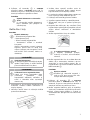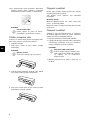
1
User Manual
AS1150
DE
Einleitung
Sehr geehrter Kunde
Einleitung Brand Variabel
Mit dem Kauf dieses Gerätes haben Sie sich für
ein Qualitätsprodukt der Marke AgfaPhoto entschieden. Ihr Gerät erfüllt die vielfältigsten Anforderungen für die private Verwendung oder in Ihrem Büro- und Geschäftsalltag.
Scannen Sie Fotos oder Visitenkarten und übertragen Sie die Daten automatisch auf Speicherkarten oder auf kompatible digitale Bilderrahmen.
Der Adapter für Negtivstreifen / Dias (Filmführung) ermöglicht Ihnen Schwarz/Weiß-Negativstreifen, Farbnegativstreifen und ungerahmte
Dias vollautomatisch zu scannen.
Zusätzlich können Sie den Scanner auch als Speicherkartenleser in Verbindung mit einem Computer verwenden.
Viel Spaß mit Ihrem Gerät und seinen vielfältigen
Funktionen!
Zu dieser Bedienungsanleitung
Mit der Installationshilfe auf den folgenden Seiten
nehmen Sie Ihr Gerät schnell und einfach in Betrieb. Detaillierte Beschreibungen finden Sie in
den folgenden Kapiteln dieser Bedienungsanleitung.
Lesen Sie die Bedienungsanleitung aufmerksam
durch. Beachten Sie vor allem die Sicherheitshinweise, um einen einwandfreien Betrieb Ihres Gerätes zu gewährleisten. Der Hersteller übernimmt
keine Haftung, sollten Sie die Hinweise nicht beachten.
Verwendete Symbole
Tipps und Tricks
Hinweis
Tipps und Tricks
Mit diesem Symbol sind Tipps gekennzeichnet, mit deren Hilfe Sie Ihr Gerät effektiver und einfacher verwenden.
Gefahrenwarnung
GEFAHR!
GEFAHR!
Warnt vor Gefahren für Personen, Schäden am Gerät oder anderen Gegenständen sowie vor möglichem Datenverlust.
Verletzungen oder Schäden können
durch unsachgemäße Handhabung entstehen.
2
Inhaltsverzeichnis
Inhaltsverzeichnis
1
Einleitung
2
Allgemeine Sicherheitshinweise
3
Übersicht
4
Scannen
5
Service
6
Anhang
Sehr geehrter Kunde ....................................................................... 2
Zu dieser Bedienungsanleitung ................................................ 2
Gerät aufstellen ................................................................................. 4
Stromversorgung .............................................................................. 4
Reparaturen ......................................................................................... 4
Außenansicht ......................................................................................
Anschlüsse auf der Rückseite ...................................................
Verpackungsinhalt ............................................................................
Netzteil anschließen ........................................................................
Speicherkarte einsetzen ...............................................................
Digitalen Fotorahmen verwenden ............................................
Fotos einlegen ....................................................................................
Filmstreifen / Dia einlegen ...........................................................
Scannerglas reinigen .......................................................................
Computeranschluss .........................................................................
5
5
5
5
5
6
7
8
9
9
Reinigung ............................................................................................ 11
Scanner kalibrieren ....................................................................... 11
Schnellhilfe ........................................................................................ 12
Technische Daten .......................................................................... 14
3
DE
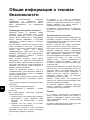
Allgemeine Sicherheitshinweise
Allgemeine Sicherheitshinweise
Lesen Sie vor der Nutzung des Gerätes folgende
wichtige Informationen, um jegliche Gefahr einer
Verletzung oder Beschädigung zu vermeiden oder
zu verringern.
Gerät aufstellen
Schützen Sie das Gerät vor direkter Sonneneinstrahlung
Schützen Sie das Gerät vor direkter Sonneneinstrahlung, Hitze, großen Temperaturschwankungen und Feuchtigkeit. Stellen Sie das Gerät nicht
in die Nähe von Heizungen oder Klimaanlagen. Beachten Sie die Angaben zu Temperatur und Luftfeuchtigkeit in den technischen Daten.
Lassen Sie Kinder nicht unbeaufsichtigt am Gerät hantieren.
Lassen Sie Kinder nicht unbeaufsichtigt am Gerät
hantieren. Die Verpackungsfolien dürfen nicht in
Kinderhände gelangen.
Stromversorgung
Verwenden Sie nur das Original-Netzteil und das USB-Kabel, die im Lieferumfang enthalten sind.
Verwenden Sie nur das Original-Netzteil und das
USB-Kabel, die im Lieferumfang enthalten sind.
Bei Verwendung anderer Netzteile und Kabel
funktioniert das Gerät möglicherweise nicht.
Ein-/Ausschalter allgemein
Schalten Sie das Gerät mit dem Ein-/Ausschalter
aus, bevor Sie den Netzstecker aus der Steckdose
ziehen.
Wird das Gerät zu heiß, oder kommt Rauch aus dem Gerät
Wird das Gerät zu heiß, oder kommt Rauch aus
dem Gerät, ziehen Sie sofort den Netzstecker aus
der Steckdose. Lassen Sie Ihr Gerät von einer
technischen Servicestelle untersuchen. Um das
Ausbreiten von Feuer zu vermeiden, sind offene
Flammen von dem Gerät fernzuhalten.
Berühren Sie niemals das Netzkabel, wenn die Isolation beschädigt ist.
Berühren Sie niemals das Netzkabel, wenn die Isolation beschädigt ist. Tauschen Sie beschädigte
Kabel sofort aus. Verwenden Sie nur geeignete
Kabel; wenden Sie sich gegebenenfalls an unseren technischen Kundendienst oder an Ihren
Fachhändler.
Das Gerät muss ausreichend belüftet werden (Unterseite)
Das Gerät muss ausreichend belüftet werden. Decken Sie die Lüftungsschlitze an der Unterseite
nicht ab. Stellen Sie Ihr Gerät nicht auf weiche Unterlagen wie Decken oder Teppiche. Das Gerät
kann sonst überhitzen und in Brand geraten.
Schließen Sie das Gerät nicht in Feuchträumen an.
Schließen Sie das Gerät nicht in Feuchträumen an.
Berühren Sie weder Netzstecker noch Netzanschluss mit nassen Händen.
Feuchtigkeitsbeschlag
Unter folgenden Bedingungen kann ein Feuchtigkeitsbeschlag im Inneren des Gerätes entstehen,
der zu Fehlfunktionen führt:
Stellen Sie Ihr Gerät so auf, dass die Steckdose leicht zugänglich ist.
Stellen Sie Ihr Gerät so auf, dass die Steckdose
leicht zugänglich ist. Im Notfall trennen Sie Ihr Gerät von der Stromversorgung, indem Sie den Netzstecker ziehen.
Trennen Sie Ihr Gerät vom Stromnetz, bevor Sie die Oberfläche reinigen.
Trennen Sie Ihr Gerät vom Stromnetz, bevor Sie
die Oberfläche reinigen. Verwenden Sie ein weiches, fusselfreies Tuch. Verwenden sie auf keinen
Fall flüssige, gasförmige oder leicht entflammbare
Reinigungsmittel (Sprays, Scheuermittel, Polituren, Alkohol). Es darf keine Feuchtigkeit in das Innere des Gerätes gelangen.
Entfernen Sie das Netzkabel, falls Sie das Gerät längere Zeit nicht benutzen, um die Gefahr eines Brandes zu vermeiden.
· wenn das Gerät von einem kalten in einen warmen Raum gebracht wird;
· nach Aufheizen eines kalten Raumes;
· bei Unterbringung in einem feuchten Raum.
Gehen Sie wie folgt vor, um Feuchtigkeitsbeschlag
zu vermeiden:
1 Verschließen Sie das Gerät in einem Plastikbeutel, bevor Sie es in einen anderen Raum
bringen um es an die Raumbedingung anzupassen.
2 Warten Sie ein bis zwei Stunden, bevor Sie das
Gerät aus dem Plastikbeutel herausnehmen.
Das Gerät darf nicht in einer stark staubbelasteten Umgebung eingesetzt werden.
Das Gerät darf nicht in einer stark staubbelasteten Umgebung eingesetzt werden. Staubpartikel
und andere Fremdkörper könnten das Gerät beschädigen.
Stoßen oder klopfen Sie nicht auf die Scanfläche;
sie ist sehr empfindlich und könnte zerbrechen.
Setzen Sie das Gerät nicht extremen Vibrationen
aus. Interne Bauelemente können dadurch beschädigt werden.
4
Entfernen Sie das Netzkabel, falls Sie das Gerät
längere Zeit nicht benutzen, um die Gefahr eines
Brandes zu vermeiden.
Versuchen Sie nicht, das Gerät auseinanderzunehmen. Es besteht die Gefahr elektrischer
Stromschläge. Das Öffnen des Gerätes führt zum
Verlust der Garantie.
Reparaturen
Reparaturen
Nehmen Sie keine Reparaturarbeiten am Gerät
vor. Unsachgemäße Wartung kann zu Personenoder Geräteschäden führen. Lassen Sie Ihr Gerät
ausschließlich von einer autorisierten Servicestelle reparieren.
Entfernen Sie nicht das Typenschild von Ihrem Gerät, anderenfalls erlischt die Garantie.
DE
Übersicht
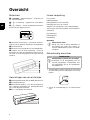
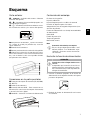
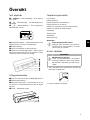
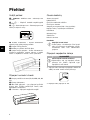
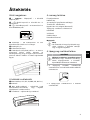
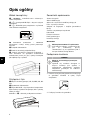
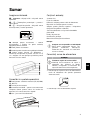
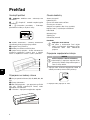
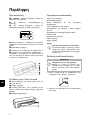
Außenansicht
Verpackungsinhalt
– – Statusanzeige – Zeigt den Gerätestatus an
Fotoscanner
– h – Ein-/Ausschalter – Gerät ein- / ausschalten
Reinigungsblatt für die Einzugsrollen
– h – Betriebsanzeige – Zeigt den Betriebszustand und Fehler des Gerätes an
Adapter für Negativstreifen / Dias (Filmführung)
LED-Lampen
Kalibrationsblatt
Reinigungsstift für den Scanner
Netzteil mit auswechselbaren Netzsteckern
USB Kabel
Schutzhülle
Garantiekarte
Bedienungsanleitung
Bedienungsanleitung
Fehlender Verpackungsinhalt
Hinweis
Dokumentenführung – Dokument fixieren / vor
der erstmaligen Verwendung, den Klebestreifen
entfernen
Fehlender Verpackungsinhalt
Sollte eines der Teile fehlen oder Beschädigungen aufweisen, wenden Sie
sich bitte an Ihren Fachhändler oder an
unseren Kundendienst.
Dokumenteneinzug
Nuten für das Einsetzen der Filmführung
Symbol für Einzugsrichtung – legen Sie das Dokument mit der Schriftseite nach oben und einer
Kante so nah als möglich an die Seite mit diesem
Symbol ein.
Übersicht Nummeriert
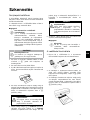
Netzteil anschließen
Netzspannung am Aufstellort
VORSICHT!
Netzspannung am Aufstellort!
Prüfen Sie, ob die Netzspannung Ihres
Gerätes (Typenschild) mit der vorhandenen Netzspannung am Aufstellort übereinstimmt.
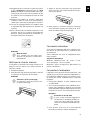
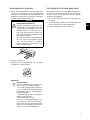
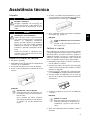
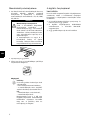
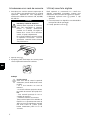
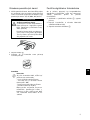
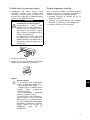
1 Stecken Sie den kleinen Stecker des Netzteils
in den Anschluss auf der Rückseite des Gerätes.
Anschlüsse auf der Rückseite
1 Steckplatz für Speicherkarte (SD, xD, MMC, MS,
MS Pro)
2 Dokumentenausgabe
3 Mini-USB Anschluss – für den Anschluss eines
Computers (nur als Speicherkartenleser) oder eines digitalen Fotorahmens
2 Stecken Sie das Netzteil in die Steckdose.
4 Buchse – Anschluss Netzteil
Rückseite Nummeriert
5
DE
Speicherkarte einsetzen
Digitalen Fotorahmen verwenden
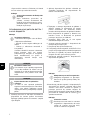
1 Stecken Sie eine Speicherkarte die nicht
schreibgeschützt in den entsprechenden
Steckplatz auf der Rückseite des Gerätes. Ihr
Gerät unterstützt folgende Speicherkarten:
SD, xD, MMC, MS, MS Pro.
Wird das Gerät an einen kompatiblen digitalen Fotorahmen angeschlossen, werden die eingescannten Fotos direkt auf den Speicher des digitalen
Fotorahmens übertragen.
GEFAHR!
Speicherkarte einsetzen!
Verwenden Sie nur Speichermedien,
die mit dem Gerät kompatibel sind.
Um Beschädigungen an der Karte
oder dem Gerät vorzubeugen, darf
die Karte nur in das Gerät eingeführt
bzw. entfernt werden, wenn es ausgeschaltet ist.
Ziehen Sie die eingesetzte Speicherkarte keinesfalls heraus, während
das Gerät darauf zugreift. Dadurch
können Daten beschädigt werden
oder verloren gehen.
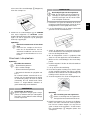
2 Drücken Sie die Taste h.
3 Warten Sie bis die Kontrollleuchte für den Gerätestatus dauerhaft leuchtet.
Hinweis
Kontrollleuchte
Blinkt diese Kontrollleuchte, kann
dies folgende Ursachen haben.
– Keine Speicherkarte eingesetzt
– Nicht genügend Speicherplatz auf
der Speicherkarte vorhanden (weniger als 1MB)
– Schreibschutz der Speicherkarte
eingeschaltet
– Speicherkarte defekt
Beachten Sie, dass bei Speicherkarten mit einer Kapazität von mehr als
2GB der Initialisierungsvorgang länger dauert. Die Kontrollleuchte kann
dann bis zu 20 Sekunden lang blinken.
6
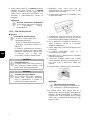
1 Halten Sie die Taste h gedrückt, um das Gerät auszuschalten.
2 Schließen Sie den digitalen Fotorahmen über
ein USB-Kabel an die Mini-USB-Buchse des
Gerätes an.
3 Schalten Sie das Gerät mit der Taste h ein.
DE
Scannen
Fotos einlegen
GEFAHR!
Dokumente einlegen
Sie können verschiedene Dokumentenarten in Ihr
Gerät einlegen. Beachten Sie die Angaben in den
technischen Daten.
Dokumentenstau!
Legen Sie kein Dokument in den Einzug, während das Gerät scannt. Das
kann zu einem Dokumentenstau führen.
Mit der Schutzhülle können Sie Fotos oder Dokumente scannen, ohne dass das Foto oder Dokument durch Kratzer oder Falten beschädigt wird.
Hinweis
Dokumente mit der Schutzhülle scannen
Werden kleinere Dokumente mit der
Schutzhülle gescannt, kann in bestimmten Fällen, die Funktion für das automatische Zuschneiden nicht korrekt funktionieren. Entweder sind wichtige Bildteile
abgeschnitten, oder es bleibt um das
Dokument zu viel Rand über. Scannen
Sie in diesem Fall die Dokumente ohne
Schutzhülle.
5 Warten Sie, bis die Kontrollleuchte h und
nicht mehr blinken und dauerhaft leuchtet. Dies bedeutet, dass der
Scanvorgang abgeschlossen ist und die Daten
auf der Speicherkarte gespeichert wurden.
GEFAHR!
Dokumentenstau!
Warten Sie unbedingt, bis beide Kontrollleuchten nicht mehr blinken, bevor Sie das nächste Dokument einlegen, um einen Dokumentenstau zu
verhindern.
Dokumente mit der Schutzhülle scannen
VORSICHT!
Ungeeignete Dokumente
Auf den Dokumenten dürfen sich keine
Büroklammern, Heftklammern, Stecknadeln oder Ähnliches befinden.
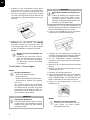
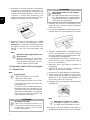
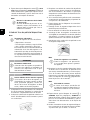
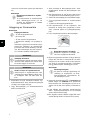
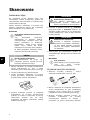
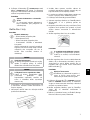
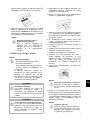
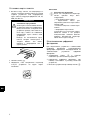
1 Legen Sie das Dokument mit der Schriftseite
nach oben und den Seitenkopf in Richtung der
Taste h in den Dokumenteneinzug.
2 Richten Sie das Dokument auf der linken Kante
aus.
3 Fixieren Sie das Dokument mit der Dokumentenführung auf der rechten Seite. Die Dokumentenführung soll das Dokument leicht berühren.
4 Schieben Sie das Dokument waagrecht so weit
in den Dokumenteneinzug, bis es automatisch
eingezogen wird und der Scanvorgang gestartet wird. Achten Sie darauf, das Dokument
nicht zu knicken. Die Kontrollleuchte h blinkt
während dem Scanvorgang.
6 Der Speichername wird gemäß dem DCF (Design Rule for Camera File System)-Standard
vergeben.
Hinweis
Stand-by-Modus
Wird der Scanner ca. 15 Minuten lang
nicht benutzt, schaltet er sich automatisch ab.
Schutzhülle verwenden
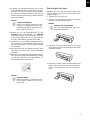
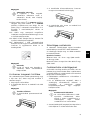
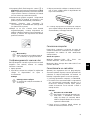
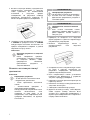
1 Öffnen Sie die Schutzhülle und legen Sie das
Dokument mit der Schrift nach oben in die
Schutzhülle ein.
2 Legen Sie die Schutzhülle mit der Schriftseite
nach oben, der geschlossenen Seite (schwarzer Streifen) voran und den Seitenkopf in Richtung der Taste h in den Dokumenteneinzug.
7
DE
3 Schieben Sie die Schutzhülle mit dem Dokument waagrecht so weit in den Dokumenteneinzug, bis sie automatisch eingezogen wird
und der Scanvorgang gestartet wird. Achten
Sie darauf, das Dokument nicht zu knicken. Die
Kontrollleuchte h blinkt während dem Scanvorgang.
VORSICHT!
Beschädigte Anfänge der Negativstreifen
Sollten die Anfänge der Negativstreifen
beschädigt sein (nicht gerade abgeschnitten, gefaltet) schneiden Sie die
Anfänge der Negativstreifen gerade und
entfernen Sie gefaltete Ecken.
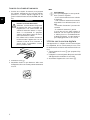
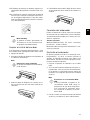
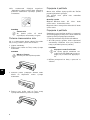
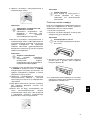
1 Überprüfen Sie, ob sich keine Dokumente im
Dokumenteneinzug befinden. Schieben Sie die
Dokumentenführung ganz nach rechts.
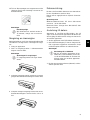
2 Legen Sie die Filmführung auf die vorgesehenen Nuten des Dokumenteneinzuges.
4 Warten Sie, bis die Kontrollleuchte h und
nicht mehr blinken und dauerhaft leuchtet. Dies bedeutet, dass der
Scanvorgang abgeschlossen ist und die Daten
auf der Speicherkarte gespeichert wurden.
Hinweis
Dokumente aus der Schutzhülle entnehmen
Entnehmen Sie nach dem Scanvorgang das Dokument aus der Schutzhülle, um ein eventuelles Verkleben
des Dokuments mit der Schutzhülle
zu vermeiden.
Filmstreifen / Dia einlegen
Hinweis
Geeignete Dokumente
• 35mm Farb-Negativstreifen
• Ungerahmte Dias
• 35mm Schwarz/Weiß-Negativstreifen
• Automatisches Drehen und Spiegeln
des Fotos:
Der Scanner erkennt die Ausrichtung
des Negativstreifens automatisch, wenn
die Nummerierung am Rand die gleiche
Ausrichtung wie das Bild hat. Kann die
Nummerierung nicht erkannt werden, ist
diese Funktion abgeschaltet.
3 Schieben Sie die Filmführung vorsichtig vollständig in den Dokumenteneizug. Beschädigen
Sie nicht die Metallbahnen der Filmführung.
4 Ist die Filmführung korrekt eingesetzt,
schnappt sie ein und das Gerät startet den Kalibriervorgang.
5 Warten Sie bis die Kontrolleuchten nicht mehr
blinken.
6 Nehmen Sie den Negativstreifen/Dia aus der
Schutzhülle/Tasche.
7 Beachten Sie die Einlegerichtung.
8 Halten Sie den Negativstreifen so, dass die Beschriftung (Nummer) des Negativs lesbar ist
(nicht spiegelverkehrt) und die Oberseite des
Bildes in Richtung der Einschalttaste weist.
9 Führen Sie den Negativstreifen / Dia in die
Filmführung ein.
Dokumente mit der Schutzhülle scannen
VORSICHT!
Ungeeignete Dokumente
Auf den Negativstreifen dürfen sich keine Kleberreste, oder Aufkleber am Rand
befinden. Dias dürfen nur ohne Rahmen
eingelegt werden.
8
Hinweis
Negative vorsichtig behandeln
Behandeln Sie die Negative mit Vorsicht. Tragen Sie wenn möglich
Baumwollhandschuhe.
DE
10 Schieben Sie den Negativstreifen / Dia so weit
in die Filmführung, bis er automatisch eingezogen wird und der Scanvorgang startet. Achten
Sie darauf, den Negativstreifen / Dia nicht zu
knicken. Die Kontrollleuchte h blinkt während
dem Scanvorgang.
Scannerglas reinigen
Sannerglas reinigen AS1110
Befinden sich auf dem gescannten Bild Linien
oder das Bild ist unscharf, müssen Sie das Scannerglas reinigen.
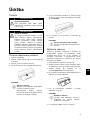
1 Schalten Sie das Gerät aus.
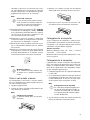
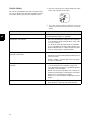
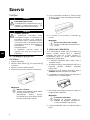
2 Stecken Sie den Reinigungsstift in das linke
Ende des Dokumentenauswurfes.
Hinweis
Scangeschwindigkeit
Durch eine höhere Auflösung beim
Scannen von Negativen / Dias, ist die
Scangeschwindigkeit langsamer als
beim Scannen von Fotos.
Hinweis
Hinweise für die Reinigung
Auf dem Reinigungsstift darf sich
kein Staub befinden.
11 Warten Sie, bis die Kontrollleuchte h und
nicht mehr blinken und dauerhaft leuchtet. Dies bedeutet, dass der
Scanvorgang abgeschlossen ist und die Daten
auf der Speicherkarte gespeichert wurden.
12 Legen Sie den gescannten Negativstreifen /
Dia wieder in die Schutzhülle/Tasche zurück
um Beschädigungen oder Verschmutzungen
zu vermeiden.
13 Der Speichername wird gemäß dem DCF (Design Rule for Camera File System)-Standard
vergeben.
3 Bewegen Sie den Reinigungsstift vorsichtig
zwei- bis dreimal zum anderen Ende des Dokumentenauswurfes.
14 Entnehmen Sie nach dem alle Negativstreifen /
Dias gescannt wurden die Filmführung. Ziehen
Sie sie dazu behutsam und gleichmäßig aus
dem Dokumenteneinzug heraus.
4 Bewegen Sie zum Schluss den Reinigungsstift
wieder zum linken Ende des Dokumentenauswurfes und entnehmen Sie den Reinigungsstift.
Hinweis
Stand-by-Modus
Wird der Scanner ca. 15 Minuten lang
nicht benutzt, schaltet er sich automatisch ab.
9
DE
Computeranschluss
Sie können den Scanner auch als Speicherkartenleser in Verbindung mit einem Computer verwenden.
Ihr Computer muss über folgende Mindestvoraussetzungen verfügen:
Betriebssystem
Betriebssystem
Windows: Windows 2000 · XP · Vista · oder spätere Versionen · 32 bit oder 64 bit
Macintosh: Mass Storage Class Mac OS10.5 oder
spätere Versionen
An den Computer anschließen
Hot-Plug-and-Play
Das Gerät ist Hot-Plug-and-Play-fähig, das heißt
Sie können das Gerät an Ihren Computer anschließen, während er läuft. Sie müssen den Computer
nicht herunterfahren, um das Gerät anzuschließen.
1 Schließen Sie das Gerät mit dem USB-Kabel an
Ihren Computer an.
2 Funktioniert der USB-Anschluss Ihres Computers einwandfrei, wird das Gerät automatisch
erkannt. Jedem Speicherkartensteckplatz wird
ein Laufwerksbuchstabe zugeordnet.
Hinweis
Anschluss an einen USB-Hub
Möchten Sie das Gerät an einen USBHub (= USB-Verteiler) anschließen,
achten Sie darauf, das der USB-Hub
mit dem Computer verbunden ist, bevor Sie das Gerät an den USB-Hub
anschließen.
3 Sie können auf die Speicherkarte (Laufwerk)
zugreifen und die gespeicherten Dateien bearbeiten.
10
DE
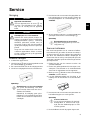
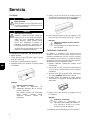
Service
Reinigung
GEFAHR!
Gerät ausschalten!
Schalten Sie das Gerät mit der Taste h
aus, bevor Sie das USB Kabel oder den
Anschluss des Netzteils vom Gerät trennen.
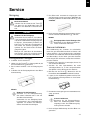
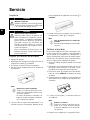
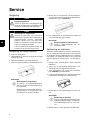
5 Das Blatt wird automatisch eingezogen und
der Reinigungsvorgang gestartet. Während der
Reinigung blinken die Kontrollleuchten h und
.
Reinigung
GEFAHR!
Hinweise für die Reinigung!
Verwenden Sie ein weiches, fusselfreies
Tuch. Verwenden Sie keinesfalls flüssige
oder leicht entflammbare Reinigungsmittel (Sprays, Scheuermittel, Polituren, Alkohol etc.). Es darf keine Feuchtigkeit in
das Innere des Gerätes gelangen. Besprühen Sie das Gerät nicht mit Reinigungsflüssigkeit.
Wischen Sie sanft über die beschriebenen Flächen. Seien Sie vorsichtig, damit
Sie nicht die Oberflächen zerkratzen.
Einzugswalzen reinigen
1 Schalten Sie das Gerät aus.
2 Halten Sie die Taste h so lange gedrückt, bis
die Kontrollleuchte h leuchtet.
3 Der Scanner befindet sich im Reinigungsmodus.
4 Schieben Sie das Reinigungsblatt in den Dokumenteneinzug.
6 Nach erfolgter Reinigung wird das Blatt ausgeworfen und die Kontrollleuchte h erlischt.
Hinweis
Reinigungsblatt für die Einzugsrollen
Bewahren Sie das Reinigungsblatt an
einem staubfreien Platz auf.
Scanner kalibrieren
Eine Kalibrierung des Scanners ist erforderlich,
wenn das gescannte Bild unscharf erscheint, oder
Linien aufweist, die im Original nicht vorhanden
sind. Durch das Kalibrieren können Abweichungen
und Messfehler, die bei allen optischen Geräten
nach einiger Zeit auftreten, nachjustiert und kompensiert werden.
1 Reinigen Sie zuerst das Scannerglas, bevor Sie
den Scanner kalibrieren.
2 Stecken Sie eine Speicherkarte die nicht
schreibgeschützt ist, in den entsprechenden
Steckplatz auf der Rückseite des Gerätes.
3 Drücken Sie die Taste h. Warten Sie bis die
Kontrollleuchte dauerhaft leuchtet.
4 Legen Sie das Kalibrierungsblatt mit den Pfeilen in Richtung Einzugswalzen in den Dokumenteneinzug.
Hinweis
Hinweise für die Reinigung
Beachten Sie die Einzugsrichtung.
Der weiße Schwamm muss sich auf
der Oberseite befinden.
Verwenden Sie zur Reinigung keine
Lösungsmittel oder Reinigungsflüssigkeiten. Sie können die Einzugswalzen dauerhaft beschädigen.
5 Das Blatt wird eingezogen und der Kalibriervorgang gestartet.
Hinweis
Scanner kalibrieren
Beachten Sie die Einzugsrichtung.
Wird das Kalibrierungsblatt falsch
eingelegt, kann der Kalibriervorgang
nicht gestartet werden.
6 Nach erfolgter Kalibrierung wird das Blatt ausgeworfen.
11
DE
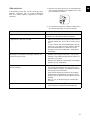
Schnellhilfe
1 Betätigen Sie den Resettaster auf der Geräteunterseite mit einer aufgebogenen Büroklammer.
Sollte ein Problem auftreten, das sich mit den Beschreibungen in dieser Bedienungsanleitung nicht
lösen lässt (siehe auch nachstehende Hilfe), gehen Sie folgendermaßen vor:
2 Tritt der Fehler wiederholt auf, wenden Sie sich
bitte an unseren technischen Kundendienst
oder an Ihren Fachhändler.
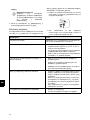
Probleme
Lösungen
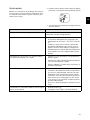
Das Gerät lässt sich nicht einschalten.
Stellen Sie sicher, dass das Netzteil oder das USB
Kabel ordnungsgemäß mit dem Gerät verbunden
ist.
Das Gerät fühlt sich warm an
•
Nach einer bestimmten Betriebsdauer erreicht
die Oberfläche ca. 30°C bis 45 °C. Dies ist normal.
Sollten Sie einen ungewöhnlichen Geruch aus
dem Gerät wahrnehmen, oder sollte die Oberfläche zu heiß werden, trennen Sie den Scanner
unverzüglich vom Stromnetz und/oder vom
Computer / digitalen Fotorahmen.
Auf dem gescannten Bild befinden sich Linien, oder
das Bild ist unscharf
•
Überprüfen Sie, ob die Vorlage verschmutzt
oder zerkratzt ist.
•
Überprüfen Sie, ob die verwendete Schutzhülle
verschmutzt oder zerkratzt ist.
•
Reinigen und kalibrieren Sie den Scanner nach
längerer Nichtbenutzung.
Beim gescannten Bild sind Teile des Bildes abgeschnitten
•
Der Scanner ist mit einer Funktion zum automatischen Abschneiden von schwarzen Rändern ausgestattet. Bei kleinen Bildern, wird dadurch nur das Bild, ohne Rand gespeichert.
Durch diese Funktion kann es bei Bildern mit
schwarzem Hintergrund (z.B: Nachtaufnahmen)
zu einem Abschneiden von wichtigen Bildinformationen kommen.
Drehen Sie in diesem Fall das Bild und scannen
es erneut.
Das Dokument ist im Einzug stecken geblieben
•
Drücken Sie die Taste h.
Das Dokument wird automatisch ausgeworfen.
12
DE
Probleme
Lösungen
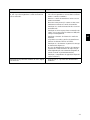
Die Kontrollleuchte blinkt schnell, kein
Scan möglich / Speicherkarte wird nicht erkannt
•
Überprüfen Sie, ob Sie eine kompatible Speicherkarte verwendet haben bzw. ob Sie die
Speicherkarte richtig eingesetzt haben.
•
Entfernen Sie die Speicherkarte und stecken
Sie diese erneut in den Steckplatz
•
Schalten Sie eine eventuell vorhandene
Schreibsperre der Speicherkarte aus.
•
Stellen Sie sicher, dass die Speicherkarte nicht
beschädigt ist.
•
Überprüfen Sie den freien Speicherplatz der
Speicherkarte. Ist der verfügbare Platz weniger
als 1MB, ist kein Scanvorgang möglich
•
Überprüfen Sie das Dateiformat der Speicherkarte.
Es können nur Speicherkarten im Dateiformat
FAT16 oder FAT32 beschrieben werden
•
Überprüfen Sie, ob das nächste Dokument zu
schnell eingelegt wurde.
Warten Sie mit dem scannen von mehreren Dokumenten, bis die Datenübertragung des ersten Scans beendet wurde (Statusleuchte
leuchtet ständig)
•
Überprüfen Sie die Vorlagenlänge (siehe technische Daten)
•
Diese Funktion ist nur mit bestimmten Fotorahmen möglich.
Die Übertragung auf einen digitalen Fotorahmen
funktioniert nicht
13
DE
Anhang
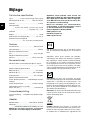
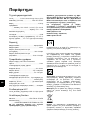
Technische Daten
Typ ........................... Color Contact Image Sensor (CIS)
Abmessungen
Abmessungen (B¦×¦H¦×¦T) .................... 158¦×¦45¦×¦55¦mm
Gewicht
Gewicht........................................................................... 0,23¦kg
Eingang
Netzanschluss
........Eingang: 100¦–¦240¦V¦~ (±¦10¦%) / 50¦–¦60¦Hz
Ausgang
....................................................... Ausgang: 5¦V¦† / 1¦A
Leistungsaufnahme
Leistungsaufnahme
Betrieb
Betrieb .................................................................................<¦9¦W
Empfohlene Geräteumgebung
Empfohlene Geräteumgebung..................... 15¦–¦35¦ºC
AgfaPhoto wird unter Lizenz von Agfa-Gevaert
NV & Co. KG oder Agfa-Gevaert NV verwendet.
Weder Agfa-Gevaert NV & Co. KG noch Agfa-Gevaert NV stellen diese Produkte her oder bieten
Gewährleistung oder Support.
Für Informationen zu Service, Support oder Gewährleistungen wenden Sie sich bitte an Ihren
Händler oder den Hersteller.
Kontakt: AgfaPhoto Holding GmbH,
www.agfaphoto.com
Hersteller: Sagemcom,
www.sagemcom.com
Relative Luftfeuchtigkeit
Relative Luftfeuchtigkeit
................................20¦–¦70¦% (nicht kondensierend)
Scanner
Eingabeformat................................................ 48-Bit-Farbe
Ausgabeformat ............................................................ 24-Bit
Maximale Hardwareauflösung Foto... 300¦×¦300 dpi
Maximale Hardwareauflösung Film/Dia ........................
...................................................................1200¦×¦1200 dpi
Dokumenteneinzug
Maximale Dicke von Scheckkarten/Plastikkarten
..........................................................................................1¦mm
Unterstützte Papierformate
Minimum (B¦×¦L) ................................................... 42¦×¦20¦mm
Die Konformität mit den für das Gerät relevanten
EU-Richtlinien wird durch das CE-Zeichen bestätigt.
Die Erhaltung der Umwelt im Rahmen eines Konzepts nachhaltiger Entwicklung liegt AgfaPhoto
sehr am Herzen. AgfaPhoto ist bestrebt, umweltfreundliche Systeme zu betreiben. Daher hat
AgfaPhoto beschlossen, der ökologischen Leistung in allen Produktphasen, von der Herstellung
über die Inbetriebnahme bis hin zum Gebrauch
und zur Entsorgung, einen hohen Stellenwert beizumessen.
Maximum (B¦×¦L) ......................................... 105¦×¦304,8¦mm
Papiergewicht ................................................ 50¦–¦105¦g/m2
Unterstützte Filmformate
35¦mm Farbnegativstreifen ....... 6 Bilder ungerahmt
35¦mm Diapositive ............................................ ungerahmt
Erkennung der Filmart (Farb, S/W, Dia) ........................
..........................................................................automatisch
Computeranschluss
Anschlussart .kompatibel mit USB 2.0 High Speed
Netzteil
Verpackung: Das Logo (Grüner Punkt) drückt aus,
dass eine anerkannte nationale Organisation eine
Beitragszahlung erhält, um die Verpackungserfassung und die Recycling-Infrastrukturen zu verbessern. Bitte halten Sie sich bei der Entsorgung dieser Verpackung an die bei Ihnen geltenden Vorschriften zur Mülltrennung.
Batterien: Sollte Ihr Produkt Batterien enthalten,
müssen diese an den dafür vorgesehenen Sammelstellen entsorgt werden.
Modell
Modell-Nr. .......................................... ADS-5N-06 05005G
Hersteller
Hersteller.......................................................................................
.........SHENZHEN HONOR ELECTRONIC CO.,LTD.
Änderungen vorbehalten
Änderungen an den technischen Spezifikationen
ohne Vorankündigung vorbehalten.
Spaltenumbruch
14
Produkt: Der durchgestrichene Mülleimer auf dem
Produkt bedeutet, dass es sich bei diesem Produkt um ein elektrisches oder elektronisches Ge-
DE
rät handelt. Die europäische Gesetzgebung
schreibt hierfür eine gesonderte Entsorgung vor:
• An Verkaufsstellen, falls Sie ein ähnliches Gerät
kaufen.
• An den örtlichen Sammelstellen (Wertstoffhof,
Sonderabholdienste etc.).
So können auch Sie Ihren Beitrag zu Wiederverwendung und Recycling von elektronischen und
elektrischen Altgeräten leisten, was sich auf die
Umwelt und die Gesundheit der Menschen auswirken kann.
Die verwendeten Verpackungen aus Papier und
Karton können wie Altpapier entsorgt werden. Die
Plastikfolien und Styroporverpackungen geben
Sie zum Recycling oder in den Restmüll, je nach
den Anforderungen Ihres Landes.
Warenzeichen: Die im vorliegenden Handbuch genannten Referenzen sind Warenzeichen der jeweiligen Firmen. Das Fehlen der Symbole É und
Ë rechtfertigt nicht die Annahme, dass es sich
bei den entsprechenden Begriffen um freie Warenzeichen handelt. Andere im vorliegenden Dokument verwendete Produktnamen dienen lediglich Kennzeichnungszwecken und können Warenzeichen der jeweiligen Inhaber sein. AgfaPhoto
lehnt jegliche Rechte an diesen Marken ab.
Vervielfältigung nicht gestattet
Die Vervielfältigung bestimmter Dokumente (z. B.
durch Scannen, Drucken, Kopieren) ist in manchen
Ländern verboten. Die im Folgenden angeführte
Liste solcher Dokumente erhebt keinen Anspruch
auf Vollständigkeit, sondern dient lediglich als
Übersicht. Fragen Sie im Zweifelsfall Ihren Rechtsbeistand um Rat.
Weder AgfaPhoto noch angeschlossene Gesellschaften sind gegenüber dem Käufer dieses Produktes oder Dritten haftbar in Bezug auf Schadenersatzansprüche, Verluste, Kosten oder Ausgaben, die dem Käufer oder Dritten in Folge eines
Unfalles, des falschen Gebrauches oder Missbrauches dieses Produktes oder nicht autorisierten
Modifikationen, Reparaturen, Veränderungen des
Produktes oder der Nichteinhaltung der Betriebsund Wartungshinweise von AgfaPhoto erwachsen.
AgfaPhoto übernimmt keine Haftung für Schadensersatzansprüche oder Probleme in Folge der
Verwendung jeglicher Optionen oder Verbrauchsmaterialien, die nicht als Originalprodukte von
AgfaPhoto oder von AgfaPhoto genehmigte Produkte gekennzeichnet sind.
AgfaPhoto übernimmt keine Haftung für Schadensersatzansprüche in Folge elektromagnetischer Interferenzen bedingt durch den Einsatz
von Verbindungskabeln, die nicht als Produkte
von AgfaPhoto gekennzeichnet sind.
Alle Rechte vorbehalten. Kein Teil dieser Publikation darf ohne vorherige schriftliche Zustimmung
durch AgfaPhoto vervielfältigt, in einem Archivsystem gespeichert oder in irgendeiner Form oder
auf sonstigem Wege – elektronisch, mechanisch,
durch Fotokopie, Aufnahme oder anderweitige
Möglichkeit – übertragen werden. Die im vorliegenden Dokument enthaltenen Informationen
sind ausschließlich zur Verwendung mit diesem
Produkt gedacht. AgfaPhoto übernimmt keine
Verantwortung, wenn diese Informationen auf andere Geräte angewendet werden.
· Reisepässe (Personalausweise)
Diese Bedienungsanleitung ist ein Dokument
ohne Vertragscharakter.
· Einreise- und Ausreisepapiere (Einwanderungspapiere)
Irrtümer, Druckfehler und Änderungen vorbehalten.
· Wehrdienstunterlagen
Copyright © 2010
· Banknoten, Reiseschecks, Zahlungsanweisungen
· Briefmarken, Steuermarken (gestempelt oder
ungestempelt)
· Anleihepapiere, Einlagenzertifikate, Schuldverschreibungen
· Urheberrechtlich geschützte Dokumente
Beachten Sie die gesetzlichen Richtlinien Ihres
Landes in Bezug auf die Rechtswirksamkeit von
Faxsendungen – vor allem in Zusammenhang mit
der Gültigkeit von Unterschriften, termingerechten Zustellfristen oder auch Nachteilen aufgrund
von Qualitätsverlusten bei der Übertragung und
so weiter.
Sorgen Sie für die Wahrung des Fernmeldegeheimnisses und Einhaltung des Datenschutzes,
wie es die Gesetzgebung Ihres Landes erfordert.
15
FR
Introduction
Cher client
Introduction Brand Variabel
En achetant cet appareil, vous avez opté pour un
produit de qualité de la marque AgfaPhoto. Votre
appareil satisfait les multiples spécifications de
l’usage privé, professionnel et de la vie quotidienne.
Scannez des photos ou des cartes de visite et
transmettez les données automatiquement sur la
carte mémoire ou sur un cadre d’images numérique compatible.
L’adaptateur pour les bandes de négatif / diapositive (insertion de film) vous permet de scanner
automatiquement des diapositives avec bandes
de négatif en noir et blanc, des bandes de négatif
en couleur ou des diapositives non cadrées..
De plus, vous pouvez également utiliser le scanneur comme lecteur de carte mémoire en connexion avec un ordinateur.
Nous vous souhaitons bien du plaisir avec votre
appareil et ses multiples fonctions !
A propos du guide d’utilisation
L’aide à l’installation des pages suivantes vous
permet de mettre en service votre appareil rapidement et facilement. Vous trouverez des descriptions détaillées dans les chapitres suivants de ce
guide d’utilisation.
Lisez attentivement le présent guide d’utilisation.
Veillez surtout aux consignes de sécurité pour assurer un parfait fonctionnement de votre appareil.
Le fabricant n’endosse aucune responsabilité si
vous ne respectez pas ces consignes.
Symboles utilisés
Trucs et astuces
Remarque
Trucs et astuces
Ce symbole désigne les astuces qui vous
aident à utiliser votre appareil de manière plus efficace et plus simple.
Avertissements concernant les risques
DANGER !
DANGER !
Avertit des risques pour les personnes,
des dommages pour l’appareil ou de
d’autres objets ainsi que d’une éventuelle perte de données. Les dommages corporels ou matériels ne peuvent provenir
que d’une manipulation non conforme.
1
Table des matières
Table des matières
1
Introduction
2
Informations générales sur la sécurité
3
Aperçu
4
Scanner
5
Service
6
Annexes
Cher client ............................................................................................. 1
A propos du guide d’utilisation ................................................. 1
Installation de l’appareil ................................................................. 3
Alimentation électrique .................................................................. 3
Réparations .......................................................................................... 3
Vue extérieure ....................................................................................
Connexions à l’arrière .....................................................................
Contenu de l’emballage .................................................................
Connecter le bloc d'alimentation ..............................................
Mise en place d’une carte mémoire ........................................
Utiliser des cadres photo numériques ..................................
Chargement de photos ..................................................................
Mettre les bandes de film / diapositive ................................
Nettoyer la vitre du scanner .......................................................
Connexion ordinateur .....................................................................
4
4
4
4
5
5
6
7
8
8
Nettoyage .............................................................................................. 9
Etalonner le scanner ....................................................................... 9
Aide express ..................................................................................... 10
Caractéristiques techniques .................................................... 12
2
FR
Informations générales sur la sécurité
Informations générales sur la sécurité
Ne laissez pas les enfants sans surveillance autour de l’appareil.
Installation de l’appareil
Alimentation électrique
Protégez l’appareil du rayonnement solaire direct
Utilisez le transformateur et câble USB fournis avec le scanner.
Avant d’utiliser cet appareil, veuillez lire les informations suivantes afin d’éliminer ou de réduire
toute possibilité de dommages ou de blessures.
Protégez l’appareil du rayonnement solaire direct,
de la chaleur, des grandes variations de températures et de l’humidité. Ne placez pas l’appareil à
proximité d’un chauffage ou d’une climatisation.
Veillez aux indications concernant la température
et l’humidité de l’air dans les caractéristiques
techniques.
Ne laissez pas les enfants sans surveillance
autour de l’appareil. Ne pas laisser les feuilles
d’emballage à portée des enfants.
Utilisez le transformateur et câble USB fournis
avec le scanner. L’utilisation d’un autre transformateur ou d’autres câbles peut entraîner le non
fonctionnement de l’appareil.
Généralités sur le commutateur marche/arrêt
Eteignez l’appareil avec le commutateur marche/
arrêt, avant de retirer la fiche de la prise de courant.
Si votre appareil devient trop chaud ou si de la fumée sort de l’appareil
Si votre appareil devient trop chaud ou si de la fumée sort de l’appareil, retirez aussitôt la prise du
secteur. Laissez examiner votre appareil par un
spécialiste. Afin d’éviter la propagation d’un feu
en cas d’incendie, tenez cet appareil éloigné des
flammes.
L’appareil doit être suffisamment aéré (Partie inférieure)
L’appareil doit être suffisamment ventilé. Ne découvrez pas la vanne d’aération sur la partie inférieure. Ne posez pas votre appareil sur des supports moelleux comme des couvertures ou des tapis. Sinon, l’appareil pourrait surchauffer voire
s’enflammer.
N’installez pas l’appareil dans des salles humides.
N’installez pas l’appareil dans des salles humides.
Ne touchez jamais les fiches/prises secteur avec
les mains humides.
Condensation
De la condensation peut se produire à l’intérieur
de l’appareil et entraîner des dysfonctionnements
dans les conditions suivantes:
lorsque cet appareil est directement déplacé
d’une pièce froide vers une chaude;
· après le réchauffement d’une pièce froide;
· lorsque cet appareil est placé dans une pièce humide.
Afin d’éviter toute condensation, nous vous recommandons de suivre la procédure suivante:
1 Conservez l’appareil dans un sac en plastique
avant de le transporter dans une autre pièce
pour qu’il s’adapte aux conditions de la pièce.
2 Attendez 1-2 heures avant d’enlever l’appareil
du sac.
Evitez d’utiliser le scanner dans un environnement poussiéreux.
Evitez d’utiliser le scanner dans un environnement
poussiéreux. Les particules de poussière et
autres corps étranger peuvent endommager le
scanner.
Assurez-vous de ne pas heurter ou cogner la vitre
du scanner car elle est fragile et pourrait se briser.
Ne pas exposer le scanner à de fortes vibrations.
Cela pourrait endommager les composants internes.
3
Ne touchez jamais les câbles électriques s’ils sont endommagés.
Ne touchez jamais les câbles électriques s’ils sont
endommagés. Echangez immédiatement le câble
endommagé. Utilisez uniquement un câble
approprié ; adressez-vous le cas échéant à notre
service technique ou à votre magasin spécialisé.
Installez votre appareil de façon que la prise de courant soit facilement accessible.
Installez votre appareil de façon que la prise de
courant soit facilement accessible. En cas d’urgence, coupez l’alimentation électrique de votre
appareil en retirant la fiche secteur.
Débranchez votre appareil du réseau électrique avant de nettoyer la surface.
Débranchez votre appareil du réseau électrique
avant de nettoyer la surface. Utilisez un chiffon
doux et non pelucheux. N’utilisez en aucun cas
des produits de nettoyage liquides, gazeux ou légèrement inflammables (sprays, produits abrasifs,
vernis brillants, alcools). Veillez à ce qu’aucune humidité ne pénètre à l’intérieur de l’appareil.
Débranchez cet appareil si vous ne vous en servez pas pendant un certain temps afin d’éviter les risques d’incendies.
Débranchez cet appareil si vous ne vous en servez pas pendant un certain temps afin d’éviter les
risques d’incendies.
N’essayez pas de démonter l’appareil. Il y a un
danger de choc électrique. Le désassemblage de
l’appareil annulerait votre garantie.
Réparations
Réparations
Ne réparez pas vous-même l’appareil. Une maintenance non conforme peut occasionner des dommages corporels ou matériels. Laissez examiner
votre appareil exclusivement par un spécialiste
agréé.
N’enlevez pas la plaque signalétique de votre appareil, autrement la garantie s’éteint.
FR
Aperçu
Vue extérieure
Contenu de l’emballage
– – Affichage de statut – affiche le
statut de l’appareil
Scanner photo
– h – Commutateur marche/arrêt – allumer /
éteindre l’appareil
Feuille de nettoyage avec les rouleaux d’entrée
– h – Voyant de fonctionnement– Indique
l’état de fonctionnement et les défaillances de
l’appareil.
Adaptateur pour bandes de négatif / diapositive
(insertion de film)
LED-Lampen
Feuille de calibrage
Bâton de nettoyage pour le scanner
Alimentation électrique avec fiche secteur interchangeable
Câble USB
Housse de protection
Carte de garantie
Guide d’utilisation
Guide d’utilisation
Contenu de l’emballage incomplet
Introduction de documents – Fixer le document
/ avant la première utilisation, retirer les bandes
collantes
Chargeur de documents
Rainures pour l’installation du guidage du film
Symbole pour la direction de l’introduction– Introduisez le document avec la page écrite vers le
haut et unnbord aussi près que possible de la
page avec ce symbole.
Remarque
Contenu de l’emballage incomplet
S’il manquait un des composants ou si
vous constatiez des dommages, adressez-vous à votre revendeur ou à notre
service après-vente.
Connecter le bloc d'alimentation
Tension réseau sur le lieu d’installation
ATTENTION !
Übersicht Nummeriert
Tension réseau sur le lieu d’installation !
Contrôlez si la tension secteur de votre
appareil (plaque signalétique) est identique à celle du lieu d’installation.
1 Insérez la petite prise de l’alimentation électrique dans le connecteur sur la partie arrière de
l’appareil.
Connexions à l’arrière
1 Fiche pour carte mémoire (SD, xD, MMC, MS, MS Pro)
2 Plateau de sortie des documents
3 Connexion Mini-USB – pour la connexion d’un
ordinateur (seulement le lecteur de carte mémoire)
ou d’un cadre de photos numériques
2 Introduire le bloc d’alimentation dans la prise
de courant.
4 Bague – connexion alimentation électrique
Rückseite Nummeriert
4
FR
Mise en place d’une carte mémoire
1 Insérez une carte mémoire qui n’est pas protégée en écriture dans l’emplacement correspondant sur la partie arrière de l’appareil. Votre appareil supporte les cartes mémoires suivantes :
SD, xD, MMC, MS, MS Pro.
DANGER !
Installer la carte mémoire !
Utilisez uniquement les supports
d'enregistrement compatibles avec
l’appareil. Afin de prévenir tout dommage sur la carte ou sur l’appareil, la
carte doit être uniquement introduite
dans l'appareil ou en être retirée
quand ce dernier est éteint.
Ne retirer en aucun cas la carte mémoire installée pendant que l'appareil
y accède. Ceci pourrait endommager
ou effacer des données.
2 Appuyez sur la touche h.
3 Attendez jusqu’à ce que le voyant de contrôle
pour le statut de l’appareil clignote durablement.
Remarque
Voyant de contrôle
Si ce voyant de contrôle clignote, ce
clignotement peut avoir les causes
suivantes.
– Aucune carte mémoire n’est insérée
– Il n’y a pas suffisamment d’emplacement mémoire sur la carte mémoire
fournie (moins de 1MB)
– La protection d’écriture de la carte
mémoire est éteinte
– La carte mémoire est défectueuse
Veuillez noter que si vous utilisez une
carte mémoire avec une capacité supérieure à 2GB, le processus d'initialisation dure plus longtemps. Le
voyant de contrôle peut ensuite clignoter pendant une durée maximale
de 20 secondes.
5
Utiliser des cadres photo numériques
Si l’appareil est connecté à un cadre photo numérique compatible, les photos scannées sont directement transférées sur la mémoire du cadre photo
numérique.
1 Maintenez la touche h enfoncée, pour éteindre l’appareil.
2 Connectez le cadre photo numérique à un câble USB et sur la Mini prise USB de l’appareil.
3 Allumez l’appareil avec la touche h .
FR
Scanner
Chargement de photos
Insérer des documents
Vous pouvez introduire différents types de documents dans votre appareil. Référez-vous aux informations dans les caractéristiques techniques.
Avec l’enveloppe de protection, vous pouvez
scanner des photos ou des documents, sans que
la photo ou le document ne soit endommagé par
des déchirages ou des pliages.
Remarque
Scanner les documents avec la housse
de protection
Si des documents plus petits sont scannés avec la pochette de protection, il est
possible que la fonction de découpage
automatique ne fonctionne pas correctement dans certains cas. Soit des parties d’images sont découpées, où alors il
reste trop de bordure autour du document. Dans ce cas, scannez les documents dans la pochette de protection.
Scanner les documents avec la housse de protection
5 Attendez jusqu’à ce que les voyants de contrôle
h et ne clignotent plus et qu’ils brillent de façon durable. Cela signifie que le
processus de scan est terminé et que les données ont été enregistrées dans la carte mémoire.
DANGER !
Bourrage document !
Attendez absolument jusqu’à ce que
les deux voyants de contrôle n’éclairent plus, avant d’introduire le prochain document pour éviter un bourrage de documents.
6 Le nom de l’enregistrement est attribué selon
le standard DCF (Design Rule for Camera File
System).
Remarque
Mode de veille
Si le scanner n’est pas utilisé pendant env. 15 minutes, il s’éteint automatiquement.
ATTENTION !
Document non approprié
Aucune pince de bureau, agrafe, épingle
ou autres éléments similaires ne doivent
se trouver sur les documents.
Utiliser une pochette de protection
1 Ouvrez la pochette de protection et placez le
document avec les écritures vers le haut dans
la pochette de protection.
1 Placez le document avec la page écrite vers le
haut et la tête de page en direction de la touche h dans l’introduction de documents.
2 Orientez le document sur la bordure gauche.
3 Fixez le document avec l’introduction de document sur le côté droit. L’en-tête du document
doit légèrement toucher le document.
2 Placez la pochette de protection avec la page
écrite vers le haut, la page fermée (bandes noires)
en avant et la tête de page en direction de la touche h dans l’introduction des documents.
3 Poussez la pochette de protection avec le document
à l’horizontale dans l’introduction des documents,
jusqu’à ce qu’elle soit introduite automatiquement
et que le processus de scan démarre. Veillez à ne
pas plier le document. Le voyant de contrôle h clignote pendant le processus de scan.
4 Introduisez le document à l’horizontale entièrement dans l’alimentation de documentss, jusqu’à ce qu’il entre automatiquement et que le
processus de scan commence. Veillez à ne pas
plier le document. Le voyant de contrôle h clignote pendant le processus de scan.
DANGER !
Bourrage document !
Ne mettez aucun document dans l’alimentation pendant que l’appareil scanne. Cela peut provoquer un bourrage.
4 Attendez jusqu’à ce que les voyants de contrôle h et ne clignotent plus et qu’ils brillent de façon durable. Cela signifie que le processus de scan est terminé et que
6
FR
les données ont été enregistrées dans la carte
mémoire.
2 Placez l’insertion de film sur les rainures appropriées de l’insertion de documents.
Remarque
Retirez les documents de la pochette
de protection
Après le processus de scan, retirez le
document de l’enveloppe de protection pour éviter un éventuel collage
du document avec l’enveloppe de
protection.
Mettre les bandes de film / diapositive
Remarque
Documents appropriés
• Bandes de négatif couleur 35mm
• Diapos non cadrées
• Bandes de négatif noir et blanc 35mm
• Tournoiement et miroitement automatiques des photos:
Le scanner reconnaît automatiquement
l'alignement des bandes négatives si la
numérisation au bord a le même alignement que l'image. Si la numérisation ne
peut pas être reconnue, cela signifie que
la fonction est éteinte.
Scanner les documents avec la housse de protection
ATTENTION !
Document non approprié
Il ne doit pas y avoir de résidus de colle
ou d’autocollant sur la bordure des bandes de négatif. Les diapos doivent uniquement être introduites sans cadre.
3 Poussez l’introduction de film avec précaution
et entièrement dans l’insertion de documents.
N’endommagez pas les bandes métalliques de
l’introduction du film.
4 Si l’insertion de film est correctement introduite, elle se ferme et l’appareil commence le processus de calibrage.
5 Attendez jusqu’à ce que les voyants de contrôle ne clignotent plus.
6 Retirez les bandes de négatif/diapositive de la
housse de protection/pochette.
7 Respectez bien la direction d’insertion.
8 Maintenez les bandes de négatif de sorte que
l’inscription (numéro) du négatif soit lisible (pas
dans le sens du miroir) et que la partie supérieure de l’image soit dans la direction du bouton d’allumage.
9 Introduisez les bandes de négatif / diapositive
dans l’insertion de film.
ATTENTION !
Débuts endommagés des bandes de négatif
Si les débuts des bandes de négatif sont
endommagés (pas exactement coupées,
pliées) coupez les débuts des bandes de
négatif et retirez les coins pliés.
1 Vérifiez qu’aucun document ne se trouve dans
l’insertion de documents. Poussez totalement
l'introduction de document vers la droite.
Remarque
Manipuler le négatif avec soin
Manipulez le négatif avec précaution. Si
possible, portez des gants en coton.
10 Poussez les bandes du négatif / diapositive
profondément dans l’insertion de film jusqu’à
insertion automatique et que le scan commence. Veillez à ne pas plier les bandes de négatif
/ diapositive. Le voyant de contrôle h clignote
pendant le processus de scan.
Remarque
Vitesse de scan
Si la définition est plus haute lors du
scan de négatif / diapositive, la vitesse de scan est plus lente que lors du
scan de photos.
7
11 Attendez jusqu’à ce que les voyants de contrôle h et ne clignotent plus et qu’ils brillent de façon durable. Cela signifie que le processus de scan est terminé et que
les données ont été enregistrées dans la carte
mémoire.
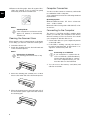
3 Agitez la tige de nettoyage avec précaution
deux à trois fois vers l’autre extrémité de l’ejection de document.
12 Replacez les bandes de négatif / diapositive
scannées dans la housse de protection/pochette pour éviter tout dommage ou salissure.
13 Le nom de l’enregistrement est attribué selon
le standard DCF (Design Rule for Camera File
System).
14 Puis, retirez toutes les bandes négatives / diapositives qui ont été scannées du guidage du
film Puis, retirez doucement et de manière symétrique l'entrée de documents.
4 Enfin, agitez à nouveau la tige de nettoyage
vers l’extrémité gauche de l’ejection du document et retirez la tige de nettoyage.
Connexion ordinateur
Remarque
Mode de veille
Si le scanner n’est pas utilisé pendant env. 15 minutes, il s’éteint automatiquement.
Vous pouvez également utiliser le scanneur comme lecteur de carte mémoire en connexion avec
un ordinateur.
Votre ordinateur doit avoir la configuration minimum suivante :
Système d’exploitation
Système d’exploitation
Nettoyer la vitre du scanner
Windows : Windows 2000 · XP · Vista · ou versions ultérieures · 32 bit ou 64 bit
Nettoyer le verre du scanner AS1110
Si des lignes se trouvent sur l’image scannée ou si
l’image n’est pas nette, vous devez nettoyer le
verre du scanner.
Macintosh : Mass Storage Class Mac OS10.5 ou
versions ultérieures
1 Eteignez l’appareil.
Connecter à l’ordinateur
2 Introduisez la tige de nettoyage dans l’extrémité à gauche de l’ejection du document.
Remarque
Indications pour le nettoyage
Il ne doit pas y avoir de poussière sur
la tige de nettoyage.
Hot-Plug-and-Play
L’appareil a une capacité Hot-Plug-and Play, cela
signifie que vous pouvez connecter l’appareil à votre ordinateur pendant qu’il est en marche. Vous
ne devez pas arrêter l’ordinateur pour connecter
l’appareil.
1 Connectez l’appareil à votre ordinateur avec
un câble USB.
2 Si la connexion USB de votre ordinateur fonctionne sans problème, l’appareil sera reconnu
immédiatement. Chaque emplacement de carte
mémoire est classé sous une lettre de lecteur.
Remarque
Connexion à un hub USB
Si vous voulez connecter l’appareil à
un hub USB (= distributeur USB), assurez-vous que le hub USB soit bien
connecté à l’ordinateur brancher l’appareil.
3 Vous pouvez avoir accès à la carte mémoire
(lecteur) et traiter les fichiers enregistrés.
8
FR
FR
Service
nettoyage, les voyants de contrôle h und
clignotent.
Nettoyage
DANGER !
Eteindre l’appareil !
Eteignez l’appareil avec la touche h,
avant de retirer le câble USB ou la connexion au câble d’alimentation de l’appareil.
Nettoyage
DANGER !
Informations pour le nettoyage !
Utilisez un chiffon doux et non pelucheux. N’utilisez en aucun cas des produits de nettoyage liquides ou légèrement inflammables (sprays, produits
abrasifs, vernis brillants, alcool, etc.).
Veillez à ce qu’aucune humidité ne pénètre à l’intérieur de l’appareil. Ne vaporisez pas l’appareil avec des nettoyants liquide.
Nettoyez doucement les surfaces décrites. Veillez à ne PAS rayer leur surface.
Nettoyer les cylindres d’entrée
1 Eteignez l’appareil.
2 Maintenez la toucheh appuyée jusqu’à ce que
les voyant de contrôle h s’allument.
3 Le scanner se trouve en mode nettoyage.
4 Introduisez la feuille de nettoyage dans l’alimentation de documents.
6 Après un nettoyage réussi, la feuille est jetée
et le voyant de contrôle h s’allume.
Remarque
Feuille de nettoyage avec les rouleaux d’entrée
Conservez la feuille de nettoyage
dans un endroit sans poussière.
Etalonner le scanner
Un calibrage du scanner est requis si l'image
scannée apparaît floue, ou que des lignes qui ne
sont pas sur l'original apparaissent. Vous pouvez
ainsi régler et compenser les variations qui peuvent affecter le composant optique avec le temps.
1 Nettoyez d’abord la vitre du scanner avant de
calibrer le scanner.
2 Insérez une carte mémoire qui n’est pas protégée en écriture dans l’emplacement correspondant sur la partie arrière de l’appareil.
3 Appuyez sur la touche h. Attendez jusqu’à ce
que le voyant de contrôle clignote
durablement.
4 Posez la feuille de calibrage avec les flèches en
direction des cylindres d’entrée dans l’alimentation des documents.
Remarque
Indications pour le nettoyage
Faîtes attention à la direction d’insertion. L’éponge blanche doit se
trouver sur la partie supérieure.
N’utilisez aucun dissolvant pour le
nettoyage ou de liquides de nettoyage. Vous pouvez endommager les cylindres d’entrée de manière permanente.
5 La feuille est introduite automatiquement et le
processus de nettoyage démarré. Pendant le
9
5 La feuille sera introduite et le processus de calibrage démarré.
Remarque
Etalonner le scanner
Faîtes attention à la direction d’insertion. Si la feuille de calibrage est
mal introduite, le processus de calibrage peut ne pas démarrer.
6 Après un calibrage réussi, la feuille est restituée.
Aide express
1 Activez le bouton-poussoir de réinitialisation
sur la partie inférieure de l’appareil avec une
pince de bureau ouverte.
Si un problème n’est pas résolu à l’aide des descriptions contenues dans le guide d’utilisation
(voir aussi l’aide ci-après), respectez les étapes
suivantes :
2 Si le problème persiste, veuillez contacter notre service technique ou votre revendeur.
Problèmes
Solution.
L’appareil ne s’éteint pas.
Assurez-vous que le câble d’alimentation ou le câble USB soit correctement relié à l’appareil.
L’appareil est chaud au toucher
•
Après une certaine durée de fonctionnement, la
surface atteint env. 30°C à 45 °C. Cela est normal.
Si vous sentez une odeur inhabituelle sur l’appareil, ou si la surface est trop chaude, débranchez immédiatement le scanner du réseau
électrique et/ou de l’ordinateur / cadre photo
numérique.
Des lignes se trouvent sur l’image scannée, ou
l’image n’est pas nette
•
Vérifiez que le support n’est pas sali ou rayé.
•
Vérifiez si la pochette de protection utilisée estencrassée ou rayée.
•
Nettoyez et calibre le scanner après une longue
période de non untilisation.
Certaines parties de l’image sont découpées sur
l’image scannée.
•
Le scanner est équipé d’une fonction pour le
découpage automatique des bordures noires.
Pour les petites images, cela permet d’enregistrer l’image sans la bordure.
Cette fonction peut provoquer le découpage
d’informations importantes de l’image sur les
images avec un arrière fond noir (par ex., prises
de nuit).
Dans ce cas, tournez l’image et scannez la à
nouveau.
Le document est resté introduit dans l’entrée
•
Appuyez sur la touche h.
Le document est éjecté automatiquement.
10
FR
FR
Problèmes
Solution.
Le voyant de contrôle clignote vite,
aucun Scan possible / la carte mémoire n’est pas
reconnue
•
Vérifiez si votre carte mémoire est compatible
ou si vous avez bien inséré la carte mémoire.
•
Retirez la carte mémoire et insérez-là à nouveau dans l’emplacement
•
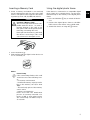
Eteignez un éventuel blocage d’enregistrement
de la carte mémoire.
•
Assurez-vous que la carte mémoire n’est pas
endommagée.
•
Vérifiez l’emplacement mémoire libre de la carte mémoire. Si l’emplacement disponible est inférieur à 1MB, le procédé de scan n’est pas
possible
•
Vérifiez le format de fichier de la carte mémoire.
Seules les cartes mémoire de format FAT16 ou
FAT32 peuvent être lues
•
Vérifiez que le prochain document n’a pas été
introduit trop vite.
Attendez que le transfert des données du premier scan soit terminé avant que scanner
d’autres documents (le voyant de statut est
constamment allumé)
•
Vérifiez la longueur du support (voir données
techniques)
•
Cette fonction est possible uniquement avec
un cadre photo specifique.
La transmission sur un cadre photo numérique ne
fonctionne pas
11
FR
Annexes
Caractéristiques techniques
Type ........................ Color Contact Image Sensor (CIS)
Dimensions
Dimensions (L¦×¦H¦×¦P) .......................... 158¦×¦45¦×¦55¦mm
plusieurs feuilles 148-297 mm
plusieurs feuilles 148-297 mm.......................... 0,23¦kg
Entrée
Prises secteur
..........Entrée : 100¦–¦240¦V¦~ (±¦10¦%) / 50¦–¦60¦Hz
Sortie
............................................................ Sortie : 5¦V¦† / 1¦A
Consommation
Consommation
Spaltenumbruch
AgfaPhoto est utilisé sous la licence de AgfaGevaert NV & Co. KG ou Agfa-Gevaert NV. Ni
Agfa-Gevaert NV & Co. KG, ni Agfa-Gevaert NV
ne fabriquent ces produits ou offrent une garantie ou un service technique.
Pour de plus amples informations sur le service,
le service technique ou les garanties, veuillez
vous adresser à votre revendeur ou au fabricant.
Contact : AgfaPhoto Holding GmbH,
www.agfaphoto.com
mode
mode .....................................................................................<¦9¦W
Température ambiante recommandée :
Température ambiante recommandée : . 15¦–¦35¦ºC
Fabricant : Sagemcom,
www.sagemcom.com
Humidité de l’air relative
Humidité de l’air relative
................................... 20¦–¦70¦% (sans condensation)
Scanner
Format d’entrée .................................Couleur de 48 bits
Format de sortie................................Couleur de 24 bits
Photo avec définition de hardware
maximale........................................................... 300¦×¦300 dpi
Film/diapositive avec definition de
hardware maximale................................1200¦×¦1200 dpi
Alimentation de document
Epaisseur maximale de carte bancaire/carte en
platisque .............................................................................1¦mm
Formats de papier compatibles
La certification CE atteste de la conformité aux directives de l’UE qui sont applicables pour cet appareil.
La protection de l’environnement dans le cadre
d’un concept de développement durable est très
importante pour AgfaPhoto. AgfaPhoto s’efforce
d’utiliser des systèmes écologiques. C’est pourquoi AgfaPhoto a décidé d’accorder une grande
valeur à la performance écologique à toutes les
phases du produit, de la fabrication à la mise en
service, et de l’utilisation à l’élimination.
Minimum (B¦×¦L) ................................................... 42¦×¦20¦mm
Minimum (B¦×¦L) .......................................... 105¦×¦304,8¦mm
poids du papier ............................................. 50¦–¦105¦g/m2
Formats de film compatibles
Bandes de négatif couleur 35¦mm...................................
.................................................... 6 images non cadrées
Diapositive 35¦mm .............................................. non cadré
Reconnaissance du type de film
(couleur, S/W, diapositive) ....................... automatique
Connexion ordinateur
Emballage : Le logo (Point vert) signifie qu’une organisation nationale reconnue paie une cotisation
pour améliorer le mode d’emballage et les infrastructures de recyclage. Veuillez respecter les procédures de tri de déchets en vigueur dans votre
pays l’élimination de cet emballage.
Batteries : Si votre produit contient des batteries,
ces dernières doivent être éliminées au dépôt prévu à cet effet.
Raccordement.........................................Compatible avec
...........................................................USB 2.0 Haut débit
Bloc d’alimentation
Modèle
Modèle ................................................ ADS-5N-06 05005G
Fabricant
Fabricant........................................................................................
.........SHENZHEN HONOR ELECTRONIC CO.,LTD.
Produit : Le symbole poubelle barrée sur le produit
signifie que ce produit est un appareil électrique
ou électronique. La législation européenne prescrit donc une élimination séparée :
Sous réserve de modifications
Sous réserve de modifications des données
techniques sans préavis.
• Sur les lieux de vente, si vous achetez un appareil similaire.
12
FR
• Aux dépôts locaux (Déchetterie, service déchets
spécial etc.)
non autorisées ou au non respect des instructions
de service et de maintenance de AgfaPhoto.
Ainsi, vous pouvez également contribuer à la réutilisation et au recyclage de vieux appareils électroniques et électriques et avoir un impact sur
l’environnement et la santé des gens.
AgfaPhoto n’endosse aucune responsabilité pour
les demandes de dommages et intérêts ou les
problèmes à la suite de l’utilisation d’options ou de
consommables qui ne sont pas des produits d’origine de AgfaPhoto ou de produits agréés par AgfaPhoto.
Les emballages utilisés en papier et carton peuvent être dépollués comme du papier usagé. Les
feuilles en plastique et le polystyrène peuvent
être recyclées ou déposées en déchets résiduels,
selon les spécifications de votre pays.
Marques déposées : Les références citées dans le
présent manuel sont des marques déposées des
entreprises respectives. L’absence des symboles
É et Ë ne signifie pas que les termes utilisés
sont des marques libres. Les autres noms de produit utilisés dans le présent document servent
uniquement à des fins de désignation et peuvent
être des marques des propriétaires respectifs.
AgfaPhoto rejette tous droits sur ces marques.
Reproduction interdite
La reproduction de certains documents (par ex.
par numérisation, impression, copie) est interdite
dans certains pays. La liste des documents indiquée ci-dessous n’est pas exhaustive et ne constitue qu’un aperçu. En cas de doute, adressezvous à un conseiller juridique.
· Passeports (papiers d’identité)
· Visas d’entrée et de sortie (papiers d’immigration)
· Papiers militaires
· Billets de banque, chèques de voyage, mandats
de paiement
· Timbres postaux, vignettes fiscales (oblitérés ou
non)
· Titres d’emprunt, certificats de dépôt, obligations
· Documents protégés par des droits d’auteur
Veillez aux dispositions légales de votre pays en
rapport avec la validité juridique d’envois de télécopies, surtout en rapport avec la validité de signatures, de délais de notification conformes ou
aussi de préjudices suite à la perte de qualité lors
de la transmission, etc.
Faites en sorte de respecter le caractère confidentiel des communications téléphoniques et la
protection des données dans le cadre de la législation de votre pays.
Ni AgfaPhoto ni les sociétés affiliées ne sont responsables vis-à-vis de l’acheteur de ce produit ou
de tiers en rapport aux demandes de dommages
et intérêts, pertes, frais ou dépenses qui incombent à l’acheteur ou à des tiers à la suite d’un accident, d’un usage erroné ou abusif de ce produit
ou à des modifications et réparations du produit
13
AgfaPhoto n’endosse aucune responsabilité pour
les demandes de dommages et intérêts à la suite
d’interférences électromagnétiques dues à l’emploi de câbles de connexion qui ne sont pas des
produits de AgfaPhoto.
Tous droits réservés. Aucune partie de la présente publication n’est autorisée à être reproduite,
enregistrée dans un système d’archive ou sous
quelque forme que ce soit ou bien transmise par
n’importe quel moyen – électronique, mécanique,
par photocopie, enregistrement ou autre. Les informations contenues dans le présent document
sont destinées exclusivement à l’utilisation du
produit décrit. AgfaPhoto n’endosse aucune responsabilité si ces informations sont appliquées à
d’autres appareils.
Le manuel d’utilisation est un document n’ayant
pas un caractère contractuel.
Sous réserve d’erreurs, de fautes d’impression et
de modifications.
Copyright © 2010
Introduction
EN
Dear Customer
Introduction Brand Variable
With the purchase of this device, you have chosen
a quality AgfaPhoto product brand. Their device
fulfils the most varied requirements for private
use or in your office and business everyday.
Scan photos or business cards and transfer the
data automatically on to memory cards or onto
compatible digital picture frames.
The adapter for the negative film / slides (film
guide) allows you to scan black/white negative
film, colour negative film and unframed slides automatically.
In addition, you also use the scanner as a memory
card reader in combination with a computer.
We hope you enjoy your device and its many functions!
About this User Manual
With the installation guide on the following pages,
you can start using your device quickly and easily.
Detailed descriptions can be found in the following sections of this user manual.
Read the entire user manual carefully. Follow all
safety instructions in order to ensure proper operation of your device. The manufacturer accepts no
liability if these instructions are not followed.
Symbols Used
Troubleshooting
Notice
Troubleshooting
This symbol designates tips that will
help you to use your device more effectively and easily.
Dangers
DANGER!
DANGER!
Warns about dangers for people, damage to the device or other objects as
well as possible loss of data. Injuries or
damage can result from improper handling.
1
Table of Contents
Table of Contents
1
Introduction
2
General Safety Information
3
Overview
4
Scanning
5
Service
6
Appendix
Dear Customer .................................................................................... 1
About this User Manual ................................................................. 1
Setting Up the Device .................................................................... 3
Power Supply ....................................................................................... 3
Repairs .................................................................................................... 3
External View ......................................................................................
Connections on the Rear Side ...................................................
Packing Contents ..............................................................................
Connecting power supply .............................................................
Inserting a Memory Card ...............................................................
Using the digital photo frame ....................................................
Loading Photos ..................................................................................
Insert film / slides .............................................................................
Cleaning the Scanner Glass ........................................................
Computer Connection .....................................................................
4
4
4
4
5
5
6
7
8
8
Cleaning .................................................................................................. 9
Calibrating the Scanner ................................................................. 9
Power Cycling ................................................................................... 10
Technical Data ................................................................................. 12
2
General Safety Information
General Safety Information
Read the following information before using the
device in order to avoid or minimise any risk of injury or damage.
Setting Up the Device
Protect the device against direct sunlight
Protect the device against direct sunlight, heat,
large temperature fluctuations and moisture. Do
not place the device in the vicinity of heaters or air
conditioners. Observe the information on temperature and humidity in the technical data.
In the event that the device becomes too hot, or if you see smoke coming from the device
In the event that the device becomes too hot, or if
you see smoke coming from the device, you must
immediately pull the power cable out of the power
socket. Have your device examined by trained professionals at a technical service location. To prevent the spread of fire, open flames should be
kept away from the device.
The device must have sufficient ventilation (underside)
The device must have sufficient ventilation. Do
not cover the ventilation slots on the underside.
Do not place your device on soft surfaces such as
cloth covers or carpets. Otherwise, the device can
overheat and catch on fire.
Do not plug in the device in moist rooms.
Do not plug in the device in moist rooms. Never
touch the mains cable or the mains connection
with wet hands.
Moisture build-up
Under the following conditions, a layer of moisture
can appear inside the device which can lead to
malfunctions:
· if the device is moved from a cold to a warm area;
· after a cold room is heated;
· when this device is placed in a damp room.
Proceed as follows to avoid any moisture build-up:
1 Seal this device in a plastic bag before moving
it to another room, in order for it to adapt to
room conditions.
EN
Power Supply
Do use the AC adapter and USB cable provided with the scanner.
Do use the AC adapter and USB cable provided
with the scanner. When using other power supply
units and cables, the device may not work.
On/Off Switch General
Turn the device off using the on/off switch before
you remove the plug from the socket.
Never touch the power cable if the insulation is damaged.
Never touch the power cable if the insulation is
damaged. Replace damaged wires immediately.
Use suitable cables only; if necessary please contact our technical customer service or your retailer.
Set up your device so that the power socket is easily accessible.
Set up your device so that the power socket is
easily accessible. In an emergency, disconnect
your device from the power supply by pulling the
power plug.
Before cleaning the surface of your device, disconnect it from the power network.
Before cleaning the surface of your device, disconnect it from the power network. Use a soft,
lint-free cloth. Never use liquid, gaseous or easily
flammable cleansers (sprays, abrasives, polishes,
alcohol). Do not allow any moisture to reach the interior of the device.
Remove the mains cable if you are not using the device for a long time to avoide the risk of fire.
Remove the mains cable if you are not using the
device for a long time to avoide the risk of fire.
Do not attempt to take the device apart. There is
danger of an electrical shock. Opening the device
voids the warranty.
Repairs
Repairs
Do not make any repairs to the device yourself.
Improper maintenance can result in injuries or
damage to the device. Only have your device repaired by an authorised service centre.
Do not remove the type label from your device;
this would void the warranty.
2 Wait one to two hours before you take the device out of the plastic bag.
The device should not be used in a very dusty environment.
The device should not be used in a very dusty environment. Dust particles and other foreign objects may damage the unit.
Be sure not to bump or knock the scanner glass
as it is fragile and could break. Do not expose the
device to extreme vibrations. It may damage the
internal components.
Do not allow children to handle the device without supervision.
Do not allow children to handle the device without
supervision. The packing materials should be kept
out of the hands of children.
3
Overview
EN
External View
Packing Contents
– - status indicator – displays the
device status
Photo scanner
– h—On/Off switch—switch the device on/
off
Cleaning sheet for the feed rollers
– h—Operating status light – Shows the operating mode and device faults
Adapter for negative film / slides (film guide)
LED-Lampen
Calibration sheet
Cleaning pen for scanner
Power supply with exchangeable plugs
USB Cable
Protective cover
Warranty Card
User Manual
User Manual
Missing Package Contents
Notice
Document guide – inserting the document/ remove the tape before using it for the first time
Document feed slot
Grooves for installing the film guide
Symbol for direction of feed – insert the document into the document feeder with the printed
side facing up and one edge as close as possible
to the side with this symbol.
Übersicht Nummeriert
Missing Package Contents
If one of the parts is missing or damaged, please contact your retailer or our
customer service.
Connecting power supply
Mains Voltage at the Site of Installation
CAUTION!
Mains Voltage at the Site of Installation!
Check whether the mains voltage of
your device (indicated on the type label)
matches the mains voltage available at
the setup location.
1 Insert the small plug of the power supply into
the socket on the rear side of your device.
Connections on the Rear Side
1 Slot for Memory card (SD, xD, MMC, MS, MS Pro)
2 Document outlet
3 Mini USB connection – for connecting a computer (only as a memory card reader) or a digital photo frame
4 - Socket – Port for power supply
Rückseite Nummeriert
4
2 Insert the power supply unit into the socket.
Inserting a Memory Card
Using the digital photo frame
1 Insert a memory card which is not read-only
into the appropriate card slot at the rear of the
device. Your photo frame supports the following memory cards: SD, xD, MMC, MS, MS Pro.
If the device is connected to a compatible digital
photo frame, the scanned photos can be transferred directly to the memory of the digital photo
frame.
DANGER!
Inserting a Memory Card!
Only use storage media that are compatible with the device. In order to
prevent damage to the card or the
unit, please turn off the power before
removing or inserting the card.
1 Press and hold the h key to switch off the device.
2 Connect the digital photo frame to the MiniUSB socket of the device using a USB cable.
3 Switch the device on using the h button.
Never pull out the memory card while
the device is accessing it. This could
cause data to be damaged or lost.
2 Press the button h.
3 Wait until the indicator light for the device status is constantly on.
Notice
Control Lamp
If this control lamp flashes, this could
stem from one of the following causes.
- no memory card inserted
- insufficient memory capacity available on the memory card (less than
1MB)
- The read-only option of the memory
card is active
- memory card defective
Please note that the initialisation
process of a memory card with a capacity of 2GB or more takes longer.
The control lamp can blink for up to
20 seconds
5
EN
Scanning
EN
Loading Photos
Loading Documents
You can insert different types of document into
your device. Follow the specifications in the technical data.
5 Wait until the control lamp h and are no longer flashing and is continually on. This means that the scanning process
is completed and the data was saved onto the
memory card.
You can scan documents using the protective
cover to avoid the photo or document being damaged by scratches or creases.
DANGER!
Document Jam!
Wait until both control lamps are no
longer flashing before you insert the
next document in order to prevent a
document jam.
Notice
Scanning documents with the protective
cover
If smaller documents are scanned using
the protective cover, in certain cases,
the automatic cutting off function does
not function properly. Either important
parts of the image are cut off or too
much edge remains around the document. In this case, scan the documents
without using the protective cover.
Scanning documents with the protective cover
6 The file name is assigned according to the DCF
(Design Rule for Camera File System) standard.
Notice
Stand-by Mode
If the scanner has not been used for
approx. 15 minutes, it automatically
switches off.
CAUTION!
Unsuitable Documents!
No paper clips, staples, fixing pins or
similar may be retained on the documents.
Using the protective cover
1 Open the protective cover and insert the document with the printed side facing up.
1 Insert a document into the document feeder
text side up and the top of the page facing the
h key.
2 Align the document to the left hand edge.
3 Fix the document in place using the document
guide on the right hand side. The document
guide should lightly touch the documents.
4 Push the document horizontally as far into the
document feeder until it is automatically fed
into the scanner and the scanning process is
started. Ensure you do not bend the document.
The control lamp h flashes during the scanning process.
DANGER!
Document Jam!
Do not insert documents into the
feeder whilst the device is scanning.
This can lead to a paper jam.
6
2 Lay the protective cover into the document
feeder with the printed side facing upwards,
the closed side of the page (black lines) forward and the page header in the direction of
the h button.
3 Slide the protective cover horizontally as far
into the document feeder until it is automatically fed into the scanner and the scanning
process is started. Ensure you do not bend the
document. The control lamp h flashes during
the scanning process.
4 Wait until the control lamp h and are no longer flashing and is continually on. This means that the scanning process
is completed and the data was saved onto the
memory card.
Notice
Removing documents from protective
cover
Remove the document from the protective cover after the scanning process in order to avoid the document
sticking to the protective cover.
Insert film / slides
Notice
Suitable documents
• 35mm colour negative film
3 Carefully slide the film guide all the way into
the document feed. Be careful not to damage
the metal rails in the film guide.
4 When the film guide is inserted correctly, it
snaps into place and the device starts the calibration process.
5 Wait until the control lamps are no longer
flashing.
6 Remove the negative film/slides from the protective case/bag.
7 Verify that they are in the correct position for
insertion.
8 Hold the negative film such that the labelling
(number) of the negative is legible (not reversed) and the upper side of the image is facing in the direction of the activation key.
9 Insert the negative film / slide into the film
guide.
• Unframed slides
• 35mm black/white negative film
• Automatic rotating and mirroring of the
photo:
The scanner automatically recognises
the orientation of the negativ film when
the printed numbers on the edge are in
the same orientation as the photo. If the
numbering cannot be identified, this
function is deactivated.
Notice
Handle the negative carefully
Handle the negative with care. If possible, wear cotton gloves.
Scanning documents with the protective cover
CAUTION!
Unsuitable Documents!
No glue residue or stickers should be
present on the edge of the negative.
Only unframed slides can be inserted.
CAUTION!
Damaged negative film ends
If the negative film ends are damaged
(not cut evenly, folded), cut the film
evenly and removed the folded corners.
1 Verify that there are not any documents in the
document feed. Push the document guide
rightmost.
2 Place the film guide on the designated grooves
in the document feed.
10 Insert the negative film / slide into the film
guide far enough so that it is automatically fed
in and the scanning process starts. Be careful
not to bend the negative film / slide. The control lamp h flashes during the scanning process.
Notice
Scanning speed
Due to the higher resolution when
scanning negatives / slides, the scanning speed is slower than when scanning photos.
11 Wait until the control lamp h and are no longer flashing and is continually on. This means that the scanning process
is completed and the data was saved onto the
memory card.
12 Return the scanned negative film / slides to
the protective case / bag in order to avoid
damage or contamination.
13 The file name is assigned according to the DCF
(Design Rule for Camera File System) standard.
7
EN
EN
14 Remove the film guide after all negativ film /
slides are scanned. To do so, pull it out gently
and evenly from the document feed.
Computer Connection
You also use the scanner as a memory card reader
in combination with a computer.
Your computer must meet the following minimum
requirements:
Operating System
Operating System
Windows: Windows 2000 · XP · Vista · or later versions · 32 bit or 64 bit
Macintosh: Mass Storage Class Mac OS10.5 or later versions
Notice
Stand-by Mode
If the scanner has not been used for
approx. 15 minutes, it automatically
switches off.
Cleaning the Scanner Glass
Connecting to the Computer
Hot-Plug-and-Play
The device is Hot-Plug-and-Play capable which
means you can link your computer to the device,
whilst its running. You do not need to close down
your computer to link the device to it.
If lines appear on the scanned image or the image
is not sharp, you need to clean the scanner glass.
1 Connect the device to your computer by means
of the USB cable.
1 Switch the device off.
2 If the USB is working correctly, the device is
recognised automatically. A drive letter is assigned to each memory card slot.
Clean scanner glass AS 1110
2 Insert the cleaning pen into the left hand end
of the document ejector.
Notice
Notice
Instructions for Cleaning
The cleaning pen must be free of any
dust.
Connecting to an USB hub
If you would like to connect the device to a USB hub = (USB distributor),
ensure that the USB hub is connected to the computer before you connect the device to the USB hub.
3 You can access the memory card (drive) and
edit the saved files.
3 Move the cleaning pen carefully two or three
times to the other end of the document ejector.
4 Move the cleaning pen to the left hand side of
the document ejector again and then remove
the cleaning pen.
8
Service
EN
Cleaning
DANGER!
5 The sheet is automatically fed and the cleaning
process started. During cleaning, the control
lamps h and flash.
Switching off the device!
Switch the device off using the h before you disconnect the USB cable or the
connection to the power supply.
Cleaning
DANGER!
Instructions for Cleaning!
Use a soft, lint-free cloth. Never use liquid or easily flammable cleansers
(sprays, abrasives, polishes, alcohol,
etc.). Do not allow any moisture to reach
the interior of the device. Do not spray
the device with any cleaning fluids.
Wipe over the surfaces gently. Be careful that you do not scratch the surfaces.
Cleaning the feed rollers
1 Switch the device off.
2 Press and hold the h key until the control
lamp h light up.
3 The scanner is now in cleaning mode.
4 Push the cleaning sheet into the document
feeder.
6 After cleaning is complete, the sheet is ejected
and the control lamp h goes out.
Notice
Cleaning sheet for the feed rollers
Store the cleaning sheet in a dustfree location.
Calibrating the Scanner
A calibrattion of the scanner is necessary if the
scanned image looks blurred or has lines that are
not on the original. This allows you to adjust and
compensate for variations that can occur in the
optical component over time by its nature.
1 Clean the scanner glass first before calibrating
the scanner.
2 Insert a memory card which is not read-only
into the appropriate card slot at the rear of the
device.
3 Press the button h. Wait until the indicator
light is continually on.
4 Place the calibrating sheet in the document
feeder with the arrows facing the feed rollers.
Notice
Instructions for Cleaning
Observe the direction of feed. The
white sponge must be on the upper
side.
Do not use any cleaning agents or
cleaning fluids. Doing so can permanently damage the feed rollers.
5 The sheet is automatically fed and the calibration process started.
Notice
Calibrating the Scanner
Observe the direction of feed. If the
calibration sheet is inserted incorrectly, the calibration process cannot
be started.
6 After successful calibration, the sheet is ejected.
9
Power Cycling
EN
1 Press the reset button on the underside of the
device with a straightened paper clip.
If a problem occurs that cannot be corrected with
the instructions in this user manual (see also the
help below), follow the steps given here.
2 If the problems repeats, please contact our
technical customer service or your retailer.
Problems
Solutions
The device cannot be switched on
Check that power supply or the USB cable is connected to the device properly.
The device feels warm
•
Lines are present on the scanned picture or the im- •
age is not sharp
After a certain period of operation, the surface
reaches approx. 30°C to 45 °C. This is normal.
If an unusual smell comes from the device or
the surface becomes too hot, disconnect the
scanner immediately from the power supply
and/or the computer / digital photo frame.
Check whether the document is dirty or
scratched.
•
Check whether the protective cover used is
dirty or scratched.
•
Clean and calibrate the scanner if it has not
been used for a longer period.
With scanned images, parts of the image are cut
off.
•
The scanner is equipped with a function for automatic cutting off of black edges. With small
images, the image is only saved without the
edge.
When using this function, cutting off of important picture information can occur with images
with a black background (e.g. night shot).
In this case, rotate the image and scan it again.
The document is stuck in the feeder
•
Press the button h.
The document is automatically ejected.
10
Problems
Solutions
The control lamp flashes quickly, scan- •
ning not possible / memory card is not recognised
Transfer to a digital photo frame is not working
Check whether you have used a compatible
memory card and whether you have inserted
the memory card correctly.
EN
•
Remove the memory card and insert it into the
slot again
•
Switch any active read-only options on the
memory card off.
•
Make sure the memory card is not damaged.
•
Check the available memory space on the memory card. If the available space is less than 1MB,
the scanning process cannot take place
•
Check the file format of the memory card
Only memory cards in the FAT16 or FAT32 file
format can be used.
•
Check whether the next document was inserted too quickly.
When scanning several documents, wait until
the data transfer of the first scan has ended
(status lamp continuously on)
•
Check the document length (see technical data)
•
This function is only available with certain photo frames.
11
Appendix
EN
Technical Data
Type ........................ Color Contact Image Sensor (CIS)
Dimensions
Dimensions (L¦×¦H¦×¦W) ......................... 158¦×¦45¦×¦55¦mm
Weight
Weight............................................................................. 0,23¦kg
Input
Mains Connection
.............. Input: 100¦–¦240¦V¦~ (±¦10¦%) / 50¦–¦60¦Hz
Output
............................................................Output: 5¦V¦† / 1¦A
Power Consumption
Power Consumption
Operation
Operation............................................................................<¦9¦W
Spaltenumbruch
AgfaPhoto is used under license of Agfa-Gevaert NV & Co. KG or Agfa-Gevaert NV. Neither
Agfa-Gevaert NV & Co KG nor Agfa-Gevaert NV
manufacture this product or provide any product
warranty or support.
For service, support and warranty information,
contact the distributor or manufacturer.
Contact:AgfaPhoto Holding GmbH,
www.agfaphoto.com
Manufacturer: Sagemcom,
www.sagemcom.com
Recommended Ambient
Recommended Ambient.................................. 15¦–¦35¦ºC
Relative Humidity
Relative Humidity
......................................... 20¦–¦70¦% (non-condensing)
Scanner
Input format..................................................... 48 bit colour
Output format............................................................... 24-Bit
Maximum hardware resolution,
photos................................................................ 300¦×¦300 dpi
Maximum hardware resolution
film/slides....................................................1200¦×¦1200 dpi
Document Feed Slot
Maximum thickness of cheque
cards/plastic cards .......................................................1¦mm
Paper formats supported
The CE symbol confirms conformity with the EU directives that apply to the device.
Preservation of the environment as part of a sustainable development logic is an essential concern
of AgfaPhoto. The desire of AgfaPhoto is to operate systems observing the environment. The desire of AgfaPhoto is to operate systems observing
the environment and consequently it has decided
to integrate environmental performances in the
life cycle of this products, from manufacturing to
commissioning use and elimination.
Minimum (B¦×¦L) ................................................... 42¦×¦20¦mm
Maximum (B¦×¦L) ......................................... 105¦×¦304,8¦mm
Paper Weight ................................................. 50¦–¦105¦g/m2
Supported film formats
35mm colour negative film .......6 photos, unframed
35mm transparency slides .............................unframed
Film type detection (colour, B/W, slide) .. automatic
Computer Connection
Connection Type ....................................Compatible with
.........................................................USB 2.0 High Speed
Packaging: The presence of the logo (green dot)
means that a contribution is paid to an approved
national organisation to improve package recovery and recycling infrastructures to facilitate.
Please respect the sorting rules set up locally for
this kind of waste.
Batteries:If your product contains batteries, they
must be disposed of at appropriate collection
points.
Power supply
Model
Model No............................................ ADS-5N-06 05005G
Manufacturer
Manufacturer...............................................................................
.........SHENZHEN HONOR ELECTRONIC CO.,LTD.
Subject to Change
Technical specifications subject to change without notice.
12
Product: The crossed-out waste bin stuck on the
product means that the product belongs to the
family of electrical and electronic equipment. In
this respect, the European regulations ask you to
dispose of it selectively;
this product, or failure to strictly comply with AgfaPhoto operating and maintenance instructions.
• At sales points in the event of the purchase of
similar equipment.
AgfaPhoto shall not be liable for any damages or
problems arising from the use of any options or
any consumable materials other than those designated as original AgfaPhoto products or AgfaPhoto approved products.
• At the collection points made available to you locally(drop-off centre, selective collection, etc.).
In this way you can participate in the re-use and
upgrading of Electrical and Electronic Equipment
Waste, which can have an effect on the environment and human health.
The paper and cardboard packaging used can be
disposed of as recyclable paper. Have the plastic
wrapping and Styrofoam packaging recycled or
dispose of it in the non-recyclable waste, depending on the requirements in your country.
Trademarks: The references mentioned in this
manual are trademarks of the respective companies. The lack of the trademarks É and Ë does
not justify the assumption that these dedicated
terminologies are free trademarks. Other product
names used herein are for identification purposes
only and may be trademarks of their respective
owners. AgfaPhoto disclaims any and all rights in
those marks.
AgfaPhoto shall not be held liable for any damage
resulting from electromagnetic interference that
occurs from the use of any interface cables other
than those designated as AgfaPhoto products.
All rights reserved. No part of this publication may
be reproduced, stored in a retrieval system or
transmitted in any form or by any means, electronic, mechanical, photocopying, recording, or otherwise, without the prior written permission of AgfaPhoto. The information contained herein is designed only for use with this product. AgfaPhoto
is not responsible, if this information is applied to
other devices.
This user manual is a document that does not represent a contract.
Errors, printing errors and changes are reserved.
Copyright © 2010
Reproduction Not Permitted
The reproduction of certain documents (e.g. by
scanning, printing, copying) is prohibited in many
countries. The list of such documents below is not
intended to be complete, it only offers a general
overview. In case of doubt, consult your legal advisor.
· Passports (personal identification)
· Entrance and exit visa papers (immigration papers)
· Military service documents
· Bank notes, travel checks, payment orders
· Postage stamps, tax stamps (stamped or unstamped)
· Loan papers, certificates of deposit, bonds
· Documents protected by copyright
Follow the statutory regulations of your country
with regard to the legal validity of fax transmissions—particularly in connection with the validity
of signatures, meeting delivery deadlines or disadvantages resulting from the loss of quality in the
transmission, etc.
Take care to maintain the statutory regulations of
your country regarding telecommunications secrecy and data privacy.
Neither AgfaPhoto nor its affiliates shall be liable
to the purchaser of this product or third parties for
damages, losses, costs, or expenses incurred by
the purchaser or third parties as a result of accident, misuse, or abuse of this product or unauthorized modifications, repairs, or alterations to
13
EN
Introduzione
Stimato cliente,
Introduzione Brand Variabel
IT
Acquistando questo apparecchio, avete scelto un
prodotto AgfaPhoto di qualità. L’apparecchio soddisfa i molteplici requisiti per l’utilizzo privato, in
ufficio o per operazioni commerciali.
Scansionate foto o biglietti da visita e trasferite
automaticamente i dati su schede di memoria oppure su cornici digitali compatibili.
L’adattatore per strisce di negativi / diapositive
(guidapellicola) consente di eseguire la scansione
di strisce di negativi in bianco e nero, a colori e diapositive senza telaio in modo completamente automatico.
Inoltre, se lo si collega ad un computer, lo scanner
si presta all'utilizzo come lettore di schede di memoria.
Buon divertimento con il vostro nuovo apparecchio e le sue numerose funzioni!
A proposito del manuale d’uso
La guida all’installazione riportata nelle pagine seguenti permette di mettere in funzione l’apparecchio in modo rapido e semplice. Le descrizioni dettagliate sono riportate nei capitoli seguenti di questo manuale d’uso.
Leggere con attenzione il manuale d’uso. Seguire
soprattutto le avvertenze per la sicurezza, in
modo da garantire il miglior funzionamento
dell’apparecchio. Il costruttore non si assume alcuna responsabilità se queste istruzioni non vengono seguite.
Simboli utilizzati
Consigli e aiuti
Nota
Consigli e aiuti
Questi simboli indicano suggerimenti per
un utilizzo più efficace e semplice
dell’apparecchio.
Avvertenza sui pericoli
PERICOLO!
PERICOLO!
Fornisce avvertenze sui pericoli per persone, sui danni per l’apparecchio o altri
oggetti, nonché sulla prevenzione per
evitare la perdita dei dati. Un utilizzo non
corretto può provocare pericoli per le
persone o danni alle cose.
1
Sommario
Sommario
1
Introduzione
2
Indicazioni generali di sicurezza
3
Panoramica
4
Scansione
5
Assistenza
6
Allegato
Stimato cliente, ................................................................................... 1
A proposito del manuale d’uso .................................................. 1
Posizionamento dell’apparecchio ............................................. 3
Alimentazione ..................................................................................... 3
Riparazioni ............................................................................................ 3
Vista esterna .......................................................................................
Connettori sul retro ..........................................................................
Contenuto dell’imballaggio ...........................................................
Collegamento dell’alimentatore alla corrente ....................
Inserire la scheda di memoria ....................................................
Utilizzo con la cornice digitale ...................................................
Inserire fotografie .............................................................................
Caricamento delle strisce di negativi / diapositive .........
Pulire il vetro dello scanner .........................................................
Collegamento a computer ............................................................
4
4
4
4
5
5
6
7
8
8
Pulizia ...................................................................................................... 9
Calibrazione dello scanner ........................................................... 9
Guida rapida ...................................................................................... 10
Caratteristiche tecniche ............................................................. 12
2
Indicazioni generali di sicurezza
IT
Indicazioni generali di sicurezza
Evitare che l’apparecchio venga manipolato da bambini non sorvegliati.
Posizionamento dell’apparecchio
Alimentazione
Proteggere l’apparecchio dall’esposizione diretta ai raggi solari
Utilizzare esclusivamente l'alimentatore originale e il cavo USB in dotazione.
Prima di utilizzare l'apparecchio, si raccomanda di
leggere le seguenti informazioni importanti per
evitare o ridurre il rischio di lesioni o danneggiamenti.
Proteggere l’apparecchio dall’esposizione diretta
ai raggi solari, dal calore, da forti sbalzi termici e
dall’umidità. Non posizionare l’apparecchio nelle
vicinanze di impianti di riscaldamento o di climatizzazione. Osservare i dati riportati nel foglio delle
caratteristiche tecniche relativi a temperatura e
umidità dell’aria.
Evitare che l’apparecchio venga manipolato da
bambini non sorvegliati. Tenere le pellicole utilizzate per l’imballo lontano dalla portata dei bambini.
Utilizzare esclusivamente l'alimentatore originale
e il cavo USB in dotazione. In caso di utilizzo di altri alimentatori e cavi l'apparecchio potrebbe non
funzionare.
Informazioni generali sull'interruttore principale
Spegnere sempre l'apparecchio mediante l'interruttore acceso/spento prima di estrarre la spina di
alimentazione dalla presa di corrente elettrica.
Qualora si riscontrasse un surriscaldamento dell’apparecchio o fuoriuscita di fumo
Qualora si riscontrasse un surriscaldamento
dell’apparecchio, fuoriuscita di fumo o odore di
bruciato, scollegare immediatamente la spina dalla
presa di corrente. Far controllare l’apparecchio da
un centro di assistenza tecnica. Tenere l’apparecchio lontano da fiamme libere per evitare la formazione di incendi.
Provvedere ad un’aerazione sufficiente (lato inferiore)
Provvedere ad un’aerazione sufficiente. Evitare di
otturare le fessure di aerazione sul lato inferiore.
Non collocare mai l’apparecchio su tappeti, cuscini, divani o altri supporti morbidi. Altrimenti l’apparecchio potrebbe surriscaldarsi ed incendiarsi.
Non collegare mai l’apparecchio alla corrente in ambienti particolarmente umidi.
Non collegare mai l’apparecchio alla corrente in
ambienti particolarmente umidi. Non toccare mai la
spina elettrica o la presa di corrente con le mani
bagnate.
Condensa
Nelle seguenti condizioni all'interno dell'apparecchio si può formare della condensa che può compromettere il corretto funzionamento dell'apparecchio:
se l'apparecchio viene trasferito da un ambiente
freddo in una stanza riscaldata;
dopo aver riscaldato una stanza fredda;
in caso venga alloggiato in un ambiente umido.
Per evitare che si formi condensa procedere come
segue:
1 Prima di trasferire l'apparecchio in un'altra
stanza per riportarlo alle condizioni ambientali
normali, sigillarlo in una busta di plastica.
2 Attendere una o due ore prima di estrarre l'apparecchio dalla busta di plastica.
L'apparecchio non deve essere esposto ad ambienti in cui siano presenti elevate concentrazioni di polveri.
L'apparecchio non deve essere esposto ad ambienti in cui siano presenti elevate concentrazioni
di polveri. Le particelle di polvere ed altri corpi
estranei potrebbero danneggiare l'apparecchio.
Non urtare né battere sulla superficie di scansione, in quanto è molto sensibile e potrebbe rompersi. Non esporre l'apparecchio a vibrazioni estreme.
Gli elementi costruttivi interni dell'apparecchio potrebbero danneggiarsi.
3
Non toccare il cavo di rete se l’isolamento risulta danneggiato.
Non toccare il cavo di rete se l’isolamento risulta
danneggiato. Sostituire immediatamente eventuali cavi danneggiati. Utilizzare esclusivamente
cavi adatti; se necessario, rivolgersi al nostro Servizio di assistenza tecnica clienti o al proprio rivenditore specializzato.
Posizionare l’apparecchio in modo che la presa di corrente sia facilmente accessibile.
Posizionare l’apparecchio in modo che la presa di
corrente sia facilmente accessibile. In caso di
emergenza scollegare l’apparecchio dall’alimentazione sfilando la spina dalla presa di corrente.
Prima di pulire la superficie, scollegare l’apparecchio dalla rete di alimentazione elettrica.
Prima di pulire la superficie, scollegare l’apparecchio dalla rete di alimentazione elettrica. Utilizzare
un panno morbido, non sfilacciato. Non utilizzare
detergenti liquidi, gassosi o facilmente infiammabili, quali spray, abrasivi, lucidanti, alcool, eccetera.
Non consentire che l’umidità penetri all’interno
dell’apparecchio.
Rimuovere il cavo di alimentazione nel caso in cui l'apparecchio resti inutilizzato per un periodo di tempo prolungato al fine di evitare il rischio che si inneschino incendi.
Rimuovere il cavo di alimentazione nel caso in cui
l'apparecchio resti inutilizzato per un periodo di
tempo prolungato al fine di evitare il rischio che si
inneschino incendi.
Non smontare l'apparecchio. Sussiste il pericolo di
scosse elettriche. L'apertura dell'apparecchio porta alla decadenza dei diritti di garanzia.
Riparazioni
Riparazioni
Non eseguire personalmente lavori di riparazione
sull’apparecchio. Una manutenzione inappropriata
può provocare ferite alle persone o danni all’apparecchio. Far riparare l’apparecchio esclusivamente
dai centri di assistenza tecnica autorizzati.
Non rimuovere la targhetta di identificazione
dall’apparecchio; in caso contrario decade la garanzia.
Panoramica
Vista esterna
Contenuto dell’imballaggio
– – Spia di stato – Indicazione dello
stato dell'apparecchio
Scanner
– h – Attivazione/disattivazione – Accensione/spegnimento dell‘apparecchio
Foglio di pulizia per rulli di inserimento
– h – Spia dello stato di funzionamento – Indica lo stato di funzionamento e gli errori dell’apparecchio
Adattatore per strisce di negativi / diapositive
(guidapellicola)
LED-Lampen
IT
Foglio di calibrazione
Punta di pulizia dello scanner
Alimentatore con spine intercambiabili
Cavo USB
Custodia protettiva
Tagliando di garanzia
Manuale d’istruzioni
Manuale d’istruzioni
Parti mancanti nell’imballo
Nota
Guida documenti– Sistemare correttamente il
documento / prima del primo utilizzo rimuovere il
nastro adesivo
Vassoio inserimento documenti
Scanalature per l’inserimento della guida della
pellicola
Simbolo per il senso di inserimento – Inserire il
documento nella fessura di caricamento dei documenti con la parte scritta rivolta verso l’alto e uno
dei bordi il più vicino possibile a tale simbolo.
Übersicht Nummeriert
Parti mancanti nell’imballo
Qualora una delle parti mancasse o presentasse dei difetti, rivolgersi al rivenditore o al nostro servizio clienti.
Collegamento dell’alimentatore alla
corrente
Tensione di rete sul luogo di installazione
ATTENZIONE!
Tensione di rete sul luogo di installazione!
Verificare sulla targhetta che la tensione
di rete dell’apparecchio coincida con la
tensione di rete disponibile nel luogo di
installazione.
1 Infilare la spina piccola dell'alimentatore
nell’apposita presa sul retro dell’apparecchio.
Connettori sul retro
1 Slot per la scheda di memoria (SD, xD, MMC, MS,
MS Pro)
2 Supporto uscita documenti
2 Inserire l’alimentatore nella presa di corrente.
3 Collegamento mini USB – Per il collegamento di
un computer (solo come lettore di schede di memoria) o di una cornice digitale
4 Presa – Collegamento alimentatore
Rückseite Nummeriert
4
Inserire la scheda di memoria
IT
1 Inserire una scheda di memoria, non protetta
da scrittura, nell’apposito slot sul retro dell’apparecchio. La cornice digitale supporta le seguenti schede di memoria: SD, xD, MMC, MS, MS
Pro.
PERICOLO!
Inserire la scheda di memoria
Utilizzare esclusivamente dispositivi
di memoria che siano compatibili con
l’apparecchio. Per evitare danni alla
scheda di memoria interna o al prodotto si raccomanda di spegnere
sempre quest’ultimo prima di rimuovere od inserire la scheda.
Non sfilare mai la scheda di memoria
inserita mentre l’apparecchio sta accedendo ai dati in essa contenuti. In
questo modo si potrebbero corrompere o perdere i dati.
Nota
Spia luminosa
Se la spia lampeggia, le cause potrebbero essere le seguenti:
- non è stata inserita nessuna scheda
di memoria
- sulla scheda di memoria la memoria
disponibile è insufficiente (meno di 1
MB)
- la scheda di memoria è protetta da
scrittura
- la scheda di memoria è guasta
Si noti che nel caso delle schede di
memoria con una capacità superiore
a 2GB il processo di inizializzazione
richiede più tempo. La spia luminosa
può lampeggiare fino a 20 secondi.
Utilizzo con la cornice digitale
Se l'apparecchio è collegato ad una cornice digitale compatibile, le foto scansionate possono essere direttamente trasferite nella memoria della cornice.
1 Tenere premuto il tasto h per spegnere l’apparecchio.
2 Collegare la cornice digitale alla presa mini USB
dell’apparecchio mediante il cavo USB.
3 Accendere l’apparecchio con il tasto h.
2 Premere il tasto h.
3 Attendere finché la spia luminosa dello stato
dell'apparecchio non rimane permanentemente
accesa.
5
Scansione
Inserire fotografie
PERICOLO!
Inserimento dei documenti
Nell'apparecchio si possono inserire diversi tipi di
documento. Osservare i dati riportati nel foglio
delle caratteristiche tecniche.
Con la custodia protettiva si possono scansionare
foto o documenti senza che questi si graffino o
pieghino.
Nota
Scansione di documenti con la custodia
protettiva
Se si scansionano documenti di formato
più piccolo con la custodia protettiva, in
certi casi la funzione automatica di taglio
su misura potrebbe non funzionare correttamente. Potrebbe verificarsi che parti importanti dell’immagine vengano tagliate oppure che attorno al documento
resti un margine eccessivo. In tal caso
scansionare i documenti senza custodia
protettiva.
5 Attendere finché le spie luminose h e non smettono di lampeggiare e finché
non si illuminano permanentemente.
Ciò significa che il processo di scansione è terminato e i dati sono stati memorizzati sulla
scheda.
PERICOLO!
Documenti inceppati
Attendere assolutamente finché entrambe le spie luminose non cesseranno di lampeggiare prima di inserire
il documento successivo per evitare
che i documenti si inceppino.
Scansione di documenti con la custodia protettiva
ATTENZIONE!
Documenti non adatti
Rimuovere eventuali graffette metalliche, punti metallici, puntine, ecc. dal documento.
IT
Documenti inceppati
Non inserire nessun documento nella
fessura di caricamento dei documenti, mentre l'apparecchio sta già effettuando una scansione. Potrebbe verificarsi un inceppamento dei documenti.
6 Alla memoria viene assegnato un nome secondo lo standard DCF (Design Rule for Camera
File System).
Nota
1 Inserire l’originale nell’apposito vassoio con la
parte scritta rivolta verso l'alto e la parte superiore rivolta verso il tasto h.
2 Orientare il documento prendendo come riferimento il lato sinistro.
Modalità stand-by
Se lo scanner non viene utilizzato per
15 minuti circa si spegne automaticamente.
3 Fissare il documento sul lato destro con la guida. La guida documenti deve solo sfiorare leggermente il documento.
Utilizzo della custodia protettiva
4 Introdurre il documento in orizzontale nella
fessura di caricamento dei documenti, finché il
meccanismo di trasporto non preleverà automaticamente il documento. Successivamente il
processo di scansione si avvia. Fare attenzione
a non piegare il documento. La spia luminosa
h lampeggia durante il processo di scansione.
2 Nel caricamento documenti inserire la custodia
protettiva con la parte scritta rivolta verso l’alto, con il lato chiuso (linea nera) in avanti e il
lato superiore del foglio rivolto verso il tasto
h.
1 Aprire la custodia protettiva e inserirvi il documento con la parte scritta rivolta verso l’alto.
6
IT
3 Introdurre la custodia protettiva contenente il
documento in orizzontale nel caricamento documenti, finché il meccanismo di trasporto non
la preleverà automaticamente e il processo di
scansione si avvierà. Fare attenzione a non
piegare il documento. La spia luminosa h lampeggia durante il processo di scansione.
ATTENZIONE!
Parte iniziale della striscia di negativi
danneggiata
Se la parte iniziale della striscia di negativi è danneggiata (non è tagliata diritta,
è piegata), provvedere a tagliarla diritta e
a rimuovere gli angoli piegati.
1 Verificare che il vassoio di inserimento documenti sia vuoto. Spostare la guida documenti
tutta verso destra.
2 Posizionare il guidapellicola sulle apposite scanalature del vassoio di inserimento documenti.
4 Attendere finché le spie luminose h e non smettono di lampeggiare e finché
non si illuminano permanentemente.
Ciò significa che il processo di scansione è terminato e i dati sono stati memorizzati sulla
scheda.
Nota
Rimozione degli originali dalla custodia protettiva
Al termine del processo di scansione
rimuovere il documento dalla custodia protettiva per impedire che il documento aderisca alla custodia.
Caricamento delle strisce di negativi / diapositive
3 Spingere completamente il guidapellicola nel
vassoio di inserimento con la dovuta cautela.
Prestare attenzione a non danneggiare le guide metalliche del guidapellicola.
4 Se il guidapellicola è inserito correttamente, si
chiude con uno scatto e l’apparecchio avvia il
processo di calibrazione.
5 Attendere che le spie luminose smettano di
lampeggiare.
6 Prelevare la striscia di negativi / diapositiva
dalla custodia protettiva / bustina.
7 Osservare la corretta direzione di inserimento.
Nota
Originali adatti
• Strisce di negativi a colori 35 mm
• Diapositive senza telaio
• Strisce di negativi in bianco e nero 35 mm
• Rotazione e riproduzione speculare automatica della foto:
lo scanner riconosce automaticamente l’allineamento della striscia di negativo se la
numerazione lungo il bordo ha il medesimo
allineamento dell'immagine. Se la numerazione non viene riconosciuta significa che
questa funzione è disattivata.
8 Tenere la striscia di negativi in modo che la
scritta (numero) del negativo sia leggibile (non
all’inverso) e il lato superiore dell’immagine sia
rivolto verso il tasto di accensione.
9 Introdurre la striscia di negativi / diapositiva nel
guidapellicola.
Scansione di documenti con la custodia protettiva
ATTENZIONE!
Documenti non adatti
Sulle strisce di negativi non devono esserci residui di colla né adesivi sul bordo.
Le diapositive possono essere caricate
soltanto senza telaio.
7
Nota
Maneggiare i negativi con cautela
Maneggiare i negativi con cautela. Se
possibile, indossare guanti di cotone.
10 Spingere la striscia di negativi / diapositiva nel
guidapellicola finché non si inserisce automati-
camente e il processo di scansione non sia avvia. Fare attenzione a non piegare la striscia di
negativi / diapositiva. La spia luminosa h lampeggia durante il processo di scansione.
3 Muovere con cautela la punta da un'estremità
all'altra dell'uscita documenti da due a tre volte.
Nota
Velocità di scansione
In caso di scansione di negativi / diapositive, essendo la risoluzione superiore,
la velocità di scansione sarà inferiore rispetto alla scansione di fotografie.
IT
4 Riportare la punta di pulizia all'estremità sinistra dell'uscita dei documenti e rimuoverla.
11 Attendere finché le spie luminose h e non smettono di lampeggiare e finché non si illuminano permanentemente. Ciò significa
che il processo di scansione è terminato e i dati
sono stati memorizzati sulla scheda.
12 Rimettere la striscia di negativi / diapositiva
scansionata nella custodia protettiva / bustina
per evitare che si danneggi o si sporchi.
13 Alla memoria viene assegnato un nome secondo lo standard DCF (Design Rule for Camera
File System).
14 Dopo aver scansionato tutte le strisce di negativi/diapositive, estrarre la guida della pellicola
tirandola delicatamente e in maniera omogenea dal meccanismo di trasporto documenti.
Collegamento a computer
Se lo si collega ad un computer, lo scanner si presta all'utilizzo come lettore di schede di memoria.
Il computer a cui collegare l’apparecchio fax deve
soddisfare i requisiti minimi seguenti:
Sistema operativo
Sistema operativo
Windows: Windows 2000 · XP · Vista · o versioni
successive · 32 bit o 64 bit
Macintosh: Mass Storage Class Mac OS10.5 o versioni successive
Collegamento al computer
Hot-Plug-and-Play
Nota
Modalità stand-by
Se lo scanner non viene utilizzato per
15 minuti circa si spegne automaticamente.
Pulire il vetro dello scanner
Pulizia del vetro dello scanner AS1110
Se sull’immagine scansionata si trovano delle linee o se l’immagine non è nitida significa che il vetro dello scanner va pulito.
1 Spegnere l'apparecchio.
2 Inserire la punta di pulizia nell'estremità sinistra dell'uscita documenti.
Nota
Istruzioni per la pulizia
La punta di pulizia deve essere priva
di polvere.
L'apparecchio è dotato di funzione "Hot-Plug-andPlay", vale a dire che l'apparecchio può essere collegato al computer mentre quest'ultimo è in funzione. Non è quindi necessario spegnere il computer per collegare l'apparecchio.
1 Collegare l'apparecchio al computer utilizzando
il cavo USB.
2 Se il collegamento USB del computer funziona
correttamente, l'apparecchio verrà riconosciuto immediatamente. A ciascuno slot per schede di memoria viene assegnato un drive.
Nota
Collegamento ad un hub USB
Se si desidera collegare l'apparecchio
ad un hub USB (smistatore USB), assicurarsi che l'hub USB sia collegato
al computer prima di collegare l'apparecchio all'hub USB.
3 Si può quindi accedere alla scheda di memoria
(drive) ed elaborare i dati memorizzati.
8
Assistenza
Pulizia
6 Al termine della pulizia il foglio viene espulso e
la spia luminosa h si spegne.
PERICOLO!
IT
Nota
Spegnere l’apparecchio!
Spegnere l’apparecchio con il tasto h
prima di scollegare il cavo USB o la spina
dell’alimentatore dall’apparecchio.
Pulizia
PERICOLO!
Istruzioni per la pulizia!
Utilizzare un panno morbido, non sfilacciato. Non utilizzare detergenti liquidi o facilmente infiammabili, quali spray, abrasivi,
lucidanti, alcool, eccetera. Non consentire
che l’umidità penetri all’interno dell’apparecchio. Non utilizzare liquidi detergenti a
spruzzo per pulire l'apparecchio.
Pulire delicatamente le superfici indicate.
Fare attenzione a non graffiare le superfici durante la pulizia.
Pulizia dei rulli di inserimento
1 Spegnere l'apparecchio.
2 Tenere premuto il tasto h finché le spia luminosa h non si accenderanno.
3 Lo scanner si trova ora in modalità di pulizia.
Foglio di pulizia per rulli di inserimento
Conservare il foglio di pulizia in un
luogo privo di polvere.
Calibrazione dello scanner
La calibrazione dello scanner si rende necessaria
quando l’immagine scansionata non appare nitida
o mostra delle linee non presenti nella copia originale. Con la calibrazione si possono regolare e
compensare gli scostamenti e gli errori di misurazione che di solito si manifestano con il tempo in
tutti gli apparecchi ottici.
1 Prima di eseguire la calibrazione, pulire il vetro
dello scanner.
2 Inserire una scheda di memoria, non protetta
da scrittura, nell’apposito slot sul retro dell’apparecchio.
3 Premere il tasto h. Attendere finché la spia luminosa non rimane permanentemente accesa.
4 Inserire il foglio di calibrazione nella fessura di
caricamento dei documenti con le frecce rivolte
verso i rulli di inserimento.
4 Introdurre il foglio di pulizia nella fessura di caricamento dei documenti.
5 Il foglio viene prelevato automaticamente e il
processo di calibrazione si avvia.
Nota
Nota
Istruzioni per la pulizia
Rispettare le indicazioni per orientare e
inserire correttamente il foglio. La spugna
bianca deve trovarsi sul lato superiore.
Non utilizzare solventi o liquidi detergenti.
Tali prodotti possono causare danni irreversibili ai rulli di inserimento.
5 Il foglio viene prelevato automaticamente e il
processo di pulizia si avvia. Durante la pulizia le
spie luminose h e lampeggiano.
9
Calibrazione dello scanner
Rispettare le indicazioni per orientare
e inserire correttamente il foglio. Se il
foglio di calibrazione viene inserito
scorrettamente, il processo di calibrazione non si avvia.
6 Al termine della calibrazione il foglio viene
espulso.
Guida rapida
1 Premere il tasto Reset sul lato inferiore dell’apparecchio con la punta di una graffetta aperta.
Qualora si riscontrasse un problema che non può
essere risolto con le descrizioni contenute in questo manuale (vedi anche la guida seguente), procedere come segue.
IT
2 Se l’errore dovesse ripetersi, rivolgersi al rivenditore di fiducia.
Problemi
Soluzioni
È impossibile accendere l'apparecchio.
Verificare che l’alimentatore o il cavo USB sia correttamente collegato all’apparecchio.
L'apparecchio si riscalda.
•
Dopo una determinata durata di funzionamento
la superficie dell'apparecchio raggiunge una
temperatura di circa 30°C - 45 °C. Ciò è normale.
Laddove si dovessero avvertire odori insoliti
provenienti dall'apparecchio oppure se la superficie dovesse surriscaldarsi, scollegare immediatamente lo scanner dalla rete di alimentazione elettrica e/o dal computer/dalla cornice
digitale.
Sull'immagine scansionata sono presenti delle linee oppure l'immagine non è nitida.
•
Verificare se sul documento sono presenti impurità o graffi.
•
Verificare se sulla custodia protettiva utilizzata
sono presenti impurità o graffi.
•
Pulire e calibrare lo scanner dopo un periodo di
inutilizzo prolungato.
•
Lo scanner è dotato di una funzione di taglio
automatico di margini neri. Grazie a tale funzione, nel caso delle immagini di piccolo formato,
l’immagine viene memorizzata senza margini.
Tuttavia, a causa di questa funzione, può accadere che nel caso di immagini con uno sfondo
scuro (per es. foto notturne) si taglino parti importanti dell'immagine.
In tal caso girare l’immagine e ripetere la scansione.
Parti dell'immagine scansionata sono tagliate
Il documento si è incastrato nella fessura di carica- •
mento dei documenti.
Premere il tasto h.
L’originale viene espulso automaticamente.
10
Problemi
Soluzioni
La spia luminosa lampeggia a breve intermittenza, non è possibile effettuare scansioni /
la scheda di memoria non viene riconosciuta.
•
Verificare che la scheda sia compatibile e che
sia stata inserita correttamente.
•
Rimuovere la scheda di memoria e inserirla nuovamente nello slot.
•
Disattivare eventuali protezioni di scrittura della scheda di memoria.
•
Verificare che la scheda di memoria non sia
danneggiata.
•
Verificare se la memoria disponibile sulla scheda è sufficiente. Se la memoria disponibile è inferiore a 1 MB, non è possibile avviare nessun
processo di scansione.
•
Verificare il formato dati della scheda di memoria.
I dati possono essere scritti esclusivamente su
schede di memoria in formato FAT16 o FAT32.
•
Verificare che il documento successivo non sia
stato inserito prematuramente.
Nel caso si scansionino più documenti in successione, attendere il termine della trasmissione dei dati della scansione precedente prima di
avviare la scansione successiva (spia dello stato accesa permanentemente).
•
Verificare la lunghezza dei documenti ( vedi Caratteristiche tecniche)
•
Tale funzione è disponibile solo con determinate cornici digitali.
IT
La trasmissione dei dati alla cornice digitale non
funziona.
11
Allegato
Caratteristiche tecniche
Tipo.......................... Color Contact Image Sensor (CIS)
Dimensioni
Dimensioni (L¦×¦A¦×¦P)............................ 158¦×¦45¦×¦55¦mm
Peso
Peso ................................................................................. 0,23¦kg
Entrata
Alimentazione elettrica
......... Entrata: 100¦–¦240¦V¦~ (±¦10¦%) / 50¦–¦60¦Hz
Uscita
.............................................................Uscita: 5¦V¦† / 1¦A
Potenza assorbita
Potenza assorbita
Funzionamento
Funzionamento ...............................................................<¦9¦W
Il marchio AgfaPhoto è una licenza della AgfaGevaert NV & Co. KG o della Agfa-Gevaert NV.
Agfa-Gevaert NV & Co. KG e Agfa-Gevaert NV
non realizzano questi prodotti né offrono servizi
di garanzia o assistenza tecnica.
Per informazioni su servizi, supporto e garanzia,contattare il distributore o il produttore.
Contatti: AgfaPhoto Holding GmbH,
www.agfaphoto.com
Produttore: Sagemcom,
www.sagemcom.com
Condizioni ambiente consigliate
Condizioni ambiente consigliate................. 15¦–¦35¦ºC
Umidità relativa
Umidità relativa..............20¦–¦70¦% (senza condensa)
Scanner
Profondità di scansione in ingresso.. colore, 48 bit
Profondità di scansione in uscita ....................... 24 bit
Risoluzione massima hardware
foto ...................................................................... 300¦×¦300 dpi
Risoluzione massima hardware
pellicola / diapositiva ............................1200¦×¦1200 dpi
Vassoio inserimento documenti
Spessore massimo di carte di >
credito/schede in plastica ........................................1¦mm
Il marchio CE conferma che il prodotto risponde
alle norme vigenti dell’Unione Europea.
La difesa dell’ambiente come parte di un processo
di sviluppo sostenibile è di importanza fondamentale per AgfaPhoto. AgfaPhoto si impegna a utilizzare sistemi che rispettino l’ambiente. Pertanto
AgfaPhoto ha deciso di integrare i processi a tutela dell’ambiente all’interno del ciclo di vita dei
propri prodotti, dalla produzione alla messa in funzione, all’utilizzo e allo smaltimento.
Formati di carta supportati
Minima (larghezza¦×¦lunghezza)................. 42¦×¦20¦mm
Massima (larghezza¦×¦lunghezza) .... 105¦×¦304,8¦mm
Peso della carta ............................................ 50¦–¦105¦g/m2
Formati pellicola supportati
Strisce di negativi a colori 35 mm ..... 6 fotogrammi
senza telaio
Diapositive 35 mm......................................... senza telaio
Riconoscimento del tipo di
pellicola (colori, B/N, diapositiva)............. automatico
Imballagio: La presenza del logo (punto verde) indica che viene versato un contributo ad una organizzazione nazionale riconosciuta per il riciclo e il
recupero degli imballaggi. Si prega di rispettare le
norme locali sullo smaltimento differenziato per
questo tipo di rifiuti.
Batterie: Se il vostro prodotto contiene batterie,
queste devono essere smaltite presso un apposito punto di raccolta.
Collegamento a computer
Tipo di collegamento..................................... Compatibile
............................................... con USB 2.0 High Speed
Alimentatore
Modello
Modello N........................................... ADS-5N-06 05005G
Produttore
Produttore.....................................................................................
.........SHENZHEN HONOR ELECTRONIC CO.,LTD.
Con riserva di apportare modifiche
Con riserva di apportare modifiche alle specifiche tecniche senza preavviso.
Spaltenumbruch
Prodotto: Il simbolo del bidone barrato da una croce indica che questo prodotto appartiene alla categoria delle apparecchiature elettriche ed elettroniche. A tale proposito le normative europee vi
chiedono di smaltirlo alternativamente;
• Presso i punti vendita dove vi rechiate per acquistare apparecchiature analoghe.
12
IT
• Presso i punti di raccolta a voi più vicini(centri di
smaltimento rifiuti, raccolta differenziata, ecc.)
In questo modo si contribuisce al riutilizzo e alla
valorizzazione dei vecchi apparecchi elettrici ed
elettronici che, altrimenti, avrebbero conseguenze
negative sull’ambiente e sulla nostra salute.
IT
Gli imballaggi di carta e cartone possono essere
smaltiti come carta usata. Le pellicole di plastica e
gli imballaggi di polistirolo possono essere destinati al riciclaggio o smaltiti con i rifiuti, secondo le
indicazioni del rispettivo paese.
Marchi di fabbrica: I riferimenti contenuti in questo manuale di istruzioni si riferiscono a marchi di
fabbrica delle rispettive ditte. L’assenza dei simboli É e Ë non giustifica il presupposto che i concetti interessati non siano marchi di fabbrica di diritto. Altri nomi di prodotti utilizzati in questo documento sono da intendersi a solo scopo di
designazione e possono essere marchi di fabbrica
dei rispettivi proprietari. AgfaPhoto declina ogni
diritto su tali marchi.
Riproduzione non autorizzata
In alcuni paesi è proibita la riproduzione di determinati documenti, quali la copia con scanner, la
stampa o la fotocopia. L’elenco di tali documenti
riportato di seguito non ha pretese di completezza, ma serve solo come prospetto indicativo. In
caso di dubbio, rivolgersi al tribunale di competenza.
· Passaporti (carte di identità)
· Documenti di viaggio (documenti di immigrazione)
· Documenti di servizio militare
· Banconote, traveller’s cheque, mandati di pagamento
· Francobolli, marche da bollo (timbrate o non timbrate)
· Titoli di prestito, certificati di deposito, obbligazioni
· Documenti protetti da copyright
Seguire le direttive giuridiche in vigore nel proprio
paese riguardo alla validità giuridica delle trasmissioni fax, soprattutto in relazione alla validità di firme, scadenze o anche svantaggi derivanti da perdite di qualità durante la trasmissione, eccetera.
Conformarsi alle leggi in vigore nel proprio paese
in relazione alla riservatezza nelle telecomunicazioni e al rispetto della protezione dei dati.
AgfaPhoto e società correlate non sono responsabili nei confronti degli acquirenti di questo prodotto o di terzi in relazione a reclami di sostituzione, perdite, costi o spese a cui l’acquirente o terzi
dovessero essere soggetti in conseguenza di un
incidente, di utilizzo non conforme o abuso di questo prodotto, oppure di modifiche, riparazioni, va-
13
riazioni non autorizzate apportate al prodotto, oppure del mancato rispetto delle istruzioni d’uso e
manutenzione di AgfaPhoto.
AgfaPhoto declina ogni responsabilità per reclami
di sostituzione o problemi derivanti dall’utilizzo di
qualunque opzione o materiale di consumo che
non sia designato come prodotto originale di
AgfaPhoto o prodotto approvato da AgfaPhoto.
AgfaPhoto declina ogni responsabilità per reclami
di sostituzione derivanti da interferenze elettromagnetiche connesse all’uso di cavi di collegamento non originali AgfaPhoto.
Tutti i diritti riservati. La duplicazione di qualunque
parte di questa pubblicazione senza il consenso
scritto di AgfaPhoto, la memorizzazione in un archivio o in qualunque forma o altro mezzo di trasmissione, sia esso elettronico, meccanico, ottenuto per fotocopiatura, registrazione o altro. Le informazioni contenute nel presente documento si
riferiscono esclusivamente all’utilizzo con questo
prodotto. AgfaPhoto ünon si assume alcuna responsabilità nel caso in cui queste informazioni
vengano applicate ad altri apparecchi.
Questo manuale di istruzioni è un documento che
non ha carattere contrattuale.
Salvo errori ed omissioni, con riserva di modifiche.
Copyright © 2010
Inleiding
Geachte klant
Inleiding Brand Variabel
Door dit toestel te kopen hebt u gekozen voor een
kwaliteitsproduct van AgfaPhoto. Uw toestel vervult de meest uiteenlopende eisen voor privé en
professioneel gebruik.
NL
Scan de foto’s of visitekaartjes en sla de gegevens automatisch op een geheugenkaart of op
een compatibel digitaal fotoframe op.
Met de adapter voor negatieven / dia’s (filmgeleider) kunnen zwart/wit-negatieven, kleurnegatieven en dia’s zonder raampje geheel automatisch
worden ingescand.
Daarnaast kunt u de scanner ook als geheugenkaartlezer samen met een computer gebruiken.
Veel plezier met uw toestel en zijn veelvoudige
functies!
Over deze handleiding
Met de installatiehulp op de volgende bladzijden
kunt u uw toestel snel en gemakkelijk in gebruik
nemen. Gedetailleerde beschrijvingen vindt u in de
volgende hoofdstukken van deze handleiding.
Lees de handleiding nauwkeurig. Let op de veiligheidsinstructies om een correcte werking van uw
toestel te garanderen. De fabrikant kan niet aansprakelijk worden gesteld voor enig gebruik dat
afwijkt van het in de instructies beschreven gebruik.
Gebruikte symbolen
Tips en Trucs
Opmerking
Tips en Trucs
Met dit symbool zijn tips gekenmerkt die
de bediening van uw apparaat efficiënter en eenvoudiger maken.
Waarschuwing
GEVAAR!
GEVAAR!
Waarschuwt voor gevaar voor personen,
voor beschadigingen aan het toestel of
andere voorwerpen en voor mogelijk verlies van gegevens. Ondeskundig gebruik
kan tot verwondingen en beschadigingen leiden.
1
Inhoudsopgave
Inhoudsopgave
1
Inleiding
2
Algemene veiligheidsinstructies
3
Overzicht
4
Scannen
5
Service
6
Bijlage
Geachte klant ...................................................................................... 1
Over deze handleiding .................................................................... 1
Toestel opstellen ............................................................................... 3
Stroomverzorging ............................................................................. 3
Reparaties ............................................................................................. 3
Buitenkant ............................................................................................
Aansluitingen aan de achterzijde ............................................
Inhoud verpakking ............................................................................
Netverbinding aansluiten ..............................................................
Geheugenkaart plaatsen ..............................................................
Het digitale fotoframe gebruiken .............................................
Foto’s plaatsen ...................................................................................
Filmstrook / dia plaatsen ..............................................................
Scannerglas reinigen .......................................................................
Computeraansluiting .......................................................................
4
4
4
4
5
5
6
7
8
8
Reiniging ................................................................................................ 9
Scanner kalibreren ........................................................................... 9
Snelle hulp .......................................................................................... 10
Technische specificaties ............................................................ 12
2
Algemene veiligheidsinstructies
Algemene veiligheidsinstructies
Lees voor gebruik van het apparaat de volgende
belangrijke informatie door om ieder gevaar op
letsel of beschadiging te voorkomen of te verminderen.
Toestel opstellen
Bescherm het toestel tegen direct zonlicht
Bescherm het toestel tegen direct zonlicht, hitte,
grote temperatuurverschillen en vochtigheid. Zet
het toestel niet in de buurt van de verwarming of
de airconditioning. Let op de informatie in de technische specificaties met betrekking tot temperatuur en luchtvochtigheid.
Laat uw kinderen niet zonder toezicht met het toestel omgaan.
Laat uw kinderen niet zonder toezicht met het
toestel omgaan. De verpakkingsfolie mag niet in
de handen van kinderen geraken.
Stroomverzorging
Gebruik uitsluitend het originele stroomsnoer en de USB-kabel die zijn meegeleverd.
Gebruik uitsluitend het originele stroomsnoer en
de USB-kabel die zijn meegeleverd. Bij gebruik van
andere stroomsnoeren en kabels functioneert het
apparaat mogelijk niet.
Aan/uit schakelaar algemeen
Schakel het apparaat met de aan/uit schakelaar
uit voordat u het stroomsnoer uit de contactdoos
haalt.
Wanneer het toestel te warm wordt of wanneer er rook uit het toestel komt
Wanneer het toestel te warm wordt of wanneer er
rook uit het toestel komt – meteen de netstekker
uit het stopcontact trekken. Laat uw toestel door
een technische servicedienst onderzoeken. Om te
vermijden dat een brand uitbreidt, moeten open
vlammen uit de buurt van het toestel worden gehouden.
Het apparaat moet voldoende ventilatie krijgen (onderkant)
Het apparaat moet voldoende ventilatie krijgen.
Dek de ventilatiespleten aan de onderkant niet af.
Zet het apparaat niet op een zachte ondergrond
zoals een deken of tapijt. Het toestel kan anders
oververhit en in brand geraken.
Sluit het toestel niet in vochtige ruimtes aan.
Sluit het toestel niet in vochtige ruimtes aan. Raak
de netstekker of de netaansluiting nooit met natte handen aan.
Raak het stroomsnoer nooit aan als de isolatie beschadigd is.
Raak het stroomsnoer nooit aan als de isolatie beschadigd is. Wissel onmiddellijk de beschadigde
kabel om. Gebruik uitsluitend geschikte kabels;
neem indien nodig contact op met onze technische klantenservice of met uw vakhandel.
Zet uw toestel zo dat het stopcontact gemakkelijk toegankelijk is.
Zet uw toestel zo dat het stopcontact gemakkelijk
toegankelijk is. In noodgeval haalt u uw toestel
van de stroomvoorziening door de netstekker uit
te trekken.
Sluit uw apparaat af van de stroomvoorziening voordat u de oppervlakte schoonmaakt.
Sluit uw apparaat af van de stroomvoorziening
voordat u de oppervlakte schoonmaakt. Gebruik
een zacht, pluisvrij doekje. Gebruik nooit vloeibare,
gasvormige of licht ontvlambare reinigingsmiddelen (sprays, schurende middelen, politoeren, alcohol). Er mag geen vocht in het toestel geraken.
Condensvorming
Onder de volgende omstandigheden kan condensvorming aan de binnenkant van het apparaat
ontstaan, hetgeen tot onjuist functioneren leidt:
Verwijder het stroomsnoer als u het apparaat gedurende langere tijd niet gebruikt, om het gevaar voor brand te voorkomen.
· als het apparaat vanuit een koude naar een warme ruimte wordt gebracht;
Probeer niet het apparaat uit elkaar te halen. Er
bestaat gevaar voor elektrische schokken. Het
openen van het apparaat leidt ertoe dat de garantie vervalt.
· na het opwarmen van een koude ruimte;
· bij plaatsing in een vochtige ruimte.
Ga als volgt te werk om condensvorming te voorkomen:
1 Doe het apparaat in een plastic zak voordat u
het naar een andere ruimte brengt, zodat het
zich aan het de temperatuur en vochtigheidsgraad in de nieuwe ruimte kan aanpassen.
2 Wacht één tot twee uur voordat u het apparaat
uit de plastic zak haalt.
Verwijder het stroomsnoer als u het apparaat gedurende langere tijd niet gebruikt, om het gevaar
voor brand te voorkomen.
Reparaties
Reparaties
Repareer uw toestel niet zelf. Ondeskundig onderhoud kan tot lichamelijke en materiële schade leiden. Laat uw toestel uitsluitend door een geautoriseerde servicedienst repareren.
Verwijder het typeplaatje van uw toestel niet, anders komt de garantie te vervallen.
Het apparaat mag niet in een zeer stoffige omgeving worden gebruikt.
Het apparaat mag niet in een zeer stoffige omgeving worden gebruikt. Stofdeeltjes en andere
vreemde voorwerpen zouden het apparaat kunnen beschadigen.
Stoot of klop niet op het scan-oppervlak; dit is
zeer gevoelig en zou kunnen breken. Stel het apparaat niet bloot aan extreme trillingen. Interne
onderdelen kunnen daardoor worden beschadigd.
3
NL
Overzicht
NL
Buitenkant
Inhoud verpakking
– – Statusweergave – Toont de status van het apparaat
Fotoscanner
– h – Powerknop – Apparaat in- /uitschakelen
Reinigingsblad voor invoerrollen
– h – Display – Geeft de bedrijfstoestand en
fouten van het apparaat weer
Adapter voor negatieven / dia’s (filmgeleiding)
LED-Lampen
Kalibratiepagina
Reinigingsstift voor de scanner
Stroomsnoer met verwisselbare stroomstekkers
USB kabel
Beschermhoes
Garantiebewijs
Handleiding
Handleiding
Ontbrekende delen
Opmerking
Document doorvoering – Document fixeren /
vóór het eerste gebruik, de plakstrook verwijderen
Documentinvoer
Gleuven voor het gebruik van een filmgeleider
Symbool voor de doorvoerrichting – voer het
document door met de schriftzijde naar boven en
één kant zo dicht mogelijk naar de zijde met dit
symbool.
Ontbrekende delen
Mocht een van de delen ontbreken of
beschadigd zijn, neem dan contact op
met uw vakhandelaar of met onze klantendienst.
Netverbinding aansluiten
Netspanning en plaats van opstelling
VOORZICHTIG!
Übersicht Nummeriert
Netspanning en plaats van opstelling!
Controleer of de netspanning van uw
toestel (typeplaatje) overeenkomt met
de netspanning die op de opstelplaats
beschikbaar is.
1 Steek de kleine stekker van het stroomsnoer in
de aansluiting aan de achterzijde van het apparaat.
Aansluitingen aan de achterzijde
1 Geheugenkaartsleuf (SD, xD, MMC, MS, MS Pro)
2 Documentenuitvoer
3 Mini-USB aansluiting – voor het aansluiten op
een computer (uitsluitend als geheugenkaartlezer) of een digitaal fotoframe
4 Bus – aansluiting stroomsnoer
Rückseite Nummeriert
4
2 Steek de netverbinding in de wandcontactdoos.
Geheugenkaart plaatsen
Het digitale fotoframe gebruiken
1 Plaats een geheugenkaart die niet tegen overschrijven is beschermd in de desbetreffende
sleuf aan de achterkant van het apparaat. Uw
apparaat ondersteunt de volgende geheugenkaarten: SD, xD, MMC, MS, MS Pro.
Als het apparaat als een compatibel digitaal fotoframe wordt aangesloten, dan worden de gescande foto’s direct in het geheugen van het digitale
fotoframe opgeslagen.
GEVAAR!
Geheugenkaart plaatsen!
Gebruik uitsluitend opslagmedia die
compatibel met het apparaat zijn. Om
schade aan het apparaat of aan geheugenkaarten te voorkomen, schakelt u het apparaat uit voordat u een
kaart uit het apparaat verwijdert of in
het apparaat plaatst.
1 Houd toets h ingedrukt om het apparaat aan
te zetten.
2 Sluit de digitale fotolijst via een USB-kabel aan
op de mini-USB-bus van het apparaat.
3 Zet het apparaat met toets h aan.
Trek de ingestoken geheugenkaart
er nooit uit als het apparaat gegevens aan het opslaan is. Hierdoor
kunnen gegevens beschadigd worden of verloren gaan.
2 Druk op toets h.
3 Wacht tot het controlelampje voor de apparaatstatus continue brandt.
Opmerking
Controlelampje
Als dit controlelampje knippert, kan
dit de volgende oorzaken hebben:
- Er is geen geheugenkaart geplaatst
- Er is onvoldoende geheugenruimte
beschikbaar op de geheugenkaart
(minder dan 1MB)
- Schrijfbeveiliging van de geheugenkaart is ingeschakeld
- Geheugenkaart is defect
Houd er bij geheugenkaarten met
een capaciteit van meer dan 2GB rekening mee dat de initialisatie langer
duurt. Het controlelampje kan dan tot
wel 20 seconden lang knipperen.
5
NL
Scannen
Foto’s plaatsen
GEVAAR!
Documenten invoeren
U kunt verscheidene types documenten in uw apparaat leggen. Let op de gegevens in de technische specificaties.
NL
Met de beschermhoes kunt u foto’s of documenten scannen zonder dat de foto of het document
door krassen of vouwen wordt beschadigd.
Opmerking
Documenten met de beschermhoes
scannen
Wanneer kleinere documenten met het
plastic hoesje worden gescand dan kan
het in bepaalde gevallen voorkomen, dat
de functie voor het automatisch op maat
snijden niet correct functioneert. Of er
zijn belangrijke delen van de afbeeldingen afgesneden, of er blijft een te grote
rand over om het document heen. Scan
deze documenten dan zonder het hoesje in.
Documenten met de beschermhoes scannen
VOORZICHTIG!
Ongeschikte documenten
Er mogen geen paperclips, nietjes, spelden en dergelijke aan de documenten
zitten.
1 Leg het document met de letters naar boven
en de bovenkant van de tekst in de richting van
toets h in de documentinvoer.
2 Lijn het document op de linker zijde uit.
3 Fixeer het document met de documentinvoer
op de rechter zijde. De documentinvoer moet
het document raken licht aanraken.
4 Schuif het document horizontaal zo ver in de
documentinvoer dat het er automatisch ingetrokken wordt en het scanproces wordt gestart. Let erop dat u het document niet vouwt.
Het controlelampje h knippert tijdens het
scanproces.
6
Document zit vast!
Plaats geen document in de invoer
terwijl het apparaat scant. Dit kan ertoe leiden dat documenten vastlopen.
5 Wacht tot de controlelampjes h en niet meer knipperen en continu
brandt. Dit betekent dat het scanproces beëindigd is en dat de gegevens op de geheugenkaart zijn opgeslagen.
GEVAAR!
Document zit vast!
Wacht beslist totdat beide controlelampjes niet meer knipperen voordat
u het volgende document plaatst, om
het vastlopen van documenten te
vermijden.
6 De geheugennaam wordt volgens de DCF (Design Rule for Camera File System)-standaard
verstrekt.
Opmerking
Stand-by modus
Als de scanner gedurende ong. 15
minuten niet wordt gebruikt, dan
schakelt hij zichzelf automatisch uit.
Gebruik de beschermhoes
1 Open de beschermhoes en leg het document
met de letters naar boven in de beschermhoes.
2 Leg de beschermhoes met het schrift naar boven, de gesloten kant (zwarte streep) naar voren en de beginregel in de richting van toets h
in de documentinvoer.
3 Schuif de beschermhoes met het document
horizontaal zover in de documentinvoer, dat
deze automatisch wordt ingetrokken en het
scannen begint. Let erop dat u het document
niet vouwt. Het controlelampje h knippert tijdens het scanproces.
VOORZICHTIG!
Beschadigd begin van de negatieven
Knip, als het begin van het negatief beschadigd is (niet recht afgesneden, gevouwen), het begin van de strook recht
af en verwijder ezelsoren.
1 Controleer of er geen documenten in de documentinvoer zijn blijven hangen. Schuif de documentgeleider zo ver mogelijk naar rechts.
2 Leg de filmgeleider op de hiervoor bedoelde
groeven van de documentinvoer.
4 Wacht tot de controlelampjes h en niet meer knipperen en continu
brandt. Dit betekent dat het scanproces beëindigd is en dat de gegevens op de geheugenkaart zijn opgeslagen.
Opmerking
Haal de documenten uit de beschermhoes
Neem na het scanproces het document uit de beschermhoes om het
eventueel vastkleven van het document aan de beschermhoes te voorkomen.
Filmstrook / dia plaatsen
Opmerking
3 Schuif de filmgeleider voorzichtig helemaal in
de documentinvoer. Beschadig de metalen banen van de filmgeleider niet.
4 Als de filmgeleider correct is geplaatst, klikt
deze vast en het apparaat start de kalibratie.
5 Wacht tot de controlelampjes niet meer knipperen.
Geschikte documenten
• 35mm kleurnegatieven
6 Haal het negatief / de dia uit de beschermhoes
of het mapje.
• Dia’s zonder raampje
7 Let op de juiste invoerrichting.
• 35mm zwart/wit negatieven
8 Houd het negatief zodanig vast, dat de cijfers
op het negatief leesbaar zijn (niet in spiegelbeeld) en de bovenkant van de afbeelding in de
richting van de aan/uit-toets wijst.
• Automatisch draaien en spiegelen van
foto’s:
De scanner herkent automatisch de orientatie van de negatievenstrook indien
de nummering langs de rand de zelfde
oriëntering als het beeld heeft. Deze
functie is uitgeschakeld wanneer er
geen nummering wordt herkend.
9 Voer het negatief / de dia in de filmgeleider in.
Documenten met de beschermhoes scannen
VOORZICHTIG!
Ongeschikte documenten
Op de negatieven mogen geen restjes
plaksel of etiketresten zijn achtergebleven. Dia’s mogen alleen zonder raampje
worden ingevoerd.
Opmerking
Ga voorzichtig om met negatieven
Wees voorzichtig met de negatieven.
Draag liefst katoenen handschoenen.
10 Schuif het negatief / de dia zover in de filmgeleider, dat deze automatisch wordt ingetrokken en het scannen begint. Let erop dat er
geen vouwen in het negatief / de dia komen.
Het controlelampje h knippert tijdens het
scanproces.
7
NL
Opmerking
Scansnelheid
Door een hogere resolutie bij het
scannen van negatieven / dia’s is de
scansnelheid lager dan wanneer er
foto’s ingescand worden.
NL
11 Wacht tot de controlelampjes h en niet meer knipperen en continu
brandt. Dit betekent dat het scanproces beëindigd is en dat de gegevens op de geheugenkaart zijn opgeslagen.
12 Plaats gescande negatieven / dia’s weer terug
in de beschermhoes / het mapje, om beschadigingen of verontreiniging tegen te gaan.
3 Beweeg de reinigingsstift voorzichtig twee tot
drie keer naar het andere uiteinde van de documentuitvoer.
4 Beweeg de reinigingsstift tot slot weer naar
het linker uiteinde van de documentuitvoer en
verwijder de reinigingsstift.
13 De geheugennaam wordt volgens de DCF (Design Rule for Camera File System)-standaard
verstrekt.
14 Verwijder de filmgeleider naadat alle negatiefstroken / dia’s gescand zijn. Trek de filmgeleider voorzichtig en gelijkmatig uit de documentinvoer.
Computeraansluiting
U kunt de scanner ook als geheugenkaartlezer
samen met een computer gebruiken.
Uw computer moet aan de volgende minimale systeemeisen voldoen:
Besturingssysteem
Besturingssysteem
Windows: Windows 2000 · XP · Vista · of nieuwere versies · 32-bits of 64-bits
Opmerking
Stand-by modus
Als de scanner gedurende ong. 15
minuten niet wordt gebruikt, dan
schakelt hij zichzelf automatisch uit.
Scannerglas reinigen
Reinigen glasplaat scanner AS1110
Als de gescande afbeelding strepen vertoont of
onscherp is, moet u de glasplaat van de scanner
reinigen.
1 Schakel het apparaat uit.
2 Steek de reinigingsstift in het linker uiteinde
van de documentuitvoer.
Opmerking
Aanwijzingen voor het schoonmaken
Er mag zich geen stof op de reinigingsstift bevinden.
Macintosh: Mass Storage Class Mac OS10.5 of
nieuwere versies
Op de computer aansluiten
Hot-Plug-and-Play
Het apparaat is geschikt voor Hot-Plug-and-Play,
d.w.z. u kunt het apparaat op uw computer aansluiten terwijl deze aan staat. U hoeft de computer niet uit te zetten om het apparaat aan te sluiten.
1 Sluit het apparaat met een USB-kabel op uw
computer aan.
2 Als de USB-aansluiting van uw computer probleemloos functioneert, dan wordt het apparaat automatisch herkend. Aan iedere sleuf
voor geheugenkaarten wordt een driveletter
toegewezen.
Opmerking
Aansluiting op een USB-hub
Als u het apparaat op een USB-hub (=
USB-verdeler) wilt aansluiten, let er
dan op dat de USB-hub op de computer is aangesloten voordat u het apparaat op de USB-hub aansluit.
3 U kunt de geheugenkaart (drive) benaderen en
de opgeslagen bestanden bewerken.
8
Service
Reiniging
GEVAAR!
Apparaat uitschakelen!
Zet het apparaat met de toets h uit,
voordat u de USB-kabel of de aansluiting van de voeding uit het apparaat
haalt.
5 Het blad wordt er automatisch ingetrokken en
het reinigingsproces wordt gestart. Tijdens de
reiniging knipperen de controlelampjes h en
.
NL
Reiniging
GEVAAR!
Aanwijzingen voor schoonmaken!
Gebruik een zacht, pluisvrij doekje. Gebruik nooit vloeibare of licht ontvlambare
reinigingsmiddelen (sprays, schurende
middelen, politoeren, alcohol enz.). Er
mag geen vocht in het toestel geraken.
Spuit geen reinigingsvloeistof op het apparaat.
Veeg met een zachte doek over de beschreven oppervlaktes. Wees voorzichtig dat u geen krassen op de oppervlaktes veroorzaakt.
6 Als de reiniging voltooid is, wordt het blad eruit
geworpen en dooft het controlelampje h.
Opmerking
Reinigingsblad voor invoerrollen
Berg het reinigingsblad op een stofvrije plaats op.
Scanner kalibreren
1 Schakel het apparaat uit.
Het wordt aangeraden om de scanner te kalibreren wanneer het gescande document onscherp is
of lijnen bevat die in het origineel niet aanwezig
zijn. Door het kalibreren kunnen afwijkingen en
meetfouten die na verloop van tijd bij alle optische
apparaten optreden opnieuw worden ingesteld en
gecompenseerd.
2 Houd de knop h net zo lang ingedrukt totdat
de controlelampje h branden.
1 Reinig het glas van de scanner voordat u de
scanner kalibreert.
3 De scanner bevindt zich in de reinigingsmodus.
2 Plaats een geheugenkaart die niet tegen overschrijven is beschermd in de desbetreffende
sleuf aan de achterkant van het apparaat.
Invoerrol reinigen
4 Schuif het reinigingsblad in de documentinvoer.
3 Druk op toets h. Wacht tot het controlelampje
continue brandt.
4 Leg het kalibreringsblad met de pijlen in de
richting van de invoerrollen in de documentinvoer.
Opmerking
Aanwijzingen voor het schoonmaken
Let op de invoerrichting. Het witte
sponsstrookje dient zich aan de bovenkant te bevinden.
Gebruik bij de reiniging geen oplosmiddelen of schoonmaakvloeistoffen.
U kunt de invoerrollen zo blijvend beschadigen.
5 Het blad wordt er automatisch ingetrokken en
het kalibreringsproces wordt gestart.
Opmerking
Scanner kalibreren
Let op de invoerrichting. Als het kalibreringsblad er foutief wordt ingelegd, kan het kalibreringsproces niet
worden gestart.
6 Na de kalibratie wordt de pagina uitgevoerd.
9
Snelle hulp
1 Druk met een opengebogen paperclip op de resetknop aan de onderkant van het apparaat.
Mocht er een probleem optreden dat niet kan worden opgelost aan de hand van de beschrijvingen
in deze handleiding (zie ook de volgende tips), ga
dan als volgt te werk:
NL
2 Mocht de fout regelmatig optreden, neem dan
a.u.b. contact op met onze technische klantendienst of met uw vakhandelaar.
Problemen
Oplossingen
Het apparaat kan niet worden aangeschakeld.
Controleer of de voeding c.q. de USB-kabel correct
op het apparaat is aangesloten.
Het apparaat voelt heet aan
•
Na een bepaalde bedrijfsduur wordt het oppervlak ong. 30ºC tot 45ºC. Dit is normaal.
Als u een ongebruikelijke geur uit het apparaat
ruikt of als het oppervlak te heet wordt, ontkoppel de scanner dan onmiddellijk van de
stroomvoorziening en/of van de computer / het
digitale fotoframe.
Er bevinden zich lijnen op de gescande afbeelding,
of de afbeelding is onscherp
•
Controleer of het document vuil of gekrast is.
•
Controleer ook of de gebruikte beschermhoes
vies of bekrast is.
•
Reinig en kalibreer de scanner nadat u deze
langdurig niet hebt gebruikt.
Bij de gescande afbeelding zijn delen van de afbeelding afgesneden
•
De scanner heeft een functie waarmee zwarte
randen automatisch worden afgesneden. Bij
kleine afbeeldingen wordt daardoor alleen de
afbeelding, zonder de rand opgeslagen.
Bovendien kan deze functie ervoor zorgen dat
bij afbeeldingen met een zwarte achtergrond
(bijv: nachtopnames) belangrijke beeldinformatie verloren gaat.
Draai de afbeelding in dit geval een slag en
scan hem overnieuw.
Het document is in de invoer blijven steken.
•
Druk op toets h.
Het document wordt automatisch uitgevoerd.
10
Problemen
Oplossingen
Het controlelampje knippert snel, er is
geen scan mogelijk / geheugenkaart wordt niet
herkend
•
Controleer of u een compatibele geheugenkaart hebt gebruikt resp. of u de geheugenkaart correct geplaatst hebt.
•
Verwijder de geheugenkaart en steek deze
nogmaals in de sleuf
•
Zet een eventuele schrijfbeveiliging van de geheugenkaart uit.
•
Controleer of de geheugenkaart niet beschadigd is.
•
Controleer het beschikbare vrije geheugen van
de geheugenkaart. Als de beschikbare ruimte
minder dan 1MB bedraagt, is het niet mogelijk
om te scannen
•
Controleer het bestandsformaat van de geheugenkaart.
Alleen geheugenkaarten met de formattering
FAT16 of FAT32 kunnen worden beschreven
•
Controleer of het volgende document te snel is
geplaatst.
Wacht met het scannen van meerdere documenten totdat de gegevensoverdracht van de
eerste scan is voltooid (statuslampje brandt
continu)
•
Controleer de documentlengte (zie technische
gegevens)
De overdracht naar een digitaal fotoframe functio- •
neert niet
Deze functie is uitsluitend mogelijk met bepaalde fotoframes.
11
NL
Bijlage
Technische specificaties
Type ........................ Color Contact Image Sensor (CIS)
Afmetingen
Afmetingen (B¦×¦H¦×¦D).......................... 158¦×¦45¦×¦55¦mm
Gewicht
Gewicht........................................................................... 0,23¦kg
NL
Ingang
Netaansluiting
............ Invoer: 100¦–¦240¦V¦~ (±¦10¦%) / 50¦–¦60¦Hz
Uitgang
..........................................................Uitgang: 5¦V¦† / 1¦A
Verbruik
Verbruik
Bedrijf
Bedrijf ...................................................................................<¦9¦W
Aanbevolen toestelomgeving
Aanbevolen toestelomgeving ...................... 15¦–¦35¦ºC
AgfaPhoto wordt gebruikt onder licentie van
Agfa-Gevaert NV & Co. KG of Agfa-Gevaert NV.
Noch Agfa-Gevaert NV & Co. KG noch Agfa-Gevaert NV fabriceren deze producten zelf of bieden garantie of ondersteuning.
Neem voor informatie over servicereparaties,
ondersteuning of garantieaanspraken contact
op met de distributeur of de fabrikant.
Contact: AgfaPhoto Holding GmbH,
www.agfaphoto.com
Fabrikant: Sagemcom,
www.sagemcom.com
Relatieve luchtvochtigheid
Relatieve luchtvochtigheid
....................................20¦–¦70¦% (niet condenserend)
Scanner
Invoerformaat .................................................48-bits kleur
Uitvoerformaat ........................................................... 24-bits
Maximale hardwareresolutie
foto ...................................................................... 300¦×¦300 dpi
Maximale hardwareresolutie
film/dia..........................................................1200¦×¦1200 dpi
Documentinvoer
Maximale dikte van betaalpasjes/plastic pasjes
..........................................................................................1¦mm
Ondersteunde papierformaten
Het CE merk bevestigt dat de machine voldoet
aan de betreffende richtlijnen van de Europese
Unie.
AgfaPhoto hecht grote waarde aan milieubescherming in het kader van duurzame ontwikkeling. AgfaPhoto streeft ernaar om milieuvriendelijke systemen op de markt te brengen. Daarom
heeft AgfaPhoto besloten de ecologische prestaties in alle levensfasen van het product, van fabricage via ingebruikneming tot het gebruik en de afvalverwerking een hoge prioriteit te geven.
Minimaal (B¦×¦L).................................................... 42¦×¦20¦mm
Maximaal (B¦×¦L) ......................................... 105¦×¦304,8¦mm
Papiergewicht ................................................ 50¦–¦105¦g/m2
Ondersteunde filmformaten
35¦mm kleurnegatieven ....... 6 afbeeldingen zonder
raampje
35¦mm diapositieven .............................zonder raampje
Herkenning van het soort film
(kleur, z/w, dia) ................................................automatisch
Computeraansluiting
Soort aansluiting.......compatibel met USB 2.0 High
Speed
Verpakking: Het logo met de groene stip geeft
aan dat er een bijdrage aan een erkende landelijke
organisatie is betaald om infrastructuren voor
hergebruik en recycling van verpakkingen te verbeteren. Bied verpakkingsmateriaal altijd aan volgens de ter plaatse geldende voorschriften voor
gescheiden afvalinzameling.
Batterijen: Als het product batterijen bevat, levert
u deze aan het einde van de levensduur in bij een
erkend inzamelingspunt.
Adapter
Model
Modelnummer ................................. ADS-5N-06 05005G
Fabrikant
Fabrikant .......................................................................................
.........SHENZHEN HONOR ELECTRONIC CO.,LTD.
Wijzigingen voorbehouden
Wijzigingen aan deze technische specificaties
zijn zonder vooraankondiging voorbehouden.
Spaltenumbruch
12
Produkt: Wanneer een product is voorzien van
een logo van een afvalcontainer met een kruis, betekent dit dat het product behoort tot de categorie elektrische en elektronische apparatuur. De
Europese regelgeving schrijft voor dat dergelijke
apparatuur gescheiden moet worden ingezameld:
• via verkooppunten wanneer tegelijkertijd soortgelijke nieuwe apparatuur wordt aangeschaft
• via de plaatselijke systemen voor (gescheiden)
afvalinzameling.
Op deze manier levert u een bijdrage aan hergebruik en recycling van Afgedankte Elektrische en
Elektronische Apparatuur, en daarmee tevens aan
een beter milieu en een betere volksgezondheid.
De gebruikte papieren en kartonnen verpakkingen
kunnen als oud papier worden aangeboden. De
plastic en Styropor verpakkingen biedt u als overig afval ter verwerking aan, afhankelijk van de in
uw land geldende richtlijnen.
Handelsmerken: De in deze handleiding genoemde referenties zijn handelsmerken van de betreffende firma’s. Het ontbreken van de symbolen É
en Ë betekent niet dat de betreffende begrippen
vrije handelsmerken zijn. Andere in dit document
gebruikte productnamen dienen alleen maar ter
kenmerking en kunnen handelsmerken van de betreffende houder zijn. AgfaPhoto weigert om het
even welk recht op deze merken.
Reproduceren niet toegelaten
In heel wat landen is het reproduceren van bepaalde documenten (door bijvoorbeeld scannen, uitprinten en kopiëren) verboden. De volgende lijst
van dergelijke documenten maakt geen aanspraak op volledigheid en dient alleen maar ter orientatie. Vraag in geval van twijfel raad aan uw
rechtsbijstand.
· Reispassen (identiteitskaarten)
misbruik van dit product of niet toegelaten modificaties, reparaties, wijzingen van het product of
het niet in acht nemen van de gebruiks- en onderhoudsinstructies van AgfaPhoto.
AgfaPhoto kan niet aansprakelijk worden gesteld
voor eisen tot schadevergoeding of problemen
tengevolge van het gebruik van om het even welke opties of verbruiksmaterialen die niet als originele producten van AgfaPhoto of niet als door AgfaPhoto goedgekeurde producten zijn gekenmerkt.
AgfaPhoto kan niet aansprakelijk worden gesteld
voor eisen tot schadevergoeding tengevolge van
elektromagnetische interferenties veroorzaakt
door het gebruik van verbindingskabels die niet
als producten van AgfaPhoto zijn gekenmerkt.
Alle rechten voorbehouden. Niets uit deze uitgave
mag zonder voorafgaande schriftelijke toestemming van AgfaPhoto worden vermenigvuldigd, in
een archiefsysteem worden opgeslagen of in welke vorm dan ook - elektronisch, mechanisch, door
middel van fotokopie, opname of op een andere
manier – worden gereproduceerd. De in dit document opgenomen informatie is uitsluitend bedoeld
als ondersteuning bij het gebruik van dit product.
AgfaPhoto kan niet aansprakelijk worden gesteld
wanneer deze informatie op andere toestellen
wordt toegepast.
Deze gebruiksaanwijzing kan niet als contract
worden beschouwd.
Vergissingen, drukfouten en wijzingen voorbehouden.
Copyright © 2010
· Inreis- en uitreispapieren (immigratiepapieren)
· Documenten in verband met legerdienst
· Bankbiljetten, reischeques, wissels
· Postzegels, fiscale zegels (gestempeld of ongestempeld)
· Leningdocumenten,
obligaties
investeringscertificaten,
· Documenten die door copyright beschermd zijn
Let ook op de in uw land geldende wettelijke bepalingen met betrekking tot de rechtskracht van
faxberichten - vooral in verband met de geldigheid
van handtekeningen, tijdige levering of ook nadelen op basis van kwaliteitsverlies bij de transmissie enz.
Respecteer het telefoongeheim en de bescherming van persoonlijke gegevens zoals beschreven
in de in uw land geldende wetten.
AgfaPhoto en aanverwante bedrijven kunnen
door de koper van dit product of door derden niet
aansprakelijk worden gesteld voor eisen tot schadevergoeding, verlies of kosten en uitgaven tengevolge van een ongeval, het verkeerde gebruik of
13
NL
Introducción
Distinguido cliente:
Introducción Brand Variabel
Con la compra de este dispositivo, ha elegido usted una marca de producto AgfaPhoto de gran calidad. Su aparato cumple con las demandas más
diversas, tanto para su uso privado como en la oficina y en el mundo de los negocios.
ES
Escanee fotografías o tarjetas de visita y transmita automáticamente los datos a la memoria o a un
marco de fotos digital compatible.
El adaptador de tiras de negativo/diapositivas
(conducción de película) le permite escanear de
forma completamente automática tiras de negativo en blanco y negro, tiras de negativo en color y
diapositivas sin marco.
Además puede Vd. utilizar el escáner como lector
de tarjetas de memoria en combinación con un ordenador.
¡Disfrute de su aparato y de su gran variedad de
funciones!
Acerca de este manual de usuario
Gracias a la guía de instalación que aparece en las
páginas siguientes podrá poner en marcha su
aparato de forma rápida y sencilla. En los capítulos
siguientes de este manual de usuario encontrará
descripciones detalladas.
Lea detenidamente este manual de usuario. Para
garantizar un funcionamiento del aparato libre de
fallos, preste especial atención a las instrucciones
de seguridad. El fabricante no se responsabiliza
de los problemas que puedan surgir del incumplimiento de estas instrucciones.
Símbolos utilizados
Trucos & Consejos
Nota
Trucos & Consejos
Con este símbolo se han marcado los
consejos con ayuda de los cuales podrá
Vd. utilizar el aparato de forma más
efectiva y simple.
Advertencias de peligro
PELIGRO!
PELIGRO!
Cuidado con los peligros para personas
y daños para los aparatos u otros objetos, así como con posibles pérdidas de
datos. El manejo indebido puede ocasionar lesiones o daños.
4
Indice de materias
Indice de materias
1
Introducción
2
Instrucciones generales de seguridad
3
Esquema
4
Escanear
5
Servicio
6
Anexo
Distinguido cliente: ........................................................................... 4
Acerca de este manual de usuario ......................................... 4
Instalar el aparato ............................................................................. 6
Alimentación eléctrica .................................................................... 6
Reparaciones ....................................................................................... 6
Vista exterior .......................................................................................
Conexiones en la parte posterior .............................................
Contenido del embalaje .................................................................
Enchufar la fuente de alimentación ........................................
Instalar tarjeta de memoria .........................................................
Uso de marcos digitales de fotografía ..................................
7
7
7
7
8
8
Cargar las fotos ................................................................................. 9
Introducir tiras de película/diapositivas ............................ 10
Limpiar el cristal del escáner ................................................... 11
Conexión del ordenador ............................................................. 11
Limpieza .............................................................................................. 12
Calibrar el escáner ......................................................................... 12
Ayuda rápida .................................................................................... 13
Datos técnicos ................................................................................. 15
5
Instrucciones generales de seguridad
Instrucciones generales de seguridad
Antes de utilizar el aparato lea la información que
sigue a continuación, pues es importante. Con ello
evitará o disminuirá el peligro de lesión a pesonas
o de daños materiales.
Instalar el aparato
Proteja el aparato contra la exposición solar directa
ES
Proteja el aparato contra la exposición solar directa, el calor, las oscilaciones graves de temperatura
y la humedad. No instale el aparato en las proximidades de radiadores o aparatos de aire acondicionado. Preste atención a la información acerca de
la temperatura y la humedad del aire que aparece
en los datos técnicos.
En caso de que el aparato se caliente demasiado o eche humo
En caso de que el aparato se caliente demasiado
o eche humo, desconecte el aparato de la red
eléctrica. Deje que el servicio técnico revise su
aparato. Para evitar que se pueda extender un
fuego, no exponga el aparato a un fuego abierto.
El aparato debe tener ventilación suficiente (parte inferior)
El aparato debe tener ventilación suficiente. No
tape la ranura de ventilación que hay en la parte
inferior. No coloque el aparato sobre superficies
suaves, como mantas o alfombras. En ese caso el
aparato podría sobrecalentarse e incendiarse.
No conecte el aparato en habitaciones húmedas.
No conecte el aparato en habitaciones húmedas.
Nunca toque el enchufe ni el conector de alimentación con las manos húmedas.
Capa de vaho
En caso de que concurran las siguientes condiciones, puede crearse una capa de vaho en el interior
del aparato y provocar un error de funcionamiento
...en caso de que el aparato sea transportado de
una estancia fría a una caldeada;
... tras caldear una estancia fría;
Alimentación eléctrica
Utilice exclusivamente la fuente de alimentación original, así como el cable USB suministrado.
Utilice exclusivamente la fuente de alimentación
original, así como el cable USB suministrado. Es
posible que si utiliza otra fuente de alimentación
u otro cable, el aparato no funcione.
Interruptor general de encendido y apagado
Apague el aparato con el interruptor de encendido
/ apagado antes de desenchufarlo de la red.
No toque jamás el cable si el aislamiento está deteriorado.
No toque jamás el cable si el aislamiento está deteriorado. Sustituya inmediatamente los cables
defectuosos. Utilice exclusivamente cables apropiados; dado el caso, póngase en contacto con
nuestro servicio técnico de asistencia el cliente o
con su comerciante especializado.
Coloque su aparato de forma que el enchufe quede bien accesible.
Coloque su aparato de forma que el enchufe quede bien accesible. En caso necesario, quite el aparato de la alimentación eléctrica desconectando el
enchufe.
Desenchufe el aparato de la red eléctrica antes de limpiar su superficie.
Desenchufe el aparato de la red eléctrica antes de
limpiar su superficie. Utilice un paño suave y sin
pelusas. No utilice en ningún caso productos de
limpieza líquidos, gaseosos o fácilmente inflamables (sprays, productos abrasivos, productos para
pulir, alcohol, etc.). El interior del aparato no puede
entrar en contacto con humedad.
Para evitar peligro de incendio, retire el cable de la red si no va a utilizar el aparato durante un largo período de tiempo.
Para evitar peligro de incendio, retire el cable de la
red si no va a utilizar el aparato durante un largo
período de tiempo.
No intente desmontar el aparato. Hay peligro de
descarga eléctrica. En caso de abrir el aparato, se
pierde la garantía.
Reparaciones
Reparaciones
...si se ubica en una estancia húmeda.
Para evitar dicha capa de vaho, proceda como se
indica a continuación:
1 Cierre el aparato dentro de una bolsa de plástico antes de llevarlo a otra habitación, a fin de
adaptarlo a las circunstancias del entorno.
2 Espere una o dos horas antes de sacar el aparato de dicha bolsa.
El aparato no debe colocarse en un entorno con mucho polvo.
El aparato no debe colocarse en un entorno con
mucho polvo. Las partículas de polvo, así como
otros cuerpos extraños podrían dañar el aparato.
No golpee la superficie de escaneado; es muy sensible y podría romperse. No exponga el aparato a
vibraciones extremas. En ese caso, los módulos
internos podrían dañarse.
No permita que haya niños que manejen el aparato sin ser vigilados.
No permita que haya niños que manejen el aparato sin ser vigilados. No permita que los plásticos
de embalaje lleguen a manos de niños.
6
No realice reparaciones de ningún tipo en el aparato. Un mantenimiento indebido puede provocar
daños a personas o en el aparato. Deje que únicamente el servicio técnico autorizado repare su
aparato.
No retire la placa de características de su aparato,
de lo contrario se extinguirá la garantía.
Esquema
Vista exterior
Contenido del embalaje
– – Indicador del estatus – Muestra
el estado del aparato.
Escáner de fotografías
– – Interruptor de encendido/apagado: encender/apagar el aparato
Hoja de limpieza para los rodillos de entrada
– h – Visualización del funcionamiento: muestra el estado de servicio y los errores del aparato
LED-Lampen
Hoja de calibración
Pasador de limpieza para el escáner
Adaptador de tiras de negativo/diapositivas (conducción de película)
Fuente de alimentación con clavija intercambiable
de alimentación
Cable USB
Funda de protección
Tarjeta de garantía
Manual del usuario
Manual del usuario
Guía para los documentos _ Fijar los documentos / antes de usarlo por primera vez, sacar las
cintas adhesivas.
Entrada de documentos
Ranuras para introducir la conducción de la película
Símbolo de la dirección de introducción: introduzca el documento con la cara escrita hacia arriba y con un borde lo más cerca posible del lado
que presenta este símbolo.
Übersicht Nummeriert
Contenido del embalaje incompleto
Nota
Contenido del embalaje incompleto
En caso de que alguna pieza falte o esté
dañada, diríjase a su distribuidor especializado o a nuestro servicio de asistencia al cliente.
Enchufar la fuente de alimentación
Tensión de red en el lugar donde se va a colocar
ATENCIÒN!
Tensión de red en el lugar donde se va a
colocar
Compruebe que la tensión de red de su
aparato (placa de características) coincide con la tensión de la red disponible en
el lugar de instalación.
1 Conecte el enchufe pequeño de la fuente de
alimentación en el empalme situado en la parte
posterior del aparato.
Conexiones en la parte posterior
1 Toma para la tarjeta de memoria (SD, xD, MMC,
MS, MS Pro)
2 Salida de documentos
3 Conexión del mini-USB - Para conectar un ordenador (sólo como lector de tarjetas de memoria)
o un marco de fotos digital
4-Hembrilla – Conexión a la fuente de alimentación
Rückseite Nummeriert
2 Enchufe la fuente de alimentación en la toma
de corriente.
7
ES
Instalar tarjeta de memoria
1 Coloque una tarjeta de memoria que no esté
protegida contra modificaciones por escrito en
la ranura correspondiente, situada en la parte
posterior del aparato. El aparato acepta las siguientes tarjetas de memoria: SD, xD, MMC, MS,
MS Pro.
PELIGRO!
¡Introducir la tarjeta de memoria!
Use solamente medios de almacenamiento compatibles con el aparato.
Para evitar dañar la tarjeta o la unidad, apague el marco antes de introducir o extraer la tarjeta.
ES
En ningún caso saque la tarjeta de
memoria utilizada mientras que el
aparato esté accediendo a ella. Los
datos se podrían dañar o perder.
2 Presione la tecla h.
3 Espere hasta que la lámpara de control del estatus del aparato se ilumine de forma continua
Nota
Lámpara de control
Si parpadea esta lámpara de control,
esto puede deberse a los siguientes
motivos.
- No se ha introducido ninguna tarjeta
de memoria
- No hay suficiente sitio en la tarjeta
de memoria (menos de 1 MB)
- Está activada la protección contra
modificaciones por escrito.
- La tarjeta de memoria es defectuosa
Por favor tenga en cuenta que en las
tarjetas de memoria con una capacidad superior a 2 GB, el proceso de inicio tarda más tiempo. La lámpara de
control puede parpadear entonces
hasta 20 segundos.
8
Uso de marcos digitales de fotografía
Si se conecta el aparato a un marco de fotos digital compatible, las fotos escaneadas se transmitirán automáticamente a la memoria de dicho marco.
1 Mantenga presionada la tecla h para apagar
el aparato.
2 Conecte el marco de fotos digital a través de
un cable USB a la mini-toma USB del aparato.
3 Encienda el aparato con la tecla h.
Escanear
Cargar las fotos
Cargar documentos
Vd. puede colocar diferentes tipos de documentos
en el aparato. Observe la información indicada en
las características técnicas.
Con la cubierta protectora podrá escanear fotos o
documentos sin que éstos se rayen o se arruguen.
5 Espere hasta que la lámpara de control h y
dejen de parpadear y se
ilumine de forma continua. Esto significa que el
proceso de escaneado ha finalizado y que los
datos han sido almacenados en la tarjeta de
memoria.
PELIGRO!
Nota
Escanear documentos con cubierta protectora
Si se escanean documentos más pequeños con la cubierta protectora, puede
suceder que en algunos casos la función
de corte automático no funcione correctamente. O bien se cortarán partes importantes de la imagen, o queda demasiado margen alrededor del documento.
En ese caso, escanee los documentos
sin cubierta protectora.
Escanear documentos con cubierta protectora
ATENCIÒN!
Documento inadecuado
En los documentos no deben haber ni
clips sujetapapeles, ni grapas, ni alfileres, ni nada parecido.
1 Introduzca el documento en el alimentador de
documentos con la cara escrita hacia arriba y la
cabeza de la página en la dirección de la tecla
h.
¡Atasco de documentos!
Para evitar que el documento se
atasque, espere siempre hasta que
las lámparas de control dejen de parpadear antes de introducir el siguiente documento.
ES
6 El nombre de memoria se atribuye según el estándar DCF (Design Rule for Camera File System).
Nota
Modo Standby
Si durante un plazo aproximado de
15 minutos no se usa el escáner, éste
se apagará automáticamente.
Usar funda de protección
1 Abra dicha cubierta protectora y coloque dentro
el documento con la parte escrita hacia arriba.
2 Coloque el documento en el lado izquierdo.
3 Fije el documento con la guía de entrada en la
parte derecha. Dicha guía sólo debe rozar suavemente el documento.
2 Coloque la cubierta protectora con la parte escrita hacia arriba. La parte cerrada de ésta (con
una raya negra) ha de introducirse primero en
la entrada de documentos y la cabecera de la
hoja en dirección a la tecla h.
4 Deslice el documento en dirección horizontal
hacia la entrada de documentos hasta que
éste sea recogido automáticamente y se inicie
el proceso de escaneado. Tenga cuidado de no
doblar el documento. La lámpara de control h
parpadea durante el proceso de escaneado.
3 Deslice la cubierta protectora con el documento en dirección horizontal hacia la entrada de
documentos hasta que ésta sea recogida automáticamente y se inicie el proceso de escaneado. Tenga cuidado de no doblar el documento. La lámpara de control h parpadea durante el proceso de escaneado.
PELIGRO!
¡Atasco de documentos!
No coloque ningún documento en la
entrada mientras el aparato esté escaneando. Ello podría provocar un
atasco del documento.
9
4 Espere hasta que la lámpara de control h y dejen de parpadear y se ilumine de
forma continua. Esto significa que el proceso de escaneado ha finalizado y que los datos han sido almacenados en la tarjeta de memoria.
Nota
Extraer los documentos de la funda
de protección
Una vez finalizado el proceso de escaneado, saque el documento de la
cubierta para así evitar que éste se
adhiera a la cubierta.
ES
3 Desplace con cuidado la conducción de película
completamente hasta el interior del alimentador de documentos. Al hacerlo, no provoque
desperfectos en las bandas de metal de la conducción de película.
4 Si la conducción de película está correctamente introducida, queda encajada y el aparato inicia el proceso de calibración.
5 Espere hasta que las lámparas de control dejen de parpadear.
6 Extraiga la tira de negativo/diapositivas de la
funda de protección/bolsa.
7 Preste atención a la dirección de introducción.
Introducir tiras de película/diapositivas
Nota
Documentos adecuados
• Tiras de negativo en color de 35 mm
• Diapositivas sin marco
8 Sostenga la tira de negativo de manera que
sea legible (no invertida) la rotulación (número)
del negativo y la parte superior de la imagen
apunte en dirección a la tecla de encendido.
9 Introduzca en la conducción de película la tira
de negativo/diapositiva.
• Tiras de negativo en blanco y negro de 35 mm
• Giro y reflejo automáticos de la foto:
El escáner reconoce automáticamente la
orientación de la tira del negativo si la
numeración que hay en el borde presenta la misma orientación que la imagen. Si
no se puede reconocer la numeración, se
desconecta esta función.
Nota
Tratar los negativos con cuidado
Trate los negativos con precaución.
Si es posible, lleve puestos guantes
de algodón.
Escanear documentos con cubierta protectora
ATENCIÒN!
Documento inadecuado
Sobre las tiras de negativo no puede haber restos de adhesivo ni pegatinas en
el marco. Las diapositivas solo se pueden introducir sin marco.
ATENCIÒN!
Inicios dañados de las tiras de negativo
Si los inicios de las tiras de negativo están dañados (no están cortados en línea
recta, presentan pliegues), recorte los
inicios de las tiras de negativo en línea
recta y elimine los bordes plegados.
1 Compruebe si no hay documentos en el alimentador de documentos. Desplace la conducción de
documentos completamente hacia la derecha.
2 Coloque la conducción de película sobre las ranuras del alimentador de documentos previstas a tal efecto.
10 Desplace la tira de negativo/diapositiva hacia
el interior de la conducción de película hasta
que encaje automáticamente y se inicie el proceso de escaneo. Al hacerlo, preste atención
para que no se doble la tira de negativo/diapositiva. La lámpara de control h parpadea durante el proceso de escaneado.
Nota
Velocidad de escaneo
A causa de la mayor resolución del
escaneo de negativos/diapositivas, la
velocidad es inferior a la del escaneo
de fotos.
11 Espere hasta que la lámpara de control h y
dejen de parpadear y se
ilumine de forma continua. Esto significa que el
proceso de escaneado ha finalizado y que los
datos han sido almacenados en la tarjeta de
memoria.
12 Vuelva a introducir la tira de negativo/diapositiva escaneada en la funda de protección/bolsa para evitar que se dañe o se ensucie.
10
13 El nombre de memoria se atribuye según el estándar DCF (Design Rule for Camera File System).
4 Para finalizar mueva dicho lápiz de nuevo hacia
el tope izquierdo de la salida de docuemntos y
saquelo.
14 A continuación, retire la conducción de película
una vez que se hayan escaneado todas las tiras de negativo/diapositivas. Para ello, extráigalas del alimentador de documentos cuidadosa y uniformemente.
Conexión del ordenador
ES
Puede Vd. utilizar el escáner como lector de tarjetas de memoria en combinación con un ordenador.
Nota
Modo Standby
Si durante un plazo aproximado de
15 minutos no se usa el escáner, éste
se apagará automáticamente.
Limpiar el cristal del escáner
Limpiar el vidrio del escaner AS1110
Si en la imagen escaneada aparecen líneas o ésta
no es nítida, tiene que limpiar el vidrio del escáner.
1 Apague el aparato.
2 Introduzca el lápiz de limpieza a la izquierda de
la salida de documentos.
Nota
Indicaciones para la limpieza
En el lápiz de limpieza no debe haber
nada de polvo.
Su ordenador debe cumplir, por lo menos, las condiciones siguientes:
Sistema operativo
Sistema operativo
Windows: Windows 2000 · XP · Vista · o versiones
posteriores · 32 bits o 64 bits
Macintosh: Mass Storage Class Mac OS10.5 o versiones posteriores
Enchufar al ordenador
Tecnología “Hot-Plug-and-Play”
El aparato permite acceder a la tecnología “HotPlug-and-Play”, es decir, se puede conectar el
aparato al ordenador mientras este último está
funcionando. Con ello no necesita apagar el sistema para enchufar el aparato
1 Conecte el aparato al ordenador con el cable
USB.
2 Si la conexión USB del ordenador funciona correctamente, ésta reconocerá automáticamente el aparato. A cada ranura para la tarjeta de
memoria se le asignará una letra de la unidad
de disco.
Nota
3 Mueva el lápiz de limpieza con cuidado dos o
tres veces hasta el otro lado de la salida de documentos.
Conexión a un concentrador (Hub)
USB
Si desea enchufar el aparato a un
concentrador (Hub) USB, tenga la
precaución de que dicho dispositivo
esté conectado al ordenador antes
de conexionar el aparato al concentrador USB.
3 Puede acceder a la tarjeta de memoria (unidad
de disco) y modificar los datos almacenados.
11
Servicio
pieza, parpadean las lámparas de control h y
.
Limpieza
PELIGRO!
¡Apagar el aparato!
Apague el aparato con la tecla h antes
de desconectar del aparato el cable USB
o la conexión del equipo de red.
ES
Limpieza
PELIGRO!
¡Advertencias para la limpieza!
Utilice un paño suave y sin pelusas. No
utilice en ningún caso productos de limpieza líquidos o fácilmente inflamables
(sprays, productos abrasivos, productos
para pulir, alcohol, etc.). El interior del
aparato no puede entrar en contacto
con humedad. No rocie el aparato con líquidos de limpieza.
Pase suavemente un trapo por las superficies descritas. Tenga cuidado de no
rayar la superficie.
Limpiar los rodillos de entrada
1 Apague el aparato.
2 Mantenga presionada la tecla h hasta que la
lámpara de control h se ilumine.
3 El escáner está en el estado de limpieza.
4 Deslice la hoja de limpieza hasta la entrada de
documentos.
6 Cuando dicho proceso finalice, la hoja saldrá y
la lámpara de control h se apagará.
Nota
Hoja de limpieza para los rodillos de
entrada
Guarde la hojade limpieza en un lugar
sin polvo.
Calibrar el escáner
Es necesario calibrar el escáner si la imagen escaneada se muestra poco nítida o si presenta líneas
que no había en el original. Las divergencias y
errores de medición que pasado un tiempo aparecen en todos los aparatos ópticos, pueden reajustarse y compensarse calibrando el aparato.
1 Antes de calibrar el aparato, limpie el cristal del
escáner.
2 Introduzca una tarjeta de memoria que no esté
protegida contra escritura en la toma correspondiente de la parte trasera del aparato.
3 Presione la tecla h. Espere hasta que la lámpara de control se ilumine de forma
continua.
4 Coloque la hoja de calibrado con las flechas en
dirección hacia los rodillos en la entrada de documentos.
Nota
Indicaciones para la limpieza
Tenga en cuenta la dirección de entrada. La esponja blanca ha de estar
en el lado superior.
No utilice disolventes, ni líquidos de
limpieza. Podría estropear seriamente los rodillos de entrada.
5 La hoja será recogida automáticamente y se
iniciará el proceso de limpieza. Durante la lim-
5 La hoja será recogida y se iniciará el proceso
de calibrado.
Nota
Calibrar el escáner
Tenga en cuenta la dirección de entrada. Si se coloca de forma errónea
la hoja de calibrado, no se iniciará dicho proceso.
6 Después de la calibración, se expulsa la hoja.
12
Ayuda rápida
1 Accione la tecla de reinicio que hay en la parte
inferior del aparato utilizando un clip desdoblado.
En caso de que aparezca un problema que no se
pueda solucionar con las descripciones contenidas en este manual de usuario (vea también la
ayuda siguiente), proceda de la siguiente manera:
2 Si vuelve a aparecer el problema, diríjase a
nuestro servicio técnico de asistencia al cliente
o a su distribuidor especializado.
Problemas
Soluciones
El aparato no se enciende.
Asegúrese de que el equipo de red o el cable USB
está conectado correctamente con el aparato.
El aparato está caliente
•
Pasado un período de funcionamiento, la superficie alcanza una temperatura de aprox. 30
°C a 45°C. Esto es normal.
Si nota un olor extraño procedente del aparato
o si la superficie está demasiado caliente, desenchufe inmediatamente de la corriente eléctrica y/o del ordenador / marco digital de fotos.
En la imágen que se ha escaneado hay líneas o la
imágen no es nítida.
•
Compruebe si el original está sucio o rayado.
•
Compruebe si la cubierta protectora está sucia
o rayada.
•
Si durante un largo período de tiempo no ha utilizado el escáner, límpielo y calíbrelo.
Parte de la imagen escaneada está cortada
•
El escáner está provisto de la función de corte
automático de márgenes negros. Si la imagen
es pequeña, sólo se almacenará ésta, sin margen.
Con esta función y en caso de que las imagenes tengan un fondo negro (p.e. fotografías
nocturnas) pueden cortarse informaciones importantes de la imagen.
En ese caso gire la imagen y vuelva a escanearla.
El documento se ha quedado bloqueado en la entrada
•
Presione la tecla h.
El documento se expulsa automáticamente.
13
ES
Problemas
Soluciones
La lámpara de control parpadea rápida- •
mente; no se puede escanear / No reconoce la tarjeta de memoria.
•
Compruebe si la tarjeta es compatible con el
aparato y si la ha introducido correctamente.
•
Quizás la tarjeta de memoria esté bloqueada
para escribir. Desactíve dicho bloqueo.
•
Compruebe que la tarjeta de memoria no esté
dañada.
•
Compruebe el espacio libre que queda en la tarjeta de memoria. Si el espacio que queda libre
no alcanza 1 MB, no se puede escanear.
•
Compruebe el formato de archivo de la tarjeta
de memoria.
Solo se pueden describir tarjetas de almacenamiento de datos en formato de archivo FAT16
o FAT32
•
Compruebe que el siguiente documento no
haya sido introducido demasiado rápidamente.
Si ha de escanear varios documentos, espere a
que finalice la transmisión de datos del primer
escaneado (la lámpara de estado está constantemente iluminada)
•
Compruebe la longitud del original (véanse los
datos técnicos)
•
Esta función sólo es posible en ciertos marcos
de foto.
ES
La transmisión de datos a un marco digital de fotos
no funciona.
14
Saque la tarjeta de memoria y vuelva a colocarla en la ranura.
Anexo
Datos técnicos
Tipo.......................... Color Contact Image Sensor (CIS)
Dimensiones
Dimensiones (A¦×¦A¦×¦P) ....................... 158¦×¦45¦×¦55¦mm
Peso
Peso ................................................................................. 0,23¦kg
Entrada
Alimentación eléctrica
........ Entrada: 100¦–¦240¦V¦~ (±¦10¦%) / 50¦–¦60¦Hz
Salida
..............................................................Salida: 5¦V¦† / 1¦A
Consumo de potencia
Consumo de potencia
Spaltenumbruch
AgfaPhoto se usa bajo licencia de Agfa-Gevaert
NV & Co. KG o de Agfa-Gevaert NV. Ni Agfa-Gevaert NV & Co. KG, ni Agfa-Gevaert NV fabrican
este producto y tampoco ofrecen ni garantía, ni
servicio post-venta.
Si necesita información respecto al servicio
postventa o garantía, por favor diríjase a su proveedor o al fabricante.
Contacto: AgfaPhoto Holding GmbH,
www.agfaphoto.com
ES
Funcionamiento
Funcionamiento ..............................................................<¦9¦W
Entorno recomendado
Entorno recomendado ..................................... 15¦–¦35¦ºC
Fabricante: Sagemcom,
www.sagemcom.com
Humedad relativa
Humedad relativa...........20¦–¦70¦% (no condensable)
Escáner
Formato de entrada ................................. 48-Bit colores
Formato de salida....................................................... 24-Bit
Resolución de hardware máxima
para fotografía .............................................. 300¦×¦300 dpi
Resolución de hardware máxima
para película/diapositiva.....................1200¦×¦1200 dpi
Entrada de documentos
Grosor máximo de tarjetas de crédito / Tarjetas de
plástico ................................................................................1¦mm
Formatos de papel aceptados
Mínimo (Anchura¦×¦Longitud) ....................... 42¦×¦20¦mm
La conformidad de esta máquina con las Directivas relevantes de la UE se confirma mediante el
símbolo CE.
La conservación del medio ambiente como parte
de una lógica de desarrollo sostenible es una preocupación esencial de AgfaPhoto. AgfaPhoto se
esfuerza en utilizar sistemas no contaminantes.
Por ello, AgfaPhoto ha decidido dar mucha importancia a los parámetros ecológicos en todas las
fases del producto, desde la fabricación hasta el
uso y la eliminación, pasando por la puesta en funcionamiento.
Máximo (Anchura¦×¦Longitud)............. 105¦×¦304,8¦mm
Peso del papel............................................... 50¦–¦105¦g/m2
Formatos de película compatibles
Tiras de negativo en
color de 35 mm ..........................6 imágenes sin marco
Diapositivas de 35 mm .....................................sin marco
Reconocimiento del tipo de película (color, blanco
y negro, diapositiva) ....................................... automático
Conexión del ordenador
Tipo de conexión..................................... Compatible con
...................... USB 2.0 High Speed (alta velocidad)
Embalaje: La presencia del logotipo (punto verde)
significa que se paga una contribución a una organización nacional aprobada para mejorar las infraestructuras para la recuperación y el reciclado de
los embalajes. Le rogamos respete las normas de
clasificación establecidas localmente para este
tipo de residuo.
Pilas: Si su producto contiene pilas, debe desecharlas en un punto de recogida adecuado.
Unidad de alimentación
Modelo
Modelo ................................................ ADS-5N-06 05005G
Fabricante: ,
Fabricante: , ................................................................................
.........SHENZHEN HONOR ELECTRONIC CO.,LTD.
Reservado el derecho a introducir modificaciones
Reservado el derecho a introducir modificaciones sin preaviso en las especificaciones técnicas.
Producto: La papelera tachada que aparece en la
mercancía significa que el producto es un aparato
eléctrico o electrónico. En relación con esto, las
15
normativas europeas le ruegan lo deseche selectivamente:
• En los puntos de venta, en el caso de compra de
un aparato similar.
• En el punto de recogida municipal establecido.
De esta forma, puede participar en la reutilización
y mejora de la calidad de los Residuos de Equipos
Eléctricos y Electrónicos, que tienen un grave
efecto en el entorno y en la salud humana.
ES
El embalaje utilizado es de papel y cartón y desecharse en los contendores de papel. Por favor
entregue los plásticos y embalajes de estiropor
para que sean reclicados o elimínelos en el contenedor de basuras sobrantes, según las disposicions de su país.
Marca registrada: Las referencias mencionadas
en el presente manual son marcas comerciales de
las respectivas compañías. La ausencia de los
símbolos É y Ë no ha de dar pie a suponer que
los símbolos correspondientes sean marcas libres
de fábrica. Otros nombres de productos utilizados
en el presente documento sirven sólo para identificar los productos y pueden ser marcas del propietario correspondiente. AgfaPhoto niega tener
ningún derecho sobre estas marcas.
Reproducción no permitida
La reproducción de determinados documentos (p.
ej. mediante escaneo, impresión o copia) está prohibida en algunos países. La lista de documentos
que se menciona a continuación no pretende ser
completa y tiene carácter meramente indicativo.
En caso de duda, consulte a su asesor jurídico
· Pasaportes (documentos de identidad)
· Visados (documentos de inmigración)
· Documentos relativos al servicio militar
· Billetes de banco, cheques de viaje, órdenes de
pago
· Sellos de correos, timbres fiscales (matasellados
o no)
· Bonos de empréstito, certificados de depósito,
obligaciones
· Documentos protegidos por derechos de autor
Observe la normativa legal de su país en cuanto a
la eficacia jurídica de envíos de fax y, en particular,
en lo relativo a validez de firmas, cumplimiento de
plazos de notificación o perjuicios por pérdida de
calidad durante la transmisión, etc.
Trate de salvaguardar el secreto de las telecomunicaciones y de cumplir con la protección de datos,
tal y como exige la legislación de su país.
Ni AgfaPhoto ni sus empresas colaboradoras son
responsables, frente al comprador de este producto o frente a terceros, de reclamaciones por
daños, pérdidas, costes o gastos ocasionados al
comprador o a un tercero como consecuencia de
16
accidente, uso inadecuado o mal uso del producto;
o modificaciones, reparaciones o cambios no autorizados en el aparato, o por la inobservancia de
las instrucciones de funcionamiento y mantenimiento de AgfaPhoto.
AgfaPhoto no se hace responsable de las reclamaciones por daños o los problemas derivados de
la utilización de cualquier opción o material de
consumo que no esté identificado como producto
original AgfaPhoto o producto autorizado por
AgfaPhoto.
AgfaPhoto no se hace responsable de las reclamaciones por daños debidas a interferencias electromagnéticas ocasionadas por la utilización de
cables de conexión no identificados como producto de AgfaPhoto.
Todos los derechos reservados. Está prohibida la
reproducción total o parcial de esta publicación
sin previo consentimiento escrito de AgfaPhoto,
así como su almacenamiento en cualquier sistema
de archivo y la transmisión por cualquier medio, ya
sea electrónico, mecánico, mediante fotocopia,
grabación u otro. La información que contiene
este documento está exclusivamente pensada
para la utilización de este producto. AgfaPhoto no
se responsabiliza de la utilización de esta información en otros aparatos.
Este manual de usuario no tiene carácter contractual.
Nos reservamos el derecho a modificaciones y no
nos responsabilizamos de errores de imprenta u
otros errores en este documento.
Copyright © 2010
Introdução
Estimado cliente
Símbolos utilizados
Introdução Brand Variabel
Conselhos e truques
Ao adquirir este aparelho, optou por um produto
de uma marca de qualidade AgfaPhoto. O seu
aparelho satisfaz as mais variadas exigências,
tanto no que se refere à utilização privada como
no quotidiano do escritório ou da empresa.
Digitalize fotos ou cartões de visita e transfira os
dados automaticamente para cartões de memória
ou para molduras digitais compatíveis.
O adaptador para negativos / diapositivos (guia
do filme) permite digitalizar, de forma totalmente
automática, negativos a preto e branco, negativos
a cores e diapositivos sem moldura.
Além disso, também pode utilizar o scanner como
leitor de cartões de memória juntamente com um
computador.
Esperamos que o seu novo aparelho de fax com
as suas múltiplas funções satisfaça plenamente
as suas expectativas!
Indicação
Conselhos e truques
As sugestões identificadas com este
símbolo ajudam-no a utilizar o aparelho
de uma forma mais simples e eficaz.
Aviso contra riscos
PERIGO!
PERIGO!
Este símbolo chama a atenção para os
riscos que as pessoas podem incorrer,
os danos que o aparelho ou outros objectos podem sofrer, bem como para a
eventual perda de dados. O manuseamento incorrecto pode causar lesões ou
danos.
PT
Acerca deste manual de instruções
Com o guia de instalação fácil incluído nas páginas
que se seguem, poderá colocar o aparelho em funcionamento com toda a simplicidade e rapidez.
Nos capítulos seguintes deste manual de instruções encontrará descrições mais detalhadas.
Leia atentamente este manual de instruções. Tenha principalmente em atenção as informações de
segurança, a fim de assegurar um funcionamento
sem problemas do seu aparelho. O fabricante declina toda e qualquer responsabilidade no caso do
não cumprimento destas instruções.
1
Índice
Índice
1
Introdução
2
Informações gerais sobre segurança
3
Descrição geral
Estimado cliente ................................................................................ 1
Acerca deste manual de instruções ....................................... 1
Instalação do aparelho ................................................................... 3
Alimentação eléctrica ..................................................................... 3
Reparações ........................................................................................... 3
Vista exterior .......................................................................................
Ligações na parte de trás do aparelho ................................
Conteúdo da embalagem ..............................................................
Ligar a fonte de alimentação .....................................................
Introduzir um cartão de armazenamento de dados no
aparelho .................................................................................................
Utilizar molduras digitais ..............................................................
4
Digitalização de documentos
5
Assistência técnica
6
Anexo
Carregar imagens ..............................................................................
Inserir negativos / diapositivos .................................................
Limpar o vidro do scanner ...........................................................
Porta do computador ......................................................................
4
4
4
4
5
5
6
7
8
8
Limpeza .................................................................................................. 9
Calibrar o scanner ............................................................................. 9
Ajuda rápida ...................................................................................... 10
Especificações técnicas ............................................................. 12
2
Informações gerais sobre segurança
Informações gerais sobre segurança
Antes de utilizar o aparelho, leia as seguintes informações que são importantes para ajudar a evitar ou a diminuir qualquer risco de ferimentos ou
de danos.
Instalação do aparelho
Proteja o aparelho contra a exposição directa aos raios solares
Proteja o aparelho contra a exposição directa aos
raios solares, calor, grandes variações de temperatura e humidade. Nunca instale o aparelho próximo de aparelhos de elementos de aquecimento
ou de instalações de ar condicionado. Tenha em
atenção as indicações relativas à temperatura e à
humidade do ar incluídas nas especificações técnicas.
Se o aparelho registar um aquecimento excessivo ou se sair fumo deste
Se o aparelho registar um aquecimento excessivo
ou se sair fumo deste, puxe imediatamente a ficha
eléctrica da tomada de alimentação. Mande verificar o aparelho por um centro de assistência técnica. Manter o aparelho afastado de chamas abertas a fim de evitar a propagação de incêndios.
O aparelho tem de ter uma ventilação adequada (na parte de baixo).
O aparelho tem de ter uma ventilação adequada.
Não cubra as ranhuras de ventilação na parte de
baixo. Não coloque o aparelho em bases macias,
como coberturas ou tapetes. Existe o perigo de
sobreaquecimento do aparelho e, consequentemente, de incêndio.
Nunca instale o aparelho em espaços húmidos.
Nunca instale o aparelho em espaços húmidos.
Nunca toque na ficha de rede ou na ligação de
rede com as mãos húmidas.
Condensação da humidade
Sob as seguintes condições pode ocorrer uma
condensação da humidade no interior do aparelho
que provoca avarias:
· se o aparelho for transportado de um local frio
para um local quente;
· após o aquecimento de um local quente;
· durante a colocação num local húmido.
Proceda da forma que se segue, para evitar a condensação da humidade:
1 Feche o aparelho num saco de plástico, antes
de o levar para um outro local, de forma a
adaptá-lo às condições do compartimento.
2 Aguarde até duas horas antes de tirar o aparelho do saco de plástico.
Nunca permita que as crianças mexam no aparelho sem a supervisão de um adulto.
Nunca permita que as crianças mexam no aparelho sem a supervisão de um adulto. Manter as películas da embalagem afastadas das crianças.
Alimentação eléctrica
Utilize apenas a fonte de alimentação original e o cabo USB incluído no material fornecido.
Utilize apenas a fonte de alimentação original e o
cabo USB incluído no material fornecido. O aparelho poderá não funcionar com outras fontes de alimentação e cabos.
Interruptor para ligar/desligar geral
Desligue o aparelho no interruptor para ligar/desligar antes de tirar a ficha de rede da tomada.
Nunca toque no cabo de rede se o isolamento estiver danificado.
Nunca toque no cabo de rede se o isolamento estiver danificado. Substitua imediatamente os cabos danificados. Utilize apenas o cabo adequado;
se necessário, contacte os nossos serviços de assistência técnica ou o seu revendedor.
Instale o aparelho de modo a que a tomada possa ser acedida com facilidade.
Instale o aparelho de modo a que a tomada possa
ser acedida com facilidade. Em caso de emergência desligue o aparelho da alimentação eléctrica,
retire a ficha da tomada de alimentação.
Desligue o aparelho da rede eléctrica antes de limpar a respectiva superfície.
Desligue o aparelho da rede eléctrica antes de limpar a respectiva superfície. Utilize um pano macio
e que não largue pêlo. Nunca utilize produtos de
limpeza líquidos, gasosos ou facilmente inflamáveis (sprays, produtos abrasivos, polimentos, álcool). Não deve entrar qualquer humidade no interior
do aparelho.
Remova o cabo de rede, caso não utilize o aparelho durante um longo período de tempo, para evitar o risco de incêndio.
Remova o cabo de rede, caso não utilize o aparelho durante um longo período de tempo, para evitar o risco de incêndio.
Não tente desmontar o aparelho. Corre o risco de
choques eléctricos. A abertura do aparelho provoca a perda de garantia.
Reparações
Reparações
Nunca proceda a trabalhos de reparação no aparelho. Uma manutenção incorrecta pode causar lesões nas pessoas ou danos no aparelho. Mande
sempre reparar o aparelho por um centro de assistência técnica autorizado.
Não remova a placa de características do aparelho, caso contrário a garantia perde a validade.
O aparelho não deve ser utilizado num ambiente sujeito a muito pó.
O aparelho não deve ser utilizado num ambiente
sujeito a muito pó. As partículas de pó e outros
corpos estranhos podem danificar o aparelho.
Não pressione nem bata na superfície de digitalização; ela é muito sensível e pode quebrar-se.
Não sujeite o aparelho a vibrações extremas. Os
componentes internos podem ser danificados.
3
PT
Descrição geral
Vista exterior
Conteúdo da embalagem
– – Indicação do estado – indica o
estado do aparelho.
Scanner de fotos
– h – Interruptor - Liga / desliga o aparelho
Folha de limpeza para os rolos de entrada
– h – Indicação do funcionamento – indica o
estado de funcionamento e as falhas do aparelho
Caneta de limpeza para scanner
LED-Lampen
Folha de calibragem
Adaptador para negativos / diapositivos (guia do
filme)
Fonte de alimentação com fichas intercambiáveis
Cabo USB
Bolsa transparente
PT
Certificado de garantia
Manual de Instruções
Manual de Instruções
Guia de documentos – fixar documento / antes
da primeira utilização, remover a fita-cola
Entrada de documentos
ranhuras para a colocação da guia do filme
símbolo para a direcção da entrada – coloque
o documento com a parte escrita virada para cima
e um canto o mais próximo possível do lado com
este símbolo.
Übersicht Nummeriert
Conteúdo da embalagem em falta
Indicação
Conteúdo da embalagem em falta
No caso de faltar qualquer componente
ou no caso de algum componente apresentar danos, agradecemos que entre
em contacto com o seu revendedor ou
com o nossos serviço de assistência
técnica.
Ligar a fonte de alimentação
Tensão de rede no local de instalação
CUIDADO!
Tensão de rede no local de instalação!
Certifique-se de que a tensão de rede do
aparelho (indicada na placa de características) coincide com a tensão da rede
eléctrica disponível no local onde o aparelho vai ser instalado.
Ligações na parte de trás do aparelho
1 ranhura para cartão de armazenamento (SD,
xD, MMC, MS, MS Pro)
1 Ligue a ficha pequena da fonte de alimentação
à ligação existente na parte de trás do aparelho.
2 Saída de documentos
3 Porta Mini-USB – para a ligação de um computador (apenas como leitor de cartões de memória)
ou uma moldura digital.
4 Conector – ligação da fonte de alimentação
Rückseite Nummeriert
4
2 Insira a fonte de alimentação na porta.
Introduzir um cartão de armazenamento de dados no aparelho
1 Coloque um cartão de memória não protegido
contra escrita na respectiva ranhura, na parte
traseira do aparelho. O seu aparelho suporta
os seguintes cartões de armazenamento de
dados: SD, xD, MMC, MS, MS Pro.
PERIGO!
Utilizar molduras digitais
Se o aparelho for ligado a uma moldura digital
compatível, as fotos digitalizadas são transferidas
directamente para a memória da moldura digital.
1 Para desligar o aparelho, mantenha premida a
tecla h.
2 Ligue a moldura digital com um cabo USB à tomada mini-USB do aparelho.
3 Ligue o aparelho com a tecla h.
Introduzir um cartão de armazenamento de dados!
Utilize apenas dispositivos de memória compatíveis com o aparelho. A fim
de evitar danos no cartão ou no próprio aparelho, desligue o aparelho antes de retirar ou introduzir o cartão.
PT
Nunca retire o cartão de armazenamento de dados colocado, enquanto
o aparelho estiver a acedê-lo. Se o fizer, os dados podem ficar corrompidos ou mesmo ser eliminados.
2 Prima a tecla h.
3 Aguarde até o indicador luminoso do estado do
aparelho se acender permanentemente.
Indicação
Indicador luminoso de controlo
Se esta lâmpada de controlo piscar
isto pode dever-se às seguintes causas:
– nenhum cartão de memória inserido
– sem espaço suficiente no cartão de
memória (inferior a 1MB)
– protecção contra escrita do cartão
de memória activada
– cartão de memória avariado
Tenha em atenção que no caso de
cartões de memória com uma capacidade superior a 2GB o processo de
inicialização é mais demorado. A lâmpada de controlo pode então piscar
lentamente durante 20 segundos.
5
Digitalização de documentos
Carregar imagens
PERIGO!
Colocar documentos no aparelho
Pode colocar diferentes tipos de documentos no
seu aparelho. Tenha em atenção as indicações incluídas nas especificações técnicas.
Com a bolsa transparente podem ser digitalizadas
fotos e documentos, sem que estes sejam danificados com riscos ou dobras.
Indicação
Digitalizar documentos com a bolsa
transparente
Se forem digitalizados pequenos documentos com a bolsa transparente, ocasionalmente o corte automático poderá
não funcionar da forma correcta. Ou serão cortadas partes importantes da imagem ou em redor do documento existirá
uma margem demasiado grande. Neste
caso, digitalize os documentos sem a
bolsa transparente.
PT
Digitalizar documentos com a bolsa transparente
CUIDADO!
Documentos inadequados
Nos documentos não devem existir clipes, agrafos, pioneses ou algo idêntico.
1 Coloque o documento com a parte escrita para
cima e o cabeçalho da página no sentido da tecla h na entrada de documentos.
2 Alinhe o documento no canto esquerdo.
3 Fixe o documento com a guia de documentos
no lado direito. A guia de documentos pode tocar ligeiramente no documento.
4 Insira o documento na horizontal na entrada de
documentos até ser recolhido automaticamente e se iniciar o processo de digitalização. Certifique-se sempre de que o documento não fica
dobrado. A lâmpada de controlo h pisca durante o processo de digitalização.
6
Encravamento de papel!
Não coloque qualquer documento na
entrada enquanto o aparelho estiver
a digitalizar. O papel poderá ficar encravado.
5 Aguarde, até a lâmpada de controlo h e deixar de piscar e se acender
permanentemente. Isso significa que o processo de digitalização está concluído e de que os
dados foram guardados no cartão de memória.
PERIGO!
Encravamento de papel!
Aguarde até as duas lâmpadas de
controlo deixarem de piscar, antes de
colocar o documento seguinte, a fim
de evitar um encravamento de papel.
6 O nome da memória é atribuído de acordo com
a norma DCF (Design Rule for Camera File System).
Indicação
Modo de espera
Se o scanner não for utilizado durante aprox. 15 minutos, ele desliga-se
automaticamente.
Utilizar a bolsa transparente
1 Abra a bolsa transparente e coloque o documento com o texto virado para cima dentro da
bolsa transparente.
2 Coloque a bolsa transparente com a parte escrita para cima, o lado fechado (riscos pretos)
para a frente e o cabeçalho no sentido da tecla
h na entrada de documentos.
3 Insira a bolsa transparente juntamente com o
documento na horizontal na entrada de documentos até ser recolhida automaticamente e
se iniciar o processo de digitalização. Certifique-se sempre de que o documento não fica
dobrado. A lâmpada de controlo h pisca durante o processo de digitalização.
1 Verifique se não existem documentos na respectiva entrada. Empurre a guia de documentos totalmente para a direita.
2 Insira a guia do filme nas ranhuras previstas da
entrada de documentos.
4 Aguarde, até a lâmpada de controlo h e deixar de piscar e se acender
permanentemente. Isso significa que o processo de digitalização está concluído e de que os
dados foram guardados no cartão de memória.
Indicação
Retirar documentos da bolsa transparente
Após o processo de digitalização remova o documento da bolsa transparente, para evitar que o documento
se cole à bolsa transparente.
Inserir negativos / diapositivos
Indicação
Documentos adequados
• negativos a cores de 35mm
3 Empurre a guia do filme com cuidado e na totalidade para a entrada de documentos. Não
danifique as vias metálicas da guia do filme.
4 Se a guia do filme estiver correctamente colocada, ela encaixa e o aparelho inicia o processo
de calibragem.
5 Aguarde até as lâmpadas de controlo deixarem
de piscar.
6 Retire o negativo/diapositivo da bolsa transparente/bolsa.
7 Respeite a direcção da inserção.
8 Coloque o negativo, de forma que a inscrição
(número) seja legível (não reflectido) e a parte
superior da imagem esteja virada no sentido da
tecla de activação.
9 Insira o negativo / diapositivo na guia do filme.
• diapositivos sem moldura
• negativos a preto e branco de 35 mm
• Rotação automática e reflexão de fotos:
O scanner reconhece automaticamente
o sentido do negativo, quando a numeração na margem apresenta o mesmo
alinhamento da imagem. Se não for possível detectar a numeração, isso significa que a função está desactivada.
Digitalizar documentos com a bolsa transparente
CUIDADO!
Documentos inadequados
Nos negativos não devem existir restos
de cola nem autocolantes na margem.
Só os dispositivos sem moldura podem
ser inseridos.
CUIDADO!
Partes iniciais dos negativos danificadas
Se as partes iniciais dos negativos estiverem danificadas (não cortadas correctamente, dobradas), corte-as em linha
recta e remova os cantos dobrados.
Indicação
Manusear o negativo com cuidado
Manuseie o negativo com cuidado. Se
possível, use luvas de algodão.
10 Empurre o negativo/diapositivo na guia do filem, até ele ser automaticamente recolhido e o
processo de digitalização se iniciar. Certifiquese sempre de que o negativo/diapositivo não
fica dobrado. A lâmpada de controlo h pisca
durante o processo de digitalização.
Indicação
Velocidade de digitalização
Devido à elevada resolução na digitalização de negativos/diapositivos, a
velocidade de digitalização é mais
lenta do que acontece na digitalização de fotos.
7
PT
11 Aguarde, até a lâmpada de controlo h e deixar de piscar e se acender
permanentemente. Isso significa que o processo de digitalização está concluído e de que os
dados foram guardados no cartão de memória.
3 Mova a caneta de limpeza com cuidado duas
ou três vezes para a outra extremidade da saída de documentos.
12 Volte a colocar o negativo/dispositivo digitalizado na bolsa de protecção/bolsa a fim de evitar danos ou sujidade.
13 O nome da memória é atribuído de acordo com
a norma DCF (Design Rule for Camera File System).
14 Retire a guia do filme depois de todos os negativos / diapositivos terem sido digitalizados.
Para isso, puxe-a uniformemente para fora da
entrada de documentos.
4 Por fim, mova novamente a caneta de limpeza
para a extremidade esquerda da saída de documentos e retire a caneta de limpeza.
PT
Indicação
Modo de espera
Se o scanner não for utilizado durante aprox. 15 minutos, ele desliga-se
automaticamente.
Limpar o vidro do scanner
Porta do computador
Também pode utilizar o scanner como leitor de cartões de memória juntamente com um computador.
O computador a que o aparelho de fax vai ser ligado tem de satisfazer os seguintes requisitos mínimos:
Sistema operativo
Sistema operativo
Limpar o vidro do scanner AS1110
Se existirem linhas na imagem digitalizada ou se
esta não estiver nítida, terá de limpar o vidro do
scanner.
Windows: Windows 2000 · XP · Vista · ou versões
posteriores · 32 bit ou 64 bit
1 Desligue o aparelho.
Macintosh: Mass Storage Class Mac OS10.5 ou
versões posteriores
2 Encaixe a caneta de limpeza na extremidade
esquerda da saída de documentos.
Conectar ao computador
Hot-Plug-and-Play
Indicação
Informações sobre a limpeza
Na caneta de limpeza não deve haver
pó.
O aparelho é compatível com Hot-Plug-and-Play,
ou seja, pode ligar o aparelho ao seu computador
enquanto ele está em funcionamento. Não precisa
de desligar o computador para ligar o aparelho.
1 Conecte o aparelho com o cabo USB ao seu
computador.
2 Se a porta USB do seu computador funcionar correctamente, o aparelho será reconhecido automaticamente. A cada ranhura de cartões de memória está atribuída uma letra de unidade.
Indicação
Ligação a um hub USB
Se desejar conectar o aparelho a um
hub USB (= distribuidor USB), preste
atenção para que o hub USB esteja ligado ao computador, antes de conectar o aparelho ao hub USB.
3 Pode aceder ao cartão de memória (unidade) e
editar os dados guardados.
8
Assistência técnica
Limpeza
PERIGO!
5 A folha é recolhida automaticamente e o processo de limpeza é iniciado. Durante a limpeza,
as lâmpadas de controlo h e .
Desligar o aparelho!
Desligue o aparelho com a tecla h, antes de desconectar o cabo USB ou a ligação da fonte de alimentação do aparelho.
Limpeza
PERIGO!
Informações sobre a limpeza!
Utilize um pano macio e que não largue
pêlo. Nunca utilize produtos de limpeza
líquidos ou facilmente inflamáveis
(sprays, produtos abrasivos, polimentos,
álcool, etc.). Não deve entrar qualquer
humidade no interior do aparelho. Não
pulverize o aparelho com líquido de limpeza.
Limpe com cuidado as superfícies mencionadas. Seja cuidadosa, para não arranhar as superfícies.
Limpar os cilindros de recolha
1 Desligue o aparelho.
2 Mantenha a tecla h premida até a lâmpada de
controlo h se acenderem.
3 O scanner encontra-se no modo de limpeza.
4 Insira a folha de limpeza na entrada de documentos.
6 Após a limpeza, a folha é ejectada e a lâmpada
de controlo h apaga-se.
Indicação
Folha de limpeza para os rolos de entrada
Guarde a folha de limpeza num local
não sujeito a pó.
Calibrar o scanner
Uma calibração do scanner é necessária, quando
a imagem digitalizada surge com pouca nitidez ou
apresenta linhas que não existem no original. A
calibração permite o ajuste e a compensação de
variações e de erros de medição, que ocorrem em
todos os aparelhos ópticos após algum tempo.
1 Em primeiro lugar, limpe o vidro do scanner, antes de calibrar o scanner.
2 Coloque um cartão de memória não protegido
contra escrita na respectiva ranhura, na parte
traseira do aparelho.
3 Prima a tecla h. Aguarde até o indicador luminoso se acender permanentemente.
4 Coloque a folha de calibração com as setas na
direcção dos cilindros de recolha na entrada de
documentos.
Indicação
Informações sobre a limpeza
Respeite a direcção da entrada. A esponja branca tem de se encontrar no
lado de cima.
Para a limpeza não utilize solventes
nem líquidos de limpeza. Pode danificar
os cilindros de recolha permanentemente.
5 A folha é recolhida e o processo de calibração
é iniciado.
Indicação
Calibrar o scanner
Respeite a direcção da entrada. Se a
folha de calibração for inserida incorrectamente, o processo não será iniciado.
6 Após uma calibragem bem sucedida, a folha é
ejectada.
9
PT
Ajuda rápida
1 Accione a tecla reset na parte inferior do aparelho com a ponta de um clipe.
Se ocorrer um problema que não consegue resolver com as instruções aqui apresentadas (consulte a ajuda abaixo), proceda da seguinte forma:
2 Se o erro voltar a ocorrer, contacte os nossos
serviços de assistência técnica ou o seu revendedor.
Problemas
Soluções
O aparelho não se liga.
Verifique se a fonte de alimentação ou o cabo USB
está devidamente ligado ao aparelho.
O aparelho está quente
•
Após um determinado tempo de funcionamento, a superfície chega a atingir aprox. 30°C a 45
°C. Isto é normal.
Se sentir um ruído anormal vindo do aparelho
ou se a superfície ficar demasiado quente, desligue imediatamente o scanner da ficha de rede
e/ou do computador / moldura digital.
Na imagem digitalizada vêem-se linhas ou a imagem não está nítida.
•
Verifique se o papel está sujo ou riscado.
•
Verifique se a bolsa transparente utilizada está
suja ou riscada.
•
Limpe e calibre o scanner após um longo período sem ser utilizado.
Na imagem digitalizada foram cortadas partes da
imagem.
•
O scanner está equipado com uma função para
o corte automático de margens negras. No
caso de imagens pequenas, é guardada apenas
a imagem, sem a margem.
Devido a esta função poderão ser cortadas informações importantes em imagens com fundo
negro (p. ex: fotografias nocturnas).
Neste caso, rode a imagem e digitalize-a novamente.
O documento ficou preso na entrada.
•
Prima a tecla h.
O documento é ejectado automaticamente.
PT
10
Problemas
Soluções
A lâmpada de controlo pisca rapidamen- •
te, não é possível digitalizar / cartão de memória
não reconhecido.
A transferência para uma moldura de fotos digital
não funciona
Verifique se está a utilizar um cartão compatível com este aparelho e se introduziu correctamente o cartão na ranhura.
•
Remova o cartão de memória e insira-o novamente na ranhura.
•
Desactive uma protecção contra escrita eventualmente existente no cartão de memória.
•
Verifique se o cartão de memória não se encontra danificado.
•
Verifique se existe espaço livre na memória do
cartão. Se o espaço livre for inferior a 1MB, não
será possível digitalizar.
•
Verifique o formato do ficheiro do cartão de
memória.
Só podem ser usados cartões de memória no
formato de ficheiro FAT16 ou FAT32.
•
Verifique se o documento seguinte foi carregado demasiado depressa.
No caso da digitalização de vários documentos,
aguarde até a transferência de dados da primeira digitalização ter terminado (lâmpada de
estado acende-se permanentemente)
•
Verifique o comprimento do papel (ver Especificações técnicas)
•
Esta função só é possível em determinadas
molduras.
11
PT
Anexo
Especificações técnicas
Tipo.......................... Color Contact Image Sensor (CIS)
Dimensões
Dimensões (L¦×¦A¦×¦P)............................ 158¦×¦45¦×¦55¦mm
Peso
Gramagem..................................................................... 0,23¦kg
Entrada
Ligação à rede
........ Entrada: 100¦–¦240¦V¦~ (±¦10¦%) / 50¦–¦60¦Hz
Saída
...............................................................Saída: 5¦V¦† / 1¦A
Consumo de energia
Consumo de energia
Spaltenumbruch
A AgfaPhoto é usada sob concessão da AgfaGevaert NV & Co. KG ou Agfa-Gevaert NV. Nem
a Agfa-Gevaert NV & Co. KG nem a Agfa-Gevaert
NV fabricam estes produtos nem concedem garantia ou prestam assistência.
Para informações sobre serviço, assistência ou
garantia dirija-se ao seu revendedor ou ao fabricante.
Contacto: AgfaPhoto Holding GmbH,
www.agfaphoto.com
Operação
Operação ............................................................................<¦9¦W
PT
Condições ambientais recomendadas
Condições ambientais recomendadas .... 15¦–¦35¦ºC
Fabricante: Sagemcom,
www.sagemcom.com
Humidade relativa
Humidade relativa.....20¦–¦70¦% (sem condensação)
Scanner
Formato de entrada ...................................Cores 48 bits
Formato de saída........................................................ 24-Bit
Resolução máxima do hardware
Foto ..................................................................... 300¦×¦300 dpi
Resolução máxima do hardware
filme/diapositivo......................................1200¦×¦1200 dpi
Entrada de documentos
Espessura máxima de cartões electrónicos/plastificados .................................................................................1¦mm
Formatos de papel suportados
Mínimo (B¦×¦L) ....................................................... 42¦×¦20¦mm
A conformidade com as Directivas da UE relevantes para o aparelho é confirmada pela marca CE.
A conservação do ambiente enquanto parte integrante de um plano de desenvolvimento sustentável é uma preocupação essencial da AgfaPhoto. O
desejo da AgfaPhoto é utilizar sistemas, tendo em
conta o meio ambiente. Consequentemente, a
AgfaPhoto decidiu integrar medidas ambientais
dentro do período de duração dos nossos produtos, desde o fabrico ao comissionamento, utilização e eliminação.
Máximo (B¦×¦L)............................................. 105¦×¦304,8¦mm
Peso do papel ................................................ 50¦–¦105¦g/m2
Formatos de filme suportados
Negativos a cores 35¦mm .....................................................
.................................................6 imagens sem moldura
Dispositivos 35¦mm ......................................sem moldura
Detecção do tipo de filme
(cores, P/B, diapositivo)................................ automática
Porta do computador
Tipo de ligação.........................................compatível com
.........................................................USB 2.0 High Speed
Embalagem: A presença do logótipo (ponto verde)
significa que é feita uma contribuição para uma
organização nacional devidamente aprovada, com
o fim de melhorar a recuperação de embalagens e
as infra-estruturas de reciclagem. Respeite as leis
locais relativamente à eliminação deste tipo de resíduos.
Pilhas: Se o seu produto contiver pilhas, estas deverão ser eliminadas através do ponto de recolha
adequado.
Fonte de alimentação
Modelo
Modelo N.º .................................... ADS-5N-06 05005G
Fabricante
Fabricante.....................................................................................
SHENZHEN HONOR ELECTRONIC CO.,LTD.
Nota final sobre a salvaguarda ao direito de introdução de alterações
Reservamo-nos o direito de introduzir alterações nas especificações técnicas sem qualquer
aviso prévio.
12
Produto: A presença do símbolo de um caixote do
lixo com uma cruz em cima significa que o produto
pertence à família do equipamento eléctrico e
electrónico. A este respeito, a legislação europeia
estabelece que deverá eliminar este tipo de equipamento:
• Nos pontos de venda, em caso de compra de
produtos semelhantes.
• Em pontos de recolha disponibilizados a nível local (centros de recolha, contentores de recolha
selectiva, etc.).
Deste modo poderá contribuir para a reutilização
e melhoria dos resíduos de equipamento eléctrico
e electrónico, que podem ter efeitos sobre o meio
ambiente e a saúde humana.
As embalagens utilizadas em papel e cartão podem ser eliminadas como papéis velhos. As películas de plástico e as embalagens em Styropor
devem ser enviadas para reciclagem ou colocadas
no lixo residual, em conformidade com as regulamentações do seu país.
Marcas comerciais: As marcas mencionadas no
presente manual de instruções são marcas comerciais detidas pelas respectivas empresas. A
omissão dos símbolos É e Ë não justifica o pressuposto de que essas marcas sejam marcas comerciais não sujeitas a licença. Outros nomes de
produtos mencionados neste documento têm por
único objectivo uma identificação, podendo ser
marcas comerciais detidas pelos respectivos proprietários. A AgfaPhoto declina todos e quaisquer
direitos sobre essas marcas.
Reprodução não autorizada
Alguns países proíbem a reprodução de determinados documentos (mediante a sua digitalização,
impressão ou cópia, por exemplo). A lista desses
documentos que apresentamos em seguida reveste-se de mero carácter orientativo, não tendo
qualquer pretensão a ser completa. Em caso de
dúvida, aconselhe-se junto de um advogado.
- Passaportes (documentos pessoais de identificação)
- Documentos de entrada num país e de saída de
um país (documentação de imigração)
Tome as medidas necessárias para assegurar a
protecção tanto da confidencialidade das telecomunicações como dos dados, de acordo com o estipulado na legislação em vigor no seu país.
Nem a AgfaPhoto, nem as empresas a ela associadas podem ser responsabilizadas, seja perante o
comprador deste produto, seja perante terceiros,
relativamente a reivindicações de indemnizações
por danos, a prejuízos, a custos ou a despesas em
que quer o comprador, quer terceiros tenham incorrido em resultado de um acidente, de uma utilização errada ou incorrecta do produto, de modificações não autorizadas, de reparações, de alterações introduzidas no produto ou do
incumprimentos das instruções de utilização e de
manutenção dadas pela AgfaPhoto.
A AgfaPhoto declina toda e qualquer responsabilidade por reivindicações de indemnizações por
danos e por problemas decorrentes da utilização
de todos e quaisquer consumíveis ou opções que
não estejam identificados como sendo produtos
originais da AgfaPhoto ou produtos por ela autorizados.
Da mesma forma, a AgfaPhoto também declina
toda e qualquer responsabilidade por reivindicações de indemnizações por danos resultantes de
interferências electromagnéticas decorrentes da
utilização de cabos de ligação que não estejam
identificados como produtos da AgfaPhoto.
Todos os direitos reservados. Nenhuma parte
desta publicação pode ser duplicada, guardada
num sistema de arquivo ou transmitida de qualquer outra forma ou por qualquer outra via, electrónica, mecânica, por meio de fotocópia, de gravação ou outra, sem a autorização prévia expressa e por escrito da AgfaPhoto. As informações
constantes no presente documento foram elaboradas tendo exclusivamente em vista este produto. A AgfaPhoto declina toda e qualquer responsabilidade pela aplicação destas informações a
outros aparelhos.
- Documentos do serviço militar
Este manual de instruções é um documento sem
carácter contratual.
- Notas bancárias, cheques de viagem, ordens de
pagamento
Salvaguardam-se erros, erros de impressão e alterações.
- Selos, selos fiscais (carimbados ou por carimbar)
Copyright © 2010
- Documentação relativa a empréstimos, certificados de depósito, promissórias
- Documentos protegidos por direitos de autor
Cumpra o disposto na legislação do seu país relativamente à validade jurídica de documentos enviados por fax, de modo especial no que diz respeito à validade de assinaturas e a prazos legais de
envio; tenha também em atenção as desvantagens inerentes a perdas de qualidade em caso de
transmissão, etc.
13
PT
Introduktion
Bäste kund
Använda symboler
Introduktion Brand Variabel
Råd och tips
Vid köpet av denna apparat har du valt en kvalitetsprodukt från AgfaPhoto. Den uppfyller en
mängd krav som rör privat användning, kontoret
och butiken.
Läs in foton eller visitkort och överför respektive
data automatiskt till minneskort eller till kompatibla digitala bildramar.
Adaptern för negativremsor/dior (filmstyrning) gör
det möjligt att skanna svart/vita negativremsor,
färgnegativremsor och dior utan ram helautomatiskt.
Dessutom kan du också använda skannern som
minneskortläsare i kombination med en dator.
SE
Mycket nöje med din apparat och dess mångfaldiga funktioner!
Om den här bruksanvisningen
Med installationshjälpen på följande sidor kan du
snabbt och enkelt ta din apparat i bruk. Detaljerade beskrivningar finner du i följande kapitel i denna bruksanvisning.
Läs noggrant igenom bruksanvisningen. Beakta
framförallt säkerhetsanvisningar för att garantera
en problemfri användning av din apparat. Tillverkaren övertar inget ansvar om du inte skulle iaktta
anvisningarna.
1
Anvisningar
Råd och tips
Med denna symbol markeras tips som
hjälper dig att använda din apparat på
ett effektivare och enklare sätt.
Varning för fara
FARA!
FARA!
Varnar för personfara, produktskada eller andra föremål såväl som för potentiell
förlust av information. Skador kan uppstå genom icke fackmässig hantering.
Innehållsförteckning
Innehållsförteckning
1
Introduktion
2
Allmänna säkerhetsanvisningar
3
Översikt
4
Läs in
5
Service
6
Bilaga
Bäste kund ........................................................................................... 1
Om den här bruksanvisningen ................................................... 1
Utplacering av apparaten ............................................................. 3
Strömtillförsel ...................................................................................... 3
Reparation ............................................................................................. 3
Sett uppifrån ........................................................................................
Uttag på baksidan ............................................................................
Förpackningsinnehåll ......................................................................
Anslut nätdelen ..................................................................................
Insättning av minneskort ..............................................................
Användning av digital fotoram ..................................................
Lägga i foton .......................................................................................
Inläggning av filmremsa/dia ........................................................
Rengöring av skannerglas ...........................................................
Datoranslutning .................................................................................
4
4
4
4
5
5
6
7
8
8
Rengöring .............................................................................................. 9
Kalibrering av skannern ................................................................. 9
Snabbhjälp ......................................................................................... 10
Tekniska data .................................................................................. 12
2
Allmänna säkerhetsanvisningar
Allmänna säkerhetsanvisningar
Läs följande viktiga informationer innan du använder apparaten för att undvika eller minska risken
för personskador eller skador på apparaten.
Utplacering av apparaten
Skydda apparaten mot direkt solljus
Skydda apparaten mot direkt solljus, hetta, stora
temperaturförändringar och fukt. Placera inte apparaten i närheten av värme- eller klimatanläggningar. Beakta anvisningarna om temperatur och
luftfuktighet i den tekniska informationen.
Om apparaten blir för varm eller om det ryker från den
Om apparaten blir för varm eller om det ryker från
den, ska du genast dra ut stickkontakten ur eluttaget. Låt då en teknisk serviceverkstad undersöka apparaten. Håll öppen eld borta från den här
produkten för att undvika att elden sprids.
Apparaten måste ventileras tillräckligt (undersidan)
SE
Apparaten måste ventileras tillräckligt. Täck inte
över ventilationsslitsarna på undersidan. Ställ inte
apparaten på mjuka underlag som dukar eller mattor. Apparaten kan i så fall bli överhettad och fatta
eld.
Anslut inte apparaten i fuktiga utrymmen.
Anslut inte apparaten i fuktiga utrymmen. Rör aldrig stickkontakten eller nätuttaget med våta händer.
Kondensbildning
Strömtillförsel
Använd endast originalnätdelen och den USB-kabel som ingår i leveransen.
Använd endast originalnätdelen och den USB-kabel som ingår i leveransen. Om andra nätdelar eller
kablar används, fungerar apparaten eventuellt inte.
Påslagning och avstängning allmänt
Stäng av apparaten med strömbrytaren innan du
drar ut stickkontakten ur vägguttaget.
Vidrör aldrig sladden om isoleringen är skadad.
Vidrör aldrig sladden om isoleringen är skadad.
Byt genast ut skadade kablar. Använd endast
lämpliga kablar; kontakta vår tekniska kundtjänst
eller din återförsäljare vid behov.
Placera apparaten så att eluttaget är lätt att nå.
Placera apparaten så att eluttaget är lätt att nå. I
nödfall måste du skilja apparaten från eltillförsel
genom att dra ut nätkontakten.
Koppla bort apparaten från elnätet innan du rengör den utanpå.
Koppla bort apparaten från elnätet innan du rengör den utanpå. Använd en mjuk trasa som inte
luddar. Använd under inga omständigheter flytande, i gasform eller lättantändliga rengöringsmedel
(sprejer, skurmedel, polityrer, alkohol etc..). Låt
aldrig fukt tränga in i apparaten.
Ta bort sladden om du inte använder apparaten under en längre tid för att undvika risken för eldsvåda.
Ta bort sladden om du inte använder apparaten
under en längre tid för att undvika risken för eldsvåda.
Under följande villkor kan en kondensbildning
uppträda inuti apparaten, vilket leder till driftsstörningar resp. felfunktioner:
Försök inte att ta isär apparaten. Risk för elektrisk
stöt föreligger. Garantin upphör att gälla om apparaten öppnas.
· när apparaten förflyttas från ett kallt till ett vamt
rum;
Reparation
· efter uppvärmning av ett kallt rum;
· vid förvaring i ett fuktigt rum.
Gör som följer för att undvika kondensbildning:
1 Packa in apparaten i en plastpåse, innan du
förflyttar den till ett annat rum för att anpassa
den till rumsvillkoren.
2 Vänta en till två timmar, innan du tar ut apparaten ur plastpåsen.
Apparaten får inte utsättas för en starkt dammbelastad omgivning.
Apparaten får inte utsättas för en starkt dammbelastad omgivning. Dammpartiklar och andra
främmande partiklar skulle kunna skada apparaten.
Slå eller knacka inte på skannerns yta; den är
mycket ömtålig och skulle kunna brista. Utsätt
inte apparaten för extrema vibrationer. Interna
komponenter skulle kunna ta skada.
Låt inte barn leka utan uppsikt med apparaten.
Låt inte barn leka utan uppsikt med apparaten.
Förpackningarna av plast får inte hamna i barns
händer.
3
Reparation
Försök inte reparera apparaten själv. Icke fackmässig behandling kan leda till person- och produktskador. Låt endast en auktoriserad serviceverkstad reparera apparaten.
Avlägsna inte typskylten från apparaten. Om du
gör det upphör garantin att gälla.
Översikt
Sett uppifrån
Förpackningsinnehåll
– – Statusindikering – Visar apparatens status
Fotoskanner
– h – Till-/frånknapp – Till-/frånkoppling av
apparaten
Rengöringsblad för matarrullarna
– h – Driftsindikering – Visar apparatens
driftstillstånd och fel
Adapter för negativremsor/dior (filmstyrning)
LED-Lampen
Kalibreringsblad
Rengöringsstift för skannern
Nätdel med utbytbara nätkontakter
USB-kabel
Skyddsfodral
Garantikort
Bruksanvisning
Bruksanvisning
Förpackningsinnehåll saknas
Anvisningar
Dokumentstyrning – dokumentfixering/ta bort
klisterremsan före första användningen
Dokumentintag
Spår för insättning av filmstyrningen
Symbol för matningsriktningen – lägg in dokumentet med textsidan uppåt och en kant så nära
sidan med denna symbol som möjligt.
SE
Förpackningsinnehåll saknas
Vänligen vänd dig till din specialiståterförsäljare eller vår kundtjänst om delar
saknas eller är skadade.
Anslut nätdelen
Nätspänning på platsen
OBSERVER!
Übersicht Nummeriert
Nätspänning på platsen!
Testa om nätspänningen i din apparat
(typskylt) stämmer överens med förhandenvarande nätspänning på placeringsstället.
1 Sätt i nätdelens lilla stickkontakt i uttaget på
baksidan av apparaten.
Uttag på baksidan
1 Plats för minneskort (SD, xD, MMC, MS, MS Pro)
2 Dokumentutmatning
3 Mini-USB-anslutning – för anslutning av en dator (endast som minneskortläsare) eller en digital
fotoram
2 Anslut nätdelen till uttaget
4 Uttag – Anslutning nätdel
Rückseite Nummeriert
4
Insättning av minneskort
Användning av digital fotoram
1 Sätt in ett ej skrivskyddat minneskort i motsvarande plats på apparatens baksida. Din apparat understöder följande minneskort: SD, xD,
MMC, MS, MS Pro.
Om apparaten ansluts till en kompatibel digital fotoram, överförs inlästa foton direkt till den digitala
fotoramens minne.
FARA!
Sätt in minneskort!
Använd endast minnestyper som är
kompatibla med apparaten. För att
förebygga skador på kortet eller apparaten, får kortet bara föras in i apparaten respektive tas ut, när den är
avslagen.
Dra aldrig ut det insatta minneskortet, när apparaten just använder det.
Data skulle då kunna skadas eller
förstöras.
SE
2 Tryck på knappen h.
3 Vänta tills kontrollampan för apparatens status lyser permanent.
Anvisningar
Kontrollampa
Om kontrollampan blinkar, kan detta
ha följande orsaker.
– Inget minneskort insatt
– Ej tillräcklig minnesplats på minneskortet (mindre än 1MB)
– Minnerkortets skrivskydd är inkopplat
– Minneskortet är defekt
Observera att initialiseringsprocessen tar längre tid vid minneskort med
en kapacitet på mer än 2GB. Kontrolllampan kan då blinka i upp till 20 sekunder.
5
1 Håll knappen h intryckt för att stänga av apparaten.
2 Anslut den digitala fotoramen över en USB-kabel till apparatens mini-USB-uttag.
3 Koppla på apparaten med knappen h.
Läs in
Lägga i foton
Lägga i papper
Du kan lägga in olika typer av dokument i apparaten. Beakta uppgifterna i den tekniska datan.
Med skyddsfodralet kan foton eller dokument läsas in utan att fotot eller dokument skadas genom repor eller veck.
Anvisningar
Inläsning av dokument med skyddsfodral
Om mindre dokument skannas med
skyddsfodralet, kan det i vissa fall hända
att funktionen för den automatiska tillskärningen inte fungerar korrekt. Antingen skärs viktiga bilddelar bort, eller
för mycket kant blir kvar kring dokumentet. Skanna i så fall dokumenten utan
skyddsfodral.
slutad och att alla data sparats på minneskortet.
FARA!
Dokumentstopp!
Vänta ovillkorligen tills båda kontrolllamporna inte blinkar längre innan du
lägger in nästa dokument för att undvika ett dokumentstopp.
6 Det lagrade namnet tilldelas enligt DCF-standaden (Design Rule for Camera File System).
Anvisningar
Beredskapsläge
Om skannern inte används under ca
15 minuter, stängs den av automatiskt.
SE
Användning av skyddsfodral
Inläsning av dokument med skyddsfodral
OBSERVER!
Olämpliga dokument
På dokumenten får det inte finnas några
gem, häftklammer, nålar eller liknande.
1 Öppna skyddsfodralet och lägg in dokumentet
i skyddsfodralet med texten uppåt.
1 Lägg in dokumentet i dokumentmataren med
textsidan uppåt och sidhuvudet i riktning mot
knappen h.
2 Rikta in dokumentet mot den vänstra kanten.
3 Fixera dokumentet med dokumentstyrningen
på högra sidan. Dokumentstyrningen ska vidröra dokumentet något.
2 Lägg in skyddsfodralet i dokumentmataren
med textsidan uppåt, den slutna sidan (svart
rand) framåt och sidhuvudet i riktning mot
knappen h.
3 Skjut in skyddsfodralet med dokumentet vågrätt så långt i dokumentmataren, tills det dras
in automatiskt och skanningsprocessen startas. Se till att inte göra något veck på dokumentet. Kontrollampan h blinkar under skanningsprocessen.
4 Skjut in dokumentet vågrätt så långt i dokumentmataren tills det dras in automatiskt och
skanningsprocessen startas. Se till att inte
göra något veck på dokumentet. Kontrollampan h blinkar under skanningsprocessen.
FARA!
Dokumentstopp!
Lägg inte in något dokument i mataren när apparaten skannar. Det kan
leda till dokumentstopp.
5 Vänta tills kontrollampan h och inte
blinkar längre och lyser permanent.
Detta betyder att skanningsprocessen är av-
4 Vänta tills kontrollampan h och inte
blinkar längre och lyser permanent.
Detta betyder att skanningsprocessen är av-
6
slutad och att alla data sparats på minneskortet.
Anvisningar
Uttagning av dokument ur skyddsfodralet
Ta ut dokumentet ur skyddsfodralet
efter skanningsprocessen för att
undvika att dokumentet ev. klibbar
fast i skyddsfodralet.
Inläggning av filmremsa/dia
Anvisningar
Lämpliga dokument
• 35 mm färgnegativremsa
3 Skjut försiktigt in filmstyrningen helt i dokumentmataren. Skada inte filmstyrningens metallbanor.
4 Om filmstyrningen är rätt insatt, hakar den in
och apparaten startar kalibreringsprocessen.
5 Vänta tills kontrollamporna inte blinkar längre.
6 Ta ut negativremsan/dian ur skyddsfodralet/
fickan.
7 Ta hänsyn till inläggningsriktningen.
8 Håll negativremsan så att negativets text
(nummer) är läsligt (inte spegelvänt) och bildens ovansida pekar mot påkopplingsknappen.
9 För in negativremsan/dian i filmstyrningen.
• Dior utan ram
• 35 mm svart/vit negativremsa
• Automatisk vridning och spegling av
fotot:
Skannern registrerar automatiskt negativremsans inriktning om numreringen
på kanten har samma inriktning som bilden. Om numreringen inte kan registreras, är denna funktion frånkopplad.
SE
Inläsning av dokument med skyddsfodral
OBSERVER!
Olämpliga dokument
På negativremsorna får inte finnas några
limrester eller etiketter på kanten. Dior
får endast läggas in utan ram.
OBSERVER!
Skador i början av negativremsorna
Skulle början av negativremsorna vara
skadade (inte rakt avklippta, vikta), måste de klippas raka och vikta hörn tas
bort.
1 Kontrollera att inga dokument befinner sig i
dokumentmataren. Skjut dokumentstyrningen
så långt som möjligt åt höger.
2 Lägg filmstyrningen på dokumentmatarens
härför avsedda spår.
Anvisningar
Behandla negativen försiktigt.
Behandla negativen försiktigt. Använd om möjligt bomullsvantar.
10 Skjut in negativremsan/dian så långt i filmstyrningen tills den dras in automatiskt och skanningsprocessen startar. Se till att inte göra något veck på negativremsan/dian. Kontrollampan h blinkar under skanningsprocessen.
Anvisningar
Skanningshastighet
På grund av en högre upplösning vid
skanning av negativ/dior, är skanningshastigheten långsammare än
vid skanning av foton.
11 Vänta tills kontrollampan h och inte
blinkar längre och lyser permanent.
Detta betyder att skanningsprocessen är avslutad och att alla data sparats på minneskortet.
12 Lägg tillbaka den skannade negativremsan/
dian i skyddsfodralet/fickan för att undvika
skador eller nedsmutsning.
13 Det lagrade namnet tilldelas enligt DCF-standaden (Design Rule for Camera File System).
7
14 Ta bort filmstyrningen när negativremsor/dior
skannats. Dra ut den försiktigt och rakt ur dokumentmataren.
Datoranslutning
Du kan också använda skannern som minneskortläsare i kombination med en dator.
Datorn måste uppfylla minst följande förutsättningar:
Operativsystem
Operativsystem
Windows: Windows 2000 · XP · Vista · eller senare
versioner · 32 bit eller 64 bit
Anvisningar
Beredskapsläge
Om skannern inte används under ca
15 minuter, stängs den av automatiskt.
Rengöring av skannerglas
Rengöring av scannerglaset AS1110
Om linjer befinner sig på den skannade bilden eller
om bilden är oskarp, måste scannerglaset rengöras.
1 Stäng av apparaten.
2 Stick in rengöringsstiftet i dokumentutmatningens vänstra ände.
Anvisningar
Anvisningar för rengöringen
På rengöringsstiftet får inget damm
finnas.
Macintosh: Mass Storage Class Mac OS10.5 eller
senare versioner
Anslutning till datorn
Hot-Plug-and-Play
Apparaten är Hot-Plug-and-Play-duglig, det vill
säga att du kan ansluta apparaten till datorn när
den är igång. Du behöver inte stänga av datorn för
att ansluta apparaten.
1 Anslut apparaten med USB-kabeln till datorn.
2 Om USB-anslutningen på datorn fungerar felfritt, registreras apparaten automatiskt. Varje
minneskortplats tilldelas en enhetsbokstav.
Anvisningar
Anslutning till en USB-hub
Om du vill ansluta apparaten till en
USB-hub (= USB-fördelare), måste du
se till att USB-hubben är ansluten till
datorn, innan du ansluter apparaten
till USB-hubben.
3 Du kan anropa minneskortet (enheten) och bearbeta sparade data.
3 Förflytta rengöringsstiftet försiktigt två till tre
gånger till dokumentutmatningens andra ände.
4 Förflytta slutligen rengöringsstiftet åter till dokumentutmatningens vänstra ände och ta ut
det.
8
SE
Service
Rengöring
FARA!
5 Bladet dras in automatiskt och rengöringsprocessen startas. Under rengöringen blinkar kontrollamporna h och .
Stäng av apparaten!
Stäng av apparaten med knappen h,
innan du kopplar bort USB-kabeln eller
nätdelens anslutning från apparaten.
Rengöring
FARA!
Anvisningar för rengöringen!
Använd en mjuk trasa som inte luddar.
Använd inga flytande eller lättantändliga
rengöringsmedel (sprejer, skurmedel,
polityrer, alkohol etc.). Låt aldrig fukt
tränga in i apparaten. Spreja inte apparaten med rengöringsvätska.
SE
Torka av mjukt på de angivna ytorna. Var
försiktig så att du inte repar ytorna.
Rengöring av matarvalsarna
1 Stäng av apparaten.
2 Håll knappen h intryckt så länge tills kontrolllampan h lyser.
3 Skannern befinner sig i rengöringsläge.
4 Skjut in rengöringsbladet i dokumentmataren.
6 När rengöringen är avslutad matas bladet ut
och kontrollampan h slocknar.
Anvisningar
Rengöringsblad för matarrullarna
Förvara rengöringsbladet på ett
dammfritt ställe.
Kalibrering av skannern
Skannern måste kalibreras om den skannade bilden är oskarp eller uppvisar ränder som inte finns
på originalet. Genom kalibreringen kan avvikelser
och mätfel, som uppträder efter en viss tid på alla
optiska apparater, efterjusteras och kompenseras.
1 Rengör först skannerglaset innan skannern
kalibreras.
2 Sätt in ett ej skrivskyddat minneskort i motsvarande plats på apparatens baksida.
3 Tryck på knappen h. Vänta tills kontrollampan lyser permanent.
4 Lägg in kalibreringsbladet i dokumentmataren
med pilarna i riktning mot matarvalsarna.
Anvisningar
Anvisningar för rengöringen
Ta hänsyn till matningsriktningen.
Den vita svampen måste befinna sig
på ovansidan.
Använd inga lösningsmedel eller rengöringsvätskor för rengöringen. Matarvalsarna kan skadas allvarligt.
5 Bladet dras in och kalibreringsprocessen startas.
Anvisningar
Kalibrering av skannern
Ta hänsyn till matningsriktningen. Om
kalibreringsbladet läggs in felaktigt,
kan kalibreringsprocessen inte startas.
6 Bladet matas ut efter genomförd kalibrering.
9
Snabbhjälp
1 Tryck på återställningsknappen på apparatens
undersida med ett uppböjt gem.
Skulle det uppstå ett problem som inte går att
lösa med hjälp av någon beskrivning i den här
bruksanvisningen, ska du göra så här:
2 Om felet uppstår igen skall du vända dig till vår
tekniska kundtjänst eller till din specialiståterförsäljare.
Problem
Lösningar
Apparaten kan inte kopplas på.
Se till att nätdelen eller USB-kabeln är korrekt ansluten till apparaten.
Apparaten känns varm
•
På den skannade bilden finns linjer eller bilden är
oskarp
Efter en viss driftstid uppnår ytan ca 30°C till
45 °C. Det är normalt.
Om du skulle märka en ovanlig lukt från apparaten eller om ytan skulle bli för het: Koppla genast bort skannern från nätet och/eller datorn
/ den digitala fotoramen.
•
Kontrollera om originalet är smutsigt eller repat.
•
Kontrollera om det använda skyddsfodralet är
smutsigt eller repat.
•
Rengör och kalibrera skannern om den inte använts under en längre tid.
På den skannade bilden är delar av bilden bortskurna
•
Scannern är försedd med en funktion för automatisk bortskärning av svarta kanter. Vid små
bilder sparas därför endast bilden, utan kant.
Genom denna funktion kan det vid bilder med
svart bakgrund (t.ex. nattbilder) hända att viktiga bildinformationer skärs bort.
Vänd i så fall bilden och skanna den på nytt.
Dokumentet har fastnat i mataren
•
Tryck på knappen h.
Dokumentet matas ut automatiskt.
10
SE
Problem
Lösningar
Kontrollampan blinkar snabbt, ingen
skanning möjlig/minneskortet registreras ej
•
Kontrollera om du har använt ett kompatibelt
minneskort eller om du har satt in minneskortet
korrekt.
•
Ta bort minneskortet och stick in det på nytt.
•
Koppla från en eventuell skrivspärr på minneskortet.
•
Se till att minneskortet inte är skadat.
•
Kontrollera minneskortets lediga minnesplats.
Om den lediga platsen är mindre än 1MB, är ingen skanningsprocess möjlig.
•
Kontrollera minneskortets filformat.
Endast minneskort i filformat FAT16 eller
FAT32 kan bearbetas.
•
Kontrollera om nästa dokument lagts in för
snabbt.
Vänta med skanning av flera dokument tills den
första skanningens dataöverföring avslutats
(statuslampan lyser ständigt)
•
Kontrollera originalets längd (se tekniska data)
•
Denna funktion är endast möjlig med vissa fotoramar.
SE
Överföringen till en digital fotoram fungerar inte
11
Bilaga
Tekniska data
Typ ........................... Color Contact Image Sensor (CIS)
Mått
Mått (B¦×¦H¦×¦D) ......................................... 158¦×¦45¦×¦55¦mm
Vikt
Vikt.................................................................................... 0,23¦kg
Ingång
Nätanslutning
...........Ingång: 100¦–¦240¦V¦~ (±¦10¦%) / 50¦–¦60¦Hz
Utgång
...........................................................Utgång: 5¦V¦† / 1¦A
Upptagningskapacitet
Upptagningskapacitet
Drift
Drift........................................................................................<¦9¦W
Spaltenumbruch
AgfaPhoto används på licens från Agfa-Gevaert
NV & Co. KG eller Agfa-Gevaert NV. Varken
Agfa-Gevaert NV & Co. KG eller Agfa-Gevaert
NV tillverkar dessa produkter eller tillhandahåller garanti eller support.
För information om service, support eller garanti
kontakta din återförsäljare eller tillverkaren.
Kontakt: AgfaPhoto Holding GmbH,
www.agfaphoto.com
Tillverkaren: Sagemcom,
www.sagemcom.com
Rekommenderad omgivning
Rekommenderad omgivning ......................... 15¦–¦35¦ºC
Relativ luftfuktighet
Relativ luftfuktighet
.................................20¦–¦70¦% (inte kondenserande)
SE
Scanner
Inmatningsformat .......................................... 48-bits-färg
Konformiteten med de för apparaten relevanta
EG-direktiven bekräftas av CE-märket.
Utmatningsformat .................................................... 24-bits
Maskinvarans maximala upplösning
foto ...................................................................... 300¦×¦300 dpi
Maskinvarans maximala upplösning
film/dia..........................................................1200¦×¦1200 dpi
Dokumentintag
Miljöhänsyn inom ramen för ett koncept ligger AgfaPhoto om hjärtat vid all utveckling. AgfaPhoto
strävar efter att representera miljövänliga system.
Därför har AgfaPhoto beslutat att den ekologiska
effekten i alla produktens faser, från tillverkning
via logistik till förbrukning och kvittblivning, skall
ges ett högt betydelsevärde.
Maximal tjocklek av ID-kort/plastkort
..........................................................................................1¦mm
Understödda pappersformat
Minimum (B¦×¦L) ................................................... 42¦×¦20¦mm
Maximum (B¦×¦L) ......................................... 105¦×¦304,8¦mm
Pappersvikt ..................................................... 50¦–¦105¦g/m2
Understödda filmformat
35 mm färgnegativremsor ............. 6 bilder utan ram
35 mm diapositiv................................................... utan ram
Registrering av filmtypen
(färg, svart/vitt, dia) ........................................ automatisk
Förpackning: Den (gröna punkten) tryckt på, ger
en känd nationell organisation ett bidrag, för att
förbättra förpackningsprocessen och återviningsinfrastrukturen. Följ dina lokala regler för avfallssortering vid kvittblivning av denna förpackning.
Batterier: Om din produkt innehåller batterier,
måste dessa lämnas till därför avsedda uppsamlingsställen för förbrukade batterier efter användningstidens slut.
Datoranslutning
Anslutningssätt ......................................kompatibel med
.........................................................USB 2.0 High Speed
Nätadapter
Modell
Modellnummer ................................ ADS-5N-06 05005G
Tillverkare
Tillverkare......................................................................................
.........SHENZHEN HONOR ELECTRONIC CO.,LTD.
Reservation för ändringar
Vi förbehåller oss rätten till ändringar i de tekniska specifikationerna utan förvarning.
Produkt: Den genomstrukna avfallstunnan på
produkten, indikerar att det är en elektrisk eller
elektronisk apparat. Den europeiska lagstiftningen föreskriver för dessa en speciell kvittblivning:
• Lämna till inköpsstället om du köper liknande
apparat.
12
• Till lokal uppsamling (Avfallsstationer, Special
avfallsstationer etc.)
Så kan du också lämna ditt bidrag till återanvändning och recirkulation av elektriska och elektroniska apparater, vilket kan ha en positiv inverkan på
människor miljö och hälsa.
De använda förpackningarna av papper och kartong kan avfallshanteras som ska återvinningspapper. Plastfolierna och frigolitförpackningarna
sorteras antingen för återvinning eller kastas i
hushållssoporna, beroende på hur insamlingen i
din kommun går till.
SE
Varumärke: De referenser som anges i denna
handbok är företagens aktuella varumärken. Avsaknad av symbolerna É och Ë rättfärdigar inte
antagandet att de aktuella begreppen är fria varumärken. Andra i det föreliggande dokumentet använda produktnamn är endast avsedda för märkningsändamål och kan vara varumärken från den
aktuella innehavaren. AgfaPhoto tillbakavisar alla
rättigheter till dessa märken.
Reproduktion ej tillåten
Det är i vissa länder förbjudet att mångfaldiga vissa dokument (till exempel genom skanning, utskrivning, kopiering). Listan nedan över sådana
dokument gör inget anspråk på att vara fullständig, utan den ska bara ses som en översikt. Fråga
i tveksamma fall en juridiskt kunnig person om
råd.
· Pass (ID-kort)
· Inrese- och utresehandlingar (invandringshandlingar)
· Underlag för militärtjänst
· Sedlar, resecheckar, betalningsanvisningar
· Frimärken,
ostämplade)
skattemärken
(stämplade
eller
· Lånehandlingar, inlåningscertifikat, skuldförbindelser
· Upphovsrättsligt skyddade dokument
Beakta de juridiska riktlinjerna i ditt land med avseende
på
rättsverkan
beträffande
faxsändningar – särskilt i samband med underskrifters giltighet, tidskorrekta delgivningsfrister
och nackdelar på grund av kvalitetsförluster vid
överföringen och så vidare.
Sörj för att telehemligheten upprätthålls och att
dataskyddet följs på det sätt som lagstiftaren i
ditt land kräver.
Varken AgfaPhoto eller anslutna företag bär något ansvar gentemot köparen av den här produkten eller tredje person med avseende på skadeståndsanspråk, förluster, kostnader eller utgifter
som uppstår för köparen eller tredje person till
följd av en olyckshändelse, felaktig användning eller missbruk av den här produkten eller oauktori-
13
serade modifieringar, reparationer, produktändringar eller ignorering av AgfaPhotos bruks- och
underhållsanvisning.
AgfaPhoto övertar inget ansvar för skadeståndsanspråk eller problem till följd av användning av
extrautrustning eller förbrukningsmaterial som
inte är en AgfaPhoto originalprodukt eller av AgfaPhoto uppmärkt som godkänd produkt.
AgfaPhoto övertar inget ansvar för skadeståndsanspråk till följd av elektromagnetiska interferenser som uppstått på grund av användning av anslutningssladdar som inte är uppmärkta som en
AgfaPhoto produkt.
Alla rättigheter förbehålls. Ingen del av den här
publikationen får utan föregående skriftligt tillstånd av AgfaPhoto mångfaldigas, lagras i ett arkivsystem eller överföras i någon form eller på något annat sätt – till exempel elektroniskt, mekaniskt, via fotokopiering eller fotografering. Den i
det föreliggande dokumentet befintliga informationen är uteslutande avsedd för användning tillsammans med den här produkten. AgfaPhoto
övertar inget ansvar om den här informationen används tillsammans med andra apparater.
Denna bruksanvisning är ett dokument utan avtalskaraktär.
Misstag, tryckfel och ändringar förbehålls.
Copyright © 2010
Úvod
Vážený zákazníku,
Použité symboly
Úvod Brand Variabel
Odstraňování problémů
Koupí tohoto výrobku jste zvolili kvalitní produkt
společnosti AgfaPhoto. Přístroj zcela splňuje
požadavky na soukromé používání nebo běžnou
denní práci v kanceláři i v podmínkách obchodu.
Poznámka
Odstraňování problémů
Tento symbol označuje nápady, které
mohou pomoci ke snadnějšímu a
efektivnějšímu
používání
vašeho
přístroje.
Skenujte snímky nebo vizitky a přenášejte data
automaticky na paměťovou kartu nebo do
kompatibilních digitálních fotorámečků.
Adaptér pro negativní film / listy (vodítko)
umožňuje automatické skenování černobílého
negativního filmu, barevného negativního filmu a
nezarámovaných svitků.
Kromě toho můžete skener použít jako čtečku
paměťových karet k počítači.
Doufáme, že se z nového přístroje a jeho funkcí
budete těšit!
Nebezpečí
POZOR!
POZOR!
Upozorňuje na nebezpečí pro osoby,
poškození
přístroje
nebo
jiných
předmětů a také možnost ztráty dat.
Zranění nebo poškození mohou být
následkem nesprávné manipulace.
O tomto návodu k obsluze
CZ
Pomocí instalační příručky na následujících
stranách můžete začít přístroj používat rychle a
snadno. Podrobné popisy můžete nalézt na
následujících stranách tohoto návodu k obsluze.
Přečtěte si návod pozorně. Dbejte všech
bezpečnostních pokynů a zajistěte tak správné
používání vašeho přístroje. Výrobce nenese
žádnou zodpovědnost pokud nebudou tyto
pokyny dodrženy.
1
Obsah
Obsah
1
Úvod
2
Obecné bezpečnostní informace
3
Přehled
4
Skenování
5
Údržba
6
Příloha
Vážený zákazníku, ........................................................................... 1
O tomto návodu k obsluze .......................................................... 1
Umístění přístroje .............................................................................. 3
Napájení .................................................................................................. 3
Opravy ..................................................................................................... 3
Vnější pohled .......................................................................................
Připojení na zadní straně ..............................................................
Obsah dodávky ..................................................................................
Připojení napájecího zdroje .........................................................
Vložení paměťové karty ................................................................
Použití digitálního fotorámečku ................................................
Vkládání fotografií ............................................................................
Vložte film / listy ...............................................................................
Čištění snímacího skla ....................................................................
Připojení k počítači ...........................................................................
4
4
4
4
5
5
6
7
8
8
Čištění ...................................................................................................... 9
Kalibrace skeneru ............................................................................. 9
Zapnutí a vypnutí napájení ....................................................... 10
Technické parametry ................................................................... 12
2
Obecné bezpečnostní informace
Obecné bezpečnostní informace
Před použitím přístroje si přečtěte tyto informace,
omezíte tak riziko zranění nebo poškození.
Umístění přístroje
Chraňte přístroj před přímým sluncem
Chraňte přístroj před přímým sluncem, teplem,
velkými změnami teplot a vlhkostí. Nepokládejte
přístroj blízko topení a klimatizací. Podívejte se na
provozní podmínky teploty a vlhkosti v
technických údajích.
V případě nadměrné teploty faxového přístroje nebo pokud ucítíte kouř vycházející z přístroje
V případě nadměrné teploty faxového přístroje
nebo pokud ucítíte kouř vycházející z přístroje,
okamžitě vytáhněte síťový kabel ze zásuvky.
Ponechejte faxový přístroj podrobně prozkoumat
profesionály v servisním středisku. Otevřený oheň
musí být provozován mimo přístroj, zabráníte tím
jeho rozšíření.
Přístroj musí mít zajištěné dostatečné větrání (ze spodní strany)
Přístroj musí mít zajištěné dostatečné větrání.
Nezakrývejte větrací otvory na spodní straně.
Nestavte přístroj na měkké povrchy, jako jsou
látky a koberce. V opačném případě se může
faxový přístroj přehřát nebo dokonce začít hořet.
Nezapojujte přístroj ve vlhkých místnostech.
Nezapojujte přístroj ve vlhkých místnostech. Nikdy
se nedotýkejte síťového kabelu nebo síťového
propojení mokrýma rukama.
Sražení vlhkosti
Za následujících okolnosti se může uvnitř zařízení
srazit vlhkost a způsobit chybnou funkci:
· po přenesení zařízení ze studeného do teplého
prostředí;
· po vytopení chladné místnosti
· při umístění ve vlhku.
Pro zabránění sražení vlhkosti postupujte takto:
1 Před přenesením do prostředí s odlišnou
teplotou zabalte přístroj do plastového sáčku
do vyrovnání teplot.
Napájení
Použijte síť ový adaptér a USB kabel dodané se skenerem.
Použijte síťový adaptér a USB kabel dodané se
skenerem. Při použití jiného napáječe nebo kabelu
nemusí zařízení pracovat.
Hlavní vypínač
Před odpojením zařízení od sítě jej vypněte
vypínačem.
Nikdy se nedotýkejte napájecího s poškozenou izolací.
Nikdy se nedotýkejte napájecího s poškozenou
izolací. Ihned vyměňte vadné kabely. Používejte
pouze vhodné kabely, v nutných případech se
obraťte na servis nebo na svého prodejce.
Umístěte přístroj tak, aby napájecí zásuvka byla snadno dostupná.
Umístěte přístroj tak, aby napájecí zásuvka byla
snadno dostupná. V případě nouze, odpojte
přístroj od sítě vytáhnutím zástrčky.
Před čištěním povrchu přístroje odpojte napájecí kabel za sítě.
Před čištěním povrchu přístroje odpojte napájecí
kabel za sítě. Pro čištění používejte měkkou a
suchou látku prostou chlupů. Nepoužívejte
tekutiny, plyny nebo snadno vznětlivé čistící
prostředky (spreje, brusné pasty, leštidla, alkohol
či benzín). Zabraňte vniknutí jakékoliv vlhkosti
dovnitř faxového přístroje.
Pokud zařízení delší dobu nepoužíváte, odejměte síťový kabel, zabráníte nebezpečí vzniku požáru.
Pokud zařízení delší dobu nepoužíváte, odejměte
síťový kabel, zabráníte nebezpečí vzniku požáru.
Nepokoušejte se zařízení rozebrat. Hrozí
nebezpečí úrazu elektrickým proudem. Otevření
zařízení vede ke ztrátě záruky.
Opravy
Opravy
Na
přístroji
neprovádějte
žádné
opravy
samostatně. Nesprávná údržba může vést ke
zranění nebo poškození přístroje. Opravu přístroje
svěřte autorizovanému servisnímu centru.
Neodstraňujte typový štítek z přístroje; jednalo by
se o porušení záruky.
2 Před vyjmutím ze sáčku vyčkejte jednu až dvě
hodiny.
Zařízení nepoužívejte v prašném prostředí.
Zařízení nepoužívejte v prašném prostředí.
Prachové částice a cizí předměty mohou způsobit
poškození přístroje.
Nenechte padat předměty na sklo skeneru ani na
něj neklepejte a nevystavujte je nárazům, hrozí
rozbití. Nevystavujte výrobek extrémním otřesům.
Může dojít k poškození vnitřních dílů.
Nedovolte dětem jakoukoliv manipulaci s faxovým přístrojem bez dohledu.
Nedovolte dětem jakoukoliv manipulaci s faxovým
přístrojem bez dohledu. Obalový materiál by měl
být umístěn mimo dosah dětí.
3
CZ
Přehled
Vnější pohled
Obsah dodávky
– - indikátor stavu – zobrazuje stav
zařízení
Skener fotografií
– h – Přepínač On/Off—zapíná/vypíná
zařízení
Čistící list nabíracího válečku
– h – Kontrolka provozu – Zobrazuje provozní
režimy a chybové stavy
Adaptér pro negativní film / listy (vodítko)
LED-Lampen
Kalibrační list
Čistící pero skeneru
Napájecí zdroj s výměnnými zástrčkami
USB kabel
Ochranný kryt
Záruční list
Návod k obsluze
Návod k obsluze
Chybějící obsah balení
Poznámka
Vodítko dokumentu – vložení dokumentu/
sejmutí pásky před prvním použitím
CZ
Chybějící obsah balení
Pokud jedna z dodávaných částí chybí
nebo je poškozena, kontaktujte vašeho
dodavatele nebo naši zákaznickou
podporu.
Vstupní část podavače
Drážka pro vložení unašeče filmu
Symbol směru pohybu – vložte dokument do
podavače potištěnou stranou nahoru a jedním
rohem co nejblíže ke straně s tímto symbolem.
Übersicht Nummeriert
Připojení napájecího zdroje
Síťové napětí v místě instalace
UPOZORNĚNÍ!
Síťové napětí v místě instalace!
Zkontrolujte, zda typ napájení vašeho
přístroje (na štítku) odpovídá typu
napájení ve vaší oblasti.
1 Zapojte malou zástrčkou napájecího kabelu do
zdířky na zadní straně vašeho přístroje.
Připojení na zadní straně
1 Slot pro paměťovou kartu (SD, xD, MMC, MS, MS
Pro)
2 Výstup dokumentu
3 Mini USB připojení – pro připojení počítače
(pouze jako čtečka paměťových karet) nebo
digitálního fotorámečku
4 – Zásuvka – Připojení napájecího napětí
Rückseite Nummeriert
4
2 Napájecí zdroj zapojte do sítě.
Vložení paměťové karty
Použití digitálního fotorámečku
1 Vložte paměťovou kartu, která umožňuje zápis,
do správného slotu na zadní straně přístroje.
Tento fotorámeček podporuje následující typy
paměťových karet: SD, xD, MMC, MS, MS Pro.
Pokud je přístroj připojen ke kompatibilnímu
digitálnímu fotorámečku, mohou být skenované
snímky přeneseny přímo do paměti fotorámečku.
POZOR!
Vložení paměťové karty!
Používejte pouze média kompatibilní
s tímto přístrojem. Abyste zabránili
poškození paměťové karty nebo
přístroje, ujistěte se prosím, že je
přístroj před vyjmutím nebo vložením
paměťové karty vypnutý.
1 Stiskem a přidržením tlačítka h vypněte
přístroj.
2 Připojte fotorámeček k zásuvce Mini-USB
zařízení kabelem USB.
3 Zapněte zařízení tlačítkem h.
Paměťovou kartu nikdy nevyjímejte v
době, kdy na ní přístroj přistupuje.
Mohlo by dojít k poškození nebo
ztrátě dat.
CZ
2 Stiskněte tlačítko h.
3 Vyčkejte, až se kontrolka stavu přístroje
rozsvítí klidně.
Poznámka
Kontrolka
Pokud tato kontrolka bliká, mohou
být příčinou tyto nedostatky.
- není vložena paměťová karta
- na kartě není dostatek místa (mně
než 1 MB)
- karta je nastavena pouze pro čtení
- paměťová karta je vadná
Mějte prosím na paměti, že proces
inicializace paměťových karet s
kapacitou 2 GB a větší trvá delší
dobu. Kontrolka může blikat až 20
vteřin.
5
Skenování
Vkládání fotografií
POZOR!
Vkládání dokumentů
Do přístroje můžete vkládat různé dokumenty.
Dbejte na dodržení informací v technických
parametrech.
Dokumenty můžete skenovat s ochranným
krytem, zabráníte jejich poškrábání či zmačkání.
Poznámka
Skenování dokumentů s ochranným
krytem
Při skenování malých dokumentů v
ochranném krytu nemusí v některých
případech správně pracovat funkce
automatického ořezu. Může dojít k
oříznutí důležité části obrazu nebo jsou
naopak ponechány široké okraje. V
takovém případě skenujte dokument
bez použití ochranného krytu.
CZ
Skenování dokumentů s ochranným krytem
UPOZORNĚNÍ!
Zablokování papíru!
Před vložením dalšího dokumentu
vyčkejte, až přestanou blikat obě
kontrolky,
zabráníte
zaseknutí
dokumentu.
6 Název souboru bude přidělen v souladu se
standardem DCF (Design Rule for Camera File
System).
Poznámka
Pohotovostní režim
Pokud skener po dobu 15 minut
nepoužijete, automaticky se vypne.
Použití ochranného obalu
1 Otevřete ochranný kryt a vložte dokument
skenovanou stranou vzhůru.
Nevhodné dokumenty!
Na dokumentu nesmějí zůstat sponky,
špendlíky apod.
1 Vložte dokument do podavače skenovanou
stranou nahoru a horním okrajem k tlačítku h.
2 Dokument srovnejte k levému okraji.
3 Dokument upevněte na místo vodítkem na
pravé straně. Vodítka by se měla jemně
dotýkat dokumentu.
2 Ochranný kryt vložte do podavače skenovanou
stranou nahoru, uzavřeným okrajem stránky
(černé čáry) dopředu a hlavičkou stránky ve
směru tlačítka h.
3 Zatlačte ochranný kryt vodorovně do podavače
co nejdále, až je automaticky vtažen dovnitř a
proces skenování začne. Ujistěte se, že se
dokument nezmačkal. Během skenování bliká
kontrolka h.
4 Zatlačte dokument vodorovně do podavače, až
je automaticky vtažen dovnitř a proces
skenování začne. Ujistěte se, že se dokument
nezmačkal. Během skenování bliká kontrolka
h.
POZOR!
Zablokování papíru!
Do přístroje nevkládejte dokumenty,
pokud probíhá skenování. Mohlo by
dojít k zablokování papíru.
5 Počkejte, až kontrolky h a přestanou blikat a trvale svítí. To
znamená, že proces skenování byl ukončen a
data byla uložena na paměťovou kartu.
6
4 Počkejte, až kontrolky h a přestanou blikat a trvale svítí. To
znamená, že proces skenování byl ukončen a
data byla uložena na paměťovou kartu.
Poznámka
Vyjmutí dokumentu z ochranného
obalu
Po oskenování vyjměte dokument z
krytu, zabráníte jeho přilepení na
ochranný kryt.
Vložte film / listy
Poznámka
3 Vodítko filmu opatrně zasuňte zcela do
podavače dokumentů. Buďte opatrní, abyste
nepoškodili kovové kolejničky vodítka.
4 Po správném vložení vodítka filmu zapadne na
místo a přístroj zahájí kalibrační proces.
5 Počkejte, než kontrolky přestanou blikat.
6 Vyjměte negativní film/listy z krabičky/obalu.
7 Zkontrolujte, zda jsou ve správné poloze pro
vložení.
8 Negativní film držte tak, aby označení (čísla)
negativů byla správně (nikoli pozpátku) a horní
strana obrazu směřovala k aktivačnímu
tlačítku.
9 Vložte negativní film / listy do vodítka.
Vhodné dokumenty
• 35mm barevný negativní film
• Nezarámované listy
• 35mm černobílý negativní film
• Automatické otáčení a zrcadlení
fotografie:
Skener automaticky rozezná orientaci
negativu, pokud čísla na okraji mají
stejnou orientaci jako fotografie. Pokud
není možné čísla rozeznat, funkce se
deaktivuje.
Skenování dokumentů s ochranným krytem
UPOZORNĚNÍ!
Nevhodné dokumenty!
Na okrajích negativu nesmějí být zbytky
lepidla či lepící pásky. Je možné vkládat
pouze nezarámované listy filmu.
UPOZORNĚNÍ!
Poškozené konce negativního filmu
Pokud jsou konce negativního filmu
poškozené
(zmačkané
nebo
nepravidelně zaříznuté), zařízněte je
rovně a odstraňte nebo vyrovnejte
ohnuté rohy.
1 Přesvědčte se, že v podavači dokumentů není
dokument. Zatlačte vodítka dokumentu co
nejvíce doprava.
2 Umístěte unašeč filmu do určených drážek
podavače dokumentu.
CZ
Poznámka
S negativy zacházejte opatrně
S negativy zacházejte opatrně.
Pokud je to možné, noste bavlněné
rukavice.
10 Vložte negativní film / list do vodítka filmu tak
daleko, až je automaticky zaveden a proces
skenování se spustí. Buďte opatrní, aby se
negativní film / list neohnul. Během skenování
bliká kontrolka h.
Poznámka
Rychlost snímání
Rozlišení při skenování negativů /
listů je vyšší, proto proces trvá déle
než při skenování fotografií.
11 Počkejte, až kontrolky h a přestanou blikat a trvale svítí. To
znamená, že proces skenování byl ukončen a
data byla uložena na paměťovou kartu.
12 Vložte negativní film/listy zpět do krabičky/
obalu, aby se zabránilo znečistění a poškození.
13 Název souboru bude přidělen v souladu se
standardem DCF (Design Rule for Camera File
System).
7
14 Po naskenování všech negativů / diapozitivů
vyjměte unašeč filmu. Vyjmutí z podavače
dokumentů proveďte opatrně a stejnoměrně.
Připojení k počítači
Kromě toho můžete skener použít jako čtečku
paměťových karet k počítači.
Váš počítač
požadavky:
musí
splňovat
tyto
minimální
Operační systém
Operační systém
Windows: Windows 2000 · XP · Vista · nebo vyšší
verze · 32 bit nebo 64 bit
Poznámka
Pohotovostní režim
Pokud skener po dobu 15 minut
nepoužijete, automaticky se vypne.
Čištění snímacího skla
Čistění skla skeneru AS 1110
Pokud se ve skenovaném obrazu objeví linky nebo
není ostrý, je nutné vyčistit sklo skeneru.
1 Vypněte zařízení.
CZ
2 Čistící pero vložte do levé strany výstupu
dokumentu.
Poznámka
Návod k čistění
Čistící pero musí být prosté prachu.
Macintosh: Mass Storage Class Mac OS10.5 nebo
vyšší verze
Připojení k počítači
Hot-Plug-and-Play
Zařízení je typu Hot-Plug-and-Play, to znamená,
že můžete připojit počítač za chodu. Nemusíte
vypínat počítač pro připojení zařízení.
1 Připojte zařízení k počítači USB kabelem.
2 Pokud USB pracuje správně, bude rozpoznáno
automaticky. Každému slotu pro paměťové
karty je přiřazeno písmeno jednotky.
Poznámka
Připojení k USB rozbočovači
Pokud chcete připojit zařízení přes
USB rozbočovač (USB hub), ujistěte
se nejprve, že je rozbočovač
připojený k PC.
3 Můžete přistupovat na karty a pracovat se
soubory.
3 Čistícím perm pohybujte dvakrát nebo třikrát
na protější stranu výstupu dokumentu.
4 Čistící pero vložte opět do levé strany výstupu
dokumentu a pak jej vyjměte.
8
Údržba
Čištění
POZOR!
5 List je automaticky vtažen a čistící postup se
spustí. Během skenování blikají kontrolky h a
.
Vypnutí zařízení!
Před připojením USB kabelu nebo
připojením k napájení vypněte přístroj
pomocí h.
Čištění
POZOR!
Návod k čistění!
Pro čištění používejte měkkou a suchou
látku prostou chlupů. Nepoužívejte
tekutiny, plyny nebo snadno vznětlivé
čistící prostředky (spreje, brusné pasty,
leštidla, alkohol či benzín). Zabraňte
vniknutí jakékoliv vlhkosti dovnitř
faxového
přístroje.
Na
výrobek
nestříkejte žádné čistící prostředky.
Jemně otírejte povrch. Nepoškrábejte
povrch.
Čistění nabíracího válečku
1 Vypněte zařízení.
2 Stiskněte a držte tlačítko h, až se kontrolka
h rozsvítí.
3 Přístroj je nyní v režimu čistění.
4 Vložte čistící list do podavače dokumentů.
6 Po vyčistění je list vysunut a kontrolka h
zhasne.
Poznámka
Čistící list nabíracího válečku
Čistící list ukládejte na bezprašném
místě.
CZ
Kalibrace skeneru
Skener je potřeba kalibrovat v případě, že
naskenované obrázky jsou rozmazané nebo
obsahují linie, které nejsou na originálu. Ta
umožňuje nastavení a kompenzaci změn
optických komponent zařízení, k nimž přirozeně
dochází.
1 Před kalibrací skeneru očistěte sklo.
2 Vložte paměťovou kartu, která umožňuje zápis,
do správného slotu na zadní straně přístroje.
3 Stiskněte tlačítko h. Vyčkejte,
kontrolka rozsvítí klidně.
až
se
4 Do podavače dokumentu vložte kalibrační list
šipkami směrem k válečkům.
Poznámka
Návod k čistění
Sledujte směr nabírání. Bílá houbička
musí být na horní straně.
Nepoužívejte žádné čistící prostředky
ani roztoky. Může dojít k trvalému
poškození válečku.
5 List je automaticky vtažen a postup kalibrace
se spustí.
Poznámka
Kalibrace skeneru
Sledujte směr nabírání. Pokud není
kalibrační list vložen správně,
kalibrace se nespustí.
6 Po úspěšné kalibraci je list vysunut.
9
Zapnutí a vypnutí napájení
1 Stiskněte tlačítko reset na spodní straně
přístroje narovnanou kancelářskou svorkou.
Pokud nastane s přístrojem problém, který není
možné vyřešit pokyny v tomto návodu, pokračujte
následujícími kroky.
2 Pokud se chyba projeví znovu, kontaktujte
prosím naši zákaznickou podporu nebo vašeho
dodavatele.
CZ
Problémy
Řešení
Zařízení nejde zapnout
Zkontrolujte připojení napájení a kabelu USB.
Zařízení se přehřálo
•
Ve skenovaném obrázku jsou linky nebo není ostrý •
Po určité době vystoupí teplota povrchu na cca
30°C až 45 °C. To je normální.
Pokud zařízení vydává nezvyklý zápach nebo je
povrch příliš horký, odpojte skener okamžitě od
sítě a od počítače či digitálního fotorámečku.
Ověřte, zda není dokument poškrábaný nebo
nečistý.
•
Ověřte, zda není ochranný kryt poškrábaný
nebo nečistý.
•
Pokud nebyl skener dlouho použit, kalibrujte jej.
Části skenovaného obrazu jsou oříznuty.
•
Skener je vybaven funkcí automatického
oříznutí černých okrajů. Malé obrazy se ukládají
bez okrajů.
Při použití této funkce může dojít k oříznutí
důležitých částí obrazu na černém pozadí
(např. noční snímky).
V tom případě snímek otočte a skenujte znovu.
Dokument je přilepený k nabíracím válečkům
•
Stiskněte tlačítko h.
Dokument je automaticky vysunut.
10
Problémy
Řešení
Kontrolka rychle bliká, skenování není
možné / paměťová karta nebyla rozpoznána
•
Zkontrolujte zda použité karty jsou
kompatibilní a zda jsou správně vloženy.
•
Vyjměte kartu a vložte ji zpět do slotu
•
Vypněte všechny přepínače chránící kartu proti
zápisu.
•
Zkontrolujte, zda není poškozena paměťová
karta.
•
Zkontrolujte volné místo na kartě. Pokud je na
kartě méně než 1 MB volného místa, skenování
se nespustí
•
Zkontrolujte souborový formát karty
Je možné použít pouze karty s formátem
FAT16 nebo FAT32.
•
Ověřte, zda nebyl další dokument vložen příliš
rychle.
Při skenování více dokumentů vyčkejte, až
skončí datový přenos předchozího dokumentu
(stavová kontrolka trvale svítí)
•
Zkontrolujte délku dokumentu (viz technické
údaje)
•
Tato funkce pracuje pouze s některými
fotorámečky.
Přenos do digitálního fotorámečku nepracuje
CZ
11
Příloha
Technické parametry
Typ ........................... Color Contact Image Sensor (CIS)
Rozměry
Rozměry (d¦×¦v¦×¦š).................................. 158¦×¦45¦×¦55¦mm
Hmotnost
Hmotnost....................................................................... 0,23¦kg
Vstup
Napájení
............ Vstup: 100¦–¦240¦V¦~ (±¦10¦%) / 50¦–¦60¦Hz
Výstup
........................................................... Výstup: 5¦V¦† / 1¦A
Spotřeba energie
Spotřeba energie
Spaltenumbruch
Logo AgfaPhoto je použito v licenci společnosti
Agfa-Gevaert NV & Co. KG nebo Agfa-Gevaert
NV. Žádná ze společností Agfa-Gevaert NV & Co
KG nebo Agfa-Gevaert NV toto zařízení
nevyrábějí ani neposkytují záruku nebo podporu.
Informace týkající se servisu, zákaznické
podpory a podmínkách záruky získáte u
prodejce nebo výrobce.
Kontakt:AgfaPhoto Holding GmbH,
www.agfaphoto.com
Provoz
Provoz ..................................................................................<¦9¦W
Doporučené parametry prostředí
Doporučené parametry prostředí............... 15¦–¦35¦ºC
Výrobce: Sagemcom,
www.sagemcom.com
Relativní vlhkost
Relativní vlhkost ...............20¦–¦70¦% (nekondenzující)
Snímač (skener)
Vstupní formát ........................................... 48 bit barevný
CZ
Výstupní formát........................................................... 24-Bit
Maximální hardwarové rozlišení,
fotografie ......................................................... 300¦×¦300 dpi
Maximální hardwarové rozlišení
film/listy .......................................................1200¦×¦1200 dpi
Vstupní část podavače
Max. tloušťka šekových/plastových karet
..........................................................................................1¦mm
Podporované formáty papíru
Minimum (B¦×¦L) ................................................... 42¦×¦20¦mm
Maximum (B¦×¦L) ......................................... 105¦×¦304,8¦mm
Symbol CE potvrzuje shodu tohoto výrobku s
nařízeními EU.
Ochrana životního prostředí jako součást
koncepce trvale udržitelného rozvoje patří mezi
základní priority AgfaPhoto Cílem AgfaPhoto je
provozovat systémy v souladu se zájmy na
ochranu životního prostředí, Cílem společnosti
AgfaPhoto je provozovat systémy v souladu se
zájmy na ochranu životního prostředí, a proto se
také společnost rozhodla dbát na ekologické
aspekty v průběhu celého životního cyklu svých
výrobků, od výroby přes uvedení do provozu a
používání až po jejich likvidaci.
Hmotnost papíru .......................................... 50¦–¦105¦g/m2
Podporované filmové formáty
35mm barevný negativní film ........................ 6 snímků,
nezarámované
35mm průhledné listy.............................nezarámované
Rozpoznání druhu filmu
(barevný, čb, listy) ..........................................automaticky
Připojení k počítači
Typ připojení................................................. Kompatibilní s
.........................................................USB 2.0 High Speed
Obaly: Logo (zelená tečka) znamená, že
společnost platí příspěvky pověřené národní
organizaci, která ji umožňuje zajistit lepší
návratnost obalů a recyklační infrastrukturu.
Dodržujte prosím místní zákony týkající se třídění
a likvidace tohoto druhu odpadu.
Baterie:Pokud výrobek používá k napájení baterie,
je třeba je odevzdat v příslušném sběrném dvoře,
kde bude provedena jejich likvidace.
Napájení
Model
Č. modelu........................................... ADS-5N-06 05005G
Výrobce
Výrobce .........................................................................................
.........SHENZHEN HONOR ELECTRONIC CO.,LTD.
Závěrečná poznámka o změnách
Technické parametry mohou být změněny bez
předchozího upozornění.
12
Výrobek: Symbol přeškrtnutého odpadkového
koše umístěný na výrobku znamená, že výrobek
patří do skupiny elektrických a elektronických
zařízení. Pro tuto skupinu výrobků předepisují
normy EU likvidaci:
• u prodejce při koupi podobného výrobku,
• v příslušných sběrných dvorech (odevzdáním
pomocí donáškového způsobu, svozového
způsobu atd.).
Tímto způsobem se i vy můžete podílet na
recyklaci a opětovném použití elektrických a
elektronických výrobků a přispět tak k ochraně
životního prostředí a lidského zdraví.
Papír i použitou papírovou krabici odevzdejte k
recyklaci. Plastový obal a obalovou pěnu
Styrofoam také recyklujte nebo ji znehodnoťte v
běžném odpadu podle požadavků ve vaší zemi.
Obchodní značky: Zmíněné odkazy v tomto
návodu jsou obchodními značkami příslušných
společností. Nezmíněné obchodní značky É a Ë
neznamenají, že tyto vyhrazené pojmy jsou
volnými značkami. Další názvy výrobků, které jsou
v návodu použity, slouží pouze pro identifikaci a
mohou
být
obchodními
značkami
jejich
příslušných vlastníků. AgfaPhoto se zříká
jakéhokoliv práva na tyto značky.
Reprodukce není povolena
Reprodukce jistých dokumentů (např. skenováním,
tiskem, kopírováním) je v mnoha zemích zakázána.
Seznam takových dokumentů uvedený níže není
míněn jako úplný, a je pouze obecným přehledem.
V případě pochybností konzultujte s právníkem.
AgfaPhoto není odpovědný za poškození nebo
problémy
vzniklé
použitím
jakéhokoliv
příslušenství nebo jiného komerčního výrobku
jiného, než těch, které byly označeny jako
originální výrovky AgfaPhoto není odpovědný za
poškození nebo problémy vzniklé použitím
jakéhokoliv příslušenství nebo jiného komerčního
výrobku jiného, než těch, které byly označeny jako
originální výrovky AgfaPhoto.
AgfaPhoto není odpovědný za poškození vzniklé
jako důsledek elektromagnetického rušení, které
bylo zapříčiněno použitím jiných kabelů, než těch,
které jsou označeny jako výrobky AgfaPhoto.
Všechna práva vyhrazena. Žádná část této
publikace nesní být reprodukována, ukládána ve
vyhledávacích systémech, šířena v jakékoliv
formě, elektronicky, mechanicky, kopírováním,
nahráváním nebo jinak bez předchozího psaného
souhlasu AgfaPhoto. Všechny zde uvedené
informace se týkají pouze tohoto výrobku.
AgfaPhoto nenese žádnou zodpovědnost, pokud
je tato informace vztažena na jiný přístroj.
Tento návod k použití je dokumentem, který není
smlouvou.
Za technické změny a chyby se neručí.
Copyright © 2010
· Pasy (osobní identifikace)
· Vstupní a výstupní víza (imigrační formuláře)
· Vojenské dokumenty
· Bankovní listiny, cestovní šeky, platební příkazy
· Poštovní známky a kolky (orazítkované i
neorazítkované)
· Úvěrové listy, vkladové listiny, dlužní úpisy
· Dokumenty chráněné autorskými právy
Dbejte zákonných ustanovení vaší země
vzhledem k platnosti faxových přenosů – zejména
v souvislosti s platností podpisů, konečných
termínů
dodání
nebo
jiných
okolností
zapříčiněných sníženou kvalitou přenosu apod.
Dbejte dodržování zákonných ustanovení vaší
země týkajících se telekomunikačních přenosů a
soukromých dat.
AgfaPhoto ani jeho přidružené organizace nejsou
odpovědné kupujícímu tohoto výrobku nebo
třetích stran za poškození, ztráty, ušlé zisky nebo
náklady vzniklé kupujícímu nebo třetí straně jako
důsledek nehody, nesprávného použití nebo
zneužití tohoto výrobku, neoprávněné úpravy,
opravy nebo výměny tohoto výrobku ani jeho
selhání, které vyhovělo pokynům k ovládání a
údržbě dané AgfaPhoto.
13
CZ
Bevezetés
Tisztelt Vásárló!
Bevezetés Brand Variabel
A készülék megvásárlásával Ön egy kiváló
minőségű AgfaPhoto márkájú termék mellett
döntött. A készülék megfelel a mindennapi
magáncélú és üzleti használat legkülönbözőbb
igényeinek.
Fénykép vagy névjegy beszkennelése után az
adatokat automatikusan memóriakártyára vagy
megfelelő digitális képkeretre lehet továbbítani.
A negatív film / dia adapter (filmvezető)
használatával fekete/fehér negatív filmet, színes
negatív filmet és nem bekeretezett diát lehet
automatikusan szkennelni.
Ezen felül a szkennert számítógéppel együtt
használva memóriakártya-olvasóként is lehet
alkalmazni.
Reméljük, hogy örömmel használja majd új
készülékét és annak sok funkcióját!
A használati utasításról
HU
A következő oldalakon található használati
útmutatóval készülékét gyorsan és egyszerűen
használatba veheti. A használati útmutató a
készülék használatának részletes leírását
tartalmazza.
Kérjük, gondosan olvassa el. Kérjük, hogy a
készülék helyes működése érdekében tartson be
minden biztonsági előírást. Az útmutató
előírásainak figyelmen kívül hagyása esetén a
gyártó semmilyen felelősséget sem vállal.
Az alkalmazott jelölések
Hibakeresés
Megjegyzés
Hibakeresés
Ez a jelzés olyan javaslatokat jelöl,
amelyek a készülék egyszerűbb és
hatékonyabb használatához nyújtanak
segítséget.
Veszély
VESZÉLY!
VESZÉLY!
Személyi sérülés, a készülék vagy más
tárgyak megrongálódásának, illetve
lehetséges adatvesztés veszélyére
figyelmeztet. A nem megfelelő használat
személyi sérülést vagy anyagi kárt
okozhat.
1
Tartalom
Tartalom
1
Bevezetés
2
Általános biztonsági információk
3
Áttekintés
4
Szkennelés
5
Szerviz
6
Függelék
Tisztelt Vásárló! ................................................................................. 1
A használati utasításról ................................................................ 1
A készülék beállítása ...................................................................... 3
Tápellátás .............................................................................................. 3
A készülék javítása .......................................................................... 3
Külső megjelenés ..............................................................................
A hátoldali csatlakozók .................................................................
A csomag tartalma ...........................................................................
A tápegység csatlakoztatása ....................................................
Memóriakártya behelyezése .......................................................
A digitális fényképkeret használata .......................................
Fényképek betöltése ......................................................................
Film / dia behelyezése ...................................................................
A szkenner üvegének tisztítása ...............................................
Számítógép-csatlakozás ..............................................................
4
4
4
4
5
5
6
7
8
8
Tisztítás .................................................................................................. 9
A szkenner kalibrálása .................................................................. 9
"Hardver-reset" ............................................................................... 10
Műszaki adatok ............................................................................... 12
2
Általános biztonsági információk
Általános biztonsági információk
A
sérülés
és
anyagi
kár
veszélyének
minimalizálása érdekében a készülék használata
előtt olvassa el a következő tájékoztatást.
A készülék beállítása
A készüléket ne érje közvetlen napsugárzás
A készüléket ne érje közvetlen napsugárzás,
magas hőmérséklet, nagy hőmérséklet-ingadozás
és nedvesség. A készüléket ne helyezze
fűtőkészülék vagy légkondicionáló közelébe.
Tartsa szem előtt a műszaki adatokban megadott
hőmérséklet- és páratartalom-adatokat.
Ha a faxkészülék túlságosan felmelegedik, vagy füstöl
Ha a faxkészülék túlságosan felmelegedik, vagy
füstöl, a hálózati kábelt azonnal húzza ki az
elektromos falicsatlakozóból. A készüléket
képzett szakemberrel, szervizben vizsgáltassa át.
A tűzveszély elkerülése érdekében a készüléket
nyílt lángtól tartsa távol.
A készüléknek megfelelően szellőznie kell (alul)
HU
A készüléknek megfelelően szellőznie kell. Ne
takarja
le
a
készülék
alján
található
szellőzőnyílásokat. A készüléket ne tegye puha
felületre, pl. takaróra vagy szőnyegre. A készülék
ilyen esetben túlmelegedhet és kigyulladhat.
A készüléket ne csatlakoztassa nedves helyiségben.
A készüléket ne csatlakoztassa nedves
helyiségben. Nedves kézzel soha ne érintse a
hálózati kábelt vagy a hálózati csatlakozót!
Páralecsapódás
A
következő
esetekben
a
készülékben
páralecsapódás történhet, ami hibás működést
eredményezhet:
· ha a készüléket hideg helyről meleg helyre viszi;
· ha a hideg helyiséget felfűti;
· ha a készülék párás helyiségben van.
A páralecsapódás megelőzése érdekében a
következőket lehet tenni:
1 Ha más helyiségbe viszi a készüléket, zárja
műanyagzacskóba, amíg átveszi a helyiség
hőmérsékletet.
2 A
készüléket
1-2
műanyagzacskóban.
óráig
hagyja
a
A készüléket ne használja nagyon párás környezetben.
A készüléket ne használja nagyon párás
környezetben. A porrészecskék és más idegen
tárgyak megrongálhatják a készüléket.
A szkenner üvegét ne üsse meg és ne
kopogtassa, mert törékeny. A készüléket ne érje
szélsőséges rezgés. Ekkor a belső alkatrészek
meghibásodhatnak.
Gyerekek felügyelet nélkül ne használják a faxkészüléket.
Gyerekek felügyelet nélkül ne használják a
faxkészüléket. A csomagolóanyagokat tartsa
gyerekek elől elzárva.
3
Tápellátás
A szkennerrel szállított AC-adaptert és USB-kábelt használja.
A szkennerrel szállított AC-adaptert és USBkábelt használja. Előfordulhat, hogy más
tápegység vagy USB-kábel használata esetén a
készülék nem működik.
Be-/kikapcsoló gomb, általános
A hálózati feszültségről való lecsatlakoztatás
előtt a be-/kikapcsolóval kapcsolja ki a
készüléket.
Ne érintse meg a hálózati kábelt, ha a szigetelése sérült!
Ne érintse meg a hálózati kábelt, ha a szigetelése
sérült! Azonnal cserélje ki a sérült kábeleket. Csak
megfelelő kábeleket használjon; szükség esetén
kérje műszaki segélyszolgálatunk vagy a
forgalmazó segítségét.
A készüléket könnyen elérhető hálózati csatlakozó mellett állítsa fel.
A készüléket könnyen elérhető hálózati
csatlakozó mellett állítsa fel. Vészhelyzetben a
hálózati kábel lecsatlakoztatásával kapcsolja ki a
készüléket.
A készülék felületének tisztítása előtt a készüléket csatlakoztassa le a hálzóati feszültségről!
A készülék felületének tisztítása előtt a
készüléket csatlakoztassa le a hálzóati
feszültségről! A tisztításhoz használjon puha,
szöszmentes textilt. A tisztításhoz ne használjon
folyékony vagy gáznemű tisztítószert (spray,
súrolószer, polírozó szer, alkohol stb.). A készülék
belsejébe ne kerüljön nedvesség.
A tűzveszély elkerülése érdekében húzza ki a hálózati kábelt, ha hosszabb ideig nem használja a készüléket.
A tűzveszély elkerülése érdekében húzza ki a
hálózati kábelt, ha hosszabb ideig nem használja
a készüléket.
Ne próbálkozzon a készülék szétszedésével. Ez
áramütést okozhat. A készülék felnyitása
érvéntelenné teszi a jótállást.
A készülék javítása
A készülék javítása
Ne próbálkozzon a készülék javításával. A
helytelen karbantartás személyi sérülést okozhat
és a készülék is megrongálódhat. A készüléket
csak a hivatalos szakszerviz javíthatja.
A típustáblát ne távolítsa el a készülékről, mert ez
a garancia elvesztését okozza.
Áttekintés
Külső megjelenés
A csomag tartalma
– - állapotjelző – a készülék
állapotát jelzi.
Fényképszkenner
– h—Be/Ki kapcsoló—a készülék be- és
kikapcsolása.
az iratadagoló görgőinek tisztítólapja.
– h—üzemállapot-jelző – az üzemmódot és a
készülékhibákat jelzi.
Negatív film / dia adapter (filmvezető)
LED-Lampen
Kalibráló lap
Tisztítótoll a szkennerhez
Tápegység cserélhető csatlakozóval
USB-kábel
Védőfedél.
Jótállási kártya
Használati útmutató
Használati útmutató
Hiány
Megjegyzés
iratvezető – irat behelyezése/ az első
használat előtt távolítsa el a szalagot.
Iratadagoló rés
A filmvezető hornyai.
A behelyezés irányának jelzése – az iratot a
nyomtatott
felével
felfelé
helyezze
az
iratadagolóba úgy, hogy az egyik széle az ezzel a
jelzéssel ellátott oldalhoz a lehető legközelebb
legyen.
Übersicht Nummeriert
Hiány
Ha valamelyik részegység hiányzik vagy
sérült, értesítse a készülék eladóját
vagy az ügyfélszolgálatot.
A tápegység csatlakoztatása
HU
Hálózati feszültség a használati helyen
VIGYÁZAT!
Hálózati feszültség a használati helyen!
Ellenőrizze, hogy a hálózati feszültség
adatai megegyeznek-e a készülék
típustábláján feltüntetett adatokkal.
1 A
tápegység
kisebbik
csatlakozóját
csatlakoztassa a készülék hátoldalán található
csatlakozóra.
A hátoldali csatlakozók
1 Memóriakártya-rés (SD, xD, MMC, MS, MS Pro).
2 Iratkiadó
3 Mini USB-csatlakozó – számítógép (csak
memóriakártya-olvasóként)
vagy
digitális
fényképkeret csatlakoztatása.
2 A tápegységet csatlakoztassa a hálózati
csatlakozóba.
4- Csatlakozó – tápfeszültség-csatlakozó
Rückseite Nummeriert
4
Memóriakártya behelyezése
1 Az írható/olvasható memóriakártyát illessze a
készülék
hátulján
található
megfelelő
kártyarésbe. A képkerettel a következő
memóriakártyák használhatók: SD, xD, MMC,
MS, MS Pro.
VESZÉLY!
Memóriakártya behelyezése!
Csak a készülékkel kompatibilis
tárolóeszközt
használjon.
A
memóriakártyán vagy a készüléken
tárolt adatok sérülésének elkerülése
érdekében a kártya behelyezésekor
vagy eltávolításakor kapcsolja ki a
tápfeszültséget.
A memóriakártyát ne vegye ki a
készülékből, amikor az éppen
használja a kártyát. Ekkor az adatok
megsérülhetnek vagy elveszhetnek.
HU
2 Nyomja meg a h gombot.
3 Várja meg, hogy a készülékállapot jelzőfénye
folyamatosan világítson.
Megjegyzés
Jelzőfény
Ha ez villog, akkor a lehetséges okok
a következők:
- nincs behelyezett memóriakártya,
- a memóriakártyán nincs elegendő
szabad tárolóhely (kevesebb mint 1
MB),
- a memóriakártya csak olvasható,
- a memóriakártya hibás.
Megjegyezzük, hogy a 2 GB vagy
nagyobb kapacitású memóriakártya
inicializálási folyamata hosszabb
ideig tart. A jelzőfény akár 20
másodpercig is villoghat.
5
A digitális fényképkeret
használata
Ha a készülék megfelelő digitális fényképkeretre
csatlakozik, akkor a beszkennelt fényképet
közvetlenül a fényképkeret memóriájába lehet
továbbítani.
1 A készülék kikapcsolásához nyomja meg és
tartsa nyomva a h gombot.
2 A digitális fényképkeretet USB-kábellel
csatlakoztassa
a
készülék
Mini-USBcsatlakozójára.
3 A h gombbal kapcsolja be a készüléket.
Szkennelés
Fényképek betöltése
Az iratok betöltése
A készülékbe különböző típusú iratokat lehet
helyezni. Tartsa szem előtt a műszaki adatokban
közölt információkat.
A szkennelt iratot a védőfedéllel lehet védeni a
karcolódás vagy szakadás ellen.
Megjegyzés
Irat szkennelése a védőfedél
használatával
Ha a védőlap használatával kisebb
dokumentumokat
szkennel,
akkor,
bizonyos esetekben, az automatikus
kivágás nem megfelelően működik. A
kép fontos részei levágódnak, vagy a
dokumentum körül túl nagy keret marad.
Ilyen esetben a védőlap nélkül végezze a
szkennelést.
Irat szkennelése a védőfedél használatával
jelenti, hogy a szkennelés befejeződött és a
készülék a memóriakártyára tárolta az
adatokat.
VESZÉLY!
Papírelakadás!
Várja meg, amíg mindét jelzőfény
villogása
megszűnik,
és
a
papírelakadás elkerülése érdekében
csak ekkor helyezze be a következő
iratot.
6 A fájlnév a DCF (Design Rule for Camera File
System) szabványnak megfelelő.
Megjegyzés
Készenlét
Ha kb. 15 percig nem használja a
szkennert, akkor automatikusan
kikapcsolódik.
VIGYÁZAT!
Nem megfelelő irat!
Az iratokon ne hagyjon iratkapcsot,
gemkapcsot, tűt vagy hasonlót.
A védőfedél használata
1 Nyissa fel a védőfedelet és a nyomtatott
felével felfelé helyezze be a dokumentumot.
1 Az iratot a szöveges oldalával felfelé, a felső
részével a h gomb felé helyezze az
iratadagolóba.
2 Az iratot illessze a bal oldali élhez.
3 A jobb oldali iratvezetővel rögzítse a helyén az
iratot. Az iratvezetőnek enyhén érintenie kell
az iratot.
4 Az iratot vízszintesen tolja be addig, amíg az
adagoló automatikusan be nem húzza, ezután
megkezdődik a szkennelés. Ne hajlítsa meg az
iratot. A szkennelési folyamat alatt a h
jelzőfény villog.
2 A védőlapot a nyomtatott felével felfelé, az
oldal zárt felével (fekete vonalak) előre
helyezze az iratadagolóba, a fejléc a h gomb
felé nézzen.
3 A védőlapot vízszintesen tolja be addig, amíg
az adagoló automatikusan be nem húzza,
ezután megkezdődik a szkennelés. Ne hajlítsa
meg az iratot. A szkennelési folyamat alatt a
h jelzőfény villog.
VESZÉLY!
Papírelakadás!
Ne tegyen iratot az iratadagolóba,
amíg a készülék szkennel. Ez
papírtorlódást okozhat.
5 Várjon addig, amíg a h és jelzőfény
villogása meg nem szűnik és a jelzőfény folyamatosan nem világít. Ez azt
6
HU
4 Várjon addig, amíg a h és jelzőfény
villogása meg nem szűnik és a jelzőfény folyamatosan nem világít. Ez azt
jelenti, hogy a szkennelés befejeződött és a
készülék a memóriakártyára tárolta az
adatokat.
1 Ellenőrizze, hogy van-e más irat az
iratadagolóban. Az iratvezetőt tolja a jobb
oldali legszélső helyzetbe.
2 A filmvezetőt helyezze az iratadagoló erre
szolgáló hornyaiba.
Megjegyzés
Az iratok eltávolítása a védőfedélből
A szkennelés után vegye ki az iratot
a
védőfedélből,
nehogy
hozzáragadjon.
Film / dia behelyezése
Megjegyzés
Használható dokumentumok
• 35 mm-es színes negatív film
• Nem bekeretezett dia
• 35 mm-es fekete/fehér negatív film
• A fénykép automatikus forgatása és
tükrözése:
A szkenner automatikusan felismeri a
negatív film tájolását, ha a film szélére
nyomtatott szám tájolása ugyanaz, mint
a fényképé. Ha a szám nem
azonosítható, a funkció kikapcsolódik.
HU
Irat szkennelése a védőfedél használatával
VIGYÁZAT!
Nem megfelelő irat!
A negatív szélén nem lehet ragasztóvagy öntapadós címke-maradék. Csak
keret nélküli diát lehet behelyezni.
3 A filmvezetőt óvatosan, teljesen tolja be az
iratadagolóba. Ügyeljen arra, hogy ne rongálja
meg a filmvezetőben található fémsíneket.
4 Ha a filmvezetőt megfelelően helyezte be,
akkor a helyére csúszik és a készülék
megkezdi a kalibrálást.
5 Várjon addig, amíg a jelzőfények villogása meg
nem szűnik.
6 A negatív filmet/diákat
védődobozból/zacskóból.
vegye
ki
a
7 Ellenőrizze, hogy a behelyezéshez megfelelő
helyzetben legyenek.
8 Tartsa úgy a negatív filmet, hogy a felirat
(szám) olvasható legyen (ne hátul legyen) és a
kép felső része a bekapcsoló gomb felé
nézzen.
9 A negatív filmet / diát helyezze a filmvezetőbe.
VIGYÁZAT!
A negatív film végei sérültek
Ha a negatív film végei sérültek (a
levágás nem egyenletes, behajlott),
vágja le egyenletesen a végeket és
távolítsa el a behajlott sarkokat.
Megjegyzés
Óvatosan kezelje a negatívot
Nagy gonddal kezelje a negatívot. Ha
lehetséges, viseljen pamutkesztyűt.
10 A negatív filmet /diát annyira tolja be a
filmvezetőbe, hogy az adagoló automatikusan
behúzza, ezután megkezdődik a szkennelés.
Ügyeljen arra, hogy ne hajlítsa meg a negatív
filmet / diát. A szkennelési folyamat alatt a h
jelzőfény villog.
7
Megjegyzés
3 A tisztítótollat kétszer-háromszor óvatosan
mozgassa az iratkiadó másik végéig.
Szkennelési sebesség
A negatívok / diák nagyobb
szkennelési felbontása miatt a
szkennelés lassab, mint fénykép
beolvasásakor.
11 Várjon addig, amíg a h és jelzőfény
villogása meg nem szűnik és a jelzőfény folyamatosan nem világít. Ez azt
jelenti, hogy a szkennelés befejeződött és a
készülék a memóriakártyára tárolta az
adatokat.
4 A tisztítótollat tolja vissza az iratkiadó bal
oldalára és távolítsa el.
12 A sérülés vagy szennyezés megelőzése
érdekében a negatív filmet/diákat tegye vissza
a védődobozba/zacskóba.
13 A fájlnév a DCF (Design Rule for Camera File
System) szabványnak megfelelő.
14 A filmnegatívok / diák szkennelésének
befejezése után vegye ki a filmvezetőt. Ehhez
óvatosan és egyenletesen húzza ki az
iratadagolóból.
Számítógép-csatlakozás
A szkennert számítógéppel együtt használva
memóriakártya-olvasóként is lehet alkalmazni.
A számítógép feleljen meg az alábbi minimális
követelményeknek:
Operációs rendszer
Operációs rendszer
Windows 2000 · XP · Vista · vagy újabb verziók ·
32 bit vagy 64 bit
Megjegyzés
Készenlét
Ha kb. 15 percig nem használja a
szkennert, akkor automatikusan
kikapcsolódik.
A szkenner üvegének tisztítása
Macintosh: Mass Storage Class Mac OS10.5 vagy
újabb verzió
Csatlakoztatás számítógéphez
Hot-Plug-and-Play
A készülék Hot-Plug-and-Play készülék, ami azt
jelenteni, hogy üzem közben lehet csatlakoztatni
a számítógéphez. A csatlakoztatás előtt nem kell
kikapcsolni a számítógépet!
Tisztítsa meg a szkenner üvegét AS 1110
Ha a szkennelt képen vonalak jelennek meg, vagy
a kép nem éles, akkor meg kell tisztítani a
szkenner üvegét.
1 Kapcsolja ki a készüléket.
2 A tisztítótollat illessze az iratkiadó bal oldali
végébe.
1 USB-kábellel csatlakoztassa a készüléket a
számítógépre.
2 Ha az USB-kapcsolat megfelelő, akkor a
számítógép
automatikusan
felismeri
a
készüléket.
A
számítógép
minden
memóriakártya-helyhez
egy
meghajtóbetűjelet rendel.
Megjegyzés
Tisztítási előírások
A tisztítótollnak pormentesnek kell
lennie.
Megjegyzés
Csatlakoztatás USB-hubra
Ha a készüléket USB-hubra (= USBelosztóra)
csatlakoztatja,
akkor
először a hubot csatlakoztassa a
számítógépre,
majd
ezután
csatlakoztassa rá a készüléket.
3 A memóriakártyáról (meghajtó) be lehet hívni a
tárolt fájlokat és szerkeszteni lehet őket.
8
HU
Szerviz
Tisztítás
VESZÉLY!
5 List je automaticky vtiahnutý a čistiaci postup
sa spustí. Počas skenovania blikajú kontrolky
h a .
A készülék kikapcsolása!
Az USB-kábel lecsatlakoztatása vagy a
tápellátás csatlakoztatása előtt a h
gombbal kapcsolja ki a készüléket.
Tisztítás
VESZÉLY!
Tisztítási előírások!
A
tisztításhoz
használjon
puha,
szöszmentes textilt. A tisztításhoz ne
használjon folyékony vagy gyúlékony
tisztítószert (spray, súrolószer, polírozó
szer, alkohol stb.). A készülék belsejébe
ne kerüljön nedvesség. A készülékre ne
permetezzen
semmiféle
tisztítófolyadékot.
A felületeket óvatosan törölje át.
Ügyeljen arra, hogy ne karcolja meg a
felületeket.
HU
Az iratadagoló görgőinek
tisztítása
1 Vypnite zariadenie.
2 Stlačte a držte tlačidlo h, až sa kontrolka h
rozsvietia.
3 Prístroj je teraz v režime čistenia.
4 Vložte čistiaci list do podávača dokumentov.
6 Po vyčistení je list vysunutý a kontrolka h
zhasne.
Megjegyzés
Čistiaci list naberacieho valčeka
Čistiaci list ukladajte na bezprašnom
mieste.
A szkenner kalibrálása
Ha a szkennelt kép életlen vagy az eredetin nem
látható vonalak vannak rajta, a szkennert
kalibrálni kell. Ezzel be ki lehet igazítani és
kompenzálni lehet az optikai elemek idővel
bekövetkező elállítódását.
1 A szkenner kalibrálása előtt tisztítsa meg a
szkenner üvegét.
2 Az írható/olvasható memóriakártyát illessze a
készülék
hátulján
található
megfelelő
kártyarésbe.
3 Nyomja meg a h gombot. Várja meg, amíg a
jelzőfény folyamatosan világít.
4 A nyilakkal az adagológörgők felé helyezze a
kalibráló lapot az iratadagolóba.
Megjegyzés
Návod na čistenie
Sledujte smer naberania. Biela hubka
musí byť na hornej strane.
Nepoužívajte
žiadne
čistiace
prostriedky ani roztoky. Môže dôjsť k
trvalému poškodeniu valčeka.
5 A készülék automatikusan behúzza a lapot és
megkezdődik a kalibrálás.
Megjegyzés
A szkenner kalibrálása
Ügyeljen az adagolási irányra. A
kalibráló lap helytelen behelyezése
esetén a kalibrálás nem indul el.
6 A sikeres kalibrálás után a készülék kidobja a
lapot.
9
"Hardver-reset"
1 Kiegyenesített gemkapoccsal nyomja meg a
készülék alján található reset-gombot.
Ha probléma jelentkezik és azt a használati
utasítás alapján nem lehet elhárítani (ld. az alábbi
Súgót is), akkor kövesse az alábbi lépéseket.
2 Ha a probléma megismétlődik, kérjük, kérjen
tanácsot a műszaki segélyszolgálatunktól
vagy a készülék eladójától.
Probléma
Megoldás
A készüléket nem lehet bekapcsolni.
Ellenőrizze, hogy a tápellátás és az USB-kábel
csatlakoztatása megfelelő-e.
A készülék meleg
•
Bizonyos idejű működés után a készülék
felülete kb. 30 °C - 45 °C hőmérsékletre
melegszik fel. Ez nem hiba.
Ha a készülékből szokatlan szagot érez, vagy
a felülete forró, azonnal csatlakoztassa le a
hálózati feszültségről és/vagy számítógépről/
digitális fényképkeretről.
A szkennelt képen csíkok vannak, vagy a kép nem
éles
•
Ellenőrizze, hogy a dokumentum nem poros
vagy karcos-e.
•
Ellenőrizze, hogy a védőlap nem poros vagy
karcos-e.
•
Ha hosszabb ideig nem használta, tisztítsa
meg és kalibrálja a szkennert.
A szkennelt kép egyes részei levágódnak.
•
A szkenner egyik funkciója automatikusan
levágja a fekete széleket. Ha a kép kicsi, a
szkennelt kép a szélek nélkül jelenik meg.
A funkció használatakor a kép fontos részei
levágódhatnak, ha a kép háttere fekete (pl.
éjszakai felvétel).
Ilyen esetben forgassa el a képet és szkennelje
be újra.
Az irat elakadt az iratadagolóban
•
Nyomja meg a h gombot.
A készülék automatikusan kidobja a lapot.
HU
10
HU
Probléma
Megoldás
A jelzőfény gyorsan villog, nem lehet
szkennelni / a készülék nem ismeri fel a
memóriakártyát.
•
Hogy a megfelelő típusú kártyát használta-e és
a behelyezési irány is megfelelő-e.
•
Vegye ki a memóriakártyát, majd tegye vissza.
•
A memóriakártyán kapcsolja ki az írásvédelmet.
•
Ellenőrizze a memóriakártya esetleges
sérülését.
•
Ellenőrizze a memóriakártyán lévő szabad
tárolóhelyet. Ha a szabad tárolóhely kisebb
mint 1 MB, a szkennelés nem lehetséges.
•
Ellenőrizze a memóriakártya fájlrendszerét.
Csak FAT16 vagy FAT32 fájlformátumú
memóriakártya használható.
•
Ellenőrizze, hogy a következő dokumentumot
nem túl gyorsan helyezte-e be.
Több irat szkennelése esetén várja meg az
előző szkennelés adatátvitelének
befejeződését (az állapotjelző folyamatosan
világít).
•
Ellenőrizze a lap hosszát (lásd a műszaki
adatokat).
•
Ez a funkció csak egyes képkeretekkel
használható.
Az adatok nem továbbítódnak a digitális
képkeretre
11
Függelék
Műszaki adatok
Típus ................................................... Color Contact Image
.............................................. Sensor (CIS) képérzékelő
Méretek
Méretek (szél.¦×¦mag.¦×¦mélys.)......... 158¦×¦45¦×¦55¦mm
Tömeg
Tömeg ............................................................................. 0,23¦kg
Bemenet
Hálózati feszültség
......Bemenet: 100¦–¦240¦V¦~ (±¦10¦%) / 50¦–¦60¦Hz
Kimenet
.........................................................Kimenet: 5¦V¦† / 1¦A
Teljesítmény-felvétel
Teljesítmény-felvétel
Működés
Működés .............................................................................<¦9¦W
Az AgfaPhoto megnevezés használatát az
Agfa-Gevaert NV & Co.KG vagy az Agfa-Gevaert
NV engedélyezte. Sem az Agfa-Gevaert NV &
Co.KG, sem az Agfa-Gevaert NV nem gyártja ezt
a terméket és ezekre nem nyújt semmilyen
szavatosságot vagy támogatást.
Szerviz-, támogatási és garanciális ügyekben
keresse fel a forgalmazót vagy a gyártót.
Kapcsolat: AgfaPhoto Holding GmbH,
www.agfaphoto.com
Gyártó: Sagemcom,
www.sagemcom.com
Ajánlott környezeti hőmérséklet
Ajánlott környezeti hőmérséklet................ 15¦–¦35¦ºC
Relatív páratartalom
Relatív páratartalom
........................................... 20¦–¦70¦% (nem lecsapódó)
Szkenner
Bemeneti formátum..............................48-bites, színes
Kimeneti formátum ..................................................... 24 bit
Maximális hardveres felbontás,
fénykép ............................................................. 300¦×¦300 dpi
Maximális hardveres felbontás,
film/dia..........................................................1200¦×¦1200 dpi
Iratadagoló rés
Csekkártya/műanyagkártya
legnagyobb vastagsága ......................................... 1¦ mm
A használható lapformátumok
Minimum (szél.¦×¦hossz) ................................. 42¦×¦20¦ mm
A CE jelölés azt jelenti, hogy a készülék megfelel
a rá vonatkozó EU-direktíváknak.
A fenntartható fejlődés logikájának részeként az
AgfaPhoto egyik alapvető szempontja a
környezet megőrzése. Az AgfaPhoto kitűzött
célja a rendszerek környezetkímélő üzemeltetése.
Az AgfaPhoto kitûzött célja a rendszerek
környezetkímélõ
üzemeltetése,
ebbõl
következõen úgy döntött, hogy termékeinek
életciklusába a gyártástól az üzembe helyezésen
és a használaton át a hulladékkezelésig beépíti a
környezet védelmét.
Maximum (szél.¦×¦hossz).......................105¦×¦304,8¦ mm
Papír tömege.................................................. 50¦–¦105¦g/m2
Használható filmformátumok
35 mm-es színes negatív film............................................
...................................................6 fénykép, keret nélkül
35 mm-es átlátszó dia................................. keret nélkül
Filmtípus érzékelése
(színes, F/F, dia)............................................. automatikus
Számítógép-csatlakozás
Csatlakozás típusa ......................USB 2.0 High Speed
Tápfeszültség
Csomagolás: Ez a logó(zöld pont) azt jelenti, hogy
a gyártó hozzájárulást fizetett egy hivatalos
nemzeti szervezetnek a csomagolóanyagok
újrahasznosításának és az újrahasznosító
létesítmények fejlesztésének céljára. Kérjük, a
csomagolóanyag-hulladék kezelésekor tartsa
tiszteletben a helyi szelektív hulladékgyûjtési
szabályokat.
Elemek:Ha az Ön készülékében elemek vannak,
akkor az elhasznált elemeket a megfelelő
begyűjtőhelyen kell leadni.
Típus
Típusszám ........................................ ADS-5N-06 05005G
Gyártó
Gyártó..SHENZHEN HONOR ELECTRONIC CO.,LTD.
Változtatásokkal kapcsolatos záró megjegyzés
A
műszaki
adatok
megváltoztathatók.
értesítés
nélküli
Spaltenumbruch
12
HU
határidők, a faxküldés közbeni minőségromlásból
eredő hátrányok stb. tekintetében.
Ügyeljen a helyi, távközlés-biztonságra és
adatvédelemre vonatkozó törvényi előírások
betartására.
Termék: A készüléken látható áthúzott
szeméttároló azt jelzi, hogy a készülék
hulladékkezelését elektromos és elektronikus
hulladékként
kell
végezni.
Ebben
a
vonatkozásban az EU-elõírások a szelektív
hulladékkezelést kérik;
• hasonló készülék vásárlása esetén a vásárlás
helyén,
•
a helyi begyûjtõhelyeken (központi
begyûjtõhely, szelektív hulladékgyûjtõ hely stb.).
Ilyen módon Ön is hozzájárulhat az elektronikus
és elektromos hulladék újrahasznosításának és
feldolgozásának fejlesztéséhez, ami elõnyös
hatással lehet a környezetre és az emberi
egészségre.
HU
A papírt és a kartondobozt újrahasznosítható
papírhulladékként lehet kezelni. A műanyag
csomagolást és a sztirolhab-betéteket az Ön
országának
előírásait
alkalmazva
újrahasznosításra le lehet adni, vagy a nem
újrahasznosítható hulladékban lehet elhelyezni.
Védjegyek: A kézikönyvben említett hivatkozások
a megfelelő vállalatok védjegyei. A É és Ë
védjegy hiánya nem jelenti azt, hogy az adott
megnevezések védjeggyel nem védettek. A
megemlített más terméknevek csak azonosítási
célt szolgálnak és a megfelelő tulajdonosok
védjegyei lehetnek. A AgfaPhoto lemond az ilyen
védjegyekkel kapcsolatos minden jogról.
Másolni tilos!
Bizonyos
dokumentumok
másolása
(pl.
szkenneléssel, nyomtatással, másolással) sok
országban tilos. Az ilyen dokumentumok alábbi
listája nem teljes, de általános áttekintést ad.
Kétség esetén kérjen jogi tanácsot.
- Útlevél (személyazonosítás)
- Kilépő és belépő vízum (bevándorlási okmányok)
- Katonai szolgálatra vonatkozó dokumentumok
- Bankjegy, utazási csekk, készpénzkifizetési
rendelvény
- Postabélyeg,
anélkül)
illetékbélyeg
(pecséttel
vagy
- Hiteldokumentum, letéti igazolás, kötvény
- Szerzői joggal védett dokumentum
A faxok jogi érvényességével kapcsolatban az Ön
országának jogi előírásait vegye figyelembe,
különös tekintettel az aláírások, szállítási
13
A készülék vásárlója vagy harmadik fél sem a
AgfaPhoto-et, sem leányvállalatait nem teheti
felelőssé a vásárlót vagy harmadik felet ért olyan
kárért, veszteségért, költségért vagy kiadásért,
amelyet baleset, a késülék nem rendeltetésszerű
használata,
jogosulatlan
megváltoztatása,
javítása, módosítása, vagy a AgfaPhoto
üzemeltetési és karbnatartási előírásainak be
nem tartása okoz.
A AgfaPhoto nem tehető felelőssé a nem az
eredetiként megnevezett AgfaPhoto -termékek
vagy a AgfaPhoto által jóváhagyott kiegészítő
vagy fogyóanyagok használatából eredő károkért
vagy problémákért.
A AgfaPhoto nem tehető felelőssé a nem a
AgfaPhoto
által
gyártott
interfész-kábel
haszálatából eredő elektromágneses zavar által
okozott károkért.
Minden jog fenntartva. A jelen kiadvány a
AgfaPhoto előzetes engedélye nélkül sem
részben, sem egészben nam reprodukálható,
kereshető rendszerben nem tárolható, valamint
semmilyen módon és formában, sem elektronikus
vagy mechanikus úton, sem fénymásolás, felvétel
vagy más útján nem továbbítható. Az itt található
információk kizárólag erre a készülékre
vonatkoznak. A AgfaPhoto nem tehető felelőssé
azért, ha ezeket az utasításokat más készülékre
alkalmazzák.
A jelen használati útmutató nem testesít meg
szerződést.
A hibák, nyomtatási hibák és változtatások joga
fenntartva.
Copyright © 2010
Wstęp
Szanowny Kliencie!
Używane symbole
Wstęp Brand Variabel
Rozwiązywanie problemów
Nabywając to urządzenie wybrałeś wysokiej
jakości produkt marki AgfaPhoto. Jej urządzenia
spełniają najbardziej zróżnicowane wymagania
użytkowników indywidualnych, biurowych i
biznesowych.
Skanowanie
fotografii
lub
wizytówek
i
automatyczne przenoszenie danych na karty
pamięci lub na kompatybilne cyfrowe ramki do
zdjęć.
Adapter negatywu/slajdów (prowadnica kliszy)
umożliwia automatyczne skanowanie negatywów
czarno-białych, kolorowych i slajdów bez ramek.
Ponadto w połączeniu z komputerem można
używać skanera jako czytnika kart pamięci.
Mamy nadzieję, że będą Państwo zadowoleni z
zakupionego urządzenia i jego funkcji!
Wskazówku
Rozwiązywanie problemów
Ten symbol oznacza wskazówki,
dotyczące bardziej efektywnego i
łatwiejszego użytkowania urządzenia.
Zagrożenia
ZAGROŻENIE!
ZAGROŻENIE!
Ostrzega o zagrożeniu dla ludzi,
niebezpieczeństwie
uszkodzenia
urządzenia lub innych przedmiotów oraz
groźnie utraty danych. Niewłaściwe
użytkowanie
urządzenia
może
spowodować uszkodzenie ciała, lub
straty materialne.
O instrukcji użytkownika
Korzystając z instrukcji instalacji, przedstawionej
na kolejnych stronach, można szybko i łatwo
rozpocząć użytkowanie urządzenia. Szczegółowe
opisy są podane w kolejnych rozdziałach
niniejszej instrukcji obsługi.
PL
Prosimy o dokładne zapoznanie się z całą
instrukcją obsługi. Dla poprawnego działania
urządzenia niezbędne jest przestrzeganie
wszystkich zaleceń dotyczących bezpieczeństwa.
Nieprzestrzeganie
tych
zaleceń
zwalnia
producenta od jakiejkolwiek odpowiedzialności.
1
Spis treści
Spis treści
1
Wstęp
2
Ogólne informacje na temat
bezpieczeństwa
Szanowny Kliencie! .......................................................................... 1
O instrukcji użytkownika ............................................................... 1
Przygotowanie urządzenia do pracy ...................................... 3
Zasilanie ................................................................................................. 3
Naprawy ................................................................................................. 3
3
Opis ogólny
4
Skanowanie
5
Serwis
6
Załącznik
Widok zewnętrzny ............................................................................
Przyłącza z tyłu ..................................................................................
Zawartość opakowania .................................................................
Podłączanie zasilania .....................................................................
Instalacja karty pamięci .................................................................
Używanie cyfrowej ramki do zdjęć ..........................................
Ładowanie zdjęć ................................................................................
Włożyć kliszę/slajdy ........................................................................
Czyszczenie szyby skanera ........................................................
Połączenie z komputerem ............................................................
4
4
4
4
5
5
6
7
8
8
Czyszczenie ......................................................................................... 9
Kalibracja skanera ............................................................................ 9
Naprawa przez wyłączenie i włączenie zasilania ........ 10
Dane techniczne ............................................................................. 12
2
Ogólne informacje na temat
bezpieczeństwa
Ogólne informacje na temat bezpieczeństwa
Przed użyciem urządzenia należy przeczytać
następujące informacje w celu uniknięcia lub
zminimalizowania ryzyka obrażeń i innych szkód.
Przygotowanie urządzenia do pracy
Należy chronić urządzenie przed bezpośrednim światłem słonecznym
Należy chronić urządzenie przed bezpośrednim
światłem słonecznym, promieniowaniem cieplnym,
dużymi wahaniami temperatury i wilgotności. Nie należy
umieszczać urządzenia w pobliżu grzejników i
klimatyzatorów.
Należy
przestrzegać
zaleceń
dotyczących temperatury i wilgotności, podanych w
rozdziale zawierającym dane techniczne.
Jeśli faks jest zbyt gorący względnie wydobywa się z niego dym
Jeśli użytkownik zauważy nadmierne nagrzewanie
się urządzenia lub dym wychodzący z urządzenia,
powinien natychmiast wyjąć kabel zasilający z
gniazdka sieciowego. Następnie należy przekazać
urządzenie do przeglądu przez przeszkolonych
specjalistów w ośrodku serwisowym. Aby uniknąć
zapalenia, należy chronić urządzenie przed
otwartym ogniem.
Urządzenie powinno mieć zapewniony wystarczający dopływ powietrza (od dołu)
Urządzenie
powinno
mieć
zapewniony
wystarczający dopływ powietrza. Należy uważać,
aby nie zakrywać szczelin wentylacyjnych
urządzenia w jego dolnej części. Nie stawiać
urządzenia na miękkich powierzchniach, takich
jak obrusy lub wykładziny. Nieprzestrzeganie tego
zalecenia może doprowadzić do przegrzania i
zapalenia się urządzenia.
Nie włączać urządzenia w wilgotnych pomieszczeniach.
Nie włączać urządzenia w wilgotnych pomieszczeniach.
Nie należy dotykać wtyczki sieciowej ani przyłącza
sieciowego mokrymi rękoma.
Zawilgocenie
Warstwa wilgoci może pojawić się wewnątrz
urządzenia,
co
może
prowadzić
do
nieprawidłowego działania, jeżeli wystąpią
następujące warunki:
· jeżeli urządzenie zostanie przeniesione z
zimnego do ciepłego miejsca;
· po ogrzaniu pomieszczenia, w którym było zimno;
· po umieszczeniu urządzenia w pomieszczeniu, w
którym panuje wilgoć.
Aby uniknąć zawilgocenia, należy postępować w
następujący sposób:
1 Włożyć urządzenie do szczelnie zamkniętego
worka foliowego przed przeniesieniem go do
innego pomieszczenia, aby przystosowało się
do warunków panujących w pomieszczeniu.
2 Zaczekać 1–2 godziny przed
urządzenia z worka foliowego.
Urządzenia nie należy używać w warunkach wysokiego zapylenia.
wyjęciem
Urządzenia nie należy używać w warunkach
wysokiego zapylenia. Cząstki pyłu i inne ciała obce
mogą spowodować uszkodzenie urządzenia.
Należy uważać, aby nie uderzać szyby skanera,
ponieważ jest delikatna i może zostać stłuczona.
Nie narażać urządzenia na bardzo silne wibracje.
Mogą
one
spowodować
uszkodzenie
wewnętrznych elementów.
Nie należy pozwalać dzieciom na korzystanie z urządzenia bez nadzoru.
Nie należy pozwalać dzieciom na korzystanie z
urządzenia bez nadzoru. Materiały opakowaniowe
należy chronić przed dziećmi.
Zasilanie
Należy użyć zasilacza sieciowego i kabla USB dostarczonego ze skanerem.
Należy użyć zasilacza sieciowego i kabla USB
dostarczonego ze skanerem. W przypadku
korzystania z innych zasilaczy i kabli, urządzenie
może nie działać.
Przełącznik ogólny
Przed wyjęciem wtyczki z gniazdka wyłączyć
urządzenie za pomocą przełącznika.
W przypadku uszkodzenia izolacji nie wolno dotykać kabla zasilającego.
W przypadku uszkodzenia izolacji nie wolno
dotykać
kabla
zasilającego.
Natychmiast
wymienić uszkodzone przewody. Należy używać
wyłącznie odpowiednich kabli. W razie potrzeby
należy się skontaktować z naszym działem
pomocy technicznej lub ze sprzedawcą.
Urządzenie należy ustawić w sposób zapewniający łatwy dostęp do gniazda zasilającego.
Urządzenie należy ustawić w sposób zapewniający
łatwy dostęp do gniazda zasilającego. W przypadku
awarii należy je odłączyć od zasilania, wyjmując
wtyczkę z gniazdka.
Przed czyszczeniem powierzchni urządzenia należy je odłączyć od sieci zasilającej.
Przed czyszczeniem powierzchni urządzenia
należy je odłączyć od sieci zasilającej. Używaj
miękkiej, niepylącej ściereczki. Nie wolno używać
ciekłych, gazowych lub łatwo zapalnych środków
czyszczących (aerozoli, środków ściernych,
zwiększających połysk i alkoholu). Nie pozwól, aby
jakiekolwiek płyny dostały się do wnętrza
urządzenia.
Aby wyeliminować zagrożenie pożarowe, odłączyć kabel od sieci zasilającej, jeżeli urządzenie nie będzie używane przez dłuższy czas.
Aby
wyeliminować
zagrożenie
pożarowe,
odłączyć kabel od sieci zasilającej, jeżeli
urządzenie nie będzie używane przez dłuższy
czas.
Nie próbować demontować urządzenia. Istnieje
niebezpieczeństwo
porażenia
prądem
elektrycznym. Otwarcie urządzenia spowoduje
unieważnienie gwarancji.
Naprawy
Naprawy
Nie należy samodzielnie wykonywać żadnych
napraw. Niewłaściwie wykonane naprawy grożą
uszkodzeniem ciała lub urządzenia. Urządzenie
powinno być naprawiane wyłącznie przez
autoryzowany punkt serwisowy.
Nie wolno usuwać tabliczki znamionowej z
urządzenia; gdyż spowoduje to utratę gwarancji.
3
PL
Opis ogólny
Widok zewnętrzny
Zawartość opakowania
– – wskaźnik stanu – informuje o
stanie urządzenia
Skaner fotografii
– h – przełącznik Wł./Wył. – włącza i wyłącza
urządzenie
Arkusz do czyszczenia wałków podających
– h – Wskaźnik pracy urządzenia – wyświetla
stan działania urządzenia
LED-Lampen
Arkusz kalibracyjny
Pióro czyszczące skaner
Adapter do negatywu / slajdów (prowadnica
kliszy)
Zasilacz z wymiennymi wtyczkami
Kabel USB
Pokrywa ochronna
Karta gwarancyjna
Instrukcja obsługi
Instrukcja obsługi
Niekompletna zawartość opakowania
Prowadnica dokumentu – wkładanie
dokumentu/ usunąć taśmę przed pierwszym
użyciem
Podajnik dokumentów
Rowki do instalacji podajnika kliszy
Symbol wskazujący kierunek podawania –
włóż dokument do podajnika dokumentów
zadrukowaną stroną do góry i jedną z krawędzi
jak najbliżej tego symbolu.
PL
Wskazówku
Niekompletna zawartość opakowania
Jeśli brakuje jednego z elementów lub
jest
on
uszkodzony,
proszę
skontaktować się ze sprzedawcą lub z
naszym działem obsługi klienta.
Podłączanie zasilania
Napięcie sieci zasilającej w miejscu instalacji
UWAGA!
Übersicht Nummeriert
Napięcie sieci zasilającej w miejscu
instalacji!
Sprawdź czy zasilanie dostępne w
miejscu instalacji jest zgodne z
wymaganymi parametrami zasilania
urządzenia (podanymi na tabliczce
znamionowej).
1 Umieścić małą wtyczkę przewodu zasilającego
w gnieździe zasilania w tylnej części
urządzenia.
Przyłącza z tyłu
1 Wejście na kartę pamięci (SD, xD, MMC, MS, MS
Pro)
2 Wydawanie dokumentów
3 Złącze Mini USB – do połączenia z komputerem
(tylko funkcja czytnika kart pamięci) lub z cyfrową
ramką do zdjęć
Gniazdko – 4 – Gniazdo podłączenia zasilania
Rückseite Nummeriert
4
2 Podłączyć zasilacz do gniazdka.
Instalacja karty pamięci
Używanie cyfrowej ramki do zdjęć
1 Włożyć kartę pamięci z możliwością zapisu do
odpowiedniego gniazda z tyłu urządzenia.
Odtwarzacz
photo
frame
obsługuje
następujące karty pamięci: SD, xD, MMC, MS,
MS Pro.
Jeśli urządzenie jest połączone z kompatybilną
cyfrową ramką do zdjęć, zeskanowane zdjęcia
mogą być przekazywane bezpośrednio do
pamięci cyfrowej ramki do zdjęć.
ZAGROŻENIE!
Instalacja karty pamięci!
Używać wyłącznie takich nośników
pamięci, które są zgodne z
urządzeniem.
Aby
zapobiec
uszkodzeniu karty lub urządzenia,
należy wyłączyć zasilanie przed
wyjęciem lub włożeniem karty.
1 Nacisnąć i przytrzymać przycisk h, aby
wyłączyć urządzenie.
2 Podłączyć cyfrową ramkę do zdjęć do złącza
Mini-USB urządzenia za pomocą kabla USB.
3 Aby włączyć urządzenie, należy użyć przycisku
h.
Nigdy nie wyjmować karty pamięci,
gdy urządzenie odczytuje z niej dane.
Może to spowodować uszkodzenie
lub utratę danych.
2 Nacisnąć przycisk h.
PL
3 Zaczekać, aż wskaźnik stanu urządzenia
zacznie się stale świecić.
Wskazówku
Lampka kontrolna
Jeżeli lampka kontrolna pulsuje,
przyczyny mogą być następujące:
- nie włożono karty pamięci
- za mało wolnego miejsca na karcie
pamięci (poniżej 1MB)
- karta pamięci jest w trybie tylko do
odczytu
- karta pamięci jest uszkodzona
Prosimy o zwrócenie uwagi na fakt,
że proces inicjacji karty pamięci o
pojemności 2GB lub większej może
zająć
więcej
czasu.
Lampka
kontrolna może migać do 20 sekund.
5
Skanowanie
Ładowanie zdjęć
ZAGROŻENIE!
Ładowanie dokumentów
Do urządzenia można wkładać różne typy
dokumentów. Należy postępować zgodnie ze
specyfikacjami umieszczonymi w rozdziale, który
zawiera dane techniczne.
Można skanować dokumenty w koszulce, aby
uniknąć uszkodzenia zdjęcia lub dokumentu
przez zadrapania czy pofałdowania.
Wskazówku
Skanowanie dokumentów w koszulce
ochronnej
Przy
skanowaniu
mniejszych
dokumentów w koszulce funkcja
automatycznego odcinania może nie
działać prawidłowo w niektórych
przypadkach.
Mogą zostać obcięte
ważne części obrazu lub wokół
dokumentu zostaje zbyt duży margines.
W takim przypadku dokument należy
skanować bez koszulki ochronnej.
Skanowanie dokumentów w koszulce ochronnej
UWAGA!
Nieodpowiednie dokumenty!
Na dokumentach nie mogą się
znajdować spinacze, zszywki ani inne
metalowe elementy mocujące.
PL
1 Włożyć dokument do podajnika dokumentów
stroną zadrukowaną do góry, z górną
krawędzią strony skierowaną do przycisku h.
2 Ustawić dokument przy lewej krawędzi.
3 Ustalić położenie dokumentu za pomocą
prawej prowadnicy dokumentu. Prowadnica
powinna lekko dotykać dokumentów.
4 Wsuwać dokument poziomo do podajnika
dokumentów, aż zostanie automatycznie
pobrany do skanera i rozpocznie się proces
skanowania.
Uważać,
aby
nie
zgiąć
dokumentu. W trakcie skanowania pulsuje
lampka kontrolna h.
6
Zakleszczenie dokumentu!
Nie
wkładać
dokumentów
do
podajnika
podczas
skanowania.
Może to prowadzić do zatoru papieru.
5 Zaczekaj aż lampka kontrolna h i przestaną migać, a zaświeci się
światłem ciągłym. Oznacza to, że skanowanie
zostało zakończone, a dane zostały zapisane
na kartę pamięci.
ZAGROŻENIE!
Zakleszczenie dokumentu!
Zaczekać z włożeniem następnego
dokumentu do podajnika dokumentów,
aż obie lampki kontrolne przestaną
pulsować, aby zapobiec zakleszczeniu
się dokumentu.
6 Nazwa pliku jest przydzielana zgodnie ze
standardem DCF (Design Rule for Camera File
System).
Wskazówku
Tryb gotowości
Jeżeli skaner nie jest używany przez
około
15
minut,
nastąpi
automatyczne wyłączenie.
Używanie koszulki ochronnej
1 Otworzyć koszulkę ochronną i włożyć
dokument zadrukowaną stroną do góry.
2 Włożyć dokument do podajnika dokumentów
stroną zadrukowaną do góry, zamkniętym
brzegiem strony (czarne linie) do przodu i
nagłówkiem strony w kierunku przycisku h.
3 Wsuwać koszulkę ochronną poziomo do
podajnika
dokumentów,
aż
zostanie
automatycznie pobrana do skanera i
rozpocznie się proces skanowania. Uważać,
aby nie zgiąć dokumentu. W trakcie
skanowania pulsuje lampka kontrolna h.
1 Sprawdź, czy podajnik dokumentów jest pusty.
Przesuń prowadnicę dokumentów jak najdalej w
prawo.
2 Umieść prowadnicę kliszy we wskazanych
rowkach w podajniku dokumentów.
4 Zaczekaj aż lampka kontrolna h i przestaną migać, a zaświeci się
światłem ciągłym. Oznacza to, że skanowanie
zostało zakończone, a dane zostały zapisane
na kartę pamięci.
Wskazówku
Wyjmowanie dokumentów z koszulki
Po zakończeniu skanowania wyjąć
dokument z koszulki, aby się do niej
nie przykleił.
3 Ostrożnie wsunąć prowadnicę kliszy do końca do
podajnika dokumentów. Należy uważać, aby nie
uszkodzić metalowych szyn w prowadnicy kliszy.
4 Jeżeli prowadnica kliszy została wprowadzona
prawidłowo, zaskoczy ona na miejsce i
urządzenie rozpocznie proces kalibracji.
5 Zaczekaj aż lampki kontrolne przestaną migać.
Włożyć kliszę/slajdy
6 Wyjąć
kliszę
negatywową/slajdy
opakowania/woreczka.
Wskazówku
7 Sprawdzić, czy są prawidłowo ustawione do
włożenia.
Odpowiednie dokumenty
• Klisza negatywu barwnego 35mm
• Slajdy bez ramek
• Klisza negatywu czarno-białego 35mm
• Automatyczne obracanie i lustrzane
odbicie zdjęcia:
Skaner
automatycznie
rozpoznaje
kierunek negatywu, jeżeli numery
nadrukowane na krawędzi są w tym
samym położeniu, co zdjęcie. Jeśli nie
jest możliwe rozpoznanie numerów,
funkcja ta jest wyłączana.
z
8 Trzymać kliszę negatywową w taki sposób,
aby
etykiety
(numery)
były
czytelne
(nieodwrócone), a górna strona obrazu była
skierowana w stronę przycisku aktywacji.
9 Włożyć kliszę negatywową / wsunąć do
prowadnicy kliszy.
Skanowanie dokumentów w koszulce ochronnej
UWAGA!
Nieodpowiednie dokumenty!
Na krawędzi negatywu nie powinny się
znajdować resztki kleju ani naklejki.
Można wkładać tylko slajdy bez ramek.
UWAGA!
Uszkodzone końce kliszy negatywowej
Jeżeli końce kliszy negatywowej są
uszkodzone
(nieprzycięte
równo,
zawinięte), należy równo przyciąć kliszę
i usunąć zawinięte rogi.
Wskazówku
Postępować ostrożnie z negatywem
Postępować ostrożnie z negatywem.
Jeżeli to możliwe, założyć bawełniane
rękawice.
10 Włożyć kliszę negatywową/wsunąć ją do
prowadnicy kliszy wystarczająco daleko, aby
została automatycznie podana i rozpoczął się
proces skanowania. Należy uważać aby nie
zgiąć kliszy negatywowej/slajdu. W trakcie
skanowania pulsuje lampka kontrolna h.
7
PL
Wskazówku
Prędkość skanowania
Z powodu wyższej rozdzielczości
podczas skanowania negatywów/
slajdów, prędkość skanowania jest
niższa
niż
przy
skanowaniu
fotografii.
11 Zaczekaj aż lampka kontrolna h i przestaną migać, a zaświeci się
światłem ciągłym. Oznacza to, że skanowanie
zostało zakończone, a dane zostały zapisane
na kartę pamięci.
3 Przesunąć pióro czyszczące ostrożnie dwa lub
trzy razy na drugi koniec podajnika
wyjściowego dokumentów.
4 Przesunąć pióro czyszczące ponownie na lewą
stronę podajnika wyjściowego dokumentów i
wyjąć je.
12 Włożyć zeskanowaną kliszę negatywową/
slajdy do opakowania/woreczka, aby uniknąć
uszkodzenia lub zanieczyszczenia.
13 Nazwa pliku jest przydzielana zgodnie ze
standardem DCF (Design Rule for Camera File
System).
14 Zdemontuj prowadnicę kliszy/slajdu po
zeskanowaniu wszystkich klisz/slajdów. Aby
to zrobić, wyciągnij ją równo i delikatnie z
podajnika dokumentów.
Połączenie z komputerem
W połączeniu z komputerem można używać
skanera jako czytnika kart pamięci.
Komputer musi spełniać poniższe wymagania
minimalne:
System operacyjny
System operacyjny
PL
Windows: Windows 2000 · XP · Vista · lub nowsze
wersje · 32-bitowe lub 64-bitowe
Wskazówku
Tryb gotowości
Jeżeli skaner nie jest używany przez
około
15
minut,
nastąpi
automatyczne wyłączenie.
Czyszczenie szyby skanera
Czyszczenie szyby skanera AS 1110
Jeżeli na skanowanym obrazie pojawiają się linie
lub obraz jest nieostry, należy oczyścić szybę
skanera.
1 Wyłączyć urządzenie.
2 Włożyć pióro czyszczące z lewej strony
podajnika wyjściowego dokumentów.
Wskazówku
Instrukcje dotyczące czyszczenia
Na piórze czyszczącym nie może
znajdować się kurz.
Macintosh: Klasa pamięci masowej Mac OS10.5
lub nowsze wersje
Podłączanie do komputera
Podłączanie Plug-and-Play podczas pracy urządzenia
Urządzenie obsługuje funkcję Hot-Plug-and-Play,
co oznacza, że do urządzenia można podłączyć
komputer podczas pracy urządzenia. Nie trzeba
wyłączać komputera, aby połączyć go z
urządzeniem.
1 Połączyć urządzenie z komputerem za pomocą
kabla USB.
2 Jeżeli złącze USB działa prawidłowo,
urządzenie
zostanie
rozpoznane
automatycznie. Do każdego gniazda karty
pamięci zostanie przypisana litera napędu.
Wskazówku
Podłączanie do koncentratora USB
Aby
połączyć
urządzenie
z
koncentratorem USB = („hubem
USB”),
przed
podłączeniem
urządzenia do koncentratora należy
upewnić się, czy koncentrator USB
jest połączony z komputerem.
3 Można otwierać kartę pamięci jako dysk
(oznaczony literą) i edytować zapisane pliki.
8
Serwis
6 Po vyčistení je list vysunutý a kontrolka h
zhasne.
Czyszczenie
ZAGROŻENIE!
Wyłączyć urządzenie!
Wyłączyć urządzenie za pomocą
przycisku h przed odłączeniem kabla
USB lub kabla zasilającego.
Wskazówku
Čistiaci list naberacieho valčeka
Čistiaci list ukladajte na bezprašnom
mieste.
Kalibracja skanera
Czyszczenie
ZAGROŻENIE!
Instrukcje dotyczące czyszczenia!
Używaj miękkiej, niepylącej ściereczki. W
żadnym razie nie używaj ciekłych lub
łatwo zapalnych środków czyszczących
(aerozoli,
środków
ściernych,
zwiększających połysk, alkoholu itd.). Nie
pozwól, aby jakiekolwiek płyny dostały
się do wnętrza urządzenia. Nie
spryskiwać urządzenia żadnymi płynami
czyszczącymi.
Delikatnie
wycierać
powierzchnie.
Uważać, aby nie zarysować powierzchni.
Czyszczenie wałków podających
1 Vypnite zariadenie.
Kalibracja skanera jest konieczna, jeżeli
zeskanowane obrazy wyglądają na zamazane lub
posiadają linie, których nie ma na oryginale.
Umożliwia ona wyregulowanie i wyrównywanie
różnic, które mogą wystąpić w elemencie
optycznym z upływem czasu z uwagi na jego
właściwości.
1 Oczyścić szybę skanera przed kalibracją
skanera.
2 Włożyć kartę pamięci z możliwością zapisu do
odpowiedniego gniazda z tyłu urządzenia.
3 Nacisnąć przycisk h. Zaczekać, aż lampka
wskaźnika będzie się stale świecić.
4 Umieścić arkusz kalibracji w podajniku
dokumentów ze strzałkami skierowanymi w
stronę rolek podających.
2 Stlačte a držte tlačidlo h, až sa kontrolka h
rozsvietia.
3 Prístroj je teraz v režime čistenia.
4 Vložte čistiaci list do podávača dokumentov.
5 Arkusz zostanie podany automatycznie i
rozpocznie się proces kalibracji.
Wskazówku
Wskazówku
Návod na čistenie
Sledujte smer naberania. Biela hubka
musí byť na hornej strane.
Nepoužívajte
žiadne
čistiace
prostriedky ani roztoky. Môže dôjsť k
trvalému poškodeniu valčeka.
Kalibracja skanera
Przestrzegać kierunku podawania.
Jeżeli arkusz kalibracji zostanie
włożony
nieprawidłowo,
proces
kalibracji nie będzie mógł się
rozpocząć.
6 Po pomyślnej
wysunięty.
kalibracji
arkusz
zostanie
5 List je automaticky vtiahnutý a čistiaci postup
sa spustí. Počas skenovania blikajú kontrolky
h a .
9
PL
Naprawa przez wyłączenie i
włączenie zasilania
1 Nacisnąć przycisk reset od spodu urządzenia,
używając
wyprostowanego
spinacza
biurowego.
Jeśli utrzymuje się problem, którego nie można
usunąć, postępując zgodnie z zaleceniami
podanymi w niniejszej instrukcji obsługi (zobacz
również tekst pomocy poniżej), wykonaj
następujące czynności.
2 Jeśli błąd dalej występuje, skontaktuj się z
naszym działem pomocy technicznej lub ze
sprzedawcą.
PL
Problemy
Rozwiązania
Nie można włączyć urządzenia
Sprawdzić, czy kabel zasilania lub kabel USB jest
prawidłowo podłączony do urządzenia.
Urządzenie jest ciepłe w dotyku.
•
Po pewnym czasie pracy, temperatura
powierzchni osiągnie ok. 30°C do 45°C. Jest to
normalne zjawisko.
Jeżeli z urządzenia zacznie się wydobywać
nieprawidłowy zapach lub powierzchnia stanie
się bardzo gorąca, natychmiast odłączyć
skaner od źródła zasilania i/lub komputera/
cyfrowej ramki do zdjęć.
Na zeskanowanym zdjęciu są linie lub obraz jest
nieostry
•
Sprawdzić, czy dokument nie jest brudny lub
zarysowany.
•
Sprawdzić, czy używana koszulka ochronna nie
jest brudna ani zarysowana.
•
Oczyścić i wykalibrować skaner, jeśli nie był
używany przez dłuższy czas.
Część skanowanego obrazu zostaje obcięta.
•
Skaner jest wyposażony w funkcję
automatycznego przycinania czarnych
krawędzi. Przy małych obrazach zapisywany
jest sam obraz bez krawędzi.
Przy korzystaniu z tej funkcji obcinanie
ważnych fragmentów obrazu może
występować w przypadku obrazów z czarnym
tłem (np. fotografia wykonana w nocy).
W tym przypadku należy obrócić obraz i
zeskanować go ponownie.
Dokument zakleszczył się w podajniku
•
Nacisnąć przycisk h.
Dokument zostanie wysunięty automatycznie.
10
Problemy
Rozwiązania
Lampka kontrolna pulsuje szybko,
skanowanie nie jest możliwe / karta pamięci nie
została rozpoznana
•
Należy sprawdzić czy została użyta
kompatybilna karta pamięci i czy została ona
prawidłowo zainstalowana.
•
Wyjąć kartę pamięci i ponownie włożyć ją do
gniazda
•
Wyłączyć wszelkie zabezpieczenia przed
zapisem na karcie pamięci.
•
Sprawdzić, czy karta pamięci nie jest
uszkodzona.
•
Sprawdzić dostępność wolnego miejsca na
karcie pamięci. Jeśli na karcie pamięci jest mniej
niż 1MB wolnego miejsca, skanowanie nie
może zostać wykonane
•
Sprawdzić system plików na karcie pamięci
Można używać tylko kart pamięci z systemem
plików FAT16 lub FAT32.
•
Sprawdzić, czy następny dokument nie został
włożony zbyt szybko.
Skanując kilka dokumentów, należy zaczekać,
aż przesyłanie danych pierwszego skanu
zostanie zakończone (lampka stanu świeci się
w sposób ciągły)
•
Sprawdzić długość dokumentu (patrz dane
techniczne)
•
Ta funkcja jest dostępna tylko w niektórych
ramkach do zdjęć.
Przesyłanie danych do cyfrowej ramki do zdjęć nie
działa prawidłowo
PL
11
Załącznik
Dane techniczne
Typ ...................Przetwornik obrazu kolorowego (CIS)
Wymiary
Wymiary (Dł.¦×¦Wys.¦×¦Szer.) ............... 158¦×¦45¦×¦55¦mm
Ciężar
Ciężar............................................................................... 0,23¦kg
Wejście
Przyłącze sieciowe
.........Wejście: 100¦–¦240¦V¦~ (±¦10¦%) / 50¦–¦60¦Hz
Wyjście
.......................................................... Wyjście: 5¦V¦† / 1¦A
Nazwa AgfaPhoto jest używana na podstawie
licencji Agfa-Gevaert NV & Co. KG lub AgfaGevaert NV. Spółki Agfa-Gevaert NV & Co KG i
Agfa-Gevaert NV nie są producentami tego
urządzenia, nie udzielają na nie gwarancji ani
pomocy technicznej.
W sprawie serwisu, pomocy technicznej i
gwarancji
należy
skontaktować
się
z
dystrybutorem lub producentem.
Pobór mocy
Pobór mocy
Praca
Praca.....................................................................................<¦9¦W
Zalecana temperatura otoczenia
Zalecana temperatura otoczenia............... 15¦–¦35¦ºC
Wilgotność względna
Kontakt:AgfaPhoto Holding GmbH,
www.agfaphoto.com
Producent: Sagemcom,
www.sagemcom.com
Wilgotność względna
.........................................20¦–¦70¦% (bez kondensacji)
Skaner
Format wejściowy....................48-bitowa głębia barw
Format wyjściowy ...............................................24-bitowy
Maksymalna rozdzielczość
sprzętowa dla zdjęć ..................................300¦×¦300 dpi
Maksymalna rozdzielczość
sprzętowa dla klisz/slajdów ........... 1200¦×¦1200 dpi
PL
Podajnik dokumentów
Maksymalna grubość karty
czekowej / karty plastikowej ..................................1¦mm
Obsługiwane formaty papieru
Minimalny (B¦×¦L) ................................................. 42¦×¦20¦mm
Symbol CE potwierdza zgodność urządzenia z
dotyczącymi go dyrektywami UE.
Ochrona środowiska w ramach zrównoważonego
rozwoju jest podstawową troską firmy AgfaPhoto.
Pragnieniem firmy AgfaPhoto jest tworzenie
systemów
przyjaznych
dla
środowiska
Pragnieniem firmy AgfaPhoto jest tworzenie
systemów przyjaznych dla środowiska, dlatego
kryteria środowiskowe uwzględniła ona w cyklu
życia produktów, od produkcji przez przekazanie
do użytkowania po utylizację.
Maksymalny (B¦×¦L)................................... 105¦×¦304,8¦mm
Gramatura papieru ...................................... 50¦–¦105¦g/m2
Obsługiwane formaty klisz
Klisza negatywu barwnego 35mm................. 6 zdjęć,
............................................................................... bez ramki
Slajdy 35mm .........................................................bez ramek
Wykrywanie rodzaju kliszy
(kolorowa, czarno-biała, slajd) ............automatyczne
Połączenie z komputerem
Typ złącza...................Zgodny z USB 2.0 High Speed
Opakowanie: Obecność logo (zielonej kropki)
oznacza, że dokonano wpłaty na rzecz
zatwierdzonej krajowej organizacji na rzecz
rozbudowy infrastruktury odzysku i recyklingu
opakowań. Prosimy o przestrzeganie lokalnych
przepisów segregacji odpadów.
Baterie: Jeżeli produkt zawiera baterie, należy je
oddać do utylizacji we właściwym punkcie zbiórki.
Zasilanie
Model
Nr modelu.......................................... ADS-5N-06 05005G
Producent
Producent......................................................................................
.........SHENZHEN HONOR ELECTRONIC CO.,LTD.
Uwaga końcowa – dokument może ulec zmianie
Specyfikacje techniczne mogą ulec zmianie bez
powiadomienia.
Spaltenumbruch
12
Produkt:
Etykieta z przekreślonym koszem
przyklejona do produktu, oznacza że produkt
zalicza się do grupy produktów elektrycznych i
elektronicznych. Przepisy obowiązujące w Europie
wymagają
produktów;
selektywnej
utylizacji
takich
• W punkcie sprzedaży w przypadku zakupu
podobnego urządzenia;
• W miejscowym punkcie
selektywnej zbiórki itp.).
zbiórki
(punkcie
W ten sposób użytkownik może uczestniczyć w
ponownym wykorzystaniu i recyklingu odpadów
powstających z urządzeń elektrycznych i
elektronicznych, co może mieć pozytywny wpływ
na środowisko i ludzkie zdrowie.
Opakowanie papierowe i kartonowe można
poddać recyklingowi w postaci makulatury.
Opakowanie z folii i styropianu należy oddać do
recyklingu lub utylizacji jako odpad niezdatny do
recyklingu, zależnie od obowiązujących wymagań.
Znaki towarowe: Nazwy własne użyte w
niniejszej instrukcji są znakami towarowymi,
należącymi do odpowiednich przedsiębiorstw.
Brak znaków towarowych É i Ë nie
usprawiedliwia założenia, że konkretne terminy są
bezpłatnymi znakami towarowymi. Pozostałe
nazwy produktów zostały użyte wyłącznie w
celach identyfikacyjnych i mogą być znakami
towarowymi
należącymi
do
odpowiednich
właścicieli.
Firma AgfaPhoto nie rości sobie
jakichkolwiek praw do tych znaków towarowych.
Niedozwolone powielanie
Powielanie niektórych dokumentów (np.przez
skanowanie, drukowanie, kopiowanie) jest w wielu
krajach zabronione. Poniższa lista dokumentów
nie jest wyczerpująca, ma charakter ogólny i
przykładowy. W razie wątpliwości proszę
skontaktować się z prawnikiem.
· Paszporty (dokumenty tożsamości)
· Dokumenty wizowe wjazdowe i wyjazdowe
(dokumenty imigracyjne)
· Dokumenty dotyczące służby wojskowej
· Banknoty, czeki podróżne, polecenia zapłaty
·
Znaczki
pocztowe,
(stemplowane lub nie)
znaczki
produktu ani osób trzecich z tytułu szkód, strat,
kosztów lub wydatków poniesionych przez
nabywcę lub osoby trzecie, w wyniku wypadku,
niewłaściwego
lub
niezgodnego
z
przeznaczeniem użytkowania tego produktu,
bądź
dokonywania
samodzielnych
jego
modyfikacji, napraw lub zmian, a także w
przypadku zaniedbania ścisłego przestrzegania
postanowień instrukcji obsługi i konserwacji
produktu AgfaPhoto.
Firma AgfaPhoto nie ponosi odpowiedzialności za
jakiekolwiek szkody lub problemy wynikające ze
stosowania
opcji
lub
materiałów
eksploatacyjnych, nie będących oryginalnymi
produktami
firmy
AgfaPhoto
produktami
zatwierdzonymi przez firmę AgfaPhoto.
Firma
AgfaPhoto
nie
ponosi
żadnej
odpowiedzialności za jakiekolwiek szkody
wynikające z zakłóceń elektromagnetycznych
występujących w rezultacie stosowania kabli
połączeniowych, które nie są oznaczone jako
produkty firmy AgfaPhoto.
Wszelkie prawa zastrzeżone. Żadnej części
niniejszej publikacji nie wolno powielać,
przechowywać w systemie umożliwiającym
wyszukiwanie informacji, ani przesyłać w
jakiejkolwiek postaci i jakimikolwiek metodami
elektronicznymi, mechanicznymi, za pomocą
fotokopiowania lub w inny sposób, bez
uprzedniego
pisemnego
zezwolenia
firmy
AgfaPhoto. Zawarte w niej informacje zostały
udostępnione wyłącznie w celu wykorzystania w
związku z tym produktem. Firma AgfaPhoto nie
ponosi
żadnej
odpowiedzialności
za
zastosowanie tych informacji do innych urządzeń.
Niniejsza instrukcja obsługi nie jest dokumentem,
potwierdzającym zawarcie umowy.
Zastrzega się możliwość występowania błędów,
pomyłek drukarskich oraz wprowadzania zmian.
Copyright © 2010
skarbowe
· Papiery dłużne, rewersy, obligacje
· Dokumenty chronione prawem autorskim
Należy
przestrzegać
przepisów prawnych
obowiązujących w Twoim kraju, dotyczących
ważności prawnej transmisji faksowej –
szczególnie w połączeniu z ważnością podpisów,
dotrzymania ostatecznych terminów dostawy lub
stratami spowodowanymi złą jakością transmisji
itd.
Proszę przestrzegać przepisów krajowych
dotyczących poufności telekomunikacji i ochrony
danych.
Firma AgfaPhoto, ani firmy z nią powiązane nie
ponoszą odpowiedzialności wobec nabywcy tego
13
PL
Introducere
Stimate client
Simboluri utilizate
Introducere Brand Variabel
Probleme
Prin achiziţionarea acestui aparat, aţi ales un
produs de calitate, marca AgfaPhoto. Aparatul
dvs.îndeplineşte cerinţe multiple pentru utilizarea
personală sau utilizarea cotidiană într-un birou.
Indicaţie
Probleme
Cu ajutorul acest simbol sunt indicate
anumite recomandări, cu ajutorul cărora
puteţi utiliza aparatul într-un mod mai
eficient şi mai simplu.
Scanaţi fotografiile sau cărţile de vizită şi
înregistraţi datele automat pe carduri de memorie
sau pe rame foto digitale, compatibile.
Adaptorul pentru pelicule negative / diapozitive
(dispozitivul de ghidare a filmului) vă facilitează
scanarea automată a peliculelor negative albnegru, a peliculelor negative color şi a
diapozitivelor neînrămate.
În plus, puteţi folosi scanerul şi cu funcţia de
cititor de carduri de memorie în conexiune cu un
computer.
Vă dorim să folosiţi cu plăcere aparatul dvs. şi
funcţiile sale multiple!
Despre acest manual de
instrucţiuni de utilizare
Cu ajutorul la instalare de pe următoarele pagini
veţi pune în funcţiune aparatul simplu şi rapid. Veţi
găsi descrieri amănunţite în capitolele următoare
ale acestui manual de instrucţiuni de utilizare.
RO
Citiţi cu atenţie manualul de instrucţiuni. Fiţi atent
în special la indicaţiile privind siguranţa, pentru a
asigura o funcţionare a aparatului cât mai
eficientă.
Producătorul
nu
îşi
asumă
responsabilitatea în cazul în care nu respectaţi
aceste indicaţii.
1
Avertizare asupra pericolelor
PERICOL!
PERICOL!
Avertizare asupra pericolelor pentru
persoane,
asupra
deteriorărilor
aparatului sau ale altor obiecte sau
asupra eventualelor pierderi de date. Pot
apărea vătămări sau deteriorări ale
aparatului din cauza unei manipulări
necorespunzătoare.
Cuprins
Cuprins
1
Introducere
2
Indicaţii generale privind siguranţa
3
Sumar
4
Scanare
5
Serviciu
6
Anexă
Stimate client ...................................................................................... 1
Despre acest manual de instrucţiuni de utilizare ........... 1
Amplasare aparat ............................................................................. 3
Alimentare cu curent electric ..................................................... 3
Reparaţii ................................................................................................. 3
Imagine exterioară ............................................................................
Conectări in spatele aparatului .................................................
Conţinut ambalaj ................................................................................
Conectaţi sursa de alimentare ...................................................
Introducerea unui card de memorie ........................................
Utilizaţi rame foto digitale ............................................................
Încărcare fotografii ...........................................................................
Introducerea unei pelicule de film / a unui diapozitiv ...
Curăţarea geamului scanner-ului .............................................
Conexiune computer .......................................................................
4
4
4
4
5
5
6
7
8
8
Curăţare .................................................................................................. 9
Calibrarea scanerului ....................................................................... 9
Ajutor rapid ........................................................................................ 10
Date tehnice ...................................................................................... 12
2
Indicaţii generale privind siguranţa
Indicaţii generale privind siguranţa
Înainte de utilizarea aparatului citiţi următoarele
informaţii importante pentru a preveni sau reduce
apariţia oricărui pericol sau deteriorări.
Amplasare aparat
Protejaţi aparatul de contactul direct cu lumina soarelui
Protejaţi aparatul de contactul direct cu lumina
soarelui, căldură, oscilaţii mari de temperatură şi
umiditate. Nu amplasaţi aparatul în apropierea
instalaţiilor de încălzire şi climatizare. Fiţi atent la
indicaţiile din datele tehnice privind temperatura şi
umiditatea aerului.
Dacă aparatul se încălzeşte prea tare sau dacă iese fum din el
Dacă aparatul se încălzeşte prea tare sau dacă
iese fum din el, scoateţi imediat stecherul din
priză. Duceţi aparatul la un centru de service.
Pentru a evita un incendiu, aparatul trebuie ţinut
departe de flăcără deschisă.
Aparatul trebuie să fie suficient ventilat (pe partea inferioară)
Aparatul trebuie să fie suficient ventilat. Nu
acoperiţi fantele de aerisire de pe partea
inferioară. Nu depuneţi aparatul pe suprafeţe moi
cum ar fi pături sau covoare. Aparatul se poate
supraîncălzi şi poate provoca incendii.
Nu conectaţi aparatul în spaţii umede.
Nu conectaţi aparatul în spaţii umede. Nu atingeţi
stecherul sau priza cu mâinile ude.
Condensul
În următoarele condiţii se poate forma condens în
interiorul aparatului, fapt care conduce la o
funcţionare defectuoasă:
RO
. dacă aparatul este adus dintr-un spaţiu cu o
temperatură scăzută într-un spaţiu cu o
temperatură mai mare;
. după încălzirea unui spaţiu cu temperatură
scăzută;
. la aducerea într-un spaţiu cu umezeală.
Pentru a evita formarea condensului, procedaţi
după cum urmează:
1 Împachetaţi aparatul într-o pungă de plastic
înainte de a-l aduce în altă încăpere, pentru a-l
adapta la noile condiţii.
2 Aşteptaţi un interval de timp între una şi două
ore înainte de a scoate aparatul din punga de
plastic.
Nu este permisă utilizarea aparatului într-un mediu cu depuneri mari de praf.
Nu este permisă utilizarea aparatului într-un
mediu cu depuneri mari de praf. Particulele de praf
şi alte corpuri străine ar putea deteriora aparatul.
Nu loviţi şi nu ciocniţi suprafaţa de scanare;
aceasta este foarte sensibilă şi s-ar putea sparge.
Nu expuneţi aparatul la vibraţii extreme.
Componentele interne se pot deteriora din
această cauză.
Nu lăsaţi copiii să manipuleze aparatul nesupravegheaţi.
Nu lăsaţi copiii să manipuleze aparatul
nesupravegheaţi. Foliile ambalajului nu trebuie să
ajungă în mâinile copiilor.
3
Alimentare cu curent electric
Folosiţi numai cablul de reţea original şi cablul USB, conţinute în pachetul de livrare.
Folosiţi numai cablul de reţea original şi cablul
USB, conţinute în pachetul de livrare. La utilizarea
altor surse de alimentare şi cabluri există
posibilitatea ca aparatul să nu funcţioneze.
Generalităţi despre întrerupătorul pornire/oprire
Decuplaţi aparatul de la întrerupătorul pornire/
oprire, înainte de a scoate ştecherul din priză.
Nu atingeţi niciodată cablul de alimentare dacă izolarea e deteriorată.
Nu atingeţi niciodată cablul de alimentare dacă
izolarea e deteriorată. Înlocuiţi imediat cablurile
deteriorate. Folosiţi numai cabluri adecvate; dacă
este cazul, adresaţi-vă serviciului nostru de
probleme tehnice pentru clienţi sau dealerului dvs.
autorizat.
Amplasaţi aparatul în aşa fel, încât priza să fie uşor accesibilă.
Amplasaţi aparatul în aşa fel, încât priza să fie
uşor accesibilă. Dacă e necesar, deconectaţi
aparatul de la alimentarea cu curent, trăgând de
ştecher.
Deconectaţi aparatul dvs. de la reţeaua de curent înainte de a curăţa suprafaţa superioară.
Deconectaţi aparatul dvs. de la reţeaua de curent
înainte de a curăţa suprafaţa superioară. Utilizaţi
o cârpă moale, fără scame. Nu utilizaţi în nici un
caz agenţi de curăţare lichizi, gazoşi sau uşor
inflamabili (spray-uri, agenţi abrazivi, agenţi
pentru lustru, alcool, etc.) Umezeala nu trebuie să
pătrundă în interiorul aparatului.
Îndepărtaţi cablul de reţea, dacă nu utilizaţi aparatul pe o perioadă îndelungată, pentru a evita riscul unui incendiu.
Îndepărtaţi cablul de reţea, dacă nu utilizaţi
aparatul pe o perioadă îndelungată, pentru a evita
riscul unui incendiu.
Nu încercaţi să demontaţi aparatul. Există pericol
de electrocutare. Deschiderea aparatului duce la
pierderea garanţiei.
Reparaţii
Reparaţii
Nu întreprindeţi nici o acţiune de reparaţie la
aparat. Întreţinerea necorespunzătoare poate
duce la vătămare corporală şi la deteriorarea
aparatului. Aparatul dvs. trebuie verificat la un
centru de service autorizat.
Nu scoateţi placuţa cu datele tehnice de pe
aparatul dvs., deoarece în acest caz veţi pierde
garanţia.
Sumar
Imagine exterioară
Conţinut ambalaj
– – Afişajul stării – afişează starea
aparatului
Scanner foto
– h – Întrerupător pornit/oprit – pornire /
oprire aparat
Hârtie de curăţare pentru rolele de alimentare
– h – Afişajul funcţionării – Afişează starea
de funcţionare şi erorile aparatului
LED-Lampen
Foaie de calibrare
Dispozitiv de curăţare pentru scanner
Adaptor pentru pelicule negative / diapozitive
(dispozitiv de ghidare a filmului)
Sursă de alimentare cu fişe interschimbabile
Cablu USB
Înveliş de protecţie
Certificat de garanţie
Manual de instrucţiuni de utilizare
Manual de instrucţiuni de utilizare
Conţinut necorespunzător al ambalajului
Ghidajul pentru documente – fixarea
documentului / înainte de prima utilizare,
îndepărtaţi banda adezivă
Fantă pentru documente
Caneluri pentru introducerea ghidajului filmului
Simbol pentru direcţia de alimentare –
introduceţi documentul cu partea scrisă în sus şi
cu o margine cât mai aproape posibil de partea
marcată cu acest simbol.
Indicaţie
Conţinut necorespunzător al ambalajului
Dacă unele componente lipsesc sau
prezintă
deteriorări,
adresaţi-vă
dealerului dvs. autorizat sau serviciului
nostru cu clienţii.
Conectaţi sursa de alimentare
Tensiunea reţelei la locul montării
ATENŢIE!
Übersicht Nummeriert
Tensiunea reţelei la locul montării!
Verificaţi dacă tensiunea de reţea a
aparatului dvs. (plăcuţa cu datele
tehnice) corespunde cu tensiunea de
reţea existentă la locul de amplasare.
RO
1 Introduceţi mica priză a sursei de alimentare în
mufa de alimentare din spatele aparatului
dumneavoastră.
Conectări in spatele aparatului
1 Fantă pentru cardul de memorie (SD, xD, MMC,
MS, MS Pro)
2 Tavă ieşire documente
3 Conexiune mini USB – pentru conectarea unui
computer (numai pentru cititor de carduri de
memorie) sau a unei rame foto digitale
2 Introduceţi sursa de alimentare în priză.
4 Slot – port sursă de alimentare
Rückseite Nummeriert
4
Introducerea unui card de memorie
Utilizaţi rame foto digitale
1 Introduceţi un card de memorie neprotejat la
scris în fanta corespunzătoare de pe spatele
aparatului . Aparatul dvs. este compatibil cu
următoarele carduri de memorie: SD, xD, MMC,
MS, MS Pro.
Dacă aparatul se conectează la o ramă foto
digitală compatibilă, fotografiile scanate sunt
transferate direct în memoria ramei foto digitale.
PERICOL!
Introduceţi cardul de memorie!
Utilizaţi numai suporturi de memorie,
care sunt compatibile cu aparatul.
Pentru a preveni deteriorarea
cardului sau a unităţii, vă rugăm ca
înainte de a scoate sau a introduce
cardul, să opriţi echipamentul.
Nu scoateţi cardul de memorie in timp
ce aparatul îl accesează . Aceasta
operaţiune cauzează daune datelor
sau pierderea lor.
2 Apăsaţi tasta h.
3 Aşteptaţi, până când lampa de control pentru
starea aparatului luminează continuu.
RO
Indicaţie
Led de control
Dacă acest led de control se aprinde
intermitent, există următoarele cauze
posibile:
- nu a fost introdus un card de
memorie
- nu există suficient spaţiu de salvare
pe cardul de memorie (mai puţin de 1
MB)
- este activată protecţia la scris a
cardului de memorie
- cardul de memorie este defect
Ţineţi cont de faptul că la cardurile de
memorie cu o capacitate mai mare de
2GB, procesul de iniţializare durează
mai mult. Ledul de control poate
lumina intermitent până la 20 de
secunde.
5
1 Menţineţi apăsată tasta h pentru a opri
aparatul.
2 Conectaţi rama foto digitală cu un cablu USB la
mini-portul USB al aparatului.
3 Porniţi aparatul cu tasta h.
Scanare
Încărcare fotografii
Introducere documente
Puteţi introduce în aparatul dvs. diverse tipuri de
documente. Acordaţi atenţie indicaţiilor de la Date
tehnice.
5 Aşteptaţi până când lampa de control h şi
nu mai luminează intermitent şi se aprinde permanent. Aceasta înseamnă
că procesul de scanare s-a încheiat şi că datele
au fost salvate pe cardul de memorie.
Cu învelişul de protecţie puteţi scana fotografii
sau documente fără să le zgâriaţi sau să le îndoiţi.
Indicaţie
Scanarea documentelelor cu învelişul de
protecţie
Dacă se scanează documente mai mici
cu învelişul de protecţie, în anumite
cazuri, funcţia pentru tăiere automată
nu poate funcţiona corect. Fie sunt
tăiate părţi importante din imagine, fie
rămân margini prea mari. În acest caz,
scanaţi documente fără învelişul de
protecţie.
Scanarea documentelelor cu învelişul de protecţie
ATENŢIE!
Documente inadecvate
Pe documente nu trebuie să se afle
agrafe de birou, agrafe de capsat, ace cu
gămălie sau alte obiecte asemănătoare.
PERICOL!
Blocarea documentelor în aparat!
Aşteptaţi obligatoriu până când
ledurile de control nu se mai aprind
intermitent, înainte de a introduce
următorul document pentru a evita o
blocare a documentelor.
6 Numele
fişierului
este
desemnat
în
concordanţă cu standardul DCF (Design Rule
for Camera File System).
Indicaţie
Mod stand by
Dacă scanerul nu este utilizat timp de
cca. 15 minute, se opreşte automat.
Utilizaţi un înveliş de protecţie.
1 Desfaceţi învelişul de protecţie şi introduceţi
documentul în el cu scrisul în sus.
1 Introduceţi documentele cu partea cu poze/
scrisă în sus şi cu antetul în direcţia tastei h
în fanta pentru documente.
RO
2 Aliniaţi documentul la marginea stângă.
3 Fixaţi documentul cu ghidajul pe partea
dreaptă. Ghidajul trebuie să atingă uşor
documentul.
2 Introduceţi învelişul de protecţie în dispozitivul
de intrare a documentului, cu partea scrisă în
sus, partea închisă (dunga neagră) în faţă şi
capătul paginii în direcţia săgeţii h .
4 Împingeţi documentul orizontal în fanta pentru
documente până când este tras automat şi
începe procesul de scanare. Fiţi atent să nu
îndoiţi documentul. În timpul procesului de
scanare ledul de control h se aprinde
intermitent.
3 Împingeţi orizontal învelişul de protecţie cu
documentul până când este tras automat şi
începe procesul de scanare. Fiţi atent să nu
îndoiţi documentul. În timpul procesului de
scanare ledul de control h se aprinde
intermitent.
PERICOL!
Blocarea documentelor în aparat!
Nu
introduceţi
documente
în
dispozitivul de introducere, în timp de
aparatul scanează. Acest lucru poate
duce la blocarea documentelor.
4 Aşteptaţi până când lampa de control h şi
nu mai luminează intermitent şi se aprinde permanent. Aceasta înseamnă
6
că procesul de scanare s-a încheiat şi că datele
au fost salvate pe cardul de memorie.
Indicaţie
Scoateţi documentele din învelişul de
protecţie
După încheierea procesului de
scanare, scoateţi documentul din
învelişul de protecţie pentru a evita o
eventuală lipire a documentului de
învelişul de protecţie.
Introducerea unei pelicule de film /
a unui diapozitiv
Indicaţie
Documente adecvate
• Peliculă de film negativ color de 35mm
2 Aplicaţi dispozitivul de ghidare a filmului pe
canelurile prevăzute ale dispozitivului de
intrare a documentelor.
3 Împingeţi cu atenţie dispozitivul de ghidare a
filmului complet în dispozitivul de intrare
pentru documente. Nu deterioraţi lamele
metalice ale dispozitivului de ghidare a filmului.
4 Dacă dispozitivul de ghidare a filmului este
introdus corect, se blochează, iar aparatul
porneşte un proces de calibrare.
• Diapozitive neînrămate
5 Aşteptaţi, până când nu se mai aprind
intermitent lămpile de control.
• Peliculă de film negativ alb/negru de
35mm
6 Scoateţi pelicula negativă / diapozitivul din
învelişul de protecţie / plic.
• Rotirea şi reflectarea automată a
fotografiilor:
Scanerul identifică automat orientarea
benzii negative, dacă are aceeaşi
numerotare pe margine ca fotografia.
Dacă numărătoarea nu poate fi
identificată, această funcţie este
dezactivată.
7 Respectaţi direcţia de introducere.
8 Poziţionaţi pelicula negativă, astfel încât să se
poată citi inscripţionarea (numărul) negativului
(nu întors, în oglindă), iar partea superioară a
imaginii să indice spre tasta de pornire.
9 Introduceţi pelicula negativă / diapozitivul în
dispozitivul de ghidare.
Scanarea documentelelor cu învelişul de protecţie
ATENŢIE!
RO
Documente inadecvate
Este interzis ca pe suprafaţa negativului
să se afle reziduuri de adeziv sau pe
margine să se afle etichete Introducerea
diapozitivelor este permisă doar fără
ramă.
ATENŢIE!
Capete deteriorate ale peliculelor
negative
În cazul în care capetele peliculelor
negative sunt deteriorate (nu sunt tăiate
drept, sunt pliate), îndreptaţi aceste
capete prin tăiere şi îndepărtaţi colţurile
pliate.
1 Verificaţi, dacă nu se află deja documente în
dispozitivul de intrare pentru documente.
Împingeţi ghidajul pentru documente complet
spre dreapta.
7
Indicaţie
Manipularea precaută a negativelor
Manipulaţi negativele cu precauţie.
Dacă este posibil, purtaţi mănuşi de
bumbac.
10 Introduceţi pelicula negativă / diapozitivele în
dispozitivul de ghidare a filmului, până când
acestea sunt trase automat în aparat şi
porneşte procesul de scanare. Atenţie, nu
îndoiţi pelicula negativă / diapozitivul. În timpul
procesului de scanare ledul de control h se
aprinde intermitent.
Indicaţie
Viteza de scanare
Rezoluţia este mai mare la scanarea
negativelor / diapozitivelor, de aceea
viteza de scanare este mai mică,
decât la scanarea fotografiilor.
11 Aşteptaţi până când lampa de control h şi
nu mai luminează intermitent şi se aprinde permanent. Aceasta înseamnă
că procesul de scanare s-a încheiat şi că datele
au fost salvate pe cardul de memorie.
3 Mişcaţi creionul de curăţare cu atenţie de două,
trei ori spre celălalt capăt al dispozitivului de
ieşire a documentelor.
12 Reintroduceţi pelicula negativă / diapozitivul
după scanare în învelişul de protecţie / plic
pentru a preveni deteriorările şi murdărirea.
13 Numele
fişierului
este
desemnat
în
concordanţă cu standardul DCF (Design Rule
for Camera File System).
14 După ce au fost scanate toate benzile
negative/imaginile, scoateţi dispozitivul de
ghidare a filmului. Pentru aceasta extrageţi-l cu
atenţie şi uniform din dispozitivul de intrare
pentru documente.
4 La sfârşit mişcaţi din nou creionul de curăţare
spre capătul stâng al dispozitivului de ieşire a
documentelor şi extrageţi creionul.
Conexiune computer
Indicaţie
Mod stand by
Dacă scanerul nu este utilizat timp de
cca. 15 minute, se opreşte automat.
Puteţi folosi scanerul şi cu funcţia de cititor de
carduri de memorie în conexiune cu un computer.
Computerul dvs trebuie să aibă următoarele
cerinţe minime:
Sistem de operare
Sistem de operare
Curăţarea geamului scanner-ului
Windows: Windows 2000 · XP · Vista · sau
versiuni ulterioare · 32 bit sau 64 bit
Curăţaţi fereastra scanerului AS1110
Dacă pe imaginea scanată se găsesc linii sau dacă
imaginea este neclară, trebuie să curăţaţi
fereastra scanerului.
Macintosh: Mass Storage Class Mac OS10.5 sau
versiuni ulterioare
1 Opriţi aparatul.
Conectarea la un calculator
2 Introduceţi creionul de curăţare în capătul din
stânga al dispozitivului de ieşire a
documentelor.
Indicaţie
Indicaţii pentru curăţare
Pe creionul de curăţare nu trebuie să
existe praf.
Hot-Plug-and-Play
Aparatul are capacitatea de hot plug-and-play,
aceasta înseamnă că puteţi conecta aparatul la un
calculator în timpul funcţionării. Nu trebuie să
închideţi computerul pentru a racorda aparatul.
1 Conectaţi aparatul la computer, cu cablul USB.
2 În cazul în care conexiunea USB a computerului
dvs. funcţionează ireproşabil, aparatul va fi
recunoscut automat. Fiecărei fante pentru
cardul de memorie îi este alocată o literă a
unităţii de disc.
Indicaţie
Racordare la un Hub USB
Dacă doriţi să conectaţi aparatul la un
hub USB ( = distribuitor conexiuni
USB), fiţi atenţi să conectaţi hubul
USB la computer înainte de a conecta
aparatul la hubul USB.
3 Puteţi accesa şi prelucra datele salvate pe
cardul de memorie (unitate de disc).
8
RO
Serviciu
Curăţare
PERICOL!
5 Hârtia este trasă automat şi începe procesul
de curăţare. În timpul procesului de curăţare se
aprind intermitent ledurile h şi .
Opriţi aparatul!
Opriţi aparatul cu tasta h înainte de a
deconecta cablul USB sau aparatul de la
sursa de alimentare.
Curăţare
PERICOL!
Indicaţii pentru curăţare!
Utilizaţi o cârpă moale, fără scame. Nu
utilizaţi în nici un caz agenţi de curăţare
lichizi sau uşor inflamabili (spray-uri,
agenţi abrazivi, agenţi pentru lustru,
alcool, etc.) Umezeala nu trebuie să
pătrundă în interiorul aparatului. Nu
pulverizaţi lichid de curăţare pe aparat.
Ştergeţi delicat suprafeţele descrise. Fiţi
atent să nu zgâriaţi suprafeţele.
Curăţarea cilindrilor de alimentare
Indicaţie
Hârtie de curăţare pentru rolele de
alimentare
Păstraţi hârtia de curăţare într-un loc
lipsit de praf.
Calibrarea scanerului
3 Scanerul se află în modul de curăţare.
O calibrare a scanerului este necesară dacă
imaginea scanată are un aspect neclar sau dacă
imaginea prezintă linii care nu există în original.
Prin calibrare se pot ajusta şi compensa ulterior
abaterile şi erorile de măsurare care apar după un
anumit timp la toate aparatele optice
4 Împingeţi hârtia de curăţare în fanta pentru
documente.
1 Înaintea calibrării scannerului curăţaţi sticla
scannerului.
1 Opriţi aparatul.
2 Ţineţi apăsată tasta h până când se aprind
ledul de control h.
RO
6 După terminarea procesului de curăţare, foaia
este evacuată şi ledul de control h se stinge.
2 Introduceţi un card de memorie neprotejat la
scris în fanta corespunzătoare de pe spatele
aparatului .
3 Apăsaţi tasta h. Aşteptaţi, până când lampa
de control luminează continuu.
4 Aşezaţi hârtia de calibrare în fanta pentru
documente, cu săgeţile în direcţia cilindrului de
alimentare.
Indicaţie
Indicaţii pentru curăţare
Fiţi atenţi la dispozitivul de
alimentare. Buretele alb se află pe
partea superioară.
Nu utilizaţi solvenţi sau detergenţi
lichizi
pentru
curăţare.
Puteţi
deteriora
definitiv
cilindrii
de
alimentare.
5 Hârtia este trasă automat şi începe procesul
de calibrare.
Indicaţie
Calibrarea scanerului
Fiţi atenţi la dispozitivul de
alimentare. Dacă hârtia de calibrare a
fost introdusă incorect nu poate
începe procesul de calibrare.
6 După încheierea calibrării foaia este ejectată.
9
Ajutor rapid
1 Acţionaţi tasta de resetare de pe partea
inferioară a aparatului cu o agrafă de birou
desfăcută.
În cazul în care apar probleme pe care nu le puteţi
rezova cu ajutorul descrierilor din acest manual de
instrucţiuni de utilizare (vezi şi indicaţiile de ajutor
de mai jos), luaţi următoarele măsuri:
2 Dacă eroarea persistă, adresaţi-vă serviciului
nostru cu clienţii pe probleme tehnice sau
dealerului dvs. autorizat.
Probleme
Remedierea acestora
Aparatul nu porneşte.
Asiguraţi-vă, că aparatul sau cablul USB este
conectat corespunzător la sursa de alimentare.
Aparatul se încălzeşte
•
După o anumită perioadă de funcţionare,
suprafaţa atinge temperaturi de la cca. 30°C
până la 45 °C. Acest lucru este normal.
Dacă simţiţi un miros neobişnuit care provine
de la aparat sau dacă suprafaţa devine prea
fierbinte, separaţi imediat scanerul de la
reţeaua de curent electric şi/sau de la
computer / rama foto digitală.
Dacă pe imaginea scanată sunt linii sau dacă
imaginea este neclară
•
Verificaţi dacă modelul este murdar sau zgâriat.
•
Verificaţi dacă învelişul de protecţie utilizat
este murdar sau zgâriat.
•
Dacă nu aţi utilizat scanerul o perioadă mai
lungă de timp, curăţaţi-l şi calibraţi-l.
La imaginea scanată sunt tăiate marginile.
•
Scanerul este dotat cu o funcţie pentru tăierea
automată a marginilor negre. Din această
cauză, la pozele mici, se salvează numai
imaginea, fără margine.
Din cauza acestei funcţii, la fotografiile pe
fundal negru (de exemplu, fotografii făcute
noaptea) pot fi tăiate părţi importante ale
pozei.
În acest caz rotiţi fotografia şi scanaţi-o din
nou.
Documentul a rămas fixat în fanta de intrare
•
Apăsaţi tasta h.
Documentul este ejectat automat..
RO
10
Probleme
Remedierea acestora
Ledul de control se aprinde intermitent
rapid, nu se poate scana / cardul de memorie nu
este recunoscut
•
Verificaţi dacă aţi folosit un card de memorie
compatibil şi dacă aţi introdus cardul de
memorie corect.
•
Extrageţi cardul de memorie şi introduceţi-l din
nou în fantă
•
Dezactivaţi o eventuală protecţie la scris a
cardului de memorie.
•
Se verifică dacă respectivul card de memorie nu
este defect.
•
Verificaţi spaţiul de salvare liber al cardului de
memorie. Dacă locul disponil este mai mic de
1MB, nu este posibil procesul de scanare
•
Verificaţi formatul fişierului cardului de
memorie.
Pot fi inscripţionate exclusiv carduri de
memorie de format FAT16 sau FAT32
•
Verificaţi dacă următorul document a fost
introdus prea repede.
Pentru a scana mai multe documente aşteptaţi
până la terminarea transferului de date pentru
prima scanare (ledul de stare se aprinde
continuu)
•
Verificaţi lungimea modelelor (vezi Date
Tehnice)
•
Această funcţie este posibilă numai cu anumite
rame foto.
Nu funcţionează transferul la o ramă foto digitală
RO
11
Anexă
Date tehnice
Tip ............................ Senzor Color Contact Image (CIS)
Dimensiuni
Dimensiuni (L¦×¦Î¦×¦L) .............................. 158¦×¦45¦×¦55¦mm
Greutate
Greutate......................................................................... 0,23¦kg
Intrare
Sursă de alimentare
........... Intrare: 100¦–¦240¦V¦~ (±¦10¦%) / 50¦–¦60¦Hz
Leşire
............................................................. Leşire: 5¦V¦† / 1¦A
Consum putere
Consum putere
Funcţionare
Funcţionare .......................................................................<¦9¦W
Mediul pentru aparat recomandat
Mediul pentru aparat recomandat............. 15¦–¦35¦ºC
AGFAPHOTO este utilizat sub licenţă AgfaGevaert NV & Co. KG sau Agfa-Gevaert NV.
Firmele Agfa-Gevaert NV & Co. KG şi AgfaGevaert NV nu produc aceste articole şi nu oferă
garanţie sau suport.
Pentru informaţii referitoare la service, suport
sau garanţie vă rugăm să vă adresaţi dealerului
dvs. sau producătorului.
Contact: AgfaPhoto Holding GmbH,
www.agfaphoto.com
Producătorul: Sagemcom,
www.sagemcom.com
Umiditate relativă
Umiditate relativă ................20¦–¦70¦% (fără condens)
Scanner
Format intrare.............................................. Culoare 48 bit
Format ieşire ................................................................. 24-Bit
Rezoluţie maximă hardware foto........ 300¦×¦300 dpi
Rezoluţie maximă hardware
film / diapozitiv ........................................1200¦×¦1200 dpi
Fantă pentru documente
Grosime maximă carduri
bancare/carduri de plastic........................................1¦mm
Formate de hârtie acceptate
Minim (B¦×¦L) .......................................................... 42¦×¦20¦mm
Conformitatea cu instrucţiunile UE relevante
pentru aparat este confirmată prin simbolul CE.
Protecţia mediului înconjurător, ca parte a unei
strategii de dezvoltare de lungă durată AgfaPhoto
este preocuparea noastră principală. AgfaPhoto
depune eforturi pentru a distribui sisteme
ecologice. De aceea AgfaPhoto a decis să acorde
o prioritate ridicată serviciilor ecologice în toate
fazele produsului, începând de la producţie şi
punere în funcţiune până la evacuare .
Maxim (B¦×¦L)................................................ 105¦×¦304,8¦mm
Greutate hârtie.............................................. 50¦–¦105¦g/m2
Formate de film suportate
Pelicule negative color 35¦mm...poze neînrămate 6
Diapozitive 35¦mm ........................................... neînrămate
Recunoaşterea tipului
filmului (color, A/N, diapozitiv) .........................automat
Conexiune computer
Tip de conectare ..........................................compatibil cu
.........................................................USB 2.0 High Speed
Sursă de alimentare
Ambalajul: Prezenţa acestui logo (punctul de
culoare verde) semnalează faptul că respectiva
companie plăteşte o anumită contribuţie către un
organism autorizat la nivel naţional pe probleme
de reciclare a materialelor de ambalare. Pentru a
veni în ajutorul acestei reciclări eficiente, vă rugăm
să respectaţi regulile de sortare a deşeurilor
stabilite la nivel local.
Bateriile: Dacă produsul include baterii, acestea
trebuie evacuate la un punct de colectare
corespunzător.
Model
Model numărul ................................ ADS-5N-06 05005G
Producător
Producător....................................................................................
.........SHENZHEN HONOR ELECTRONIC CO.,LTD.
Încheiere; supus modificărilor
Supus modificărilor specificaţiilor tehnice fără
notificare prealabilă.
Spaltenumbruch
Produsul: Imaginea pe produs a unui coş de gunoi
tăiat semnalează faptul că acel produs aparţine
familiei de echipamente electrice şi electronice.
12
RO
Reglementările de nivel european vă solicită, în
acest caz să evacuaţi în mod selectiv astfel de
produse:
• În cazul achiziţionării unui echipament similar, la
un punct de vânzare.
• la centrul de colectare existent la nivel local.
În acest mod puteţi şi D-voastră participa la unele
faze ale refolosirii deşeurilor electrice şi
electronice, deşeuri care altfel ar putea afecta
mediul înconjurător şi sănătatea umană.
Ambalajelor folosite de hârtie şi carton pot fi
eliminate ca deşeuri de hârtie. Foliile de plastic şi
ambalajele din stiropor pot fi reciclate sau
eliminate în gunoiul menajer, în conformitate cu
cerinţele ţării dvs.
Marca fabricii: În referinţele din acest manual se
află mărcile fabricilor firmelor respective. Lipsa
simbolurilor É şi Ë nu îndreptăţeste
presupunerea că în cazul termenilor respectivi e
vorba de o lipsă a mărcii fabricii. Alte nume de
produs utilizate în documentul prezent servesc
doar în scopuri de identificare şi pot fi mărcile de
fabrică ale respectivului patron. AgfaPhoto refuză
orice drepturi acestor mărci.
Copiere neautorizată
Copierea anumitor documente (de ex. prin
scanare, tipărire, copiere) este interzisă în unele
ţări. Lista documentelor de acest fel prezentată
mai jos nu este completă, ci serveşte în scop de
imagine generală. În cazul în care nu sunteţi sigur,
consultaţi asistentul dvs.juridic.
RO
· Paşapoarte
· Documente pentru intrarea şi ieşirea dintr-o ţară
(documente de călătorie)
· Documente privind serviciul militar
· Bancnote, cecuri de călătorie, înşţiinţări de plată
· Timbre poştale, timbre fiscale (ştampilate sau
neştampilate)
· Documente privind împrumuturi, certificate de
depozit, obligaţiuni
· Documente protejate prin drepturi de autor
Respectaţi instrucţiunile legale ale ţării dvs. cu
privire la expedierile prin fax - în special în legătură
cu valabilitatea semnăturilor, sau în legătură cu
dezavantajele cauzate de calitatea proastă a
facsimulului, etc.
Aveţi grijă cu privire la păstrarea secretelor
notificărilor transmise prin documente şi la
protecţia datelor, în conformitate cu legislaţia ţării
dvs.
Nici AgfaPhoto şi nici companiile sale asociate nu
sunt răspunzătoare faţă de cumpărătorii acestor
produse sau alte părţi terţe cu privire la
reclamaţiile de despăgubire pentru pierderi sau
costuri pe care cumpătorii sau alte părţi terţe le13
au suferit ca urmare a unor accidente, a utilizării
incorecte sau necorespunzătoare a acestor
produse sau ca urmare a modificării, reparaţiilor
neautorizate ale produselor sau ca urmare a
nerespectării indicaţiilor AgfaPhoto cu privire la
întrebuinţare şi întreţinere.
AgfaPhoto nu îşi asumă răspunderea pentru
reclamaţiile de despăgubire survenite în legătură
cu probleme de utilizare apărute ca urmare a
utilizării altor consumabile decât cele originale.
AgfaPhoto nu îşi asumă răspunderea pentru
reclamaţiile de despăgubire survenite în legătură
cu interferenţele provocate de cabluri ce nu sunt
indicate ca produse AgfaPhoto.
Deţinerea tuturor drepturilor. Nici o parte a
acestei publicaţii nu poate fi salvată în arhivă sau
transmisă prin orice cale - electronică, mecanică,
prin fotocopiere, acceptare, sau prin orice altă
modalitate fără acordul scris dat în avans de
AgfaPhoto. Informaţiile conţinute în prezentul
document sunt destinate exclusiv utilizării acestui
produs. AgfaPhoto nu îşi asumă răspunderea
dacă aceste informaţii sunt aplicate altor aparate.
Acest manual de instrucţiuni este un document ce
nu are caracter de contract.
Poate conţine erori, erori de tipărire sau modificări.
Copyright © 2010
Úvod
Vážený zákazník,
Použité symboly
Úvod
Odstranovanie problémov
Zakúpením tohoto prístroja ste sa rozhodli pre
kvalitný produkt AgfaPhoto. Prístroj celkom spĺňa
všetky požiadavky kladené na súkromné
používanie alebo bežnú dennú prácu v kancelárii
aj v podmienkach obchodu.
Skenujte snímky alebo vizitky a prenášajte dáta
automaticky na pamäťovú kartu alebo do
kompatibilných digitálnych fotorámčekov.
Adaptér na negatívny film / listy (vodidlo)
umožňuje automatické skenovanie čiernobieleho
negatívneho filmu, farebného negatívneho filmu a
nezarámovaných zvitkov.
Okrem toho môžete skener použiť ako čítačku
pamäťových kariet k počítaču.
Dúfame, že sa z nového prístroja a jeho funkcií
budete tešiť!
Poznámka
Odstranovanie problémov
Tento symbol označuje rady, ktoré môžu
prispieť k ľahšiemu a efektívnejšiemu
používaniu vášho prístroja.
Nebezpečenstvá
Nebezpečenstvá!
Nebezpečenstvá!
Upozorňuje na nebezpečenstvo pre
osoby, na poškodenie prístroja alebo
iných predmetov a tiež na možnosť
straty dát. Zranenia alebo poškodenia
môžu byť následkom nesprávnej
manipulácie.
Informácie o tomto užívateľskom
manuáli
Pomocou inštalačnej príručky na nasledujúcich
stranách môžete začať prístroj používať rýchlo a
ľahko. Podrobné popisy môžete nájsť na
nasledujúcich stranách tohto návodu na obsluhu.
Prečítajte si návod pozorne. Dbajte na všetky
bezpečnostné pokyny a zaistite tak správne
používanie vášho prístroja. Výrobca nenesie
žiadnu zodpovednosť, ak nebudú tieto pokyny
dodržané.
SK
1
Obsah
Obsah
1
Úvod
2
Všeobecné bezpečnostné informácie
3
Prehľad
4
Skenovanie
5
Údržba
6
Dodatok
Vážený zákazník, .............................................................................. 1
Informácie o tomto užívateľskom manuáli .......................... 1
Nastavenie prístroja ........................................................................ 3
Zdroj napätia ....................................................................................... 3
Opravy ..................................................................................................... 3
Vonkajší pohľad ..................................................................................
Pripojenie na zadnej strane .........................................................
Obsah dodávky ..................................................................................
Pripojenie napájacieho zdroja ....................................................
Vkladanie pamäťových kariet .....................................................
Použitie digitálneho fotorámčeka ............................................
Vkladanie fotografií .........................................................................
Vložte film / listy ...............................................................................
Čistenie skenovacieho skla .........................................................
Pripojenie k počítaču .......................................................................
4
4
4
4
5
5
6
7
8
8
Čistenie ................................................................................................... 9
Kalibrácia skenera ............................................................................ 9
Sieťový reštart ................................................................................. 10
Technické údaje .............................................................................. 12
2
Všeobecné bezpečnostné informácie
Všeobecné bezpečnostné informácie
Pred použitím prístroja si prečítajte tieto
informácie, obmedzíte tak riziko zranenia alebo
poškodenia.
Nastavenie prístroja
Chráňte prístroj pred priamym slnkom
Chráňte prístroj pred priamym slnkom, teplom,
veľkými zmenami teplôt a vlhkosťou. Neukladajte
prístroj blízko kúrenia a klimatizácie. Pozrite sa na
prevádzkové podmienky teploty a vlhkosti v
technických údajoch.
V prípade nadmernej teploty prístroja alebo ak ucítite dym vychádzajúci z prístroja
V prípade nadmernej teploty prístroja alebo ak
ucítite dym vychádzajúci z prístroja, okamžite
vytiahnite sieťový kábel zo zásuvky. Nechajte
prístroj podrobne preskúmať profesionálmi v
servisnom stredisku. Nepribližujte prístroj k
otvorenému ohňu, zabránite tým jeho rozšíreniu.
Prístroj musí mať zaistené dostatočné vetranie (zo spodnej strany)
Prístroj musí mať zaistené dostatočné vetranie.
Nezakrývajte vetracie otvory na spodnej strane.
Nestavajte prístroj na mäkké povrchy, ako sú látky
a koberce. V opačnom prípade sa môže faxový
prístroj prehriať alebo dokonca začať horieť.
Nezapájajte zariadenie vo vlhkých miestnostiach.
Nezapájajte zariadenie vo vlhkých miestnostiach.
Nikdy sa nedotýkajte sieťového kábla, sieťového
prepojenia alebo telefónnej zásuvky mokrými
rukami.
Zrážanie vlhkosti
Za nasledujúcich okolnosti sa môže vnútri
zariadenia zraziť vlhkosť a spôsobiť chybnú
funkciu:
· po prenesení zariadenia zo studeného do
teplého prostredia;
· po vykúrení chladnej miestnosti
· pri umiestnení vo vlhku.
Pre zabránenie zrážania vlhkosti postupujte
takto:
1 Pred prenesením do prostredia s odlišnou
teplotou zabaľte prístroj do plastového vrecka
do vyrovnania teplôt.
Zdroj napätia
Použite sieťový adaptér a kábel USB dodané so skenerom.
Použite sieťový adaptér a kábel USB dodané so
skenerom. Pri použití iného napájacieho zdroja
alebo kábla nemusí zariadenie pracovať.
Hlavný vypínač
Pred odpojením zariadenia od siete ho vypnite
vypínačom.
Nikdy sa nedotýkajte napájacieho kábla s poškodenou izoláciou.
Nikdy sa nedotýkajte napájacieho kábla s
poškodenou izoláciou. Ihneď vymeňte chybné
káble. Používajte iba vhodné káble, v nutných
prípadoch sa obráťte na servis alebo na svojho
predajcu.
Umiestnite prístroj tak, aby napájacia zásuvka bola ľahko dostupná.
Umiestnite prístroj tak, aby napájacia zásuvka
bola ľahko dostupná. V prípade núdze, odpojte
prístroj od siete vytiahnutím zástrčky.
Pred čistením povrchu prístroja odpojte napájací kábel od siete.
Pred čistením povrchu prístroja odpojte napájací
kábel od siete. Na čistenie používajte mäkkú a
suchú látku zbavenú chlpov. Nepoužívajte
tekutiny, plyny alebo ľahko zápalné čistiace
prostriedky (spreje, brúsne pasty, leštidlá, alkohol
či benzín). Zabráňte vniknutiu akejkoľvek vlhkosti
dovnútra faxového prístroja.
Ak zariadenie dlhšie nepoužívate, odstráňte sieť ový kábel, zabránite nebezpečenstvu vzniku požiaru.
Ak zariadenie dlhšie nepoužívate, odstráňte
sieťový kábel, zabránite nebezpečenstvu vzniku
požiaru.
Nepokúšajte sa zariadenie rozobrať. Hrozí
nebezpečenstvo úrazu elektrickým prúdom.
Otvorenie zariadenia vedie k strate záruky.
Opravy
Opravy
Na prístroji sami nevykonávajte žiadne opravy.
Nesprávna údržba môže viesť k zraneniu alebo
poškodeniu prístroja. Nechajte opravovať svoje
zariadenie len v autorizovanom servisnom centre.
Neodstraňujte typový štítok prístroja; nebola by
potom uznaná záruka.
2 Pred vybratím z vrecka vyčkajte jednu až dve
hodiny.
Zariadenie nepoužívajte v prašnom prostredí.
Zariadenie nepoužívajte v prašnom prostredí.
Prachové častice a cudzie predmety môžu
spôsobiť poškodenie prístroja.
Nenechajte padať predmety na sklo skenera ani
na neho neklepte a nevystavujte ho nárazom,
hrozí rozbitie. Nevystavujte výrobok extrémnym
otrasom. Môže dôjsť k poškodeniu vnútorných
dielov.
Nedovoľte deťom akúkoľvek manipuláciu s faxovým prístrojom bez dohľadu.
Nedovoľte deťom akúkoľvek manipuláciu s
faxovým prístrojom bez dohľadu. Obalový materiál
by mal byť umiestnený mimo dosahu detí.
3
SK
Prehľad
Vonkajší pohľad
Obsah dodávky
– - indikátor stavu – zobrazuje stav
zariadenia
Skener fotografií
– h—Prepínač
zariadenie
Čistiaci list naberacieho valčeka
On/Off—zapína/vypína
– h—Kontrolka prevádzky – Zobrazuje
prevádzkové režimy a chybové stavy
LED-Lampen
Kalibračný list
Čistiace pero skenera
Adaptér na negatívny film / listy (vodidlo)
Napájací zdroj s výmennými zástrčkami
Kábel USB
Ochranný kryt
Záručný list
Užívateľský manuál
Užívateľský manuál
Chýbajúci obsah balenia
Poznámka
Vodidlo dokumentu – vloženie dokumentu/
odstránenie pásky pred prvým použitím
Vstupná časť podávača
Drážka pre vloženie unášača filmu
Symbol smeru pohybu – vložte dokument do
podávača potlačenou stranou hore a jedným
rohom čo najbližšie k strane s týmto symbolom.
Übersicht Nummeriert
Chýbajúci obsah balenia
Ak jedna z dodávaných častí chýba
alebo je poškodená, kontaktujte vášho
dodávateľa alebo našu zákaznícku
podporu.
Pripojenie napájacieho zdroja
Sieťové napätie v mieste inštalácie
POZOR!
Sieťové napätie v mieste inštalácie!
Skontrolujte, či napájacie napätie vášho
prístroja (na štítku) zodpovedá napätiu v
sieti vo vašej oblasti.
1 Zapojte malú zástrčku napájacieho kábla do
zdierky na zadnej strane vášho prístroja.
SK
Pripojenie na zadnej strane
1 Slot pre pamäťovú kartu (SD, xD, MMC, MS, MS
Pro)
2 Výstup dokumentu
3 Mini USB pripojenie – pre pripojenie počítača
(iba ako čítačka pamäťových kariet) alebo
digitálneho fotorámčeka
4 – Zásuvka – Pripojenie napájacieho napätia
Rückseite Nummeriert
4
2 Napájací zdroj zapojte do siete.
Vkladanie pamäťových kariet
Použitie digitálneho fotorámčeka
1 Vložte pamäťovú kartu, ktorá umožňuje zápis,
do správneho slotu na zadnej strane prístroja.
Tento fotorámček podporuje nasledujúce typy
pamäťových kariet: SD, xD, MMC, MS, MS Pro.
Ak je prístroj pripojený ku kompatibilnému
digitálnemu fotorámčeku, môžu byť skenované
snímky
prenesené
priamo
do
pamäte
fotorámčeka.
Nebezpečenstvá!
Vloženie pamäťovej karty!
Používajte iba médiá kompatibilné s
týmto prístrojom. Napájanie vypnite
kvôli zabráneniu poškodeniu karty
alebo jednotky
1 Stlačením a pridržaním tlačidla h vypnite
prístroj.
2 Pripojte fotorámček k
zariadenia káblom USB.
zásuvke
Mini-USB
3 Zapnite zariadenie tlačidlom h.
Pamäťovú kartu nikdy nevyberajte v
čase, kedy na ňu prístroj pristupuje.
Toto by mohlo spôsobiť poškodenie
dát, prípadne ich stratu.
2 Stlačte tlačidlo h.
3 Vyčkajte, až sa kontrolka stavu prístroja
rozsvieti pokojne.
SK
Poznámka
Kontrolka
Ak táto kontrolka bliká, môžu byť
príčinou tieto nedostatky.
- nie je vložená pamäťová karta
- na karte nie je dostatok miesta
(menej než 1 MB)
- karta je nastavená iba pre čítanie
- pamäťová karta je chybná
Majte, prosím, na pamäti, že proces
inicializácie pamäťových kariet s
kapacitou 2 GB a väčšou trvá dlhší
čas. Kontrolka môže blikať až 20
sekúnd.
5
Skenovanie
Vkladanie fotografií
Vkladanie dokumentov
Do prístroja môžete vkladať rôzne dokumenty.
Dbajte na dodržanie informácií v technických
parametroch.
Dokumenty môžete skenovať s ochranným
krytom, zabránite ich poškrabaniu či pokrčeniu.
Poznámka
Skenovanie dokumentov s ochranným
krytom
Pri skenovaní malých dokumentov v
ochrannom kryte nemusí v niektorých
prípadoch správne pracovať funkcia
automatického orezania. Môže dôjsť k
orezaniu dôležitej časti obrazu alebo sú
naopak ponechané široké okraje. V
takom prípade skenujte dokument bez
použitia ochranného krytu.
5 Počkajte, až kontrolky h a prestanú
blikať a trvale svietia. To znamená,
že proces skenovania bol ukončený a dáta boli
uložené na pamäťovú kartu.
Nebezpečenstvá!
Zablokovanie papiera!
Pred vložením ďalšieho dokumentu
vyčkajte, až prestanú blikať obe
kontrolky,
zabránite
zaseknutiu
dokumentu.
6 Súboru je priradené meno podľa DCF (Design
Rule for Camera System) štandardu.
Poznámka
Šetriaci mód
Ak
skener
počas
15
minút
nepoužijete, automaticky sa vypne.
Skenovanie dokumentov s ochranným krytom
POZOR!
Nevhodné dokumenty!
Na dokumente nesmú zostať sponky,
špendlíky a pod.
Použitie ochranného obalu
1 Otvorte ochranný kryt a vložte dokument
skenovanou stranou nahor.
1 Vložte dokument do podávača skenovanou
stranou nahor a horným okrajom k tlačidlu h.
2 Dokument zarovnajte k ľavému okraju.
3 Dokument upevnite na miesto vodidlom na
pravej strane. Vodidlá by sa mali jemne dotýkať
dokumentu.
SK
4 Zatlačte dokument vodorovne do podávača, až
je automaticky vtiahnutý dovnútra a proces
skenovania začne. Uistite sa, že sa dokument
nepokrčil. Počas skenovania bliká kontrolka
h.
Nebezpečenstvá!
Zablokovanie papiera!
Do prístroja nevkladajte dokumenty,
ak prebieha skenovanie. Mohlo by
dôjsť k zablokovaniu papiera.
6
2 Ochranný kryt vložte do podávača skenovanou
stranou hore, uzatvoreným okrajom stránky
(čierne čiary) dopredu a hlavičkou stránky v
smere tlačidla h.
3 Zatlačte ochranný kryt vodorovne do podávača
čo najďalej, až je automaticky vtiahnutý
dovnútra a proces skenovania začne. Uistite
sa, že sa dokument nepokrčil. Počas
skenovania bliká kontrolka h.
4 Počkajte, až kontrolky h a prestanú
blikať a trvale svietia. To znamená,
že proces skenovania bol ukončený a dáta boli
uložené na pamäťovú kartu.
Poznámka
Vybratie dokumentu z ochranného
obalu
Po oskenovaní vyberte dokument z
krytu, zabránite jeho prilepeniu na
ochranný kryt.
Vložte film / listy
Poznámka
3 Vodidlo filmu opatrne zasuňte celkom do
podávača dokumentov. Buďte opatrní, aby ste
nepoškodili kovové koľajničky vodidla.
4 Po správnom vložení vodidla filmu zapadne na
miesto a prístroj začne kalibračný proces.
5 Počkajte, než kontrolky prestanú blikať.
6 Vyberte negatívny film/listy zo škatuľky/obalu.
7 Skontrolujte, či sú v správnej polohe na
vloženie.
8 Negatívny film držte tak, aby označenia (čísla)
negatívov boli správne (nie spätne) a horná
strana obrazu smerovala k aktivačnému
tlačidlu.
9 Vložte negatívny film / listy do vodidla.
Vhodné dokumenty
• 35mm farebný negatívny film
• Nezarámované listy
• 35mm čiernobiely negatívny film
• Automatické otáčanie a zrkadlenie
fotografie:
Skener automaticky rozozná orientáciu
negatívu, ak čísla na okraji majú rovnakú
orientáciu ako fotografia. Ak nie je
možné čísla rozoznať, funkcia sa
deaktivuje.
Skenovanie dokumentov s ochranným krytom
POZOR!
Nevhodné dokumenty!
Na okrajoch negatívu nesmú byť zvyšky
lepidla či lepiacej pásky. Je možné
vkladať iba nezarámované listy filmu.
POZOR!
Poškodené konce negatívneho filmu
Pokiaľ sú konce negatívneho filmu
poškodené
(pokrčené
alebo
nepravidelne zarezané), zarežte ich
rovno a odstráňte alebo vyrovnajte
ohnuté rohy.
1 Presvedčte sa, že v podávači dokumentov nie
je dokument. Zatlačte vodidlá dokumentu čo
najviac doprava.
2 Umiestnite unášač filmu do určených drážok
podávača dokumentu.
Poznámka
S negatívmi zaobchádzajte opatrne
S negatívmi zaobchádzajte opatrne.
Pokiaľ je to možné, noste bavlnené
rukavice.
10 Vložte negatívny film / list do vodidla filmu tak
ďaleko, až je automaticky zavedený a proces
skenovania sa spustí. Buďte opatrní, aby sa
negatívny film / list neohli. Počas skenovania
bliká kontrolka h.
Poznámka
SK
Rýchlosť skenovania
Rozlíšenie pri skenovaní negatívov /
listov je vyššie, preto proces trvá
dlhšie než pri skenovaní fotografií.
11 Počkajte, až kontrolky h a prestanú
blikať a trvale svietia. To znamená,
že proces skenovania bol ukončený a dáta boli
uložené na pamäťovú kartu.
12 Vložte negatívny film/listy späť do škatuľky/
obalu, aby sa zabránilo znečisteniu a
poškodeniu.
13 Súboru je priradené meno podľa DCF (Design
Rule for Camera System) štandardu.
7
14 Po
naskenovaní
všetkých
negatívov /
diapozitívov vyberte unášač filmu. Vybratie z
podávača dokumentov vykonajte opatrne a
rovnomerne.
Pripojenie k počítaču
Okrem toho môžete skener použiť ako čítačku
pamäťových kariet k počítaču.
Váš počítač
požiadavky:
musí
spĺňať
tieto
minimálne
Operačný systém
Operačný systém
Windows: Windows 2000 · XP · Vista · alebo
vyššie verzie · 32 bit alebo 64 bit
Macintosh: Mass Storage Class Mac OS10.5 alebo
vyššie verzie
Poznámka
Šetriaci mód
Ak
skener
počas
15
minút
nepoužijete, automaticky sa vypne.
Čistenie skenovacieho skla
Čistenie skla skenera AS 1110
Ak sa v skenovanom obraze objavia čiary alebo
nie je ostrý, je nutné vyčistiť sklo skenera.
1 Vypnite zariadenie.
2 Čistiace pero vložte do ľavej strany výstupu
dokumentu.
Poznámka
Návod na čistenie
Čistiace pero musí byť bez prachu.
Pripojenie k počítaču
Hot-Plug-and-Play
Zariadenie je typu Hot-Plug-and-Play, to znamená,
že môžete pripojiť počítač počas chodu. Nemusíte
vypínať počítač pre pripojenie zariadenia.
1 Pripojte zariadenie k počítaču USB káblom.
2 Ak USB pracuje správne, bude rozpoznané
automaticky. Každému slotu pre pamäťové
karty je priradené písmeno jednotky.
Poznámka
Pripojenie k rozbočovaču USB
Ak chcete pripojiť zariadenie cez
rozbočovač USB (USB hub), uistite sa
najprv, že je rozbočovač pripojený k
PC.
3 Môžete pristupovať na karty a pracovať so
súbormi.
SK
3 Čistiacim perom pohybujte dvakrát alebo
trikrát na náprotivnú stranu výstupu
dokumentu.
4 Čistiace pero vložte opäť do ľavej strany
výstupu dokumentu a potom ho vyberte.
8
Údržba
Čistenie
Nebezpečenstvá!
5 List je automaticky vtiahnutý a čistiaci postup
sa spustí. Počas skenovania blikajú kontrolky
h a .
Vypnutie zariadenia!
Pred pripojením USB kábla alebo
pripojením k napájaniu vypnite prístroj
pomocou h.
Čistenie
Nebezpečenstvá!
Návod na čistenie!
Na čistenie používajte mäkkú a suchú
látku zbavenú chlpov. Nepoužívajte
tekutiny, plyny alebo ľahko zápalné
čistiace prostriedky (spreje, brúsne
pasty, leštidlá, alkohol či benzín).
Zabráňte vniknutiu akejkoľvek vlhkosti
dovnútra faxového prístroja. Na výrobok
nestriekajte žiadne čistiace prostriedky.
Jemne utierajte povrch. Nepoškrabte
povrch.
Čistenie naberacieho valčeka
1 Vypnite zariadenie.
2 Stlačte a držte tlačidlo h, až sa kontrolka h
rozsvietia.
3 Prístroj je teraz v režime čistenia.
4 Vložte čistiaci list do podávača dokumentov.
6 Po vyčistení je list vysunutý a kontrolka h
zhasne.
Poznámka
Čistiaci list naberacieho valčeka
Čistiaci list ukladajte na bezprašnom
mieste.
Kalibrácia skenera
Skener je potrebné kalibrovať v prípade, že
naskenované obrázky sú rozmazané alebo
obsahujú línie, ktoré nie sú na origináli. Tá
umožňuje nastavenie a kompenzáciu zmien
optických komponentov zariadenia, ku ktorým
prirodzene dochádza.
1 Pred kalibráciou skenera očistite sklo.
2 Vložte pamäťovú kartu, ktorá umožňuje zápis,
do správneho slotu na zadnej strane prístroja.
3 Stlačte tlačidlo h. Vyčkajte, až
kontrolka rozsvieti pokojne.
sa
4 Do podávača dokumentu vložte kalibračný list
šípkami smerom k valčekom.
Poznámka
Návod na čistenie
Sledujte smer naberania. Biela hubka
musí byť na hornej strane.
Nepoužívajte
žiadne
čistiace
prostriedky ani roztoky. Môže dôjsť k
trvalému poškodeniu valčeka.
5 List je automaticky
kalibrácie sa spustí.
vtiahnutý
a
postup
Poznámka
Kalibrácia skenera
Sledujte smer naberania. Ak nie je
kalibračný list vložený správne,
kalibrácia sa nespustí.
6 Po úspešnej kalibrácii je list vysunutý.
9
SK
Sieťový reštart
1 Stlačte tlačidlo reset na spodnej strane
prístroja narovnanou kancelárskou sponkou.
Ak nastane s prístrojom problém, ktorý nie je
možné vyriešiť pokynmi v tomto návode,
pokračujte nasledujúcimi krokmi.
2 Ak sa chyba prejaví znovu, kontaktujte, prosím,
našu zákaznícku podporu alebo vášho
dodávateľa.
Problémy
Riešenie
Zariadenie sa nedá zapnúť
Skontrolujte pripojenie napájania a kábla USB.
Zariadenie sa prehrialo
•
Po určitom čase vystúpi teplota povrchu na cca
30 °C až 45 °C. To je normálne.
Ak zariadenie vydáva nezvyčajný zápach alebo
je povrch príliš horúci, odpojte skener okamžite
od siete a od počítača či digitálneho
fotorámčeka.
V skenovanom obrázku sú čiary alebo nie je ostrý
•
Overte, či nie je dokument poškrabaný alebo
nečistý.
•
Overte, či nie je ochranný kryt poškriabaný
alebo nečistý.
•
Ak nebol skener dlho používaný, kalibrujte ho.
Časti skenovaného obrazu sú orezané.
•
Skener je vybavený funkciou automatického
orezania čiernych okrajov. Malé obrazy sa
ukladajú bez okrajov.
Pri použití tejto funkcie môže dôjsť k orezaniu
dôležitých častí obrazu na čiernom pozadí
(napr. nočné snímky).
V tom prípade snímku otočte a skenujte znovu.
Dokument je prilepený k naberacím valčekom
•
Stlačte tlačidlo h.
Dokument je automaticky vysunutý.
SK
10
Problémy
Riešenie
Kontrolka rýchlo bliká, skenovanie nie je
možné / pamäťová karta nebola rozpoznaná
•
Skontrolujte, či používate kompatibilnú
pamäťovú kartu a či bola karta vložená
správne.
•
Vyberte kartu a vložte ju späť do slotu
•
Vypnite všetky prepínače chrániace kartu proti
zápisu.
•
Overte, či pamäťová karta nie je poškodená.
•
Skontrolujte voľné miesto na karte. Ak je na
karte menej než 1 MB voľného miesta,
skenovanie sa nespustí
•
Skontrolujte súborový formát karty
Je možné použiť iba karty s formátom FAT16
alebo FAT32.
•
Overte, či nebol ďalší dokument vložený príliš
rýchlo.
Pri skenovaní viacerých dokumentov vyčkajte,
až skončí dátový prenos predchádzajúceho
dokumentu (stavová kontrolka trvale svieti)
•
Skontrolujte dĺžku dokumentu (pozri technické
údaje)
•
Táto funkcia pracuje iba s niektorými
fotorámčekmi.
Prenos do digitálneho fotorámčeka nepracuje
SK
11
Dodatok
Technické údaje
Typ ........................... Color Contact Image Sensor (CIS)
Rozmery
Rozmery (d¦×¦v¦×¦š).................................. 158¦×¦45¦×¦55¦mm
Hmotnosť
Hmotnosť ...................................................................... 0,23¦kg
Vstup
Napájanie
............ Vstup: 100¦–¦240¦V¦~ (±¦10¦%) / 50¦–¦60¦Hz
Výstup
........................................................... Výstup: 5¦V¦† / 1¦A
Spotreba energie
Spotreba energie
Prevádzka
Prevádzka ..........................................................................<¦9¦W
Odporúčané parametre prostredia
Odporúčané parametre prostredia ........... 15¦–¦35¦ºC
Logo AgfaPhoto je použité v licencii spoločnosti
Agfa-Gevaert NV & Co. KG alebo Agfa-Gevaert
NV. Žiadna zo spoločností Agfa-Gevaert NV &
Co KG alebo Agfa-Gevaert NV toto zariadenie
nevyrába ani neposkytuje záruku alebo podporu.
Informácie týkajúce sa servisu, zákazníckej
podpory a podmienok záruky získate u predajcu
alebo výrobcu.
Kontakt:AgfaPhoto Holding GmbH,
www.agfaphoto.com
Výrobca: Sagemcom,
www.sagemcom.com
Relatívna vlhkosť
Relatívna vlhkosť ......... 20¦–¦70¦% (nekondenzujúca)
Skener
Vstupný formát...................................48-bitový farebný
Výstupný formát................................................... 24-bitový
Maximálne hardvérové rozlíšenie,
fotografie ......................................................... 300¦×¦300 dpi
Maximálne hardvérové rozlíšenie
film/listy .......................................................1200¦×¦1200 dpi
Vstupná časť podávača
Max. hrúbka šekových/plastových kariet.........1¦mm
Podporované formáty papiera
Minimum (B¦×¦L) ................................................... 42¦×¦20¦mm
Maximum (B¦×¦L) ......................................... 105¦×¦304,8¦mm
SK
Hmotnosť papiera........................................50¦–¦105¦g/m2
CE symbol potvrdzuje súlad s direktívami EU,
vzťahujúcimi sa na toto zariadenie.
Ochrana životného prostredia ako súčasť
koncepcie trvale udržateľného rozvoja patrí medzi
základné priority spoločnosti AgfaPhoto. Cieľom
spoločnosti AgfaPhoto je prevádzkovať systémy v
súlade so záujmami na ochranu životného
prostredia. Cieľom spoločnosti AgfaPhoto je
prevádzkovať systémy v súlade so záujmami na
ochranu životného prostredia, a preto sa tiež
spoločnosť rozhodla dbať na ekologické aspekty v
priebehu celého životného cyklu svojich výrobkov,
od výroby cez uvedenie do prevádzky a
používanie až po ich likvidáciu.
Podporované filmové formáty
35mm farebný negatívny film ....................... 6 snímok,
.....................................................................nezarámované
35mm priehľadné listy............................nezarámované
Rozpoznanie druhu filmu
(farebný, čb, listy)...........................................automaticky
Pripojenie k počítaču
Typ pripojenia ............................................ Kompatibilné s
.........................................................USB 2.0 High Speed
Napájanie
Balenie: Logo (zelená bodka) znamená, že
spoločnosť platí príspevky poverené národnou
organizáciou, ktorá jej umožňuje zaistiť lepšiu
návratnosť obalov a recyklačnú infraštruktúru.
Dodržujte, prosím, miestne zákony týkajúce sa
triedenia a likvidácie tohto druhu odpadu.
Batérie:Pokiaľ váš výrobok používa na napájanie
batérie, je potrebné ich odovzdať v príslušnom
zbernom dvore, kde bude vykonaná ich likvidácia.
Modelu
Č. modelu........................................... ADS-5N-06 05005G
Výrobca
Výrobca .........................................................................................
.........SHENZHEN HONOR ELECTRONIC CO.,LTD.
Záverečná poznámka o zmenách
Technické špecifikácie podliehajú zmenám bez
predchádzajúceho upozornenia.
Spaltenumbruch
12
Výrobok:Symbol preškrtnutého odpadkového
koša umiestnený na výrobku znamená, že
výrobok patrí do skupiny elektrických a
elektronických zariadení. Z tohto hľadiska od vás
európske prepisy vyžadujú jeho oddelenú
likvidáciu;
• Na predajných miestach v prípade nákupu
podobného zariadenia.
• V príslušných zberných dvoroch (odovzdaním
pomocou donáškového spôsobu, zvozového
spôsobu atď.).
Týmto spôsobom sa aj vy môžete podieľať na
recyklácii a opätovnom použití elektrických a
elektronických výrobkov a prispieť tak k ochrane
životného prostredia a ľudského zdravia.
Papier aj použitú papierovú škatuľu odovzdajte na
recykláciu. Plastový obal a obalovú penu
Styrofoam taktiež recyklujte alebo ju znehodnoťte
v bežnom odpade podľa požiadaviek vo vašej
krajine.
Obchodné značky: Zmienené odkazy v tomto
návode sú obchodnými značkami príslušných
spoločností. Nezmienenie obchodných značiek É
a Ë neznamená, že tieto vyhradené pojmy sú
voľnými značkami. Mená dalších produktov, tu
spomenutých, sú uvedené len pre identifikačné
dôvody a môžu byť obchodnými značkami
príslušných vlastníkov. AgfaPhoto sa zrieka
akéhokoľvek práva na tieto značky.
Reprodukcia nie je povolená
Reprodukcia
určitých
dokumentov
(napr.
skenovaním, tlačou, kopírovaním) je v mnohých
štátoch zakázaná. Zoznam takýchto dokumentov,
uvedených nižšie, si nekladie za cieľ byť úplným,
poskytuje iba všeobecný prehľad. V prípade
akýchkoľvek pochybností konzultujte vášho
právneho poradcu.
strane ako dôsledok nehody, nesprávneho
použitia
alebo
zneužitia
tohto
výrobku,
neoprávnenej úpravy, opravy alebo výmeny tohto
výrobku ani jeho zlyhania, ktoré vyhovelo
pokynom na ovládanie a údržbu dané AgfaPhoto.
AgfaPhoto nie je zodpovedný za poškodenie
alebo problémy vzniknuté použitím akéhokoľvek
príslušenstva alebo iného komerčného výrobku
iného, než tých, ktoré boli označené ako originálne
výrobky AgfaPhoto nie je zodpovedný za
poškodenie alebo problémy vzniknuté použitím
akéhokoľvek
príslušenstva
alebo
iného
komerčného výrobku iného, než tých, ktoré boli
označené ako originálne výrobky AgfaPhoto.
AgfaPhoto nie je zodpovedný za poškodenie
vzniknuté ako dôsledok elektromagnetického
rušenia, ktoré bolo zapríčinené použitím iných
káblov, než tých, ktoré sú označené ako výrobky
AgfaPhoto.
Všetky práva vyhradené. Žiadna časť tejto
publikácie nesmie byť reprodukovaná, ukladaná
vo vyhľadávacích systémoch, šírená v akejkoľvek
forme, elektronicky, mechanicky, kopírovaním,
nahrávaním alebo inak bez predchádzajúceho
písaného súhlasu AgfaPhoto. Tu obsiahnuté
informácie slúžia len na použitie s týmto
produktom.
AgfaPhoto
nenesie
žiadnu
zodpovednosť, ak je táto informácia vztiahnutá na
iný prístroj.
Tento užívateľský manuál je dokument, ktorý
nereprezentuje kontrakt.
Chyby, tlačové chyby a zmeny rezervované.
Copyright © 2010
SK
· Pasy (osobná identifikácia)
· Vstupné a výstupné víza (imigračné formuláre)
· Vojenské dokumenty
· Bankové listiny, cestovné šeky, platobné príkazy
· Poštové známky a kolky (opečiatkované aj
neopečiatkované)
· Úverové listy, vkladové listiny, dlžné úpisy
· Dokumenty chránené autorskými právami
Rešpektujte zákonné nariadenia vo vašej krajine
vzhľadom na legálnu platnosť faxových prenosov
– najmä v spojení s platnosťou podpisov, termínov
stretnutí alebo iných nevýhod, spôsobených
stratou kvality počas prenosu, atd.
Dávajte si pozor na dodržiavanie zákonných
obmedzení
vašej
krajiny
vzhľadom
na
telekomunikačnú diskrétnosť a utajenie dát.
AgfaPhoto ani jeho pridružené organizácie nie sú
zodpovedné kupujúcemu tohto výrobku alebo
tretích strán za poškodenie, straty, zmarené zisky
alebo náklady vzniknuté kupujúcemu alebo tretej
13
Giriş
Sayın müşterimiz,
Giriş Brand Variabel
Bu cihazı satın alarak, AgfaPhoto markasının
kalitesini seçmiş bulunmaktasınız. Cihazınız, gerek
evde, gerekse işyerinde
tüm
ihtiyacınızı
karşılayacak şekilde üretilmiştir.
Fotoğraflarınızı veya kartvizitlerinizi tarayarak,
verileri otomatik olarak hafıza kartlarına veya
dijital resim çerçevelerine aktarınız.
Negatif şeritleri / Slâyt şeritleri (Film yönlendirme)
adaptörleri ile siyah/beyaz-negatif şeritlerinizi,
renkli
negatif
şeritlerinizi
ve
henüz
çerçevelendirilmemiş olan slâyt şeritlerinizi, tam
otomatik bir biçimde taratabilme olanağınız
bulunmaktadır.
Bu tarayıcıyı ayrıca bir bilgisayar ile bağlantılı
olarak bir hafıza kartı okuyucusu olarak da
kullanabilirsiniz.
Cihazınızdan
ve
sunduğu
çok
yönlü
fonksiyonlardan memnun kalmanız dileğiyle.
Bu kullanma kılavuzu hakkında
Devamdaki kurulum yardımıyla cihazınızı hızlı ve
kolay bir şekilde kullanmaya başlayabilirsiniz.
Ayrıntılı açıklamaları, bu kullanma kılavuzunun ilgili
bölümlerinde bulacaksınız.
Kullanma kılavuzunu dikkatle okuyun. Cihazın
sorunsuz çalışmasını sağlamak için özellikle
güvenlik bilgilerine dikkat edin. Bu bilgilere dikkat
edilmemesi durumunda üretici hiçbir sorumluluk
üstlenmeyecektir.
Kullanılan semboller
Öneriler ve İpuçları
TR
Uyarı
Öneriler ve İpuçları
Cihazı daha etkili ve daha kolay
kullanmanızı sağlayacak öneriler bu
işaretle işaretlenmiştir.
Tehlike Uyarısı
TEHLIKE!
TEHLIKE!
Yaralanma,
cihazda
veya
başka
cisimlerde maddi hasar veya olası veri
kaybı gibi tehlikelere karşı uyarıda
bulunur.
Usulüne
aykırı
kullanım
durumunda yaralanma veya maddi hasar
oluşabilir.
1
İçindekiler
İçindekiler
1
Giriş
2
Genel güvenlik bilgileri
3
Genel bakış
4
Tarama (Scan)
5
Servis
6
Ek
Sayın müşterimiz, .............................................................................. 1
Bu kullanma kılavuzu hakkında ................................................. 1
Cihazın yerleştirilmesi ..................................................................... 3
Elektrik girişi ........................................................................................ 3
Tamir ........................................................................................................ 3
Dış görünüm ......................................................................................... 4
Arka taraftaki bağlantılar ............................................................. 4
Ambalaj içeriği ..................................................................................... 4
Şebeke aygıtının bağlanması ...................................................... 4
Hafıza kartının yerleştirilmesi ..................................................... 5
Dijital fotoğraf çerçevelerinin kullanımı ................................. 5
Fotoğrafların yerleştirilmeleri ......................................................
Film şeridi / Slâyt yerleştirilmesi ...............................................
Scanner camının temizlenmesi ..................................................
Bilgisayar bağlantısı .........................................................................
6
7
8
8
Temizleme ............................................................................................. 9
Tarayıcının kalibrasyonu ................................................................ 9
Hızlı yardım ........................................................................................ 10
Teknik Veriler ................................................................................... 12
2
Genel güvenlik bilgileri
Genel güvenlik bilgileri
Olası yaralanma veya hasar durumlarının
önlenmeleri veya azaltılmaları bakımından, lütfen
aşağıda bulunan bilgileri, cihazın kullanımından
önce itinalı bir biçimde okuyunuz.
Cihazın yerleştirilmesi
Cihazı direkt güneş ışınlarından, sıcaktan, büyük
ısı değişikliklerinden ve nemden koruyun. Cihazı
kalorifer veya klima tertibatlarının yakınına
yerleştirmeyin. Teknik Veriler bölümündeki ısı ve
nem ile ilgili bilgilere dikkat edin.
Faks cihazınız aşırı ısınmışsa veya cihazdan duman
Faks cihazınız aşırı ısınmışsa veya cihazdan
duman çıkıyorsa derhal elektrik fişini prizden
çekin. Cihazın bir teknik servis tarafından kontrol
edilmesini sağlayın. Yangının yayılmasını önlemek
için açık ateşi cihazdan uzak tutun.
Cihaz, yeterli düzeyde havalandırılmalıdır (alt kısmı)
Cihaz, yeterli düzeyde havalandırılmalıdır. Cihazın
alt kısmında bulunan havalandırma açıklıklarını
örterek kapatmayınız. Cihazınızı battaniye veya
halı gibi yumuşak olan zeminlerde kullanmayınız.
Aksi takdirde cihaz aşırı ısınabilir ve yangına yol
açabilir.
Cihazı nemli odalarda prize takmayın.
Cihazı nemli odalarda prize takmayın. Elektrik
fişine ve elektrik bağlantısına ıslak elle
dokunmayın.
Aşağıda sıralanan sebeplerden
içersinde nem oluşabilmekte
çalışmalara neden olabilmektedir:
dolayı cihaz
olup, hatalı
· Cihazın soğuk bir mekândan sıcak bir mekâna
getirilmesi durumunda;
· Soğuk olan bir mekânın ısıtılması durumunda;
· Nemli bir mekânda bulundurulması halinde.
TR
Cihazın nemlenmesini önlemek için aşağıda tarif
edildiği gibi hareket ediniz:
1 Cihazı diğer bir mekâna taşımadan önce, yeni
mekânın iklimsel şarlarına uyum sağlayabilmesi
için bir plastik torbanın içine kapatınız.
2 Cihazı plastik torbadan çıkartmadan önce
takriben iki saat kadar bekleyeniz.
Bu cihaz ağır derecede tozlu bir ortama maruz kalmamalıdır.
Bu cihaz ağır derecede tozlu bir ortama maruz
kalmamalıdır. Toz zerreleri veya diğer yabancı
maddeler cihaza zarar verebilmektedir.
Tarama yüzeyine çarpmayınız ve üzerine
vurmayınız; bu yüzey son derece hassas olup,
kırılabilmektedir. Cihazı aşırı derecede titreşimlere
maruz bırakmayınız. Bu durumdan dolayı dahili
yapı parçaları hasar görebilmektedir.
Çocukların gözetimsiz olarak cihaza dokunmasına izin vermeyin.
Çocukların gözetimsiz olarak cihaza dokunmasına
izin vermeyin. Ambalaj folyoları çocukların eline
geçmemelidir.
3
Sadece teslimat kapsamında bulunan orijinal-şebeke aygıtı ile USB-kablosunu kullanınız.
Sadece teslimat kapsamında bulunan orijinalşebeke aygıtı ile USB-kablosunu kullanınız. Diğer
şebeke aygıtlarının veya kabloların kullanımı
durumunda cihazınız çalışmayabilmektedir.
Genel Açma-/Kapama şalteri
Cihazı direkt güneş ışınlarından
Nemlenme durumu
Elektrik girişi
Cihazı her zaman için şebeke fişini çekmeden
önce Açma-/Kapama şalteri ile kapatınız.
İzolasyonu zarar görmüş elektrik kablosuna kesinlikle dokunmayın.
İzolasyonu zarar görmüş elektrik kablosuna
kesinlikle dokunmayın. Hasarlıolan kabloyu hemen
degiştirin. Sadece uygun olan kabloyu kullanınj
uygun kablo olmadiğinda lüften yetkili teknik
servisimizin veya yetkili satıcınıza sorun.
Cihazı, prize kolayca ulaşılabilecek şekilde yerleştirin.
Cihazı, prize kolayca ulaşılabilecek şekilde
yerleştirin. Acil durumda cihaza elektrik girişini fişi
çekerek kesin.
Cihazın yüzeyini temizlemeden önce elektrik fişini çekin.
Cihazın yüzeyini temizlemeden önce elektrik fişini
çekin. Tüy bırakmayan, yumuşak bir bez kullanın.
Asla sıvı, gaz veya kolay alev alan nitelikte
temizleme maddeleri kullanmayın (sprey, aşındırı
maddeler, cilalar, alkol) Cihazın iç kısımlarına nem
girmemelidir.
Yangın tehlikesini önleme bakımından cihazı uzun bir süre için kullanmadığınızda, şebeke kablosunu yerinden sökünüz.
Yangın tehlikesini önleme bakımından cihazı uzun
bir süre için kullanmadığınızda, şebeke kablosunu
yerinden sökünüz.
Cihazı sökmeye çalışmayınız. Elektrik çarpması
tehlikesi bulunmaktadır. Cihazın açılması durumu
garanti haklarının yitirilmelerine neden olmaktadır.
Tamir
Tamir
Cihaz üzerinde herhangi bir onarım yapmayın.
Kurallara uygun olmayan bakım çalışmalara
yaralanmalara veya cihazda maddi hasara yol
açabilir. Cihazın sadece teknik servis tarafından
tamir edilmesini sağlayın.
Cihazınızdaki tip levhasını çıkartmayın,
takdirde garanti hakkı kaybolacaktır.
aksi
Genel bakış
Dış görünüm
Ambalaj içeriği
– – Statü göstergesi – Cihaz
statüsünü göstermektedir
Fotoğraf tarayıcısı
– h – Açma-/Kapama - Cihazı Açma- /
Kapama
Çekme tamburları için temizleme yaprağı
– h – İşletim göstergesi – Cihazın işletim
durumunu ve hata durumlarını göstermektedir
LED-Lampen
Kalibrasyon sayfası
Tarayıcı için temizleme çubuğu
Negatif şeritleri için adaptör / Slâytlar (Film
yönlendirme)
Değiştirilebilir şebeke fişi donanımlı şebeke aygıtı
USB-Kablosu
Koruma kılıfı
Garanti kartı
Kullanma kılavuzu
Kullanma kılavuzu
Ambalaj İçeriği Eksikse
Belge yönlendirmesi – Belge sabitleştirme / ilk
kullanımdan önce yapıştırıcı şerit yerinden
alınmalıdır
Uyarı
Ambalaj İçeriği Eksikse
Parçalardan biri eksik veya hasarlıysa,
lütfen yetkili satıcınıza veya müşteri
hizmetlerimize başvurun.
Belge alma mekanizması
Film yönlendirme kısmının takılacağı oluklar
Çekme yönü sembolü – belgeyi yazılı kısmı
yukarıya doğru ve bir kenarını söz konusu
sembole mümkün olduğu kadar yakın bir biçimde
yerleştiriniz.
Übersicht Nummeriert
Şebeke aygıtının bağlanması
Kurulum yeri şebeke gerilimi
DIKKAT!
Kurulum yeri şebeke gerilimi!
Cihazınıza ait şebeke voltajının (tip
levhası), kurulum yerindeki şebeke
voltajına uygun olmasına dikkat edin.
1 Şebeke aygıtının küçük soketini cihazınızın
arka tarafından bulunan elektrik kablosu
bağlantısına takınız.
TR
Arka taraftaki bağlantılar
1 Hafıza kartı yuvası (SD, xD, MMC, MS, MS Pro)
2 Belge çıkışı
3 Mini-USB bağlantısı – Bir bilgisayarın (sadece
hafıza kartı okuyucusu olarak) veya bir dijital resim
çerçevesinin bağlanması için.
2 Şebeke aygıtını prize takınız.
4-Soket – Şebeke aygıtı bağlantısı
Rückseite Nummeriert
4
Hafıza kartının yerleştirilmesi
1 Cihazın arka kısmında bulunan kart yuvasına,
yazma korumalı olmayan bir hafıza kartı
yerleştiriniz. Sizin cihazınız tarafından altta
bulunan hafıza kartı tipleri desteklenmektedir:
SD, xD, MMC, MS, MS Pro.
TEHLIKE!
Hafıza kartını takınız!
Sadece cihaz ile uyumlu olan hafıza
medyaları kullanınız. Kart veya cihaz
üzerinde olası hasarların önlenmeleri
bakımından, kartın cihaza sadece
cihaz kapalı olduğunda takılması
gerekmektedir.
Cihaz üzerinde bulunan hafıza kartını
cihazın işlem yaptığı sırada kesinlikle
cihazdan
çıkartmayınız.
Bu
nedenden dolayı veriler zarar görebilir
veya kaybolabilir.
2 h tuşuna basınız.
3 Cihaz konumu ile ilgili olan kontrol lambasının
sürekli olarak yanmasını bekleyiniz.
TR
Uyarı
Kontrol lambası
Bu kontrol lambasının yanıp sönmesi
halinde, aşağıda gösterilen sebepler
söz konusu olabilmektedir.
– Bir hafıza kartı takılmamıştır
– Hafıza kartı üzerinde yeterli
miktarda
yer
bulunmamaktadır
(1MB’den az)
– Hafıza kartının yazma koruması
devrededir
– Hafıza kartı arızalıdır
Kapasiteleri 2GB ve üzeri olan hafıza
kartlarında, kaydetme işleminin daha
uzun sürebileceğini lütfen dikkate
alınız. Bu durumda kontrol lambası
20
saniye
kadar
yanıp
sönebilmektedir.
5
Dijital fotoğraf çerçevelerinin
kullanımı
Cihazın bir dijital resim çerçevesine bağlanması
durumunda, taranan resimler doğrudan dijital
resim çerçevesinin hafızasına kaydedilmektedir.
1 Söz konusu h tuşunu cihazı kapatmak için
basılı tutunuz.
2 Dijital resim çerçevesini bir USB-kablosu
yardımıyla, cihazın Mini-USB bağlantısına
bağlayınız.
3 Cihazı h tuşu ile çalıştırınız.
Tarama (Scan)
Fotoğrafların yerleştirilmeleri
Doküman yerleştirme
Cihazınıza çeşitli belge türleri yerleştirebilirsiniz.
Teknik Veriler bölümündeki bilgilere dikkat edin.
Koruyucu kılıf ile fotoğrafların veya belgelerin
çizilmeden yada katlanmadan dolayı hasar
görmeleri önlenerek taranmaları sağlanmaktadır.
5 Kontrol lambası h ile kontrol
lambasının artık yanıp sönmemesini ve kontrol lambasının sürekli olarak
yanmasını bekleyiniz. Bu durdum tarama
işleminin tamamlandığı ve ilgili verilerin hafıza
kartına kaydedildikleri anlamına gelmektedir.
TEHLIKE!
Uyarı
Belgelerin koruyucu kılıf ile taranmaları
Küçük evrakların koruyucu kılıf ile
taranmaları halinde, bazı durumlarında
olmak
üzere,
otomatik
kesme
fonksiyonu
tam
olarak
doğru
çalışmamaktadır. Bu durumda ya resmin
önemli kısımları da kesilmektedir yada
evrakın etrafında çok fazla kenar
bırakılmaktadır. Bu durumda evrakları
koruyucu kılıf olmadan tarayınız.
Belgelerin koruyucu kılıf ile taranmaları
DIKKAT!
Uygun olmayan dokümanlar
Taranacak olan belgelerin üzerinde
ataçlar, zımba telleri, toplu iğneler ve
saire bulunmamalıdır.
1 Belgeyi yazı tarafıyla yukarıya doğru olmak
üzere ve kenarının h tuşuna yönelik durması
kaydıyla belge çekme yerine yerleştiriniz.
Kâğıt sıkışması!
Bir kâğıt sıkışmasının önlenmesi için
mutlaka diğer belgeyi sürmeden
önce, her iki kontrol lambalarının da
artık yanıp sönmemelerini bekleyiniz.
6 Hafıza adı DCF (Design Rule for Camera File
System)
–
standardı
doğrultusunda
belirlenmektedir.
Uyarı
Stand-by-modu
Tarayıcının takriben 15 dakika
kullanılmaması durumunda, cihaz
kendiliğinden kapanmaktadır.
Koruyucu kılıf kullanımı
1 Koruyucu kılıfı açınız ve evrakı yazılar yukarıya
doğru olmak üzere koruyucu kılıfa koyunuz.
2 Belgeyi sol kenarı itibariyle düzgün konuma
getiriniz.
3 Belgeyi sağ tarafta bulunan belge yönlendirme
kısmı yardımıyla sabitleştiriniz.
Belge
yönlendirme kısmı, belgeye hafifçe değmelidir.
4 Belgeyi otomatik olarak içeri çekilmesi ve
tarama işleminin başlatılmasına dek, yatay
olarak belge giriş kısmına doğru itiniz. Kâğıdın
bükülmemesine dikkat ediniz. Kontrol lambası
h tarama işlemi sırasında yanıp sönecektir.
2 Koruyucu kılıfı yazılar üste gelmek üzere ve
kapalı kenarının (siyah çizgi) ileriye dönük tuşa
doğru gelmesi şeklinde h evrak girişine
konumlandırınız.
3 Koruyucu kılıfı evrak ile birlikte yatay olmak
üzere evrak çekme yerine, otomatik olarak
içeriye çekilene ve böylelikle tarama işleminin
başlatılmasına
dek
itiniz.
Kâğıdın
bükülmemesine dikkat ediniz. Kontrol lambası
h tarama işlemi sırasında yanıp sönecektir.
TEHLIKE!
Kâğıt sıkışması!
Cihazın tarama işlemi sırasında belge
girişini
diğer
bir
belge
ile
beslemeyiniz. Aksi takdirde kâğıt
sıkışabilir.
6
TR
4 Kontrol lambası h ile kontrol
lambasının artık yanıp sönmemesini ve kontrol lambasının sürekli olarak
yanmasını bekleyiniz. Bu durdum tarama
işleminin tamamlandığı ve ilgili verilerin hafıza
kartına kaydedildikleri anlamına gelmektedir.
ardından
doküman
yönlendirici
tamamen sağ tarafa doğru itiniz.
kısmını
2 Film yönlendirme kısmını belge girişi üzerinde
bunun için öngörülen oluklara yerleştiriniz.
Uyarı
Belgelerin koruyucu kılıf içerinden
alınmaları
Belgenin koruyucu kılıf ile olası bir
yapışma olayını önlemek için belgeyi
tarama
işleminin
tamamlanması
ardından koruyucu kılıftan çıkartınız.
Film şeridi / Slâyt yerleştirilmesi
Uyarı
Uygun olan dokümanlar
• 35mm Renkli-negatif şeridi
• Çerçevelendirilmemiş slâytlar
• 35mm Siyah/Beyaz-Negatif şeridi
• Fotoğrafın otomatik olarak çevrilmesi
ve aynada yansıtılması:
Kenarda bulunan numaralandırmanın
söz konusu resim ile aynı hizada olması
halinde, negatif şeridinin yönü tarayıcı
tarafından
tanınabilmektedir.
Söz
konusu numaranın tanımlanamaması
durumunda, bu fonksiyon kapatılmıştır.
Belgelerin koruyucu kılıf ile taranmaları
DIKKAT!
3 Film yönlendirme kısmını dikkatli bir biçimde ve
tamamen belge girişinin içersine itiniz. Film
yönlendirme kısmının metal şeritlerine zarar
vermeyiniz.
4 Film yönlendirme kısmının doğru bir biçimde
konumlandırılmış olması durumunda, kısım
kilitlenecektir ve söz konusu kalibrasyon işlemi
cihaz
tarafından
otomatik
olarak
başlatılacaktır.
5 Kontrol lambalarının artık yanıp sönmeme
konumuna gelmelerini bekleyiniz.
6 Negatif şeridini /Slâyt’ı koruyucu kılıftan/
cepten çıkartınız.
7 Yerleştirme yönüne dikkat ediniz.
8 Negatif şeridini, üzerinde bulunan yazılar
okunabilecek bir biçimde (numara) tutunuz
(ayna tersi değil) ve resmin üst kısmının
çalıştırma tuşuna yönelik olmasına dikkat
ediniz.
9 Negatif şeridini / Slâyt’ı film yönlendirme
kısmına takınız.
Uygun olmayan dokümanlar
Söz konusu negatif şeritleri üzerinde
yapıştırıcı kalıntıları veya kenarlarında
yapıştırıcı
bantların
bulunmamaları
gerekmektedir.
Slâytlar ise sadece
çerçevesiz olarak yerleştirilebilmektedir.
TR
DIKKAT!
Negatif şeritlerinin hasarlı olan
başlangıç kısımları
Negatif şeritlerinin başlangıç kısımlarının
hasarlı olmaları durumunda (düz bir
biçimde kesilmemiş veya katlanmış
olanlar), söz konusu negatif şeritlerinin
başlangıç kısımlarını keserek düzeltiniz
ve katlanmış olan kenarlarını yok ediniz.
1 Belge girişi içersinde belgelerin bulunup
bulunmadıklarını
kontrol
ediniz.
Bunun
7
Uyarı
Negatiflere itinalı bir biçimde
davranınız
Negatifler ile yapılan uygulamalarda
dikkatli olunuz. Eğer mümkün ise
pamuk malzemesinden eldivenler
takınız.
10 Söz konusu negatif şeridini / Slâyt’ı, otomatik
bir biçimde içeriye çekilmesine ve tarama
işleminin başlatılmasına dek film yönlendirme
kısmının içersine doğru itiniz. Negatif şeridinin
/ Slâyt’ın bükülmemesine dikkat ediniz. Kontrol
lambası h tarama işlemi sırasında yanıp
sönecektir.
Uyarı
Tarama hızı
Negatiflerin / Slâyt’ların taranmaları
sırasında
uygulanan
yüksek
çözünürlük sebebiyle, bu tarama hızı
fotoğraflarınkinden daha yavaştır.
11 Kontrol lambası h ile kontrol
lambasının artık yanıp sönmemesini ve kontrol lambasının sürekli olarak
yanmasını bekleyiniz. Bu durdum tarama
işleminin tamamlandığı ve ilgili verilerin hafıza
kartına kaydedildikleri anlamına gelmektedir.
3 Temizleme kalemini dikkatli bir biçimde iki- ile
üç kez arası belge çıkışının diğer uçuna dek
hareket ettiriniz.
4 Sonuna doğru temizleme kalemini yine belge
çıkışının sol bitimine doğru hareket ettiriniz ve
temizleme kalemini yerinden alınız.
12 Hasar görmelerini veya kirlenmelerini önlemek
açısından ise taranmış olan negatif şeritlerini /
Slâyt’ları, koruyucu kılıfa/Cebe geri koyunuz.
13 Hafıza adı DCF (Design Rule for Camera File
System)
–
standardı
doğrultusunda
belirlenmektedir.
14 Tüm negatif şerlerinin / slâytların taranmaları
ardından film yönlendirme kısmını yerinden
çıkartınız. Bunun için bu kısmı belge besleme
girişinden dikkatli ve eşit bir biçimde çekerek
çıkartmanız yeterli olacaktır.
Bilgisayar bağlantısı
Bu tarayıcıyı ayrıca bir bilgisayar ile bağlantılı
olarak bir hafıza kartı okuyucusu olarak da
kullanabilirsiniz.
Cihazınızın sahip olması gereken asgari özellikler
şunlardır:
İşletim sistemi
İşletim sistemi
Windows: Windows 2000 · XP · Vista · veya daha
sonraki versiyonları · 32 bit veya 64 bit
Macintosh: Mass Storage Class Mac OS10.5 veya
daha sonraki versiyonları
Uyarı
Stand-by-modu
Tarayıcının takriben 15 dakika
kullanılmaması durumunda, cihaz
kendiliğinden kapanmaktadır.
Scanner camının temizlenmesi
Tarayıcı camının temizlenmesi AS1110
Taranan resmin üzerinde çizgiler var ise veya
resim net değil ise tarayıcı camının temizlenmesi
gerekmektedir.
1 Cihazı kapatınız.
2 Temizleme kalemini belge çıkışının sol bitimine
takınız.
Uyarı
Temizleme ile ilgili talimatlar
Temizleme kalemi üzerinde
bulunmamalıdır.
Bilgisayara bağlama durumu
Hot-Plug-and-Play/Tak ve çalıştır
Bu cihaz Hot-Plug-and-Play-/tak ve çalıştır uyumlu
olup, cihazı çalışması halinde dahi bilgisayarınıza
bağlayabilmeniz
mümkündür.
Bu
cihazı
bağlayabilmeniz için bilgisayarınızı kapatmanız
gerekmemektedir.
1 Cihazı
bir
USB-kablosu
bilgisayarınıza bağlayınız.
yardımıyla
2 Sizin
bilgisayarınızın
USB-bağlantısının
kusursuz bir biçimde çalışması halinde, cihaz
otomatik olarak tanınacaktır. Beher hafıza
kartı yuvasına yönelik bir disk sürücüsü harfi
tayin edilecektir.
Uyarı
toz
Son USB-Hub (= USB-taksimatçısı)
bağlantı
Cihazı bir USB-Hub (= USBtaksimatçısı)
aygıtına
bağlamak
istediğinizde, önceden USB-Hub
aygıtının bilgisayar ile bağlı olup
olmadığını kontrol ediniz ve bunun
ardından cihazı USB-Hub aygıtına
takınız.
3 Bu durumda hafıza kartına ulaşabilir (disk
sürücüsü) ve kaydedilen veriler üzerinde işlem
yapabilirsiniz.
8
TR
Servis
işlemi sırasında kontrol lambaları h ile yanıp sönmektedir.
Temizleme
TEHLIKE!
Cihazı kapatınız!
USB kablosunu veya şebeke cihazını
cihazdan ayırmadan önce, cihazı h tuşu
ile kapatmanız gerekmektedir.
Temizleme
TEHLIKE!
Temizlik işlemi bilgileri!
Tüy bırakmayan, yumuşak bir bez
kullanın. Asla sıvı veya kolay alev alan
nitelikte
temizleme
maddeleri
kullanmayın (sprey, aşındırı maddeler,
cilalar, alkol v.s.). Cihazın iç kısımlarına
nem girmemelidir. Cihazın üzerine
temizleme sıvısı püskürtmeyiniz.
Tarif edilen yüzeyleri dikkatli bir biçimde
siliniz.
Yüzeylerin çizilmemeleri için
dikkatli davranınız.
Çekme tamburlarının
temizlenmeleri
1 Cihazı kapatınız.
2 h Tuşunu kontrol lambası h yanmalarına
dek basılı tununuz.
3 Tarayıcı temizleme modundadır.
4 Kâğıt çekme kısmına temizleme yaprağını
iterek yerleştiriniz.
6 Temizleme işlemi tamamlandığında, temizleme
yaprağı tahliye edilmektedir ve kontrol lambası
h sönmektedir.
Uyarı
Çekme tamburları için temizleme
yaprağı
Temizleme yaprağını temiz bir yerde
saklayınız.
Tarayıcının kalibrasyonu
Taranan resmin orijinalinde çizgilerin veya netlik
bozukluğunun olmaması durumunda, bu durum
tarayıcıdan kaynaklanmakta olup, tarayıcının
kalibrasyon işlemi gereklidir. Kalibrasyon işlemi
sayesinde zaman içersinde beher optik cihaz
üzerinde meydana gelen aykırılıklar ve ölçüm
hataları ince ayara tabi tutulmakta veya
kompanze edilmektedir.
1 Tarayıcıya kalibrasyon işlemine tabi tutmadan
önce, tarayıcı camını temizleyiniz.
2 Cihazın arka kısmında bulunan kart yuvasına,
yazma korumalı olmayan bir hafıza kartı
yerleştiriniz.
3 h tuşuna basınız. Söz konusu kontrol lambasının sürekli olarak yanmasını
bekleyiniz.
TR
4 Kalibrasyon sayfasını üzerinde bulunan okları
yönünde çekme merdanelerine doğru olmak
üzere, belge girişine yerleştiriniz.
Uyarı
Temizleme ile ilgili talimatlar
Çekme yönüne dikkat ediniz. Beyaz
olan
süngerin
yukarıya
doğru
bakması gerekmektedir.
Temizleme işlemi için çözeltici
maddeler veya temizleme sıvıları
kullanmayınız. Bu durumda çekme
tamburları dönüşülmez bir biçimde
hasar görebilmektedir.
5 Yaprak otomatik olarak içeri çekilecektir ve
temizleme işlemi başlatılacaktır. Temizleme
9
5 Kalibrasyon sayfası otomatik olarak içeri
çekilecektir ve temizleme işlemi başlatılacaktır.
Uyarı
Tarayıcının kalibrasyonu
Çekme
yönüne
dikkat
ediniz.
Kalibrasyon sayfasının yanlış olarak
yerleştirilmesi halinde, kalibrasyon
işlemi başlatılamamaktadır.
6 Kalibrasyon işleminin tamamlanması ardından
sayfa çıkartılacaktır.
Hızlı yardım
1 Bir ataç telini açarak, bunun yardımıyla cihazın
alt kısmında bulunan reset tuşuna basınız.
Bu kullanma kılavuzunda yer alan açıklamalarla
çözemediğiniz bir sorun ortaya çıktığında
(bkz.ayrıca devamdaki yardım), şu şekilde hareket
edin:
2 Hata tekrar ortaya çıkıyorsa, lütfen yetkili
teknik servisimize veya yetkili satıcınıza
başvurun.
Sorunlar
Çözümler
Cihaz açılmamaktadır.
Şebeke cihazının veya USB kablosunun aslına
uygun bir biçimde cihaz ile bağlı olduğunu temin
ediniz.
Cihaz ısınmış durumdadır
•
Belirli bir işletim süresinin ardından cihaz yüzeyi
takriben 30°C ile 45 °C derece arası bir ısıya
ulaşmaktadır. Bu durum normaldir.
Cihazdan alışılmadık bir koku geldiğinde veya
cihaz yüzeyi aşırı ısındığında, tarayıcıyı vakit
geçirmeksizin elektrik şebekesinden ve/veya
bilgisayardan / dijital resim çerçevesinden
ayırınız.
Taranan resim üzerinde çizgiler bulunmaktadır
veya resim net değildir
•
Taranan resmin kirli veya çizik olup olmadığını
kontrol ediniz.
•
Kullanılan koruyucu kılıfın kirle veya çizik olup
olmadığını kontrol ediniz.
•
Uzun bir süre için kullanılmaması halinde,
tarayıcıyı temizleme ve kalibrasyon işlemine
tabi tutunuz.
•
Bu tarayıcı siyah kenarların otomatik olarak
kesilmeleri fonksiyonu ile donatılmıştır. Bundan
dolayı küçük resimlerde, sadece resim, kenarsız
olarak kaydedilmektedir.
Bu fonksiyon sonucu olarak arka planları siyah
olan resimlerde (mesela: gece çekimlerinde)
önemli kısımlarının kesilmeleri söz konusu
olabilmektedir.
Böyle bir durumda resmi çeviriniz ve yeniden
tarayınız.
Taranan resimde, resmin bazı parçaları kesildiğinde
Belge giriş kısmında sıkışmıştır
•
h tuşuna basınız.
Belge otomatik olarak dışarıya çıkartılır.
10
TR
Sorunlar
Çözümler
Kontrol lambası hızlı biçimde yanıp
sönmektedir, tarama işlemi mümkün değildir /
hafıza kartı tanınmamaktadır
•
Uyumlu hafıza kartını kullanıp kullanmadığınızı
ya da hafıza kartını doğru yerleştirip
yerleştirmediğinizi kontrol ediniz.
•
Hafıza kartını yuvasından çıkartınız ve yeniden
yuvasına takınız.
•
Hafıza kartının olası yazma koruma konumunu
değiştiriniz.
•
Sessiz hafıza kartının hasarlı olup olmadığını
kontrol ediniz.
•
Hafıza kartının boş hafıza durumunu kontrol
ediniz. Boş hafıza alanı 1MB’den az ise tarama
işlemi mümkün değildir.
•
Hafıza kartının veri formatını kontrol ediniz.
Sadece veri formatları FAT 16 veya FAT32 olan
hafıza kartlarına kayıt yapılabilmektedir.
•
Diğer belgenin çok hızlı yerleştirilip
yerleştirilmediğini kontrol ediniz.
Birden fazla belgenin tarama işlemi için ilk
tarama işleminin tamamlanmasını bekleyiniz
(statü lambası sürekli yanacaktır).
•
Belge uzunluğunu kontrol ediniz (bakınız lütfen,
teknik veriler bölümü).
•
Bu fonksiyon sadece belirli fotoğraf
çerçevelerinde çalışmaktadır.
Bir dijital fotoğraf çerçevesine aktarım
çalışmamaktadır
TR
11
Ek
Teknik Veriler
Tip ............................ Color Contact Image Sensor (CIS)
Ölçüler
Ölçüler (G¦×¦Y¦×¦D) .................................... 158¦×¦45¦×¦55¦mm
Ağırlık
Ağırlık .............................................................................. 0,23¦kg
Giriş
Şebeke bağlantısı
................Giriş: 100¦–¦240¦V¦~ (±¦10¦%) / 50¦–¦60¦Hz
Çıkış
.................................................................Çıkış: 5¦V¦† / 1¦A
AgfaPhoto adı, Agfa-Gevaert NV & Co. KG veya
Agfa-Gevaert NV tarafından lisans altında
kullanılmaktadır. Bu ürünleri ne Agfa-Gevaert
NV & Co. KG kuruluşu ne de Agfa-Gevaert NV
kuruluşu üretmektedir veya bununla ilgili garanti
yada destek sağlamaktadır.
Daha ayrıntılı bilgiler, destek veya garanti
durumları hakkında lütfen satıcı kuruluşunuza
veya üretici kuruluşa müracaat ediniz.
Elektrik tüketimi
Elektrik tüketimi
İşletim
İşletim ..................................................................................<¦9¦W
Tavsiye edilen cihaz ortamı
Tavsiye edilen cihaz ortamı........................... 15¦–¦35¦ºC
Bağıl nem
İrtibat:: AgfaPhoto Holding GmbH,
www.agfaphoto.com
Fabrikatör: Sagemcom,
www.sagemcom.com
Bağıl nem........................... 20¦–¦70¦% (yoğunlaşma yok)
Scanner
Giriş formatı ....................................................Renkli 48-Bit
Çıkış formatı................................................................... 24-Bit
Azami donanım çözünürlüğü Foto ..... 300¦×¦300 dpi
Azami donanım çözünürlüğü
Film/Slâyt ....................................................1200¦×¦1200 dpi
Belge alma mekanizması
Kredi kartları/Plastik kartlar azami kalınlığı.....1¦mm
Desteklenen kâğıt formatları
Asgari (B¦×¦L)......................................................... 42¦×¦20¦mm
Azami (B¦×¦L) ................................................ 105¦×¦304,8¦mm
Kâğıt ağırlığı ................................................... 50¦–¦105¦g/m2
Desteklenen film formatları
35¦mm Renkli negatif şeritleri.............................................
............................................6 Resim çerçevesiz olarak
Cihazın önemli AB-yönetmeliklerine uygunluğu CEişareti ile onaylanmıştır.
Çevrenin korunmasına bir konsept ilkelerine
uyulması doğrultusunda olmak AgfaPhoto
kuruluşu tarafından son derece önem verilmekte
olup, AgfaPhoto kuruluşu her daim çevreye duyarlı
sistemlerin üretilmesine özen göstermektedir. Bu
sebepten dolayı AgfaPhoto kuruluşu tarafından
tüm ürünlerinin ekolojik verimlerinin tüm üretim
aşamaları üzerinden olmak kaydıyla, ilk olarak
çalıştırılmalarından, kullanımlarına ve son olarak
atık giderme işlemlerine tabi tutulmalarına dek,
önemli bir biçimde değerlendirilmelerine karar
verilmiştir.
TR
35¦mm Slâyt pozitifleri ................... Çerçevesiz olarak
Film türü tanıma (Renkli,
Siyah/Beyaz, slâyt)...............................................Otomatik
Bilgisayar bağlantısı
Bağlantı çeşidi ....... USB 2.0 High Speed uyumludur
Şebeke aygıtı
Model
Model-No. .......................................... ADS-5N-06 05005G
Üretici:
Üretici: SHENZHEN HONOR ELECTRONIC CO.,LTD.
Değişiklik yapma hakkı saklıdır
Teknik özelliklerde önceden
değişiklik yapma hakkı saklıdır.
Spaltenumbruch
bildirilmeden
Ambalaj: (Yeşil Nokta) işaretinin anlamı,
onaylanmış olan ulusal bir organizasyona
kendisinin
ambalaj
malzemelerinin
tespit
edilmelerinde ve atık giderme-geri dönüştürme alt
yapılarının geliştirilmelerinde kullanılmak üzere,
kendisine belirli ödeneklerin intikal ettirildiği
manasındadır. Lütfen bu ürünün ambalajýný atýk
giderme iþlemlerine tabi tutuðunuzda, kendi
bölgenizde geçerli olan atýk ayýrma yönetmeliði
hükümlerini dikkate alýnýz.
Piller: Sizin ürününüzde piller var ise, bunların
kendileri için öngörülmüş olan toplama yerlerinde,
12
ilgili atık giderme işlemlerine tabi tutulmaları
gerekmektedir.
vadelerin ve imzaların geçerliliği veya gönderme
esnasında oluşabilecek kalite kayıplarının yol
açabileceği dezavantajlar hakkında bilgi edinin.
Ülkenizdeki telekomünikasyon gizliliği ve veri
koruma yasalarına uymaya dikkat edin.
Ürün: Ürün üzerinde bulunan çizgili çöp bidonu
işareti, bu ürünün bir elektrikli veya elektronik
aygıt olduğuna işaret etmektedir.
Avrupa’da
geçerli olan yasal yükümlülükler uyarýnca, bu
durumda özel atýk giderme iþleminin uygulanmasý
þart koþulmaktadýr:
• Yerel toplama yerlerinde (Deðerli madde toplama
alaný, özel atýk giderme kuruluþlarý ve saire).
AgfaPhoto ayrıca, AgfaPhoto’in orijina ürünü veya
AgfaPhoto onaylı olarak işaretlenmemiş olan
tüketim
malzemelerinin
veya
opsiyonların
kullanımı sonucunda doğabilecek sorunlardan da
sorumlu değildir.
Siz de böylelikle çevreye ve insanlarýn saðlýðýna
faydalý ve ayný zamanda ömrünü yitirmiþ olan
elektrikli veya elektronik aygýtlarýn geri dönüþüm
iþlemlerine tabi tutularak geri kazandýrýlmalarýna
katkýda bulunabilmektesiniz.
AgfaPhoto ürünü olarak işaretlenmemiş bağlantı
kablolarının yol açabileceği elektromanyetik
enterferans sonucunda meydana gelebilecek
hasarlarda
da
AgfaPhoto
sorumluluk
üstlenmemektedir.
Kullanılan kâğıt ve karton ambalajlar hurda kâğıt
kapsamında
atık
giderme
işlemine
tabi
tutulabilmektedir. Plastik folyoları ve köpük tipi
ambalaj malzemelerini, ülkenizdeki yasalar
doğrultusunda bir geri dönüşüm merkezine teslim
edin ya da diğer artık çöplere ekleyin.
Her hakkı saklıdır. Bu yayının hiçbir parçası,
önceden AgfaPhoto’nın yazılı onayı alınmadan
çoğaltılamaz, bir arşiv sistemine kaydedilemez,
herhangi bir şekilde veya herhangi bir yolla elektronik, mekanik, fotokopi, kayıt veya başka bir
yöntem - aktarılamaz. Bu belgede yer alan bilgiler,
sadece bu ürünle kullanılmak üzere hazırlanmıştır.
Bu bilgilerin başka cihazlarda kullanılması
durumda AgfaPhoto hiçbir sorumluluk kabul
etmez.
• Benzer bir ürün satın almanız durumunda, satış
yerinde olmak üzere.
TR
Kaza, ürünün hatalı veya kötü niyetli kullanımı,
yetkili olmayan şahıslar tarafından modifiye
edilmesi, onarımı, değiştirilmesi, AgfaPhoto
tarafından verilen işletme ve bakım bilgilerine
uyulmaması gibi durumlar sonucunda alıcı veya
üçüncü şahısların karşı karşıya kalacağı kayıplar,
masraflar veya giderlerde ne AgfaPhoto, ne de
ona bağlı şirketler hiçbir sorumluluk üstlenmez.
Tescilli marka: Bu el kitapçığında yer alan
referanslar, ilgili firmaların tescilli ürünleridir. É ile
Ë sembollerinin kullanılmamış olması, ilgili
kavramların tescilli olmadığı varsayımına yol
açmamalıdır. Bu belgede kullanılan diğer ürün
isimleri sadece bilgilendirme amacıyla kullanılmıştır
ve üçüncü şahıslara ait tescilli markalar olabilir.
AgfaPhoto, bu ürünler üzerinde hiçbir hak iddia
etmez.
Çoğaltılması yasaktır
Belirli belgelerin çoğaltılması (örn. scanner,
fotokopi, baskı yoluyla) bazı ülkelerde yasaktır. Bu
tür belgelerin bir listesi aşağıda verilmiştir; bu
listenin eksiksiz olduğu iddia edilmemektedir, liste
sadece fikir verme amacıyla hazırlanmıştır. Emin
olamıyorsanız, hukuki danışmanınıza başvurun.
· Pasaportlar (kimlikler)
· Ülkeye giriş ve çıkış evrağı (göç evrağı)
· Askerlik belgeleri
· Banknotlar, seyahat çekleri, ödeme emirleri
· Posta pulları, vergi pulları (damgalı veya
damgasız)
· Rehin belgeleri, yatırım sertifikaları, borç senetleri
· Telif hakkı ile korunan belgeler
Gönderilen faksların yasal geçerliliği ile ilgili
ülkenizdeki yönetmeliklere dikkat edin - özellikle
13
Bu kullanma kılavuzunun herhangi bir akdi özelliği
yoktur.
Yanılgı, baskı hatası veya değişiklik olabilir.
Copyright © 2010
Εισαγωγή
Αγαπητέ πελάτη
Σύμβολα
Εισαγωγή Brand Variabel
Συ"βουλές και κόλπα
Με την αγορά της συσκευής αυτής επιλέξατε ένα
ποιοτικό προϊόν μάρκας AgfaPhoto. Η συσκευή
ανταποκρίνεται στις διάφορες απαιτήσεις ιδιωτικής
χρήσης ή χρήσης σε γραφείο ή επιχείρηση.
Κάντε σάρωση φωτογραφιών ή επισκεπτηρίων και
μεταφέρτε τα δεδομένα αυτόματα σε κάρτες μνήμης
ή συμβατές ψηφιακές κορνίζες.
Ο προσαρμογέας για αρνητικά / σλάιντ (φορέας
ταινιών) σας επιτρέπει να σαρώνετε εντελώς
αυτόματα ασπρόμαυρα ή έγχρωμα αρνητικά και μη
πλαισιωμένα σλάιντ.
Επιπλέον, μπορείτε να χρησιμοποιήσετε το σαρωτή
και ως αναγνώστη καρτών μνήμης σε συνδυασμό
με ηλεκτρονικό υπολογιστή.
Σας ευχόμαστε πολλές ευχάριστες εμπειρίες με τη
συσκευή και τις πάμπολλες λειτουργίες της!
Οδηγία
Συμβουλές και κόλπα
Τα σύμβολα αυτά αντιπροσωπεύουν
συμβουλές για την πιο αποτελεσματική
και εύκολη χρήση της συσκευής σας.
Προειδοποίηση
ΚΊΝΔΥΝΟΣ!
ΚΊΝΔΥΝΟΣ!
Προειδοποιεί για κινδύνους για πρόσωπα,
ζημιές στη συσκευή, ή σε άλλα
αντικείμενα, ως επίσης και για την
πιθανότητα απώλειας δεδομένων. Ο μη
σωστός χειρισμός μπορεί να προκαλέσει
τραυματισμούς ή ζημιές.
Σχετικά με τις οδηγίες χρήσης
Με τη βοήθεια εγκατάστασης που περιγράφεται στις
ακόλουθες σελίδες θα μπορέσετε να λειτουργήσετε
γρήγορα και εύκολα τη συσκευή σας. Πιο
λεπτομερείς εξηγήσεις θα βρείτε στα επόμενα
κεφάλαια των οδηγιών χρήσης.
Διαβάστε προσεκτικά τις οδηγίες χρήσης. Δώστε
ιδιαίτερη προσοχή στις οδηγίες ασφαλείας για να
διασφαλίσετε την άψογη λειτουργία της συσκευής.
Ο κατασκευαστής δεν αναλαμβάνει καμία ευθύνη αν
δεν συμμορφωθείτε με τις οδηγίες.
GR
1
Περιεχόμενα
Περιεχόμενα
1
Εισαγωγή
2
Γενικές οδηγίες ασφαλείας
3
Περίληψη
4
Σάρωση
5
Σέρβις
6
Παράρτημα
Αγαπητέ πελάτη ................................................................................. 1
Σχετικά με τις οδηγίες χρήσης ..................................................... 1
Εγκατάσταση της συσκευής ......................................................... 3
Παροχή ηλεκτρικού ........................................................................... 3
Επισκευές .............................................................................................. 3
Εξωτερική όψη ....................................................................................
Συνδέσεις στην πίσω πλευρά ......................................................
Περιεχόμενα συσκευασίας .............................................................
Σύνδεση αντάπτορα δικτύου ........................................................
Τοποθέτηση της κάρτας μνήμης ................................................
Χρήση ψηφιακής κορνίζας .............................................................
Τοποθέτηση φωτογραφιών ...........................................................
Τοποθέτηση ταινίας / σλάιντ ........................................................
Καθαρισμός γυαλιού σαρωτή ......................................................
Συνδεσιμότητα Η/Υ ...........................................................................
4
4
4
4
5
5
6
7
8
8
Καθαρισμός ........................................................................................... 9
Βαθμονόμηση σαρωτή .................................................................... 9
Κύκλωση ρεύματος ........................................................................ 10
Τεχνικά χαρακτηριστικά ............................................................... 12
2
Γενικές οδηγίες ασφαλείας
Γενικές οδηγίες ασφαλείας
Πριν χρησιμοποιήσετε τη συσκευή, διαβάστε τις
ακόλουθες σημαντικές πληροφορίες για να
αποφύγετε ή να μειώσετε τον κίνδυνο τραυματισμού
ή ζημιάς.
Εγκατάσταση της συσκευής
Προστατεύστε τη συσκεύη από το ά"εσο φως του ήλιου
Προστατεύστε τη συσκεύη από το άμεσο φως του
ήλιου, τη ζέστη, από μεγάλες διακυμάνσεις
θερμοκρασίας και από την υγρασία. Μην
τοποθετήσετε τη συσκευή κοντά σε θερμάνσεις ή
συσκευές κλιματισμού. Συμμορφωθείτε με τις
πληροφορίες σχετικά με τη θερμοκρασία και την
υγρασία στα τεχνικά χαρακτηριστικά της συσκευής.
Αν υπερθερ"ανθεί η συσκευή ή βγάζει καπνό
Αν υπερθερμανθεί η συσκευή ή βγάζει καπνό,
βγάλτε αμέσως το καλώδιο παροχής από την πρίζα.
Φροντίστε ώστε να εξεταστεί η συσκευή από τεχνικό
συνεργείο σέρβις. Για να αποφύγετε την εξάπλωση
φωτιάς, κρατήστε τη συσκευή μακριά από ανοιχτές
φλόγες.
Φροντίστε να γίνεται καλός εξαερισ"ός της συσκευής (κάτω "έρος)
Φροντίστε να γίνεται καλός εξαερισμός της
συσκευής. Μην καλύπτετε τις σχισμές εξαερισμού
στο κάτω μέρος της συσκευής. Μη βάλετε τη
συσκευή σε μαλακές επιφάνειες, όπως κουβέρτες ή
χαλιά. Αλλιώς μπορεί να υπερθερμανθεί και να
προκαλέσει πυρκαγία.
Μη συνδέσετε τη συσκευή σε υγρά δω"άτια.
Μη συνδέσετε τη συσκευή σε υγρά δωμάτια. Μην
αγγίζετε καλώδια ρεύματος ή την πρίζα παροχής με
βρεγμένα χέρια.
Σχη"ατισ"ός δρόσου
Υπό τις ακόλουθες συνθήκες μπορεί να σχηματιστεί
δρόσος στο εσωτερικό της συσκευής και να
προκαλέσει δυσλειτουργίες:
· όταν η συσκευή μεταφερθεί από κρύο σε θερμό
χώρο·
· μετά την αναθέρμανση ενός κρύου χώρου·
· όταν τοποθετηθεί σε υγρό χώρο.
Ακολουθήστε τις εξής οδηγίες για να αποφύγετε τη
δημιουργία δρόσου:
1 Κλείστε τη συσκευή σε πλαστικό σακούλι πριν τη
μεταφέρετε σε άλλο χώρο για να την
προσαρμόσετε στις συνθήκες του χώρου.
2 Περιμένετε μια ως δυο ώρες πριν να βγάλετε τη
συσκευή από το πλαστικό σακούλι.
Η συσκευή δεν πρέπει να χρησι"οποείται σε περιβάλλον "ε πολλή σκόνη.
Η συσκευή δεν πρέπει να χρησιμοποείται σε
περιβάλλον με πολλή σκόνη. Σωματίδια σκόνης και
άλλα ξένα σώματα μπορεί να προκαλέσουν ζημιά
στη συσκευή.
Μην αφήνετε "ικρά παιδιά να χειρίζονται τη συσκευή χωρίς παρακολούθηση.
Μην αφήνετε μικρά παιδιά να χειρίζονται τη
συσκευή χωρίς παρακολούθηση. Κρατήστε την
πλαστική συσκευασία μακριά από μικρά παιδιά.
Παροχή ηλεκτρικού
Χρησι"οποιήστε "όνο το γνήσιο τροφοδοτικό και το καλώδιο USB που παρέχονται "ε τη συσκευή.
Χρησιμοποιήστε μόνο το γνήσιο τροφοδοτικό και το
καλώδιο USB που παρέχονται με τη συσκευή.
Πιθανόν η συσκευή να μη λειτουργεί με άλλα
τροφοδοτικά και καλώδια.
Γενικός διακόπτης
Σβήστε τη συσκευή με το γενικό διακόπτη πριν να
αποσυνδέσετε το καλώδιο τάσης από την υποδοχή
στον τοίχο.
Μην αγγίζετε ποτέ το καλώδιο παροχής ηλεκτρικού αν έχει πάθει φθορά η "όνωσή του.
Μην αγγίζετε ποτέ το καλώδιο παροχής ηλεκτρικού
αν έχει πάθει φθορά η μόνωσή του. Αντικαταστήστε
αμέσως τυχόν φθαρμένα καλώδια. Χρησιμοποιήστε
μόνο
κατάλληλα
καλώδια·
αν
χρειαστεί,
απευθυνθείτε στο τεχνικό σέρβις πελατών μας ή
στον εμπορικό αντιπρόσωπό σας.
Τοποθετήστε τη συσκευή έτσι ώστε να έχετε εύκολη πρόσβαση στην πρίζα παροχής.
Τοποθετήστε τη συσκευή έτσι ώστε να έχετε εύκολη
πρόσβαση στην πρίζα παροχής. Σε περίπτωση
έκτακτης ανάγκης, αποσυνδέστε τη συσκευή από
την παροχή ηλεκτρικού βγάζοντας το καλώδιο από
την πρίζα.
Αποσυνδέστε τη συσκευή από το ρεύ"α πριν να καθαρίσετε την επιφάνεια της συσκευής.
Αποσυνδέστε τη συσκευή από το ρεύμα πριν να
καθαρίσετε
την
επιφάνεια
της
συσκευής.
Χρησιμοποιήστε ένα μαλακό πανί χωρίς χνούδι.
Μην χρησιμοποιήσετε ποτέ υγρά ή εύφλεκτα
απορρυπαντικά (ψεκαστικά (σπρέϋ), γυαλιστικά
κλπ). Μην αφήσετε να διεισδύσει υγρό στο
εσωτερικό της συσκευής.
Για να αποφύγετε τον κίνδυνο πυρκαγιάς, αφαιρέστε το καλώδιο τάσης όταν δε θα χρησι"οποιήσετε τη συσκευή για "εγάλο χρονικό διάστη"α.
Για να αποφύγετε τον κίνδυνο πυρκαγιάς,
αφαιρέστε το καλώδιο τάσης όταν δε θα
χρησιμοποιήσετε τη συσκευή για μεγάλο χρονικό
διάστημα.
Μην επιχειρήσετε να αποσυναρμολογήσετε τη
συσκευή. Διατρέχετε κίνδυνο ηλεκτροπληξίας! Το
άνοιγμα της συσκευής θα οδηγήσει στην απώλεια
της εγγύησης.
Επισκευές
Επισκευές
Μην κάνετε επισκευές στη συσκευή. Η μη σωστή
συντήρηση μπορεί να οδηγήσει σε τραυματισμό ή
βλάβη στη συσκευή. Η συσκευή να επιδιορθώνεται
μόνο από εγκεκριμένο συνεργείο σέρβις.
Μην αφαιρέσετε την πλακίδα τύπου της συσκευής,
αλλιώς ακυρώνεται η εγγύηση.
Μην πιέσετε και μη χτυπήσετε την επιφάνεια
σάρωσης. Είναι πολύ ευαίσθητη και μπορεί να
σπάσει. Μην εκθέσετε τη συσκευή σε ακραίους
κραδασμούς. Μπορεί να προκαλέσετε ζημιά σε
κατασκευαστικά στοιχεία στο εσωτερικό της
συσκευής.
3
GR
Περίληψη
Εξωτερική όψη
Περιεχόμενα συσκευασίας
– – Ένδειξη κατάστασης – Δείχνει την
κατάσταση της συσκευής
Σαρωτής φωτογραφιών
– h – Διακόπτης – Άναμμα/Σβήσιμο της
συσκευής
Φύλλο
καθαρισμού
τροφοδότησης
– h – Ένδειξη λειτουργίας – Δείχνει την
κατάσταση λειτουργίας και λάθη της συσκευής
Στυλό καθαρισμού για το σαρωτή
LED-Lampen
Φύλλο βαθμονόμησης
για
τους
κύλινδρους
Προσαρμογέας για αρνητικά / σλάιντ (φορέας
ταινιών)
Τροφοδοτικό με εναλλάξιμα βύσματα τάσης
Καλώδιο USB
Προστατευτικό κάλυμμα
Κάρτα εγγύησης
Οδηγίες χρήσης
Οδηγίες χρήσης
Οδηγός εγγράφων – τοποθέτηση του εγγράφου
/ αφαιρέστε την αυτοκόλλητη ταινία πριν την πρώτη
χρήση
Απώλεια περιεχο"ένων συσκευασίας
Οδηγία
Απώλεια περιεχομένων συσκευασίας
Αν ένα από τα μέρη της συσκευής λείπει ή
παρουσιάζει ζημιές, απευθυνθείτε στον
εμπορικό αντιπρόσωπό σας ή στο σέρβις
πελατών μας.
Τροφοδοσία εγγράφων
Αυλάκια για την τοποθέτηση του οδηγού ταινιών
Σύμβολο για την κατεύθυνση τροφοδότησης –
τοποθετήστε το έγγραφο με το κείμενο προς τα
πάνω και μια άκρη του όσο πιο κοντά γίνεται στην
πλευρά με το σύμβολο αυτό.
Übersicht Nummeriert
Σύνδεση αντάπτορα δικτύου
Τάση δικτύου στον τόπο χρήσης
ΠΡΟΣΟΧΉ!
Τάση δικτύου στον τόπο χρήσης!
Ελέγξτε αν η τάση της συσκευής σας
(πλακίδιο τύπου) ταιριάζει με την τάση
δικτύου ρεύματος στον τόπο χρήσης
(χώρα).
1 Βάλτε το μικρό βύσμα του τροφοδοτικού στην
υποδοχή στο πίσω μέρος της συσκευής.
Συνδέσεις στην πίσω πλευρά
GR
1 Θύρα επέκτασης για κάρτα μνήμης (SD, xD,
MMC, MS, MS Pro)
2 Έξοδος εγγράφων
3 Υποδοχή Mini-USB – για τη σύνδεση με Η/Υ
(μόνο ως αναγνώστης καρτών μνήμης) ή ψηφιακής
κορνίζας
4 Υποδοχή τροφοδοτικού
Rückseite Nummeriert
4
2 Συνδέστε τον αντάπτορα με την υποδοχή τάσης
στον τοίχο.
Τοποθέτηση της κάρτας μνήμης
Χρήση ψηφιακής κορνίζας
1 Τοποθετήστε μια κάρτα μνήμης χωρίς
προστασία εγγραφής στην ανάλογη θύρα
επέκτασης στο πίσω μέρος της συσκευής. Η
συσκευή σας υποστηρίζει τις ακόλουθες κάρτες
μνήμης: SD, xD, MMC, MS, MS Pro.
Όταν η συσκευή συνδεθεί με συμβατή ψηφιακή
κορνίζα, οι σαρωμένες φωτογραφίες μεταφέρονται
αυτόματα στη μνήμη της ψηφιακής κορνίζας.
ΚΊΝΔΥΝΟΣ!
Τοποθετήστε την κάρτα μνήμης!
Χρησιμοποιήστε
μόνο
μέσα
αποθήκευσης που είναι συμβατά με τη
συσκευή. Για να αποφύγετε ζημιές
στην κάρτα ή στη συσκευή, η κάρτα
πρέπει πάντοτε να αφαιρείται όταν η
συσκευή είναι σβησμένη.
1 Κρατήστε πατημένο το πλήκτρο h για να
σβήσετε τη συσκευή.
2 Συνδέστε την ψηφιακή κορνίζα στην υποδοχή
Mini-USB της συσκευής με ένα καλώδιο USB.
3 Ανάψτε τη συσκευή με το πλήκτρο h.
Μην αφαιρέσετε σε καμία περίπτωση
την κάρτα μνήμης ενώ η συσκευή τη
διαβάζει. Μπορεί με τον τρόπο αυτό να
προκαλέσετε ζημιά στα αρχεία ή να τα
καταστρέψετε.
2 Πατήστε το πλήκτρο h.
3 Περιμένετε μέχρι να μείνει αναμμένο το λαμπάκι
ελέγχου για την κατάσταση της συσκευής.
Οδηγία
Λαμπάκι ελέγχου
Αν το λαμπάκι αυτό αναβοσβήνει,
εξετάστε τις ακόλουθες πιθανές αιτίες.
– Δεν έχετε βάλει κάρτα μνήμης
– Η κάρτα μνήμης δε διαθέτει αρκετό
ελεύθερο
χώρο
αποθήκευσης
(λιγότερο από 1MB)
– Έχει ενεργοποιηθεί η προστασία
εγγραφής της κάρτας μνήμης
– Η κάρτα μνήμης είναι ελαττωματική
Λάβετε υπόψη πως στην περίπτωση
καρτών μνήμης με χωρητικότητα άνω
των 2GB, η διαδικασία προετοιμασίας
θα διαρκέσει περισσότερο. Το λαμπάκι
ελέγχου μπορεί στη συνέχεια να
ανάβοσβήνει
μέχρι
και
20
δευτερόλεπτα.
GR
5
Σάρωση
Τοποθέτηση φωτογραφιών
ΚΊΝΔΥΝΟΣ!
Τοποθέτηση σελίδων
Μπορείτε να βάλετε διαφορετικά είδη εγγράφων στο
σαρωτή σας. Διαβάστε τα τεχνικά χαρακτηριστικά
της συσκευής.
Με το προστατευτικό κάλυμμα μπορείτε να
σαρώσετε φωτογραφίες ή έγγραφα χωρίς να τους
προκαλέσετε ζημιά με γρατσουνίσματα ή
τσαλακώματα.
Οδηγία
Σάρωση εγγράφων με το
προστατευτικό κάλυμμα
Αν χρησιμοποιήσετε το προστατευτικό
κάλυμμα για τη σάρωση μικρών
πρωτοτύπων, σε μερικές περιπτώσεις η
λειτουργία για την αυτόματη κοπή μπορεί
να μη λειτουργήσει σωστά. Είτε γίνεται
κοπή σημαντικών μερών της εικόνας ή
μένει υπερβολικό περιθώριο γύρω από το
πρωτότυπο. Στην περίπτωση αυτή,
σαρώστε
τα
πρωτότυπα
χωρίς
προστατευτικό κάλυμμα.
Σάρωση εγγράφων "ε το προστατευτικό κάλυ""α
ΠΡΟΣΟΧΉ!
Ακατάλληλα έγγραφα
Τα έγγραφα δεν πρέπει να φέρουν
συνδετήρες, καρφίτσες ή παρόμοια
αντικείμενα.
1 Τοποθετήστε το έγγραφο στην τροφοδοσία
εγγράφων με την τυπωμένη πλευρά προς τα
πάνω και την άνω άκρη προς την κατεύθυνση
του πλήκτρου h.
2 Ευθυγραμμίστε το έγγραφο στην αριστερή
πλευρά του.
GR
Μπλοκάρισμα εγγράφων!
Μην τοποθετήσετε έγγραφο στον
οδηγό ενώ η συσκευή κάνει σάρωση.
Αυτό
μπορεί
να
προκαλέσει
μπλοκάρισμα των εγγράφων.
5 Περιμένετε μέχρι το λαμπάκι ελέγχου h και
να σταματήσουν να αναβοσβήνουν
και να ανάψει μόνιμα το . Αυτό σημαίνει
πως έχει ολοκληρωθεί η διαδικασία σάρωσης
και τα δεδομένα έχουν αποθηκευτεί στην κάρτα
μνήμης.
ΚΊΝΔΥΝΟΣ!
Μπλοκάρισμα εγγράφων!
Πρέπει απαραίτητα να περιμένετε
μέχρι να μην αναβοσβήνουν τα δύο
λαμπάκια
ελέγχου
πριν
να
τοποθετήσετε το επόμενο έγγραφο, για
να αποφύγετε τυχόν μπλοκάρισμα.
6 Στο αποθηκευμένο έγγραφο θα δοθεί όνομα
σύμφωνα με το πρότυπο DCF (Design Rule for
Camera File System).
Οδηγία
Αναμονή
Αν ο σαρωτής δε χρησιμοποιείται για
περίπου 15 λεπτά, σβήνει αυτόματα.
Χρήση προστατευτικού καλύμματος
1 Ανοίξτε το προστατευτικό κάλυμμα και βάλτε το
πρωτότυπο στο κάλυμμα με το κείμενο προς τα
πάνω.
3 Στερεώστε το έγγραφο χρησιμοποιώντας τον
οδηγό εγγράφου στην δεξιά πλευρά. Ο οδηγός
εγγράφου πρέπει να αγγίζει μόνο ελαφρά το
έγγραφο.
4 Σπρώξτε το έγγραφο οριζόντια στον τροφοδότη
εγγράφων μέχρι που να τραβηχτεί αυτόματα και
να αρχίσει η διαδικασία σάρωσης. Προσέξτε να
μη διπλωθεί το έγγραφο. Το λαμπάκι ελέγχου h
αναβοσβήνει κατά τη διάρκεια της σάρωσης.
6
2 Βάλτε το προστατευτικό κάλυμμα στην
τροφοδοσία εγγράφων με το κείμενο προς τα
πάνω, την κλειστή πλευρά (μαύρη λωρίδα)
μπροστά, και το πάνω μέρος της σελίδας να
βλέπει προς το πλήκτρο h.
3 Σπρώξτε το προστατευτικό κάλυμμα με το
πρωτότυπο
οριζόντια
στον
τροφοδότη
εγγράφων μέχρι που να τραβηχτεί αυτόματα και
να αρχίσει η διαδικασία σάρωσης. Προσέξτε να
μη διπλωθεί το έγγραφο. Το λαμπάκι ελέγχου h
αναβοσβήνει κατά τη διάρκεια της σάρωσης.
1 Βεβαιωθείτε πως δεν υπάρχουν έγγραφα στην
τροφοδοσία εγγράφων. Σπρώξτε τον οδηγό
εγγράφων εντελώς στα δεξιά.
2 Βάλτε τον οδηγό ταινιών στα προβλεπόμενα
αυλάκια της τροφοδοσίας εγγράφων.
4 Περιμένετε μέχρι το λαμπάκι ελέγχου h και να σταματήσουν να αναβοσβήνουν και να
ανάψει μόνιμα το . Αυτό σημαίνει πως έχει
ολοκληρωθεί η διαδικασία σάρωσης και τα δεδομένα
έχουν αποθηκευτεί στην κάρτα μνήμης.
Οδηγία
Αφαίρεση εγγράφων από το
προστατευτικό κάλυμμα
Μετά τη σάρωση, αφαιρέστε το
έγγραφο από το προστατευτικό
κάλυμμα για να μην κολλήσει το
έγγραφο
με
το
προστατευτικό
κάλυμμα.
Τοποθέτηση ταινίας / σλάιντ
Οδηγία
Κατάλληλα έγγραφα
• Ταινία έγχρωμου αρνητικού 35mm
• Μη πλαισιωμένα σλάιντ
• Ταινία ασπρόμαυρου αρνητικού 35mm
• Αυτόματη στροφή και καθρέφτισμα της
φωτογραφίας:
Ο σαρωτής αναγνωρίζει αυτόματα την
κατεύθυνση της ταινίας αρνητικού όταν η
αρίθμηση στο περιθώριο έχει την ίδια
κατεύθυνση όπως και η φωτογραφία. Αν δεν
είναι δυνατή η αναγνώριση του αριθμού, η
λειτουργία αυτή παραμένει σβησμένη.
3 Σπρώξτε τον οδηγό ταινιών προσεκτικά μέχρι να
μπει ολόκληρος στην τροφοδοσία εγγράφων.
Μην προκαλέσετε ζημιά στις μεταλλικές λωρίδες
του οδηγού ταινιών.
4 Αν τοποθετηθεί σωστά ο οδηγός ταινιών, θα
"πιάσει" μέσα και η συσκευή θα ξεκινήσει τη
διαδικασία βαθμονόμησης.
5 Περιμένετε μέχρι που τα λαμπάκια ελέγχου να
μην ανάβουν.
6 Αφαιρέστε την ταινία αρνητικού/το σλάιντ από το
προστατευτικό κάλυμμα/τη θήκη.
7 Προσέξτε την κατεύθυνση τοποθέτησης.
8 Κρατήστε την ταινία αρνητικού έτσι ώστε η
γραφή (αριθμός) του αρνητικού να είναι
ευανάγνωστη (όχι αντανάκλαση) και το άνω
μέρος της εικόνας να δείχνει προς την
κατεύθυνση του πλήκτρου ανάμματος της
συσκευής.
9 Σπρώξτε την ταινία αρνητικού / το σλάιντ στον
οδηγό ταινίας.
Οδηγία
ΠΡΟΣΟΧΉ!
Ακατάλληλα έγγραφα
Στην ταινία αρνητικού δεν πρέπει να
βρίσκονται υπολείμματα κόλλας ή
αυτοκόλλητα στο περιθώριο. Τα σλάιντ
πρέπει να τοποθετούνται πάντοτε χωρίς
πλαίσιο.
ΠΡΟΣΟΧΉ!
Ταινίες αρνητικού με φθαρμένη αρχή
Αν οι αρχές των ταινιών αρνητικού είναι
φθαρμένες (δεν είναι κομμένες ίσα, είναι
διπλωμένες), κόψτε ίσια τις αρχές της
ταινίας αρνητικού και αφαιρέστε τυχόν
διπλωμένες γωνιές.
GR
Χειριστείτε προσεκτικά το αρνητικό
Χειριστείτε τα αρνητικά με προσοχή.
Αν είναι δυνατό, φορέστε βαμβακερά
γάντια.
Σάρωση εγγράφων "ε το προστατευτικό κάλυ""α
10 Σπρώξτε την ταινία αρνητικού / το σλάιντ στον
οδηγό ταινίας μέχρι να τραβηχτεί μέσα αυτόματα
και να αρχίσει η διαδικασία σάρωσης. Προσέξτε
να μη διπλωθεί η ταινία αρνητικού / το σλάιντ. Το
λαμπάκι ελέγχου h αναβοσβήνει κατά τη
διάρκεια της σάρωσης.
Οδηγία
Ταχύτητα σάρωσης
Λόγω της υψηλής ευκρίνειας σάρωσης
ταινιών αρνητικού / σλάιντ, η ταχύτητα
σάρωσης είναι μικρότερη από εκείνη
της σάρωσης φωτογραφιών.
7
11 Περιμένετε μέχρι το λαμπάκι ελέγχου h και
να σταματήσουν να αναβοσβήνουν
και να ανάψει μόνιμα το . Αυτό σημαίνει
πως έχει ολοκληρωθεί η διαδικασία σάρωσης
και τα δεδομένα έχουν αποθηκευτεί στην κάρτα
μνήμης.
4 Στο τέλος, τραβήξτε ξανά το στυλό καθαρισμού
προς την αριστερή άκρη της εξόδου εγγράφων
και στη συνέχεια αφαιρέστε το.
12 Τοποθετήστε τη σαρωμένη ταινία αρνητικού / το
σλάιντ ξανά στο προστατευτικό κάλυμμα / στη
θήκη για να αποφύγετε φθορά ή ακαθαρσίες.
13 Στο αποθηκευμένο έγγραφο θα δοθεί όνομα
σύμφωνα με το πρότυπο DCF (Design Rule for
Camera File System).
14 Μετά που θα γίνει σάρωση όλων των ταινιών
αρνητικού/σλάιντς, αφαιρέστε τον οδηγό
ταινιών. Για να το επιτύχετε αυτό, τραβήξτε το
προσεκτικά και ίσια από την τροφοδοσία
εγγράφων.
Συνδεσιμότητα Η/Υ
Επιπλέον, μπορείτε να χρησιμοποιήσετε το σαρωτή
και ως αναγνώστη καρτών μνήμης σε συνδυασμό
με ηλεκτρονικό υπολογιστή.
Ο υπολογιστής πρέπει να πληρεί τις ακόλουθες
ελάχιστες απαιτήσεις:
Λειτουργικό σύστημα
Λειτουργικό σύστη"α
Windows: Windows 2000 · XP · Vista · ή μετέπειτα
εκδόσεις · 32 bit ή 64 bit
Macintosh: Mass Storage Class Mac OS10.5 ή
μετέπειτα εκδόσεις
Οδηγία
Αναμονή
Αν ο σαρωτής δε χρησιμοποιείται για
περίπου 15 λεπτά, σβήνει αυτόματα.
Καθαρισμός γυαλιού σαρωτή
Καθάρισ"α γυαλιού σαρωτή AS1110
Αν στη σαρωμένη εικόνα παρουσιάζονται γραμμές
ή η εικόνα είναι θολή, πρέπει να καθαρίσετε το γυαλί
του σαρωτή.
1 Σβήστε τη συσκευή.
2 Βάλτε το στυλό καθαρισμού στην αριστερή άκρη
της εξόδου εγγράφων.
Οδηγία
Οδηγίες για τον καθαρισμό
Δεν πρέπει να υπάρχει σκόνη στο
στυλό καθαρισμού.
GR
3 Τραβήξτε το στυλό καθαρισμού προσεκτικά δυο
με τρεις φορές μέχρι την άλλη άκρη της εξόδου
εγγράφων.
8
Σύνδεση με τον ηλεκτρονικό
υπολογιστή
Hot-Plug-and-Play
Η συσκευή υποστηρίζει το πρότυπο Hot-Plug-andPlay, που σημαίνει πως μπορείτε να συνδέσετε τη
συσκευή με τον Η/Υ σας ενώ αυτός βρίσκεται σε
λειτουργία. Δεν είναι ανάγκη να σβήσετε πρώτα τον
Η/Υ για να συνδέσετε τη συσκευή.
1 Συνδέστε τη συσκευή στον Η/Υ σας με το
καλώδιο USB.
2 Αν η υποδοχή USB του Η/Υ σας λειτουργεί
κανονικά, η συσκευή θα αναγνωριστεί αυτόματα.
Στην κάθε θύρα κάρτας μνήμης θα κατανεμηθεί
ένα γράμμα μονάδας δίσκου.
Οδηγία
Σύνδεση με διανομέα USB (USB hub)
Αν θέλετε να συνδέσετε τη συσκευή
σας σε USB hub (= διανομέα USB),
βεβαιωθείτε πως το USB hub έχει
πρώτα συνδεθεί με τον Η/Υ πριν να
συνδέσετε τη συσκευή με το USB hub.
3 Τώρα μπορείτε να κάνετε πρόσβαση στην κάρτα
μνήμης (μονάδα δίσκου) και να επεξεργαστείτε
τα αποθηκευμένα δεδομένα.
Σέρβις
Καθαρισμός
διάρκεια του καθαρισμού αναβοσβήνουν τα
λαμπάκια ελέγχου h και .
ΚΊΝΔΥΝΟΣ!
Σβήστε την συσκευή
Σβήστε τη συσκευή με το πλήκτρο h
πριν να αποσυνδέσετε τη συσκευή από το
καλώδιο USB ή από την τροφοδοσία
ηλεκτρικού.
Καθαρισ"ός
ΚΊΝΔΥΝΟΣ!
Οδηγίες για τον καθαρισμό!
Χρησιμοποιήστε ένα μαλακό πανί χωρίς
χνούδι. Μην χρησιμοποιήστε ποτέ υγρά ή
εύφλεκτα απορρυπαντικά (ψεκαστικά
(σπρέϋ), γυαλιστικά κλπ). Μην αφήσετε να
διεισδύσει υγρό στο εσωτερικό της
συσκευής. Μην ψεκάζετε τη συσκευή σας
με απορρυπαντικό υγρό.
Σκουπίστε ελαφρά τις επιφάνειες όπως
περιγράφεται. Προσέξτε
να μη
γρατσουνίσετε τις επιφάνειες.
Καθάρισμα κυλίνδρων τροφοδοσίας
1 Σβήστε τη συσκευή.
2 Κρατήστε πατημένο το πλήκτρο h μέχρι να
ανάψουν τα λαμπάκια ελέγχου h.
6 Μετά τον καθαρισμό το φύλλο θα βγεί από τη
συσκευή και θα σβήσει το λαμπάκι ελέγχου h.
Οδηγία
Φύλλο καθαρισμού για τους
κύλινδρους τροφοδότησης
Φυλάξτε το φύλλο καθαρισμού σε
χώρο που δεν υπάρχουν σκόνες.
Βαθμονόμηση σαρωτή
Η βαθμονόμηση του σαρωτή είναι αναγκαία όταν η
σαρωμένη εικόνα είναι θολή ή παρουσιάζει άσπρες
γραμμές που δεν υπάρχουν στο πρωτότυπο. Με τη
βαθμονόμηση είναι δυνατό να επαναρυθμιστούν και
να αντισταθμιστούν αποκλίσεις και λάθη που
εμφανίζονται μετά από κάποιο χρόνο σε όλες τις
οπτικές συσκευές.
λειτουργία
1 Καθαρίστε πρώτα το γυαλί του σαρωτή πριν να
κάνετε βαθμονόμηση.
4 Βάλτε το φύλλο καθαρισμού στον τροφοδότη
εγγράφων.
2 Τοποθετήστε μια κάρτα μνήμης χωρίς
προστασία εγγραφής στην ανάλογη θύρα
επέκτασης στο πίσω μέρος της συσκευής.
3 Ο σαρωτής
καθαρισμού.
έχει
περάσει
στη
3 Πατήστε το πλήκτρο h. Περιμένετε μέχρι να
ανάψει μόνιμα το λαμπάκι ελέγχου .
4 Τοποθετήστε το φύλλο βαθμονόμησης στον
τροφοδότη εγγράφων με τα βέλη να δείχνουν
προς τους κυλίνδρους τροφοδότησης.
Οδηγία
Οδηγίες για τον καθαρισμό
Προσέξτε
την
κατεύθυνση
τροφοδότησης. Ο λευκός σπόγγος
πρέπει να βρίσκεται στο πάνω μέρος.
Μη χρησιμοποιείτε διαλυτικά ή υγρά
απορρυπαντικά για τον καθαρισμό.
Μπορεί να προκαλέσετε μόνιμη ζημιά
στους κυλίνδρους τροφοδότησης.
5 Το φύλλο θα τραβηχτεί αυτόματα στη συσκευή
και θα αρχίσει η διαδικασία βαθμονόμησης.
5 Το φύλλο θα τραβηχτεί αυτόματα στη συσκευή
και θα αρχίσει η διαδικασία καθαρισμού. Κατά τη
9
GR
οδηγίες χρήσης (βλέπε και την ακόλουθη βοήθεια),
ακολουθήστε τα παρακάτω βήματα:
Οδηγία
Βαθμονόμηση σαρωτή
Προσέξτε
την
κατεύθυνση
τροφοδότησης. Αν βάλετε λανθασμένα
το φύλλο βαθμονόμησης, δεν μπορεί
να
ξεκινήσει
η
διαδικασία
βαθμονόμησης.
1 Πατήστε το πλήκτρο επανεκκίνησης (reset) στο
κάτω μέρος της συσκευής χρησιμοποιώντας ένα
λυγισμένο συνδετήρα.
6 Μετά την ολοκλήρωση της βαθμονόμησης, η
συσκευή θα βγάλει αυτόματα το χαρτί.
Κύκλωση ρεύματος
2 Εάν
παρουσιαστεί
το
ίδιο
πρόβλημα,
επικοινωνήστε με το τεχνικό σέρβις πελατών ή
με τον εμπορικό αντιπρόσωπό σας.
Αν παρουσιαστεί κάποιο πρόβλημα που δε μπορεί
να λυθεί με τις συμβουλές που παρέχονται στις
Προβλήματα
Λύσεις
Η συσκευή δεν ανάβει.
Βεβαιωθείτε πως το τροφοδοτικό ή το καλώδιο USB
είναι σωστά συνδεδεμένα με τη συσκευή.
Η συσκευή φαίνεται να έχει θερμανθεί
•
Μετά από ορισμένο χρόνο λειτουργίας, η
επιφάνεια φτάνει περίπου τους 30°C ως 45 °C.
Αυτό δεν είναι ασυνήθιστο.
Αν η συσκευή μυρίζει παράξενα ή αν η επιφάνεια
υπερθερμανθεί, αποσυνδέστε το σαρωτή
αμέσως από την τάση και/ή από τον ηλεκτρονικό
υπολογιστή / τη ψηφιακή κορνίζα.
Στη σαρωμένη εικόνα εμφανίζονται γραμμές ή η
εικόνα είναι θολή
•
Ελέγξτε αν το πρωτότυπο είναι ακάθαρτο ή
γρατσουνισμένο.
•
Ελέγξτε αν το προστατευτικό κάλυμμα είναι
ακάθαρτο ή γρατσουνισμένο.
•
Καθαρίστε και κάντε βαθμονόμηση του σαρωτή
μετά από μεγάλο διάλειμμα χρήσης.
Μέρη της σαρωμένης εικόνας δε φαίνονται
•
Ο σαρωτής διαθέτει λειτουργία αυτόματης κοπής
μαύρων περιθωρίων. Στην περίπτωση μικρών
εικόνων αποθηκεύεται έτσι μόνο η εικόνα, χωρίς
περιθώριο.
Με αυτή τη λειτουργία, δυνατό στην περίπτωση
φωτογραφιών με μαύρο φόντο (π.χ. νυχτερινές
φωτογραφίες) να γίνει κοπή σημαντικών μερών
της εικόνας.
Στην περίπτωση αυτή, γυρίστε τη φωτογραφία
και σαρώστε την ξανά.
Το έγγραφο έχει μπλοκάρει στον τροφοδότη
•
Πατήστε το πλήκτρο h.
Η συσκευή θα βγάλει αυτόματα το έγγραφο.
GR
10
Προβλήματα
Λύσεις
Το λαμπάκι ελέγχου αναβοσβήνει
γρήγορα, δεν είναι δυνατή η σάρωση / δεν
αναγνωρίζεται η κάρτα μνήμης
•
Ελέγξτε αν έχετε βάλει συμβατή κάρτα μνήμης ή
αν έχετε τοποθετήσει σωστά την κάρτα μνήμης.
•
Αφαιρέστε την κάρτα μνήμης και ξαναβάλτε τη
στη θύρα
•
Αν η κάρτα μνήμης έχει ασφάλεια εγγραφής,
ξεκλειδώστε τη.
•
Βεβαιωθείτε πως η κάρτα μνήμης δεν έχει
υποστεί ζημιές.
•
Ελέγξτε τον ελεύθερο χώρο στην κάρτα μνήμης.
Αν ο ελεύθερος χώρος είναι λιγότερος από 1MB,
δεν είναι δυνατή η σάρωση
•
Ελέγξτε το φορμά αρχείου της κάρτας μνήμης.
Είναι μόνο δυνατή η εγγραφή καρτών μνήμης με
τύπο αρχείου FAT16 ή FAT32
•
Ελέγξτε αν το επόμενο έγγραφο έχει τοποθετηθεί
υπερβολικά γρήγορα.
Όταν κάνετε σάρωση πολλών εγγράφων,
περιμένετε μέχρι να τελειώσει η μετάδοση
δεδομένων της πρώτης σάρωσης (το λαμπάκι
κατάστασης ανάβει μόνιμα)
•
Ελέγξτε το μήκος του πρωτότυπου (βλέπε
τεχνικά στοιχεία)
•
Η λειτουργία αυτή είναι δυνατή μόνο με
συγκεκριμένες ψηφιακές κορνίζες.
Η μεταβίβαση δεδομένων σε ψηφιακή κορνίζα δε
λειτουργεί
GR
11
Παράρτημα
Τεχνικά χαρακτηριστικά
Τύπος ..................... Color Contact Image Sensor (CIS)
Διαστάσεις
Διαστάσεις (Π¦x¦Υ¦x¦Β)............................ 158¦×¦45¦×¦55¦mm
Βάρος
Βάρος............................................................................... 0,23¦kg
Είσοδος
Τροφοδοσία
........Είσοδος: 100¦–¦240¦V¦~ (±¦10¦%) / 50¦–¦60¦Hz
Έξοδος
...........................................................Έξοδος: 5¦V¦† / 1¦A
Κατανάλωση ρεύ"ατος
Κατανάλωση ρεύματος
Λειτουργία
Λειτουργία...........................................................................<¦9¦W
Συνιστά"ενες συνθήκες περιβάλλοντος
Συνιστάμενες συνθήκες περιβάλλοντος ... 15¦–¦35¦ºC
AgfaPhoto χρησιμοποιείται με άδεια της AgfaGevaert NV & Co. KG ή της Agfa-Gevaert NV. Η
Agfa-Gevaert NV & Co. KG και η Agfa-Gevaert
NV δεν κατασκευάζουν αυτά τα προϊόντα, ούτε
και προσφέρουν εγγύηση ή υποστήριξη.
Για
πληροφορίες
σχετικά
με
σέρβις,
υποστήριξη, ή εγγυήσεις, απευθυνθείτε στον
αντιπρόσωπό σας ή στον κατασκευαστή.
Επαφή: AgfaPhoto Holding GmbH,
www.agfaphoto.com
Κατασκευαστής: Sagemcom,
www.sagemcom.com
Σχετική υγρασία
Σχετική υγρασία.......... 20¦–¦70¦% (μη συμπυκνώσιμη)
Σαρωτής
Φορμά εισόδου ..............................................Χρώμα 48 bit
Φορμά εξόδου ................................................................ 24 bit
Μέγιστη ανάλυση hardware για
φωτογραφίες .................................................... 300¦×¦300¦dpi
Μέγιστη ανάλυση hardware για
φιλμ/σλάιντ ................................................. 1200¦×¦1200¦dpi
Τροφοδοσία εγγράφων
Μέγιστο πάχος πιστωτικών/πλαστικών
κάρτων .................................................................................1¦mm
Υποστηριζόμενα μεγέθη χαρτιού
Επιβεβαιώνεται με το σήμα CE η πιστότητα με τις
σχετικές για τη συσκευή οδηγίες ΕΕ.
Η AgfaPhoto δίνει μεγάλη σημασία στη διατήρηση
του περιβάλλοντος στα πλαίσια ενός σχεδίου
βιώσιμης ανάπτυξης. Η AgfaPhoto αποσκοπεί στη
λειτουργία συστημάτων που δε βλάπτουν το
περιβάλλον. Για το λόγο αυτό η AgfaPhoto
προσδίδει μεγάλη σημασία στην οικολογική
απόδοση σε όλα τα στάδια του προϊόντος, από την
παραγωγή του ως τη θέση του σε λειτουργία, τη
χρήση και την απαλλαγή του.
Ελάχιστο (Μ¦x¦Π) ................................................. 42¦×¦20¦mm
Μέγιστο (Μ¦x¦Π)........................................... 105¦×¦304,8¦mm
Βάρος χαρτιού................................................ 50¦–¦105¦g/m2
Υποστηριζόμενα φορμά φιλμ
Ασπρόμαυρα αρνητικά 35¦mm.....6 φωτογραφίες μη
........................................................................πλαισιωμένες
GR
Διαφάνειες 35¦mm....................................μη πλαισιωμένα
Αναγνώριση του τύπου
φιλμ (έγχρωμο, ασπρόμαυρο, σλάιντ) .........αυτόματα
Συνδεσιμότητα Η/Υ
Τύπος σύνδεσης . συμβατό με USB 2.0 High Speed
Συσκευασία: Το σήμα αυτό καταδεικνύει πως ένας
αναγνωρισμένος εθνικός οργανισμός εισπράττει
συνεισφορά για να βελτιώσει την συλλογή
συσκευασιών και τις υποδομές ανακύκλωσης.
Παρακαλούμε να συμμορφωθείτε με τις τοπικές
διατάξεις χωρισμού των σκυβάλων όταν θα κάνετε
απαλλαγή της συσκευασίας αυτής.
Μπαταρίες: Αν το προϊόν σας περιέχει μπαταρίες,
πρέπει να γίνεται απαλλαγή τους στα ειδικά
πρατήρια.
Αντάπτορας δικτύου
Μοντέλο
Μοντέλο .............................................. ADS-5N-06 05005G
Κατασκευαστής
Κατασκευαστής...........................................................................
.........SHENZHEN HONOR ELECTRONIC CO.,LTD.
Με την επιφύλαξη τροποποιήσεων
Με την επιφύλαξη αλλαγών των τεχνικών
προδιαγραφών χωρίς προειδοποίηση.
Spaltenumbruch
12
Προϊόν: Το διαγραμμένο σκυβαλοδοχείο στο
προϊόν σημαίνει πως αυτό αποτελεί ηλεκτρική ή
ηλεκτρονική συσκευή. Η Ευρωπαϊκή νομοθεσία
προβλέπει ειδική απαλλαγή για τέτοιες συσκευές:
• Στα σημεία πώλησης, σε περίπτωση που θα
αγοράσετε μια παρόμοια συσκευή.
• Στα τοπικά πρατήρια συλλογής (μάντρες
ανακύκλωσης, ειδικές υπηρεσίες συλλογής, κλπ.).
Με τον τρόπο αυτό μπορείτε και σεις να κάνετε τη
συνεισφορά σας στην επαναχρησιμοποίηση και την
ανακύκλωση παλιών ηλεκτρονικών και ηλεκτρικών
συσκευών, με θετικές επιδράσεις στο περιβάλλον
και την ανθρώπινη υγεία.
Οι συσκευασίες από χαρτόνι και χαρτί μπορουν να
απαλλαχθούν ως χαρτί για ανακύκλωση. Οι
συσκευασίες από πλαστικό ή πολυστυρόλιο
μπορούν να παραδοθούν για ανακύκλωση ή να
πεταχτούν με τα κανονικά σκουπίδια, ανάλογα με
τους κανονισμούς που ισχύουν στη χώρα σας.
Σήματα κατατεθέν: Οι αναφορές που γίνονται σ’
αυτές τις οδηγίες χρήσης αποτελούν σήματα
κατατεθέν της κάθε εταιρείας. Η απώλεια των
συμβόλων É και Ë δε δικαιολογεί το συμπέρασμα
πως οι σχετικοί όροι αποτελούν ελεύθερα σήματα.
Άλλα ονόματα προϊόντων που χρησιμοποιούνται
στο έγγραφο αυτό χρησιμεύουν απλώς για
σκοπούς ένδειξης και πιθανόν να είναι σήματα του
κάθε ιδιοκτήτη. Η AgfaPhoto αρνείται οποιαδήποτε
δικαιώματα σε αυτές τις μάρκες.
Δεν επιτρέπεται η πολυγράφηση
Σε μερικές χώρες απαγορεύεται η πολυγράφηση
ορισμένων εγγράφων (π.χ. με σάρωση, εκτύπωση,
αντιγραφή). Ο ακόλουθος κατάλογος τέτοιων
εγγράφων δεν είναι πλήρης αλλά χρησιμεύει απλά
ως σύνοψη. Σε περίπτωση που έχετε αμφιβολίες,
συμβουλευτείτε το νομικό σας σύμβουλο.
• Διαβατήρια (δελτία ταυτότητας)
• Έγγραφα εισόδου
μετανάστευσης)
και
εξόδου
(έγγραφα
αγοραστή του προϊόντος αυτού ή τρίτων σχετικά με
αξιώσεις αποζημίωσης, απώλειες, κόστα ή έξοδα
που προκύπτουν για τον αγοραστή ή τρίτους ως
αποτέλεσμα ατυχήματος, λανθασμένης χρήσης ή
κατάχρησης του προϊόντος αυτού ή μη
εξουσιοδοτημένες μετατροπές, επισκευές, αλλαγές
του προϊόντος ή τη μη τήρηση των οδηγιών
λειτουργίας και συντήρησης της AgfaPhoto.
Η AgfaPhoto δεν αναλαμβάνει ευθύνη για αξιώσεις
αποζημίωσης ή προβλήματα που προκύπτουν ως
αποτέλεσμα της χρήσης αξεσουάρ ή αναλωσίμων
που δε φέρουν σήμανση ως γνήσια προϊόντα της
AgfaPhoto ως εγκεκριμένα από τη AgfaPhoto.
AgfaPhoto δεν αναλαμβάνει ευθύνη για αξιώσεις
αποζημίωσης ως αποτέλεσμα ηλεκτρομαγνητικών
παρεμβολών που προκλήθηκαν από την χρήση
καλωδίων σύνδεσης που δεν φέρουν σήμανση ως
προϊόντα της AgfaPhoto.
Με την επιφύλαξη όλων των δικαιωμάτων. Κανένα
μέρος της δημοσίευσης αυτής δεν επιτρέπεται να
πολυγραφηθεί, να αποθηκευτεί σε σύστημα
αρχειοθέτησης, ή να μεταδοθεί σε οποιαδήποτε
μορφή ή με άλλο τρόπο – ηλεκτρονικά, μηχανικά, με
φωτοτυπία, φωτογραφία ή άλλη μέθοδο – χωρίς την
προηγούμενη γραπτή συγκατάθεση της AgfaPhoto.
Οι πληροφορίες που περιέχονται στο έντυπο αυτό
προορίζονται αποκλειστικά για τη χρήση με το
προϊόν αυτό. Η AgfaPhoto δεν αναλαμβάνει καμία
ευθύνη αν οι πληροφορίες χρησιμοποιηθούν για
άλλες συσκευές.
Αυτές οι οδηγίες χρήσεως δεν έχουν χαρακτήρα
συμβολαίου.
Με την επιφύλαξη σφαλμάτων, τυπογραφικών
λαθών, και τροποποιήσεων.
Copyright © 2010
• Έγγραφα στρατιωτικής θητείας
• Χαρτονομίσματα, ταξιδιωτικές επιταγές, εντάλματα
πληρωμής
• γραμματόσημα, χαρτόσημα (σφραγισμένα και μη)
• Ομολογίες,
δανεισμού
πιστοποιητικά
• Έγγραφα
δημιουργού
προστατευόμενα
κατάθεσης,
με
μέσα
GR
δικαιώματα
Συμμορφωθείτε με τις νομικές διατάξεις της χώρας
σας σχετικά με την νομική ισχύ των μηνυμάτων φαξ
- ιδιαίτερα σε σχέση με την ισχύ υπογραφών,
εγκαίρων προθεσμιών επίδοσης ή ακόμα και με
τυχόν μειονεκτήματα λόγω της κακής ποιότητας
μετάδοσης, κλπ.
Λάβετε τα αναγκαία μέτρα για την προστασία του
απόρρητου τηλεπικοινωνιών και την τήρηση της
προστασίας δεδομένων όπως απαιτείται από τη
νομοθεσία της χώρας σας.
Ούτε η AgfaPhoto ούτε και οι συνδεδεμένες με αυτή
εταιρείες αναλαμβάνουν ευθύνη έναντι του
13
Введение
Уважаемый покупатель,
Используемые обозначения
Введение Brand Variabel
Советы и рекомендации
Вы
выбрали
качественное
изделие
производства AgfaPhoto. Аппарат соответствует
самым различным требованиям, что позволяет
использовать его как дома, так и в офисе.
Сканируйте фотографии или визитные карточки
и переносите данные в автоматическом режиме
на карты памяти или на совместимые цифровые
фоторамки.
Адаптер для негативной пленки/диапозитивов
(подача пленки) позволяет сканировать чернобелые негативные пленки, цветные негативные
пленки
и
безрамочные
диапозитивы
в
полностью автоматическом режиме.
Кроме того, сканер можно использовать и как
считывающее устройство для карт памяти,
подключив его к компьютеру.
Мы надеемся, что Вы получите удовольствие от
работы с аппаратом и его многочисленных
функций!
Об этом руководстве
пользователя
С помощью приведенного далее руководства по
установке вы сможете быстро приступить к
эксплуатации вашего аппарата. Подробное
описание функций приведено в последующих
разделах руководства пользователя.
Внимательно ознакомьтесь с руководством
пользователя. Для обеспечения безопасной
работы аппарата соблюдайте все указания
техники безопасности. Изготовитель не несет
ответственности в случае несоблюдения правил
техники безопасности.
RU
1
Замечания
Советы и рекомендации
Этот символ обозначает советы,
которые помогают наиболее просто и
эффективно использовать устройство.
Опасно
ОПАСНОСТЬ!
ОПАСНОСТЬ!
Предупреждает об опасностях для
людей, возможности повреждений
аппарата или других устройств, а также
о
возможной
потере
данных.
Неправильная эксплуатация может
привести к травмам или повреждению
аппарата.
Содержание
Содержание
1
Введение
2
Общая информация о технике
безопасности
Уважаемый покупатель, ............................................................... 1
Об этом руководстве пользователя ..................................... 1
Процедура настройки аппарата ............................................. 3
Электрическое питание ............................................................... 3
Ремонт .................................................................................................... 3
3
Общие сведения
4
Сканирование
5
Техническое обслуживание
6
Приложение
Вид снаружи ........................................................................................
Шнур сетевого электропитания ..............................................
Комплект поставки ..........................................................................
Подключение сетевого адаптера ...........................................
Установка карты памяти ..............................................................
Использование цифровой фоторамки ................................
Загрузка фотографий ....................................................................
Вложите негативную пленку/диапозитив .........................
Очистка стекла сканера ...............................................................
Подключение к компьютеру ......................................................
4
4
4
4
5
5
6
7
8
9
Очистка ............................................................................................... 10
Калибровка сканера .................................................................... 10
Выключение и включение питания .................................... 11
Технические данные ................................................................... 13
2
Общая информация о технике
безопасности
Общая информация о технике безопасности
Перед
использованием
устройства
ознакомьтесь
со
следующей
важной
информацией, чтобы исключить или снизить
риски
травмирования
или
повреждения
оборудования.
Не ударяйте и не стучите по поверхности
сканирования; она очень чувствительна и может
разбиться. Не допускайте воздействия на устройство
сильной вибрации. Это может привести к
повреждению внутренних компонентов.
Не позволяйте детям пользоваться аппаратом без присмотра.
Процедура настройки аппарата
Защищайте аппарат от попадания прямого солнечного света
Защищайте аппарат от попадания прямого
солнечного света, воздействия тепла, резких
перепадов температуры и влаги. Не размещайте
аппарат вблизи нагревателей и кондиционеров
воздуха. Смотрите информацию о допустимой
температуре и влажности воздуха в технических
характеристиках.
Если ваш аппарат слишком сильно нагреется или вы увидите выходящий из него дым
Если ваш аппарат слишком сильно нагреется или вы
увидите выходящий из него дым, то немедленно
отключите шнур сетевого электропитания из розетки.
Отдайте
ваш
аппарат
для
осмотра
квалифицированным специалистам или в центр
сервисного обслуживания. Для предотвращения
возгорания запрещается подносить к аппарату
источники открытого пламени.
Место установки устройства должно хорошо проветриваться (нижняя сторона)
Место установки устройства должно хорошо
проветриваться. Не закрывайте вентиляционные
прорези на нижней стороне. Не ставьте устройство на
такие мягкие подкладки, как скатерти или коврики. В
противном случае аппарат может перегреться и
возникает опасность возгорания.
Никогда не подключайте аппарат к сети и к телефонной линии в сырых помещениях.
Никогда не подключайте аппарат к сети и к
телефонной линии в сырых помещениях. Никогда не
касайтесь сетевой вилки и розетки и телефонного
разъема влажными руками.
Запотевание
При следующих условиях внутри устройства может
происходить запотевание, что приводит к сбоям в
работе:
· если устройство переносится из холодного в теплое
помещение;
RU
· при нагревании холодного помещения;
· при нахождении
влажностью.
Для предотвращения
следующие указания:
в
помещении
запотевания
с
высокой
соблюдайте
1 Упакуйте аппарат в пластиковый мешок перед его
перестановкой в другое помещение, чтобы
обеспечить его акклиматизацию к другим
условиям.
2 Подождите два часа, прежде чем доставать
устройство из пластикового пакета.
Не используйте устройство в сильно запыленном помещении.
Не используйте устройство в сильно запыленном
помещении. Частицы пыли и другие посторонние
предметы могут повредить устройство.
3
Не позволяйте детям пользоваться аппаратом без
присмотра. Не допускайте детей к упаковочным
материалам.
Электрическое питание
Используйте только оригинальный сетевой адаптер и USB-кабель, входящие в комплект поставки.
Используйте только оригинальный сетевой адаптер и
USB-кабель, входящие в комплект поставки. При
использовании других сетевых адаптеров и кабелей
устройство может не работать.
Выключатель, общая информация
Включите устройство при помощи выключателя,
прежде чем извлекать сетевую вилку из розетки.
Не касайтесь шнура электропитания с поврежденной изоляцией.
Не касайтесь шнура электропитания с поврежденной
изоляцией. Немедленно замените поврежденный
кабель. Используйте только соответствующие кабели;
при необходимости обращайтесь в службу
технической поддержки или к Вашему поставщику.
Установите ваш аппарат так, чтобы у вас был удобный доступ к розетке электропитания
Установите ваш аппарат так, чтобы у вас был
удобный доступ к розетке электропитания В
экстренной ситуации отсоедините аппарат от
источника электропитания путем отключения шнура
сетевого питания.
Перед очисткой поверхности аппарата обязательно отключите его от сети электропитания.
Перед очисткой поверхности аппарата обязательно
отключите его от сети электропитания. Для очистки
используйте мягкую сухую безворсовую ткань. Не
применяйте для очистки жидких, газообразных и
горючих очистителей (аэрозоли, абразивные и
полирующие средства, спирт). Не допускайте
попадания влаги внутрь аппарата.
Извлеките сетевой кабель, если устройство не используется в течение длительного времени, чтобы исключить вероятность возгорания.
Извлеките сетевой кабель, если устройство не
используется в течение длительного времени, чтобы
исключить вероятность возгорания.
Не пытайтесь разобрать устройство. Существует
опасность поражения электротоком. Открывание
устройства ведет к потере гарантии.
Ремонт
Ремонт
Не пытайтесь самостоятельно ремонтировать
аппарат. Неправильный ремонт может привести к
травмам и повреждению аппарата. Ваш аппарат
можно ремонтировать только в уполномоченном
сервисном центре.
Не снимайте заводской шильдик с аппарата, при этом
отменяются гарантийные обязательства.
Общие сведения
Вид снаружи
Комплект поставки
–
– индикатор состояния –
отображает состояние устройства
Фотосканер
– h – Выключатель
выключение аппарата
Очищающий лист для втягивающих роликов
–
включение/
– h – индикатор рабочего режима –
отображает
рабочий
режим
и
ошибки
устройства
LED-Lampen
Калибровочный лист
Чистящий карандаш для сканера
Адаптер для негативных пленок/диапозитивов
(подача пленки)
Сетевой
вилками
адаптер
со
сменными
сетевыми
USB-кабель
Защитный чехол
Гарантийная карта
Руководство пользователя
Руководство пользователя
Неполный комплект поставки
направляющая документов – фиксация
документов/перед первым использованием
удалите клейкую ленту
Автоподатчик документов
Пазы для подачи пленки
Символ направления втягивания – уложите
документ лицевой стороной вверх и краем как
можно ближе к стороне с этим символом.
Übersicht Nummeriert
Замечания
Неполный комплект поставки
Если один из этих предметов
отсутствует
или
поврежден,
обратитесь к вашему поставщику или в
службу поддержки.
Подключение сетевого адаптера
Напряжение сети в месте установки
О
ОСТОРОЖНОСТЬ!
Напряжение сети в месте установки!
Проверьте, соответствует ли тип
электропитания
вашего
аппарата
(указан
на
шильдике)
типу
электропитания в месте установки
аппарата.
1 Вставьте маленькую вилку кабеля сетевого
адаптера в разъем на задней стороне
устройства.
Шнур сетевого электропитания
1 Слот для карт памяти (SD, xD, MMC, MS, MS
Pro)
2 Выходной лоток для документов
3 Разъем мини-USB – для подключения
компьютера (только в качестве устройства для
чтения карт памяти) или цифровой фоторамки
4 Разъем – подсоединение сетевого адаптера
RU
2 Вставьте сетевой адаптер в сетевую розетку.
Rückseite Nummeriert
4
Установка карты памяти
1 Вставьте карту памяти, не защищенную от
записи, в соответствующее гнездо на задней
стороне устройства. Оно поддерживают
карты памяти следующих форматов: SD, xD,
MMC, MS, MS Pro.
ОПАСНОСТЬ!
Установите карту памяти!
Используйте только совместимые с
устройством носители информации.
Всегда отключайте электропитание
устройства прежде, чем извлечь из
него карту памяти во избежании
повреждения карты памяти либо
устройства.
Никогда не вытаскивайте карту
памяти, которая используется в
текущий
момент.
Это
может
привести к повреждению или к
утрате данных.
Замечания
Контрольный индикатор
Если этот контрольный индикатор
мигает,
причины
могут
быть
следующими:
– не вставлена карта памяти
–
недостаточно
места
для
сохранения данных на карте памяти
(менее 1 Mб)
– включена защита от записи карты
памяти
– повреждена карта памяти
Учитывайте то, что для карт памяти
емкостью более 2 Гб процесс
инициализации занимает больше
времени. Контрольный индикатор
может мигать до 20 секунд.
Использование цифровой
фоторамки
При подключении устройства к совместимой
цифровой
фоторамке
отсканированные
фотографии переносятся непосредственно на
запоминающее
устройство
цифровой
фоторамки.
1 Удерживайте
кнопку
h
в
нажатом
положении для выключения устройства.
2 Нажмите кнопку h.
3 Подождите, пока контрольный индикатор
статуса устройства не будет гореть
постоянно.
RU
5
2 Подключите цифровую фоторамку при
помощи USB-кабеля к разъему мини-USB
устройства.
3 Включите устройство при помощи кнопки h.
Сканирование
Загрузка фотографий
ОПАСНОСТЬ!
Загрузка документов
В устройство можно помещать различные типы
документов.
Дополнительная
информация
приведена
в
разделе
о
технических
характеристиках аппарата.
Защитная обложка используется для защиты
фотографий или документов от царапин и
образования складок во время сканирования.
Замечания
Сканирование документов в
защитной обложке
Если
выполняется
сканирование
документов в защитной обложке, то в
определенных
случаях
функция
автоматического обрезания может
работать неправильно. Происходит
обрезание частей изображения, либо
вокруг документа остаются слишком
большие поля. В таком случае
выполняйте сканирование документов
без защитной оболочки.
Сканирование документов в защитной обложке
О
ОСТОРОЖНОСТЬ!
Неподходящие документы
На документах не должно быть
канцелярских
скрепок,
скоб
для
сшивания бумаг, булавок и т.п.
1 Загрузите документ лицевой стороной вверх
и стороной заголовка в направлении кнопки
h в податчик документов.
2 Выровняйте документ по левому краю.
3 Зафиксируйте
направляющей
Направляющая
документа.
документ
при
с
правой
должна слегка
помощи
стороны.
касаться
Застревание документа!
Загрузка документов в податчик
происходит во время сканирования.
Это может привести к застреванию
бумаги.
5
Подождите, пока контрольный индикатор h
и не прекратят мигать, а не будет гореть постоянно. Это означает, что
процесс сканирования завершен и данные
сохранены на карту памяти.
ОПАСНОСТЬ!
Застревание документа!
Обязательно дождитесь, пока не
перестанут мигать оба контрольных
индикатора, прежде чем загружать
следующий
документ,
чтобы
исключить
вероятность
его
застревания.
6 Имя файла назначается согласно стандарту
DCF (Правила файловой системы для
фотоаппаратов).
Замечания
Режим ожидания
Если сканер не используется в
течение
примерно
15
минут,
происходит его автоматическое
выключение.
Используйте защитную обложку
1 Откройте защитную обложку и вложите в нее
документ лицевой стороной вверх.
RU
4 Вставьте
документ
в
горизонтальном
положении в податчик, чтобы произошло его
автоматическое втягивание и запустился
процесс сканирования. Не допускайте
сгибания
документов.
Контрольный
индикатор h мигает во время процесса
сканирования.
2 Уложите защитную оболочку лицевой
стороной вверх, закрытой стороной (черная
полоса) вперед, а стороной заголовка в
направлении кнопки h в податчик.
6
3 Вставьте защитную обложку с документом в
горизонтальном положении в податчик,
чтобы
произошло
ее
автоматическое
втягивание
и
запустился
процесс
сканирования. Не допускайте сгибания
документов. Контрольный индикатор h
мигает во время процесса сканирования.
Сканирование документов в защитной обложке
О
ОСТОРОЖНОСТЬ!
Неподходящие документы
На негативных пленках не должно быть
остатков клея или наклеек на краях.
Диапозитивы разрешается укладывать
только без рамок.
О
ОСТОРОЖНОСТЬ!
Поврежденное начало негативной
пленки
Если начало негативной пленки
поврежден (неровно обрезан, согнут),
ровно обрежьте начало пленки и
согнутые углы.
4
Подождите, пока контрольный индикатор h
и не прекратят мигать, а не будет гореть постоянно. Это означает, что
процесс сканирования завершен и данные
сохранены на карту памяти.
1 Проверьте, не находятся ли в податчике
бумаги документы. Сдвиньте направляющую
документов до упора вправо.
2 Вложите
направляющую
соответствующие
пазы
документов.
пленки
в
податчика
Замечания
Извлеките документы из защитной
обложки
После
завершения
процесса
сканирования извлеките документ
из
защитной
обложки,
чтобы
предотвратить
возможное
приклеивание
документа
к
защитной обложке.
Вложите негативную пленку/
диапозитив
Замечания
Подходящие документы
• 35-мм цветные негативные пленки
• Безрамочные диапозитивы
• 35-мм
пленки
черно-белые
негативные
•
Автоматическое
вращение
и
зеркалирование фотографии:
сканер распознает направление ленты
негатива
автоматически,
если
нумерация по краю имеет то же
направление, что и изображение. Если
нумерация невозможна, эта функция
отключается.
RU
7
3 Осторожно вставьте направляющую пленки
до упора в податчик документов. Не
допускайте повреждения металлических
дорожек направляющей пленки.
4 Если направляющая пленки установлена
правильно, она фиксируется, и устройство
запускает процедуру калибровки.
5 Подождите, пока контрольные индикаторы не
перестанут мигать.
6 Извлеките негативную пленку/диапозитив из
защитного чехла/сумки.
7 Соблюдайте положение при укладке.
8 Держите негативную пленку таким образом,
чтобы надпись (номер) негатива была
читаема (не в зеркальном отображении), а
верхний край изображения был направлен в
сторону кнопки включения.
9 Подайте негативную пленку/диапозитив в
направляющую пленки.
Замечания
Режим ожидания
Если сканер не используется в
течение
примерно
15
минут,
происходит его автоматическое
выключение.
Очистка стекла сканера
Чистка стекла сканера AS1110
Замечания
Соблюдайте осторожность при
обращении с пленкой
Соблюдайте
осторожность
при
обращении с негативами. При
возможности
надевайте
хлопчатобумажные перчатки.
10 Вставьте негативную пленку/диапозитив в
направляющую пленки, чтобы произошло ее/
его автоматическое втягивание и запустился
процесс сканирования. Не допускайте
сгибания негативной пленки/диапозитива.
Контрольный индикатор h мигает во время
процесса сканирования.
Если на отсканированном изображении имеются
линии или изображению не хватает резкости,
необходимо очистить стекло сканера.
1 Выключите устройство.
2 Вставьте чистящий карандаш в левый край
отверстия выгрузки документов.
Замечания
Рекомендации по чистке
На чистящем карандаше не должно
быть пыли.
Замечания
Скорость сканирования
При
высоком
разрешении
сканирования
негативов/
диапозитивов
скорость
сканирования ниже по сравнению со
сканированием фотографий.
3 Аккуратно переместите чистящий карандаш
два-три раза к другому краю отверстия
выгрузки документов.
11 Подождите, пока контрольный индикатор h
и не прекратят мигать, а не будет гореть постоянно. Это означает, что
процесс сканирования завершен и данные
сохранены на карту памяти.
12 Поместите отсканированную негативную
пленку/диапозитив обратно в защитный
чехол/сумку для защиты их от повреждений и
загрязнения.
4 В завершение снова переместите чистящий
карандаш к левому краю отверстия выгрузки
документов и извлеките его.
13 Имя файла назначается согласно стандарту
DCF (Правила файловой системы для
фотоаппаратов).
RU
14 После того, как будут отсканированы все
ленты
негатива/диапозитивы,
снимите
направляющую пленки. Для этого осторожно
и равномерно извлеките направляющую
документов из податчика документов.
8
Подключение к компьютеру
Также сканер можно использовать и как
считывающее устройство для карт памяти,
подключив его к компьютеру.
Ваш
компьютер
должен
удовлетворять
следующим минимальным требованиям:
Операционная система
Операционная система
Windows: Windows 2000 · XP · Vista · или более
поздние версии · 32- или 64-битные версии
Macintosh: Mass Storage Class Mac OS10.5 или
более поздние версии
Подключение к компьютеру
Режим автоматического конфигурирования в «горячем» режиме
Устройство
может
автоматически
конфигурироваться в «горячем» режиме, т.е.,
устройство можно подключать к работающему
компьютеру. Для подключения устройства нет
необходимости выключать компьютер.
1 Подключите устройство к компьютеру при
помощи USB-кабеля.
2 Если подключение по USB работает
нормально,
устройство
распознается
автоматически. С каждым гнездом для карты
памяти соотнесена буква диска.
Замечания
Подключение к USB-концентратору
При подключении устройства через
концентратор USB необходимо
сначала подключить концентратор
USB к компьютеру, а затем –
устройство к концентратору USB.
3 Можно открывать карту памяти (диск) и
редактировать сохраненные данные.
RU
9
Техническое обслуживание
чистки мигают контрольные индикаторы h и
.
Очистка
ОПАСНОСТЬ!
Отключите аппарат!
Отключите устройство при помощи
кнопки h, прежде чем отсоединять от
него USB-кабель или разъем сетевого
кабеля.
Очистка
ОПАСНОСТЬ!
Рекомендации по чистке!
Для очистки используйте мягкую сухую
безворсовую ткань. Не применяйте для
очистки жидких, газообразных и
горючих
очистителей
(аэрозоли,
абразивные и полирующие средства,
спирт и т.п.). Не допускайте попадания
влаги внутрь аппарата. Не используйте
для чистки устройства чистящие спреи.
Аккуратно протирайте поверхности с
надписями. Соблюдайте осторожность,
чтобы не поцарапать поверхности.
Чистка втягивающих валиков
1 Выключите устройство.
2 Удерживайте
кнопку
h
в
нажатом
положении до тех пор, пока не загорятся
онтрольный индикатор h.
3 Сканер находится в режиме чистки.
4 Вставьте очищающий
документов.
лист
в
податчик
6 После завершения процедуры чистки лист
выбрасывается, и контрольный индикатор h
гаснет.
Замечания
Очищающий лист для
втягивающих роликов
Храните очищающий лист в месте,
где нет пыли.
Калибровка сканера
Необходимо
откалибровать
сканер,
если
отсканированное изображение выглядит нерезким
или на нем имеются линии, которых нет на
оригинале. При помощи калибровки можно
компенсировать отклонения и погрешности
измерений, которые возникают во всех оптических
приборах по истечении некоторого времен.
1 Перед проведением калибровки выполните
очистку стекла сканера.
2 Вставьте карту памяти, не защищенную от
записи, в соответствующее гнездо на задней
стороне устройства.
3 Нажмите кнопку h. Подождите, пока
контрольный индикатор не будет
гореть постоянно.
4 Вложите калибровочный лист стрелками в
направлении
втягивающих
валиков
в
податчик документов.
RU
Замечания
Рекомендации по чистке
Учитывайте направление подачи.
Белая губка должна находиться на
верхней стороне.
Не
используйте
для
чистки
растворители
или
чистящие
жидкости. Это может привести к
необратимым
повреждениям
втягивающих валиков.
5 Лист втягивается, и запускается процедура
калибровки.
Замечания
Калибровка сканера
Учитывайте направление подачи.
Если калибровочный лист вложен
неправильно,
процедура
калибровки не будет запущена.
5 Лист
автоматически
втягивается,
и
запускается процедура чистки. Во время
10
1 Нажмите кнопку Сброс (Reset) на нижней
стороне устройства разогнутой канцелярской
скрепкой.
6 После выполнения калибровки происходит
выгрузка листа.
Выключение и включение
питания
Если возникла проблема, которую не удается
устранить с помощью описанных здесь указаний
(смотрите также справочный текст ниже), то
выполните следующие действия.
2 Если ошибка не устранена, то обращайтесь в
службу технической поддержки или к вашему
поставщику.
Неисправности
Устранение
Устройство не будет включаться.
Убедитесь в том, что сетевой адаптер или USBкабель подключен к устройству надлежащим
образом.
Устройство ощутимо нагревается
•
После определенного времени эксплуатации
поверхность нагревается примерно до 30 –
45 °C. Это нормальное явление.
При появлении непривычного запаха из
устройства или при слишком сильном
нагревании поверхности немедленно
отключите сканер от сети электропитания и/
или от компьютера/цифровой фоторамки.
На отсканированном изображении имеются
линии или изображению не хватает резкости
•
Проверьте, нет ли на документе загрязнений
или царапин.
•
Проверьте, нет ли загрязнений или царапин
на защитной оболочке.
•
Очистите и откалибруйте сканер после
длительного простоя.
Части отсканированного изображения обрезаны
•
Сканер имеет функцию автоматической
обрезки черных краев. При сканировании
небольших изображений благодаря этой
функции сохраняется только само
изображение без полей.
Эта функция может стать причиной
обрезания важных элементов изображения
на фотографиях с темным фоном (например,
ночная съемка).
В таком случае поверните изображение и
отсканируйте его еще раз.
Документ застрял в податчике
•
Нажмите кнопку h.
Документ будет выгружен автоматически.
RU
11
Неисправности
Устранение
Быстро мигает контрольный индикатор ,
сканирование не запускается/карта памяти не
распознается
•
Проверьте, совместима ли эта карта памяти с
аппаратом и правильно ли вы установили ее
в гнездо.
•
Извлеките карту памяти и снова вставьте её в
гнездо
•
Отключите защиту от записи карты памяти
(если установлена).
•
Проверьте, не карта памяти не повреждена.
•
Проверьте карту памяти на наличие
свободного места для хранения данных. Если
доступный объем памяти составляет менее 1
Мб, сканирование невозможно
•
Проверьте формат данных на карте памяти.
Поддерживается запись данных на карты
памяти только в формате FAT16 или FAT32
•
Проверьте, не был ли слишком быстро
загружен следующий документ.
При сканировании нескольких документов
дождитесь, пока не будет завершена
передача данных предыдущего сканирования
(индикатор состояния горит постоянно)
•
Проверьте длину документа (см. технические
характеристики)
•
Эта функция доступна только с
определенными фоторамками.
Не удается передать изображение на цифровую
фоторамку
RU
12
Приложение
Технические данные
Электрическое питание
Модель
Тип ............................................................................CIS-сенсор
Модель...............................................ADS-5N-06 05005G
Габариты
Производитель
Габаритные размеры (ШхВхГ) .......158¦×¦45¦×¦55¦мм
Производитель..........................................................................
..........SHENZHEN HONOR ELECTRONIC CO.,LTD.
Вес
Вес...................................................................................... 0,23¦кг
Вход
Cеть электропитания
......................................................................... вход: перем.
......................Ток 100¦–¦240В~ (±¦10%) / 50¦–¦60Гц
Выход
........................................Выход: пост. ток 5¦В¦~ / 1¦Гц
Потребляемая мощность
Потребляемая мощность
В рабочем режиме
В рабочем режиме......................................................<¦9¦Вт
Рекомендуемые условия эксплуатации
Рекомендуемые условия
эксплуатации........................................................ 15¦–¦35¦ºC
Относительная влажность воздуха
Относительная
влажность воздуха ...20¦–¦70¦% (без конденсации)
Сканер
Формат ввода .........................................48 бит, цветной
Выходной формат.................................................... 24 бит
Максимальное аппаратное
разрешение фотографий ...................................................
................................... 300¦×¦300 точек на дюйм (dpi)
Сохраняется право на внесение изменений
Технические характеристики могут быть
изменены
без
предварительного
уведомления.
Spaltenumbruch
Изделия под торговой маркой AgfaPhoto
производятся по лицензии компании AgfaGevaert NV & Co. KG или Agfa-Gevaert NV. Ни
Agfa-Gevaert NV & Co. KG, ни Agfa-Gevaert NV
не производит данные устройства, а также не
предоставляет гарантийные услуги или
поддержку.
По вопросам обслуживания, поддержки или
гарантии обращайтесь к поставщику или
производителю.
Контактная информация: AgfaPhoto Holding
GmbH,
www.agfaphoto.com
Производитель: Sagemcom,
www.sagemcom.com
Максимальное аппаратной
разрешение пленки/диапозитива .................................
..............................1200¦×¦1200 точек на дюйм (dpi)
Автоподатчик документов
Максимальная толщина
чековых/кредитных карт ...........................................1¦мм
Поддерживаемые размеры бумаги
Минимум (Ш¦×¦Д)..................................................42¦×¦20¦мм
Максимум (Ш¦×¦Д) ...................................... 105¦×¦304,8¦мм
Плотность бумаги.........................................50¦–¦105¦г/м2
Поддерживаемые форматы пленки
RU
35-мм цветные пленки
........................................... 6 изображений без рамки
Маркировка CE подтверждает, что этот аппарат
соответствует
действующим
нормам
Европейского союза.
Охрана
окружающей
среды
как
часть
рационально разработанного плана является
важной составляющей работы AgfaPhoto.
AgfaPhoto
разрабатывает
экологичные
системы. Поэтому AgfaPhoto интегрирует
действия по защите окружающей среды в
жизненный цикл изделий, от их производства до
ввода в эксплуатацию, использования и
утилизации.
35-мм диапозитив............................................ без рамки
Распознавание типа пленки
(цветная, черно-белая, диапозитив) ............................
..........................................в автоматическом режиме
Подключение к компьютеру
Тип подключения...................................... совместимо с
........................................высокоскоростным USB 2.0
13
Упаковка: Наличие данного логотипа (зеленая
точка) означает, что внесен вклад в национальную
организацию по улучшению инфраструктуры по
вторичному использованию упаковки. Пожалуйста,
следуйте местным правилам по утилизации
упаковки.
Аккумуляторы: Если в устройстве используются
аккумуляторы, то после истечения срока их
эксплуатации
их
необходимо
сдавать
в
специальные пункты приема для дальнейшей
утилизации.
Продукт: Изображение перечеркнутой корзины
для мусора означает, что устройство относится к
категории
электрического
и
электронного
оборудования. Согласно Европейским нормативам
устройство необходимо утилизировать следующим
образом:
• В торговых точках при
аналогичного оборудования.
приобретении
• в местных пунктах сбора (например, центрах
приема отработавшего оборудования, пунктах
выборочного приема и др.).
Подобным образом Вы можете участвовать в
Программе по переработке и повторному
использованию электрического и электронного
оборудования, направленной на сохранение
окружающей среды и здоровья людей.
Используемую упаковку из бумаги и картона можно
сдавать для вторичной переработки. Пластиковую
пленку
и
упаковочные
элементы
из
пенополистирола следует сдавать для повторной
переработки или утилизировать в соответствии с
национальным законодательством.
Торговые
марки:
Различные
названия,
упоминаемые в этом руководстве, являются
торговыми марками соответствующих компаний.
Отсутствие символов É и Ë не означает, что
данные
обозначения
не
являются
зарегистрированными
торговыми
марками.
Названия других изделий указаны здесь только с
целью отожествления, и они могут быть торговыми
марками соответствующих владельцев. AgfaPhoto
отказывается от любых и всех прав на такие
торговые марки.
Воспроизведение запрещено
Воспроизведение
некоторых
документов
(например,
путем
сканирования,
печати,
копирования) запрещено во многих странах.
Приведенный ниже список таких документов не
является полным, он только дает общее описание
таких
документов.
В
случае
сомнений
проконсультируйтесь с вашим юристом.
• Паспорта (документы идентификации личности)
· Разрешения на въезд и выезд (иммиграционные
документы)
· Документы о воинской службе
· Банкноты, дорожные чеки, платежные поручения
· Почтовые марки, налоговые марки (погашенные
или непогашенные)
· Документы о займах, депозитные сертификаты,
долговые обязательства
· Документы, защищенные авторским правом
Выполняйте все законодательные требования
вашей страны относительно юридической силы
переданных по факсу документов - в частности
относительно
действительности
подписей,
соблюдения крайних сроков доставки или
искажений,
возникающих
из-за
ухудшения
качества при передачи и т.д.
Обязательно соблюдайте все действующие нормы
и правила вашей страны относительно защиты
средств телекоммуникации и защиты данных.
Ни компания AgfaPhoto, ни ее отделения не несут
никакой ответственности перед покупателем этого
изделия или третьей стороной за ущерб,
повреждение, расходы или затраты, понесенные
покупателем или третьей стороной в результате
несчастного случая, неправильного или не
надлежащего использования этого изделия или
внесения в него несанкционированных изменений,
ремонта или переделки этого изделия или
несоблюдение указаний компании AgfaPhoto по
эксплуатации и техническому обслуживанию.
Компания
AgfaPhoto
не
несет
никакой
ответственности за любой ущерб или проблемы,
возникающие
из-за
использования
любых
принадлежностей или расходных материалов,
отличных от тех, которые обозначены как
оригинальные изделия AgfaPhoto или изделия,
рекомендованные компанией AgfaPhoto.
Компания
AgfaPhoto
не
несет
никакой
ответственности за любой ущерб, возникающий изза электромагнитных помех, связанных с
использованием любых интерфейсных кабелей,
отличающихся от тех, которые предназначены для
изделий компании AgfaPhoto.
Все права защищены. Все права защищены.
Никакую
часть
этой
публикации
нельзя
воспроизводить, хранить в архивной системе или
передавать в любом формате и любыми
средствами,
в
том
числе
электронными,
механическими, путем фотокопирования, записи и
любыми другими без предварительного получения
письменного разрешения от компании AgfaPhoto.
Приведенная здесь информация предназначена
только для использования с данным изделием.
Компания AgfaPhoto не несет ответственности в
случае применения этой информации к другим
изделиям.
Это
руководство
пользователя
документом,
не
накладывающим
договорных обязательств
является
никаких
Возможно
наличие
ошибок
и
опечаток;
сохраняется право на внесение технических.
Copyright © 2010
14
RU
AgfaPhoto is used under license of Agfa-Gevaert NV & Co. KG or
Agfa-Gevaert NV. Neither Agfa-Gevaert NV & Co. KG nor AgfaGevaert NV manufacture this product or provide any product
warranty or support. For service, support and warranty
information, contact the distributor or manufacturer.
AS1150
Booklet
253354001-A