1
Unpack printer and install control panel
Drucker auspacken und Bedienfeld einsetzen
Déballage de l'imprimante et Installation du panneau de commande
De printer uitpakken en Het bedieningspaneel installeren
1
IMPORTANT: Do not connect the USB cable to the printer until instructed during software installation.
WICHTIG: Schließen Sie das USB-Kabel erst während der Software-Installation entsprechend der Anleitung an
den Drucker an.
IMPORTANT: ne connectez pas le câble USB à l'imprimante avant que cela ne vous soit spécifié au cours
de l'installation du logiciel.
BELANGRIJK: Sluit de USB-kabel niet aan op de printer tot u dit wordt gevraagd tijdens de software-installatie.
OK
EN
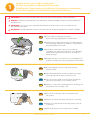
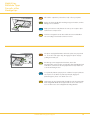
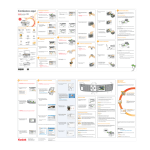
a) See box flaps for unpacking instructions.
Remove all orange shipping tape from the printer.
DE
a) Anweisungen zum Auspacken finden Sie auf den Klappen
der Verpackung. Entfernen Sie sämtliches orangefarbenes
Verpackungsband vom Drucker.
FR
a) Consultez les instructions situées sur les rabats de
l'emballage pour obtenir des instructions sur le déballage.
Débarrassez l'imprimante de toute trace de bande de
transport orange.
NL
a) Raadpleeg de doos voor instructies voor het uitpakken van
de printer. Verwijder alle oranje transporttape van de printer.
EN
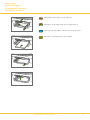
b) If not preinstalled, insert the control panel overlay,
bottom end first.
DE
b) Wenn das Bedienfeld noch nicht vorinstalliert ist, setzen
Sie das Overlay mit der unteren Seite zuerst ein.
FR
b) S'il n'est pas pré-installé, insérez la façade amovible du
panneau de commande, avec le inférieur premier.
NL
b) Plaats de overlay van het bedieningspaneel, als dit nog niet
is gebeurd, met de onderzijde eerst.
EN
c) Press down on all edges of the overlay until it snaps
into position.
DE
c) Drücken Sie auf alle Seiten des Overlays, bis es einrastet.
FR
c) Appuyez sur chaque bord de la façade, jusqu'à ce qu'elle
s'enclenche.
NL
c) Druk op alle zijden van de overlay tot deze vastklikt.
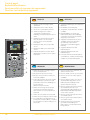
EasyShare 5300
All-in-One Printer
OK
EasyShare 5300
All-in-One Printer
Rotate
Proofsheet
Zoom
Transfer
Photo
Copy
Scan
Help
Menu
OK
On/Off
Cancel
Attention
www.kodak.com/go/aiosupport
3