1
body directly over or near Moisture Outlet
while unit is in operation. DO NOT cover
Moisture Outlet or place anything over it
while the unit is operating.
8. Do not attempt to overflow the aroma
reservoir.
9. DO NOT operate any appliance with a
damaged cord or plug, after the appliance
malfunctions, or if it has been dropped or
damaged in any manner. Return appliance
to manufacturer for examination, electrical or
mechanical adjustment, or repair.
10. Use appliance only for intended household
use as described in this manual. Any other
use not recommended by the manufacturer
may cause fire, electric shock, or injury to
persons. The use of attachments not
recommended or sold by Holmes Products
(Europe) Ltd. may cause hazards.
11. DO NOT use outdoors.
12. Always place humidifier on a firm, flat, level
surface. A waterproof mat or pad is
recommended for under the humidifier.
NEVER place it on a surface that may
become damaged by exposure to water and
moisture (i.e. finished floor).
13. DO NOT allow the Moisture Outlet to directly
face the wall. Moisture could cause damage,
particularly to wallpaper.
14. Humidifier should be unplugged when not
in use.
15. NEVER tilt, move, or attempt to empty unit
while it is operating. Shut off and unplug
before removing the water tank and moving
the unit. DO NOT attempt to remove the
water tank within 15 minutes after the
humidifier is turned off and unplugged.
Serious injury may result.
16. This humidifier requires regular maintenance
to operate appropriately. Refer to cleaning
and maintenance procedures.
17. NEVER use detergents, petrol, glass
cleaner, furniture polish, paint thinner, or
other household solvents to clean any part of
the humidifier.
18. Excessive humidity in a room can cause
water condensation on windows and some
furniture. If this happens, turn the humidifier
OFF.
19. Do not use humidifier in an area where
humidity level is in excess of 55%.
20. DO NOT attempt to repair or adjust any
electrical or mechanical functions on this
unit. The inside of the unit contains no user
serviceable parts. All servicing should be
performed by qualified personnel only.
21. If the supply cord is damaged, it must be
replaced by the manufacturer or its service
agent or a similarly qualified person.
ENGLISH
Congratulations
By choosing a Bionaire™ humidifier, you have
chosen one of the finest humidifiers on the
market today!
PLEASE READ AND SAVE THESE
IMPORTANT INSTRUCTIONS
NOTE: Before reading these
instructions, please review the
corresponding illustrations.
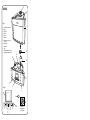
GENERAL DESCRIPTION (SEE FIG. 1)
A Mist Nozzle/Aroma diffuser
BHandle
C Water Tank
D Tank Cap
E Filter (x1)
FTransducer
G Water level security switch (not visible)
H Airflow outlet
I Water Basin
JBase
K LCD display and control panel (see fig. 2)
I Power ON
O Power OFF
Mist Output, Humidistat & Timer Setting
+ - Increase/Decrease Function
Ioniser ON/OFF
L. Sponges (x4) for aroma diffuser
Important SAFETY PRECAUTIONS
When using electrical appliances, basic safety
precautions should always be followed to reduce
the risk of fire, electric shock, and injury to
persons, including the following:
1. Read all instructions before using the
appliance.
2. To avoid fire or shock hazard, plug the
appliance directly into an electrical outlet and
fully insert the plug.
3. Keep the cord out of heavy traffic areas. To
avoid fire hazard, NEVER put the cord under
rugs, or near radiators, stoves, or heaters.
4. DO NOT place humidifier near heat sources
such as stoves, radiators, and heaters. Do
locate your humidifier on an inside wall near
an electrical outlet. The humidifier should be
at least 10cm/4” away from the wall for best
results.
5. WARNING: Never use a humidifier in a
closed room. (i.e: doors and windows
closed) as it may result in excessive
humidity.
6. WARNING: Do not attempt to refill
humidifier without first unplugging the unit
from its electrical outlet. Be sure to pull by
the plug and not the cord.
7. NEVER drop or insert any object into any
openings. DO NOT place hands, face, or
2
22. This appliance is not intended for use by
persons (including children) with reduced
physical, sensory or mental capabilities, or
lack of experience and knowledge, unless
they have been given supervision or
instruction concerning use of the appliance
by a person responsible for their safety.
Children should be supervised to ensure that
they do not play with the appliance.
23. CAUTION: In order to avoid a hazard due
to inadvertent resetting of the thermal cutout,
this appliance must not be supplied through
an external switching device, such as a
timer, or connected to a circuit that is
regularly switched on and off by the utility.
HUMIDIFIER SETTINGS
This unit has a built-in room humidity indicator
ideal for precise and continuous humidity level
status monitoring. To adjust the humidity level,
you will need to select the desired level by
pushing the [ ] button. This will adjust the mist
output level and will display current setting.
There are 5 modes available: [ ]
(1) Low, (2) Medium, (3) High mist level output,
(4) Humidity Setting and (5) Timer Function
(Press and hold for two seconds).
First [ ] Press
Second [ ] Press
Third [ ] Press
HUMIDISTAT SETTING
While in Humidity Setting (fourth [ ] Press),
unit will default to stabilise at 50% humidity. Use
the [+] [-] buttons to adjust humidity setting. The
setting range is 35%–65%. Press [+] [-] for two
seconds to turn off the Humidistat setting.
ASSEMBLY INSTRUCTIONS
1. Be sure the humidifier is switched off and
disconnected from the wall outlet.
2. Install the Water Filter (E) into the base (J)
matching the filter hole with the base pin.
WARNING: When installing a new Water
Filter, be sure to first remove the plastic bag,
then follow “Filter Use Instructions”.
IMPORTANT: To eliminate the emission of
minerals from the water, it is recommended
that the Water Filter be used.
3. Place the water tank (C) onto the base.
IMPORTANT: Make sure the water tank as
well as the water basin (I) are clean before
using the appliance and after storing for a
long time.
4. Ensure humidifier is level. If the humidifier is
not level always turn the power off before
handling it.
TIMER SET UP
Hold the [ ] button for 2 seconds to initiate the
timer set up mode. A clock symbol and 00 will
appear so the desired number of hours can be
entered by pressing [+] [-] buttons. Maximum
time setting is 12 hours. Press the [ ] button
for two seconds to exit timer function.
INDEPENDENT IONISER
Press the [ ] button activate the ioniser and a
[ ] symbol will be displayed on the LCD. Press
again to stop the ion function to regular mode.
Aroma Diffuser
The unit is equipped with an aroma diffuser,
which contains the scented oil reservoir. Open
the diffuser cap carefully and place the sponge
(four sponges included) into the reservoir. Apply
oil drops with a dropper directly to the sponge as
desired and close the lid for correct operation.
Ideal number of drops may vary depending on
personal preference and type of scented oil
used. Allow the unit to operate for a few minutes
in high output mode for faster results. Dropper
and scented oil are not included.
WARNING: To avoid damage to product
surface, clean product immediately if aroma oil
spills outside of diffuser.
OPERATING INSTRUCTIONS
Fill Water Tank
NOTE: Be sure the humidifier is switched off
and disconnected from the wall outlet. The water
you put into the water tank should be clean and
not be over 40°C (cold boiled water or
demineralised water are recommended).
1. Remove the water tank out from the base.
2. Unscrew the tank cap (D).
3. Fill the tank with clean water and screw the
tank cap back tightly onto the tank.
4. Put the water tank back on the base.
AUTO SAFETY SHUT OFF (G)
This Ultrasonic Humidifier has a built in
safety device:
1. When the water level in the basin is low, the
unit will beep 10 times and the control panel
will continuously flash, the transducer (F) will
automatically shut off. Refill the tank as
instructed in “Operating Instructions” to
operate the humidifier again.
Switch the Unit On and Off (See Fig. 2
K1 & K2)
1. Put the plug into the main supply.
2. Press Power ON [I] and Power OFF [O] to
switch on and off. The LCD panel (K) is
illuminated in blue when the power is on and
will show the actual humidity level in the
room. The humidifier is preset for high mist
output at this initial stage.
NOTE: This unit has a memory. The control
panel will remember the previous level setting
after the unit has been turned off.
Filter Use
The Water filter is used to retain minerals in your
water and to provide clean moisture. The filter
life is determined by the average daily use of
your humidifier and the water hardness in your
3