1
6.1 Adjusting the transmission channel
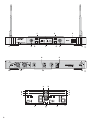
1) In the operating panel of the receiving unit press
the key or (6) [for a minimum of 1 s]. On the
display, the indication (b) for the channel adjusting
mode flashes: RX1 (for receiving unit 1) or RX2 (for
receiving unit 2).
2) As long as the indication keeps flashing, the channel
may be selected: With the key , the channels are
scanned in ascending order, with the key , they
are scanned in descending order. The 16 channels
are assigned to the following received frequencies:
Channel
Frequency
Channel
Frequency
1
744.250 MHz
9
754.250 MHz
2
745.500 MHz
10
755.875 MHz
3
746.500 MHz
11
757.000 MHz
4
747.125 MHz
12
758.500 MHz
5
748.250 MHz
13
759.000 MHz
6
749.125 MHz
14
760.750 MHz
7
750.500 MHz
15
761.750 MHz
8
753.500 MHz
16
763.250 MHz
3) Approx. 3 seconds after the last actuation of a key,
the indication RX1 or RX2 will disappear and the
channel adjusting mode is exited.
Note: It is not possible to set both receiving units to the
same channel. The channel selected for one receiving
unit will be automatically skipped during channel
adjustment for the other receiving unit.
ENGLISH
3) Speak/sing into the wireless microphone. The
volume of the audio signal received is shown on the
display via the indication AF (d): the more segments are displayed, the higher is the volume level.
Adjust the optimum volume on the transmitter
(→ see instruction manual of the transmitter).
Match the output level of the receiving unit to the
input of the subsequent unit with the volume control
(5).
4) With the squelch control (12) – CH. 1 for receiving
unit 1, CH. 2 for receiving unit 2 – adjust the threshold value for the response of the squelch. The further the control is turned clockwise, the higher is
the threshold value.
The squelch will mute the receiving unit if during
music intervals high-frequency interference signals
are received of which the level is below the threshold value adjusted. With a higher threshold value,
however, the operating range of the wireless
system will be reduced as the receiving unit will
also be muted if the power of the radio signal of the
microphone falls below the threshold value adjusted. Thus, a higher threshold value may be adjusted
with the squelch control if the reception of the
microphone signal is good. However, with a longer
distance between the transmitter and receiver, a
lower value should be selected.
5) After operation, switch off the receiver with the
switch POWER (3). If the receiver is not used for a
longer period, disconnect the power supply unit
from the mains supply as it will have a low current
consumption even with the receiver switched off.
6.1.1 Lock mode
(locking the channel selector keys)
To prevent accidental change of the transmission
channels selected, it is possible to activate the lock
mode. With the lock mode activated, it is not possible
to call the channel adjusting mode for any of the two
receiving units.
1) To activate the lock mode, in one of the operating
panels, keep the keys and (6) pressed at the
same time until LOCK (a) is displayed.
2) To deactivate the lock mode, in one of the operating
panels, press the keys and at the same time
until LOCK disappears.
Note: The lock mode is automatically deactivated each
time the unit is switched on.
7
Specifications
Type of unit: . . . . . . . . . PLL multifrequency receiver
in diversity technique
Radio frequency range: 740 – 764 MHz, divided into
16 channels
(→ table, chapter 6.1)
Audio frequency range: . 40 – 18 000 Hz
THD: . . . . . . . . . . . . . . < 0.6 %
Dynamic range: . . . . . . > 105 dB
Squelch: . . . . . . . . . . . . pilot tone squelch, noise mute
Audio outputs
2 × XLR: . . . . . . . . . 150 mV/150 Ω (bal.)
1 × 6.3 mm jack: . . . 500 mV/1 kΩ (unbal.)
Ambient temperature: . 0 – 40 °C
Power supply: . . . . . . . via the supplied power
supply unit connected to
230 V~ / 50 Hz
Dimensions
(w/o antennas): . . . . . . 420 × 53 × 230 mm
Weight: . . . . . . . . . . . . 2 kg
Subject to technical modification.
All rights reserved by MONACOR ® INTERNATIONAL GmbH & Co. KG. No part of this instruction manual may
be reproduced in any form or by any means for any commercial use.
9