1
Function
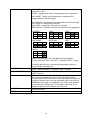
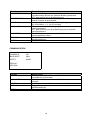
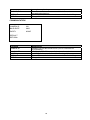
FOCUS MODE
Description
AUTO: Automatic setting for the focus
MANUAL: After exiting the OSD menu, use the left/right buttons
for the manual focus setting.
PUSH AUTO: Select this function to perform the focussing once
and save.
1.5 m / 3 m / 5 m / 10 m / 10 cm / 50 cm
Setting for the minimum focus interval. This interval may not be
exceeded.
1~17
Setting for the start zoom factor
2~18
Setting for the end zoom factor
LOW: Slow zoom speed
MIDDLE: Medium zoom speed
HIGH: Fast zoom speed
FOCUS DISTANCE
ZOOM START
ZOOM END
ZOOM SPEED
DEFAULT
RETURN
Restores all values in the sub-menu to the factory settings
Back to main menu
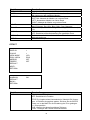
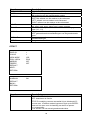
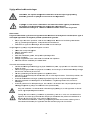
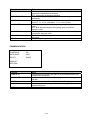
EXPOSURE
WDR
SHUTTER
HLC / BLC
SHUTTER AGC
NOISE REDUCTION
DIS
>
AUTO>
OFF
LOW
>
OFF
DEFAULT
RETURN>
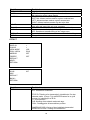
Function
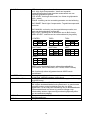
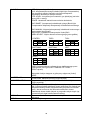
WDR
SHUTTER
Description
NORMAL: Deactivates the WDR function
ATR-EX: Activates the WDR function
CONTRAST (LOW – HIGH): This value changes the intensity of
the WDR function from low (LOW) to high (HIGH).
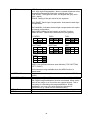
AUTO:
HIGH LUMINANCE
BRIGHTNESS: Setting for the basic picture brightness.
LOW LUMINANCE
DSS: Activates the digital slow shutter function (Digital Slow
Shutter). The FLD unit indicates the exposure factor.
MANUAL
SHUTTER (1/50-1/100000): Setting for a fixed exposure time.
HIGH LUMINANCE
BRIGHTNESS: Setting for the basic picture brightness.
29