1
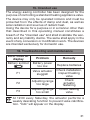
Bedienungsanleitung
Operating Manual
Mode d’emploi
Handleiding
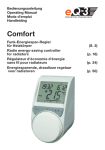
Model K
Energiespar-Regler
für Heizkörper
(S. 2)
Energy-saving controller
for radiators
(p. 18)
Régulateur d‘économie d‘énergie
pour radiateurs
(p. 34)
Energiesparende regelaar
voor radiatoren
(p. 50)
1
Inhaltsverzeichnis
I. Bedienung und Display...............................................3
II. Allgemeine Funktion....................................................4
Schritt 1: Batterien einlegen (wechseln).............................4
Schritt 2: Datum und Uhrzeit einstellen..............................5
Schritt 3: Energiespar-Regler montieren............................6
1. Wochenprogramm einstellen......................................7
2. Wochenprogramm: Beispiele......................................8
3. Betriebsmodi...............................................................9
4. Konfigurationsmenü..................................................10
5. Display-Inhalt im Normalbetrieb...............................10
6. Boost-Funktion.........................................................11
7. Urlaubsfunktion einstellen.........................................11
8. Komfort- und Absenktemperatur..............................12
9. Kindersicherung/Bediensperre.................................12
10. Heizphasen einstellen...............................................13
11. Frostschutzbetrieb einstellen....................................13
12. Fenster-auf-Funktion.................................................13
13. Offset-Temperatur einstellen.....................................14
14. Werkseinstellungen wieder herstellen.......................14
15. Bestimmungsgemäßer Einsatz.................................14
16. Fehlerbehebung und Wartung..................................15
17. Entsorgungshinweis..................................................15
18. Sicherheitshinweis....................................................16
19. Technische Eigenschaften........................................16
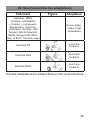
20. Adapterübersicht.......................................................17
Lesen Sie diese Anleitung sorgfältig, um das Gerät in
Betrieb zu nehmen. Bewahren Sie die Anleitung zum späteren Nachschlagen auf.
1. Ausgabe Deutsch 08/2010
Dokumentation © 2010 eQ-3 Ltd., Hong Kong.
Alle Rechte vorbehalten.
CC-RT-B-CyK-W, V1.0 927-26
2
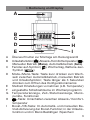
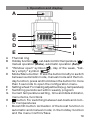
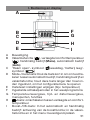
I. Bedienung und Display
A
B
C
D
E
A
B
F
G
H
I
Überwurfmutter zur Montage am Heizungsventil
Urlaubsfunktion( ),Absenk-/Komforttemperatur ( ),
Manueller Betrieb (Manu), Automatikbetrieb (Auto)
), Wochentag, Batterie-leerC Fenster-auf-Symbol (
)
Symbol (
D Mode-/Menü-Taste: Taste kurz drücken zum Wechseln zwischen Automatikbetrieb, manuellen Betrieb
und Urlaubsfunktion; Taste länger als 3 Sekunden
drücken zum Öffnen des Konfigurationsmenüs
E Stellrad: Einstellungen vornehmen (z.B. Temperatur)
F eingestellte Schaltzeiträume im Wochenprogramm
G Temperaturanzeige, Zeit-/Datumsanzeige, Menüpunkte, Funktionen
-Taste: Umschalten zwischen Absenk-/ KomfortH
temperatur
I Boost-/OK-Taste: Im Automatik- und manuellen Betrieb Aktivierung der Boost-Funktion; in der Urlaubsfunktion und im Menü Bestätigen /Speichern
3
II. Allgemeine Funktion
Der Energiespar-Regler für Heizkörper regelt zeitgesteuert die Raumtemperatur. Der Stellantrieb bewegt ein
Ventil, um den Wärmezustrom am Heizkörper zu steuern.
Der Regler passt auf alle gängigen Heizkörperventile. Die
Boost-Funktion öffnet bei Aktivierung für 5 Minuten das
Ventil, um sofort ein angenehmes Wärmegefühl im Raum
zu erreichen.
Die Montage erfolgt in 3 einfachen Schritten.
Schritt 1: Batterien einlegen (wechseln)
• Batteriefachdeckel abziehen
• 2 neue Batterien vom Typ
LR6 (Mignon/AA) polungsrichtig in das Batteriefach
einlegen
• Batteriefachdeckel wieder
aufsetzen und einrasten
Die Lebensdauer neuer Alkali)
Batterien beträgt ca. 3 Jahre. Ein Batteriesymbol (
weist darauf hin, dass die Batterien auszutauschen sind.
Nach Entnahme der Batterien sollte bis zum Einlegen der
neuen Batterien ca. 1 Minute gewartet werden. Ein Betrieb
mit Akkus ist nicht möglich.
Normale Batterien dürfen niemals aufgeladen werden. Es besteht Explosionsgefahr.
Batterien nicht ins Feuer werfen!
Batterien nicht kurzschließen!
4
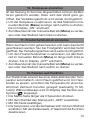
Verbrauchte Batterien gehören nicht in
den Hausmüll! Entsorgen Sie diese in Ihrer
örtlichen Batteriesammelstelle!
Schritt 2: Datum und Uhrzeit einstellen
Wenn Batterien eingelegt oder ausgetauscht werden, wird
nach kurzer Anzeige der Firmware-Versionsnummer automatisch Datum und Uhrzeit abgefragt.
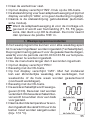
A
• Jahr (A) mit Stellrad (B) einstellen
• Mit OK (C) bestätigen
• Monat (A) mit Stellrad (B) einstellen
• Mit OK (C) bestätigen
• Tag (A) mit Stellrad (B) einstellen
• Mit OK (C) bestätigen
• Stunde (A) mit Stellrad (B) einstellen
• Mit OK (C) bestätigen
• Minute (A) mit Stellrad (B) einstellen
• Mit OK (C) bestätigen
BC
Während der Eingaben fährt der Motor den Steuerstift
bereits zurück.
• Die Anzeige „INS“ mit drehendem „∏“ weist darauf
hin, dass der Motor noch zurückfährt. Sobald der Stellantrieb am Ventil montiert werden kann, steht nur „INS“
im Display.
• Das Wochenprogramm und andere Einstellungen
können vor der Montage angepasst werden. Drücken Sie dazu die Mode-Taste, während in der Anzeige
„INS“ steht. Mehr Details finden Sie unter „4. Konfigurationsmenü“.
5
• Nach abgeschlossener Programmierung steht erneut
„INS“ im Display und die Montage (Schritt 3) kann erfolgen.
Schritt 3: Energiespar-Regler montieren
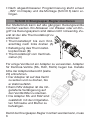
Der Stellantrieb kann auf alle gängigen Heizungsventile
montiert werden. Ein Ablassen von Wasser oder ein Eingriff ins Heizungssystem sind dabei nicht notwendig. Zuerst ist der alte Thermostatkopf zu
entfernen:
• Thermostatkopf bis zum Endanschlag nach links drehen (A)
• Befestigung des Thermostatkopfes lösen (B)
• Thermostatkopf vom Ventil abziehen (C)
Für einige Ventile ist ein Adapter zu verwenden. Adapter
für Danfoss-Ventile (RA, RAV, RAVL) liegen bei. Details
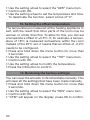
bitte der Adapterübersicht (siehe
20) entnehmen.
• Der Adapter ist auf das Ventil
zu setzen und zu drehen, bis
er stabil aufsitzt.
• Beim RAV Adapter ist die mitgelieferte Verlängerung auf
den Ventilstößel zu stecken.
• Die Adapter RA und RAV sind
zusätzlich mit der mitgelieferten Schraube und Mutter zu
befestigen.
Damit der Energiespar-Regler montiert werden kann, muss
6
im Display „INS“ stehen. Nach der Montage führt der Stellantrieb zur Anpassung ans Ventil eine Adaptierfahrt durch.
Währenddessen wird „ADA“ angezeigt.
• Stellantrieb auf Ventil setzen
• Überwurfmutter festziehen
• Im Display steht „INS“, OK-Taste drücken
• Der Stellantrieb führt eine Adaptierfahrt durch (im Display
erscheint „ADA“, keine Bedienung möglich).
• Danach ist der Stellantrieb betriebsbereit (Auto-Modus)
Wurde die Adaptierfahrt vor der Montage eingeleitet
bzw. wird eine Fehlermeldung (F1, F2, F3) angezeigt,
drücken Sie OK und der Motor fährt zurück zur Position „INS“.
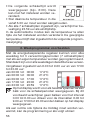
1. Wochenprogramm einstellen
Im Wochenprogramm lassen sich für jeden Wochentag separat bis zu 3 Heizphasen (7 Schaltzeitpunkte) einstellen.
Die Programmierung erfolgt für die ausgewählten Tage,
wobei für einen Zeitraum von 00:00 bis 23:59 Temperaturen hinterlegt werden müssen.
• Menü-Taste länger als 3 Sekunden drücken.
• Im Display erscheint „PRO“
• Mit OK-Taste bestätigen
• Im Display erscheint „DAY“. Mit dem
Stellrad sind ein einzelner Wochentag, alle Werktage, das Wochenende oder die gesamte Woche auswählbar (Bsp. Werktage).
• Mit OK-Taste bestätigen
• Der erste Schaltzeitpunkt wird
angezeigt (0:00), dieser kann nicht
verändert werden. Die Heizzeiten
werden zudem als Balken angezeigt.
• Mit OK bestätigen
7
• Danach ist die Temperatur einzustellen, die ab 0:00 im Raum vorherrschen soll (Bsp. 17.0°C).
• Mit OK bestätigen
• Der nächste Schaltzeitpunkt wird
angezeigt (Bsp. 6:00). Dieser kann
verändert werden.
• Danach die Temperatur einstellen, die ab 6:00 vorherrschen soll.
• Dieser Vorgang ist zu wiederholen, bis für den Zeitraum
von 0:00 bis 23:59 Temperaturen hinterlegt sind.
• Sind alle 7 Schaltzeitpunkte belegt, wird 23:59 als Endzeitpunkt zum Bestätigen angezeigt.
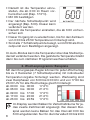
Im Auto-Modus kann die Temperatur über das Stellrad jederzeit verändert werden. Die geänderte Temperatur bleibt
dann bis zum nächsten Programmwechsel erhalten.
2. Wochenprogramm: Beispiele
Mit dem Energiespar-Regler können für jeden Wochentag
bis zu 3 Heizzeiten (7 Schaltzeitpunkte) mit individueller
Temperaturvorgabe hinterlegt werden. Werkseitig sind
zwei Heizphasen von 6:00 bis 9:00 Uhr und von 17:00 bis
23:00 Uhr für alle Wochentage gleich hinterlegt:
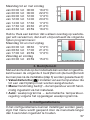
ab 00:00 bis 06:00 17.0°C
ab 06:00 bis 09:00 21.0°C
ab 09:00 bis 17:00 17.0°C
ab 17:00 bis 23:00 21.0°C
ab 23:00 bis 23:59 17.0°C
8
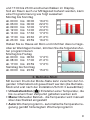
Im Display werden Balken für Zeitschalträume für jedes zweite Zeitintervall angezeigt. Bei diesem Beispiel werden keine Balken für das Intervall 0:00 bis
6:00 eingeblendet. Nur für die Intervalle 6:00 bis 9:00
und 17:00 bis 23:00 erscheinen Balken im Display.
Soll ein Raum auch zur Mittagszeit beheizt werden, kann
eine Programmierung wie folgt aussehen:
Montag bis Sonntag
ab 00:00 bis 06:00 16.0°C
ab 06:00 bis 09:00 22.0°C
ab 09:00 bis 12:00 17.0°C
ab 12:00 bis 14:00 20.0°C
ab 14:00 bis 17:30 17.0°C
ab 17:30 bis 23:30 21.0°C
ab 23:30 bis 23:59 16.0°C
Haben Sie zu Hause ein Büro und möchten dies nur tagsüber an Werktagen heizen, könnten Sie die folgenden Zeiten programmieren:
Montag bis Freitag
ab 00:00 bis 08:30 17.0°C
ab 08:30 bis 17:00 21.0°C
ab 17:00 bis 23:59 17.0°C
Samstag bis Sonntag
ab 00:00 bis 23:59 15.0°C
3. Betriebs-Modi
Mit kurzem Druck der Mode-Taste kann zwischen den folgenden 3 Betriebsmodi gewechselt werden (die BetriebsModi sind erst nach der Installation/Schritt 3 auswählbar):
• Urlaubsfunktion ( ): Einstellen einer Temperatur, die
bis zu einem fixen Zeitpunkt gehalten werden soll.
• Manu: Manueller Betrieb - die Temperatur wird manuell
über das Stellrad eingestellt
• Auto: Wochenprogramm - automatische Temperaturregelung gemäß hinterlegtem Wochenprogramm
9
4. Konfigurationsmenü
Im Konfigurationsmenü lassen sich Einstellungen ändern.
Das Menü lässt sich über einen langen Tastendruck (länger
als 3 Sekunden) der Menü-Taste aufrufen.
• PRO: Einstellung des Wochenprogramms (siehe Abschnitt „1. Wochenprogramm einstellen“)
• DAT: Ändern von Uhrzeit und Datum
• POS: Abfrage der aktuellen Position des Stellantriebs
• DST: Die automatische Umschaltung zwischen Sommerund Winterzeit kann deaktiviert werden.
• AER: Fenster-auf-Temperatur und –Zeit für die automatische Temperaturabsenkung beim Lüften einstellen
• TOF: Offset-Temperatur einstellen
• RES: Werkseinstellungen wieder herstellen
Menüpunkte werden mit dem Stellrad ausgewählt und mit
OK bestätigt. Ein erneuter Druck der Menü-Taste führt zur
vorherigen Ebene zurück. Nach 65 Sekunden Inaktivität
schließt sich das Menü automatisch.
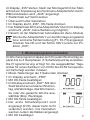
5. Display-Inhalt im Normalbetrieb
Im Normalbetrieb werden
Schaltzeiträume, Betriebsmodus, Soll-Temperatur und
Wochentag angezeigt.
Die Balken für Schaltzeiträume des Wochenprogramms
werden für jedes zweite Zeitintervall angezeigt. (Beispiel
unter „2. Wochenprogramm: Beispiele“).
10
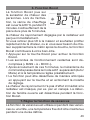
6. Boost-Funktion
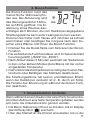
Die Boost-Funktion nutzt das
menschliche Wärmeempfinden aus. Bei Aktivierung wird
das Heizungsventil für 5 Minuten auf 80% geöffnet. Die Erwärmung eines Raumes dauert länger als 5 Minuten, die vom Heizkörper abgegebene
Strahlungswärme kann sofort wahrgenommen werden.
Kommen Sie früher nach Hause und möchten es schnell
warm haben oder benötigen Sie morgens nach dem Duschen extra Wärme, hilft Ihnen die Boost-Funktion.
• Drücken Sie die Boost-Taste zum Aktivieren der BoostFunktion
• Die verbleibende Funktionsdauer wird im Sekundentakt
heruntergezählt („B299“ bis „B000“).
• Nach Ablauf dieser 5 Minuten wechselt der Stellantrieb
in den vorher aktiven Modus (Auto/Manu) mit der vorher
eingestellten Temperatur.
• Die Funktion lässt sich jederzeit vorzeitig durch einen Tastendruck oder Betätigen des Stellrads deaktivieren.
Die Strahlungswärme hat keinen unmittelbaren Effekt,
wenn der Heizkörper verdeckt ist (z. B. durch ein Sofa).
Die Fenster-Auf-Erkennung ist während der Boost-Funktion deaktiviert.
7. Urlaubsfunktion einstellen
Wenn während eines Urlaubs oder einer Party für einen bestimmten Zeitraum eine feste Temperatur gehalten werden
soll, kann die Urlaubsfunktion genutzt werden.
• Die Menü-Taste ist so oft kurz zu drücken, bis im Display
das Koffersymbol ( ) erscheint.
• Über das Stellrad ist die Uhrzeit einzustellen, bis zu der
11
die Temperatur gehalten werden soll.
• Bestätigung durch die OK-Taste
• Mit dem Stellrad ist danach das Datum einzustellen
• Bestätigung durch die OK-Taste
• Mit dem Stellrad die Temperatur einstellen, mit OK bestätigen. Die Anzeige blinkt zur Bestätigung.
Die eingestellte Temperatur bleibt bis zum vorgegebenen
Zeitpunkt bestehen. Danach geht der Stellantrieb in den
Auto-Modus.
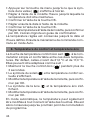
8. Komfort- und Absenktemperatur
Die Taste Komfort-/Absenktemperatur ( ) dient zur komfortablen und einfachen Umschaltung zwischen diesen
beiden Temperaturen. Werkseitig liegen diese bei 21.0°C
und 17.0°C. Sie können wie folgt angepasst werden.
• Die Komfort-/Absenktaste ( ) lange gedrückt halten.
• Im Display erscheinen das Sonnensymbol ( ) und die
aktuelle Komforttemperatur.
• Temperatur mit Stellrad verändern, mit OK bestätigen.
• Es erscheinen Mondsymbol ( ) und Absenktemperatur.
• Temperatur mit Stellrad verändern, mit OK bestätigen.
Auch im Auto-Modus kann die Temperatur über die Taste jederzeit geändert werden. Diese bleibt dann bis zum
nächsten Schaltzeitpunkt des Programms erhalten.
9. Kindersicherung / Bediensperre
Die Bedienung kann gesperrt werden.
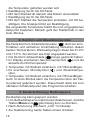
• Um die Bediensperre zu aktivieren/deaktivieren, sind die
gleichzeitig kurz zu drücken.
Tasten Menu und
• Nach Aktivierung erscheint „LOC“ im Display.
• Zur Deaktivierung beide Tasten erneut drücken.
12
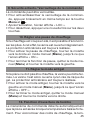
10. Heizpause einstellen
Ist die Heizung im Sommer abgeschaltet, können die Batterien geschont werden. Dazu wird das Ventil ganz geöffnet. Der Verkalkungsschutz wird weiter durchgeführt.
• Um die Heizpause zu aktivieren, ist das Stellrad im manuellen Betrieb (Manu) so lange nach rechts zu drehen,
bis im Display „ON“ erscheint.
• Zum Beenden ist der manuelle Betrieb (Manu) zu verlassen oder das Stellrad nach links zu drehen.
11. Frostschutzbetrieb einstellen
Wenn der Raum nicht geheizt werden soll, kann das Ventil
geschlossen werden. Nur bei Frostgefahr wird das Ventil
geöffnet. Der Verkalkungsschutz wird weiter durchgeführt.
• Um den Frostschutzbetrieb zu aktivieren, ist das Stellrad im manuellen Betrieb (Manu) so lange nach links zu
drehen, bis im Display „OFF“ erscheint.
• Zum Beenden ist der manuelle Betrieb (Manu) zu verlassen oder das Stellrad nach rechts zu drehen.
12. Fenster-auf-Funktion
Der Stellantrieb erkennt bei einer stark absinkenden Temperatur automatisch, ob im Raum gelüftet wird. Um Heizkosten zu sparen, wird dann die Temperatur für einen bestimmten Zeitraum herunter geregelt (werkseitig 15 Minuten). Währenddessen wird im Display das Fenster-aufSymbol ( ) angezeigt.
• Die Menü-Taste länger als 3 Sekunden drücken
• Mit dem Stellrad den Menüpunkt „AER“ auswählen
• Mit OK-Taste bestätigen
• Die Temperatur und die Zeit lassen sich mit dem Stellrad
einstellen. Mit der Zeitauswahl „0“ lässt sich die Funktion
deaktivieren.
13
13. Offset-Temperatur einstellen
Da die Temperatur am Heizkörper gemessen wird, kann es
woanders im Raum kälter oder wärmer sein. Um dies anzugleichen, kann ein Temperatur-Offset von ±3.5°C eingestellt werden. Werden z.B. 18°C anstatt eingestellter 20°C
gemessen, ist ein Offset von -2.0°C einzustellen.
• Die Menü-Taste länger als 3 Sekunden drücken
• Mit dem Stellrad den Menüpunkt „TOF“ auswählen
• Mit OK-Taste bestätigen
• Die Temperatur mittels des Stellrads verändern.
• Bestätigung erfolgt durch die OK-Taste
14. Werkseinstellungen wieder herstellen
Der Auslieferungszustand des Stellantriebs kann manuell
wieder hergestellt werden. Dabei gehen alle manuell vorgenommenen Einstellungen verloren.
• Die Menü-Taste länger als 3 Sekunden drücken
• Mit dem Stellrad den Menüpunkt „RES“ auswählen
• Mit OK-Taste bestätigen
• Es erscheint „CFM“ im Display, mit OK bestätigen
15. Bestimmungsgemäßer Einsatz
Der Energiespar-Regler dient zum Regulieren eines gängigen Heizkörperventils. Betreiben Sie das Gerät nur in Innenräumen und vermeiden Sie den Einfluss von Feuchtigkeit, Staub sowie Sonnen- oder Wärmebestrahlung.
Jeder andere Einsatz als in dieser Bedienungsanleitung
beschrieben ist nicht bestimmungsgemäß und führt zu
Garantie- und Haftungsausschluss. Dies gilt auch für Umbauten und Veränderungen. Die Geräte sind ausschließlich
für den privaten Gebrauch gedacht.
14
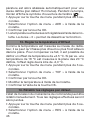
16. Fehlerbehebung und Wartung
Fehlercode im
Problem
Display
Batteriesymbol Batterieleistung
)
zu gering
(
F1
Ventilantrieb
schwergängig
F2
Stellbereich
zu groß
F3
Stellbereich
zu klein
Behebung
Batterien
austauschen
Installation prüfen,
Heizungsventil
überprüfen
Befestigung
des Stellantriebs
überprüfen
Heizungsventil
überprüfen
Einmal wöchentlich am Samstag, um 12:00 führt der
Stellantrieb zum Schutz vor Ventilverkalkung eine
Entkalkungsfahrt durch. Dabei erscheint „CAL“ im
Display.
17. Entsorgungshinweis
Gerät nicht im Hausmüll entsorgen!
Elektronische Geräte sind entsprechend der
Richtlinie über Elektro- und Elektronik-Altgeräte
über die örtlichen Sammelstellen für ElektronikAltgeräte zu entsorgen!
Das CE-Zeichen ist ein Freiverkehrszeichen, das
sich ausschließlich an die Behörden wendet und
keine Zusicherung von Eigenschaften beinhaltet.
15
18. Sicherheitshinweise
Die Geräte sind keine Spielzeuge, erlauben Sie Kindern
nicht damit zu spielen. Verpackungsmaterial nicht achtlos
liegen lassen, dies kann für Kinder zu einem gefährlichen
Spielzeug werden. Öffnen Sie das Gerät nicht, es enthält
keine durch den Anwender zu wartenden Teile. Im Fehlerfall schicken Sie das Gerät an den Service.
19. Technische Eigenschaften
Versorgungsspannung:
Max. Stromaufnahme:
Batterien:
Batterielebensdauer:
Display:
Gehäuseabmessung:
Anschluss:
Umgebungstemperatur:
Max.
Oberflächentemperatur: Linearer Hub: Federkraft: 3V
100 mA
2x LR6 / Mignon / AA
ca. 3 Jahre
LC-Display
63 x 66 x 92 mm (B x H x T)
M30 x 1,5
+5 bis +55°C
+90°C (am Heizkörper)
4,2 mm
max. 80 N
Technische Änderungen, die zur Verbesserung
dienen, sind vorbehalten.
16
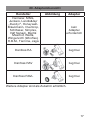
20. Adapterübersicht
Hersteller
Abbildung
Adapter
Heimeier, MNG,
Junkers, Landis&Gyr
„Duodyr“, HoneywellBraukmann, Oventrop,
Schlösser, Simplex,
Valf Sanayii, Mertik
Maxitrol, Watts,
Wingenroth (Wiroflex),
R.B.M., Tiemme, Jaga
kein
Adapter
erforderlich
Danfoss RA
liegt bei
Danfoss RAV
liegt bei
Danfoss RAVL
liegt bei
Weitere Adapter sind als Zubehör erhältlich.
17
Table of contents
I. Operation and Display..............................................19
II. General function........................................................20
Step 1: Inserting (replacing) the batteries........................20
Step 2: Setting the date and time of day.........................21
Step 3: Installing the energy-saving controller.................22
1. Setting the weekly program......................................23
2. Weekly program: Examples......................................24
3. Operating modes......................................................25
4. Configuration menu...................................................26
5. Display content during normal operation..................26
6. Boost function...........................................................27
7. Setting the holiday function......................................27
8 Comfort and set-back temperatures.........................28
9. Child-proof lock/Operating inhibit.............................28
10. Setting the heating break..........................................29
11. Setting frost protection mode...................................29
12. „Window open“ function...........................................29
13. Setting the offset temperature..................................30
14. Restoring the factory settings...................................30
15. Intended use.............................................................31
16. Troubleshooting and maintenance............................31
17. Instructions for disposal............................................32
18. Safety instructions....................................................32
19. Technical properties..................................................32
20. Adapter overview......................................................33
Please read this manual carefully in order to help you put
the device into operation. Keep the manual handy so you
can refer to it at a later date!
Issue 1 English 08/2010
Documentation © 2010 eQ-3 Ltd., Hong Kong. All rights reserved.
CC-RT-B-CyK-W, V1.0 927-26
18
I. Operation and display
A
B
C
D
E
A
B
F
G
H
I
Thermal ring
Holiday function ( ), set-back/comfort temperature ( ),
manual operation (Manu), automatic operation (Auto)
C “Window open” symbol ( ), day of the week, “bat )
tery empty” symbol ( D Mode/Menu button: Press the button briefly to switch
between automatic mode, manual mode and the holiday function; press and hold down the button for more
than 3 seconds to open the configuration menu.
E Setting wheel: For making adjustments (e.g. temperature)
F Switching periods set within weekly program
G Current temperature setting , time and date indicator,
menu items, functions
button: For switching between set-back and comH
fort temperatures
I Boost/OK button: Activation of the boost function in
automatic and manual mode; in the holiday function
and the menu Confirm/Save
19
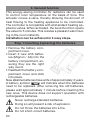
II. General function
This energy-saving controller for radiators can be used
to control room temperature on the basis of time. The
actuator moves a valve, thereby allowing the amount of
heat flowing to the heating appliance to be controlled.
The controller is compatible with all standard heating appliance valves. When activated, the boost function opens
the valve for 5 minutes. This creates a pleasant warm feeling in the room instantly.
Installation can be achieved in 3 easy steps.
Step 1: Inserting (replacing) the batteries
• Remove the battery compartment cover.
• Insert 2 new LR6 batteries (Mignon / AA) into the
battery compartment, ensuring they are the right
way round.
• Reattach the battery compartment cover and click
into place.
New alkaline batteries have a life of approximately 3 years.
) will indicate when the batteries
A battery symbol (
need to be replaced. After removing the old batteries,
please wait approximately 1 minute before inserting the
new ones. This device does not support operation with
rechargeable batteries.
Never recharge standard batteries.
Doing so will present a risk of explosion.
Do not throw the batteries into a fire.
Do not short-circuit batteries.
20
Used batteries should not be disposed
of with regular domestic waste. Instead,
they should be taken to your local battery
disposal point.
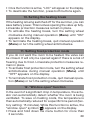
Step 2: Setting the date and time of day
The firmware version number will be displayed briefly once
you have inserted/replaced the batteries and then you will be
automatically prompted to set the date and time of day.
• Use the setting wheel (B) to set
the year (A).
• Confirm with OK (C).
• Use the setting wheel (B) to set
the month (A).
• Confirm with OK (C).
• Use the setting wheel (B) to set
the day (A).
• Confirm with OK (C).
• Use the setting wheel (B) to set
the hour (A).
• Confirm with OK (C).
• Use the setting wheel (B) to set
the minute (A).
• Confirm with OK (C).
A
BC
The motor will start moving back the control pin while the
entries are still being made.
• If “INS” is displayed with a rotating “∏” symbol, this
indicates that the motor is still moving back. Once the
device is ready for the actuator to be installed on the
valve, just “INS” will appear on the display.
• The weekly program and other settings can be cus21
tomised prior to installation. To do this, press the mode
button when “INS” is shown on the display. For further
details, please see “4. Configuration menu”.
• Once programming is complete, “INS” will reappear on the
display and installation (Step 3) can commence.
Step 3: Installing the energy-saving controller
The actuator can be installed on all standard heating
valves. There is no need to drain away water or fiddle
around with the heating system before doing this. First,
you need to remove the old thermostat dial:
• Turn the thermostat dial anticlockwise as far as it will go (A).
• Release the thermal ring of the
thermostat (B).
• Remove the thermostat from the
valve (C).
An adapter will need to be used in
the case of certain valves. Adapters
for Danfoss valves (RA, RAV, RAVL) are inclu-ded in the
scope of delivery. For details, please refer to the adapter
overview (see 20).
• The adapter must be placed on
the valve and turned until it is
securely seated.
• In the case of the RAV adapter,
the extension supplied must be
attached to the valve tappet.
• The RA and RAV adapters
must, in addition, be secured
by means of the bolt and nut
supplied.
22
The energy-saving controller can only be installed if “INS”
is showing on the display. Following installation, the actuator will perform an adjustment run so that it can adapt to the
valve. During this process, “ADA” will be displayed.
• Place the actuator on the valve.
• Tighten the union nut.
• “INS” will appear on the display, press the OK button.
• The actuator will perform an adjustment run (“ADA” will
appear on the display, operation not possible).
• After that, the actuator will be ready for operation (Auto
mode).
If the adjustment run was initiated prior to installation, or if an error message will be displayed (F1, F2,
F3); press OK to move the motor back to the “INS”
position.
1. Setting the weekly program
The weekly program allows you to set up to 3 separate
heating periods (7 switching times) for each day of the
week. Programming is performed in relation to the selected days, for which temperatures must be stored for a
period from 00:00 to 23:59.
Press and hold down the menu button for more than 3 seconds.
• “PRO” will appear on the display.
• Confirm with OK.
• “DAY” will appear on the display. The setting wheel can
be used to select an individual day of the week, all working days, the weekend or the entire week (example
shows working days selected).
• Confirm with OK.
• The first setting time will appear on
the display (0:00). This cannot be
changed. In addition, the display
shows bars for every other swit23
ching interval.
• Confirm with OK.
• Set the temperature that is to be
maintained from 0:00 onwards (example shows 17.0°C).
• Confirm with OK.
• The next switching time appears on
the display (example shows 6:00). Use the setting wheel
to set the time.
• Confirm with OK.
• Then, select a temperature for the selected switching
time.
• Keep repeating this process until you have finished storing
temperatures for the period from 0:00 to 23:59.
• After all 7 switching times have been selected, 23:59 will
appear on the display as end time.
• Confirm with OK.
In Auto mode, the temperature can be modified at any time
via the setting wheel. The modified temperature will then
be retained until the next program changeover.
2. Weekly program: Examples
The energy-saving controller allows you to store up to 3 heating periods (7 switching times) with individual temperature
settings for each day of the week. The factory setting consists
of two heating phases (from 6:00 until 9:00 and from 17:00 until
23:00 respectively) for every single day of the week:
From 00:00 to 06:00 17.0°C
From 06:00 to 09:00 21.0°C
From 09:00 to 17:00 17.0°C
From 17:00 to 23:00 21.0°C
From 23:00 to 23:59 17.0°C
24
To represent the switching periods, the display shows
bars for every other switching interval. In this example, no bars are shown for the interval from 0:00 to
6:00. Bars are only shown on the display for the intervals from 6:00 to 9:00 and from 17:00 to 23:00.
If a room also needs to be heated at around noon, the corresponding program might look like this:
Monday to Sunday
From 00:00 to 06:00 16.0°C
From 06:00 to 09:00 22.0°C
From 09:00 to 12:00 17.0°C
From 12:00 to 14:00 20.0°C
From 14:00 to 17:30 17.0°C
From 17:30 to 23:30 21.0°C
From 23:30 to 23:59 16.0°C
If you have a home office and only want it to be heated
during the day on working days, you can program the following times:
Monday to Friday
From 00:00 to 08:30 17.0°C
From 08:30 to 17:00 21.0°C
From 17:00 to 23:59 17.0°C
Saturday and Sunday
From 00:00 to 23:59 15.0°C
3. Operating modes
To switch between the 3 operating modes described below,
press the mode button briefly (these operating modes can
only be selected following installation/Step 3):
• Holiday function ( ): Set a temperature that is to be
maintained until a fixed point in time.
• Manu: Manual operation – The temperature is set manually using the setting wheel.
25
• Auto: Weekly program – The temperature is controlled automatically in accordance with the stored weekly program.
4. Configuration menu
The configuration menu can be used to modify settings.
To access this menu, press and hold down the menu
button (for more than 3 seconds).
• PRO: For setting the weekly program (see Section “1
Setting the weekly program”)
• DAT: For modifying the time of day and date
• POS: For querying the actuator’s current position
• DST: Automatic switchover at the start or end of daylight
saving time can be deactivated.
• AER: For setting the “window open” temperature and time
so that the temperature is automatically reduced in the
event of ventilation
• TOF: For setting the offset temperature
• RES: For restoring the factory settings
Use the setting wheel to select menu items and the OK button to confirm your choice. Press the menu button again to
return to the previous level. After 65 seconds without anything happening, the menu will close automatically.
5. Display content during normal operation
During normal operation, the
following are displayed: switching periods, operating mode,
temperature setting and day
of the week.
The bars indicating the weekly program’s switching periods are shown for every other
time interval. For an example, please refer to “2. Weekly
program: Examples”.
26
6. Boost function
The boost function makes use
of human sensations of heat.
When the function is activated,
the heating valve opens for 5
minutes at 80%. You can feel
the heat from the radiator immediately and at the end of the 5 minutes, the room continues to heat up.
If you arrive home earlier than usual and want to heat
the room up quickly, or you need some extra heat in the
morning after a shower, then the boost function will help
you with this.
• Press the boost button to activate the boost function.
• The remaining time for the function will be counted down
in seconds (“B299” to “B000”).
• Once 5 minutes have elapsed, the actuator switches back
to the mode that was active previously (Auto/Manu), with
the temperature that was set previously.
• The function can be deactivated prematurely at any time
by pressing the button or deactivating the actuator.
The radiant heat will not have an immediate effect if the
radiator is covered or concealed (e.g. by a sofa). Open
window detection is deactivated while the boost function is active.
7. Setting the holiday function
If you want a fixed temperature to be maintained for a set
period of time while you are on holiday or during a party,
you can make use of the Holiday function.
• Press and release the menu button repeatedly until the
suitcase symbol ( ) appears on the display.
• Use the setting wheel to set the end of the time period
27
during which the temperature is to be maintained.
• Press the OK button to confirm.
• Then use the setting wheel to set the date.
• Press the OK button to confirm.
• Use the setting wheel to set the temperature; press OK to
confirm. The display will flash to confirm your settings.
The set temperature will remain in force until the specified
time. After that, the actuator will adopt Auto mode.
8. Comfort and set-back temperatures
The comfort/set-back temperature button ( ) provides
an easy and convenient way of switching between these
two temperatures. The factory settings are 21.0°C and
17.0°C respectively. To adapt them, proceed as follows:
• Press and hold down the comfort/set-back temperature
button ( ) for more than 3 seconds.
• The sun symbol ( ) will appear on the display along
with the current comfort temperature.
• Use the setting wheel to modify the temperature; press
OK to confirm.
• The moon symbol ( ) will appear together with the setback temperature.
• Use the setting wheel to modify the temperature; press
OK to confirm.
The temperature can even be modified in Auto mode at any
time by using this button. The new setting will be retained
until the program’s next switching time.
9. Child-proof lock/Operating inhibit
Operation can be inhibited.
• To activate/deactivate the operating inhibit, briefly press
buttons at the same time.
the Menu and
28
• Once the function is active, “LOC” will appear on the display.
• To deactivate the function, press both buttons again.
10. Setting the heating break
If the heating is being switched off for the summer, you can
save battery power. This involves opening the valve up fully.
Limescale protection measures remain in place.
• To activate the heating break, turn the setting wheel
clockwise during manual operation (Manu) until “ON”
appears on the display.
• To terminate the heating break, quit manual operation
(Manu) or turn the setting wheel anticlockwise.
11. Setting frost protection mode
If you do not want the room to be heated, the valve can
be closed. It will only be opened again if there is a risk of
freezing due to frost. Limescale protection measures remain in place.
• To activate frost protection mode, turn the setting wheel
anticlockwise during manual operation (Manu) until
“OFF” appears on the display.
• To terminate frost protection mode, quit manual operation (Manu) or turn the setting wheel clockwise.
12. “Window open” function
In the event of a significant drop in temperature, the actuator can automatically detect whether the room is being
ventilated. To save on heating costs, the temperature is
then automatically reduced for a specific time period (factory setting: 15 minutes). While this function is active, the
“window open” symbol ( ) appears on the display.
• Press and hold down the menu button for more than
3 seconds.
29
• Use the setting wheel to select the “AER” menu item.
• Confirm with OK.
• Use the setting wheel to set the temperature and time.
To deactivate the function, select a time of “0”.
13. Setting the offset temperature
The temperature is measured at the heating appliance itself, with the result that other parts of the room may be
warmer or colder than this. To allow for this, you can set
a temperature offset of ±3.5°C. If, for example, a temperature of 18°C is measured somewhere within the room
instead of the 20°C set, it means that an offset of -2.0°C
needs to be configured.
• Press and hold down the menu button for more than
3 seconds.
• Use the setting wheel to select the “TOF” menu item.
• Confirm with OK.
• Use the setting wheel to modify the temperature.
• Press the OK button to confirm.
14. Restoring the factory settings
You can reset the actuator to its initial state manually. This
will clear all the settings that have been made manually.
• Press and hold down the menu button for more than
3 seconds.
• Use the setting wheel to select the “RES” menu item.
• Confirm with OK.
• “CFM” will appear on the display; press OK to confirm.
30
15. Intended use
The energy-saving controller has been designed for the
purpose of controlling a standard heating appliance valve.
The device may only be operated indoors and must be
protected from the effects of damp and dust, as well as
solar radiation and sources of radiant heat.
Using the device for a purpose or in a manner other than
that described in this operating manual constitutes a
breach of the “intended use” and shall invalidate the warranty and any liability claims. The same shall apply in the
event of any conversion or modification work. The devices
are intended exclusively for domestic use.
16. Troubleshooting and maintenance
Error code on
display
Battery symbol
)
(
Problem
Remedy
Battery power
too low
Replace batteries
F1
Valve actuator
sluggish
F2
Adjusting range
too large
F3
Adjusting range
too small
Check installation,
inspect heating
valve
Check
actuator
fastening
Check heating
valve
At 12:00 every Saturday, the actuator performs a
weekly descaling function to prevent valve calcification. “CAL” will appear on the display.
31
17. Instructions for disposal
Do not dispose of the device with regular
domestic waste.
Electronic equipment must be disposed of at local collection points for waste electronic equipment in compliance with local directives governing waste
electrical and electronic equipment.
The CE sign is a free trade sign addressed exclusively to the authorities and does not warrant
any properties.
18. Safety instructions
The devices concerned are not intended for children and
must not be used as toys. Do not leave packaging material
lying around, as children might be tempted to play with it,
which is extremely dangerous. Do not open the device: it
does not contain any components that need to be serviced by the user. In the event of an error, please return the
device to our service department.
19. Technical properties
Supply voltage:
3V
Max. current consumption: 100 mA
Batteries:
2x LR6 / Mignon / AA
Battery life:
Approx. 3 years
Display:
LC display
Housing dimensions:
63 x 66 x 92 mm (W x H x D)
Connection:
M30 x 1.5
Ambient temperature:
+5 to +55°C
Max. surface temperature: +90°C (of radiator)
Linear travel: 4.2 mm
Spring force: max. 80 N
We reserve the right to make any technical changes
that constitute an improvement to the device.
32
20. Adapter overview
Manufacturer
Figure
Adapter
Heimeier, MNG, Junkers,
Landis&Gyr “Duodyr”,
Honeywell- Braukmann,
Oventrop, Schlösser, Simplex, Valf Sanayii, Mertik
Maxitrol, Watts,
Wingenroth (Wiroflex),
R.B.M., Tiemme, Jaga
No adapter
required
Danfoss RA
Included
in scope of
supply
Danfoss RAV
Included
in scope of
supply
Danfoss RAVL
Included
in scope of
supply
Other adapters available as accessories.
33
Table des matières
I. Utilisation et affichages.............................................35
II. Fonctionnement général...........................................36
Etape 1: Insérer (remplacer) les piles...............................36
Etape 2: Régler la date et l‘heure.....................................37
Etape 3: Monter le régulateuer d‘économie d‘énergie.....38
1. Régler le programme hebdomadaire........................39
2. Programme hebdomadaire: Exemples......................40
3. Modes de fonctionnement........................................41
4. Menu de configuration..............................................42
5. Contenu de l‘affichage an mode normal...................42
6. Fonction Boost..........................................................43
7. Régler la fonction de vacances.................................43
8 Température de confort et température éco.............44
9. Sécurité enfants / Verrouillage de la commande......45
10. Régler une pause de chauffage................................45
11. Régler le mode antigel..............................................45
12. Fonction d‘ouverture de fenêtre................................45
13. Régler la température d‘Offset..................................46
14. Rétablir les réglages par défaut................................46
15. Utilisation conforme..................................................47
16. Elimination des dysfonctionnements et entretien.....47
17. Consignes pour l‘élimination.....................................48
18. Consignes de sécurité..............................................48
19. Caractéristiques techniques.....................................48
20. Vue d‘ensemble des adapteurs................................49
Lisez soigneusement la présente notice pour l’utilisation
de l’appareil. Conservez la notice pour pouvoir vous y
référer ultérieurement.
1. Edition française 08/2010
Documentation © 2010 eQ-3 Ltd., Hong Kong.
Tous droits réservés.
CC-RT-B-CyK-W, V1.0 927-26
34
I. Utilisation et affichages
A
B
C
D
E
A
B
C
D
E
F
G
H
I
F
G
H
I
L‘écrou d‘accouplement
Fonction vacances ( ), température éco / confort
( ), fonctionnement manuel (Manu), fonctionnement
automatique (Auto)
Symbole d’ouverture de fenêtre ( ), jour de la semaine, symbole d’épuisement de la pile ( )
Touche Mode/Menu : Appuyer brièvement sur la touche pour commuter entre le mode automatique, le
mode manuel et la fonction vacances; pour ouvrir le
menu de configuration, maintenir la touche appuyée
pendant plus de 3 secondes.
Molette de réglage : procéder à des réglages (par ex.
de la température)
Intervalles de commutation réglés dans le programme hebdomadaire
Affichage de la température, de l’heure et de la date,
options de menus, fonctions
Touche
: commutation entre la température éco
et la température confort
Touche Boost/OK : Activation de la fonction Boost
en mode automatique ou manuel; dans la fonction
vacances et dans le menu Confirmer/Enregistrer
35
II. Fonctionnement général
Le régulateur d’économie d’énergie pour radiateurs régule
la température ambiante à l’aide d’une horloge. Le mécanisme de commande actionne une valve pour piloter le flux
de chaleur du radiateur. Le régulateur s’installe sur toutes
les vannes de radiateur courantes. Lors de son activation,
la fonction Boost ouvre la vanne pendant 5 minutes pour
obtenir une agréable sensation de chaleur dans la pièce.
Le montage est réalisé en 3 étapes.
Etape 1 : Insérer (remplacer) les piles
• Retirer le couvercle du compartiment à piles.
• Insérer 2 piles LR6
(Mignon / AA) neuves dans les
compartiments à piles, en prenant soin de veiller à la polarité.
• Refermer et réenclencher le
couvercle du compartiment
à piles.
La durée de vie de piles alcalines neuves est d’env. 3 ans.
) indique que les piles devront
Un symbole de pile (
être remplacées. Après le retrait des piles, attendre env.
1 min. avant de remettre les nouvelles piles en place. Le
fonctionnement sur piles rechargeables n’est pas possible.
Les piles normales ne doivent jamais être rechargées. Risque d’explosion !
Ne pas jeter les piles au feu !
Ne pas court-circuiter les piles !
36
Les piles usées ne sont pas des ordures ménagères ! Portez les piles au point de collecte local !
Etape 2 : Régler la date et l’heure
Suite à la mise en place ou au remplacement des piles, la
date et l’heure sont demandées automatiquement après
l’affichage bref du numéro de version du progiciel.
• Régler l’année (A) à l’aide
de la molette (B)
• Confirmer par OK (C)
• Régler le mois (A) à l’aide
de la molette (B)
• Confirmer par OK (C)
• Régler le jour (A) à l’aide
de la molette (B)
• Confirmer par OK (C)
• Régler l’heure (A) à l’aide
de la molette (B)
• Confirmer par OK (C)
• Régler les minutes (A) à l’aide
de la molette (B)
• Confirmer par OK (C)
A
BC
Pendant les saisies, le moteur ramène
déjà la broche de commande.
• L’affichage « INS » avec un « ∏ » rotatif
indique que le moteur effectue encore le mouvement de
recul. Dès que le mécanisme de commande peut être installé sur la vanne, l’écran n’affiche plus que « INS ».
• Le programme hebdomadaire et les autres réglages peuvent être réalisés avant le montage. Appuyez à cet effet sur la touche de mode tant que « INS »
s’affiche. Vous trouverez de plus amples détails sous
« 4. Menu de configuration ».
• Une fois la programmation terminée, l’écran affiche de nouveau « INS » et le montage (étape 3) peut être réalisé.
37
Etape 3 : Monter le régulateur d’économie d’énergie
Le mécanisme de commande peut être monté sur toutes
les vannes de radiateur courantes. Aucune vidange d’eau
ou intervention sur le système de chauffage n’est nécessaire lors de cette opération. Retirer d’abord l’ancien régulateur thermostatique :
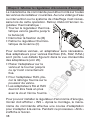
• Tourner le régulateur thermostatique vers la gauche jusqu’à
la butée (A)
• Démonter la fixation du (B)
• Retirer le régulateur thermostatique de la vanne (C)
Pour certaines vannes, un adaptateur sera nécessaire.
Des adaptateurs pour vannes Danfoss (RA, RAV, RAVL)
sont joints. Les détails figurent dans la vue d’ensemble
des adaptateurs (voir 20).
• Placer l’adaptateur sur la
vanne et le tourner jusqu’à
ce qu’il soit correctement
fixé.
• Pour l’adaptateur RAV, placer la rallonge fournie sur le
poussoir de vanne.
• Les adaptateurs RA et RAV
devront être fixés en plus
avec la vis et l’écrou fournis.
Pour pouvoir installer le régulateur d’économie d’énergie,
l’écran doit afficher « INS ». Après le montage, le mécanisme de commande effectue une course d’adaptation
pour s’adapter à la vanne. Pendant ce processus « ADA »
s’affiche à l’écran.
38
• Placer le mécanisme de commande sur la vanne.
• Serrer l’écrou d’accouplement.
• L’écran affiche « INS », appuyer sur la touche OK.
• Le mécanisme de commande effectue une course
d’adaptation (l’écran affiche « ADA », aucune commande n’est possible).
• Ensuite le mécanisme de commande est opérationnel
(mode Auto).
Si la course d’adaptation a été initiée avant le montage ou si l’écran affiche un message d’erreur (F1, F2,
F3), appuyer sur OK pour que le moteur revienne à la
position « INS ».
1. Régler le programme hebdomadaire
Le programme hebdomadaire permet de régler pour chaque jour de la semaine jusqu’à 3 phases de chauffage individuelles (7 points de commutation). La programmation
a lieu pour les jours sélectionnés, les températures devant
être définies pour une période de 00:00 à 23:59.
• Appuyer sur la touche de menu pendant plus de 3 secondes.
• L’écran affiche « PRO ».
• Confirmer par la touche OK.
• L’écran affiche « DAY ». La molette permet de sélectionner un jour de semaine individuel, toutes les journées
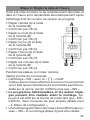
ouvrables, le week-end ou la semaine complète (ex. :
jours ouvrables).
• Confirmer par la touche OK.
• Le premier point de commutation
s’affiche (0:00) ; celui-ci ne peut pas
être modifié. Chaque second intervalle de commutation est de plus
représenté par des barres.
39
• Réglez ensuite la température qui
doit régner dans la pièce à partir
de 0:00 (ex. : 17.0 °C).
• Le prochain point de commutation
s’affiche (ex. : 6:00). Celui-ci peut
être modifié à l’aide de la molette.
• Réglez ensuite la température qui
doit régner à partir de 6:00.
• Lorsque les 7 points de commutation ont tous été attribués, 23:59
s’affiche pour confirmer le point de réglage final.
En mode automatique, la température peut être modifiée
à tout moment manuellement à l’aide de la molette. La
température modifiée reste alors active jusqu’au prochain
changement de programme.
2. Programme hebdomadaire : Exemples
Le régulateur d’économie d’énergie permet d’enregistrer
pour chaque jour de la semaine jusqu’à 3 tranches de
chauffage (7 points de commutation) avec une température
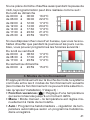
définie individuellement. Par défaut, 2 phases de chauffage de 06:00 à 09:00 et de 17:00 à 23:00 sont définies de
manière identique pour tous les jours de la semaine :
de 00:00 à 06:00 17.0°C
de 06:00 à 09:00 21.0°C
de 09:00 à 17:00 17.0°C
de 17:00 à 23:00 21.0°C
de 23:00 à 23:59 17.0°C
Des barres s’affichent à l’écran pour les périodes de
commutation pour chaque second intervalle de
temps. Dans le présent exemple, aucune barre ne
s’affiche pour l’intervalle de 00:00 à 06:00. Les barres ne s’affichent à l’écran que pour les intervalles de
06:00 à 09:00 et de 17:00 à 23:00.
40
Si une pièce doit être chauffée aussi pendant la pause de
midi, la programmation peut être réalisée comme suit :
Du lundi au dimanche
de 00:00 à 06:00 16.0°C
de 06:00 à 09:00 22.0°C
de 09:00 à 12:00 17.0°C
de 12:00 à 14:00 20.0°C
de 14:00 à 17:30 17.0°C
de 17:30 à 23:30 21.0°C
de 23:30 à 23:59 16.0°C
Si vous disposez chez vous d’un bureau, que vous ne souhaitez chauffer que pendant la journée et les jours ouvrables, vous pouvez programmes les horaires suivants :
Du lundi au vendredi
de 00:00 à 08:30 17.0°C
de 08:30 à 17:00 21.0°C
de 17:00 à 23:59 17.0°C
Du samedi au dimanche
de 00:00 à 23:59 15.0°C
3. Modes de fonctionnement
En appuyant brièvement sur la touche de mode, le système
commute entre les 3 modes de fonctionnement suivants
(les modes de fonctionnement ne peuvent être sélectionnés qu’après l’installation / l’étape 3) :
• Fonction vacances ( ) : Réglage d’une température
qui sera conservée jusqu’à un moment défini.
• Manu : Mode manuel – la température est réglée manuellement à l’aide de la molette.
• Auto : Programme hebdomadaire – régulation de température automatique selon un programme hebdomadaire enregistré.
41
4. Menu de configuration
Le menu de configuration permet de modifier les réglages.
Le menu s’affiche après un actionnement prolongé (supérieur à 3 secondes) de la touche de menu.
• PRO : Réglage du programme hebdomadaire (voir section « 1. Régler le programme hebdomadaire »).
• DAT : Modification de l’heure et de la date.
• POS : Interrogation de la position actuelle du mécanisme de commande.
• DST : Permet de désactiver la commutation automatique entre l’heure d’été et l’heure d’hiver.
• AER : Réglage de la température et de la durée d’ouverture de fenêtre pour l’abaissement automatique de la
température lors de l’aération.
• TOF : Etablissement de la température d’Offset.
• RES : Rétablir les réglages par défaut.
Les options de menus sont sélectionnées à l’aide de la
molette et confirmées par OK. Une nouvelle pression sur la
touche de menu ramène au niveau précédent. Après une
durée d’inaction de 65 secondes, le menu se ferme automatiquement.
5. Contenu de l’affichage en mode normal
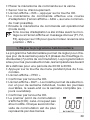
En mode normal, l’écran affiche les horaires de chauffage,
le mode de fonctionnement, la
température de consigne et le
jour de la semaine.
Les barres des périodes de
commutation s’affichent pour chaque second intervalle
de temps. Un exemple figure sous « 2. Programme hebdomadaire : exemples ».
42
6. Fonction Boost
La fonction Boost joue sur
la sensation de chaleur des
personnes. Lors de l’activation, la vanne de chauffage
est ouverte à 80 % pendant 5
minutes. L’échauffement de la
pièce dure plus de 5 minutes,
la chaleur de rayonnement dégagée par le radiateur est
perçue immédiatement.
Si vous rentrez plus tôt à la maison et souhaitez profiter
rapidement de la chaleur, ou si vous avez besoin de chaleur supplémentaire le matin après la douche, la fonction
Boost contribuera à votre bien-être.
• Appuyez sur la touche Boost pour activer la fonction
Boost.
• Les secondes de fonctionnement restantes sont décomptées (« B299 » à « B000 »).
• Après écoulement de ces 5 minutes, le mécanisme de
commande passe dans le mode actif auparavant (Auto/
Manu) et à la température réglée préalablement.
• La fonction peut être désactivée de manière anticipée
en appuyant sur la touche et en actionnant la molette
de réglage.
La chaleur de rayonnement n’a pas d’effet immédiat si le
radiateur est masqué, par ex. par un canapé. La détection de fenêtre ouverte est désactivée pendant la fonction Boost.
7. Régler la fonction de vacances
La fonction de vacances est utilisée si pendant des vacances ou une fête, une température fixe doit être maintenue
pendant une durée définie.
43
• Appuyer sur la touche de menu jusqu’à ce que le symbole de la valise ( ) s’affiche à l’écran.
• Régler à l’aide de la molette l’heure jusqu’à laquelle la
température doit être maintenue.
• Confirmer à l’aide de la touche OK.
• Régler ensuite la date à l’aide de la molette.
• Confirmer à l’aide de la touche OK.
• Régler la température à l’aide de la molette, puis confirmer
par OK. L’écran clignote en guise de confirmation.
La température réglée est conservée jusqu’à la date et
l’heure définis. Ensuite le mécanisme de commande commute en mode Auto.
8. Température de confort et température éco
La touche de température confort/éco sert ( ) à la commutation simple et confortable entre ces deux températures. Par défaut, celles-ci sont de 21,0 °C et de 17,0 °C.
Elles peuvent être adaptées comme suit :
• Maintenir la touche confort/éco ( ) pendant plus de
3 secondes.
• Le symbole du soleil ( ) et la température confort actuelle s’affichent.
• Modifier la température à l’aide de la molette, puis confirmer par OK.
• Le symbole de la lune ( ) et la température éco s’affichent.
• Modifier la température à l’aide de la molette, puis confirmer par OK.
En mode automatique, la température peut également
être modifiée à tout moment à l’aide des touches. Elle est
alors conservée jusqu’au prochain point de commutation
du programme.
44
9. Sécurité enfants / Verrouillage de la commande
La commande peut être verrouillée.
• Pour activer/désactiver le verrouillage de la commande, appuyer brièvement en même temps sur la touche
.
Menu et
• Après l’activation, l’écran affiche « LOC ».
• Pour désactiver, appuyer une nouvelle fois sur les deux
touches.
10. Régler une pause de chauffage
Si le chauffage est coupé en été, il est possible d’économiser les piles. A cet effet, la vanne est ouverte intégralement.
La protection anticalcaire est toujours réalisée.
• Pour activer la pause de chauffage, tourner la molette
vers la droite en mode manuel (Manu), jusqu’à ce que
l’écran affiche « ON ».
• Pour terminer la fonction de pause, quitter le mode manuel (Manu) et tourner la molette vers la gauche.
11. Régler le mode antigel
Si la pièce ne doit pas être chauffée, la vanne peut être fermée. La vanne n’est alors ouverte qu’en cas de risque de
gel. La protection anticalcaire est toujours réalisée.
• Pour activer le mode antigel, tourner la molette vers la
gauche en mode manuel (Manu), jusqu’à ce que l’écran
affiche « OFF ».
• Pour terminer le mode antigel, quitter le mode manuel
(Manu) et tourner la molette vers la droite.
12. Fonction d’ouverture de fenêtre
Le mécanisme de commande détecte automatiquement
que la pièce est aérée lorsque la température baisse fortement. Pour économiser des coûts de chauffage, la tem45
pérature est alors abaissée automatiquement pour une
durée définie (par défaut 15 minutes). Pendant ce temps,
l’écran affiche le symbole d’ouverture de fenêtre ( ) .
• Appuyer sur la touche de menu pendant plus de 3 secondes.
• Sélectionner l’option de menu « AER » à l’aide de la
molette.
• Confirmer par la touche OK.
• La température et la durée sont réglables à l’aide de la molette. La durée « 0 » permet de désactiver la fonction.
13. Régler la température d’Offset
Comme la température est mesurée au niveau du radiateur, il se peut qu’il fasse plus chaud ou plus froid ailleurs
dans la pièce. Pour compenser ce fait, il est possible de
définir un offset de température de ±3.5 °C. Si par ex. une
température de 18 °C est mesurée à la place des 20 °C
définis, l’offset réglé devra être de -2,0 °C.
• Appuyer sur la touche de menu pendant plus de 3 secondes.
• Sélectionner l’option de menu « TOF » à l’aide de la
molette.
• Confirmer par la touche OK.
• Modifier la température à l’aide de la molette.
• Confirmer à l’aide de la touche OK.
14. Rétablir les réglages par défaut.
L’état de livraison du mécanisme de commande peut être
rétabli manuellement. Tous les réglages effectués seront
alors perdus.
• Appuyer sur la touche de menu pendant plus de 3 secondes.
• Sélectionner l’option de menu « RES » à l’aide de la
molette.
46
• Confirmer par la touche OK.
• L’écran affiche « CFM », confirmer par OK.
15. Utilisation conforme
Le régulateur d’économie d’énergie sert à réguler une vanne de radiateur courante. Utilisez l’appareil uniquement à
l’intérieur et évitez l’exposition à l’humidité, à la poussière
ainsi qu’au soleil et aux rayonnements thermiques.
Toute utilisation autre que celle décrite dans le présent
manuel est considéré comme non conforme et entraîne
une annulation de la garantie et de la responsabilité du
fabricant. Ceci s’applique également aux modifications
et transformations. Les appareils sont destinés exclusivement à une utilisation privée.
16. Elimination des dysfonctionnements et entretien
Code d’erreur
à l’écran
Symbole de pile
)
(
F1
F2
F3
Problème
Mesure
corrective
Puissance de
pile trop faible Remplacer les piles
Mécanisme de
Vérifier
commande de
l’installation,
vanne partielle- vérifier la vanne de
ment grippé
radiateur
Vérifier la fixation
Plage de réglage du
mécanisme de
trop grande
commande
Plage de réglage Vérifier la vanne de
trop petite
radiateur
Une fois par semaine, le samedi à 12:00, le mécanisme de commande effectue une course anticalcaire afin d’empêcher l’entartrage de la vanne. L’écran
affiche « CAL ».
47
17. Consignes pour l’élimination
L’appareil ne doit pas être éliminé avec les
ordures ménagères !
Les appareils électroniques sont à éliminer
conformément à la directive relative aux appareils électriques et électroniques usagés par les
points de collecte locaux d’appareils usagés !
Le sigle CE est un sigle de libre circulation destiné
uniquement aux administrations ; il ne constitue
pas une garantie de caractéristiques.
18. Consignes de sécurité
Les appareils ne sont pas des jouets, ne permettez pas à
des enfants de jouer avec eux. Ne laissez pas traîner les matériels d’emballage, ils peuvent constituer des jouets dangereux pour les enfants. N’ouvrez pas l’appareil, il ne contient
aucune pièce réparable par l’utilisateur. En cas de dysfonctionnement, renvoyez l’appareil au service après-vente.
19. Caractéristiques techniques
Tension d’alimentation :
3V
Courant absorbé maximal : 100 mA
Piles :
2 piles LR6 / Mignon / AA
Durée de vie des piles :
env. 3 ans
Ecran :
écran LCD
Dimensions du boîtier :
63 x 66 x 92 mm (l x h x p)
Branchement :
M30 x 1,5
Température ambiante : +5 bis +55°C
Température de surface max. : +90°C (du radiateur)
Course linéaire : 4,2 mm
Force élastique : au maximum 80 N
Sous réserve de modifications techniques destinées à l’amélioration du système.
48
20. Vue d’ensemble des adaptateurs
Fabricant
Figure
Adaptateur
Heimeier, MNG,
Junkers, Landis&Gyr
« Duodyr », HoneywellBraukmann, Oventrop,
Schlösser, Simplex, Valf
Sanayii, Mertik Maxitrol,
Watts, Wingenroth (Wiroflex), R.B.M., Tiemme, Jaga
Aucun adaptateur n’est
nécessaire
Danfoss RA
Joint à la
livraison
Danfoss RAV
Joint à la
livraison
Danfoss RAVL
Joint à la
livraison
D’autres adaptateurs sont disponibles en tant qu’accessoires.
49
Inhoudsopgave
I. Bediening en display.................................................51
II. Algemene werking.....................................................52
Stap 1: batterijen plaatsen (vervangen)............................52
Stap 2: datum en tijd instellen..........................................53
Stap 3: energiebesparende regelaar monteren................54
1. Weekprogramma instellen.........................................55
2. Weekprogramma: voorbeelden.................................56
3. Bedrijfsmodi..............................................................57
4. Configuratiemenu......................................................57
5. Display tijdens het normale bedrijf............................58
6. Boostfunctie..............................................................58
7. Vakantiefunctie instellen............................................59
8. Comfort- en verlaagde temperatuur.........................60
9. Kinderslot, bediening vergrendelen..........................60
10. Verwarmingspauze instellen......................................61
11. Vorstbeveiliging instellen...........................................61
12. ‘Raam open’-functie.................................................61
13. Offsettemperatuur instellen.......................................62
14. Fabrieksinstellingen opnieuw instellen......................62
15. Beoogd gebruik.........................................................63
16. Storingen oplossen en onderhoud............................63
17. Verwijdering...............................................................64
18. Veiligheidsinstructies.................................................64
19. Technische eigenschappen.......................................65
20. Adapteroverzicht.......................................................65
Lees deze handleiding zorgvuldig door, vóór u het apparaat in gebruikneemt. Bewaar de handleiding, om ze ook
later nog te kunnen raadplegen.
50
1e uitgave Nederlands 08/2010
Documentatie © 2010 eQ-3 Ltd., Hong Kong.
Alle rechten voorbehouden.
CC-RT-B-CyK-W, V1.0 927-26
I. Bediening en display
A
B
C
D
E
F
G
H
I
A Bevestiging
B Vakantiefunctie ( ), verlaagde/comforttemperatuur
( ), handmatig bedrijf (Manu), automatisch bedrijf
(Auto)
C ‘Raam open’- symbool ( )weekdag, ‘batterij leeg’ )
symbool ( D Mode-/menutoets: Druk de toets kort in om om te schakelen tussen automatisch bedrijf, handmatig bedrijf en
vakantiefunctie; houd deze toets langer dan 3 seconden ingedrukt, om het configuratiemenu te openen
E Instelwiel: instellingen wijzigen (bijv. temperatuur)
F Ingestelde schakelperioden in het weekprogramma
G Temperatuurweergave, tijd- en datumweergave,
menupunten, functies
-toets: omschakelen tussen verlaagde en comfortH
temperatuur
I Boost-/OK-toets: In het automatisch en handmatig
bedrijf: activering van de boostfunctie; in de vakantiefunctie en in het menu: bevestigen/opslaan
51
II. Algemene werking
De energiebesparende regelaar voor radiatoren regelt de
kamertemperatuur tijdgestuurd. De stelaandrijving beweegt
een kraan, om de warmtetoevoer aan de radiator te regelen. De regelaar past op alle gangbare radiatorkranen. De
boostfunctie opent bij activering gedurende 5 minuten de
kraan, om direct een aangenaam warmtegevoel in de kamer te creëren.
De montage gebeurt in 3 eenvoudige stappen.
Stap 1: batterijen plaatsen (vervangen)
• Verwijder het deksel van het batterijvak.
• Plaats 2 nieuwe batterijen
(LR6 / Mignon / AA) in de
batterijvakken. Let daarbij
op de juiste polariteit.
• Breng het deksel weer op
het batterijvak aan, tot het
vastklikt.
De levensduur van nieuwe
alkalibatterijen bedraagt ca.
) verschijnt,
3 jaar. Als op het display een lege batterij (
dienen de batterijen te worden vervangen. Na de verwijdering van de batterijen dient u ca. 1 minuut te wachten,
alvorens u nieuwe batterijen plaatst. Dit apparaat werkt
niet op accuvoeding.
Normale batterijen mogen nooit worden opgeladen.
Er bestaat explosiegevaar.
Werp batterijen niet in het vuur!
Batterijen mogen niet worden kortgesloten!
52
Oude batterijen horen niet in de vuilnisbak!
Lever ze in bij een verzamelpunt!
Stap 2: datum en tijd instellen
Als de batterijen werden geplaatst of vervangen, verschijnt
eerst kort het versienummer van de firmware. Daarna wordt
automatisch gevraagd datum en tijd in te voeren.
• Stel het jaartal (A) met het
instelwiel (B) in.
• Bevestig met OK (C).
• Stel de maand (A) met het
instelwiel (B) in.
• Bevestig met OK (C).
• Stel de dag (A) met het
instelwiel (B) in.
• Bevestig met OK (C).
• Stel de uren (A) met het
instelwiel (B) in.
• Bevestig met OK (C).
• Stel de minuten (A) met het
instelwiel (B) in.
• Bevestig met OK (C).
A
BC
Tijdens het invoeren trekt de motor de regelpen al terug.
• De indicatie ‘INS’ met draaiende ‘∏’ geeft aan dat de
motor nog in beweging is. Zodra de stelaandrijving op
de kraan kan worden gemonteerd, verschijnt nog slechts
‘INS’ op het display.
• Het weekprogramma en andere instellingen kunnen
vóór de montage worden aangepast. Druk daarvoor
op de modetoets, terwijl op het display ‘INS’ staat. Meer
details vindt u onder ‘4. Configuratiemenu’.
• Wanneer de programmering voltooid is, verschijnt opnieuw ‘INS’ op het display. Nu kan de montage (stap 3)
worden uitgevoerd.
53
Stap 3: energiebesparende regelaar monteren
De stelaandrijving kan op alle gangbare radiatorkranen worden
gemonteerd. Hiervoor hoeft het water niet te worden afgelaten
en is evenmin een ingreep in het verwarmingssysteem nodig.
Eerst dient de oude thermostaatkop te worden verwijderd:
• Draai de thermostaatkop tot
de eindaanslag naar links (A).
• Maak de bevestiging van de
thermostaatkop los (B).
• Trek de thermostaatkop van
de kraan (C).
Voor sommige kranen dient een
adapter te worden gebruikt.
Adapters voor Danfoss-kranen (RA, RAV, RAVL) zijn
bijgeleverd. Meer details vindt u
in het adapteroverzicht (zie 18).
• Plaats de adapter op de kraan
en draai hem, tot hij stevig
vastzit.
• Bij de RAV-adapter dient het
bijgeleverde verlengstuk op de
stang van de kraan te worden
gestoken.
• De adapters RA en RAV
moeten aanvullend met de
bijgeleverde schroef en moer worden bevestigd.
Om de energiebesparende regelaar te kunnen monteren, moet
op het display ‘INS’ staan. Na de montage voert de stelaandrijving een adapteerbeweging om zich aan de kraan aan te passen. Tijdens deze beweging verschijnt ‘ADA’ op het display.
• Plaats de stelaandrijving op de kraan.
54
• Draai de wartelmoer vast.
• Op het display verschijnt ‘INS’. Druk op de OK-toets.
• De stelaandrijving voert een adapteerbeweging uit (op het
display verschijnt ‘ADA’, er is geen bediening mogelijk).
• Daarna is de stelaandrijving gebruiksklaar (automatische modus).
Werd de adapteerbeweging al voor de montage uitgevoerd of wordt een foutmelding (F1, F2, F3) gegevens, dan dient u op OK te drukken. De motor neemt
dan opnieuw de positie ‘INS’ in.
1. Weekprogramma instellen
In het weekprogramma kunnen voor elke weekdag apart
tot 3 verwarmingsfasen worden ingesteld (7 schakeltijden).
De programmering gebeurt voor de geselecteerde dagen,
waarbij voor de periode van 00.00 tot 23.59 uur temperaturen dienen te worden ingesteld.
• Hou de menutoets langer dan 3 seconden ingedrukt.
• Op het display verschijnt ‘PRO’.
• Bevestig met de OK-toets.
• Op het display verschijnt ‘DAY’. Met het instelwiel
kan een afzonderlijke weekdag, alle werkdagen, het
weekeinde of de hele week worden geselecteerd
(voorbeeld werkdagen).
• Bevestig met de OK-toets.
• De eerste schakeltijd wordt weergegeven (0:00). Deze kan niet worden
veranderd. Elk tweede schakelinterval wordt bovendien door een balk
voorgesteld.
• Daarna dient de temperatuur te worden ingesteld die vanaf 0.00 uur in de
kamer moet worden aangehouden
(bijv. 17,0 °C).
55
• De volgende schakeltijd wordt
weergegeven (bijv. 6:00). Deze
kan met het instelwiel worden veranderd.
• Stel daarna de temperatuur in die
vanaf 6.00 uur moet worden aangehouden.
• Als alle 7 schakeltijden ingesteld zijn, verschijnt ter bevestiging 23.59 uur als eindtijdstip.
In de automatische modus kan de temperatuur te allen
tijde via het instelwiel worden veranderd. De gewijzigde
temperatuur blijft dan ingesteld tot de volgende programmawijziging.
2. Weekprogramma: voorbeelden
Met de energiebesparende regelaar kunnen voor elke
weekdag tot 3 verwarmingsperioden (7 schakeltijden)
met elk een eigen temperatuur worden geprogrammeerd.
Standaard zijn voor alle weekdagen dezelfde twee verwarmingsfasen ingesteld van 6.00 tot 9.00 uur en van 17.00
tot 23.00 uur:
van 00:00 tot 06:00 17.0°C
van 06:00 tot 09:00 21.0°C
van 09:00 tot 17:00 17.0°C
van 17:00 tot 23:00 21.0°C
van 23:00 tot 23:59 17.0°C
Op het display wordt voor elk tweede tijdsinterval een
balk voor de schakelperioden weergegeven. Bij dit
voorbeeld verschijnen geen balken voor het interval
0.00 tot 6.00 uur. Alleen voor de intervallen 6.00 tot
9.00 en 17.00 tot 23.00 worden balken op het display
weergegeven.
Als een ruimte ook tijdens de middag moet worden verwarmd, kan de programmering er als volgt uitzien:
56
Maandag tot en met zondag
van 00:00 tot 06:00 16.0°C
van 06:00 tot 09:00 22.0°C
van 09:00 tot 12:00 17.0°C
van 12:00 tot 14:00 20.0°C
van 14:00 tot 17:30 17.0°C
van 17:30 tot 23:30 21.0°C
van 23:30 tot 23:59 16.0°C
Hebt u thuis een kantoor dat u alleen overdag op werkdagen wilt verwarmen, dan kunt u bijvoorbeeld de volgende
tijden programmeren:
Maandag tot en met vrijdag
van 00:00 tot 08:30 17.0°C
van 08:30 tot 17:00 21.0°C
van 17:00 tot 23:59 17.0°C
Zaterdag en zondag
van 00:00 tot 23:59 15.0°C
3. Bedrijfsmodi
Met een korte druk op de modetoets kan worden omgeschakeld tussen de volgende 3 bedrijfsmodi (de bedrijfsmodi
kunnen pas na de installatie (stap 3) worden geselecteerd):
• Vakantiefunctie ( ): instellen van een temperatuur die
tot een vast tijdstip moet worden aangehouden.
• Manu: handmatig bedrijf – de temperatuur wordt handmatig ingesteld via het instelwiel.
• Auto: weekprogramma – automatische temperatuurregeling volgens het opgeslagen weekprogramma.
4. Configuratiemenu
In het configuratiemenu kunnen instellingen worden gewijzigd. Het menu wordt geopend door de menutoets langer
dan 3 seconden ingedrukt te houden.
57
• PRO: instelling van het weekprogramma (zie ‘1. Weekprogramma instellen’)
• DAT: wijzigen van datum en tijd
• POS: opvragen van de huidige positie van de stelaandrijving
• DST: de automatische omschakeling tussen zomer- en
wintertijd kan worden gedeactiveerd
• AER: instellen van de ‘raam open’-temperatuur en -tijd
voor de automatische temperatuurverlaging tijdens het
ventileren
• TOF: instellen van de offsettemperatuur
• RES: fabrieksinstellingen opnieuw instellen
De menupunten worden met het instelwiel geselecteerd en
met OK bevestigd. Door nogmaals op de menutoets te drukken, keert men naar het vorige niveau terug. Na 65 seconden
van inactiviteit wordt het menu automatisch gesloten.
5. Display tijdens het normale bedrijf
Tijdens het normale bedrijf
worden schakelperioden in het
weekprogramma, bedrijfsmodus, ingestelde temperatuur
en de weekdag vermeld.
De balken voor de schakelperioden van het weekprogramma worden voor elk tweede tijdsinterval weergegeven. Een voorbeeld vindt u onder ‘2. Weekprogramma:
voorbeelden’.
6. Boostfunctie
De boostfunctie maakt gebruik van de menselijke warmte-ervaring. Bij activering wordt de radiatorkraan gedurende 5 minuten voor 80% geopend. De verwarming van
58
een ruimte duurt langer dan
5 minuten, maar de door de
radiator afgegeven stralingswarmte kan direct worden
waargenomen.
De boostfunctie helpt u, wanneer u vroeger naar huis komt en het snel warm wilt hebben of wanneer u ’s ochtends na het douchen wat extra
warmte nodig hebt.
• Druk op de boosttoets om de boostfunctie te activeren.
• De resterende functietijd wordt per seconde afgeteld
(‘B299’ tot ‘B000’).
• Na afloop van deze 5 minuten schakelt de stelaandrijving
weer terug naar de laatste actieve modus (auto/hand)
met de eerder ingestelde temperatuur.
• De functie kan ook altijd vroegtijdig worden gedeactiveerd met een druk op de toets of met behulp van
het instelwiel.
De stralingswarmte heeft geen onmiddellijk effect, als de
radiator verborgen is (bijv. achter een sofa). Tijdens de
boostfunctie is de ‘raam open’-detectie uitgeschakeld.
7. Vakantiefunctie instellen
Als tijdens een vakantie of feest voor een bepaalde periode een vaste temperatuur moet worden aangehouden,
kan de vakantiefunctie worden gebruikt.
• De menutoets dient herhaaldelijk kort te worden ingedrukt, tot op het display het koffersymbool ( ) verschijnt.
• Stel met het instelwiel in tot welke tijd de temperatuur
moet worden aangehouden.
• Bevestig met de OK-toets.
59
• Daarna dient met het instelwiel de datum te worden
ingesteld.
• Bevestig met de OK-toets.
• Stel met het instelwiel de temperatuur in en bevestig met
OK. Het display knippert ter bevestiging.
De ingestelde temperatuur wordt aangehouden tot het
ingestelde tijdstip. Daarna keert de stelaandrijving weer
naar de automatische modus terug.
8. Comfort- en verlaagde temperatuur
De toets ‘comfort-/verlaagde temperatuur’ ( ) dient
voor de comfortabele en eenvoudige omschakeling tussen deze beide temperaturen. Standaard zijn 21,0 °C
resp. 17,0 °C ingesteld. Deze waarden kunnen als volgt
worden aangepast:
• Hou de toets ‘comfort-/verlaagde temperatuur’ ( ) langere tijd ingedrukt (langer dan 3 seconden)
• Op het display verschijnen het zonnesymbool en de huidige
comforttemperatuur.
• Verander de temperatuur met behulp van het instelwiel
en bevestig met OK.
• Nu verschijnen het maansymbool ( ) en de verlaagde
temperatuur.
• Verander de temperatuur met behulp van het instelwiel
en bevestig met OK.
Ook in de automatische modus kan de temperatuur te allen
tijde met de toetsen worden veranderd. Deze blijft dan ingesteld tot de volgende schakeltijd van het programma.
9. Kinderslot, bediening vergrendelen
De bediening kan worden vergrendeld.
• Om de vergrendeling te activeren/deactiveren, dienen de
tegelijk kort te worden ingedrukt.
toetsen Menu en
60
• Na de activering verschijnt ‘LOC’ op het display.
• Het slot wordt gedeactiveerd door nogmaals op beide
toetsen te drukken.
10. Verwarmingspauze instellen
Is de verwarming in de zomer uitgeschakeld, dan kunnen
de batterijen worden gespaard. Daarvoor wordt de kraan
volledig geopend. De kalkbescherming blijft actief.
• Om de verwarmingspauze te activeren, dient het instelwiel
in de handmatige modus (Manu) naar rechts te worden
gedraaid, tot op het display ‘ON’ verschijnt.
• Om de pauze te beëindigen, dient de handmatige modus
(Manu) te worden verlaten of het instelwiel naar links te
worden gedraaid.
11. Vorstbeveiliging instellen
Als de ruimte niet moet worden verwarmd, kan de kraan
worden gesloten. Alleen bij vorstgevaar wordt de kraan
geopend. De kalkbescherming blijft actief.
• Om de vorstbeveiliging te activeren, dient het instelwiel
in de handmatige modus (Manu) naar links te worden
gedraaid, tot op het display ‘OFF’ verschijnt.
• Om de functie te beëindigen, dient de handmatige modus
(Manu) te worden verlaten of het instelwiel naar rechts te
worden gedraaid.
12. ‘Raam open’-functie
De stelaandrijving detecteert bij een sterk dalende temperatuur automatisch dat de ruimte wordt geventileerd.
Om verwarmingskosten te besparen, wordt de temperatuur dan automatisch voor een bepaalde periode verlaagd
(standaard 15 minuten). Ondertussen verschijnt op het
61
display het ‘raam open’-symbool ( ).
• Hou de menutoets langer dan 3 seconden ingedrukt.
• Selecteer met het instelwiel het menupunt ‘AER’.
• Bevestig met de OK-toets.
• De temperatuur en tijd kunnen met het instelwiel worden
ingesteld. De functie kan worden gedeactiveerd door
voor de tijd de waarde ‘0’ in te stellen.
13. Offsettemperatuur instellen
Omdat de temperatuur aan de radiator wordt gemeten, kan
het op een andere plek in de ruimte kouder of warmer zijn.
Om dit te compenseren, kan een temperatuuroffset van
± 3,5 °C worden ingesteld. Wordt bijv. 18 °C gemeten in
plaats van de ingestelde 20 °C, dan dient een offset van 2,0 °C te worden ingesteld.
• Hou de menutoets langer dan 3 seconden ingedrukt.
• Selecteer met het instelwiel het menupunt ‘TOF’.
• Bevestig met de OK-toets.
• Verander de temperatuur met het instelwiel.
• Bevestig met de OK-toets.
14. Fabrieksinstellingen opnieuw instellen
De oorspronkelijke leveringstoestand van de stelaandrijving kan handmatig worden hersteld. Hierbij gaan alle
handmatig gewijzigde instellingen verloren.
• Hou de menutoets langer dan 3 seconden ingedrukt.
• Selecteer met het instelwiel het menupunt ‘RES’.
• Bevestig met de OK-toets.
• Er verschijnt ‘CFM’ op het display. Bevestig met OK.
62
15. Beoogd gebruik
De energiebesparende regelaar dient voor de regeling van
een gangbare radiatorkraan. Gebruik het apparaat uitsluitend binnen en vermijd blootstelling aan vocht, stof, zonlicht en warmtestraling.
Elk ander gebruik dan in deze handleiding beschreven is,
geldt als oneigenlijk en leidt tot de uitsluiting van garantie
en aansprakelijkheid. Dit geldt ook voor verbouwingen en
veranderingen. De apparaten zijn uitsluitend voor particulier gebruik bedoeld.
16. Storingen oplossen en onderhoud
Foutcode op
het display
Batterijsymbool
)
(
F1
F2
F3
Probleem
Oplossing
BatterijcapaciBatterijen
teit te laag
vervangen
KraanInstallatie controaandrijving
leren, radiatorkraan
stroef
controleren
Bevestiging
van
Instelbereik
de stelaandrijving
te groot
controleren
Instelbereik
te klein
Radiatorkraan
controleren
Eenmaal per week, op zaterdag om 12.00 uur, voert
de stelaandrijving een ontkalkingsbeweging uit, om
de kraan tegen verkalking te beschermen. Er verschijnt ‘CAL’ op het display.
63
17. Verwijdering
Het apparaat hoort niet in de vuilnisbak!
Elektronische apparaten moeten overeenkomstig
de richtlijn voor afgedankte elektrische en elektronische apparaten worden ingeleverd bij de inzamelpunten voor afgedankte apparaten!
De CE-markering is een label voor het vrij verkeer
van goederen binnen de Europese Unie en is uitsluitend bedoeld voor de betreffende autoriteiten. Het is
geen garantie voor bepaalde eigenschappen.
18. Veiligheidsinstructies
De apparaten zijn geen speelgoed! Laat kinderen er niet mee
spelen. Laat verpakkingsmateriaal niet rondslingeren. Het kan
door kinderen als gevaarlijk speelgoed worden gebruikt. Open
het apparaat niet. Het bevat geen onderdelen die door de gebruiker moeten worden onderhouden. In het geval van een defect dient u het apparaat naar de klantenservice te sturen.
19. Technische eigenschappen
Voedingsspanning:
3V
Max. stroomverbruik:
100 mA
Batterijen:
2x LR6 / Mignon / AA
Levensduur batterijen:
ca. 3 jaar
Display:
lcd-scherm
Afmetingen kast:
63 x 66 x 92 mm (b x h x d)
Aansluiting:
M30 x 1,5
Omgevingstemperatuur: +5 tot +55°C
Max. oppervlaktetemperatuur: +90°C (van de radiator)
Lineaire slag: 4,2 mm
Veerkracht: max. 80 N
Technische wijzigingen ter verbetering zijn
voorbehouden.
64
20. Adapteroverzicht
Fabrikant
Afbeelding
Adapter
Heimeier, MNG, Junkers,
Landis&Gyr „Duodyr“,
Honeywell- Braukmann,
Oventrop, Schlösser, Simplex, Valf Sanayii, Mertik
Maxitrol, Watts,
Wingenroth (Wiroflex),
R.B.M., Tiemme, Jaga
geen
adapter
benodigd
Danfoss RA
bijgeleverd
Danfoss RAV
bijgeleverd
Danfoss RAVL
bijgeleverd
Andere adapters zijn als toebehoren verkrijgbaar.
65
66
67
eQ-3 AG
Maiburger Straße 29
D-26789 Leer
www.eQ-3.com
68