1
BDA 34873-Rev-RZ_Layout 1 21.06.13 09:14 Seite 2
GB
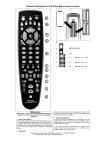
Universal TV- DVB Controller UR Z2
Before you start using the device, please first read through the safety information and this
operating instruction very carefully. Only then you can use all the functions safely and reliably. Please maintain the operating instruction well and pass on to possible other owners.
Intended use
Universal remotes replace original remote controls etc. of consumer electronics devices. The device is
meant for sole use in private households and may not be used for commercial purposes. Any other use
is not deemed as intended use and may lead to material damages or even to personal injuries.
The manufacturer does not assume any liability for damages that have occurred due to unintended use.
Battery/rechargeable battery safety
Please read these instructions very carefully. Disregarding these instructions can cause
damages/injuries and possibly even an explosion of batteries/rechargeable batteries! Do not shortcircuit the contacts, for example by common storage with metallic objects. Do not expose batteries/
rechargeable batteries to long periods of direct sunlight or heat. Do not throw batteries/rechargeable
batteries into the fire. Do not open batteries/rechargeable batteries, they do not contain any parts that
need to be maintained. Only replace batteries/rechargeable batteries with the same type or with an
equivalent recommended by the manufacturer. Accumulators only: For charging accumulators, do only
use the charging functions integrated in the device or any other suitable chargers. Never charge batteries.
Inserting the batteries
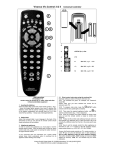
Open the battery flap on the back of the remote control, press the tongue lightly downwards, then insert
2 alkaline AA batteries. Check that the polarity markings on the batteries and in the battery compartment
are correctly lined up (+=+), then close the flap carefully. – Always use undamaged batteries.
Adapting to appliances
In order to control e.g. your TV or DVB you must adapt or set the remote control to it. There are two
ways of doing so: direct control code entry or code search.
Direct control code entry using the enclosed list
Example: setting to control a Panasonic television set:
1. The attached list gives, for example, the Panasonic Code 0158. Please make sure you have
selected the correct list for television sets (TV).
2. To prepare code entry, press the SET button, keep it pressed and then press the required appliance
button, e.g. TV, additionally until the lamp (LED) lights constantly.
3. Then press the number buttons (e.g. 0158) in sequence.
4. Once the numbers have been entered the lamp goes out and the remote control is ready to control
your appliance.
5. Finally, test the control code setting by trying to control (in this example) your television set. If it does
not work at all or not correctly try a different code from the list or the code search (see below). You can
terminate the mode by pressing any device button.
Code search
If the brand of your appliance is not in the list or none of the codes given fits, we recommend a code
search.
Manual code search
1. Switch on the appliance to be controlled. Program is running.
2. To prepare code search, press the SET button, keep it pressed and then press the required
appliance button, e.g. TV, additionally until the lamp (LED) lights constantly.
3. Then point the remote control at the appliance to be controlled.
4. Briefly press the SET button once. The lamp (LED) blinks.
5. Press the ON/OFF
(appliance on/off) button repeatedly for testing the next code, approx. every
1,5 seconds, until the appliance, e.g. your TV reacts by power off. - If your appliance has switched itself
off you must switch it back on again, e.g. on the appliance or with the original remote control, to continue
searching. - When your appliancereacts you can also try out other buttons without interrupting the
search. If some buttons do not work properly, simply continue searching with ON/OFF.
6. When your appliance reacts correctly, press the appliance button, e.g. TV, and end the search. The
lamp (LED) goes out. - The UR Z2 continues with the search at the point where you interrupted it. The
code last entered remains stored. The search stops after approx. 30 seconds of inactivity.
2