1
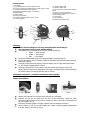
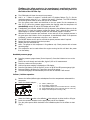
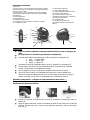
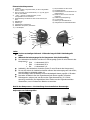
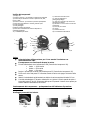
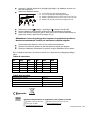
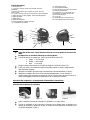
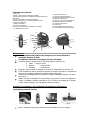
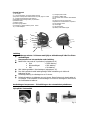
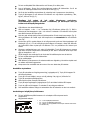
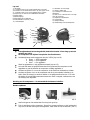
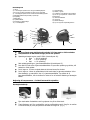
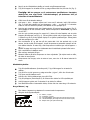
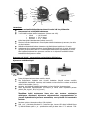
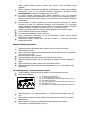
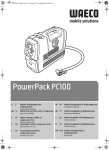
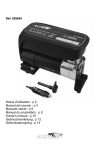
Control lay out 1) LCD display 2) + push & hold button to increase preset pressure 3) M push to select pressure measurement. PSI, KPA, Kg/cm² or BAR 4) – push & hold to decrease preset pressure 5) Handheld gauge LED light switch, on/off button 6) Deflation outlet 7) Inflation outlet + 8) Pressure gauge release 9) Compressor / Inflator selection power switch 10) 7 x Valve adapters 11) LED light power switch 12) Inflator / deflator pipe 13) Air hose & valve connector with deflation button 14) Items 10 & 12 are stored in the compartment in underneath the compressor 15) DC charging socket 16) 5x LED light 17) Air hose storage 18) Battery level indicator lights 18 6 1 3 7 2 4 5 17 8 13 16 9 12 15 14 11 10 Charging Before first use charge for 12 hours using the 240v mains charger. The compressor will not work whilst charging. The battery level is indicated by the 3 LED’s (Control Layout 18). Green = 100% change Amber = 50% charge Red = 0% charge Insert the charging lead into the DC charging socket (Control Layout 15). The red LED next to the DC charging socket will illuminate when charging and extinguish when fully charged. If charging using the mains charger, plug the charger into the 240v socket and switch on. Full charge will take approx 12 hours. If charging using the DC in car charger, start the vehicle then plug into the 12v DC socket. Remove from the DC socket when the engine is switched off to prevent flattening the vehicle battery. Full charge will take approx 4 hours. Compressor Operation – preset the automatic pressure gauge:Vehicle tyre inflation Fig 1 Fig 2 Fig 3 Fig 4 Remove the dust cap from the tyre valve and store in a safe place. Carefully pull out the air hose from the rear of the compressor. Screw the valve connector clockwise onto the tyre valve. Ensure the valve is correctly connected but do not over tighten. (Fig 1) Ensure the pressure gauge is correctly inserted onto the compressor housing. Press M button to turn on the LCD display and select a pressure gauge measurement from Bar, Kg/cm², KPA and Psi (Fig 2)