1
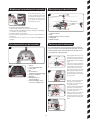
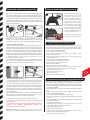
Choosing the flight area
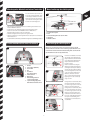
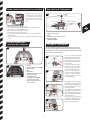
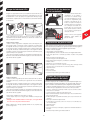
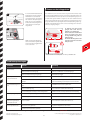
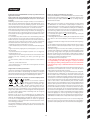
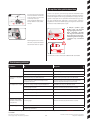
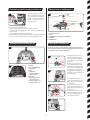
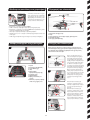
The forward-/backward lever controls
the helicopter´s pitch forward and backward. When shifting the lever forward
the nose of the helicopter will move
downwards and the helicopter will fly
forward. When shifting the forward-/
backward lever backward the helicopter
will move backwards and the helicopter
will fly backward.
5
+
‒
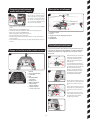
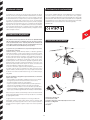
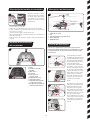
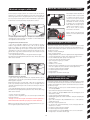
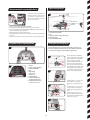
When being prepared for the first flight you should choose a closed room without any
persons or obstacles which is as big as possible. Due to the size and controllability of
the helicopter experienced pilotes may be able to fly the helicopter in relatively small
rooms. For your first flights we strongly recommend to choose a room with a minimum
floor space of 3 x 3 metres and 2.40 metres of height. After having trimmed your helicopter for flight and having made yourself familiar with the controlling and its functions
you may start flying in smaller and less open environments.
6
+
2,4m
‒
3m
4m
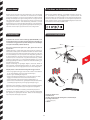
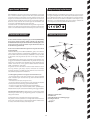
After having made yourself familiar with
the main control functions and having
chosen an appropriate area for flying
the helicopter, you can start the first
flight.
The helicopter may be flown out of
doors, but only on calm days or days
of very little wind.
Please note that in spite of calm conditions near the ground, it can be
very windy a little further from the
ground.
If this advice is disregarded, the helicopter may suffer irreparable damage.
For more information on our RC-products please visit carrera-rc.com.
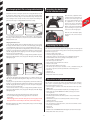
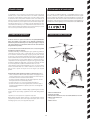
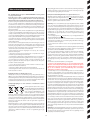
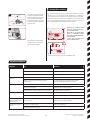
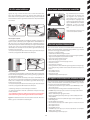
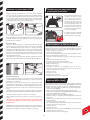
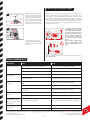
Troubleshooting
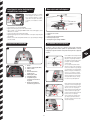
Problem
Cause
Solution
Remote control
does not work.
The ON/OFF-power switch is turned “OFF”.
Turn the ON/OFF-power switch “ON”.
The batteries have been wrongly inserted.
Check if the batteries have been correctly inserted.
The batteries do not have enough power.
Insert new batteries.
The helicopter cannot be
controlled with the remote
control
The power switch on the reomote control is turned “OFF”.
First turn the power switch on the remote control “ON”.
The remote control is possibly not correctly frequency bound with the
receiver on the helicopter.
Please carry out a frequency bind between the helicopter and the
remote control as described in “frequency bind between model and
remote control”.
The rotor blades do not rotate.
The power switch on the model or the controller is at “OFF”
Turn the ON/OFF-power switch “ON”.
The rechargeable battery is too weak or has run out of power.
Charge the battery (see chapter “Charging the battery”).
The battery connection on the helicopter is not made.
Make the plugged connection to be found on the helicopter.
The rotor blades rotate too slowly.
Push the throttle up.
The battery´s power is not sufficient.
Charge the battery (see chapter “Charging the battery”).
The battery is too weak.
Charge the battery (see chapter “Charging the battery”).
Loss of throttle control.
Push the throttle down slowly.
The helicopter does not lift.
During flight, the helicopter
loses speed and height
without any obvious reason.
The helicopter lands too
quickly.
Throttle has been pushed down too quickly.
For the latest version of these operating instructions and information on replacement and spare parts available, please visit carrera-rc.com in the service area.
Errors and changes excepted
Colours / final design – changes excepted
13
Technical changes and design-related changes excepted
Pictograms = symbolic photos