1
EN
EN
Operating Instructions:
1-Year Limited Warranty
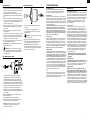
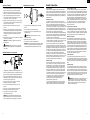
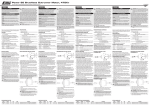
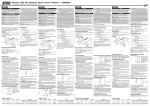
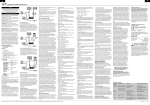
Changing Shaft Orientation
1. This brushless motor requires a sensorless brushless speed control
(electronic speed control or ESC). Failure to use the correct ESC may result
in damage to the motor and/or speed control. Refer to your ESC instructions
for correct operation with this motor and a propeller.
2. Where needed, always attach motor with short screws that do not enter
and damage the motor. Use screws and other hardware included with your
motor.
3. Where needed, install included 3 bullet connectors (EFLA249) on the output
wires of your ESC using solder and heat shrink insulation (to prevent short
circuiting). The 3 motor wires can be connected in any order to the 3 ESC
output wires or output port on an ESC.
4. Make sure the motor turns in the correct direction for your model. Change
the direction the motor turns by changing the connection of any 2 motor
wires on the ESC.
5. Install a propeller on the motor shaft after you ensure the motor turns
in the proper direction.
6. Make sure the motor is mounted on the model to ensure good air circulation
during operation. The motor generates heat when operated at maximum
power. The user is responsible to make sure the motor does not overheat.
Overheating the motor is not covered under any warranty.
7. Never cut or otherwise change the length or size of motor wires. Remove
connectors by heating and removing solder.
NOTICE: Changing the motor wires is improper modification of the motor
and may cause the motor to fail.
CAUTION: When the motor is connected to power, use extreme
caution or injury and damage can result. Motors turn propellers at dangerously high RPM (revolutions per minute) so stay clear of the motor and
propeller during operation.
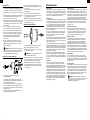
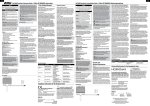
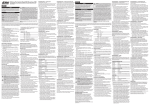
Motor Mounting using an X-Mount
A
A
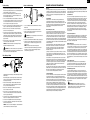
Illustration shows installation of a motor and X-mount on a firewall.
Other attachment options are available such as motor installation in
the fuselage (requiring the reversing of the shaft as described above)
or attaching the motor using aftermarket standoffs when using cowlings.
1. Refer to model plans for the recommended motor installation position. Align
and center the motor mount on the firewall for correct propeller clearance.
2.First trial-fit the aluminum X-mount against the front of the firewall of your
model and use a pen to mark the locations of the four screw holes.
3.Drill appropriate size holes to fit the included blind nuts. Always be sure to
maintain the proper thrust line and account for adequate prop/spinner clearance for your model.
4.Attach the included aluminum X-mount to the motor using 4 included
flat head (countersunk) screws.
5. Install included 4 blind nuts on the inner side of the firewall.
6. Attach the aluminum X-mount to the firewall using the blind nuts and
included 4 socket head cap 3mm screws and 4 washers.
A
What this Warranty Covers
Horizon Hobby, Inc., (Horizon) warranties that the Products purchased
(the “Product”) will be free from defects in materials and workmanship
for a period of 1 year from the date of purchase by the Purchaser.
A
A
1. Loosen the setscrew on the shaft collar and remove the collar
from the shaft.
2. Loosen the two setscrews on the rotating end of the motor.
3. Push the shaft through the motor. A small hammer is required
to lightly tap the shaft.
CAUTION: DO NOT bend or damage the motor shaft as injury
or property damage may result.
4. Install the shaft collar against the bearing using the setscrew.
5. Tighten both setscrews on the rotating end of the motor. Tighten
one setscrew against the flat face on the motor shaft.
NOTICE: At final assembly, apply a small amount of blue
threadlock (example A shown in illustration) to setscrews to keep
these fasteners from becoming loose. DO NOT use a large amount
of threadlock that can get in the motor.
What is Not Covered
This warranty is not transferable and does not cover (i) cosmetic damage, (ii)
damage due to acts of God, accident, misuse, abuse, negligence, commercial
use, or due to improper use, installation, operation or maintenance, (iii) modification of or to any part of the Product, (iv) attempted service by anyone other
than a Horizon Hobby authorized service center, or (v) Products not purchased
from an authorized Horizon dealer.
OTHER THAN THE EXPRESS WARRANTY ABOVE, HORIZON MAKES NO OTHER
WARRANTY OR REPRESENTATION, AND HEREBY DISCLAIMS ANY AND ALL
IMPLIED WARRANTIES, INCLUDING, WITHOUT LIMITATION, THE IMPLIED WARRANTIES OF NON-INFRINGEMENT, MERCHANT ABILITY AND FITNESS FOR A
PARTICULAR PURPOSE. THE PURCHASER ACKNOWLEDGES THAT THEY ALONE
HAVE DETERMINED THAT THE PRODUCT WILL SUITABLY MEET THE REQUIREMENTS OF THE PURCHASER’S INTENDED USE.
Purchaser’s Remedy
Horizon’s sole obligation and purchaser’s sole and exclusive remedy shall be
that Horizon will, at its option, either (i) service, or (ii) replace, any Product
determined by Horizon to be defective. Horizon reserves the right to inspect
any and all Product(s) involved in a warranty claim. Service or replacement
decisions are at the sole discretion of Horizon. Proof of purchase is required for
all warranty claims. SERVICE OR REPLACEMENT AS PROVIDED UNDER THIS
WARRANTY IS THE PURCHASER’S SOLE AND EXCLUSIVE REMEDY.
Limitation of Liability
HORIZON SHALL NOT BE LIABLE FOR SPECIAL, INDIRECT, INCIDENTAL OR
CONSEQUENTIAL DAMAGES, LOSS OF PROFITS OR PRODUCTION OR COMMERCIAL LOSS IN ANY WAY, REGARDLESS OF WHETHER SUCH CLAIM IS BASED IN
CONTRACT, WARRANTY, TORT, NEGLIGENCE, STRICT LIABILITY OR ANY OTHER
THEORY OF LIABILITY, EVEN IF HORIZON HAS BEEN ADVISED OF THE POSSIBILITY OF SUCH DAMAGES. Further, in no event shall the liability of Horizon exceed
the individual price of the Product on which liability is asserted. As Horizon has
no control over use, setup, final assembly, modification or misuse, no liability
shall be assumed nor accepted for any resulting damage or injury. By the act
of use, setup or assembly, the user accepts all resulting liability. If you as the
purchaser or user are not prepared to accept the liability associated with the
use of the Product, purchaser is advised to return the Product immediately in
new and unused condition to the place of purchase.
Law
These terms are governed by Illinois law (without regard to conflict of law
principals). This warranty gives you specific legal rights, and you may also
have other rights which vary from state to state. Horizon reserves the right to
change or modify this warranty at any time without notice.
Warranty Services
Questions, Assistance, and Repairs
Your local hobby store and/or place of purchase cannot provide warranty support or service. Once assembly, setup or use of the Product has been started,
you must contact Horizon directly. This will enable Horizon to better answer
your questions and service you in the event that you may need any assistance.
For questions or assistance, please direct your email to productsupport@
horizonhobby.com, or call 877.504.0233 toll free to speak to a Product
Support representative. You may also find information on our website
at www.horizonhobby.com.
Inspection or Repairs
If this Product needs to be inspected or serviced, please use the Horizon
Online Service Request submission process found on our website or call
Horizon to obtain a Return Merchandise Authorization (RMA) number. Pack the
Product securely using a shipping carton. Please note that original boxes may
be included, but are not designed to withstand the rigors of shipping without
additional protection. Ship via a carrier that provides tracking and insurance for
lost or damaged parcels, as Horizon is not responsible for merchandise until it
arrives and is accepted at our facility. An Online Service Request is available at
http://www.horizonhobby.com under the Support tab. If you do not have internet access, please contact Horizon Product Support to obtain a RMA number
along with instructions for submitting your product for service. When calling
Horizon, you will be asked to provide your complete name, street address,
email address and phone number where you can be reached during business
hours. When sending product into Horizon, please include your RMA number,
a list of the included items, and a brief summary of the problem. A copy of
your original sales receipt must be included for warranty consideration. Be
sure your name, address, and RMA number are clearly written on the
outside of the shipping carton.
Notice: Do not ship LiPo batteries to Horizon. If you have any issue
with a LiPo battery, please contact the appropriate Horizon Product
Support office.
Warranty Requirements
For Warranty consideration, you must include your original sales receipt
verifying the proof-of-purchase date. Provided warranty conditions have
been met, your Product will be serviced or replaced free of charge. Service
or replacement decisions are at the sole discretion of Horizon.
Non-Warranty Service
Should your service not be covered by warranty service will be completed and payment will be required without notification or estimate of
the expense unless the expense exceeds 50% of the retail purchase cost.
By submitting the item for service you are agreeing to payment of the service
without notification. Service estimates are available upon request. You must
include this request with your item submitted for service. Non-warranty service
estimates will be billed a minimum of ½ hour of labor. In addition you will be
billed for return freight. Horizon accepts money orders and cashiers checks, as
well as Visa, MasterCard, American Express, and Discover cards. By submitting
any item to Horizon for service, you are agreeing to Horizon’s Terms and Conditions found on our website http://www.horizonhobby.com/Service/Request/.
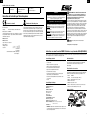
NOTICE: At final assembly, apply a small amount of blue threadlock
(example A shown in illustration) to screws and bolts to keep
these fasteners from becoming loose.
2
3