1
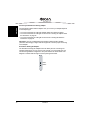
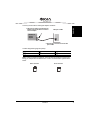
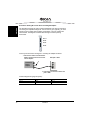
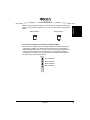
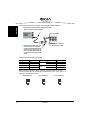
Diva Server Adapters
Installation Guide
Diva Server Karten
Installationsanleitung
Adaptadores Diva Server
Guía de Instalación
www.eicon.com/divaserver
Thirteenth Edition (April 2007)
203-195-13
COPYRIGHT NOTICE AND LEGAL DISCLAIMER
Copyright © 1999-2007 Eicon Networks Corporation. All Rights Reserved. You may not
reproduce this document in whole or in part without permission in writing from Eicon Networks
Corporation.
All contents of this document are subject to change without notice and do not represent a
commitment on the part of Eicon Networks Corporation. Reasonable effort is made to ensure
the accuracy of the information contained in the document. However, due to ongoing product
improvements and revisions, Eicon Networks Corporation does not warrant the accuracy of
this information and cannot accept responsibility for errors or omissions that may be contained
in this document. It is possible that the use or implementation of any one of the concepts,
applications, or ideas described in this document, in marketing collateral produced by or on
web pages maintained by Eicon Networks Corporation or its subsidiaries may infringe one or
more patents or other intellectual property rights owned by third parties. Eicon Networks
Corporation does not provide any intellectual property licenses with the sale of Eicon Networks
products other then a license to use such product in accordance with intellectual property
owned or validly licensed by Eicon Networks Corporation or its subsidiaries. More detailed
information about such intellectual property is available from Eicon Networks Corporation's
legal department at 9800 Cavendish Blvd., Montreal, Quebec, Canada H4M 2V9. The software
referred to in this document is provided under a Software License Agreement. Refer to the
Software License Agreement for complete details governing the use of the software.
Eicon Networks Corporation encourages all users of its products to procure all
necessary intellectual property licenses required to implement any concepts or
applications and does not condone or encourage any intellectual property infringement
and disclaims any responsibility related thereto. These intellectual property licenses
may differ from country to country and it is the responsibility of those who develop the
concepts or applications to be aware of and comply with different national license
requirements.
Please be aware that in the United States, the use of the Eicon Diva Server digital board
to route facsimile transmissions using DID is likely to infringe certain claims of U.S.
Patent Nos. 5,488,651 and 5,291,546 owned by Cantata Technology Inc.
All names, products, and services mentioned herein are the trademarks or registered
trademarks of their respective organizations and are the sole property of their respective
owners. Eicon, Eicon Networks, Diva, Diva ISDN, Diva Server, and Connecting People to
Information are registered trademarks or trademarks of Eicon Networks Corporation or its
subsidiaries.
To contact Eicon Customer Support, refer to the Customers Services section on page 58 or
visit our web site at www.eicon.com.
www.eicon.com/divaserver
Eicon Networks Corporation License Agreement for use of software
This is an Agreement between you, the Company, and your Affiliates (referred to in some
instances as "You" and in other instances as "Company") and all your Authorized Users and
Eicon Networks Corporation ("Eicon").
YOU SHOULD CAREFULLY READ THE FOLLOWING TERMS AND CONDITIONS BEFORE
INSTALLING OR DOWNLOADING THE SOFTWARE. IF YOU AGREE WITH THESE TERMS
YOU MAY PROCEED WITH THE DOWNLOAD OR INSTALLATION OF THE SOFTWARE.
IF YOU DO NOT AGREE WITH THESE TERMS, PLEASE RETURN THE PACKAGE IN "AS
NEW" CONDITION (INCLUDING DOCUMENTATION AND BINDERS OR OTHER
CONTAINERS) AND YOUR MONEY WILL BE REFUNDED. DOWNLOADING OR
INSTALLING THE SOFTWARE CONSTITUTES YOUR ACCEPTANCE OF THESE TERMS
AND CONDITIONS. YOU ASSUME RESPONSIBILITY FOR THE SELECTION OF THE
PROGRAM TO ACHIEVE YOUR INTENDED RESULTS, AND FOR THE INSTALLATION,
USE, AND RESULTS OBTAINED FROM THE PACKAGE.
Copyright
The enclosed Software ("Program") and documents are owned by
Eicon Networks Corporation ("Eicon") and its suppliers and are protected by copyright laws
and international treaty provisions. Therefore, You and your Authorized Users must treat the
Program and documentation like any other copyrighted material except as expressly permitted
in this License Agreement.
License
Under the terms and conditions of this License Agreement:
• You may install and use one copy of the Program on a single-user computer, file server, or
on a workstation of a local area network, and only in conjunction with a legally acquired Eicon
hardware or software product;
• The primary Authorized User on the computer on which the "Program" is installed may make
a second copy for his/her exclusive use on either a home or portable computer;
• You may copy the Program into any machine readable or printed form for backup or
modification purposes in support of your use of one copy of the Program;
• You may make one copy of Eicon's documentation provided that all copyright notices
contained within the documentation are retained;
• You may modify the Program and/or merge it into another Program for your use in one
computer; (any portion of this Program will continue to be subject to the terms and conditions
of this Agreement);
• You may transfer the Program, documentation and the license to another eligible party within
your Company if the other party agrees to accept the terms and conditions of this Agreement.
If You transfer the Program and documentation, You must at the same time either transfer
all copies whether in printed or machine readable form to the same party or destroy any
copies not transferred; this includes all modifications and portions of the Program contained
in or merged into other Programs;
• You must reproduce and include the copyright notice on any copy, modification or portion of
the Program merged into another Program;
• You may not rent or lease the Program. You may not reverse engineer, decompile or
disassemble the Program. You may not use, copy, modify or transfer the Program and
documentation, or any copy, modification or merged portion, in whole or in part, except as
expressly provided for in this License Agreement;
www.eicon.com/divaserver
• If You transfer possession of any copy, modification or merged portion of the Program or
documentation to another party in any way other than as expressly permitted in this License
Agreement, this license is automatically terminated.
Upgrades
If the Program is provided as an upgrade and the upgrade is an upgrade from another software
product licensed to You and Your Authorized Users by Eicon, the upgrade is governed by the
License Agreement earlier provided with that software product package and the present
License Agreement does not grant you additional license(s).
Term
The license is effective until terminated. You may terminate it at any time by destroying the
Program and documentation together with all copies, modifications and merged portions in
any form. It will also terminate upon conditions set forth elsewhere in this Agreement or if you
fail to comply with any terms or conditions of this Agreement. You agree upon such termination
to destroy the Program and documentation together with all copies, modifications and merged
portions in any form.
Limited Warranty
The only warranty Eicon makes is that the medium on which the Program is recorded will be
replaced without charge if Eicon, in good faith, determines that it was defective in materials or
workmanship and if returned to your supplier with a copy of your receipt within ninety (90) days
from the date you received it. Eicon offers no warranty for your reproduction of the Program.
This Limited Warranty is void if failure of the Program has resulted from accident, misuse,
abuse, or misapplication.
Customer Remedies
Eicon's entire liability and You and Your Authorized Users exclusive remedy shall be, at
Eicon's option, either (a) return of the price paid or (b) repair or replacement of the Program
that does not meet the above Limited Warranty. Any replacement Program will be warranted
for the remainder of the original Warranty period.
No Other Warranties
Eicon disclaims all other warranties, either expressed or implied, including but not limited to
implied warranties or merchantability and fitness for a particular purpose and the warranty
against latent defects, with respect to the Program and the accompanying documentation.
This limited warranty gives You specific legal rights. You may have others, which may vary
from jurisdiction to jurisdiction.
No Liability for Consequential Damage
In no event shall Eicon or its suppliers be liable for any damages whatsoever (including without
limitation, damages for loss of business profits, business interruption, loss of information, or
other pecuniary loss and indirect, consequential, incidental, economic, or punitive damages)
arising out of the use of or inability to use this Program, even if Eicon has been advised of the
possibility of such damages. As some jurisdictions do not allow the exclusion or limitation for
certain damages, some of the above limitations may not apply to You or your Authorized
Users.
Limit of Liability
Eicon's entire aggregate liability under any provision of this agreement shall be limited to the
amount actually paid by You for the affected Program.
www.eicon.com/divaserver
Right to Audit
If this Program is licensed for use in a Company, your Company agrees to keep all usual and
proper records and books of accounts and all usual proper entries relating to each
reproduction and Authorized User of the Program during the term of this Agreement and for
a period of three (3) years thereafter. During this period, Eicon may cause an audit to be made
of the applicable records in order to verify Your compliance with this Agreement and prompt
adjustment shall be made to compensate for any errors or omissions disclosed by such audit.
Any such audit shall be conducted by an independent certified public accountant selected by
Eicon and shall be conducted during the regular business hours at Your offices and in such a
manner as not to interfere with Your normal business activities. Any such audit shall be paid
for by Eicon unless material discrepancies are disclosed. For such purposes, "material
discrepancies" shall mean three percent (3%) or more of the Authorized Users within the
Company. If material discrepancies are disclosed, Your Company agrees to pay Eicon for the
costs associated with the audit as well as the license fees for the additional Authorized Users.
In no event shall audits be made more frequently than semi-annually unless the immediately
preceding audit disclosed a material discrepancy.
Supplementary Software
Any Supplementary Software provided with the Eicon Program referred to in this License
Agreement is provided "as is" with no warranty of any kind.
U.S. Government Restricted Rights
The Program and documentation are provided with RESTRICTED RIGHTS. Use,
duplication or disclosure by the U.S. Government is subject to restrictions as set
forth in subparagraph c) 1) ii) of The Rights in Technical Data and Computer
Software clause at DFARS 252.227-7013 or subparagraph c) 1) and 2) of the
Commercial Computer Software-Restricted Rights at 48 CFR52.227-19, as
applicable.
Governing Law
This Agreement shall be construed and controlled by the laws in force in the Province of
Quebec, Canada.
Contractor/ manufacturer is:
EICON NETWORKS CORPORATION.
9800 Cavendish Blvd., Montreal, Quebec, Canada H4M 2V9
This Agreement has been drafted in English at the express wish of the parties. Ce contrat a
été rédigé en anglais à la demande expresse des parties.
www.eicon.com/divaserver
Eicon Networks Corporation End user Warranty Statement
Unless your rights have been modified through the direct agreement between Eicon Networks
Corporation ("EICON") and EICON's direct customer through whom you purchased your
EICON Product your warranty rights are set out in full as follows:
Warranty for Software Products: The only warranty EICON makes is that the medium on which
the program is recorded will be replaced without charge if EICON, acting reasonably,
determines that it was defective in materials or workmanship and if returned to EICON with a
copy of BUYER's receipt within ninety (90) days from the date BUYER received it. EICON
offers no warranty for the installation of the program even if it has provided assistance to
BUYER in making such installation. This Limited Warranty is void if failure of the program has
resulted from accident, misuse, abuse or misapplication. EICON'S ENTIRE LIABILITY AND
BUYER'S EXCLUSIVE REMEDY SHALL BE, AT EICON'S OPTION, EITHER (A) RETURN
OF THE PRICE PAID OR (B) REPAIR OR REPLACEMENT OF THE PROGRAM THAT DOES
NOT MEET THIS WARRANTY. ANY REPLACEMENT PROGRAM WILL BE WARRANTED
FOR THE REMAINDER OF THE ORIGINAL WARRANTY PERIOD.
Warranty for Hardware Products: EICON warrants that at the time of delivery the hardware
Products supplied hereunder will be free from defects in material and workmanship. The
warranty will be for EICON's standard warranty period for the Product you have purchased as
at the date of EICON's shipment of the Product. Standard warranty periods for specific
Products are set out at www.eicon.com. In no event shall the EICON warranty be shorter
than the legal minimum warranty period required for such Product in the country of purchase.
All warranties are subject to the BUYER registering the Product at
http://www.eicon.com/register. This warranty is void if the defect has resulted from accident,
misuse, abuse or misapplication. Any hardware Product which becomes defective during the
warranty period and is returned to EICON's Authorized Service Center with a Return Material
Authorization (RMA) number (which must be obtained from EICON before any return) within
thirty (30) days after discovery of the defect with a written description of the defect will be
repaired or replaced at EICON's option. Freight charges will be paid by EICON only for
shipment back to BUYER.
No Other Warranties: EICON DISCLAIMS AND BUYER WAIVES ALL OTHER
WARRANTIES, EITHER EXPRESS OR IMPLIED, INCLUDING BUT NOT LIMITED TO
IMPLIED WARRANTIES OF MERCHANTABILITY AND FITNESS FOR A PARTICULAR
PURPOSE AND ANY WARRANTY AGAINST LATENT DEFECTS, WITH RESPECT TO ANY
EICON PRODUCT.
No Liability for Damages: IN NO EVENT SHALL EICON OR ITS SUPPLIERS BE LIABLE
FOR ANY DAMAGES WHATSOEVER (INCLUDING, WITHOUT LIMITATION, DAMAGES
FOR LOSS OF PROFITS, INTERRUPTION OF ACTIVITIES, LOSS OF INFORMATION OR
OTHER PECUNIARY LOSS AND DIRECT OR INDIRECT, CONSEQUENTIAL, INCIDENTAL,
ECONOMIC OR PUNITIVE DAMAGES) ARISING OUT OF THE USE OF OR INABILITY TO
USE ANY EICON PRODUCT OR DUE TO THE FAULT OR NEGLIGENCE OF EICON OR
THOSE FOR WHICH IT IS RESPONSIBLE AT LAW, EVEN IF EICON HAS BEEN ADVISED
OF THE POSSIBILITY OF SUCH DAMAGES. (NOTE: SOME JURISDICTIONS DO NOT
ALLOW THE EXCLUSION OR LIMITATION OF LIABILITY FOR CERTAIN DAMAGES AND
ACCORDINGLY THE ABOVE LIMITATION OR EXCLUSION MAY NOT APPLY TO BUYER.)
www.eicon.com/divaserver
Limitation of Liability: EICON AND ITS AFFILIATES AND SUPPLIERS' LIABILITY TO YOU
UNDER ANY CIRCUMSTANCES, IN THE AGGREGATE FOR ALL CAUSES OF ACTION,
SHALL BE LIMITED TO THE AMOUNTS ACTUALLY PAID BY YOU FOR THE SPECIFIC
PRODUCT WHICH IS THE OBJECT OF THE CLAIM. YOU RELEASE EICON, ITS
AFFILIATES AND ITS SUPPLIERS FROM ALL AMOUNTS IN EXCESS OF THE
LIMITATION.
Additional Exclusions: EICON will have no obligation to make repairs or replacements
necessitated by your fault or negligence, improper or unauthorized use of the product, repairs
or modifications made without EICON's prior written approval or by causes beyond the control
of EICON, including, but not limited to, power or air conditioning failure, acts of God, improper
interface with other units, or malfunction of any equipment or software used with the EICON
Product(s).
www.eicon.com/divaserver
Contents
English
Introduction .................................................................................... 11
General Safety Instructions ........................................................... 14
Ordering Your Analog Line in North America................................. 16
Line Provisioning and Configuration for Diva Server
PRI Adapters ................................................................................. 17
Ordering Your ISDN PRI or T1 Line in North America ................... 18
Before You Start............................................................................. 21
Installation...................................................................................... 22
Troubleshooting ............................................................................. 36
Technical Specifications................................................................. 40
International Regulatory Information.............................................. 46
International approvals .................................................................. 55
Suppliers Declaration of Conformity .............................................. 56
Customer Services ........................................................................ 57
Your Eicon Networks Adapter and The WEEE Directive ............... 59
Deutsch
Einführung ..................................................................................... 61
Allgemeine Sicherheitshinweise .................................................... 64
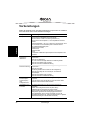
Vorbereitungen .............................................................................. 66
Installation...................................................................................... 67
Problemlösung............................................................................... 79
Technische Daten .......................................................................... 83
www.eicon.com/divaserver
Zulassungsinformationen .............................................................. 89
Kundendienst................................................................................. 90
Ihre Eicon Networks Karte und die WEEE Richtlinie..................... 92
Español
Introducción ................................................................................... 93
Instrucciones de Seguridad ........................................................... 96
Preparativos .................................................................................. 98
Instalación ..................................................................................... 99
Problemas y Soluciones ...............................................................112
Datos Técnicos.............................................................................116
Datos Sobre la Homologación..................................................... 122
Soporte Técnico .......................................................................... 123
Su Adaptador Eicon Networks y la Directiva WEEE ................... 125
www.eicon.com/divaserver
www.eicon.com/divaserver
Eicon Networks’ Diva Server adapters provide high-speed digital or analog
connections to support a variety of network applications. This installation guide
describes how to physically install and connect your Diva Server adapter, it
provides information about the adapter’s technical specifications and gives an
overview of the available online documentation.
ENGLISH
Introduction
Note: The Eicon brand will change to Dialogic in all relevant documents during
2007.
Supported Diva Server adapters
The Diva Server product range comprises the following adapters:
ISDN BRI adapters
Diva Server BRI adapters are high-performance, partly active PC-based server
adapters that provide digital, analog, and GSM connections over an ISDN line.
• Diva Server 2FX
• Diva Server BRI-2M 2.0
• Diva Server 4BRI-8M 2.0
• Diva Server V-BRI-2
• Diva Server V-4BRI-8
ISDN PRI, E1, and T1 adapters
These powerful adapters are active server adapters which provide both digital and
analog connectivity for the ISDN Primary Rate Interface (PRI), E1, and T1 lines.
Diva Server T1/PRI:
• Diva Server T1/PRI
• Diva Server T1/PRI-4M
• Diva Server T1/PRI-8M
• Diva Server T1/PRI-24M
Diva Server PRI 2.0:
• Diva Server PRI-0M
• Diva Server PRI-4M
• Diva Server PRI-8M
• Diva Server PRI-30M
Diva Server PRI 3.0:
• Diva Server PRI/E1/T1-CTI
• Diva Server PRI/E1/T1-8
• Diva Server PRI/T1-24
• Diva Server PRI/E1-30
Diva Server V-PRI:
• Diva Server V-PRI/T1-24
• Diva Server V-PRI/E1-30
Diva Server PRI PCIe:
Diva Server V-PRI PCIe:
• Diva Server PRI/E1/T1-CTI PCIe • Diva Server V-PRI/T1-24 PCIe
• Diva Server PRI/T1-24 PCIe
• Diva Server V-PRI/E1-30 PCIe
• Diva Server PRI/E1-30 PCIe
Introduction
11
Multiport ISDN PRI, E1, and T1 adapters
ENGLISH
The Diva Server multiport adapters are exceptionally powerful PC-based
telephony adapters that provide rich media processing capabilities for up to 120
voice channels over E1 interfaces or up to 96 voice channels over T1 interfaces.
• Diva Server V-2PRI/E1/T1
• Diva Server V-4PRI/E1/T1
Analog adapters
Diva Server Analog communication adapters offer standard RJ-10 or RJ-45
interfaces to connect to public and private switching systems. Since they provide
high-performance media processing functions, they enhance the overall system
performance and lower implementation cost.
• Diva Server Analog-2P
• Diva Server Analog-4P
• Diva Server Analog-8P
• Diva Server V-Analog-4P
• Diva Server V-Analog-8P
Supported operating systems
Diva Server adapters support the following operating systems:
•
•
•
•
Microsoft Windows® Server 2003
Microsoft Windows XP
Microsoft Windows 2000
Linux®
Note: You can install your Diva Server BRI and V-BRI adapter on a computer with
Microsoft Small Business Server (SBS). For the Microsoft Small Business Server
version 4.5 and 2000, you can find the required drivers and documentation on the
Microsoft Small Business Server CD-ROM.
Diva Server online documentation
Diva Server online documentation is available on the Diva Server Software Suite
CD-ROM and/or the Eicon Networks web site. The online documentation
describes the installation and configuration of Diva Server software. For more
information about documentation on the Diva Server Software Suite CD-ROM, see
below. For documentation on the web visit our Eicon Manuals and
Documentation site at: http://www.eicon.com/worldwide/support/docs.htm
where you can select the desired documentation for your Eicon Networks product.
12
Introduction
Documentation for the above mentioned Microsoft Windows operating systems is
available on the Diva Server Software Suite CD-ROM. For Linux, documentation is
available on the Eicon Networks web site. See page 14 for more information.
The Diva Server Software Suite CD-ROM includes comprehensive online
reference guides in Adobe® Acrobat® portable document format (PDF) and
Microsoft HTML help files in CHM format.
ENGLISH
Diva Server Software Suite CD-ROM
Your Diva Server Software Suite CD-ROM also includes readme files. The readme
files contain the most up-to-date information which did not make it into other
manuals.
Note: To view and print the online reference guides properly, you must use
Acrobat Reader version 3.0 or later. You can install the Acrobat Reader from your
Diva Server Software Suite CD-ROM.
To install Acrobat Reader under a Windows operating system:
1.
2.
3.
Insert your Diva Server Software Suite CD-ROM into your CD-ROM drive. The
front end will start automatically. If the front end fails to start, double-click
SETUP.EXE in the root folder on the CD-ROM.
At the Welcome screen, click the Bonus Software button.
From the presented screen, you can install Acrobat Reader.
To view a PDF manual under a Windows operating system:
1.
2.
3.
4.
Insert your Diva Server Software Suite CD-ROM into your CD-ROM drive. The
front end will start automatically. If the front end fails to start, double-click
SETUP.EXE in the root folder on the CD-ROM.
At the Welcome screen, click Documentation.
From the presented screen, you can view the available PDF documentation for
your hardware and software.
To view an online manual, double-click the manual you wish to read.
To view an online help under a Windows operating system:
1.
2.
3.
4.
Insert your Diva Server Software Suite CD-ROM into your CD-ROM drive. The
front end will start automatically. If the front end fails to start, double-click
SETUP.EXE in the root folder on the CD-ROM.
At the Welcome screen, click Browse this CD.
Click the following folders: driver > i386 > ENGLISH.
To view an online help file, double-click the CHM-file you wish to read.
Introduction
13
General Safety Instructions
ENGLISH
Use the following safety instructions to help ensure your own personal safety and
to help protect your computer, adapter, and working environment from potential
damage.
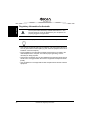
WARNING
All Diva Server Adapters
All computers that have Diva Server adapters installed must comply
with the country specific safety regulations, such as CE or FCC, to
avoid serious personal injuries and damage to your computer, your
adapter, or both.
Before you install your Diva Server adapter or remove the cover
from your computer for any reason, disconnect the ISDN or analog
cable from the ISDN, analog network, E1, or T1 line, to avoid
personal injuries and damage to your computer, your adapter, or
both.
Proper installation of the adapter requires that it is screwed to the
metal backplate of the PC. This ensures proper grounding that is
necessary for your safety.
Diva Server ISDN
PRI and BRI signals can have telephone network voltages (TNV).
Therefore, ISDN BRI, PRI, E1, and T1 lines should be installed and
maintained by service personnel only. It may be hazardous if your
computer is not properly plugged in and grounded. This applies
particularly to users in North America and Australia.
Diva Server T1/PRI, PRI, V-2PRI, V-4PRI
Diva Server V-2PRI and V-4PRI, and all versions of Diva Server
T1/PRI and PRI 2.0 adapters may need approximately 20 Watts of
power.
If you have installed several adapters in your system, make sure
that the power supply will not be overloaded when you install your
Diva Server adapter, to avoid personal injuries and damage to your
computer, your adapter, or both.
Make also sure that your PC provides sufficient cooling to avoid
damage on your adapter.
14
General Safety Instructions
All Diva Server ISDN adapters have been tested and found to
comply with the Electromagnetic compatibility, Safety, and
Network connection regulations within the European Union, North
America, and other major territories. Read the regulatory
information in the section Regulatory Information on page 46
before installing and using your adapter.
ENGLISH
IMPORTANT Diva Server ISDN
Diva Server V-2PRI, V-4PRI, PRI PCIe
A proper functioning of Diva Server V-2PRI, V-4PRI, and PRI PCIe
adapters is guaranteed only if it is operated within the permitted
temperature range, see page 40 for more information. If the
temperature is exceeded, a trace file with the temperature
information will be created.
Diva Server Analog
Use only certified telecommunications cables with No. 26 AWG
(American Wire Gauge) or higher with this equipment to ensure
proper functioning of the adapter.
General Safety Instructions
15
ENGLISH
Ordering Your Analog Line in North
America
This chapter will assist you in ordering an analog line for your Diva Server Analog
adapter.
Line types
Diva Server Analog adapters can be configured to support a standard analog line.
Specify the following requirements when you place your order:
• Standard analog line
• Loop start line
• Dial type: Diva Server Analog adapters support tone and pulse dialing. It is
recommended to specify tone as the dial type.
Connecting to a PBX
In most installations, the analog line is connected to a PBX instead of the Diva
Server Analog adapter. If this is the case and you wish to do DTMF collection
through the PBX, you need to configure the sequence on the PBX as follows:
•
•
•
•
•
16
Ring voltage
500 ms pause
Routing through DTMF
500 ms pause
Open the call path
Ordering Your Analog Line in North America
During the software installation, select the switch type as specified by your service
provider, e.g. Euro-ISDN (ETSI). This will set all line parameters to a default value
that is the most common value for the respective switch type.
ENGLISH
Line Provisioning and Configuration
for Diva Server PRI Adapters
In some countries the parameter value is different than the default. For the
Euro-ISDN (ETSI) switch type for example, the CRC 4 mode is normally on, so the
default will set the parameter CRC 4 Mode to ON. However, the CRC setting
needs to be OFF for Energis lines in the UK and Telecom Eireann lines in the
Republic of Ireland. Normally, lines in France, Belgium, and the Netherlands are
also provisioned with the CRC 4 mode OFF.
Please make sure that you configure the value as required by your service
provider. For detailed information see the Diva Server Configuration Manager
Online Help (DSMain.chm) for Windows operating systems and the Diva Server
for Linux Reference Guide for Linux.
Note: Your service provider will deactivate your line if you connect to it with wrong
settings. Always contact your service provider to ask for your line to be reactivated
before testing with new settings.
Line Provisioning and Configuration for Diva Server PRI Adapters
17
ENGLISH
Ordering Your ISDN PRI or T1 Line
in North America
This chapter will assist you in ordering an ISDN PRI or a T1 line for your Diva
Server PRI adapter. It provides recommended settings for a number of the
configuration settings on Diva Server PRI adapters. You should specify these
settings when you order your line from your service provider.
Line types
The Diva Server PRI adapters can be configured to support an ISDN PRI line or a
T1 line.
ISDN PRI
In North America and Japan, an ISDN PRI line typically supports 23 B-channels
and one D-channel. PRI configurations are used to receive multiple, simultaneous
ISDN calls from analog-modem and digital-services dial-in traffic. Another
common use of ISDN PRI is to connect a PBX (Private Branch Exchange) to a
central office switch.
Channelized T1 (robbed-bit signaling)
Robbed-bit signaling, which uses bits from specified frames in the user data
channel for signaling, fits into the in-band signaling category. In this scenario, bits
are ‘robbed’ from each channel for signaling purposes, as opposed to ISDN PRI
(out-of-band signaling) which dedicates a specific channel (D-channel) to
signaling.
Connecting to a PBX
In some installations, the PRI or T1 line is connected to a PBX instead of the Diva
Server PRI adapter. In these cases, you must correctly configure the PBX to
communicate with the Diva Server PRI adapter.
18
Ordering Your ISDN PRI or T1 Line in North America
This section explains how to order an ISDN PRI line for your Diva Server PRI
adapter.
What to order
ENGLISH
Provisioning an ISDN PRI connection
Specify the following requirements when you place your order:
• 23 B-channels + 1 D-channel
• D-channel on channel 24 (timeslot 24). Do not order NFAS (non-facility
associated signaling service), which enables you to use channel 24 as a
data-carrying B-channel.
• Layer 1 line code is B8ZS with ESF (Extended SuperFraming).
• Data rate of 1.544 Mbps
• 64 kbps clear channel service, which ensures that calls will not be routed over
56 kbps channels.
• Companding type is µ-law
• A CSU is not required (Diva supplies the function of the CSU internally).
However, you can connect to a CSU if present.
• A DSU is not required (Diva supplies the function of the DSU internally).
• The T1 interface number must be 0.
• The D-channel must be specified as the terminal endpoint identifier (TEI) 0.
• If the switch type is AT&T/Lucent, request that allocation of channels for
incoming calls is in descending order, high to low (23 to 1).
Information to obtain when ordering
Obtain the following information when you place your order. You will need this
information to properly configure your Diva Server PRI adapter.
• The type of ISDN switch your line is connected to.
• Directory or phone number assigned to the PRI line.
• Line build out setting (LBO). Only if you are going to use the Diva Server's
on-board CSU.
• Number of DNIS (Dialed Number Identification Service) digits provided by your
service provider. Normally, you can choose between four, seven, or ten digits.
Ordering Your ISDN PRI or T1 Line in North America
19
Provisioning a channelized T1 connection (robbed-bit)
ENGLISH
This section explains how to order a T1 line that uses robbed-bit signaling for your
Diva Server PRI adapter.
What to order
Specify the following when you place your order:
•
•
•
•
•
•
•
•
Switched T1 service for 56 kbps voice calls
No multichannel services (switchtec 384/H0 or 1536/H11)
Extended SuperFrame (ESF)
B8ZS line encoding
Wink Start E&M signaling
DTMF dialing
Answer supervision required for outgoing calls
A CSU is not required (Diva supplies the function of the CSU internally).
However, you can connect to a CSU if present.
• A DSU is not required (Diva supplies the function of the DSU internally).
Information to obtain when ordering
Obtain the following information when you place your order. You will need this
information to properly configure your Diva Server PRI adapter.
• The type of ISDN switch your line is connected to.
• Directory number assigned to the T1 line.
• Number of DNIS (Dialed Number Identification Service) digits provided by your
service provider. Normally, you can choose between four, seven, or ten digits.
20
Ordering Your ISDN PRI or T1 Line in North America
Before you start, make sure you have the items you need to install your Diva
Server adapter and the corresponding software.
Item
Description
Computer
Your computer must have:
• a free PCI slot for PCI bus adapters
(for Diva Server V-2PRI and V-4PRI according to PCI 2.2)
• a free PCIe x1 slot, 1.0a compliant for PCIe bus adapters
Other slot sizes, e.g. x4, x8, x16 can be used if supported by
the BIOS and the operating system.
• an installed operating system:
Windows Server 2003,
Windows XP,
Windows 2000,
Linux
• at least 15 MB of free hard-disk space for the software
Diva Server ISDN
adapter package
This includes:
• Diva Server ISDN adapter
• cable(s) needed to connect to your ISDN BRI, ISDN PRI, E1,
or T1 line
• Diva Server Software Suite CD-ROM
• Diva Server Adapters Installation Guide
Diva Server Analog
adapter package
This includes:
• Diva Server Analog adapter
• cables to connect to your analog line
• Diva Server Analog-8P and V-Analog-8P: four cables with
dongle
• Diva Server Software Suite CD-ROM
• Diva Server Adapters Installation Guide
ISDN Basic Rate
Interface (BRI),
Primary Rate Interface
(PRI), channelized E1 or
T1 interface, or analog
interface
The lines are installed by your service provider.
Make sure that you get the appropriate line(s) for your adapter.
Information about your
line
Your service provider has to provide the following information:
• switch type: This usually depends on your geographic location.
Common switch types include Euro-ISDN DSS1 (used in
Europe), 1TR6 (used mainly in PBXs in Germany), NI-1 (used
in North America), and 5ESS (used in North America).
• Phone numbers for each ISDN, T1, or analog line
• North America only: Service Profile Identifiers (SPIDs) for each
ISDN BRI line
ENGLISH
Before You Start
Note: In some countries, you might need a network terminating
device (NT1).
Before You Start
21
Installation
ENGLISH
This chapter will assist you in installing your Diva Server adapter and connecting it
to your ISDN BRI, ISDN PRI, E1, T1, or analog line.
You need to complete the following three procedures to use your Diva Server
adapter properly:
• (A) Insert your Diva Server adapter into your computer as described below.
• (B) Connect your Diva Server adapter as described on page 24.
• (C) Install your Diva Server adapter software as described on page 35.
Note: You may need your computer’s manual during the installation of your
adapter.
(A) Insert your Diva Server adapter into your computer
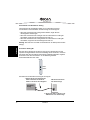
For your safety, disconnect all technical and peripheral devices and all energy
sources from the computer,
2. Drain static electricity from your body by touching the metal chassis (the
unpainted metal at the back of your computer).
3. Remove the ISDN cable, if present, and the power cord from your computer.
4. Remove the cover of the computer as described in your computer’s manual.
5. Locate a PCI or PCIe slot in your computer.
6. If there is a metal plate at the end of the slot, remove the screw or loosen the
clip and remove the metal plate. Keep the screw for fastening your adapter.
7. If your adapter comes with a retainer, and space does not permit the use of the
retainer, simply remove it before you insert the adapter. The retainer is only an
installation aid and does not add functionality to the adapter.
1.
retainer
22
Installation
Before you insert your adapter, read the following safety instruction:
CAUTION: To avoid damaging your hardware, insert the adapter only into a
PCI or PCIe slot, according to your adapter type. Inserting the
adapter into any other type of slot can damage your adapter, your
computer, or both.
ENGLISH
8.
Firmly insert the adapter into the selected slot. Make sure that the adapter does
not touch the CPU, memory modules, or other parts on the motherboard.
Note: Additionally to the PCI bus, Diva Server V-2PRI and V-4PRI adapters
have a H.100 bus on the board. The H.100 bus is not operational; therefore,
only insert the adapter with the PCI bus into the computer.
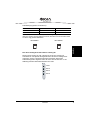
screw or clip
metal plates
PCI express slots
9.
PCI slots
Firmly secure the adapter with the screw or clip.
WARNING: For your safety, make sure that the adapter’s bracket is properly
secured to the PC’s chassis by fastening the adapter with the
screw or clip. This will ensure proper grounding and avoid
personal injuries and damage to your computer, your adapter, or
both.
10. Replace the cover of the computer as described in your computer’s manual.
Installation
23
(B) Connect your Diva Server adapter
ENGLISH
How you connect your adapter depends on the type of Diva Server adapter you
have:
• To connect a Diva Server BRI adapter, follow the instructions below.
• To connect a Diva Server PRI adapter, follow the instructions on page 26.
• To connect a Diva Server Analog adapter, follow the instructions on page 30.
Connect your Diva Server BRI adapter
Note: If you plan to use your Diva Server BRI adapter as network termination for
back-to-back operation or connection to PBX networks, go to page 25.
In Europe and most countries worldwide:
In Europe as well as most countries except North America and Japan, connect
your ISDN line using the cable included with your Diva Server adapter.
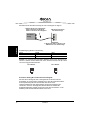
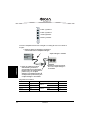
1. Take the cable included with the
adapter and plug one end into the
adapter.
ISDN wall jack with NT
Diva Server
BRI adapter
2. Plug the other end into the ISDN
wall jack.
In North America, Japan and some other countries:
In North America, Japan and a few other countries, you need an NT1 to connect
your ISDN line. You can order an NT1 from Eicon Networks or from another
supplier. Make sure that a power supply is available for the NT1 of this line.
Usually, a PBX is installed in the same area as the NT1 and the service provider
can use the power supply of the PBX for the ISDN line as well. If this is not the
case, you have to order a combo device from your service provider. This device
consists of an installation rack into which an NT1 module and a power supply
module is mounted.
24
Installation
3. Take the cable included with the NT1
and plug one end into the ISDN wall
jack.
Diva Server
BRI adapter
ENGLISH
1. Take the cable included with the
adapter and plug one end into
the adapter.
NT1
S/T jack
2. Plug the other end into
the S/T jack.
U jack
4. Plug the other end into
the U jack.
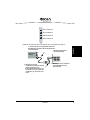
Note for Diva Server 4BRI and V-4BRI:
The Diva Server 4BRI and V-4BRI adapters have four ports for connecting to four
separate ISDN BRI lines. Connect all four cables as described above. You can use
any port; typically, you must specify the port number during software configuration.
The port numbers are shown below. The diagram is oriented with the edge
connector pointing downwards.
Port 1
Port 2
Port 3
Port 4
Connecting Diva Server BRI adapters in NT mode:
The Diva Server software enables you to configure Diva Server BRI adapters as
network termination (NT). This means your adapter can serve as an NT for PBXs,
for example, when coupling PBXs with the Q-Sig protocol, and it can be used for
back-to-back operation.
When connecting the adapter to a PBX that acts as terminal equipment and
therefore requires an NT to provide a clocking signal, configure the adapter as an
NT. Wire the adapter to the PBX as shown in the diagram on page 26 by applying
the appropriate assignment at the PBX connectors. Use the required termination
resistors.
Installation
25
ENGLISH
When using two Diva Server adapters in back-to-back operation, configure one
adapter as an NT and the other one as terminal equipment (TE). Connect the
adapters using a crossover cable. The cable wiring must correspond to the
diagram below and the cable must have the required termination resistors.
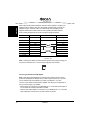
Pole (contact) assignments for 8-pole connections (plugs and jacks):
TE Side
Pins on RJ45
NT Side
Wire
Signals
3
2a
4
1a
1
not used
2
not used
Wiring
Wire
Signals
TX +
1a
TX +
RX +
2a
RX +
Resistors
5
1b
RX -
2b
RX -
6
2b
TX -
1b
TX -
7
not used
8
not used
Termination resistors
100 Ohm, 5%
Note: Looking at the RJ45 connector with the exposed connector pins facing you,
the pins are numbered from 1 to 8 from left to right (as shown below).
8
1
Connect your Diva Server PRI adapter
Note: Diva Server PRI adapters have a built-in CSU (channel service unit) to
protect the adapters from damage due to power surges. However, you can also
use an external CSU, which allows you to test your ISDN, E1, or T1 line.
Use one of the cables included with the adapter. The cable you use depends on
how you want to apply your adapter:
• RJ45 to RJ45 for connection to an ISDN PRI, E1, or T1 line with an RJ45 jack or
for connection as network termination to a PBX.
• RJ45 to open-ended cables for connection to your ISDN PRI, E1, or T1 line with
open-ended wire connections or for back-to-back connection.
26
Installation
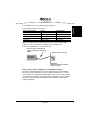
Use the supplied RJ45 to RJ45 cable:
Diva Server PRI Adapter
Signals
Pin 1
Receive + (RX +)
RJ45 Terminal
Pin 1
Pin 2
Receive - (RX -)
Pin 2
Pin 4
Transmit + (TX +)
Pin 4
Pin 5
Transmit - (TX -)
Pin 5
shielded plug
overall shielded
shielded plug
ENGLISH
If the ISDN PRI or T1 line is installed with an RJ45 jack:
Note: For E1 Mode with 75 Ohm impedance, use an external 75 Ohm Balun
Adapter. You can purchase such an adapter from specialized stores.
Connect your ISDN PRI, E1, or T1 line as shown:
1. Take the cable included with the
adapter and plug one end into the
adapter.
ISDN wall jack, NT, or CSU
Diva Server
PRI adapter
2. Plug the other end into the NT,
CSU, or wall jack.
Note for all Diva Server V-2PRI/E1/T1 and V-4PRI/E1/T1 adapters:
Diva Server V-2PRI adapters have two ports and Diva Server V-4PRI adapters
have four ports for connecting to two or four separate ISDN PRI, E1, or T1 lines.
Connect all two or four cables as described above. You can use any port; typically,
you must specify the port number during software configuration. The port numbers
are shown on the next page. The diagram is oriented with the edge connector
pointing downwards.
Installation
27
ENGLISH
Diva Server V-2PRI/E1/T1
Diva Server V-4PRI/E1/T1
Port 1
Port 1
Port 2
Port 2
Port 3
Port 4
If the Diva Server PRI adapter in NT mode is connected to a PBX:
The Diva Server software enables you to configure Diva Server PRI adapters as
network termination (NT). This means your adapter can serve as an NT for PBXs
that act as terminal equipment and therefore requires an NT to provide a clocking
signal. For example, the Diva Server adapter can act as an NT when coupling
PBXs with the Q-Sig protocol.
When connecting the adapter to a PBX that acts as TE, configure the adapter as
an NT. Wire it to the PBX as shown in the diagram on page 29 and apply the
appropriate assignment at the PBX connectors.
If the ISDN PRI, E1, or T1 line uses open-ended wire connections:
In some cases, you are required to connect to your network termination using the
open-ended connectors. The transmission (TX) leads and the receiving (RX) leads
are identified by color; transmission leads are blue and white-blue, receiving leads
are orange and white-orange.
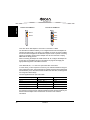
Use the supplied RJ45 to open ends cable:
Diva Server PRI Adapter
Signals
Open Ends
Pin 1
Receive + (RX +)
white-orange
Pin 2
Receive - (RX -)
orange
Pin 4
Transmit + (TX +)
white-blue
Pin 5
Transmit - (TX -)
blue
shielded plug
overall shielded
shield
Make sure to connect the transmission leads of your Diva Server PRI adapter to
the receiving connectors of the network termination and the receiving leads of your
Diva Server PRI adapter to the transmission connectors of the network
termination.
28
Installation
ENGLISH
Note: If the adapter is not properly connected to the ISDN PRI, E1, or T1 line, a
layer 1 warning light appears on the NT, the adapter, the external CSU, and at the
switching center of the network provider. The network provider might then
deactivate the line. If this occurs, you must contact your network provider to
reactivate your line.
If the Diva Server PRI adapter is run in back-to-back mode:
The Diva Server software enables you to configure Diva Server PRI adapters as
network termination (NT). This means you can use two Diva Server adapters in
back-to-back operation.
When using Diva Server adapters back-to-back, configure one adapter as an NT
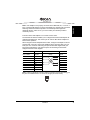
and the other one as TE. Connect the adapters with a crossover cable. You can
build your own crossover cable using the open-ended cable supplied with your
Diva Server PRI adapter. Just crimp the open end according to the NT-side
assignment shown in this diagram:
TE Side
NT Side
Wiring
Pins on RJ45
Signals
1
RX +
RX +
2
RX -
RX -
4
TX +
TX +
5
TX -
TX -
3
Signals
not used
6
not used
7
not used
8
not used
Note: Looking at the RJ45 connector with the exposed connector pins facing you,
the pins are numbered from 1 to 8 from left to right (as shown below).
1
8
Installation
29
Connect your Diva Server Analog adapter
ENGLISH
Use the cables included with the adapter. How you connect your adapter depends
on the adapter type:
• To connect a Diva Server Analog-2P adapter follow the instructions below.
• To connect a Diva Server Analog-4P or Diva Server V-Analog-4P adapter follow
the instructions on page 32.
• To connect a Diva Server Analog-8P or Diva Server V-Analog-8P follow the
instructions on page 33.
Important: Use only certified telecommunications cables with No. 26 AWG
(American Wire Gauge) or higher with this equipment to ensure proper functioning
of the adapter.
Diva Server Analog-2P adapter:
The Diva Server Analog-2P adapters have two RJ10 ports for connecting two
separate analog lines. You can use any port; typically, you must specify the port
number during software configuration. The port numbers are shown below. The
diagram is oriented with the edge connector pointing downwards.
Port 1
Port 2
30
Installation
1. Take the two cables included with the
adapter and plug the RJ10 connectors
into the adapter.
Wall jack or PBX
ENGLISH
Connect your Diva Server Analog-2P adapter as follows:
Diva Server
Analog
adapter
2. Plug the RJ11 connectors into the wall
jack or PBX.
Contact assignments (plugs and jacks):
RJ10
Signals
RJ11
Pin 2
Ring
Pin 3
Pin 3
Tip
Pin 4
Note: Looking at the RJ10 and RJ11 connector with the exposed connector pins
facing you, the pins are numbered from 1 to 4 and 1 to 6 from left to right as shown
below.
RJ10 connector
RJ11 connector
1
Installation
6
31
Diva Server Analog-4P or Diva Server V-Analog-4P adapter:
ENGLISH
The Diva Server Analog-4P and V-Analog-4P adapters have four RJ10 ports for
connecting four separate analog lines. You can use any port; typically, you must
specify the port number during software configuration. The port numbers are
shown below. The diagram is oriented with the edge connector pointing
downwards.
Port 1
Port 2
Port 3
Port 4
Connect your Diva Server Analog-4P or V-Analog-4P adapter as follows:
1. Take the four cables included with the
adapter and plug the RJ10 connectors
into the adapter.
Wall jack or PBX
Diva Server
Analog
adapter
2. Plug the RJ11 connectors into the wall
jack or PBX.
Contact assignments (plugs and jacks):
32
RJ10
Signals
RJ11
Pin 2
Ring
Pin 3
Pin 3
Tip
Pin 4
Installation
RJ10 connector
RJ11 connector
1
ENGLISH
Note: Looking at the RJ10 and RJ11 connector with the exposed connector pins
facing you, the pins are numbered from 1 to 4 and 1 to 6 from left to right as shown
below.
6
Diva Server Analog-8P or Diva Server V-Analog-8P adapter:
The Diva Server Analog-8P and V-Analog-8P adapters have four RJ45 ports for
connecting four dongles. The dongles have two ports each for connecting two
separate analog lines; therefore, you can connect to up to eight analog lines. You
can use any port; typically, you must specify the port number during software
configuration. The port numbers are shown below. The diagram is oriented with
the edge connector pointing downwards.
Port 1 and Port 2
Port 3 and Port 4
Port 5 and Port 6
Port 7 and Port 8
Installation
33
Connect your Diva Server Analog-8 or V-Analog-8P adapter as follows:
ENGLISH
1. Take the four cables with the dongle and plug the
RJ45 connectors into the adapter.
Wall jack or PBX
Diva Server
Analog
adapter
3. Plug the RJ11 connectors
into the wall jack or PBX.
2. Take the eight cables and plug
the RJ10 connectors into the
dongle. The jack labeled with ‘A’
corresponds to the ports 1,3,5,
and 7. The jack labeled with ‘B’
corresponds to the ports 2,4,6,
and 8.
Contact assignments (plugs and jacks):
RJ45
Signals
Pin 1
Ring
Pin 2
Tip
Pin 7
Tip
Pin 8
Ring
Dongle with RJ10 jacks
Port A
Port B
RJ11
Pin 2
Pin 3
Pin 3
Pin 4
Pin 3
Pin 4
Pin 2
Pin 3
Note: Looking at the RJ45, RJ10, and RJ11 connectors with the exposed
connector pins facing you, the pins are numbered from 1 to 8, 1 to 4, and 1 to 6
from left to right as shown below.
RJ45 connector
1
34
RJ10 connector
RJ11 connector
1
8
Installation
6
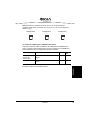
To install the Diva Server adapter software, see the online reference guides on the
Diva Server Software Suite CD-ROM or on the Eicon Web site.
Operating System
Reference Guides
Windows® Server 2003 Diva Server for Windows Reference Guide
Windows XP
Windows 2000
Linux®
CD-ROM Web
✔
Diva Server for Linux Reference Guide
✔
ENGLISH
(C) Install your Diva Server adapter software
✔
For more information on available online documentation see the section
Diva Server Online Documentation on page 12.
Installation
35
Troubleshooting
ENGLISH
If you are having problems with your adapter or with the corresponding software,
the following suggestions can help you diagnose and solve the problems. If these
suggestions do not work for you, try the suggestions described in the online
reference guides or in the help files for the corresponding software, or those on the
Help Web (see page 57).
Using Diva Server Line Test
(under Windows 2000, Windows XP, and Windows Server 2003)
Diva Server Line Test allows you to quickly verify that your Diva Server adapter
and analog, ISDN, E1, or channelized T1 line are working properly.
To open Diva Server Line Test click:
Start > Programs > Diva Server for Windows > Diva Server Line Test.
Diva Server Line Test offers the following tests:
• Line Check: Performs a quick check of your Diva Server Software installation
and the physical connection.
• Hardware Test: Performs a test only of the controller.
• Phone/Loop: Performs basic inband or outband phone tests, to verify the
connection to other telephones or to itself.
• Call Transfer: Performs different call transfers tests, with the option to choose the
transfer type.
• Fax: Performs basic inbound or outbound fax tests.
For more information about the tests of Diva Server Line Test, see Diva Server
Line Test Online Help (DSLineTest.chm).
36
Troubleshooting
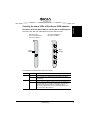
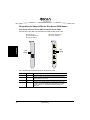
Diva Server 2FX, Diva Server BRI 2.0, and Diva Server V-BRI adapters
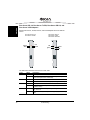
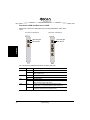
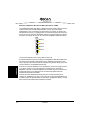
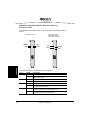
Diva Server 2FX, BRI, and V-BRI adapters have two LEDs as shown:
Diva Server 2FX
Diva Server BRI-2M 2.0
Diva Server V-BRI-2
Diva Server 4BRI-8M 2.0
Diva Server V-4BRI-8
ENGLISH
Checking the status LEDs of Diva Server ISDN adapters
green
orange
green
orange
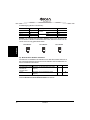
The table below describes the function of the LEDs:
Color
Status
Description
green
off
Layer 1 is not active.
lit
Layer 1 is active. The cabling and the connection to the ISDN
work properly.
off
Layer 2 is not active.
lit
Layer 2, i.e. the D-channel, is active. In Europe, the status of the
D-channel depends on the switch configuration; the LED might
remain lit for the duration of the call or it might remain lit
continuously. In North America, the D-channel is always active
and, as such, the LED remains lit.
orange
Troubleshooting
37
ENGLISH
Diva Server PRI 2.0, Diva Server T1/PRI, Diva Server PRI 3.0, and
Diva Server V-PRI adapters
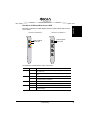
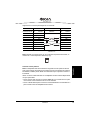
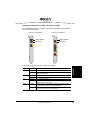
Diva Server PRI 2.0, T1/PRI, PRI 3.0, and V-PRI adapters have four LEDs as
shown:
Diva Server PRI 2.0
Diva Server T1/PRI
yellow
blue
Diva Server PRI 3.0
Diva Server V-PRI
Diva Server PRI PCIe
red
green
red
green
yellow
blue
The table below describes the function of each LED:
Color
Status
yellow
off
Normal operation.
lit
Remote site is experiencing synchronization problems (if a
remote alarm/yellow alarm is detected).
red
blue
green
38
Description
off
Normal operation.
lit
The receiver does not detect a signal (loss of signal/red alarm).
off
Normal operation.
lit
Received frames are not synchronized properly (alarm indication
signal/blue alarm).
off
Layer 2 is not active. Check your layer 2 configuration, i.e. switch
type, switch etc.
lit
Layer 2 is active. If your adapter works properly, layer 2 is always
active.
Troubleshooting
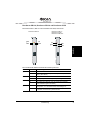
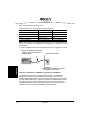
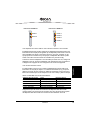
Diva Server V-2PRI and V-4PRI adapters have two multifunctional LEDs for each
port as shown:
Diva Server V-2PRI/E1/T1
Diva Server V-4PRI/E1/T1
green or yellow
green or yellow
blue or red
blue or red
ENGLISH
Diva Server V-2PRI and Diva Server V-4PRI
The table below describes the function of each LED:
Color
Status
Description
green
off
Layer 2 is not active. Check your layer 2 configuration, i.e. switch
type, switch etc.
lit
Layer 2 is active. If your adapter works properly, layer 2 is always
active.
yellow
red
blue
off
Normal operation.
lit
Remote site is experiencing synchronization problems (if a remote
alarm/yellow alarm is detected).
off
Normal operation.
lit
The receiver does not detect a signal (loss of signal/red alarm).
off
Normal operation.
lit
Received frames are not synchronized properly (alarm indication
signal/blue alarm).
Troubleshooting
39
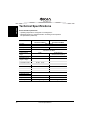
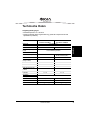
Technical Specifications
ENGLISH
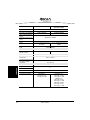
Environmental requirements:
• Operating temperature: 10 degrees C to 50 degrees C
• Maximum tolerance in voltage fluctuation: according to the respective
PCI specification (PCI/PCIe)
Diva Server BRI-2M 2.0
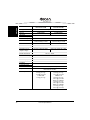
Diva Server V-BRI-2
Bus type
PCI (3.3/5.0 V)
CPU
Memory
32 Bit RISC CPU, 100 MHz
8 MB SDRAM
IRQ levels
16 MB SDRAM
Allocated by PC BIOS
I/O base addr. (hex)
Shared memory
range
Diva Server 4BRI-8M 2.0
Diva Server V-4BRI-8
8 MB
16 MB (memory)
64 Kbyte (local registers)
2 ADSP 2185
8 ADSP 2185
PCB
167.52 x 64.41
174.63 x 106.68
Low profile bracket
181.36 x 80.06
Bracket
181.36 x 120.88
187.84 x 126.37
B-channels
2 x 64
4 x 2 x 64
D-channels
1 x 16
4 x 16
DSPs
Dimensions in mm
(length x height)
Data transfer in kbps
Plug&Play
yes
Power safe mode
Ports
Female RJ45 (ISDN BRI)
4 x Female RJ45 (ISDN BRI)
Physical interfaces
ISDN basic rate interface
4 x ISDN basic rate interface
0.33 A @ +5 V typ.
0.58 A @ +5 V typ.
Power requirements
40
Technical Specifications
CPU
Memory
IRQ levels
I/O base addr. (hex)
PCI (3.3/5.0 V)
32 Bit RISC CPU, 133 MHz
8 MB SDRAM
Allocated by PC BIOS
Shared memory range
8 MB
DSPs
none
ENGLISH
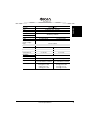
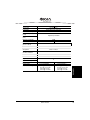
Diva Server 2FX
Bus type
Dimensions in mm
(length x height)
PCB
167.52 x 64.41
Low profile bracket
181.36 x 80.06
Bracket
181.36 x 120.88
Data transfer in kbps
B-channels
2 x 64
D-channel
1 x 64
Plug&Play
Power safe mode
yes
Port
Female RJ45 (ISDN BRI)
Physical interface
ISDN basic rate interface
Power requirements
0.3 A @ +5 V typ.
Technical Specifications
41
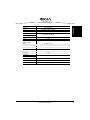
ENGLISH
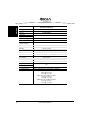
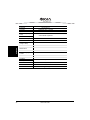
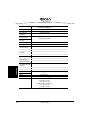
Diva Server PRI 2.0
Diva Server T1/PRI
Bus type
CPU
Memory
IRQ levels
I/O base addr. (hex)
Diva Server PRI 3.0
Diva Server V-PRI
PCI (3.3/5.0 V)
64 Bit RISC CPU, 180 MHz
32 Bit RISC CPU, 300 MHz
8 MB SDRAM
64 MB SDRAM
Allocated by PC BIOS
Shared memory range
DSPs
Dimensions in mm
PCB
Bracket
Dimensions in mm
(length x height)
8 MB
either 2, 4, 8, 24, or 30 ADSPs
2185 according to model
either 2, 10, 24, or 31 ADSPs
2185 according to model
PRI-0M and T1/PRI-0M:
PRI/E1/T1-CTI, PRI/E1/T1-8:
174.63 x 106.68
187.84 x 126.37
PRI and T1/PRI with DSPs:
PRI/T1-24, PRI/E1-30, V-PRI:
PCB
312.00 x 106.68
Bracket and retainer
352.17 x 126.37
Data transfer in kbps
B-channels
23 or 30 x 64
D-channel (PRI)
1 x 64
Channelized T1
24 x 56
Plug&Play
yes
Power safe mode
Port
Physical interface
Power requirements
42
Female RJ45 (ISDN PRI)
ISDN primary rate interface or
channelized T1 interface
PRI-30M 2.0:
2.2 A @ +5 V typ.
3.4 A @ +5 V max.
T1/PRI-24M:
1.7 A @ +5 V typ.
Technical Specifications
PRI/E1/T1-CTI:
0.58 A @ +5 V typ.
1.70 A @ +5 V max.
PRI/E1/T1-8:
0.65 A @ +5 V typ.
2.00 A @ +5 V max.
PRI/T1-24, V-PRI/T1:
0.92 A @ +5 V typ.
2.60 A @ +5 V max.
PRI/E1-30, V-PRI/E1:
0.97 A @ +5 V typ.
2.70 A @ +5 V max.
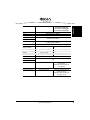
Diva Server V-2PRI/E1/T1
CPU
64 Bit RISC CPU, 466 MHz
Memory
64 MB SDRAM
IRQ levels
Allocated by PC BIOS
I/O base addr. (hex)
Shared memory range
DSPs
Diva Server V-4PRI/E1/T1
PCI (3.3/5.0 V)
ENGLISH
Bus type
8 MB
10 ADSPs-BF533
20 ADSPs-BF533
Dimensions in mm
(length x height)
PCB
312.00 x 106.68
Bracket and retainer
352.17 x 126.37
Data transfer in kbps
B-channels
D-channels (PRI)
Channelized T1
2 x 23 x 64 or 2 x 30 x 64
4 x 64
2 x 24 x 56
4 x 24 x 56
Plug&Play
yes
Power safe mode
Ports
Physical interfaces
Power requirements
4 x 23 x 64 or 4 x 30 x 64
2 x 64
2 x Female RJ45 (ISDN PRI)
4 x Female RJ45 (ISDN PRI)
2 x ISDN primary rate interface
or 2 x channelized T1 interface
4 x ISDN primary rate interface
or 4 x channelized T1 interface
3.0 A @ +3.3 V typ.
4.9 A @ +3.3 V max.
0.02 A @ +5 V typ.
0.04 A @ +5 V max.
5.5 A @ +3.3 V typ.
6.5 A @ +3.3 V max.
0.04 A @ +5 V typ.
0.08 A @ +5 V max.
Technical Specifications
43
ENGLISH
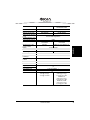
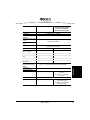
Diva Server PRI PCIe
Diva Server V-PRI PCIe
Bus type
PCIe 1.0a x1 lane (3.3/12 V)
CPU
32 Bit RISC CPU, 300 MHz
Memory
IRQ levels
I/O base addr. (hex)
Shared memory range
DSPs
Dimensions in mm
(length x height)
PCB
64 MB SDRAM
Allocated by PC BIOS
8 MB
either 2, 24, or 31 ADSPs 2185
PRI/E1/T1-CTI PCIe:
167.52 x 64.41
Low profile bracket
181.36 x 80.06
Bracket
181.36 x 120.88
Dimensions in mm
PRI/T1-24 PCIe, PRI/E1-30 PCIe, V-PRI PCIe:
PCB
312.00 x 106.68
Bracket and retainer
352.17 x 126.37
Data transfer in kbps
B-channels
1 x 64
Channelized T1
24 x 56
Plug&Play
Power safe mode
Port
Physical interface
Power requirements
44
23 or 30 x 64
D-channel (PRI)
yes
Female RJ45 (ISDN PRI)
Primary rate interface or channelized T1 interface
PRI/E1/T1-CTI PCIe:
0.96 A @ +3.3 V typ.
0.04 A @ +12 V typ.
PRI/T1-24 PCIe, V-PRI/T1-24 PCIe:
2.1 A @ +3.3 V typ.
0.03 A @ +12 V typ.
PRI/E1-30 PCIe, V-PRI/E1-30 PCIe:
2.3 A @ +3.3 V typ.
0.03 A @ +12 V typ.
Technical Specifications
Bus type
CPU
PCI (3.3/5.0 V)
32 Bit RISC CPU, 100 MHz
Memory
IRQ levels
I/O base addr. (hex)
Shared memory range
DSPs
Diva Server Analog-4P
Diva Server Analog-8P
Diva Server V-Analog-4P
Diva Server V-Analog-8P
ENGLISH
Diva Server Analog-2P
16 MB SDRAM
Allocated by PC BIOS
16 MB (memory)
64 Kbyte (local registers)
either 2, 4, or 8 ADSP 2185 according to model
Dimensions in mm
(length x height)
PCB
167.52 x 64.41
Low profile bracket
181.36 x 80.06
Bracket
181.36 x 120.88
312.00 x 106.68
Bracket and retainer
Data transfer in kbps
352.17 x 126.37
max. 2, 4, or 8 x 56 according to model
Plug&Play
yes
Power safe mode
Ports
2 RJ10 jacks
Analog-4P and V-Analog-4P:
4 RJ10 jacks
Analog-8P and V-Analog-8P:
4 RJ45 jacks
Physical interfaces
2, 4, or 8 x analog interface V.90 according to model
Power requirements
0.34 A @ +5 V typ.
Technical Specifications
Analog-4P and V-Analog-4P:
0.45 A @ +5 V typ.
Analog-8P and V-Analog-8P:
0.5 A @ +5 V typ.
45
International Regulatory Information
ENGLISH
Regulatory Information for the USA
WARNING: Changes or modifications to this unit not expressly approved by
Eicon Networks Corporation could void the user's authority to
operate the equipment.
FCC Declaration of Conformity
We:
Eicon Networks
Parkway Centre II
2805 N. Dallas Parkway
Suite 200
Plano, TX 75093
(972) 473-4500
Fax: (972) 473-4510
Declare under our sole legal responsibility that the products listed below to which
this declaration relates, are in conformity with Part 15 of the FCC Rules. Operation
is subject to the following two conditions:
(1) This device may not cause harmful interference, and
(2) this device must accept any interference received, including interference that
may cause undesired operation.
Note: This equipment has been tested and found to comply with the limits for a
Class B digital device, pursuant to Part 15 of the FCC Rules. These limits are
designed to provide reasonable protection against harmful interference in a
residential installation. This equipment generates, uses and can radiate radio
frequency energy and, if not installed and used in accordance with the instructions,
may cause harmful interference to radio communications.
However, there is no guarantee that interference will not occur in a particular
installation. If this equipment does cause harmful interference to radio or television
reception, which can be determined by turning the equipment off and on, the user
is encouraged to try to correct the interference by one or more of the following
measures:
• Reorient or relocate the receiving antenna.
• Increase the separation between the equipment and receiver.
46
International Regulatory Information
FCC Part 68 Notice
ENGLISH
• Connect the equipment into an outlet on a circuit different from that to which the
receiver is connected.
• Consult the dealer or an experienced radio/TV technician for help.
This equipment complies with Part 68 of the FCC rules and the requirements
adopted by the ACTA. On the bottom of this equipment is a label that contains,
among other information, a FCC part 68 registration number or a product identifier
in the format US: AAAEQ##TXXXX. If requested, this information must be
provided to the telephone company.
A plug and jack used to connect this equipment to the premises wiring and
telephone network must comply with the applicable FCC part 68 rules and
requirements adopted by the ACTA. A compliant telephone cord and modular plug
is provided with this product. It is designed to be connected to a compatible
modular jack that is also compliant.
The REN is used to determine the number of devices that may be connected to a
telephone line. Excessive RENs on a telephone line may result in the devices not
ringing in response to an incoming call. In most but not all areas, the sum of RENs
should not exceed five (5.0). To be certain of the number of devices that may be
connected to a line, as determined by the total RENs, contact the local telephone
company.
If this equipment causes harm to the telephone network, the telephone company
will notify you in advance that temporary discontinuance of service may be
required. But if advance notice is not practical, the telephone company will notify
the customer as soon as possible.
Also, you will be advised of your right to file a complaint with the FCC if you believe
it is necessary.
The telephone company may make changes in its facilities, equipment,
operations, or procedures that could affect the operation of the equipment. If this
happens, the telephone company will provide advance notice in order for you to
make the necessary modifications in order to maintain uninterrupted service.
If trouble is experienced with this equipment, please contact us for repair and
warranty information. If the trouble is causing harm to the telephone network, the
telephone company may request you to remove the equipment from the network
until the problem is resolved.
This unit contains no user-serviceable parts. Connection to party lines is subject to
state tariffs. Contact the state public utility commission, public service commission
or corporation commission for information.
International Regulatory Information
47
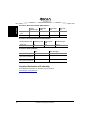
Diva Server Basic Rate Interface (BRI) adapters:
ENGLISH
Facility
Interface code
Digital Reg.
code
Service Order
code
USOC Jack
Type
Without Fax
option
02lS5
XD
6.0N
N/A
With Fax option
02lS5
XD
6.0P
N/A
Diva Server Primary Rate Interface (PRI) adapters:
Facility Interface code
Digital Reg. code
Service Order
code
USOC Jack Type
04DU9-1SN
DD
6.0F
RJ48-C
Diva Server Analog adapters:
REN
USOC Jack Type
Diva Server Analog-2P
0.2B
RJ11-C
Diva Server Analog-4P,
Diva Server V-Analog-4P
0.2B
RJ11-C
Diva Server Analog-8P,
Diva Server V-Analog-8P
0.2B
RJ11-C
Suppliers Declaration of Conformity
Eicon Network’s declaration of conformity can be viewed at:
www.dialogic.com/declarations
48
International Regulatory Information
NOTICE: This equipment meets the applicable Industry Canada Terminal
Equipment Technical Specifications. This is confirmed by the registration number.
The abbreviation, IC, before the registration number signifies that registration was
performed based on a Declaration of Conformity indicating that Industry Canada
technical specifications were met. It does not imply that Industry Canada approved
the equipment.
ENGLISH
Regulatory Information for Canada
The Ringer Equivalence Number is an indication of the maximum number of
devices allowed.
Before installing this equipment, users should ensure that it is permissible to be
connected to the facilities of the local telecommunications company. The
equipment must also be installed using an acceptable method of connection. In
some cases, the company’s inside wiring associated with a single line individual
service may be extended by means of certified connector assembly (telephone
extension cord). The customer should be aware that compliance with the above
conditions may not prevent degradation of service in some situations.
WARNING: For your safety, follow these steps before you remove the cover
from your PC:
1. Turn off the power to your PC and all peripheral devices.
2. Disconnect the power cable.
Repairs to certified equipment should be made by an authorized Canadian
maintenance facility designated by the supplier. Any repairs or alterations made by
the user to this equipment, or equipment malfunctions, may give the
telecommunications company cause to request the user to disconnect the
equipment.
For their own protection, users should ensure that any electrical ground
connections of the power utility, telephone lines and internal metallic water pipe
system are connected together. This precaution is particularly important in rural
areas.
WARNING: Users should not attempt to make such connections themselves,
but should contact the appropriate electric inspection authority, or
electrician, as appropriate.
This Class B digital apparatus complies with Canadian ICES-003.
Cet appareil numérique de la classe B est conforme à la norme NMB-003 du
Canada.
Eicon Network’s declaration of conformity can be viewed at:
www.dialogic.com/declarations
International Regulatory Information
49
Regulatory Information for Europe
ENGLISH
EU Declaration of Conformity
Eicon Networks Corporation declares that this equipment is in compliance with the
Radio and Telecommunication Terminal Equipment directive 1999/5/EC with
requirements covering the Electromagnetic Compatibility Directive 89/336/EEC
and the Low Voltage Directive 2006/95/EC. A detailed declaration of conformity for
this product can be found at:
http://www.eicon.com/worldwide/about/declarations/default.htm
CS: Eicon Networks tímto prohlašuje, že tento ITE je ve shodě se základními
požadavky a dalšími příslusnými ustanoveními směrnice 1999/5/ES.
DA: Undertegnede Eicon Networks erklærer herved, at følgende udstyr ITE
overholder de væsentlige krav og øvrige relevante krav i direktiv 1999/5/EF.
DE: Hiermit erklärt Eicon Networks, dass sich das Gerät ITE in
Übereinstimmung mit den grundlegenden Anforderungen und den übrigen
relevanten Bestimmungen der Richtlinie 1999/5/EG befindet.
EL: Ã≈ ‘«Õ —¡–œ’”¡ Eicon Networks ƒ«ÀŸÕ≈… œ‘… …‘≈ ”’ÃÃœ–÷ŸÕ≈‘¡…
—–œ” ‘…” œ’”…Ÿƒ≈…” ¡—¡…‘«”≈…” ¡… ‘…” Àœ…—≈” ”◊≈‘… ≈” ƒ…¡‘¡Œ≈…” ‘«”
œƒ«√…¡” 1999/5/EK.
EN: Hereby, Eicon Networks, declares that this ITE is in compliance with the
essential requirements and other relevant provisions of Directive 1999/5/EC.
ES: Por medio de la presente Eicon Networks declara que el ITE cumple con los
requisitos esenciales y cualesquiera otras disposiciones aplicables o exigibles de
la Directiva 1999/5/EC.
ET: Käesolevaga kinnitab Eicon Networks seadme ITE vastavust direktiivi
1999/5/EÜ põhinõuetele ja nimetatud direktiivist tulenevatele teistele
asjakohastele sätetele.
FI:
Eicon Networks vakuuttaa täten että ITE tyyppinen laite on direktiivin
1999/5/EY oleellisten vaatimusten ja sitä koskevien diretiivin muiden ehtojen
mukainen.
FR: Par la présente Eicon Networks déclare que l’appareil ITE est conforme aux
exigences essentielles et aux autres dispositions pertinentes de la directive
1999/5/CE.
HU: Alulírott, Eicon Networks nyilatkozom, hogy a ITE megfelel a vonatkozó
alapvetõ követelményeknek és az 1999/5/EC irányelv egyéb elõírásainak.
IC:
Hér með lýsir Eicon Networks yfir því að ITE er í samræmi við grunnkröfur
og aðrar kröfur, sem gerðar eru í tilskipun 1999/5/EC.
50
International Regulatory Information
LT:
Šiuo Eicon Networks deklaruoja, kad šis ITE atitinka esminius reikalavimus
ir kitas 1999/5/EB Direktyvos nuostatas.
ENGLISH
IT:
Con la presente Eicon Networks dichiara che questo ITE è conforme ai
requisiti essenziali ed alle altre disposizioni pertinenti stabilite dalla direttiva
1999/5/CE.
LV: Ar šo Eicon Networks deklarē, ka ITE atbilst Direktīvas 1999/5/EK
būtiskajām prasībām un citiem ar to saistītajiem noteikumiem.
MT: Hawnhekk, Eicon Networks, jiddikjara li dan ITE jikkonforma mal-htigijiet
essenzjali u ma provvedimenti ohrajn relevanti li hemm fid-Dirrettiva 1999/5/EC.
NL: Hierbij verklaart Eicon Networks dat het toestel ITE in overeenstemming is
met de essentiële eisen en de andere relevante bepalingen van richtlijn
1999/5/EG.
NO: Eicon Networks erklærer herved at utstyret ITE er i samsvar med de
grunnleggende krav og øvrige relevante krav i direktiv 1999/5/EF.
PL: Eicon Networks niniejszym oświadcza, że ITE spełnia wszystkie istotne
wymagania i odpowiednie ustalenia dyrektywy 1999/5/EC.
PT: Eicon Networks declara que este ITE está conforme com os requisitos
essenciais e outras disposições da Directiva 1999/5/CE.
SL: Eicon Networks izjavlja, da je ta ITE v skladu z bistvenimi zahtevami in
ostalimi relevantnimi določili direktive 1999/5/ES.
SK: Eicon Networks týmto vyhlasuje, že ITE spĺňa základné požiadavky a
všetky príslušné ustanovenia Smernice 1999/5/ES.
SV: Härmed intygar Eicon Networks att denna ITE står l överensstämmelse
med de väsentliga egenskapskrav och övriga relevanta bestämmelser som
framgår av direktiv 1999/5/EG.
International Regulatory Information
51
Power consumption
ENGLISH
WARNING: Check that power supply will not be overloaded. Maximum power
consumption of the board is stated in the section Technical
Specifications on page 40. The user should check that the total
power drawn by the host computer, the Diva Server adapter and any
other peripherals, must not exceed the capability of the host Power
Supply Unit. The Diva Server adapter does not draw power from the
ISDN network.
User/Installer instructions
Diva Server adapter communications board (internal models only)
Important safety considerations when installing into a host computer system
WARNING: The telephones cord(s) must remain disconnected from the
telecommunications system until the adapter has been properly
installed within the host which provides the necessary protection of
the operator.
Proper installation of the telecommunication card requires that the
adapter is screwed to the metal backplate of the PC. This ensures
proper grounding, which is necessary for your safety.
If it is subsequently desired to open the host equipment for any
reason, the telephones cord(s) must be disconnected prior to
effecting access to the telecommunications adapter.
WARNING: Never install telephone jacks in wet locations.
Never touch non-insulated telephone wires or terminals unless the
telephone line has been disconnected at the network interface.
Use caution when installing or modifying telephone lines.
52
International Regulatory Information
WARNING: It is essential that, when other option cards are introduced which use
or generate a hazardous voltage, the minimum creepages and
clearances specified in the table below are maintained. Suitable
user protection to ensure compliance with EN 60950 should be
present on the card. A hazardous voltage is one which exceeds
42.4 V peak a.c or 60 V d.c. If you have any doubt, seek advice from
a competent engineer before installing other adapters into the host
equipment.
ENGLISH
Installation within a spare slot position
The equipment must be installed such that with the exception of the connections to
the host, clearance and creepage distances shown in the table below are
maintained between the adapter and any other assemblies which use or generate
a voltage shown in the table below.
Clearance
X mm
Creepage
Y mm
Voltage used or generated by other parts of
the host or expansion card Vrms or Vdc
2.0
2.4 (3.8)
up to 50
2.6
3.0 (4.8)
up to 125
4.0
5.0 (8.0)
up to 250
4.0
6.4 (10.0)
up to 300
The larger distance shown in brackets applies where the local environment within
the host is subject to conductive pollution or dry non-conductive pollution which
could become conductive due to condensation. Failure to maintain these minimum
distances would invalidate the approval.
The clearance distance X is the shortest distance in air between two points. The
creepage path Y (along surfaces) is the shortest distance between the same two
points.
International Regulatory Information
53
Regulatory Information for Australia
ENGLISH
WARNING:
This customer equipment is to be installed and maintained by
service personnel as defined by AS/NZS 3260 Clause 1.2.14.3
Service Personnel. It may be hazardous if your computer is not
properly plugged in and grounded.
IMPORTANT: This equipment will be inoperable when mains power fails.
• This customer equipment shall only be installed in a PC that requires the use of
a tool to gain access to internal parts (e.g. this customer equipment must not be
installed in a PC with a ‘flip lid’).
• Proper installation of the Diva Server adapter requires that it is screwed to the
metal backplate of the computer. This ensures proper grounding, which is
necessary for safety purposes.
• This customer equipment may only be installed in host equipment where there is
at least 2 mm of air gap between the customer equipment and adjacent boards
(PCBs).
• Only compliant line cord set(s) shall be used as replacements with this customer
equipment.
54
International Regulatory Information
To receive detailed approval information, send a request specifying the product
name and the relevant countries to the following E-mail address:
[email protected]
All Diva Server adapters are certified in Europe (
(FCC and Industry Canada).
mark) and North America
ENGLISH
International approvals
Approval in Europe includes only countries that accept European Union approval
(
mark): Austria, Belgium, Cyprus, Czech Republic, Denmark, Estonia, Finland,
France, Germany, Greece, Hungary, Iceland, Ireland, Italy, Latvia, Lithuania,
Luxembourg, Malta, Netherlands, Norway, Poland, Portugal, Slovakia, Slovenia,
Spain, Sweden, Switzerland, and United Kingdom.
Some other countries in Eastern Europe and the Mediterranean region also accept
the CE-mark. If you are unsure, please check with your equipment supplier,
service provider or regulatory authority for confirmation.
International approvals
55
Japan approvals
ENGLISH
Product
Certificate Number
Diva Server BRI-2M 2.0
Diva Server V-BRI-2
CD-02-0870JP
Diva Server 4BRI-8M 2.0
Diva Server V-4BRI-8
C01-0472JP L01-0152
Diva Server T1/PRI-24M
C01-0537JP L01-0179
Diva Server PRI/E1/T1-CTI
Diva Server PRI/E1/T1-8
CD05-0558001
Diva Server PRI/T1-24
Diva Server PRI/T1-24 PCIe
CD05-0557001
Diva Server V-2PRI
CD06-0488001
Diva Server V-4PRI
CD06-0489001
Diva Server Analog-4P
Diva Server Analog-8P
Diva Server V-Analog-4P
Diva Server V-Analog-8P
A05-0055003
Russia approvals
Diva Server Analog-4P, Diva Server V-Analog-4P,
Diva Server Analog-8P, and Diva Server V-Analog-8P adapters comply
with Gost-R certification.
56
International approvals
The suppliers declaration of conformity are updated constantly. You can find a
complete list of all available suppliers declarations of conformity under
www.dialogic.com/declarations.
ENGLISH
Suppliers Declaration of Conformity
Suppliers Declaration of Conformity
57
Customer Services
ENGLISH
Eicon Networks provides various possibilities to obtain technical support for your
Eicon Networks product. We recommend that you contact your Eicon Networks
supplier first. If your supplier is not able to solve the problem, visit our help web
with its detailed information about a variety of topics. In the unusual case that the
information on the help web cannot help you fix the problem contact our Customer
Support.
Eicon Networks supplier
To obtain technical support for Eicon Networks products contact your Eicon
Networks supplier. A debug trace created with Diva Server tools may help you or
your supplier to find out the reason for your problem. For Windows operating
systems see the Diva Server Diagnostics Online Help DIVATRACE.chm on your
Diva Server Software Suite CD-ROM for more information about creating traces.
For Linux, the Diva Server for Linux Reference Guide contains helpful information
about traces.
Eicon Networks Help Web
If your supplier was not able to help you to solve the problem visit our Help Web.
It contains detailed information on:
• Installation and upgrade of Diva Server drivers, configuration scenarios, and
applications.
• Diagnostic and testing utilities.
• Basic issues, error messages and how to resolve them.
• ‘How to’ guides and wizards.
• Online training for ISDN, Diva Server API, and X.25 primarily 1st level technical
support people, but much of the course is also suitable for a non-technical
audience.
Visit our Help Web at www.eicon.com/support/ema.
58
Customer Services
If the information on the Help Web was not sufficient to help you to solve the
problem, contact our Customer Support.
Customer Support may probably need:
• A debug trace. For Windows see Diva Server Diagnostics Online Help
DIVATRACE.chm and for Linux see Diva Server for Linux Reference Guide.
• Or a copy of your active configuration if you use a Windows operating system.
See Diva Server Configuration Manager Online Help DiSrvCfg.chm.
ENGLISH
Eicon Networks Customer Support
See www.eicon.com/support/contact.asp for details on how to contact us.
Comments
If you wish to make comments about your Diva Server adapter or the
corresponding software, address them by e-mail to: [email protected].
Customer Services
59
Your Eicon Networks Adapter and
The WEEE Directive
In August 2005, the European Union Directive on Waste Electrical and Electronic
Equipment (2002/96/EC) and its amendment (2003/108/EC), collectively known as
the WEEE Directive, came into force throughout most of the European Union. This
Eicon Networks product comes within the scope of the WEEE Directive.
We are confident that this product will provide you with many years of reliable
service. Moreover, we are pleased to advise you that Eicon Networks warrants this
product, as detailed in Eicon Networks Corporation License Agreement for
use of software on page 2 of this guide and provides a fee based repair service
when the product is out of warranty. However, a time will come when the product
will no longer meet your needs or will become uneconomic to repair. It is at that
stage that we ask for your co-operation in recycling this product in the spirit of the
WEEE directive.
Eicon Networks has taken great care to minimize the environmental burden of this
product by careful design, and manufacturing it under an Environmental
Management System, registered to ISO 14001. The requirements of ISO 14001
are similar to and as rigorous as the requirements of ISO 9001, Quality
Management Systems with which you may be more familiar. We ask you to help
us to ensure that the environmental burden of this product is minimized when it is
of no further use to you by recycling it.
Like all electrical and electronic equipment, including televisions and computers,
it may contain small amounts of materials which could lead to environmental
damage. To minimize any environmental damage we ask you to have this product
recycled by:
• bringing it to the recycling collection point in your company
• by handing it into the store where you are purchasing the replacement
• by delivering it to a local bring-center in your area
No charge can be imposed on you for this recycling service in the European
Union, as Eicon Networks has paid for recycling this product when it was placed
on the market. These are requirements of the WEEE directive.
We thank you in advance for you co-operation and working with Eicon Networks in
protecting our environment.
Please do not dispose of this
product through municipal or
general waste, recycle it.
60
Your Eicon Networks Adapter and The WEEE Directive
Einführung
Mit Eicon Networks Diva Server Karten können Sie über ISDN-Basisanschlüsse
(S0), Primärmultiplexanschlüsse (S2M) oder Analoganschlüsse schnellste
Verbindungen für eine Vielzahl von Anwendungen realisieren. Diese
Installationsanleitung beschreibt die Installation und den Anschluss Ihrer Diva
Server Karte, liefert technische Daten der Karte und gibt einen Überblick über die
verfügbare Online-Dokumentation.
Unterstützte Diva Server Karten
Die Diva Server Produktpalette beinhaltet die folgenden Diva Server Karten:
ISDN BRI Karten
Eicons Diva Server BRI sind leistungsstarke und zum Teil aktive ISDN-Karten für
den ISDN-Basisanschluss (BRI). Die Karten unterstützen sowohl analoge als auch
digitale Gegenstellen.
• Diva Server 2FX
• Diva Server BRI-2M 2.0
• Diva Server 4BRI-8M 2.0
DEUTSCH
Hinweis: Die Marke Eicon wird im Verlauf von 2007 in allen relevanten Dokument
in Dialogic geändert.
• Diva Server V-BRI-2
• Diva Server V-4BRI-8
ISDN PRI- und E1-Karten
Diese Karten sind zum Teil aktive Hochleistungs-ISDN-Karten für den
ISDN-Primärmultiplexanschluss (PRI) und können sowohl für digitale als auch für
analoge Dienste eingesetzt werden.
Diva Server PRI 2.0:
• Diva Server PRI-0M
• Diva Server PRI-4M
• Diva Server PRI-8M
• Diva Server PRI-30M
Diva Server PRI 3.0:
• Diva Server PRI/E1/T1-CTI
• Diva Server PRI/E1/T1-8
• Diva Server PRI/E1-30
Diva Server PRI PCIe:
• Diva Server PRI/E1/T1-CTI PCIe
• Diva Server PRI/E1-30 PCIe
Diva Server V-PRI:
• Diva Server V-PRI/E1-30
Diva Server V-PRI PCIe:
• Diva Server V-PRI/E1-30 PCIe
Einführung
61
Multiport ISDN PRI- und E1-Karten
Die Multiportkarten sind leistungsfähige PC-basierte Telefoniekarten. Sie stellen
Rich Media Processing Funktionalitäten für bis zu 120 Sprachkanäle über bis zu
vier ISDN PRI- (E1) Schnittstellen bereit.
• Diva Server V-2PRI/E1/T1
• Diva Server V-4PRI/E1/T1
Analogkarten
Die Analogkarten können über RJ 10- oder RJ 45-Standardanschlüsse an analoge
Telefonanlagen oder das öffentliche analoge Netz angeschlossen werden.
Aufgrund von High-Performance Media Processing Funktionalitäten verbessert die
Diva Server Analog die Systemleistung.
DEUTSCH
• Diva Server Analog-2P
• Diva Server Analog-4P
• Diva Server Analog-8P
• Diva Server V-Analog-4P
• Diva Server V-Analog-8P
Unterstützte Betriebssysteme
Diva Server Karten unterstützen die folgenden Betriebssysteme:
•
•
•
•
Microsoft Windows® Server 2003
Microsoft Windows XP
Microsoft Windows 2000
Linux®
Hinweis: Die Diva Server BRI and V-BRI können Sie zusätzlich in einem
Computer mit dem Betriebssystem Microsoft Small Business Server (SBS)
einsetzen. Die Software und Dokumentation für die Microsoft Small Business
Server Version 4.5 und 2000 finden Sie auf der entsprechenden Microsoft Small
Business Server CD-ROM.
Diva Server Online-Dokumentation
Diva Server Online-Dokumentation ist auf der Diva Server Software Suite
CD-ROM und/oder auf der Eicon Networks Internetseite verfügbar. Die
Online-Dokumentation beschreibt die Installation und Konfiguration der Diva
Server Software. Die Internetseite von Eicon Networks bietet Ihnen eine große
Auswahl an Online-Dokumentation zu allen unterstützten Betriebssystemen
unter: http://www.eicon.com/worldwide/support/docs.htm.
62
Einführung
Diva Server Software Suite CD-ROM
Ihre Diva Server Software Suite CD-ROM enthält umfassende
Online-Benutzerhandbücher im PDF-Format von Adobe® Acrobat® und Microsoft
HTML-Hilfen im CHM-Format für die oben genannten Windows Betriebssysteme.
Die Dokumentation für Linux finden Sie auf der Eicon Internetseite. Für weitere
Informationen sehen Sie Seite 62.
Zusätzlich enthält Ihre Diva Server Software Suite CD-ROM README-Dateien.
Diese Dateien stellen aktuelle Informationen bereit, die nicht mehr in die
Handbücher aufgenommen werden konnten.
So installieren Sie den Adobe Acrobat Reader unter Windows:
1.
2.
3.
Legen Sie Ihre Diva Server Software Suite CD-ROM in das
CD-ROM-Laufwerk ein. Die CD-ROM wird automatisch gestartet. Falls der
automatische Start fehlschlägt, doppelklicken Sie im Root-Verzeichnis Ihrer
CD-ROM auf SETUP.EXE.
Klicken Sie im Begrüßungsdialog auf Bonus Software.
Im folgenden Dialogfenster können Sie den Acrobat Reader installieren.
DEUTSCH
Hinweis: Zum korrekten Anzeigen und Drucken der Online-Handbücher müssen
Sie die Acrobat Reader Version 3.0 oder eine neuere Version verwenden. Sie
können den Acrobat Reader von Ihrer Diva Server Software Suite CD-ROM
installieren.
So zeigen Sie ein PDF-Handbuch unter Windows an:
1.
2.
3.
4.
Legen Sie Ihre Diva Server Software Suite CD-ROM in das
CD-ROM-Laufwerk Ihres Computers ein. Falls der automatische Start
fehlschlägt, doppelklicken Sie im Root-Verzeichnis Ihrer CD-ROM auf
SETUP.EXE.
Klicken Sie im Begrüßungsdialog auf Dokumentation.
Im folgenden Dialogfenster wird Ihnen die Dokumentation zur Hard- und
Software angezeigt.
Zum Öffnen eines Handbuches doppelklicken Sie auf den entsprechenden
Link.
So zeigen Sie eine Online-Hilfe unter Windows an:
1.
2.
3.
4.
Legen Sie Ihre Diva Server Software Suite CD-ROM in das
CD-ROM-Laufwerk Ihres Computers ein. Falls der automatische Start
fehlschlägt, doppelklicken Sie im Root-Verzeichnis Ihrer CD-ROM auf
SETUP.EXE.
Klicken Sie im Begrüßungsdialog auf Inhalt der CD.
Klicken Sie auf die folgenden Ordner: driver > i386 > DEUTSCH.
Zum Öffnen einer Online-Hilfe doppelklicken Sie auf die entsprechende
CHM-Datei.
Einführung
63
Allgemeine Sicherheitshinweise
Die folgenden Sicherheitshinweise dienen Ihrer persönlichen Sicherheit und
schützen den Computer und die Karte sowie die Arbeitsumgebung vor möglichen
Schäden.
WARNUNG Alle Diva Server Karten
Computer, in denen Eicon Diva Server Karten eingesetzt werden,
müssen den CE-Richtlinien entsprechen, um Gesundheitsschäden
und Schäden am Computer und an der Karte zu vermeiden.
DEUTSCH
Ziehen Sie das analoge oder ISDN-Kabel aus dem Computer, bevor
Sie das Gehäuse Ihres Computers für die Installation Ihrer Diva
Server Karte oder aus einem anderen Grund abnehmen, um
Gesundheits- und Materialschäden zu vermeiden.
Achten Sie darauf, die Metallschiene der Diva Server Karte zu
verschrauben, so dass sie fest mit dem Computergehäuse
verbunden ist. Dadurch wird die richtige Erdung sichergestellt und
somit Gesundheits- und Materialschäden vermieden.
Diva Server PRI, V-2PRI und V-4PRI
Die Diva Server V-2PRI und V-4PRI und alle Versionen der Diva
Server PRI 2.0 können ca. 20 Watt Leistung benötigen. Wenn Sie
mehrere Karten in Ihrem System installiert haben, kann die
Stromversorgung überlastet werden. Stellen Sie sicher, dass die
Stromversorgung nicht überlastet wird und dass Ihr Computer
ausreichende Kühlung gewährleistet, um Gesundheits- und
Materialschschäden zu vermeiden.
64
Allgemeine Sicherheitshinweise
Diva Server ISDN
Alle Eicon Diva Server ISDN-Karten wurden getestet und
entsprechen bezüglich der elektromagnetischen Verträglichkeit, der
Sicherheit und der Kompatibilität der ISDN-Schnittstelle den
Richtlinien in der EU, in Nordamerika und in anderen wichtigen
Wirtschaftsräumen. Lesen Sie die entsprechenden Informationen im
Kapitel Zulassungsinformationen auf Seite 89, bevor Sie die Karte
installieren und einsetzen.
Diva Server V-2PRI, V-4PRI und PRI PCIe
Die korrekte Funktionsweise der Diva Server V-2PRI, V-4PRI und
PRI PCIe kann nur gewährleistet werden, wenn die Karten innerhalb
der zugelassenen Betriebstemperatur eingesetzt werden, siehe
Seite 83. Wird die Temperatur überschritten, erstellt das System
eine Trace-Datei mit den Informationen über die Betriebstemperatur.
Diva Server Analog
DEUTSCH
WICHTIG
Benutzen Sie nur Kabel mit American Wire Gauge (AWG) Nr. 26
oder höher, um ein korrektes Funktionieren zu gewährleisten.
Allgemeine Sicherheitshinweise
65
Vorbereitungen
Stellen Sie zunächst sicher, dass alle erforderlichen Komponenten zur Installation
Ihrer Diva Server Karte und der Software bereitliegen:
Beschreibung
Computer
Ihr Computer muss verfügen über:
• einen freien PCI-Steckplatz für PCI-Bus Karten
(für Diva Server V-2PRI und V-4PRI gemäß PCI 2.2)
• einen freien PCIe-Steckplatz x1, 1.0a kompatibel für PCIe-Bus
Karten
Andere Steckplätze, z. B. x4, x8, x16 können genutzt werden, wenn
sie vom BIOS und vom Betriebssystem unterstützt werden.
• ein installiertes Betriebssystem:
Windows Server 2003,
Windows XP,
Windows 2000,
Linux
• mindestens 15 MB freien Speicherplatz auf der Festplatte für die
Software
Lieferumfang der
Diva Server
ISDN-Karte
Der Lieferumfang Ihrer Diva Server ISDN-Karte enthält folgende
Komponenten:
• Diva Server ISDN-Karte
• ein oder mehrere benötigte ISDN RJ-45 Verbindungskabel
• Diva Server Software Suite CD-ROM
• Diva Server Karten Installationsanleitung
Lieferumfang der
Diva Server Analog
Der Lieferumfang Ihrer Diva Server Analog enthält folgende
Komponenten:
• Diva Server Analog
• Verbindungskabel zum Anschluss an die Analogleitung
• Diva Server Analog-8P und V-Analog-8P: vier Kabel mit
Dual-Adapter
• Diva Server Software Suite CD-ROM
• Diva Server Karten Installationsanleitung
ISDN-Basis- (S0),
Primärmultiplexanschluss (S2M)
oder
Analoganschluss
Die Anschlüsse werden von der zuständigen Telefongesellschaft
eingerichtet.
Achten Sie darauf, dass Sie den/die zu Ihrer Diva Server Karte
passenden Anschluss/Anschlüsse erhalten.
Informationen zum
Anschluss
Ihre Telefongesellschaft muss die folgenden Informationen
bereitstellen:
• ISDN- oder analoge Rufnummern für jede Leitung
• ISDN-Übertragungsprotokoll (D-Kanal-Protokoll):
Das Protokoll ist normalerweise abhängig von der Region.
Beispiele für gebräuchliche Übertragungsprotokolle sind:
Euro-ISDN DSS1 (wird in Europa verwendet und auch als
ETSI-Standard bezeichnet), 1TR6 (wird hauptsächlich in digitalen
Nebenstellenanlagen in Deutschland verwendet).
DEUTSCH
Komponente
66
Vorbereitungen
Installation
Dieser Abschnitt beschreibt die Installation Ihrer Diva Server Karte und das
Anschließen an die Leitung.
Führen Sie die folgenden Schritte durch, um Ihre Diva Server Karte erfolgreich
einzusetzen:
• (A) Die Diva Server Karte in Ihren Computer einstecken, wie unten beschrieben.
• (B) Die Diva Server Karte anschließen, wie auf Seite 68 beschrieben.
• (C) Die Diva Server Software installieren, wie auf Seite 78 beschrieben.
(A) Die Diva Server Karte in Ihren Computer einstecken
1. Schalten Sie den Computer und alle Peripheriegeräte aus und ziehen Sie von
allen Geräten den Stecker, um Verletzungen zu vermeiden.
2. Entladen Sie die statische Aufladung Ihres Körpers, indem Sie das Metallgehäuse berühren (die nicht-lackierte Rückseite des Computer-Gehäuses).
3. Ziehen Sie das ISDN-Kabel, wenn vorhanden, und das Netzkabel vom
Computer ab.
4. Nehmen Sie die Abdeckung des Computers ab (siehe Computer-Handbuch).
5. Suchen Sie in Ihrem Computer einen freien PCI- oder PCIe-Steckplatz.
6. Lösen Sie die Schraube oder lockern Sie den Clip. Achten Sie darauf, die
Schraube nicht zu verlieren. Entfernen Sie ggf. die hintere Metallschiene des
Steckplatzes.
7. Wenn Ihre Diva Server Karte einen Haltebügel hat und dieser bei der
Installation stört, können Sie ihn auch abmontieren. Er ist lediglich eine
Installationshilfe und trägt nicht zum Funktionieren der Karte bei.
DEUTSCH
Hinweis: Halten Sie Ihr Computer-Handbuch während der Installation der Karte
bereit.
Haltebügel
8.
Bevor Sie die Karte in den Steckplatz einsetzen, lesen Sie folgenden
Sicherheitshinweis:
VORSICHT: Damit keine Hardwareschäden auftreten, dürfen Sie die Karte,
je nach Typ, nur in einen PCI- oder PCIe-Steckplatz einsetzen.
Wenn Sie eine Karte in einen Steckplatz anderen Typs
einsetzen, können die Karte, der Computer oder beide
beschädigt werden.
Installation
67
9.
Setzen Sie die Karte in den Steckplatz ein. Stellen Sie sicher, dass die Karte
weder die CPU, noch die Speichermodule oder andere Bauteile auf der
Hauptplatine berührt.
Hinweis: Die Diva Server V-2PRI und V-4PRI haben zusätzlich zum PCI-Bus
einen H.100-Bus auf der Karte, der nicht betriebsbereit ist. Setzen Sie Ihre
Karte nur mit dem PCI-Bus in einen PCI-Steckplatz ein.
Schraube oder Clip
Metalschiene
DEUTSCH
PCI-Express
Steckplatz
PCI-Steckplatz
10. Befestigen Sie die Karte mit der Schraube oder dem Clip, damit sie fest mit
dem Gehäuse des Computers verbunden ist.
VORSICHT: Achten Sie darauf, die Metallschiene der Diva Server Karte zu
verschrauben, so dass sie fest mit dem Computergehäuse
verbunden ist. Dadurch wird die richtige Erdung sichergestellt
und somit Verletzungen und Schäden am Computer und der
Diva Server Karte vermieden.
11. Bringen Sie die Abdeckung des Computers wieder an (siehe Computer-
Handbuch).
(B) Die Diva Server Karte anschließen
Das Anschließen der Karte ist abhängig vom Kartentyp:
• Wenn Sie eine Diva Server BRI anschließen, folgen Sie den Anweisungen
auf Seite 69.
• Wenn Sie eine Diva Server PRI anschließen, folgen Sie den Anweisungen
auf Seite 71.
• Wenn Sie eine Diva Server Analog anschließen, folgen Sie den Anweisungen
auf Seite 74.
68
Installation
Anschließen einer Diva Server BRI
Hinweis: Wenn Sie Ihre Diva Server BRI als Master für TK-Anlagen oder als
Netzabschluss für den Back-to-Back Betrieb einsetzen möchten, sehen Sie
Seite 70.
In Europa und den meisten Ländern weltweit:
In Europa und den meisten anderen Ländern außer Nordamerika und Japan kann
die ISDN-Karte mit dem mitgelieferten Kabel direkt an die ISDN-Leitung
angeschlossen werden.
1. Nehmen Sie das mitgelieferte
ISDN-Kabel und stecken Sie ein
Ende in die Karte.
DEUTSCH
ISDN-Anschlussbuchse
Diva Server
BRI
2. Stecken Sie das andere
Ende des Kabels in die
ISDN-Anschlussbuchse.
Hinweis für Diva Server 4BRI und V-4BRI:
Die Diva Server 4BRI und V-4BRI haben vier Ports zum Anschließen an vier
separate ISDN-Basisanschlüsse. Schließen Sie die vier mitgelieferten Kabel an,
wie in der Abbildung oben beschrieben. Sie können beliebige Ports verwenden,
müssen in der Regel aber die Port-Nummer während der Software-Konfiguration
angeben. Sehen Sie unten die Port-Nummern. In der Abbildung weist der
Kartensteckverbinder nach unten.
Port 1
Port 2
Port 3
Port 4
Installation
69
Diva Server BRI Karten als Netzabschluss anschließen:
Die Diva Server Software bietet die Möglichkeit, Diva Server BRI Karten als
Netzabschluss (NT) zu betreiben. Der NT-Modus ermöglicht den Einsatz von Diva
Server Karten als Master bei der Kopplung von TK-Anlagen, z. B. Kopplung von
TK-Anlagen mit Q-Sig. Außerdem ermöglicht er, zwei Diva Server Karten im
Back-to-Back Betrieb einzusetzen.
Wenn Sie die Diva Server Karte an eine TK-Anlage anschließen, die als
Endgerät (TE) agiert und daher einen Netzabschluss erfordert, der die Taktung
generiert, konfigurieren Sie die Diva Server Karte als Netzabschluss. Schließen
Sie die Karte an die TK-Anlage an, wie im Diagramm unten dargestellt. Nehmen
Sie hierzu die entsprechende Anschlussbelegung an der TK-Anlage vor.
Verwenden Sie die erforderlichen Abschlusswiderstände.
DEUTSCH
Wenn Sie zwei Diva Server Karten im Back-to-Back Betrieb einsetzen,
konfigurieren Sie eine Karte als NT und die andere als TE. Verbinden Sie die
Karten mit einem gekreuzten Kabel. Die Kabelbelegung und die erforderlichen
Abschlusswiderstände können Sie dem Diagramm unten entnehmen.
Pol- (Kontakt-) Belegung für 8-polige Verbindungen (Stecker und Buchsen):
TE
Pins auf RJ-45
NT
Draht
Signal
3
2a
4
1a
1
nicht verwendet
2
nicht verwendet
Verdrahtung
Draht
Signal
TX +
1a
TX +
RX +
2a
RX +
Widerstände
5
1b
RX -
2b
RX -
6
2b
TX -
1b
TX -
7
nicht verwendet
8
nicht verwendet
Abschlusswiderstände
100 Ohm, 5%
Hinweis: Pin 1 befindet sich links (siehe Abbildung unten), wenn Sie den RJ-45
Stecker mit dem Kabel nach unten, den Pins zu Ihnen und der Lasche von Ihnen
weg gerichtet betrachten.
1
70
8
Installation
Anschließen einer Diva Server PRI
Hinweis: Ihre Diva Server PRI hat eine eingebaute CSU (Channel Service Unit),
die sie vor Beschädigungen durch Stromstöße schützt. Sie können jedoch auch
eine zusätzliche externe CSU benutzen, die Ihnen die Überprüfung Ihrer
ISDN-Leitung ermöglicht.
Verwenden Sie eines der mitgelieferten Kabel, um Ihre Diva Server PRI
anzuschließen. Das Anschlusskabel wird in zwei Varianten geliefert. Welches
Kabel Sie benutzen, hängt davon ab, wie Sie Ihre Diva Server PRI einsetzen:
Wenn die ISDN-Leitung mit einer RJ-45 Buchse installiert ist:
Verwenden Sie das mitgelieferte Kabel mit RJ-45 Steckern auf beiden Seiten:
Diva Server PRI
Signal
Pin 1
Receive + (RX +)
RJ-45 Stecker
Pin 1
Pin 2
Receive - (RX -)
Pin 2
Pin 4
Transmit + (TX +)
Pin 4
Pin 5
Transmit - (TX -)
Pin 5
abgeschirmter Stecker
völlig abgeschirmt
abgeschirmter Stecker
DEUTSCH
• RJ-45 zu RJ-45: zum Anschluss an eine ISDN-Leitung mit RJ-45 Buchse und
zum Einsatz als Master für eine TK-Anlage.
• RJ-45 zum offenen Kabelende: zur selbstdefinierten Leitungsbelegung
entsprechend dem verwendeten NT und zum Einsatz im Back-to-Back Betrieb.
Hinweis: Verwenden Sie für den E1 Modus mit 75 Ohm Impedanz einen externen
75 Ohm Balun-Adapter. Sie können einen solchen Adapter in Fachgeschäften
erwerben.
Schließen Sie Ihre Diva Server PRI wie unten dargestellt an das ISDN an.
1. Nehmen Sie das mitgelieferte
ISDN-Kabel und stecken Sie ein Ende
des Kabels in die Karte.
ISDN-Anschlussbuchse, NT
bzw. CSU
Diva Server
PRI
2. Stecken Sie das andere Ende des Kabels in
die ISDN-Anschlussbuchse, den NT oder
die CSU.
Installation
71
Hinweis für alle Diva Server V-2PRI/E1/T1 und V-4PRI/E1/T1:
Die Diva Server V-2PRI hat zwei Ports und die Diva Server V-4PRI hat vier Ports
zum Anschließen an vier separate ISDN-Primärmultiplexanschlüsse. Schließen
Sie die mitgelieferten Kabel an, wie in der Abbildung auf Seite 71 beschrieben. Sie
können beliebige Ports verwenden, müssen in der Regel aber die Port-Nummer
während der Software-Konfiguration angeben. Sehen Sie unten die
Port-Nummern. In der Abbildung weist der Kartensteckverbinder nach unten.
Diva Server V-2PRI/E1/T1
Diva Server V-4PRI/E1/T1
Port 1
Port 1
Port 2
Port 2
DEUTSCH
Port 3
Port 4
Wenn die Diva Server PRI als NT an eine TK-Anlage angeschlossen wird:
Die Diva Server Software bietet die Möglichkeit, Diva Server Karten als
Netzabschluss (NT) einzusetzen. Dies ermöglicht den Einsatz von Diva Server
PRI als Master bei der Kopplung von TK-Anlagen z. B. mit dem Q-Sig Protokoll.
Konfigurieren Sie die Diva Server Karte als Netzabschluss, wenn Sie die Diva
Server Karte an eine TK-Anlage anschließen, die als Endgerät (TE) agiert und
daher einen Netzabschluss zum Generieren der Taktung erfordert. Schließen Sie
die Karte an die TK-Anlage an, wie im Diagramm auf Seite 73 dargestellt. Nehmen
Sie hierzu die entsprechende Anschlussbelegung an der TK-Anlage vor.
Wenn der NT offene Drahtanschlüsse benutzt:
In einigen Fällen müssen Sie Ihre Diva Server PRI an einen NT mit offenen
Verbindungen anschließen. Die Sende- (TX) und Empfangsleitungen (RX) sind
durch die Farbe der Leitungen gekennzeichnet; Sendeleitungen sind blau und
weiß-blau, Empfangsleitungen sind orange und weiß-orange.
Verwenden Sie das mitgelieferte ISDN-Kabel mit offenen Kabelenden:
72
Diva Server PRI
Signal
Pin 1
Receive + (RX +)
Offene Enden
weiß-orange
Pin 2
Receive - (RX -)
orange
Pin 4
Transmit + (TX +)
blau
Pin 5
Transmit - (TX -)
weiß-blau
abgeschirmter Stecker
völlig abgeschirmt
Abschirmung
Installation
Stellen Sie sicher, dass die Sendeleitungen Ihrer Diva Server PRI an die
Empfangsanschlüsse des NTs und die Empfangsleitungen Ihrer Diva Server PRI
an die Sendeanschlüsse des NTs angeschlossen werden.
Hinweis: Wenn Ihre Diva Server PRI nicht richtig am ISDN angeschlossen ist,
leuchtet sowohl am NT als auch in der Vermittlungsstelle der zuständigen
Telefongesellschaft eine Schicht 1 Warnlampe auf. Wenn Sie eine externe CSU
verwenden, leuchtet auch eine Warnlampe an der CSU auf. Die Leitung wird
daraufhin möglicherweise von der Telefongesellschaft deaktiviert und muss
manuell wieder von der Telefongesellschaft aktiviert werden. Zu diesem Zweck
sollten Sie die Störungsstelle der zuständigen Telefongesellschaft informieren.
Die Diva Server Software bietet die Möglichkeit, Diva Server Karten als
Netzabschluss (NT) einzusetzen. Dies ermöglicht Ihnen, zwei Diva Server Karten
im Back-to-Back Betrieb zu verwenden. Hierzu konfigurieren Sie eine Karte als
Netzabschluss (NT) und die andere als Endgerät (TE). Verbinden Sie die Karten
mit einem gekreuzten Kabel. Sie können ein solches Kabel herstellen, indem Sie
das mitgelieferte ISDN-Kabel mit offenen Kabelenden benutzen und das offene
Ende entsprechend der Pin-Belegung für den NT-Modus terminieren, wie in der
folgenden Tabelle dargestellt:
TE
NT
Verdrahtung
Pins auf dem RJ-45
Signal
1
RX +
RX +
2
RX -
RX -
4
TX +
TX +
5
TX -
TX -
3
DEUTSCH
Wenn die Diva Server PRI im Back-to-Back Betrieb eingesetzt wird:
Signal
nicht verwendet
6
nicht verwendet
7
nicht verwendet
8
nicht verwendet
Hinweis: Pin 1 befindet sich links (siehe Abbildung unten), wenn Sie den RJ-45
Stecker mit dem Kabel nach unten, den Pins zu Ihnen und der Lasche von Ihnen
weg gerichtet betrachten.
1
8
Installation
73
Anschließen einer Diva Server Analog
Verwenden Sie die mitgelieferten Kabel, um Ihre Diva Server Analog
anzuschließen. Das Anschließen der Karte hängt vom Kartentyp ab:
• Wenn Sie eine Diva Server Analog-2P anschließen, folgen Sie den
nachfolgenden Anweisungen.
• Wenn Sie eine Diva Server Analog-4P oder eine Diva Server V-Analog-4P
anschließen, folgen Sie den Anweisungen auf Seite 75.
• Wenn Sie eine Diva Server Analog-8P oder eine Diva Server V-Analog-8P
anschließen, folgen Sie den Anweisungen auf Seite 76.
Wichtig: Benutzen Sie nur Kabel mit mindestens Nr. 26 AWG (American Wire
Gauge).
DEUTSCH
Diva Server Analog-2P:
Die Diva Server Analog-2P hat zwei RJ-10 Ports zum Anschließen an zwei
separate Analoganschlüsse. Sie können beliebige Ports verwenden, müssen in
der Regel aber die Port-Nummer während der Softwarekonfiguration angeben.
Sehen Sie unten die Port-Nummern. In der Abbildung weist der
Kartensteckverbinder nach unten.
Port 1
Port 2
Schließen Sie die Diva Server Analog-2P wie folgt an:
1. Nehmen Sie die zwei mitgelieferten
Kabel und stecken Sie die RJ-10
Stecker in die Ports der Analogkarte.
TAE-Anschlussbuchsen
oder Telefonanlage
Diva Server
Analog
2. Stecken Sie die RJ-11 Stecker in die
TAE-Buchsen oder Telefonanlage.
74
Installation
Kontaktbelegung (Stecker und Buchsen):
RJ-10
Signal
RJ-11
Pin 2
Ring
Pin 3
Pin 3
Tip
Pin 4
Hinweis: Pin 1 befindet sich links (siehe Abbildung unten), wenn Sie den RJ-10
oder RJ-11 Stecker mit dem Kabel nach unten, den Pins zu Ihnen und der Lasche
von Ihnen weg gerichtet betrachten.
RJ-11 Stecker
1
6
Diva Server Analog-4P und Diva Server V-Analog-4P:
DEUTSCH
RJ-10 Stecker
Die Diva Server Analog-4P oder V-Analog-4P hat vier RJ-10 Ports zum
Anschließen an vier separate Analoganschlüsse. Sie können beliebige Ports
verwenden, müssen in der Regel aber die Port-Nummer während der
Softwarekonfiguration angeben. Sehen Sie unten die Port-Nummern. In der
Abbildung weist der Kartensteckverbinder nach unten.
Port 1
Port 2
Port 3
Port 4
Installation
75
Schließen Sie die Diva Server Analog-4P oder V-Analog-4P wie folgt an:
1. Nehmen Sie die vier mitgelieferten
Kabel und stecken Sie die RJ-10
Stecker in die Ports der Analogkarte.
TAE-Anschlussbuchsen
oder Telefonanlage
Diva Server
Analog
2. Stecken Sie die RJ-11 Stecker in die
TAE-Buchsen oder Telefonanlage.
DEUTSCH
Kontaktbelegung (Stecker und Buchsen):
RJ-10
Signal
RJ-11
Pin 2
Ring
Pin 3
Pin 3
Tip
Pin 4
Hinweis: Pin 1 befindet sich links (siehe Abbildung unten), wenn Sie den RJ-10
oder RJ-11 Stecker mit dem Kabel nach unten, den Pins zu Ihnen und der Lasche
von Ihnen weg gerichtet betrachten.
RJ-10 Stecker
RJ-11 Stecker
1
6
Diva Server Analog-8P und Diva Server V-Analog-8P:
Die Diva Server Analog-8P oder V-Analog-8P hat vier RJ-45 Ports zum
Anschließen an vier RJ-45/RJ-10 Adapter, die je zwei RJ-10 Buchsen haben.
Somit repräsentiert jeder Port auf der Karte zwei Ports an der
TAE-Anschlussbuchse oder Telefonanlage. Sie können beliebige Ports
verwenden, müssen in der Regel aber die Port-Nummer während der
Softwarekonfiguration angeben. Sehen Sie unten die Port-Nummern. In der
Abbildung weist der Kartensteckverbinder nach unten.
76
Installation
Port 1 und Port 2
Port 3 und Port 4
Port 5 und Port 6
Port 7 und Port 8
1. Nehmen Sie die vier mitgelieferten Kabel mit
Dual-Adapter und stecken Sie die RJ-45 Stecker
in die Analogkarte.
TAE-Anschlussbuchsen
oder Telefonanlage
Diva Server
Analog
2. Nehmen Sie die acht
mitgelieferten Kabel und stecken
die RJ-10 Stecker in den
Dual-Adapter. Wobei Buchse „A“
den Ports 1,3,5 und 7 entspricht
und Buchse „B“ den Ports 2,4,6
und 8.
Installation
DEUTSCH
Schließen Sie Ihre Diva Server Analog-8P oder V-Analog-8P wie folgt an:
3. Stecken Sie die RJ-11 Stecker
in die TAE-Buchsen oder
Telefonanlage.
77
Kontaktbelegung (Stecker und Buchsen):
RJ-45
Signal
Pin 1
Ring
Pin 2
Tip
Pin 7
Tip
Pin 8
Ring
Dual-Adapter mit RJ-10 Buchsen
Buchse A
Buchse B
RJ-11
Pin 2
Pin 3
Pin 3
Pin 4
Pin 3
Pin 4
Pin 2
Pin 3
Hinweis: Pin 1 befindet sich links (siehe Abbildung unten), wenn Sie den RJ-45,
RJ-10 oder RJ-11 Stecker mit dem Kabel nach unten, den Pins zu Ihnen und der
Lasche von Ihnen weg gerichtet betrachten.
RJ-45 Stecker
DEUTSCH
1
RJ-10 Stecker
RJ-11 Stecker
8
1
6
(C) Die Diva Server Software installieren
Informationen zur Installation der Software für Ihre Diva Server Karte finden Sie in
der Online-Dokumentation auf der Diva Server Software Suite CD-ROM oder auf
der Eicon Networks Internetseite.
Betriebssystem
Dokumentation
CD-ROM Internet
Windows® Server 2003 Diva Server for Windows Reference Guide
(englisch)
Windows XP
Windows 2000
Linux®
✔
Diva Server for Linux Reference Guide
(englisch)
Weitere Informationen zur verfügbaren Online-Dokumentation finden Sie im
Abschnitt Diva Server Online-Dokumentation auf Seite 62.
78
Installation
✔
✔
Problemlösung
Die folgenden Hinweise helfen bei der Diagnose und beim Beheben von Fehlern,
die mit der Karte oder der dazugehörigen Software auftreten können. Reichen
diese Hinweise zur Fehlerbehebung nicht aus, finden Sie im Online Reference
Guide (auf Englisch) oder in der Online-Hilfe zur jeweiligen Software und im Help
Web (siehe Seite 90) weitere Informationen.
Diva Server Line Test (Anschlusstest)
Mit dem Diva Server Line Test Tool können Sie Ihre Diva Serve Karte und Ihren
Analog- oder ISDN-Anschluss überprüfen.
Zum Öffnen von Diva Server Anschlusstest klicken Sie auf Start > Programme >
Diva Server for Windows > Diva Server Line Test.
Sie können folgende Tests durchführen:
DEUTSCH
(unter Windows 2000, Windows XP und Windows 2003)
• Anschluss: Dieser Test überprüft, ob eine Verbindung zur Gegenstelle aufgebaut
werden kann.
• Hardware: Dieser Test überprüft die Controller auf der Diva Server Karte.
• Telefon/Loop: Der Telefon-/Looptest führt einen Ruf zu einem anderen Telefon
oder zum eigenen Anschluss durch.
• Rufweiterleitung: Dieser Test führt Rufweiterleitungen durch. Dabei kann die Art
der Rufweiterleitung ausgewählt werden.
• Fax: Mit diesem Test können Sie Testfaxe senden oder empfangen.
Für weitere Informationen sehen Sie die Diva Server Line Test Online-Hilfe
(DSLineTest.chm).
Problemlösung
79
Überprüfen der Status-LEDs der Diva Server ISDN-Karten
Diva Server 2FX, Diva Server BRI 2.0 und Diva Server V-BRI
Die Diva Server 2FX, BRI und V-BRI haben zwei Status-LEDs, siehe unten:
Diva Server 2FX
Diva Server BRI-2M 2.0
Diva Server V-BRI-2
Diva Server 4BRI-8M 2.0
Diva Server V-4BRI-8
DEUTSCH
grün
grün
orange
orange
Die untenstehende Tabelle beschreibt die Funktion der LEDs:
Farbe
Status
Beschreibung
grün
aus
Schicht 1 ist nicht aktiv.
an
Schicht 1 ist aktiv. Die Verkabelung und die Verbindung zum
ISDN funktionieren fehlerfrei.
aus
Schicht 2, der D-Kanal, ist nicht aktiv.
an
Schicht 2, der D-Kanal, ist aktiv. In Europa ist der Status des
D-Kanals von der Protokollkonfiguration abhängig. Die LED
leuchtet entweder nur solange die Verbindung steht oder
dauerhaft.
orange
80
Problemlösung
Diva Server PRI 2.0, Diva Server PRI 3.0 und Diva Server V-PRI
Diva Server PRI 2.0, PRI 3.0 und V-PRI haben vier LEDs, siehe unten:
Diva Server PRI 2.0
gelb
blau
Diva Server PRI 3.0
Diva Server V-PRI
Diva Server PRI PCIe
rot
grün
rot
gelb
blau
DEUTSCH
grün
Die untenstehende Tabelle beschreibt die Funktion jeder LED:
Farbe
Status
Beschreibung
gelb
aus
Normaler Betrieb.
an
Die entfernte Station hat Sychronisationsprobleme. (remote
alarm / yellow alarm)
aus
Normaler Betrieb.
rot
blau
grün
an
Der Empfänger nimmt kein Signal auf. (loss of signal / red alarm)
aus
Normaler Betrieb.
an
Die empfangenen Rahmen sind nicht korrekt synchronisiert.
(alarm indication signal / blue alarm)
aus
Schicht 2 ist nicht aktiv. Überprüfen Sie Ihre Schicht 2
Konfiguration, d. h. D-Kanal-Protokoll, Telefonanlage, etc.
an
Schicht 2 ist aktiv. Wenn Ihre Diva Server PRI korrekt
funktioniert, ist die Schicht 2 permanent aktiv.
Problemlösung
81
Diva Server V-2PRI und Diva Server V-4PRI
Diva Server V-2PRI und V-4PRI haben pro Port zwei Multifunktions-LEDs, siehe
unten:
Diva Server V-2PRI/E1/T1
Diva Server V-4PRI/E1/T1
grün oder gelb
grün oder gelb
blau oder rot
blau oder rot
DEUTSCH
Die untenstehende Tabelle beschreibt die Funktion jeder LED:
Farbe
Status
Beschreibung
gelb
aus
Normaler Betrieb.
an
Die entfernte Station hat Sychronisationsprobleme. (remote
alarm / yellow alarm)
aus
Normaler Betrieb.
rot
blau
grün
82
an
Der Empfänger nimmt kein Signal auf. (loss of signal / red alarm)
aus
Normaler Betrieb.
an
Die empfangenen Rahmen sind nicht korrekt synchronisiert.
(alarm indication signal / blue alarm)
aus
Schicht 2 ist nicht aktiv. Überprüfen Sie Ihre Schicht 2
Konfiguration, d. h. D-Kanal-Protokoll, Telefonanlage, etc.
an
Schicht 2 ist aktiv. Wenn Ihre Diva Server PRI korrekt
funktioniert, ist die Schicht 2 permanent aktiv.
Problemlösung
Technische Daten
Umgebungsbedingungen:
• Betriebstemperatur: 10°C bis 50°C
• Maximal zulässige Spannungsschwankung: gemäß der entsprechenden PCI
Spezifikation (PCI/PCIe)
Diva Server 4BRI-8M 2.0
Diva Server V-4BRI-8
Busformat
PCI (3,3/5,0 V)
Prozessor
32 Bit RISC CPU, 100 MHz
Speicher auf der Karte
8 MB SDRAM
IRQs (Interrupt Request
Level)
16 MB SDRAM
Vom PC BIOS zugewiesen
I/O-Basisadressen (hex)
Gemeinsamer Speicher
8 MB
16 MB (Speicher)
64 KB (lokale Register)
2 ADSP 2185
8 ADSP 2185
Platine
167.52 x 64.41
174.63 x 106.68
Low Profile Metallschiene
181.36 x 80.06
Metallschiene
181.36 x 120.88
187.84 x 126.37
B-Kanäle
2 x 64
4 x 2 x 64
D-Kanäle
1 x 16
4 x 16
DSPs
DEUTSCH
Diva Server BRI-2M 2.0
Diva Server V-BRI-2
Abmessungen in mm
(Länge x Höhe)
Datenübertragungrate
in kBit/s
Plug&Play
ja
Stromsparmodus
Anschlussbuchsen
1 x RJ-45 (ISDN S0)
4 x RJ-45 (ISDN S0)
Anschlussart
ISDN S0-Anschluss
4 parallele S0-Anschlüsse
Stromverbrauch
0,33 A @ +5 V typ.
0,58 A @ +5 V typ.
Technische Daten
83
Diva Server 2FX
Busformat
PCI (3,3/5,0 V)
Prozessor
32 Bit RISC CPU, 133 MHz
Speicher auf der Karte
IRQs (Interrupt Request
Level)
8 MB SDRAM
Vom PC BIOS zugewiesen
I/O-Basisadressen (hex)
Gemeinsamer Speicher
8 MB
DSPs
nein
Abmessungen in mm
(Länge x Höhe)
DEUTSCH
Platine
167.52 x 64.41
Low Profile
Metallschiene
181.36 x 80.06
Metallschiene
181.36 x 120.88
Datenübertragungrate
in kBit/s
B-Kanäle
2 x 64
D-Kanal
1 x 16
Plug&Play
Stromsparmodus
Anschlussbuchse
1 x RJ-45 (ISDN S0)
Anschlussart
ISDN S0-Anschluss
Stromverbrauch
84
ja
0,3 A @ +5 V typ.
Technische Daten
Diva Server PRI 2.0
Busformat
Prozessor
Speicher auf der Karte
IRQs (Interrupt Request
Level)
Diva Server PRI 3.0
Diva Server V-PRI
PCI (3,3/5,0 V)
64 Bit RISC CPU, 180 MHz
32 Bit RISC CPU, 300 MHz
8 MB SDRAM
64 MB SDRAM
Vom PC BIOS zugewiesen
I/O-Basisadressen (hex)
DSPs
Abmessungen in mm
(Länge x Höhe)
8 MB
2, 4, 8 oder 30 ADSP 2185 je
nach Modell
2, 10 oder 31 ADSP 2185 je
nach Modell
PRI-0M:
PRI/E1/T1-CTI, PRI/E1/T1-8:
Platine
174.63 x 106.68
Metallschiene
187.84 x 126.37
Abmessungen in mm
PRI-4M, PRI-8M, PRI-30M:
PRI/E1-30, V-PRI:
Platine
312.00 x 106.68
Metallschiene und
Haltebügel
352.17 x 126.37
DEUTSCH
Gemeinsamer Speicher
Datenübertragungrate
in kBit/s
B-Kanäle
23 oder 30 x 64
D-Kanal
1 x 64
Plug&Play
ja
Stromsparmodus
Anschlussbuchse
Anschlussart
Stromverbrauch
1 x RJ-45 (ISDN S2M)
ISDN S2M-Anschluss
PRI-30M:
2,2 A @ +5 V typ.
3,4 A @ +5 V max.
Technische Daten
PRI/E1/T1-CTI:
0,58 A @ +5 V typ.
1,70 A @ +5 V max.
PRI/E1/T1-8:
0,65 A @ +5 V typ.
2,00 A @ +5 V max.
PRI/E1-30, V-PRI:
0,97 A @ +5 V typ.
2,70 A @ +5 V max.
85
Diva Server V-2PRI/E1/T1
Diva Server V-4PRI/E1/T1
Busformat
PCI (3,3/5,0 V)
Prozessor
64 Bit RISC CPU, 466 MHz
Speicher auf der Karte
64 MB SDRAM
IRQs (Interrupt Request
Level)
Vom PC BIOS zugewiesen
I/O-Basisadressen (hex)
Gemeinsamer Speicher
DSPs
8 MB
10 ADSP-BF533
20 ADSP-BF533
Abmessungen in mm
(Länge x Höhe)
DEUTSCH
Platine
312.00 x 106.68
Metallschiene und
Haltebügel
352.17 x 126.37
Datenübertragungrate
in kBit/s
B-Kanäle
2 x 23 x 64 oder 2 x 30 x 64
4 x 23 x 64 oder 4 x 30 x 64
D-Kanäle
2 x 64
4 x 64
Plug&Play
ja
Stromsparmodus
Anschlussbuchsen
Anschlussart
Stromverbrauch
86
2 x RJ-45 (ISDN S2M)
4 x RJ-45 (ISDN S2M)
2 parallele ISDN
S2M-Anschlüsse
4 parallele ISDN
S2M-Anschlüsse
3,0 A @ +3,3 V typ.
4,9 A @ +3,3 V max.
0,02 A @ +5 V typ.
0,04 A @ +5 V max.
5,5 A @ +3,3 V typ.
6,5 A @ +3,3 V max.
0,04 A @ +5 V typ.
0,08 A @ +5 V max.
Technische Daten
Diva Server PRI PCIe
Diva Server V-PRI PCIe
Busformat
PCIe 1.0a x1 Lane (3,3/12 V)
Prozessor
32 Bit RISC CPU, 300 MHz
Speicher auf der Karte
64 MB SDRAM
IRQs (Interrupt Request
Level)
Vom PC BIOS zugewiesen
I/O-Basisadressen (hex)
DSPs
Abmessungen in mm
(Länge x Höhe)
8 MB
8 oder 31 ADSP 2185
PRI/E1/T1-CTI PCIe
Platine
167.52 x 64.41
Low Profile
Metallschiene
181.36 x 80.06
Metallschiene
Abmessungen in mm
181.36 x 120.88
PRI/E1-30 PCIe, V-PRI PCIe:
Platine
312,00 x 106,68
Metallschiene und
Haltebügel
352,17 x 126,37
DEUTSCH
Gemeinsamer Speicher
Datenübertragungrate
in kBit/s
B-Kanäle
30 x 64
D-Kanal
1 x 64
Plug&Play
Stromsparmodus
ja
Anschlussbuchse
1 x RJ-45 (ISDN S2M)
Anschlussart
ISDN S2M-Anschluss
Stromverbrauch
PRI/E1/T1 PCIe:
0,96 A @ +3,3 V typ.
0,04 A @ +12 V typ.
PRI/E1-30 PCIe, V-PRI PCIe
2,3 A @ +3,3 V typ.
0,03 A @ +12 V typ.
Technische Daten
87
Diva Server Analog-2P
Diva Server Analog-4P
Diva Server V-Analog-4P
Diva Server Analog-8P
Diva Server V-Analog-8P
Busformat
PCI (3,3/5,0 V)
Prozessor
32 Bit RISC CPU, 100 MHz
Speicher auf der Karte
16 MB SDRAM
IRQs (Interrupt Request
Level)
Vom PC BIOS zugewiesen
I/O-Basisadressen (hex)
Gemeinsamer Speicher
DSPs
16 MB (Speicher)
64 KB (lokale Register)
2, 4 oder 8 ADSP 2185 je nach Kartentyp
DEUTSCH
Abmessungen in mm
(Länge x Höhe)
Platine
167,52 x 64,41
Low Profile
Metallschiene
181,63 x 80,06
Metallschiene
181,63 x 120,88
312,00 x 106,68
Metallschiene und
Haltebügel
Datenübertragungsrate
in kBit/s
352,17 x 126,37
max. 2, 4 oder 8 x 56 je nach Modell
Plug&Play
ja
Stromsparmodus
Anschlussbuchsen
Anschlussart
Stromverbrauch
88
2 x RJ-10
Analog-4P und V-Analog-4P:
4 x RJ-10
Analog-8P und V-Analog-8P:
4 x RJ-45
2, 4 oder 8 x analoge V.90 Schnittstelle je nach Kartentyp
0,34 A @ +5 V typ.
Technische Daten
Analog-4P und V-Analog-4P:
0,45 A @ +5 V typ.
Analog-8P und V-Analog-8P:
0,5 A @ +5 V typ.
Zulassungsinformationen
Eicon Networks Corporation erklärt, dass diese Telekommunikationsendeinrichtungen den grundlegenden Anforderungen und anderen relevanten
Bestimmungen der Richtlinie 1999/5/EG entspricht.
Internationale Zulassungen
Kennzeichnung) und in Nordamerika (FCC
Die Zertifizierung in Europa beinhaltet nur die Länder, die das
Zulassungskennzeichen der Europäischen Union (
Kennzeichnung)
akzeptieren: Belgien, Dänemark, Deutschland, Estland, Finnland, Frankreich,
Griechenland, Großbritannien, Irland, Island, Italien, Lettland, Litauen, Luxemburg,
Niederlande, Norwegen, Österreich, Polen, Portugal, Schweden, Schweiz,
Slowakei, Slowenien, Spanien, Tschechische Republik, Ungarn und Zypern.
Einige osteuropäische Länder und Mittelmeer-Länder akzeptieren das
CE-Kennzeichen ebenfalls. Wenn Sie sich nicht sicher sind, wenden Sie sich an
Ihren Fachhändler, die zuständige Telefongesellschaft oder die
Zulassungsbehörde.
DEUTSCH
Diva Server Karten sind in Europa (
und Industry Canada) zertifiziert.
Wenn Sie ausführliche Zulassungsinformationen benötigen, senden Sie eine
E-mail mit Angaben zu Ihrer Diva Server Karte und den relevanten Ländern an
folgende Adresse:
[email protected]
Zulassungsinformationen
89
Kundendienst
Eicon Networks stellt Ihnen verschiedene Möglichkeiten zur Verfügung,
technischen Support zu erhalten. Falls beim Betrieb Ihrer Karte Probleme
auftreten sollten, wenden Sie sich zuerst an Ihren Fachhändler. Wenn der
Fachhändler Ihnen nicht weiterhelfen kann, besuchen Sie unser Help Web, auf
dem Sie detaillierte Informationen zu den unterschiedlichsten Themenbereichen
finden. Für den unwahrscheinlichen Fall, dass Ihnen das Help Web nicht die
benötigten Informationen liefert, kontaktieren Sie den Eicon Networks
Kundendienst.
Eicon Networks Fachhändler
DEUTSCH
Wenn Sie technischen Support benötigen, wenden Sie sich an Ihren Fachhändler.
Wenn Sie beim Betrieb der Karte Probleme haben sollten, dann erstellen Sie ein
Debug-Trace. Diese Informationen können Ihnen bzw. Ihrem Fachhändler helfen,
die Fehlerquelle rasch zu bestimmen. Wenn Sie Ihre Karte unter einem
Windows-Betriebssystem einsetzen, sehen Sie die Diva Server Diagnose
Online-Hilfe DIVATRACE.chm auf Ihrer Diva Server for Windows Software
CD-ROM für Informationen über das Aufzeichnen von Fehlermeldungen. Wenn
Sie Linux verwenden, finden Sie hilfreiche Informationen dazu im Diva Server for
Linux Reference Guide.
Eicon Networks Help Web
Wenn Sie zusammen mit Ihrem Fachhändler das Problem nicht beheben konnten,
besuchen Sie das Eicon Networks Help Web. Es enthält detaillierte Informationen
zu:
• Installation und Konfiguration der Diva Server Karten und der Software in den
unterschiedlichsten Einsatzbereichen.
• Diagnose- und Testprogramme.
• Fehlerbehebungen.
• ‘How to’ Anleitungen und Wizards.
• Online Training zu ISDN, Diva Server API und X.25. Die Kurse richten sich in
erster Linie an Kundendienstmitarbeiter des First-Level-Supports, aber viele
Inhalte sind auch für einen nicht-Techniker verständlich.
Besuchen Sie das Eicon Networks Help Web unter:
www.eicon.com/support/ema.
90
Kundendienst
Eicon Networks Kundendienst
Beachten Sie bei Problemen mit Ihrer Diva Server Karte und der Software die
Vorschläge und Empfehlungen im Help Web, bevor Sie sich mit dem
Kundendienst in Verbindung setzen.
Der Kundendienst benötigt von Ihnen ggf.:
Zur Kontaktaufnahme mit dem Kundendienst von Eicon Networks sehen Sie
www.eicon.com/support/contact.asp.
Anmerkungen
DEUTSCH
• ein Debug-Trace. Für Windows-Betriebssystem sehen Sie die Diva Server
Diagnose Online-Hilfe DIVATRACE.chm auf Ihrer Diva Server for Windows
Software CD-ROM. Für Linux sehen Sie den Diva Server for Linux Reference
Guide.
• oder eine Kopie Ihrer aktiven Konfiguration, wenn Sie Ihre Karte unter Windows
einsetzen. Sehen Sie dazu die Diva Server Konfigurationsmanager Online-Hilfe
DiSrvCfg.chm.
Wenn Sie Anmerkungen zu Ihrer Diva Server Karte oder Diva Server Software
haben, schicken Sie bitte eine e-mail an: [email protected].
Kundendienst
91
Ihre Eicon Networks Karte und die
WEEE Richtlinie
Im August 2005 trat die Richtlinie 2002/96/EG über Elektro- und
Elektronik-Altgeräte (WEEE) und deren Ergänzung 2003/108/EG in den meisten
Ländern der Europäischen Union in Kraft. Diese Richtlinie gilt auch für das von
Ihnen erworbene Eicon Networks Produkt.
Wir sind überzeugt, dass Ihnen unser Produkt über viele Jahre zuverlässige
Dienste leisten wird. Und es freut uns, Ihnen mitteilen zu dürfen, dass Eicon
Networks für dieses Produkt eine Garantie gewährt - wie unter Eicon Networks
Corporation License Agreement for use of software auf Seite 2 in dieser
Installationsanleitung beschrieben. Auch nach Ablauf der Garantiezeit, bieten wir
Ihnen eine Reparatur an, die dann aber kostenpflichtig ist.
Wenn das Produkt, nach vielen Jahren des erfolgreichen Einsatzes, nicht mehr
Ihren Ansprüchen gerecht werden sollte oder die Reparaturkosten zu hoch sein
sollten, bitten wir Sie, es nicht über den Hausmüll zu entsorgen sondern einer
Verwertung zuzuführen, da die Materialien wiederverwertet werden können.
Eicon Networks hat viel Zeit in Design und Herstellung der Karte gemäß
ISO 14001, Umweltmanagementsysteme, investiert, um die Umweltbelastung so
gering wie möglich zu halten. Die Anforderungen der ISO 14001 sind denen der
ISO 9001, Qualitätsmanagementsysteme, sehr ähnlich und durchaus genauso
anspruchsvoll.
Wie alle elektrischen und elektronischen Produkte, einschließlich Fernsehgeräte
und Computer, kann diese Karte einen geringen Anteil an Werkstoffen enthalten,
die Umweltschäden hervorrufen können. Um solche Schäden zu vermeiden, bitten
wir Sie eine der folgenden Möglichkeiten der Entsorgung zu nutzen:
• bei der Sammelstelle Ihrer Firma,
• bei einer lokalen Wertstoffannahmestelle oder
• bei Kartenneukauf, alte Karte dort zurückgeben, wo Sie die neue erwerben.
Für das Entsorgen der Karte innerhalb der Europäischen Union fallen für Sie keine
Kosten an, da wir, mit Markteinführung der Karte, für die Entsorgung bezahlt
haben. Das sind die Anforderungen der WEEE Richtlinie.
Wir danken Ihnen im Voraus für Ihre Mitarbeit und Ihre Unterstützung beim Schutz
der Umwelt.
Bitte nicht in den Müll werfen,
sondern umweltgerecht
entsorgen.
www.eicon.com/divaserver
Introducción
Los adaptadores Diva Server de Eicon Networks permiten establecer enlaces de
alta velocidad a través de accesos básicos RDSI (S0), accesos primarios (S2M) o
accesos analógicos para una gran variedad de aplicaciones. Esta guía de
instalación describe como instalar y conectar fisicamente su adaptador Diva
Server, provee datos técnicos y una vista general de la documentación online.
Nota: La marca Eicon será cambiado a Dialogic durante el año 2007 en toda la
documentación relevante.
Adaptadores Diva Server disponibles
El rango de productos Diva Server abarca los siguientes adaptadores:
Adaptadores Diva Server BRI
Diva Server BRI es un adaptador RDSI para servidor que proporciona conexión
tanto digital como analógica para uno o cuatro Interfaces de Acceso Básico (BRI)
de la RDSI.
• Diva Server 2FX
• Diva Server BRI-2M 2.0
• Diva Server 4BRI-8M 2.0
• Diva Server V-BRI-2
• Diva Server V-4BRI-8
Adaptadores Diva Server PRI, E1 y T1
Diva Server PRI 2.0:
• Diva Server PRI-0M
• Diva Server PRI-4M
• Diva Server PRI-8M
• Diva Server PRI-30M
Diva Server PRI 3.0:
• Diva Server PRI/E1/T1-CTI
• Diva Server PRI/E1/T1-8
• Diva Server PRI/E1-30
Diva Server PRI PCIe:
• Diva Server PRI/E1/T1-CTI PCIe
• Diva Server PRI/E1-30 PCIe
Diva Server V-PRI:
• Diva Server V-PRI/E1-30
ESPAÑOL
Los adaptadores de servidor aportan conectividad hasta 30 canales sobre líneas
RDSI PRI (Primary Rate Interface), E1 y T1.
Diva Server V-PRI PCIe:
• Diva Server V-PRI/E1-30 PCIe
Adaptadores Diva Server PRI, E1 y T1 de puertos múltiples
Los adaptadores de puertos múltiples son adaptadores de telefonía basada en PC
de gran potencia que ofrecen características avanzadas de procesamiento
multimedia para 60 o 120 canales de voz a través de E1 o RDSI PRI.
• Diva Server V-2PRI/E1/T1
• Diva Server V-4PRI/E1/T1
Introducción
93
Adaptadores Diva Server Analog
Los adaptadores Diva Server Analog son adaptadores de comunicaciones que
ofrecen soporte para aplicaciones de voz, fax y acceso remoto para dos, cuatro u
ocho conexiones simultáneas a través de líneas analógicas.
• Diva Server Analog-2P
• Diva Server Analog-4P
• Diva Server Analog-8P
• Diva Server V-Analog-4P
• Diva Server V-Analog-8P
Sistemas Operativos
Se puede utilizar los adaptadores Diva Server con los siguientes sistemas
operativos:
•
•
•
•
Microsoft Windows® Server 2003
Microsoft Windows XP
Microsoft Windows 2000
Linux®
Nota: El adaptador Diva Server BRI and V-BRI también puede utilizarse en PCs
que dispongan del sistema operativo Microsoft Small Business Server (SBS).
El software y la documentación para la versión 4.5 y 2000 de Microsoft Small
Business Server se encuentran en el correspondiente CD-ROM de Microsoft
Small Business Server.
ESPAÑOL
Diva Server Documentación Online
La documentación online se encuentra en el CD-ROM Diva Server Software Suite
y/o en la página web de Eicon Networks. La documentación online describe la
instalación y configuración del Diva Server software. Para más información sobre
la documentación en la página web véase la página 95.
El CD-ROM Diva Server Software Suite
El CD-ROM Diva Server Software Suite contiene amplias guías online en formato
PDF de Adobe® Acrobat® para los sistemas operativos Windows previamente
mencionados. Además, el CD-ROM viene acompañado, para los sistemas
operativos Windows, de ayudas en formato CHM usado en la ayuda de Microsoft
HTML. Para el sistema operativo Linux la documentación se encuentra en la
página web de Eicon. Para más información véase la página 95.
El CD-ROM Diva Server Software Suite también incluye varios archivos README
que ofrecen información actualizada no incorporada en los manuales.
94
Introducción
Nota: Para ver e imprimir correctamente las guías online, es necesario tener
instalada la aplicación Acrobat Reader, versión 3.0 o superior. Se puede instalar la
aplicación Acrobat Reader desde el CD-ROM Diva Server Software Suite.
Modo de instalar la aplicación Adobe Acrobat Reader bajo Windows:
1.
2.
3.
Introduzca el CD-ROM Diva Server Software Suite en la unidad de CD-ROM.
La aplicación de usuario se inicia automáticamente. De no ser así, haga un
doble clic dentro del directorio raíz del CD-ROM en SETUP.EXE.
En la pantalla inicial, seleccione Bonus Software.
En la siguiente pantalla puede instalar la aplicación Acrobat Reader.
Modo de ver una guía PDF en Windows:
1.
2.
3.
4.
Introduzca el CD-ROM Diva Server Software Suite en la unidad de CD-ROM
del PC. Si no se inicia automáticamente, haga un doble clic dentro del
directorio raíz del CD-ROM en SETUP.EXE.
En la pantalla inicial, haga clic en Documentation.
A continuación puede ver la documentación del hardware y del software.
Para abrir una guía, haga doble clic en ella.
1.
2.
3.
4.
Introduzca el CD-ROM Diva Server Software Suite en la unidad de CD-ROM
del PC. Si no se inicia automáticamente, haga un doble clic dentro del
directorio raíz del CD-ROM en SETUP.EXE.
En la pantalla inicial, haga clic en Browse this CD.
Haga clic en las carpetas siguientes: driver > i386 > ENGLISH.
Para abrir una ayuda online, haga doble clic en ella.
Página web de Eicon Networks
ESPAÑOL
Modo de ver una ayuda online en Windows:
La página web de Eicon Networks le ofrece amplías guías online para los
sistemas operativos mencionados en la página 94. En la página
http://www.eicon.com/worldwide/support/docs.htm puede seleccionar la
documentación para su producto de Eicon Networks.
Introducción
95
Instrucciones de Seguridad
Aplique las siguientes instrucciones de seguridad para garantizar su propia
seguridad personal y para ayudarle a proteger el PC y su entorno de trabajo
contra posibles daños.
PRECAUCIÓN Para todos los adaptadores Diva Server
Todos los PCs que tienen instalados adaptadores Diva Server,
deben cumplir con las regulaciones específicas de seguridad del
país, tales como la CE o FCC, para evitar daños personales y del
PC y/o adaptador Diva Server.
Asegúrese de que el cable RDSI o analógico no está conectado
con la RDSI o la red analógica antes de abrir la caja del PC para
evitar daños personales y del PC y/o adaptador Diva Server.
Siempre coloque el tornillo en la barra metálica del adaptador
Diva Server para que éste quede firmemente sujeto al chasis del
PC. De este modo se garantiza una puesta a tierra correcta y se
evitan posibles daños.
Adaptadores Diva Server PRI, V-2PRI y V-4PRI
ESPAÑOL
96
Todos los adaptadores Diva Server PRI 2.0, V-2PRI y V-4PRI
pueden requerer una potencia de aproximadamente 20 vatios.
En caso de instalar varios adaptadores en su sistema, asegúrese
de que la alimentación eléctrica no sufre sobrecargas con la
instalación del adaptador Diva Server PRI. Asegúrese también
de que el PC tiene suficiente ventilación para evitar daños del
mismo.
Instrucciones de Seguridad
IMPORTANTE Adaptadores RDSI Diva Server
Todos los adaptadores RDSI Diva Server de Eicon han sido
sometidos a una prueba de funcionamiento y cumplen con todos
los requisitos de compatibilidad electromagnética, seguridad y
compatibilidad de la interfaz RDSI impuestos por las Directivas
de la UE y por las normativas vigentes en Norteamérica y otros
espacios económicos importantes. Antes de instalar y utilizar el
adaptador, lea la información dada en el capítulo Datos sobre la
homologación en la página 122.
Diva Server V-2PRI, V-4PRI y PRI PCIe
El funcionamiento adecuado de los adaptadores
Diva Server V-2PRI, V-4PRI y PRI PCIe está garantizado
solamente si son operados dentro del rango de temperatura
permitido, veáse la página 116 para más información. Si se
excede la temperatura máxima, se crea un archivo de
depuración con información de las temperaturas alcanzadas.
Adaptadores Diva Server Analog
ESPAÑOL
Solamente utilice cables de telecomunicación con American Wire
Gauge (AWG) número 26 o superior.
Instrucciones de Seguridad
97
Preparativos
En primer lugar, asegúrese de que tiene a mano todos los componentes
necesarios para la instalación del adaptador Diva Server y del software:
ESPAÑOL
Componentes
Descripción
PC
El PC debe disponer de lo siguiente:
• Una ranura PCI libre para adaptadores de bus PCI
(para Diva Server V-2PRI y V-4PRI según
PCI 2.2)
• Una ranura PCI Express x1 libre, 1.0a compatible para
adaptadores de bus PCIe
Se pueden usar otras ranuras de tipo PCIe, p.ej. x4, x8, x16, si son
soportados por el sistema operativo.
• Un sistema operativo instalado:
Windows Server 2003,
Windows XP,
Windows 2000,
Linux
• Como mínimo 15 MB de memoria libre en el disco duro para el
software
Adaptador RDSI
Diva Server
El paquete Diva Server RDSI incluye los siguientes componentes:
• Adaptador Diva Server BRI o PRI
• Uno o varios cables de enlace RJ-45 RDSI
• CD-ROM Diva Server Software Suite
• Adaptadores Diva Server Guía de Instalación
Adaptador Diva
Server Analog
El paquete Diva Server Analog incluye los siguientes componentes:
• Adaptador Diva Server Analog
• cables para conectar el adaptador a la línea analógica
• Adaptador Diva Server Analog-8P y V-Analog-8P: cuatro cables
con dispositivo
• CD-ROM Diva Server Software Suite
• Adaptadores Diva Server Guía de Instalación
Acceso RDSI básico Los accesos son instalados por la compañía telefónica responsable.
(S0), primario (S2M) Asegúrese de que le instalen el acceso adecuado para el adaptador
o analógico
Diva Server.
Información sobre el Su compañía telefónica debe suministrarle la siguiente información:
acceso
• Números para cada linea RDSI o analógica.
• Protocolo de transmisión RDSI (protocolo de canal D):
El protocolo depende normalmente de la región. El protocolo más
conocido es Euro-RDSI DSS1 (se utiliza en Europa y también se
denomina estándar ETSI).
98
Preparativos
Instalación
Usted debe completar los tres siguientes procedimientos, para utilizar su
adaptador Diva Server apropiadamente:
• (A) Insertar el adaptador Diva Server en el PC siguiendo la descripción dada
abajo.
• (B) Conectar la línea siguiendo la descripción dada en la página 101.
• (C) Instalar el software para el adaptador Diva Server siguiendo la descripción
dada en la página 111.
Nota: Usted puede requerir el manual de su PC durante la instalacion de su
adaptador.
(A) Insertar el adaptador Diva Server en el PC
Desconecte el PC y todas las unidades periféricas para evitar posibles daños.
2. Elimine la carga estática de su cuerpo tocando el chasis metálico (el metal sin
pintar que esta en la parte posterior del PC).
3. Desenchufe el cable RDSI y el cable de alimentación del PC.
4. Retire la cubierta exterior del PC (véase el manual del PC).
5. Busque una ranura PCI libre en el PC.
6. Si hay una placa metálica en el extremo de la ranura, retíre el tornillo o afloje
el clip y retíre la placa metálica. Guarde el tornillo para fijar el adaptador como
se describe en paso 10 en la página 100.
7. Si el adaptador tiene un estribo de sujeción, lo puede retirar si dificulta la
instalación, pues sólo sirve de ayuda mecánica y no influye el funcionamiento
del adaptador.
Estribo de
sujeción
8.
ESPAÑOL
1.
Antes de insertar el adaptador lea la siguiente norma de seguridad:
NORMA DE
SEGURIDAD:
Para no dañar el hardware, es imprescindible instalar el
adaptador en una ranura PCI. Si instala el adaptador en una
ranura de un tipo diferente, se puede dañar el adaptador, el
PC o ambos.
Instalación
99
9.
Inserte el adaptador en la ranura. Asegúrese de que el adaptador no hace
contacto ni con la CPU, ni con los módulos de memoria y con ningún otro
componente de la placa.
Nota: Adicionalmente al bus PCI, los adaptadores Diva Server V-2PRI y
V-4PRI cuentan con un bus H.100 en la tarjeta. El bus H.100 no es
operacional, por lo tanto, solamente inserte el adaptador con el bus PCI en el
PC.
Tornillo
Placas metálicas
Ranuras
PCI Express
Ranuras PCI
10. Fije el adaptador con el tornillo o el clip para que quede bien sujeto al chasis
del PC.
NORMA DE No se olvide de colocar el tornillo en la barra metálica del
SEGURIDAD: adaptador Diva Server para que éste quede firmemente sujeto
al chasis del PC. De este modo se garantiza una puesta a
tierra correcta y se evitan posibles daños.
ESPAÑOL
100
11. Vuelva a montar la cubierta exterior del PC (véase el manual del PC).
Instalación
(B) Conectar la línea
La manera de conectar su adaptador depende del tipo de adaptador Diva Server
que tenga:
• Si tiene un adaptador Diva Server BRI, siga la descripción dada abajo.
• Si tiene un adaptador Diva Server PRI, siga la descripción dada en la
página 103.
• Si tiene un adaptador Diva Server Analog, siga la descripcion dada en la
página 107.
Conectar la línea RDSI básica
Nota: Si pretende utilizar su Diva Server BRI como terminación de red para su
conexión a centralitas o directamente a otra Diva Server, acuda a la página 102.
En Europa y en la mayoría de los países del mundo:
En Europa y en la mayoría de los demás países del mundo, excepto Norteamérica
y Japón, el adaptador se puede conectar directamente a la línea RDSI con el
cable suministrado.
1. Utilice el cable RDSI suministrado y
enchufe un extremo del cable en el
adaptador RDSI.
Cajetín RDSI
2. Enchufe el otro extremo del cable en
el cajetín RDSI.
Instalación
ESPAÑOL
Adaptador
Diva Server
BRI
101
Nota para adaptadores Diva Server 4BRI y Diva Server V-4BRI:
Los adaptadores Diva Server 4BRI y V-4BRI tienen cuatro puertos para conectar a
cuatro accesos básicos RDSI independientes. Conecte los cuatro cables
suministrados como se muestra en la figura arriba. Los puertos se pueden usar
indistintamente aunque, por regla general, es necesario especificar el número de
puerto a la hora de configurar el software. Observe en la figura abajo los números
de puerto. En la figura, el conector de enchufe del adaptador señala hacia abajo.
Puerto 1
Puerto 2
Puerto 3
Puerto 4
Conexión de adaptadores Diva Server BRI en modo TR:
El software Diva Server permite configurar los adaptadores Diva Server BRI como
terminaciones de red (TR). Esto significa que su adaptador puede actuar como
TR, por ejemplo, para interconexión de centralitas con protocolo Q-Sig o para una
conexión directa a otro adaptador Diva Server.
ESPAÑOL
102
Cuando se conecta el adaptador a una centralita que actúa como equipo terminal
y, por tanto, requiere un TR que proporcione la señal de reloj, configure el
adaptador como TR. Conecte el adaptador a la centralita tal como se muestra en
el diagrama inferior con la asignación de conectores apropiada. Utilice las
resistencias terminales necesarias.
Cuando utilice dos adaptadores Diva Server para conexión directa entre sí,
configure un adaptador como TR y el otro como TE. Conecte los adaptadores con
un cable cruzado. El cableado debe corresponderse al diagrama inferior y el cable
debe incorporar las resistencias terminales necesarias.
Instalación
Asignación de contactos para clavijas de 8 conectores:
Lado TE
Conectores RJ-45 Hilo
1
no utilizado
2
no utilizado
Lado TR
Señales
Cableado
Hilo
Señales
3
2a
TX +
1a
TX +
4
1a
RX +
2a
RX +
5
1b
RX -
2b
RX -
6
2b
TX -
1b
TX -
Resistencias
7
no utilizado
8
no utilizado
Resistencias terminales
100 Ohm, 5%
Nota: Mirando el conector RJ-45 con los conectores expuestos hacia usted, se
numeran de 1 a 8 de izquierda a derecha (v. fig.).
1
8
Nota: El adaptador Diva Server PRI lleva integrada una CSU (Channel Service
Unit) que le protege de los daños que pueden provocar los impulsos de corriente.
No obstante, también puede utilizar una CSU externa que le permita controlar la
línea RDSI.
ESPAÑOL
Conectar la línea primaria
Utilice uno de los cables incluidos con el adaptador. El cable a utilizar depende del
uso que quiera darle:
• RJ-45 a RJ-45 para conexión a una linea RDSI PRI con conexión RJ-45 o para
una conexión como terminación de red a una centralita.
• RJ-45 a cables abiertos para conexión a una linea RDSI PRI con hilos abiertos o
para conexión entre dos adaptadores Diva Server.
Instalación
103
Si el acceso RDSI tiene un cajetín RJ-45:
Utilice el cable con conectores RJ-45 en ambos extremos:
Adaptador Diva Server PRI
Señal
Conector RJ-45
Pin 1
Receive + (RX +)
Pin 1
Pin 2
Receive - (RX -)
Pin 2
Pin 4
Transmit + (TX +)
Pin 4
Pin 5
Transmit - (TX -)
Pin 5
Conector apantallado
Totalmente apantallado
Conector apantallado
Nota: Para el modo E1 con impedancia de 75 ohmios, utilice un adaptador Balun
externo de 75 ohmios. Dicho adaptador se puede adquirir en cualquier comercio
especializado.
Conecte el adaptador Diva Server PRI a la RDSI tal como se muestra en la figura.
1. Utilice el cable RDSI suministrado y
enchufe un extremo del cable en el
adaptador RDSI.
Cajetín RDSI, TR o CSU
Adaptador
Diva Server
PRI
ESPAÑOL
104
2. Enchufe el otro extremo del cable en el
cajetín RDSI, la TR o la CSU.
Nota para los Diva Server V-2PRI/E1/T1 y Diva Server V-4PRI/E1/T1:
Los adaptadores Diva Server V-2PRI tienen dos puertos y los adaptadores
Diva Server V-4PRI tienen cuatro puertos para conectar a cuatro accesos
primarios RDSI independientes. Conecte los cables sumistrados como se muestra
en la figura de la página 104. Los puertos se pueden usar indistintamente aunque,
por regla general, es necesario especificar el número de puerto a la hora de
configurar el software. Observe en la figura abajo los números de puerto. En la
figura, el conector de enchufe del adaptador señala hacia abajo.
Instalación
Diva Server V-2PRI/E1/T1
Diva Server V-4PRI/E1/T1
Puerto 1
Puerto 1
Puerto 2
Puerto 2
Puerto 3
Puerto 4
Si el adaptador Diva Server PRI en modo TR está conectado a una centralita:
El software Diva Server permite configurar los adaptadores Diva Server PRI como
terminaciones de red (TR). Esto significa que su adaptador puede actuar como TR
para centralitas que actúan como equipo terminal y, por tanto, requieren un TR
que proporcione la señal de reloj. Por ejemplo, el adaptador Diva Server puede
actuar como TR en la interconexión de centralitas con protocolo Q-Sig.
Cuando se conecta el adaptador a una centralita que actúa como TE, configure el
adaptador como TR. Conecte el adaptador a la centralita tal como se muestra en
el diagrama de la página 106 con la asignación de conectores apropiada.
En determinados casos hay que conectar el adaptador Diva Server PRI a una
terminación de red (TR) sin cajetín. Los cables de transmisión (TX) y recepción
(RX) se reconocen por sus colores; los cables de transmisión son de color azul y
blanco-azul mientras que los de recepción son de color naranja y blanco-naranja.
Utilice el cable RDSI con los extremos abiertos:
Adaptador Diva Server PRI
Señal
Pin 1
Receive + (RX +)
Blanco-naranja
Pin 2
Receive - (RX -)
Naranja
ESPAÑOL
Si la TR tiene alambres sueltos:
Extremos abiertos
Pin 4
Transmit + (TX +)
Azul
Pin 5
Transmit - (TX -)
Blanco-azul
Conector apantallado
Totalmente apantallado
Apantallamiento
Asegúrese de que las líneas de transmisión del adaptador Diva Server PRI
quedan unidas a las conexiones de recepción de la TR y las líneas de recepción
del adaptador Diva Server PRI a las conexiones de transmisión de la TR.
Instalación
105
Nota: Si el adaptador Diva Server PRI no está bien conectado a la RDSI, se
ilumina un piloto de advertencia de nivel 1 tanto en la TR como en la centralita de
la compañía telefónica. En caso de utilizar una CSU externa, también se ilumina
un piloto de advertencia en la CSU. En dicho caso, lo más probable es que la
compañía telefónica desactive la línea que después tendrá que volver a activar
manualmente. Para tal finalidad, es necesario que informe al centro de averías de
su compañía telefónica.
Si el adaptador Diva Server PRI va a conectarse directamente a otro adaptador:
El software Diva Server permite configurar los adaptadores Diva Server PRI como
terminaciones de red (TR). Esto significa que puede utilizar dos adaptadores Diva
Server para una conexión directa entre sí.
Cuando utilice dos adaptadores Diva Server para conexión directa entre sí,
configure un adaptador como TR y el otro como TE. Conecte los adaptadores con
un cable cruzado. Puede hacerlo usted mismo utilizando el cable abierto por uno
de sus extremos suministrado con su adaptador Diva Server PRI. Conecte los
hilos del extremo abierto como se describe en el lado TR del diagrama inferior:
Lado TE
Lado TR
Cableado
Conectores RJ-45
Señales
1
RX +
RX +
2
RX -
RX -
4
TX +
TX +
5
TX -
TX -
3
no utilizado
ESPAÑOL
6
no utilizado
7
no utilizado
8
no utilizado
Nota: Mirando el conector RJ-45 con los conectores expuestos hacia usted, se
numeran de 1 a 8 de izquierda a derecha (v. fig.).
1
106
Señales
8
Instalación
Conectar la línea analógica
Utilice los cables incluidos con el adaptador. La manera de conectar su adaptador
depende del tipo de adaptador Diva Server que usted tenga:
• Si conecta un adaptador Diva Server Analog-2P, siga la descripción que se
indica abajo.
• Si conecta un adaptador Diva Server Analog-4P o Diva Server V-Analog-4P, siga
la descripción que se indica en la página 108.
• Si conecta un adaptador Diva Server Analog-8P o Diva Server V-Analog-8P, siga
la descripción que se indica en la página 109.
Importante: Solamente utilice cables de telecomunicación como mínimo con
número 26 AWG (American Wire Gauge).
Adaptador Diva Server Analog-2P:
Los adaptadores Diva Server Analog-2P tienen dos puertos RJ-10 para conectar a
dos accesos analógicos independientes. Los puertos se pueden usar
indistintamente aunque, por regla general, es necesario especificar el número de
puerto a la hora de configurar el software. Observe en la figura abajo los números
de puerto. En la figura, el conector de enchufe del adaptador señala hacia abajo.
ESPAÑOL
Puerto 1
Puerto 2
Conecte el adaptador Diva Server Analog-2P como se muestra en la figura:
1. Utilice los dos cables suministrados y enchufe
los dos conectores RJ-10 en el adaptador
analógico.
Cajetín analógico o centralita
Adaptador
Diva Server
Analog
2. Enchufe los dos conectores RJ-11 en el
cajetín analógico o la centralita.
Instalación
107
Asignación de contactos:
RJ-10
Señal
RJ-11
Pin 2
Ring
Pin 3
Pin 3
Tip
Pin 4
Nota: Mirando los conectores RJ-10 y RJ-11 con los conectores expuestos hacia
usted, se numeran de 1 a 4 y de 1 a 6 de izquierda a derecha (v. fig.).
conector RJ-10
conector RJ-11
1
6
Adaptador Diva Server Analog-4P o Diva Server V-Analog-4P:
Los adaptadores Diva Server Analog-4P y V-Analog-4P tienen cuatro puertos
RJ-10 para conectar a cuatro accesos analógicos independientes. Los puertos se
pueden usar indistintamente aunque, por regla general, es necesario especificar
el número de puerto a la hora de configurar el software. Observe en la figura abajo
los números de puerto. En la figura, el conector de enchufe del adaptador señala
hacia abajo.
Puerto 1
ESPAÑOL
108
Puerto 2
Puerto 3
Puerto 4
Instalación
Conecte el adaptador Diva Server Analog-4P o V-Analog-4P como se muestra en
la figura:
1. Utilice los cuatro cables suministrados y
enchufe los cuatro conectores RJ-10 en el
adaptador analógico.
Cajetín analógico o centralita
Adaptador
Diva Server
Analog
2. Enchufe los cuatro conectores RJ-11 en el
cajetín analógico o la centralita.
Asignación de contactos:
RJ-10
Señal
RJ-11
Pin 2
Ring
Pin 3
Pin 3
Tip
Pin 4
Nota: Mirando los conectores RJ-10 y RJ-11 con los conectores expuestos hacia
usted, se numeran de 1 a 4 y de 1 a 6 de izquierda a derecha (v. fig.).
conector RJ-11
1
6
Adaptador Diva Server Analog-8P o Diva Server V-Analog-8P:
ESPAÑOL
conector RJ-10
Los adaptadores Diva Server Analog-8P y V-Analog-8P tienen cuatro puertos
RJ-45 para conectar a cuatro dispositivos. Cada dispositivo tiene dos puertos. Asi
que un puerto del adaptador representa a dos puertos en el cajetín analógico o la
centralita. Los puertos se pueden usar indistintamente aunque, por regla general,
es necesario especificar el número de puerto a la hora de configurar el software.
Observe en la figura abajo los números de puerto. En la figura, el conector de
enchufe del adaptador señala hacia abajo.
Instalación
109
Puerto 1 y Puerto 2
Puerto 3 y Puerto 4
Puerto 5 y Puerto 6
Puerto 7 y Puerto 8
Conecte el adaptador Diva Server Analog-8P o V-Analog-8P como se muestra en
la figura:
1. Utilice los cables con dispositivo y enchufe los
conectores RJ-45 en el adaptador analógico.
Cajetín analógico o centralita
Adaptador
Diva Server
Analog
ESPAÑOL
2. Utilice los cables RJ-10 a RJ-11
suministrados y enchufe los
conectores RJ-10 en el dispositivo.
Donde el puerto ‘A’ corresponde a los
puertos 1,3,5 y 7 en el cajetín
analógico o la centralita. El puerto ‘B’
corresponde a los puertos 2,4,6 y 8 en
el cajetín analógico o la centralita.
3. Enchufe los cuatro conectores
RJ-11 en el cajetín analógico o
la centralita.
Asignación de contactos:
110
RJ-45
Señal
Pin 1
Ring
Pin 2
Tip
Pin 7
Tip
Pin 8
Ring
Dispositivo con puertos RJ-10
puerto A
puerto B
RJ-11
Pin 2
Pin 3
Pin 3
Pin 4
Pin 3
Pin 4
Pin 2
Pin 3
Instalación
Nota: Mirando los conectores RJ-45, RJ-10 y RJ-11 con los conectores
expuestos hacia usted, se numeran de 1 a 8, de 1 a 4 y de 1 a 6 de izquierda a
derecha (v. fig.)
conector RJ-45
1
conector RJ-10
8
conector RJ-11
1
6
(C) Instalar el Software para el adaptador Diva Server
Para más información sobre la instalación del software para el adaptador Diva
Server, consulte la documentación online que se encuentra en el CD-ROM Diva
Server Software Suite o en la página web de Eicon Networks.
Sistema operativo
Documentación
Windows® Server 2003 Diva Server for Windows Reference Guide
(inglés)
Windows XP
Windows 2000
Linux®
Diva Server for Linux Reference Guide
(inglés)
CD-ROM
✔
Página
Web
✔
✔
ESPAÑOL
Véase el cápitulo Diva Server Documentación Online en la página 94 para más
información sobre la documentación online.
Instalación
111
Problemas y Soluciones
La siguiente información le ayudará a diagnosticar y resolver problemas
relacionados con el adaptador o su software. Si los consejos dados no son
suficientes para solucionar un determinado problema, consulte la guía online o la
ayuda online del software utilizado así como la ayuda que se ofrece en la web
(véase la página 123).
Comprobar la línea con Diva Server Line Test
(en Windows 2000, Windows XP y Windows Server 2003)
Diva Server Line Test le permite comprobar la línea, el adaptador, el cableado y el
enlace con la RDSI.
Para abrir el programa seleccione:
Inicio > Programas > Diva Server for Windows > Diva Server Line Test.
Diva Server Line Test le ofrece los siguientes pruebas:
• Line Check: Comprobación de la instalación del software Diva Server y la
conección física.
• Hardware: Comprobación de los controladores del adaptador.
• Phone/Loop: Envío y recibo de llamadas telefónicos para comprobar la línea.
• Call Transfer: Tranferencias de llamadas, con la opción de seleccionar la
manera de transferencia.
• Fax: Envío y recepción de facsímiles.
ESPAÑOL
112
Para más información sobre Diva Server Line Test, véase la ayuda Diva Server
Line Test Online Help (DSLineTest.chm).
Problemas y Soluciones
Comprobar los LEDs indicadores del estado
Adaptadores Diva Server 2FX, Diva Server BRI 2.0 y Diva Server V-BRI
Los adaptadores Diva Server 2FX, BRI y V-BRI tienen dos LEDs (véase la figura):
Diva Server 2FX
Diva Server BRI-2M 2.0
Diva Server V-BRI-2
Diva Server 4BRI-8M 2.0
Diva Server V-4BRI-8
En la siguiente tabla se muestra la función de los LEDs:
Color
Estado
Descripción
verde
apagado
Nivel 1 inactivo.
encendido
Nivel 1 activo. El cableado y el enlace con la RDSI son correctos.
naranja
apagado
Nivel 2, canal D, inactivo.
encendido
Nivel 2, canal D, activo. En Europa el estado del canal D
depende de la configuración del protocolo. El LED luce sólo
mientras esté establecida la comunicación o de forma
permanente.
Problemas y Soluciones
ESPAÑOL
verde
naranja
verde
naranja
113
Adaptadores Diva Server PRI 2.0, Diva Server PRI 3.0 y
Diva Server V-PRI
Los adaptadores Diva Server PRI 2.0, 3.0 y V-PRI tienen cuatro LEDs (véase la
figura):
Diva Server PRI 2.0
amarillo
azul
Diva Server PRI 3.0
Diva Server V-PRI
Diva Server PRI PCIe
rojo
verde
rojo
verde
amarillo
azul
ESPAÑOL
En la siguiente tabla se muestra la función de cada LED:
Color
Estado
amarillo
apagado
Funcionamiento normal.
encendido
La estación remota tiene problemas de sincronización (remote
alarm / yellow alarm).
rojo
azul
verde
114
Descripción
apagado
Funcionamiento normal.
encendido
Al receptor no le llega ninguna señal (loss of signal / red alarm).
apagado
Funcionamiento normal.
encendido
Las tramas recibidas no están bien sincronizadas (alarm
indication signal / blue alarm).
apagado
Nivel 2 inactivo. Compruebe la configuración del nivel 2, es decir,
el protocolo del canal D, la central telefónica, etc.
encendido
Nivel 2 activo. El nivel 2 está activo siempre que el adaptador
Diva Server PRI funcione correctamente.
Problemas y Soluciones
Adaptadores Diva Server V-2PRI y Diva Server V-4PRI
Los adaptadores Diva Server V-2PRI y V-4PRI tienen dos LEDs multi funcionales
por puerto (véase la figura):
Diva Server V-2PRI/E1/T1
Diva Server V-4PRI/E1/T1
verde o amarillo
verde o amarillo
azul o rojo
azul o rojo
Color
Estado
amarillo
apagado
Funcionamiento normal.
encendido
La estación remota tiene problemas de sincronización (remote
alarm / yellow alarm).
rojo
azul
verde
Descripción
apagado
Funcionamiento normal.
encendido
Al receptor no le llega ninguna señal (loss of signal / red alarm).
apagado
Funcionamiento normal.
encendido
Las tramas recibidas no están bien sincronizadas (alarm
indication signal / blue alarm).
apagado
Nivel 2 inactivo. Compruebe la configuración del nivel 2, es decir,
el protocolo del canal D, la central telefónica, etc.
encendido
Nivel 2 activo. El nivel 2 está activo siempre que el adaptador
Diva Server PRI funcione correctamente.
Problemas y Soluciones
ESPAÑOL
En la siguiente tabla se muestra la función de cada LED:
115
Datos Técnicos
Condiciones de operacion:
• Temperatura de servicio: 10°C a 50°C
• Máx. fluctuación de voltaje admisible: según la especificación PCI (PCI/PCIe)
correspondiente
Diva Server BRI-2M 2.0
Diva Server V-BRI-2
Diva Server 4BRI-8M 2.0
Diva Server V-4BRI-8
Tipo de bus
PCI (3,3/5,0 V)
Procesador
32 bits RISC CPU, 100 MHz
Memoria en el adaptador
8 MB de SDRAM
IRQs (Interrupt Request
Level)
Asignado por la BIOS
Direcciones básicas I/O
(hex)
Memoria compartida
16 MB de SDRAM
8 MB
16 MB (memoria)
64 KB (registros locales)
2 ADSP 2185
8 ADSP 2185
PCB
167,52 x 64,41
174,63 x 106,68
Barra metálica de perfil
bajo
181,36 x
barra metálica
181,36 x 120,88
187,84 x 126,37
Canales B
2 x 64
4 x 2 x 64
Canales D
1 x 16
4 x 16
DSPs
Dimensiones en mm
(ancho x altura)
80,06
ESPAÑOL
Velocidad de transmisión
de datos en kbits/s
Plug&Play
sí
Ahorro de energía
1 x RJ-45 (RDSI S0)
4 x RJ-45 (RDSI S0)
Interfaz físico
1 acceso RDSI S0
4 accesos S0 paralelos
Consumo de energía
0,33 A @ +5 V típ.
0,58 A @ +5 V típ.
Puerto
116
Datos Técnicos
Diva Server 2FX
Tipo de bus
PCI (3,3/5,0 V)
Procesador
32 bits RISC CPU, 133 MHz
Memoria en el adaptador
IRQs (Interrupt Request
Level)
Direcciones básicas I/O
(hex)
Memoria compartida
DSPs
8 MB de SDRAM
Asignado por la BIOS
8 MB
ninguno
Dimensiones en mm
(ancho x altura)
PCB
167,52 x 64,41
Barra metálica de perfil
bajo
181,36 x 80,06
Barra metálica
181,36 x 120,88
Velocidad de transmisión
de datos en kbits/s
Canales B
2 x 64
Canal D
1 x 16
Plug&Play
Ahorro de energía
Puerto
sí
RJ-45 (RDSI S0)
1 acceso RDSI S0
Consumo de energía
0,3 A @ +5 V típ.
ESPAÑOL
Interfaz físico
Datos Técnicos
117
Diva Server PRI 2.0
Tipo de bus
Procesador
Memoria en el adaptador
Diva Server PRI 3.0
Diva Server V-PRI
PCI (3,3/5,0 V)
64 bits RISC CPU, 180 MHz
32 bits RISC CPU, 300 MHz
8 MB de SDRAM
64 MB de SDRAM
IRQs (Interrupt Request
Level)
Asignado por la BIOS
Direcciones básicas I/O
(hex)
Memoria compartida
DSPs
Dimensiones en mm
PCB
Barra metálica
Dimensiones en mm
(ancho x altura)
8 MB
2, 4, 8 o 30 ADSP 2185 según 2, 10 o 31 ADSP 2185 según el
el modelo
modelo
PRI-0M:
PRI/E1/T1-CTI, PRI/E1/T1-8:
174,63 x 106,68
187,84 x 126,37
PRI-4M, PRI-8M, PRI-30M:
PRI/E1-30, V-PRI:
PCB
312,00 x 106,68
Barra metálica y estribo
de sujeción
352,17 x 126,37
Velocidad de transmisión
de datos en kbits/s
Canales B
23 o 30 x 64
Canal D
1 x 64
Plug&Play
ESPAÑOL
118
sí
Ahorro de energía
Puerto
Interfaz físico
Consumo de energía
RJ-45 (RDSI S2M)
1 acceso RDSI S2M
PRI-30M 2.0:
2,2 A @ +5 V típ.
3,4 A @ +5 V máx.
Datos Técnicos
PRI/E1/T1-CTI:
0,58 A @ +5 V típ.
1,70 A @ +5 V máx.
PRI/E1/T1-8:
0,65 A @ +5 V típ.
2,00 A @ +5 V máx.
PRI/E1-30, V-PRI:
0,97 A @ +5 V típ.
2,70 A @ +5 V máx.
Diva Server V-2PRI/E1/T1
Diva Server V-4PRI/E1/T1
Tipo de bus
PCI (3,3/5,0 V)
Procesador
64 bits RISC CPU, 466 MHz
Memoria en el adaptador
64 MB de SDRAM
IRQs (Interrupt Request
Level)
Asignado por la BIOS
Direcciones básicas I/O
(hex)
Memoria compartida
DSPs
8 MB
10 ADSP-BF533
20 ADSP-BF533
Dimensiones en mm
(ancho x altura)
PCB
312,00 x 106,68
Barra metálica y estribo
de sujeción
352,17 x 126,37
Velocidad de transmisión
de datos en kbits/s
Canales B
2 x 23 x 64 o 2 x 30 x 64
4 x 23 x 64 o 4 x 30 x 64
Canales D
2 x 64
4 x 64
Plug&Play
Puertos
2 x RJ-45 (RDSI S2M)
4 x RJ-45 (RDSI S2M)
Interfaz físico
2 accesos RDSI S2M
4 accesos RDSI S2M
Consumo de energía
3,0 A @ +3,3 V típ.
4,9 A @ +3,3 V máx.
0,02 A @ +5 V típ.
0,04 A @ +5 V máx.
Datos Técnicos
5,5 A @ +3,3 V típ.
6,5 A @ +3,3 V máx.
0,04 A @ +5 V típ.
0,08 A @ +5 V máx.
ESPAÑOL
sí
Ahorro de energía
119
Diva Server PRI PCIe
Diva Server V-PRI PCIe
Tipo de bus
PCIe 1.0a x1 Lane (3,3/12 V)
Procesador
32 bits RISC CPU, 300 MHz
Memoria en el
adaptador
IRQs (Interrupt
Request Level)
Direcciones básicas
I/O (hex)
Memoria compartida
DSPs
Dimensiones en mm
(ancho x altura)
64 MB de SDRAM
Asignado por la BIOS
8 MB
8 o 31 ADSP 2185
PRI/E1/T1-CTI PCIe:
PCB
167,52 x 64,41
Barra metálica de
perfil bajo
181,36 x
barra metálica
Dimensiones en mm
80,06
181,36 x 120,88
PRI/E1-30 PCIe, V-PRI PCIe:
PCB
312,00 x 106,68
Barra metálica y
estribo de sujeción
352,17 x 126,37
Velocidad de
transmisión de datos
en kbits/s
ESPAÑOL
Canales B
30 x 64
Canal D
1 x 64
Plug&Play
Ahorro de energía
Puerto
Interfaz físico
Consumo de energía
120
sí
RJ-45 (RDSI S2M)
1 acceso RDSI S2M
PRI/E1/T1 PCIe:
0,96 A @ +3.3 V típ.
0,04 A @ +12 V típ.
PRI/E1-30 PCIe, V-PRI PCIe:
2,3 A @ +3,3 V típ.
0,03 A @ +12 V típ.
Datos Técnicos
Diva Server Analog-2P
Diva Server Analog-4P
Diva Server V-Analog-4P
Diva Server Analog-8P
Diva Server V-Analog-8P
Tipo de bus
PCI (3,3/5,0 V)
Procesador
32 Bit RISC CPU, 100 MHz
Memoria en el
adaptador
16 MB SDRAM
IRQs (Interrupt Request
Level)
Asignado por la BIOS
Direcciones básicas I/O
(hex)
Memoria compartida
DSPs
16 MB (memoria)
64 KB (registros locales)
2 ADSP 2185
4 o 8 ADSP 2185 según modelo
PCB
167,52 x 64,41
312,00 x 106,68
Barra metálica de perfil
bajo
181,36 x
Barra metálica
181,36 x 120,88
Dimensiones en mm
(ancho x altura)
80,06
Barra metálica y estribo
de sujeción
max. 2, 4 u 8 x 56 kbits/s según el típo de adaptador
Plug&Play
sí
Ahorro de energía
Puertos
Interfaz físico
Consumo de energía
2 x RJ-10
Analog-4P y V-Analog-4P:
4 x RJ-10
Analog-8P y V-Analog-8P:
4 x RJ-45
ESPAÑOL
Velocidad de
transmisión de datos en
kbits/s
352,17 x 126,37
2, 4, u 8 interfaces analógicos V.90 según el típo de adaptador
0,34 A @ +5 V típ.
Datos Técnicos
Analog-4P y V-Analog-4P:
0,45 A @ +5 V típ.
Analog-8P y V-Analog-8P:
0,5 A @ +5 V típ.
121
Datos Sobre la Homologación
Eicon Networks declara, bajo su responsabilidad, que este aparato cumple con lo
dispuesto en la Directiva 99/05/CE, del Parlamento Europeo y del Consejo de 9
de marzo de 1999, transpuesta a la legislación española mediante el Real Decreto
1890/2000, de 20 de noviembre.
Firma autorizada:
Gaetan Hogue - Approval Manager - Montreal
Eicon Networks Corporation
Montreal, 12 de Junio de 2001
Homologaciones internacionales
Los adaptadores Diva Server están certificados en Europa (marca
Norteamérica (FCC e Industry Canada).
) y en
La certificación en Europa sólo es válida para los países que aceptan la marca de
la Unión Europea (marca
): Alemania, Austria, Bélgica, Chipre, Dinamarca,
Eslovaquia, Eslovenia, España, Estonia, Finlandia, Gran Bretaña, Grecia,
Holanda, Irlanda, Islandia, Italia, Latvia, Lituania, Luxemburgo, Noruega, Polonia,
Portugal, República Checa, Suecia y Suiza.
ESPAÑOL
Algunos países de Europa Oriental y del Mediterráneo también aceptan la marca
CE. Si no está seguro, consulte con su proveedor, con la compañía telefónica o
con la Oficina de Homologaciones.
Si necesita más información sobre la homologación, envíe un mensaje por correo
electrónico indicando el adaptador Diva Server y el país relevante a la siguiente
dirección:
[email protected]
122
Datos Sobre la Homologación
Soporte Técnico
Eicon Networks ofrece diferentes posibilidades de obtener soporte técnico.
Le recomendamos que primeramente consulte con su proveedor de Eicon
Networks. Si su proveedor no puede localizar la causa del error, visite la ayuda
suministrada en la página web. En el supuesto de que usted no pudiera resolver el
problema, consulte con el soporte técnico de Eicon Networks.
Proveedor de Eicon Networks
Si tiene problemas a la hora de utilizar el adaptador, cree un archivo de
seguimiento de depuración (Debug Trace) con las herramientas de
mantenimiento. Esta información le ayudará a usted o a su proveedor a localizar
rápidamente la causa del error. Para más detalles, consulte el apartado
correspondiente a las herramientas de mantenimiento que le ofrece tanto las
guías online como la ayuda que acompaña al software.
Ayuda Web de Eicon Networks
• instrucciones detalladas para la instalación y configuración de los adaptadores
Diva Server y el software en los más variados campos de aplicación.
• programas de seguimiento de depuración
• asistentes de instalación y configuración
• información muy útil para la eliminación de errores
• cursos online sobre RDSI, Diva Server API y X.25
Visite la Ayuda Web de Eicon Networks en la dirección
www.eicon.com/support/ema
ESPAÑOL
En el caso de que su proveedor no puede localizar la causa del error, visite
nuestro servicio de Ayuda Web en inglés. La Ayuda Web contiene:
Soporte técnico de Eicon Networks
Si tiene problemas con el adaptador Diva Server y el software, lea detenidamente
las sugerencias y recomendaciones dadas en la Ayuda Web antes de ponerse en
contacto con el soporte técnico.
El soporte técnico podría necesitar:
• un seguimiento de depuración. Para más información consulte la ayuda online
Diva Server Diagnostics Online Help DIVATRACE.chm para los sistemas
operativos Windows, y el Diva Server for Linux Reference Guide para Linux.
Soporte Técnico
123
• o para los sistemas operativos de Windows una copia de la configuración activa.
Para más informción consulte la ayuda online Diva Server Configuration
Manager Online Help DiSrvCfg.chm.
Para obtener información sobre como contactarnos según el producto y el
problema que tenga, por favor visite: www.eicon.com/support/contact.asp.
Comentarios
Si desea mandar comentarios con respecto a su adaptador Diva Server o el Diva
Server Software, hagalo por mail: [email protected].
ESPAÑOL
124
Soporte Técnico
Su Adaptador Eicon Networks y la
Directiva WEEE
Durante agosto del 2005, la Directiva 2002/96/CE sobre residuos de equipos
eléctricos y electrónicos y su complemento 2003/108/CE conocidos como WEEE
entró en vigor en la mayoría de los países de la Unión Europea. Este producto de
Eicon Networks aplica dentro de la Directiva WEEE.
Confiamos en que este producto será de gran utilidad. Es un placer informale que
Eicon Networks garantiza este producto como está descrito en Eicon Networks
Corporation License Agreement for use of software en la página 2 de esta
guía de instalación. Después del periodo de garantía le ofrecemos el servicio de
reparación con cargo a usted. Si algún día este producto ya no satisface sus
necesidades o los costos de reparación sean demasiado altos, le pedimos no
tirarlo a la basuro sino de reciclarlo.
Eicon Networks invertió mucho tiempo en el diseño y la fabricación según ISO
14001, sistema de gestión medioambiental, para la reducción de daños al medio
ambiente. Los requerimientos de ISO 14001 se parecen a los de ISO 9001,
sistema de gestión de calidad, y son igualmente rigorosos.
• llevar el producto al centro de recopilación de su empresa,
• llevar el producto a la oficina de entrega para productos reciclables o
• llevar el producto a la tienda donde comprará el nuevo producto Eicon Networks.
El reciclaje del producto dentro de la Unión Europea no causa ningún gasto ya
que Eicon Networks cubrió dichos gastos para el reciclaje al lanzar el producto al
mercado, como lo requiere la directiva WEEE.
ESPAÑOL
Como todos los productos eléctricos y electrónicos, incluyendo televisores y
ordenadores, este producto puede contener una cantidad mínima de materiales
dañinos al medioambiente. Para evitar daños ambientales, le pedimos que use los
siguientes maneras de reciclaje:
Le agradecemos de antemano su co-operación y apoyo en la protección del
medio ambiente.
Por favor, no lo tire a la basura,
recíclelo.
Su Adaptador Eicon Networks y la Directiva WEEE
125
www.eicon.com/divaserver
www.eicon.com/divaserver
www.eicon.com/divaserver