1
Page 14
AXIS 216FD Installation Guide
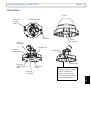
Adjusting the image
Image
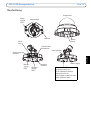
balance
ring
Focus puller
Zoom puller
Tilt adjustment
screw
Tilt adjustment
screw
Locking screw
1. Open the Live View page in the Web interface and make the following adjustments on the
camera:
2. Loosen the locking screw and tilt adjustment screws.
3. Turn the lens to the desired position.
4. Once satisfied, gently tighten the locking screw and tilt adjustment screws to secure the
camera’s position.
5. Turn the image balance ring to set the horizontal position.
6. Open the Focus Adjustment page in the Web interface under Basic Configuration > Focus
and follow the on-screen instructions. Use the image window to adjust the focus and
zoom.
• To set the focus and zoom, loosen the zoom and focus pullers counterclockwise and
rotate the rings.
• Lock the focus and zoom pullers in position by rotating the screws clockwise.
Note:
The image can be fine-tuned for low lighting conditions. Go to 'Setup > Video & Image > Advanced' and refer to
the online help for more information.