1
L5BQ2_XE(INSTALLATION).book 1 ページ
2006年8月28日 月曜日 午後4時1分
Cautions and Examples of PoE Power Supply Connection
bCautions when Connecting PoE (Power over Ethernet) Power Supply
and/or Microphone/Speakers for Bi-directional Voice Communication
●
Do not use the power supply of the camera when using PoE power
supply.
●
PoE cannot be used for supplying power to the heater board.
When using the heater, use a camera with AC 24V.
●
When connecting PoE, do not supply power to the PoE hub or PoE power
adapter until the camera installation is finished.
●
Howling may occur if microphone and speakers are put too close. Move
them apart or change the speakers orientation to prevent howling. Also
adjust the microphone sensitivity as well as the speaker volume.
●
For speakers on the camera side, use speakers with built-in amplifier.
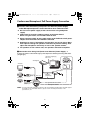
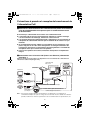
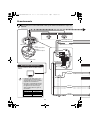
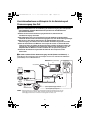
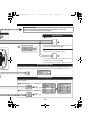
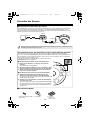
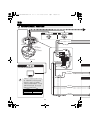
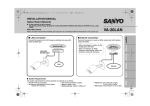
bConnection when Using PoE (Power over Ethernet) Power Supply - 1
Connect the camera to the LAN through a power adapter and switching hub using LAN cables
(straight type).
LAN cable (straight type)
Max. 100 m
Speaker
PC
Switching hub
Microphone
TV monitor
Video output
(BNC connector)
Power adapter
Speaker
Voice output (black)
3.5 φ mini jack
Max. 100 m
LAN cable
(straight type)
Microphone
Video/voice data + Power supply
External
microphone input
(white)
3.5 φ mini jack
Voice signal transmission to camera
Voice signal check at PC
MEMO: You may extend the transmission distance by using multiple switching hubs with PoE support.
For details on the extendable distance, please refer to the hub performance in the
specifications, etc.
1