1
L5BQ2_XE(INSTALLATION).book 4 ページ
2006年8月28日 月曜日 午後4時1分
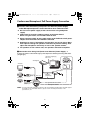
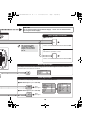
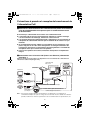
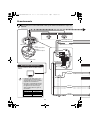
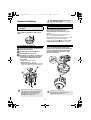
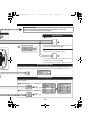
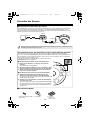
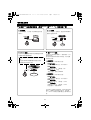
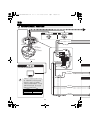
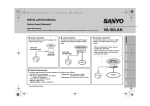
bTo prevent electromagnetic interference
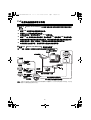
● With AC 24 V/DC 12 V
Voice
input/output
cables
Power
cable
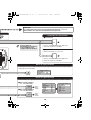
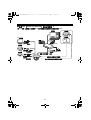
● With PoE
Video output cable
Voice
input/output
cables
Control input/output
cables
LAN cable
Video output cable
Control input/output
cables
LAN cable
Attach the 1 supplied core (small) to the
voice input/output cables as shown in the
figure.
Attach the 1 supplied core (small) to the
power cable as shown in the figure.
Attach the 1 supplied core (small) to the
video output cable as shown in the figure.
Attach the 1 supplied core (small) to the
control input/output cables as shown in
the figure.
Attach the 1 supplied core (large) to the
LAN cable as shown in the figure.
Attach the 1 supplied core (small) to the
voice input/output cables as shown in the
figure.
Attach the 1 supplied core (small) to the
video output cable as shown in the figure.
Attach the 1 supplied core (small) to the
control input/output cables as shown in
the figure.
Attach the 1 supplied core (large) to the
LAN cable as shown in the figure.
4