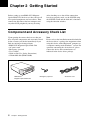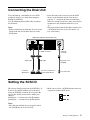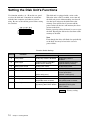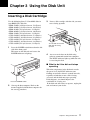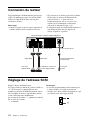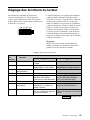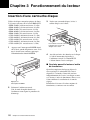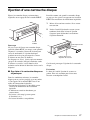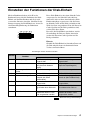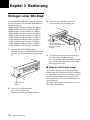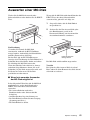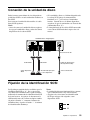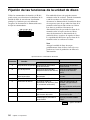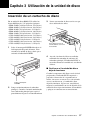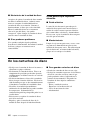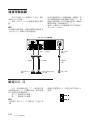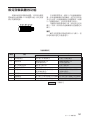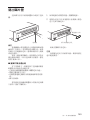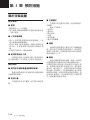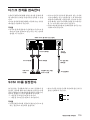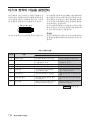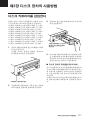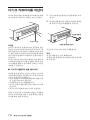
1
3-862-813-17(1) MO Disk Unit RMO-S551 User’s Guide Mode d’emploi Bedienungsanleitung Guía del usuario Istruzioni per l’uso Safety Regulations Owner’s Record The model and serial numbers are located on the bottom of the unit. Record the serial number in the space provided below. Refer to them whenever you call upon your Sony dealer regarding this product. Model No. RMO-S551 Serial No._________________________ Information For the customer in the U.S.A. You are cautioned that any changes or modifications not expressly approved in this manual could void your authority to operate this equipment. This equipment has been tested and found to comply with the limits for a Class B digital device, pursuant to Part 15 of the FCC Rules. These limits are designed to provide reasonable protection against harmful interference in a residential installation. This equipment generates, uses, and can radiate radio frequency energy and, if not installed and used in accordance with the instructions, may cause harmful interference to radio communications. However, there is no guarantee that interference will not occur in a particular installation. If this equipment does cause harmful interference to radio or television reception, which can be determined by turning the equipment off and on, the user is encouraged to try to correct the interference by one or more of the following measures: –Reorient or relocate the receiving antenna. –Increase the separation between the equipment and receiver. –Connect the equipment into an outlet on a circuit different from that to which the receiver is connected. –Consult the dealer or an experienced radio/TV technician for help. This device requires shielded interface cables to comply with FCC emission limits. 2 WARNING To reduce the risk of fire or electric shock, do not expose this apparatus to rain or moisture. To avoid electrical shock, do not open the cabinet. Refer servicing to qualified personnel only. CAUTION As the laser beam used in the RMO-S551 is harmful to the eyes, do not attempt to disassemble the unit. Refer servicing to qualified personnel only. The use of controls or adjustments or performance of procedures other than those specified herein may result in hazardous radiation exposure. This label is affixed inside the unit. CAUTION ATTENTION VORSICHT ADVARSEL ADVARSEL VARNING VARO! CLASS 3B LASER RADIATION WHEN OPEN. AVOID DIRECT EXPOSURE TO THE BEAM. RADIATIONS LASER DE CLASSE 3B EN CAS D'OUVERTURE. EVITER TOUTE EXPOSITION DIRECTE AU FAISCEAU. KLASSE 3B LASERSTRAHLUNG WENN GEÖFFNET. DIREKTEN KONTAKT MIT DEM STRAHL VERMEIDEN. LASERSTRÅLING AF KLASSE 3B VED ÅBNING. UNDGÅ DIREKTE UDSÆTTELSE FOR STRÅLING. LASERSTRÅLING I KLASSE 3B NÅR DEKSEL ÅPNES. UNNGÅ DIREKTE EKSPONERING FOR STRÅLEN. KLASS 3B LASERSTRÅLNING NÄR DENNA DEL ÄR ÖPPNAD. UNDVIK ATT DIREKT EXPONERA DIG FÖR STRÅLNINGEN. AVATTUNA LUOKAN 3B LASERSÄTEILYÄ. VÄLTÄ SUORAA ALTISTUMISTA SÄTEELLE. This MO disk unit is classified as a CLASS 1 LASER PRODUCT. The CLASS 1 LASER PRODUCT label is located on the bottom exterior. CLASS 1 LASER PRODUCT LASER KLASSE 1 PRODUKT LUOKAN 1 LASERLAITE KLASS 1 LASER APPARAT NOTICE Use the power cord set approved by the appropriate testing organization for the specific countries where this unit is to be used. Disposal of Old Electrical & Electronic Equipment (Applicable in the European Union and other European countries with separate collection systems) This symbol on the product or on its packaging indicates that this product shall not be treated as household waste. Instead it shall be handed over to the applicable collection point for the recycling of electrical and electronic equipment. By ensuring this product is disposed of correctly, you will help prevent potential negative consequences for the environment and human health, which could otherwise be caused by inappropriate waste handling of this product. The recycling of materials will help to conserve natural resources. For more detailed information about recycling of this product, please contact your local Civic Office, your household waste disposal service or the shop where you purchased the product. According to the EU Directives related to product safety, EMC and R&TTE the manufacturer of this product is Sony Corporation, 6-7-35 Kitashinagawa Shinagawa-ku Tokyo, 141-0001 Japan. The Authorised Representative is Sony Deutschland GmbH, Hedelfinger Strasse 61,70327 Stuttgart, Germany. For any service or guarantee matters please refer to the addresses given in separate service or guarantee documents. Using this Guide ........................................ 4 English CAUTION The mains plug on this equipment must be used to disconnect mains power. Please ensure that the socket outlet is installed near the equipment and shall be easily accessible. Table of Contents Chapter 1 Introduction Overview .................................................... 5 Features ....................................................... 5 Compatible Disks ....................................... 6 System Configuration ................................. 6 Location and Function of Parts ............... 7 Chapter 2 Getting Started Component and Accessory Check List .. 8 Connecting the Disk Unit ......................... 9 Setting the SCSI ID .................................... 9 Setting the Disk Unit’s Functions .......... 10 Chapter 3 Using the Disk Unit Inserting a Disk Cartridge ...................... 11 Ejecting a Disk Cartridge ........................ 12 Chapter 4 Precautions On the Disk Unit ...................................... 13 Safety Considerations ............................... 13 Damage Prevention .................................. 13 Other Points Requiring Attention ............. 14 On the Disk Cartridges ........................... 14 Protecting Your Data ................................ 15 Cleaning ................................................... 15 Cleaning a Disk ........................................ 15 Appendix Specifications .......................................... 16 Disk Unit .................................................. 16 Optional Accessories ................................ 17 3 Using this Guide This guide covers the use and operation of the RMO-S551 Magneto-Optical Disk Unit (called the “disk unit” thereafter). Do not attempt to use the disk unit without first carefully reading this guide. When finished, keep it handy for future reference. The guide is divided into the following sections. Chapter 1 Introduction This chapter contains a general overview of the RMO-S551 disk unit, touching upon its features, system configuration, and the location and function of its parts. Chapter 2 Getting Started This chapter explains how to connect the disk unit to the host computer and other SCSI peripheral devices. It also explains how to set the disk unit’s functions and the SCSI ID. Refer to this chapter when setting up the disk unit. Chapter 3 Using the Disk Unit In this chapter, you learn how to turn on the disk unit, and how to insert and eject a disk cartridge. Refer to this chapter when you are ready to actually begin using the disk unit. Chapter 4 Precautions This chapter contains precautions regarding the use and operation of the disk unit and magnetooptical disk cartridges. It also discusses cleaning of disks. Be sure to refer to this chapter before using the disk unit. Appendix The Appendix contains an explanation of the disk unit’s main specifications. 4 Notes • The manufacturer disclaims all responsibility for any losses incurred through malfunction or use of this product. • The manufacturer does not warrant the security of data stored using this product. To guard accidental data loss, frequent backup of important data is highly recommended. • Reproduction of the contents of this manual, in whole or in part, is prohibited. • Macintosh is a registered trademark of Apple Computer, Inc. • Microsoft and Windows are registered trademarks of Microsoft Corporation. Chapter 1 Introduction Overview Features The RMO-S551 Magneto-Optical Disk Unit has the following features: • Magneto-optical technology enables repeated writing and erasing of data on the disk. • The disk unit automatically senses the type of disk being inserted, enabling the free use of both 650 Mbytes (594 Mbytes), 1.3 Gbytes (1.2 Gbytes), 2.6 Gbytes (2.3 Gbytes), and 5.2 Gbytes (4.8 Gbytes, 4.1 Gbytes) disks indifferently. • A maximum of 5.2 Gbytes (2,048 bytes/sector), 4.8 Gbytes (1,024 bytes/sector), or 4.1 Gbytes (512 bytes/sector) of data can be written on the two sides of a 5.25-inch magneto-optical disk. This is equivalent to about 2900–3700 times the capacity of a conventional 3.5-inch floppy disk (2HD). • Any disk conforming to the internationally accepted CCS (continuous/composite servo) or CCW (continuous composite write-once) format can be used in this disk unit. • This disk unit employs SCSI-2 (Small Computer System Interface-2). • The 3,300 min-1 (3,300 rpm) high-speed spindle motor enables data transfer rates of 2.48 – 5.07 Mbytes/s (2,048 bytes/sector), 2.31 – 4.79 Mbytes/s (1,024 bytes/sector), or 1.97 – 4.06 Mbytes/s (512 bytes/sector). • With disk capacities under 2.6 Gbytes (2.3 Gbytes), the spindle motor rotates at 3600 min-1 (rpm). • The low-profile, light-weight optical pick-up yields average seek times of 25ms. • Use of a highly reliable error correction code (ECC) system keeps the error rate as low as 10-12. • Optimum operation environment is provided through use of a large, 4MB buffer and optimized cache control algorithm. (Write cache can be enabled or disabled. For details, see “Setting the Disk Unit’s Functions” on page 10.) Chapter 1 Introduction 5 Compatible Disks The RMO-S551 can use the following Sony 5.25-inch MO Disks: Standard Sector format Type* Capacity ISO/IEC 15286 ISO/IEC 15286 Sony equivalent 2048 bytes/sector R/W About 5.2 G bytes EDM-5200B 1024 bytes/sector R/W About 4.8 G bytes EDM-4800B ISO/IEC 15286 512 bytes/sector R/W About 4.1 G bytes EDM-4100B ISO/IEC 14517 1024 bytes/sector R/W About 2.6 G bytes EDM-2600B ISO/IEC 14517 512 bytes/sector R/W About 2.3 G bytes EDM-2300B ISO/IEC 13549 1024 bytes/sector R About 1.3 G bytes EDM-1300B ISO/IEC 13549 512 bytes/sector R About 1.2 G bytes EDM-1200B ISO/IEC 10089 1024 bytes/sector R About 650 M bytes EDM-650B ISO/IEC 10089 512 bytes/sector R About 600 M bytes EDM-600B ISO/IEC 15286 2048 bytes/sector WO About 5.2 G bytes CWO-5200B ISO/IEC 15286 1024 bytes/sector WO About 4.8 G bytes CWO-4800B ISO/IEC 15286 512 bytes/sector WO About 4.1 G bytes CWO-4100B ISO/IEC 14517 1024 bytes/sector WO About 2.6 G bytes CWO-2600B ISO/IEC 14517 512 bytes/sector WO About 2.3 G bytes CWO-2300B ISO/IEC 13549 1024 bytes/sector R About 1.3 G bytes CWO-1300B ISO/IEC 13549 512 bytes/sector R About 1.2 G bytes CWO-1200B ISO/IEC 11560 1024 bytes/sector R About 650 M bytes CWO-650B ISO/IEC 11560 512 bytes/sector R About 600 M bytes CWO-600B *R/W:Rewritable, R/W:Rewritable(MO), WO:Write Once, R:Read Only System Configuration The disk unit should be used with a host computer equipped with SCSI. A maximum of seven peripheral devices can be linked in a daisy chain on the SCSI bus, and controlled with SCSI-2 commands. Host computer SCSI cable RMO-S551 disk unit 6 Chapter 1 Introduction SCSI peripheral devices Location and Function of Parts Front Panel Rear Panel 1 A B C D E F G H BUSY AC IN SCSI ID 0 POWER SCSI CONNECTOR F.GND EJECT 1 POWER switch Push the button to turn the power on and off. The power is on when the button is in the depressed position, and off when fully protruding. 2 POWER indicator The green lamp lights up when the power is turned on. 3 BUSY indicator As this disk is inserted and the drive becomes ready for read/write operation, the BUSY indicator turns green. The orange lamp lights up when the disk unit is accessing or writing data. This lamp flashes on and off at about 2second intervals when the unit overheats, regardless of whether or not a disk is being accessed. 4 Disk insertion slot Insert the disk cartridge into this slot. Refer to the section “Inserting a Disk Cartridge” on page 11 for more information. 5 Emergency eject hole If the disk cartridge cannot be ejected using the EJECT button 6, turn off the power and insert the supplied emergency eject tool into this hole to trip the emergency eject mechanism. Refer to the section “What to do if the disk does not eject” on page 12 for further details. 6 EJECT button Press this button to eject the disk cartridge from the disk unit. The EJECT button is disabled with the function switch or software settings prohibit ejection. When the write cache is enabled, it may take a few moments (up to 45 seconds) for the disk to eject because data in the cache must first be written to the disk. 1 Function switches Use this switches to set the disk unit’s functions in accordance with the host computer and software being used. Refer to the section“Setting the Disk Unit’s Functions” on page 10 for more information. 2 SCSI ID switch Use these switches to set the SCSI ID. Push the “–” button to lower the ID number; push the “+” button to raise the ID number. Refer to the section“Setting the SCSI ID”on page 9 for more information. 3 SCSI connectors Plug SCSI cables (sold separately) linking the host computer and other SCSI peripherals into these connectors. Note If the disk unit is the last device on the SCSI chain, set function switch F to “1” to turn on the internal terminator. When it is not the last device, make sure that the terminator is off (switch F is set to “0”). 4 Air duct The air for cooling the disk unit flows through this duct, so be careful not to block its surface or impede the outflow. 5 F.GND (frame ground) terminal Connect the ground terminals of other devices to the disk unit’s frame ground. 6 AC IN (AC power) connector Connect the supplied AC power cord to this connector. Chapter 1 Introduction 7 Chapter 2 Getting Started Before setting up your RMO-S551 MagnetoOptical Disk Unit, check to see that you have all the required components and accessories. Then, connect the disk unit to the host computer and any other SCSI peripherals you may be using. After checking to see that all the connections have been properly made, set the SCSI ID using the SCSI ID switch and the disk unit’s functions using the function switches. Component and Accessory Check List Upon opening the carton, check to see that you have all of the components and accessories listed below. Contact your dealer immediately if you find any missing or damaged items. • RMO-S551 Magneto-Optical Disk Unit • AC power cord • Emergency eject tool • User’s Guide • Guide to Safe Use (Safety Precautions) • 1 Blank MO disk (EDM-5200B) RMO-S551 Magneto-Optical Disk Unit 8 Chapter 2 Getting Started Note Please refer to the installation manual included in the device driver’s package for instructions when using this device with a Macintosh® computer or a computer running under Windows® system. For questions concerning the device drivers, please contact the device driver manufacturer as indicated in the device driver package. Emergency eject tool AC Power cord Connecting the Disk Unit You can hook up a maximum of seven SCSI peripheral devices to a single host computer through its SCSI bus. Use the following Sony SCSI cable to connect the disk unit. Notes • Before connecting the disk unit, be sure to turn off the disk unit and all other devices on the SCSI chain. • If the disk unit is the last device on the SCSI chain, set the function switch F on the rear panel to “1” to turn on the internal terminator. When it is not the last device, make sure that the terminator is off (function switch F is set to “0”). • The total length of the SCSI cables connected to a SCSI chain must not exceed six meters (19 feet 8 1/4 inches). RMO-S551 Magneto-Optical Disk Unit 1 A B C D E F G H AC IN SCSI ID 0 SCSI CONNECTOR F.GND to SCSI connector SCSI cable to another SCSI device SCSI cable to AC IN connector AC power cord (supplied) to the host computer or another SCSI device to an AC outlet Setting the SCSI ID The factory default setting for the SCSI ID is “0.” If necessary, this ID number can be changed using the SCSI ID switch on the rear panel. Be sure to turn off the power before making any changes. Pushing the “+” button raises the ID number; pushing the “–” button lowers the ID number. • Make sure to select a SCSI ID that has not been assigned to another SCSI device. 0 Notes • The disk unit will not operate properly unless the SCSI ID has been set correctly. Chapter 2 Getting Started 9 Setting the Disk Unit’s Functions Use function switches (A – H) on the rear panel to select the disk unit’s functions in accordance with the host computer and software you are using. Be sure to turn off the power before setting the switches. 1 A B C D E F G H 0 This disk unit is equipped with a write cache. When the write cache is enabled, never turn off the disk unit power without making sure that all data has been written to the disk from cache memory. Data will be lost if you turn off the power before all data in cache memory has been written to the disk. Before powering off the disk unit, be sure to eject the disk. Ejecting the disk writes data from cache memory to the disk. Note Even though the drive will flush data periodically to the disk, data may be lost in the case of a power failure. Function Switch Settings Switch Function 1 0 A Parity check SCSI parity check is disabled. SCSI parity check is enabled. B Device type Peripheral device type 00H (Direct Access Device) Peripheral device type 07H (Optical Memory Device) C Write cache control Disable write cache. Enable write cache. D Fast SCSI control Fast SCSI compatible Not Fast SCSI compatible E Force verify All write operations are verfied. (with a verify pass) All write operations are normal operations. (without a verify pass) F Terminator The internal terminator is on. The internal terminator is off. G Auto spin up Inserting a disk does not causes Inserting a disk causes the spindle motor to rotate. the spindle motor to rotate. H Manual eject Disk catridge cannot be ejected Disk cartridge can be by pressing the EJECT button. ejected by pressing the EJECT button : Factory setting 10 Chapter 2 Getting Started Chapter 3 Using the Disk Unit Inserting a Disk Cartridge Use the following Sony 5.25-inch MO disks in your RMO-S551 disk unit. • EDM-5200B (2,048 bytes/sector, 5.2 Gbytes) • EDM-4800B (1,024 bytes/sector, 4.8 Gbytes) • EDM-4100B (512 bytes/sector, 4.1 Gbytes) • EDM-2600B (1,024 bytes/sector, 2.6 Gbytes) • EDM-2300B (512 bytes/sector, 2.3 Gbytes) • CWO-5200B (2,048 bytes/sector, 5.2 Gbytes ) • CWO-4800B (1,024 bytes/sector, 4.8 Gbytes) • CWO-4100B (512 bytes/sector, 4.1 Gbytes) • CWO-2600B (1,024 bytes/sector, 2.6 Gbytes ) • CWO-2300B (512 bytes/sector, 2.3 Gbytes) 1 Press the POWER switch located on the left side of the front panel. This turns on the disk unit and causes the POWER indicator to light up. 3 Insert a disk cartridge with the side you want to use facing upwards. To use Side A, insert the disk with “A” facing upward. 4 Access or write data on the disk using software commands on the host computer. The BUSY indicator lights up while the unit is accessing the disk. ■ What to do if the disk unit stops operating Press the POWER switch 2 Start up the host computer. Refer to the manual supplied with the host computer for the start up procedure. When the temperature in the disk unit exceeds the preset level, the BUSY indicator starts flashing on and off at about 2-seconds intervals, regardless of whether or not a disk is being accessed, and the disk unit stops operating. If this happens, you should improve the ventilation of a setting area. If the disk unit still refuses to operate, unplug the unit and contact your dealer. Chapter 3 Using the Disk Unit 11 Ejecting a Disk Cartridge Eject the disk cartridge either by using software commands or by pressing the EJECT button. 1 Turn off the disk unit if the power is still on. 2 Insert the emergency eject tool (or a paper clip) straight into the emergency eject hole to trip the manual ejection mechanism. Emergency eject Tool EJECT button Note Do not attempt to eject a disk cartridge while the BUSY indicator is lit orange (except when it is flashing at about 2-second intervals due to overheating). Ejecting the disk while it is being accessed may cause data write errors or may result in loss of data. Also, it may take a few moments (up to 45 seconds) for the disk to eject when the write cache is enabled, because data in the cache must first be written to the disk. ■ What to do if the disk does not eject The disk cartridge may not come out, even when you press the EJECT button or use a software command, under the following conditions: • The eject function has been disabled using the function switch or a software command; • The host computer is not functioning properly; • The disk unit has been turned off (due to a power failure, etc.); or • Something is wrong with your disk unit itself. When you cannot eject the disk cartridge using the EJECT button or software commands, remove it as follows. 12 Chapter 3 Using the Disk Unit Insert into the emergency eject hole. This should cause the disk cartridge to eject. Caution The tip of the emergency eject tool is sharp. When handling the tool, please be careful to avoid injury. Chapter 4 Precautions On the Disk Unit Safety Considerations ■ Power supply • Be sure to use 100 - 240V AC. • Do not share the AC outlet with any other power-consuming equipment such as copying machines or shredders. ■ AC power cord • Be careful not to place or drop heavy object on the power cord, or subject it to anything that may damage it. • When unplugging the cord from an AC outlet, be sure to grasp the plug itself. Pulling on the cord may cause damage to the internal wiring. • Unplug the unit when not using it for long period of time. ■ Handling the emergency eject tool The tip of the emergency eject tool is sharp. When handling the tool, please be careful to avoid injury. Do not use the tool for any purpose other than ejecting disks. Damage Prevention ■ Do not subject the disk unit to shock or vibration Dropping the unit or subjecting it to strong impact may damage the disk unit. ■ Setting position ■ Location requirements Careful consideration should be given to the following in selecting a site to install or store your disk unit. Avoid the following conditions: • High humidity • High temperatures • Direct sunlight • Dust • Strong vibration • Wide temperature fluctuations ■ Ventilation Care should be exercised to prevent the internal mechanisms of the disk unit from overheating. Be careful not to clog or block the vent, or place the unit in an area with poor ventilation. The disk unit may stop operating altogether if the internal temperature becomes too high. ■ Condensation Avoid subjecting the disk unit to extremes in temperature. If, for example, the disk unit is moved suddenly from a very cold location to a warm one, moisture from condensation may form within the unit due to the quick rise in ambient temperature. If a sudden change in the temperature cannot be avoided, wait for an hour or more before using the disk unit. Inserting a disk cartridge into the mechanism when moisture is present may cause damage to both the disk and the disk unit. Remove the disk cartridge immediately if you suspect any condensation problems. The moisture should evaporate quickly if the disk unit is left on without a disk inserted. The disk unit is designed to be used in the horizontal position. Do not position it at an angle. Chapter 4 Precautions 13 ■ Moving the disk unit Be sure to remove the disk cartridge when the disk unit is not being used. Also never move or transport the unit with the disk cartridge still inserted. While in operation, the disk rotates at a high speed. Moving the disk unit at such a time may disturb the spinning disk and cause it to be damaged. Always remove the disk cartridge before moving your disk unit. ■ If problems occur If any problems occur, turn off the power and unplug the disk unit, contact your dealer. Other Points Requiring Attention ■ Electrical noise The high-frequency signal generated by the disk unit may cause interference or static on other electrical appliances such as radios, televisions and audio tuners. If this should occur, move the disk unit a little farther away from the affected appliance. ■ Maintenance Clean the cabinet with a dry soft cloth, or with a soft cloth lightly moistened with a mild detergent solution. Do not use any type of solvent, such as alcohol or benzine, which may damage the finish. On the Disk Cartridges • Do not drop the disk cartridge or subject it to any violent shocks or vibration. • Do not disassemble the disk cartridge. It is a precision component and has been carefully adjusted at the factory prior to shipment. • Do not open the disk cartridge’s shutter manually or touch the disk inside. The shutter is designed to open automatically when the cartridge is inserted into the disk unit. • Do not use the cartridge under ambient conditions of high humidity or wide temperature fluctuations. Moisture from condensation may make it impossible to read or write data. • Avoid inserting and ejecting the disk cartridge more than is necessary. • Always eject and remove the disk cartridge from the disk unit after using it. 14 Chapter 4 Precautions ■ Storing disk cartridges • Store the disk cartridges in their cases. • Do not leave the cartridges exposed to direct sunlight or excessive heat, like on the dashboard or in the glove compartment of an automobile. Do not store the disk cartridges under the following conditions. – Excessive dust and debris – Exposure to direct sunlight – Near a heat source – High humidity Protecting Your Data The magneto-optical disk cartridges are equipped with a DATA PROTECT switch (red tab) to prevent accidental erasure of data on the disk or inadvertent writing of unwanted data. Slide this switch in the direction of the arrow as illustrated below to enable the write protect function. You can still read the data contained on the disk, but will not be allowed to write on or erase the disk. Return the switch to its original position to disable the write protect. Make it a practice to leave the write protection enabled when you do not foresee the need to write on the disk. DATA PROTECT switch Cleaning Cleaning a Disk Dust and stains may accumulate on MO disks when they are used for a long period of time. To avoid resultant data read/write errors, use an optional disk cleaner. To maintain the high performance and prolong the useful life of your MO disk, cleaning at least once every three months is recommended. Attention In the disk unit, preventive measures are taken to guard against dust. It is unnecessary to clean the optical lens of your disk unit. Using a lens cleaning cartridge may damage the disk unit. ■ Disk cleaning accessories Use the following Sony disk cleaning kit or disk cleaner (sold separately). • MOA-D51 Disk Cleaning Kit Do not use any other type of disk cleaner as it may cause data read/write errors due to the differences in disk surface characteristics. For cleaning instructions, refer to the manual supplied with each cleaning accessory Chapter 4 Precautions 15 Appendix Specifications Disk Unit ■ Performance Capacity Per disk 5.2 Gbytes (ZCAV 2,048 bytes/sector) 4.8 Gbytes (ZCAV 1,024 bytes/sector) 4.1 Gbytes (ZCAV 512 bytes/sector) 2.6 Gbytes (ZCAV 1,024 bytes/sector) 2.3 Gbytes (ZCAV 512 bytes/sector) Rotation speed 3,300 min–1 (3,300 rpm) 3,600 min–1 (3,600 rpm) Seek times (average) 25 ms (typical) User data transfer rate Continuous transfer rate 2.48 – 5.07 Mbytes/s (2,048 bytes/sector) 2.31 – 4.79 Mbytes/s (1,024 bytes/sector) 1.97 – 4.06 Mbytes/s (512 bytes/sector) Burst transfer rate 10 Mbytes/s (using Fast SCSI) Host interface SCSI-2 (Small Computer System Interface-2) ANSI X3.131–1994 ■ Operating environment Installation Horizontal (±5°) Temperature Operating 5 °C to 40 °C (41 °F to 104 °F) (gradient 10° C/h or 18 °F/h) Non-operating – 30 °C to 60 °C (– 22 °F to 140 °F) Relative humidity Operating 10 % to 85 % (no condensation) Non-operating 10 % to 90 % 16 Appendix ■ Laser Type Semiconductor AlGaInP laser Wavelength 685 nm ± 10 nm Maximum output 30 mW ■ Power supply and others Power supply 100 – 240 V AC ±10%, 50/60 Hz ±5% Current drain 0.60 – 0.35 A max Maximum external dimensions (excluding protruding parts and air duct) 211 × 70 × 293 mm (W/H/D) (8 3/8 × 2 7/8 × 11 5/8 inches) Weight 4.9 kg (10.9 lb.) Accessories AC power cord (1) Emergency eject tool(1) User’s Guide (1) MO Disk (1) Formatting Utility (1) Design and specifications are subject to change without notice. Optional Accessories MO disks EDM-5200B (2,048 bytes/sector, 5.2 Gbytes) EDM-4800B (1,024 bytes/sector, 4.8 Gbytes) EDM-4100B (512 bytes/sector, 4.1Gbytes) EDM-2600B (1,024 bytes/sector, 2.6 Gbytes) EDM-2300B (512 bytes/sector, 2.3 Gbytes) Continuous composite write-once disks CWO-5200B (2,048 bytes/sector, 5.2 Gbytes) CWO-4800B (1,024 bytes/sector, 4.8 Gbytes) CWO-4100B (512 bytes/sector, 4.1 Gbytes) CWO-2600B (1,024 bytes/sector, 2.6 Gbytes) CWO-2300B (512 bytes/sector, 2.3 Gbytes) Disk Cleaning Kit MOA-D51 Appendix 17 Règles de sécurité AVERTISSEMENT Afin de réduire les risques d’incendie ou de choc électrique, n’exposez pas cet appareil à la pluie ni à l’humidité. Pour éviter toute électrocution, ne pas ouvrir le boîtier. Confier l’entretien à un technicien qualifié uniquement. NOTICE Utiliser le cordon d’alimentation approuvé par l’organisation de contrôle appropriée pour les pays auxquels le produit est destiné. Traitement des appareils électriques et électroniques en fin de vie (Applicable dans les pays de l’Union Européenne et aux autres pays européens disposant de systèmes de collecte sélective) Ce symbole, apposé sur le produit ou sur son emballage, indique que ce produit ne doit pas être traité avec les déchets ménagers. Il doit être remis à un point de collecte approprié pour le recyclage des équipements électriques et électroniques. En s’assurant que ce produit est bien mis au rebus de manière appropriée, vous aiderez à prévenir les conséquences négatives potentielles pour l’environnement et la santé humaine. Le recyclage des matériaux aidera à préserver les ressources naturelles. Pour toute information supplémentaire au sujet du recyclage de ce produit, vous pouvez contacter votre municipalité, votre déchetterie ou le magasin où vous avez acheté le produit. Sommaure Comment utiliser ce Guide ..................... 19 Chapitre 1 Introduction Aperçu ...................................................... 20 Caractéristiques ........................................ 20 Disques compatibles ................................. 21 Configuration de système ......................... 21 Localisation et fonction des pièces ...... 22 Chapitre 2 Démarrage Liste de contrôle des composants et accessoires ...................................... 23 Connexion du lecteur ............................. 24 Réglage de l’adresse SCSI ..................... 24 Réglage des fonctions du lecteur .......... 25 Chapitre 3 Fonctionnement du lecteur Insertion d’une cartouche disque .......... 26 Ejection d’une cartouche disque ........... 27 Chapitre 4 Précautions A propos du lecteur ................................ 28 Sécurité ..................................................... 28 Prévention des dommages ........................ 28 Autres points à prendre en compte ........... 29 A propos des cartouches disques ........ 29 Protection des données ............................. 30 Entretien ................................................... 30 Nettoyage des disques .............................. 30 Appendice Spécifications .......................................... 31 Lecteur ...................................................... 31 Accessoires en option ............................... 32 18 Comment utiliser ce Guide Ce guide couvre l’emploi et le fonctionnement du lecteur de disque magnéto-optique RMO-S551 (appelé par le suite le “lecteur”). Ne pas essayer d’utiliser ce lecteur sans avoir préalablement lu attentivement ce guide. La lecture terminée, le garder à proximité pour toute référence ultérieure. Chapitre 1 Introduction Ce chapitre contient un aperçu général du lecteur RMO-S551, portant sur ses caractéristiques, la configuration du système, ainsi que la localisation et la fonction des pièces. Chapitre 2 Démarrage Ce chapitre explique comment raccorder ce lecteur à l’ordinateur central et aux autres périphériques SCSI. Il explique également le réglage de l’adresse SCSI et des fonctions du lecteur. Voir ce chapitre pour l’implantation du lecteur. Chapitre 3 Fonctionnement du lecteur Ce chapitre indique comment mettre le lecteur sous tension, et insérer et éjecter une cartouche disque. Se reporter à ce chapitre quand on est prêt à commencer à utiliser le lecteur. Chapitre 4 Précautions Ce chapitre contient les précautions concernant l’utilisation et le fonctionnement du lecteur et des cartouches disques magnéto-optiques. Il couvre également le nettoyage des disques. Se reporter à ce chapitre avant d’utiliser le lecteur. Appendice L’appendice donne les spécifications principales du lecteur. 19 Français Ce guide se divise comme suit: Remarques: • Le fabricant décline toute responsabilité pour les pertes subies suite au mauvais fonctionnement ou à l’utilisation de ce produit. • Le fabricant ne garantit pas la sécurité des données enregistrées en utilisant ce produit. Pour éviter toute perte accidentelle de données, une copie de sauvegarde fréquente est fortement recommandée. • La reproduction du contenu de ce mode d’emploi, en totalité ou en partie, est interdite. • Macintosh est une marque déposée de Apple Computer, Inc. • Microsoft et Windows sont des marques déposées de Microsoft Corporation. Chapitre 1 Introduction Aperçu Caractéristiques Le lecteur de disque magnéto-optique RMOS551 possède les caractéristiques suivantes: • La technologie magnéto-optique permet l’écriture et l’effacement répétés de données sur le disque. • Le lecteur de disque détecte automatiquement le type de disque en cours d’insertion, permettant ainsi d’employer indifféremment des disques de 650 Mo (594 Mo), 1,3 Go (1,2 Go), 2,6 Go (2,3 Go) et 5,2 Go (4,8 Go, 4,1 Go). • 5,2 Go (2.048 octets/secteur), 4,8 Go (1.024 octets/secteur), ou 4,1 Go (512 octets/secteur) maximum de donneés peuvent être écrites sur les deux côtés d’un disque magnéto-optique de 5,25 pouces, ce qui équivaut à environ 2900– 3700 fois la capacité d’une disquette conventionnelle de 3,5 pouces (2HD). • Toute disquette conforme au format international CCS (servo continu/composite) ou CCW (écriture unique continu/composite) peut être utilisée dans cette unité de disquette. 20 Chapitre 1 Introduction • Ce lecteur de disque utilise SCSI-2 (Small Computer System Interface-2). • Le moteur à broche grande vitesse 3.300 min-1 (3.300 tr/min.) permet la transmission des données à une vitesse de 2,48 - 5,07 Mo/s (2.048 octets/secteur), 2,31 - 4,79 Mo/s (1.024 octets/secteur), ou 1,97 - 4,06 Mo/s (512 octets/ secteur). • Avec une capacité de disque inférieure à 2,6 Gbytes (2,3 Gbytes), le moteur fusiforme tourne à 3600 min-1 (tpm). • Le lecteur optique profilé et léger offre un temps de recherche moyen de 25 ms. • L’emploi d’un système de correction d’erreur hautement fiable (ECC) maintient les erreurs à un taux faible de 10-12. • Un environnement de fonctionnement optimal est fourni par l’utilisation d’une large mémoire intermédiaire de 4 Mo et d’un algorithme de contrôle de mémoire-cache optimal. (La mémoire-cache d’écriture peut être activée ou désactivée. Pour plus d’informations, voir le réglage des fonctions du lecteur en page 25). Disques compatibles Le RMO-S551 peut utiliser les disques magnéto-optiques de 5,25 pouces Sony suivants. Standard Format du secteur Type* Capacité Equivalent Sony ISO/IEC 15286 2048 octets/secteur R/W Environ 5.2 Go EDM-5200B ISO/IEC 15286 1024 octets/secteur R/W Environ 4.8 Go EDM-4800B ISO/IEC 15286 512 octets/secteur R/W Environ 4.1 Go EDM-4100B ISO/IEC 14517 1024 octets/secteur R/W Environ 2.6 Go EDM-2600B ISO/IEC 14517 512 octets/secteur R/W Environ 2.3 Go EDM-2300B ISO/IEC 13549 1024 octets/secteur R Environ 1.3 Go EDM-1300B ISO/IEC 13549 512 octets/secteur R Environ 1.2 Go EDM-1200B ISO/IEC 10089 1024 octets/secteur R Environ 650 Mo EDM-650B ISO/IEC 10089 512 octets/secteur R Environ 600 Mo EDM-600B ISO/IEC 15286 2048 octets/secteur WO Environ 5.2 Go CWO-5200B ISO/IEC 15286 1024 octets/secteur WO Environ 4.8 Go CWO-4800B ISO/IEC 15286 512 octets/secteur WO Environ 4.1 Go CWO-4100B ISO/IEC 14517 1024 octets/secteur WO Environ 2.6 Go CWO-2600B ISO/IEC 14517 512 octets/secteur WO Environ 2.3 Go CWO-2300B ISO/IEC 13549 1024 octets/secteur R Environ 1.3 Go CWO-1300B ISO/IEC 13549 512 octets/secteur R Environ 1.2 Go CWO-1200B ISO/IEC 11560 1024 octets/secteur R Environ 650 Mo CWO-650B ISO/IEC 11560 512 octets/secteur R Environ 600 Mo CWO-600B * R/W : Réécriture possible, R/W: Ecriture multiple (MO), WO: Ecriture uniquement, R: Lecture uniquement Configuration de système Le lecteur doit être utilisé avec un ordinateur central équipé d’un SCSI. Sept périphériques maximum peuvent être reliés en chaîne sur le bus SCSI et contrôlés avec des instructions SCSI-2. Ordinateur central Câble SCSI Lecteur RMO-S551 Péruphériques SCSI Chapitre 1 Introduction 21 Localisation et fonction des pièces Panneau avant Panneau arrière 1 A B C D E F G H BUSY AC IN SCSI ID 0 POWER SCSI CONNECTOR EJECT 1 Interrupteur d’alimentation (POWER) 2 3 4 5 6 22 Appuyer sur la touche pour mettre sous/hors tension. L’appareil est sous tension quand la touche est enfoncée, et hors tension quand elle est sortie. Témoin d’alimentation (POWER) Le témoin vert s’allume à la mise sous tension. Témoin d’occupation (BUSY) Lorsque le disque est inséré et le lecteur est prêt pour l’opération de lecture/écriture, le témoin BUSY devient vert. Le témoin orange s’allume quand le lecteur accède au disque ou à l’écriture de données. Ce témoin clignotera à 2 secondes d’intervalle environ en cas de surchauffe, indépendamment de l’accès ou non à un disque. Logement d’insertion de disque Insérer la cartouche disque dans ce logement. Voir la section “Insertion d’une cartouche disque” à la page 26 pour de plus amples informations. Trou d’éjection de secours Si la cartouche disque ne peut être éjectée en utilisant la touche 6 EJECT, mettre l’appareil hors tension et insérer l’outil d’éjection de secours dans la fente pour déclencher le mécanisme d’éjection de secours. Se reporter à la section “Que faire si la cartouche disque ne s’éjecte pas” en page 27 pour plus de détails. Touche d’éjection (EJECT) Appuyer sur cette touche pour éjecter la cartouche disque du lecteur. La touche d’éjection est inhibée avec les sélecteurs de fonction ou un réglage logiciel interdisant l’éjection. Lorsque la mémoire-cache d’écriture est activée, la disquette est éjectée après un moment (jusqu’à 45 secondes) car les données de la mémoire-cache doivent d’abord être écrites sur la disquette. Chapitre 1 Introduction F.GND 1 Sélecteurs de fonction 2 3 4 5 6 Les utiliser pour régler les fonctions du lecteur selon l’ordinateur central et le logiciel utilisés. Voir la section “Réglage des fonctions du lecteur” à la page 25 pour de plus amples informations. Sélecteur d’adresse SCSI (SCSI ID) L’utiliser pour poser l’adresse SCSI. Appuyer sur la touche “–” pour réduire le numéro ID, ou sur la touche “+” pour l’augmenter. Voir la section “Réglage de l’adresse SCSI” à la page 24 pour les détails. Connecteurs SCSI Brancher les câbles SCSI (vendus séparément) reliant l’ordinateur central et les autres périphériques dans ces connecteurs. Remarque Si le lecteur est le dernier appareil de la chaîne SCSI, régler le sélecteur de fonctions F sur “1” pour activer la terminaison interne. Dans le cas contraire, vérifier que la terminaison est désactivée (le sélecteur F est réglé sur “0”). Manche à air L’air pour refroidir le lecteur de disque passe dans cette manche. Faire très attention à ne pas bloquer sa surface et entraver la circulation. Borne de terre de cadre (F.GND) Connecter les bornes de mise à la terre des autres appareils à la borne de terre de cadre du lecteur. Connecteur d’alimentation secteur (AC IN) Brancher le cordon d’alimentation secteur fourni dans ce connecteur. Chapitre 2 Démarrage Avant l’implantation du lecteur de disque magnéto-optique RMO-S551, vérifier que tous les composants et accessoires requis sont disponibles. Puis, connecter le lecteur à l’ordinateur central et aux autres périphériques SCSI utilisés. Après la vérification des connexions, régler les fonctions du lecteur et son adresse SCSI ID à l’aide des sélecteurs de fonction. Liste de contrôle des composants et accessoires Ouvrir le carton et vérifier que tous les composants et accessoires indiqués ci-dessous s’y trouvent. Contacter immédiatement son revendeur si l’un d’entre eux manque ou est abîmé. • Lecteur de disque magnéto-optique RMO-S551 • Cordon d’alimentation secteur • Outil d’éjection de secours • Mode d’emploi • Guide d’utilisation de sécurité (Précautions de sécurité) • 1 disque MO vierge (EDM-5200B) Lecteure de disque magnétooptique RMO-S551 Remarque Prière de se reporter au manuel d’installation inclu avec le gestionnaire de périphérique pour les instructions lors de l’utilisation de ce périphérique avec un ordinateur Macintosh® ou un ordinateur avec le système Windows®. Pour les questions concernant les gestionnaires de périphériques, prière de contacter le fabricant du gestionnaire de périphérique tel qu’indiqué dans le paquet. Outil d’éjection de secour Cordon d’alimentation secteur Chapitre 2 Démarrage 23 Connexion du lecteur Sept périphériques SCSI maximum peuvent être reliés à un ordinateur central via son bus SCSI. Utiliser le câble SCSI de Sony suivant pour raccorder le lecteur. Remarques • Couper le lecteur et tous les autres appareils de la chaîne SCSI avant de connecter le lecteur. • Si le lecteur est le dernier appareil de la chaîne SCSI, régler le sélecteur de fonction F du panneau arrière à “1” pour activer la terminaison interne. Si ce n’est pas le cas, vérifier que la terminaison est désactivée (sélecteur de fonction F réglé à “0”). • La longueur totale des câbles SCSI connectés à une chaîne SCSI ne doit pas dépasser 6 mètres(19 pieds 8 1/4 pouces). Lecteur de disque magnéto-optique RMO-S551 1 A B C D E F G H AC IN SCSI ID 0 SCSI CONNECTOR Câble SCSI à un autre appareil SCSI F.GND au connecteur SCSI au connecteur AC IN Câble SCSI Cordon d’alimentation sevteur(fourni) à l’ordinateur central ou à un autre appareil SCSI à une prise secteur Réglage de l’adresse SCSI Régler l’adresse SCSI du lecteur. Le réglage usine par défaut de l’adresse SCSI est “0”. Si nécessaire, ce numéro ID peut être modifié au sélecteur SCSI ID du panneau arrière. Ne pas oublier de mettre l’appareil hors tension avant d’effectuer toute modification. La pression de la touche “+” augmente le numéro ID, et celle de la touche “–” le diminue. 24 Chapitre 2 Démarrage Remarques • Le lecteur ne fonctionnera correctement que si l’adresse SCSI a été réglée correctement. • Vérifier que l’adresse SCSI sélectionnée n’a pas été affectée à un autre appareil SCSI. 0 Réglage des fonctions du lecteur Sélectionner les fonctions du lecteur aux sélecteurs de fonction (A – H) du panneau arrière, selon l’ordinateur central et le logiciel utilisés. Bien mettre l’appareil hors tension avant d’effectuer ces réglages. 1 L’unité de disquette est équipée d’une mémoirecache d’écriture. Lorsque la mémoire-cache d’écriture est activée, ne jamais mettre l’unité de disquette hors tension avant de s’assurer que toutes les données ont été écrites de la mémoirecache sur la disquette. Toutes les données seront perdues si l’unité est mise hors tension avant l’écriture de la mémoire-cache sur la disquette. S’assurer d’éjecter la disquette avant de mettre l’unité de disquette hors tension. En éjectant la disquette, les données sont écrites de la mémoirecache sur la disquette. A B C D E F G H 0 Remarque Même si le lecteur envoie régulièrement les données au disque, les données risquent d’être perdues en cas de coupure de courant. Réglages des sélecteurs de fonction Sélecteur de fonction Fonction A Contrôle de parité Contrôle de parité SCSI invalide. Contrôle de parité SCSI valide. B Type de périphérique Type de périphérique 00H (Périphérique à accès direct) Type de périphérique 07H (Périphérique à mémoire optique) C Contrôle de mémoirecache d’écriture Mémoire-cache désactivée. Mémoire-cache activée. D Contrôle SCSI rapide SCSI rapide compatible SCSI non rapide compatible E Vérification forcée. Toutes les opérations Toutes les opérations d’écriture d’écriture sont vérifiées. sont des opérations normales. (avec un passe de vérification) (sans passe de vérification) F Terminaison Terminaison interne activée. Terminaison interne désactivée. G Entraînement automatique L’insertion d’un disque ne provoque pas la rotation du moteur à broche. L’insertion d’un disque provoque la rotation du moteur à broche. H Ejection manuelle La cartouche de disque ne La cartouche de disque peut peut pas s’éjecter en appuyant s’éjecter en appuyant sur la touche sur la touche EJECT. EJECT. 1 0 : Réglages usine Chapitre 2 Démarrage 25 Chapitre 3 Fonctionnement du lecteur Insertion d’une cartouche disque Utiliser les disques magnéto-optiques de Sony 5,25 pouces suivants sur le lecteur RMO-S551. • EDM-5200B (2.048 octets/secteur, 5,2 Go) • EDM-4800B (1.024 octets/secteur, 4,8 Go) • EDM-4100B (512 octets/secteur, 4,1 Go) • EDM-2600B (1.024 octets/secteur, 2,6 Go) • EDM-2300B (512 octets/secteur, 2,3 Go) • CWO-5200B (2.048 octets/secteur, 5,2 Go) • CWO-4800B (1.024 octets/secteur, 4,8 Go) • CWO-4100B (512 octets/secteur, 4,1 Go) • CWO-2600B (1.024 octets/secteur, 2,6 Go) • CWO-2300B (512 octets/secteur, 2,3 Go) 1 Appuyer sur l’interrupteur POWER située sur le côtée gauche du panneau avant. Cela met le lecteur sous tension et provoque l’illumination du témoin POWER. 3 Insérer une cartouche disque, la face à utiliser dirigée vers le haut. Pour utiliser la face A, inserer le disque avec la face “A” dirigée vers le haut. 4 Accéder ou écrire des données sur le disque à l’aide d’instructions logicielles à l’ordinateur central. Le témoin BUSY s’allume durant l’accès au disque. ■ Que faire quand le lecteur s’arrête de fonctionner Appuyer sur I’interrupteur POWER 2 26 Démarrer l’ordinateur central. Voir le mode d’emploi fourni avec l’ordinateur central pour la procédure de démarrage. Chapitre 3 Fonctionnement du lecteur Quand la température du lecteur dépasse le niveau préréglé, le témoin BUSY se met à clignoter à 2 secondes d’intervalle environ indépendamment de l’accès à un disque ou non, et le lecteur s’arrête de fonctionner. Dans ce cas, il faut améliorer la ventilation de la zone de réglage. Débrancher le lecteur s’il refuse toujours de fonctionner, et contacter son revendeur. Ejection d’une cartouche disque Ejecter la cartouche disque par instructions logicielles ou en appuyant sur la touche EJECT. Procéder comme suit quand la cartouche disque ne peut pas être ejectée en appuyant sur la touche EJECT ou en utilisant des instructions logicielles. 1 Mettre le lecteur hors tension s’il est encore sous tension. 2 Insérer l’outil d’éjection de secours (ou un trombone) droit dans la fente d’éjection d’urgence pour déclencher le mécanisme d’éjection manuelle. Touch EJECT Remarque Ne pas essayer d’éjecter une cartouche disque quand le témoin BUSY est orange (sauf quand il clignote à 2 secondes d’intervalle environ pour cause de surchauffe). L’éjection du disque pendant son accès peut provoquer des erreurs d’écriture ou une perte de données. La disquette est, aussi, éjectée après un moment (jusqu’à 45 secondes) lorsque la mémoire-cache d’écriture est activée, car les données de la mémoire-cache doivent d’abord être écrites sur la disquette. ■ Que faire si la cartouche disque ne s’éjecte pas Outil d’éjection de secours Insérer dans le trou d’éjection de secours Ceci devrait provoquer l’éjection de la cartouche disque. Précaution Le bout de l’outil d’éjection de secours est pointu. Faire très attention pour éviter toute blessure en manipulant l’outil. Dans les conditions suivantes, la cartouche disque peut ne pas être projetée en avant, même si l’on appuie sur la touche EJECT ou si l’on utilise des instructions logicielles: • La fonction d’éjection a été invalidée par un sélecteur de fonction ou une instruction logicielle. • L’ordinateur central ne fonctionne pas correctement. • Le lecteur a été coupé (par une panne d’électricité, etc.), • Le lecteur lui-même a un problème. Chapitre 3 Fonctionnement du lecteur 27 Chapitre 4 Précautions A propos du lecteur Sécurité ■ Alimentation • S’assurer d’utiliser du CA 100 - 240 V. • Ne pas brancher cet appareil sur la même sortie secteur qu’un autre appareil gros consommateur de courant, un copieur ou un destructeur de documents par exemple. ■ Cordon d’alimentation secteur • Prendre garde de ne pas placer ni laisser tomber d’objets lourds sur le cordon d’alimentation, ou de l’endommager de quelque manière que ce soit. • Pour débrancher le cordon de la prise secteur, bien le saisir par la fiche elle-même. Tirer sur le cordon risque d’endommager le câblage interne. • Débrancher l’appareil s’il doit rester inutilisé durant une période prolongée. ■ Manipulation de l’outil d’éjection de secours Le bout de l’outil d’éjection de secours est pointu. Faire très attention pour éviter toute blessure en manipulant l’outil. N’utiliser l’outil que pour l’éjection des disques. Prévention des dommages ■ Ne pas soumettre le lecteur à des chocs ou à la vibration Le lecteur risque d’être endommagé s’il tombe ou s’il est soumis à de forts impacts. ■ Position d’installation Le lecteur est conçu pour être utilisé horizontalement. Ne pas l’installer de biais. 28 Chapitre 4 Précautions ■ Exigences concernant l’emplacement Tenir compte des points suivants lors de la sélection de l’emplacement d’installation ou de stockage du lecteur. Eviter les conditions suivantes: • Forte humidité • Hautes températures • En plein soleil • Poussière • Forte vibration • Fluctuations de température importantes ■ Ventilation Prendre les précautions nécessaires pour éviter la surchauffe des mécanismes internes du lecteur. Veiller à ne pas obstruer ni bloquer les trous d’aération, ni placer l’appareil dans un endroit mal aéré. Le lecteur de disque peut s’arrêter de fonctionner si la température interne devient trop élevée. ■ Condensation Eviter de soumettre le lecteur à des températures extrêmes. Ainsi, s’il est brusquement déplacé d’un endroit froid à un endroit chaud, de l’humidité peut se condenser à l’intérieur à cause de la soudaine augmentation de la température ambiante. Si un brusque changement de température ne peut pas être évité, attendre une heure au moins avant d’utiliser le lecteur. L’insertion d’une cartouche disque dans le mécanisme alors qu’il y a de l’humidité risque d’endommager à la fois le disque et le lecteur. Retirer immédiatement la cartouche disque si l’on suspecte un problème de condensation. L’humidité devrait s’évaporer rapidement si le lecteur est laissé sous tension sans insertion de disque. ■ Déplacement du lecteur Ne pas oublier de retirer la cartouche disque quand le lecteur n’est pas utilisé. Ne jamais déplacer ou transporter l’appareil avec une cassette disque à l’intérieur. En fonctionnement, le disque tourne à grande vitesse. Le déplacement du lecteur à ce moment-là risque de déranger le disque en rotation et de l’endommager. Toujours retirer la cartouche disque avant de déplacer le lecteur. ■ En cas de problème En cas de problème, couper l’alimentation, débrancher le lecteur, et contacter son revendeur. Autres points à prendre en compte ■ Parasites Le signal de hautes fréquences produit par le lecteur peut provoquer des interférences ou de l’électricité statique sur d’autres appareils électriques, tels que poste radio, téléviseur et tuner audio. Dans ce cas, éloigner un peu plus le lecteur de l’appareil affecté. ■ Entretien Nettoyer le coffret avec un chiffon doux et sec, ou un chiffon doux légèrement humecté de solution détergente douce. Ne pas utiliser de solvant, tel que l’alcool ou la benzine; il pourrait abîmer la finition. A propos des cartouches disques • Ne pas laisser tomber la cartouche disque ni la soumettre à des chocs ou vibrations violents. • Ne pas démonter la cartouche disque. C’est un composant de précision, qui a été minutieusement réglé à l’usine avant son expédition. • Ne pas ouvrir le volet de la cartouche disque à la main ni toucher le disque à l’intérieur. Le volet est conçu pour s’ouvrir automatiquement à l’insertion de la cartouche dans le lecteur. • Ne pas utiliser la cartouche dans des conditions ambiantes de forte humidité ou d’importantes fluctuations de température. L’humidité due à la condensation peut rendre la lecture ou l’écriture des données impossible. • Eviter d’insérer et d’éjecter la cartouche disque plus souvent que nécessaire. • Toujours éjecter et retirer la cartouche disque du lecteur après son utilisation. ■ Rangement des cartouches disques • Ranger les cartouches disques dans leur boîte. • Ne pas les laisser en plein soleil ou sous une chaleur excessive, sur le tableau de bord ou dans la boîte à gants d’une voiture par exemple. Ne pas ranger les cartouches disques dans les conditions suivantes: – Poussière excessive et débris – En plein soleil – Près d’une source de chaleur – Forte humidité Chapitre 4 Précautions 29 Protection des données Les cartouches disques magnéto-optiques sont équipées d’un curseur DATA PROTECT (ergot rouge) pour éviter tout effacement accidentel des données du disque ou écriture par inadvertance de données non souhaitées. Glisser ce curseur vers la gauche comme le montre l’illustration cidessous pour valider la fonction de protection contre l’écriture. Il sera toujours possible de lire les données du disque, mais l’écriture ou l’effacement du disque seront impossibles. Ramener le curseur à sa position d’origine pour invalider la protection contre l’écriture. S’habituer à laisser la protection contre l’écriture validée quand on ne prévoit pas d’écrire sur le disque. Curseur DATA PROTECT Entretien Nettoyage des disques La poussière et les taches peuvent s’accumuler sur les disques magnéto-optiques quand ils sont employés durant de longues périodes. Utiliser un dispositif de nettoyage de disque en option pour éviter les erreurs de lecture/écriture en résultant. Il est recommandé de nettoyer les disques MO au moins une fois tous les trois mois pour leur conserver leurs bonnes performances et prolonger leur longévité. ■ Accessoires de nettoyage de disque Utiliser le kit de nettoyage de disque ou le dispositif de nettoyage de disque Sony (vendus séparément) suivants: • Kit de nettoyage de disque MOA-D51 30 Chapitre 4 Précautions Ne pas utiliser d’autre dispositif de nettoyage de disque, cela pourrait provoquer des erreurs d’écriture/lecture des données dues aux différences de caractéristiques de la surface des disques. Voir le mode d’emploi fourni avec chaque accessoire de nettoyage pour les instructions sur le nettoyage. Attention: Dans le lecteur de disque, des mesures préventives sont prises pour le protéger de la poussière. Il est nécessaire de nettoyer la lentille optique du lecteur. L’utilisation d’une cassette de nettoyage de lentille risque d’endommager le lecteur de disque. Appendice Spécifications Lecteur ■ Performances Capacité Par disque 5,2 Go (ZCAV 2.048 octets/secteur) 4,8 Go (ZCAV 1.024 octets/secteur) 4,1 Go (ZCAV 512 octets/secteur) 2,6 Go (ZCAV 1.024 octets/secteur) 2,3 Go (ZCAV 512 octets/secteur) Vitesse de rotation 3.300 min-1 (3.300 tr/min.) 3.600 min-1 (3.600 tr/min.) Temps de recherche (moyenne) 25 ms (typique) Vitesse de transmission des données d’utilisateur Vitesse de transmission continue 2,48 – 5,07 Mo/s (2.048 octets/secteur) 2,31 – 4,79 Mo/s (1.024 octets/secteur) 1,97 – 4,06 Mo/s (512 octets/secteur) Vitesse de transmission de salve 10 Mbytes/s (en utilisant Fast SCSI) Interface d’ordinateur central SCSI-2 (Small Computer System Interface-2) ANSI X3.131-1994 ■ Laser Type Semi-conducteur A1GaInP Longueur d’onde 685 nm ± 10 nm Puissance maximale 30 mW ■ Alimentation et autres Alimentation Secteur de 100 – 240 V ± 10 %, 50/60 Hz ± 5 % Consommation 0,60 – 0,35 A max. Dimensions externes maximales (projections et manche à air exclues) 211 × 70 × 293 mm (8 3/8 × 2 7/8 × 11 5/8 po) (l/h/p) Poids 4,9 kg (10,9 livres) Accessoires Cordon d’alimentation secteur (1) Outil d’éjection de secours(1) Mode d’emploi (1) Disque MO (1) Utilitaire de formatage (1) Conception et spécifications sont sujettes à modification sans préavis. ■ Environnement de fonctionnement Installation Horizontale (± 5°) Température Fonctionnement 5 à 40 °C (41 à 104 °F) (gradient de 10 °C/h ou 18 °F/h) Non fonctionnement –30 à 60 °C (–22 à 140 °F) Humidité relative Fonctionnement 10 à 85 % (sans condensation) Non fonctionnement 10 à 90 % Appendice 31 Accessoires en option Disques magnéto-optiques EDM-5200B (2.048 octets/secteur, 5,2 Go) EDM-4800B (1.024 octets/secteurs, 4,8 Go) EDM-4100B (512 octetssecteur, 4,1 Go) EDM-2600B (1.024 octets/secteur, 2,6 Go) EDM-2300B (512 octets/secteurs, 2,3 Go) Disquettes d’écriture unique continue composite CWO-5200B (2.048 octets/secteur, 5,2 Go) CWO-4800B (1.024 octets/secteur, 4,8 Go) CWO-4100B (512 octets/secteur, 4,1 Go) CWO-2600B (1.024 octets/secteur, 2,6 Go) CWO-2300B (512 octets/secteur, 2,3 Go) Kit de nettoyage de disque MOA-D51 32 Appendice Sicherheitsbestimmungen VORSICHT Um die Gefahr eines Brands oder elektrischen Schlags zu reduzieren, darf dieses Gerät weder Regen noch Feuchtigkeit ausgesetzt werden. Um einen elektrischen Schlag zu vermeiden, öffnen Sie das Gehäuse nicht. Überlassen Sie Wartungsarbeiten stets qualifiziertem Fachpersonal. Achtung Zur Trennung vom Netz ist der Netzstecker aus der Steckdose zu ziehen, welche sich in der Nähe des Gerätes befinden muß und leicht zugänglich sein soll. Dieser Aufkleber befindet sich an der unt Unterseite des Gehäuses. CAUTION ATTENTION VORSICHT ADVARSEL ADVARSEL Bei dieser MO-Disk-Einheit handelt es sich um ein Laser-Produkt der Klasse 1. Ein entsprechender Aufkleber mit der Beschriftung CLASS 1 LASER PRODUCT befindet sich an der Geräteunterseite. CLASS 1 LASER PRODUCT LASER KLASSE 1 PRODUKT Im Sinne der EU Richtlinien bezüglich Produktsicherheit, EMV und R&TTE ist Sony Corporation, 6-7-35 Kitashinagawa Shinagawa-ku Tokyo, 141-0001 Japan der Hersteller dieses Produktes. Bevollmächtigter ist Sony Deutschland GmbH, Hedelfinger Strasse 61, D-70327 Stuttgart. Für Service oder Garantieangelegenheiten wenden Sie sich bitte an die in separaten Service oder Garantiedokumenten angegebenen Adressen. VARNING VARO! Diese Ausrüstung erfüllt die Europäischen EMCBestimmungen für die Verwendung in folgender/ folgenden Umgebung(en): • Wohngegenden • Gewerbegebiete • Leichtindustriegebiete (Diese Ausrüstung erfüllt die Bestimmungen der Norm EN55022, Klasse B.) HINWEIS Benutzen Sie das Netzkabel, das von der zuständigen Testorganisation des Landes zugelassen ist, in dem dieses Gerät benutzt wird. HINWEIS Maschinenlärminformations-Verordnung - 3. GPSGV, der höchste Schalldruckpegel beträgt 70 dB(A) oder weniger gemäß EN ISO 7779. 33 Deutsch GEFAHR Bei geöffnetem Laufwerk und beschädigter oder deaktivierter Verriegelung tritt ein unsichtbarer Laserstrahl aus. Direkter Kontakt mit dem Laserstrahl ist unbedingt zu vermeiden. CLASS 3B LASER RADIATION WHEN OPEN. AVOID DIRECT EXPOSURE TO THE BEAM. RADIATIONS LASER DE CLASSE 3B EN CAS D'OUVERTURE. EVITER TOUTE EXPOSITION DIRECTE AU FAISCEAU. KLASSE 3B LASERSTRAHLUNG WENN GEÖFFNET. DIREKTEN KONTAKT MIT DEM STRAHL VERMEIDEN. LASERSTRÅLING AF KLASSE 3B VED ÅBNING. UNDGÅ DIREKTE UDSÆTTELSE FOR STRÅLING. LASERSTRÅLING I KLASSE 3B NÅR DEKSEL ÅPNES. UNNGÅ DIREKTE EKSPONERING FOR STRÅLEN. KLASS 3B LASERSTRÅLNING NÄR DENNA DEL ÄR ÖPPNAD. UNDVIK ATT DIREKT EXPONERA DIG FÖR STRÅLNINGEN. AVATTUNA LUOKAN 3B LASERSÄTEILYÄ. VÄLTÄ SUORAA ALTISTUMISTA SÄTEELLE. Inhalt Entsorgung von gebrauchten elektrischen und elektronischen Geräten (Anzuwenden in den Ländern der Europäischen Union und anderen europäischen Ländern mit einem separaten Sammelsystem für diese Geräte) Das Symbol auf dem Produkt oder seiner Verpackung weist darauf hin, dass dieses Produkt nicht als normaler Haushaltsabfall zu behandeln ist, sondern an einer Annahmestelle für das Recycling von elektrischen und elektronischen Geräten abgegeben werden muss. Durch Ihren Beitrag zum korrekten Entsorgen dieses Produkts schützen Sie die Umwelt und die Gesundheit Ihrer Mitmenschen. Umwelt und Gesundheit werden durch falsches Entsorgen gefährdet. Materialrecycling hilft den Verbrauch von Rohstoffen zu verringern. Weitere Informationen über das Recycling dieses Produkts erhalten Sie von Ihrer Gemeinde, den kommunalen Entsorgungsbetrieben oder dem Geschäft, in dem Sie das Produkt gekauft haben. Verwendung dieses Handbuchs ............ 35 Kapitel 1 Einführung Überblick .................................................. 36 Merkmale .................................................. 36 Kompatible Disks ..................................... 37 Systemkonfiguration ................................. 37 Lage und Funktion der Teile .................. 38 Kapitel 2 Betriebsvorbereitungen Überprüfen des Verpackungsinhalts .... 39 Anschließen der Disk-Einheit ................ 40 Einstellen der SCSI-ID ............................ 40 Einstellen der Funktionen der DiskEinheit ............................................... 41 Kapitel 3 Bedienung Einlegen einer MO-Disk .......................... 42 Auswerfen einer MO-Disk ....................... 43 Kapitel 4 Zur besonderen Beachtung Für die Disk-Einheit ................................ 44 Zur Betriebssicherheit............................... 44 Zur Vermeidung von Schäden .................. 44 Weitere wichtige Punkte ........................... 45 Für die MO-Disks ..................................... 45 Datenschutz .............................................. 46 Reinigung ................................................. 46 Reinigen von MO-Disks ........................... 46 Anhang Technische Daten ................................... 47 Disk-Einheit .............................................. 47 Sonderzubehör .......................................... 48 34 Verwendung dieses Handbuchs Dieses Handbuch beschreibt den Betrieb und die Bedienung der MO-Disk-Einheit RMO-S551 (nachfolgend Disk-Einheit genannt). Lesen Sie die Anleitungen bitte sorgfältig durch, bevor Sie die Disk-Einheit das erste Mal in Betrieb nehmen. Bewahren Sie dieses Handbuch bitte griffbereit auf, um später jederzeit bestimmte Kapitel nachschlagen zu können. Dieses Handbuch setzt sich aus den folgenden Abschnitten zusammen: Kapitel 1 Einführung Dieses Kapitel gibt einen Überblick über die Disk-Einheit, schneidet kurz die verschiedenen Merkmale und möglichen Systemkonfigurationen an und erklärt die Funktionselemente. Zur Beachtung • Der Hersteller übernimmt keine Haftung für Verluste, die auf die Benutzung dieses Produkts oder auf Funktionsstörungen zurückzuführen sind. • Der Hersteller garantiert nicht die Sicherheit der mit diesem Produkt gespeicherten Daten. Um einem eventuellen Verlust von Daten vorzubeugen, ist es sehr ratsam, häufig Sicherheitskopien von wichtigen Daten anzufertigen. • Kein Teil dieser Anleitung darf in irgendeiner Form reproduziert werden. • Macintosh ist ein eingetragenes Warenzeichen von Apple Computer, Inc. • Microsoft und Windows sind eingetragene Warenzeichen der Microsoft Corporation. Kapitel 2 Betriebsvorbereitungen Dieses Kapitel beschreibt die Anschlüsse der Disk-Einheit an den Host-Rechner und andere SCSI-Ausrüstungen. Fernerhin werden die Einstellung der SCSI-ID und die verschiedenen Funktionen der Disk-Einheit erklärt. Lesen Sie dieses Kapitel, bevor Sie die DiskEinheit in ein bestehendes System integrieren. Kapitel 3 Bedienung Dieses Kapitel beschreibt die Bedienungsverfahren für das Ein- und Ausschalten der Disk-Einheit sowie das Einlegen und Auswerfen von MO-Disks. Lesen Sie dieses Kapitel, bevor Sie die angeschlossene DiskEinheit das erste Mal in Betrieb nehmen. Kapitel 4 Zur besonderen Beachtung Dieses Kapitel beschreibt Punkte, die für den Betrieb und die Bedienung der Disk-Einheit sowie für den korrekten Umgang mit MO-Disks zu beachten sind. Auch die Reinigung der Disks wird behandelt. Lesen Sie dieses Kapitel, bevor Sie die DiskEinheit in Betrieb nehmen. Anhang Im Anhang finden Sie die technischen Daten der Disk-Einheit. 35 Kapitel 1 Einführung Überblick Merkmale Die MO-Disk-Einheit RMO-S551 bietet die folgenden Merkmale: • Magnetooptische Technologie ermöglicht wiederholtes Schreiben und Lesen von Daten. • Die Disk-Einheit erkennt automatisch, welcher Disk-Typ eingeschoben ist, wodurch Disks mit 650 MByte (594 MByte), 1,3 GByte (1,2 GByte), 2,6 GByte (2,3 GByte), und 5,2 GByte (4,8 GByte, 4.1 GByte) uneingeschränkt benutzt werden können. • Bis zu 5,2 GByte (2048 Bytes/Sektor), 4,8 GByte (1024 Bytes/Sektor), oder 4,1 GByte (512 Bytes/Sektor) an Daten lassen sich auf einer 5,25-Zoll-MO-Disk (beidseitig beschrieben) speichern. Das entspricht etwa einer Kapazität von 2900–3700 herkömmlichen 3,5-Zoll-Disketten (2HD). • Alle Disks, die dem international anerkannten CCS- (Continuous/Composite Servo) oder CCW-Format (Continous Composite WriteOnce) entsprechen, können von dieser DiskEinheit benutzt werden. 36 Kapitel 1 Einführung • Die Disk-Einheit benutzt SCSI-2 (Small Computer System Interface-2). • Ein schneller Spindelmotor mit einer Drehzahl von 3300 min-1 ermöglicht Datentransfergeschwindigkeiten von 2,48 bis 5,07 MByte/s (2048 Byte/Sektor), 2,31 bis 4,79 MByte/s (1024 Byte/Sektor), oder 1,97 bis 4,06 MByte/s (512 Byte/Sektor). • Mit Disks, deren Kapazität unter 2,6 GByte (2,3 GByte) liegt, dreht sich der Spindelmotor mit 3600 min-1 (U/min). • Die besonders kompakt und leicht konzipierte Optik ermöglicht eine schnelle, durchschnittliche Zugriffszeit von 25 ms. • Ein hochzuverlässiges Fehlerkorrektursystem gewährleistet Fehlerraten von 10-12. • Durch einen großen, 4 MB umfassenden Puffer und einen optimierten CacheSteuerungsalgorithmus wird eine optimale Betriebsumgebung erzielt. (Der Schreib-Cache kann aktiviert oder deaktiviert werden. Einzelheiten unter “Einstellen der Funktionen der Disk-Einheit” auf Seite 41.) Kompatible Disks Die Disk-Einheit arbeitet mit den folgenden 5,25-Zoll-MO-Disks von Sony: Standard Sektorenformat Typ* Kapazität Sony gleichwertig ISO/IEC 15826 2048 Bytes/Sektor R/W Etwa 5.2 GByte EDM-5200B ISO/IEC 15826 1024 Bytes/Sektor R/W Etwa 4.8 GByte EDM-4800B ISO/IEC 15826 512 Bytes/Sektor R/W Etwa 4.1 GByte EDM-4100B ISO/IEC 14517 1024 Bytes/Sektor R/W Etwa 2.6 GByte EDM-2600B ISO/IEC 14517 512 Bytes/Sektor R/W Etwa 2.3 GByte EDM-2300B ISO/IEC 13549 1024 Bytes/Sektor R Etwa 1.3 GByte EDM-1300B ISO/IEC 13549 512 Bytes/Sektor R Etwa 1.2 GByte EDM-1200B ISO/IEC 10089 1024 Bytes/Sektor R Etwa 650 MByte EDM-650B ISO/IEC 10089 512 Bytes/Sektor R Etwa 600 MByte EDM-600B ISO/IEC 15826 2048 Bytes/Sektor WO Etwa 5.2 GByte CWO-5200B ISO/IEC 15826 1024 Bytes/Sektor WO Etwa 4.8 GByte CWO-4800B ISO/IEC 15826 512 Bytes/Sektor WO Etwa 4.1 GByte CWO-4100B ISO/IEC 14517 1024 Bytes/Sektor WO Etwa 2.6 GByte CWO-2600B ISO/IEC 14517 512 Bytes/Sektor WO Etwa 2.3 GByte CWO-2300B ISO/IEC 13549 1024 Bytes/Sektor R Etwa 1.3 GByte CWO-1300B ISO/IEC 13549 512 Bytes/Sektor R Etwa 1.2 GByte CWO-1200B ISO/IEC 11560 1024 Bytes/Sektor R Etwa 650 MByte CWO-650B ISO/IEC 11560 512 Bytes/Sektor R Etwa 600 MByte CWO-600B * R/W : Wiederbeschreibbar, R/W: wiederbeschreibbar (MO), WO: einmal beschreibbar, R: nur lesbar Systemkonfiguration Schließen Sie die Disk-Einheit an einen HostRechner mit SCSI-Interface an. Bis zu sieben Peripheriegeräte können durch Anschluß an den SCSI-Bus miteinander verkettet und anschließend über SCSI-2 Kommandos gesteuert werden. Host-Rechner SCSI-Kable Disk-Einheit RMO-S551 SCSI-Ausrüstung Kapitel 1 Einführung 37 Lage und Funktion der Teile Frontplatte Sekunden), bis die Disk ausgeworfen wird, weil die Daten im Cache zuerst auf die Disk geschrieben werden müssen. BUSY POWER EJECT Rückwand 1 A B C D E F G H AC IN SCSI ID 0 1 POWER-Schalter 2 3 4 5 6 38 Zum Ein- und Ausschalten der Disk-Einheit. In eingedrückter Schalterstellung ist die Stromversorgung zur Disk-Einheit eingeschaltet; in ausgerückter Stellung ausgeschaltet. POWER-Indikator Dieser grüne Indikator leuchtet bei eingeschalteter Stromversorgung. BUSY-Indikator Nachdem die Disk eingeschoben und die Disk-Einheit zum Lesen/Schreiben bereit ist, beginnt der BUSY-Indikator grün zu leuchten. Dieser orangefarbene Indikator leuchtet, wann immer Daten von der eingelegten MODisk gelesen bzw. auf diese geschrieben werden. Ein Blinken dieses Indikators in 2Sekunden-Intervallen warnt vor einer Überhitzung der Disk-Einheit, und zwar ungeachtet, ob eine Disk eingeschoben ist oder nicht. Einschubschlitz Schieben Sie hier eine MO-Disk ein. Weitere Einzelheiten entnehmen Sie bitte dem Abschnitt ”Einlegen einer MO-Disk“ auf Seite 46. Not-Auswerf-Öffnung Läßt sich die Disk-Kassette mit der EJECTTaste 6 nicht auswerfen, schalten Sie das Gerät aus und schieben den mitgelieferten Not-Auswerf-Stift in diese Öffnung, um den Notauswurfmechanismus auszulösen. Einzelheiten dazu entnehmen Sie bitte dem Abschnitt “Wenn kein normales Auswerfen der MO-Disk möglich ist” auf Seite 43. EJECT-Taste Drücken Sie diese Taste, um eine eingelegte MO-Disk auszuwerfen. Die Funktion dieser Taste läßt sich wunschgemäß über Funktionsschalter oder Software außer Kraft setzen. Ist der Schreib-Cache aktiviert, kann es einige Momente dauern (bis zu 45 Kapitel 1 Einführung SCSI CONNECTOR F.GND 1 Funktionsschalter 2 3 4 5 6 Stellen Sie mit diesen Schaltern die Funktionen der Disk-Einheit auf den HostRechner und die jeweils verwendete Software ein. Nähere Einzelheiten entnehmen Sie bitte dem Abschnitt ”Einstellen der Funktionen der Disk-Einheit“ auf Seite 41. SCSI ID-Schalter Stellen Sie mit diesem Schalter die SCSI-ID ein. Zum Erhöhen der SCSI-ID-Nummer die Plusseite (+) drücken, zum Verringern der SCSI-ID-Nummer die Minusseite (–) drücken. Nähere Einzelheiten entnehmen Sie bitte dem Abschnitt ”Einstellen der SCSIID“ auf Seite 40. SCSI-Schnittstellen Schließen Sie hier SCSI-Kabel (nicht im Lieferumfang der Disk-Einheit) an, um die Verbindung mit dem Host-Rechner und anderen SCSI-Ausrüstungen herzustellen. Zur Beachtung Ist die Disk-Einheit die letzte Ausrüstung in der SCSI-Kette, stellen Sie den Funktionsschalter F auf “1”, um den internen Abschluß (Terminator) einzuschalten. Ist sie nicht die letzte Ausrüstung, muß der Abschluß ausgeschaltet sein (Schalter F auf “0” stellen). Belüftungsöffnung Durch diese Öffnung fließt die Luft zum Kühlen der Disk-Einheit, weshalb Sie darauf achten sollte, die Öffnung nicht zu blockieren oder den Luftstrom zu behindern. Masseklemme (F.GND) Erden Sie die Massekabel anderer Ausrüstungen am Gehäuse der Disk-Einheit. Netzeingang (AC IN) Schließen Sie hier das mitgelieferte Netzkabel an. Kapitel 2 Betriebsvorbereitungen Bevor Sie mit dem Anschluß der MO-DiskEinheit RMO-S551 beginnen, vergewissern Sie sich bitte davon, daß sämtliche erforderlichen Komponenten und Zubehörteile bereitliegen. Schließen Sie dann die Disk-Einheit an den HostRechner bzw. andere SCSI-Ausrüstungen innerhalb Ihres Systems an. Vergewissern Sie sich von der Korrektheit aller Anschlüsse und stellen Sie danach die Funktionen und die SCSIID der Disk-Einheit über und die Funktionsschalter den SCSI ID-Schalter ein. Überprüfen des Verpackungsinhalts Überprüfen Sie nach dem Auspacken als erstes den Inhalt anhand der Liste weiter unten. Wenn Komponenten fehlen oder beschädigt sind, benachrichtigen Sie bitte sofort Ihren Fachhändler. • RMO-S551 MO-Disk-Disk-Einheit • Netzkabel • Not-Ausewrf-Stift • Bedienungsanleitung • Anleitung zur sicheren Benutzung (Sicherheitsmaßnahmen) • 1 leere MO-Disk (EDM-5200B) MO-Disk-Einheit RMO-S551 Zur Beachtung Informationen über den Gebrauch dieses Geräts mit einem Macintosh® Computer oder einem unter Windows® laufenden Computer finden Sie in der Installationsanleitung, die dem Gerätetreiber beigelegt ist. Bei Fragen zu den Gerätetreibern wenden Sie sich bitte an den auf der Verpackung des betreffenden Gerätetreibers angegebenen Hersteller. ot-Auswerf-Stift Netzkable Kapitel 2 Betriebsvorbereitungen 39 Anschließen der Disk-Einheit Sie können bis zu sieben SCSI-Ausrüstungen über den SCSI-Bus an einen einzigen HostRechner anschließen. Verwenden Sie zum Anschluß der Disk-Einheit das folgende Sony-SCSI-Kabel : Zur Beachtung • Schalten Sie vor dem Anschluß die Stromversorgung der Disk-Einheit und aller anderen Ausrüstungen in der SCSI-Verkettung aus. • Wenn die Disk-Einheit die letzte Ausrüstung in der SCSI-Verkettung des Systems ist, stellen Sie den Funktionsschalter F an der Rückwand auf ”1“, um die Disk-Einheit intern abzuschließen. Wenn sie nicht die letzte Ausrüstung im System ist, muß der Funktionsschalter F auf ”0“ stehen. • Die Gesamtlänge aller SCSI-Kabel in der SCSIVerkettung darf 6 Meter nicht überschreiten. MO-Disk-Einheit RMO-S551 1 A B C D E F G H AC IN SCSI ID 0 SCSI CONNECTOR F.GND an SCSI-Interface SCSI-Kable SCSI-Kable an ein andere SCSI-Ausrüstung an Host-Rechner order eine andere SCSI-Ausrüstung an AC IN-Netzeingang Netzkabel (im Lieferumfang) an Netzsteckdose Einstellen der SCSI-ID Die SCSI-ID der Disk-Einheit ist herstellerseitig auf ”0” eingestellt. Diese ID-Nummer kann je nach Systemanforderungen wunschgemäß geändert werden. Schalten Sie die Stromversorgung der Disk-Einheit aus, bevor Sie eine Einstellung/Änderung der SCSI-ID vornehmen. Zum Erhöhen der SCSI-ID-Nummer die Plusseite (+) des SCSI ID-Schalters drücken, zum Verringern der SCSI-ID-Nummer die Minusseite (–) drücken. 40 Kapitel 2 Betriebsvorbereitungen Zur Beachtung • Ein einwandfreier Betrieb der Disk-Einheit ist nur dann möglich, wenn deren SCSI-ID korrekt eingestellt wurde. • Vergewissern Sie sich davon, daß Sie eine SCSI-ID-Nummer für die Disk-Einheit wählen, die nicht bereits von einer anderen SCSIAusrüstung oder vom Host-Rechner belegt ist. 0 Einstellen der Funktionen der Disk-Einheit Mit den Funktionsschaltern A bis H an der Rückwand lassen sich die Funktionen der DiskEinheit auf den Host-Rechner und die jeweils verwendete Software einstellen. Schalten Sie die Stromversorgung der Disk-Einheit aus, bevor Sie eine Einstellung/Änderung der Funktionen vornehmen. 1 Diese Disk-Einheit ist mit einem Schreib-Cache ausgestattet. Ist der Schreib-Cache aktiviert, müssen Sie sich vor dem Ausschalten der DiskEinheit unbedingt vergewissern, daß alle Daten im Schreib-Cache auf die Disk geschrieben sind. Wird das Gerät ausgeschaltet bevor alle Daten im Cache-Speicher auf die Disk geschrieben sind, verlieren Sie diese Daten. Bevor Sie die Disk-Einheit ausschalten, werfen Sie unbedingt die Disk aus. Beim Auswerfen werden die Daten im Cache-Speicher auf die Disk geschrieben. A B C D E F G H 0 Hinweis Obwohl die Disk-Einheit in Abständen Daten auf die Disk schreibt, kann ein Stromausfall zum Verlust von Daten führen. Einstellungen mit den Funktionsschaltern Schalter Funktion 1 0 A Paritätsprüfung SCSI-Paritätsprüfung ausgeschaltet SCSI-Paritätsprüfung eingeschaltet B Geräteklasse Peripheriegerät der Klasse 00H (Gerät mit direktem Zugriff) Peripheriegerät der Klasse 07H (Optisches Speichergerät) C Steuerung des SchreibCache Schreib-Cache ausgeschaltet Schreib-Cache eingeschaltet D Fast-SCSI-Steuerung Mit Fast-SCSI kompatibel Mit Fast-SCSI nicht kompatibel E Prüflesen erzwingen Alle Schreibvorgänge werden überprüft (mit einem Prüfdurchlauf). Alle Schreibvorgänge laufen normal ab (kein Prüfdurchlauf). F Abschlußwiderstand Interner Abschlußwiderstand eingeschaltet. Interner Abschlußwiderstand ausgeschaltet. G Automatischer Motorstart Spindelmotor läuft bei Einschieben einer Disk nicht an. Spindelmotor läuft bei Einschieben einer Disk an. H Manueller Auswurf Disk-Kassette kann durch Drücken der EJECT-Taste nicht ausgeworfen werden. Disk-Kassette kann durch Drücken der EJECT-Taste ausgeworfen werden. : Herstellerseitige Einstellungen Kapitel 2 Betriebsvorbereitungen 41 Kapitel 3 Bedienung Einlegen einer MO-Disk Die Disk-Einheit RMO-S551 ist für das Arbeiten mit den folgenden 5,25-Zoll-MO-Disk-Modellen von Sony ausgelegt: • EDM-5200B (2048 Bytes/Sektor, 5,2 GByte) • EDM-4800B (1024 Bytes/Sektor, 4,8 GByte) • EDM-4100B (512 Bytes/Sektor, 4,1 GByte) • EDM-2600B (1024 Bytes/Sektor, 2,6 GByte) • EDM-2300B (512 Bytes/Sektor, 2,3 GByte) • CWO-5200B(2048 Bytes/sektor, 5,2 GByte ) • CWO-4800B(1024 Bytes/sektor, 4,8 GByte) • CWO-4100B(512 Bytes/sektor, 4.1 GByte) • CWO-2600B(1024 Bytes/sektor, 2,6 GByte ) • CWO-2300B(512 Bytes/sektor, 2,3 GByte) 1 Drücken Sie den POWER-Schalter. Daraufhin leuchtet der POWER-Indikator zur Anzeige, daß die Disk-Einheit eingeschaltet ist. 3 Legen Sie eine MO-Disk mit der zu verwendenden Seite nach oben ein. Um mit Seite A zu arbeiten, die MO-Disk mit dem A nach oben einlegen 4 Veranlassen Sie das Lesen und Schreiben von Daten über den Host-Rechner. Der orangefarbene BUSY-Indikator leuchtet zur Anzeige, daß gegenwärtig auf die MODisk zugegriffen wird. ■ Wenn die Disk-Einheit stoppt Power-Schalter drüken 2 42 Starten Sie den Host-Rechner. Lesen Sie hierzu bitte die Bedienungsanleitung des Host-Rechners. Kapitel 3 Bedienung Bei zu hoher Temperatur im Innern der DiskEinheit fängt der orangefarbene BUSY-Indikator in 2-Sekunden-Intervallen an zu blinken, und der Betrieb der Disk-Einheit stoppt. Sorgen Sie in diesem Fall für eine bessere Luftzirkulation am Aufstellungsort. Wenn dies nichts hilft, benachrichtigen Sie bitte Ihren Sony-Fachhändler. Auswerfen einer MO-Disk Werfen Sie die MO-Disk entweder über Softwarebefehl aus oder drücken Sie die EJECTTaste. Wenn sich die MO-Disk nicht durch Drücken der EJECT-Taste oder über Softwarebefehle auswerfen läßt, gehen Sie wie folgt vor: 1 Sorgen Sie dafür, daß die Disk-Einheit ausgeschaltet ist. 2 Stecken Sie den Not-Auswerf-Stift (oder eine Büroklammer) gerade in die Notauswurf-Öffnung, um den manuellen Auswurfmechanismus auszulösen. Eject-Taste Not-Auswert-Stiff Zur Beachtung Versuchen Sie niemals die MO-Disk auszuwerfen, während der BUSY-Indikator orange leuchtet. Andernfalls sind Schreibfehler und/oder Datenverluste die Folge. Für den Fall, daß der BUSY-Indikator zur Anzeige einer Überhitzung der Disk-Einheit in 2Sekunden-Intervallen blinkt, dürfen und sollten Sie allerdings die MO-Disk auswerfen. Wenn der Schreib-Cache aktiviert ist, kann es außerdem einige Momente dauern (bis zu 45 Sekunden), bis die Disk ausgeworfen wird, weil die Daten im Cache zuerst auf die Disk geschrieben werden müssen. In die Not-AuswerfÖffnug stecken Die MO-Disk wird daraufhin ausgeworfen. Vorsicht Die Spitze des Not-Auswerf-Stifts ist scharf. Bitte achten Sie beim Benutzen des Stifts darauf sich nicht zu verletzen. ■ Wenn kein normales Auswerfen der MO-Disk möglich ist In den folgenden Fällen läßt sich die MO-Disk möglicherweise weder durch Drücken der EJECT-Taste noch über Softwarebefehle auswerfen: • Die Auswerffunktion wurde über Funktionsschalter oder Softwarebefehle deaktiviert. • Am Host-Rechner liegt eine Störung vor. • Die Disk-Einheit hat keine Stromversorgung (Spannungsausfall etc.). • Die Disk-Einheit ist defekt. Kapitel 3 Bedienung 43 Kapitel 4 Zur besonderen Beachtung Für die Disk-Einheit Zur Betriebssicherheit ■ Netzversorgung • Nur 100 - 240 V Wechselstrom benutzen. • Vermeiden Sie den Anschluß an eine Netzsteckdose, an der bereits andere hohe Stromverbraucher angeschlossen sind, wie z.B. Kopiergeräte oder Aktenvernichter. ■ Netzkabel • Stellen Sie keine Gegenstände auf das Netzkabel, und schützen Sie das Kabel vor Beschädigungen. • Zum Abziehen des Netzkabels ziehen Sie stets am Stecker, niemals am Kabel selbst. • Trennen Sie das Netzkabel ab, wenn die DiskEinheit längere Zeit unbenutzt bleiben soll. ■ Handhabung des Not-AuswerfStifts Die Spitze des Not-Auswerf-Stifts ist scharf. Bitte achten Sie beim Benutzen des Stifts darauf sich nicht zu verletzen. Benutzen Sie den Stift für keine anderen Zwecke als zum Auswerfen von Disks. Zur Vermeidung von Schäden ■ Stöße und Erschütterungen vermeiden Lassen Sie die Disk-Einheit nicht fallen, und schützen Sie sie vor Stößen. ■ Betriebsposition Die Disk-Einheit darf nur in waagerechter Stellung betrieben werden. Der Betrieb in angewinkelter Stellung ist nicht zulässig. 44 Kapitel 4 Zur besonderen Beachtung ■ Zum Aufstellplatz Wählen Sie sowohl für den Betrieb als auch für die Aufbewahrung/Lagerung der Disk-Einheit geeignete Plätze. Vermeiden Sie insbesondere Plätze, an denen die folgenden Bedingungen herrschen: • Hohe Feuchtigkeit • Hohe Temperaturen • Direkte Sonneneinstrahlung • Hohe Staubbildung • Erschütterungen • Hohe Temperaturschwankungen. ■ Belüftung Vermeiden Sie eine Überhitzung des internen Mechanismus der Disk-Einheit. Achten Sie darauf, die Belüftungsöffnung durch nichts zu verstopfen oder zu blockieren und vermeiden Sie Aufstellplätze mit unzureichender Luftzirkulation. Bei zu hoher Innentemperatur kann es sein, daß die Disk-Einheit ihren Betrieb einstellt. ■ Kondensatbildung Vermeiden Sie extreme Temperaturen. Wenn die Disk-Einheit von einem kalten an einen warmen Ort gebracht wird, müssen Sie mit Kondensatbildung im Innern des Gehäuses rechnen. Warten Sie in einem solchen Fall ca. eine Stunde, bevor Sie die Disk-Einheit betreiben. Wenn bei vorhandener Kondensatbildung eine MO-Disk eingelegt wird, kann sowohl die MO-Disk als auch die DiskEinheit beschädigt werden. Entfernen Sie unverzüglich die MO-Disk aus der Disk-Einheit, wenn Sie Kondensatbildung vermuten. Sie können das Verdunsten des Kondensats beschleunigen, indem Sie die Disk-Einheit ohne eingelegte MO-Disk eingeschaltet lassen. ■ Standortwechsel Entfernen Sie stets die MO-Disk aus einer nicht verwendeten Disk-Einheit und/oder bevor Sie die Disk-Einheit an einen anderen Aufstellplatz bewegen oder sonstwie transportieren. Eine eingelegte MO-Disk wird mit hoher Drehzahl gedreht. Die Disk-Einheit darf in einem solchen Fall unter keinen Umständen bewegt werden, weil ansonsten die MO-Disk beschädigt wird. ■ Im Störungsfalle Im Störungsfalle schalten Sie bitte die DiskEinheit aus, trennen Sie das Netzkabel und benachrichtigen Sie Ihren Fachhändler. Weitere wichtige Punkte ■ Elektromagnetische Störfelder Die Disk-Einheit erzeugt HF-Strahlen, die möglicherweise den Rundfunk- und Fernsehempfang beeinträchtigen. Wenn dies der Fall ist, stellen Sie die Disk-Einheit so weit wie möglich von den betroffenen Geräten entfernt auf. ■ Wartung Reinigen Sie das Gehäuse mit einem weichen, trockenen Tuch oder mit einem leicht mit milder Reinigungslösung angefeuchteten Tuch. Verwenden Sie unter keinen Umständen starke Lösungsmittel wie Verdünner oder Bezin, da diese das Finish angreifen. Für die MO-Disks • Lassen Sie MO-Disks nicht fallen, und schützen Sie sie vor Stößen und Erschütterungen. • Versuchen Sie unter keinen Umständen, die Cartridge zu öffnen oder auseinanderzubauen. • Öffnen Sie das Shutter der Cartridge niemals mit der Hand, und berühren Sie unter keinen Umständen die Disk-Oberfläche. Das Shutter wird bei Einlegen in die Disk-Einheit automatisch geöffnet. • Schützen Sie Ihre MO-Disks vor starker Feuchtigkeit und hohen Temperaturschwankungen. Kondensatbildung auf der Diskoberfläche kann das Lesen und Schreiben unmöglich machen. • Werfen Sie Ihre MO-Disks nicht unnötig häufig aus. • Entfernen Sie Ihre MO-Disks stets nach dem Gebrauch aus der Disk-Einheit. ■ Aufbewahrung • Bewahren Sie die MO-Disk-Cartridges stets in ihren Schutzbehältern auf. • Schützen Sie die MO-Disks vor direkter Sonneneinstrahlung und übermäßiger Hitze, wie sie beispielsweise auf dem Armaturenbrett eines in der Sonne geparkten Autos vorkommen. Vermeiden Sie insbesondere Plätze, an denen die folgenden Bedingungen herrschen: – Übermäßige Staubbildung – Direkte Sonneneinstrahlung – Die Nähe von Wärmequellen – Hohe Feuchtigkeit. Kapitel 4 Zur besonderen Beachtung 45 Datenschutz Die MO-Disk-Cartridges verfügen über einen roten Schieber (DATA PROTECT), um ein unbeabsichtigtes Löschen oder Überschreiben von Daten zu verhindern. Verstellen Sie diesen Schieber nach links (siehe Abbildung), um den Schreibschutz zu aktivieren. Ein Lesen der auf der MO-Disk enthaltenen Daten ist dann weiterhin möglich, ein Schreiben oder Löschen von Daten ist dann jedoch gesperrt. Um wieder Daten auf die MO-Disk schreiben zu können, setzen Sie den Schieber in seine Ausgangsstellung zurück. Machen Sie es sich zur Regel, stets den Schreibschutz zu aktivieren, wenn Sie in absehbarer Zeit kein Schreiben mit der betreffenden MO-Disk beabsichtigen. SchreibschutzSchieber Reinigung Reinigen von MO-Disks Nach längerem Gebrauch sammeln sich Staubund Schmutzteilchen auf den Oberflächen von MO-Disks. Um Fehler beim Lesen/Schreiben aufgrund einer verschmutzten MO-Disk zu vermeiden, reinigen Sie Ihre MO-Disks bitte regelmäßig. Für optimale Zuverlässigkeit, Leistung und Lebensdauer sollten Sie Ihre MO-Disks mindestens alle drei Monate einmal reinigen. Verwenden Sie keine anderen Reinigungsprodukte. Die speziellen DiskOberflächen der Sony-MO-Disks lassen sich nur mit den obigen Sony-Reinigungsprodukten sicher und zuverlässig reinigen. Der Gebrauch anderer Reiniger kann Lese- und Schreibfehler verursachen. Lesen Sie bitte die Gebrauchsanleitung(en) des Disk-Reinigungs-Zubehörs, bevor Sie mit der Reinigung beginnen. ■ Disk-Reinigungs-Zubehör Verwenden Sie die folgenden Sony-Produkte (Sonderzubehör) zum Reinigen von MO-Disks: • MOA-D51 Disk-Reinigungs-Kit 46 Kapitel 4 Zur besonderen Beachtung Achtung Die Disk-Einheit ist gegen Staub geschützt. Es ist nicht nötig, die optische Linse der Disk-Einheit zu reinigen. Die Verwendung einer LinsenReinigungskassette kann zur Beschädigung der Disk-Einheit führen. Anhang Technische Daten Disk-Einheit ■ Leistungswerte Speicherkapazität Je Disk 5,2 GByte (ZCAV 2048 Bytes/Sektor) 4,8 GByte (ZCAV 1024 Bytes/Sektor) 4,1 GByte (ZCAV 512 Bytes/Sektor) 2,6 GByte (ZCAV 1024 Bytes/Sektor) 2,3 GByte (ZCAV 512 Bytes/Sektor) Motordrehzahl 3.300 min-1 (U/min) 3.600 min-1 (U/min) Mittlere Zugriffszeit 25 ms (typisch) Datentransfergeschwindigkeit Dauertransfer 2,48 - 5,07 MByte/s (2024 Bytes/Sektor) 2,31 - 4,79 MByte/s (1024 Bytes/Sektor) 1,97 - 4,06 MByte/s (512 Bytes/Sektor) Burst-Transfer 10 MByte/S (mit Fast SCSI) Host-Interface SCSI-2 ANSI X3,131-1994 ■ Umgebungsbedingungen ■ Laser Typ Halbleiter AlGaInP-Laser Wellenlänge 685 nm ± 10 nm Max. Leistung 30 mW ■ Anschlußwerte usw. Spannungsversorgung 100 - 240 V Wechselstrom ± 10 %, 50/60 Hz ± 5 % Stromaufnahme 0,60 – 0,35 A max. Maximale Außenabmessungen (außer hervorstehende Teile und Belüftungsöffnung) 211 × 70 × 293 mm (B/H/T) Gewicht 4,9 kg Im Lieferumfang Netzkabel (1) Not-Auswerf-Stift (1) Bedienungsanleitung (1) MO-Disk (1) Formatierungsprogramm (1) Änderungen, die dem technischen Fortschritt dienen, bleiben vorbehalten. Aufstellung Waagerecht (± 5°) Temperatur Betrieb 5 °C bis 40 °C (Anstieg 10 °C/Std.) Nichtbetrieb – 30 °C bis 60 °CFeuchtigkeit Betrieb 10 % bis 85 % (ohne Kondensierung) Nichtbetrieb 10 % bis 90 % Anhang 47 Sonderzubehör MO-Disks EDM-5200B (2048 Bytes/Sektor, 5,2 GByte) EDM-4800B (1024 Bytes/Sektor, 4,8 GByte) EDM-4100B (512 Bytes/Sektor, 4,1 GByte) EDM-2600B (1024 Bytes/Sektor, 2,6 GByte) EDM-2300B (512 Bytes/Sektor, 2,3 GByte) Continous Composite Write-Once Disks CWO-5200B (2048 Byte/Sektor, 5,2 GByte) CWO-4800B (1024 Byte/Sektor, 4,8 GByte) CWO-4100B (512 Byte/Sektor, 4,1 GByte) CWO-2600B (1024 Byte/Sektor, 2,6 GByte) CWO-2300B (512 Byte/Sektor, 2,3 GByte) Disk-Reinigungs-Kit MOA-D51 48 Anhang Indice Utilización de esta guía .......................... 50 Capítulo 1 Introducción Resumen .................................................. 51 Características ........................................... 51 Discos compatibles ................................... 52 Configuración del sistema ........................ 52 Ubicación y función de las partes ......... 53 Capítulo 2 Preparativos Lista de componentes y accesorios ..... 54 Conexión de la unidad de disco ............ 55 Fijación de la identificación SCSI .......... 55 Fijación de las funciones de la unidad de disco .................................................. 56 Español Capítulo 3 Utilización de la unidad de disco Inserción de un cartucho de disco ........ 57 Expulsión de un cartucho de disco ....... 58 Capítulo 4 Precauciones En la unidad de disco ............................. 59 Seguridad .................................................. 59 Prevención de averías ............................... 59 Otros puntos que requieren atención ........ 60 En los cartuchos de disco ...................... 60 Protección de sus datos ............................. 61 Limpieza ................................................... 61 Limpieza de un disco ................................ 61 Apéndice Especificaciones ..................................... 62 Unidad de disco ........................................ 62 Accesorios opcionales .............................. 63 49 Utilización de esta guía ADVERTENCIA Para reducir el riesgo de incendios o electrocución, no exponga el aparato a la lluvia ni a la humedad. Para evitar descargas eléctricas, no abra la unidad. Solicite servicio técnico únicamente a personal cualificado. Esta guía explica la utilización y el funcionamiento de la unidad de disco magnetoóptico RMO-S551 (a partir de ahora llamada “unidad de disco”). No intente utilizar esta unidad de disco sin haber leído antes atentamente esta guía. Cuando termine de leerla, guárdela a mano para utilizarla como referencia en el futuro. La guía se divide en las secciones siguientes: Capítulo 1 Introducción Este capítulo contiene un resumen general de la unidad de disco RMO-S551, ocupándose brevemente de sus características, configuración del sistema, y ubicación y función de sus partes. Capítulo 2 Preparativos Este capítulo explica cómo conectar la unidad de disco al ordenador principal y a otros dispositivos periféricos SCSI. También explica cómo fijar las funciones de la unidad de disco y la identificación SCSI. Consulte este capítulo cuando prepare la unidad de disco. Capítulo 3 Utilización de la unidad de disco En este capítulo aprenderá cómo encender la unidad de disco y cómo insertar y expulsar un cartucho de disco. Consulte este capítulo cuando esté listo para empezar a utilizar la unidad de disco. Capítulo 4 Precauciones Este capítulo contiene medidas de precaución relacionadas con la utilización y el funcionamiento de la unidad de disco y de los cartuchos de disco magnetoóptico. También explica la limpieza de los discos. Asegúrese de consultar este capítulo antes de utilizar la unidad de disco. 50 Apéndice El apéndice contiene una explicación de las especificaciones principales de la unidad de disco. Notas: • El fabricante no se hace responsable de ninguna pérdida debida al mal funcionamiento de este aparato. • El fabricante no garantiza la seguridad de los datos almacenados usando este aparato. Para evitar perder datos por accidente se recomienda hacer copias de reserva de los datos importantes. • La reproducción total o parcial del contenido de este manual está prohibida. • Macintosh es una marca de fábrica registrada de Apple Computer, Inc. • Microsoft y Windows son marcas de fábrica registradas de Microsoft Corporation. Tratamiento de los equipos eléctricos y electrónicos al final de su vida útil (Aplicable en la Unión Europea y en países europeos con sistemas de recogida selectiva de residuos) Este símbolo en su equipo o su embalaje indica que el presente producto no puede ser tratado como residuos domésticos normales, sino que deben entregarse en el correspondiente punto de recogida de equipos eléctricos y electrónicos. Asegurándose de que este producto es desechado correctamente, Ud. está ayudando a prevenir las consecuencias negativas para el medio ambiente y la salud humana que podrían derivarse de la incorrecta manipulación de este producto. El reciclaje de materiales ayuda a conservar las reservas naturales. Para recibir información detallada sobre el reciclaje de este producto, por favor, contacte con su ayuntamiento, su punto de recogida más cercano o el distribuidor donde adquirió el producto. Capítulo 1 Introducción Resumen Características La unidad de disco magnetoóptico RMO-S551 tiene las características siguientes: • Tecnología magnetoóptica que permite la escritura y la borradura repetidas de los datos del disco. • La unidad de disco detecta automáticamente el tipo de disco que está siendo insertado, permitiendo la libre utilización de discos de 650 Mbytes (594 Mbytes), de 1,3 Gbytes (1,2 Gbytes), de 2,6 Gbytes (2,3 Gbytes), y de 5,2 Gbytes (4,8 Gbytes, 4,1 Gbytes). • En las dos caras de un disco magnetoóptico de 5,25 pulgadas se puede escribir un máximo de 5,2 Gbytes (2.048 bytes/sector) 4,8 Gbytes (1.024 bytes/sector), o 4,1 Gbytes (512 bytes/ sector) de datos. Esto equivale a una capacidad 2900–3700 veces superior a la de un disco floppy convencional de 3,5 pulgadas (2HD). • En esta unidad de disco se podrá utilizar cualquier disco que cumpla con el formato internacionalmente aceptado CCS (servocontinuo/servocompuesto) o CCW (escritura única compuesta continua). • Esta unidad de disco emplea SCSI-2 (Interfaz 2 para Sistemas de Pequeños Ordenadores). • El motor de husillo de alta velocidad (3.600 rpm) permite velocidades de transferencia de datos de 2,48-5,07 Mbytes/s (2.048 bytes/ sector), de 2,31-4,79 Mbytes/s (1.024 bytes/ sector), o 1,97 -4,06 Mbytes/s (512 bytes/ sector). • Con discos cuya capacidad es inferior a 2,6 Gbytes (2,3 Gbytes), el motor del husillo gira a 3.600 rpm. • El captor óptico delgado y ligero tiene un promedio de tiempo de búsqueda de 25 ms. • La utilización de un confiable sistema de código de corrección de errores (ECC) mantiene una tasa de errores tan baja como 10-12. • El entorno de funcionamiento óptimo se suministra mediante la utilización de una memoria intermedia de 4 MB y algoritmo de control de memoria caché optimizado. (La memoria caché de escritura se puede activar o desactivar. Para tener detalles, consulte “Fijación de las funciones de la unidad de disco” en la página 56.) Capítulo 1 Introducción 51 Discos compatibles La RMO-S551 puede utilizar los discos MO Sony de 5,25 pulgadas siguientes: Estándar Formato de sector Tipo* Capacidad Equivalente Sony ISO/IEC 15286 2048 bytes/sector R/W Más o menos 5.2 G bytes EDM-5200B ISO/IEC 15286 1024 bytes/sector R/W Más o menos 4.8 G bytes EDM-4800B ISO/IEC 15286 512 bytes/sector R/W Más o menos 4.1 G bytes EDM-4100B ISO/IEC 14517 1024 bytes/sector R/W Más o menos 2.6 G bytes EDM-2600B ISO/IEC 14517 512 bytes/sector R/W Más o menos 2.3 G bytes EDM-2300B ISO/IEC 13549 1024 bytes/sector R Más o menos 1.3 G bytes EDM-1300B ISO/IEC 13549 512 bytes/sector R Más o menos 1.2 G bytes EDM-1200B ISO/IEC 10089 1024 bytes/sector R Más o menos 650 M bytes EDM-650B ISO/IEC 10089 512 bytes/sector R Más o menos 600 M bytes EDM-600B ISO/IEC 15286 2048 bytes/sector WO Más o menos 5.2 G bytes CWO-5200B ISO/IEC 15286 1024 bytes/sector WO Más o menos 4.8 G bytes CWO-4800B ISO/IEC 15286 512 bytes/sector WO Más o menos 4.1 G bytes CWO-4100B ISO/IEC 14517 1024 bytes/sector WO Más o menos 2.6 G bytes CWO-2600B ISO/IEC 14517 512 bytes/sector WO Más o menos 2.3 G bytes CWO-2300B ISO/IEC 13549 1024 bytes/sector R Más o menos 1.3 G bytes CWO-1300B ISO/IEC 13549 512 bytes/sector R Más o menos 1.2 G bytes CWO-1200B ISO/IEC 11560 1024 bytes/sector R Más o menos 650 M bytes CWO-650B ISO/IEC 11560 512 bytes/sector R Más o menos 600 M bytes CWO-600B * R/W : Reescribible. R/W: Escritura múltiple (MO). WO: Escritura única. R: Lectura solamente Configuración del sistema La unidad de disco deberá utilizarse con un ordenador principal equipado con SCSI. Puede conectarse un máximo de siete dispositivos periféricos en una cadena de margaritas en el bus SCSI, y ésta podrá ser controlada con comandos SCSI-2. Ordenador principal Cable SCSI Unidad de disco RMO-S551 52 Capítulo 1 Introducción Dispositivos periféricos SCSI Ubicación y función de las partes Panel delantero segundos) porque los datos de la memoria caché deberán escribirse primero en el disco. BUSY POWER Panel trasero EJECT 1 A B C D E F G H AC IN SCSI ID 0 1 Interruptor POWER 2 3 4 5 6 Púlselo para conectar y desconectar la alimentación. La alimentación estará conectada cuando el botón esté pulsado y desconectada cuando el botón no esté pulsado. Indicador POWER Cuando se conecte la alimentación, la lámpara verde se encenderá. Indicador BUSY Al insertar el disco y prepararse la unidad para la operación de lectura/escritura, el indicador BUSY cambia a color verde. Cuando la unidad de disco esté accediendo a los datos o los esté escribiendo, la lámpara anaranjada se encenderá. Esta lámpara parpadeará a intervalos de 2 segundos más o menos cuando la unidad se caliente en exceso, sin tenerse en cuenta si está accediendo a un disco o no. Ranura de inserción del disco Inserte el cartucho del disco en esta ranura. Consulte la sección “Inserción de un cartucho de disco” en la página 57 para tener más información. Agujero de expulsión de emergencia Si el cartucho de disco no se puede expulsar utilizando el botón EJECT 6, desconecte la alimentación e inserte la herramienta de expulsión de emergencia suministrada en este agujero para activar así el mecanismo de expulsión de emergencia. Consulte la sección “Qué hacer si el disco no sale expulsado” en la página 58 para tener más detalles. Botón EJECT Pulse este botón para expulsar el cartucho de disco de la unidad de disco. El botón EJECT se desactiva con el conmutador de función o con las fijaciones del software que prohiben la expulsión. Cuando la memoria caché esté activada, el disco tal vez tarde en salir expulsado unos pocos momentos (hasta 45 SCSI CONNECTOR F.GND 1 Conmutadores de función 2 3 4 5 6 Utilice estos conmutadores para fijar las funciones de la unidad de disco de acuerdo con el ordenador principal y el software que estén siendo utilizados. Consulte la sección “Fijación de las funciones de la unidad de disco” en la página 56 para tener más información. Conmutador de identificación SCSI Utilice este conmutador para fijar la identificación SCSI. Pulse el botón “–” para reducir el número de identificación y pulse el botón “+” para aumentarlo. Consulte la sección “Fijación de la identificación SCSI” en la página 55 para tener más información. Conectores SCSI Enchufe en estos conectores los cables SCSI (vendidos por separado) que enlazan el ordenador personal y otros periféricos SCSI. Nota Si la unidad de disco es el último dispositivo de la cadena SCSI, ponga el conmutador de función F en “1” para activar el terminador interior. Cuando no sea el último dispositivo, asegúrese de que el terminador esté desactivado (conmutador F en “0”). Conducto de aire El aire de enfriamiento de la unidad de disco pasa a través de este conducto, así que tenga cuidado para no tapar su superficie o impedir la salida de aire. Terminal F.GND (masa del bastidor) Conecte los terminales de masa de otros dispositivos a la masa del bastidor de la unidad de disco. Conector AC IN (alimentación de CA) Conecte el cable de alimentación de CA suministrado a este conector. Capítulo 1 Introducción 53 Capítulo 2 Preparativos Antes de instalar su unidad de disco magnetoóptico RMO-S551, compruebe si tiene todos los componentes y accesorios necesarios. Luego, conecte la unidad de disco al ordenador principal y a cualquier otro periférico SCSI que esté utilizando. Después de comprobar que todas las conexiones estén bien hechas, fije la identificación SCSI con el conmutador de identificación SCSI y las funciones de la unidad de disco con los conmutadores de función. Lista de componentes y accesorios Al abrir la caja de cartón, compruebe si tiene todos los componentes y accesorios indicados en la lista de abajo. Póngase inmediatamente en contacto con su concesionario si le falta algo o alguno de los artículos está estropeado. • Unidad de disco magnetoóptico RMO-S551 • Cable de alimentación de CA • Heramienta de expulsión de emergencia • Guía del usuario • Guía para realizar una utilización segura (Normas de seguridad) • 1 disco MO virgen (EDM-5200B) Unidad de disco magnetoóptico RMO-S551 54 Capítulo 2 Preparativos Nota Consulte por favor el manual de instalación incluido en el paquete del controlador del dispositivo para obtener instrucciones cuando utilice este dispositivo con un ordenador Macintosh® o un ordenador que funcione bajo el sistema Windows®. En cuanto a las preguntas relacionadas con los controladores de dispositivos, póngase en contacto con el fabricante del controlador del dispositivo como se indica en el paquete del controlador del dispositivo. Heramienta de expulsión Cable de alimentación de CA de emergencia Conexión de la unidad de disco Podrá conectar un máximo de siete dispositivos periféricos SCSI a un solo ordenador mediante su bus SCSI. Para conectar la unidad de disco utilice el cable Sony SCSI siguiente: Notas • Antes de conectar la unidad de disco asegúrese de apagar la unidad de disco y todos los demás dispositivos de la cadena SCSI. • Si la unidad de disco es el último dispositivo de la cadena SCSI, ponga el conmutador de función F en “1” para activar el terminador interior. Cuando no sea el último dispositivo, asegúrese de que el terminador esté desactivado (conmutador F en “0”). • La longitud total de los cables SCSI conectados a una cadena SCSI no deberá superar los seis metros. Unidad de disco magnetóptico 1 A B C D E F G H AC IN SCSI ID 0 SCSI CONNECTOR F.GND Al conector SCSI Cable SCSI A otro dispositivo SCSI Cable SCSI Al conector AC IN Cable de alimentación de CA(suministrado) Al ordenador principal o a otro dispositivo A una toma de CA Fijación de la identificación SCSI La fijación por omisión hecha en fábrica para la identificación SCSI es “0”. De ser necesario, este número de identificación se podrá cambiar utilizando el conmutador de identificación SCSI del panel trasero. Asegúrese de desconectar la alimentación antes de realizar cualquier cambio. Al pulsar el botón “+” aumenta el número de identificación y al pulsar el botón “–” el número de identificación disminuye. Notas • La unidad de disco no funcionará bien a menos que la identificación se fije correctamente. • Asegúrese de seleccionar una identificación SCSI que no haya sido asignada a otro dispositivo SCSI. 0 Capítulo 2 Preparativos 55 Fijación de las funciones de la unidad de disco Utilice los conmutadores de función (A–H) del panel trasero para seleccionar las funciones de la unidad de disco de acuerdo con el ordenador principal y el software que esté utilizando. Asegúrese de desconectar la alimentación antes de fijar los conmutadores. 1 A B C D E F G H 0 Esta unidad de disco está equipada con una memoria caché de escritura. Cuando la memoria caché de escritura esté activada, nunca desconecte la alimentación de la unidad de disco sin asegurarse antes de que todos los datos de la memoria caché hayan sido escritos en el disco. Los datos se perderán si desconecta la alimentación antes de que todos los datos de la memoria caché se hayan escrito en el disco. Antes de desconectar la alimentación de la unidad de disco, asegúrese de expulsar el disco. La expulsión del disco hace que los datos de la memoria caché se escriban en el disco. Nota Aunque la unidad de disco descargue periódicamente datos al disco, éstos tal vez se pierdan en el caso de producirse un fallo en la alimentación. Fijaciones de los conmutadores de función Conmutador Función 1 0 A Comprobación de paridad Comprobación de paridad SCSI desactivada. B Tipo de dispositivo Dispositivo periférico 00H Dispositivo periférico 07H (Dispositivo de acceso directo) (Dispositivo de memoria óptica) C Control de memoria caché de escritura Memoria caché de escritura desactivada. Memoria caché de escritura activada. D Control Fast SCSI Compatible con Fast SCSI No compatible con Fast SCSI E Verificación de fuerza Se verifican todas las Todas las operaciones de operaciones de escritura. (Con escritura son operaciones un pasada de verificación) normales. (Sin un pasada de verificación) F Terminador El terminador interior está activado. El terminador interior está desactivado. G Rotación automática Insertar un disco no hace que gire el motor de husillo. Insertar un disco hace que gire el motor de husillo. H Expulsión manual El cartucho de disco no se puede expulsar pulsando el botón EJECT. El cartucho de disco se puede expulsar pulsando el botón EJECT. Comprobación de paridad SCSI activada. : Ajuste de fábrica 56 Capítulo 2 Preparativos Capítulo 3 Utilización de la unidad de disco Inserción de un cartucho de disco En su unidad de disco RMO-S551 utilice los discos MO Sony de 5,25 pulgadas siguientes: • EDM-5200B (2.048 bytes/sector, 5,2 G bytes) • EDM-4800B (1.024 bytes/sector, 4,8 G bytes) • EDM-4100B (512 bytes/sector, 4,1 G bytes) • EDM-2600B (1.024 bytes/sector, 2,6 G bytes) • EDM-2300B (512 bytes/sector, 2,3 G bytes) • CWO-5200B(2.048 bytes/sector, 5,2 G bytes ) • CWO-4800B(1.024 bytes/sector, 4,8 G bytes ) • CWO-4100B(512 bytes/sector, 4,1 G bytes) • CWO-2600B(1.024 bytes/sector, 2,6 G bytes ) • CWO-2300B(512 bytes/sector, 2,3 G bytes) 1 3 Inserte un cartucho de disco con la cara que desee utilizar hacia arriba. Para utilizar la cara A, inserte el disco con la “A” hacia arriba. Pulse el interruptor POWER ubicado en el lado izquierdo del panel delantero. Esto encenderá la unidad de disco y hará que se encienda el indicador POWER. 4 Acceda a los datos del disco o escríbalos utilizando los comandos de software del ordenador principal. El indicador BUSY se encenderá mientras la unidad esté accediendo al disco. ■ Qué hacer si la unidad de disco deja de funcionar Pulse el interruptor POWER. 2 Ponga en funcionamiento el ordenador principal. Consulte el manual suministrado con el ordenador principal para seguir el procedimiento de puesta en funcionamiento. Cuando la temperatura del disco exceda el nivel preajustado, el indicador BUSY empezará a parpadear a intervalos de 2 segundos más o menos, sin tenerse en cuenta si se está teniendo acceso a un disco o no, y la unidad de disco dejará de funcionar. Si pasa esto, usted deberá mejorar la ventilación de un área de fijación. Si la unidad de disco sigue sin funcionar, desenchúfela y póngase en contacto con su concesionario. Capítulo 3 Utilización de la unidad de disco 57 Expulsión de un cartucho de disco Expulse el cartucho de disco utilizando los comandos de software o pulsando el botón EJECT. Botón EJECT Nota No intente expulsar un cartucho de disco mientras el indicador BUSY esté encendido en anaranjado (excepto cuando parpadee a intervalos de 2 segundo más o menos debido a un exceso de calentamiento). La expulsión del disco mientras se esté teniendo acceso a él tal vez cause errores en la escritura de los datos o la pérdida de ellos. Además, cuando la memoria caché esté activada, el disco tal vez tarde en salir expulsado unos pocos momentos (hasta 45 segundos) porque los datos de la memoria caché deberán escribirse primero en el disco. ■ Qué hacer si el disco no sale expulsado El cartucho de disco tal vez no salga al exterior, a pesar de pulsar el botón EJECT o utilizar un comando de software, bajo las condiciones siguientes: • La función de expulsión ha sido desactivada con el conmutador de función o con un comando de software. • El ordenador principal no está funcionando bien. • La unidad de disco ha sido apagada (debido a un fallo en la alimentación, etc.). • La propia unidad de disco no funciona bien. 58 Capítulo 3 Utilización de la unidad de disco Cuando no pueda expulsar el cartucho de disco utilizando el botón EJECT ni los comandos de software, sáquela de la forma siguiente: 1 Apague la unidad de disco si la alimentación está aún conectada. 2 Inserte derecha la herramienta de expulsión de emergencia (o un clip para papel) en el agujero de expulsión de emergencia para activar el mecanismo de expulsión manual. Herramienta de expulsión de emergenica Inserte en el agujero de expulsión de emergenicia. Esto hará que el cartucho de disco salga expulsado. Precaución La punta de la herramienta de expulsión de emergencia es muy puntiaguda. Cuando maneje la herramienta, tenga cuidado para no herirse. Capítulo 4 Precauciones En la unidad de disco Seguridad ■ Alimentación • Asegúrese de utilizar 100 - 240 V CA. • No comparta la toma de CA con ningún otro equipo que consuma energía como, por ejemplo, una copiadora o trituradora de papel. ■ Cable de alimentación de CA • Tenga cuidado para no poner ni dejar caer objetos pesados sobre el cable de alimentación, y no lo someta a nada que pueda estropearlo. • Cuando desenchufe el cable de una toma de CA, sujete siempre el enchufe. Si tira del cable tal vez estropee los conductores interiores. • Desenchufe la unidad cuando no piense utilizarla durante mucho tiempo. ■ Manejo de la herramienta de expulsión de emergencia La punta de la herramienta de expulsión de emergencia es muy puntiaguda. Cuando maneje la herramienta, tenga cuidado para no herirse. No utilice la herramienta con ningún otro propósito que no sea el de expulsar los discos. Prevención de averías ■ No someta la unidad de disco a golpes o vibraciones La unidad de disco tal vez se estropee si la deja caer o la somete a golpes intensos. ■ Posición de instalación ■ Requisitos de la ubicación Al seleccionar un lugar para instalar o guardar la unidad deberá tenerse en consideración lo siguiente. Evite las condiciones siguientes: • Alta humedad • Altas temperaturas • Luz directa del sol • Polvo • Vibraciones intensas • Fluctuaciones excesivas de la temperatura ■ Ventilación Deberá tenerse cuidado para evitar que los mecanismos interiores de la unidad de disco se calienten excesivamente. Tenga cuidado para no tapar ni bloquear los orificios de ventilación, y no ponga la unidad en lugares con mala ventilación. La unidad de disco tal vez deje de funcionar si la temperatura interior se eleva excesivamente. ■ Condensación Evite exponer la unidad de disco a temperaturas extremas. Si, por ejemplo, la unidad de disco se pasa repentinamente de un lugar muy frío a otro caliente, tal vez se forme humedad de la condensación en el interior de la unidad debido al rápido aumento en la temperatura ambiental. Si no se puede evitar un cambio repentino en la temperatura, espere una hora o más antes de utilizar la unidad de disco. El disco y la unidad de disco tal vez se estropeen si inserta un cartucho de disco en la unidad habiendo humedad en ella. Quite inmediatamente el cartucho de disco si sospecha de cualquier problema de condensación. La humedad deberá desaparecer rápidamente si se deja la unidad de disco encendida sin tener insertado un disco. La unidad de disco ha sido diseñada para ser utilizada en posición horizontal. No la ponga en posición inclinada. Capítulo 4 Precauciones 59 ■ Movimiento de la unidad de disco Asegúrese de quitar el cartucho de disco cuando no utilice la unidad de disco. Además, nunca mueva o transporte la unidad habiendo un cartucho de disco en su interior. Durante el funcionamiento, el disco gira a alta velocidad. Mover la unidad de disco en ese momento alterará el giro del disco y éste podría estropearse. Quite siempre el cartucho de disco antes de mover su unidad de disco. ■ Si se producen problemas Si se produce cualquier tipo de problema, desconecte la alimentación, desenchufe la unidad de disco y póngase en contacto con su concesionario. Otros puntos que requieren atención ■ Ruido eléctrico La señal de alta frecuencia generada por la unidad de disco quizá cause interferencias o ruidos de estática en otros aparatos eléctricos tales como radios, televisores y sintonizadores. En este caso, separe la unidad de disco un poco más del aparato afectado. ■ Mantenimiento Limpie la caja con un paño seco y suave, o con un paño suave humedecido un poco en una solución de detergente suave. No utilice ningún tipo de disolvente, tal como alcohol o bencina, porque tal vez estropee el acabado. En los cartuchos de disco • No deje caer el cartucho de disco ni lo someta a vibraciones o golpes violentos. • No desmonte el cartucho de disco. Éste es un componente de precisión que ha sido ajustado cuidadosamente en fábrica antes de ser enviado a su destino. • No abra manualmente el cierre del cartucho de disco ni toque el interior del disco. El cierre ha sido diseñado para que se abra automáticamente al introducir el cartucho en la unidad de disco. • No utilice el cartucho bajo condiciones ambientales de alta humedad o grandes cambios de temperatura. La humedad de la condensación quizá haga imposible poder leer o escribir datos. • Evite insertar y expulsar el cartucho de disco más de lo necesario. • Expulse y quite el cartucho de disco de la unidad de disco después de haberlo utilizado. 60 Capítulo 4 Precauciones ■ Para guardar cartuchos de disco • Guarde los cartuchos de disco en sus cajas. • No deje los cartuchos expuestos a la luz directa del sol ni a un calor excesivo, como el que pueda producirse sobre el salpicadero o la guantera de un automóvil. No guarde los cartuchos de disco bajo las condiciones siguientes: – Polvo y suciedad excesivos – Expuestos a la luz directa del sol – Cerca de una fuente de calor – Alta humedad Protección de sus datos Los cartuchos de disco magnetoóptico están equipados con un conmutador DATA PROTECT (lengüeta roja) para evitar la borradura accidental de los datos del disco o para evitar escribir sin darse cuenta datos innecesarios. Deslice este conmutador en el sentido de la flecha ilustrada abajo para activar la función de protección contra escritura. Aún podrá leer los datos del disco, pero no podrá escribir en él ni borrarlo. Vuelva a poner el conmutador en su posición original para desactivar la función de protección contra escritura. Cuando no prevea la necesidad de escribir en el disco, acostúmbrese a dejar activada la función de protección contra escritura. Conmutador DATA PROTECT Limpieza Limpieza de un disco Cuando los discos MO se utilicen durante mucho tiempo tal vez acumulen polvo y manchas. Para evitar los errores de lectura/escritura de datos, utilice un limpiador de discos opcional. Para mantener las altas prestaciones y prolongar la vida útil de su disco MO se recomienda limpiarlo, como mínimo, una vez cada tres meses. ■ Accesorios de limpieza de discos Utilice el juego de limpieza de discos o el limpiador de discos Sony (vendidos por separado). • Juego de limpieza de discos MOA-D51 No utilice ningún otro tipo de limpiador de discos porque esto tal vez cause errores de lectura/ escritura de datos debido a las diferencias en las características de la superficie del disco. Para conocer las instrucciones de limpieza, consulte el manual suministrado con cada accesorio de limpieza. Atención En la unidad de disco se han tomado medidas preventivas contra el polvo. No es necesario limpiar la lente óptica de sus unidad de disco. Usar un cartucho de limpieza de lentes podría estropear la unidad de disco. Capítulo 4 Precauciones 61 Apéndice Especificaciones Unidad de disco ■ Prestaciones Capacidad Por disco 5,2 Gbytes (ZCAV 2.048 bytes/sector) 4,8 Gbytes (ZCAV 1.024 bytes/sector) 4,1 Gbytes (ZCAV 512 bytes/sector) 2,6 Gbytes (ZCAV 1.024 bytes/sector) 2,3 Gbytes (ZCAV 512 bytes/sector) Velocidad de rotación 3.300 min-1 (3.300 rpm) 3.600 min-1 (3.600 rpm) Tiempo de búsqueda (promedio) 25 ms (típico) Velocidad de transferencia de datos del usuario Velocidad de transferencia continua 2,48-5,07 Mbytes/s (2.048 bytes/sector) 2,31-4,06 Mbytes/s (1.024 bytes/sector) 1,97-4,06 Mbytes/s (512 bytes/sector) Velocidad de transferencia en ráfaga 10 Mbytes (utilizando Fast SCSI) Interfaz principal SCSI-2 (Interfaz para Sistemas de Pequeños Ordenadores-2) ANSI X3.131-1994 ■ Ambiente de funcionamiento Instalación Horizontal (±5°) Temperaturas Funcionando 5°C a 40°C (gradiente de 10°/h) Sin funcionar -30°C a 60°C Humedad relativa Funcionando 10% a 85% (sin condensación) Sin funcionar 10% a 90% 62 Apéndice ■ Láser Tipo Láser A1GaInP de semiconductor Longitud de onda 685 nm ±10 nm Potencia máxima 30 mW ■ Alimentación y demás Alimentación 100-240 V CA ±10%, 50/60 Hz ±5% Consumo de corriente 0,60 – 0,35 A máx. Dimensiones exteriores máximas (excluyendo las partes sobresalientes y el conducto de aire) 211 × 70 × 293 (An. × Al. × Prof.) Peso 4,9 kg Accesorios 1 Cable de alimentación 1 Herramienta de expulsión de emergencia 1 Guía del usuario 1 Disco MO 1 Utilidad de formateado El diseño y las especificaciones están sujetos a cambios sin previo aviso. Accesorios opcionales Discos MO EDM-5200B (2.048 bytes/sector, 5,2 Gbytes) EDM-4800B (1.024 bytes/sector, 4,8 Gbytes) EDM-4100B (512 bytes/sector, 4,1 Gbytes) EDM-2600B (1.024 bytes/sector, 2,6 Gbytes) EDM-2300B (512 bytes/sector, 2,3 Gbytes) Discos de escritura única compuesta continua CWO-5200B (2.048 bytes/sector, 5,2 Gbytes) CWO-4800B (1.024 bytes/sector, 4,8 Gbytes) CWO-4100B (512 bytes/sector, 4,1 Gbytes) CWO-2600B (1.024 bytes/sector, 2,6 Gbytes) CWO-2300B (512 bytes/sector, 2,3 Gbytes) Juego de limpieza de disco MOA-D51 Apéndice 63 Indice Uso di questa guida ................................ 65 Capitolo 1 Introduzione Descrizione generale .............................. 66 Caratteristiche ........................................... 66 Dischi MO compatibili ............................. 67 Configurazione del sistema ...................... 67 Posizione e funzione delle varie parti ... 68 Capitolo 2 Per cominciare Lista componenti ed accessori .............. 69 Collegamento del drive MO .................... 70 Impostazione del numero SCSI ............. 70 Impostazione delle funzioni del drive ... 71 Capitolo 3 Uso del drive Inserimento di una cartuccia ................. 72 Espulsione di una cartuccia ................... 73 Capitolo 4 Precauzioni Il drive ....................................................... 74 Norme di sicurezza ................................... 74 Prevenzione danni .................................... 74 Altri punti da tenere presente.................... 75 Le cartucce .............................................. 75 Protezione dei dati .................................... 76 Pulizia ....................................................... 76 Pulizia di un disco .................................... 76 Appendice Dati tecnici ............................................... 77 Drive MO .................................................. 77 Opzionali .................................................. 78 64 Uso di questa guida AVVERTENZA Per ridurre il rischio di incendi o scosse elettriche, non esporre questo apparecchio alla pioggia o all’umidità. Onde evitare scosse elettriche, non aprire l’apparecchio. Rivolgersi esclusivamente a personale qualificato. Questa guida riguarda l’uso e la manutenzione del drive magneto-ottico RMO-S551, d’ora in poi chiamato semplicemente “il drive MO”. Non tentare l’uso del drive senza prima aver letto e ben capito questo manuale. Conservarlo poi per poterlo usare ancora in caso di necessità. Il manuale è diviso nelle seguenti parti. Capitolo 1 Introduzione Questo capitolo contiene una descrizione generale del drive RMO-S551 e delle sue funzioni, della configurazione necessaria del sistema e della collocazione e della funzione delle sue parti. Capitolo 3 Uso del drive Questo capitolo spiega come accendere il drive e come inserire o togliere le cartucce. Consultarlo subito prima di usare l’unità per la prima volta. Capitolo 4 Precauzioni Questo capitolo contiene precauzioni riguardanti l’uso del drive e delle cartucce magneto ottiche. Spiega inoltre come pulire i dischi. prima di usare l’unità, non mancare di leggerlo sino in fondo. Nota • Il fabbricante non si assume alcuna responsabilità per perdite dovute all’anormale funzionamento o all’uso di questo apparecchio. • Il fabbricante non garantisce l’integrità dei dati memorizzati in questo dispositivo. Per salvaguardare la sicurezza di dati importanti, si consiglia la produzione frequente di copie di scorta. • La riproduzione anche parziale di questo manuale è proibita. • Macintosh è un marchio registrato della Apple Computer, Inc. • Microsoft e Windows sono marchi registrati della Microsoft Corporation. Trattamento del dispositivo elettrico od elettronico a fine vita (applicabile in tutti i paesi dell’Unione Europea e in altri paesi europei con sistema di raccolta differenziata) Questo simbolo sul prodotto o sulla confezione indica che il prodotto non deve essere considerato come un normale rifiuto domestico, ma deve invece essere consegnato ad un punto di raccolta appropriato per il riciclo di apparecchi elettrici ed elettronici. Assicurandovi che questo prodotto sia smaltito correttamente, voi contribuirete a prevenire potenziali conseguenze negative per l’ambiente e per la salute che potrebbero altrimenti essere causate dal suo smaltimento inadeguato. Il riciclaggio dei materiali aiuta a conservare le risorse naturali. Per informazioni più dettagliate circa il riciclaggio di questo prodotto, potete contattare l’ufficio comunale, il servizio locale di smaltimento rifiuti oppure il negozio dove l’avete acquistato. 65 Italiano Capitolo 2 Per cominciare Questo capitolo invece spiega come collegare il drive al computer e ad altri dispositivi SCSI. Spiega anche come predisporre le funzioni del drive ed il suo numero SCSI. Consultarlo prima di installare il drive. Appendice L’appendice contiene i dati tecnici del drive. Capitolo 1 Introduzione Descrizione generale Caratteristiche Il drive magneto-ottico RMO-S551 possiede le seguenti caratteristiche: • La tecnologia magneto-ottica permette la scrittura e lettura ripetute sullo stesso disco. • Il drive rileva automaticamente il tipo di cartuccia usato, permettendo l’uso indifferenziato di cartucce da 650 Mbyte (549 Mbyte), 1,3 Gbyte (1,2 Gbyte), 2,6 Gbyte (2,3 Gbyte), e 5,2 Gbyte (4,8 Gbyte, 4.1 Gbyte). • Sui due lati di un disco MO da 5,25 pollici si possono memorizzare 5,2 Gbyte (2048 byte/ settore), 4,8 Gbyte (1024 byte/settore), o 4,1 Gbyte (512 byte/settore). Ciò equivale alla capacità di circa 2900–3700 floppy disk da 3,5 pollici (2HD). • Con quest’unità si può usare qualsiasi disco conforme agli standard internazionali CCS (continuous/composite servo in inglese) o CCW (continuous composite write once). 66 Capitolo 1 Introduzione • Questo è un drive SCSI-2 (Small Computer System Interface-2). • Il motore ad alta velocità da 3300 min-1 (3300 gpm) permette il trasferimento di dati a velocità comprese fra gli 2,48 ed i 5,07 Mbyte/s (2048 byte/settore), gli 2,31 ed i 4,79 Mbyte/s (1024 byte/settore), o fra 1,97 e gli 4,06 Mbyte/s (512 byte/settore). • Con dischi da meno di 2.6 Gbyte (2.3 Gbyte), l’alberino del motore gira a 3600 min-1 (gpm). • La testina ottica leggera e di basso profilo permette tempi medi di posizionamento da 25 ms. • L’unità impiega un codice di correzione errori molto affidabile (ECC) che mantiene gli errori ad un livello di 10-12 sull’intero disco. • Attraverso l’uso di un buffer da ben 4 MB ed un algoritmo di controllo della memoria cache ottimizzato si produce un ottimo ambiente di lavoro per il drive. la memoria cache di scrittura può venire attivata e disattivata a piacere. Per dettagli, consultare la sezione “Impostazione delle funzioni del drive” a pagina 71. Dischi MO compatibili L’RMO-S551 può usare i seguenti dischi MO Sony da 5,25 pollici. Standard Formato settori Tipo* Capacità Equivalente Sony ISO/IEC 15286 2048 byte/settore R/W Circa 5.2 Gbyte EDM-5200B ISO/IEC 15286 1024 byte/settore R/W Circa 4.8 Gbyte EDM-4800B ISO/IEC 15286 512 byte/settore R/W Circa 4.1 Gbyte EDM-4100B ISO/IEC 14517 1024 byte/settore R/W Circa 2.6 Gbyte EDM-2600B ISO/IEC 14517 512 byte/settore R/W Circa 2.3 Gbyte EDM-2300B ISO/IEC 13549 1024 byte/settore R Circa 1.3 Gbyte EDM-1300B ISO/IEC 13549 512 byte/settore R Circa 1.2 Gbyte EDM-1200B ISO/IEC 10089 1024 byte/settore R Circa 650 Mbyte EDM-650B ISO/IEC 10089 512 byte/settore R Circa 600 Mbyte EDM-600B ISO/IEC 15286 2048 byte/settore WO Circa 5.2Gbyte CWO-5200B ISO/IEC 15286 1024 byte/settore WO Circa 4.8Gbyte CWO-4800B ISO/IEC 15286 512 byte/settore WO Circa 4.1 Gbyte CWO-4100B ISO/IEC 14517 1024 byte/settore WO Circa 2.6Gbyte CWO-2600B ISO/IEC 14517 512 byte/settore WO Circa 2.3 Gbyte CWO-2300B ISO/IEC 13549 1024 byte/settore R Circa 1.3 Gbyte CWO-1300B ISO/IEC 13549 512 byte/settore R Circa 1.2 Gbyte CWO-1200B ISO/IEC 11560 1024 byte/settore R Circa 650 Mbyte CWO-650B ISO/IEC 11560 512 byte/settore R Circa 600 Mbyte CWO-600B * R/W : riscrittibile; R/W: Riscrittibile (MO); W/O: Scrittibile solo una volta; R: solo lettura Configurazione del sistema venire collegati e quindi controllati con comandi SCSI-2 al massimo sette dispositivi. Il drive deve venire usato con un computer dotato di una porta SCSI. Al bus SCSI possono Computer Cavo SCSI Drive RMO-S551 Dispositivi SCSI Capitolo 1 Introduzione 67 Posizione e funzione delle varie parti Pannello anteriore Pannello posteriore 1 A B C D E F G H BUSY AC IN SCSI ID 0 POWER SCSI CONNECTOR EJECT 1 Tasto di alimentazione Premere questo tasto per accendere e spegnere il drive MO. A tasto premuto il drive MO è acceso e a tasto sollevato esso è spento. 2 Indicatore di alimentazione Se l’unità è accesa, si illumina di luce verde. 3 Indicatore di macchina al lavoro Inserito il disco, quando il drive è pronto per la lettura/scrittura, l’indicatore di macchina al lavoro diventa verde. La spia arancione si illumina quando il drive MO sta accendendo o scrivendo dati. Questa spia lampeggia ad intervalli da 2 secondi se l’unità surriscalda, a prescindere dal fatto che un disco sia in uso o meno. 4 Fessura caricamento cartuccia disco Inserire la cartuccia del disco in questa fessura. Per maggiori dettagli, consultare in proposito la sezione del manuale “Inserimento di una cartuccia” a pagina 72. 5 Foro di espulsione di emergenza Se non si riesce ad espellere una cartuccia premendo il tasto di espulsione 6, spegnere il drive ed inserire l’utensile di espulsione di emergenza in dotazione o semplicemente un fermaglio per carta per fare scattare il dispositivo di espulsione di emergenza. Consultare la sezione “Se il disco non esce” a pagina 73 di questo manuale. 6 Tasto di espulsione Per espellere la cartuccia, premere questo tasto. il tasto di espulsione viene disattivato quando il comando di attivazione o la regolazione effettuata col software proibisce l’espulsione. Se la memoria cache di scrittura è attivata, ci possono volere sino a 45 secondi per l’espulsione del disco, dato che i dati che questa devono prima venire scritti su di esso. 68 Capitolo 1 Introduzione F.GND 1 Interruttori di funzione DIP Regolare la posizione di questi interruttori a seconda del computer posseduto e del software che si desidera usare. Consultare in proposito la sezione “Impostazione delle funzioni del drive” a pagina 71 di questo manuale. 2 Selettori numero SCSI Usare questi tasti per scegliere un numero SCSI per il drive MO. Premere il tasto - per abbassarlo e quello + per aumentarlo. Consultare in proposito la sezione “Impostazione del numero SCSI” a pagina 70 di questo manuale. 3 Connettori SCSI Collegare a questi connettori i cavi SCSI (in vendita separatamente) fra il computer e gli altri componenti della vostra catena SCSI. Nota Se il drive MO è l’ultimo elemento della catena SCSI, portare l’interruttore di funzione F su “1” così da attivare il terminatore interno. Se non lo è, portare F1 sulla posizione “0” (disattivando il terminatore). 4 Dotto aria L’aria che raffredda il disco passa per questo dotto ed è quindi necessario non impedirne l’acceso. 5 Terminale F.GND (messa a terra sul telaio) Collegare i terminali di messa a terra di altri dispositivi alla massa del telaio del drive MO. 6 Connettore di alimentazione Collegare a questa presa il cavo di alimentazione in dotazione. Capitolo 2 Per cominciare Prima di installare il vostro nuovo drive MO RMO-S551, controllare di possedere tutti i componenti ed accessori necessari. Collegare quindi il drive MO al computer e ad altre unità SCSI che possedete. Controllato che i collegamenti siano ben fatti, scegliete un numero SCSI per il drive MO coi selettori appositi e gli interruttori DIP. Lista componenti ed accessori Aperto l’imballaggio, controllare che tutti i componenti elencati di seguito siano presenti. Se ne mancasse qualcuno, entrare in contatto immediatamente col proprio negoziante di fiducia. • Drive MO RMO-S551 • Cavo di alimentazione • Utensil espulsione disco • Istruzioni per l’uso (questo manuale) • Guida all’uso dei dischi (norme di sicurezza) • Disco MO vuoto (EDM-5200B) Utensile espulsione disco Drive MO RMO-S551 Nota Se si usa questo prodotto con un computer Macintosh® o un computer che faccia uso di Microsoft Windows®, consultare il libretto di istruzioni accluso al device driver per tutte le istruzioni necessarie. Per domande concernenti i device driver, entrare in contatto col loro fabbricante nel modo suggerito sulla confezione dei device driver stessi. Utensil espulsione disco Cavo di alimentazione Capitolo 2 Per cominciare 69 Collegamento del drive MO Al bus SCSI di un computer potete collegare un massimo di sette periferiche SCSI. Per il collegamento del drive, usate il seguente cavo SCSI Sony. Nota • Prima di collegare il drive MO, spegnere tutte le unità interessate. • Se il drive MO è l’ultimo elemento della catena, portare sulla posizione “1” l’interruttore DIP F1 così da attivare il terminatore interno. Se non lo è, portare F1 sulla posizione “0” (disattivando il terminatore). • La lunghezza totale dei cavi di una catena SCSI non può superare i sei metri. Drive MO RMO-S551 1 A B C D E F G H AC IN SCSI ID 0 SCSI CONNECTOR F.GND Ad un connettore SCSI Cavo SCSI Ad un altro dispositivo SCSI Cavo SCSI Al connettore di alimentazione Cavo di alimentazione (in dotazione) Al computer o a un dispositivo SCSI Ad una presa di corrente Impostazione del numero SCSI Il numero SCSI impostato in fabbrica è lo zero. Se necessario, esso deve venire cambiato con i selettori appositi del pannello posteriore. prima di cambiarlo è necessario spegnere il drive MO. Premendo il tasto +, il numero aumenta. Premendo quello - esso diminuisce. Nota • Se il numero SCSI è uguale a quello di un’altra unità, il drive MO non funziona affatto. • Scegliere quindi un numero unico. 0 70 Capitolo 2 Per cominciare Impostazione delle funzioni del drive Gli interruttori DIP da A a H del pannello posteriore permettono di scegliere le funzioni dell’unità in accordo con il tipo di computer e di software usati. Prima di regolarli è sempre necessario spegnere tutte le unità interessate. 1 A B C D E F G H Quest’unità possiede una memoria cache di scrittura. Se questa viene attivata, non si deve spegnere mai il drive MO senza controllare che tutti i dati nella memoria cache siano stati scritti sul disco. Altrimenti, si potrebbero verificare perdite di dati. Prima di spegnere il drive MO, espellere il disco. Ciò fa sì che i dati della memoria cache vengano scritti su disco. Nota Anche se il drive manda periodicamente i dati al disco, questi possono ugualmente venire perduti in caso di cadute di tensione. 0 Interruttori DIP Interruttore Funzione 1 0 A Controllo parità Controllo parità SCSI attivato Controllo parità SCSI disattivato B Tipo di dispositivo Unità periferica tipo 00H (dispositivo ad accesso diretto) Unità periferica tipo 07H (dispositivo di memoria di massa ottico) C Controllo scrittura cache Disattivazione scrittura cache Attivazione scrittura cache D Controllo Fast SCSI Fast SCSI compatibile Non Fast SCSI compatibile E Verifica forzata Verifica di tutte le operazioni (con un passaggio di verifica) La scrittura è sempre normale (senza verifica) F Terminatore Terminazione interna attivata Terminazione interna disattivata G Rotazione automatica disco Inserito un disco, esso non inizia a ruotare. Inserito un disco, esso inizia a ruotare. H Espulsione manuale La cartuccia non può venire espulsa premendo il tasto EJECT. La cartuccia può venire espulsa premendo il tasto EJECT. : Regolazione di fabbrica Capitolo 2 Per cominciare 71 Capitolo 3 Uso del drive Inserimento di una cartuccia Questo drive può usare cartucce dei seguenti tipi: • EDM-5200B (2048 byte/settore, 5,2 Gbyte) • EDM-4800B (1024 byte/settore, 4,8 Gbyte) • EDM-4100B (512 byte/settore, 4,1 Gbyte) • EDM-2600B (1024 byte/settore, 2,6 Gbyte) • EDM-2300B (512 byte/settore, 2,3 Gbyte) • CWO-5200B(2048 byte/settore, 5,2 Gbyte ) • CWO-4800B(1024 byte/settore, 4,8 Gbyte) • CWO-4100B(512 byte/settore, 4,1 Gbyte) • CWO-2600B(1024 byte/settore, 2,6 Gbyte ) • CWO-2300B(512 byte/settore, 2,3 Gbyte) 1 3 Inserire una cartuccia col lato da leggere rivolto in alto. Pre poter leggere il lato A, esso deve esser rivolto in alto. Premere il tasto di accensione sul lato sinistro del pannello anteriore. Il drive MO si accende e l’indicatore di accensione si illumina. 4 La scrittura o lettura di dati sul disco MO viene fatta con comandi software dal computer. Mentre una di queste due operazioni è in corso, l’indicatore di macchina al lavoro è acceso. ■ Se il drive MO smettesse di funzionare Premere il tasto di accensione. 2 72 Avviare il computer. Per quanto riguarda quest’operazione, consultare il manuale del computer. Capitolo 3 Uso del drive Se la temperatura nel drive MO supera un certo livello, l’indicatore di macchina al lavoro inizia a lampeggiare ad intervalli di 2 secondi che il disco venga letto o meno ed il drive si ferma. Se ciò accade, migliorare la ventilazione del luogo di installazione. Se il drive MO continua a non funzionare, scollegare il cavo di alimentazione ed entrare in contatto con il proprio negoziante di fiducia. Espulsione di una cartuccia La cartuccia può venire espulsa sia attraverso comandi software che premendo il tasto apposito del pannello anteriore. Se il disco non può venire espulso, fare quanto segue. 1 Se fosse acceso, spegnere il drive MO. 2 Inserire l’utensile di espulsione di emergenza in dotazione o semplicemente un fermaglio per carta per fare scattare il dispositivo di espulsione di emergenza. Utensile di espulsione di emergenza Tasto di espulsione Nota Non tentare di estrarre il disco mentre l’indicatore di macchina al lavoro è acceso di luce arancione (salvo nel caso in cui lampeggia circa ad intervalli di 2 secondi per surriscaldamento). Espellendolo mentre viene letto o scritto può causare errori di scrittura o perdite di dati. Inoltre, se la memoria cache di scrittura è attivata, l’espulsione potrebbe richiedere sino a 45 secondi, dato che i dati che essa contiene devono venire scritti su disco. Inserire l’utensile nel foro di espulsione di emergenza. Il disco dovrebbe uscire. Attenzione L’utensile di espulsione d’emergenza è appuntito e deve quindi venire maneggiato con precauzione. ■ Se il disco non esce Nelle seguenti circostanze, il disco potrebbe non uscire anche dopo l’uso di un comando software o del tasto di espulsione del pannello anteriore. • La funzione di espulsione è stata disattivata con gli interruttori DIP. • Il computer non funziona bene. • Il drive MO è stato spento (la corrente elettrica è venuta a mancare o altro). • Il drive MO stesso è guasto. Capitolo 3 Uso del drive 73 Capitolo 4 Precauzioni Il drive Norme di sicurezza ■ Alimentazione • Usare solo corrente alternata di tensione compresa fra i 100 ed i 240 V. • Non dividere una stessa presa fra quest’unità ed un altro apparecchio che consumi molta energia, ad esempio copiatrici. ■ Cavo di alimentazione • Non far cadere oggetti pesanti sul cavo e proteggerlo da altri danni. • Per scollegare il cavo da una presa di corrente alternata, tirarne la spina e non direttamente il cavo. Questo per evitare danni interni al cavo stesso. • Se si ritiene di non dover usare l’unità per qualche tempo, scollegare il cavo di collegamento dell’unità dalla presa di corrente. ■ Uso dell’utensile di espulsione d’emergenza L’utensile di espulsione d’emergenza è appuntito e deve quindi venire maneggiato con precauzione. Usare l’utensile solo per la sua funzione originaria. Prevenzione danni ■ Proteggere il drive MO da urti e vibrazioni Facendolo cadere o esponendolo ad urti violenti, esso può venire danneggiato. ■ Posizione di installazione Il drive MO è disegnato per funzionare in posizione orizzontale. Non installarlo su superfici non perfettamente orizzontali. 74 Capitolo 4 Precauzioni ■ Condizioni ambientali richieste L’ambiente di lavoro ha una grande importanza per il funzionamento dell’unità. Evitare le seguenti condizioni. • Grande umidità • Alte temperature • Luce solare diretta • Polvere • Vibrazioni forti • Forti variazioni di temperatura ■ Ventilazione E’necessario prendere ogni precauzione per evitare il surriscaldamento dell’unità. La sua ventilazione non deve venire impedita. Se la temperatura interna sale tropppo, l’unità può smettere di funzionare del tutto. ■ Condensa Evitare di sottoporre il drive MO a grandi variazioni di temperatura. Se ad esempio esso viene portato improvvisamente da una stanza fredda ad una calda, al suo interno si condensa vapore acqueo. Se il cambiamento di ambiente fosse inevitabile, attendere un’ora o due prima di usare il drive MO. Inserendo una cartuccia in esso in presenza di condensa si può danneggiare sia il drive MO che la cartuccia. Se si sospetta la presenza di condensa nel drive MO, togliere subito la cartuccia. Se l’unità non contiene un disco, la condensa evapora rapidamente. ■ Spostamento del drive MO Se il drive MO non è in uso, toglierte sempre il disco dal drive MO stesso. Non trasportare mai il drive MO a cartuccia inserita. Il disco, quando è caricato, gira ad alta velocità e spostandolo lo si potrebbe danneggiare gravemente. Prima di muovere il drive MO, estrarre sempre la cartuccia. ■ In caso di problemi Spegnere subito il drive MO e scollegarne la spina di alimentazione, quindi entrare in contatto col negozio di acquisto. Altri punti da tenere presente ■ Disturbi elettrici Il segnale ad alta frequenza generato dal drive MO può causare interferenze o scariche statiche in apparecchi come radio, televisori e sintonizzatori audio. Se ciò dovesse accadere, allontanare il drive dall’apparecchio. ■ Manutenzione Pulire l’esterno del drive MO con un panno soffice ed asciutto o leggermente inumidito con una soluzione detergente neutra. Non usare solventi di alcun tipo, ad esempio alcool o benzina, dato che danneggiano le finiture del drive. Le cartucce • Non far cadere le cartucce e non esporle a vibrazioni o urti violenti. • Non smontare la cartuccia. E’ un componente di precisione ed è stata tarata con estrema cura prima della spedizione. • Non aprire a mano la finestrella della cartuccia e non toccare il disco al suo interno. Essa è disegnata per aprirsi automaticamente al momento dell’inserimento del disco nel drive. • Non usare la cartuccia in ambienti di elevata umidità o dalla temperatura molto variabile. La condensa può rendere impossibile il funzionamento corretto del drive. • Evitare di caricare ed espellere le cartucce inutilmente. • Dopo averla usata, togliere sempre la cartuccia dal drive. ■ Conservazione delle cartucce • Rimettere sempre le cartucce nella loro custodia. • Non esporre le cartucce a luce solare diretta o calore eccessivo, lasciandole ad esempio in un’automobile d’estate. Non conservarle in condizioni come le seguenti. – In presenza di polvere e sporco. – In presenza di luce solare diretta – Vicino a sorgenti di calore – In presenza di umidità Capitolo 4 Precauzioni 75 Protezione dei dati Le cartucce magneto-ottiche possiedono un dispositivo di inibizione della scrittura (interruttore rosso) che rende impossibile la modifica del contenuto della cartuccia stessa. Per attivare la funzione di protezione dei dati, spostare l’interruttore nella direzione indicata dalla freccia. I dati possono quindi venire letti normalmente, ma non modificati. Riportare l’interruttore nella sua posizione originale per disattivare la funzione di protezione dei dati. Prendere l’abitudine di attivare la funzione nel caso di tutti i dischi sui quali non si prevede di dover scrivere dati nel prossimo futuro. Interruttore protezione dati Pulizia Pulizia di un disco A lungo andare, sulle cartucce MO si può accumulare della polvere. Per evitare i conseguenti errori di scrittura e lettura dei dati, pulire i dischi con un pulitore apposito opzionale. Per mantenere al massimo le prestazioni del disco MO e allungarne la durata, pulirlo una volta ogni tre mesi. ■ Accessori di pulizia dei dischi MO Usare i corredi di pulizia dischi Sony seguenti: • MOA-D51 Corredo di pulizia dischi Non usare pulitori di altri tipo, dato che essi possono causare danni al disco e quindi errori di lettura o scrittura dati. Per le istruzioni necessarie, consultare il manuale in dotazione a ciascuno degli accessori menzionati. Attenzione: Il drive è protetto dalla polvere. La pulizia della testina ottica non è quindi necessaria. Usando una cartuccia del tipo per la pulizia delle testine si possono causare danni. 76 Capitolo 4 Precauzioni Appendice Dati tecnici Drive MO ■ Prestazioni Capacità Per disco 5,2 Gbyte (ZCAV, 2048 byte/settore) 4,8 Gbyte (ZCAV, 1024 byte/settore) 4,1 Gbyte (ZCAV, 512 byte/settore) 2,6 Gbyte (ZCAV, 1024 byte/settore) 2,3 Gbyte (ZCAV, 512 byte/settore) Velocità di rotazione 3300 min-1 (3300 gpm) 3600 min-1 (3600 gpm) Tempo medio di posizionamento 25ms (tipico) Velocità trasferimento dati Continua 2,48 - 5,07 Mbyte/sec. (2048 byte/settore) 2,31 - 4,79 Mbyte/sec. (1024 byte/settore) 1,97 - 4,06 Mbyte/sec. (512 byte/settore) Velocità trasferimento momentanea 10 Mbyte/s (usando Fast SCSI) Interfaccia computer SCSI-2 (Small Computer System Interface-2) ANSI X3.131-1994 ■ Raggio laser Tipo A semiconduttori AlGaInP Lunghezza d’onda 685 nm± 10 nm Uscita massima 30 mW ■ Alimentazione ed altri dati Da 100 a 240 V di c.a. ±10%, 50/60Hz±5% Consumo 0,60 – 0,35 A max. Dimensioni esterne (escluse protrusioni e dotto aria) 211 × 70 × 293 mm (L × A × P) Peso 4,9 kg Accessori Cavo di alimentazione (1) Utensile espulsione disco(1) Istruzioni per l’uso (1) Disco magneto ottico (1) Utility di formattazione (1) Design e dati tecnici soggetti a modifiche senza preavviso. ■ Ambiente di lavoro Installazione Orizzontale (±5°) Temperatura Di lavoro Da 5° C a 40° C (gradiente 10° C/h) Di riposo Da -30° C a 60° C Umidità relativa Di lavoro Dal 10% all’85% (senza condensa) Di riposo Dal 10% al 90% Appendice 77 Opzionali Dischi MO EDM-5200B (2048 byte/settore, 5,2 Gbyte) EDM-4800B (1024 byte/settore, 4,8 Gbyte) EDM-4100B (512 byte/settore, 4,1 Gbyte) EDM-2600B (1024 byte/settore, 2,6 Gbyte) EDM-2300B (512 byte/settore, 2,3 Gbyte) Dischi CCW CWO-5200B (2048 byte/settore, 5,2 Gbyte) CWO-4800B (1024 byte/settore, 4,8 Gbyte) CWO-4100B (512 byte/settore, 4,1 Gbyte) CWO-2600B (1024 byte/settore, 2,6 Gbyte) CWO-2300B (512 byte/settore, 2,3 Gbyte) Corredo pulizia disco MOA-D51 78 Appendice 安全规定 安全规定 .............................................. 79 本指南的使用方法 ................................. 80 警告 为减少火灾或触电的危险,请勿将本装置暴露 在雨中或潮湿环境中。 为防止触电,请勿打开机盖。维修只能由有资 格的人员进行。 警告 RMO-S551中使用的激光束会对眼睛造成伤 害,因此请不要拆开本产品。 维修服务只能由有资格人士进行。 如果使用这里指定以外的控制器、调节器或 者操作步骤,可能会受到激光辐射。 这个标签贴在产品内部。 CAUTION ATTENTION VORSICHT ADVARSEL ADVARSEL VARNING VARO! 目录 CLASS 3B LASER RADIATION WHEN OPEN. AVOID DIRECT EXPOSURE TO THE BEAM. RADIATIONS LASER DE CLASSE 3B EN CAS D'OUVERTURE. EVITER TOUTE EXPOSITION DIRECTE AU FAISCEAU. KLASSE 3B LASERSTRAHLUNG WENN GEÖFFNET. DIREKTEN KONTAKT MIT DEM STRAHL VERMEIDEN. LASERSTRÅLING AF KLASSE 3B VED ÅBNING. UNDGÅ DIREKTE UDSÆTTELSE FOR STRÅLING. LASERSTRÅLING I KLASSE 3B NÅR DEKSEL ÅPNES. UNNGÅ DIREKTE EKSPONERING FOR STRÅLEN. KLASS 3B LASERSTRÅLNING NÄR DENNA DEL ÄR ÖPPNAD. UNDVIK ATT DIREKT EXPONERA DIG FÖR STRÅLNINGEN. AVATTUNA LUOKAN 3B LASERSÄTEILYÄ. VÄLTÄ SUORAA ALTISTUMISTA SÄTEELLE. MO 盘装置为1类激光产品。 第 1 章 简介 总论 ..................................................... 81 特性 ...................................................... 81 兼容磁光盘 ........................................... 82 系统配置 ............................................... 82 部件的位置和功能 ................................. 83 第 2 章 准备开始 组件以及配件明细单 .............................. 84 磁光盘装置的连接 ................................. 85 SCSI ID 的设定.................................... 85 磁光盘装置的功能设定 ........................... 86 第 3 章 磁光盘装置的使用方法 磁光盘的插入 ........................................ 87 磁光盘的退盘 ........................................ 88 “1类激光产品”标签贴在驱动器的底部。 LASER KLASSE 1 PRODUKT 注意 应用该产品时,请使用由各国相应测试机构 认可的电源线。 警告 必须拔下电源插头才能断开电源。 请保证电源插座被安装在设备附近以便插/拔 电源。 MO 盘装置 RMO-S551 索尼公司 日本东京都品川区北品川6-7-35 原产国:日本 第 4 章 预防措施 关于磁光盘装置 .................................... 89 安全事项 ............................................... 89 防止损坏 ............................................... 89 其它注意点 ........................................... 90 关于磁光盘 ........................................... 90 数据的保护 ........................................... 91 清洁方法 .............................................. 91 磁光盘的清洁 ....................................... 91 附件 规格 ..................................................... 92 磁光盘装置 ........................................... 92 选择附件 ............................................... 93 79 中国语(简体) CLASS 1 LASER PRODUCT 本指南的使用方法 本指南包括 RMO-S551 磁性光盘(MO) 装置(此后称之为“磁光盘装置”)的使用和 操作,切勿在详细阅读此指南之前使用此磁光 盘装置。阅读完后请将其保存好以备后用。 本指南分为下列几部分。 第 1 章 简介 本章包括本 RMO-S551 磁光盘装置的总 括说明,涉及其特性、系统配置以及部件的位 置和功能。 第 2 章 准备开始 本章说明了将磁光盘连接到电脑主机以及 其它 SCSI 外围设备的方法。并且说明了设定 磁光盘装置的功能和 SCSI ID 的方法。组装磁 光盘装置时请参见本章说明。 第 3 章 磁光盘装置的使用方法 在本章中,您能了解到如何启动本磁光 盘装置以及怎样插入和退出磁光盘。请在您 真正准备好开始使用本磁光盘装置时参见本 章说明。 第 4 章 预防措施 本章包括有关本磁光盘装置和磁光盘预防 措施的说明。 它也介绍如何清理磁光盘。 在开始使用磁光盘装置之前,请一定要参 考本章。 附件 本附件包括磁光盘装置的主规格说明。 80 注释 • 制造商对此产品的使用或故障所引起的损失 表明一概不负责。 • 制造商对通过此产品储存的资料的安全不作 任何保正。为了预防资料意外地被遗失,经 常将重要的资料作备用保存是制造商所推荐 的措施。 • 禁止复制此说明书的一部分或全部内容。 • Macintosh 是 Apple Computer 公司的注册商 标。 • Microsoft 及 Windows 皆是 Microsoft Corporation 的注册商标。 第 1 章 简介 总论 特性 本 RMO-S551 磁光盘装置具有如下特性: • 磁光盘装置技术可重复写入和消除磁光盘上 的数据。 • 本磁光盘装置可自动读出装入磁光盘的种 类,并可随意使用 650 兆字节(594 兆字 节),1.3 千兆字节(1.2 千兆字节),2.6 千 兆字节(2.3 千兆字节)以及 5.2 千兆字节 (4.8 千兆字节,4.1 千兆字节)磁光盘。 • 含量高达 5.2 千兆字节(2,048 字节/区), 4.8 千兆字节(1,024 字节/区)或 4.1 千兆 字节(572 字节/区)的数据可写入一张 5.25 英寸大小两面用光磁光盘。此种磁光盘相当 于 3.5 英寸软盘 (2HD) 的大约 2900~3700 倍。 • 任何可以符合国际 CCS(连续/合成伺服) 或 CCW(连续合成一次写入)格式化的磁光 盘均可用于本磁光盘。 • 本磁光盘装置采用 SCSI-2(微型电脑系统接 口 2)。 • 本 3,300 min-1(3,300 转/分)高速转轴电 机可达到 2.48-5.07 兆字节/秒(2,048 字节 /区),2.31-4.79 兆字节/秒(1,024 字节 /区)或 1.97-4.06 兆字节/秒(512 字节/ 区)的数据转换率。 • 2.6 干兆字节以下(2.3 干兆字节)容量的磁光 盘被操用时,转轴电机的速度是 3,600 min-1(转 /分)。 • 体积小、重量轻光读取区域的平均探寻时间 为 25 毫秒。 • 采用高可靠性故障校正编码系统 (ECC) 将故 障率保持在 10-12 以下。 • 通过使用大型、4-兆字节冲器和最佳存储器 控制算法提供最佳操作环境。(可或不可写 入存储器。详见第 86 页的“磁光盘装置的功 能设定”。) 第 1 章 简介 81 兼容磁光盘 RMO-S551 可使用下列索尼 5.25 英寸的 MO 磁光盘: 标准 区位格式化 形式* 容量 索尼类同品 ISO/IEC 15286 2048 字节/区 R/W 约 5.2 千兆字节 EDM-5200B ISO/IEC 15286 1024 字节/区 R/W 约 4.8 千兆字节 EDM-4800B ISO/IEC 15286 512 字节/区 R/W 约 4.1 千兆字节 EDM-4100B ISO/IEC 14517 1024 字节/区 R/W 约 2 .6 千兆字节 EDM-2600B ISO/IEC 14517 512 字节/区 R/W 约 2.3 千兆字节 EDM-2300B ISO/IEC 13549 1024 字节/区 R 约 1.3 千兆字节 EDM-1300B ISO/IEC 13549 512 字节/区 R 约 1.2 千兆字节 EDM-1200B ISO/IEC 10089 1024 字节/区 R 约 650 兆字节 EDM-650B ISO/IEC 10089 512 字节/区 R 约 600 兆字节 EDM-600B ISO/IEC 15286 2048 字节/区 WO 约 5.2 千兆字节 CWO-5200B ISO/IEC 15286 1024 字节/区 WO 约 4.8 千兆字节 CWO-4800B ISO/IEC 15286 512 字节/区 WO 约 4.1 千兆字节 CWO-4100B ISO/IEC 14517 1024 字节/区 WO 约 2.6 千兆字节 CWO-2600B ISO/IEC 14517 512b 字节/区 WO 约 2.3 千兆字节 CWO-2300B ISO/IEC 13549 1024 字节/区 R 约 1.3 千兆字节 CWO-1300B ISO/IEC 13549 512 字节/区 R 约 1.2 千兆字节 CWO-1200B ISO/IEC 11560 1024 字节/区 R 约 650 兆字节 CWO-650B ISO/IEC 11560 512 字节/区 R 约 600 兆字节 CWO-600B *R/W:可写入,R/W:可写入(MO),WO:一次性写入,R:只读 在 SCSI 总线上最多可串联 7 台外围设 备,并且用 SCSI-2 控制。 系统配置 本磁光盘装置应用于主机上备有 SCSI 的 电脑。 主电脑 SCSI 电缆 RMO-S551 磁光盘装置 82 第 1 章 简介 SCSI 外围装置 部件的位置和功能 前视图 后盘图 1 A B C D E F G H BUSY AC IN SCSI ID 0 POWER SCSI CONNECTOR F.GND EJECT 123 4 56 1 电源 (POWER) 开关 按压该按钮将电源打开和关闭。电源在处 于压下位置时为打开,在完全弹起时为关 闭。 2 电源 (POWER) 显示灯 电源打开时,绿色灯点亮。 3 繁忙 (BUSY) 显示器 在磁光盘播入,磁光盘装置进入读/写操 作状态时,“BUSY”(繁忙)显示器显示 绿色。在磁光盘装置处于接续中或数据写 入状态时,桔黄色灯将点亮。该灯在装置 过热时,每隔 2 秒闪亮一次,但这与天气 冷热或有没有磁光盘正在使用无关。 4 磁光盘插入口 将磁光盘插入该口。详见第 87 页的“磁 光盘的插入”。 5 紧急退盘孔 如果磁光盘不能用 EJECT(退盘)按钮 6 退出,关闭电源并将紧急退盘工具插入 该孔启动紧急退出机构。详见第 88 页的 “如何处理磁光盘不能退出的情况”详细说 明。 6 EJECT(退盘)按钮 按压本按钮将磁光盘从磁光盘装置中退 出。该 EJECT(退盘)按钮不能使用功能 开关或软件设定禁止退出。在可以写入主 记忆装置状态下,因主记忆装置中的数据 必须在先写入磁光盘后才能退出,所以大 概需要一会儿(最多 45 秒)的时间。 1 2 3 4 56 1 功能开关 根据主机电脑及使用的软件采用此开关设 定磁光盘装置的功能。详见第 86 页“磁 光盘装置的功能设定”部分。 2 SCSI ID 开关 使用这些开关设定“SCSI ID” 。用“–”按 钮降低 ID 号数;用“+”按钮升高 ID 号 数。详见第 85 页“SCSI ID 的设定”的说 明。 3 SCSI 连接件 将 SCSI 电缆(另售)插头插入将电脑主 机以及其它 SCSI 外围设备的连接器上。 注释 如果本磁光盘装置为 SCSI 链上的最后一 个装置,将功能开关从下 F 设定至“1”。 如果不是最后一个装置时,确保该端子处 于关闭状态(开关 F 设定至“0”)。 4 通风口 冷却磁光盘装置的空气是通过此通道流入 的,所以要注意不能封闭通风口或阻碍散 热。 5 F.GND(接地点)端子 将其它装置的接地点接至磁光盘装置的框 接地点上。 6 交流电源(AC 电源)插座 将备有的 AC 电源线接至此插座。 第 1 章 简介 83 第 2 章 准备开始 在组合您的 RMO-S551 磁光盘装置前, 检查您所需的组件和配件是否齐全。然后将磁 光盘装置接至您将使用的电脑主机以及 SCSI 外围设备上。在检查各组件均连接正常后,用 SCSI ID 开关设定 SCSI ID,并用功能开关设 定磁光盘装置的功能。 组件以及配件明细单 打开盒子检查如下所列组件和配件是否齐 全。如发现有遗漏或损坏件请速与销售商店联 系。 • RMO-S551 磁光盘装置 • AC 电源线 • 紧急退盘工具 • 用户指南 • 使用安全指南(安全上的注意事项) • 一片空 MO(磁光)盘 (EDM-5200B) RMO-S551 磁光盘装置 84 第 2 章 准备开始 注释 把此机与 M a c i n t o s h 电脑或使用着 Windows 系统的电脑连接使用时,请参阅器 件推动程序包装内的装置说明书。有关器件推 动程序的疑问,请与器件推动程序包装内所显 示的器件推动程序制造商联络。 紧急退盘工具 AC 电源线 磁光盘装置的连接 您可通过一台单个主电脑的 SCSI 母线最 多连接七台 SCSI 外围设备。 使用下列 Sony SCSI 电缆将其与磁光盘 装置连接。 注释 • 在连接该磁光盘装置之前,确保磁光盘装置 以及 SCSI 上串联的其它装置处于关闭状态。 • 如果磁光盘装置为 SCSI 链上的最后一个装 置,将后盘上的功能开关 F 设定在“1”上, 打开内部端子。在不是最后的装置时,确保该 端子处于关闭状态(功能开关 F 设定在“0” 上)。 • 接至 SCSI 链的 SCSI 电缆总长度必须短于六 米(19 英尺 8 1/4 英寸)。 RMO-S551 磁光盘装置 1 A B C D E F G H AC IN SCSI ID 0 SCSI CONNECTOR SCSI 电缆 至另一台 SCSI 装置 F.GND 至 SCSI 接口 至 AC IN 接口 SCSI 电缆 AC 交流电源线(备有) 至电脑主机或另一台 SCSI 装置 至 AC 交流电源插座 SCSI ID 的设定 制造厂不负责 SCSI ID 的设定,使其号数 处于“0”。需要时可用后盘上的 SCSI ID 开 关调整 ID 的号数。在进行变号前要保证电源 关闭。 按压“+”按钮升高 ID 号数;按压“–” 按钮降低 ID 号数。 • 确证选择 SCSI ID 是没有用于其它 SCSI 装 置。 0 注释 • 本磁光盘装置只有在 SCSI ID 正确设定的情 况下才能正常工作。 第 2 章 准备开始 85 磁光盘装置的功能设定 根据所使用的主电脑和软件用后盘上的功 能开关 (A-H) 选定功能。保证在设定该开关前 电源关闭。 1 A B C D E F G H 0 此磁光盘装置装有一个写入式高速缓冲存 储器。在写入式高速缓冲存储器被启动时,切 勿在没有确认数据完全从写入式高速缓冲存储 器的记忆中写入磁光盘的情况下,不得关闭磁 光盘装置电源。如果在写入式高速缓冲存储器 中所有数据没有全部写入磁光盘之前关闭电 源,数据将会消失。 在关闭磁光盘装置之前,要保证取出磁光 盘在磁光盘将数据从写入式高速缓冲存储器记 忆写入该磁光盘后取出磁光盘。 注释 即使驱动器周期性将数据冲入磁光盘,在 停电时数据也会消失。 功能开关的设定 开关 功能 1 无法进行 SCSI 奇偶性检查。 0 A 奇偶性检查 B 装置型号 C 写入式存储器控制 无法写入存储器。 可写入存储器。 D 快速 SCSI 控制 快速 SCSI 兼容。 非快速 SCSI 兼容。 E 人工转移程序校验 F 端子 内部端子打开。 内部端子关闭。 G 自动旋起 插入一个不使轴 电机旋转的磁光盘。 插入一个不使轴电 机旋转的磁光盘。 H 手动取出 按压 EJECT 退出按钮不能 使磁光盘装置退出。 按压 EJECT 退出按 钮能使磁光盘装置退出。 外围装置型号 00H (直接接入装置) 所有写入操作经校验。 (常用校验通道) 可进行 SCSI 奇偶性检查。 外围装置型号 07H (光储存装置) 所有写入运作都被当成正常操 作。(无校验通道) :出厂设定 86 第 2 章 准备开始 第 3 章 磁光盘装置的使用方法 磁光盘的插入 在您的 RMO-S551 磁光盘装置中使用以 下索尼 5.25 英寸的磁光盘。 • EDM-5200B(2,048 字节/区,5.2 千兆字节) • EDM-4800B(1,024 字节/区,4.8 千兆字节) • EDM-4100B(512 字节/区,4.1 千兆字节) • EDM-2600B(1,024 字节/区,2.6 千兆字节) • EDM-2300B(512 字节/区,2.3 千兆字节) • CWO-5200B(2,048 字节/区,5.2 千兆字节) • CWO-4800B(1,024 字节/区,4.8 千兆字节) • CWO-4100B(512 字节/区,4.1 千兆字节) • CWO-2600B(1,024 字节/区,2.6 千兆字节) • CWO-2300B(512 字节/区,2.3 千兆字节) 3 将磁光盘欲用一面向上插入磁光盘装置。 若用 A 面,则将“A” 朝上插入。 1 按压装在前盘左边的 POWER 电源开关。 这可将磁光盘装置启动并使电源显示灯点 亮。 4 使用电脑主机的软件命令接通和将数据写 入磁光盘。本 BUSY(繁忙)显示灯在本 装置与磁光盘接续时闪亮。 ■ 如何处理磁光盘装置停止工作的情况 在磁光盘装置的温度超过预设定值的时 候,BUSY(繁忙)显示灯开始每隔 2 秒闪动 一次,但磁光盘装置停止工作与天气温度或没 有磁光盘插入无关。 如果是这样,请改善以下通风条件。 如果磁光盘装置还是不能进行正常工作, 请拔掉电源插头并与厂商联系。 按压电源开关 POWER 开关 2 启动电脑主机。参见电脑主机备有的说明 书的启动规程。 第 3 章 磁光盘装置的使用方法 87 磁光盘的退盘 使用软件命令或按压 EJECT(退盘)按 钮的方法退出磁光盘。 1 如果磁光盘装置还处于打开状态时,将其 关闭。 2 用紧急退盘工具(或纸别针)直接插入紧 急退出孔启动手动退盘机构。 紧急退盘工具 EJECT(退盘)按钮 注释 在 BUSY(繁忙)显示灯点亮桔黄色时, 切勿退出磁光盘(过热导致每隔 2 秒闪一次除 外)。正在接续退出磁光盘会导致数据写入的 故障或导致数据的遗失。 并且因为存储器中的数据必须先写入磁光 盘,所以正在写入存储器启动时,需要灯一会 儿(最多 45 秒)。 ■ 如何处理磁光盘不能退出的情况 即使按压 EJECT(退盘)按钮或使用软 件的命令,磁光盘也有不能退出的情况,有如 下几种: • 使用功能开关或软件的指令使退出功能失灵。 • 电脑主机工作不正常。 • 磁光盘装置被关闭(导致电源故障等情况) • 您的磁光盘装置出故障。 在按压 EJECT(退盘)按钮或使用软件 的指令也不能退出磁光盘时,按如下方法退 出。 88 第 3 章 磁光盘装置的使用方法 插入紧急退盘孔 这应导致磁光盘退出。 注意 因紧急退盘工具头部尖锐,使用时请注意 避免损坏设备。 第 4 章 预防措施 关于磁光盘装置 安全事项 ■ 电源 • 确保使用 100-240 伏交流。 • 切勿与复印机或切碎机等其它耗电设备共用 一个 AC 交流电源。 ■ AC 交流电源线 • 小心不要将重物放置或掉落在电源线上,有 导致其损坏的可能。 • 在从 AC 交流电源上拔出插头时,一定要抓 住插头本身。拉拽电源线会导致内部线芯损 坏。 • 在长时间不用时,要拔掉电源。 ■ 紧急退盘工具的使用方法 因紧急退盘工具头部尖锐,使用时请注意 避免损坏设备,切勿将具用予其它用途。 防止损坏 ■ 切勿使磁光盘装置遭受撞击或振动 掉落该装置或使其受到强烈冲撞会导致磁 光盘装置的损坏。 ■ 位置的设定 ■ 位置要求 在选择安装位置或摆放位置时,应仔细考 虑以下几点。 避免下列条件: • 湿度高 • 温度高 • 直接受阳光照射 • 尘埃 • 强烈振组件以及配件明细单动 • 温度升降范围大 ■ 通风口 应对磁光盘装置进行检查以防过热。注意 切勿遮挡或封闭通风口,或者将其放置在通风 恶劣的地方。磁光盘装置可能会因内部温度过 高导致停止工作。 ■ 冷凝作用 为避免磁光盘装置的温度过高。例如如果 磁光盘装置突然从极冷的地方挪至温暖的地 方,磁光盘装置会因为室温升高过快在内部产 生潮气。如果不能避免突然升高温度,在使用 前请等一个小时以上。如果在潮气存在时将磁 光盘插入本装置不仅会导致磁光盘损坏,而且 会导致磁光盘装置损坏。如果发现有潮气的征 兆,请迅速磁光盘退出。没有磁光盘装在磁光 盘装置内,机器通着电潮气会散发得快些。 磁光盘装置为横式摆放的设计。切勿将其 倾斜放置。 第 4 章 预防措施 89 ■ 磁光盘装置的移动 当磁光盘装置不被使用时,务请将里面的 磁光盘取出。请勿将里面装有磁光盘的机器移 动或搬运。 在运作中,磁光盘以高速度旋转。此时将 磁光盘装置移动的话可能干扰磁光盘的旋转损 环磁光盘。在搬动磁光盘装置前务必将磁光盘 取出。 其它注意点 ■ 电气噪音 因磁光盘装置产生高频信号会导致诸如收 音机、电视机和音响调谐器等电器的干扰或静 电。如果发生此种情况,可将磁光盘装置挪得 离受影响的电器远一点。 ■ 若出现任何问题 ■ 维修保养 若出现任何问题,请将电源失掉,把插头 拨下,然后与您的经销商联系。 用清洁柔软的干布清洁磁光盘装置箱,或 者浸用微量无反应清洗剂的软布轻轻擦扶。切 勿使用任何诸如含酒精、苯醇的溶液,以免导 致腐蚀表面。 关于磁光盘 • 切勿将磁光盘掉落或使其受到强烈撞击和振 动。 • 切勿拆卸磁光盘。因为它是一个精密的元 件,在出厂前已经过精密调整。 • 切勿用手打开磁光盘封盖,触摸磁光盘装置 内侧。封盖设计为装入磁光盘装置内自动打 开。 • 切勿在高温或温差变化大的环境下使用磁光 盘。冷凝潮气会导致数据无法读出或写入。 • 避免磁光盘更多不需要的装入和取出。 • 养成使用后退出或取出磁光盘的习惯。 90 第 4 章 预防措施 ■ 储存磁光盘 • 将磁光盘保存在盒子里。 • 切勿将磁光盘放在受阳光直射或过热的地 方、如仪表盘或在机动机械的暖室内。 切勿将磁光盘存放在下列条件下。 — 尘埃和碎片过多 — 暴露在阳光下直射 — 离热源过近 — 湿度过高 数据的保护 此种磁光盘装有一个 DATA PROTECT (数据保护)开关(红色标记)以防意外的数据 删除或不注意写入不想写入的数据。按如下所 示箭头方向拨动开关启动写入保护功能。 即使您处于保护状态,您还是可以读出磁 盘内的数据,只是不能往磁光盘内写入和删除 数据。将开关反回其原位,取削写入保护。 当磁光盘不需作任何写入时,应当常常将 写入保护功能保持打开,亦是个好羽惯。 数据保护开关 清洁方法 磁光盘的清洁 在磁光盘用过一段时间,MO 磁光盘上会 带有灰尘和玷污。为避免数据出现读出或写入 故障,请使用磁光盘清洁剂。为维持 MO 磁光 盘的正常工作和延长寿命,建议至少每三个月 清理一次。 注意 在此种磁光盘装置内,采用保护方法防止 灰尘进入。不需清理磁光盘装置的光镜头。使 用镜头清理盘会损坏磁光盘装置。 ■ 磁光盘清理配件 使用系列索尼磁光盘清洁用具套或磁光盘 清洁剂(另售)。 • MOA-D51 磁光盘清洁剂用具 切勿使用任何由于磁光盘表面特征不同会 导致数据读出/写入故障的清洁剂。关于清洁 说明参见各清洁辅件所带说明书。 第 4 章 预防措施 91 附件 规格 ■ 操作环境 磁光盘装置 ■ 性能 容量 各磁光盘 5.2 千兆字节(ZCAV 2,048 字节/区) 4.8 千兆字节(ZCAV 1,024 字节/区) 4.1 千兆字节(ZCAV 512 字节/区) 2.6 千兆字节(ZCAV 1,024 字节/区) 2.3 千兆字节(ZCAV 512 字节/区) 旋转速度 3,300 min-1(3,300 转/分) 3,600 min-1(3,600 转/分) 探寻时间 25 毫秒(典型) 利用者数据转送速度 连续传送率 2.48-5.70 兆字节/秒 (2,048 字节/区) 2.31-4.79 兆字节/秒 (1,024 字节/区) 1.97-4.06 兆字节/秒 (512 字节/区) 脉冲传送速度 10 兆字节/秒(使用 Fast(快速) SCSI) 主机接口 SCSI-2(小型电脑系统接口-2) ANSI X3.131-1994 安装 横向放置(±5°) 温度 操作时 5℃ 至 40℃(41°F至 104°F) (温度升降率 10℃/小时或 18℃/小 时) 非操作时 -30℃ 至 60℃(-22°F 至 140°F) 有关湿度 操作时 10% 至 85%(不会凝结) 非操作时 10% 至 90% ■ 激光 类型 半导体 AlGaInP 激光 波长 685 nm ± 10 nm 最大输出 30 mW ■ 电源及其它 电源 100-240 V AC ±10%,50/60 Hz ±5% 漏电 0.60-0.35 安最大 最大外部尺寸(不含伸出部分和排气口) 211×70×293 mm(W/H/D) (8 3/8×2 7/8×11 5/8 英寸) 重量 4.9 公斤(10.9 磅) 附件 AC 电源线(1) 紧急退出工具(1) 顾客指南(1) MO(磁光)盘(1) 格式化应用软件(1) 设计和规格以变更为准,恕不另行通知。 92 附件 选择附件 MO 磁光盘 EDM-5200B(2,048 字节/区,5.2 千兆字节) EDM-4800B(1,024 字节/区,4.8 千兆字节) EDM-4100B(512 字节/区,4.1 千兆字节) EDM-2600B(1,024 字节/区,2.6 千兆字节) EDM-2300B(512 字节/区,2.3 千兆字节) 连续合成写入一次磁光盘 CWO-5200B(2,048 字节/区,5.2 千兆字节) CWO-4800B(1,024 字节/区,4.8 千兆字节) CWO-4100B(512 字节/区,4.1 千兆字节) CWO-2600B(1,024 字节/区,2.6 千兆字节) CWO-2300B(512 字节/区,2.3 千兆字节) 磁光盘清洁用具 MOA-D51 附件 93 安全規範 安全規範 ............................ 94 說明書的使用方法 .................... 95 警告 為減少火災或觸電的危險,請勿將本裝置暴露 在雨中或潮濕環境中。 為防止觸電,請勿打開機蓋。維修只能由有資 格的人員進行。 注意 因雷射光對眼睛有所傷害,請勿嘗試拆開外殼。 若需服務,請通知合格維修人員。 進行控制或調整以及執行步驟如超出此處的 指定範圍,可能導致曝露於有害輻射之下。 下列標籤固定於本產品內部。 CAUTION ATTENTION VORSICHT ADVARSEL ADVARSEL VARNING VARO! 目錄 CLASS 3B LASER RADIATION WHEN OPEN. AVOID DIRECT EXPOSURE TO THE BEAM. RADIATIONS LASER DE CLASSE 3B EN CAS D'OUVERTURE. EVITER TOUTE EXPOSITION DIRECTE AU FAISCEAU. KLASSE 3B LASERSTRAHLUNG WENN GEÖFFNET. DIREKTEN KONTAKT MIT DEM STRAHL VERMEIDEN. LASERSTRÅLING AF KLASSE 3B VED ÅBNING. UNDGÅ DIREKTE UDSÆTTELSE FOR STRÅLING. LASERSTRÅLING I KLASSE 3B NÅR DEKSEL ÅPNES. UNNGÅ DIREKTE EKSPONERING FOR STRÅLEN. KLASS 3B LASERSTRÅLNING NÄR DENNA DEL ÄR ÖPPNAD. UNDVIK ATT DIREKT EXPONERA DIG FÖR STRÅLNINGEN. AVATTUNA LUOKAN 3B LASERSÄTEILYÄ. VÄLTÄ SUORAA ALTISTUMISTA SÄTEELLE. 本產品屬於CLASS 1等級的雷射產品。 第 1 章 簡介 概要 ................................ 特性 ............................ 相容的碟片 ...................... 系統結構 ........................ 部件的位置及功能 .................... 96 96 97 97 98 第 2 章 準備開始 零件及配件明細單 .................... 99 連接存儲裝置 ....................... 100 設定SCSI ID ........................ 100 設定存儲裝置的功能 ................. 101 第 3 章 使用存儲裝置 插入碟片匣 ......................... 102 退出碟片匣 ......................... 103 CLASS 1等級的雷射產品標籤標示在本體外觀 底部。 CLASS 1 LASER PRODUCT LASER KLASSE 1 PRODUKT 注意 請使用經過當地測試組織所認可的電源線組。 警告 必須拔下電源插頭才能切斷電源。 請保證電源插座被安裝在設備附近以便插/拔 電源。 產品名稱 型 號 生產國別 進口代理店 94 MO存儲裝置 RMO-S551 日本 台灣新力國際股份有限公司 台北市長春路145號5F (02)2522-8546 第 4 章 預防措施 關於存儲裝置 ....................... 安全事項 ....................... 預防損壞 ....................... 其他注意事項 ................... 關於碟片匣 ......................... 保護您的資料 ................... 清潔 ............................... 碟片的清潔 ..................... 104 104 104 105 105 106 106 106 附錄 規格 ............................... 107 光碟裝置 ....................... 107 選擇配件 ....................... 108 說明書的使用方法 本指南包括RMO-S551 MO存儲裝置(此後稱 之為茈嗞郋壧)的使用及操作,請勿在詳細閱讀 本指南之前使用此存儲裝置。閱讀完後請將其 保存以備日後使用。 本指南分成下列幾個部份。 第 1 章 簡介 本章節包括RMO-S551存儲裝置的概括說 明,包含其特性、系統結構以及各部件的位置 及功能。 備註 • 製造商對本裝置的使用或故障所引起的損失 聲明一概不負責。 • 製造商對本裝置所儲存資料的安全性不做任 何保證,在此建議,為了避免資料的意外遺 失,請經常性地將重要資料備份保存。 • 禁止複製本說明書的一部份或全部內容。 • Macintosh是Apple Computer Inc.的註冊商 標。 • M i c r o s o f t 及W i n d o w s 是M i c r o s o f t Corporation的註冊商標。 第 2 章 準備開始 本章節說明如何連接存儲裝置到電腦主機 以及其他SCSI外接週邊的方法。 並且說明如 何設定存儲裝置的功能及SCSI ID。若要進行 設定時,請參考本章說明。 第 3 章 使用存儲裝置 在本章節內您可以學習到如何啟動存儲 裝置,以及如何插入及退出碟片匣。請在您 準備要開始使用本裝置前閱讀本章節。 第 4 章 預防措施 本章節包含使用及操作存儲裝置及碟片匣 的預防措施說明。 對於清潔碟片亦有介紹。 使用本裝置前請務必要參考本章節。 附錄 本附錄包含存儲裝置的主要規格說明。 中國語(繁体) 95 第 1 章 簡介 概要 特性 本RMO-S551 MO存儲裝置有如下特性: • 磁光碟技術可重複寫入和消除碟片上的資 料。 • 存儲裝置可自動讀出所插入的碟片種類,可 隨意使用650 Mbytes(594 Mbytes),1.3 Gbytes(1.2 Gbytes),2.6 Gbytes (2.3 Gbytes)以及5.2 Gbytes(4.8 Gbytes, 4.1 Gbytes)碟片。 • 最大容量可將5.2 Gbytes(2,048 bytes/區), 4.8 Gbytes(1,024 bytes/區),或4.1 Gbytes (512 bytes/區)的資料寫入一片5.25英吋大 小兩面用的MO碟片,此碟片相當於3.5英吋軟 碟機(2HD)的大約2900 3700倍。 • 任何可以符合國際CCS(連續/合成伺服)或CCW ( 連續合成一次寫入) 格式化的碟片均可使 用。 96 第 1 章 簡介 • 本存儲裝置使用SCSI-2(小型電腦系統介面2)。 • 3.300 min-1(3,300 rpm)高速轉軸馬達可達資 料傳輸速率2.48-5.07 Mbytes/秒(2,048 bytes/區),2.31-4.79 Mbytes/秒(1,024 bytes/區)或1.97-4.06 Mbytes/秒(512 bytes/ 區)。 • 使用低於2.6 Gbytes(2.3 Gbytes)容量時, 轉軸馬達的速度是3,600min-1(rpm)。 • 體積小、重量輕的光學讀寫區域的平均搜尋 時間為25ms。 • 使用高可靠性故障校正編碼系統(EEC),可將 故障率保持在10-12以下。 • 透過使用最大4MB緩衝器和最佳儲存器控制算 法提供最佳操作環境。( 關於可否寫入儲存 器,詳見第1 0 1 頁的“設定存儲裝置功 能”。) 相容的碟片 RMO-S551可以使用下列SONY 5.25英吋的MO碟片: 標準 區位格式化 型式* 容量 等同SONY ISO/IEC 15286 2048 bytes/sector R/W About 5.2 G bytes EDM-5200B ISO/IEC 15286 1024 bytes/sector R/W About 4.8 G bytes EDM-4800B ISO/IEC 15286 512 bytes/sector R/W About 4.1 G bytes EDM-4100B ISO/IEC 14517 1024 bytes/sector R/W About 2.6 G bytes EDM-2600B ISO/IEC 14517 512 bytes/sector R/W About 2.3 G bytes EDM-2300B ISO/IEC 13549 1024 bytes/sector R About 1.3 G bytes EDM-1300B ISO/IEC 13549 512 bytes/sector R About 1.2 G bytes EDM-1200B ISO/IEC 10089 1024 bytes/sector R About 650 M bytes EDM-650B ISO/IEC 10089 512 bytes/sector R About 600 M bytes EDM-600B ISO/IEC 15286 2048 bytes/sector WO About 5.2 G bytes CWO-5200B ISO/IEC 15286 1024 bytes/sector WO About 4.8 G bytes CWO-4800B ISO/IEC 15286 512 bytes/sector WO About 4.1 G bytes CWO-4100B ISO/IEC 14517 1024 bytes/sector WO About 2.6 G bytes CWO-2600B ISO/IEC 14517 512b bytes/sector WO About 2.3 G bytes CWO-2300B ISO/IEC 13549 1024 bytes/sector R About 1.3 G bytes CWO-1300B ISO/IEC 13549 512 bytes/sector R About 1.2 G bytes CWO-1200B ISO/IEC 11560 1024 bytes/sector R About 650 M bytes CWO-650B ISO/IEC 11560 512 bytes/sector R About 600 M bytes CWO-600B * R/W:可寫入,R/W:可寫入(MO),WO:一次性寫入,R:只讀 在SCSI介面上最多可以串聯7台週邊設備, 並使用SCSI-2指令控制。 系統結構 本存儲裝置需用於主機上備有S C S I 的電 腦。 主電腦 SCSI信號線 RMO-S551存儲裝置 SCSI其他週邊 第 1 章 簡介 97 部件的位置及功能 前面板 後面板 1 A B C D E F G H BUSY AC IN SCSI ID 0 POWER SCSI CONNECTOR F.GND EJECT 123 4 56 1 電源開關 按下此鍵可以打開及關閉電源。電源鍵處 於壓下位置時為打開,當完全彈起時則為 關閉。 2 電源指示燈 當電源開啟時,綠色燈亮起。 3 運轉指示燈 當插入碟片且存儲裝置處於準備讀取/寫入 狀態時,運轉指示燈顯示綠色。當存儲裝 置正在處理或寫入資料時,運轉指示燈顯 示橘色。若本裝置過熱時,會顯示每隔兩 秒閃爍一次,這與天氣或有沒有碟片正在 處理無關。 4 碟片插槽 將碟片匣插入此插槽,詳細內容請參考第 102頁關於“插入碟片匣”。 5 緊急退片孔 如果碟片匣無法使用退出鍵6退出時,請 關閉電源並將緊急退出工具插入該孔啟動 緊急退出機構,詳細內容請參考第103頁關 於“當碟片無法退出時”。 6 退出鍵 按下此鍵可將碟片匣從存儲裝置中退出, 此按鍵無法使用功能開關或軟體設定禁止 退出。在可以寫入主記憶體狀態下,因主 記憶體裝置內的資料必須先寫入碟片,所 以需要一會兒時間(最多45秒)才能退片。 98 第 1 章 簡介 1 2 3 4 56 1 功能開關 依據主電腦及使用的軟體可使用此開關設 定存儲裝置的功能,詳細內容請參考第101 頁關於“設定存儲裝置功能”。 2 SCSI ID開關 使用這些開關來設定SCSI ID。按下“-” 鍵來降低ID號數,按下“+”鍵來增加ID號 數,詳細內容請參考第1 0 0 頁關於“設定 SCSI ID”。 3 SCSI連接埠 使用SCSI信號線(另售)連接主電腦及其他 SCSI週邊到這些連接埠。 備註 如果本存儲裝置是SCSI鍊上的最後一個裝 置,請設定功能開關F為“1”來啟動內部 終端器,若不是的話請確認終端器是關閉 的(開關F設定為0)。 4 通風孔 冷卻存儲裝置的空氣是通過此通風孔流入 的,所以請小心不要封閉通風孔或阻塞散 熱。 5 接地端子 將其他裝置的接地點連接到存儲裝置的接 地上。 6 AC電源連接埠鍵 將AC電源線連接到此連接埠。 第 2 章 準備開始 在設定您的RMO-S551存儲裝置前,請檢查 您的零配件是否齊全,然後將存儲裝置連接到 主電腦及您會使用的任何SCSI週邊。 當檢查所有連接正常後,使用SCSI開關來 設定SCSI ID,並使用功能開關來設定存儲裝 置功能。 零件及配件明細單 打開包裝盒後,請檢查您的零配件是否如 下所列。如發現有任何遺漏或損壞,請儘速聯 繫經銷商。 • RMO-S551 MO存儲裝置 • AC電源線 • 緊急退片工具 • 使用說明書 • 使用安全指南(安全注意事項) • 一片空白MO碟片(EDM-5200B) RMO-S551 MO 存儲裝置 備註 當本裝置與Macintosh®電腦或使用Windows® 系統的電腦連接使用時,請參閱隨裝置所檢附 的驅動程式包裝內的說明書。有關於設備驅動 的問題,請聯繫在驅動程式包裝上的製造商。 緊急退出工具 AC電源線 第 2 章 準備開始 99 連接存儲裝置 您可以透過一台主電腦的SCSI介面,最多 連接七台SCSI設備。 使用下列SONY SCSI信號線來連接存儲裝 置。 備註 • 在連接存儲裝置前,請確認關閉存儲裝置及 所有在SCSI上串聯的其他設備電源。 • 如果存儲裝置是SCSI串聯的最後一個裝置,請 將存儲裝置後面的功能開關F設定為“1”,來 啟動內部終端器。若不是最後的裝置,請確認 關閉終端器(功能開關F設定“0”)。 • 連接SCSI鍊的SCSI信號線總長度不得超過六 米(19英8 1/4英吋)。 RMO-S551 MO 存儲裝置 1 A B C D E F G H AC IN SCSI ID 0 SCSI CONNECTOR SCSI信號線 連接到其他SCSI 週邊 F.GND 連接SCSI連接埠 連接AC電源 連接埠 SCSI信號線 AC電源線 (附件) 連接到主電腦或其他 SCSI週邊 連接AC插座 設定SCSI ID SCSI ID的出廠設定為“0”,需要時可使 用裝置後面的SCSI ID開關來更改,做任何變 更之前請記得先關閉電源。 按“+”鍵來增加ID號數; 按“-”鍵來減少ID號數。 備註 • 本裝置只有在SCSI ID正確設定下才能正常 操。 100 第 2 章 準備開始 • 請確認所選擇的SCSI ID是沒有用於其他SCSI 裝置。 0 設定存儲裝置的功能 依據所使用的電腦及軟體,可利用存儲裝 置後面的功能開關(A-H)來選擇功能。設定前請 務必先關閉電源。 1 A B C D E F G H 0 本存儲裝置裝有一個寫入式高速緩衝儲存 器,當高速緩衝儲存器啟動時,請勿在資料尚 未完全由寫入高速緩衝儲存記憶體被寫入到碟 片之前關閉電源,否則您將會遺失資料。 在關閉存儲裝置電源之前,請記得先退出 碟片,將寫入資料從高速緩衝儲存記憶體退出 碟片。 備註 雖然本裝置會定期地將資料沖入碟片,但 停電時資料還是可能會遺失。 功能開關設定 開關 功能 1 0 A 奇偶性檢查 無法進行奇偶性檢查 可進行奇偶性檢查 B 裝置型號 週邊裝置型號 00H (直接處理裝置) 週邊裝置型號 07H (光學記憶裝置) C 寫入式儲存控制 無法寫入儲存器 可寫入儲存器 D 快速SCSI控制 相容快速SCSI 不相容快速SCSI E 強迫確認 對所有寫入操作進行確認 (配有確認通道) 所有寫入操作視為正常操作 (無確認通道) F 終端器 啟動內部終端器 關閉內部終端器 G 自動旋起 插入碟片不會引起軸心馬達旋轉 插入碟片會引起軸心馬達旋轉 H 手動退出 按退出鍵無法退出碟片匣 按退出鍵可以退出碟片匣 :出廠設定 第 2 章 準備開始 101 第 3 章 使用存儲裝置 插入碟片匣 您的RMO-S551 MO存儲裝置可使用下列SONY 5.25 MO碟片。 • EDM-5200B (2,048 bytes/區,5.2 Gbytes) • EDM-4800B (1,024 bytes/區,4.8 Gbytes) • EDM-4100B (512 bytes/區,4.1 Gbytes) • EDM-2600B (1,024 bytes/區,2.6 Gbytes) • EDM-2300B (512 bytes/區,2.3 Gbytes) • CWO-5200B (2,048 bytes/區,5.2 Gbytes) • CWO-4800B (1,024 bytes/區,4.8 Gbytes) • CWO-4100B (512 bytes/區,4.1 Gbytes) • CWO-2600B (1,024 bytes/區,2.6 Gbytes) • CWO-2300B (512 bytes/區,2.3 Gbytes) 3 1 4 按下位於前面面板左邊的電源開關。 可啟動存儲裝置並使電源顯示器亮起。 將碟片匣使用面朝上插入。 使用A面時,請將A 面朝上插入。 使用電腦主機內的軟體命令來處理或寫入 資料,當碟片在處理時,運轉顯示燈會亮 起。 x 當存儲裝置器停止操作時該如何處理 當存儲裝置的溫度超過預設值的時候,運 轉顯示燈開始每隔兩秒閃爍一次,但存儲裝置 停止工作與天氣溫度或沒有插入碟片無關。 如果有此現象,應該改善通風條件,如果 存儲裝置仍然無法正常工作,請拔掉電源並聯 繫經銷商。 按下電源開關 2 啟動電腦主機。關於啟動程序請參考隨電 腦所附之說明書。 102 第 3 章 使用存儲裝置 退出碟片匣 退出碟片匣可以使用軟體命令或按下退出 鍵。 1 如果電源仍為開啟狀態,請關閉電源。 2 用緊急退出工具(或迴紋針)直接插入緊急 退片孔來手動退出。 緊急退出工具 退出鍵 備註 當運轉顯示燈亮橘色時(因過熱導致每隔 兩秒閃一次除外),請勿嘗試退出碟片匣,如果 在碟片正在處理時退出,會導致資料寫入錯誤 或遺失資料。 當寫入儲存器啟動時,因為資料必須先由 儲存器寫到碟片,所以退出碟片匣需要一會兒 時間(最多45秒)。 插入此緊急退片孔 如此可讓碟片匣退出。 注意 因為緊急退出工具頭部尖銳,使用時請注 意以避免傷害。 x 當碟片無法退出時 在下列條件下,即使您按下退出鍵或使用 軟體命令仍無法退出碟片匣。 • 已使用功能開關或軟體命令關閉退出功能。 • 電腦主機功能不正常。 • 存儲裝置電源已關閉(因為電源故障等情況等) 或。 • 碟片匣故障。 當您使用退出鍵或軟體命令仍無法退出碟 片匣時,請依下圖取出。 第 3 章 使用存儲裝置 103 第 4 章 預防措施 關於存儲裝置 安全事項 x 電源 • 確保使用100-240V電壓。 • 請勿與影印機或碎紙機等其他耗電設備共用 一個AC電源。 x AC交流電源線 • 請小心勿將重物放置或掉落在電源線上,如 此可能導致電源線損壞。 • 當從AC電源上拔出插頭時,請務必要抓住插 頭本身,拉扯電源線可能導致內部線材損 壞。 • 長時間不使用時,請拔掉電源。 x 使用緊急退出工具 因為緊急退出工具頭部尖銳,使用時請注 意以避免傷害,切勿將此工具用於其他用途。 預防損壞 x 請勿使存儲裝置遭受撞擊或振動 掉落該裝置或使其受到強烈的充撞會導致 存儲裝置的損壞。 x 設定位置 本裝置設計為水平擺放,請勿將其傾斜放 置。 104 第 4 章 預防措施 x 位置要求 在選擇安裝位置或存放時,請仔細考慮下 列幾點。 避免下列條件: • 溼度高。 • 溫度高。 • 陽光直射。 • 灰塵。 • 強烈振動。 • 溫度升降驟變。 x 通風 應對磁存儲裝置進行檢查以防內部機械過 熱。請注意切勿遮擋或封閉通風口,或放置在 通風不良的場所。存儲裝置可能因為內部溫度 過高導致停止工作。 x 凝結 避免存儲裝置的溫度過高,例如,如果將 存儲裝置突然從極冷的地方挪到溫暖的地方, 存儲裝置會因為室溫升高過快在內部產生濕 氣。如果無法避免突然的溫度升高,請在使用 前等待一個小時以上。如果在濕氣存在時將磁 帶匣插入本裝置時,不但會損壞碟片而且會導 致磁帶匣損壞。如果您發現有濕氣的現象,請 迅速退出磁帶匣,沒有磁帶匣裝在存儲裝置 內,濕氣應該會較快蒸發。 x 取出碟片 掉落該裝置或使其受到強烈的充撞會導致 存儲裝置的損壞。 當操作時,碟片運轉以高速度轉動,如果 在此時移動存儲裝置可能影響碟片的轉動損壞 存儲裝置。在搬動存儲裝置裝置前請務必將碟 片匣取出。 x 若發生其他問題 若出現任何問題,請關閉電源拔下插頭, 聯繫您的經銷商。 其他注意事項 x 電氣噪音 因為存儲裝置裝置產生高頻信號會導致諸 如收音機、電視機和音響調諧器等的干擾或靜 電,如果有此情形產生,可將存儲裝置裝置搬 離受影響的電器。 x 維修保養 用乾淨柔軟的乾布清潔存儲裝置裝置,或 使用浸用微量無反應清潔濟的軟布輕輕擦拭。 請勿使用任何諸如含酒精或苯醇的溶劑,以避 免導致腐蝕表面。 關於碟片匣 • 請勿掉落碟片匣或使其受到強烈撞擊和振 動。 • 請勿拆卸碟片匣,因為它是一個精密元件, 而且在出廠前已經過精密調整。 • 請勿用手打開碟片匣封蓋或觸摸碟片內部, 封蓋設計為插入碟片匣到存儲裝置時自動開 啟。 • 請勿在高溫或溫度變化大的環境下使用碟片 匣,凝結的濕氣可能導致無法讀取或寫入資 料。 • 避免不必要的裝入或取出碟片匣。 • 請養成使用後退出或取出碟片匣的習慣。 x 儲存碟片匣 • 請將碟片匣存放在盒子內。 • 請勿將碟片匣曝露於陽光直射或過熱的地 方,如儀表盤或在機動機械的暖室內。請勿 將碟片匣存放在下列條件下。 – 過多灰塵及碎片 – 曝露在陽光下直射 – 靠近熱源 – 溫度過高 第 4 章 預防措施 105 保護您的資料 此磁存儲裝置裝置有一個資料保護開關 (紅色標記)以防意外的資料刪除或不注意地寫 入不想寫入的資料。依圖箭頭指示移動保護開 關可開啟寫入保護功能。 您仍然可以讀取碟片內的資料,只是無法 寫入或刪除資料。將開關移動到原來的位置即 可取消寫入保護功能。 如果您預計不需寫入時,請習慣性地將保 護寫入功能打開。 資料保護開關 清潔 碟片的清潔 當使用一段時間後,MO存儲裝置可能會有 灰塵和玷污,為避免導致資料讀取或寫入錯 誤,請使用存儲裝置清潔濟。為維持MO存儲裝 置的正常工作及延長壽命,建議每三個月清潔 一次。 x 清潔配件 使用下列SONY碟片清潔用具或碟片清潔濟 (另售)。 • MOA-D51碟片清潔濟用具。 請勿使用其他任何形式的碟片清潔濟,由 於碟片表面特性的不同可能導致資料寫入或讀 取錯誤。關於清潔的說明,請參考各清潔配件 所附的說明書。 106 第 4 章 預防措施 注意 在此裝置內已採用保護方法防止灰塵進 入,不需要清潔您裝置內的光學鏡頭,如果使 用鏡頭清潔匣可能導致損壞存儲裝置。 附錄 規格 x 操作環境 光碟裝置 x 特性 容量 每碟片 5.2 4.8 4.1 2.6 2.3 Gbytes Gbytes Gbytes Gbytes Gbytes (ZCAV (ZCAV (ZCAV (ZCAV (ZCAV 2,048 bytes/區) 1,024 bytes/區) 512 bytes/區) 1,024 bytes/區) 512 bytes/區) 轉動速度 3,300 min-1 (3,300 rpm) 3,600 min-1 (3,600 rpm) 搜尋時間 25 ms (典型) 資料傳輸速率 連續傳輸速率 2.48-5.07 Mbytes/秒, (2,048 bytes/ 區) 2.31-4.79 Mbytes/秒, (1,024 bytes/ 區) 1.97-4.06 Mbytes/秒, (512 bytes/ 區) 瞬間傳輸速率 10 Mbytes/秒(使用快速SCSI) (2,048 bytes/區) 主要介面 SCSI (小型電腦系統介面-2) ANSI X3.131-1994 安裝 水平擺放 (±5°) 溫度 操作時 5℃至40℃ (41℉至40℉) (溫度升降率10℃/h或18℉/h) 非操作時 -30℃至60℃ (-22℉至140℉) 相關溼度 操作時 10%至85% (無凝結) 非操作時 10%至90% x 雷射 型式 半導體A1FGaInP雷射 波長 685 nm±10nm 最大輸出 30 mW x 電源及其他 電源 100-240V AC±10%, 50/60 Hz±5% 電流 0.60-0.35A最大 最大外部尺寸 (不含突出部份及排氣口) 211 x 70 x 293 毫米 (寬/高/深) (8 3/8 x 2 7/8 x 11 5/8英吋) 重量 4.9公斤 (10.9磅) 附件 AC電源線(1) 緊急退出工具(1) 使用者指南(1) MO存儲裝置(1) 格式化軟體(1) 設計或規格變更恕不另行通知。 附錄 107 選擇配件 MO碟片 EDM-5200B (2,048 bytes/區, 5.2 Gytes) EDM-4800B (1,024 bytes/區, 4.8 Gytes) EDM-4100B (512 bytes/區, 4.1 Gytes) EDM-2600B (1,024 bytes/區, 2.6 Gytes) EDM-2300B (512 bytes/區, 2.3 Gytes) 連續合成寫入一次碟片 CWO-5200B (2,048 bytes/區, 5.2 Gytes) CWO-4800B (1,024 bytes/區, 4.8 Gytes) CWO-4100B (512 bytes/區, 4.1 Gytes) CWO-2600B (1,024 bytes/區, 2.6 Gytes) CWO-2300B (512 bytes/區, 2.3 Gytes) 碟片清潔工具 MOA-D51 108 附錄 목차 이 설명서의 사용방법 ....................... 110 제1장 처음에 개요 ............................................ 111 주요 특징 ..................................... 111 대응 디스크 .................................. 112 시스템 구성 .................................. 112 각 부의 위치와 기능 ......................... 113 제2장 조작을 시작한다 컴포넌트와 부속품의 체크 리스트 ......... 디스크 장치를 접속한다 ..................... SCSI ID를 설정한다 ........................ 디스크 장치의 기능을 설정한다 ............ 114 115 115 116 제3장 디스크 장치의 사용방법 디스크 카트리지를 삽입한다 ............... 117 디스크 카트리지를 꺼낸다 .................. 118 제4장 사용상의 주의 디스크 장치에 대하여 ....................... 119 안전상의 주의 ............................... 119 손상을 방지하기 위하여 .................. 119 기타 주의사항 ............................... 120 디스크 카트리지에 대하여 .................. 120 데이터를 보호한다 ......................... 121 클리닝 ......................................... 121 디스크의 클리닝 ............................ 121 부록 한 국 어 주요 제원 ...................................... 122 디스크 장치 .................................. 122 옵션 액세서리 ............................... 123 109 이 설명서의 사용방법 경고 화재 또는 감전 사고의 위험을 줄이려면 본제품에 비나 수분이 닿지 않도록 주의하십시오. 이 설명서에서는 RMO-S551 광 자기 디스크 장 치(이하 “디스크 장치”이라 함)의 사용 및 조작 방 법을 설명하고 있습니다. 반드시 본 설명서를 잘 읽으신 다음 디스크 장치를 사용하여 주십시오. 읽으신 후에는 장래 참고로 하기 위하여 소중히 보관하여 주십시오. 본 설명서는 다음의 4개의 섹션으로 구성되어 있 습니다. 제1장 처음에 이 장에서는 RMO-S551 디스크 장치의 개요, 주요 특징, 시스템 구성, 각 부의 위치와 기능을 설 명합니다. 제2장 조작을 시작한다 이 장에서는 디스크 장치의 주컴퓨터와 기타 SCSI 주변기기와의 접속방법을 설명합니다. 또 디스크 장치의 기능과 SCSI ID의 설정방법을 설 명합니다. 디스크 장치를 장착할 때에는 이 장을 참조하여 주십시오. 제3장 디스크 장치의 사용방법 이 장에서는 디스크 장치의 전원을 넣는 방법과 디스크 카트리지의 삽입과 꺼내는 방법을 설명합 니다. 실제로 디스크 장치를 사용하실 준비가 되었으면 이 장을 참조하여 주십시오. 제4장 사용상의 주의 이 장에서는 디스크 장치와 광 자기 디스크 카드 리지의 사용, 조작상의 주의사항을 설명합니다. 또 디스크의 클리닝도 설명합니다. 디스크 장치를 사용하시기 전에 반드시 이 장을 참조하여 주십시오. 110 부록 이 부록에는 디스크 장치의 주요 제원에 대하여 설명합니다. 주의점 • 제조 메이커는 본 제품의 고장 또는 사용에 의 하여 발생되는 손해에 대하여 일절 책임지지 않 습니다. • 제조 메이커는 본 제품을 사용하여 보존시킨 데 이터의 세큐리티에 대해서는 보증하지 않습니 다. 데이터의 손실사고를 방지하기 위하여 중요 한 데이커는 자주 백업을 받아두실 것을 권합니 다. • 이 설명서 내용의 복제는 전체 또는 일부를 막 론하고 금지합니다. • Macintosh는 Apple Computer, Inc.의 등 록상표입니다. • Microsoft 및 Windows는 Microsoft Corporation의 등록상표입니다. 제1장 처음에 개요 주요 특징 RMO-S551 광 자기 디스크 장치의 주요 특징은 다음과 같습니다: • 광 자기 기술에 의하여 디스크로 데이터의 읽기 와 쓰기를 반복해서 할 수 있습니다. • 디스크 장치는 삽입된 디스크의 종류를 자동으로 검출하므로 650 MB(594 MB), 1.3 GB(1.2 GB), 2.6 GB(2.3 GB), 5.2 GB(4.8 GB, 4.1 GB) 의 각 디스크를 자유롭게 사용할 수 있습니다. • 5.25 인치 광 자기 디스크의 양면에는 최대 5.2 GB(2,048 바이트/섹터), 4.8 GB(1,024 바이 트/섹터) 또는 4.1 GB(512 바이트/섹터)의 데 이터를 쓸 수 있습니다. 이것은 종래 3.5 인치 플 로피 디스크(2HD)의 2900-3700배의 용량에 상당합니다. • 국제적으로 인정되어 있는 CCS(연속/컴포지 트 서보) 또는 CCW(연속복합 1회 쓰기) 포멧 의 적합한 디스크이면 이 디스크 장치에서 사용 할 수 있습니다. • 이 디스크 장치는 SCSI-2(Small Computer System Interface-2)를 채용하고 있습니 다. • 3,300 min-1(3,300 rpm)의 고회전 모터에 의 하여 2.48 - 5.07 MB/s(2,048 바이트/섹터), 2.31 - 4.79 MB/s(1,024 바이트/섹터) 또는 1.97 - 4.06 MB/s(512 바이트/섹터)의 데이 터 전송속도를 실현했습니다. • 디스크의 용량이 2.6 GB(2.3 GB) 이하일 때 스핀들 모터의 회전수는 3600 min-1(rpm)이 됩니다. • 얇고 가벼운 광 픽업에 의하여 평균 자리찾기 시 간은 25 ms를 달성했습니다. • 신뢰성 높은 오류 정정 코드(ECC) 시스템에 의 하여 오류율은 불과 10-12입니다. • 대용량의 4 MB 버퍼와 최적화 캐시 제어 알고 리즘의 채용에 의하여 최적한 광환경을 실현하 고 있습니다.(쓰기 캐시는 사용가능 또는 사용 금지로 할 수 있습니다. 자세한 것은 101 페이 지의 “디스크 장치의 기능을 설정한다”를 참조 하여 주십시오.) 제1장 처음에 111 대응 디스크 RMO-S551은 다음의 Sony 5.25인치 MO 디스크를 사용할 수 있습니다. 규격 섹터 형식 형식* 용량 Sony의 해당 제품 ISO/IEC 15286 2048 바이트/섹터 R/W 약 5.2 GB EDM-5200B ISO/IEC 15286 1024 바이트/섹터 R/W 약 4.8 GB EDM-4800B ISO/IEC 15286 512 바이트/섹터 R/W 약 4.1 GB EDM-4100B ISO/IEC 14517 1024 바이트/섹터 R/W 약 2.6 GB EDM-2600B ISO/IEC 14517 512 바이트/섹터 R/W 약 2.3 GB EDM-2300B ISO/IEC 13549 1024 바이트/섹터 R 약 1.3 GB EDM-1300B ISO/IEC 13549 512 바이트/섹터 R 약 1.2 GB EDM-1200B ISO/IEC 10089 1024 바이트/섹터 R 약 650 MB EDM-650B ISO/IEC 10089 512 바이트/섹터 R 약 600 MB EDM-600B ISO/IEC 15286 2048 바이트/섹터 WO 약 5.2 GB CWO-5200B ISO/IEC 15286 1024 바이트/섹터 WO 약 4.8 GB CWO-4800B ISO/IEC 15286 512 바이트/섹터 WO 약 4.1 GB CWO-4100B ISO/IEC 14517 1024 바이트/섹터 WO 약 2.6 GB CWO-2600B ISO/IEC 14517 512 바이트/섹터 WO 약 2.3 GB CWO-2300B ISO/IEC 13549 1024 바이트/섹터 R 약 1.3 GB CWO-1300B ISO/IEC 13549 512 바이트/섹터 R 약 1.2 GB CWO-1200B ISO/IEC 11560 1024 바이트/섹터 R 약 650 MB CWO-650B ISO/IEC 11560 512 바이트/섹터 R 약 600 MB CWO-600B *R/W : 재기록, R/W : 재기록(MO), WO : 1회 쓰기, R : 읽기 전용 시스템 구성 디스크 장치는 SCSI 인터페이스를 갖춘 주컴퓨 터에서 사용하여 주십시오. SCSI 버스에서는 최대 7대까지 주변기기를 데 이지 체인 방식으로 링크하여 SCSI-2 명령으로 제어할 수 있습니다. 주컴퓨터 SCSI 케이블 RMO-S551 디스크 장치 112 제1장 처음에 SCSI 주변기기 각 부의 위치와 기능 프론트 패널 리어 패널 1 A B C D E F G H AC IN SCSI ID BUSY 0 POWER SCSI CONNECTOR F.GND EJECT 123 4 56 1 POWER 스위치 이 버튼을 눌러 전원을 켜거나 끕니다. 이 버튼이 들어가 있으면 전원이 켜져 있는 상 태이고, 완전히 튀어나와 있는 것이 전원이 꺼져 있는 상태입니다. 1 2 3 4 56 1 기능 스위치 사용하고 있는 주컴퓨터와 소프트웨어에 따 라 이 스위치를 사용하여 디스크 장치의 기능 설정을 할 수 있습니다. 자세한 것은 101 페 이지의 섹션 “디스크 장치의 기능을 설정한 다”를 참조하여 주십시오. 2 POWER 표시등 전원이 들어오면 녹색 램프가 점등합니다. 3 BUSY 표시등 이 디스크를 삽입하면 구동기가 읽기/쓰기 조작의 준비가 되면 BUSY 표시등이 녹색으 로 바뀝니다. 디스크 장치가 데이터에 접근 또는 읽기를 하고 있을 때에는 오렌지색 램프 가 점등합니다. 본기가 과열되어 있을 때에는 디스크에 접근과 관계없이 약 2초 간격으로 이 램프가 점멸합니다. 2 SCSI ID 스위치 SCSI ID를 설정할 때에 이 스위치를 사용합 니다. ID 번호를 작게 할 때에는 “–” 버튼을 누르고 ID 번호를 크게 할 때에는 “+” 버튼을 누릅니다. 자세한 것은 100 페이지의 섹션 “SCSI ID를 설정한다”를 참조하여 주십시 오. 3 SCSI 커넥터 주컴퓨터와 SCSI 주변기기를 링크할 SCSI 케이블(별매)을 이 커넥터에 접속합니다. 4 디스크 삽입 슬롯 디스크 카트리지는 이 슬롯에 삽입합니다. 자 세한 것은 102 페이지의 섹션 “디스크 카트리 지를 삽입한다”를 참조하여 주십시오. 5 비상용 배출공 EJECT 버튼 6에서는 디스크 카트리지를 꺼낼 수 없을 경우에는 전원을 끈 다음, 부속 된 비상용 배출 툴을 이 구멍에 꽂아서 비상 용 배출 메커니즘을 작동시킵니다. 자세한 것 은 103 페이지의 섹션 “디스크가 배출되지 않 을때의 처치”을 참조하여 주십시오. 주의점 디스크 장치이 SCSI에 마지막에 접속되어 있는 기기가 될 때에는 기능 스위치 F를 “1” 로 세트하여 내장 터미네이터를 기동하여 주 십시오. 마지막에 접속되지 않았을 때에는 반 드시 터미네이터를 끔(스위치 F를 “0”로 세 트)으로 하여 주십시오. 4 통풍구 디스크 장치의 냉각용 에어는 이 통풍구를 통 과하므로 표면을 막거나 통풍을 방해하지 않 도록 주의하여 주십시오. 6 EJECT 버튼 디스크 카트리지를 디스크 장치에서 꺼낼 때 에는 이 버튼을 눌러 주십시오. 기능 스위치 또는 소프트웨어 설정의 배출금지에 의하여 EJECT 버튼을 사용금지할 수 있습니다. 쓰 기 캐시가 사용가능할 때에는 우선 캐시 메모 리의 데이터를 디스크에 써야 하므로 디스크 가 배출될 때까지 잠시(약 45초간) 시간이 소 요됩니다. 5 F.GND(프레임 그라운드) 단자 다른 기기의 그라운드 단자를 디스크 장치의 프레임 그라운드 단자에 접속합니다. 6 AC IN(AC 전원) 커넥터 부속된 AC 전원 코드를 이 커넥터에 접속합 니다. 제1장 처음에 113 제2장 조작을 시작한다 RMO-S551 광 자기 디스크 장치를 설치하기 전 에 필요한 컴포넌트와 액세서리가 모두 갖추어져 있는지를 확인하여 주십시오. 다음에 디스크 장 치를 주컴퓨터와 사용하고 싶은 다른 SCSI 주변 기기에 접속합니다. 모든 접속이 바르게 되어 있는지를 확인한 다음, SCSI ID 스위치로 SCSI ID를, 또 기능 스위치 를 사용하여 디스크 장치의 기능을 설정합니다. 컴포넌트와 부속품의 체크 리스트 상자를 열었으면, 즉시 다음에 나타낸 컴포넌트 와 부속품이 모두 들어있는지 확인하여 주십시 오. 만약 빠진 품목이나 손상된 품목이 있을 때에 는 즉시 판매점으로 연락하여 주십시오. • RMO-S551 광 자기 디스크 장치 • AC 전원 코드 • 비상용 배출 툴 • 사용설명서 • 안전하게 사용하기 위한 안내서(안전상의 주의) • 블랭크 MO 디스크 1장(EDM-5200B) RMO-S561 광 자기 디스크 장치 114 제2장 조작을 시작한다 주의점 이 장치를 Macintosh® 컴퓨터 또는 Windows ® 로 작동하는 컴퓨터에서 사용할 때의 조작방법은 장치 구동기 패키지에 들어 있는 설치 매뉴얼을 참조하여 주십시오. 장치 구동기에 관한 질문은 장치 구동기의 패키지에 기재되어 있는 장치 구 동기 제조 메이커로 문의하여 주십시오. 비상용 배출 툴 AC 전원 코드 디스크 장치를 접속한다 1대의 주컴퓨터에 대해 SCSI 버스를 통하여 최 대 7대의 SCSI 대응 주변기기를 접속할 수 있습 니다. 디스크 장치에 접속할 때에는 다음의 Sony SCSI 케이블을 사용하여 주십시오. 주의점 • 디스크 장치에 접속하기 전에 반드시 디스크 장 치와 SCSI 로 접속하고 있는 다른 모든 장치의 전원을 꺼 주십시오. • 디스크 장치가 SCSI에 접속되어 있는 마지막 기기일 때에는 기능 스위치 F를 “1”로 세트하여 내장 터미네이터를 기동합니다. 마지막 기기가 아닐 때에는 반드시 터미네이터를 끔(스위치 F 를 “0”으로 세트)으로 하여 주십시오. • SCSI 체인에 접속할 SCSI 케이블의 길이는 6 m 이하로 하여 주십시오. RMO-S551 광 자기 디스크 장치 1 A B C D E F G H AC IN SCSI ID 0 SCSI CONNECTOR F.GND SCSI 커넥터로 SCSI 케이블 기타 SCSI 기기로 SCSI 케이블 주컴퓨터 또는 다른 SCSI 기기로 AC IN 커넥터로 AC 전원 코드 (부속품) AC 콘센트로 SCSI ID를 설정한다 SCSI ID는 공장출하시에 “0”으로 설정되어 있 습니다. 필요에 따라 리어 패널의 SCSI ID 스위 치를 사용하여 이 ID 번호를 변경할 수 있습니다. 반드시 전원을 끈 다음 변경하여 주십시오. “+” 버튼을 누르면 ID 번호가 커지고 “–” 버튼을 누르면 ID 번호가 작아집니다. • 반드시 다른 SCSI 기기에 사용되지 않은 SCSI ID를 선택하여 주십시오. 0 주의점 • SCSI ID를 바르게 설정하지 않으면 디스크 장 치는 정상으로 작동하지 않습니다. 제2장 조작을 시작한다 115 디스크 장치의 기능을 설정한다 리어 패널의 기능 스위치(A-H)를 사용하여 사 용하고 싶은 주컴퓨터와 소프트웨어에 맞추어 디 스크 장치의 기능을 선택하여 주십시오. 스위치 를 설정하기 전에 반드시 전원을 꺼 주십시오. 1 쓰기 캐시를 기동하고 있을 때에는 캐시 메모리의 데이터를 모두 디스크에 기록시킨 다음 디스크 장 치의 전원을 꺼 주십시오. 캐시 메모리의 데이터 가 모두 디스크에 기록되지 않은 상태에서 전원을 끄면 데이터는 손실됩니다. 디스크 장치의 전원을 끄기 전에 반드시 디스크를 꺼내 주십시오. 디스크를 꺼내면 캐시 메모리에 서 디스크에 데이터가 기록됩니다. A B C D E F G H 0 주의점 장치는 데이터를 정기적으로 디스크에 보존하지 만 정전이 발생하면 데이터가 손실되는 경우가 있 습니다. 이 디스크 장치는 쓰기 캐시를 갖추고 있습니다. 기능 스위치의 설정 스위치 기능 1 0 A 패리티 검사 SCSI의 패리티 검사를 한다 SCSI의 패리티 검사를 한다 B 기기의 종류 주변기기의 종류 00H (직접 액세스 기기) 주변기기의 종류 07H (광 메모리 장치) C 쓰기 캐시 제어 쓰기 캐시를 사용금지한다 쓰기 캐시를 사용가능하게 한다 D 고속 SCSI 제어 고속 SCSI에 호환성이 있다 고속 SCSI에 호환성이 없다 E 강제 검증 쓰기 조작을 모두 검증한다 (검증 패스를 사용) 쓰기 조작은 모두 보통조작이다 (검증 패스를 미사용) F 터미네이터 내장 터미네이터가 기동한다 내장 터미네이터가 기동하지 않 는다 G 자동 회전 개시 디스크를 넣어도 모터는 회전 하지 않는다 디스크를 넣으면 모터가 회전한 다 H 수동 추출 EJECT 버튼을 눌러도 디스크 카트리지가 나오지 않는다. EJECT 버튼을 누르면 디스크 카트리지가 나온다. : 공장 설정 116 제2장 조작을 시작한다 제3장 디스크 장치의 사용방법 디스크 카트리지를 삽입한다 RMO-S551 디스크 장치에서는 다음의 Sony 5.25인치 MO 디스크를 사용할 수 있습니다. • EDM-5200B(2,048 바이트/섹터, 5.2 GB) • EDM-4800B(1,024 바이트/섹터, 4.8 GB) • EDM-4100B(512 바이트/섹터, 4.1 GB) • EDM-2600B(1,024 바이트/섹터, 2.6 GB) • EDM-2300B(512 바이트/섹터, 2.3 GB) • CWO-5200B(2,048 바이트/섹터, 5.2 GB) • CWO-4800B(1,024 바이트/섹터, 4.8 GB) • CWO-4100B(512 바이트/섹터, 4.1 GB) • CWO-2600B(1,024 바이트/섹터, 2.6 GB) • CWO-2300B(512 바이트/섹터, 2.3 GB) 1 프론트 패널의 왼쪽에 있는 POWER 스위치 를 눌러 주십시오. 그러면 디스크 장치의 전원이 들어오고 POWER 표시등이 점등됩니다. 3 사용하고 싶은 면을 위로 하여 디스크 카트리 지를 삽입합니다. A면을 사용하려면 “A”를 위 로 해서 디스크를 삽입하여 주십시오. 4 디스크의 데이터에 액세스나 테이터의 기록 은 주컴퓨터의 소프트웨어 명령을 사용하여 주십시오. 본기가 디스크를 액세스하고 있는 동안은 BUSY 표시등이 점등됩니다. ■ 디스크 장치가 정지했을 경우의 처치 POWER 스위치를 누른다. 디스크 장치의 온도가 지정한 레벨을 초과하면 디 스크의 액세스에 관계없이 BUSY 표시등이 약 2 초 간격으로 점멸하고, 디스크 장치가 정지됩니 다. 그런 경우에는 설치 장소 부근의 환기를 시켜 주십시오. 그래도 디스크 장치가 동작하지 않을 때에는 본기 의 플러그를 빼고 판매점으로 문의하여 주십시 오. 2 주컴퓨터를 기동합니다. 기동 순서는 주컴퓨 터에 부속된 설명서를 참조하여 주십시오. 제3장 디스크 장치의 사용방법 117 디스크 카트리지를 꺼낸다 디스크 카트리지를 꺼내려면 소프트웨어의 명령 을 사용하거나 EJECT 버튼을 눌러 주십시오. 1 디스크 장치의 전원이 들어 있을 때에는 꺼 주 십시오. 2 비상용 배출 툴(또는 클립)을 비상용 배출공 에 꽂아서 수동으로 배출하여 주십시오. 비상용 배출 툴 EJECT 버튼 주의점 BUSY 표시등이 오렌지색으로 점등되어 있는 동안은 디스크 카트리지를 꺼내지 마십시오.(과 열로 인하여 약 2초 간격으로 점멸하고 있을 경우 는 제외) 액세스 중에 디스크를 꺼내면 데이터의 쓰기 오류가 발생하거나 데이터가 손실될 경우가 있습니다. 또 쓰기 캐시가 사용가능할 때에는 우선 캐시 메 모리의 데이터를 디스크에 기록해야 하므로 디스 크가 배출될 때까지 잠시(최대 45초간) 시간이 소요될 수 있습니다. ■ 디스크가 배출되지 않을 때의 처치 다음과 같은 경우에는 EJECT 버튼을 누르거나 소프트웨어 명령을 사용해도 디스크 카트리지가 나오지 않을 경우가 있습니다. • 기능 스위치가 소프트웨어 명령어로 배출 기능 이 사용금지로 되어 있습니다. • 주컴퓨터에 이상이 발생했습니다. • 디스크 장치의 전원(정전 등의 이유로)이 꺼져 있습니다. • 디스크 장치 자체에 어떤 이상이 있습니다. EJECT 버튼이나 소프트웨어 명령을 사용해도 디스크 카트리지를 꺼낼 수 없을 때에는 다음의 순서에 따라 꺼내 주십시오. 118 제3장 디스크 장치의 사용방법 비상용 배출공에 꽂는다. 이것으로 디스크 카트리지가 배출됩니다. 주의 비상용 배출 툴은 끝이 뾰족합니다. 이 툴을 사용할 때에는 부상당하지 않도록 주의하 여 주십시오. 제4장 사용상의 주의 디스크 장치에 대하여 안전상의 주의 ■ 전원에 대하여 • 반드시 100 - 240 V AC를 사용하여 주십시오. • AC 전원은 복사기나 슈레더 등 소비전력이 큰 다른 기기와 공용하지 마십시오. ■ AC 전원 코드 • 전원 코드 위에 무거운 물건을 올려놓거나 떨어 뜨리거나 또는 손상하지 않도록 주의하여 주십 시오. • AC 콘센트에서 코드를 뺄 때에는 반드시 플러 그를 잡아 주십시오. 코드를 잡아당기면 내부의 선이 손상될 염려가 있습니다. • 장기간 사용하지 않을 때에는 본기의 전원 코드 를 빼 놓으십시오. ■ 비상용 배출 툴의 취급 비상용 배출 툴은 끝이 뾰족합니다. 이 툴을 사용할 때에는 부상당하지 않도록 주의하 여 주십시오. 이 툴을 디스크의 배출 이외의 목적 으로 사용하지 마십시오. 손상을 방지하기 위하여 ■ 디스크 장치에 충격이나 진동을 가하지 마 십시오. 본기를 떨어뜨리거나 강한 충격을 가하면 디스크 장치가 손상될 염려가 있습니다. ■ 위치의 설치 ■ 설치장소의 조건 디스크 장치의 설치 또는 보관장소를 선택할 때에 는 다음과 같은 사항에 유의하여 주십시오. 다음과 같은 장소는 삼가하여 주십시오. • 고습도 • 고온 • 직사광선 • 먼지 • 심한 진동 • 심한 습도변화 ■ 환기 디스크 장치의 내부 기구가 과열되는 것을 방지하 기 위하여 주의하여 주십시오. 통풍구의 막힘이 나 통풍구를 막거나 본기를 환기가 나쁜 장소에 설치하지 않도록 주의하여 주십시오. 내부온도가 이상하게 상승하면 본기의 작동이 정지될 수 있습 니다. ■ 결로 디스크 장치를 습도가 극단적으로 되는 장소에 설 치하지 마십시오. 예를 들어 디스크 장치를 상당 히 온도가 낮은 장소에서 따뜻한 장소로 갑자기 이동하면 주위온도의 급격한 상승에 의하여 본체 내부에 결로(이슬) 현상이 생길 수 있습니다. 어 쩔 수 없이 온도의 급격한 변화를 피할 수 없을 때 에는 1시간 이상 기다린 후에 디스크 장치를 사용 하여 주십시오. 내부에 수분이 있는 상태로 디스 크 카트리지를 삽입하면 디스크와 디스크 장치 양 쪽 모두 손상될 염려가 있습니다. 결로 현상의 염 려가 있을 때에는 즉시 디스크 카트리지를 꺼내 주십시오. 디스크가 없으면 디스크 장치의 수분 은 급속히 증발됩니다. 디스크 장치는 수평으로 설치하여 주십시오. 기 울지 않도록 하여 주십시오. 제4장 사용상의 주의 119 ■ 디스크 장치의 이동 디스크 장치를 사용하지 않을 때에는 반드시 디스 크 카트리지를 꺼내 주십시오. 또 디스크 카트리 지가 들어있는 상태에서는 절대로 본기를 이동시 키거나 운반하지 마십시오. 작동 중에는 디스크가 고속으로 회전하고 있습니 다. 그런 경우에 디스크 장치를 이동하면 디스크 의 회전이 정지되어 디스크가 손상될 염려가 있습 니다. 디스크 장치를 이동할 때에는 반드시 디스 크 카트리지를 꺼내 주십시오. ■ 문제가 생겼을 때에는 어떤 문제가 생겼을 때에는 전원을 끄고 디스크 장치의 전원 코드를 뺀 다음 판매점으로 문의하여 주십시오. 기타 주의사항 ■ 전기적 노이즈 디스크 장치에서 발생하는 고주파 신호에 의하여 라디오, TV, 오디오 튜너 등의 전기기구에 전파 간섭이나 정전기를 발생할 수 있습니다. 그런 경 우에는 영향을 받는 기구로부터 디스크 장치를 멀 리하여 주십시오. ■ 손질법 캐비넷은 마른 부드러운 헝겊이나, 중성세제로 살짝 적신 부드러운 헝겊으로 클리닝하여 주십시 오. 알콜이나 시너 등의 용제는 표면을 손상시킬 염려가 있으므로 사용하지 마십시오. 디스크 카트리지에 대하여 • 디스크 카트리지를 떨어뜨리거나 강한 충격이 나 진동을 가하지 마십시오. • 디스크 카트리지는 분해하지 마십시오. 디스크 카트리지는 정밀기기이므로 공장에서 정확하 게 조정한 다음 출하하고 있습니다. • 디스크 카트리지의 셔터를 손으로 열고 내부의 디스크를 만지지 마십시오. 셔터는 디스크 카트 리지를 디스크 장치에 넣으면 자동으로 열리도 록 되어 있습니다. • 디스크 카트리지는 습도가 높은 장소 또는 온도 변화가 심한 장소에서 사용하지 마십시오. 수분 이 결로하면 데이터의 읽기나 쓰기를 할 수 없 게 됩니다. • 디스크 카트리지의 삽입과 배출은 필요없을 때 에는 되도록 하지 마십시오. • 디스크 카트리지는 사용 후에 반드시 디스크 장 치에서 배출하여 꺼내 놓으십시오. 120 제4장 사용상의 주의 ■ 디스크 카트리지를 보존한다 • 디스크 카트리지는 케이스에 넣어 보관하여 주 십시오. • 디스크 카트리지는 자동차의 계기판이나 콘솔 박스와 같은 직사광선이 닿거나 고온이 되는 장 소에 방치하지 마십시오. 디스크 카트리지는 다음과 같은 장소에 보관하 지 마십시오. – 먼지나 더러움이 심한 장소 – 직사광선이 닿는 장소 – 열원 가까이 – 습도가 높은 장소 데이터를 보호한다 광 자기 디스크 카트리지에는 디스크상의 데이터를 실수로 소거하거나 필요없는 데이터를 잘못하여 쓰 는 것을 방지하기 위하여 DATA PROTECT 스위 치(적색 태브)가 달려 있습니다. 이 스위치를 아래 의 그림과 같이 화살표 방향으로 밀면 쓰기방지기 능이 작동됩니다. 디스크상의 데이터를 읽을 수 있지만 디스크에 쓰 거나 소거는 할 수 없습니다. 쓰기방지를 취소하 려면 이 스위치를 원래 위치로 밀어 주십시오. 디스크에 쓸 예정이 없을 때에는 반드시 쓰기보 호를 해 놓도록 하십시오. DATA PROTECT 스위치 클리닝 디스크의 클리닝 MO 디스크를 장기간 사용하면 디스크 표면에 먼 지나 더러움이 쌓이는 경우가 있습니다. 그런 원 인에 의한 데이터의 읽기/ 쓰기 오류를 피하기 위 하여 옵션의 디스크 클리너를 사용하여 주십시 오. MO 디스크의 고성능을 유지하고 오랫동안 사용하기 위해서는 3개월에 한 번은 클리닝하여 주십시오. 주의사항 디스크 장치에서는 먼지를 방지하기 위한 대책이 마련되어 있습니다. 디스크 장치의 광학 렌즈를 클리닝할 필요는 없습니다. 렌즈 클리닝 카트리 지를 사용하면 디스크 장치가 손상될 염려가 있습 니다. ■ 디스크의 클리닝용 부속품 다음의 Sony 디스크 클리닝 킷 또는 디스크 클리 너(별매)를 사용하여 주십시오. • MOA-D51 디스크 클리닝 킷 디스크 표면 특성의 상이에 의하여 데이터의 읽 기/ 쓰기 오류의 원인이 되므로 이것 이외의 디스 크 클리너는 사용하지 마십시오. 클리닝 방법에 대해서는 클리닝용의 각 부속품의 설명서를 읽어 주십시오. 제4장 사용상의 주의 121 부록 주요 제원 디스크 장치 ■ 성능 용량 디스크 1장당 5.2 GB(ZCAV 2,048 바이트/섹터) 4.8 GB(ZCAV 1,024 바이트/섹터) 4.1 GB(ZCAV 512 바이트/섹터) 2.6 GB(ZCAV 1,024 바이트/섹터) 2.3 GB(ZCAV 512 바이트/섹터) 회전속도 3,300 min-1(3,300 rpm) 3,600 min-1(3,600 rpm) 자리찾기 시간(평균) 25 ms(대표치) 사용자 데이터 전송 속도 연속 전송 속도 2.48 - 5.07 MB/s (2,048 바이트/섹터) 2.31 - 4.79 MB/s (1,024 바이트/섹터) 1.97 - 4.06 MB/s (512바이트/섹터) 버스트 전송 속도 10 MB/s (고속 SCSI 사용시) 주 인터페이스 SCSI-2(Small Computer System Interface-2) ANSI X3.131 - 1994 ■ 동작 환경 설치 조건 수평(±5°) 온도 동작시 5 °C - 40 °C(온도 기울기 10 °C/h) 비동작시 - 30 °C - 60 °C 상대습도 동작시 10% - 85%(비응축) 비동작시 10% - 90% ■ 레이저 형식 반도체 AlGaInP 레이저 파장 685 nm ± 10 nm 최대 출력 30 mW ■ 전원 기타 전원 100 - 240 V AC ±10%, 50/60 Hz ±5% 전류 드레인 0.60 - 0.35 A max 최대외형치수(돌기부 및 통풍구는 제외) 211 × 70 × 293 mm(W/H/D) 중량 4.9 kg 부속품 AC 전원 코드(1) 비상용 배출 툴(1) 사용설명서(1) MO 디스크(1) 포매팅 유틸리티(1) 외관 및 제원은 예고없이 변경할 경우가 있습니 다. 122 부록 옵션 액세서리 MO 디스크 EDM-5200B(2,048 바이트/섹터, 5.2 GB) EDM-4800B(1,024 바이트/섹터, 4.8 GB) EDM-4100B(512 바이트/섹터, 4.1 GB) EDM-2600B(1,024 바이트/섹터, 2.6 GB) EDM-2300B(512 바이트/섹터, 2.3 GB) 연속 복합 1회 쓰기 디스크 CWO-5200B(2,048 바이트/섹터, 5.2 GB) CWO-4800B(1,024 바이트/섹터, 4.8 GB) CWO-4100B(512 바이트/섹터, 4.1 GB) CWO-2600B(1,024 바이트/섹터, 2.6 GB) CWO-2300B(512 바이트/섹터, 2.3 GB) 디스크 클리닝 킷 MOA-D51 부록 123 Sony Corporation Printed in Japan © 1998 Printed on recycled paper